mirror MERCEDES-BENZ METRIS 2017 MY17 Operator’s Manual
[x] Cancel search | Manufacturer: MERCEDES-BENZ, Model Year: 2017, Model line: METRIS, Model: MERCEDES-BENZ METRIS 2017Pages: 318, PDF Size: 5.01 MB
Page 101 of 318
Rear compartment and cargo com-
partment lamps
You cannot change the following bulbs yourself:
Rin a Passenger Van, the bulbs in the trunk
lamp and those of the rear interior lights in the
grab handles
Rin a Cargo Van with an LED light strip in the
cargo compartment, the LED light strip
Have these bulbs or the LED light strip changed in a qualified specialist workshop only.
Information on changing the bulb of the trunk
lamp in the side trim panel of vehicles with a
cargo compartment stowage tray can be found
under "Additional interior and ambient lighting"
(
Ypage 99)
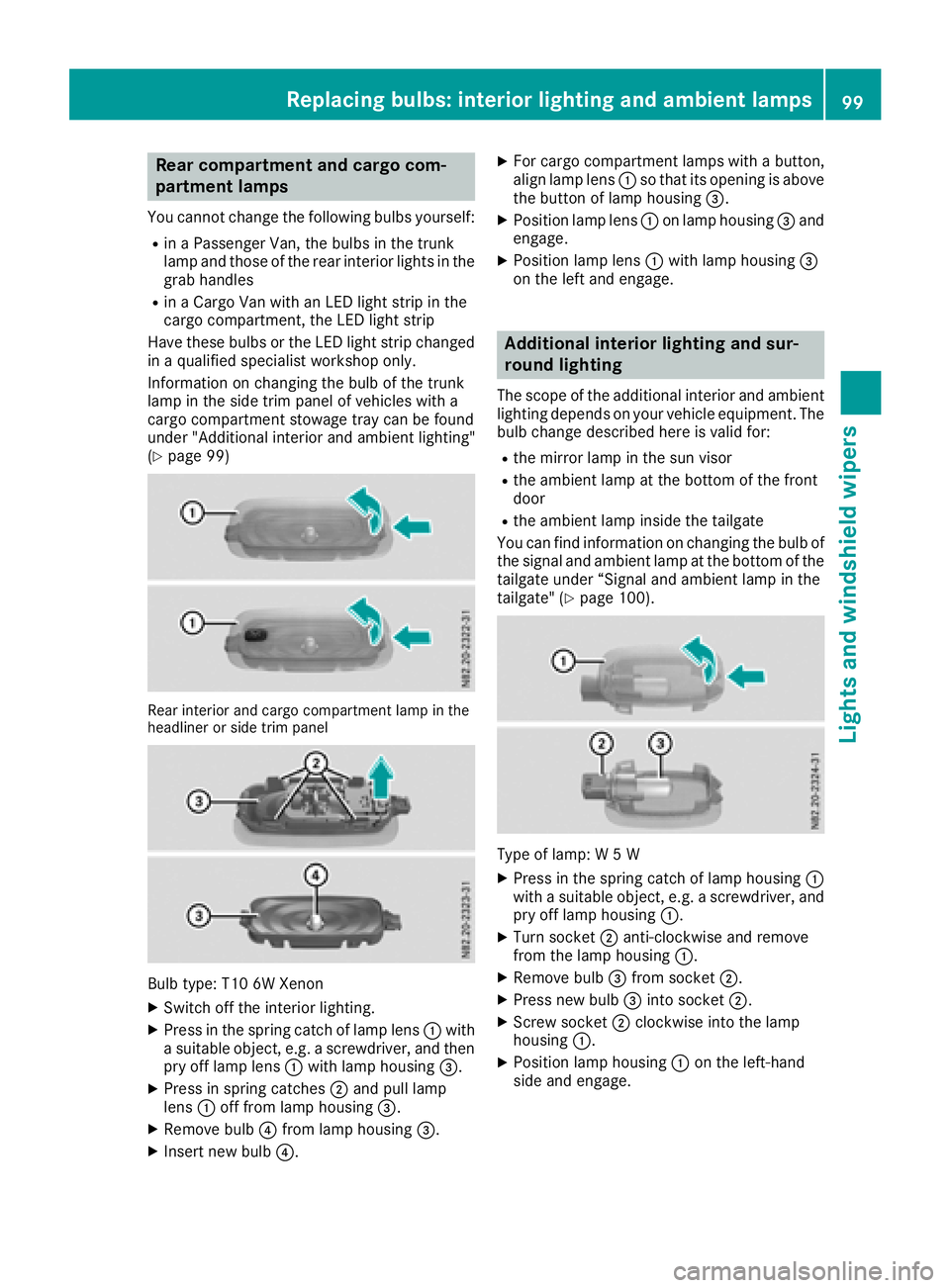
Rear interior and cargo compartment lamp in the
headliner or side trim panel
Bulb type: T10 6W Xenon
XSwitch off the interior lighting.
XPress in the spring catch of lamp lens :with
a suitable object, e.g. a screwdriver, and then pry off lamp lens :with lamp housing =.
XPress in spring catches ;and pull lamp
lens :off from lamp housing =.
XRemove bulb?from lamp housing =.
XInsert new bulb?.
XFor cargo compartment lamps with a button,
align lamp lens:so that its opening is above
the button of lamp housing =.
XPosition lamp lens:on lamp housing =and
engage.
XPosition lamp lens :with lamp housing =
on the left and engage.
Additional interior lighting and sur-
round lighting
The scope of the additional interior and ambient
lighting depends on your vehicle equipment. The
bulb change described here is valid for:
Rthe mirror lamp in the sun visor
Rthe ambient lamp at the bottom of the front
door
Rthe ambient lamp inside the tailgate
You can find information on changing the bulb of the signal and ambient lamp at the bottom of the
tailgate under “Signal and ambient lamp in the
tailgate" (
Ypage 100).
Type of lamp: W 5 W
XPress in the spring catch of lamp housing :
with a suitable object, e.g. a screwdriver, and
pry off lamp housing :.
XTurn socket;anti-clockwise and remove
from the lamp housing :.
XRemove bulb=from socket ;.
XPress new bulb =into socket ;.
XScrew socket ;clockwise into the lamp
housing :.
XPosition lamp housing :on the left-hand
side and engage.
Replacing bulbs: interior lighting and ambient lamps99
Lights and windshield wipers
Z
Page 111 of 318
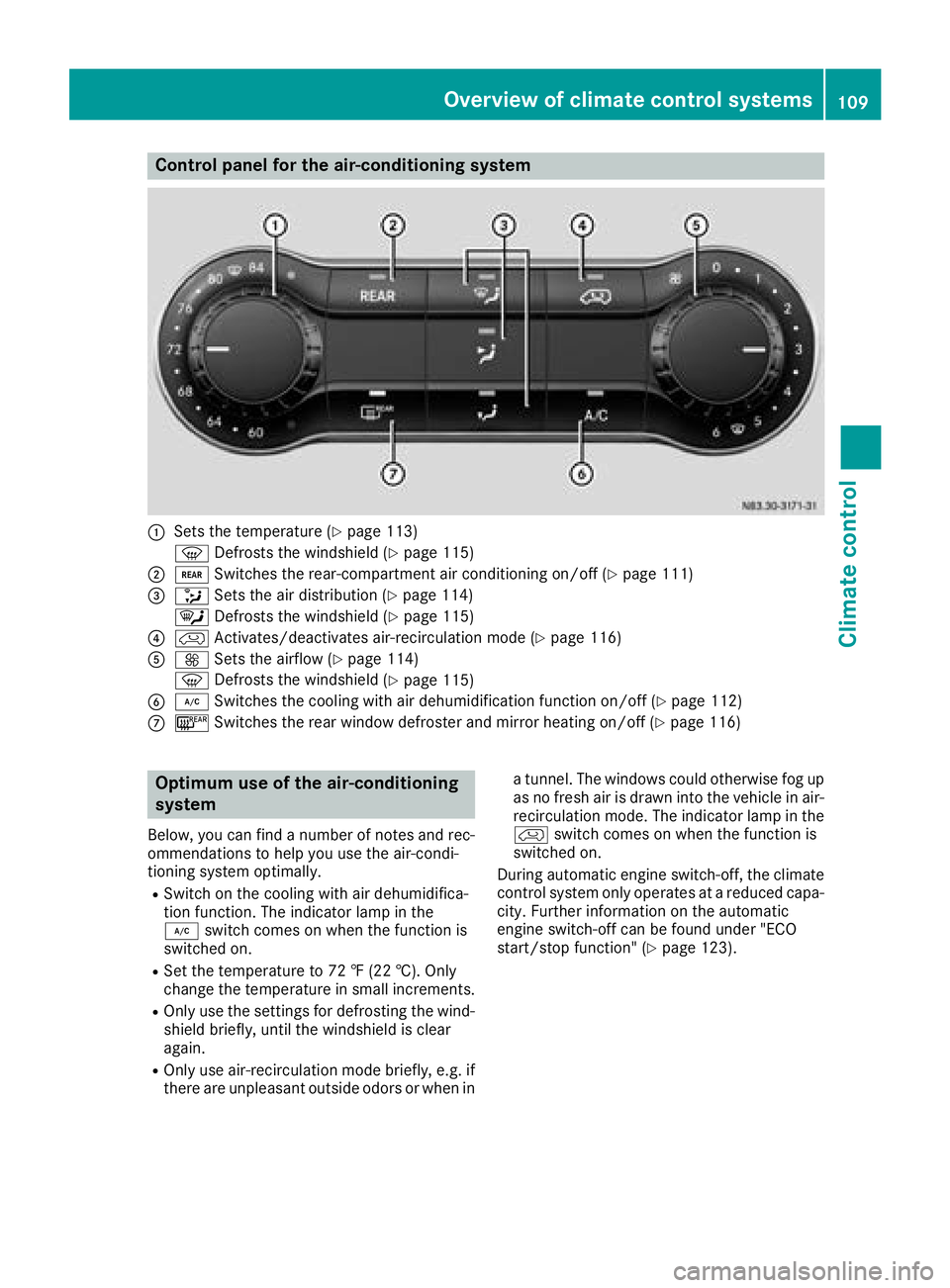
Control panel for the air-conditioning system
:Sets the temperature (Ypage 113)
z Defrosts the windshield (
Ypage 115)
;/Switches the rear-compartment air conditioning on/off (Ypage 111)
=_Sets the air distribution (Ypage 114)
¯ Defrosts the windshield (
Ypage 115)
?hActivates/deactivates air-recirculation mode (Ypage 116)
AKSets the airflow (Ypage 114)
z Defrosts the windshield (
Ypage 115)
B¿Switches the cooling with air dehumidification function on/off (Ypage 112)
C¤Switches the rear window defroster and mirror heating on/off (Ypage 116)
Optimum use of the air-conditioning
system
Below, you can find a number of notes and rec-
ommendations to help you use the air-condi-
tioning system optimally.
RSwitch on the cooling with air dehumidifica-
tion function. The indicator lamp in the
¿ switch comes on when the function is
switched on.
RSet the temperature to 72 ‡ (22 †).Only
ch ange the temperature in small increments.
ROnly use the settings for defrosting the wind-
shield briefly, until the windshield is clear
again.
ROnly use air-recirculation mode briefly, e.g. if
there are unpleasant outside odors or when in a tunnel. The windows could otherwise fog up
as no fresh air is drawn into the vehicle in air-
recirculation mode. The indicator lamp in the
h
switch comes on when the function is
switched on.
During automatic engine switch-off, the climate
control system only operates at a reduced capa-
city. Further information on the automatic
engine switch-off can be found under "ECO
start/stop function" (
Ypage 123).
Overview of climate control systems109
Climate control
Page 112 of 318
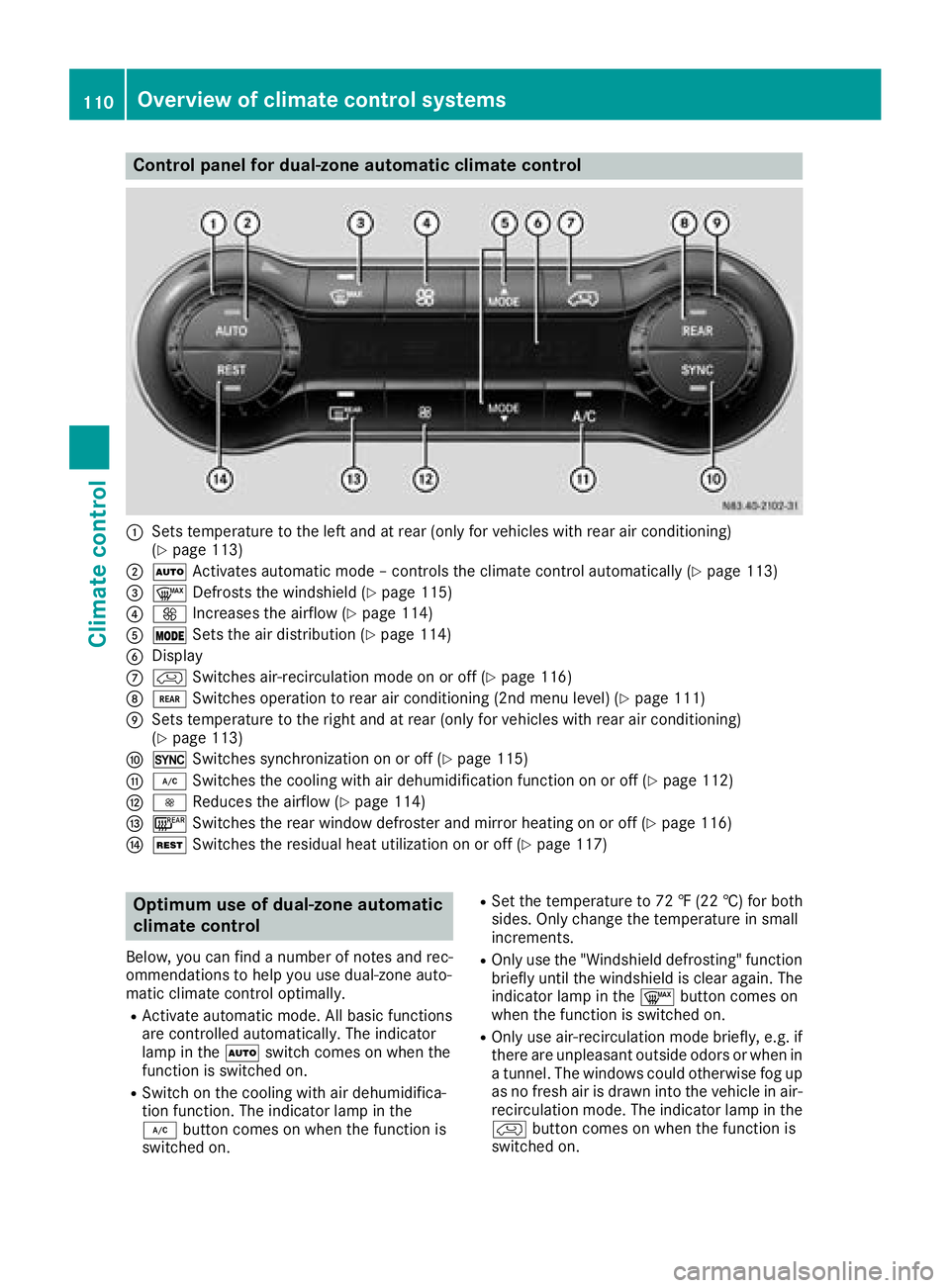
Control panel for dual-zone automatic climate control
:Sets temperature to the left and at rear (only for vehicles with rear air conditioning)
(Ypage 113)
;ÃActivates automatic mode – controls the climate control automatically (Ypage 113)
=¬Defrosts the windshield (Ypage 115)
?KIncreases the airflow (Ypage 114)
AÄSets the air distribution (Ypage 114)
BDisplay
ChSwitches air-recirculation mode on or off (Ypage 116)
D/Switches operation to rear air conditioning (2nd menu level) (Ypage 111)
ESets temperature to the right and at rear (only for vehicles with rear air conditioning)
(Ypage 113)
F0Switches synchronization on or off (Ypage 115)
G¿Switches the cooling with air dehumidification function on or off (Ypage 112)
HIReduces the airflow (Ypage 114)
I¤Switches the rear window defroster and mirror heating on or off (Ypage 116)
JÌSwitches the residual heat utilization on or off (Ypage 117)
Optimum use of dual-zone automatic
climate control
Below, you can find a number of notes and rec-
ommendations to help you use dual-zone auto-
matic climate control optimally.
RActivate automatic mode. All basic functions
are controlled automatically. The indicator
lamp in the Ãswitch comes on when the
function is switched on.
RSwitch on the cooling with air dehumidifica-
tion function. The indicator lamp in the
¿ button comes on when the function is
switched on.
RSet the temperature to 72 ‡ (22 †) for both
sides. Only change the temperature in small
increments.
ROnly use the "Windshield defrosting" function
briefly until the windshield is clear again. The
indicator lamp in the ¬button comes on
when the function is switched on.
ROnly use air-recirculation mode briefly, e.g. if
there are unpleasant outside odors or when in
a tunnel. The windows could otherwise fog up
as no fresh air is drawn into the vehicle in air-
recirculation mode. The indicator lamp in the
h button comes on when the function is
switched on.
110Overview of climate control systems
Climate control
Page 143 of 318
drive over obstacles, have the front
passenger direct you.
iWe recommend that you additionally carry a
shovel and a recovery rope with shackle in the
vehicle.
REnsure that loads and items of luggage are
securely stowed or lashed down
(
Ypage 242).
RBefore driving off-road, stop the vehicle and
shift to a low gear.
RIf the surface requires, temporarily deactivate
ESP®when pulling away (Ypage 66).
ROnly drive off-road with the engine running
and a gear engaged.
RDrive slowly and smoothly. Walking pace is
necessary in many situations.
RAvoid spinning the drive wheels.
RMake sure that the wheels always remain in
contact with the ground.
RDrive with extreme care over unknown terrain
where you can only see for a short distance.
As a precaution, get out of the vehicle to take
a look at the route to be taken in advance.
RCheck the water depth before fording.
RWatch out for obstacles (e.g. rocks, holes,
tree stumps and ruts).
RAvoid edges where the surface could crumble
or break away.
Checklist after driving off-road
!If you detect damage to the vehicle after
driving off-road, have the vehicle checked
immediately at a qualified specialist work-
shop.
Off-road driving places a higher demand on your
vehicle than normal road operation. Check your
vehicle after driving on rough terrain. By doing
so you will notice any damage in good time and
reduce the risk of an accident for yourself and
other road users. Clean your vehicle thoroughly
before driving on public roads.
Observe the following points after driving off-
road, on construction sites and before driving on
public roads:
XActivate ESP®(Ypage 66).
XClean the headlamps and tail lamps and
check them for damage.
XClean the front and rear license plates.
XClean the windshield, windows and exterior
mirrors.
XClean the steps, door sills and grab handles.
This increases safety of footing.
XClean the wheels/tires, wheel housings and
the underbody of the vehicle with a water jet. This increases road grip, especially on wet
road surfaces.
XCheck the wheels/tires and wheel housings
for trapped foreign objects and remove them.
Trapped foreign objects can damage the
wheels/tires and may be flung out from the
vehicle when you continue driving.
XCheck the underbody for trapped branches or
other parts of plants and remove them.
Trapped branches or other parts of plants
increase the risk of fire and can cause dam-
age to fuel lines, brake hoses and the rubber
bellows of axle joints and drive shafts.
XClean the brake disks, brake pads and axle
joints, particularly after operation in sand,
mud, grit/gravel, water or similarly dirty con-
ditions.
XCheck the entire floor assembly, the tires,
wheels, bodywork structure, brakes, steering,
chassis and exhaust system for any damage.
XCheck the service brake for operating safety,
e.g. carry out a brake test.
XIf you notice strong vibrations after driving off-
road, check the wheels and drive train for for- eign objects again. Remove any foreign
objects which can lead to imbalances and
thus cause vibrations.
Driving in mountainous areas
When driving in mountainous areas, note that
the power output of the engine, and with it its
gradient climbing capability, decrease with
increasing altitude. Please take note of this par-
ticularly when driving with a trailer in mountain-ous areas.
The maximum permissible trailer loads are valid
for journeys at altitudes up to 1100 yds
(1000 m) above sea level with gradients up to
12%.
Information on maximum permissible trailer
loads can be found in your vehicle registration
papers and on the vehicle identification plate
(
Ypage 303) or under "Trailer loads"
(Ypage 314).
Driving tips141
Driving and parking
Z
Page 148 of 318
In such cases, Adaptive Brake Assist can:
Rintervene unnecessarily
Rnot intervene
There is a risk of an accident.
Always pay careful attention to the traffic sit- uation and be ready to brake. Terminate the
intervention in a non-critical driving situation.
In particular, the detection of obstacles can be
impaired in the case of:
Rdirt on the sensors or anything else covering
the sensors
Rsnow or heavy rain
Rinterference from other radar sources
Rstrong radar reflections, for example, in park-
ing garages
Ra narrow vehicle traveling in front, e.g. a
motorbike
Ra vehicle traveling in front on a different line
Due to the nature of the system, particularly
complicated but non-critical driving conditions
may also cause Adaptive Brake Assist to inter-
vene.
If you fail to adapt your driving style, Adaptive
Brake Assist can neither reduce the risk of acci-
dent nor override the laws of physics. Adaptive
Brake Assist cannot take into account road,
weather or traffic conditions. Adaptive Brake
Assist is only an aid. You are responsible for the
distance to the vehicle in front, for vehicle
speed, braking in good time and for staying in
your lane.
Following damage to the front end of the vehicle,
have the configuration and operation of the
radar sensor checked at a qualified specialist
workshop. This also applies to collisions at slow
speeds where there is no visible damage to the
front of the vehicle.
If you change wheel size, make sure they corre- spond to the correct wheel size category
(
Ypage 277). If the category is changed without
recoding the control units in the vehicle, the
functioning of Adaptive Brake Assist may be
impaired. COLLISION PREVENTION ASSIST may
then detect a malfunction and switch itself off.
If Adaptive Brake Assist is not available due to a
malfunction in the radar sensor system, the
brake system remains available with full brake
boosting effect and BAS.
Operation
With the help of the radar sensor system, Adap-
tive Brake Assist can detect obstacles that have been in the path of your vehicle for an extended
period of time. Ada
ptive Brake Assist does not
react to stationary obstacles. If Adaptive Brake
Assist detects a risk of collision with a vehicle
traveling in front or with a stationary obstacle,
the system calculates the braking force neces-
sary to avoid this collision. If you apply the
brakes forcefully, Adaptive Brake Assist will
automatically increase the braking force to a
level suitable for the traffic conditions.
XBrake until the distance to the obstacle
increases and the risk of a collision passes.
ABS prevents the wheels from locking.
The brakes function as usual again if:
Ryou release the brake pedal
Rthere is no longer any danger of a collision
Rno obstacle is detected in front of your vehicle
Braking assistance is then ended.
Blind Spot Assist
General notes
Blind Spot Assist monitors the areas on either
side of the vehicle that are not visible to the
driver with two lateral, rear-facing radar sensors
in the bumper. It supports you from speeds of
approximately 20 mph (30 km/h). A warning
display in the exterior mirrors draws your atten-
tion to vehicles detected in the monitored area.
If you then switch on the corresponding turn
signal to change lane, you will also receive an
optical and audible collision warning.
Important safety notes
GWARNING
Blind Spot Assist does not react to:
Rvehicles overtaken too closely on the side,
placing them in the blind spot area
Rvehicles which approach with a large speed
differential and overtake your vehicle
As a result, Blind Spot Assist may not give
warnings in such situations. There is a risk of
an accident.
146Driving systems
Driving and parking
Page 150 of 318
Warning display
Blind Spot Assist is not active at speeds below
approximately 20 mph (30 km/h). Vehicles in
the monitoring range are then not indicated.
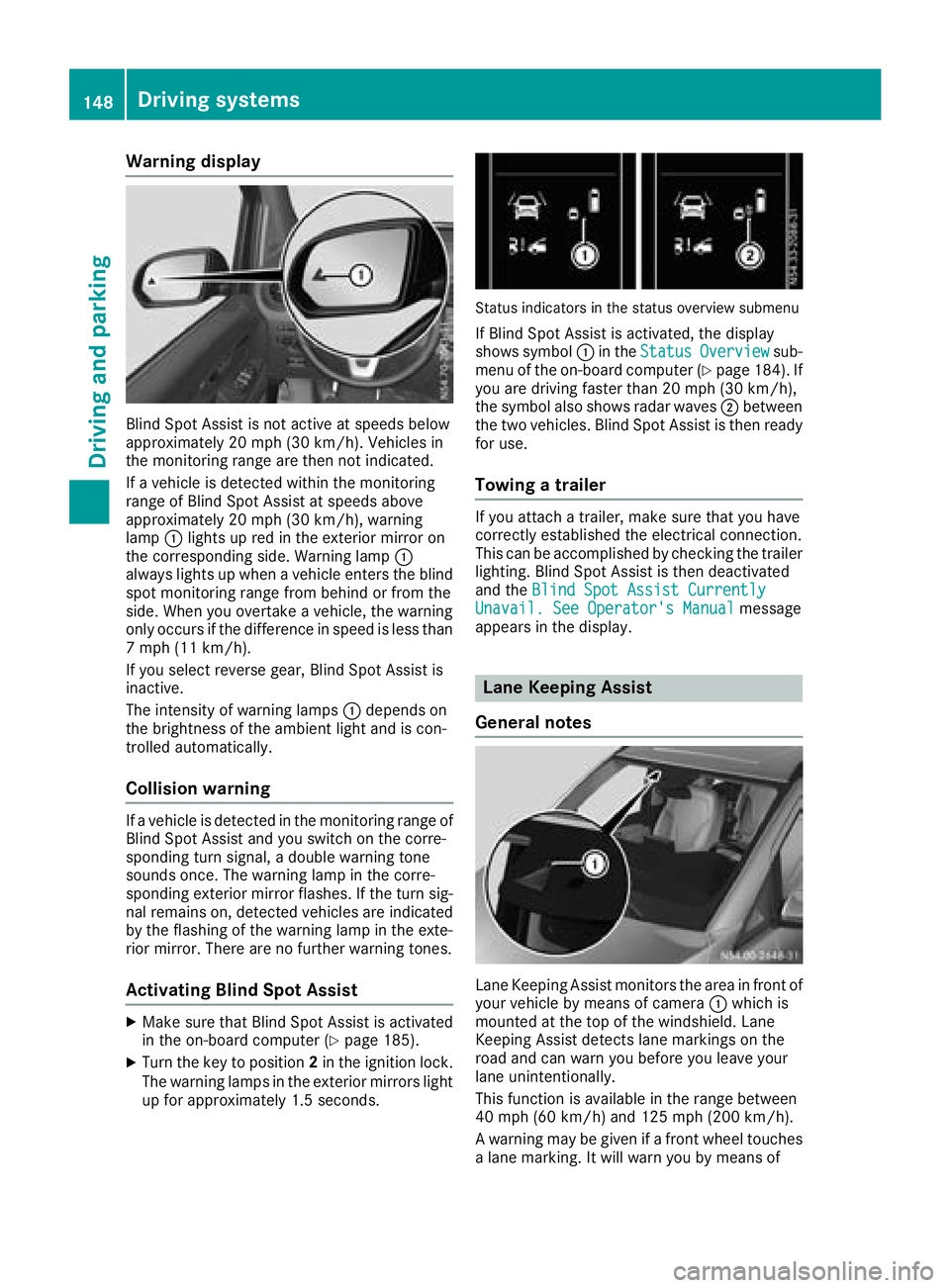
If a vehicle is detected within the monitoring
range of Blind Spot Assist at speeds above
approximately 20 mph (30 km/h), warning
lamp:lights up red in the exterior mirror on
the corresponding side. Warning lamp :
always lights up when a vehicle enters the blind
spot monitoring range from behind or from the
side. When you overtake a vehicle, the warning
only occurs if the difference in speed is less than
7 mph (11 km/h).
If you select reverse gear, Blind Spot Assist is
inactive.
The intensity of warning lamps :depends on
the brightness of the ambient light and is con-
trolled automatically.
Collision warning
If a vehicle is detected in the monitoring range of
Blind Spot Assist and you switch on the corre-
sponding turn signal, a double warning tone
sounds once. The warning lamp in the corre-
sponding exterior mirror flashes. If the turn sig-
nal remains on, detected vehicles are indicated
by the flashing of the warning lamp in the exte-
rior mirror. There are no further warning tones.
Activating Blind Spot Assist
XMake sure that Blind Spot Assist is activated
in the on-board computer (Ypage 185).
XTurn the key to position 2in the ignition lock.
The warning lamps in the exterior mirrors light
up for approximately 1.5 seconds.
Status indicators in the status overview submenu
If Blind Spot Assist is activated, the display
shows symbol :in the StatusOverviewsub-
menu of the on-board computer (Ypage 184). If
you are driving faster than 20 mph (30 km/h),
the symbol also shows radar waves ;between
the two vehicles. Blind Spot Assist is then ready
for use.
Towing a trailer
If you attach a trailer, make sure that you have
correctly established the electrical connection.
This can be accomplished by checking the trailer
lighting. Blind Spot Assist is then deactivated
and the Blind Spot Assist Currently
Unavail. See Operator's Manualmessage
appears in the display.
Lane Keeping Assist
General notes
Lane Keeping Assist monitors the area in front of
your vehicle by means of camera :which is
mounted at the top of the windshield. Lane
Keeping Assist detects lane markings on the
road and can warn you before you leave your
lane unintentionally.
This function is available in the range between
40 mph (60 km/h) and 125 mph (200 km/h).
A warning may be given if a front wheel touches a lane marking. It will warn you by means of
148Driving systems
Driving and parking
Page 160 of 318
XTo cancel the process:press the%but-
ton on the steering wheel or drive off.
or
XTo exit the parking space using active
parking assistance: press theabutton
on the steering wheel.
The display shows the Park Assist
Active: Accelerate and BrakeObs.Surroundingsmessage.
XLet go of the steering wheel.
XPull away, being ready to brake at all times.
Exit the parking space slowly and do not drive
faster than 6 mph (10 km/h). Otherwise park-
ing assistance is canceled and Active Parking
Assist is stopped.
Active Parking Assist brakes the vehicle to a
standstill when the vehicle approaches a bor-
der of the parking space.
XWhile the vehicle is stationary, shift the trans-
mission to position Dor Ras required or
according to the message.
Active Parking Assist immediately steers in
the other direction. The display shows the
Park Assist Active: Accelerate and
BrakeObs. Surroundingsmessage.
iYou will achieve the best results by waiting
for the steering procedure to complete before
pulling away.
If you back up after activation, the steering
wheel is moved to the straight-ahead posi-
tion.
XDrive forwards and reverse as prompted by
the PARKTRONIC warning displays, several
times if necessary.
Once you have exited the parking space com-
pletely:
RThe display shows the Park Assist Fin‐ishedmessage.
Ra tone sounds.
Rthe steering wheel is moved to the straight-
ahead position.
The parking assistance function of Active Park-
ing Assist is stopped. You will then have to steer
and merge into traffic on your own.
PARKTRONIC is still available.
You can take over the steering before the vehi-
cle has exited the parking space completely.
This is useful, for example when you recognize
that it is already possible to pull out of the park-
ing space.
Canceling active parking assistance
XStop the movement of the steering wheel or
steer yourself.
or
XPress the fbutton and deactivate
PARKTRONIC (Ypage 153).
Parking assistance is canceled immediately
and Active Parking Assist is stopped. The dis-
play shows the Park
AssistCanceledmes-
sage.
Active parking assistance is canceled automat-
ically if:
Ryou apply the parking brake.
Rparking using Active Parking Assist is no lon-
ger possible.
Ryou are driving faster than 6 mph (10 km/h).
Ra wheel spins and ESP®intervenes or fails.
The ÷ warning lamp in the instrument
cluster then lights up.
Ryou unfasten your seat belt.
Ryou open a door or the tailgate/rear door
Ryou shift the automatic transmission to posi-
tion P
A warning tone sounds, the parking symbol in
the display goes out and the Park Assist
Canceledmessage appears.
Once active Parking Assist has been canceled,
you must steer and brake again yourself.
If a system malfunction occurs, vehicles are
automatically braked down to a standstill. To
continue driving, you must depress the acceler-
ator pedal again.
Rear view camera
General notes
On vehicles with a tailgate, the rear view camera
is next to the tailgate handle (Ypage 267).
On vehicles with rear doors, the rear view cam-
era is in the top of the license plate molding
(
Ypage 267).
The rear view camera is a visual parking aid. It
shows you the area behind the vehicle in the
audio display.
The area behind the vehicle is displayed in a
mirrored fashion, as in the rear-view mirror or
the exterior mirrors. The guide lines displayed
assist you in backing up.
158Driving systems
Driving an d parking
Page 162 of 318
In vehicles with a trailer coupling installed, the
function mode of the rear view camera can be
switched over when the trailer is reached. The
rear view camera then changes the viewing
angle and shows a locating aid for the ball cou-
pling of the trailer tow hitch to help reach the
drawbar.
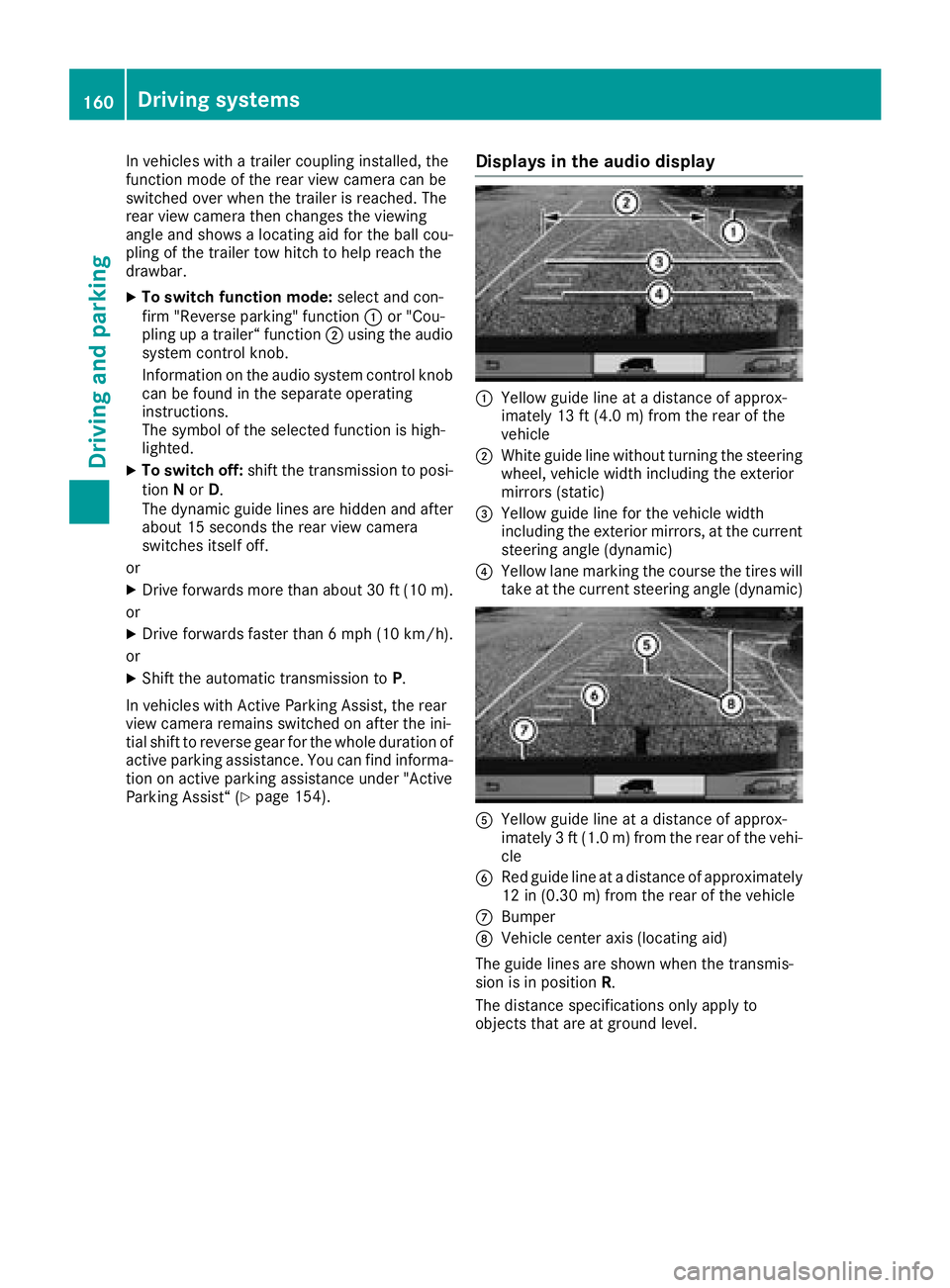
XTo switch function mode:select and con-
firm "Reverse parking" function :or "Cou-
pling up a trailer“ function ;using the audio
system control knob.
Information on the audio system control knob
can be found in the separate operating
instructions.
The symbol of the selected function is high-
lighted.
XTo switch off: shift the transmission to posi-
tion Nor D.
The dynamic guide lines are hidden and after
about 15 seconds the rear view camera
switches itself off.
or
XDrive forwards more than about 30 ft (10 m).
or
XDrive forwards faster than 6 mph (10 km/h) .
or
XShift the automatic transmission to P.
In vehicles with Active Parking Assist, the rear
view camera remains switched on after the ini-
tial shift to reverse gear for the whole duration of active parking assistance. You can find informa-
tion on active parking assistance under "Active
Parking Assist“ (
Ypage 154).
Displays in the audio display
:Yellow guide line at a distance of approx-
imately 13 ft (4.0 m) from the rear of the
vehicle
;White guide line without turning the steering
wheel, vehicle width including the exterior
mirrors (static)
=Yellow guide line for the vehicle width
including the exterior mirrors, at the current
steering angle (dynamic)
?Yellow lane marking the course the tires will
take at the current steering angle (dynamic)
AYellow guide line at a distance of approx-
imately 3 ft (1.0 m) from the rear of the vehi-
cle
BRed guide line at a distance of approximately
12 in (0.30 m) from the rear of the vehicle
CBumper
DVehicle center axis (locating aid)
The guide lines are shown when the transmis-
sion is in position R.
The distance specifications only apply to
objects that are at ground level.
160Driving systems
Driving and parking
Page 163 of 318
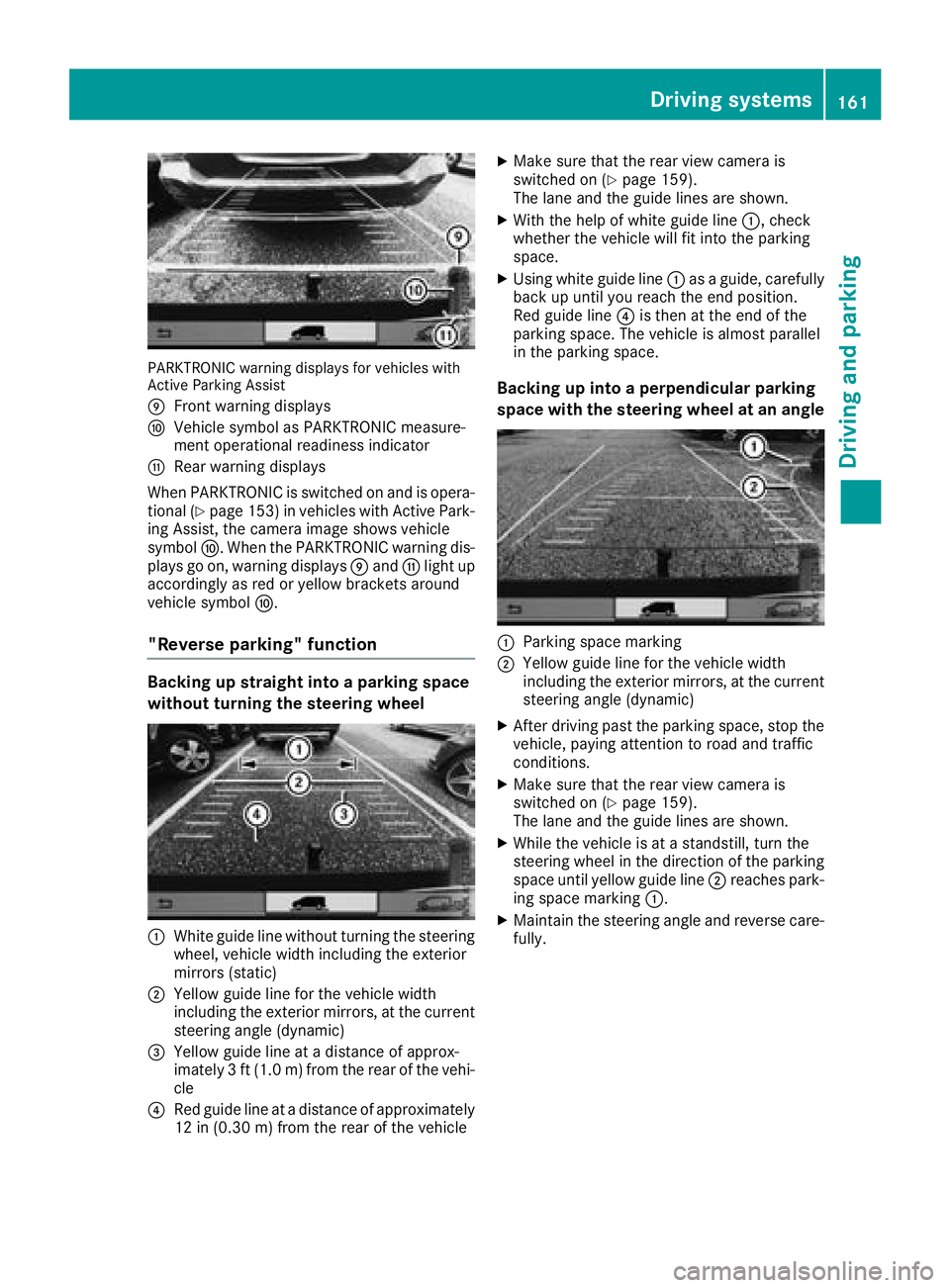
PARKTRONIC warning displays for vehicles with
Active Parking Assist
E
Front warning displays
FVehicle symbol as PARKTRONIC measure-
ment operational readiness indicator
GRear warning displays
When PARKTRONIC is switched on and is opera- tional (
Ypage 153) in vehicles with Active Park-
ing Assist, the camera image shows vehicle
symbol F. When the PARKTRONIC warning dis-
plays go on, warning displays Eand Glight up
accordingly as red or yellow brackets around
vehicle symbol F.
"Reverse parking" function
Backing up straight into a parking space
without turning the steering wheel
:White guide line without turning the steering
wheel, vehicle width including the exterior
mirrors (static)
;Yellow guide line for the vehicle width
including the exterior mirrors, at the current
steering angle (dynamic)
=Yellow guide line at a distance of approx-
imately 3 ft (1.0 m) from the rear of the vehi-
cle
?Red guide line at a distance of approximately
12 in (0.30 m)from the rear of the vehicle
XMake sure that the rear view camera is
switched on (Ypage 159).
The lane and the guide lines are shown.
XWith the help of white guide line :, check
whether the vehicle will fit into the parking
space.
XUsing white guide line :as a guide, carefully
back up until you reach the end position.
Red guide line ?is then at the end of the
parking space. The vehicle is almost parallel
in the parking space.
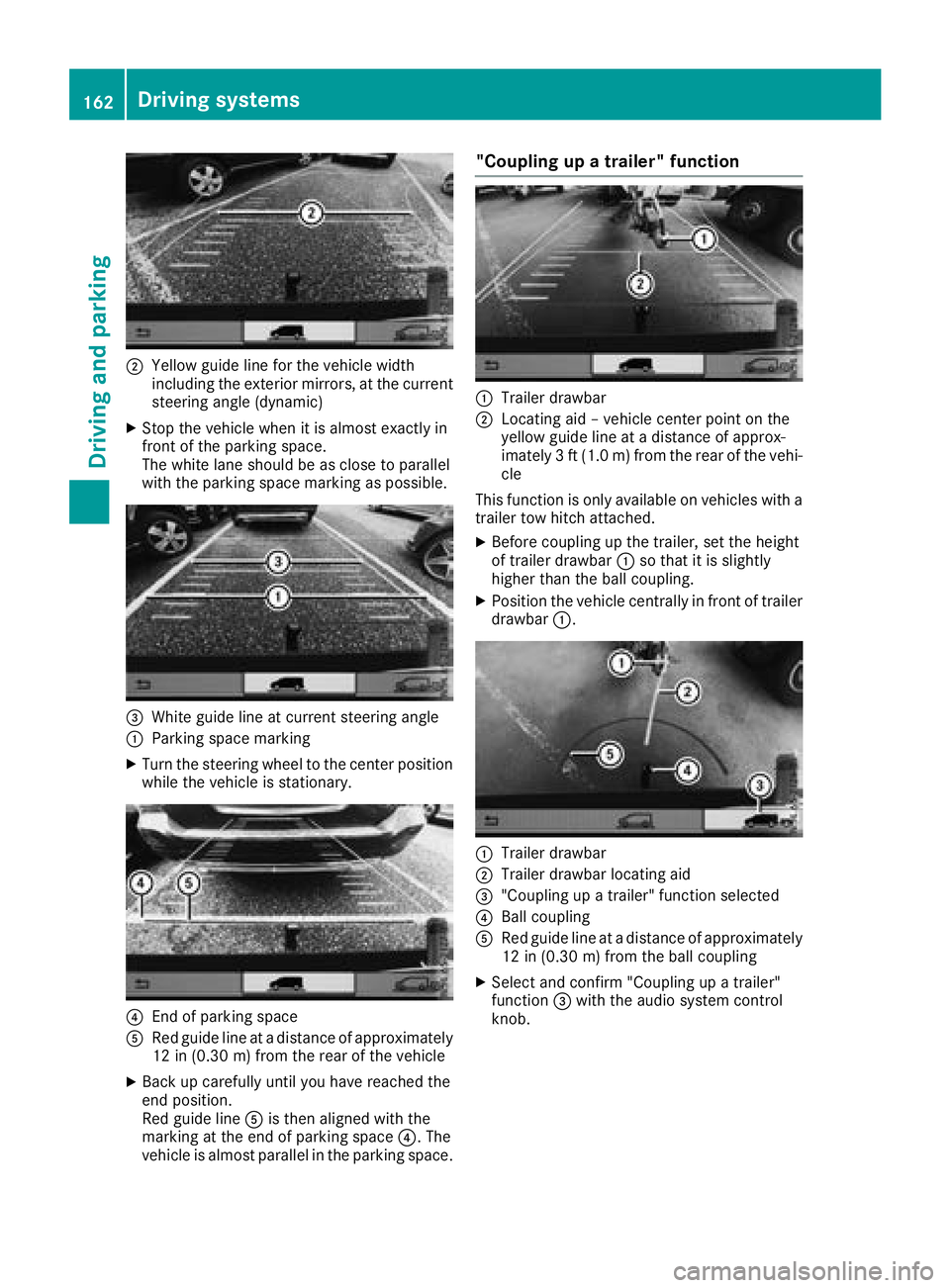
Backing up into a perpendicular parking
space with the steering wheel at an angle
:Parking space marking
;Yellow guide line for the vehicle width
including the exterior mirrors, at the current
steering angle (dynamic)
XAfter driving past the parking space, stop the
vehicle, paying attention to road and traffic
conditions.
XMake sure that the rear view camera is
switched on (Ypage 159).
The lane and the guide lines are shown.
XWhile the vehicle is at a standstill, turn the
steering wheel in the direction of the parking
space until yellow guide line ;reaches park-
ing space marking :.
XMaintain the steering angle and reverse care-
fully.
Driving systems161
Driving and parking
Z
Page 164 of 318
;Yellow guide line for the vehicle width
including the exterior mirrors, at the current
steering angle (dynamic)
XStop the vehicle when it is almost exactly in
front of the parking space.
The white lane should be as close to parallel
with the parking space marking as possible.
=White guide line at current steering angle
:Parking space marking
XTurn the steering wheel to the center positionwhile the vehicle is stationary.
?End of parking space
ARed guide line at a distance of approximately
12 in (0.30 m) from the rear of the vehicle
XBack up carefully until you have reached the
end position.
Red guide line Ais then aligned with the
marking at the end of parking space ?. The
vehicle is almost parallel in the parking space.
"Coupling up a trailer" function
:Trailer drawbar
;Locating aid – vehicle center point on the
yellow guide line at a distance of approx-
imately 3 ft (1.0 m) from the rear of the vehi-
cle
This function is only available on vehicles with a
trailer tow hitch attached.
XBefore coupling up the trailer, set the height
of trailer drawbar :so that it is slightly
higher than the ball coupling.
XPosition the vehicle centrally in front of trailer
drawbar :.
:Trailer drawbar
;Trailer drawbar locating aid
="Coupling up a trailer" function selected
?Ball coupling
ARed guide line at a distance of approximately
12 in (0.30 m) from the ball coupling
XSelect and confirm "Coupling up a trailer"
function =with the audio system control
knob.
162Driving systems
Driving and parking