stop start MERCEDES-BENZ METRIS 2017 MY17 Operator’s Manual
[x] Cancel search | Manufacturer: MERCEDES-BENZ, Model Year: 2017, Model line: METRIS, Model: MERCEDES-BENZ METRIS 2017Pages: 318, PDF Size: 5.01 MB
Page 141 of 318
110 yds (100 m) at a maximum speed of 12 mph(20 km/h).
The brake lamps are not illuminated when you
brake the vehicle using the parking brake.
Driving in wet conditions
Hydroplaning
GWARNING
There is a danger of hydroplaning occurring,
even if you are driving slowly and your tires
have sufficient tread depth, depending on the
depth of water on the road. There is a risk of
an accident.
For this reason, avoid tire ruts and brake care-
fully.
Therefore, in heavy rain or other conditions in
which hydroplaning can occur, drive as follows:
Rreduce your speed
Ravoid tire ruts
Rapply the brakes with care
Driving on flooded roads
!Do not drive through flooded areas. Check
the depth of any water before driving through
it. Drive slowly through standing water. Oth-
erwise, water may enter the vehicle interior or
the engine compartment. This can damage
the electronic components in the engine or
the automatic transmission. Water can also
be drawn in by the engine's air suction nozzles
and this can cause engine damage.
If you have to drive on stretches of road on which
water has collected, please bear in mind that:
Rthe water level of standing water should not
be above the lower edge of the front bumper
Rdo not drive faster than walking speed
Driving in winter
GWARNING
If you shift down on a slippery road surface in an attempt to increase the engine's braking
effect, the drive wheels could lose their grip.
There is an increased danger of skidding and
accidents.
Do not shift down for additional engine brak-
ing on a slippery road surface.
!An accumulation of snow and ice, particu-
larly when frozen, caught in the area around
the air intake slots, moving parts, the axles
and the wheel arches may:
Rrestrict air intake
Rdamage vehicle parts
Rcause malfunctions by restricting the mobi-
lity intended by the design (e.g. reduced
possible steering input).
Regularly check the vehicle and remove snow
or ice when traveling in wintry conditions.
If there is any damage, inform a qualified spe-
cialist workshop.
!Vehicles with automatic transmission may
roll only briefly in the neutral position N. Pro-
longed rolling of the wheels, e.g. when being
towed, will result in transmission damage.
Have your vehicle winterproofed at a qualified
specialist workshop at the onset of winter.
Drive particularly carefully on slippery roads.
Avoid sudden acceleration, steering and braking
maneuvers. Do not use cruise control.
If the vehicle threatens to skid or cannot be
stopped when moving at low speed:
XShift the transmission to position N.
XTry to maintain control of the vehicle using
corrective steering.
The outside temperature indicator is not
designed to serve as an ice-warning device and is therefore unsuitable for that purpose.
Changes in the outside temperature are dis-
played after a short delay.
Indicated temperatures just above the freezing
point do not guarantee that the road surface is
free of ice. The road may still be icy, especially in
wooded areas or on bridges. If you do not adjust
your driving style, the vehicle may start to skid.
Al
ways adapt your driving style and drive at a
speed to suit the prevailing weather conditions.
You should pay special attention to road condi-
tions when temperatures are around freezing
point.
Driving tips139
Driving and parking
Z
Page 144 of 318
When driving at altitudes of 2700 yds (2500m)
above sea level, the ECO start/stop function is
no longer available.
Notes on braking on downhill gradients can be
found in the "Braking" section (
Ypage 137).
Driving systems
Cruise control
General notes
Cruise control maintains the speed of the vehi-
cle for you. It brakes automatically in order to
avoid exceeding the set speed.
Use cruise control if road and traffic conditions
make it appropriate to maintain a steady speed
for a prolonged period. You can set any speed
from 30 km/h upwards in increments of 1 km/h
and 10 km/h.
If you have set Miles
as the unit for the digital
speedometer, you can set any speed above
20 mph in increments of 1 mph and 5 mph.
Changing the display unit for the digital speed-
ometer and the distance:
Ron vehicles without steering wheel buttons
(Ypage 175)
Ron vehicles with steering wheel buttons
(Ypage 186)
Cruise control should not be activated when
driving off-road or on construction sites.
Cruise control may be unable to maintain the
stored speed on uphill gradients. The stored
speed is resumed if the uphill gradient evens out
and the vehicle's speed does not fall below
20 mph (30 km/ h). Cruise control maintains the
stored speed on downhill gradients by automat-
ically applying the brakes. Observe the addi-
tional driving tips (
Ypage 137).
Important safety notes
Observe the notes on braking (Ypage 137).
If you fail to adapt your driving style or if you are inattentive, cruise control can neither reduce
the risk of an accident nor override the laws of
physics. Cruise control cannot take road,
weather and traffic conditions into account.
Cruise control is only an aid. You are responsible
for the distance to the vehicle in front, for vehi-
cle speed, for braking in good time and for stay-
ing in lane. If you change wheel size, make sure they corre-
spond to the correct wheel size category
(
Ypage 277). If the category is changed without
recoding the control units in the vehicle, the
functioning of cruise control may be impaired.
Do not use cruise control:
Rin traffic conditions that are unsuitable for
driving at a constant speed, e.g. in heavy traf-
fic, on winding roads or off-road.
Ron slippery roads. Braking or accelerating
may cause the drive wheels to lose traction
and the vehicle could then skid.
Rwhen there is poor visibility, e.g. due to fog,
heavy rain or snow.
If there is a change of drivers, make sure that
you inform the new driver about the set cruise
speed.
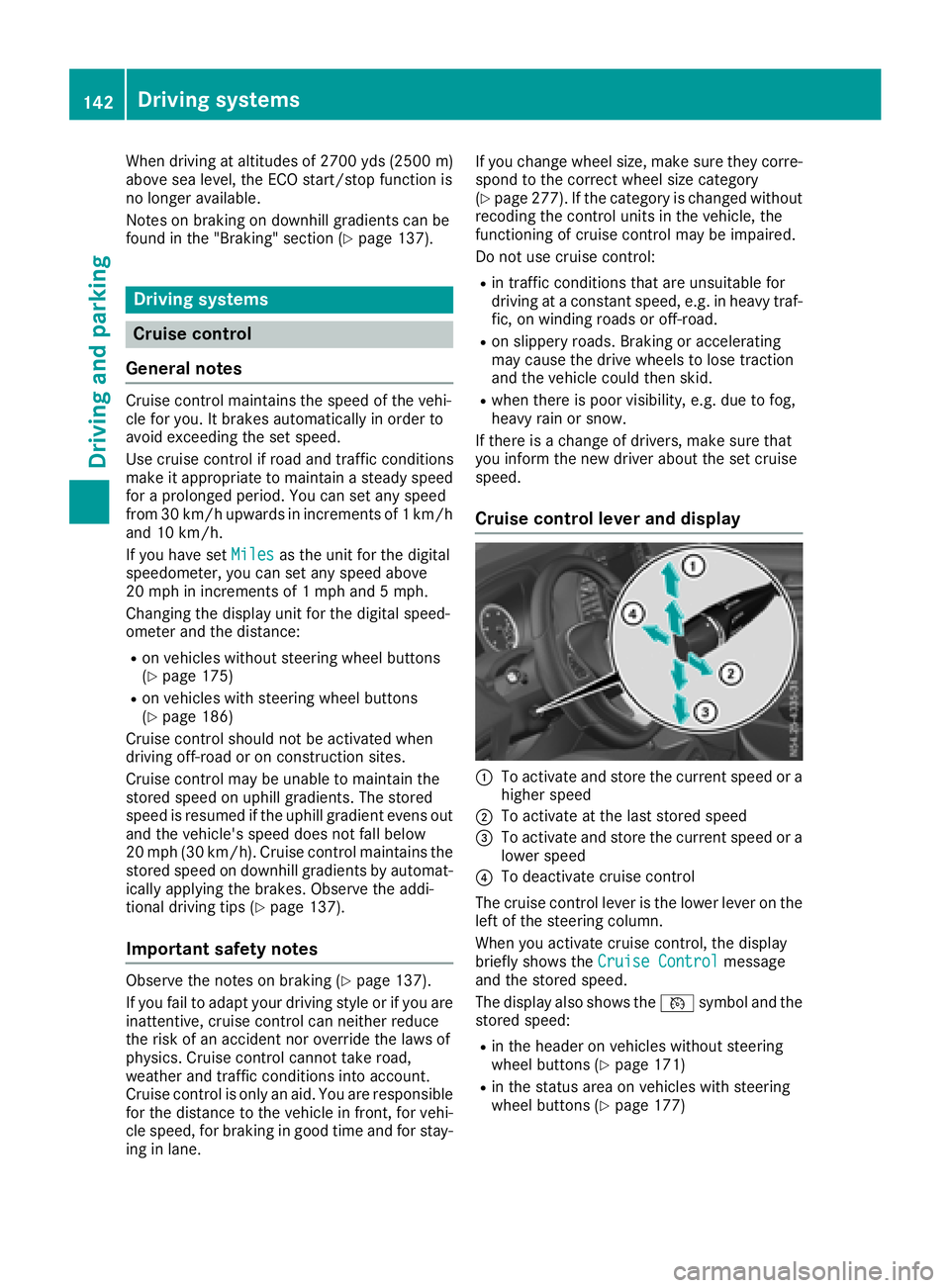
Cruise control lever and display
:To activate and store the current speed or a
higher speed
;To activate at the last stored speed
=To activate and store the current speed or a
lower speed
?To deactivate cruise control
The cruise control lever is the lower lever on the
left of the steering column.
When you activate cruise control, the display
briefly shows the Cruise Control
message
and the stored speed.
The display also shows the Vsymbol and the
stored speed:
Rin the header on vehicles without steering
wheel buttons (Ypage 171)
Rin the status area on vehicles with steering
wheel buttons (Ypage 177)
142Driving systems
Driving and parking
Page 159 of 318
XBring the vehicle safely to a stop when the
parking symbol shows the desired parking
space in the instrument cluster.
XShift the transmission to positionR.
The display shows the Start
ParkAssist?Yes: OKNo:%message and the location
of the parking space.
XTo cancel the process: press the%but-
ton on the steering wheel or drive off.
or
XTo park using active parking assistance:
press the abutton on the steering wheel.
The display shows the Park Assist
Active: Accelerate and BrakeObs.Surroundingsmessage.
XLet go of the steering wheel.
XReverse the vehicle, being ready to brake at
all times. Exit the parking space slowly and do
not drive faster than 6 mph (10 km/h). Oth-
erwise parking assistance is canceled and
Active Parking Assist is stopped.
Active Parking Assist brakes the vehicle to a
standstill when the vehicle approaches the
rear border of the parking space.
Maneuvering may be required in tight parking
spaces. The display shows the Park Assist
Active: Select DObs. Surroundingsmes-
sage.
XWhile the vehicle is stationary, shift the trans-
mission to position D.
Active Parking Assist immediately steers in
the other direction. The display shows the
Park Assist Active: Accelerate and
BrakeObs. Surroundingsmessage.
iYou will achieve the best results by waiting
for the steering procedure to complete before
pulling away.
XDrive forwards and be ready to brake at all
times.
Active Parking Assist brakes the vehicle to a
standstill.
The Park Assist Active: Select R
Obs.Surroundingsmessage is shown in the display.
As soon as the parking procedure is complete,
the Park Assist Finished
message appears
in the display and a tone sounds. The parking
assistance function of Active Parking Assist is
stopped. The vehicle is parked and kept station-
ary without the driver having to depress the
brake pedal. The braking effect is canceled
when you depress the accelerator pedal. Active Parking Assist no longer supports you
with steering interventions and brake applica-
tions. Once active parking assistance has been
stopped, you must steer and brake again your-
self. PARKTRONIC is still available.
Parking tips:
RThe way your vehicle is positioned in the park-
ing space after parking is dependent on vari-
ous factors. These include the position and
shape of the vehicles parked in front and
behind it and the conditions of the location. It
may be the case that Active Parking Assist
guides you too far into a parking space, or not
far enough into it. In some cases, it may also
lead you across or onto the curb. In this case,
cancel the active parking assistance.
RYou can also select transmission position D
prematurely. The vehicle redirects and does
not drive as far into the parking space. If you
change direction too early, parking assis-
tance is canceled and Active Parking Assist is
stopped. It is then not possible to achieve a
sensible parking position from the current
position.
Exiting a parking space
In order that Active Parking Assist can assist you
when exiting the parking space:
Rthe border of the parking space must be high
enough at the front and the rear. A curb is too
small, for example.
Rthe border of the parking space must not be
too wide. Your vehicle can be maneuvered
into a position at a maximum of 45° to the
starting position in the parking space.
Ra maneuvering distance of at least 3.3 ft
(1.0 m) must be available .
Active Parking Assist can only assist you with
exiting a parking space if you have parked the
vehicle parallel to the direction of travel using
Active Parking Assist.
If PARKTRONIC detects obstacles, Active Park-
ing Assist brakes automatically when exiting
from the parking space. You are responsible for
braking in good time.
XStart the engine.
XSwitch on the turn signal in the direction in
which you are pulling away.
XShift the transmission to position Dor R.
The display shows the Start
ParkAssist?Yes: OKNo:%message.
Driving systems157
Driving an d parking
Z
Page 174 of 318
120km/h!(only for certain countries) max-
imum permissible speed exceeded
=Display panel for display messages, menus
and menu bar
?Transmission position (Ypage 127)
AFuel level
Bè ECO start/stop function
(Ypage 123)
Cè Rear window wiper (Ypage 104)
Display panel =shows the selected menu or
submenu and display messages.
Menu overview
The Settingsmenu is only displayed when the
vehicle is stationary. You can think of the order
of the menus and functions as a circle. Press È
on the instrument cluster to scroll through the
menus.
If you scroll forward in the Settings
menu using
3, the setting from the previous submenu or
function is adopted.
If you press Èin a submenu, the submenu or
function is exited without adopting the setting.
The display then shows the start screen of the
Settings
menu.
Operation information can be found under
"Operating the on-board computer"
(
Ypage 171).
Depending on the vehicle equipment, you can
call up the following menus, displays or func-
tions:
Rtrip odometer and odometer display
(Ypage 172)
Rtrip computer display (Ypage 172)
Rcurrent range display (Ypage 173)
Rcurrent fuel consumption display
(Ypage 173)
Rdigital speedometer (Ypage 173)
Rcoolant temperature gage (Ypage 173)
Rdisplay messages in the message memory
(Ypage 189)
The following menus, displays and functions are only displayed when the vehicle is stationary:
Rnext service due date display (Ypage 258)
Rtire pressure monitor restart (Ypage 284)
RSettingsmenu for setting or activating/
deactivating driving and driver assistance systems as well as display options
(
Ypage 174)
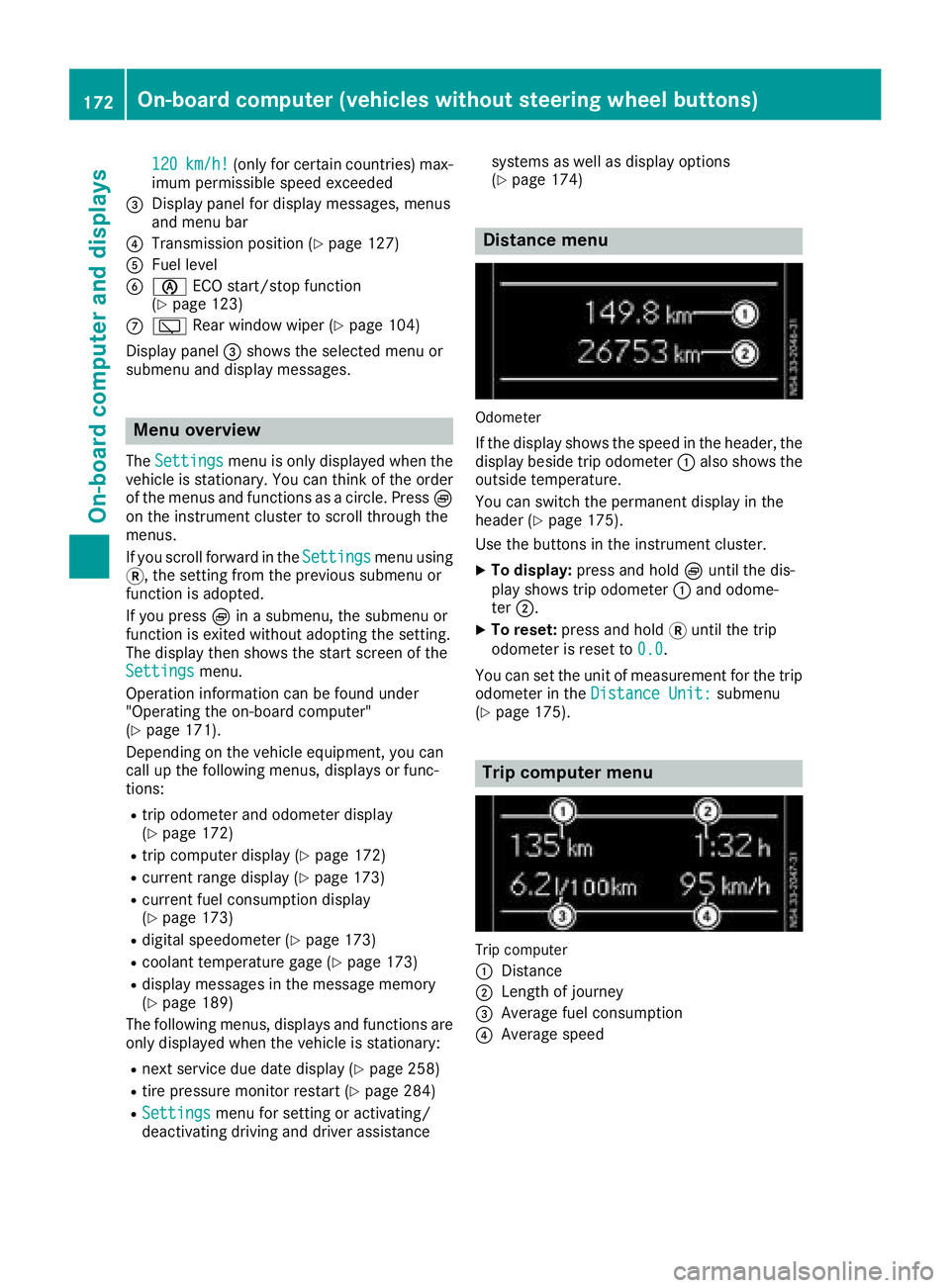
Distance menu
Odometer
If the display shows the speed in the header, the
display beside trip odometer
:also shows the
outside temperature.
You can switch the permanent display in the
header (
Ypage 175).
Use the buttons in the instrument cluster.
XTo display: press and hold Èuntil the dis-
play shows trip odometer :and odome-
ter ;.
XTo reset: press and hold 3until the trip
odometer is reset to 0.0
.
You can set the unit of measurement for the trip odometer in the Distance Unit:
submenu
(Ypage 175).
Trip computer menu
Trip computer
:
Distance
;Length of journey
=Average fuel consumption
?Average speed
172On-board computer (vehicles without steering wheel buttons)
On-board computer and displays
Page 178 of 318
Setting the time and date
The vehicle must be stationary. Use the buttonsin the instrument cluster.
XPress Èto select the Settingsmenu.
XPress3to select the time and date display.
XPress forg to set the hours and press 3
to confirm.
XPress forg to set the minutes and press
3 to confirm.
XPress forg to set the day and press 3to
confirm.
XPress forg to set the month and press 3
to confirm.
XPress forg to set the year and press 3to
confirm.
The display shows the Settings
menu again.
On-board computer (vehicles with
steering wheel buttons)
Operating the on-board computer
Overview
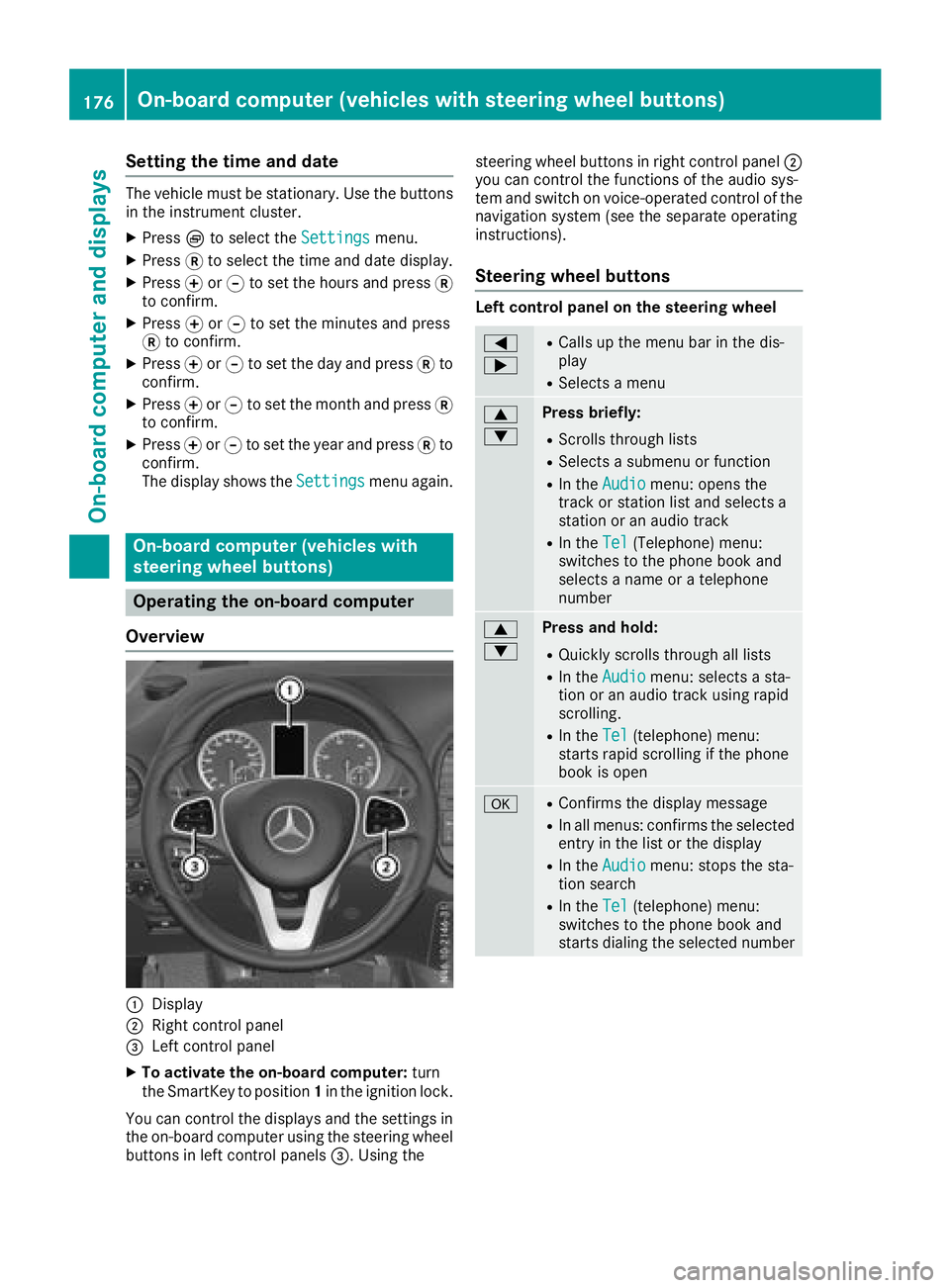
:Display
;Right control panel
=Left control panel
XTo activate the on-board computer: turn
the SmartKey to position 1in the ignition lock.
You can control the displays and the settings in the on-board computer using the steering wheel
buttons in left control panels =. Using thesteering wheel buttons in right control panel
;
you can control the functions of the audio sys-
tem and switch on voice-operated control of the
navigation system (see the separate operating
instructions).
Steering wheel buttons
Left control panel on the steering wheel
=
;RCalls up the menu bar in the dis-
play
RSelects a menu
9
:Press briefly:
RScrolls through lists
RSelects a submenu or function
RIn the Audiomenu: opens the
track or station list and selects a
station or an audio track
RIn the Tel(Telephone) menu:
switches to the phone book and
selects a name or a telephone
number
9
:Press and hold:
RQuickly scrolls through all lists
RIn the Audiomenu: selects a sta-
tion or an audio track using rapid
scrolling.
RIn the Tel(telephone) menu:
starts rapid scrolling if the phone
book is open
aRConfirms the display message
RIn all menus: confirms the selected
entry in the list or the display
RIn the Audiomenu: stops the sta-
tion search
RIn the Tel(telephone) menu:
switches to the phone book and
starts dialing the selected number
176On-board computer (vehicles with steering wheel buttons)
On-board computer and displays
Page 180 of 318
In status areaD, the display can show the sta-
tus of the following driving systems:
À ATTENTION ASSIST (
Ypage 150)
à Lane Keeping Assist (
Ypage 148)
V Cruise control (
Ypage 142)
è Rear window wiper (
Ypage 104)
è ECO start/stop function (
Ypage 123)
Menu overview
You can think of the order of the menus as a
circle. Use the =or; steering wheel
buttons to show the menu bar and scroll through
the menus. Use the :or9 steering
wheel buttons to scroll through their submenus and functions.
Operation information can be found under
"Operating the on-board computer"
(
Ypage 176).
Depending on the vehicle equipment, you can
call up the following menus:
RTripmenu (Ypage 178)
RNavimenu (navigation instructions)
(Ypage 180)
RAudiomenu (Ypage 181)
RTel(telephone) menu (Ypage 182)
RAssist.(assistance) menu (Ypage 183)
RServicemenu (Ypage 185)
RSettingsmenu (Ypage 186)
Trip menu
Standard display
Odometer
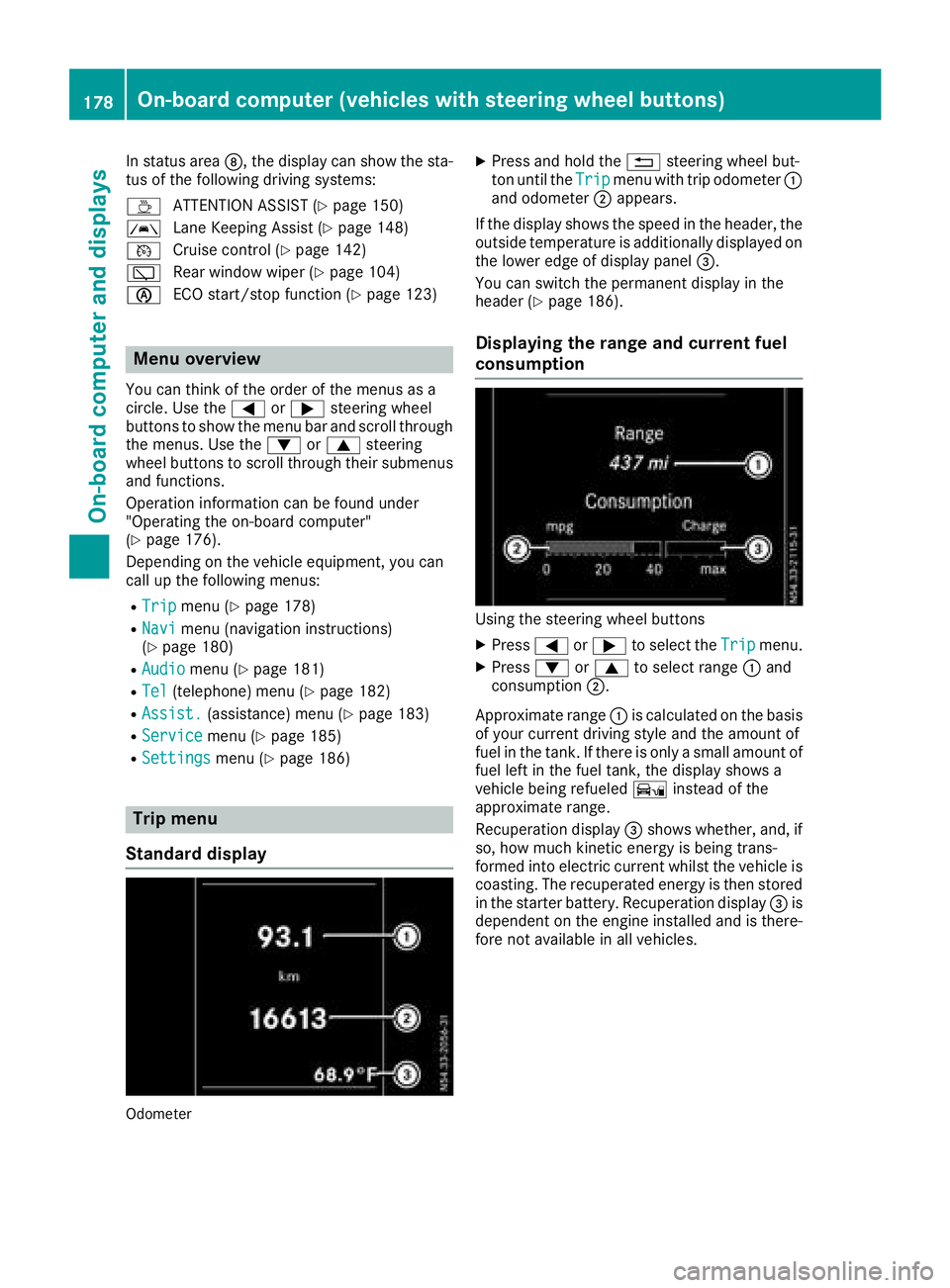
XPress and hold the %steering wheel but-
ton until the Tripmenu with trip odometer :
and odometer ;appears.
If the display shows the speed in the header, the
outside temperature is additionally displayed on
the lower edge of display panel =.
You can switch the permanent display in the
header (
Ypage 186).
Displaying the range and current fuel
consumption
Using the steering wheel buttons
XPress =or; to select the Tripmenu.
XPress:or9 to select range :and
consumption ;.
Approximate range :is calculated on the basis
of your current driving style and the amount of
fuel in the tank. If there is only a small amount of
fuel left in the fuel tank, the display shows a
vehicle being refueled Ïinstead of the
approximate range.
Recuperation display =shows whether, and, if
so, how much kinetic energy is being trans-
formed into electric current whilst the vehicle is
coasting. The recuperated energy is then stored
in the starter battery. Recuperation display =is
dependent on the engine installed and is there-
fore not available in all vehicles.
178On-board computer (vehicles with steering wheel buttons)
On-board computer and displays
Page 185 of 318
Accepting a call
XPress the6 buttonto answer acall .
If someon ecall syou when you are in th eTel
menu, acorresponding display message
appear sin th emultifunction display.
Rejecting orending a call
XPress th e~ steering whee lbutton.
Dialing a number fr omthe phone book
Using thesteering whee lbuttons
XPress =or; to select th eTelmenu.
XPress :, 9ora to switch to th e
phone book .
XPress:or9 to select names succes-
sively.
If you press and hold th ebutto nfor longer
than on esecond, th enames in th ephone
book are shown rapidly on eafter another.
or
XPress and hold :or9 for longer than
fiv eseconds.
Rapid scrollin g —thenam ethat start swit hth e
next lette ror th eprevious lette rin th ealpha-
bet is displayed. Rapid scrollin gstops when
you release th ebutto nor reac hth een dof th e
list .
XIf only one telephone number is store dfor
a name: press6ora to start dialing.
or
XIf there is mor ethan one number for a
particular name: press the6 ora
butto nto display th enumbers.
XPress :or9 to select atelephon e
number .
XPress6ora to start dialing. or
XTo exit th
ephone book :press ~or%.
Redialing
The on-board computer saves th elast names or
number sdialed in th eredial memory. Using th e
steering whee lbuttons
XPress =or; to select th eTelmenu.
XPress th e6 buttonto switch to th eredial
memory.
XPress :or9 to select names or tele-
phone numbers.
XPress th e6 ora buttonto start dialing.
or
XTo exit th eredial memory :press th e~
or % button.
Assistance menu
Introd uction
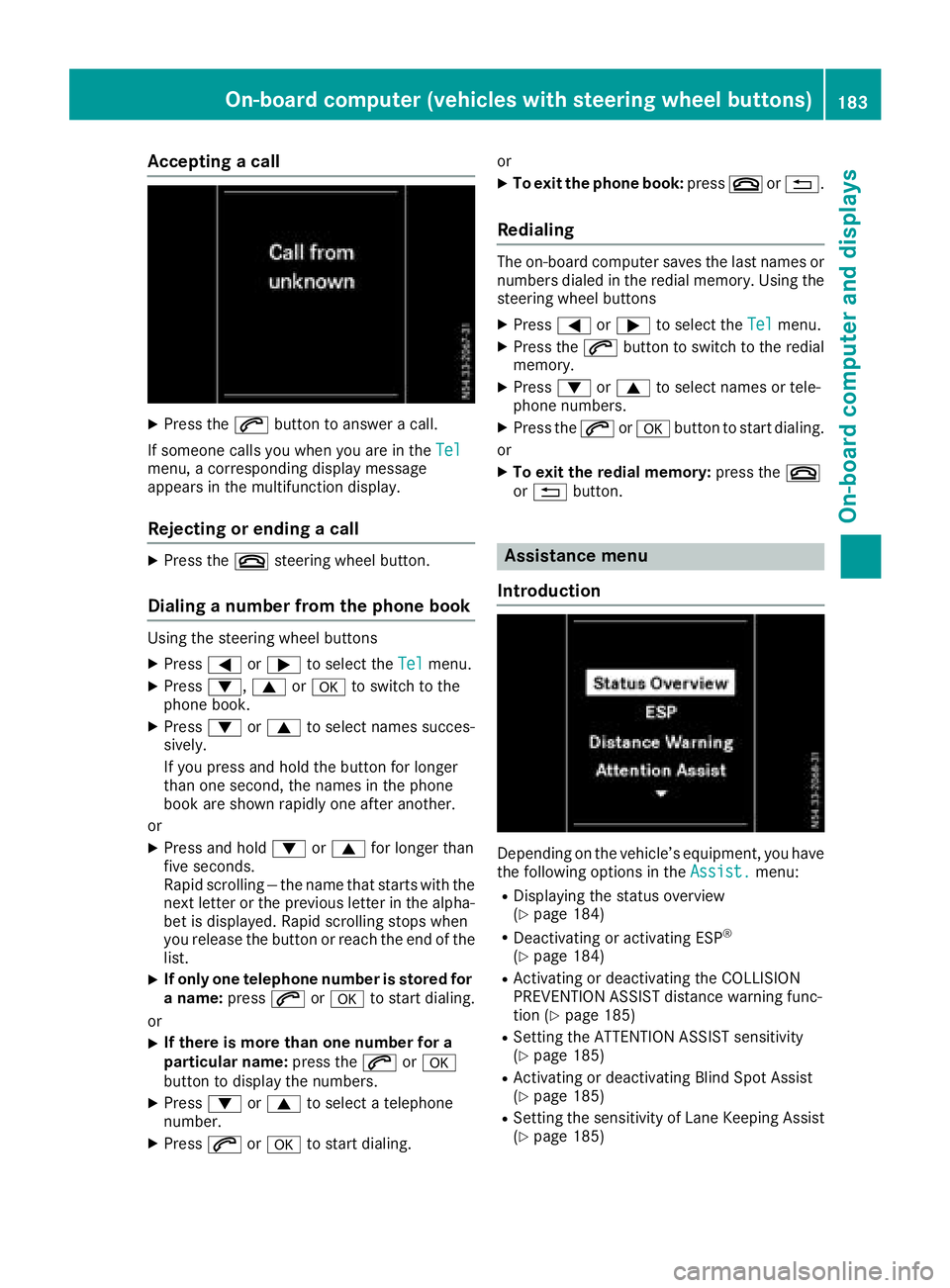
Dependin gon th evehicle’s equipment, you hav e
th efollowin goption sin th eAssist .menu:
RDisplaying th estatus overview
(Ypage 184)
RDeactivating or activating ES P®
(Ypage 184)
RActivating or deactivating theCOLLISION
PREVENTION ASSIST distanc ewarning func-
tion (
Ypage 185)
RSetting th eATTENTION ASSIST sensitivit y
(Ypage 185)
RActivating or deactivating Blind Spot Assis t
(Ypage 185)
RSetting th esensitivit yof Lan eKeepin gAssis t
(Ypage 185)
On-board computer (vehicles with steering wheel buttons)183
On-board computer and displays
Z
Page 191 of 318
Display messages (vehicles withoutsteering wheel buttons)
Introduction
Important safet ynotes
GWARNING
If th einstrumen tcluster has failed or malfunctioned, you may no trecogniz efunction restriction s
in systems relevant to safety. The operatin gsafet yof your vehicle may be impaired. There is aris k
of an accident.
Drive on carefully. Hav eth evehicle checke dat aqualified specialis tworkshop immediately.
The on-boar dcompute ronly shows messages or warnings from certain systems in th einstrumen t
cluster display. You should therefore mak esur eyour vehicle is operatin gsafely at all times .If th e
operatin gsafet yof your vehicle is impaired, stop th evehicle as soo nas possible, payin gattention
to road and traffic conditions. The nconsult aqualified specialis tworkshop .
Display messages wit hgraphi csymbols are simplified in th eOperator's Manual and may diffe rfrom
th esymbols in th edisplay. Awarnin gtone sounds wit hcertain display messages.
Please respon din accordance wit hth edisplay messages and follow th eadditional note sin this
Operator's Manual.
You can hide low-priorit ydisplay messages usin gth e3 butto non th einstrumen tcluster. The
display messages are then stored in th emessag ememory. Rectify th
eca
use ofadisplay messag e
as soo nas possible.
High-priorit ydisplay messages canno tbe hidden .These messages will continue to be shown in th e
display until their cause has bee neliminated.
Message memory
The on-boar dcompute rstores certain display messages in th emessag ememory. You can cal lup
th estored display messages. Use th ebuttons in th einstrumen tcluster.
XPress Èto selec tth emessag ememory.
If there are display messages, th edisplay shows th enumber of saved messages.
If there are no display messages, th edisplay shows No Messages
.
XPress3to scroll forwards through th edisplay messages.
Afte rth elast saved display message, th edisplay again shows th emessag ememor ystart scree n
wit hth enumber of saved messages.
Press Èto exit th edisplay messages and jump directl yto th emessag ememor ystart screen.
Display messages (vehicles without steering wheelbu ttons)189
On-board computer and displays
Z
Page 195 of 318
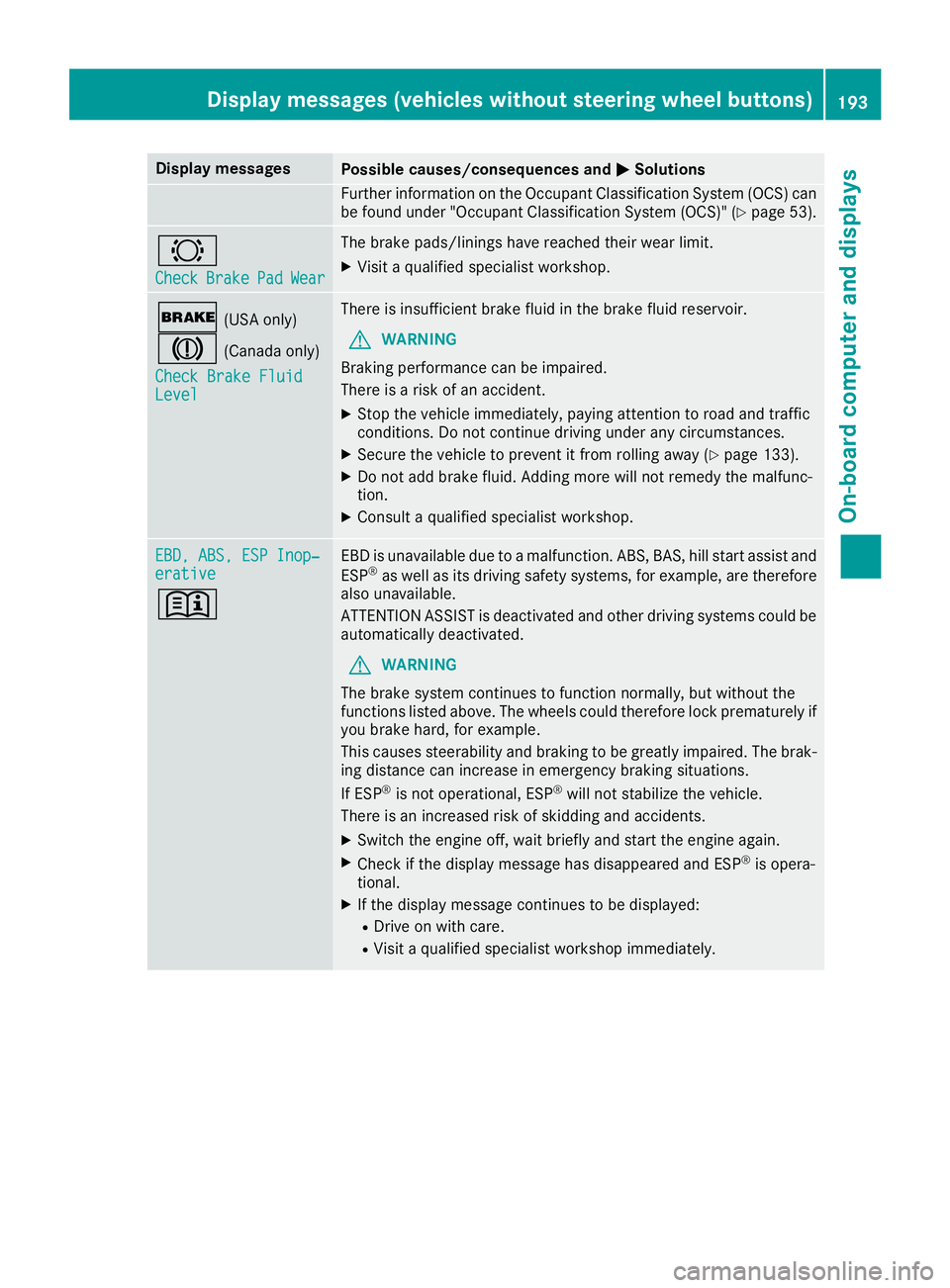
Display messagesPossible causes/consequences andMSolutions
Further information on theOccupant Classification Syste m(OCS )can
be found under "Occupant Classification Syste m(OCS)" (Ypage 53).
#
CheckBrakePadWear
The brak epads/linings hav ereached their wear limit.
XVisit aqualified specialist workshop .
$(USAonly)
J(Canada only)
Check Brake Fluid
Level
There is insufficien tbrak efluid in th ebrak efluid reservoir .
GWARNING
Braking performance can be impaired.
There is aris kof an accident.
XStop th evehicl eimmediately, payin gattention to roa dand traffic
conditions. Do no tcontinu edrivin gunder any circumstances.
XSecur eth evehicl eto preven tit from rollin gaway (Ypage 133).
XDo no tadd brak efluid. Addin gmor ewill no tremedy th emalfunc -
tion .
XConsult aqualified specialist workshop .
EBD,ABS ,ESP Inop‐erativ e
+
EBDis unavailable due to amalfunction .ABS, BAS, hill start assist and
ES P®as well as it sdrivin gsafet ysystems ,for example, are therefor e
also unavailable .
ATTENTION ASSIST is deactivated and other drivin gsystems could be
automatically deactivated.
GWARNIN G
The brak esystem continues to function normally, but without th e
function slisted above. The wheels could therefor eloc kprematurel yif
you brak ehard, for example.
This causes steerabilit yand braking to be greatl yimpaired. The brak -
ing distanc ecan increas ein emergenc ybraking situations.
If ES P
®is no toperational, ES P®will notstabiliz eth evehicle.
There is an increased ris kof skiddin gand accidents .
XSwitchth eengin eoff ,wait briefl yand start th eengin eagain .
XCheckif th edisplay message has disappeared and ES P®is opera-
tional.
XIf th edisplay message continues to be displayed:
RDrive on wit hcare.
RVisit aqualified specialist workshop immediately.
Display messages (vehicles without steering wheelbu ttons)193
On-board computer and displays
Z
Page 200 of 318
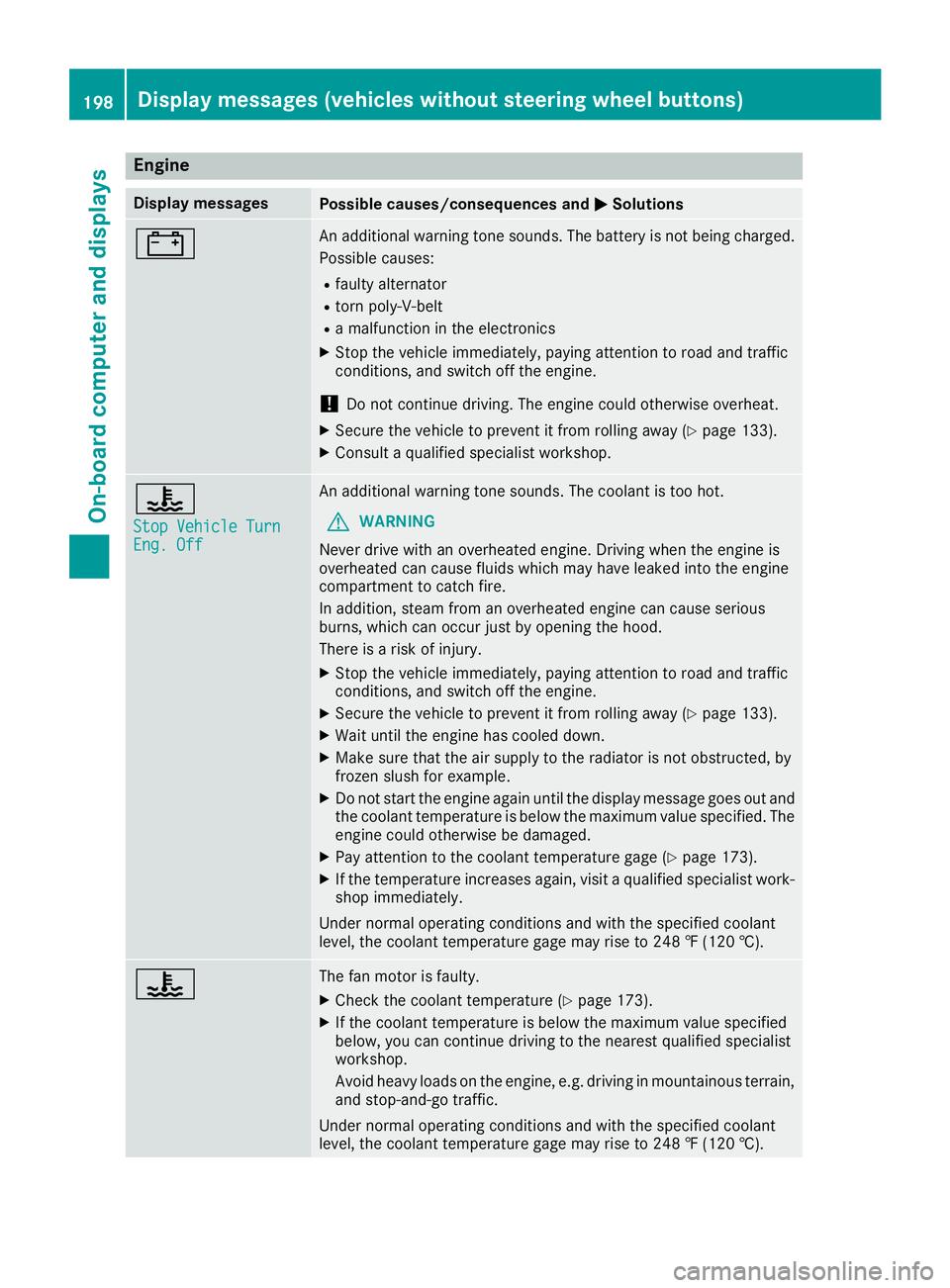
Engine
Display messagesPossible causes/consequences andMSolutions
#An additional warning tone sounds. The battery is not being charged.
Possible causes:
Rfaulty alternator
Rtorn poly-V-belt
Ra malfunction in the electronics
XStop the vehicle immediately, paying attention to road and traffic
conditions, and switch off the engine.
!Do not continue driving. The engine could otherwise overheat.
XSecure the vehicle to prevent it from rolling away (Ypage 133).
XConsult a qualified specialist workshop.
?
Stop Vehicle TurnEng. Off
An additional warning tone sounds. The coolant is too hot.
GWARNING
Never drive with an overheated engine. Driving when the engine is
overheated can cause fluids which may have leaked into the engine
compartment to catch fire.
In addition, steam from an overheated engine can cause serious
burns, which can occur just by opening the hood.
There is a risk of injury.
XStop the vehicle immediately, paying attention to road and traffic
conditions, and switch off the engine.
XSecure the vehicle to prevent it from rolling away (Ypage 133).
XWait until the engine has cooled down.
XMake sure that the air supply to the radiator is not obstructed, by
frozen slush for example.
XDo not start the engine again until the display message goes out and
the coolant temperature is below the maximum value specified. The
engine could otherwise be damaged.
XPay attention to the coolant temperature gage (Ypage 173).
XIf the temperature increases again, visit a qualified specialist work-
shop immediately.
Under normal operating conditions and with the specified coolant
level, the coolant temperature gage may rise to 248 ‡ (120 †).
?The fan motor is faulty.
XCheck the coolant temperature (Ypage 173).
XIf the coolant temperature is below the maximum value specified
below, you can continue driving to the nearest qualified specialist
workshop.
Avoid heavy loads on the engine, e.g. driving in mountainous terrain,
and stop-and-go traffic.
Under normal operating conditions and with the specified coolant
level, the coolant temperature gage may rise to 248 ‡ (120 †).
198Display messages (vehicles without steering wheel buttons)
On-board computer and displays