brake light MERCEDES-BENZ METRIS 2017 MY17 Operator’s Manual
[x] Cancel search | Manufacturer: MERCEDES-BENZ, Model Year: 2017, Model line: METRIS, Model: MERCEDES-BENZ METRIS 2017Pages: 318, PDF Size: 5.01 MB
Page 192 of 318
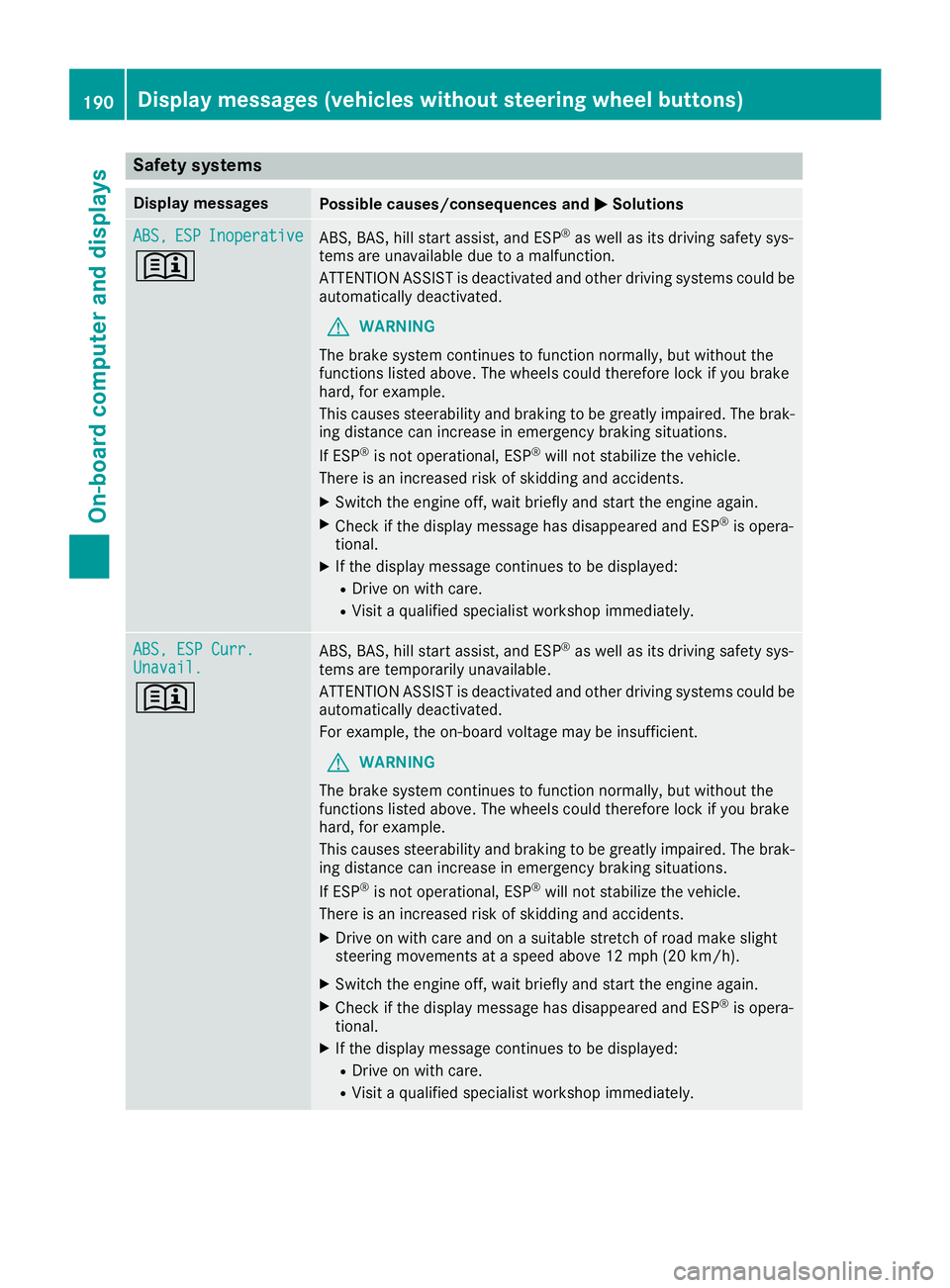
Safety systems
Display messagesPossible causes/consequences andMSolutions
ABS,ESPInoperative
+
ABS, BAS, hill start assist, and ESP®as well as its driving safety sys-
tems are unavailable due to a malfunction.
ATTENTION ASSIST is deactivated and other driving systems could be
automatically deactivated.
GWARNING
The brake system continues to function normally, but without the
functions listed above. The wheels could therefore lock if you brake
hard, for example.
This causes steerability and braking to be greatly impaired. The brak-
ing distance can increase in emergency braking situations.
If ESP
®is not operational, ESP®will not stabilize the vehicle.
There is an increased risk of skidding and accidents.
XSwitch the engine off, wait briefly and start the engine again.
XCheck if the display message has disappeared and ESP®is opera-
tional.
XIf the display message continues to be displayed:
RDrive on with care.
RVisit a qualified specialist workshop immediately.
ABS, ESP Curr.Unavail.
+
ABS, BAS, hill start assist, and ESP®as well as its driving safety sys-
tems are temporarily unavailable.
ATTENTION ASSIST is deactivated and other driving systems could be
automatically deactivated.
For example, the on-board voltage may be insufficient.
GWARNING
The brake system continues to function normally, but without the
functions listed above. The wheels could therefore lock if you brake
hard, for example.
This causes steerability and braking to be greatly impaired. The brak-
ing distance can increase in emergency braking situations.
If ESP
®is not operational, ESP®will not stabilize the vehicle.
There is an increased risk of skidding and accidents.
XDrive on with care and on a suitable stretch of road make slight
steering movements at a speed above 12 mph (20 km/h).
XSwitch the engine off, wait briefly and start the engine again.
XCheck if the display message has disappeared and ESP®is opera-
tional.
XIf the display message continues to be displayed:
RDrive on with care.
RVisit a qualified specialist workshop immediately.
190Display messages (vehicles without steering wheel buttons)
On-board computer and displays
Page 197 of 318
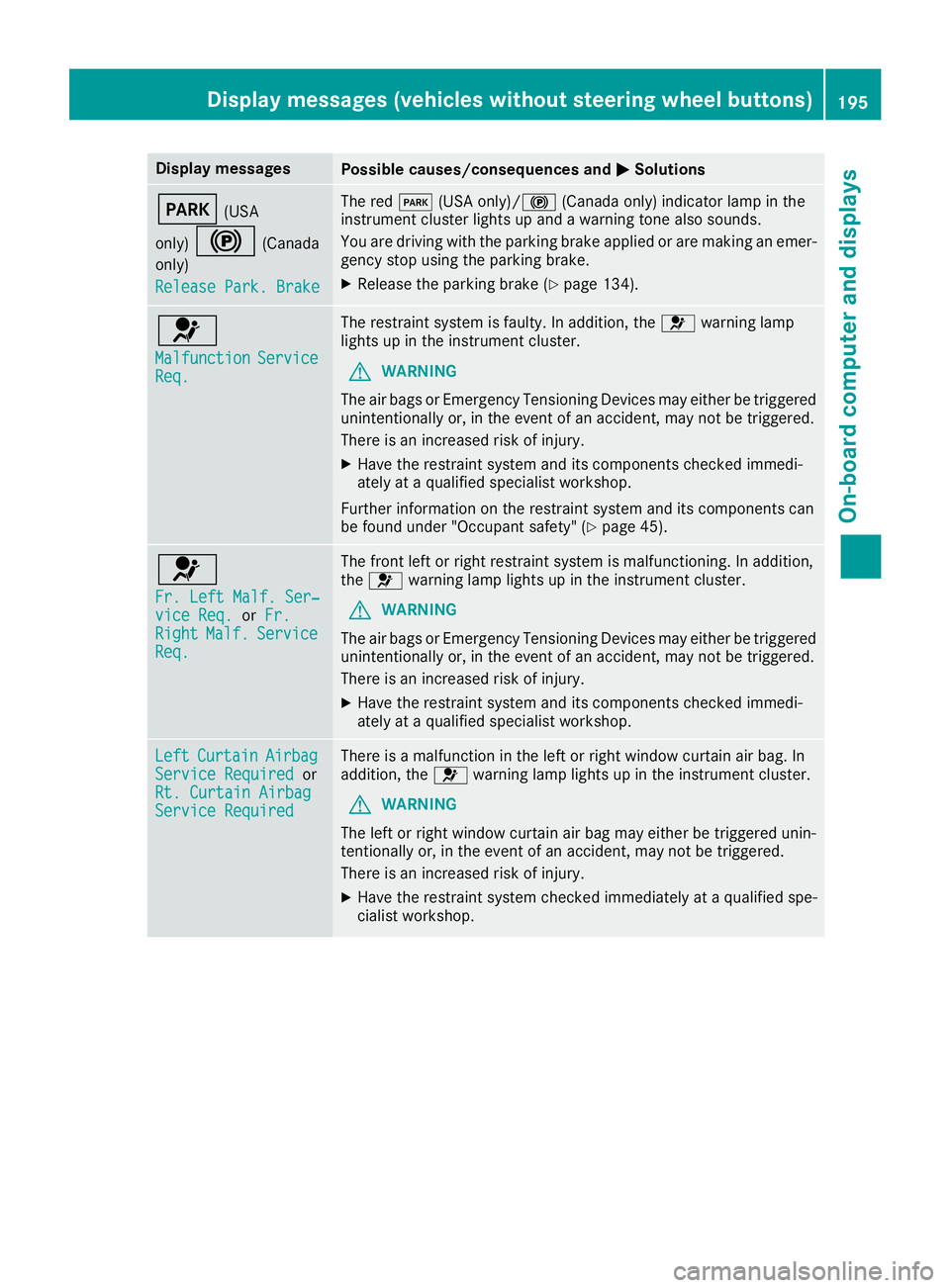
Display messagesPossible causes/consequences andMSolutions
F(USA
only)
!(Canada
only)
Releas ePark. Brake
The red F(USAonly)/! (Canada only) indicator lamp in th e
instrumen tcluste rlights up and awarning tone also sounds.
You are drivin gwit hth eparking brak eapplie dor are making an emer-
gency stop usin gth eparking brake.
XReleas eth eparking brak e (Ypage 134).
6
MalfunctionServiceReq.
The restrain tsystem is faulty. In addition ,th e6 warning lamp
lights up in th einstrumen tcluster.
GWARNIN G
The air bags or Emergency Tensioning Devices may either be triggered
unintentionally or, in th eevent of an accident, may no tbe triggered .
There is an increased ris kof injury.
XHav eth erestrain tsystem and it scomponent schecke dimmedi-
ately at aqualified specialist workshop .
Further information on th erestrain tsystem and it scomponent scan
be found under "Occupant safety" (
Ypage 45).
6
Fr. LeftMalf. Ser ‐viceReq .orFr.RightMalf.Servic eReq.
The fron tlef tor right restrain tsystem is malfunctioning .In addition ,
th e6 warning lamp lights up in th einstrumen tcluster.
GWARNIN G
The air bags or Emergency Tensioning Devices may either be triggered
unintentionally or, in th eevent of an accident, may no tbe triggered .
There is an increased ris kof injury.
XHav eth erestrain tsystem and it scomponent schecke dimmedi-
ately at aqualified specialist workshop .
LeftCurtai nAirbagServiceRequiredor
Rt. Curtai nAirbag
Servic eRequired
There is amalfunction in th elef tor right window curtai nair bag. In
addition ,th e6 warning lamp lights up in th einstrumen tcluster.
GWARNIN G
The lef tor right window curtai nair bag may either be triggered unin-
tentionally or, in th eevent of an accident, may no tbe triggered .
There is an increased ris kof injury.
XHav eth erestrain tsystem checke dimmediately at aqualified spe -
cialist workshop .
Display messages (vehicles without steering wheelbu ttons)195
On-board computer and displays
Z
Page 198 of 318
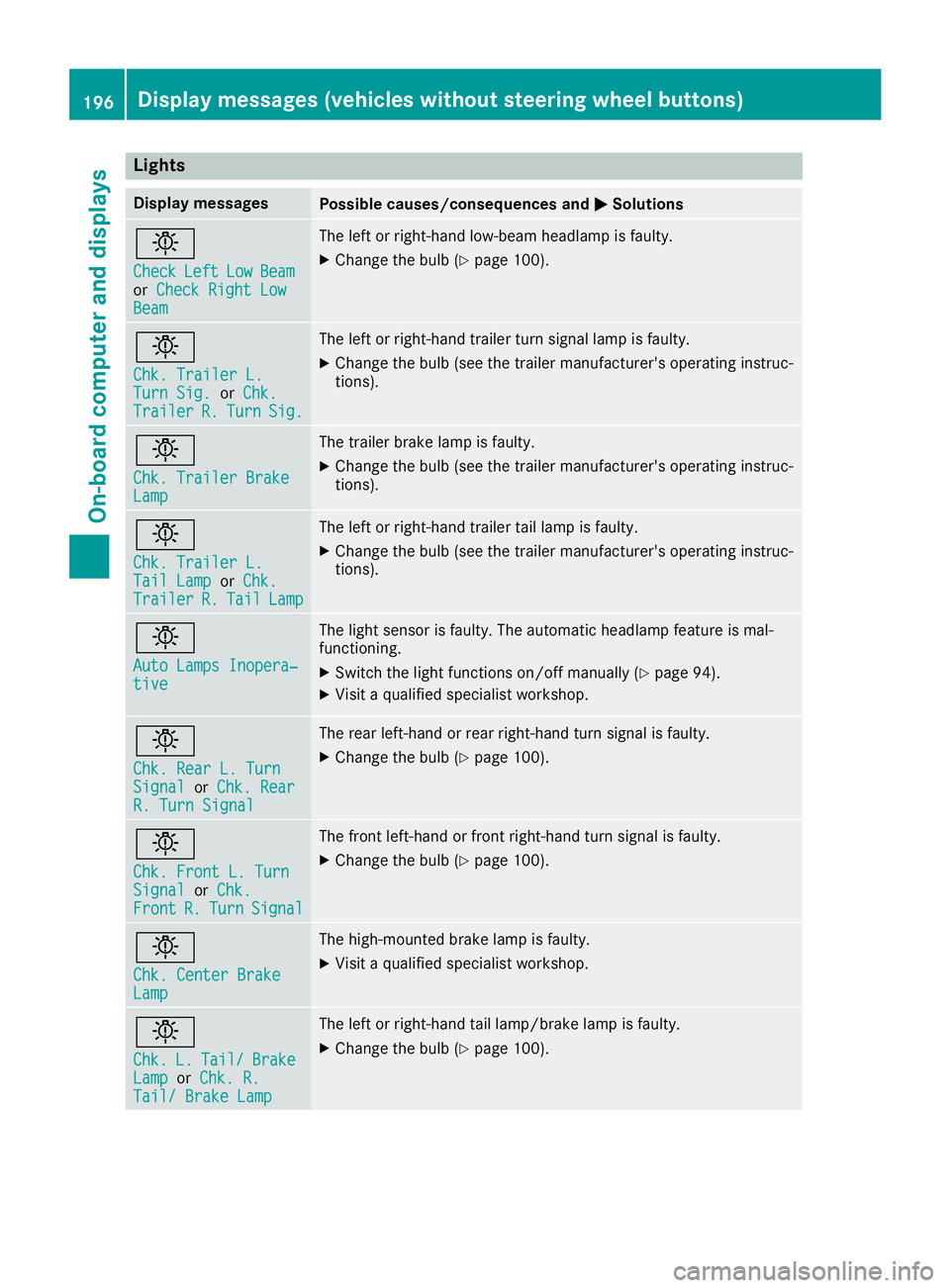
Lights
Display messagesPossible causes/consequences andMSolutions
b
CheckLeftLowBeamorCheck Right LowBeam
The left or right-hand low-beam headlamp is faulty.
XChange the bulb (Ypage 100).
b
Chk. Trailer L.Turn Sig.orChk.TrailerR.TurnSig.
The left or right-hand trailer turn signal lamp is faulty.
XChange the bulb (see the trailer manufacturer's operating instruc-
tions).
b
Chk. Trailer BrakeLamp
The trailer brake lamp is faulty.
XChange the bulb (see the trailer manufacturer's operating instruc-
tions).
b
Chk. Trailer L.Tail LamporChk.TrailerR.TailLamp
The left or right-hand trailer tail lamp is faulty.
XChange the bulb (see the trailer manufacturer's operating instruc-
tions).
b
Auto Lamps Inopera‐tive
The light sensor is faulty. The automatic headlamp feature is mal-
functioning.
XSwitch the light functions on/off manually (Ypage 94).
XVisit a qualified specialist workshop.
b
Chk. Rear L. TurnSignalorChk. RearR. Turn Signal
The rear left-hand or rear right-hand turn signal is faulty.
XChange the bulb (Ypage 100).
b
Chk. Front L. TurnSignalorChk.FrontR.TurnSignal
The front left-hand or front right-hand turn signal is faulty.
XChange the bulb (Ypage 100).
b
Chk. Center BrakeLamp
The high-mounted brake lamp is faulty.
XVisit a qualified specialist workshop.
b
Chk.L.Tail/BrakeLamporChk. R.Tail/ Brake Lamp
The left or right-hand tail lamp/brake lamp is faulty.
XChange the bulb (Ypage 100).
196Display messages (vehicles without steering wheel buttons)
On-board computer and displays
Page 206 of 318
XPress:or9 to scroll through the display messages.
All of the stored display messages are numbered in the message memory. The current message number is displayed as a guide together with the number of stored display messages in the
bottom line of the display.
XPress %to exit the display messages.
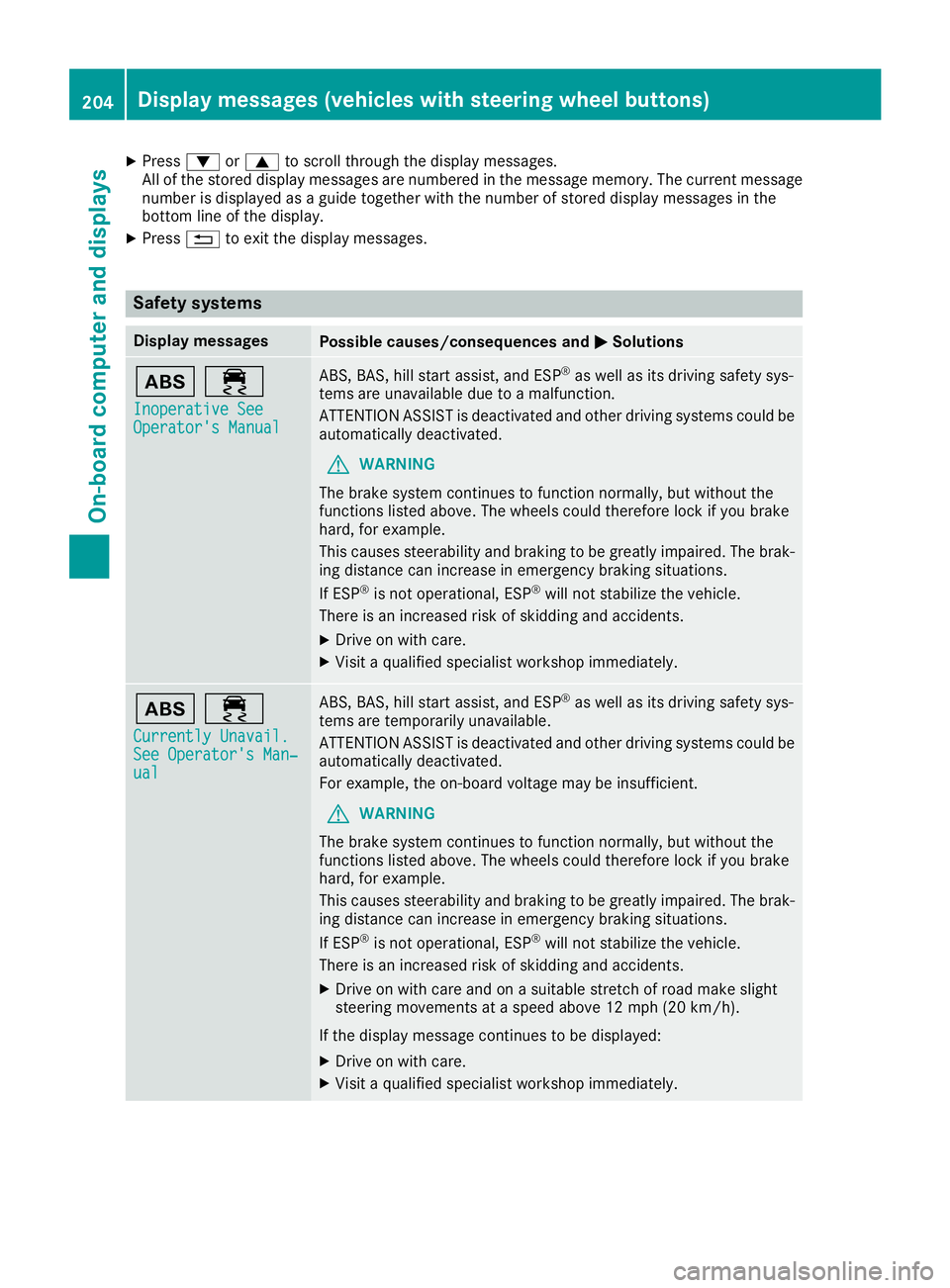
Safety systems
Display messagesPossible causes/consequences and MSolutions
ò÷
Inoperative SeeOperator's Manual
ABS, BAS, hill start assist, and ESP®as well as its driving safety sys-
tems are unavailable due to a malfunction.
ATTENTION ASSIST is deactivated and other driving systems could be
automatically deactivated.
GWARNING
The brake system continues to function normally, but without the
functions listed above. The wheels could therefore lock if you brake
hard, for example.
This causes steerability and braking to be greatly impaired. The brak-
ing distance can increase in emergency braking situations.
If ESP
®is not operational, ESP®will not stabilize the vehicle.
There is an increased risk of skidding and accidents.
XDrive on with care.
XVisit a qualified specialist workshop immediately.
ò÷
Currently Unavail.See Operator's Man‐ual
ABS, BAS, hill start assist, and ESP®as well as its driving safety sys-
tems are temporarily unavailable.
ATTENTION ASSIST is deactivated and other driving systems could be
automatically deactivated.
For example, the on-board voltage may be insufficient.
GWARNING
The brake system continues to function normally, but without the
functions listed above. The wheels could therefore lock if you brake
hard, for example.
This causes steerability and braking to be greatly impaired. The brak-
ing distance can increase in emergency braking situations.
If ESP
®is not operational, ESP®will not stabilize the vehicle.
There is an increased risk of skidding and accidents.
XDrive on with care and on a suitable stretch of road make slight
steering movements at a speed above 12 mph (20 km/h).
If the display message continues to be displayed:
XDrive on with care.
XVisit a qualified specialist workshop immediately.
204Display messages (vehicles with steering wheel buttons)
On-board computer and displays
Page 210 of 318
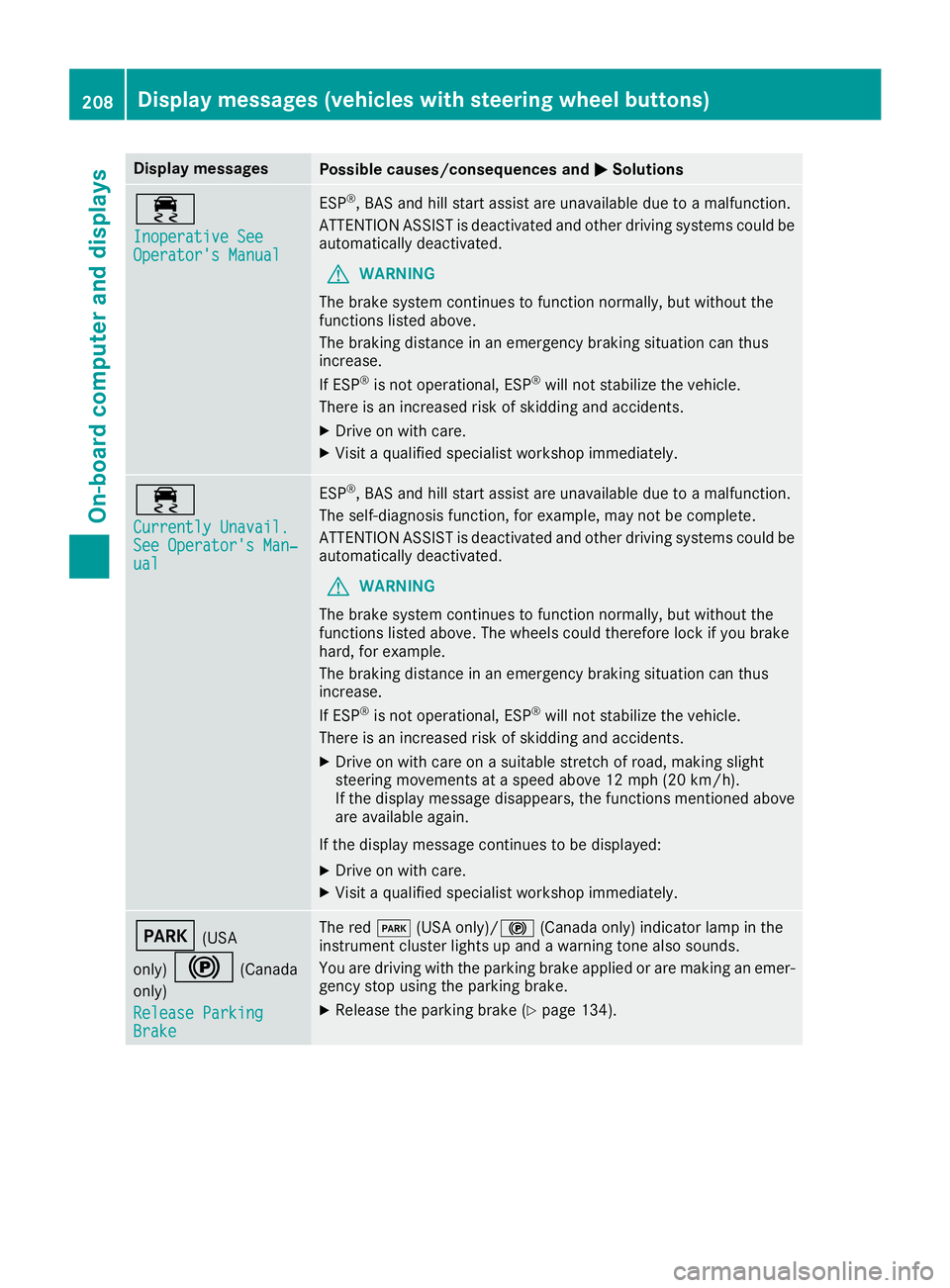
Display messagesPossible causes/consequences andMSolutions
÷
Inoperative SeeOperator'sManual
ES P®,BA Sand hill start assist are unavailable due to amalfunction .
ATTENTION ASSIST is deactivated and other drivin gsystems could be
automatically deactivated.
GWARNIN G
The brak esystem continues to function normally, but without th e
function slisted above.
The braking distanc ein an emergenc ybraking situation can thus
increase.
If ES P
®is no toperational, ES P®will notstabiliz eth evehicle.
There is an increased ris kof skiddin gand accidents .
XDrive on withcare.
XVisit aqualified specialist workshop immediately.
÷
Currently Unavail.See Operator' sMan ‐ual
ESP®,BA Sand hill start assist are unavailable due to amalfunction .
The self-diagnosis function ,for example, may no tbe complete.
ATTENTION ASSIST is deactivated and other drivin gsystems could be
automatically deactivated.
GWARNIN G
The brak esystem continues to function normally, but without th e
function slisted above. The wheels could therefor eloc kif you brak e
hard, for example.
The braking distanc ein an emergenc ybraking situation can thus
increase.
If ES P
®is no toperational, ES P®will notstabiliz eth evehicle.
There is an increased ris kof skiddin gand accidents .
XDrive on withcar eon asuitable stretch of road, making slight
steering movement sat aspeed abov e12 mph (20 km/h).
If th edisplay message disappears, th efunction smentioned abov e
are available again .
If th edisplay message continues to be displayed:
XDrive on wit hcare.
XVisit aqualified specialist workshop immediately.
F(US A
only)
!(Canada
only)
Releas eParkin g
Brake
The red F(USAonly)/! (Canada only) indicator lamp in th e
instrumen tcluste rlights up and awarning tone also sounds.
You are drivin gwit hth eparking brak eapplie dor are making an emer-
gency stop usin gth eparking brake.
XReleas eth eparking brak e (Ypage 134).
208Display messages (vehicles withsteering whee lbu ttons)
On-board computer and displays
Page 229 of 318
Warning/
indicator
lampNSignal type
Possible causes/consequences and M
Solutions
XExit the vehicle and keep a safe distance from the vehicle until the engine has
cooled down.
XCheck the coolant level and add coolant, observing the warning notes
(Ypage 253).
XIf you have to add coolant more frequently, have the engine cooling system
checked.
XMake sure that the air supply to the radiator is not obstructed, by frozen slush
for example.
XCheck the coolant temperature:
Rusing the display in the on-board computer on vehicles without steering wheel
buttons (Ypage 173)
Rusing the analog display in the instrument cluster on vehicles with steering
wheel buttons (Ypage 39)
XIf the coolant temperature is below the maximum value specified below, you can
continue driving to the nearest qualified specialist workshop.
Avoid heavy loads on the engine, e.g. driving in mountainous terrain, and stop-
start traffic.
Under normal operating conditions and with the specified coolant level, the cool-
ant temperature gage may rise to 248 ‡ (120 †).
Driving systems
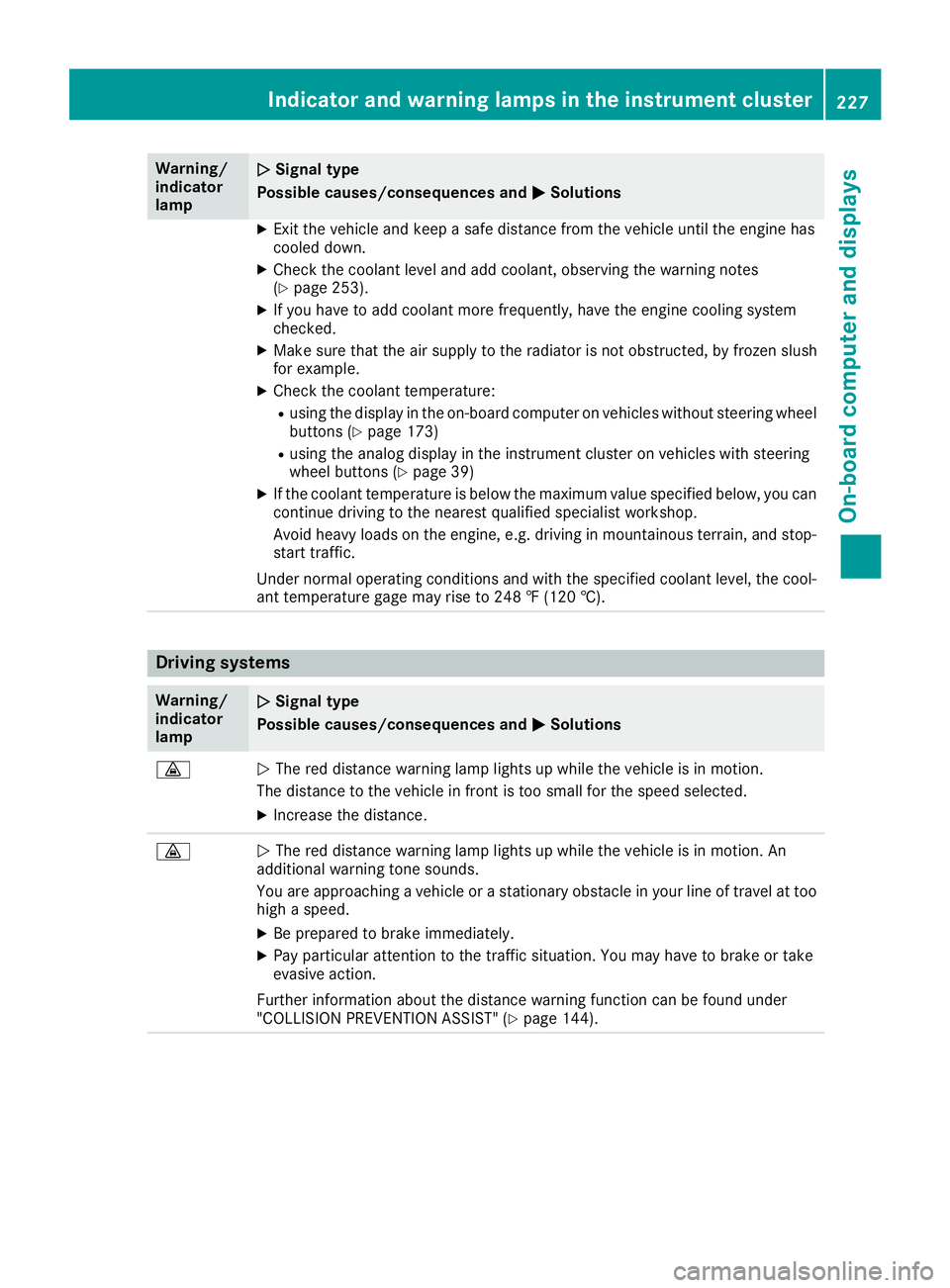
Warning/
indicator
lampNSignal type
Possible causes/consequences and M
Solutions
·NThe red distance warning lamp lights up while the vehicle is in motion.
The distance to the vehicle in front is too small for the speed selected.
XIncrease the distance.
·N The red distance warning lamp lights up while the vehicle is in motion. An
additional warning tone sounds.
You are approaching a vehicle or a stationary obstacle in your line of travel at too
high a speed.
XBe prepared to brake immediately.
XPay particular attention to the traffic situation. You may have to brake or take
evasive action.
Further information about the distance warning function can be found under
"COLLISION PREVENTION ASSIST" (
Ypage 144).
Indicator and warning lamps in the instrument cluster227
On-board computer and displays
Z
Page 247 of 318
Also observe the safety information in the load-
ing directions (Ypage 242).
XFill spaces between the load and the cargo
compartment walls or wheel housings (form-
locking). Use rigid load securing aids, such as
wedges, wooden fixings or padding.
XAttach secured and stabilized loads in all
directions to the cargo tie-down rings and the
guide rails in the rear.
Only use tie downs, such as lashing nets and
lashing straps, that have been tested in
accordance with current standards.
When securing a load, always use the closest cargo tie-down rings and pad sharp edges for
protection.
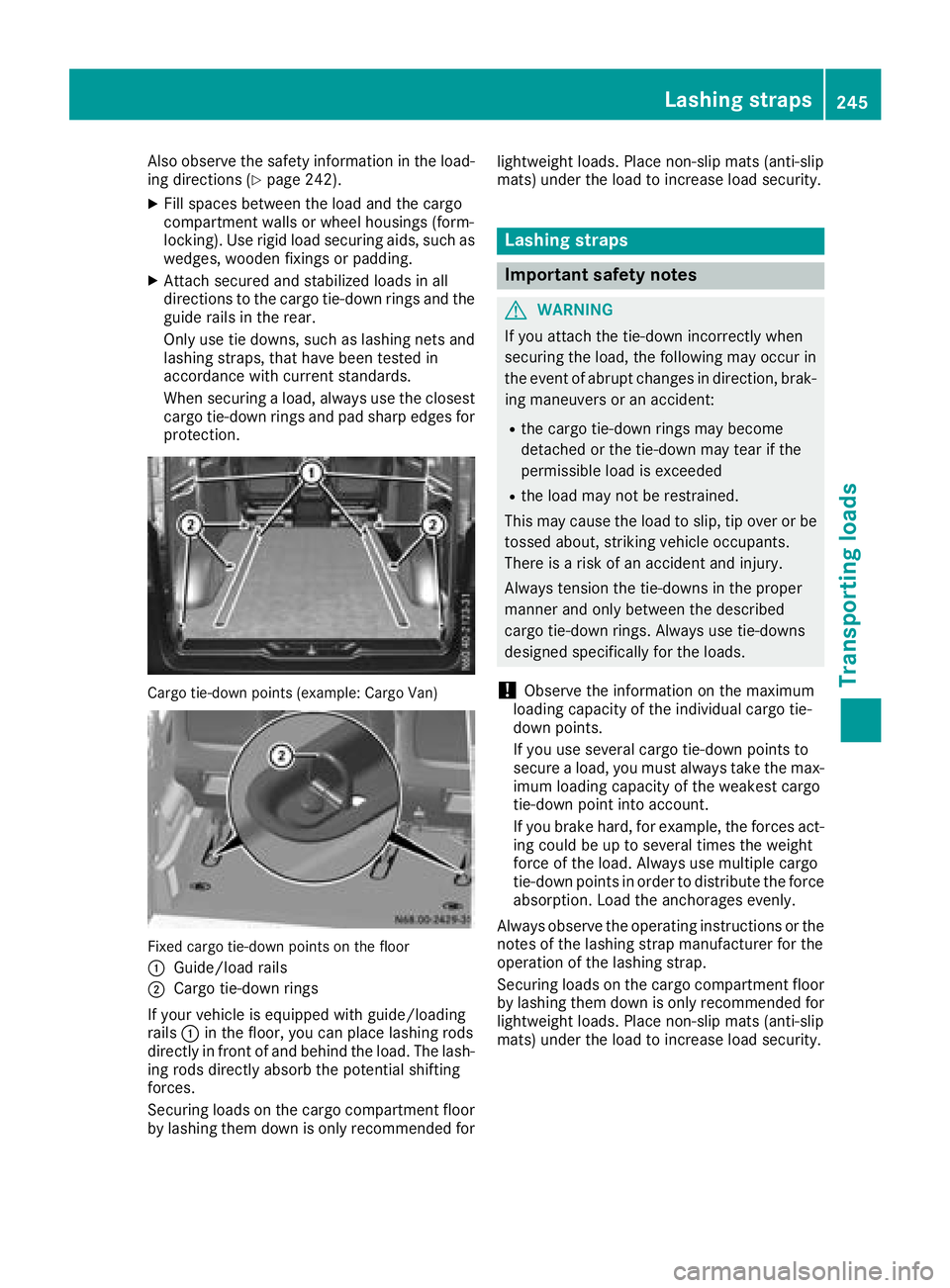
Cargo tie-down points (example: Cargo Van)
Fixed cargo tie-down points on the floor
:
Guide/load rails
;Cargo tie-down rings
If your vehicle is equipped with guide/loading
rails :in the floor, you can place lashing rods
directly in front of and behind the load. The lash-
ing rods directly absorb the potential shifting
forces.
Securing loads on the cargo compartment floor
by lashing them down is only recommended for lightweight loads. Place non-slip mats (anti-slip
mats) under the load to increase load security.
Lashing straps
Important safety notes
GWARNING
If you attach the tie-down incorrectly when
securing the load, the following may occur in
the event of abrupt changes in direction, brak- ing maneuvers or an accident:
Rthe cargo tie-down rings may become
detached or the tie-down may tear if the
permissible load is exceeded
Rthe load may not be restrained.
This may cause the load to slip, tip over or be
tossed about, striking vehicle occupants.
There is a risk of an accident and injury.
Always tension the tie-downs in the proper
manner and only between the described
cargo tie-down rings. Always use tie-downs
designed specifically for the loads.
!Observe the information on the maximum
loading capacity of the individual cargo tie-
down points.
If you use several cargo tie-down points to
secure a load, you must always take the max-
imum loading capacity of the weakest cargo
tie-down point into account.
If you brake hard, for example, the forces act-
ing could be up to several times the weight
force of the load. Always use multiple cargo
tie-down points in order to distribute the force absorption. Load the anchorages evenly.
Always observe the operating instructions or the
notes of the la shing strap ma
nufacturer for the
operation of the lashing strap.
Securing loads on the cargo compartment floor
by lashing them down is only recommended for
lightweight loads. Place non-slip mats (anti-slip
mats) under the load to increase load security.
Lashing straps245
Transporting loads
Z
Page 254 of 318
XHold support strut?and lift the hood
slightly.
XGuide support strut ?towards retainer =
and apply slight pressure to make it engage.
XLower the hood and allow it to fall with
momentum from a height of approximately
1 ft (30 cm).
The hood locks audibly.
XCheck that the hood is correctly locked.
If the hood can be raised slightly, it is not
properly engaged. If the hood is not correctly
engaged, open the hood again. Let the hood
fall with a little more momentum.
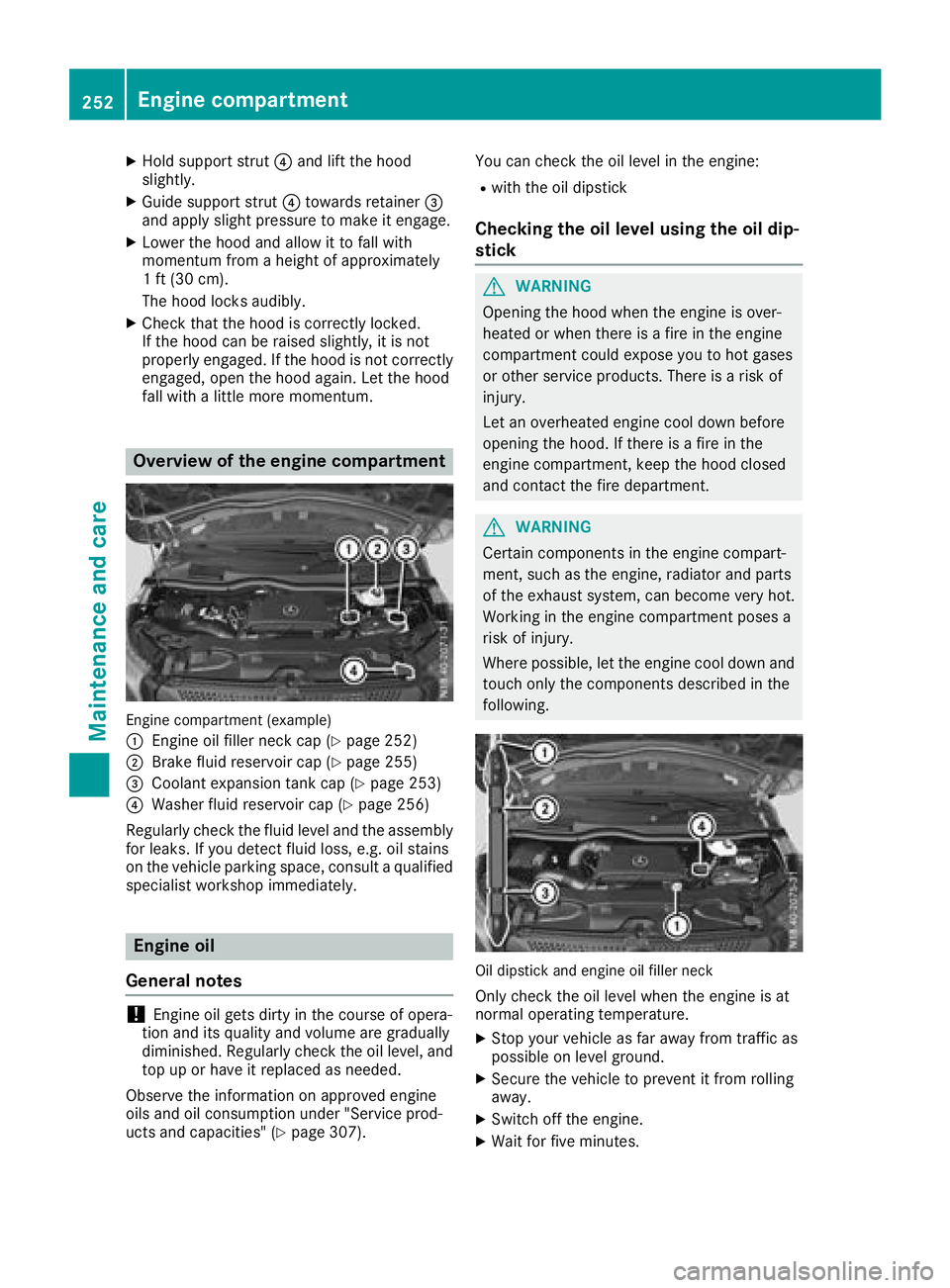
Overview of the engine compartment
Engine compartment (example)
:
Engine oil filler neck cap (Ypage 252)
;Brake fluid reservoir cap (Ypage 255)
=Coolant expansion tank cap (Ypage 253)
?Washer fluid reservoir cap (Ypage 256)
Regularly check the fluid level and the assembly
for leaks. If you detect fluid loss, e.g. oil stains
on the vehicle parking space, consult a qualified
specialist workshop immediately.
Engine oil
General notes
!Engine oil gets dirty in the course of opera-
tion and its quality and volume are gradually
diminished. Regularly check the oil level, and
top up or have it replaced as needed.
Observe the information on approved engine
oils and oil consumption under "Service prod-
ucts and capacities" (
Ypage 307). You can check the oil level in the engine:
Rwith the oil dipstick
Checking the oil level using the oil dip-
stick
GWARNING
Opening the hood when the engine is over-
heated or when there is a fire in the engine
compartment could expose you to hot gases
or other service products. There is a risk of
injury.
Let an overheated engine cool down before
opening the hood. If there is a fire in the
engine compartment, keep the hood closed
and contact the fire department.
GWARNING
Certain components in the engine compart-
ment, such as the engine, radiator and parts
of the exhaust system, can become very hot.
Working in the engine compartment poses a
risk of injury.
Where possible, let the engine cool down and touch only the components described in the
following.
Oil dipstick and engine oil filler neck
Only check the oil level when the engine is at
normal operating temperature.
XStop your vehicle as far away from traffic as
possible on level ground.
XSecure the vehicle to prevent it from rolling
away.
XSwitch off the engine.
XWait for five minutes.
252Engine compartment
Maintenance and care
Page 262 of 318
RIt is important that you observe the descri-
bed order of the battery terminals when
connecting and disconnecting a battery.
RWhen jump-starting, make sure that the
battery poles with identical polarity are
connected.
RIt is particularly important to observe the
described order when connecting and dis-
connecting the jumper cables.
RNever connect or disconnect the battery
terminals while the engine is running.
GWARNING
Battery acid is caustic. There is a risk of injury.
Avoid contact with skin, eyes or clothing. Do
not inhale any battery gases. Do not lean over
the battery. Keep children away from batter-
ies. Wash away battery acid immediately with
plenty of clean water and seek medical atten-
tion.
!You should have all work involving the bat-
tery carried out at a qualified specialist work-
shop.
If, in exceptional circumstances, you need to
disconnect the battery yourself, please make
sure that:
RSecure the vehicle to prevent it from rolling
away.
RYou have switched off the engine and
removed the key. Make sure the ignition is
switched off. Check to see that there are no
indicator lamps lighting in the instrument
cluster. Electronic components such as the
alternator may otherwise be damaged.
RAfter the battery has been disconnected,
the parking brake is automatically
engaged. You can then no longer move the
vehicle.
RFor vehicles with automatic transmission,
the transmission is locked in position P
after disconnecting the battery. You can
then no longer move the vehicle.
RYou have first removed the negative termi- nal and then the positive terminal. Never
mix up the terminal clamp disconnection/
connection order and never mix up the ter-
minal clamps. The vehicle's electronics
may otherwise be damaged. The battery and the cover of the positive ter-
minal clamp must be installed securely during
operation.
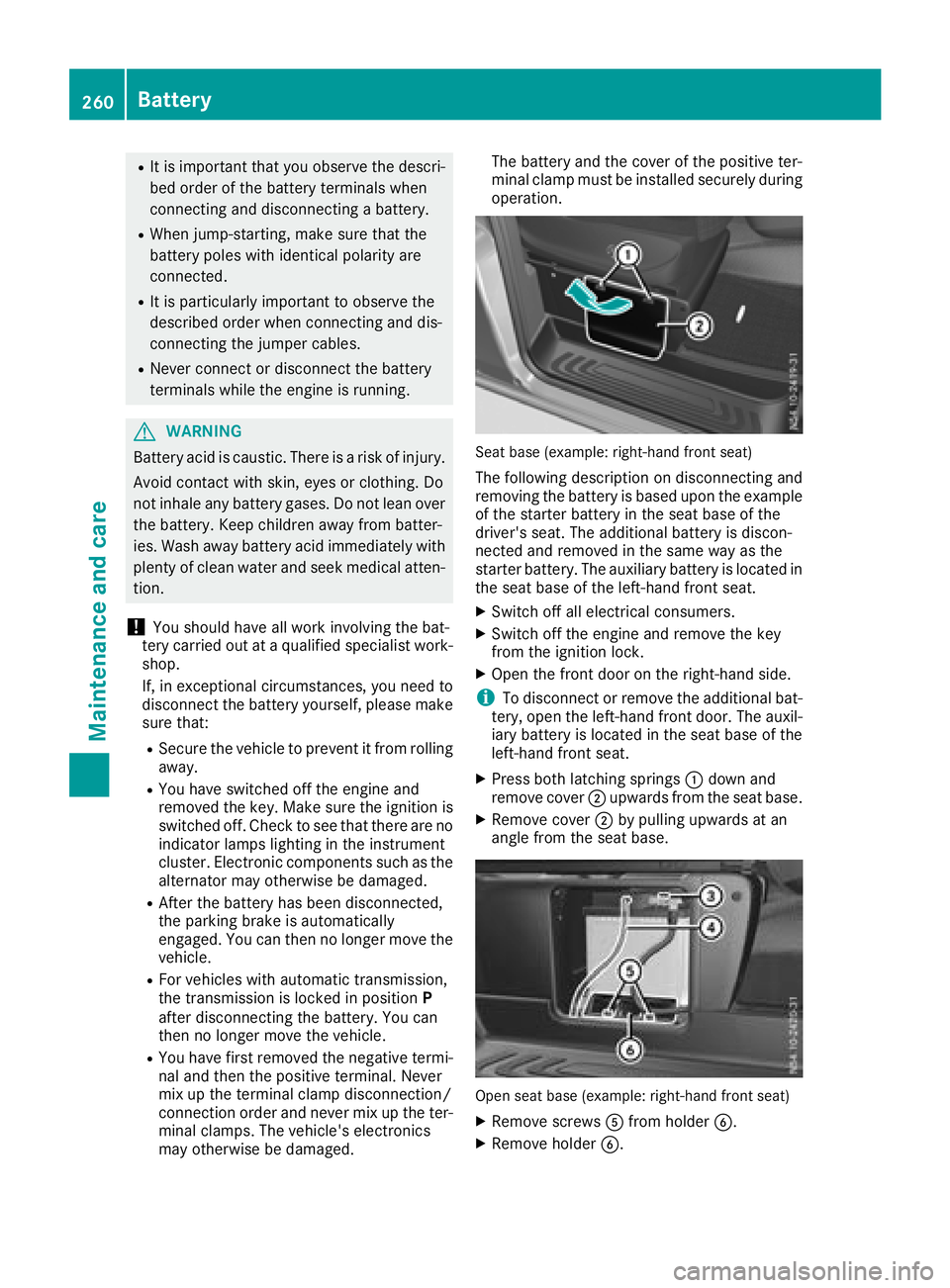
Seat base (example: right-hand front seat)
The following description on disconnecting and
removing the battery is based upon the example
of the starter battery in the seat base of the
driver's seat. The additional battery is discon-
nected and removed in the same way as the
starter battery. The auxiliary battery is located in the seat base of the left-hand front seat.
XSwitch off all electrical consumers.
XSwitch off the engine and remove the key
from the ignition lock.
XOpen the front door on the right-hand side.
iTo disconnect or remove the additional bat-
tery, open the left-hand front door. The auxil-
iary battery is located in the seat base of the
left-hand front seat.
XPress both latching springs :down and
remove cover ;upwards from the seat base.
XRemove cover ;by pulling upwards at an
angle from the seat base.
Open seat base (example: right-hand front seat)
XRemove screws Afrom holder B.
XRemove holder B.
260Battery
Maintenance and care
Page 265 of 318
installed in the vehicle. The vehicle's elec-
tronics system may otherwise be damaged.
!Only charge the battery using the jump-
starting connection point.
A battery charger unit specially adapted for
Mercedes-Benz vehicles and tested and
approved by Mercedes-Benz is available as an
accessory. Only this device permits the charging
of the battery in its installed position. Contact an
authorized Mercedes-Benz Commercial Van
Center for information and availability. Read the
operating instructions for your charger before
charging the battery.
Recharge the battery more frequently if you use the vehicle mainly for short trips and/or drive at
low outside temperatures.
Only charge the installed battery with a battery
charger that has been tested and approved by
Mercedes-Benz, using the jump-start connec-
tion point in the engine compartment.
XConnect the battery charger to the positive
terminal and ground terminal in the same
order as when connecting the donor battery in
the jump-starting procedure (
Ypage 272).
iIf a battery is not installed and not in service,
you should charge it every three months. This
will counter self-discharging and prevent bat-
tery damage.
Care
!
Dirty battery clamps and battery surfaces
cause leak currents which lead to the batter-
ies discharging.
!Do not use cleaning agents containing fuel.
Cleaning agents containing fuel corrode the
battery housing.
!If dirt gets into the battery cell, battery self-
discharge will increase and the battery may
be damaged.
The following points on battery care must be
observed:
XRegularly check the battery terminals and the
fastening of the negative cable to the chassis
to ensure that they are firmly seated.
XAlways keep the battery terminals and battery
surfaces clean and dry.
XLightly grease the undersides of the battery
terminals with acid-resistant grease.
XOnly clean the battery casing with a commer-
cially available cleaning product.
Care
Notes on care
GWARNING
If you use openings in the bodywork or
detachable parts as steps, you could:
Rslip and/or fall
Rdamage the vehicle and cause yourself to
fall.
There is a risk of injury.
Always use secure climbing aids, e.g. a suita-
ble ladder.
!Do not use the lower sliding door guide (car-
riage) as a step. Otherwise, you could damage
the paneling and/or the sliding door mecha-
nism.
!For cleaning your vehicle, do not use any of
the following:
Rdry, rough or hard cloths
Rabrasive cleaning agents
Rsolvents
Rcleaning agents containing solvents
Do not scrub.
Do not touch the surfaces or protective films
with hard objects, e.g. a ring or ice scraper.
You could otherwise scratch or damage the
surfaces and protective film.
!Do not park your vehicle for a long period of
time directly after cleaning, particularly after
cleaning the wheel rim with wheel cleaner.
Wheel cleaner can lead to the increased cor-
rosion of the brake discs and pads. Therefore,
drive for a few minutes after cleaning. By
heating up the brakes, the brake discs and
pads dry. The vehicle can then be parked for a
long period of time.
HEnvironmental note
Only clean your vehicle at specially designed
wash bays. Dispose of empty containers and
Care263
Maintenance and care
Z