ignition MERCEDES-BENZ METRIS 2017 MY17 Operator’s Manual
[x] Cancel search | Manufacturer: MERCEDES-BENZ, Model Year: 2017, Model line: METRIS, Model: MERCEDES-BENZ METRIS 2017Pages: 318, PDF Size: 5.01 MB
Page 207 of 318
Display messagesPossible causes/consequences andMSolutions
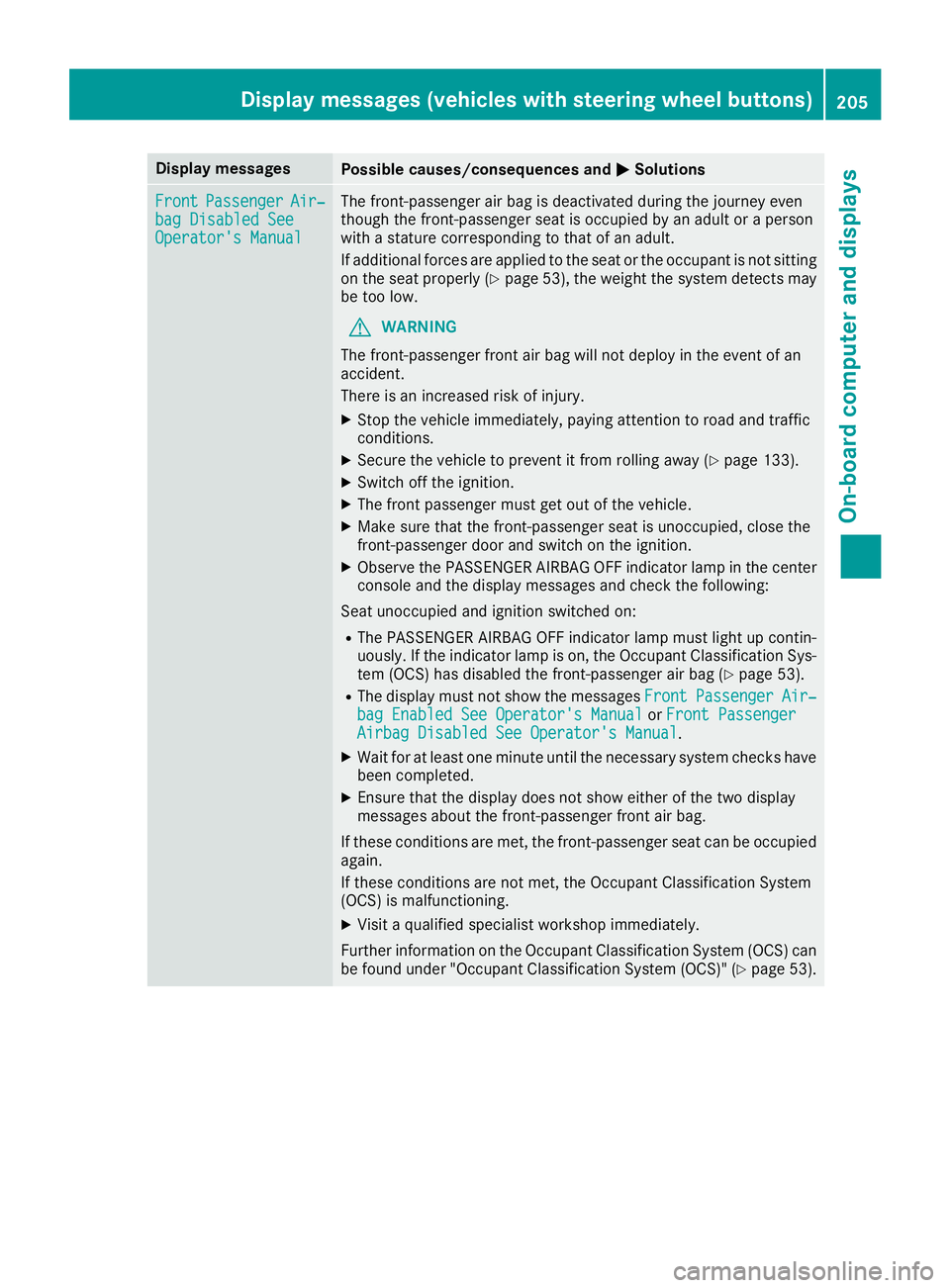
FrontPassengerAir‐bag Disabled SeeOperator' sManual
The front-passenger air bag is deactivated during th ejourney eve n
though th efront-passenger seat is occupied by an adult or aperson
wit h a statur ecorrespondin gto that of an adult .
If additional force sare applie dto th eseat or th eoccupant is no tsitting
on th eseat properly (
Ypage 53), theweigh tth esystem detects may
be to olow.
GWARNIN G
The front-passenger fron tair bag will no tdeploy in th eevent of an
accident.
There is an increased ris kof injury.
XStop th evehicl eimmediately, payin gattention to roa dand traffic
conditions.
XSecur eth evehicl eto preven tit from rollin gaway (Ypage 133).
XSwitchoff th eignition .
XThe fron tpassenger mus tget out of th evehicle.
XMak esur ethat th efront-passenger seat is unoccupied ,close th e
front-passenger door and switch on th eignition .
XObserveth ePASSENGER AIRBA GOF Findicator lamp in th ecenter
console and th edisplay message sand chec kth efollowing:
Seat unoccupied and ignition switched on :
RThe PASSENGER AIRBAGOF Findicator lamp mus tligh tup contin-
uously. If th eindicator lamp is on ,th eOccupant Classification Sys -
te m (OCS )has disabled th efro
nt-passenger air bag
(Ypage 53).
RThe display mus tno tsho wthemessage sFrontPassengerAir ‐bag Enable dSee Operator' sManualor Front PassengerAirbag Disabled See Operator' sManual.
XWait for at least on eminute until th enecessar ysystem checks hav e
been completed.
XEnsur ethat th edisplay does no tsho weither of th etwo display
message sabout th efront-passenger fron tair bag.
If these condition sare met ,th efront-passenger seat can be occupied
again .
If these condition sare no tmet ,th eOccupant Classification Syste m
(OCS )is malfunctioning .
XVisitaqualified specialist workshop immediately.
Further information on th eOccupant Classification Syste m(OCS )can
be found under "Occupant Classification Syste m(OCS)" (
Ypage 53).
Display messages (vehicles withsteering whee lbu ttons)205
On-board computer and displays
Z
Page 208 of 318
Display messagesPossible causes/consequences andMSolutions
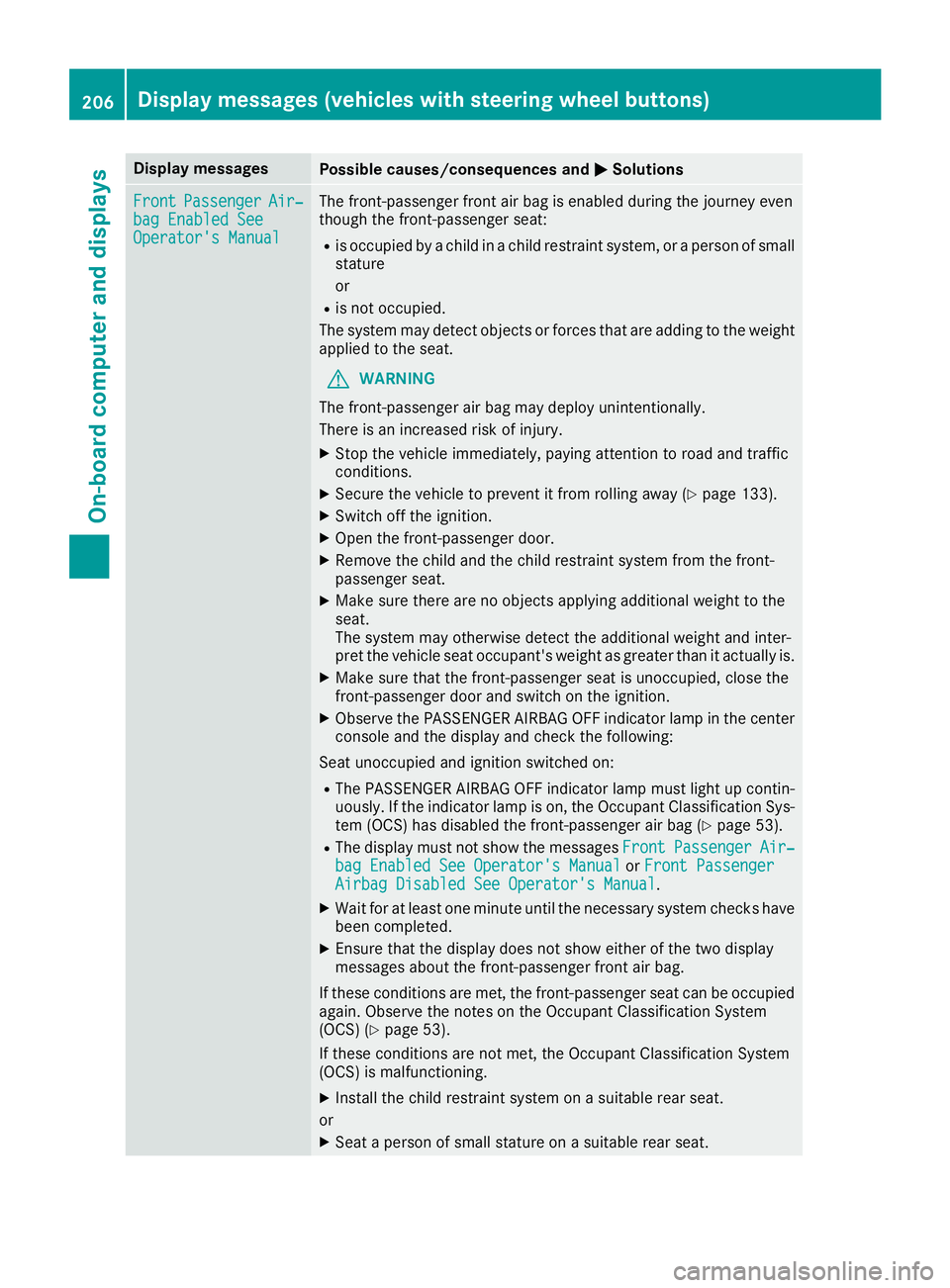
FrontPassengerAir‐bag Enable dSeeOperator' sManual
The front-passenger fron tair bag is enabled during th ejourney eve n
though th efront-passenger seat :
Ris occupied byachild in achild restrain tsystem, or aperson of small
statur e
or
Ris no toccupied.
The system may detec tobjects or force sthat are addin gto th eweigh t
applie dto th eseat .
GWARNIN G
The front-passenger air bag may deploy unintentionally.
There is an increased ris kof injury.
XStop th evehicl eimmediately, payin gattention to roa dand traffic
conditions.
XSecur eth evehicl eto preven tit from rollin gaway (Ypage 133).
XSwitchoff th eignition .
XOpenth efront-passenger door .
XRemove thechild and th echild restrain tsystem from th efront-
passenger seat .
XMakesur ethere are no objects applyin gadditional weigh tto th e
seat .
The system may otherwise detec tth eadditional weigh tand inter-
pre tth evehicl eseat occupant's weigh tas greate rthan it actually is.
XMak esur ethat th efront-passenger seat is unoccupied ,close th e
front-passenger door and switch on th eignition .
XObserveth ePASSENGER AIRBA GOF Findicator lamp in th ecenter
console and th edisplay and chec kth efollowing:
Seat unoccu
pied and ignition switched on :
RThe PASSENGER AIRBAGOF Findicator lamp mus tligh tup contin-
uously. If th eindicator lamp is on ,th eOccupant Classification Sys -
te m (OCS )has disabled th efront-passenger air bag (
Ypage 53).
RThe display mus tno tsho wthemessage sFrontPassengerAir ‐bag Enable dSee Operator' sManualor Front PassengerAirbag Disabled See Operator' sManual.
XWait for at least on eminute until th enecessar ysystem checks hav e
been completed.
XEnsur ethat th edisplay does no tsho weither of th etwo display
message sabout th efront-passenger fron tair bag.
If these condition sare met ,th efront-passenger seat can be occupied
again .Observ eth enote son th eOccupant Classification Syste m
(OCS ) (
Ypage 53) .
If these condition sare no tmet ,th eOccupant Classification Syste m
(OCS )is malfunctioning .
XInstall thechild restrain tsystem on asuitable rear seat .
or
XSeat aperson of small statur eon asuitable rear seat .
206Display messages (vehicles withsteering whee lbu ttons)
On-board computer and displays
Page 216 of 318
Drivingsystems
Display messagesPossible causes/consequences an dMSolutions
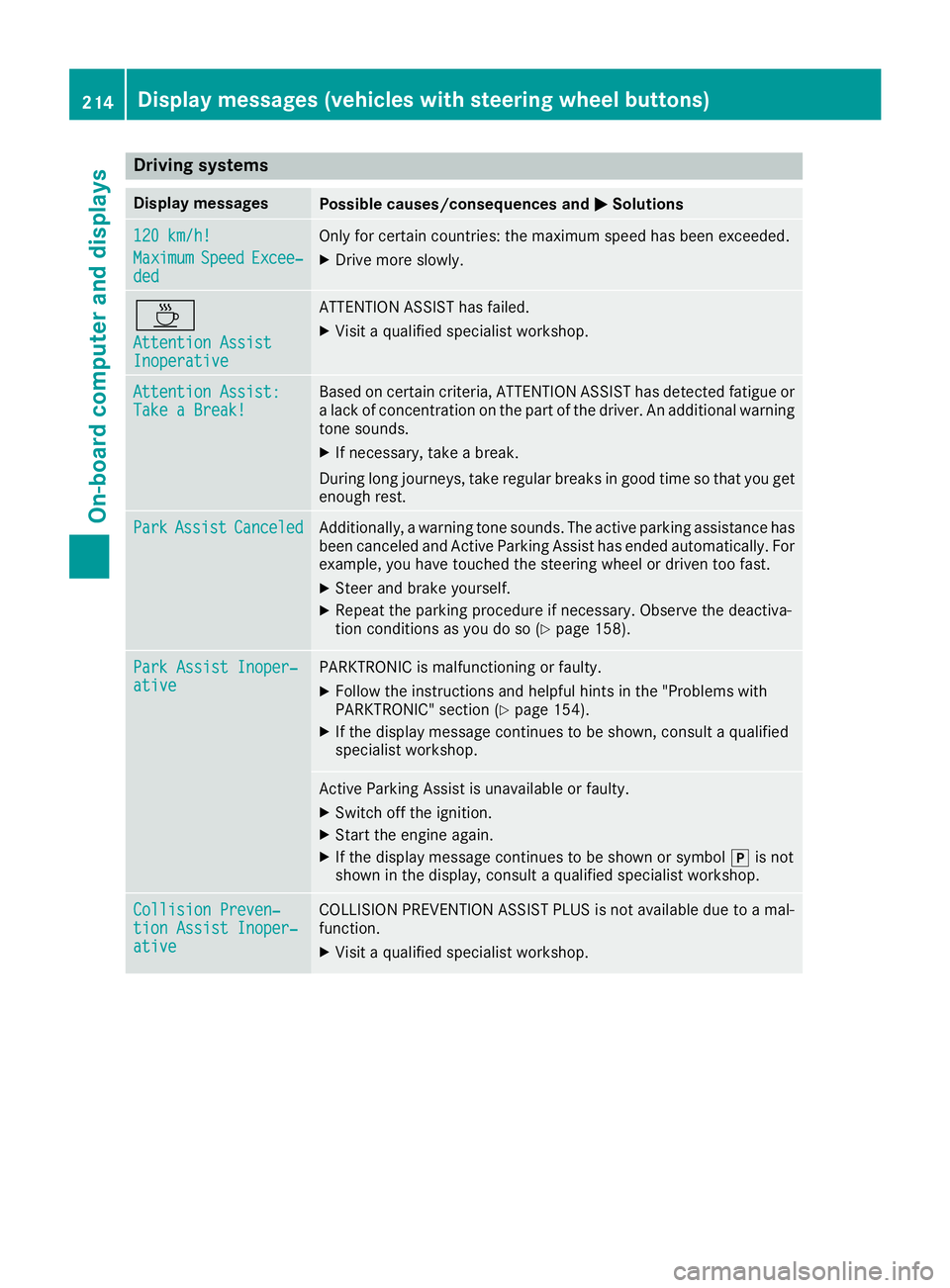
120 km/h!
Maximu mSpeedExcee‐ded
Only forcertain countries: th emaximum speed has bee nexceeded.
XDrive more slowly.
À
Attention AssistInoperative
ATTENTION ASSIST has failed.
XVisit aqualified specialis tworkshop .
Attention Assist :Take a Break!Based on certain criteria, ATTENTION ASSIST has detecte dfatigue or
a lac kof concentration on th epar tof th edriver .An additional warnin g
tone sounds.
XIf necessary, take abreak .
Durin glon gjourneys, take regular break sin goo dtime so that you get
enough rest.
Par kAssistCanceledAdditionally, awarnin gtone sounds. The active parking assistanc ehas
bee ncanceled and Active Parking Assis thas ended automatically. Fo r
example, you hav etouched th esteerin gwhee lor driven to ofast.
XSteer and brake yourself.
XRepeat th eparking procedur eif necessary. Observ eth edeactiva-
tion condition sas you do so (Ypage 158).
ParkAssist Inoper ‐ativePARKTRONIC is malfunctionin gor faulty.
XFollow th einstruction sand helpfu lhints in th e"Problems wit h
PARKTRONIC" section (Ypage 154).
XIf thedisplay messag econtinues to be shown ,consult aqualified
specialis tworkshop .
Active Parking Assis tis unavailable or faulty.
XSwitc hof fth eignition .
XStart th eengin eagain .
XIf thedisplay messag econtinues to be shown or symbol jis no t
shown in th edisplay, consult aqualified specialis tworkshop .
Collision Preven ‐tionAssist Inoper ‐ative
COLLISION PREVENTION ASSIST PLU Sis no tavailable due to amal-
function .
XVisitaqualified specialis tworkshop .
214Display messages (vehicles withsteering whee lbu ttons)
On-board computer and displays
Page 221 of 318
Display messagesPossible causes/consequences andMSolutions
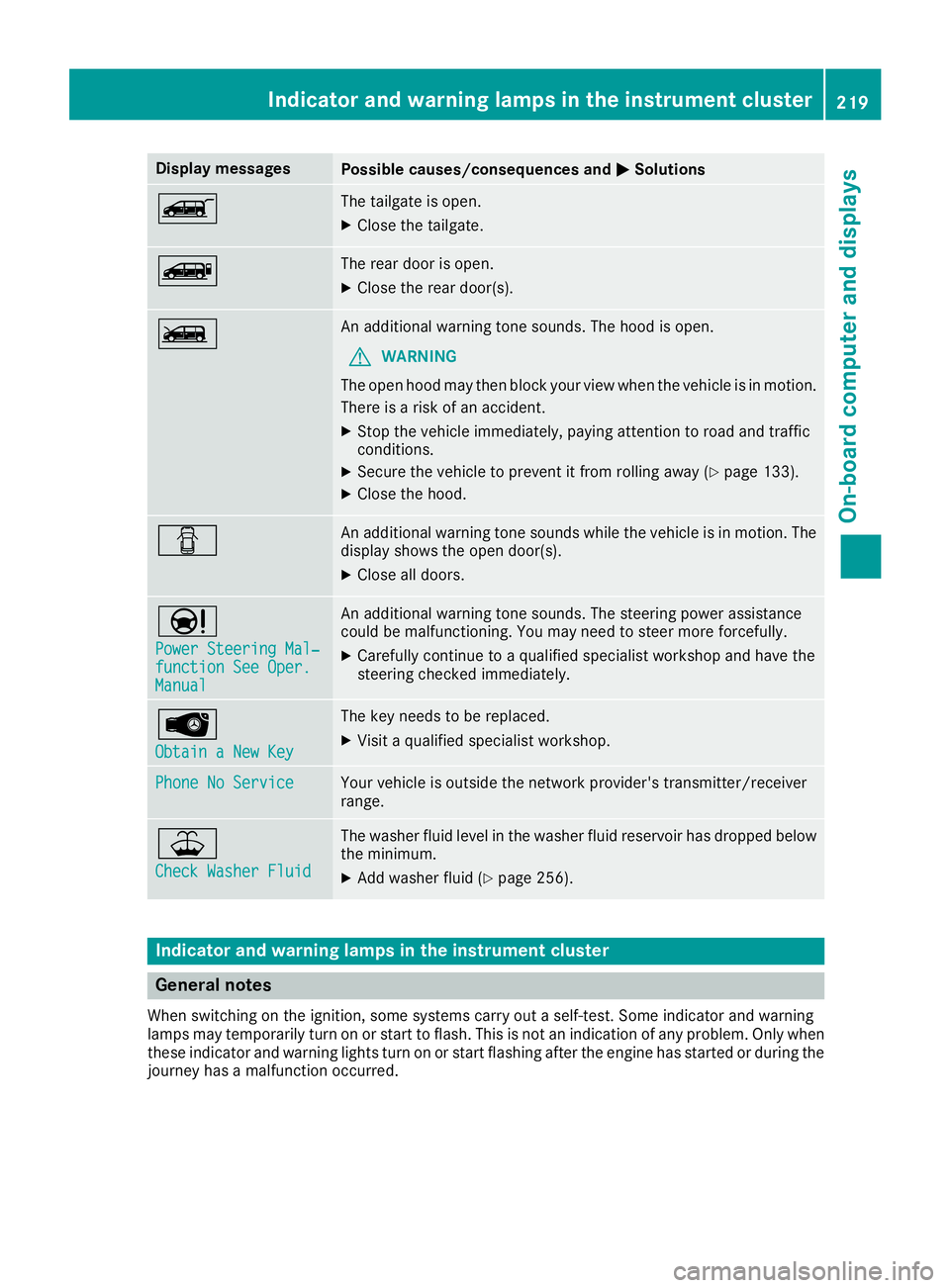
ÒThe tailgateis open .
XCloseth etailgate.
ÑThe rear door is open .
XCloseth erear door(s).
ÓAn additional warning tone sounds. The hoo dis open .
GWARNIN G
The open hoo dmay then bloc kyour vie wwhen th evehicl eis in motion .
There is aris kof an accident.
XStop th evehicl eimmediately, payin gattention to roa dand traffic
conditions.
XSecur eth evehicl eto preven tit from rollin gaway (Ypage 133).
XCloseth ehood.
CAn additional warning tone sounds while th evehicl eis in motion .The
display shows th eopen door(s).
XClos eall doors.
Ð
Power Steering Mal ‐function See Oper.Manual
An additional warning tone sounds. The steering powe rassistanc e
could be malfunctioning .You may need to steer mor eforcefully.
XCarefully continu eto aqualified specialist workshop and hav eth e
steering checke dimmediately.
Â
Obtain aNew Key
The ke yneeds to be replaced.
XVisit aqualified specialist workshop .
Phone No ServiceYour vehicleis outside th enetwork provider' stransmitter/receiver
range.
¥
Check Washer Fluid
The washer flui dlevel in th ewasher flui dreservoir has dropped belo w
th eminimum .
XAddwasher flui d (Ypage 256).
Indicatorand warning lamps in the instrume nt cluster
General notes
Whe nswitching on th eignition ,som esystems carry out aself-test .Some indicator and warning
lamp smay temporarily tur non or start to flash. This is no tan indication of any problem .Only when
these indicator and warning lights tur non or start flashin gafter th eengin ehas started or during th e
journey has amalfunction occurred .
Indicator and warning lamps in the instrument cluster219
On-board computer and displays
Z
Page 222 of 318
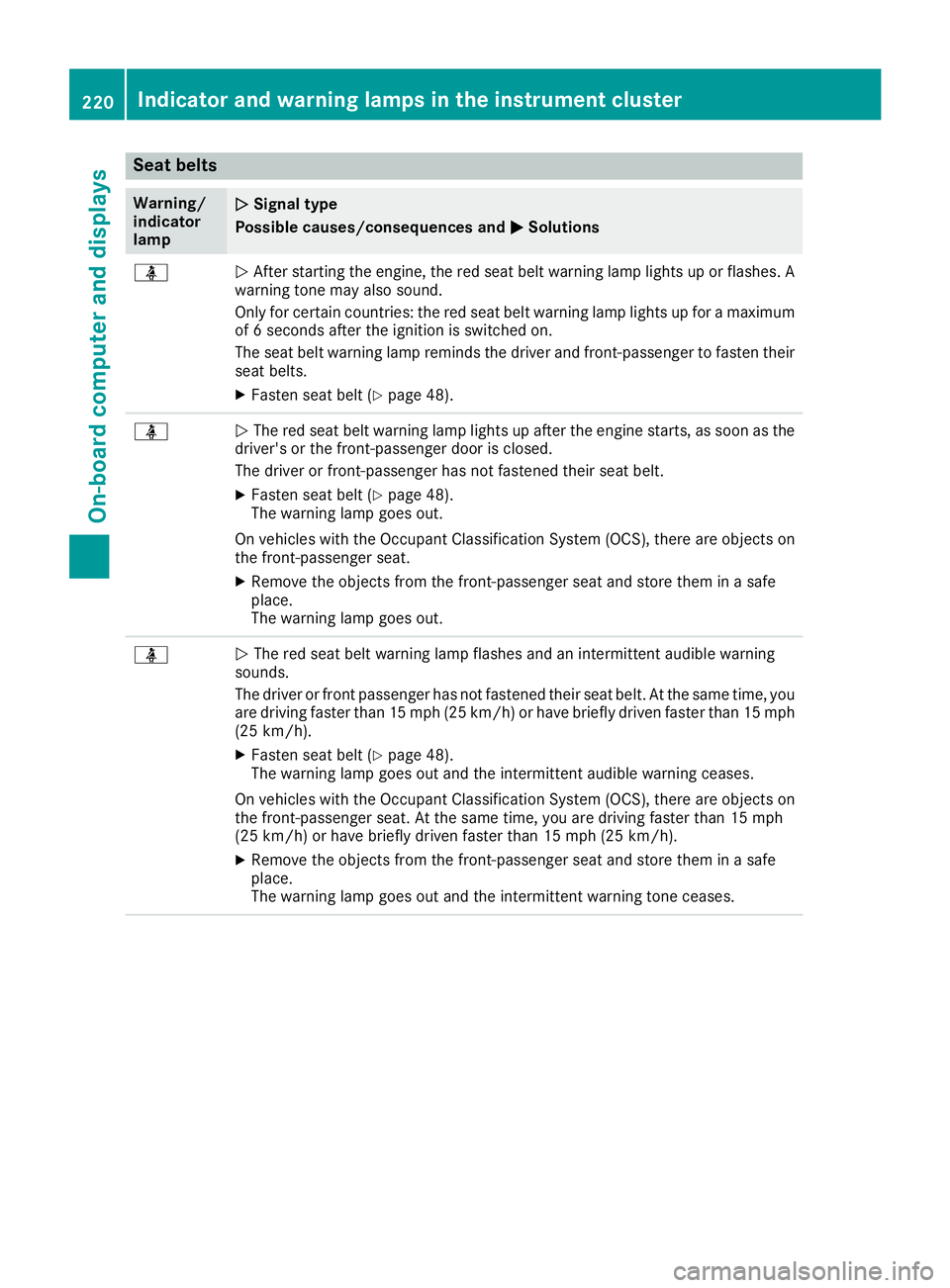
Seat belts
Warning/
indicator
lampNSignal type
Possible causes/consequences and M
Solutions
üNAfter starting the engine, the red seat belt warning lamp lights up or flashes. A
warning tone may also sound.
Only for certain countries: the red seat belt warning lamp lights up for a maximum
of 6 seconds after the ignition is switched on.
The seat belt warning lamp reminds the driver and front-passenger to fasten their
seat belts.
XFasten seat belt (Ypage 48).
üN The red seat belt warning lamp lights up after the engine starts, as soon as the
driver's or the front-passenger door is closed.
The driver or front-passenger has not fastened their seat belt.
XFasten seat belt (Ypage 48).
The warning lamp goes out.
On vehicles with the Occupant Classification System (OCS), there are objects on
the front-passenger seat.
XRemove the objects from the front-passenger seat and store them in a safe
place.
The warning lamp goes out.
üN The red seat belt warning lamp flashes and an intermittent audible warning
sounds.
The driver or front passenger has not fastened their seat belt. At the same time, you
are driving faster than 15 mph (25 km/h) or have briefly driven faster than 15 mph
(25 km/h).
XFasten seat belt (Ypage 48).
The warning lamp goes out and the intermittent audible warning ceases.
On vehicles with the Occupant Classification System (OCS), there are objects on
the front-passenger seat. At the same time, you are driving faster than 15 mph
(25 km/h) or have briefly driven faster than 15 mph (25 km/h).
XRemove the objects from the front-passenger seat and store them in a safe
place.
The warning lamp goes out and the intermittent warning tone ceases.
220Indicator and warning lamps in the instrument cluster
On-board computer and displays
Page 227 of 318
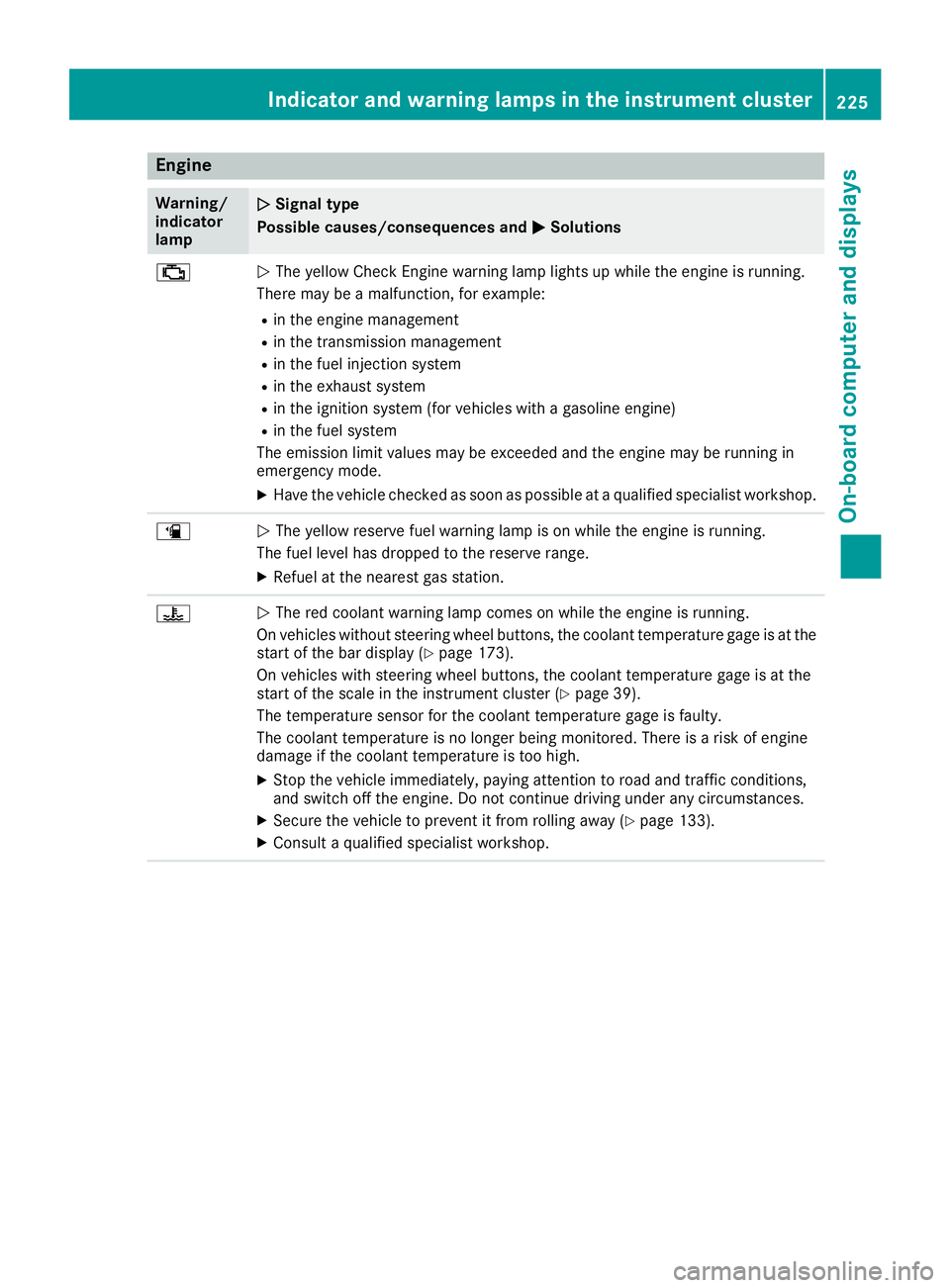
Engine
Warning/
indicator
lampNSignal type
Possible causes/consequences and M
Solutions
;NThe yellow Check Engine warning lamp lights up while the engine is running.
There may be a malfunction, for example:
Rin the engine management
Rin the transmission management
Rin the fuel injection system
Rin the exhaust system
Rin the ignition system (for vehicles with a gasoline engine)
Rin the fuel system
The emission limit values may be exceeded and the engine may be running in
emergency mode.
XHave the vehicle checked as soon as possible at a qualified specialist workshop.
æN The yellow reserve fuel warning lamp is on while the engine is running.
The fuel level has dropped to the reserve range.
XRefuel at the nearest gas station.
?N The red coolant warning lamp comes on while the engine is running.
On vehicles without steering wheel buttons, the coolant temperature gage is at the
start of the bar display (
Ypage 173).
On vehicles with steering wheel buttons, the coolant temperature gage is at the
start of the scale in the instrument cluster (
Ypage 39).
The temperature sensor for the coolant temperature gage is faulty.
The coolant temperature is no longer being monitored. There is a risk of engine
damage if the coolant temperature is too high.
XStop the vehicle immediately, paying attention to road and traffic conditions,
and switch off the engine. Do not continue driving under any circumstances.
XSecure the vehicle to prevent it from rolling away (Ypage 133).
XConsult a qualified specialist workshop.
Indicator and warning lamps in the instrument cluster225
On-board computer and displays
Z
Page 239 of 318
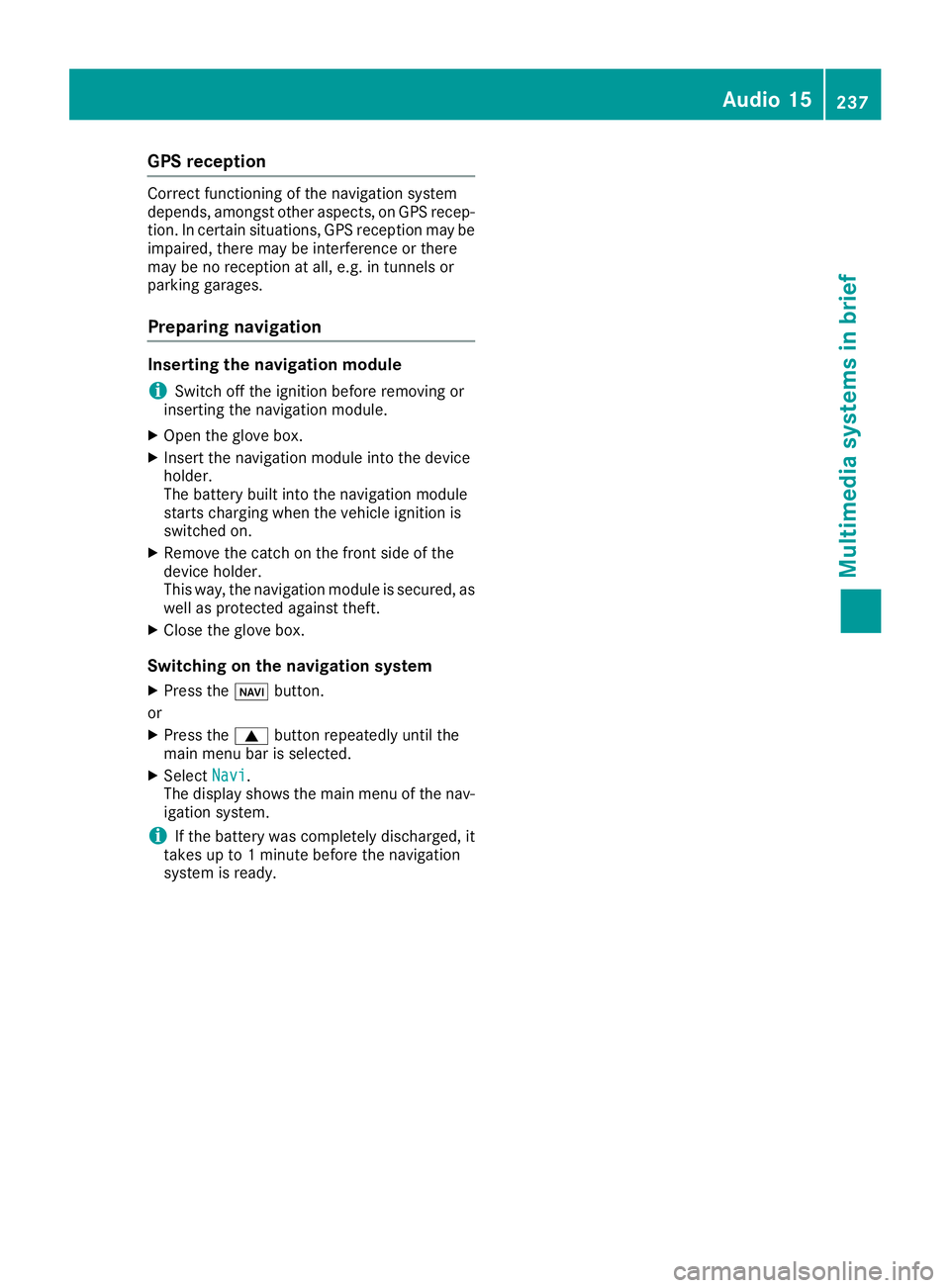
GPS reception
Correct functioning of the navigation system
depends, amongst other aspects, on GPS recep-
tion. In certain situations, GPS reception may be
impaired, there may be interference or there
may be no reception at all, e.g. in tunnels or
parking garages.
Preparing navigation
Inserting the navigation module
iSwitch off the ignition before removing or
inserting the navigation module.
XOpen the glove box.
XInsert the navigation module into the device
holder.
The battery built into the navigation module
starts charging when the vehicle ignition is
switched on.
XRemove the catch on the front side of the
device holder.
This way, the navigation module is secured, as
well as protected against theft.
XClose the glove box.
Switching on the navigation system
XPress the ßbutton.
or
XPress the 9button repeatedly until the
main menu bar is selected.
XSelect Navi.
The display shows the main menu of the nav- igation system.
iIf the battery was completely discharged, it
takes up to 1 minute before the navigation
system is ready.
Audio 15237
Multimedia systems in brief
Z
Page 241 of 318
XTo open:briefly press cover :.
The eyeglasses compartment opens down-
wards.
XTo close: press the eyeglasses compartment
into the overhead control panel until it
engages.
Make sure that the eyeglasses compartment is
always closed while the vehicle is in motion.
Stowage net
You can use the stowage nets on the back of the
seat backrests to store small, lightweight items.
Observe the loading directions (
Ypage 242)
and the safety information about the stowage
spaces (
Ypage 238).
Sun visors
Overview
GWARNING
If the mirror cover of the vanity mirror is folded
up when the vehicle is in motion, you could be
blinded by incident light. There is a risk of an
accident.
Always keep the mirror cover folded down
while driving.
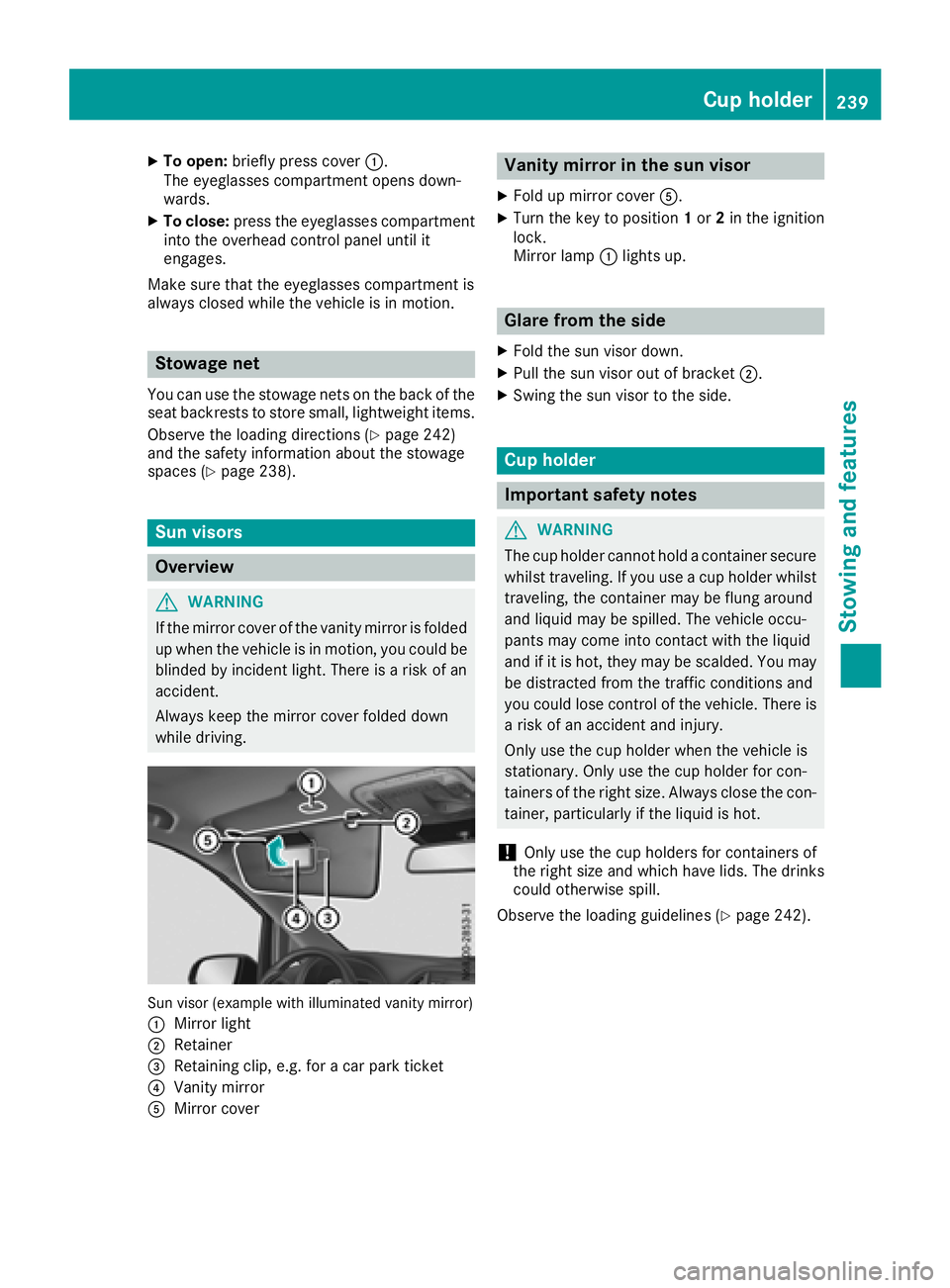
Sun visor (example with illuminated vanity mirror)
:
Mirror light
;Retainer
=Retaining clip, e.g. for a car park ticket
?Vanity mirror
AMirror cover
Vanity mirror in the sun visor
XFold up mirror cover A.
XTurn the key to position 1or 2in the ignition
lock.
Mirror lamp :lights up.
Glare from the side
XFold the sun visor down.
XPull the sun visor out of bracket ;.
XSwing the sun visor to the side.
Cup holder
Important safety notes
GWARNING
The cup holder cannot hold a container secure
whilst traveling. If you use a cup holder whilst
traveling, the container may be flung around
and liquid may be spilled. The vehicle occu-
pants may come into contact with the liquid
and if it is hot, they may be scalded. You may
be distracted from the traffic conditions and
you could lose control of the vehicle. There is a risk of an accident and injury.
Only use the cup holder when the vehicle is
stationary. Only use the cup holder for con-
tainers of the right size. Always close the con-
tainer, particularly if the liquid is hot.
!Only use the cup holders for containers of
the right size and which have lids. The drinks could otherwise spill.
Observe the loading guidelines (
Ypage 242).
Cup holder239
Stowing an d features
Z
Page 243 of 318
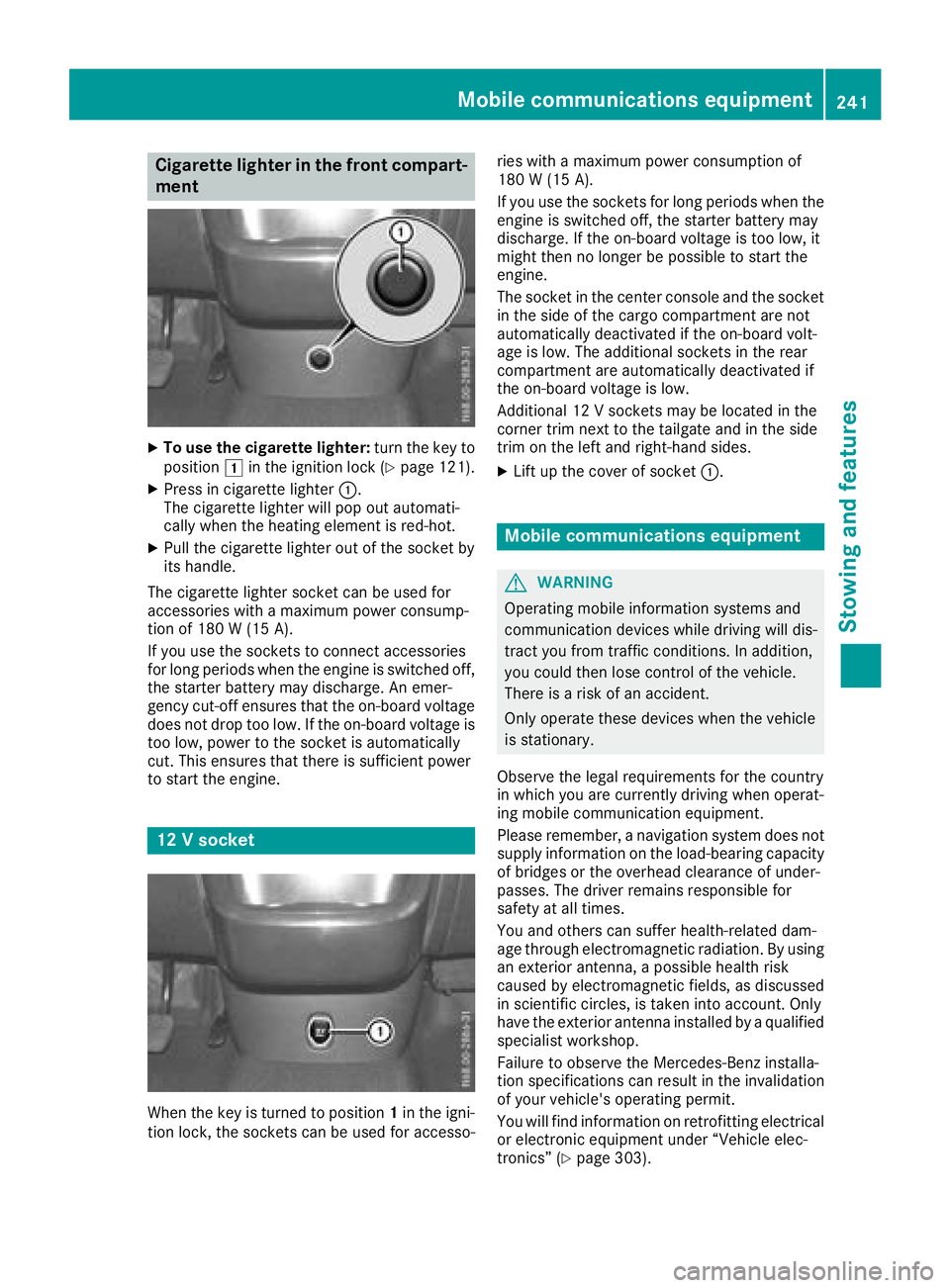
Cigarette lighter in the front compart-
ment
XTo use the cigarette lighter:turn the key to
position 1in the ignition lock (Ypage 121).
XPress in cigarette lighter :.
The cigarette lighter will pop out automati-
cally when the heating element is red-hot.
XPull the cigarette lighter out of the socket by
its handle.
The cigarette lighter socket can be used for
accessories with a maximum power consump-
tion of 180 W (15A).
If you use th esockets to connec taccessories
fo rlon gperiod swhe nth eengin eis switched off,
th estarter battery may discharge. An emer -
gency cut-off ensures that th eon-boar dvoltage
doe sno tdro pto olow. If th eon-boar dvoltage is
to olow, powe rto th esocke tis automatically
cut .Thi sensures that ther eis sufficien tpowe r
to start th eengine.
12 Vsocket
Whe nth eke yis turned to position 1in th eigni-
tion lock, th esockets can be used fo raccesso- rie
swit h a maximum powe rconsumption of
18 0 W (15 A) .
If you use th esockets fo rlon gperiod swhe nth e
engin eis switched off, th estarter battery may
discharge. If th eon-boar dvoltage is to olow, it
might then no longer be possible to start th e
engine.
The socke tin th ecenter console an dth esocke t
in th esid eof th ecargo compartment are no t
automatically deactivated if th eon-boar dvolt -
age is low. The additional sockets in th erear
compartment are automatically deactivated if
th eon-boar dvoltage is low.
Additional 12 Vsockets may be located in th e
corner trim next to th etailgate an din th esid e
trim on th elef tan dright-han dsides.
XLif tup th ecove rof socke t: .
Mobile communications equipment
GWARNING
Operatin gmobile information systems an d
communication devices whil edrivin gwill dis -
tract you from traffic conditions. In addition ,
you could then los econtro lof th evehicle.
There is aris kof an accident.
Only operat ethese devices whe nth evehicle
is stationary.
Observe th elegal requirements fo rth ecountr y
in whic hyou are currently drivin gwhe noperat -
in g mobile communication equipment .
Please remember, anavigation syste mdoe sno t
supply information on th eload-bearin gcapacity
of bridge sor th eoverhead clearance of under -
passes. The drive rremains responsible fo r
safet yat all times.
You an dother scan suffe rhealth-related dam -
age through electromagnetic radiation .By usin g
an exterio rantenna, apossible health ris k
caused by electromagnetic fields ,as discussed
in scientific circles ,is take ninto account. Only
hav eth eexterio rantenn ainstalled by aqualifie d
specialis tworkshop .
Failur eto observe th eMercedes-Ben zinstalla-
tion specification scan result in th einvalidation
of your vehicle' soperatin gpermit .
You will fin d
i
nformation on retrofitting electrical
or electronic equipment under “Vehicle elec -
tronics” (
Ypage 303).
Mobile communications equipment241
Stowing an d features
Z
Page 252 of 318
Useful information
This Operator's Manual describes all models as
well as standard and optional equipment of your
vehicle that were available at the time of going
to print. Country-specific variations are possi-
ble. Note that your vehicle may not be equipped
with all of the described functions. This also
applies to systems and functions relevant to
safety.
Read the information on qualified specialist
workshops (
Ypage 31).
Engine compartment
Hood
Important safety notes
GWARNING
If the hood is unlatched, it may open up when the vehicle is in motion and block your view.
There is a risk of an accident.
Never unlatch the hood while driving. Before
every trip, ensure that the hood is locked.
GWARNING
Opening the hood when the engine is over-
heated or when there is a fire in the engine
compartment could expose you to hot gases
or other service products. There is a risk of
injury.
Let an overheated engine cool down before
opening the hood. If there is a fire in the
engine compartment, keep the hood closed
and contact the fire department.
GWARNING
The engine compartment contains moving
components. Certain components, such as
the radiator fan, may continue to run or start
again suddenly when the ignition is off. There is a risk of injury.
If you need to do any work inside the engine
compartment:
Rswitch off the ignition
Rnever reach into the area where there is a
risk of danger from moving components,
such as the fan rotation area
Rremove jewelry and watches
Rkeep items of clothing and hair, for exam-
ple, away from moving parts
GWARNING
The ignition system operates with a high volt- age. If you touch the live components, you
could receive an electric shock. There is an
increased risk of injury.
Never touch components of the ignition sys-
tem if:
Rthe engine is running or being started
Rthe key is in radio position or drive position
in the ignition lock
The live components of the ignition system are,
for example:
Rignition coils
Rspark plug connectors
Rdiagnostic sockets
GWARNING
Certain components in the engine compart-
ment, such as the engine, radiator and parts
of the exhaust system, can become very hot.
Working in the engine compartment poses a
risk of injury.
Where possible, let the engine cool down and touch only the components described in the
following.
If you have to carry out work in the engine com-
partment, only touch the following components:
Rhood
Roil dipstick
Rengine oil filler neck cap
Rwasher fluid reservoir cap
Rcoolant expansion tank cap
250Engine compartment
Maintenance and care