Brake switch MERCEDES-BENZ METRIS 2017 MY17 Operator’s Manual
[x] Cancel search | Manufacturer: MERCEDES-BENZ, Model Year: 2017, Model line: METRIS, Model: MERCEDES-BENZ METRIS 2017Pages: 318, PDF Size: 5.01 MB
Page 7 of 318
Display messages (vehicle with-
out steering wheel buttons) ........... 200
Function/notes ............................. 150
ATTENTION ASSIST
see ATTENTION ASSIST
Audio 10
Important safety notes .................. 230
Audio 15
Bluetooth
®settings ....................... 234
Display overview ............................ 233
Entering the passkey ..................... 234
Important safety notes .................. 230
Making a call ................................. 236
Media mode ................................... 235
Navigation ..................................... 236
Overview ........................................ 232
Telephone mode ............................ 236
Authorized workshop
see Qualified specialist workshop
AUTO lamp
Display messages (vehicle with-
out steering wheel buttons) ........... 196
AUTO lights
Display messages (vehicle with
steering wheel buttons) ................. 210
see Lights
Automatic car wash (care) ............... 264
Automatic engine start (ECO start/
stop function) .................................... 124
Automatic engine switch-off (ECO
start/stop function) .......................... 124
Automatic headlamp mode ................ 95
Automatic locking ............................... 74
Automatic transmission
Accelerator pedal position ............. 130
Changing gear ............................... 128
DIRECT SELECT lever ..................... 126
Display message ............................ 218
Drive program display .................... 128
Driving tips .................................... 130
Emergency running mode .............. 132
Engaging drive position .................. 127
Engaging neutral ............................ 127
Engaging reverse gear ................... 127
Engaging the park position ............ 127
Gearshift recommendation ............ 131
Important safety notes .................. 126 Kickdown ....................................... 130
Manual shifting .............................. 130
Overview ........................................ 126
Problem (malfunction) ................... 132
Program selector button ................ 129
Rocking the
vehi
cle free ................ 130
Shift ranges ................................... 128
Starting the engine ........................ 122
Steering wheel paddle shifters ...... 130
Trailer towing ................................. 130
Transmission oil change ................ 308
Transmission position display
(DIRECT SELECT lever) ................... 128
Transmission positions .................. 127
Automatic transmission emer-
gency mode ....................................... 132
Axle load, permissible (trailer tow-
ing) ...................................................... 314
B
Backup lamp
Display messages (vehicle with
steering wheel buttons) ................. 211
Backup lamps
Display messages (vehicle with-
out steering wheel buttons) ........... 197
Replacing bulbs ............................. 103
BAS (Brake Assist System)
Function/notes ................................ 65
Basic settings
see Settings
Battery (SmartKey)
Checking .......................................... 71
Important safety notes .................... 71
Replacing ......................................... 72
Battery (vehicle)
Care ............................................... 263
Charging ........................................ 262
Connecting and installing .............. 261
Disconnecting and removing ......... 259
Display messages (vehicle with
steering wheel buttons) ................. 212
Display messages (vehicle with-
out steering wheel buttons) ........... 198
Important safety notes .................. 258
Jump starting ................................. 272
Location ......................................... 259
Index5
Page 9 of 318
Seat belt ........................................ 269
Seat cover ..................................... 268
Sensors ......................................... 266
Sliding door ................................... 267
Steering wheel ............................... 268
Trim pieces .................................... 268
Washing by hand ........................... 264
Washing the engine ....................... 265
Wheels ........................................... 266
Windows ........................................ 265
Wiper blades .................................. 266
Cargo compartment
Options .......................................... 244
Seating ............................................ 86
Cargo compartment lamp
Changing bulbs ................................ 99
Cargo compartment lighting
Switching on centrally ...................... 98
Switching on locally ......................... 98
Cargo tie-down rings
Permissible tensile load ................. 312
Center console
Controls ........................................... 42
Central locking
Activating/deactivating the
acoustic locking confirmation (on-
board computer) ............................ 188
Automatic locking ............................ 74
Automatic locking (on-board com-puter) ............................................. 188
Emergency unlocking ....................... 70
Locking/unlocking (buttons) ........... 73
Locking/unlocking (SmartKey) ........ 69
Central locking system
see Central locking
Change of address .............................. 28
Change of ownership .......................... 28
Changing a bulb
Ambient lamp in the front door ........ 99
Halogen headlamps ....................... 100
Mirror lamp in the headliner ............ 99
Signal and ambient light in the tail-
gate ............................................... 100
Trunk lamp in the side trim panel .... 99
Changing bulbs
Additional turn signals ................... 102
Ambient lamp in tailgate .................. 99
Backup lamps ................................ 103 Brake lamps ................................... 103
Cargo compartment lamp ................ 99
Daytime running lamps .................. 102
High-beam headlamps ................... 102
Installing/removing a rear lamp
cluster ........................................... 103
Installi
ng/removing the cover in
the wheel arch ............................... 101
Installing/removing the tail lamp ... 103
Interior light ..................................... 98
Interior lighting ................................ 98
Low-beam headlamps .................... 101
Overview of lamp types (front
bulbs) ............................................. 101
Overview of lamp types (rear
bulbs) ............................................. 102
Parking lamps ................................ 102
Rear fog lamp ................................ 103
Rear interior light in the headliner ... 99
Standing lamps (front) ................... 102
Standing lamps (rear) .................... 103
Tail lamps ...................................... 103
Trunk lamp in the headliner ............. 98
Turn signals (front) ......................... 102
Turn signals (rear) .......................... 103
see Changing light bulbs
Changing bulbs
see Replacing bulbs
Child
Restraint system .............................. 59
Child seat
Forward-facing restraint system ...... 62
LATCH-type (ISOFIX) child seat
anchors ............................................ 61
On the front-passenger seat ............ 62
Rearward-facing restraint system .... 62
Top Tether ....................................... 61
Child-proof locks
Important safety notes .................... 63
Sliding door ..................................... 63
Children
Special seat belt retractor ............... 59
Children in the vehicle
Important safety notes .................... 58
Cigarette lighter ................................ 240
Cleaning
Trailer tow hitch ............................. 267
Index7
Page 10 of 318
Cleaningsee Care
Climate control
Air conditioning in the rear com-
partment ........................................ 111
Control panel for dual-zone auto-
matic climate control .................... .110
Controlling automatically ...............1 13
Cooling with air dehumidification .. 112
Defrosting the windows ................. 116
Defrosting the windshield .............. 115
Important safety notes .................. 108
Information on dual-zone auto-
matic climate control ..................... 110
Information on TEMPMATIC (air-
conditioning system) ..................... 109
Overview of systems ......................1 08
Problem with the rear window
defroster ........................................ 116
Rear-compartment air condition-
ing ................................................. 111
Refrigerant ..................................... 310
Refrigerant filling capacity ............. 310
Setting the air distribution ............. 114
Setting the air vents ......................1 18
Setting the airflow ......................... 114
Setting the temperature ................ 113
Switching air-recirculation mode
on/off ............................................ 116
Switching on/off ........................... 111
Switching residual heat on/off ...... 117
Switching the rear window
defroster on/off ............................ 116
Switching the synchronization
function on and off ........................ 115
TEMPMATIC control panel (air
conditioning) .................................. 109
Clock
Setting (vehicle without steering
wheel buttons) ............................... 176
Cockpit
Instrument cluster (vehicle with
steering wheel buttons) ................... 39
Instrument cluster (vehicle with-
out steering wheel buttons) ............. 37
Overview .......................................... 36
see Instrument cluster Coffee cup symbol
see ATTENTION ASSIST
C
OLLISION PREVENTION ASSIST
Activating/deactivating the dis-
tance warning function .................. 185
Adaptive Brake Assist .................... 145
Display message ............................ 214
Distance warning function ............. 144
Operation/notes ............................ 144
Collision warning
see COLLISION PREVENTION ASSIST
COMAND display
Cleaning ......................................... 268
Combination switch ............................ 96
Communications equipment
Operation ....................................... 241
Type approval/frequency .............. 303
Consumption statistics
Fuel (vehicle with steering wheel
buttons) ......................................... 179
Fuel (vehicle without steering
wheel buttons) ............................... 172
Control panel
Above the windshield ....................... 43
Center console ................................ 42
Climate control ................................ 42
Driver's door ....................................4 3
Convenience closing feature .............. 83
Convenience opening
With the SmartKey ........................ .117
Convenience opening feature ............ 82
Conversions/equipment .................... 32
Coolant (engine)
Adding ...........................................2 55
Checking the level ......................... 253
Display messages (vehicle with
steering wheel buttons) ................. 213
Display messages (vehicle with-
out steering wheel buttons) ........... 198
Displaying the temperature (on-
board computer) ............................ 173
Filling capacity ............................... 310
Notes ............................................. 309
Temperature display in the instru-
ment cluster .................................. 170
Warning lamp ................................. 225
Cooling
see Climate control
8Index
Page 13 of 318
Limited braking efficiency on sal-
ted roads ....................................... 138
New brake disks ............................ 138
New brake pads/linings ................ 138
Off-road driving .............................. 140
Overrun cut-off .............................. 136
Snow chains .................................. 280
Speed limitation .............................136
Towing a trailer .............................. 163
Wet road surface ........................... 138
E
EBD (electronic brake force distri-
bution)
Display message (vehicle with
steering wheel buttons) ................. 207
Display message (vehicle without
steering wheel buttons) ................. 193
Function/notes ................................ 65
ECO start/stop function
Automatic engine start .................. 124
Automatic engine switch-off .......... 124
Deactivating/activating ................. 125
General information ....................... 123
Important safety notes .................. 124
Electric sliding door
Function ...........................................7 6
Important safety notes .................... 75
Obstacle detection ........................... 76
Opening/closing from the inside .....7 7
Problem (malfunction) ..................... 78
Programming the key button ........... 78
Resetting ......................................... 78
Reversing feature ............................. 76
Electrical fuses
see Fuses
Electrical sliding door
Opening/closing from the out-
side .................................................. 76
Electronic brake force distribution
see EBD (electronic brake force
distribution)
Electronic Stability Program
see ESP
®(Electronic Stability Program)
Emergency
Automatic measures after an acci-
dent .................................................5 8Emergency braking
see BAS (Brake Assist System)
Emergency release
Vehicle ............................................ .71
Emergency Tensioning Devices
Activation ........................................ .56
Emissions control
Service and warranty information .... 27
Engine
Altitude limit (diesel engine) .......... 141
Changing the power output ............. 31
Check Engine warning lamp ........... 225
Cleaning instr uctio
ns ..................... 265
Display messages (vehicle with
steering wheel buttons) ................. 212
Display messages (vehicle with-
out steering wheel buttons) ........... 198
ECO start/stop function ................ 123
Engine number ............................... 304
Irregular running ............................ 125
Jump-starting ................................. 272
Operating safety .............................. 31
Starting .......................................... 122
Starting problems .......................... 125
Switching off .................................. 135
Tow-starting (vehicle) ..................... 276
Engine electronics
Notes ............................................. 303
Problem (malfunction) ................... 125
Engine jump starting
see Jump starting (engine)
Engine oil
Adding ........................................... 253
Additives ........................................ 308
Checking the oil level using the
dipstick .......................................... 252
Display messages (vehicle with
steering wheel buttons) ................. 213
Display messages (vehicle with-
out steering wheel buttons) ........... 199
Filling capacity ............................... 307
Information about oil consump-
tion ................................................ 308
Notes about oil grades ................... 307
Oil change ...................................... 308
Oil level (note) ............................... 252
Viscosity ........................................ 308
Index11
Page 15 of 318
Gearshift recommendationDisplay (vehicle with steering
wheel buttons) ...............................1 77
Display (vehicle without steering
wheel buttons) ............................... 171
Genuine parts ...................................... 33
Glove box ...........................................2 38
GTW (Gross Trailer Weight) (defini-
tion) .................................................... 294
Guide rail
Maximum tensile strength ............. 313
H
Handbrakesee Parking brake
Handling control system
see ESP
®(Electronic Stability Program)
Hands-free system
see Mobile phone
Hazard warning lamps ........................ 96
Head restraints
Adjusting (manually) ........................ 89
Important safety notes .................... 89
Removing/installing ........................ 89
Headlamps
Changing bulbs (halogen head-
lamps) ............................................ 100
Fogging up ....................................... 97
see Automatic headlamp mode
Heating
see Climate control
High-beam headlamps
Display messages (vehicle with
steering wheel buttons) ................. 210
Display messages (vehicle with-
out steering wheel buttons) ........... 197
Replacing bulbs ............................. 102
Switching on/off .............................. 96
Hill start assist .................................. 123
Hood
Closing ........................................... 251
Display messages (vehicle with
steering wheel buttons) ................. 219
Display messages (vehicle with-
out steering wheel buttons) ........... 202
Important safety notes .................. 250
Opening ......................................... 251 Hydroplaning
..................................... 139
I
Ignition lock
see SmartKey positions (ignition lock)
Immobilizer .......................................... 67
Indicator lamps
see Warning and indicator lamps
Indicators
see Turn signals
Insect protection on the radiator ...... 33
Instrument cluster
Buttons (vehicle without steering
wheel buttons) ............................... 171
Overview (vehicle with steering
wheel buttons) ................................. 39
Overview (vehicle without steer-
ing wheel buttons) ........................... 37
Warning and indicator lamps
(vehicle with steering wheel but-
tons) ................................................ 40
Warning and indicator lamps
(vehicle without steering wheel
buttons) ........................................... 38
Instrument cluster lighting .............. 169
Interior lighting
Automatic control ............................ 97
Delayed switch-off (on-board
computer) ...................................... 188
General notes .................................. 97
Manual control ................................. 98
Notes on changing bulbs ................. 98
Overview .......................................... 97
Reading lamp ................................... 97
Rear interior light in the grab han-
dle .................................................... 98
Replacing bulbs ............................... 98
Switching the cargo compartment
lighting on/off (cargo compart-
ment) ............................................... 98
Switching the cargo compartment
lighting on/off (dashboard) .............. 98
Switching the rear compartment
lighting on centrally ......................... 98
Index13
Page 27 of 318
Ventilationsee Climate control
VIN
Engine compartment ..................... 304
Type plate ...................................... 303
W
WarningStickers ........................................... 29
Warning and indicator lamps
ABS ................................................ 222
Brakes ........................................... 221
Check Engine ................................. 225
COLLISION PREVENTION ASSIST .. 227
Coolant .......................................... 225
Distance warning ........................... 227
Door ............................................... 229
ESP
®.............................................. 222
ESP®OFF ....................................... 224
Fuel tank ........................................ 225
General notes ................................ 219
Overview (vehicle with steering
wheel buttons) ................................. 40
Overview (vehicle without steer-
ing wheel buttons) ........................... 38
Parking brake ................................ 134
PASSENGER AIR BAG OFF ............... 46
Rear door ....................................... 229
Reserve fuel ................................... 225
Restraint system ............................ 224
Seat belt ........................................ 220
Sliding door ................................... 229
Steering ......................................... 229
Tire pressure monitor .................... 228
Warranty .............................................. 27
Washer fluid
Adding ........................................... 256
Capacities ...................................... 311
Display messages (vehicle with
steering wheel buttons) ................. 219
Display messages (vehicle with-
out steering wheel buttons) ........... 203
Notes ............................................. 311
Wheel and tire combination
see Tires
Wheel bolt tightening torque ........... 299Wheels
Changing a wheel .......................... 296
Checking ........................................ 278
Cleaning ......................................... 266
Important safety notes .................. 277
Interchanging/changing ................ 296
Mounting a new wheel ................... 298
Mounting a wheel .......................... 297
Removing a wheel .......................... 298
Removing and mounting the spare
wheel ............................................. 301
Snow chains .................................. 280
Storing ........................................... 296
Tightening torque ........................... 299
Wheel/tire combinations ............... 300
Window curtain air bag
Display message (vehicle with
steering wheel buttons) ................. 209
Display message (vehicle without
steering wheel buttons) ................. 195
Operati on ......................................... 52
Wi
ndows
see Side windows
Windshield
Cleaning ......................................... 265
Defrosting ...................................... 115
Windshield washer fluid
Adding ........................................... 256
Windshield wiper
Setting the sensitivity of the rain
sensor (vehicle with steering
wheel buttons) ............................... 188
Setting the sensitivity of the rain
sensor (vehicle without steering
wheel buttons) ............................... 175
Windshield wiper
see Windshield
Windshield wipers
Problem (malfunction) ................... 107
Rear window wiper ........................ 104
Replacing the wiper blades ............ 105
Switching on/off ........................... 104
Winter driving
Slippery road surfaces ................... 139
Snow chains .................................. 280
Winter operation
General notes ................................ 279
Radiator cover ................................. 33
Index25
Page 38 of 318
Cockpit
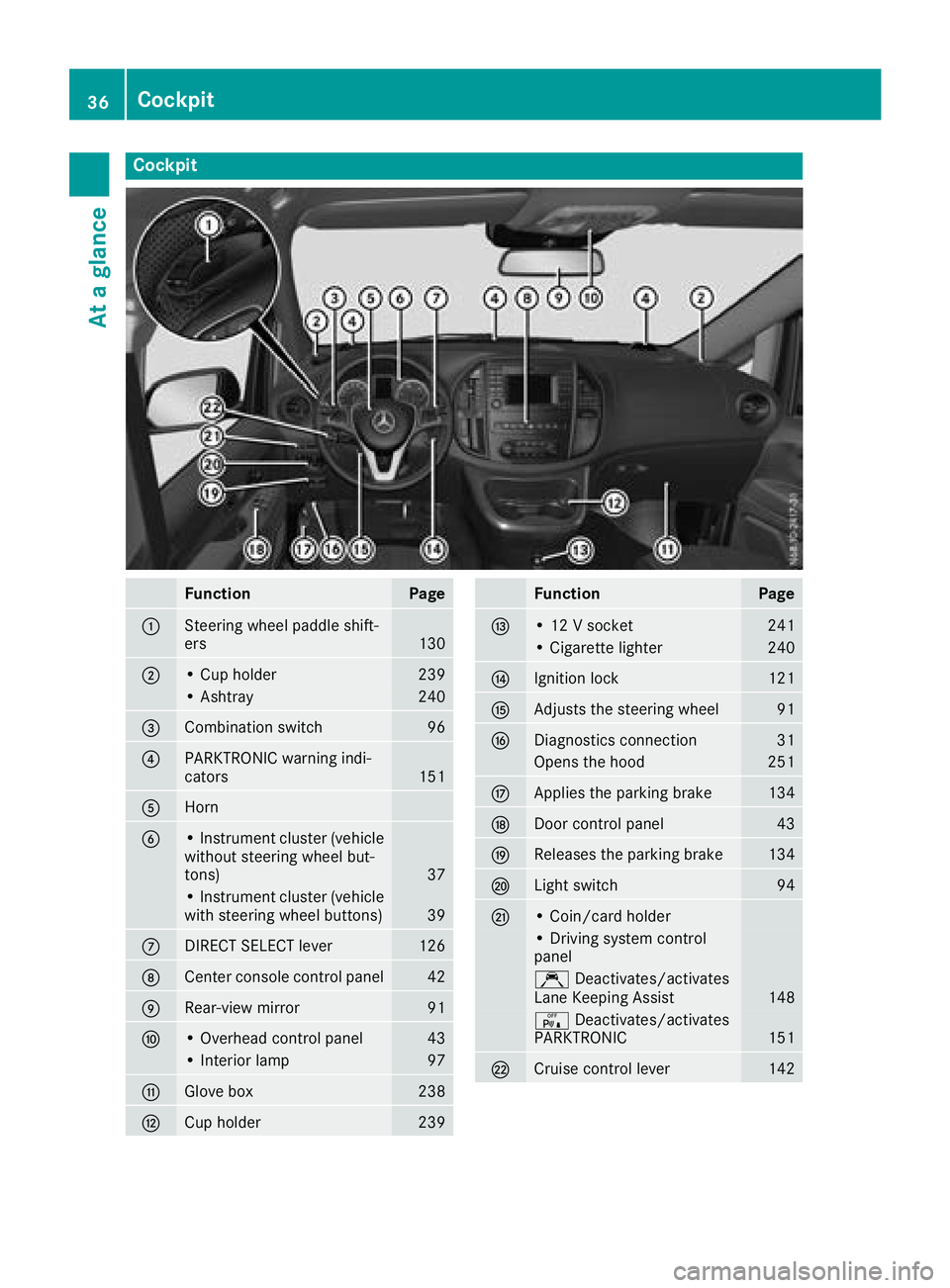
FunctionPage
:Steering wheel paddle shift-
ers130
;• Cup holder239
• Ashtray240
=Combination switch96
?PARKTRONIC warning indi-
cators151
AHorn
B• Instrument cluster (vehicle
without steering wheel but-
tons)
37
• Instrument cluster (vehicle
with steering wheel buttons)39
CDIRECT SELECT lever126
DCenter console control panel42
ERear-view mirror91
F• Overhead control panel43
• Interior lamp97
GGlove box238
HCup holder239
FunctionPage
I• 12 V socket241
• Cigarette lighter240
JIgnition lock121
KAdjusts the steering wheel91
LDiagnostics connection31
Opens the hood251
MApplies the parking brake134
NDoor control panel43
OReleases the parking brake134
PLight switch94
Q• Coin/card holder
• Driving system control
panel
ÇDeactivates/activates
Lane Keeping Assist148
c Deactivates/activates
PARKTRONIC151
RCruise control lever142
36Cockpit
At a glance
Page 60 of 318
sive role in the deployment of an air bag. Nor do
they provide an indication of air bag deploy-
ment.
The vehicle can be deformed considerably, with-
out an air bag being deployed. This is the case if only parts which are relatively easily deformed
are affected and the rate of deceleration is not
high. Conversely, air bags may be deployed even
though the vehicle suffers only minor deforma-
tion. This is the case if, for example, very rigid
vehicle parts such as longitudinal body mem-
bers are hit, and sufficient deceleration occurs
as a result.
If the restraint system control unit detects a side
impact or if the vehicle rolls over, the applicable
components of the restraint system are activa-
ted independently of each other depending on
the apparent type of accident.
RSide impact air bag and pelvis air bag on the
side on which an impact occurs, independent
from the Emergency Tensioning Device and
seat belt usage
The side impact air bag on the front-
passenger side deploys under the following
conditions:
-the OCS system detects that the front-
passenger seat is occupied or
-the seat belt buckle tongue is engaged in
the belt buckle of the front-passenger seat
RWindow curtain air bag on the side of impact,independently of the use of the seat belt and
independently of whether the front-
passenger seat is occupied
REmergency Tensioning Devices, if the system
determines that deployment can offer addi-
tional protection in this situation
RWindow curtain air bags on the driver's and
front-passenger side in certain situations
when the vehicle rolls over, if the system
determines that deployment can offer addi-
tional protection to that provided by the seat
belt
iNot all air bags are deployed in an accident.
The different air bag systems work independ- ently of each other.
How the air bag system works is determined
by the severity of the accident detected,
especially the vehicle deceleration or accel-
eration and the apparent type of accident:
RFrontal collision
RSide impact
RRollover
Automatic measures after an acci-
dent
Immediately after an accident, the following
measures are implemented, depending on the
type and severity of the impact:
Rthe hazard warning lamps are activated
Rthe emergency lighting in the interior is acti-
vated
Rthe vehicle doors are unlocked
Rthe front side windows are lowered
Rair-recirculation mode is activated
Rclimate control is switched off
Rthe engine is switched off and the fuel supply
is cut off
Children in the vehicle
Important safety notes
Accident statistics show that children secured
in the rear seats are safer than children secured
in the front-passenger seat. For this reason,
Mercedes-Benz strongly advises that you install
a child restraint system on a rear seat. Children
are generally better protected there.
If a child younger than twelve years old and
under 5 ft (1.50 m) in height is traveling in the
vehicle:
Ralways secure the child in a child restraint
system suitable for Mercedes-Benz vehicles.
The child restraint system must be appropri-
ate to the age, weight and size of the child
Rbe sure to observe the instructions and safety
notes in this section in addition to the child
restraint system manufacturer's installation
instructions
Rbe sure to observe the instructions and safety
notes on the "Occupant classification system
(OCS)" (
Ypage 52)
GWARNING
If you leave children unsupervised in the vehi-
cle, they could set it in motion by, for example:
Rrelease the parking brake.
Rshift the automatic transmission out of the
parking position P.
Rstart the engine.
58Children in the vehicle
Safety
Page 66 of 318
the electric sliding door using the corresponding
ÅorÆ sliding door button in the center
console (
Ypage 77).
Pets in the vehicle
GWARNING
If you leave animals unattended or unsecured
in the vehicle, they could press buttons or
switches, for example.
As a result, they could:
Ractivate vehicle equipment and become
trapped, for example
Ractivate or deactivate systems, thereby
endangering other road users
Unsecured animals could also be flung around
the vehicle in the event of an accident or sud-
den steering or braking, thereby injuring vehi-
cle occupants. There is a risk of an accident
and injury.
Never leave animals unattended in the vehi-
cle. Always secure animals properly during
the journey, e.g. use a suitable animal trans-
port box.
Driving safety systems
Overview
In this section, you will find information about
the following driving safety systems:
REBD ( Electronic Brake Force Distribution)
RABS ( Anti-lock Braking System)
RBAS ( Brake Assist System)
RESP®(E lectronic Stability Program)
Important safety notes
If you fail to adapt your driving style or if you are
inattentive, the driving safety systems can nei-
ther reduce the risk of accident nor override the
laws of physics. Driving safety systems are
merely aids designed to assist driving. You are
responsible for the distance to the vehicle in
front, for vehicle speed, braking in good time
and for staying in your lane. Always adapt your driving style to the prevailing road and weather
conditions and maintain a sufficient, safe dis-
tance from other road users. Drive carefully.
Please note that the driving safety systems
described only work optimally when:
Rthere is adequate contact between the tires
and the road surface
Ryou use winter tires (M+S tires), with snow
chains if necessary, when the road conditions
are wintry
Rthe speed information determined by the
vehicle is within the legally prescribed display
accuracy
Pay particular attention to the information
regarding tires, tire tread and winter operation
under "Wheels and tires" (
Ypage 277).
ABS (Anti-lock Braking System)
General notes
ABS regulates brake pressure in such a way that the wheels do not lock when you brake. This
allows you to continue steering the vehicle when
braking.
The ò warning lamp in the instrument cluster
lights up when the ignition is switched on. The
lamp goes out when the engine starts running.
Important safety notes
Observe the important safety guidelines for the
driving safety system (Ypage 64).
ABS works from a speed of about 5 mph
(8 km/h), regardless of road-surface conditions. ABS works on slippery surfaces, even when you
only brake gently.
GWARNING
If ABS is faulty, the wheels could lock when
braking. The steerability and braking charac-
teristics may be severely impaired. Addition-
ally, further driving safety systems are deac-
tivated. There is an increased danger of skid-
ding and accidents.
Drive on carefully. Have ABS checked imme-
diately at a qualified specialist workshop.
If ABS is malfunctioning, the òwarning lamp
(
Ypage 222) lights up while the engine is run-
ning and the display shows a message:
64Driving safet ysystem s
Safety
Page 69 of 318
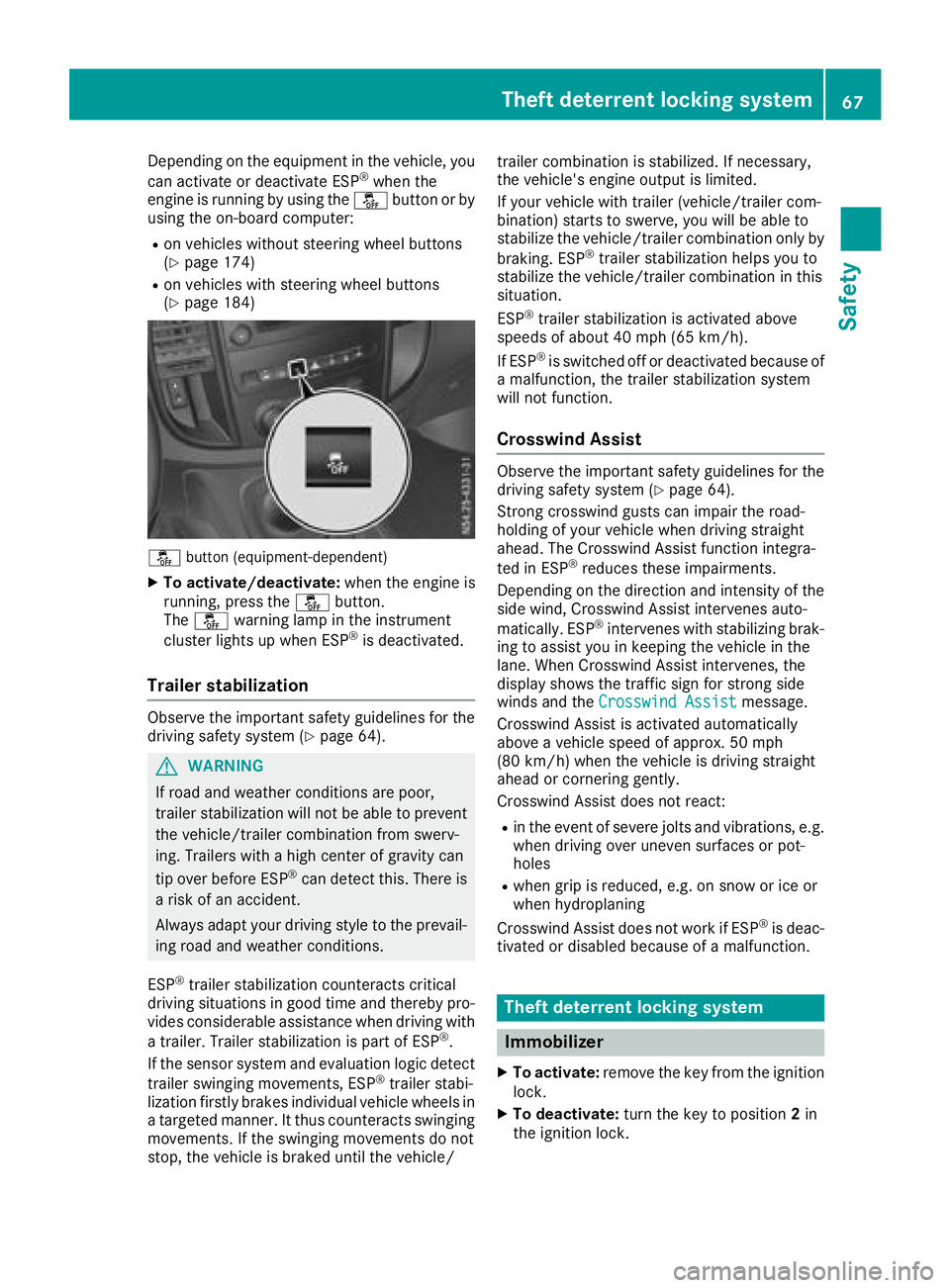
Depending on the equipment in the vehicle, you
can activate or deactivate ESP®when the
engine is running by using the åbutton or by
using the on-board computer:
Ron vehicles without steering wheel buttons
(Ypage 174)
Ron vehicles with steering wheel buttons
(Ypage 184)
å button (equipment-dependent)
XTo activate/deactivate: when the engine is
running, press the åbutton.
The å warning lamp in the instrument
cluster lights up when ESP
®is deactivated.
Trailer stabilization
Observe the important safety guidelines for the
driving safety system (Ypage 64).
GWARNING
If road and weather conditions are poor,
trailer stabilization will not be able to prevent
the vehicle/trailer combination from swerv-
ing. Trailers with a high center of gravity can
tip over before ESP
®can detect this. There is
a risk of an accident.
Always adapt your driving style to the prevail-
ing road and weather conditions.
ESP
®trailer stabilization counteracts critical
driving situations in good time and thereby pro- vides considerable assistance when driving with
a trailer. Trailer stabilization is part of ESP
®.
If the sensor system and evaluation logic detect
trailer swinging movements, ESP
®trailer stabi-
lization firstly brakes individual vehicle wheels in
a targeted manner. It thus counteracts swinging
movements. If the swinging movements do not
stop, the vehicle is braked until the vehicle/ trailer combination is stabilized. If necessary,
the vehicle's engine output is limited.
If your vehicle with trailer (vehicle/trailer com-
bination) starts to swerve, you will be able to
stabilize the vehicle/trailer combination only by
braking. ESP
®trailer stabilization helps you to
stabilize the vehicle/trailer combination in this
s
ituation.
ESP
®trailer stabilization is activated above
speeds of about 40 mph (65 km/h).
If ESP
®is switched off or deactivated because of
a malfunction, the trailer stabilization system
will not function.
Crosswind Assist
Observe the important safety guidelines for the
driving safety system (Ypage 64).
Strong crosswind gusts can impair the road-
holding of your vehicle when driving straight
ahead. The Crosswind Assist function integra-
ted in ESP
®reduces these impairments.
Depending on the direction and intensity of the
side wind, Crosswind Assist intervenes auto-
matically. ESP
®intervenes with stabilizing brak-
ing to assist you in keeping the vehicle in the
lane. When Crosswind Assist intervenes, the
display shows the traffic sign for strong side
winds and the Crosswind Assist
message.
Crosswind Assist is activated automatically
above a vehicle speed of approx. 50 mph
(80 km/h) when the vehicle is driving straight
ahead or cornering gently.
Crosswind Assist does not react:
Rin the event of severe jolts and vibrations, e.g.
when driving over uneven surfaces or pot-
holes
Rwhen grip is reduced, e.g. on snow or ice or
when hydroplaning
Crosswind Assist does not work if ESP
®is deac-
tivated or disabled because of a malfunction.
Theft deterrent locking system
Immobilizer
XTo activate: remove the key from the ignition
lock.
XTo deactivate: turn the key to position 2in
the ignition lock.
Theft deterrent locking system67
Safety
Z