key MERCEDES-BENZ METRIS 2018 MY18 Operator’s Manual
[x] Cancel search | Manufacturer: MERCEDES-BENZ, Model Year: 2018, Model line: METRIS, Model: MERCEDES-BENZ METRIS 2018Pages: 318, PDF Size: 5.07 MB
Page 17 of 318
Turn signals .....................................98
Limited Warranty ................................ 27
Load distribution ...............................245
Load protection net ........................... 249
Loading guidelines ............................ 244
Loading rails
Maximum tensile strength ............. 315
Loads
Securing ........................................ 246
Transporting .................................. 244
Locking
see Central locking
Locking (doors)
Emergency locking ........................... 71
Locking centrally
see Central locking
Low-beam headlamps
Display messages (vehicle with
steering wheel buttons) ................. 211
Display messages (vehicle with-
out steering wheel buttons) ........... 198
Driving abroad ............................... 139
Replacing bulbs .............................1 03
Switching on/off .............................. 97
Lumbar support ................................... 87
Lumbar support
see Lumbar support
M
M+S tires ............................................ 281
Maintenance ...................................... 259
Maintenance points under the
hood .................................................... 254
Maximum speed
Speed limitation .............................1 38
Mechanical key
Function/notes ................................ 70
Inserting .......................................... 71
Locking vehicle ................................ 71
Removing ......................................... 71
Media Interface
Connections ..................................... 42
Memory card (audio) ......................... 184
Memory function
Seats, steering wheel, exterior
mirrors ............................................. 94 Mercedes-Benz Commercial Van
Center
see Qualified specialist workshop
Mercedes-Benz Service24h .............. 274
Message memory
On-board computer (vehicle with
steering wheel buttons) ................. 205
On-board computer (vehicle with-
out steering wheel buttons) ........... 191
Messages
see Warning and indicator lamps
Mirrors
Exterior mirrors ................................ 94
Important safety notes .................... 93
Rear-view mirror .............................. 94
see Vanity mirror
Mobile phone
Type approval/frequency .............. 305
Mobile phone
see Telephone
Model designation
see Vehicle identification plate
Modifying the programming
(SmartKey) ...........................................7 0
Motor oil additives
see Additives
Mounting wheels
Lowering the vehicle ...................... 301
Mounting a new wheel ................... 300
Preparing the vehicle .....................2 99
Raising the vehicle ......................... 299
Removing a wheel .......................... 300
Removing and mounting the spare
wheel ............................................. 303
Securing the vehicle against roll-
ing away ........................................ 299
MP3
Operation ....................................... 184
N
NavigationMenu (on-board computer) ............ 182
Notes on breaking-in a new vehi-
cle ....................................................... 122
Index15
Page 21 of 318
Recyclingsee Protection of the environment
Refrigerant (air-conditioning sys-
tem)
Important safety notes .................. 312
Refueling
Fuel filler flap ................................. 135
Fuel gauge (vehicle with steering
wheel buttons) ................................. 39
Fuel gauge (vehicle without steer-
ing wheel buttons) ......................... 173
Refueling procedure (fuel) ............. 135
see Fuel
Remote control
see Key
Replacing bulbs
Important safety notes .................. 102
Reporting safety defects .................... 32
Rescue card ......................................... 34
Reserve (fuel tank)
see Fuel
Reserve fuel
Display messages (vehicle with
steering wheel buttons) ................. 215
Display messages (vehicle with-
out steering wheel buttons) ........... 201
Warning lamp ................................. 227
Residual heat (climate control) ........ 119
Restraint system
Display message (vehicle with
steering wheel buttons) ................. 211
Display message (vehicle without
steering wheel buttons) ................. 197
Introduction ..................................... 45
Warning lamp ................................. 226
Warning lamp (function) ................... 45
Reverse warning feature .................. 125
Reversing feature
Electric sliding door ......................... 76
Side windows ................................... 82
Roadside Assistance (breakdown) .... 28
Roof carrier
Maximum payload .......................... 315
Notes ............................................. 250
Roof lining and carpets (cleaning
guidelines) ......................................... 271
Roof load (roof carrier) ..................... 315S
Safety
Children in the vehicle ..................... 58
Operating safety .............................. 30
see Occupant safety
Safety system
see Driving safety systems
Seat belts
Adjusting the height ......................... 48
Cleaning ......................................... 271
Correct usage .................................. 48
Fastening ......................................... 48
Important safety guidelines ............. 47
Introduction ..................................... 46
Releasing ......................................... 49
Warning lamp ................................. 222
Warning lamp (function) ................... 49
Seats
Adjusting (electrically) ..................... 86
Adjusting (manually) ........................ 86
Adjusting lumbar support ................ 87
Adjusting the head restraint ............ 90
Armrest ............................................ 92
Cleaning the cover ......................... 270
Correct driver's seat position ........... 85
Important safety notes .................... 85
Seat heating .................................... 92
Storing settings (memory func-
tion) ................................................. 94
Selecting gear
see Automatic transmission
Selector lever
Cleaning ......................................... 270
see Automatic transmission
Sensors (cleaning instructions) ....... 268
Service interval display
Calling up the service due date ...... 260
Hiding service messages ............... 260
Notes ............................................. 259
Service menu (on-board com-
puter) .................................................. 187
Service phone number ...................... 274
Service products
Brake fluid ..................................... 311
Coolant (engine) ............................ 311
Engine oil ....................................... 309
Fuel ................................................ 307
Index19
Page 22 of 318
Important safety notes .................. 306
Refrigerant (air-conditioning sys-
tem) ............................................... 312
Transmission oil .....................310, 311
Washer fluid ................................... 313
Setting the air distribution ...............116
Setting the airflow ............................ 116
Setting the speed
see Cruise control
Settings
Factory (vehicle with steering
wheel buttons) ............................... 190
Factory (vehicle without steering
wheel buttons) ............................... 176
On-board computer (vehicle with
steering wheel buttons) ................. 188
On-board computer (vehicle with-
out steering wheel buttons) ........... 176
Side impact air bag .............................5 1
Side windows
Cleaning ......................................... 267
Convenience closing feature ............ 83
Convenience opening feature ..........8 3
Hinged side windows ....................... 82
Important safety information ........... 82
Opening/closing .............................. 82
Overview .......................................... 82
Problem (malfunction) ..................... 83
Resetting ......................................... 83
Signal and ambient light
Changing a bulb ............................. 102
Sliding door
Child-proof locks .............................. 63
Cleaning ......................................... 269
Important safety notes .................... 74
Indicator lamp ................................ 231
Opening/closing from the inside ..... 75
Opening/closing from the out-
side .................................................. 75
see Electric sliding door
SmartKey
Changing the battery ....................... 72
Changing the programming ............. 70
Checking the battery ....................... 71
Convenience closing feature ... 83, 119
Convenience opening feature .......... 83
Door central locking/unlocking ....... 69
Important safety notes .................... 69 Loss ................................................. 72
Mechanical key ................................ 70
Problem (malfunction) .....................
72
SmartK
ey positions (ignition lock) .. 123
Snow chains ...................................... 282
Sockets .............................................. 243
Spare wheel
General notes ................................ 303
Important safety notes .................. 303
Removing/mounting ...................... 303
Special seat belt retractor .................. 59
Specialist workshop ............................ 31
Speed, controlling
see Cruise control
Speedometer
Activating/deactivating the addi-
tional speedometer (vehicle with
steering wheel buttons) ................. 188
Activating/deactivating the addi-
tional speedometer (vehicle with-
out steering wheel buttons) ........... 177
Digital (vehicle with steering
wheel buttons) ............................... 181
Digital (vehicle without steering
wheel buttons) ............................... 175
General notes ................................ 172
In the instrument cluster (vehicle
with steering wheel buttons) ............ 39
In the instrument cluster (vehicle
without steering wheel buttons) ...... 37
Setting the display unit (vehicle
with steering wheel buttons) ......... 188
Setting the display unit (vehicle
without steering wheel buttons) .... 177
SRS (Supplemental Restraint Sys-
tem)
see Restraint system
Standing lamp
Display messages (vehicle with
steering wheel buttons) ................. 213
Standing lamps
Display messages (vehicle with-
out steering wheel buttons) ........... 199
Replacing bulbs (front) ................... 104
Replacing bulbs (rear) .................... 105
Switching on/off .............................. 96
20Index
Page 26 of 318
Trip odometerDisplaying (vehicle with steering
wheel buttons) ............................... 180
Displaying (vehicle without steer-
ing wheel buttons) ......................... 174
Resetting (vehicle with steering
wheel buttons) ............................... 181
Resetting (vehicle without steer-
ing wheel buttons) ......................... 174
Setting the display unit (vehicle
with steering wheel buttons) ......... 188
Setting the display unit (vehicle
without steering wheel buttons) .... 177
Trip odometer
see Trip odometer
Turn signal
Changing bulbs (additional turn
signals) .......................................... 104
Turn signals
Display messages (vehicle with
steering wheel buttons) ................. 212
Display messages (vehicle with-
out steering wheel buttons) ........... 198
Replacing bulbs (front) ................... 104
Replacing bulbs (rear) .................... 105
Switching on/off .............................. 98
Trailer display messages (vehicle
with steering wheel buttons) ......... 211
Trailer display messages (vehicle
without steering wheel buttons) .... 198
Two-way radios
Type approval/frequency .............. 305
TWR (Tongue Weight Rating) (defi-
nition) ................................................. 298
Type identification plate
see Vehicle identification plate
U
UnlockingEmergency unlocking ....................... 71
From inside the vehicle (central
unlocking button) ............................. 73
With emergency key element ........... 70
USB (audio)
Playing ........................................... 184
V
Vanity mirrorChanging a bulb (mirror lamp) ....... 101
Sun visor ........................................ 241
Vehicle
Data acquisition ............................... 34
Display messages (vehicle with
steering wheel buttons) ................. 220
Display messages (vehicle with-
out steering wheel buttons) ........... 204
Electronics ..................................... 305
Emergency unlocking ....................... 70
Equipment ....................................... 27
Limited Warranty ............................. 27
Loading .......................................... 290
Locking (in an emergency) ............... 71
Locking (SmartKey) .......................... 69
Lowering ........................................ 301
Maintenance .................................... 28
Operating safety .............................. 30
Parking for a long period ................ 137
Pulling away ................................... 124
Raising ........................................... 299
Registration ..................................... 32
Reporting problems ......................... 32
Securing from rolling away ............ 135
Towing away .................................. 276
Transporting .................................. 278
Unlocking (in an emergency) ........... 71
Unlocking (SmartKey) ...................... 69
Vehicle battery
see Battery (vehicle)
Vehicle bodies ..................................... 32
Body/equipment mounting direc-
tives for trucks ................................. 32
Vehicle check
see Preparing for a journey
Vehicle data ....................................... 313
Vehicle dimensions ........................... 313
Vehicle emergency locking ................ 71
Vehicle identification number
see VIN
Vehicle identification plate .............. 305
Vehicle key
see SmartKey
Vehicle tool kit
in the seat base ............................. 272
24Index
Page 50 of 318
system manufacturer's installation and oper-
ating instructions
Ralways observe the instructions and safety
notes on the "Occupant classification system
(OCS)" (
Ypage 52)
GWARNING
The seat belts may not perform their intended protective function if:
Rthey are damaged, modified, extremely
dirty, bleached or dyed
Rthe seat belt buckle is damaged or
extremely dirty
Rthe Emergency Tensioning Devices, belt
anchorages or inertia reels have been modi-
fied.
Seat belts may be damaged in an accident,
although the damage may not be visible, e.g.
due to splinters of glass. Modified or damaged
seat belts may tear or fail, e.g. in an accident.
Modified Emergency Tensioning Devices
could accidentally trigger or fail to deploy
when necessary. This poses an increased risk
of injury or even fatal injury.
Never modify the seat belts, Emergency Ten-
sioning Devices, belt anchorages and inertia
reels. Make sure that the seat belts are
undamaged, not worn out and clean. Follow-
ing an accident, have the seat belts checked
immediately at a qualified specialist work-
shop.
Only use seat belts that have been approved for
your vehicle by Mercedes-Benz.
Proper use of the seat belts
Observe the safety notes on the seat belt
(Ypage 47).
All vehicle occupants must be wearing the seat
belt correctly before beginning the journey. Also
make sure that all vehicle occupants are always
wearing the seat belt correctly while the vehicle
is in motion.
When fastening the seat belt, always make sure
that:
Rthe seat belt buckle tongue is inserted only
into the belt buckle belonging to that seat
Rthe seat belt is pulled tight across your body Avoid wearing bulky clothing, e.g. a winter
coat.
Rthe seat belt is not twisted
Only then can the forces which occur be dis-
tributed over the area of the belt.
Rthe shoulder section of the belt is routed
across the center of your shoulder
The shoulder section of the seat belt should
not touch your neck or be routed under your
arm or behind your back. Where possible,
adjust the seat belt to the appropriate height.
Rthe lap belt is taut and passes across your lap
as low down as possible
The lap belt must always be routed across
your hip joints and not across your abdomen.
This applies particularly to pregnant women.
If necessary, push the lap belt down to your
hip joint and pull it tight using the shoulder
section of the belt.
Rthe seat belt is not routed across sharp, poin-
ted or fragile objects
If you have such items located on or in your
clothing, e.g. pens, keys or eyeglasses, store
these in a suitable place.
Ronly one person is using a seat belt
Infants and children must never travel sitting
on the lap of a vehicle occupant. In the eventof an accident, they could be crushed
between the vehicle occupant and seat belt.
Robjects are never secured with a seat belt if
the seat belt is also being used by one of the
vehicle's occupants
Also ensure that there are never objects
between a person and the seat, e.g. cushions.
Seat belts are only intended to secure and
restrain vehicle occupants. Always observe the
"Loading guidelines" for securing objects, lug-
gage or loads (
Ypage 244).
Fastening and adjusting seat belts
Observe the safety notes on the seat belt
(Ypage 47) and the notes on correct use of seat
belts (Ypage 48).
48Occupant safety
Safety
Page 55 of 318
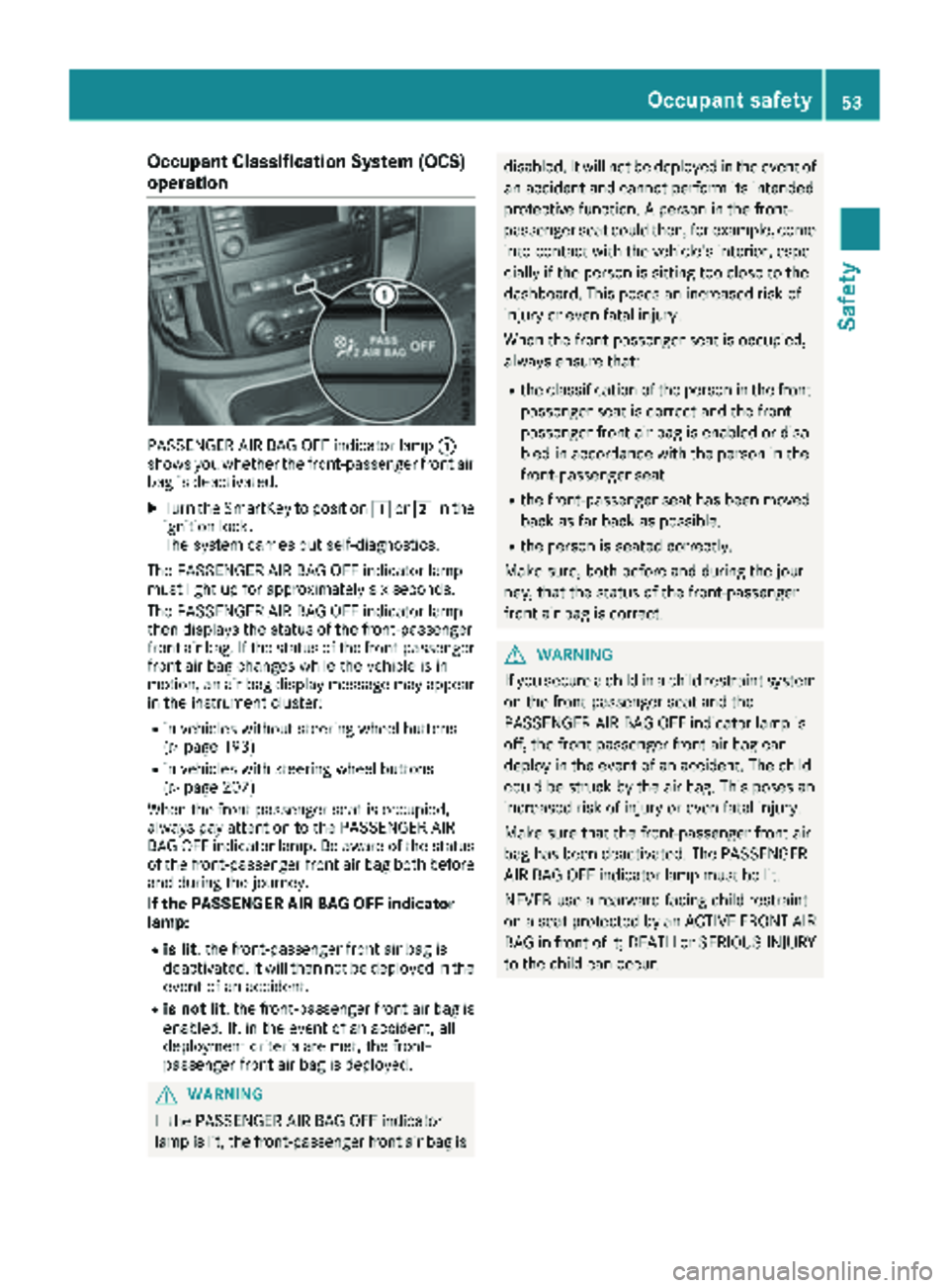
Occupant Classification System (OCS)
operation
PASSENGER AIR BAG OFF indicator lamp:
shows you whether the front-passenger front air
bag is deactivated.
XTurn the SmartKey to position 1or2 in the
ignition lock.
The system carries out self-diagnostics.
The PASSENGER AIR BAG OFF indicator lamp
must light up for approximately six seconds.
The PASSENGER AIR BAG OFF indicator lamp
then displays the status of the front-passenger
front air bag. If the status of the front-passenger
front air bag changes while the vehicle is in
motion, an air bag display message may appear
in the instrument cluster:
Rin vehicles without steering wheel buttons
(Ypage 193)
Rin vehicles with steering wheel buttons
(Ypage 207)
When the front-passenger seat is occupied,
always pay attention to the PASSENGER AIR
BAG OFF indicator lamp. Be aware of the status
of the front-passenger front air bag both before
and during the journey.
If the PASSENGER AIR BAG OFF indicator
lamp:
Ris lit : the front-passenger front air bag is
deactivated. It will then not be deployed in the
event of an accident.
Ris not lit : the front-passenger front air bag is
enabled. If, in the event of an accident, all
deployment criteria are met, the front-
passenger front air bag is deployed.
GWARNING
If the PASSENGER AIR BAG OFF indicator
lamp is lit, the front-passenger front air bag is
disabled. It will not be deployed in the event of an accident and cannot perform its intended
protective function. A person in the front-
passenger seat could then, for example, come
into contact with the vehicle's interior, espe-
cially if the person is sitting too close to the
dashboard. This poses an increased risk of
injury or even fatal injury.
When the front-passenger seat is occupied,
always ensure that:
Rthe classification of the person in the front-passenger seat is correct and the front-
passenger front air bag is enabled or disa-
bled in accordance with the person in the
front-passenger seat
Rthe front-passenger seat has been moved
back as far back as possible.
Rthe person is seated correctly.
Make sure, both before and during the jour-
ney, that the status of the front-passenger
front air bag is correct.
GWARNING
If you secure a child in a child restraint system on the front-passenger seat and the
PASSENGER AIR BAG OFF indicator lamp is
off, the front-passenger front air bag can
deploy in the event of an accident. The child
could be struck by the air bag. This poses an
increased risk of injury or even fatal injury.
Make sure that the front-passenger front air
bag has been deactivated. The PASSENGER
AIR BAG OFF indicator lamp must be lit.
NEVER use a rearward-facing child restraint
on a seat protected by an ACTIVE FRONT AIR
BAG in front of it; DEATH or SERIOUS INJURY
to the child can occur.
Occupant safety53
Safety
Z
Page 61 of 318
In addition, they may operate vehicle equip-
ment and become trapped. There is a risk of
an accident and injury.
When leaving the vehicle, always take the
SmartKey with you and lock the vehicle. Never
leave children unsupervised in the vehicle.
GWARNING
If persons, particularly children are subjected to prolonged exposure to extreme heat or
cold, there is a risk of injury, possibly even
fatal. Never leave children unattended in the
vehicle.
GWARNING
If the child restraint system is subjected to
direct sunlight, parts may get very hot. Chil-
dren may burn themselves on these parts,
particularly on the metal parts of the child
restraint system. There is a risk of injury.
If you leave the vehicle, taking the child with
you, always ensure that the child restraint
system is not exposed to direct sunlight. Pro- tect it with a blanket, for example. If the child
restraint system has been exposed to direct
sunlight, let it cool down before securing the
child in it. Never leave children unattended in
the vehicle.
Always ensure that all vehicle occupants have
their seat belts fastened correctly and are sitting
properly. Particular attention must be paid to
children.
Observe the safety notes on the seat belt
(
Ypage 47) and the notes on correct use of seat
belts (Ypage 48).
A booster seat may be necessary to achieve
proper seat belt positioning for children over
40 lbs (18 kg) until they reach a height where a
three-point seat belt can be properly fastened
without a booster seat.
Special seatbelt retractor
GWARNING
If the seat belt is released while driving, the
child restraint system will no longer be
secured properly. The special seat belt retrac- tor is disabled and the inertia real draws in a
portion of the seat belt. The seat belt cannot
be immediately refastened. There is an
increased risk of injury, possibly even fatal.
Stop the vehicle immediately, paying atten-
tion to road and traffic conditions. Reactivate
the special seat belt retractor and secure the
child restraint system properly.
All seat belts in the vehicle, except the driver's
seat belt, are equipped with a special seat belt
retractor. When activated, the special seat belt
retractor ensures that the seat belt cannot
slacken once the child seat is secured.
Installing a child restraint system:
XMake sure you observe the child restraint
system manufacturer's installation instruc-
tions.
XPull the seat belt smoothly from the belt out-
let.
XEngage seat belt tongue in belt buckle.
Activating the special seat belt retractor:
XPull the seat belt out fully and let the inertia
reel retract it again.
While the seat belt is retracting, you should
hear a ratcheting sound. The special seat belt
retractor is enabled.
XPush the child restraint system down so that
the seat belt is tight and does not loosen.
Removing the child restraint system and deac-
tivating the special seat belt retractor:
XMake sure you observe the child restraint
system manufacturer's installation instruc-
tions.
XPress the release button of the seat belt
buckle and guide the seat belt tongue back
towards the belt sash guide.
The special seat belt retractor is deactivated.
Child restraint system
The use of seat belts and child restraint systems
is required by law in:
Rall 50 states
Rthe U.S. territories
Rthe District of Columbia
Rall Canadian provinces
Children in the vehicle59
Safety
Z
Page 65 of 318
correctly routed from the vehicle belt outlet to
the shoulder belt guide on the child restraint
system. The shoulder belt strap must be routed
forward and down from the vehicle belt outlet. If
necessary, adjust the vehicle belt outlet and the
front-passenger seat accordingly.
Always observe the child restraint system man-
ufacturer's installation and operating instruc-
tions.
Override features/Child-proof locks
Important safety notes
GWARNING
If children are traveling in the vehicle, they
could:
Ropen doors, thus endangering other people
or road users
Rexit the vehicle and be caught by oncoming
traffic
Roperate vehicle equipment and become
trapped
There is a risk of an accident and injury.
Always activate the child-proof locks and
override feature if children are traveling in the vehicle. When leaving the vehicle, always take
the key with you and lock the vehicle. Never
leave children unattended in the vehicle.
Child-proof lock/override feature for:
RSliding doors (Ypage 63)
GWARNING
If you leave children unsupervised in the vehi-
cle, they could set it in motion by, for example:
Rrelease the parking brake.
Rshift the automatic transmission out of the
parking position P.
Rstart the engine.
In addition, they may operate vehicle equip-
ment and become trapped. There is a risk of
an accident and injury.
When leaving the vehicle, always take the
SmartKey with you and lock the vehicle. Never
leave children unsupervised in the vehicle.
GWARNING
If persons, particularly children are subjected to prolonged exposure to extreme heat or
cold, there is a risk of injury, possibly even
fatal. Never leave children unattended in the
vehicle.
GWARNING
If the child restraint system is subjected to
direct sunlight, parts may get very hot. Chil-
dren may burn themselves on these parts,
particularly on the metal parts of the child
restraint system. There is a risk of injury.
If you leave the vehicle, taking the child with
you, always ensure that the child restraint
system is not exposed to direct sunlight. Pro- tect it with a blanket, for example. If the child
restraint system has been exposed to direct
sunlight, let it cool down before securing the
child in it. Never leave children unattended in
the vehicle.
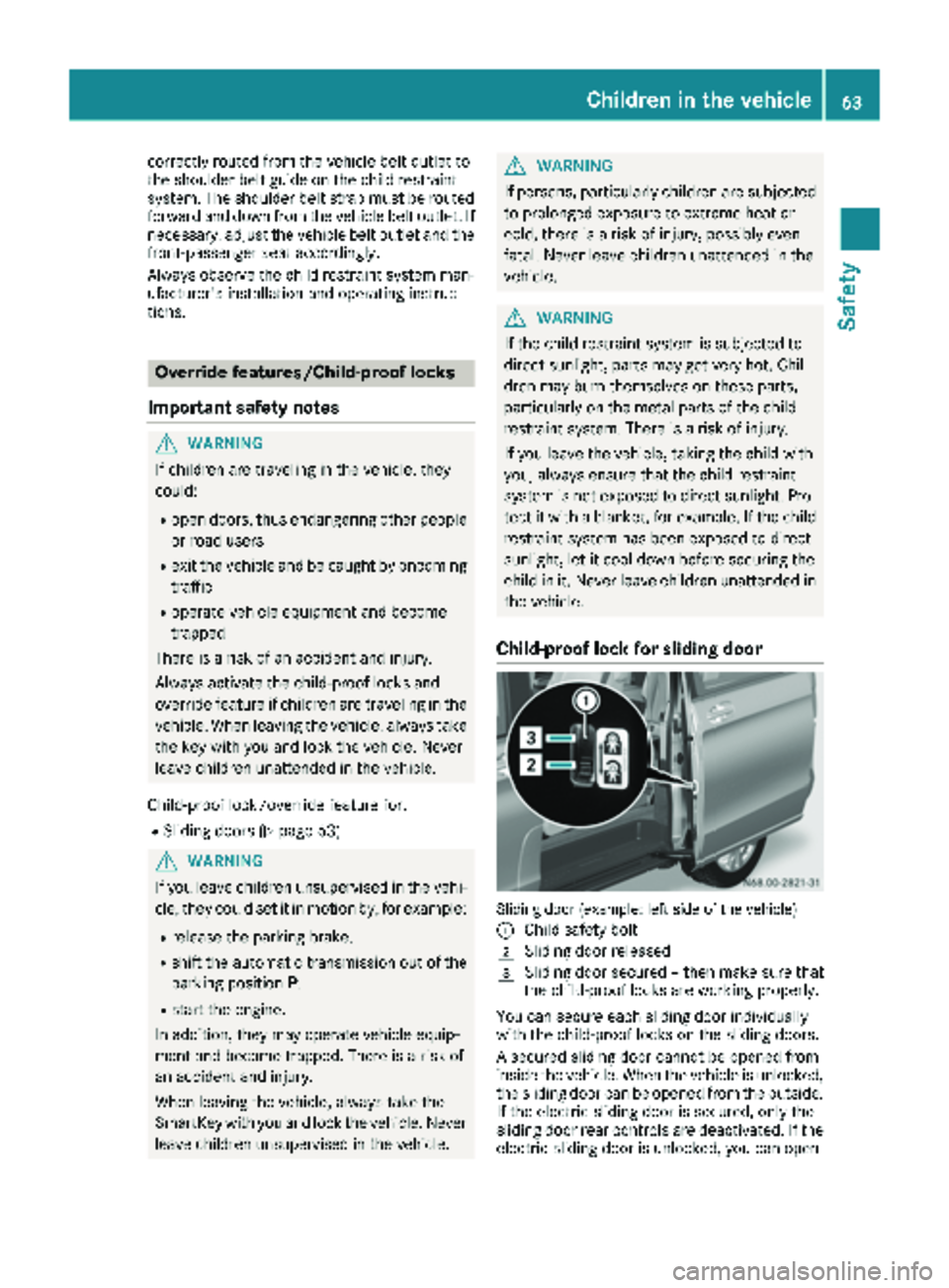
Child-proof lock for sliding door
Sliding door (example: left side of the vehicle)
:
Child safety bolt
2Sliding door released
3Sliding door secured – then make sure that
the child-proof locks are working properly.
You can secure each sliding door individually
with the child-proof locks on the sliding doors.
A secured sliding door cannot be opened from
inside the vehicle. When the vehicle is unlocked, the sliding door can be opened from the outside.
If the electric sliding door is secured, only the
sliding door rear controls are deactivated. If the
electric sliding door is unlocked, you can open
Children in the vehicle63
Safety
Z
Page 69 of 318
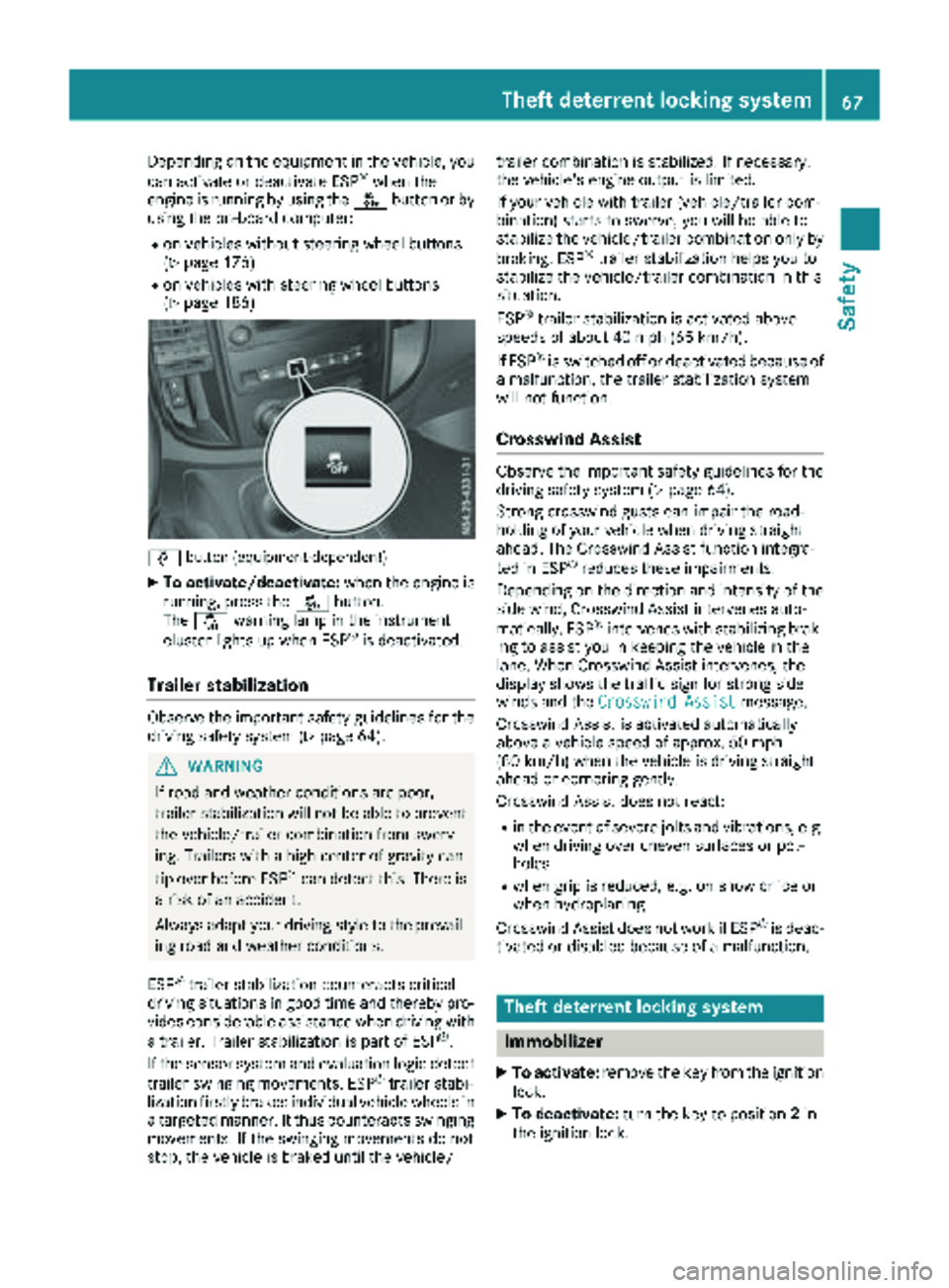
Depending on the equipment in the vehicle, you
can activate or deactivate ESP®when the
engine is running by using the åbutton or by
using the on-board computer:
Ron vehicles without steering wheel buttons
(Ypage 176)
Ron vehicles with steering wheel buttons
(Ypage 186)
å button (equipment-dependent)
XTo activate/deactivate: when the engine is
running, press the åbutton.
The å warning lamp in the instrument
cluster lights up when ESP
®is deactivated.
Trailer stabilization
Observe the important safety guidelines for the
driving safety system (Ypage 64).
GWARNING
If road and weather conditions are poor,
trailer stabilization will not be able to prevent
the vehicle/trailer combination from swerv-
ing. Trailers with a high center of gravity can
tip over before ESP
®can detect this. There is
a risk of an accident.
Always adapt your driving style to the prevail-
ing road and weather conditions.
ESP
®trailer stabilization counteracts critical
driving situations in good time and thereby pro- vides considerable assistance when driving with
a trailer. Trailer stabilization is part of ESP
®.
If the sensor system and evaluation logic detect
trailer swinging movements, ESP
®trailer stabi-
lization firstly brakes individual vehicle wheels in
a targeted manner. It thus counteracts swinging
movements. If the swinging movements do not
stop, the vehicle is braked until the vehicle/ trailer combination is stabilized. If necessary,
the vehicle's engine output is limited.
If your vehicle with trailer (vehicle/trailer com-
bination) starts to swerve, you will be able to
stabilize the vehicle/trailer combination only by
braking. ESP
®trailer stabilization helps you to
stabilize the vehicle/trailer combination in this
s
ituation.
ESP
®trailer stabilization is activated above
speeds of about 40 mph (65 km/h).
If ESP
®is switched off or deactivated because of
a malfunction, the trailer stabilization system
will not function.
Crosswind Assist
Observe the important safety guidelines for the
driving safety system (Ypage 64).
Strong crosswind gusts can impair the road-
holding of your vehicle when driving straight
ahead. The Crosswind Assist function integra-
ted in ESP
®reduces these impairments.
Depending on the direction and intensity of the
side wind, Crosswind Assist intervenes auto-
matically. ESP
®intervenes with stabilizing brak-
ing to assist you in keeping the vehicle in the
lane. When Crosswind Assist intervenes, the
display shows the traffic sign for strong side
winds and the Crosswind Assist
message.
Crosswind Assist is activated automatically
above a vehicle speed of approx. 50 mph
(80 km/h) when the vehicle is driving straight
ahead or cornering gently.
Crosswind Assist does not react:
Rin the event of severe jolts and vibrations, e.g.
when driving over uneven surfaces or pot-
holes
Rwhen grip is reduced, e.g. on snow or ice or
when hydroplaning
Crosswind Assist does not work if ESP
®is deac-
tivated or disabled because of a malfunction.
Theft deterrent locking system
Immobilizer
XTo activate: remove the key from the ignition
lock.
XTo deactivate: turn the key to position 2in
the ignition lock.
Theft deterrent locking system67
Safety
Z
Page 70 of 318
The immobilizer prevents your vehicle from
being started without the correct key.
Always take the key with you and lock the vehi-
cle when leaving the vehicle. If you leave the key
in the vehicle, anyone can start the engine.
iThe immobilizer is always deactivated when
you start the engine.
ATA (Anti-Theft Alarm system)
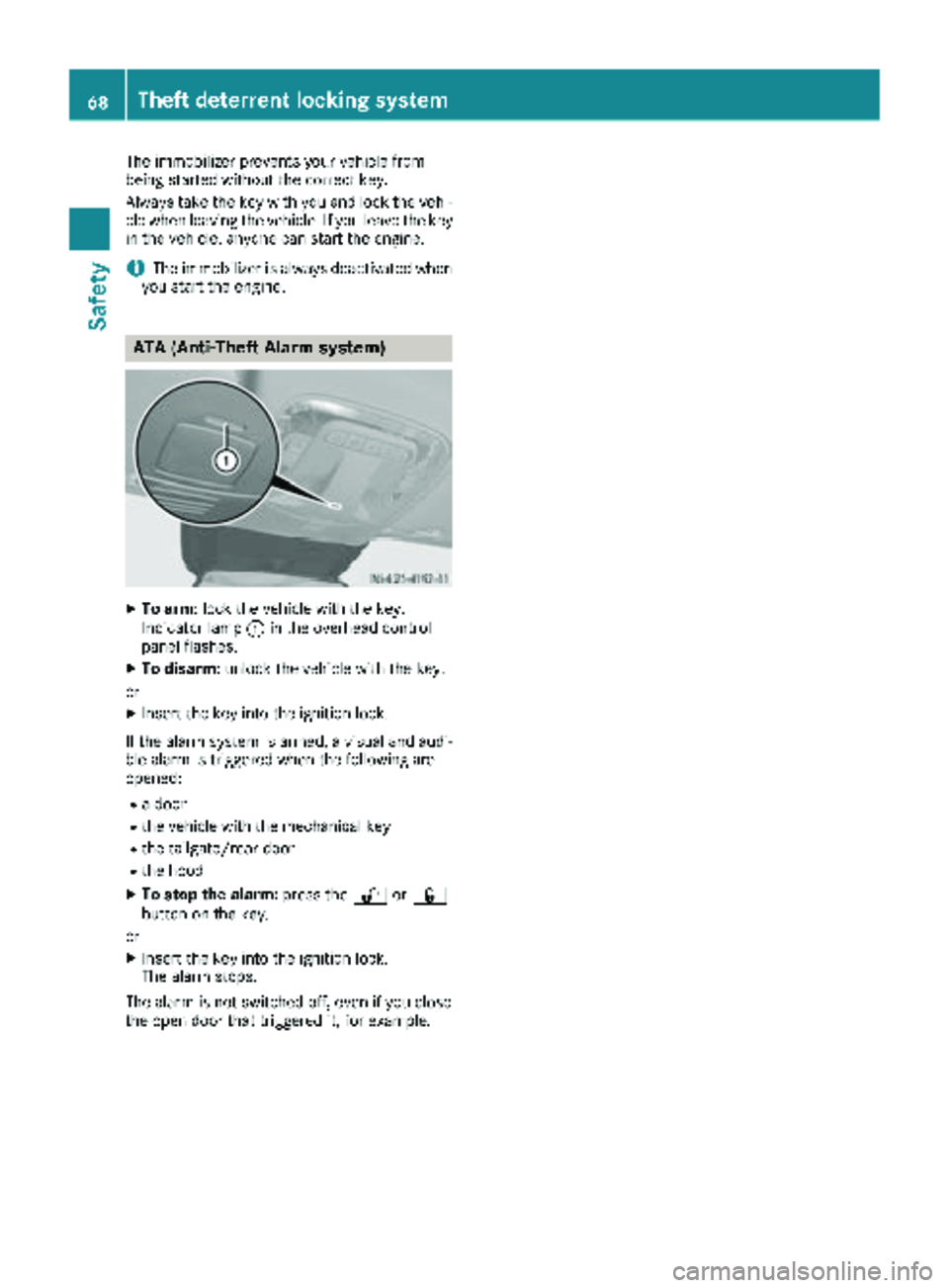
XTo arm: lock the vehicle with the key.
Indicator lamp :in the overhead control
panel flashes.
XTo disarm: unlock the vehicle with the key.
or
XInsert the key into the ignition lock.
If the alarm system is armed, a visual and audi-
ble alarm is triggered when the following are
opened:
Ra door
Rthe vehicle with the mechanical key
Rthe tailgate/rear door
Rthe hood
XTo stop the alarm: press the%or&
button on the key.
or
XInsert the key into the ignition lock.
The alarm stops.
The alarm is not switched off, even if you close
the open door that triggered it, for example.
68Theft deterrent locking system
Safety