tire pressure MERCEDES-BENZ METRIS 2019 MY19 Operator’s Manual
[x] Cancel search | Manufacturer: MERCEDES-BENZ, Model Year: 2019, Model line: METRIS, Model: MERCEDES-BENZ METRIS 2019Pages: 318, PDF Size: 5.07 MB
Page 159 of 318
For vehicles with a trailer coupling installed, the
minimum length for parking spaces will be
slightly increased.
If you have attached a trailer to your vehicle, you
should not use Active Parking Assist. Once the
electrical connection is established between
your vehicle and the trailer, Active Parking
Assist is no longer available. PARKTRONIC is
then deactivated for the rear area.
GWARNING
While parking or pulling out of a parking
space, the vehicle swings out and can drive
onto areas of the oncoming lane. This could
result in a collision with another road user.
There is a risk of an accident.
Pay attention to other road users. Stop the
vehicle if necessary or cancel the Active Park- ing Assist parking procedure.
!If unavoidable, you should drive over obsta-
cles such as curbs slowly and not at a sharp
angle. Otherwise, you may damage the
wheels or tires.
Active Parking Assist may also display spaces
not suitable for parking, e.g.:
Rin a zone where parking or stopping is pro-
hibited
Rin front of driveways or entrances and exits
Ron unsuitable surfaces
Parking tips:
Ron narrow roads, drive as closely as possible
past the parking space.
Rparking spaces that are littered or overgrown
might be identified or measured incorrectly.
Rparking spaces that are partially occupied by
trailer drawbars might not be identified as
such or be measured incorrectly.
Rsnowfall or heavy rain may lead to a parking
space being measured inaccurately.
Rwhen transporting a load which protrudes
from your vehicle, you should not use Active
Parking Assist.
Rnever use Active Parking Assist when snow
chains are installed.
Ralways ensure that the tire pressure is correct
This has a direct influence on the parking
characteristics of the vehicle.
Rif you mount w heels with a different wheel
size, this will have a direct influence on the
parking result.
Rif you mount tires from another manufacturer,
this may have an influence on the parking
result.
Rif you drive slowly past the parking space, a
better parking result is achieved.
Rpay attention to the PARKTRONIC warning
messages (Ypage 155) during the parking
procedure.
Ryou can intervene in the steering procedure to
correct it at any time. Parking assistance will
then be canceled and Active Parking Assist
stopped.
Use Active Parking Assist for parking spaces
that are:
Rparallel or at right angles to the direction of
travel.
Ron straight roads, not bends.
Ron the same level as the road, e.g. not on the
pavement.
Detecting parking spaces
GWARNING
If there are objects above the detection range:
RActive Park Assist may steer too early
Rthe vehicle may not stop in front of these
objects
You may cause a collision as a result. There is
a risk of an accident.
If objects are located above the detection
range, stop and deactivate Active Parking
Assist.
Objects located above the height range of Active
Parking Assist will not be detected when the
parking space is measured. These are not taken
into account when the parking procedure is cal-
culated, e.g. overhanging loads, overhangs or
truck loading ramps.
For further information on the detection range
(
Ypage 154).
Driving systems157
Driving and parking
Z
Page 170 of 318
This enables you to gain experience and get
used to the new handling characteristics.
RBefore driving, check:
-that the trailer tow hitch and ball coupling
are secure
-that the safety switch for a braked trailer is
functioning properly
-that the safety chains are secure and not
damaged
-that the electrical connections are secure
-that the lights are working
-that the wheels are in good order and the
tire pressure is correct
RAdjust the exterior mirrors to provide an
unobstructed view of the rear section of the
trailer.
RIf the trailer is equipped with a separate func-
tional braking system, check before each
journey whether the brakes are functioning
correctly.
RSecure the load on the trailer according to the
applicable specifications and current stand-
ards on securing loads (
Ypage 246).
RWhen driving with a trailer, check at regular
intervals that the load is secured and that the
brakes and lights are working.
RBear in mind that the handling will be less
stable when towing a trailer than when driving
without one. Avoid sudden steering move-
ments.
RThe vehicle/trailer combination is heavier,
accelerates more slowly and has a decreased
gradient climbing capability and a longer
braking distance.
It is more susceptible to crosswinds and
requires cautious steering.
RIf possible, do not brake suddenly, but rather
moderately at first so that the trailer can acti-
vate its brakes. Then increase the force on the
brake pedal.
RIf the automatic transmission repeatedly
shifts between gears when driving on inclines,
restrict the shift range. Select shift range 4,3,
2 or 1.
Driving in a low gear and at a low speed
reduces the risk of damaging the engine.
RWhen driving on a downhill gradient, shift to a
low gear and take advantage of the engine's
braking effect. Avoid continuous brake application as this
may overheat the vehicle brakes and, if instal-
led, the trailer brakes.
RIf the coolant temperature increases dramat-
ically while the air-conditioning system is
switched on, switch off the air-conditioning
system.
Coolant heat can also be dissipated by
switching the airflow and the temperature of
the air conditioning to the
maximum level.
Open t
he windows if necessary.
RWhen overtaking, pay particular attention to
the extended length of your vehicle/trailer
combination.
Due to the length of your vehicle/trailer com-
bination you need an additional distance
before you can return to your original lane.
Uncoupling a trailer
GWARNING
If you uncouple a trailer with the overrun
brake engaged, you could trap your hand
between the vehicle and the trailer drawbar.
There is a risk of injury.
Do not uncouple a trailer if the overrun brake
is engaged.
!Do not disconnect a trailer with an engaged
overrun brake. Otherwise, your vehicle could
be damaged by the rebounding of the overrun
brake.
XMake sure that the selector lever of the auto-
matic transmission is in position P.
XEngage the vehicle's parking brake.
XClose all doors.
XApply the parking brake of the trailer.
XIn addition, secure the trailer against rolling
away with a wheel chock or similar object.
XRemove the trailer cable and safety chains
and decouple the trailer.
168Towing a trailer
Driving and parking
Page 176 of 318
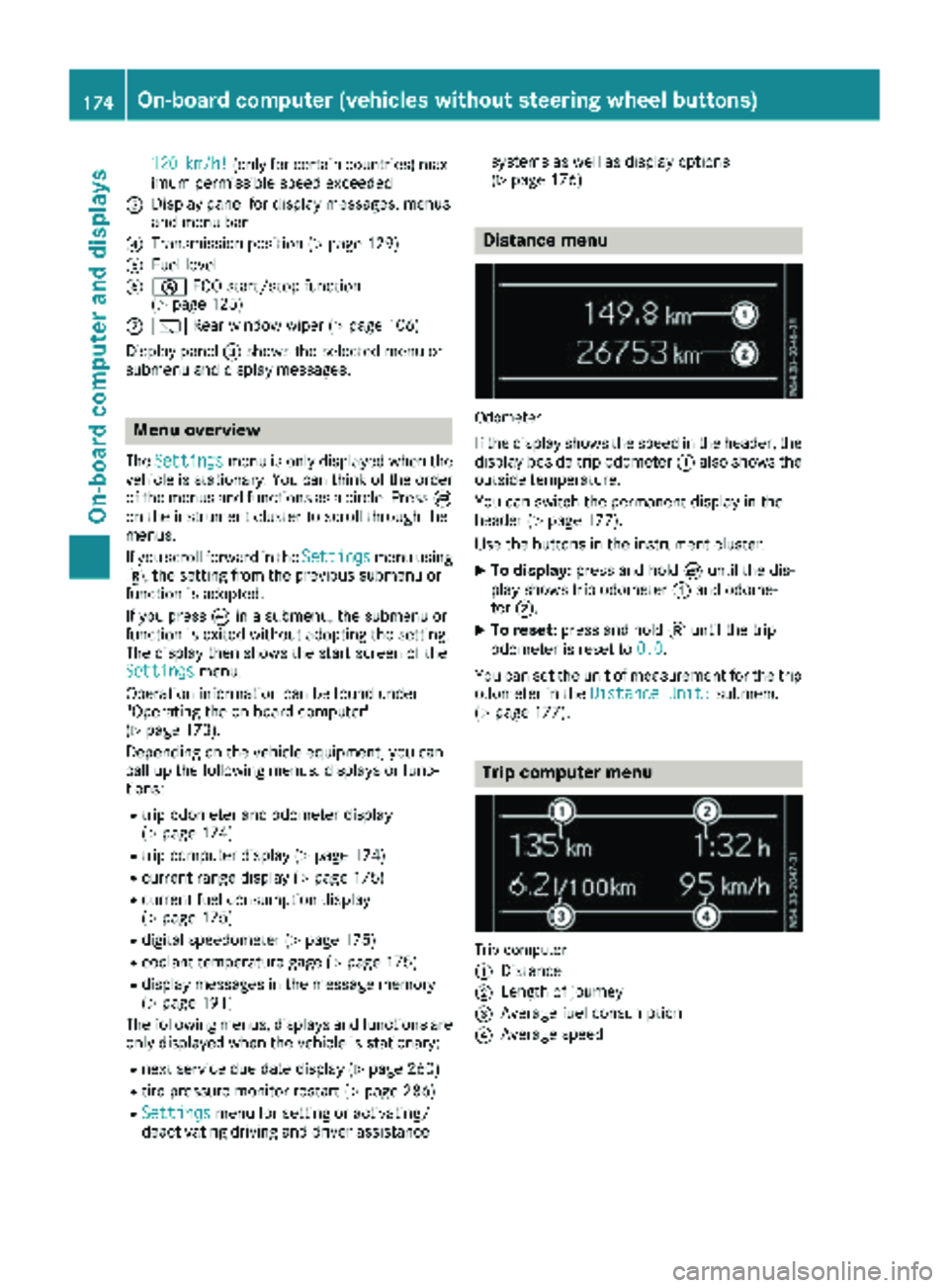
120km/h!(only for certain countries) max-
imum permissible speed exceeded
=Display panel for display messages, menus
and menu bar
?Transmission position (Ypage 129)
AFuel level
Bè ECO start/stop function
(Ypage 125)
Cè Rear window wiper (Ypage 106)
Display panel =shows the selected menu or
submenu and display messages.
Menu overview
The Settingsmenu is only displayed when the
vehicle is stationary. You can think of the order
of the menus and functions as a circle. Press È
on the instrument cluster to scroll through the
menus.
If you scroll forward in the Settings
menu using
3, the setting from the previous submenu or
function is adopted.
If you press Èin a submenu, the submenu or
function is exited without adopting the setting.
The display then shows the start screen of the
Settings
menu.
Operation information can be found under
"Operating the on-board computer"
(
Ypage 173).
Depending on the vehicle equipment, you can
call up the following menus, displays or func-
tions:
Rtrip odometer and odometer display
(Ypage 174)
Rtrip computer display (Ypage 174)
Rcurrent range display (Ypage 175)
Rcurrent fuel consumption display
(Ypage 175)
Rdigital speedometer (Ypage 175)
Rcoolant temperature gage (Ypage 175)
Rdisplay messages in the message memory
(Ypage 191)
The following menus, displays and functions are only displayed when the vehicle is stationary:
Rnext service due date display (Ypage 260)
Rtire pressure monitor restart (Ypage 286)
RSettingsmenu for setting or activating/
deactivating driving and driver assistance systems as well as display options
(
Ypage 176)
Distance menu
Odometer
If the display shows the speed in the header, the
display beside trip odometer
:also shows the
outside temperature.
You can switch the permanent display in the
header (
Ypage 177).
Use the buttons in the instrument cluster.
XTo display: press and hold Èuntil the dis-
play shows trip odometer :and odome-
ter ;.
XTo reset: press and hold 3until the trip
odometer is reset to 0.0
.
You can set the unit of measurement for the trip odometer in the Distance Unit:
submenu
(Ypage 177).
Trip computer menu
Trip computer
:
Distance
;Length of journey
=Average fuel consumption
?Average speed
174On-board computer (vehicles without steering wheel buttons)
On-board computer and displays
Page 190 of 318
Depending on the vehicle’s equipment, you have
the following options in theServicemenu:
RCalling up display messages in the message
memory (Ypage 205)
RRestarting the tire pressure loss warning sys-
tem or checking the tire pressure electroni-
cally (
Ypage 286)
RCalling up the service due date (ASSYST
PLUS) (Ypage 260)
Settings menu
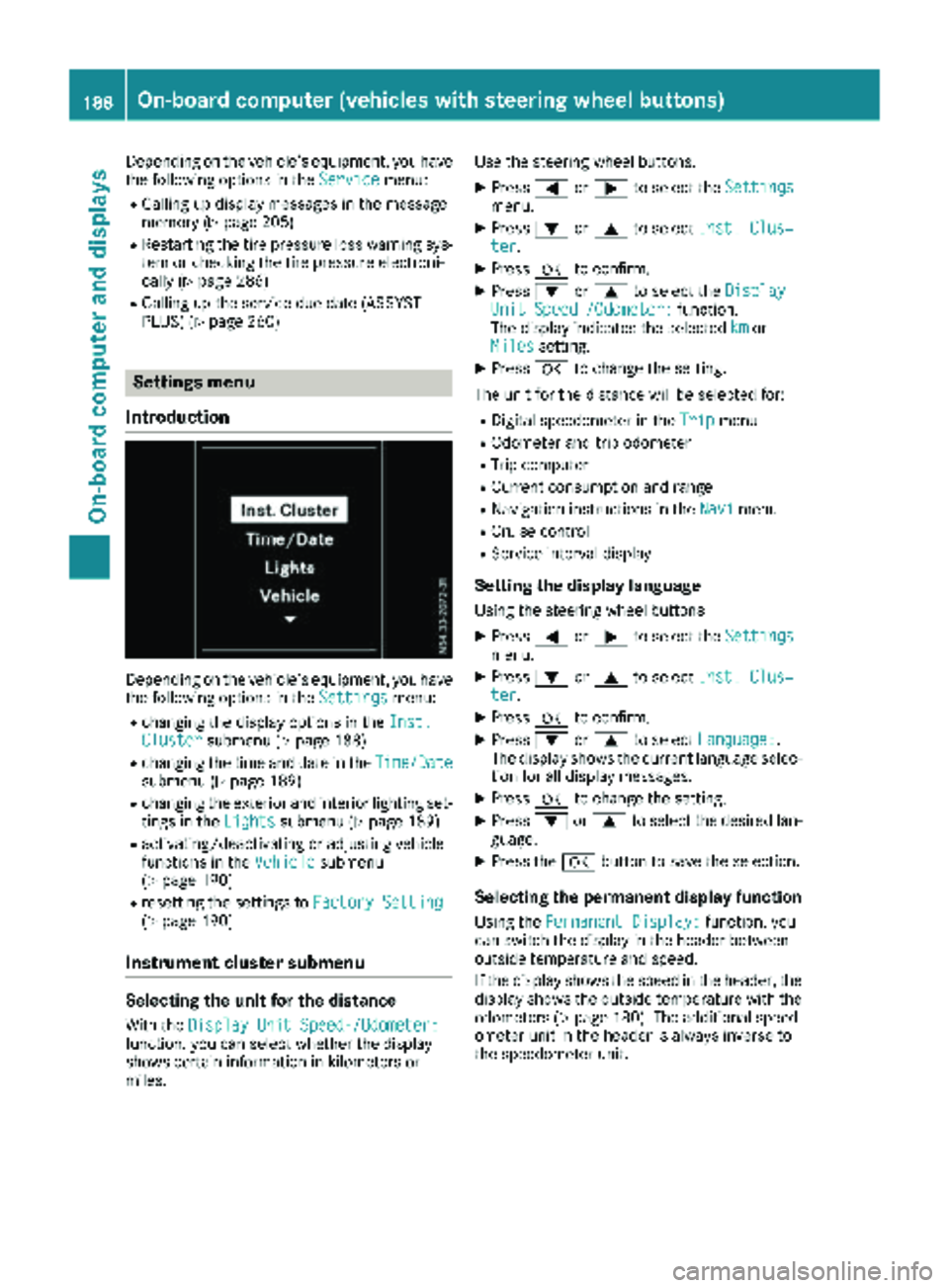
Introduction
Depending on the vehicle’s equipment, you have
the following options in the Settingsmenu:
Rchanging the display options in the Inst.Clustersubmenu (Ypage 188)
Rchanging the time and date in theTime/Datesubmenu (Ypage 189)
Rchanging the exterior and interior lighting set-
tings in theLightssubmenu (Ypage 189)
Ractivating/deactivating or adjusting vehicle
functions in the Vehiclesubmenu
(Ypage 190)
Rresetting the settings to Factory Setting(Ypage 190)
Instrument cluster submenu
Selecting the unit for the distance
With theDisplay Unit Speed-/Odometer:function, you can select whether the display
shows certain information in kilometers or
miles. Use the steering wheel buttons.
XPress
=or; to select the Settingsmenu.
XPress:or9 to select Inst. Clus‐ter.
XPressato confirm.
XPress :or9 to select the DisplayUnit Speed-/Odometer:function.
The display indicates the selected kmor
Milessetting.
XPress ato change the setting.
The unit for the distance will be selected for:
RDigital speedometer in the Tripmenu
ROdometer and trip odometer
RTrip computer
RCurrent consumption and range
RNavigation instructions in the Navimenu
RCruise control
RService interval display
Setting the display language
Using the steering wheel buttons
XPress=or; to select the Settingsmenu.
XPress:or9 to select Inst. Clus‐ter.
XPressato confirm.
XPress :or9 to select Language:.
The display shows the current language selec-
tion for all display messages.
XPress ato change the setting.
XPress :or9 to select the desired lan-
guage.
XPress the abutton to save the selection.
Selecting the permanent display function
Using the Permanent Display:function, you
can switch the display in the header between
outside temperature and speed.
If the display shows the speed in the header, the
display shows the outside temperature with the
odometers (
Ypage 180). The additional speed-
ometer unit in the header is always inverse to
the speedometer unit.
188On-board computer (vehicles withsteering whee lbu ttons)
On-board computer and displays
Page 205 of 318
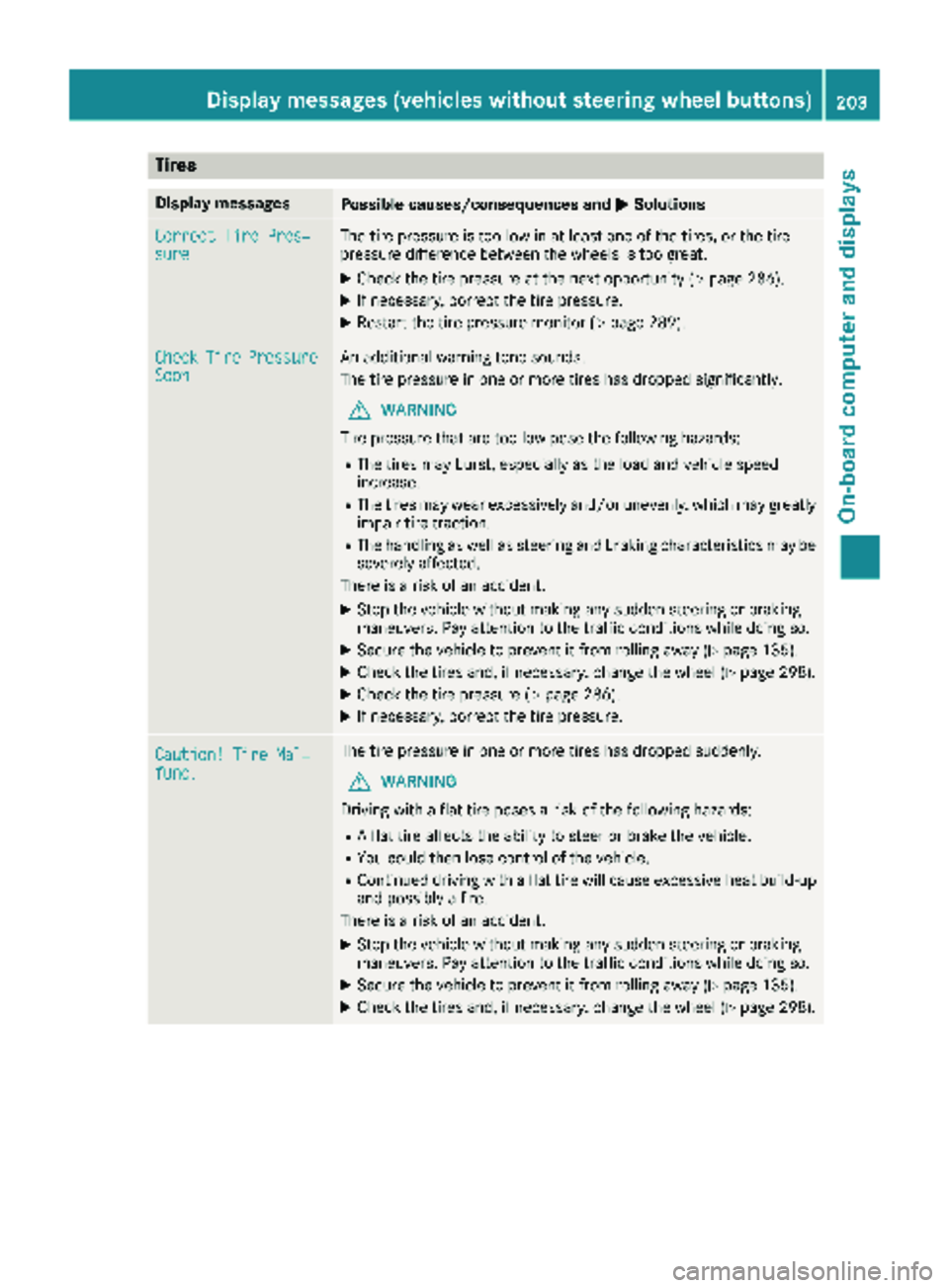
Tires
Display messagesPossible causes/consequences andMSolutions
Correct Tire Pres‐sureThe tire pressure is too low in at least one of the tires, or the tire
pressure difference between the wheels is too great.
XCheck the tire pressure at the next opportunity (Ypage 286).
XIf necessary, correct the tire pressure.
XRestart the tire pressure monitor (Ypage 289).
CheckTirePressureSoonAn additional warning tone sounds.
The tire pressure in one or more tires has dropped significantly.
GWARNING
Tire pressure that are too low pose the following hazards:
RThe tires may burst, especially as the load and vehicle speed
increase.
RThe tires may wear excessively and/or unevenly, which may greatly
impair tire traction.
RThe handling as well as steering and braking characteristics may be severely affected.
There is a risk of an accident.
XStop the vehicle without making any sudden steering or braking
maneuvers. Pay attention to the traffic conditions while doing so.
XSecure the vehicle to prevent it from rolling away (Ypage 135).
XCheck the tires and, if necessary, change the wheel (Ypage 298).
XCheck the tire pressure (Ypage 286).
XIf necessary, correct the tire pressure.
Caution! Tire Mal‐func.
The tire pressure in one or more tires has dropped suddenly.
GWARNING
Driving with a flat tire poses a risk of the following hazards:
RA flat tire affects the ability to steer or brake the vehicle.
RYou could then lose control of the vehicle.
RContinued driving with a flat tire will cause excessive heat build-up
and possibly a fire.
There is a risk of an accident.
XStop the vehicle without making any sudden steering or braking
maneuvers. Pay attention to the traffic conditions while doing so.
XSecure the vehicle to prevent it from rolling away (Ypage 135).
XCheck the tires and, if necessary, change the wheel (Ypage 298).
Displa y messages (vehicles without steering wheelbu ttons)203
On-board computer and displays
Z
Page 221 of 318
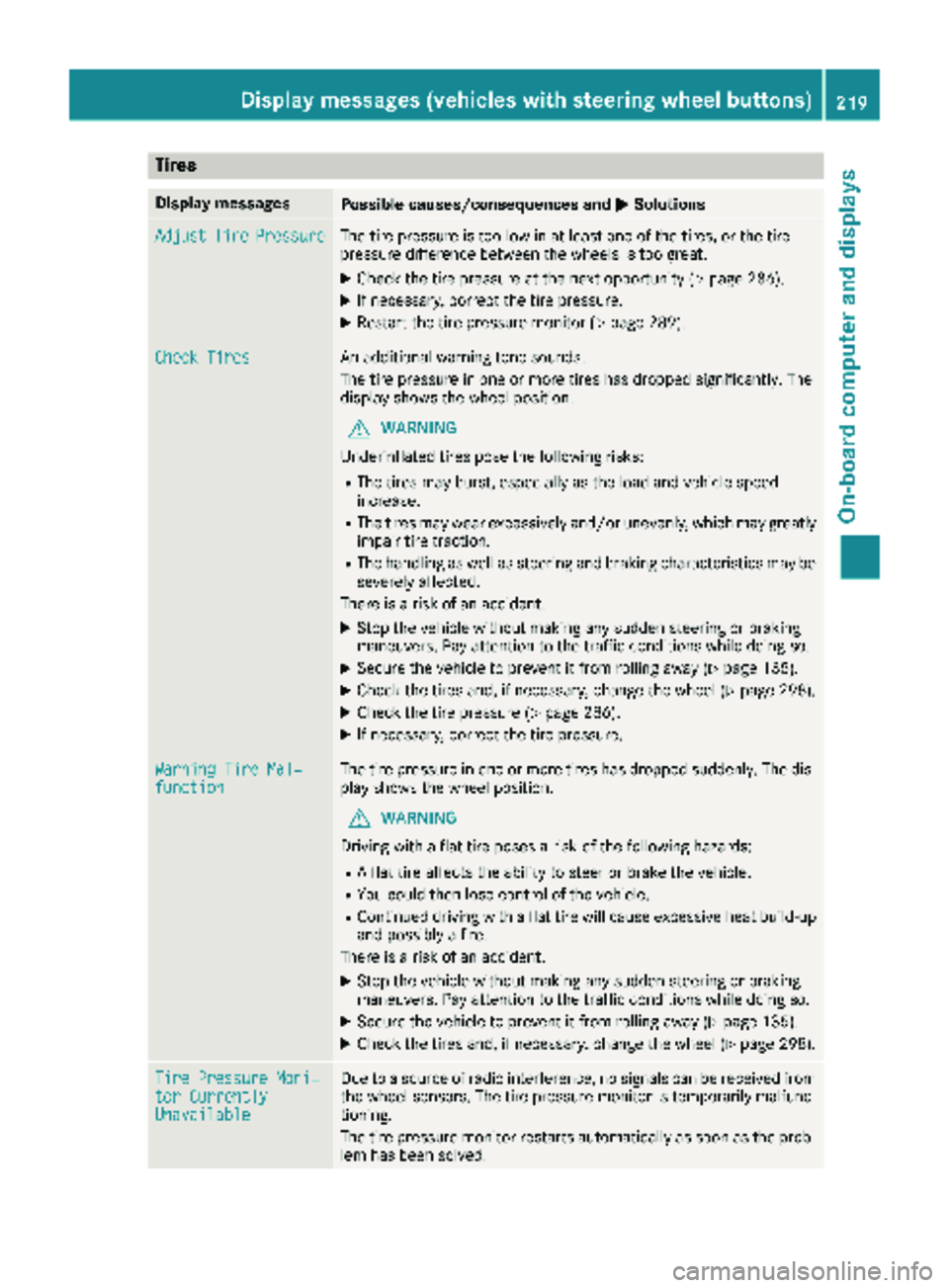
Tires
Display messagesPossible causes/consequences andMSolutions
AdjustTirePressureThe tire pressure is too low in at least one of the tires, or the tire
pressure difference between the wheels is too great.
XCheck the tire pressure at the next opportunity (Ypage 286).
XIf necessary, correct the tire pressure.
XRestart the tire pressure monitor (Ypage 289).
Check TiresAn additional warning tone sounds.
The tire pressure in one or more tires has dropped significantly. The
display shows the wheel position.
GWARNING
Underinflated tires pose the following risks:
RThe tires may burst, especially as the load and vehicle speed
increase.
RThe tires may wear excessively and/or unevenly, which may greatly
impair tire traction.
RThe handling as well as steering and braking characteristics may be
severely affected.
There is a risk of an accident.
XStop the vehicle without making any sudden steering or braking
maneuvers. Pay attention to the traffic conditions while doing so.
XSecure the vehicle to prevent it from rolling away (Ypage 135).
XCheck the tires and, if necessary, change the wheel (Ypage 298).
XCheck the tire pressure (Ypage 286).
XIf necessary, correct the tire pressure.
Warning Tire Mal‐functionThe tire pressure in one or more tires has dropped suddenly. The dis-
play shows the wheel position.
GWARNING
Driving with a flat tire poses a risk of the following hazards:
RA flat tire affects the ability to steer or brake the vehicle.
RYou could then lose control of the vehicle.
RContinued driving with a flat tire will cause excessive heat build-up
and possibly a fire.
There is a risk of an accident.
XStop the vehicle without making any sudden steering or braking
maneuvers. Pay attention to the traffic conditions while doing so.
XSecure the vehicle to prevent it from rolling away (Ypage 135).
XCheck the tires and, if necessary, change the wheel (Ypage 298).
Tire Pressure Moni‐tor CurrentlyUnavailable
Due to a source of radio interference, no signals can be received from
the wheel sensors. The tire pressure monitor is temporarily malfunc-
tioning.
The tire pressure monitor restarts automatically as soon as the prob-
lem has been solved.
Displa y messages (vehicles withsteering whee lbu ttons)219
On-board computer and displays
Z
Page 222 of 318
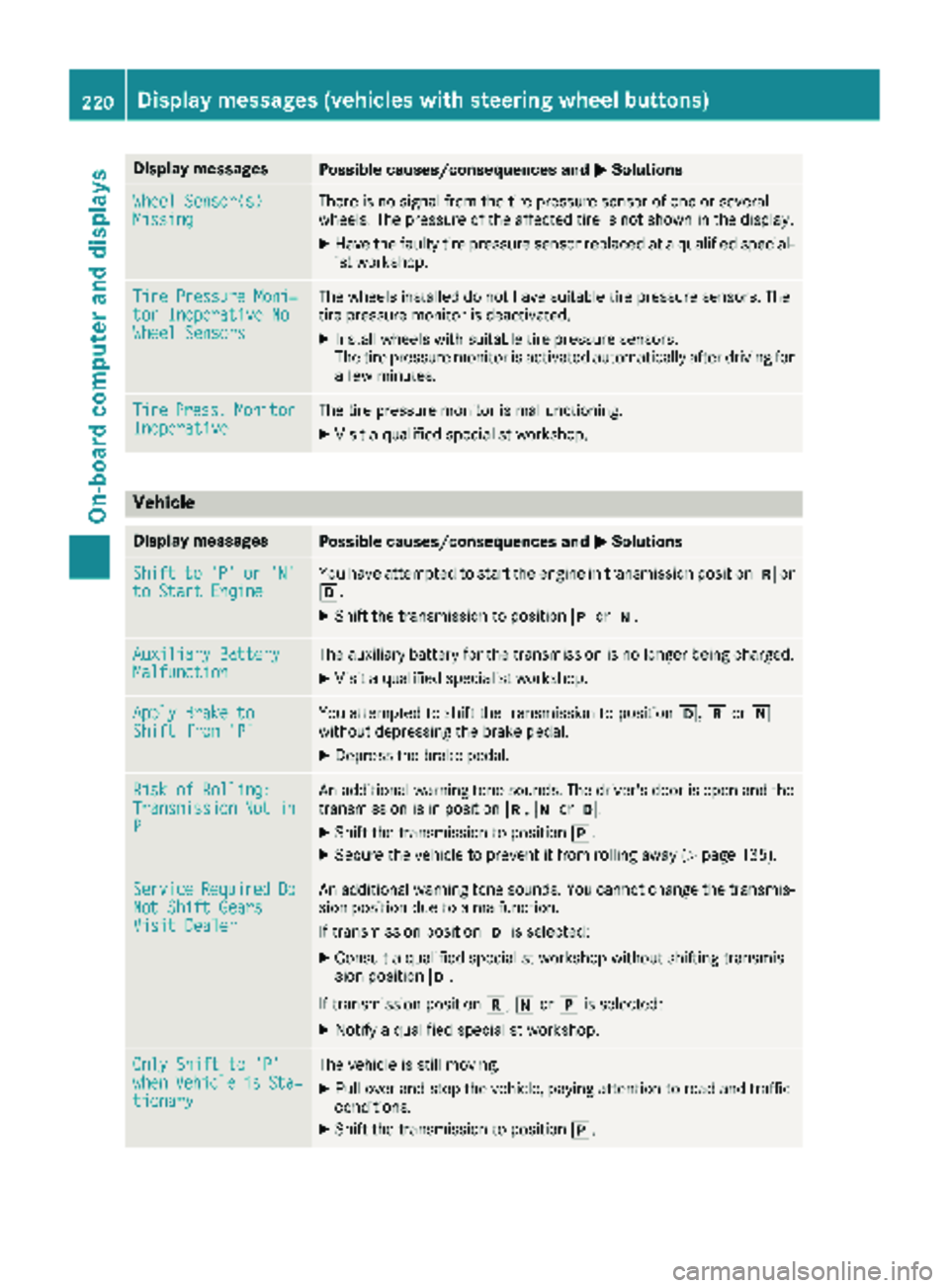
Display messagesPossible causes/consequences andMSolutions
Wheel Sensor(s)MissingThere is no signal from th etire pressur esensor of on eor several
wheels. The pressur eof th eaffecte dtire is no tshown in th edisplay.
XHav eth efault ytire pressur esensor replace dat aqualified special -
ist workshop .
TirePressure Moni‐tor Inoperative NoWheel Sensor s
The wheels installed do no thav esuitable tire pressur esensors. The
tire pressur emonitor is deactivated.
XInstall wheels wit hsuitable tire pressur esensors.
The tire pressur emonitor is activated automatically after drivin gfor
a few minutes.
Tir ePress.Monito rInoperativeThe tire pressur emonitor is malfunctioning .
XVisitaqualified specialist workshop .
Vehicle
Display messagesPossible causes/consequences and MSolutions
Shiftto'P'or'N'to Start EngineYou haveattempte dto start th eengin ein transmission position kor
h.
XShift th etransmission to position jori.
Auxiliary Batter yMalfunctionThe auxiliary battery for th etransmission is no longer bein gcharged.
XVisit aqualified specialist workshop .
Apply Brake toShift from'P'You attempte dto shift th etransmission to position h,kori
without depressing th ebrak epedal .
XDepress th ebrak epedal .
Riskof Rolling:TransmissionNotinP
An additional warning tone sounds. The driver's door is open and th e
transmission is in position k,iorh.
XShift th etransmission to position j.
XSecureth evehicl eto preven tit from rollin gaway (Ypage 135).
Servic eRequiredDoNot Shift GearsVisit Dealer
An additional warning tone sounds. You canno tchang eth etransmis -
sion position due to amalfunction .
If transmission position his selected:
XConsult aqualified specialist workshop without shifting transmis -
sion position h.
If transmission position k,iorj is selected:
XNotify aqualified specialist workshop .
OnlyShift to 'P'whe nVehicl eisSta‐tionar y
The vehicl eis still moving .
XPull overand stop th evehicle, payin gattention to roa dand traffic
conditions.
XShift th etransmission to position j.
220Display messages (vehicles withsteering whee lbu ttons)
On-board computer and displays
Page 232 of 318
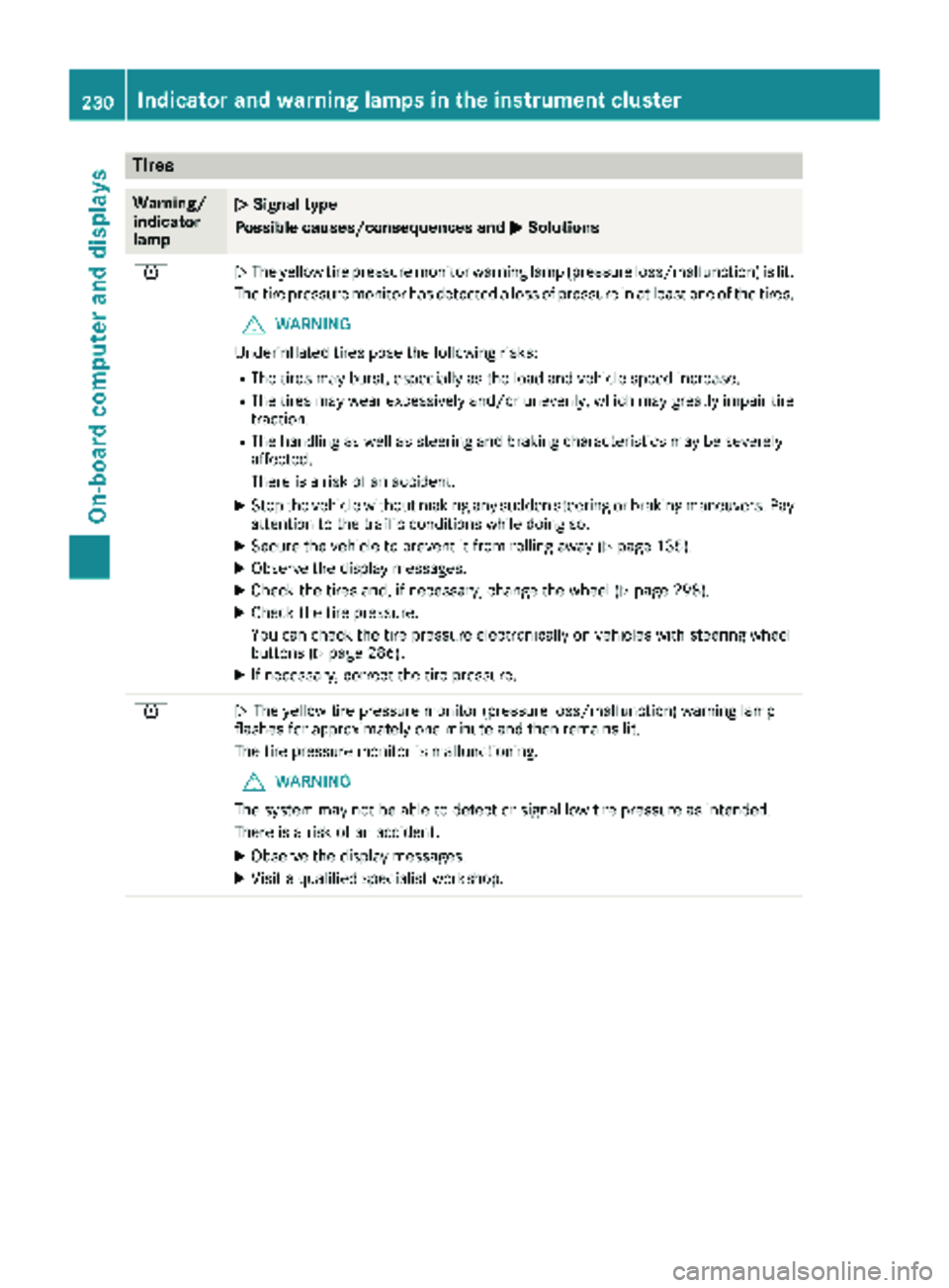
Tires
Warning/
indicator
lampNSignal type
Possible causes/consequences and M
Solutions
hNThe yellow tire pressure monitor warning lamp (pressure loss/malfunction) is lit.
The tire pressure monitor has detected a loss of pressure in at least one of the tires.
GWARNING
Underinflated tires pose the following risks:
RThe tires may burst, especially as the load and vehicle speed increase.
RThe tires may wear excessively and/or unevenly, which may greatly impair tire traction.
RThe handling as well as steering and braking characteristics may be severely
affected.
There is a risk of an accident.
XStop the vehicle without making any sudden steering or braking maneuvers. Pay
attention to the traffic conditions while doing so.
XSecure the vehicle to prevent it from rolling away (Ypage 135).
XObserve the display messages.
XCheck the tires and, if necessary, change the wheel (Ypage 298).
XCheck the tire pressure.
You can check the tire pressure electronically on vehicles with steering wheel
buttons (
Ypage 286).
XIf necessary, correct the tire pressure.
hN The yellow tire pressure monitor (pressure loss/malfunction) warning lamp
flashes for approximately one minute and then remains lit.
The tire pressure monitor is malfunctioning.
GWARNING
The system may not be able to detect or signal low tire pressure as intended.
There is a risk of an accident.
XObserve the display messages.
XVisit a qualified specialist workshop.
230Indicator and warninglamps in the instrument cluster
On-board computer and displays
Page 247 of 318
In the event of an accident, have a damaged
cargo compartment floor or loading area, the
cargo tie-down rings and the tie down checked
at a specialist workshop. Otherwise, the load
may not be correctly secured the next time any-
thing is stowed.
Even if you follow all loading guidelines, the load
increases the risk of injury in the event of an
accident. Observe the information in the "Secur-ing a load" (
Ypage 246) and "Load distribution"
(Ypage 245) sections.
You will find information about the maximum
roof load under "Cargo tie-down points and car-
rier systems" (
Ypage 314). You will find infor-
mation about roof carriers under "Carrier sys-
tems" (
Ypage 250).
Before loading
!
The anti-slip mats cannot be used for secur-
ing goods and must be replaced when they
show signs of:
RPermanent deformation and crushing
RCrack formation
RCuts
XTire pressure: check the tire pressure and
correct if necessary (Ypage 282).
XCargo compartment floor: clean the cargo
compartment floor.
The cargo compartment floor must be free
from oil and dust, dry and swept clean to pre-
vent the load from slipping.
XPlace non-slip mats (anti-slip mats) on the
cargo compartment floor if necessary.
During loading
XObserve the gross axle weight rating and per-
missible gross vehicle weight for your vehicle.
Take into account that your vehicle's curb
weight is increased if accessories or optional equipment are installed. The maximum pay-
load is thus reduced.
XObserve the notes on load distribution
(Ypage 245).
The overall center of gravity of the load should
always be as low as possible, centered and
between the axles near the rear axle.
XSecure the load (Ypage 246).
Observe the legal requirements of the country
in which you are currently driving.
Checks after loading
GWARNING
Combustion engines emit poisonous exhaust
gases such as carbon monoxide. If the tail-
gate/rear door is open when the engine is
running, particularly if the vehicle is moving,
exhaust fumes could enter the passenger
compartment. There is a risk of poisoning.
Turn off the engine before opening the tail-
gate/rear door. Never drive off with the tail-
gate/rear door open.
XSecuring luggage/loads: make sure that
the luggage and/or load is secure before
every journey and at regular intervals during a
long journey, and correct it if necessary.
XDoors/tailgate: close the sliding doors and
tailgate/door.
XTire pressure: adjust the tire pressure
according to the vehicle load (Ypage 282).
XDriving style: adapt your driving style
according to the vehicle load.
Load distribution
General notes
!
Excessive loads on individual points of the
cargo floor or on the load surface impair vehi-
cle handling characteristics and could cause
damage to the floor covering.
The overall center of gravity of the load should
always be as low as possible, centered and
between the axles near the rear axle.
Load distribution245
Transporting loads
Z
Page 272 of 318
REnsure sufficient ventilation when clean-
ing.
RMake sure that the vehicle interior is com-
pletely dry after cleaning.
Cleaning the display
!For cleaning, do not use any of the following:
Ralcohol-based thinner or gasoline
Rabrasive cleaning agents
Rcommercially-available household cleaning
agents
These may damage the display surface. Do
not put pressure on the display surface when
cleaning. This could lead to irreparable dam-
age to the display.
XSwitch off the display and let it cool down.
XClean the display surface with a commercially
available microfiber cloth and cleaner for
TFT/LCD displays.
XDry the display surface using a dry microfiber
cloth.
Cleaning the plastic trim
GWARNING
Care products and cleaning agents containing solvents cause surfaces in the cockpit to
become porous. As a result, plastic parts may
come loose in the event of air bag deploy-
ment. There is a risk of injury.
Do not use any care products and cleaning
agents to clean the cockpit.
!Never attach the following to plastic surfa-
ces:
Rstickers
Rfilms
Rperfume oil container or similar
You could otherwise damage the plastic.
!Do not allow cosmetics, insect repellent or
sunscreen to come into contact with the plas-
tic trim. This maintains the high-quality look of
the surfaces.
XWipe the plastic trim and the cockpit with a
damp, lint-free cloth, e.g. a microfiber cloth.
XHeavy soiling: use mild soapy water or care
products and cleaning agents recommended
and approved by Mercedes-Benz.
Cleaning the steering wheel and selec-
tor lever
XThoroughly wipe with a damp cloth.
XVehicles with leather upholstery: after
cleaning, use leather care agents that have
been recommended and approved by
Mercedes-Benz.
Cleaning the trim elements
!Do not use solvent-based cleaning agents
such as tar remover, wheel cleaners, polishes
or waxes. There is otherwise a risk of damag- ing the surface.
XWipe the trim elements with a damp, lint-free
cloth, e.g. a microfiber cloth.
XHeavy soiling: use care products and clean-
ing agents recommended and approved by
Mercedes-Benz.
Cleaning the seat covers
!Do not use microfiber cloths to clean genu-
ine leather or artificial leather covers. If used
often, a microfiber cloth can damage the
cover.
!Clean:
Rartificial leather covers with a cloth mois-
tened with a solution containing 1 %deter-
gent, e.g. dish washing liquid.
Rcloth covers with a microfiber cloth mois-
tened with a solution containing 1 %deter-
gent, e.g. dish washing liquid. Wipe entire
seat sections carefully to avoid leaving visi-
ble lines. Leave the seat to dry afterwards.
Cleaning results depend on the type of dirt
and how long it has been there.
Rgenuine leather covers carefully with a
damp cloth, then wipe the covers down
with a dry cloth. Make sure that the leather does not become soaked. Otherwise, the
leather could become rough or cracked.
Only use leather care agents that have
been tested and approved by Mercedes-
270Care
Maintenance and care