reset MERCEDES-BENZ METRIS 2021 MY21 Operator's Manual
[x] Cancel search | Manufacturer: MERCEDES-BENZ, Model Year: 2021, Model line: METRIS, Model: MERCEDES-BENZ METRIS 2021Pages: 290, PDF Size: 4.68 MB
Page 156 of 290
The
following option sareavailable:
R AutoTextM essages:S etst extfor messages
sent automatically while driving
R Contact Sorting:S etss orting me thod of con‐
ta ct names
R Contact Display:S etsd ispla yofc ontact
names Configu
ring navigation settings Map settings
#
Press on 003Band select Navigation *
Map.
The following option sareavailable:
R Drivin gMap View:S etsm ap perspective
R Map Theme :Determines color fort he map
material
R Map Layer :Setst he le velofd etail of them ap
R Installed Maps:S pecifies mapstobe ins talled
R Map Updates :Defines procedur efor map
material updates
Guidance settings #
Press on 003Band select Navigation *
Navigation Instructions.
The following option sareavailable:
R Calculation Mode :Setsr out ecalculation
mode
R Avoidances :Setsr oad types tobe avo ided on
th er oute
R Custom Avoidances:A llows youtoa void cer‐
ta in roads or areas
R Voic ePrompts:E nables or disable svoice
prom ptsd uring navigation
R Junction View:E nables or disables vie wof
upcoming junctions while driving
R GPS Simulator:E nablestheG PS simulator to
calculat eand simula teroutes
Tr af fics ettings #
Press on 003Band select Navigation *
Traffic .
The following option sareavailable:
R Traffic :Activates traf ficm essages
R Automatic Route Optimization:U ses opti‐
mize dalter nativ eroutes automaticall yoron
requ est R
Current Provider :Setsp rovide rfromw hich
traf ficd ataiso btained. With th e"Auto"
option, theb esta vailable traf ficd ataisa uto‐
maticall yselected.
R Subscriptions :Displa yslistofc urrent sub‐
scriptions fort raffic data
Setting position course #
Press on 003Band select Navigation *
Location History.
The following option is available:
R Travel Dat aRecording :Enables theg athering
of tra velinformation
Device and privacy settings #
Press on 003Band select About.
The following option sareavailable:
R System Update:S tartss oftwar eupdate, if an
updat eisavailable
R Map Updates :Startsorc omple tesu pdate for
th em ap material
R System Information:D isplayshardwar eand
softwar eversion information
R EULAs:D isplays th eEnd User License Agree‐
ment (EULA) and softwar elicense information
R Regulatory :Displa ysE-Labe lwithc ompliance
designations and regulator yinformation.
R Reset to Factor yDefaults:D eletesa ll data
and resets them ultimedia sy stem tothef ac‐
to ry settings Configuring notification settings
#
Press on 003Band select Notifications.
The following option sareavailable:
R Incoming Phon eCall:S etto displa yanotifica‐
tion toans werorr eject incomin gcalls
R Misse dCall:S etto displa yamissed call noti‐
fi cation
R Ongoing Call:S etto displa yanotification
when acall is in progress Configuring displa
yand languag esettings #
Press 003B and select Display and Language .15 4
Multimedia sy stem
Page 157 of 290
The
following option sareavailable:
R Brightness:S etst he brightness of them edia
display
R Display Color Mode :Select sdayor night
color mode. If yous elec tthe "Automatic"
option, them ultimedia sy stem switches auto‐
maticall ytodayor night color sdepending on
th et ime of da y.
R System Voice:S etst he voice fort he naviga‐
tion announcements and other information
R System language:S etst he languag efor text
R Keyboard:S etst he keyboar ddesign Configu
ring sound settings #
Press on 003Band select Sound.
The following option sareavailable:
R Adjust Volumes:S etst he volumes fora udible
device functions.
R Adjust Sound Quality:S etst he le velfor bal‐
ance, fader ,bass, mid-rang eand treble for
th em edia source youa reusing.
R Audi oPrompts :Setst he stylef or audio
announcements.
R Equalizer Preset:D efinesthes ettings fort he
equalizer function.
R Touch Sounds:S etst he sound fort he selec‐
tion of symbols on them edia displa y. Callin
gupt hetool menu #
Youc an call up thet ool menu an ytime by
pressing on æ.
The following function sareavailable:
R Wher eAmI? :Displa ysinformatio nabout your
cur rent position.
R Detour :Startsa detour.
R Now Playing :Displa ysinformatio nabout the
cur rent media trac k.
R Nav Assist:S hows upcomin gexitsa nd cur‐
re nt location information.
R Traffic:D isplaystraf fici nformation along your
ro ute.
R Up Ahead :Displa yspoint sofinteres tlocated
ahead of you.
R Quic kSettings :Options fora ctivating or
deactivating various sy stem functions. Na
vigation Na
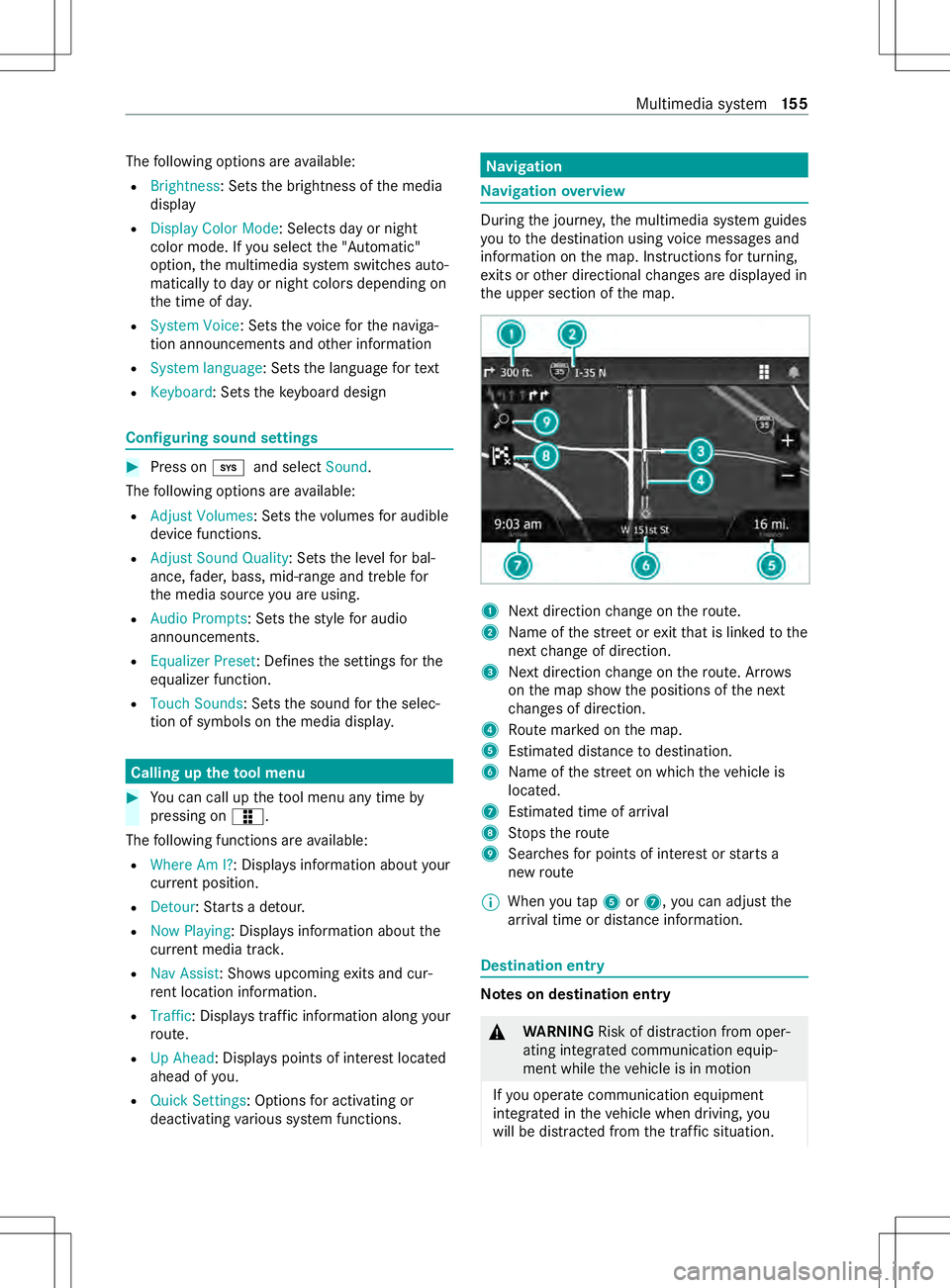
vigation overview During
thej ourne y,them ultimedia sy stem guides
yo utot he destination using voice messages and
informatio nonthe map. Instructions fort urning,
ex its or other directional changes ar edispla yedin
th eu pper section of them ap. 1
Next direction chang eont heroute.
2 Name of thes tree tore xitthat is linked tothe
next chang eofd irection.
3 Next direction chang eont heroute. Ar rows
on them ap sho wthe positions of then ext
ch anges of direction.
4 Routem arke dont he map.
5 Estimated dis tance todestination.
6 Name of thes tree tonw hichthe vehicle is
located.
7 Estimated time of ar rival
8 Stops ther oute
9 Sear ches forp oints of interes torstartsa
ne wr oute
% When
yout ap 5 or7,y ou can adjus tthe
ar riva ltim eord ista nce information. De
stination entry Note
sond estination entry &
WARNING Risk of distraction from oper‐
ating integrated communication equip‐
ment while thev ehicle is in motion
If yo uo perat ecommunication equipment
integ ratedint hevehicle when driving, you
will be distracted from thet raffic situation. Multimedia sy
stem 15 5
Page 164 of 290
The
following option sareavailable:
R Entert he telephon enumbe rusing thek eypad
ÿ and press on _.
R Toselect acontact from thep hone book:
press jand select thec ontact.
The following option sareavailable during acall:
R Totrans fert he sound output bac ktoyour
smartphone, press on &.
% Yo
uc an use this function if youd isconnect
Blue tooth ®
and at thes ame time wish to
maintain thec all or conduc tapriva te con ver‐
sation.
R Callupt he dial pad.
% Yo
uc an use this function touse automated
sy stems suc hasvoicemail.
R Press on mtomut ethe microphone.
R Press on ktoend acall.
Saving atelephone number as apreset
Yo uc an sa veup tofour contacts as presets on
dial pad. Youc an then quickl ycall frequently
called con tacts. #
Press on 002B. #
Select Add Preset Contact and selectacon‐
ta ct.
Displayin gmessages #
Select 3. #
Select amessage.
Connecting Androi dAuto #
Mak esuret hat thes oftwar eonyour
Android™ smartphone is up todate #
Download and ins tallth eA ndroid Autoapp on
th es martphone. #
Connec tthe Android™ smartphone wit hthe
USB media por tinthevehicle using asuitable
cable. #
Followt he instructions on them edia display
to comple tethes et-upp rocedure.
Connecting Apple CarPlay ®#
Mak esuret hat thes oftwar eonthe Apple
iPhone ®
is up-to-date. #
Connect theA pple iPhone ®
wit hthe USB
media por tinthevehicle using agenuine
Apple ®
cable. #
Followt he instructions on them edia display
to comple tethes et-upp rocedure. Android
Autoand Apple CarPlay ®
can be activa‐
te dbyc onnecting asuita ble mobile phone to
USB por t1 Media
Information about suppor
tedf ormats and
dat astorage media &
WARNING Risk of distraction whe nhan‐
dling da tastorag emedia
If yo uh andle adatas tora ge medium while
driving, your attention is diver tedf romt he
traf ficc onditions. Thi scould also cause you
to lose control of thev ehicle. #
Onlyhandle adatas tora ge medium
when thev ehicle is stationar y. The multimedia sy
stem is compatible wit hmany
media pla yers,includin gsmartphones and other
por table devices. Youc an connec tacompatible
medi aplaye ru sing Blue tooth®
or USB.
The multimedia sy stem is compatible with
Android devices that suppor tMTP mode.
If yo uc onnec tanexternal ha rddrive, youh aveto
connect this wit hane xternal po wersource. The
USB por tonthe multimedia sy stem cann otsup‐
pl yp owe rtoane xternal ha rddrive.
Th em ultimedia sy stem supports thef ollow‐
ing form ats and data media:
Pe rm issible
fi le sy stems FA
T16, FAT32, NTFS
Pe rm issible
dat acarriers USB devices, iPod
®
/iPhone ®
,
MTP devices, Blue tooth®
audio
equipment
Suppor ted
fo rm ats: MP3
,WMA ,AAC ,W AV,FLAC %
Obser vethef ollowing no tes:
R Due tothew ide rang eofU SB devices
av ailable on them arke t, pl aybac kcann ot
be guaranteed fora ll USB devices.
R Cop y-pr otected music files or DRM (Digi‐
tal Ri ghts Management) encryp tedf iles
canno tbeplaye db ack.
R MP3 pla yers mus tsuppor tMediaTrans fer
Pr oto col (MTP). 16 2
Multimedia sy stem
Page 166 of 290
#
Select DAB Radio. #
Press on Scan.
Whe nthe sear chis comple te,t he firs ta vaila‐
ble statio nint hefirs te nsemble found is
pla yed.
% Aftert he firs ts earch, youc an select Scan
again tosear chforD AB stations again. When
th en ew sear chisfinished them ultimedia
sy stem pla ysbac kthe firs ts tatio nint he
ensemble whic hyou werelistening toatthe
beginning of then ew sear ch.
Changing DABs tations #
Select DABR adio. #
Ifre qu ired, select Scantosear chforal ocal
DA Bs tation. #
Select 00F5or00F6 tochang ethe DABs ta‐
tion.
At thee nd of thec urrent ensembl ethe multi‐
media sy stem automaticall ychanges tothe
fi rs ta vailable statio nint he next ensemble.
Selecting aDAB station from alist #
Select DAB Radio. #
Ifre qu ired, select Scantosear chforal ocal
DA Bs tation. #
Select StationList. #
Ifre qu ired, selec tacategor y. #
Select astation. Saving
astatio nasa favo rite #
Select ther espectiv esource, e.g. FM Radio. #
Select Favourites.
The following option sareavailable:
R Tostor eas tatio ninana vailable prese t:
select preset.
R Toreplace astatio nt hat has been sa ved:
press and hold on thep rese ta nd select
Replace . Switching
thet raffic information service on
or off The traf
fici nformation service use sthe radio
dat asystem( RDS), toprov ide youw ithc urrent
traf fici nformation. If thes ystemr ecei vesat raffic
announcemen titswitches automaticall ytothe
st atio ntransmitting thet raffic announcement.
When thea nnouncemen tisfinished thes ystem
re turns tothep reviou sstation. #
Toswitc hont he traf fici nformation
service: selectZ. #
Select RDS Announcement s-TA. Satellit
eradio Information on
thes atellit eradio
SIRIUS XM ®
satellit eradio of fers mor ethan 14 0
digital-quality radio channels pr oviding 100%
commercial-free music, sports, ne wsand enter‐
ta inment ,for example. SIRIUS XM ®
satellit eradio
emplo ysaflee tofh igh-per form anc esatellites to
broadcas taround thec lockthroughout theU SA
and Canada. The satellit eradio prog ramisa vaila‐
ble foram onthly fee. Information about this can
be obtained from aSiriusXM ®
Service Center and
at https://www.siriusxm.com (USA) or https://
www.siriusxm.c a(Canada).
% Sirius, XM and all
related mar ksand logos
ar et rademar ksof SiriusXM Radio Inc .and its
subsidiaries. All other mar ks,c hannel names
and logo sarethep roperty of their respective
ow ners. All rights reser ved.
Re gis tering satellit eradio
Re quirements
R Satellit eradio equipment
R The registration wit hasatellit eradio pr ovider
% If
re gistration is no tincluded when pur chas‐
ing thes ystem, your credit car ddetails will
be requ ired toactivat eyour account
Befor eyou ar eable toactivat eyour SiriusXM ®
subs cription youw ill nee dtohavether adio ID for
yo ur SiriusXM Connec tTune ravailable. Youc an
call up this radio ID in theS iriusXM ®
settings
menu or se tyour stereo sy stem tochannel 0. #
Select Z*SiriusXM Settings *Sir-
iusXM Radio ID .
The servic einformation screen appear sshow‐
ing ther adio ID and thec urrent subscription
st atus. #
Establish atelephone connection. #
Followt he service staff's instructions.
The activatio nprocess ma ytakeuptot en
minu tes.
% Yo
uc an also ha vethes atellit eservice activa‐
te do nline. Todo so, please visit https://
www.siriusxm.com (USA) or https://
www.siriusxm.ca (Canada). 16 4
Multimedia sy stem
Page 167 of 290
Selecting
asatellit eradio category
Yo uc an mak eastatio ns electio nbased on cate‐
gories. #
Select SiriusXM ®
as them edia source. #
Select Browse *POIs. #
Select acategor y.
Using playbac kmode
Playbac kmode is used tocontrol playbac kofa
SiriusXM ®
broadcast.
% The device au
tomatically activates thep lay‐
bac km ode when stored prese tchannels are
pla yedb ack. #
If necessar y,select Livetoswitc htop layback
mode.
The following option sareavailable:
R Tocontinu eorpause playback: select 00D0
or 00CF.
R Tostop playbac kmode: select Replay.
R Tofast forw ardorr ewind step bystep: select
0054 or0055.
% If
yo uf astfor wa rdorrewind tothee nd of the
progress bar ,playbac kmode is automatically
ex ited and switched tothec urrent real-time
transmission.
Creating aTuneMix™ list
Befor eyou can playbac kaTuneMix™ list, you
mus thave save dt wo or mor echannel presets.
The TuneMix™ function allo wsyoutop ut
to ge ther an individual lis tening experience with
yo ur favo rite music channels. #
SetS iriusXM ®
as them edia source and select
Favourites . #
Select TuneMix . #
Toend playback: selectFavourites *
TuneMix.
Switching theT uneStart™ function on or off
When youa ctivat ethe TuneS tart™f unctio nand
switc htoap rese tc hannel, thet rack cur rently
pl ay ing is pla yedb ackf romt he beginning. It does
no ts tart at thep oint at whic hthe liv etransmis‐
sion is cur rentl yb road casting.
% The
TuneS tart™f unctio nisonlyavailable
when yous wit ch on prese tchannels. #
Select Z. #
Select SiriusXM Settings *Tune Start.
% When
theT une Start™ function pl aysat rack
from theb eginning, aprogress bar is shown wit
hw hichyou can control thep laybac kof
th et rack and thep laybac kmode.
Sear ching unsubscribed channels
Yo uc an activat eunsubsc ribed channels. #
Select SiriusXM ®
as them edia source. #
Select SiriusXM Settings *Unsubscribe
Channel List.
Unsubscribed channels in thec hannel lis tare
displa yedw ithg rayt ext.
Yo uc anno tset an unsubsc ribed channel bytap‐
ping it. Youc an displ aythef ollowing information,
fo re xamp le:thec hannel name, then ame of the
cur rentl yp layin gartista nd trac k.
Deletin guser data
All SiriusXM ®
user information ,e.g.p resets and
ot her data, can be dele ted. #
Select Z. #
Select SiriusXM Settings *SiriusXM User
Data Reset. Up
dating maps and sy stem software
When youd ownload thel ates tsoftwar eupdate,
yo ug etnewm apma terial, updated features and
per form anc eimp rove ments.
Map updates ha vethef ollowing advantages:
R Your multimedia sy stem take sintoa ccount all
cur rent changes in thec ourse of ther oad.
R The maps ar ekeptuptod ate,fore xamp leto
fi nd recently added points of interest.
Map upda tesa reextensiv eand ma ytakes eve ral
hours.
Softwar eupdates pr ovide inn ovations and
impr ovement sinthefeatures and functionality of
th em ultimedia sy stem. Softwar eupdates are
small and take onl yaf ewminutes. #
Toupdat esystems oftware: press on003B. #
Select Settings *About *System
Update. #
Followt he instructions on them edia displa y. #
Toupdat emaps: press on 003B. #
Select Settings *Navigation *Map and
Vehicle *Map Updates. #
Followt he instructions on them edia displa y. #
Form orei nformation on updating maps and
softwar efor them ultimedia sy stem https://
auto-oem. garm in.com/landing/site. Multimedia sy
stem 16 5
Page 186 of 290
#
Carefull yspra ythe vehicle wit hwater and dry
of fw ithal eather clo th.Don otpoint the
wate rjet directly int othe air inle tgrille.
When operating thev ehicle in winter ,remo veall
traces of road salt deposits carefull yand as soon
as possible. Note
sonc areofp aint and matte finish *
NO
TEPaint wo rkdamag eand cor rosion
due toinadequat ecare Fa
ilur etop romp tly and thoroughly remo ve
dir tfromb irdd roppings or other residue
could result in paintwor kdamag eand cor ro‐
sion at alater date. #
Cleand irto ffpaint and matt efinish
th oroughly and as soon as possible. Obser
vethen otes on cleaning and car einorder
to avoid damag etothe paintwor k.
Pa int
R Insect remains: soak wit hinsect remo vera nd
th en wash off.
R Birdd roppings: soak wit hwater and then
wa sh off.
R Tree resin, oils, fuels and greases: remo veby
ru bbing gentl yw ithac loth soaked in petro‐
leum ether or lighter fluid.
R Coolan tand brak efluid: remo vewit had amp
clo thand clear water.
R Tars tains :use tarr emo ver.
R Wax: us eas ilicone remo ver.
R Do no taffix sticke rs,f ilms or similar.
R Remo vedirtass oon as possible.
Mat tefinish
R Onlyuse car eproducts appr ovedfor
Mercedes-Benz.
R Do no tpolish thev ehicle and allo ywheels.
R Onlyusestate-of- the-ar tcar wa shes.
R Do no tuse aw ash program that end switha
ho tw ax treatmen tinautom atic car washes.
R Do no tuse paint cleaners, buf fing or polish‐
ing products, or gloss preser vers,e .g. wax.
R Alwaysh ave paintwor krepair scarried out at
aq ualified specialis tworks hop. Note
sont he car eofvehicle parts &
WARNING Risk of inju ryif unsuitable
climbin gaids ar eused
If yo uu se opening sinthevehicle's body work
or de tach able parts as steps, youc ould:
R Slip and/or fall.
R Damag ethe vehicle and thus slip and fall. #
Alwaysu se anti-slip, stable climbing
aids, e.g .asuitable ladder. &
WARNING Risk of entrapment if the
windshield wiper sareswit ched on while
th ew indshield is being cleaned
If th ew indshield wiper saresetinm otion
while youa recleanin gthe windshield or
wiper blades, youc an be trapped bythew iper
arm. #
Alwayss witc hoffthew indshield wipers
and thei gnition befor ecleaning the
windshield or wiper blades. &
WARNING Risk of bu rnsf romt hetailpipe
and tailpipe trims
The exhaus ttailpipe and tailpipe trims can
becom everyh ot.Ify ou come int ocontact
wi th th ese parts of thev ehicle, youc ould
bur nyourself. #
Alwaysbep articularly careful around
th et ailpipe and thet ailpipe trims and
supervise children especially close lyin
th is area. #
Allowvehicle parts tocool down before
to uchin gthem. *
NO
TEDama gecaused bytheu se of
openings in theb odywor kordetachable
par tasa step Using
thel owe rguide of thes liding door (car‐
ri age) as astepc an damag ethe trim and/or
mechanism of thes liding door. #
Do no tuse theg uide of thes liding door
(car riage) as astep. %
Information on suitable cleaning agentsor
cleaning clo
thsc an be obtained from aquali‐
fi ed specialis tworks hop. 184
Maintenance and care
Page 198 of 290
#
Do no tconnect or disconnect theb at‐
te ry cla mp sw hile thee ngine is running. *
NO
TEDama getotheo n-boar delectron‐
ics due tointer changing theb attery
clamps Incor
rectly connecting theb atter ycan dam‐
ag et he on-boar delectronics. #
Alwaysc onnectt he batter yasdescri‐
bed in thef ollowing sequence. Ne ver
re ve rset he term inal clamps. The
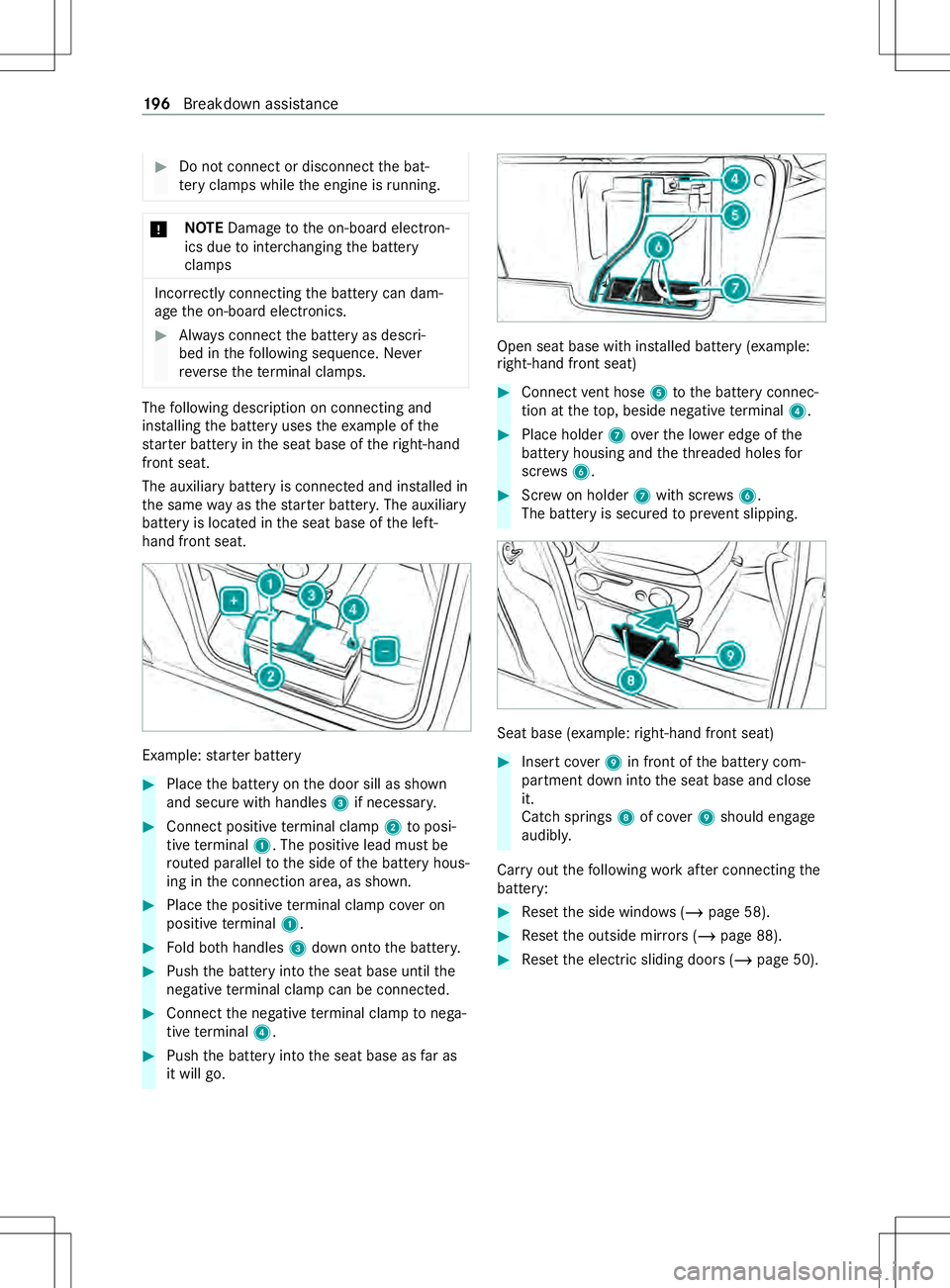
following description on connectin gand
ins talling theb atter yuses thee xamp le ofthe
st ar terb atter yint he seat base of ther ight-ha nd
front seat.
The auxiliar ybatter yisc onnected and ins talled in
th es ame wayast hestar terb atter y.The auxiliary
batter yislocated in thes eat base of thel eft-
hand front seat. Example:
star terb attery #
Place theb atter yont he door sill as shown
and secur ewithh andles 3if necessar y. #
Connec tpositiv eterminal clamp 2toposi‐
tiv et erminal 1.The positiv elead mus tbe
ro uted parallel tothes ide of theb atter yhous‐
ing in thec onnection area, as shown. #
Place thep ositiv eterminal clam pcover on
positiv eterminal 1. #
Fold bo thhandles 3down ont othe batter y. #
Push theb atter yintot he seat base until the
negati ve terminal clam pcan be connec ted. #
Connec tthe negativ eterminal clam ptonega‐
tiv et erminal 4. #
Push theb atter yintot he seat base as faras
it willg o. Open seat base wit
hinstalled batter y(example:
ri ght-han dfront seat) #
Connect vent hose 5totheb atter yconnec‐
tion at thet op, beside negativ eterminal 4. #
Place holder 7over thel owe redgeoft he
batter yhousing and thet hreadedh olesfor
scr ews 6. #
Screw on holder 7withs crews 6.
The batter yissecured topreve nt slipping. Sea
tbase( example: right-han dfront seat) #
Inser tcover 9 in front of theb atter ycom‐
partmen tdow nintot he seat base and close
it.
Catc hsprings 8of co ver9should engage
audibly.
Car ryout thef ollowing workafte rc onnecting the
battery: #
Resetthe side windo ws (/pag e58). #
Resetthe outside mir rors ( / pag e88). #
Resetthe electric sliding door s(/pag e50). 19 6
Breakdown assis tance