fog light MERCEDES-BENZ ML SUV 2008 User Guide
[x] Cancel search | Manufacturer: MERCEDES-BENZ, Model Year: 2008, Model line: ML SUV, Model: MERCEDES-BENZ ML SUV 2008Pages: 381, PDF Size: 7.18 MB
Page 152 of 381
Driving sys
tems 149under braking or acceleration. The vehi-
cle could start to skid.
R if the sensors are dirty or there is poor
visibility, e.g. due to snow, rain or fog.
Distance control may be impaired.
Always pay attention to traffic conditions
even when Distronic is activated. Other-
wise, you may fail to recognise danger in
time, could cause an accident and injure
yourself and others.
If there is no vehicle in front, Distronic oper-
ates in the same way as cruise control. Dis-
tronic functions in the 30 km/h to
180 km/h range. G
Risk of accident
Distronic brakes your vehicle at a maximum
of 2 m/s 2
, depending on its speed. This
corresponds to approximately 20% of your
vehicle's maximum braking power. You
must also apply the brakes yourself if this
braking power is not sufficient.
If Distronic detects a risk of collision with a
vehicle in front, an intermittent warning
tone sounds. In addition, the ldistance
warning lamp in the instrument cluster
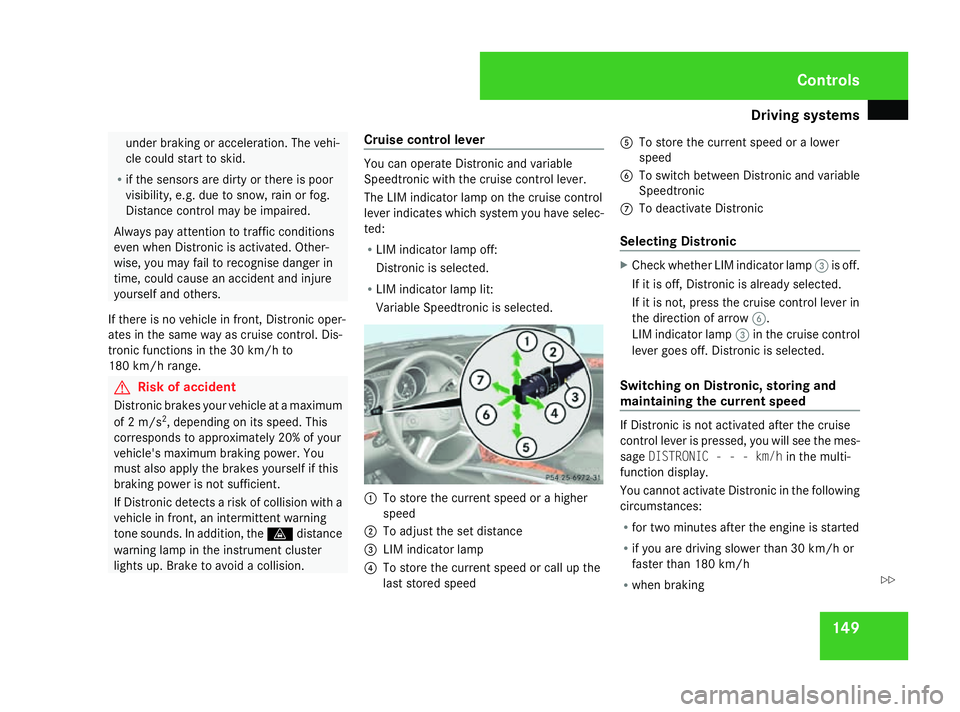
lights up. Brake to avoid a collision. Cruise control lever You can operate Distronic and variable
Speedtronic with the cruise control lever.
The LIM indicator lamp on the cruise control
lever indicates which system you have selec-
ted:
R LIM indicator lamp off:
Distronic is selected.
R LIM indicator lamp lit:
Variable Speedtronic is selected. 1
To store the current speed or a higher
speed
2 To adjust the set distance
3 LIM indicator lamp
4 To store the current speed or call up the
last stored speed 5
To store the current speed or a lower
speed
6 To switch between Distronic and variable
Speedtronic
7 To deactivate Distronic
Selecting Distronic X
Check whether LIM indicator lamp 3is off.
If it is off, Distronic is already selected.
If it is not, press the cruise control lever in
the direction of arrow 6.
LIM indicator lamp 3in the cruise control
lever goes off. Distronic is selected.
Switching on Distronic, storing and
maintaining the current speed If Distronic is not activated after the cruise
control lever is pressed, you will see the mes-
sage
DISTRONIC - - - km/h in the multi-
function display.
You cannot activate Distronic in the following
circumstances:
R for two minutes after the engine is started
R if you are driving slower than 30 km/h or
faster than 180 km/h
R when braking Controls
164_AKB; 5; 5, en-GB
wobuchh
,V ersion: 2.10.6
2008-05-11T11:55:12+02:00 - Seite 149 ZDateiname: 6515_4293_02_buchblock.pdf; preflight
Page 171 of 381
Driving sys
tems 168 You are always responsible for safety and
must continue to pay attention to your
immediate surroundings when parking and
manoeuvring. This applies to the areas
behind, in front of and next to the vehicle.
You could otherwise endanger yourself and
others. G
Risk of accident
Under the following circumstances, the
reversing camera will not function, or func-
tion in a limited manner:
R if the tailgate is open.
R in heavy rain, snow or fog. R
at night or in very dark places.
R if the camera is exposed to very bright
white light.
R if the area is lit by fluorescent light (the
display may flicker).
R if there is a sudden change in tempera-
ture, e.g. when driving into a heated
garage in winter.
R if the camera lens is dirty or obstructed.
R if the rear of your vehicle is damaged.
Have the camera position and setting
checked at a qualified specialist work- shop in this case. Mercedes-Benz recom-
mends that you use a Mercedes-Benz
Service Centre for this purpose.
Do not use the reversing camera in these
types of situation. You could otherwise
injure others or damage objects and your
vehicle while you are parking.
Activating the reversing camera X
Make sure that the key is in position 2in
the ignition lock.
X Engage reverse gear.
The area behind the vehicle is shown in the
COMAND APS display. Controls
164_AKB; 5; 5, en-GB
wobuchh
,V ersion: 2.10.6
2008-05-11T11:55:12+02:00 - Seite 168 Dateiname: 6515_4293_02_buchblock.pdf; preflight
Page 237 of 381
Driving
tips 234 G
Risk of accident
New brake pads/linings only reach their
optimum braking effect after several hun-
dred kilometres of driving. Before this opti-
mum braking effect is reached, you should
compensate for the reduced braking effect
by applying greater pressure when braking.
This also applies after the brake discs or the
brake pads/linings have been replaced.
High-performance brake system for
AMG vehicles The high-performance brake system is
designed for heavy loads. Braking can there-
fore cause noises. This will depend on:
R speed
R braking force
R environmental conditions, such as temper-
ature and humidity
The wear of individual components of the
brake system, such as the brake pads/linings
or brake discs, depends on the individual driv-
ing style and operating conditions.
Because of this, it is impossible to state a
mileage that will be valid under all circum- stances. An aggressive driving style will lead
to high wear. Tyre grip
G
Risk of accident
Whereas the vehicle can be fully controlled
at a certain speed on dry roads, you must
reduce your speed on wet or icy roads to
achieve the same road safety. Otherwise
you could cause an accident.
Pay particular attention to the road condi-
tions at temperatures around freezing
point.
If ice has formed on the road surface (e.g.
from fog), a light film of water rapidly forms
on the ice when you brake, considerably
reducing tyre grip. Drive with particular
care in such weather conditions. Driving on wet roads
If water has accumulated to a certain depth
on the road surface, there is a danger of aqua-
planing occurring, even if:
R you drive at low speeds
R the tyres have adequate tread depth
For this reason, do not drive in tyre ruts, and
brake carefully. Driving on flooded roads
If you have to drive on stretches of road on
which water has collected, please bear in
mind that:
R the maximum permitted still water depth
depends on the vehicle equipment
(Y page 239)
R you should drive no faster than at walking
pace
! Bear in mind that vehicles travelling in
front or in the opposite direction create
waves. This may cause the maximum per-
missible water depth to be exceeded.
You must observe these notes, otherwise
damage may occur to the engine, electrics
and transmission. Operation
164_AKB; 5; 5, en-GB
wobuchh
,V ersion: 2.10.6
2008-05-11T11:55:12+02:00 - Seite 234 Dateiname: 6515_4293_02_buchblock.pdf; preflight
Page 281 of 381
Display
messages 278 Display messages Possible cause/consequence Possible solution
. Licence plate
lamp, left
or
Licence plate
lamp, right The left-hand or right-hand licence plate
lamp is faulty. X
Replace the bulb (Y page 312).. Switch off lights You did not switch off the lights when
leaving the vehicle. X
Turn the light switch to MorU.
or
X If the rear foglamp is switched on: press the
light switch in to the stop. . Front foglamp,
left
or
Front foglamp,
right The front left-hand or right-hand foglamp
is faulty. X
Visit a qualified specialist workshop. . Rear left-hand
foglamp
or
Rear right-hand
foglamp The left-hand or right-hand rear foglamp is
faulty. X
Replace the bulb (Y page 318).. Parking lamp,
front left
or
Parking lamp,
front right The front left-hand or right-hand parking
lamp is faulty. X
Replace the bulb (Y page 312).Practical advi
ce
164_AKB; 5; 5, en-GB
wobuchh,
Version: 2.10.6 2008-05-11T11:55:12+02:00 - Seite 278Dateiname: 6515_4293_02_buchblock.pdf; preflight
Page 296 of 381
Troubleshooting
293Problem Possible cause/consequence Suggested solutions
The yellow reserve fuel warning
lamp comes on while the engine
is running. The fuel level has fallen below the
reserve range. The operation of
the auxiliary heating* can no lon-
ger be guaranteed. X
Refuel at the nearest filling station. Warning tones
Problem Possible cause/consequence Suggested solutions
The anti-theft warning alarm* is
triggered. You have opened the vehicle
using the emergency key element
without deactivating the anti-
theft alarm system* first. X
Switch off the alarm (Y page 63).You hear a warning tone. A message appears in the multi-
function display. X
See the explanations for the display message (Y page 259).You hear a warning tone. You are driving with the parking
brake applied. X
Release the parking brake. You hear a warning tone. You did not switch off the lights
when leaving the vehicle. X
Turn the light switch to MorU.
or
X If the rear foglamp is switched on: press the light switch in as far
as it will go. Practical advice
* optional
164_AKB; 5; 5, en-GB
wobuchh
,V ersion: 2.10.6
2008-05-11T11:55:12+02:00 - Seite 293 ZDateiname: 6515_4293_02_buchblock.pdf; preflight
Page 316 of 381
Changing the bulbs
313Do not change xenon bulbs yourself, but
have them replaced at a qualified specialist
workshop which has the necessary special-
ist knowledge and tools to carry out the
work required.
Mercedes-Benz recommends that you use
a Mercedes-Benz Service Centre for this
purpose. In particular, work relevant to
safety or on safety-related systems must be
carried out at a qualified specialist work-
shop.
! Do not change the LEDs yourself. You
could otherwise damage the LEDs or parts
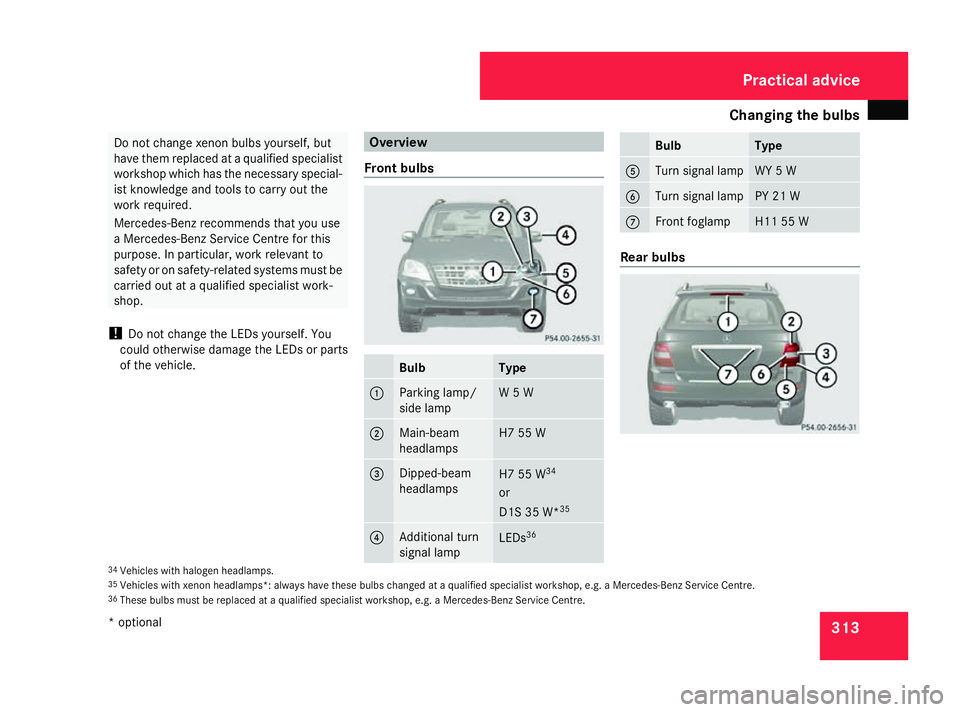
of the vehicle. Overview
Front bulbs Bulb Type
1 Parking lamp/
side lamp W 5 W
2 Main-beam
headlamps H7 55 W
3 Dipped-beam
headlamps
H7 55 W
34
or
D1S 35 W* 35 4 Additional turn
signal lamp
LEDs
36 Bulb Type
5 Turn signal lamp WY 5 W
6 Turn signal lamp PY 21 W
7 Front foglamp H11 55 W
Rear bulbs
34
Vehicles with halogen headlamps.
35 Vehicles with xenon headlamps*: always have these bulbs changed at a qualified specialist workshop, e.g. a Mercedes-Benz Service Centre.
36 These bulbs must be replaced at a qualified specialist workshop, e.g. a Mercedes-Benz Service Centre. Practical advice
* optional
164_AKB; 5; 5, en-GB
wobuchh,
Version: 2.10.6 2008-05-11T11:55:12+02:00 - Seite 313 ZDateiname: 6515_4293_02_buchblock.pdf; preflight
Page 317 of 381
Changing the bulbs
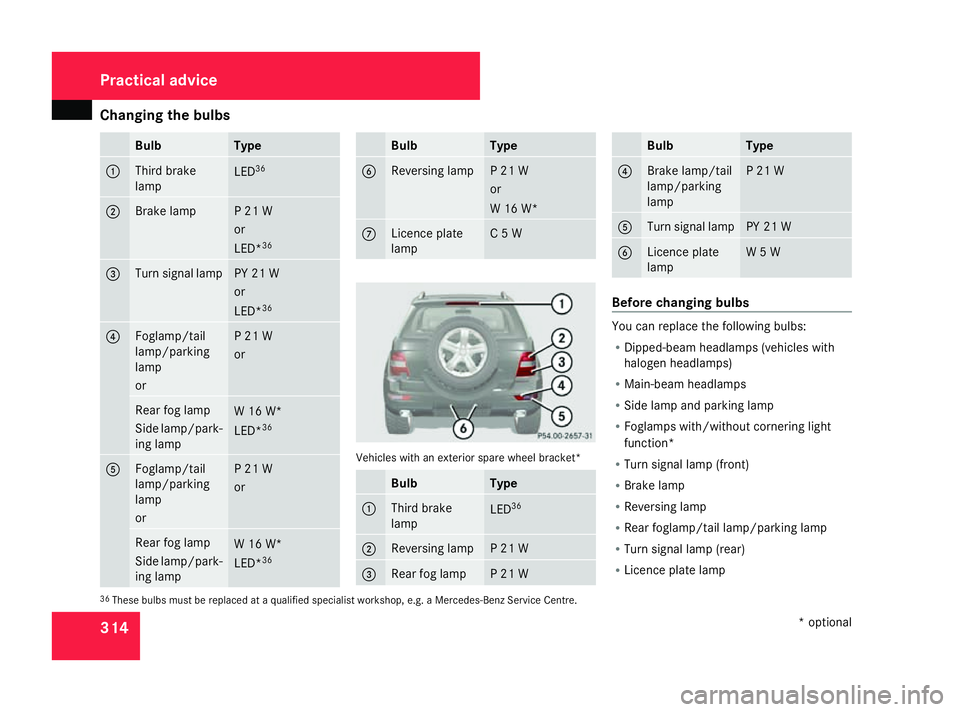
314 Bulb Type
1 Third brake
lamp LED
36 2 Brake lamp P 21 W
or
LED*
36 3 Turn signal lamp PY 21 W
or
LED*
36 4 Foglamp/tail
lamp/parking
lamp
or P 21 W
or
Rear fog lamp
Side lamp/park-
ing lamp
W 16 W*
LED*
36 5 Foglamp/tail
lamp/parking
lamp
or P 21 W
or
Rear fog lamp
Side lamp/park-
ing lamp
W 16 W*
LED*
36 Bulb Type
6 Reversing lamp P 21 W
or
W 16 W*
7 Licence plate
lamp C 5 W
Vehicles with an exterior spare wheel bracket*
Bulb Type
1 Third brake
lamp
LED
36 2 Reversing lamp P 21 W
3 Rear fog lamp P 21 W Bulb Type
4 Brake lamp/tail
lamp/parking
lamp P 21 W
5 Turn signal lamp PY 21 W
6 Licence plate
lamp W 5 W
Before changing bulbs
You can replace the following bulbs:
R
Dipped-beam headlamps (vehicles with
halogen headlamps)
R Main-beam headlamps
R Side lamp and parking lamp
R Foglamps with/without cornering light
function*
R Turn signal lamp (front)
R Brake lamp
R Reversing lamp
R Rear foglamp/tail lamp/parking lamp
R Turn signal lamp (rear)
R Licence plate lamp
36 These bulbs must be replaced at a qualified specialist workshop, e.g. a Mercedes-Benz Service Centre. Practical advice
* optional
164_AKB; 5; 5, en-GB
wobuchh,
Version: 2.10.6 2008-05-11T11:55:12+02:00 - Seite 314Dateiname: 6515_4293_02_buchblock.pdf; preflight
Page 319 of 381
Changing the bulbs
316
X
Insert the new bulb into bulb holder 2.
X Insert bulb holder 2and turn it clockwise.
X Place housing cover 1back on and turn it
clockwise until it engages.
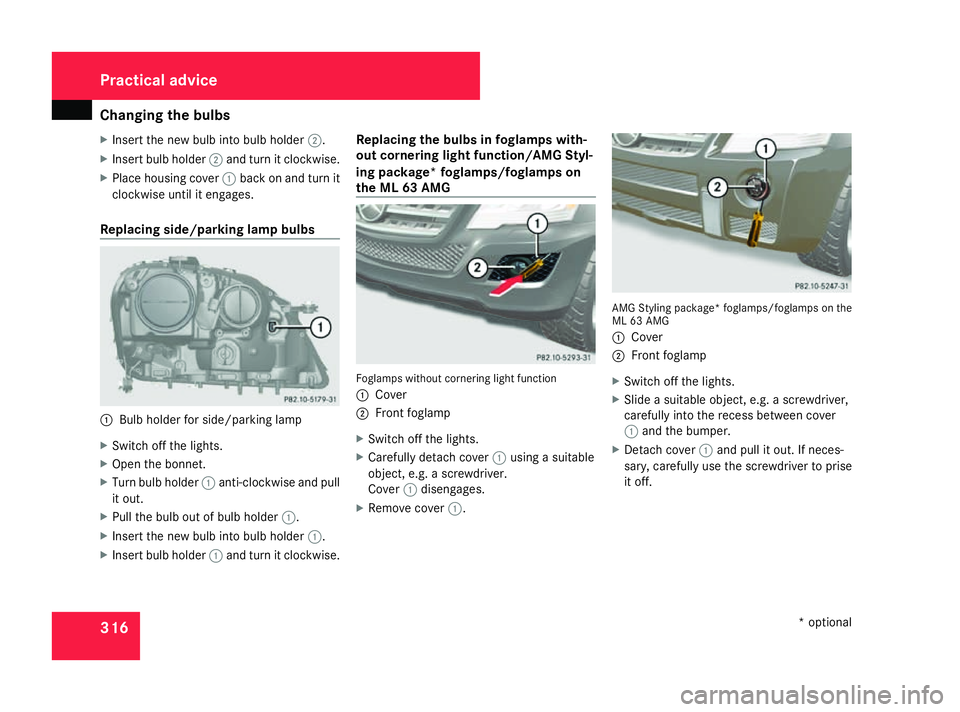
Replacing side/parking lamp bulbs 1
Bulb holder for side/parking lamp
X Switch off the lights.
X Open the bonnet.
X Turn bulb holder 1anti-clockwise and pull
it out.
X Pull the bulb out of bulb holder 1.
X Insert the new bulb into bulb holder 1.
X Insert bulb holder 1and turn it clockwise. Replacing the bulbs in foglamps with-
out cornering light function/AMG Styl-
ing package* foglamps/foglamps on
the ML 63 AMG
Foglamps without cornering light function
1
Cover
2 Front foglamp
X Switch off the lights.
X Carefully detach cover 1using a suitable
object, e.g. a screwdriver.
Cover 1disengages.
X Remove cover 1. AMG Styling package* foglamps/foglamps on the
ML 63 AMG
1
Cover
2 Front foglamp
X Switch off the lights.
X Slide a suitable object, e.g. a screwdriver,
carefully into the recess between cover
1 and the bumper.
X Detach cover 1and pull it out. If neces-
sary, carefully use the screwdriver to prise
it off. Practical advice
* optional
164_AKB; 5; 5, en-GB
wobuchh,
Version: 2.10.6 2008-05-11T11:55:12+02:00 - Seite 316Dateiname: 6515_4293_02_buchblock.pdf; preflight
Page 320 of 381
Changing the bulbs
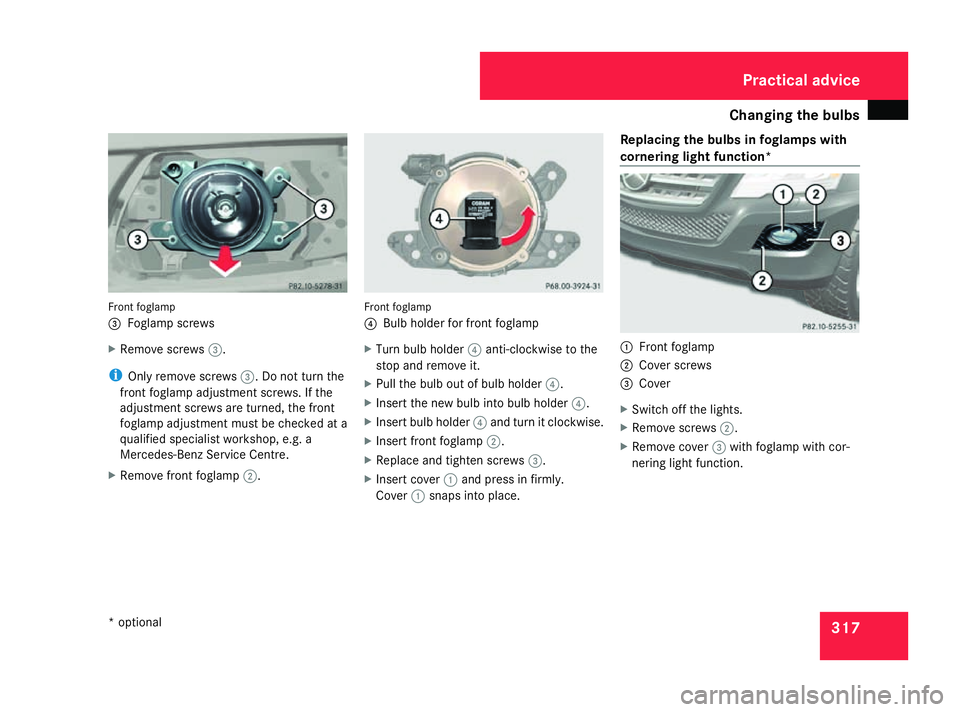
317Front foglamp
3
Foglamp screws
X Remove screws 3.
i Only remove screws 3. Do not turn the
front foglamp adjustment screws. If the
adjustment screws are turned, the front
foglamp adjustment must be checked at a
qualified specialist workshop, e.g. a
Mercedes-Benz Service Centre.
X Remove front foglamp 2. Front foglamp
4 Bulb holder for front foglamp
X Turn bulb holder 4anti-clockwise to the
stop and remove it.
X Pull the bulb out of bulb holder 4.
X Insert the new bulb into bulb holder 4.
X Insert bulb holder 4and turn it clockwise.
X Insert front foglamp 2.
X Replace and tighten screws 3.
X Insert cover 1and press in firmly.
Cover 1snaps into place. Replacing the bulbs in foglamps with
cornering light function* 1
Front foglamp
2 Cover screws
3 Cover
X Switch off the lights.
X Remove screws 2.
X Remove cover 3with foglamp with cor-
nering light function. Practical advice
* optional
164_AKB; 5; 5, en-GB
wobuchh,
Version: 2.10.6 2008-05-11T11:55:12+02:00 - Seite 317 ZDateiname: 6515_4293_02_buchblock.pdf; preflight
Page 321 of 381
Changing the bulbs
3184
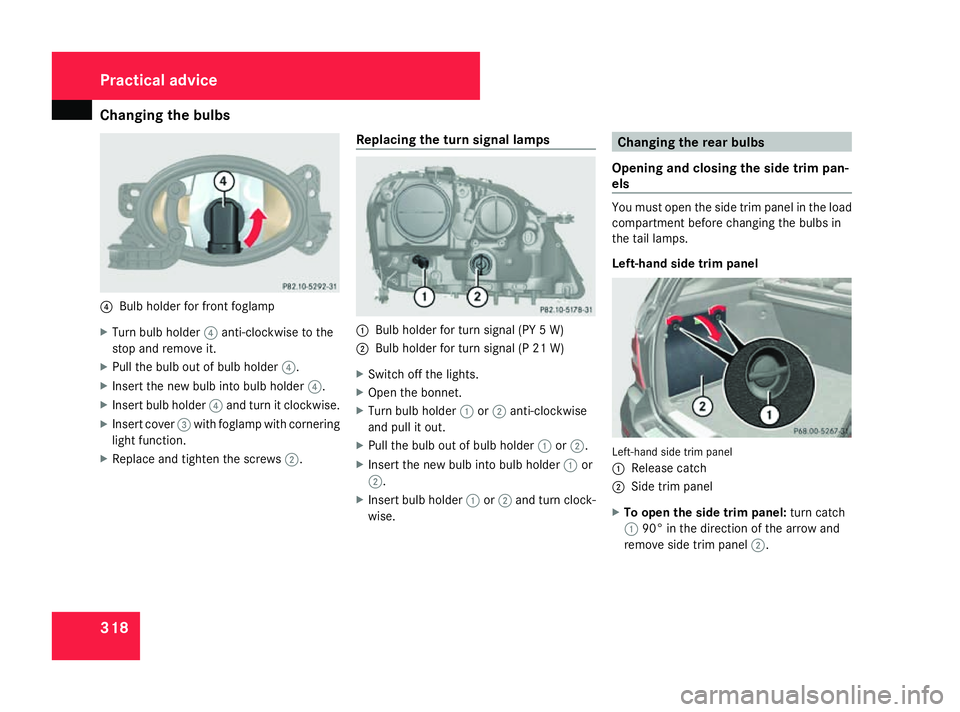
Bulb holder for front foglamp
X Turn bulb holder 4anti-clockwise to the
stop and remove it.
X Pull the bulb out of bulb holder 4.
X Insert the new bulb into bulb holder 4.
X Insert bulb holder 4and turn it clockwise.
X Insert cover 3with foglamp with cornering
light function.
X Replace and tighten the screws 2.Replacing the turn signal lamps 1
Bulb holder for turn signal (PY 5 W)
2 Bulb holder for turn signal (P 21 W)
X Switch off the lights.
X Open the bonnet.
X Turn bulb holder 1or2 anti-clockwise
and pull it out.
X Pull the bulb out of bulb holder 1or2.
X Insert the new bulb into bulb holder 1or
2.
X Insert bulb holder 1or2 and turn clock-
wise. Changing the rear bulbs
Opening and closing the side trim pan-
els You must open the side trim panel in the load
compartment before changing the bulbs in
the tail lamps.
Left-hand side trim panel
Left-hand side trim panel
1
Release catch
2 Side trim panel
X To open the side trim panel: turn catch
1 90° in the direction of the arrow and
remove side trim panel 2.Practical advice
164_AKB; 5; 5, en-GB
wobuchh,
Version: 2.10.6 2008-05-11T11:55:12+02:00 - Seite 318Dateiname: 6515_4293_02_buchblock.pdf; preflight