engine MERCEDES-BENZ ML SUV 2008 Repair Manual
[x] Cancel search | Manufacturer: MERCEDES-BENZ, Model Year: 2008, Model line: ML SUV, Model: MERCEDES-BENZ ML SUV 2008Pages: 381, PDF Size: 7.18 MB
Page 158 of 381
Driving sys
tems 155
5
To switch between cruise control or Dis-
tronic* and variable Speedtronic
6 To deactivate variable Speedtronic
Selecting variable Speedtronic X
Check whether LIM indicator lamp 2is on.
If it is on, variable Speedtronic is already
selected.
If it is not, press the cruise control lever in
the direction of arrow 5.
LIM indicator lamp 2in the cruise control
lever lights up. Variable Speedtronic is
selected. G
Risk of accident
If there is a change of drivers, advise the
new driver of the limit speed stored.
Only use Speedtronic when you do not have
to accelerate suddenly to a speed higher
than the stored limit speed allows. You
could otherwise cause an accident.
You can only exceed the limit speed stored
if you deactivate variable Speedtronic:
R using the cruise control lever.
R by depressing the accelerator pedal
beyond the pressure point (kickdown). It is not possible to deactivate variable
Speedtronic by braking. G
Risk of injury
Variable Speedtronic brakes automatically
in order to avoid exceeding the set speed.
As it does so, the brake pedal is depressed.
Do not place your foot under the brake
pedal as it could become trapped.
Storing the current speed You can use the cruise control lever to limit
the speed to any speed above 30 km/h while
the engine is running.
X Briefly press the cruise control lever up
1 or down 4to the pressure point.
The current speed is stored and shown in
the multi-function display.
The LIM indicator lamp in the instrument
cluster lights up.
Storing the current speed or calling up
the last stored speed G
Risk of accident
Only select a stored speed if you know what
that speed is and whether it is suitable for
the current driving and traffic situation. Otherwise, sudden braking could endanger
you or others.
X Briefly pull the cruise control lever towards
you 3.
Making adjustments in 1 km/h incre-
ments X
Briefly press the cruise control lever to the
pressure point, up 1for a higher speed or
down 4for a lower speed.
or
X Keep the cruise control lever pressed to the
pressure point until the desired speed is
set. Press the cruise control lever, up 1
for a higher speed or down 4for a lower
speed.
Making adjustments in 10 km/h incre-
ments X
Briefly press the cruise control lever
beyond the pressure point, up 1for a
higher speed or down 4for a lower speed.
or
X Keep the cruise control lever pressed
beyond the pressure point until the desired
speed is set. Press the cruise control lever, Controls
* optional
164_AKB; 5; 5, en-GB
wobuchh
,V ersion: 2.10.6
2008-05-11T11:55:12+02:00 - Seite 155 ZDateiname: 6515_4293_02_buchblock.pdf; preflight
Page 159 of 381
Driving sys
tems 156up
1 for a higher speed or down 4for a
lower speed.
Deactivating variable Speedtronic There are several ways to deactivate variable
Speedtronic:
X Briefly press the cruise control lever for-
wards 6.
The LIM indicator lamp in the instrument
cluster goes out.
or
X Briefly press the cruise control lever in the
direction of arrow 5.
LIM indicator lamp 2in the cruise control
lever goes out. Variable Speedtronic is
deactivated.
Cruise control or Distronic* is selected.
Variable Speedtronic is deactivated automat-
ically when you depress the accelerator pedal
beyond the pressure point (kickdown), but
only if your current speed does not differ by
more than 20 km/h from the stored speed.
You will hear a warning tone if this is the case. G
Risk of accident
It is not possible to deactivate variable
Speedtronic by braking. i
The last speed stored is cleared when you
switch off the engine.
Permanent Speedtronic i
Permanent Speedtronic is only available
in certain countries.
You can use the on-board computer to limit
the speed permanently to a value between
160 km/h (e.g. for driving with winter tyres)
and the maximum speed.
Just before the stored speed is reached, it
appears in the multi-function display.
Permanent Speedtronic remains active, even
if variable Speedtronic is deactivated.
You cannot exceed the stored limit speed,
even if you depress the accelerator pedal
beyond the pressure point (kickdown).
Setting permanent Speedtronic
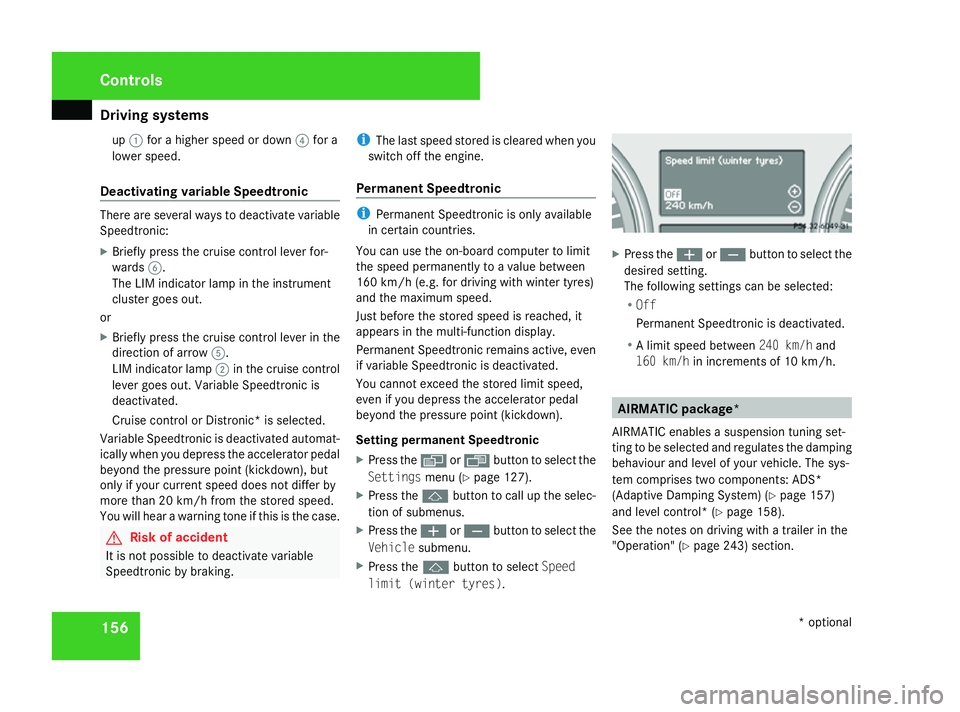
X Press the èor· button to select the
Settings menu (Ypage 127).
X Press the jbutton to call up the selec-
tion of submenus.
X Press the æorç button to select the
Vehicle submenu.
X Press the jbutton to select Speed
limit (winter tyres) . X
Press the æorç button to select the
desired setting.
The following settings can be selected:
R Off
Permanent Speedtronic is deactivated.
R A limit speed between 240 km/hand
160 km/h in increments of 10 km/h. AIRMATIC package*
AIRMATIC enables a suspension tuning set-
ting to be selected and regulates the damping
behaviour and level of your vehicle. The sys-
tem comprises two components: ADS*
(Adaptive Damping System) (Y page 157)
and level control* (Y page 158).
See the notes on driving with a trailer in the
"Operation" (Y page 243) section. Controls
* optional
164_AKB; 5; 5, en-GB
wobuchh
,V ersion: 2.10.6
2008-05-11T11:55:12+02:00 - Seite 156 Dateiname: 6515_4293_02_buchblock.pdf; preflight
Page 160 of 381
Driving sys
tems 157
ML 63 AMG The AIRMATIC package is part of the standard
equipment. Due to the sportier suspension
tuning when compared to standard vehicles,
the level positions in the ADS settings and the
speed thresholds for raising and lowering the
vehicle are different.
The vehicle is lowered from highway/high-
speed to ADS Sport level around 20 seconds
after locking. The vehicle is not lowered from
the raised level after locking. When starting
the engine, the previous setting, e.g. ADS
COMF, is restored.
!
Always keep in mind the differences in
ground clearance and vehicle height when
compared to standard vehicles. You could
otherwise damage the vehicle.
You will find different values for ground clear-
ance and vehicle height with regard to:
R off-road driving (Y page 235)
R the general vehicle settings in the "Techni-
cal Data" section (Y page 361) ADS* (Adaptive Damping System)
ADS adapts the damping characteristics to
the current operating and driving situation.
How this is adjusted depends on:
R your driving style
R the road surface conditions
R the ADS setting
R the vehicle level setting
Your selection remains stored even if you
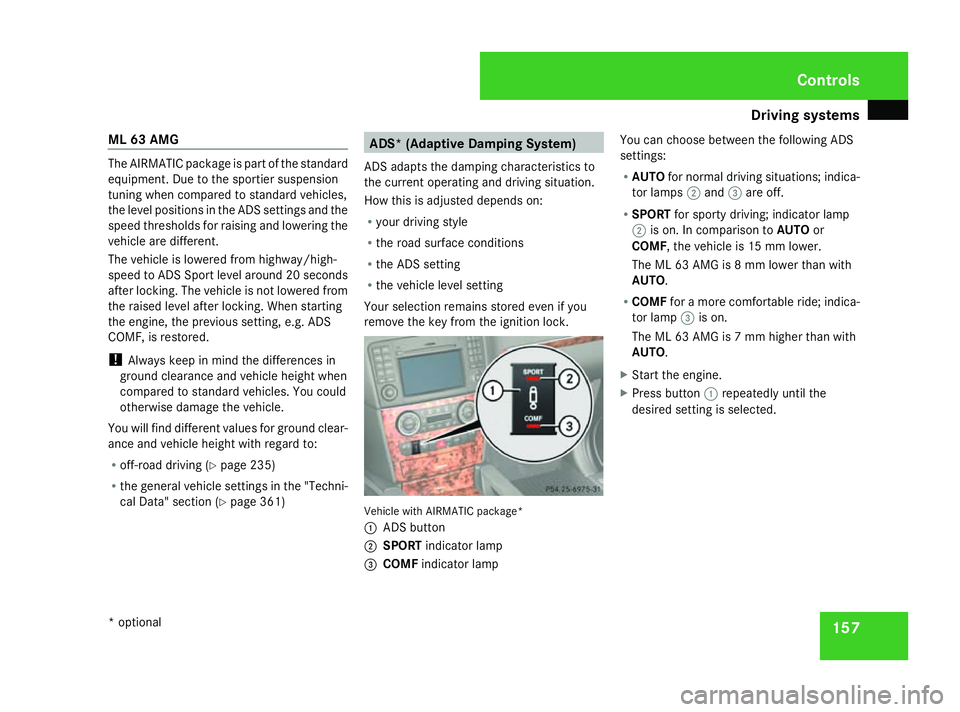
remove the key from the ignition lock. Vehicle with AIRMATIC package*
1
ADS button
2 SPORT indicator lamp
3 COMF indicator lamp You can choose between the following ADS
settings:
R
AUTO for normal driving situations; indica-
tor lamps 2and 3are off.
R SPORT for sporty driving; indicator lamp
2 is on. In comparison to AUTOor
COMF, the vehicle is 15 mm lower.
The ML 63 AMG is 8 mm lower than with
AUTO.
R COMF for a more comfortable ride; indica-
tor lamp 3is on.
The ML 63 AMG is 7 mm higher than with
AUTO.
X Start the engine.
X Press button 1repeatedly until the
desired setting is selected. Controls
* optional
164_AKB; 5; 5, en-GB
wobuchh
,V ersion: 2.10.6
2008-05-11T11:55:12+02:00 - Seite 157 ZDateiname: 6515_4293_02_buchblock.pdf; preflight
Page 161 of 381
Driving sys
tems 158 Level control*
The level control adapts the vehicle level
automatically to the current operating and
driving situation. This results in reduced fuel
consumption and improved handling.
When you are driving in ADS* COMFor
AUTO (Ypage 157), the vehicle is lowered to
the high-speed level as the speed increases.
As the vehicle decelerates, the vehicle is
raised back up to highway level.
In ADS* SPORT(Ypage 157), the vehicle
skips highway level and lowers directly to the
high-speed level depending on the basic set-
ting (Y page 158) or (Y page 160).
Make changes to the vehicle level while the
vehicle is in motion. This enables the vehicle
to adjust to the new level as quickly as pos-
sible.
The vehicle level may change visibly when you
park the vehicle and the outside temperature
changes. When the temperature drops, the
vehicle level is lower; with an increase in tem-
perature, the vehicle level rises.
When you unlock the vehicle or open a door,
the vehicle begins to balance the load dis-
crepancies while still parked. However, for
significant level changes, e.g. after the vehi-
cle has been stationary for a long period, the engine must be on. For safety reasons, the
vehicle is only lowered when the doors are
closed. Lowering is interrupted if a door is
opened and continues when the door has
been closed. G
Risk of injury
Make sure that nobody is in the vicinity of
the wheel arch or the underbody when you
begin a level change. You could otherwise
trap yourself or others. G
Risk of accident
Always select as low a vehicle level as pos-
sible. If the vehicle level is high, the vehicle
centre of gravity shifts upwards. This
increases the risk of the vehicle tipping
over.
Adapt your driving style to suit the vehicle
level. ESP ®
cannot reduce the risk of an
accident if you drive too fast. ESP ®
cannot
override the laws of physics.
! When driving on extremely rough terrain,
select a high vehicle level in good time.
Make sure there is always sufficient ground
clearance to prevent damage to the vehi-
cle. You will find information about driving off-
road in the "Operation" section
(Y
page 235).
Vehicles with AIRMATIC package* Basic settings, excluding ML 63 AMG
The extent to which the vehicle is raised or
lowered depends on the basic setting selec-
ted. Select raised level for off-road driving or
highway/high-speed level for normal roads.
The individual vehicle levels are:
R
Raised level: 60 mm above highway level
R Highway level: +/- 0 mm
R High-speed level: 15 mm below highway
level
Basic settings for the ML 63 AMG
The extent to which the vehicle is raised or
lowered depends on the ADS setting selec-
ted. Select raised level for off-road driving or
highway/high-speed level for normal roads.
With AUTO ADS, the vehicle is 73 mm higher
when in raised level than it is in highway level.
Raised level
Only select the raised level when this is appro-
priate for the road conditions. Otherwise, fuel Controls
* optional
164_AKB; 5; 5, en-GB
wobuchh
,V ersion: 2.10.6
2008-05-11T11:55:12+02:00 - Seite 158 Dateiname: 6515_4293_02_buchblock.pdf; preflight
Page 162 of 381
Driving sys
tems 159
consumption increases and handling per-
formance is affected.
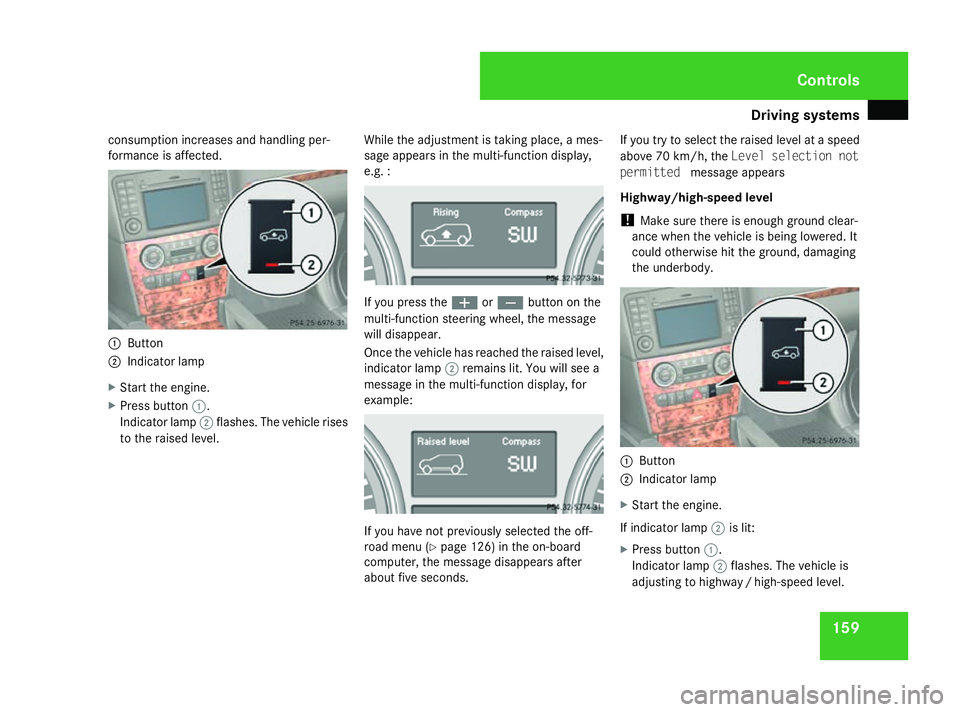
1
Button
2 Indicator lamp
X Start the engine.
X Press button 1.
Indicator lamp 2flashes. The vehicle rises
to the raised level. While the adjustment is taking place, a mes-
sage appears in the multi-function display,
e.g. : If you press the
æorç button on the
multi-function steering wheel, the message
will disappear.
Once the vehicle has reached the raised level,
indicator lamp 2remains lit. You will see a
message in the multi-function display, for
example: If you have not previously selected the off-
road menu (Y
page 126) in the on-board
computer, the message disappears after
about five seconds. If you try to select the raised level at a speed
above 70 km/h, the Level selection not
permitted message appears
Highway/high-speed level
! Make sure there is enough ground clear-
ance when the vehicle is being lowered. It
could otherwise hit the ground, damaging
the underbody. 1
Button
2 Indicator lamp
X Start the engine.
If indicator lamp 2is lit:
X Press button 1.
Indicator lamp 2flashes. The vehicle is
adjusting to highwa y/high-speed level. Controls
164_AKB; 5; 5, en-GB
wobuchh,
Version: 2.10.6 2008-05-11T11:55:12+02:00 - Seite 159 ZDateiname: 6515_4293_02_buchblock.pdf; preflight
Page 164 of 381
Driving sys
tems 161R
Avoid sudden major steering move-
ments.
R Take account of the altered handling
characteristics.
If you are driving too fast in off-road level 3,
the Bring speed below 20 km/h message
appears in the multi-function display. You
additionally hear a warning tone. The vehicle
is lowered.
i You cannot clear these messages.
Only select an off-road level when this is
appropriate for the road conditions. Other-
wise, fuel consumption increases and han-
dling performance may be affected.
Your selection remains stored even if you
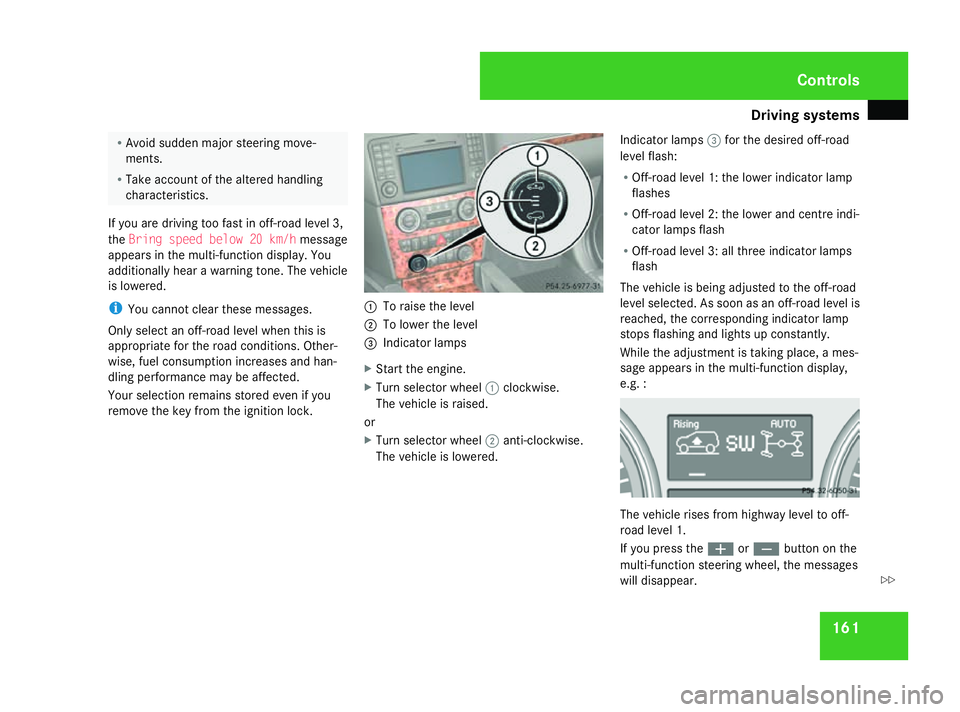
remove the key from the ignition lock. 1
To raise the level
2 To lower the level
3 Indicator lamps
X Start the engine.
X Turn selector wheel 1clockwise.
The vehicle is raised.
or
X Turn selector wheel 2anti-clockwise.
The vehicle is lowered. Indicator lamps
3for the desired off-road
level flash:
R Off-road level 1: the lower indicator lamp
flashes
R Off-road level 2: the lower and centre indi-
cator lamps flash
R Off-road level 3: all three indicator lamps
flash
The vehicle is being adjusted to the off-road
level selected. As soon as an off-road level is
reached, the corresponding indicator lamp
stops flashing and lights up constantly.
While the adjustment is taking place, a mes-
sage appears in the multi-function display,
e.g. : The vehicle rises from highway level to off-
road level 1.
If you press the
æorç button on the
multi-function steering wheel, the messages
will disappear. Controls
164_AKB; 5; 5, en-GB
wobuchh
,V ersion: 2.10.6
2008-05-11T11:55:12+02:00 - Seite 161 ZDateiname: 6515_4293_02_buchblock.pdf; preflight
Page 166 of 381
Driving sys
tems 163
You can select the following:
R
Off-road level 1 at speeds up to
100 km/h
R Off-road level 2 at speeds up to 70 km/h
R Off-road level 3 at speeds up to 20 km/h
If you are driving above 90 km/h or drive
between 70 km/h and 90 km/h for longer
than 20 seconds, off-road level 2 will be can-
celled. The vehicle is lowered to off-road
level 1.
You will see a message in the multi-function
display, for example: If you are driving above 115 km/h or drive
between 100 km/h and 115 km/h for longer
than 20 seconds, off-road level 1 will be can-
celled. The vehicle is lowered to highway
level. You will see a message in the multi-function
display, for example: At high speeds, the vehicle is lowered to high-
speed level in accordance with the ADS basic
setting (
Ypage 157). The vehicle automati-
cally selects highway level if you are driving
at a speed above 40 km/h or if you drive at
between 40 km/h and 70 km/h for around
20 seconds.
Highway/high-speed level
! Make sure there is enough ground clear-
ance when the vehicle is being lowered. It
could otherwise hit the ground, damaging
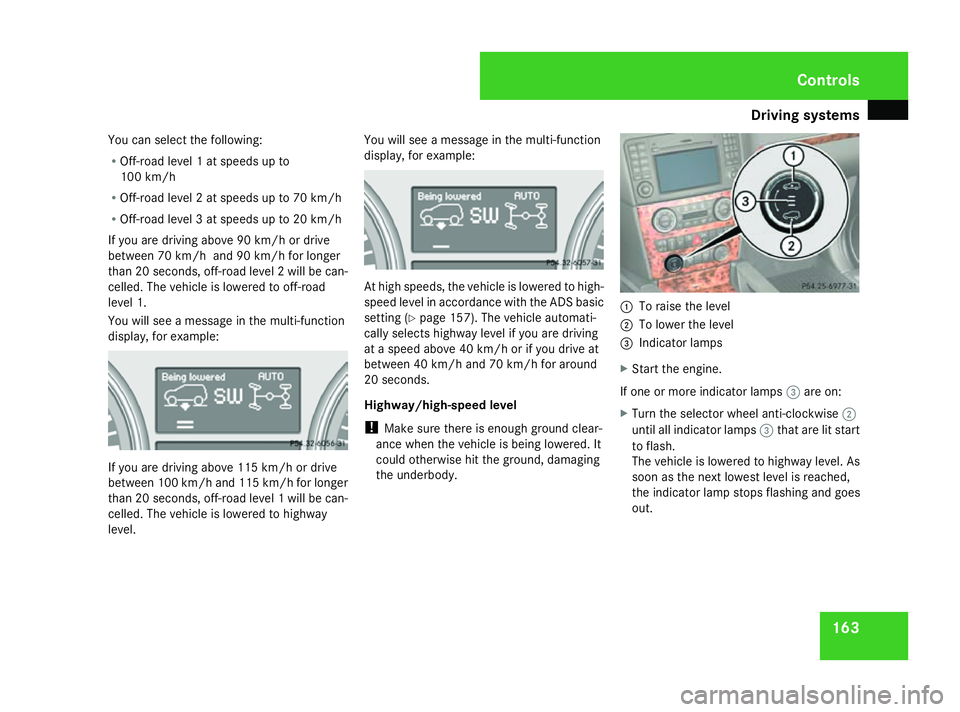
the underbody. 1
To raise the level
2 To lower the level
3 Indicator lamps
X Start the engine.
If one or more indicator lamps 3are on:
X Turn the selector wheel anti-clockwise 2
until all indicator lamps 3that are lit start
to flash.
The vehicle is lowered to highway level. As
soon as the next lowest level is reached,
the indicator lamp stops flashing and goes
out. Controls
164_AKB; 5; 5, en-GB
wobuchh
,V ersion: 2.10.6
2008-05-11T11:55:12+02:00 - Seite 163 ZDateiname: 6515_4293_02_buchblock.pdf; preflight
Page 173 of 381
Air conditioning
170 General notes
2-zone Thermatic/multi-zone Thermotronic*
controls the temperature and the humidity of
the vehicle interior and filters out undesirable
substances from the air.
2-zone Thermatic/multi-zone Thermotronic*
is only operational when the engine is run-
ning. Optimum operation is only achieved
when you drive with the side windows and
sliding/tilting sunroof* closed. i
Ventilate the vehicle for a brief period
during warm weather, e.g. using the sum-
mer opening feature (Y page 101). This will
speed up the cooling process and the
desired interior temperature will be
reached more quickly.
i The integrated filter filters out most par-
ticles of dust and completely filters out
pollen. A clogged filter reduces the amount
of air supplied to the vehicle interior. For
this reason, you should always observe the interval for replacing the filter, which is
specified in the Service Booklet. As it
depends on environmental conditions, e.g.
heavy air pollution, the interval may be
shorter than stated in the Service Booklet. G
Risk of accident
Observe the settings recommended on the
following pages. The windows could other-
wise mist up. This may obstruct your view
of the traffic situation, thereby causing an
accident. Cont
rols
* optional
164_AKB; 5; 5, en-GB
wobuchh
,V ersion: 2.10.6
2008-05-11T11:55:12+02:00 - Seite 170 Dateiname: 6515_4293_02_buchblock.pdf; preflight
Page 180 of 381
Air conditioning
177
X
To deactivate: press the™button
(Y page 173).
MODE is shown in the display behind
the ) symbol.
X Press the ´button (Y page 173).
OFF is shown in the display behind
the ) symbol.
Activating and deactivating the rear-
compartment air conditioning via the
rear-compartment air-conditioning sys-
tem* X
Turn the key to position 2in the ignition
lock.
X Activate multi-zone Thermotronic*.
X To activate: press theUbutton.
The indicator lamp in the Ubutton
comes on.
X To deactivate: press the´button.
The indicator lamp in the ´button
comes on. Switching cooling with air-dehumidi-
fication on/off
The "cooling with dehumidification" function
is only available when the engine is running.
The air inside the vehicle is cooled and dehu-
midified according to the temperature selec-
ted. This prevents the windows from misting
up. G
Risk of accident
If the "cooling with air dehumidification"
function is deactivated, the air inside the
vehicle will not be cooled (during warm
weather) or dehumidified. The windows
could mist up more quickly. This may pre-
vent you from observing the traffic condi-
tions, thereby causing an accident. H
Environmental note
The cooling system uses the refrigerant
R134A. This refrigerant does not damage
the earth's ozone layer.
Condensation may drip from the underside of
the vehicle when Thermatic is in cooling
mode. X
To activate: press the9button.
The indicator lamp in the 9button lights
up.
X To deactivate: press the9button.
The indicator lamp in the 9button goes
out. The cooling with air dehumidification
function has a delayed switch-off feature. Controlling the air conditioning auto-
matically
In automatic mode, the set temperature is
maintained automatically at a constant level.
The system automatically regulates the tem-
perature of the dispensed air, the airflow and
the air distribution.
The automatic air conditioning will achieve
optimal operation if "cooling with air dehu-
midification" is also activated. If necessary,
cooling with air dehumidification can be deac-
tivated. Cont
rols
* optional
164_AKB; 5; 5, en-GB
wobuchh
,V ersion: 2.10.6
2008-05-11T11:55:12+02:00 - Seite 177 ZDateiname: 6515_4293_02_buchblock.pdf; preflight
Page 186 of 381
Air conditioning
183
X
To deactivate: press the:button.
The indicator lamp in the :button goes
out.
i Air-recirculation mode switches off auto-
matically:
R after approximately five minutes at out-
side temperatures below approximately
5 †
R after approximately five minutes if cool-
ing with air dehumidification is deactiva-
ted
R after approximately 30 minutes at out-
side temperatures above approximately
5 †
Air-recirculation mode with the conve-
nience opening/closing feature G
Risk of injury
Make sure that nobody can become trap-
ped between the side window and the door
frame as the side windows are opened and
closed. Do not place objects or lean against
the side window when it is being opened or
closed. You or the objects could be drawn
in or become trapped between the side
window and the door frame as the window moves. If there is a risk of entrapment,
press the :button again. Press the but-
ton for stopping, opening or closing the side
window in the opposite direction as appro-
priate.
Make sure that nobody can become trap-
ped when you are opening or closing the
sliding/tilting sunroof*. If there is a risk of
entrapment, press the :button again.
Press the button for stopping, opening or
closing the sliding/tilting sunroof* in the
opposite direction as appropriate.
X Convenience closing: press and hold
the : button until the side windows and
the sliding/tilting sunroof* have closed.
The indicator lamp in the :button
comes on. Air-recirculation mode is activa-
ted.
X Convenience opening: press and hold
the : button until the side windows and
the sliding/tilting sunroof* have reached
their original position.
The indicator lamp in the :button goes
out. Air-recirculation mode is deactivated.
i If you open the side windows or the slid-
ing/tilting sunroof* manually after closing
using the convenience closing feature, it will remain in this position when opened
using the convenience opening feature. Switching the residual heat on/off
It is possible to make use of the residual heat
of the engine to continue heating the station-
ary vehicle for up to 30 minutes after the
engine has been switched off. The heating
time depends on the set interior temperature.
i The blower will run at a low speed regard-
less of the airflow setting.
i If you activate the "residual heat" function
at high temperatures, only the ventilation
will be activated. The blower runs at
medium speed.
X Turn the key to position 0in the ignition
lock or remove it.
X To switch on: press the9button.
The indicator lamp in the 9button lights
up.
X To deactivate: press the9button.
The indicator lamp in the 9button goes
out. Cont
rols
* optional
164_AKB; 5; 5, en-GB
wobuchh
,V ersion: 2.10.6
2008-05-11T11:55:12+02:00 - Seite 183 ZDateiname: 6515_4293_02_buchblock.pdf; preflight