ECO mode MERCEDES-BENZ ML320 2010 W164 User Guide
[x] Cancel search | Manufacturer: MERCEDES-BENZ, Model Year: 2010, Model line: ML320, Model: MERCEDES-BENZ ML320 2010 W164Pages: 368, PDF Size: 9.09 MB
Page 119 of 368
XBriefly pull left gearshift control :
( Y page 115).
The automatic transmission shifts into the
next lower gear.
i For maximum acceleration, pull and hold
the left gearshift control. Depending on the
engine speed the automatic transmission
selects the optimal gear for maximum
acceleration.
i When you brake or stop, the automatic
transmission shifts down into a gear from
which you can easily accelerate or take off.
Kickdown
Using the kickdown while driving in manual
program mode M is not possible.
Deactivating manual shift program
XPress the program mode selector switch
repeatedly until C or S appears in the
multifunction display.
or
XRestart the engine.
The automatic transmission will go to
automatic program mode ( C or S).
Manual program mode M is not stored.
Emergency operation (limp-home
mode)
If vehicle acceleration becomes less
responsive or sluggish or the automatic
transmission no longer shifts, the automatic
transmission is most likely operating in limp-
home (emergency operation) mode. In this
mode only second gear and reverse gear R
can be selected.
XStop the vehicle in a safe location.XShift the automatic transmission into park
position P.XTurn off the engine.XWait at least 10 seconds before restarting.XRestart the engine.XShift the automatic transmission into drive
position D (for second gear) or reverse gear
R .XHave the automatic transmission checked
at an authorized Mercedes-Benz Center as
soon as possible.
Transfer case
This section applies to vehicles equipped with
all-wheel drive (4MATIC) only. Both the front
and rear axles are powered at all times when
the vehicle is being operated.
! Only conduct operational or performance
tests on a two-axle dynamometer. If such
tests are necessary, contact an authorized
Mercedes-Benz Center. You could
otherwise seriously damage the brake
system or the transfer case which is not
covered by the Mercedes-Benz Limited
Warranty.
! Because the ESP ®
operates
automatically, the engine and ignition must
be shut off (SmartKey in starter switch
position 0 or 1 or KEYLESS-GO start/stop
button in position 0 or 1) when the parking
brake is being tested on a brake test
dynamometer. Such testing should be no
longer than 10 seconds.
Active braking action through the ESP ®
may otherwise seriously damage the brake
system which is not covered by the
Mercedes-Benz Limited Warranty.
Instrument cluster
Introduction
For a full view illustration of the instrument
cluster, see “Instrument cluster”
( Y page 28).
Instrument cluster117Controls in detail164_AKB; 7; 31, en-USd2ureepe,Version: 2.11.8.12009-09-11T12:07:36+02:00 - Seite 117Z
Page 127 of 368
Deleting all laps
It is not possible to delete a single saved lap.
When you turn off the engine, the RACETIMER
will be reset to “0” after 30 seconds. All laps
are deleted.
XPress button W while the timer is
running.
The timer stops.
XPress the reset button in the instrument
cluster twice (Y page 118).
XPress button W.
The timer starts. The saved laps are
deleted.
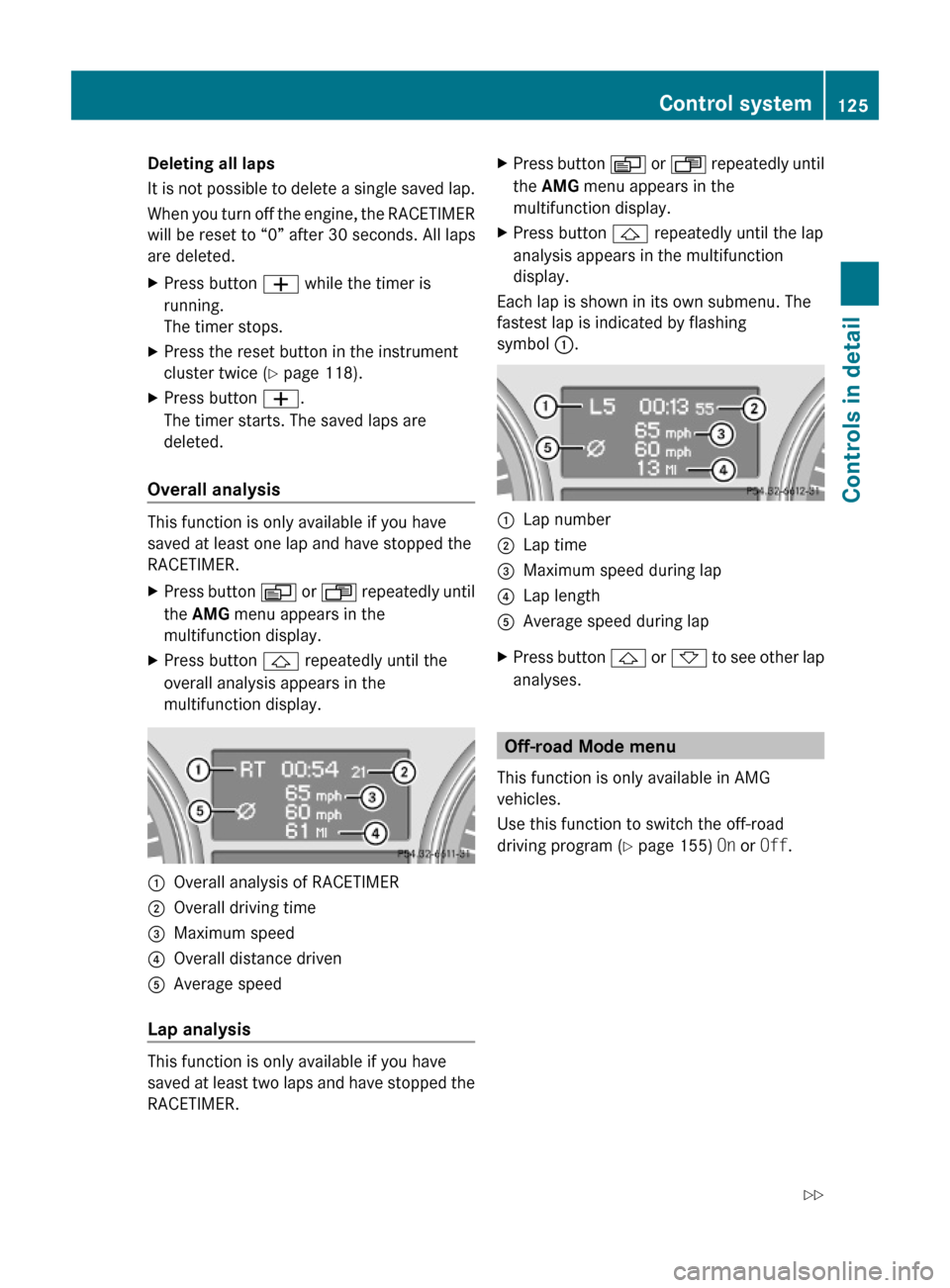
Overall analysis
This function is only available if you have
saved at least one lap and have stopped the
RACETIMER.
XPress button V or U repeatedly until
the AMG menu appears in the
multifunction display.
XPress button & repeatedly until the
overall analysis appears in the
multifunction display.
:Overall analysis of RACETIMER;Overall driving time=Maximum speed?Overall distance drivenAAverage speed
Lap analysis
This function is only available if you have
saved at least two laps and have stopped the
RACETIMER.
XPress button V or U repeatedly until
the AMG menu appears in the
multifunction display.
XPress button & repeatedly until the lap
analysis appears in the multifunction
display.
Each lap is shown in its own submenu. The
fastest lap is indicated by flashing
symbol :.
:Lap number;Lap time=Maximum speed during lap?Lap lengthAAverage speed during lapXPress button & or * to see other lap
analyses.
Off-road Mode menu
This function is only available in AMG
vehicles.
Use this function to switch the off-road
driving program (Y page 155) On or Off.
Control system125Controls in detail164_AKB; 7; 31, en-USd2ureepe,Version: 2.11.8.12009-09-11T12:07:36+02:00 - Seite 125Z
Page 164 of 368
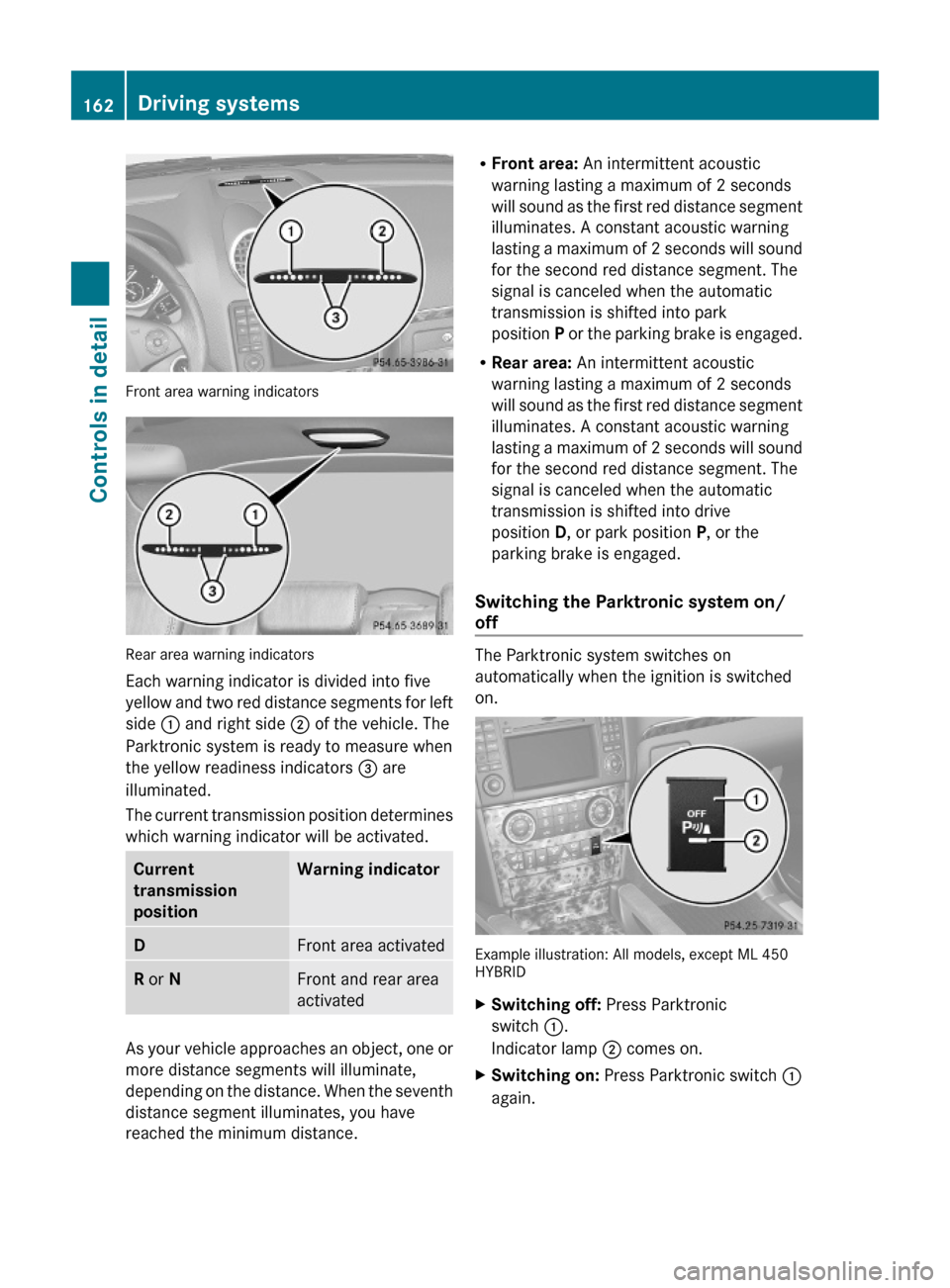
Front area warning indicators
Rear area warning indicators
Each warning indicator is divided into five
yellow and two red distance segments for left
side : and right side ; of the vehicle. The
Parktronic system is ready to measure when
the yellow readiness indicators = are
illuminated.
The current transmission position determines
which warning indicator will be activated.
Current
transmission
position
Warning indicatorDFront area activatedR or NFront and rear area
activated
As your vehicle approaches an object, one or
more distance segments will illuminate,
depending on the distance. When the seventh
distance segment illuminates, you have
reached the minimum distance.
RFront area: An intermittent acoustic
warning lasting a maximum of 2 seconds
will sound as the first red distance segment
illuminates. A constant acoustic warning
lasting a maximum of 2 seconds will sound
for the second red distance segment. The
signal is canceled when the automatic
transmission is shifted into park
position P or the parking brake is engaged.
RRear area: An intermittent acoustic
warning lasting a maximum of 2 seconds
will sound as the first red distance segment
illuminates. A constant acoustic warning
lasting a maximum of 2 seconds will sound
for the second red distance segment. The
signal is canceled when the automatic
transmission is shifted into drive
position D, or park position P, or the
parking brake is engaged.
Switching the Parktronic system on/
off
The Parktronic system switches on
automatically when the ignition is switched
on.
Example illustration: All models, except ML 450HYBRID
XSwitching off: Press Parktronic
switch :.
Indicator lamp ; comes on.
XSwitching on: Press Parktronic switch :
again.
162Driving systemsControls in detail
164_AKB; 7; 31, en-USd2ureepe,Version: 2.11.8.12009-09-11T12:07:36+02:00 - Seite 162
Page 169 of 368
Rear center console air vents:Left rear center air vent, adjustable;Right rear center air vent, adjustable=Rear climate control panelWhen the front climate control panel is
switched on or off, the air supply through the
rear center air vents is also switched on or
off.
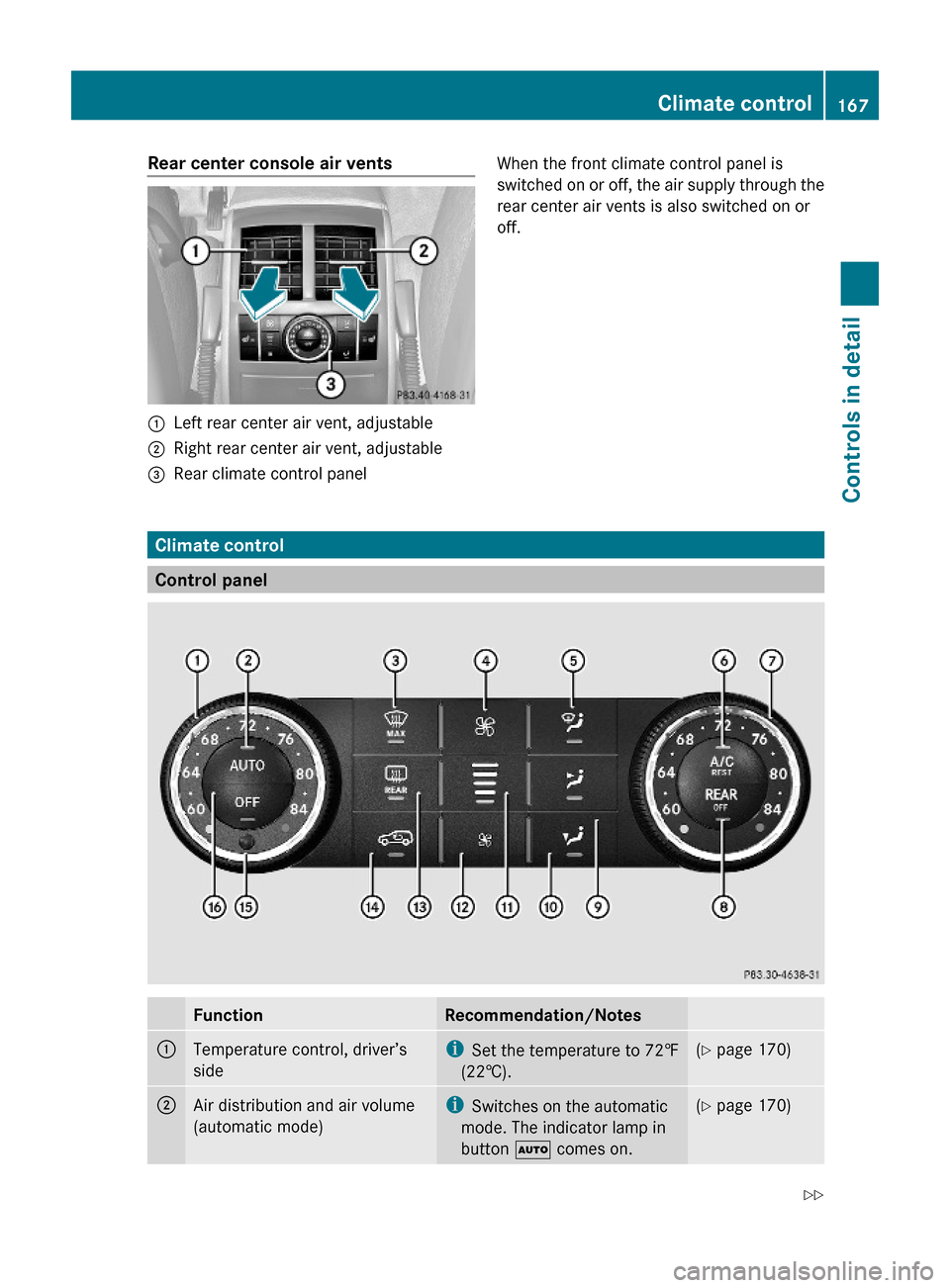
Climate control
Control panel
FunctionRecommendation/Notes:Temperature control, driver’s
side
iSet the temperature to 72‡
(22†).
(Y page 170);Air distribution and air volume
(automatic mode)
iSwitches on the automatic
mode. The indicator lamp in
button à comes on.
(Y page 170)Climate control167Controls in detail164_AKB; 7; 31, en-USd2ureepe,Version: 2.11.8.12009-09-11T12:07:36+02:00 - Seite 167Z
Page 171 of 368
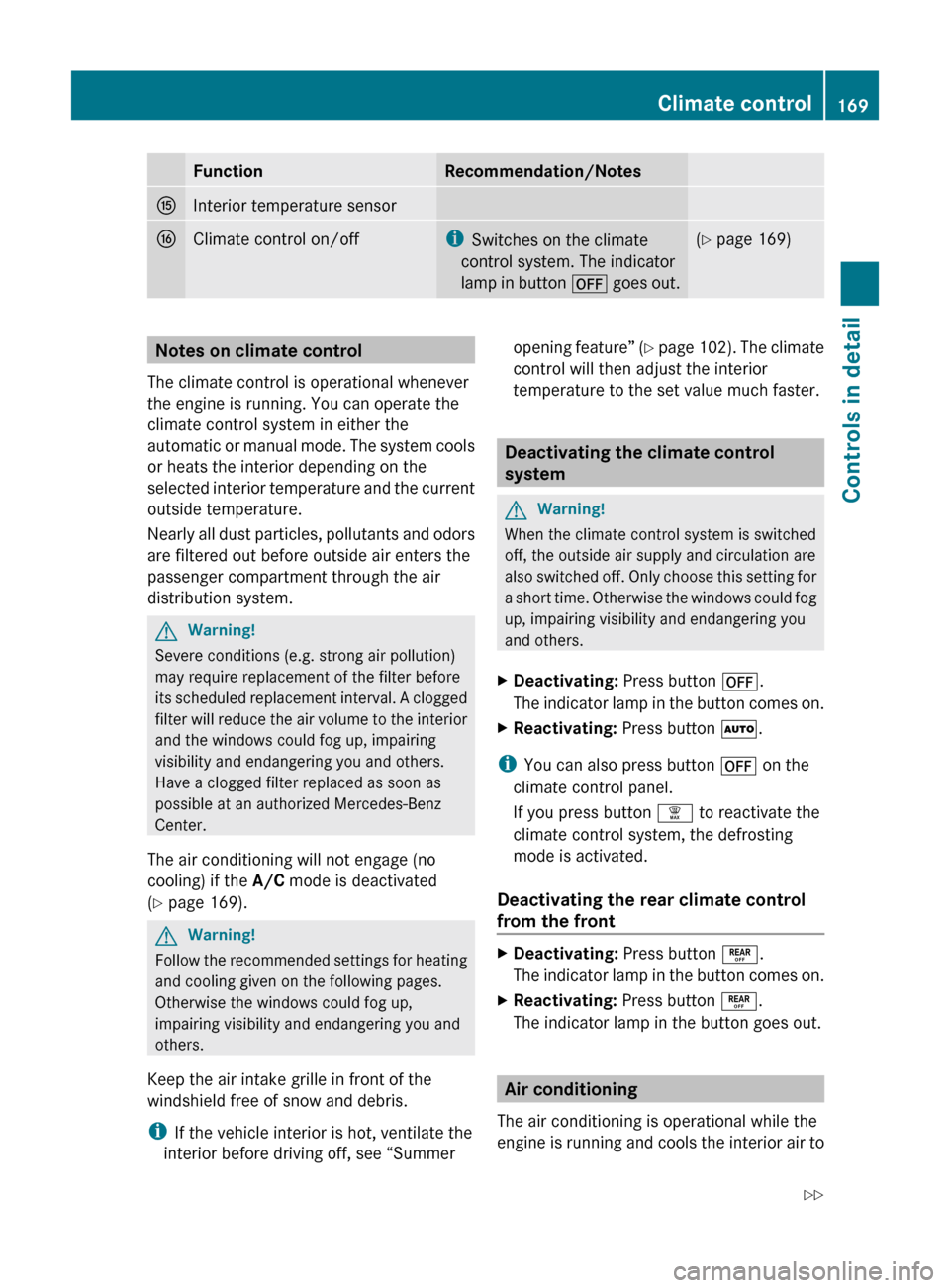
FunctionRecommendation/NotesKInterior temperature sensorLClimate control on/offiSwitches on the climate
control system. The indicator
lamp in button ^ goes out.(Y page 169)Notes on climate control
The climate control is operational whenever
the engine is running. You can operate the
climate control system in either the
automatic or manual mode. The system cools
or heats the interior depending on the
selected interior temperature and the current
outside temperature.
Nearly all dust particles, pollutants and odors
are filtered out before outside air enters the
passenger compartment through the air
distribution system.GWarning!
Severe conditions (e.g. strong air pollution)
may require replacement of the filter before
its scheduled replacement interval. A clogged
filter will reduce the air volume to the interior
and the windows could fog up, impairing
visibility and endangering you and others.
Have a clogged filter replaced as soon as
possible at an authorized Mercedes-Benz
Center.
The air conditioning will not engage (no
cooling) if the A/C mode is deactivated
( Y page 169).
GWarning!
Follow the recommended settings for heating
and cooling given on the following pages.
Otherwise the windows could fog up,
impairing visibility and endangering you and
others.
Keep the air intake grille in front of the
windshield free of snow and debris.
i If the vehicle interior is hot, ventilate the
interior before driving off, see “Summer
opening feature” (Y page 102). The climate
control will then adjust the interior
temperature to the set value much faster.
Deactivating the climate control
system
GWarning!
When the climate control system is switched
off, the outside air supply and circulation are
also switched off. Only choose this setting for
a short time. Otherwise the windows could fog
up, impairing visibility and endangering you
and others.
XDeactivating: Press button ^.
The indicator lamp in the button comes on.XReactivating: Press button Ã.
i
You can also press button ^ on the
climate control panel.
If you press button ¦ to reactivate the
climate control system, the defrosting
mode is activated.
Deactivating the rear climate control
from the front
XDeactivating: Press button ±.
The indicator lamp in the button comes on.XReactivating: Press button ±.
The indicator lamp in the button goes out.
Air conditioning
The air conditioning is operational while the
engine is running and cools the interior air to
Climate control169Controls in detail164_AKB; 7; 31, en-USd2ureepe,Version: 2.11.8.12009-09-11T12:07:36+02:00 - Seite 169Z
Page 176 of 368
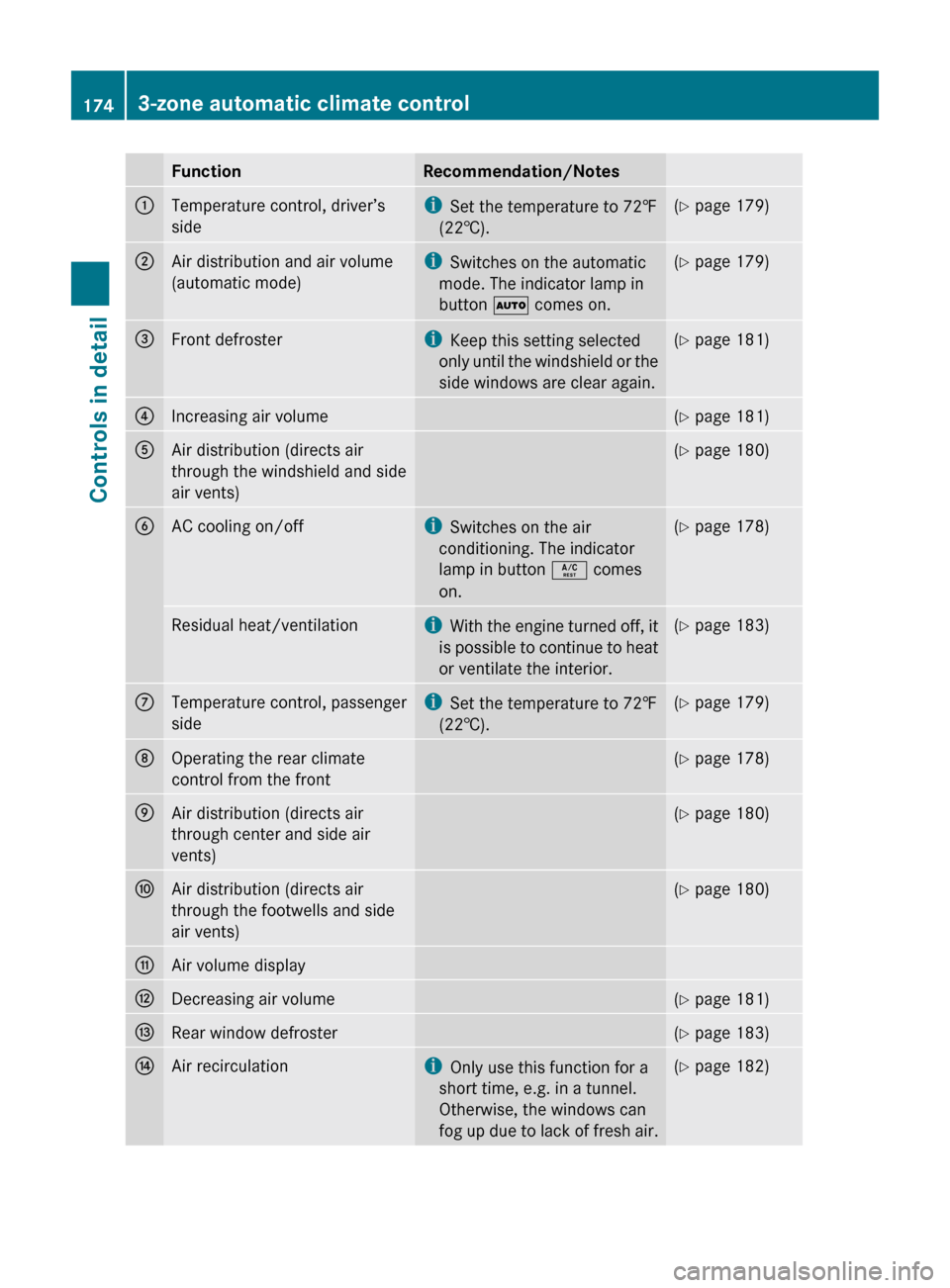
FunctionRecommendation/Notes:Temperature control, driver’s
sidei Set the temperature to 72‡
(22†).( Y page 179);Air distribution and air volume
(automatic mode)i Switches on the automatic
mode. The indicator lamp in
button à comes on.(Y page 179)=Front defrosteri
Keep this setting selected
only until the windshield or the
side windows are clear again.( Y page 181)?Increasing air volume(Y page 181)AAir distribution (directs air
through the windshield and side
air vents)( Y page 180)BAC cooling on/offi
Switches on the air
conditioning. The indicator
lamp in button Á comes
on.( Y page 178)Residual heat/ventilationi
With the engine turned off, it
is possible to continue to heat
or ventilate the interior.( Y page 183)CTemperature control, passenger
sidei Set the temperature to 72‡
(22†).( Y page 179)DOperating the rear climate
control from the front( Y page 178)EAir distribution (directs air
through center and side air
vents)( Y page 180)FAir distribution (directs air
through the footwells and side
air vents)( Y page 180)GAir volume displayHDecreasing air volume(Y page 181)IRear window defroster(Y page 183)JAir recirculationi
Only use this function for a
short time, e.g. in a tunnel.
Otherwise, the windows can
fog up due to lack of fresh air.( Y page 182)1743-zone automatic climate controlControls in detail
164_AKB; 7; 31, en-USd2ureepe,Version: 2.11.8.12009-09-11T12:07:36+02:00 - Seite 174
Page 177 of 368
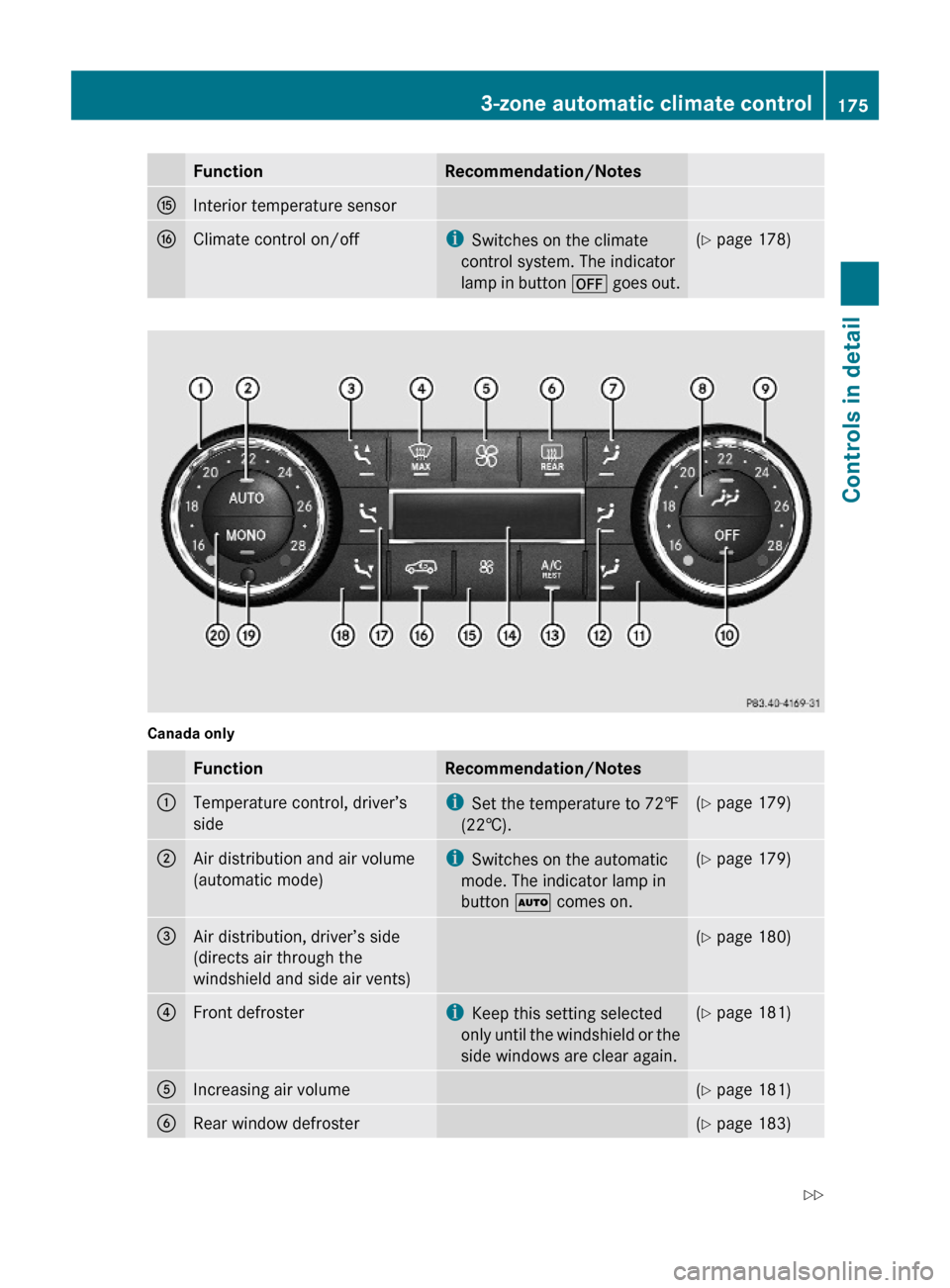
FunctionRecommendation/NotesKInterior temperature sensorLClimate control on/offiSwitches on the climate
control system. The indicator
lamp in button ^ goes out.
(Y page 178)Canada onlyFunctionRecommendation/Notes:Temperature control, driver’s
side
iSet the temperature to 72‡
(22†).
(Y page 179);Air distribution and air volume
(automatic mode)
iSwitches on the automatic
mode. The indicator lamp in
button à comes on.
(Y page 179)=Air distribution, driver’s side
(directs air through the
windshield and side air vents)
(Y page 180)?Front defrosteriKeep this setting selected
only until the windshield or the
side windows are clear again.
(Y page 181)AIncreasing air volume(Y page 181)BRear window defroster(Y page 183)3-zone automatic climate control175Controls in detail164_AKB; 7; 31, en-USd2ureepe,Version: 2.11.8.12009-09-11T12:07:36+02:00 - Seite 175Z
Page 179 of 368
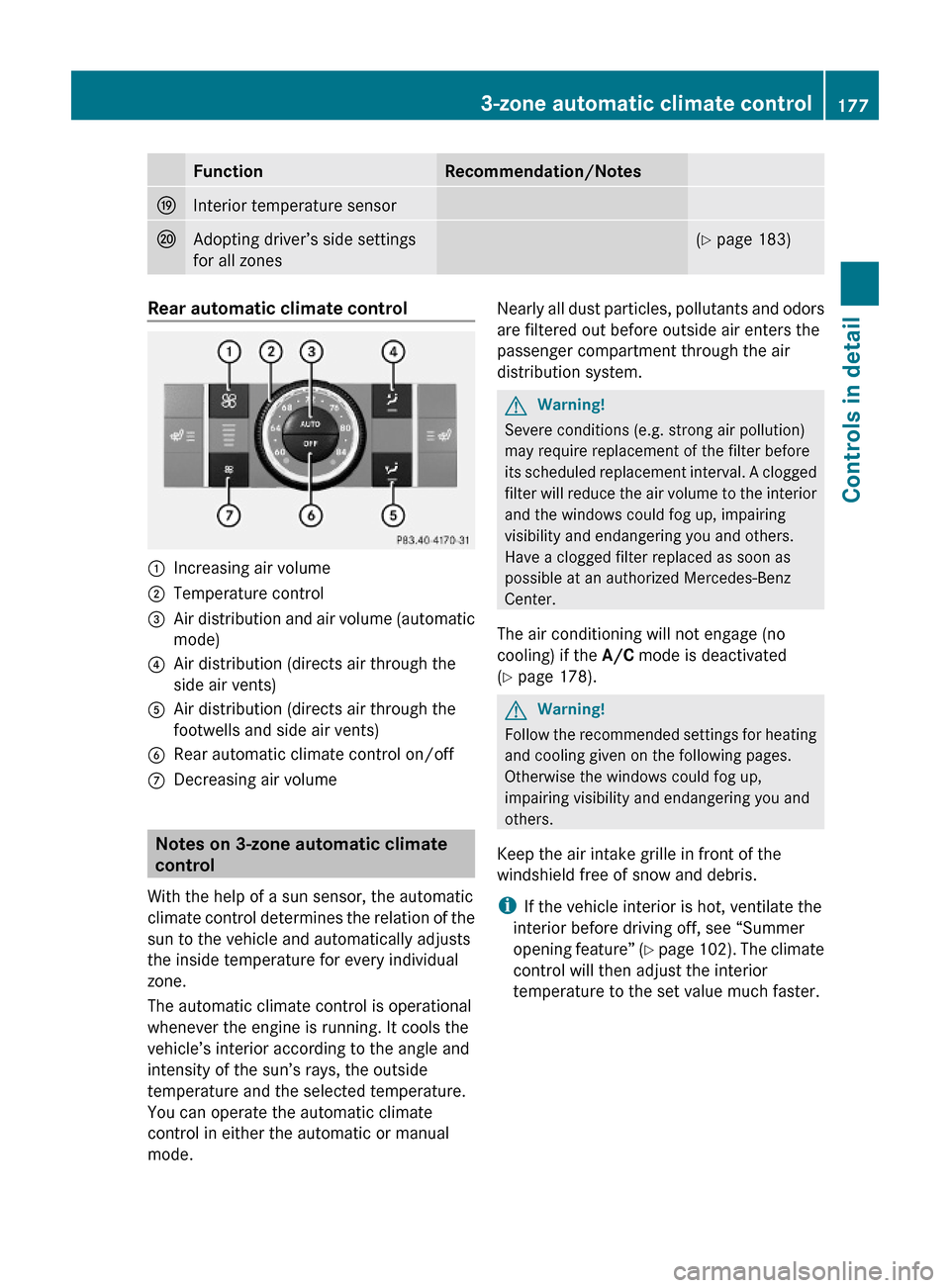
FunctionRecommendation/NotesOInterior temperature sensorPAdopting driver’s side settings
for all zones
(Y page 183)Rear automatic climate control:Increasing air volume;Temperature control=Air distribution and air volume (automatic
mode)
?Air distribution (directs air through the
side air vents)
AAir distribution (directs air through the
footwells and side air vents)
BRear automatic climate control on/offCDecreasing air volume
Notes on 3-zone automatic climate
control
With the help of a sun sensor, the automatic
climate control determines the relation of the
sun to the vehicle and automatically adjusts
the inside temperature for every individual
zone.
The automatic climate control is operational
whenever the engine is running. It cools the
vehicle’s interior according to the angle and
intensity of the sun’s rays, the outside
temperature and the selected temperature.
You can operate the automatic climate
control in either the automatic or manual
mode.
Nearly all dust particles, pollutants and odors
are filtered out before outside air enters the
passenger compartment through the air
distribution system.
GWarning!
Severe conditions (e.g. strong air pollution)
may require replacement of the filter before
its scheduled replacement interval. A clogged
filter will reduce the air volume to the interior
and the windows could fog up, impairing
visibility and endangering you and others.
Have a clogged filter replaced as soon as
possible at an authorized Mercedes-Benz
Center.
The air conditioning will not engage (no
cooling) if the A/C mode is deactivated
(Y page 178).
GWarning!
Follow the recommended settings for heating
and cooling given on the following pages.
Otherwise the windows could fog up,
impairing visibility and endangering you and
others.
Keep the air intake grille in front of the
windshield free of snow and debris.
iIf the vehicle interior is hot, ventilate the
interior before driving off, see “Summer
opening feature” (Y page 102). The climate
control will then adjust the interior
temperature to the set value much faster.
3-zone automatic climate control177Controls in detail164_AKB; 7; 31, en-USd2ureepe,Version: 2.11.8.12009-09-11T12:07:36+02:00 - Seite 177Z
Page 180 of 368
Deactivating the climate control
systemGWarning!
When the climate control system is switched
off, the outside air supply and circulation are
also switched off. Only choose this setting for
a short time. Otherwise the windows could fog
up, impairing visibility and endangering you
and others.
Deactivating the front climate control
XDeactivating: Press button ^.
The indicator lamp in the button comes on.
Canada only: Display J (Y page 175) is
cleared.XReactivating: Press button Ã.
i
You can also press button ^ on the
climate control panel.
If you press button ¦ to reactivate the
climate control system, the defrosting
mode is activated.
Deactivating the rear climate control
from the front
USA only
XDeactivating: Press button ±.
The indicator lamp in the button comes on.XReactivating: Press button ±.
The indicator lamp in the button goes out.
Canada only
XDeactivating: Press button X.
The indicator lamp in the button comes on.
In display J ( Y page 175), you will see the
Y symbol followed by MODE for
approximately 3 seconds.XWithin these 3 seconds press button
^ .
In display J, you will see the Y symbol
followed by OFF.
The rear climate control is switched off.XReactivating: Press button X.The indicator lamp in the button comes on.
In display J, you will see the Y symbol
followed by ON and MODE . The MODE display
is cleared and the indicator lamp in button
X goes out after approximately
3 seconds.
The rear climate control switches on.
Deactivating the rear climate control
from the rear
XDeactivating: Press button ^.
The indicator lamp in the button comes on.XReactivating: Press button Ã.
The indicator lamp in the button comes on.
Air conditioning
The air conditioning is operational while the
engine is running and cools the interior air to
the temperature set by the operator. In
addition, the air conditioning dehumidifies
the interior air and helps prevent window
fogging.
GWarning!
If you switch off the air conditioning, the
vehicle will not be cooled when weather
conditions are warm. The windows can fog up
more quickly. Window fogging may impair
visibility and endanger you and others.
i Condensation may drip out from
underneath the vehicle. This is normal and
not an indication of a malfunction.
Deactivating
It is possible to deactivate the cooling
function of the climate control system. The
interior air will then no longer be cooled or
dehumidified.
XPress button Á.
The indicator lamp in the button goes out.
The cooling function switches off after a
short delay.1783-zone automatic climate controlControls in detail
164_AKB; 7; 31, en-USd2ureepe,Version: 2.11.8.12009-09-11T12:07:36+02:00 - Seite 178
Page 202 of 368
RThe indicator lamp in the SOS button does
not come on during the system self-test.
R The indicator lamp in Roadside Assistance
button º does not come on during the
system self-test.
R The indicator lamp in Information button
E does not come on during the system
self-test.
R The indicator lamp in the SOS button,
Roadside Assistance button º, or
Information button E remains
illuminated constantly in red after the
system self-test.
R The message Tele Aid Inoperative or
Tele Aid Not Activated appears in the
multifunction display after the system self-
test
If a malfunction is indicated as outlined above,
the system may not operate as expected. In
case of an emergency, help will have to be
summoned by other means.
Have the system checked at the nearest
Mercedes-Benz Center or contact the
Customer Assistance Center at
1-800-FOR-MERCedes (1-800-367-6372)
(USA only) or 1-888-923-8367 (Canada only)
as soon as possible.
Emergency calls
! In order to activate the Tele Aid system, a
subscriber agreement must be completed.
To ensure your system is activated and
operational, please press Information
button E to perform the acquaintance
call. Failure to complete either of these
steps may result in a system that is not
activated.
If you have any questions regarding
activation, please call the Customer
Assistance Center at
1-800-FOR-MERCedes (1-800-367-6372)
(USA only) or 1-888-923-8367 (Canada
only).
An emergency call is initiated automatically
following an accident in which the Emergency
Tensioning Devices (ETDs) or air bags have
deployed.
i An automatically initiated Tele Aid
emergency call cannot be canceled.
An emergency call can also be initiated
manually ( Y page 201).
Once the emergency call is in progress, the
indicator lamp in the SOS button will begin to
flash. The message Connecting Call
appears in the multifunction display and the
COMAND system is muted. When the
connection is established, the message
Call Connected appears in the
multifunction display.
All information relevant to the emergency,
such as the location of the vehicle
(determined by the GPS satellite location
system), vehicle model, identification number
and color are generated.
A voice connection between the Customer
Assistance Center and the occupants of the
vehicle will be established automatically soon
after the emergency call has been initiated.
The Customer Assistance Center will attempt
to determine the nature of the emergency
more precisely, provided they can speak to
an occupant of the vehicle.
i If no vehicle occupant responds, an
ambulance will be sent to the vehicle
immediately.GWarning!
If the indicator lamp in the SOS button is
flashing continuously and there was no voice
connection to the Customer Assistance
Center established, then the Tele Aid system
could not initiate an emergency call (e.g. the
relevant cellular phone network is not
available).
The message Call Failed appears in the
multifunction display for approximately
10 seconds.
200Useful featuresControls in detail
164_AKB; 7; 31, en-USd2ureepe,Version: 2.11.8.12009-09-11T12:07:36+02:00 - Seite 200