engine MERCEDES-BENZ ML430 2002 W163 Owner's Guide
[x] Cancel search | Manufacturer: MERCEDES-BENZ, Model Year: 2002, Model line: ML430, Model: MERCEDES-BENZ ML430 2002 W163Pages: 342, PDF Size: 13.75 MB
Page 92 of 342
89 Trip computer
Te ch n i c a l
data Instruments
and controlsOperationDrivingInstrument
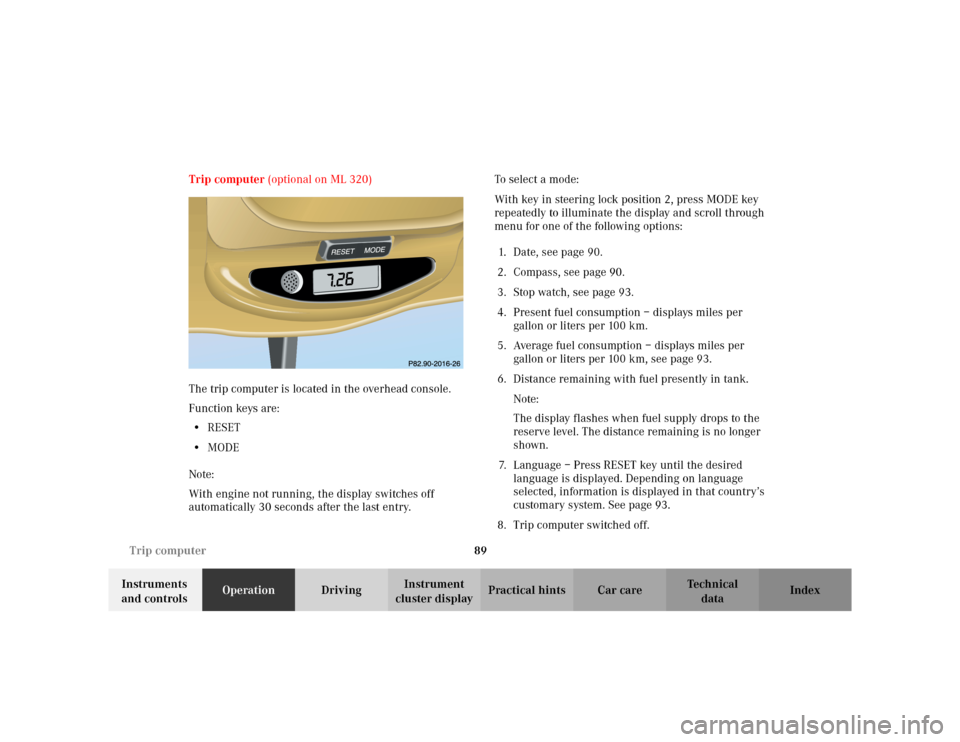
cluster displayPractical hints Car care Index Trip computer (optional on ML 320)
The trip computer is located in the overhead console.
Function keys are:
•RESET
•MODE
Note:
With engine not running, the display switches off
automatically 30 seconds after the last entry.To s e l e c t a m o d e :
With key in steering lock position 2, press MODE key
repeatedly to illuminate the display and scroll through
menu for one of the following options:
1. Date, see page 90.
2. Compass, see page 90.
3. Stop watch, see page 93.
4. Present fuel consumption – displays miles per
gallon or liters per 100 km.
5. Average fuel consumption – displays miles per
gallon or liters per 100 km, see page 93.
6. Distance remaining with fuel presently in tank.
Note:
The display flashes when fuel supply drops to the
reserve level. The distance remaining is no longer
shown.
7. Language – Press RESET key until the desired
language is displayed. Depending on language
selected, information is displayed in that country’s
customary system. See page 93.
8. Trip computer switched off.
MODE
Page 95 of 342
92 Trip computer
Te ch n i c a l
data Instruments
and controlsOperationDrivingInstrument
cluster displayPractical hints Car care Index
To calibrate the compass:
If the vehicle was exposed to a significant magnetic
zone, such as high voltage power lines, the compass
may have to be calibrated.
Calibration of the compass should be done in an area
free of steel superstructures and power lines. All
electrical consumers (e.g. exterior lamps, climate
control, rear window defroster etc.) should be switched
off, doors and liftgate closed. Do not open or close the
roof. An open liftgate triggers the display “–––”.
1. Start and run the engine.
2. Press MODE key repeatedly until the compass
display appears in the trip computer display.
3. Press RESET key and afterwards press MODE key,
“CAL–” appears in the display.4. Press and hold RESET key for a minimum of
2 seconds, to access the calibration mode.
The display shows “CAL”.
5. Without interruption drive two full circles at a speed
between 3 mph (5 km / h) and 7 mph (10 km / h).
The message “CAL” goes out after a short time.
6. The calibration of the compass is now complete.
Note:
If “CAL” remains in the display, calibration was not
successfully completed. To recalibrate, remove key from
the steering lock. Insert key, start the vehicle and start
the calibration procedure.
We recommend that you have the compass calibrated at
a Mercedes-Benz Light Truck Center.
Page 98 of 342
95 Flexible service system
Te ch n i c a l
data Instruments
and controlsOperationDrivingInstrument
cluster displayPractical hints Car care Index Important!
The FSS indicator is not an engine oil level indicator.
See page 96 for engine oil level indicator.
Notes:
When disconnecting vehicle battery for one or more
days at a time, such days will not be counted. Any such
days not counted by the FSS can be added by your
Mercedes-Benz Light Truck Center.
The interval between services is determined by the type
of driving for which the vehicle is used. For example,
driving at extreme speeds, and cold starts combined
with short distance driving in which the engine does not
reach normal operating temperature, reduce the interval
between services.
Following a completed A or B service the Mercedes-
Benz Light Truck Center sets the counter mileage to
10 000 miles (Canada: 15 000 km).
The counter can also be set by any individual. To do so:
1. Turn the key in steering lock to position 2.
2. Immediately press button (1) twice within one
second.3. The present status for days or distance is displayed.
Within 10 seconds turn key in steering lock to
position 0.
4. Press and hold button (1), while turning key in
steering lock to position 2 again. The present status
for days or distance is displayed once more.
Continue to hold button (1).
After approximately 10 seconds a signal sounds, and
the display shows 10 000 miles (Canada: 15 000 km)
for approximately 10 seconds.
5. Release button (1).
If the FSS counter was inadvertently reset, have it
corrected at a Mercedes-Benz Light Truck Center.
Note:
However you choose to set your reference numbers, the
scheduled services as posted in the Service Booklet
must be followed to properly care for your vehicle.
Page 99 of 342
96 Engine oil level indicator
Te ch n i c a l
data Instruments
and controlsOperationDrivingInstrument
cluster displayPractical hints Car care Index
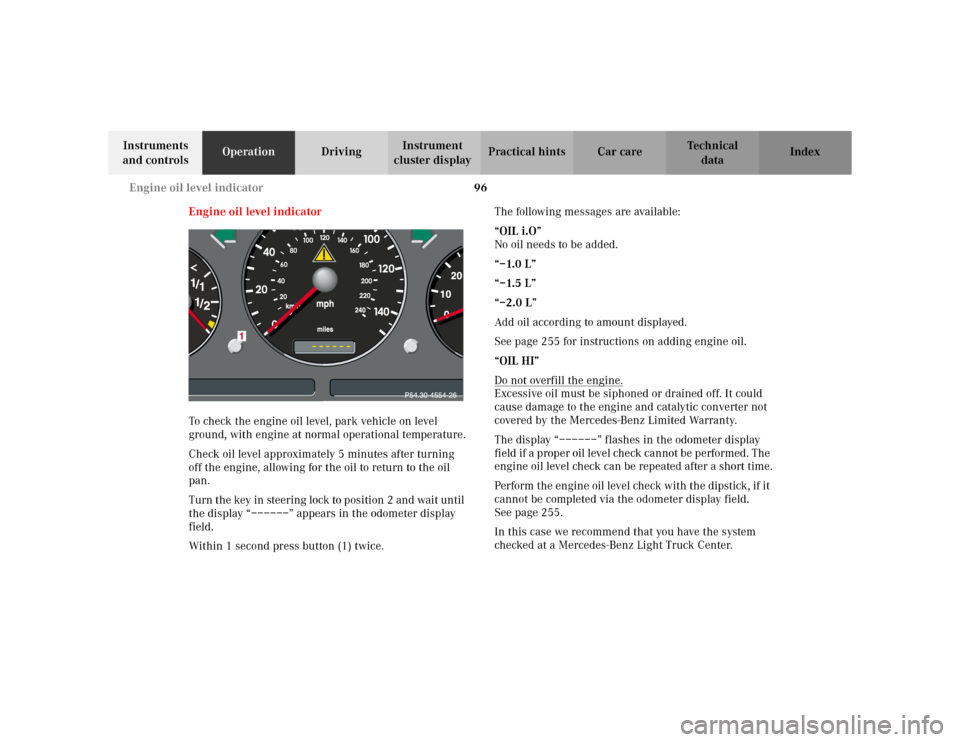
Engine oil level indicator
To check the engine oil level, park vehicle on level
ground, with engine at normal operational temperature.
Check oil level approximately 5 minutes after turning
off the engine, allowing for the oil to return to the oil
pan.
Turn the key in steering lock to position 2 and wait until
the display “––––––” appears in the odometer display
field.
Within 1 second press button (1) twice.The following messages are available:
“OIL i.O”
No oil needs to be added.
“–1.0 L”
“–1.5 L”
“–2.0 L”
Add oil according to amount displayed.
See page 255 for instructions on adding engine oil.
“OIL HI”
Do not overfill the engine.
Excessive oil must be siphoned or drained off. It could
cause damage to the engine and catalytic converter not
covered by the Mercedes-Benz Limited Warranty.
The display “––––––” flashes in the odometer display
field if a proper oil level check cannot be performed. The
engine oil level check can be repeated after a short time.
Perform the engine oil level check with the dipstick, if it
cannot be completed via the odometer display field.
Seepage255.
In this case we recommend that you have the system
checked at a Mercedes-Benz Light Truck Center.
Page 100 of 342
97 Exterior lamp switch
Te ch n i c a l
data Instruments
and controlsOperationDrivingInstrument
cluster displayPractical hints Car care Index Exterior lamp switch
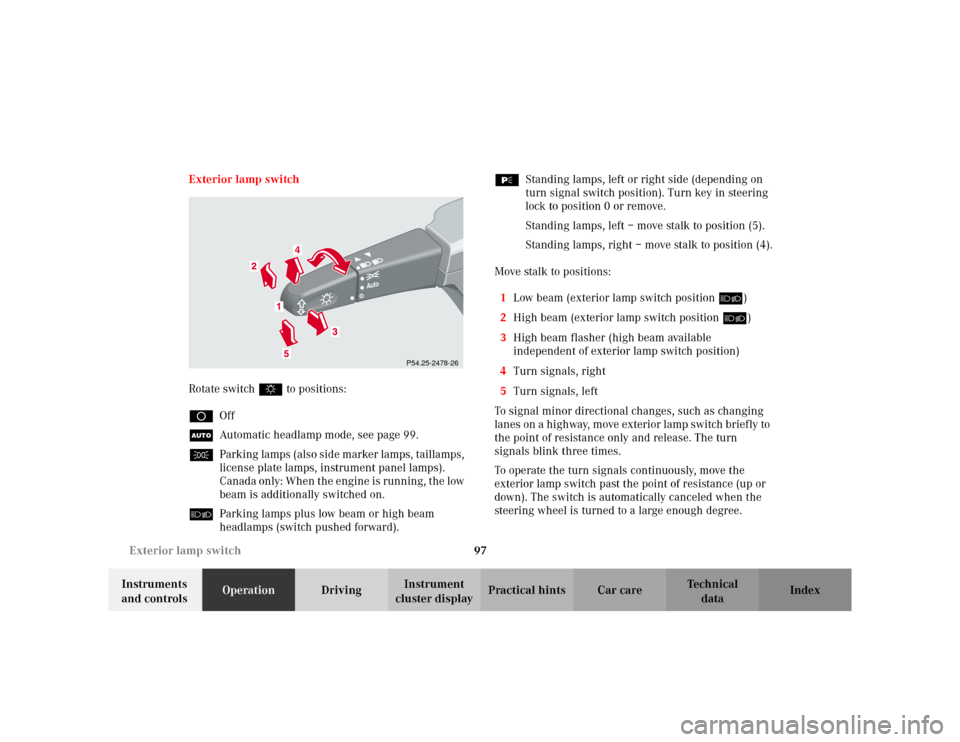
Rotate switch $ to positions:
DOff
UAutomatic headlamp mode, see page 99.
CParking lamps (also side marker lamps, taillamps,
license plate lamps, instrument panel lamps).
Canada only: When the engine is running, the low
beam is additionally switched on.
õParking lamps plus low beam or high beam
headlamps (switch pushed forward).ƒStanding lamps, left or right side (depending on
turn signal switch position). Turn key in steering
lock to position 0 or remove.
Standing lamps, left – move stalk to position (5).
Standing lamps, right – move stalk to position (4).
Move stalk to positions:
1Low beam (exterior lamp switch position õ)
2High beam (exterior lamp switch position õ)
3High beam flasher (high beam available
independent of exterior lamp switch position)
4Turn signals, right
5Turn signals, left
To signal minor directional changes, such as changing
lanes on a highway, move exterior lamp switch brief ly to
the point of resistance only and release. The turn
signals blink three times.
To operate the turn signals continuously, move the
exterior lamp switch past the point of resistance (up or
down). The switch is automatically canceled when the
steering wheel is turned to a large enough degree.
Auto
P54.25-2478-26
Page 102 of 342
99 Exterior lamp switch
Te ch n i c a l
data Instruments
and controlsOperationDrivingInstrument
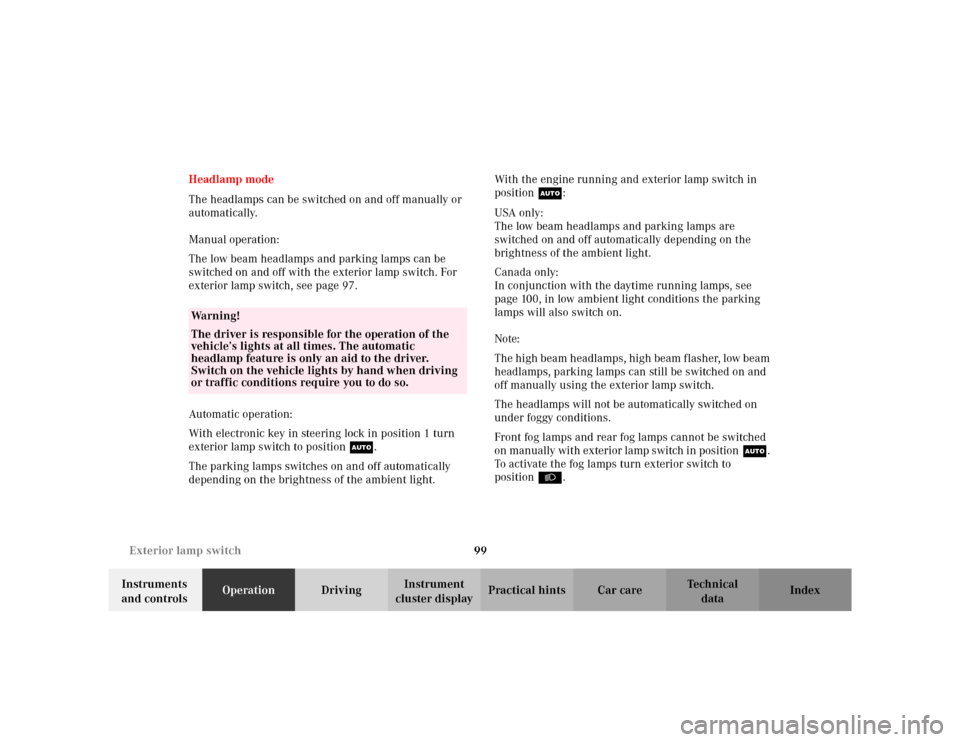
cluster displayPractical hints Car care Index Headlamp mode
The headlamps can be switched on and off manually or
automatically.
Manual operation:
The low beam headlamps and parking lamps can be
switched on and off with the exterior lamp switch. For
exterior lamp switch, see page 97.
Automatic operation:
With electronic key in steering lock in position 1 turn
exterior lamp switch to positionU.
The parking lamps switches on and off automatically
depending on the brightness of the ambient light.With the engine running and exterior lamp switch in
positionU:
USA only:
The low beam headlamps and parking lamps are
switched on and off automatically depending on the
brightness of the ambient light.
Canada only:
In conjunction with the daytime running lamps, see
page 100, in low ambient light conditions the parking
lamps will also switch on.
Note:
The high beam headlamps, high beam flasher, low beam
headlamps, parking lamps can still be switched on and
off manually using the exterior lamp switch.
The headlamps will not be automatically switched on
under foggy conditions.
Front fog lamps and rear fog lamps cannot be switched
on manually with exterior lamp switch in positionU.
To activate the fog lamps turn exterior switch to
positionB.
Wa r n i n g !
The driver is responsible for the operation of the
vehicle’s lights at all times. The automatic
headlamp feature is only an aid to the driver.
Switch on the vehicle lights by hand when driving
or traffic conditions require you to do so.
Page 103 of 342
100 Exterior lamp switch
Te ch n i c a l
data Instruments
and controlsOperationDrivingInstrument
cluster displayPractical hints Car care Index
Daytime running lamp mode (Canada only)
Turn exterior lamp switch to positionD.
When the engine is running the low beam headlamps
are automatically switched on. In low ambient light
conditions the parking lamps will also switch on.
When shifting from a driving position to position “N”
or “P”, the exterior lamps switches off (3 minutes delay).For nighttime driving the exterior lamp switch should
be turned to position õ or U to permit activation
of the high beam headlamps.
Note:
The high beam flasher is always available.
Page 104 of 342
101 Exterior lamp switch
Te ch n i c a l
data Instruments
and controlsOperationDrivingInstrument
cluster displayPractical hints Car care Index Night security illumination
This function will be only active with exterior lamp
switch in positionU.
When turning off the engine, the exterior lamps
(parking lamps and fog lamps) switch on for added
illumination. After the last door has been closed the
lamp-on time period commences.
The lamp-on time period for night security illumination
can be set at several different timed levels from 0 (off) to
60 seconds, see “Setting illumination time” on
page 102.Notes:
Within 10 minutes after closing the last door or the
tailgate the night security illumination can be
reactivated by opening a door or the tailgate.
If after switching the engine off, no doors are opened or
if after opening the doors or trunk they are not closed,
the night security illumination will switch off
automatically after 60 seconds.
Deactivating night security illumination temporarily:
Turn the electronic key in steering lock to position 0
then to position 2 and back to position 0 again before
getting out of the vehicle. The night security
illumination will not be activated when the door is
opened.
Page 113 of 342
110 Automatic climate control
Te ch n i c a l
data Instruments
and controlsOperationDrivingInstrument
cluster displayPractical hints Car care Index
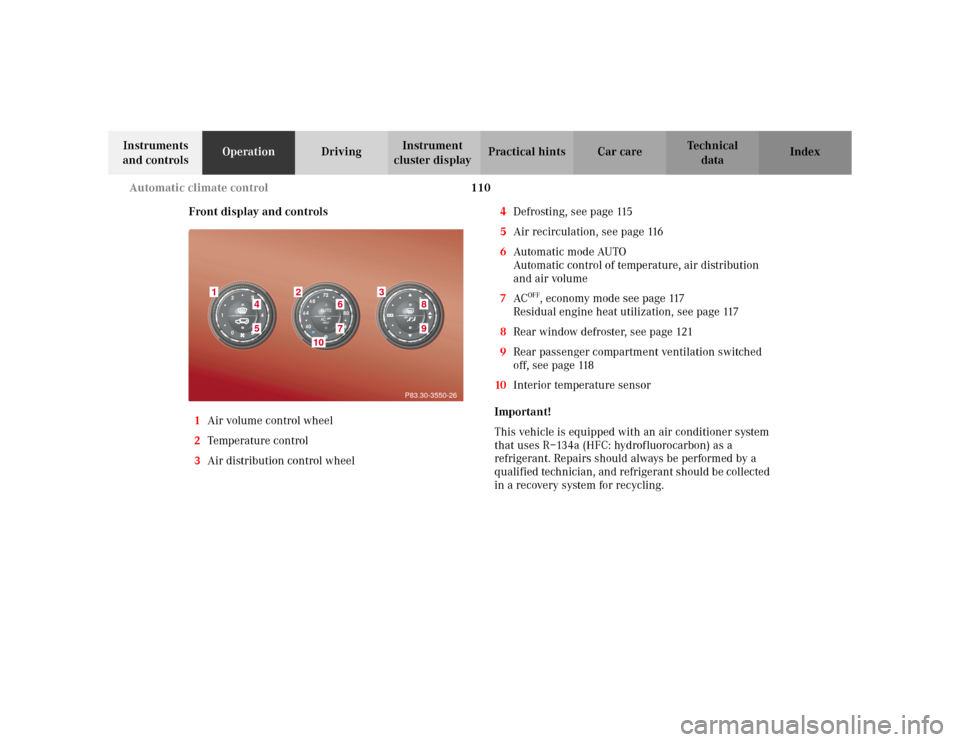
Front display and controls
1Air volume control wheel
2Temperature control
3Air distribution control wheel4Defrosting, see page 115
5Air recirculation, see page 116
6Automatic mode AUTO
Automatic control of temperature, air distribution
and air volume
7AC
OFF
, economy mode see page 117
Residual engine heat utilization, see page 117
8Rear window defroster, see page 121
9Rear passenger compartment ventilation switched
off, see page 118
10Interior temperature sensor
Important!
This vehicle is equipped with an air conditioner system
that uses R–134a (HFC: hydrofluorocarbon) as a
refrigerant. Repairs should always be performed by a
qualified technician, and refrigerant should be collected
in a recovery system for recycling.
1
2
3
45
6
10
89
P83.30-3550-26
7
Page 114 of 342
111 Automatic climate control
Te ch n i c a l
data Instruments
and controlsOperationDrivingInstrument
cluster displayPractical hints Car care Index Automatic climate control
The automatic climate control only operates with the
engine running.
The system is always at operational readiness, except
when manually switched off.
In the automatic mode the automatic climate control
cools or heats the interior depending on outside
temperature and the selected interior temperature.
Make the temperature settings in small increments.
If the vehicle interior has been heated by direct sunlight
and is very hot, ventilate the interior (open door or
windows for a short period) before driving off
Keep the air intake grill in front of the windshield free
of debris and snow.
The air conditioning mode removes considerable
moisture from the air during operation in the cooling
mode. It is normal for water to drip on the ground
through ducts in the underbody.
If the economy mode AC
OFF
is selected, the air
conditioning compressor will not engage and it is not
possible to air condition in this setting. See page 117.Notes:
The interior temperature sensor (10) should not be
touched to maintain a precise temperature.
If the vehicle travels from shade into direct sunlight, a
sensor automatically increases the air volume
temporarily to maintain the interior temperature.
The automatic climate control will not remove moisture
from the air at low outside ambient temperatures.
The air conditioner switches itself off for its own
protection if refrigerant is lost. No cooling will then take
place. Economy mode AC
OFF
cannot be switched off.
Have the air conditioner checked by a Mercedes-Benz
Center should this happen.
Dustfilter
Nearly all dust particles and pollen are filtered out
before outside air enters the passenger compartment
through the air distribution system.
Severe conditions (e.g. strong air pollution) may require
replacement of the filter before its scheduled interval.
A clogged filter will reduce the air volume to the
interior.