cruise control MERCEDES-BENZ ML63AMG 2010 W164 Owner's Manual
[x] Cancel search | Manufacturer: MERCEDES-BENZ, Model Year: 2010, Model line: ML63AMG, Model: MERCEDES-BENZ ML63AMG 2010 W164Pages: 368, PDF Size: 9.09 MB
Page 9 of 368
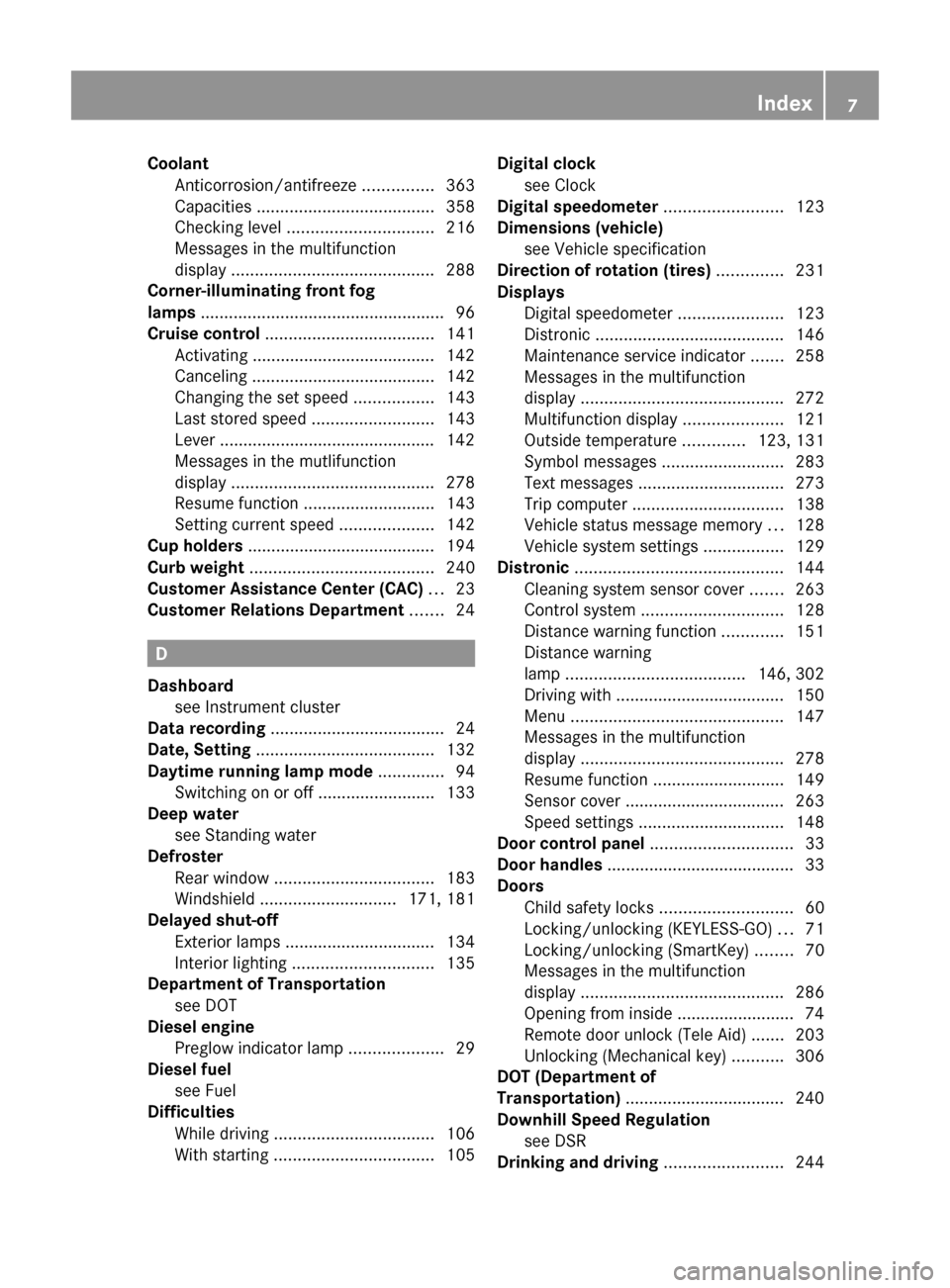
Coolant
Anticorrosion/antifreeze ...............363
Capacities ...................................... 358
Checking level ............................... 216
Messages in the multifunction
display ........................................... 288
Corner-illuminating front fog
lamps .................................................... 96
Cruise control .................................... 141
Activating ....................................... 142
Canceling ....................................... 142
Changing the set speed .................143
Last stored speed ..........................143
Lever .............................................. 142
Messages in the mutlifunction
display ........................................... 278
Resume function ............................ 143
Setting current speed ....................142
Cup holders ........................................ 194
Curb weight ....................................... 240
Customer Assistance Center (CAC) ... 23
Customer Relations Department ....... 24
D
Dashboard see Instrument cluster
Data recording ..................................... 24
Date, Setting ...................................... 132
Daytime running lamp mode .............. 94
Switching on or off ......................... 133
Deep water
see Standing water
Defroster
Rear window .................................. 183
Windshield ............................. 171, 181
Delayed shut-off
Exterior lamps ................................ 134
Interior lighting .............................. 135
Department of Transportation
see DOT
Diesel engine
Preglow indicator lamp ....................29
Diesel fuel
see Fuel
Difficulties
While driving .................................. 106
With starting .................................. 105
Digital clock
see Clock
Digital speedometer ......................... 123
Dimensions (vehicle) see Vehicle specification
Direction of rotation (tires) .............. 231
Displays
Digital speedometer ......................123
Distronic ........................................ 146
Maintenance service indicator .......258
Messages in the multifunction
display ........................................... 272
Multifunction display .....................121
Outside temperature .............123, 131
Symbol messages ..........................283
Text messages ............................... 273
Trip computer ................................ 138
Vehicle status message memory ...128
Vehicle system settings .................129
Distronic ............................................ 144
Cleaning system sensor cover .......263
Control system .............................. 128
Distance warning function .............151
Distance warning
lamp ...................................... 146, 302
Driving with .................................... 150
Menu ............................................. 147
Messages in the multifunction
display ........................................... 278
Resume function ............................ 149
Sensor cover .................................. 263
Speed settings ............................... 148
Door control panel .............................. 33
Door handles ........................................ 33
Doors
Child safety locks ............................ 60
Locking/unlocking (KEYLESS-GO) ...71
Locking/unlocking (SmartKey) ........70
Messages in the multifunction
display ........................................... 286
Opening from inside ......................... 74
Remote door unlock (Tele Aid) .......203
Unlocking (Mechanical key) ...........306
DOT (Department of
Transportation) .................................. 240
Downhill Speed Regulation see DSR
Drinking and driving ......................... 244Index7164_AKB; 7; 31, en-USd2ureepe,Version: 2.11.8.12009-09-11T12:07:36+02:00 - Seite 7
Page 10 of 368
Driving
Abroad ........................................... 257
Hydroplaning ................................. 247
Instructions ........................... 103, 244
In winter ........................................ 243
Off-road ......................................... 248
Problems ....................................... 106
Safety systems ................................ 61
Systems ......................................... 141
Through standing water .................247
With Distronic ................................ 150
Driving and parking
Safety notes .................................. 103
Driving off .................................. 105, 247
Driving safety systems ....................... 61
ABS .................................................. 62
BAS .................................................. 63
EBP .................................................. 63
ESP ®
................................................ 63
ETS/4-ETS ....................................... 64
Driving systems
Air suspension program .................155
All-wheel drive (4MATIC) ................ 159
Cruise control ................................ 141
Distronic ........................................ 144
Downhill Speed Regulation (DSR) ..152
Hill-start assist system ..................152
Off-road driving program ...............155
Parktronic system ..........................160
Rear view camera .......................... 163
Driving tips, automatic
transmission ...................................... 113
DSR (Downhill Speed Regulation) .... 152
Messages in the multifunction
display ........................................... 286
E
Easy-entry/exit feature .............. 87, 136
EBP (Electronic Brake
Proportioning) ...................................... 63
Electrical system
Improper work on or
modifications ................................... 23
Power outlets ................................. 197
Electrical system (Technical data)
see Vehicle specification
Electronic Stability Program
see ESP ®
Electronic Traction System
see ETS/4-ETS
Emergency, in case of
First aid kit ..................................... 268
Flat tire .......................................... 319
Hazard warning flasher ....................96
Roadside Assistance ................ 21, 201
Towing the vehicle .........................338
Emergency calls
Tele Aid .......................................... 200
Emergency engine shutdown ........... 344
Emergency operations
Limp-home mode ........................... 117
Remote door unlock (Tele Aid) .......203
Emergency Tensioning Device
see ETD
Emission control ............................... 258
Information label ............................ 347
System warranties ...........................20
Engine
Break-in recommendations ............210
Cleaning ......................................... 262
Compartment ................................ 212
Malfunction indicator
lamp ........................................ 29, 303
Messages in the multifunction
display ........................................... 288
Number .......................................... 347
Starting .......................................... 103
Turning off ..................................... 108
Engine (Technical data)
see Vehicle specification
Engine compartment
Radiator ......................................... 214
Engine coolant
see Coolant
Engine oil
Adding ........................................... 215
Additives ........................................ 359
Checking level ............................... 214
Consumption ................................. 214
Messages in the multifunction
display ........................................... 2918Index164_AKB; 7; 31, en-USd2ureepe,Version: 2.11.8.12009-09-11T12:07:36+02:00 - Seite 8
Page 15 of 368
Air filter .......................................... 292
Air suspension program .................285
Alternator .............................. 280, 290
Automatic
transmission .................................. 280
Battery ................................... 280, 290
Brake fluid ..................................... 284
Brake pads ..................................... 283
Coolant .......................................... 288
Corner-illuminating front fog
lamps ............................................. 295
Cruise control ................................ 278
Distronic ........................................ 278
Doors ............................................. 286
Downhill Speed Regulation (DSR) ..286
EBP ................................................ 284
Engine oil ....................................... 291
ESP ®
...................................... 273, 284
Fog lamps .............................. 293, 294
Front passenger front air bag ........275
Gas cap .......................................... 292
High-beam lamps ........................... 294
Hood .............................................. 286
License plate lamps .......................294
Light sensor ................................... 294
Low-beam lamps ............................ 294
Parking brake ................................ 284
Parking lamps ................................ 294
PRE-SAFE ®
.................................... 274
Reserve fuel ................................... 291
Reverse lamp ................................. 293
Side marker lamps .........................293
SmartKey ............................... 286, 287
SmartKey with KEYLESS-GO ..........286
SRS ................................................ 285
Tailgate .......................................... 286
Tail lamps ...................................... 295
Tele Aid .......................................... 285
Tire inflation pressure ............281, 296
Tire pressure monitor ....................281
Tires ...................................... 281, 296
Trailer brake lamps ........................295
Trailer tail lamps ............................ 295
Trailer turn signal lamps ................295
Turn signals ................................... 296
Washer fluid ................................... 288Multifunction steering wheel
Adjustment ...................................... 86
Buttons .......................................... 119
Cleaning ......................................... 265
Easy-entry/exit feature ...........87, 136
Gearshift control ............................ 115
Heating ............................................ 88
Memory function .............................. 92
Overview .......................................... 30
N
Navigation menu ............................... 127
Navigation system see Separate operating instructions
NECK-PRO active front head
restraints ............................................. 53
Resetting ....................................... 309
Nets, parcel ....................................... 188
Night security illumination .............. 134
Normal occupant weight .................. 241
Number, vehicle identification
(VIN) ................................................... 347
O
Occupant Classification System see OCS (Occupant Classification
System)
Occupant distribution ....................... 241
Occupant safety
Air bags ........................................... 37
BabySmart™ .................................... 46
Children and air bags .......................37
Children in the vehicle .....................55
Child seat anchors – LATCH-type ....59
Fastening the seat belts ................... 50
Front passenger front air bag off
indicator lamp (Canada
only) ........................................ 46, 305
Front passenger front air bag off
indicator lamp (USA only) ........42, 305
Infant and child restraint systems .... 56
Introduction ..................................... 36
OCS (Occupant Classification
System) ........................................... 42
PRE-SAFE ®
....................................... 52
Seat belts .................................. 39, 48
Index13164_AKB; 7; 31, en-USd2ureepe,Version: 2.11.8.12009-09-11T12:07:36+02:00 - Seite 13
Page 18 of 368
Securing cargo
Cargo tie-down rings ...................... 188
Selective setting
see Key, SmartKey
Selector lever
see Gear selector lever
Self-test
BabySmart™ .................................... 47
OCS (Occupant Classification
System) ........................................... 45
Tele Aid .......................................... 199
Service
see Maintenance
Service, parts .................................... 346
Service and warranty information ..... 20
Service intervals see Maintenance System, Service
indicator message
Service life (tires) .............................. 232
Settings
Factory setting (KEYLESS-GO) .........72
Factory setting (SmartKey) ..............71
Memory function .............................. 92
Menu ............................................. 129
Selective setting (KEYLESS-GO) .......73
Selective setting (SmartKey) ............71
Side impact air bags ........................... 40
Side marker lamps
Cleaning lenses ............................. 263
Messages in the multifunction
display ........................................... 293
Sidewall (tires) .................................. 241
SmartKey see Key, SmartKey
SmartKey with KEYLESS-GO
see Key, SmartKey
Snow chains ...................................... 243
Snow tires see Winter tires
Spare wheel ....................................... 352
Mounting ....................................... 324
Storage location ............................ 271
Speedometer ............................... 28, 146
Speed settings
Cruise control ................................ 142
Distronic ........................................ 148
Resume function ...................143, 149Sport Utility Vehicle
see SUV
SRS
Indicator lamp ...................29, 36, 301
Messages in the multifunction
display ........................................... 285
Standing water, driving through ...... 247
Starter switch positions
KEYLESS-GO .................................... 80
SmartKey ......................................... 79
Starting difficulties (engine) ............ 105
Starting the engine ........................... 103
Steering column see Multifunction steering wheel,
Adjustment
Steering wheel
see Multifunction steering wheel
Steering wheel gearshift control ..... 115
Stolen Vehicle Recovery Services ... 204
Storage compartments ..................... 192
Storing tires ....................................... 233
Stranded vehicle ............................... 342
Sunroof see Power tilt/sliding sunroof
Sun visors .......................................... 195
Suspension tuning see Air suspension program
SUV (Sport Utility Vehicle) ................. 22
T
Tachometer .................................. 29, 119
Overspeed range ........................... 119
Tailgate
Closing ............................................. 75
Messages in the multifunction
display ........................................... 286
Opening ........................................... 75
Power tailgate .................................. 76
Unlocking manually .......................307
Tail lamps ........................................... 312
Cleaning lenses ............................. 263
Messages in the multifunction
display ........................................... 295
Tar stains ........................................... 261
Technical data
Air conditioning refrigerant ............359
Brake fluid ..................................... 359
16Index164_AKB; 7; 31, en-USd2ureepe,Version: 2.11.8.12009-09-11T12:07:36+02:00 - Seite 16
Page 29 of 368
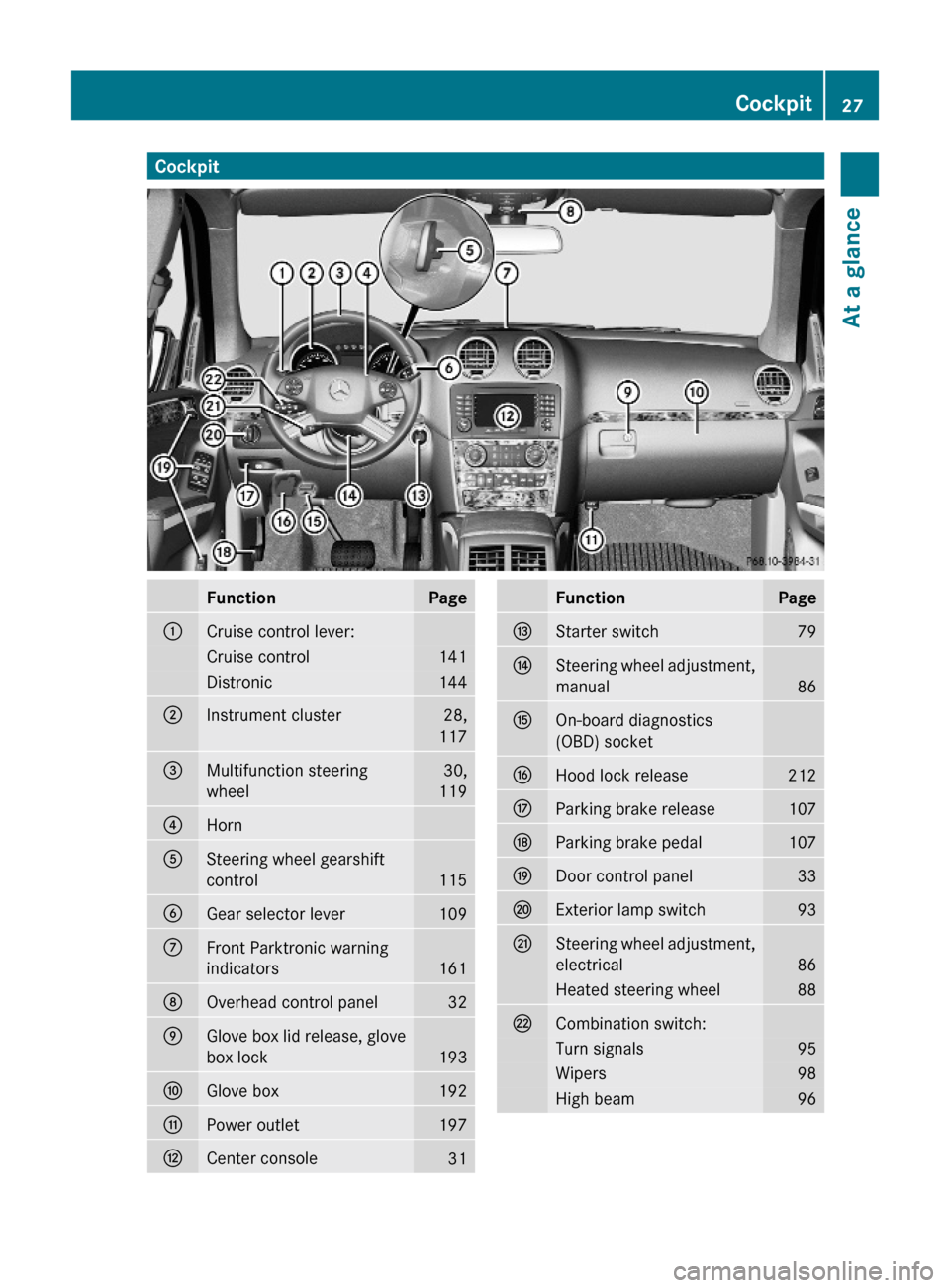
CockpitFunctionPage:Cruise control lever:Cruise control141Distronic144;Instrument cluster28,
117
=Multifunction steering
wheel
30,
119
?Horn ASteering wheel gearshift
control115
BGear selector lever109CFront Parktronic warning
indicators 161
DOverhead control panel32EGlove box lid release, glove
box lock193
FGlove box192GPower outlet197HCenter console31FunctionPageIStarter switch79JSteering wheel adjustment,
manual86
KOn-board diagnostics
(OBD) socket
LHood lock release212MParking brake release107NParking brake pedal107ODoor control panel33PExterior lamp switch93QSteering wheel adjustment,
electrical86
Heated steering wheel88RCombination switch:Turn signals95Wipers98High beam96Cockpit27At a glance164_AKB; 7; 31, en-USd2ureepe,Version: 2.11.8.12009-09-11T12:07:36+02:00 - Seite 27Z
Page 66 of 368
GWarning!
Never switch off the ESP®
when you see the
ESP ®
warning lamp d flashing in the
instrument cluster. In this case proceed as
follows:
R When driving off, apply as little throttle as
possible.
R While driving, ease up on the accelerator
pedal.
R Adapt your speed and driving style to the
prevailing road conditions.
Failure to observe these guidelines could
cause the vehicle to skid. The ESP ®
cannot
prevent accidents resulting from excessive
speed.
! Vehicles with 4MATIC:
Only conduct operational or performance
tests on a two-axle dynamometer. If such
tests are necessary, contact an authorized
Mercedes-Benz Center. You could
otherwise seriously damage the brake
system or the transfer case which is not
covered by the Mercedes-Benz Limited
Warranty.
! Vehicles without 4MATIC:
Because the ESP ®
operates automatically,
the engine and ignition must be shut off
(SmartKey in starter switch position 0 or
1 or KEYLESS-GO start/stop button in
position 0 or 1) when the parking brake is
being tested on a brake test dynamometer
or the vehicle is being towed with one axle
raised.
Active braking action through the ESP ®
may otherwise seriously damage the brake
system which is not covered by the
Mercedes-Benz Limited Warranty.
! Vehicles with 4MATIC:
Because the ESP ®
operates automatically,
the engine and ignition must be shut off
(SmartKey in starter switch position 0 or
1 or KEYLESS-GO start/stop button in
position 0 or 1) when the parking brake is
being tested on a brake test dynamometer.
Such testing should be no longer than 10
seconds.
Active braking action through the ESP ®
may otherwise seriously damage the brake
system which is not covered by the
Mercedes-Benz Limited Warranty.
! The ESP ®
will only function properly if you
use wheels of the recommended tire size
as specified in the “Technical data” section
of this Operator’s Manual.
i The cruise control switches off
automatically when the ESP ®
engages.
Electronic Traction System
(ETS/4-ETS) GObserve Safety notes, see page 62.
The ETS (Electronic Traction System) and
4-ETS (four-wheel Electronic Traction
System, vehicles with 4MATIC only) are
components of the ESP ®
. The ETS/4-ETS
improves the vehicle’s ability to utilize
available traction, especially under slippery
road conditions by applying the brakes to a
spinning wheel. Vehicles with 4MATIC also
transfer more power to the wheel(s) with
traction.
When you switch off the ESP ®
, the
ETS/4-ETS is still enabled.
XIf conditions require, switch on the off-road
driving program ( Y page 155).
Off-road 4-ETS (vehicles with 4MATIC)
With the off-road driving program switched on
( Y page 155), the 4-ETS designed for off-road
use is activated automatically.
Switching off the ESP ®
GWarning!
The ESP
®
should not be switched off during
normal driving other than in the
64Driving safety systemsSafety and security
164_AKB; 7; 31, en-USd2ureepe,Version: 2.11.8.12009-09-11T12:07:36+02:00 - Seite 64
Page 67 of 368
circumstances described below. Disabling
the system will reduce vehicle stability in
driving maneuvers.
Do not switch off the ESP® when a spare
wheel is mounted.
To improve the vehicle’s traction, switch off
the ESP®. This allows the drive wheels to spin
and thus cut into surfaces for better grip, for
example
Rwhen driving with snow chains
Rin deep snow
Rin sand or gravel
GWarning!
Switch on the ESP® immediately if the
aforementioned circumstances do not apply
anymore. Otherwise the ESP® will not
stabilize the vehicle when it is starting to skid
or a wheel is spinning.
When you switch off the ESP®,
Rthe ESP® does not stabilize the vehicle
Rthe engine output is not limited, which
allows the drive wheels to spin and thus cut
into surfaces for better grip
Rthe ETS/4-ETS will still apply the brakes to
a spinning wheel
Rthe ESP® continues to operate when you
are braking
Rthe cruise control cannot be activated
Rthe cruise control or the Distronic system
switch off if activated
iWhen the ESP® is switched off and one or
more drive wheels are spinning, the ESP®
warning lamp d in the instrument
cluster flashes. However, the ESP® will
then not stabilize the vehicle.
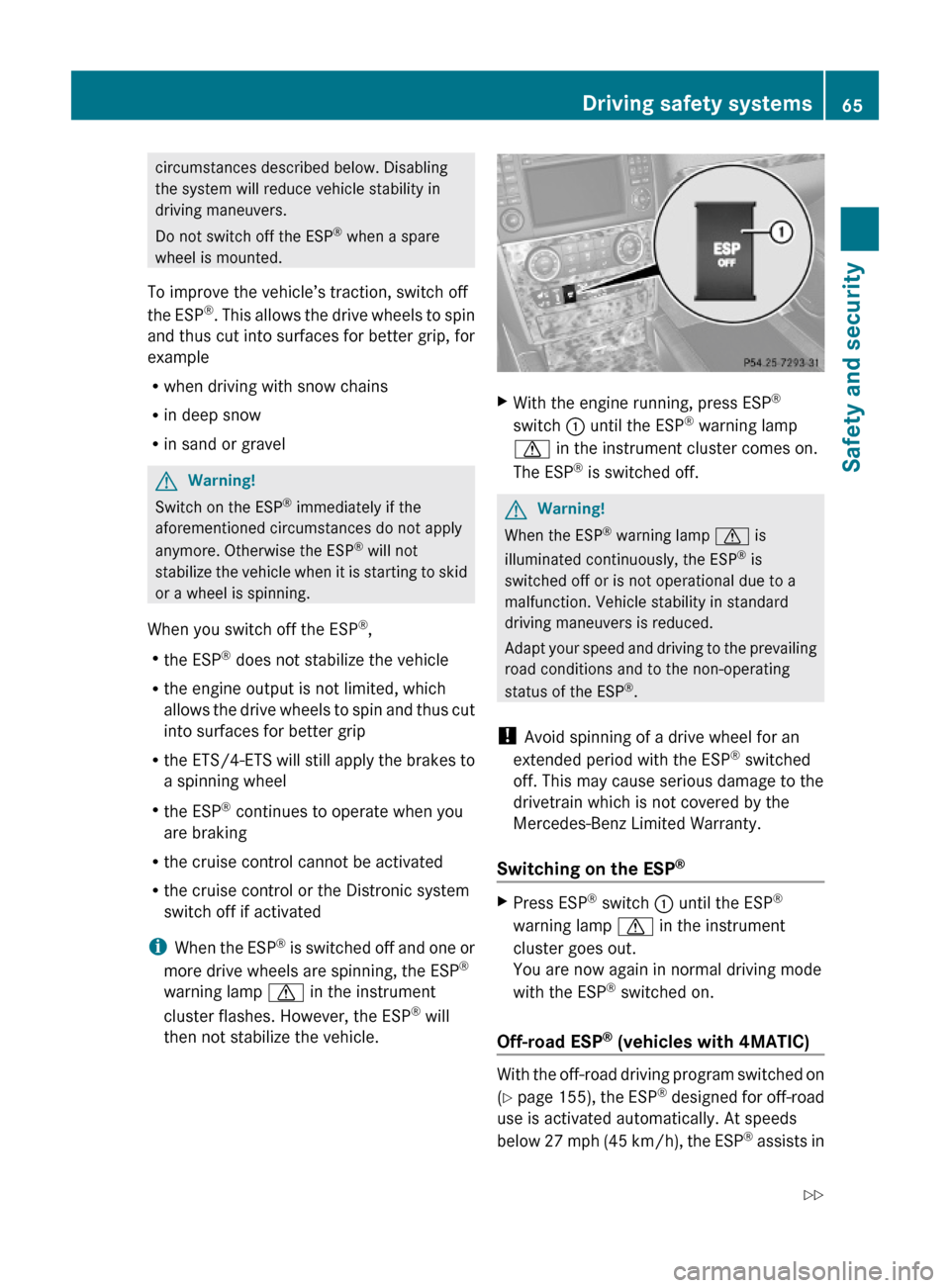
XWith the engine running, press ESP®
switch : until the ESP® warning lamp
d in the instrument cluster comes on.
The ESP® is switched off.
GWarning!
When the ESP® warning lamp d is
illuminated continuously, the ESP® is
switched off or is not operational due to a
malfunction. Vehicle stability in standard
driving maneuvers is reduced.
Adapt your speed and driving to the prevailing
road conditions and to the non-operating
status of the ESP®.
! Avoid spinning of a drive wheel for an
extended period with the ESP® switched
off. This may cause serious damage to the
drivetrain which is not covered by the
Mercedes-Benz Limited Warranty.
Switching on the ESP®
XPress ESP® switch : until the ESP®
warning lamp d in the instrument
cluster goes out.
You are now again in normal driving mode
with the ESP® switched on.
Off-road ESP® (vehicles with 4MATIC)
With the off-road driving program switched on
(Y page 155), the ESP® designed for off-road
use is activated automatically. At speeds
below 27 mph (45 km/h), the ESP® assists in
Driving safety systems65Safety and security164_AKB; 7; 31, en-USd2ureepe,Version: 2.11.8.12009-09-11T12:07:36+02:00 - Seite 65Z
Page 140 of 368
DSR (Downhill Speed Regulation)
programmed default speed
Use this function to program the default
speed the DSR is set to when it is activated.
You can program the default speed between
3 - 10 mph (Canada: 4- 18 km/h). The set
value is increased in 1 mph (Canada:
2 km/h) increments.
XPress button V or U repeatedly until
the Vehicle configuration menu appears
in the multifunction display.
XPress button & or * repeatedly until
the message DSR Speed appears in the
multifunction display.
The selection marker is on the current
setting.
XPress button W or X repeatedly until
the desired speed is shown in the
multifunction display.
When DSR is switched on, DSR will use the
programmed default speed to regulate the
vehicle’s speed.
Once DSR is switched on, you can adjust the
set speed using the cruise control lever
(Y page 154).
Trip computer menu
Use the Trip computer menu to call up
statistical data on your vehicle.
The following information is available:
RFuel consumption statistics since start
(Y page 138)
RFuel consumption statistics since last reset
(Y page 138)
RResetting fuel consumption statistics
(Y page 139)
RDistance to empty (Y page 139)
RCurrent fuel consumption (Y page 139)
When you enter the Trip computer menu,
you will always see the fuel consumption
statistics since start first.
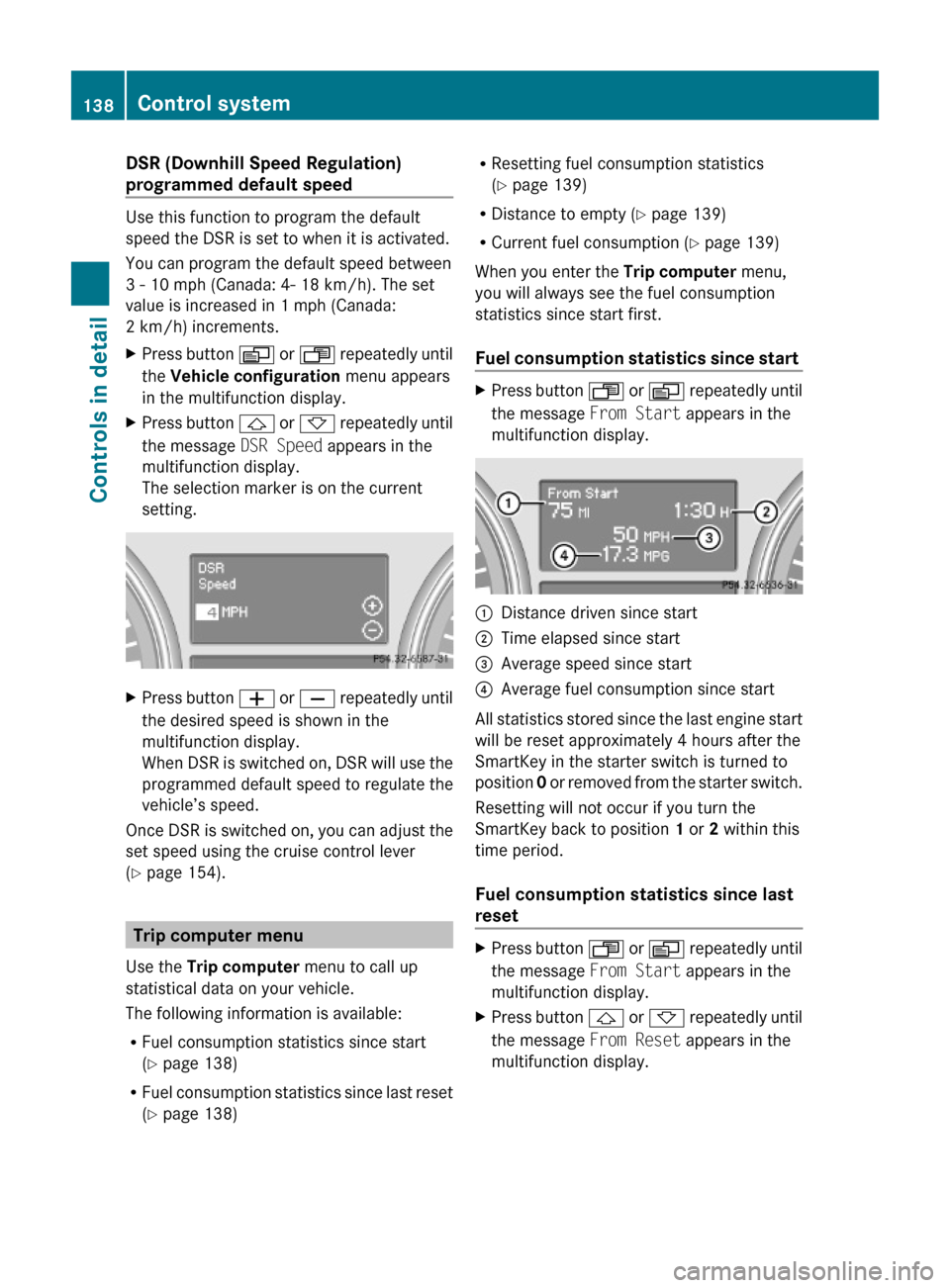
Fuel consumption statistics since start
XPress button U or V repeatedly until
the message From Start appears in the
multifunction display.
:Distance driven since start;Time elapsed since start=Average speed since start?Average fuel consumption since start
All statistics stored since the last engine start
will be reset approximately 4 hours after the
SmartKey in the starter switch is turned to
position 0 or removed from the starter switch.
Resetting will not occur if you turn the
SmartKey back to position 1 or 2 within this
time period.
Fuel consumption statistics since last
reset
XPress button U or V repeatedly until
the message From Start appears in the
multifunction display.
XPress button & or * repeatedly until
the message From Reset appears in the
multifunction display.
138Control systemControls in detail
164_AKB; 7; 31, en-USd2ureepe,Version: 2.11.8.12009-09-11T12:07:36+02:00 - Seite 138
Page 143 of 368
Redialing
The control system stores the most recently
dialed phone numbers. This eliminates the
need to search through your entire phone
book.
XPress button U or V repeatedly until
the message TEL appears in the
multifunction display.XPress button 6.
The first number in the redial memory
appears in the multifunction display.XPress button & or * repeatedly until
the desired number or name appears in the
multifunction display.XPress button 6.
The control system dials the selected
phone number.
Driving systems
Introduction
This section describes the following driving
systems of your vehicle:
R Cruise control
R Distronic
R Distance warning function (only available
with Distronic)
R Hill-start assist system
R Downhill Speed Regulation (DSR)
R Off-road driving program
R Air suspension program (Adaptive
Damping System (ADS) and vehicle level
control)
R All-wheel drive (4MATIC)
R Parktronic system
R Rear view camera
The driving safety systems ABS, BAS, EBP,
ESP ®
and 4-ETS are described in the “Safety
and security” section ( Y page 61).
Cruise control
The cruise control maintains the speed you
set for your vehicle automatically.
The use of the cruise control is recommended
for driving at a constant speed for extended
periods of time.
The currently set speed or last set speed
(“Resume” function) appears in the status
indicator of the multifunction display:
R USA only: e.g. Cruise 55 Miles
R Canada only: e.g. ¯ 90 Km/h
i The cruise control should not be activated
during off-road driving.GWarning!
The cruise control is a convenience system
designed to assist the driver during vehicle
operation. The driver is and must always
remain responsible for the vehicle’s speed
and for safe brake operation.
Only use the cruise control if the road, traffic,
and weather conditions make it advisable to
travel at a constant speed.
R The use of the cruise control can be
dangerous on winding roads or in heavy
traffic because conditions do not allow safe
driving at a constant speed.
R The use of the cruise control can be
dangerous on slippery roads. Rapid
changes in tire traction can result in wheel
spin and loss of control.
R Deactivate the cruise control when driving
in fog.
The “Resume” function should only be
operated if the driver is fully aware of the
previously set speed and wishes to resume
this particular preset speed.
Driving systems141Controls in detail164_AKB; 7; 31, en-USd2ureepe,Version: 2.11.8.12009-09-11T12:07:36+02:00 - Seite 141Z
Page 144 of 368
GWarning!
When the cruise control is braking, the brake
pedal is retracted (i.e. depressed
automatically). The pedals’ range of motion
must not be impeded by any obstacles:
RDo not place any objects in the footwell.
RMake sure that the floormats and carpets
are securely in place.
RDo not rest your foot underneath the brake
pedal, as it could otherwise be trapped.
You could otherwise cause an accident and
injure yourself and/or others.
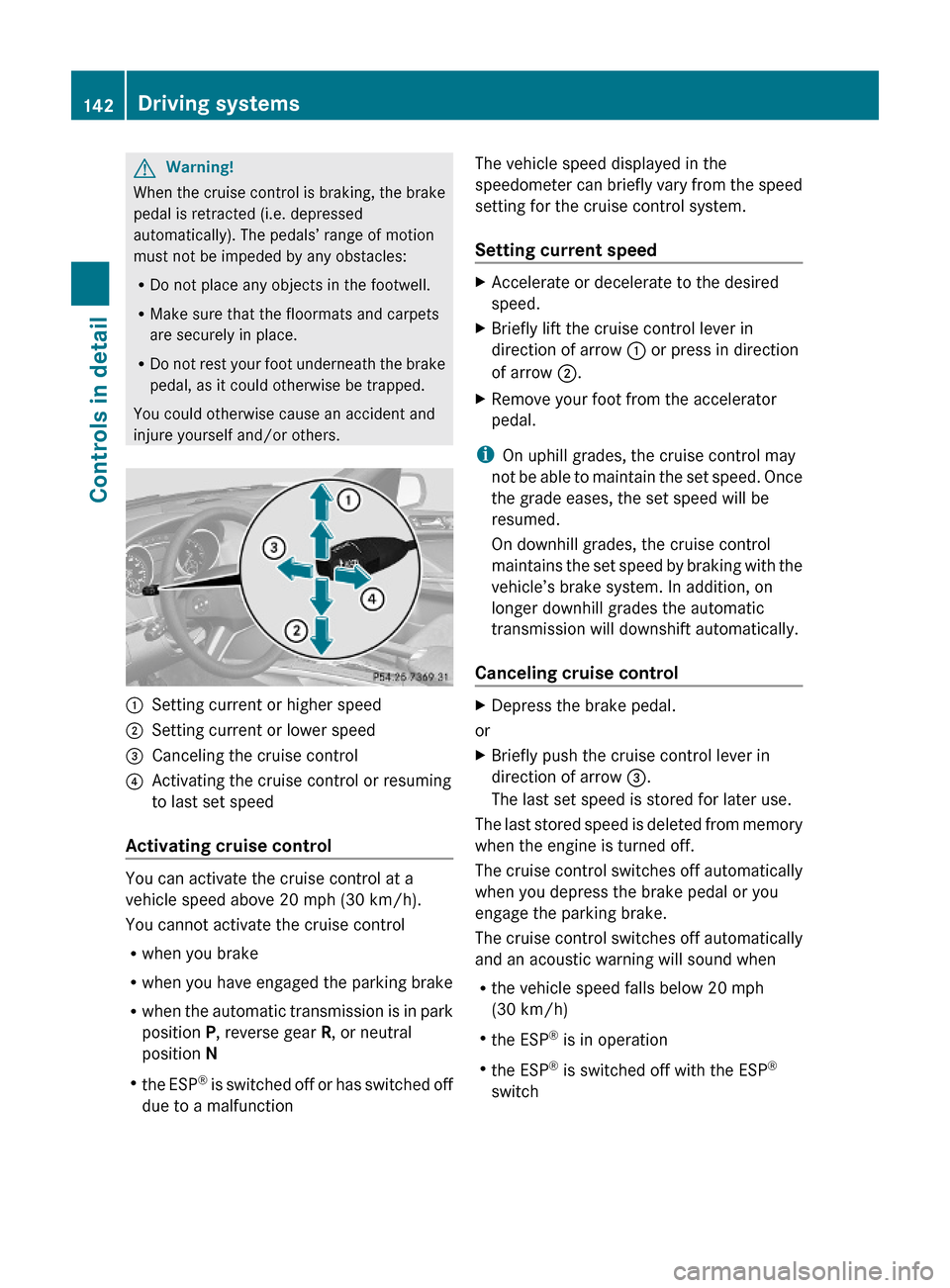
:Setting current or higher speed ;Setting current or lower speed=Canceling the cruise control?Activating the cruise control or resuming
to last set speed
Activating cruise control
You can activate the cruise control at a
vehicle speed above 20 mph (30 km/h).
You cannot activate the cruise control
Rwhen you brake
Rwhen you have engaged the parking brake
Rwhen the automatic transmission is in park
position P, reverse gear R, or neutral
position N
Rthe ESP® is switched off or has switched off
due to a malfunction
The vehicle speed displayed in the
speedometer can briefly vary from the speed
setting for the cruise control system.
Setting current speed
XAccelerate or decelerate to the desired
speed.
XBriefly lift the cruise control lever in
direction of arrow : or press in direction
of arrow ;.
XRemove your foot from the accelerator
pedal.
iOn uphill grades, the cruise control may
not be able to maintain the set speed. Once
the grade eases, the set speed will be
resumed.
On downhill grades, the cruise control
maintains the set speed by braking with the
vehicle’s brake system. In addition, on
longer downhill grades the automatic
transmission will downshift automatically.
Canceling cruise control
XDepress the brake pedal.
or
XBriefly push the cruise control lever in
direction of arrow =.
The last set speed is stored for later use.
The last stored speed is deleted from memory
when the engine is turned off.
The cruise control switches off automatically
when you depress the brake pedal or you
engage the parking brake.
The cruise control switches off automatically
and an acoustic warning will sound when
Rthe vehicle speed falls below 20 mph
(30 km/h)
Rthe ESP® is in operation
Rthe ESP® is switched off with the ESP®
switch
142Driving systemsControls in detail
164_AKB; 7; 31, en-USd2ureepe,Version: 2.11.8.12009-09-11T12:07:36+02:00 - Seite 142