fold seats MERCEDES-BENZ R-Class 2012 W251 User Guide
[x] Cancel search | Manufacturer: MERCEDES-BENZ, Model Year: 2012, Model line: R-Class, Model: MERCEDES-BENZ R-Class 2012 W251Pages: 368, PDF Size: 15.19 MB
Page 107 of 368
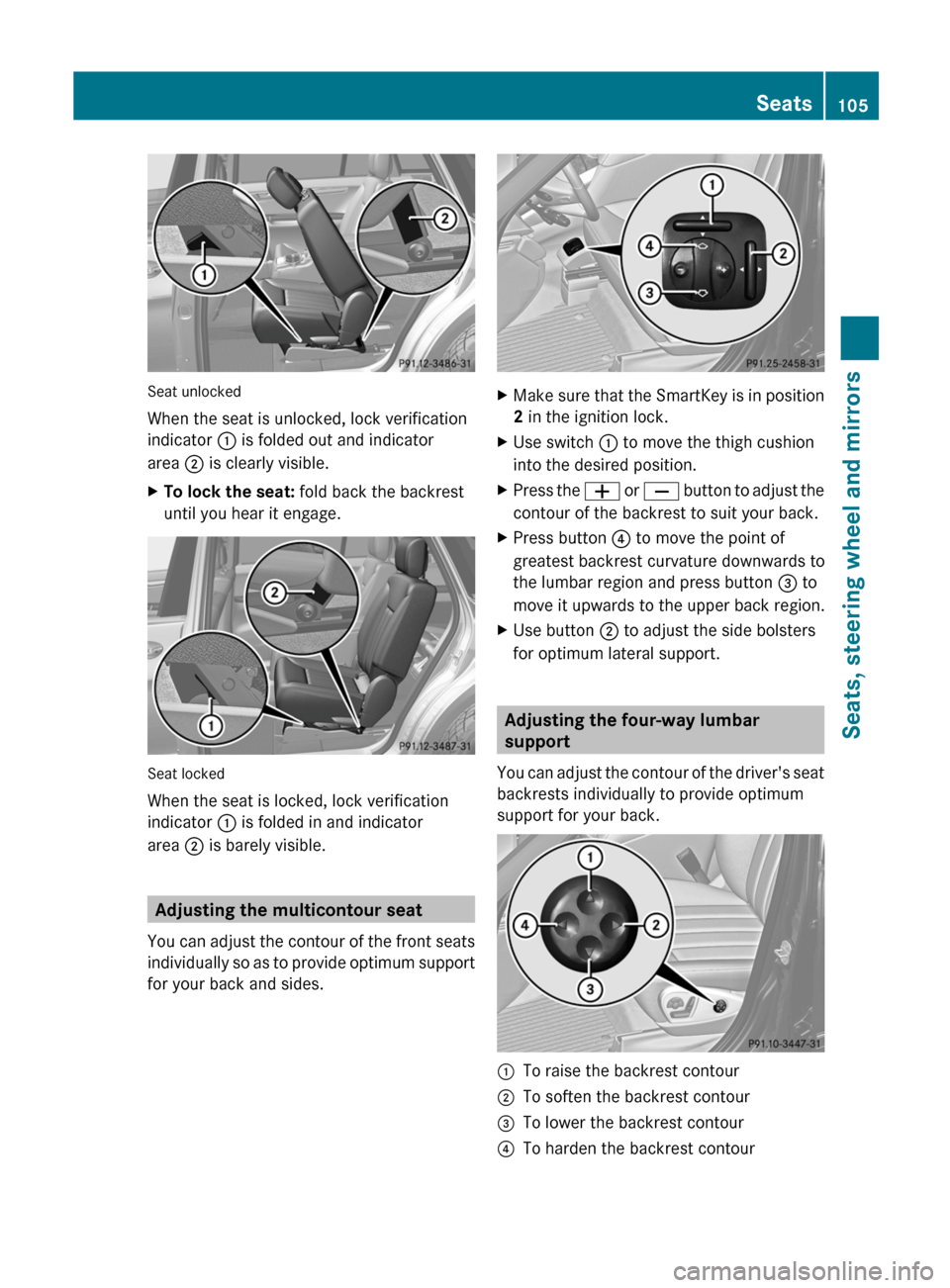
Seat unlocked
When the seat is unlocked, lock verification
indicator : is folded out and indicator
area ; is clearly visible.
XTo lock the seat: fold back the backrest
until you hear it engage.
Seat locked
When the seat is locked, lock verification
indicator : is folded in and indicator
area ; is barely visible.
Adjusting the multicontour seat
You can adjust the contour of the front seats
individually so as to provide optimum support
for your back and sides.
XMake sure that the SmartKey is in position
2 in the ignition lock.XUse switch : to move the thigh cushion
into the desired position.XPress the W or X button to adjust the
contour of the backrest to suit your back.XPress button ? to move the point of
greatest backrest curvature downwards to
the lumbar region and press button = to
move it upwards to the upper back region.XUse button ; to adjust the side bolsters
for optimum lateral support.
Adjusting the four-way lumbar
support
You can adjust the contour of the driver's seat
backrests individually to provide optimum
support for your back.
:To raise the backrest contour;To soften the backrest contour=To lower the backrest contour?To harden the backrest contourSeats105Seats, steering wheel and mirrorsZ
Page 112 of 368
Exterior mirrors
Adjusting the exterior mirrorsGWARNING
Exercise care when using the passenger-side
exterior rear view mirror. The mirror surface
is convex (outwardly curved surface for a
wider field of view). Objects in mirror are
closer than they appear. Check your interior
rear view mirror and glance over your
shoulder before changing lanes.
The exterior mirrors are automatically heated
if the rear window defroster is switched on
and the outside temperature is low.
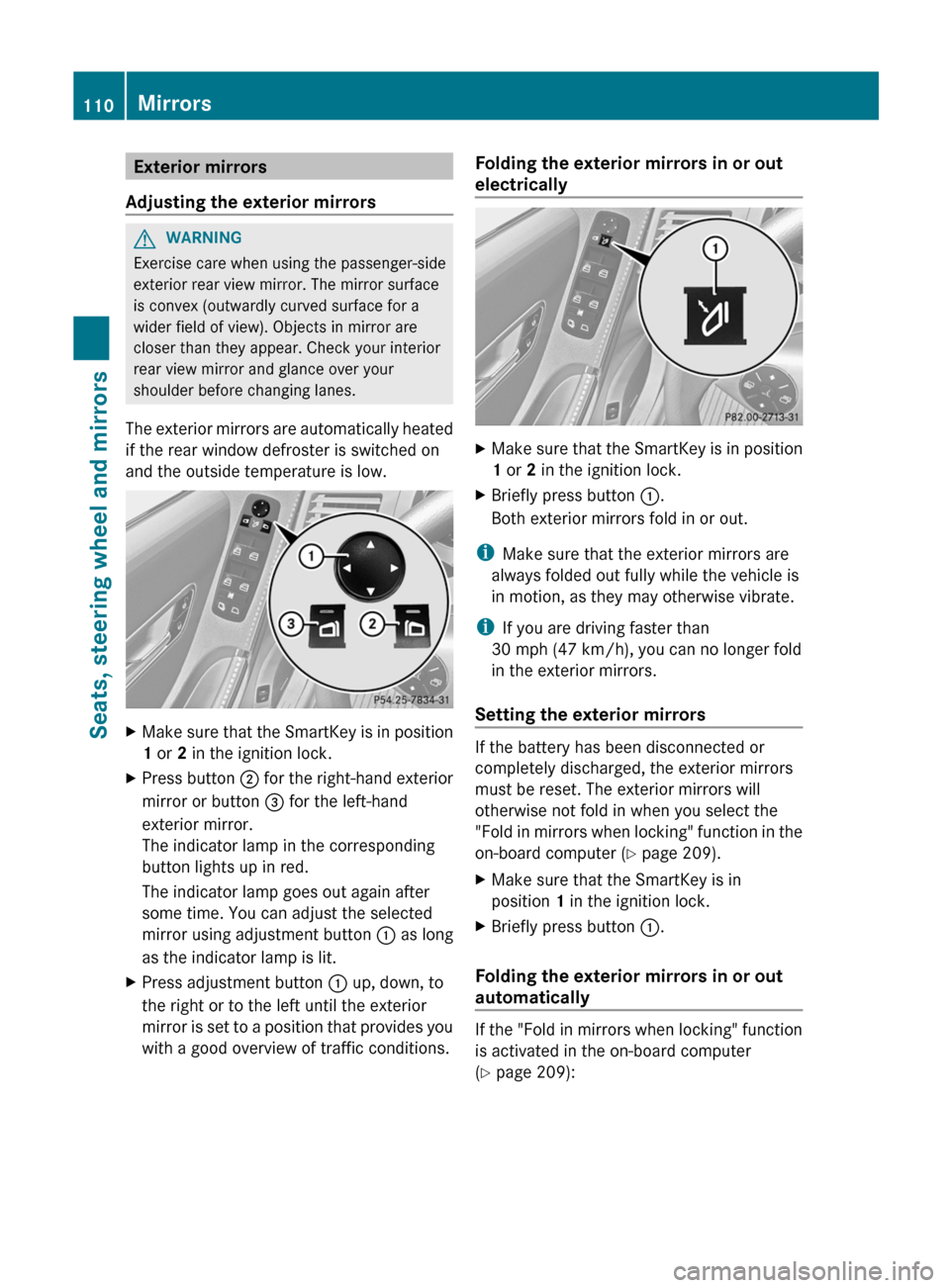
XMake sure that the SmartKey is in position
1 or 2 in the ignition lock.XPress button ; for the right-hand exterior
mirror or button = for the left-hand
exterior mirror.
The indicator lamp in the corresponding
button lights up in red.
The indicator lamp goes out again after
some time. You can adjust the selected
mirror using adjustment button : as long
as the indicator lamp is lit.XPress adjustment button : up, down, to
the right or to the left until the exterior
mirror is set to a position that provides you
with a good overview of traffic conditions.Folding the exterior mirrors in or out
electricallyXMake sure that the SmartKey is in position
1 or 2 in the ignition lock.XBriefly press button :.
Both exterior mirrors fold in or out.
i Make sure that the exterior mirrors are
always folded out fully while the vehicle is
in motion, as they may otherwise vibrate.
i If you are driving faster than
30 mph (47 km/h), you can no longer fold
in the exterior mirrors.
Setting the exterior mirrors
If the battery has been disconnected or
completely discharged, the exterior mirrors
must be reset. The exterior mirrors will
otherwise not fold in when you select the
"Fold in mirrors when locking" function in the
on-board computer ( Y page 209).
XMake sure that the SmartKey is in
position 1 in the ignition lock.XBriefly press button :.
Folding the exterior mirrors in or out
automatically
If the "Fold in mirrors when locking" function
is activated in the on-board computer
( Y page 209):
110MirrorsSeats, steering wheel and mirrors
Page 113 of 368
Rthe exterior mirrors fold in automatically as
soon as you lock the vehicle from the
outside.
R the exterior mirrors fold out again
automatically as soon as you unlock the
vehicle and then open the driver's or front-
passenger door.
i The mirrors do not fold out if they have
been folded in manually.
Exterior mirror out of position
If an exterior mirror has been pushed out of
position, proceed as follows:
XVehicles without electrically folding
exterior mirrors: move the exterior mirror
into the correct position manually.XVehicles with electronically folding
mirrors: press the mirror-folding button
( Y page 110) repeatedly until you hear the
mirror engage in position.
The mirror housing is engaged again and
you can adjust the exterior mirrors as usual
( Y page 110).
Automatic anti-glare mirrors
GWARNING
If incident light from headlamps is prevented
from striking the sensor in the rear-view
mirror, for instance, by luggage piled too high
in the vehicle, the mirror's automatic anti-
glare function will not operate.
Incident light could then blind you. This may
distract you from the traffic conditions and,
as a result, you may cause an accident.
The rear-view mirror and the exterior mirror
on the driver's side automatically go into anti-
glare mode if the ignition is switched on and
incident light from headlamps strikes the
sensor in the rear-view mirror.
The mirrors do not go into anti-glare mode if
reverse gear is engaged or the interior lighting
is switched on.
Parking position for the exterior
mirror on the front-passenger side
Setting and storing the parking position
You can position the front-passenger side
exterior mirror in such a way that you can see
the rear wheel on that side as soon as you
engage reverse gear. You can store this
position.
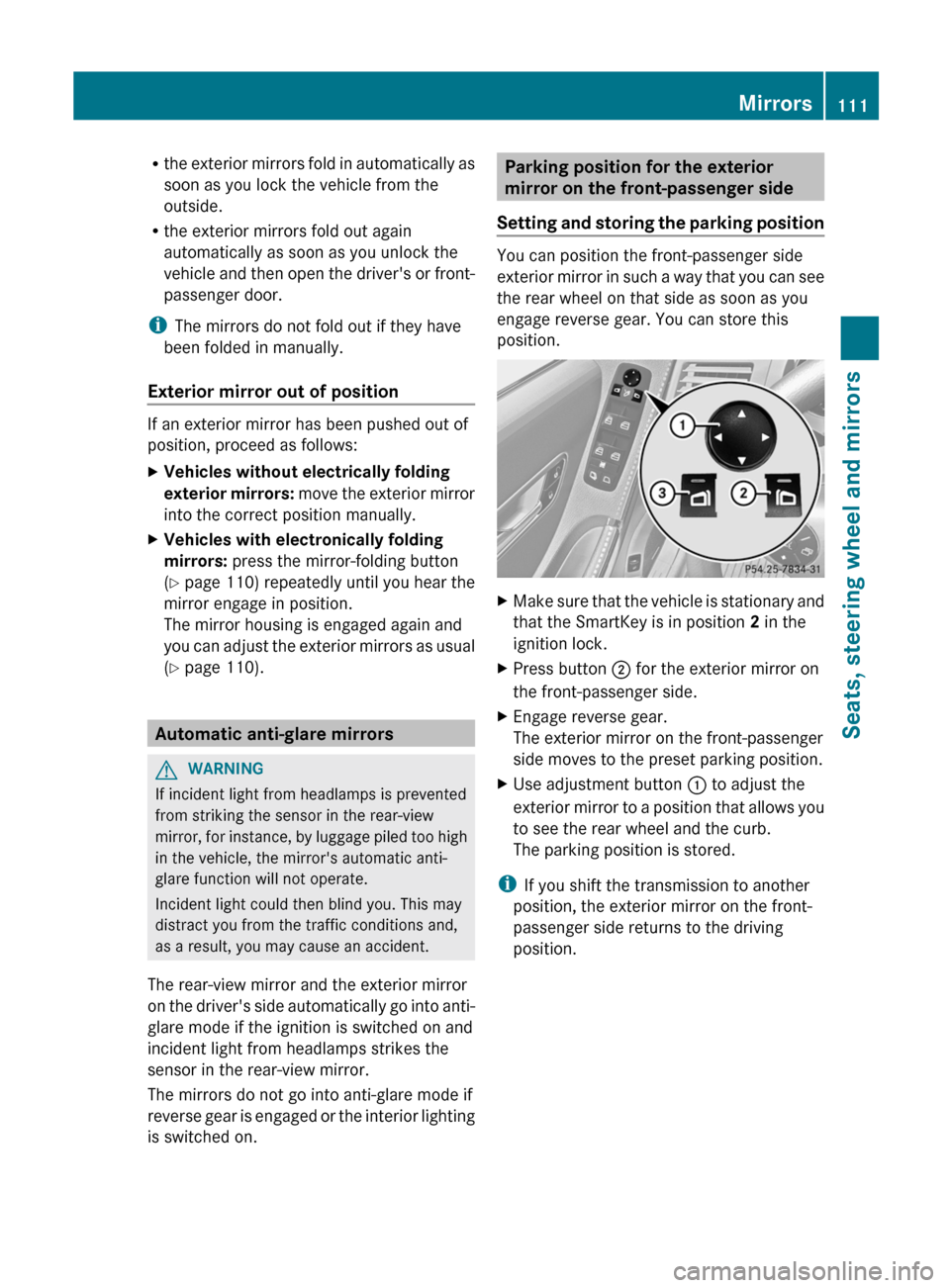
XMake sure that the vehicle is stationary and
that the SmartKey is in position 2 in the
ignition lock.XPress button ; for the exterior mirror on
the front-passenger side.XEngage reverse gear.
The exterior mirror on the front-passenger
side moves to the preset parking position.XUse adjustment button : to adjust the
exterior mirror to a position that allows you
to see the rear wheel and the curb.
The parking position is stored.
i If you shift the transmission to another
position, the exterior mirror on the front-
passenger side returns to the driving
position.
Mirrors111Seats, steering wheel and mirrorsZ
Page 252 of 368
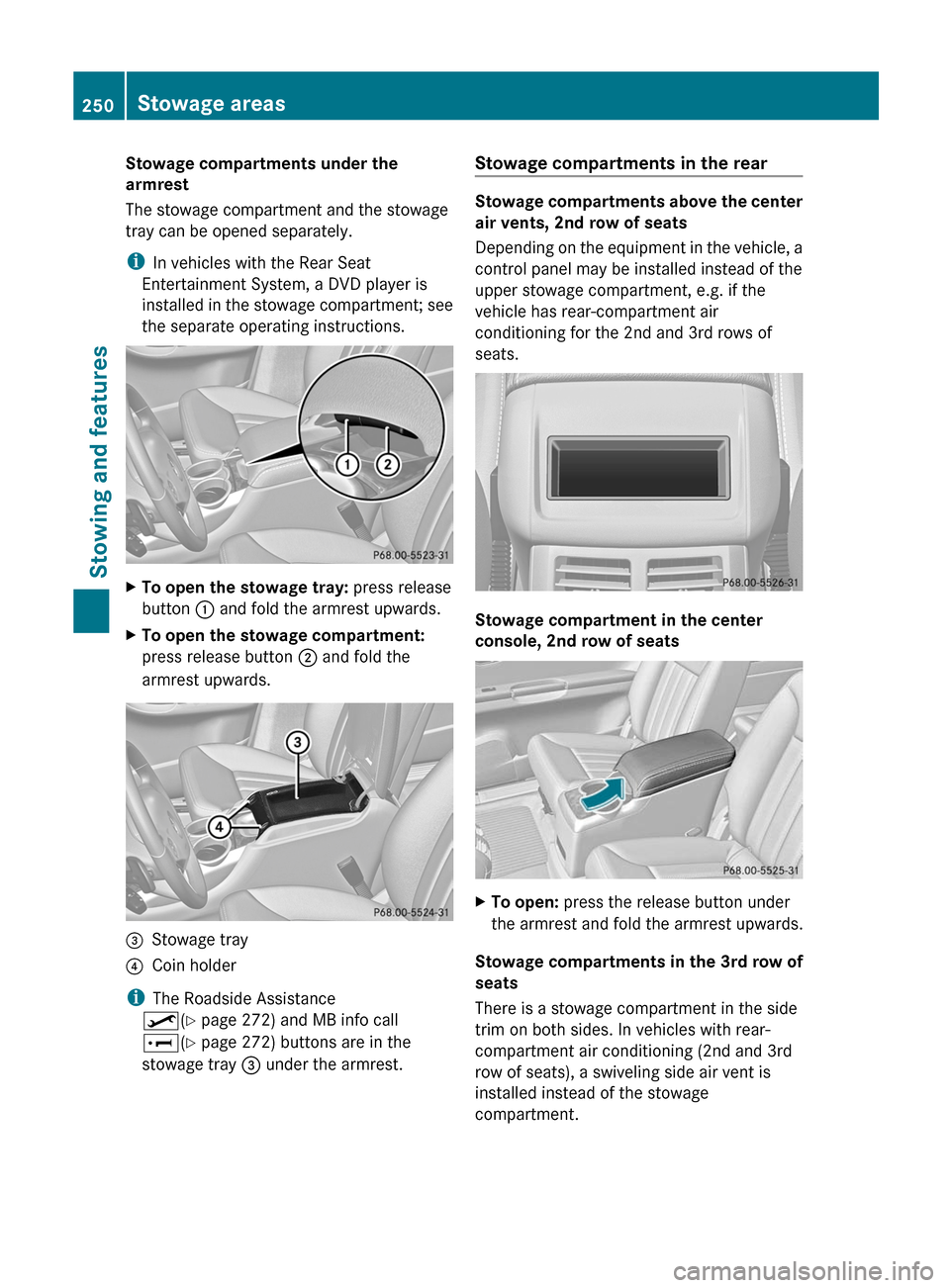
Stowage compartments under the
armrest
The stowage compartment and the stowage
tray can be opened separately.
i In vehicles with the Rear Seat
Entertainment System, a DVD player is
installed in the stowage compartment; see
the separate operating instructions.XTo open the stowage tray: press release
button : and fold the armrest upwards.XTo open the stowage compartment:
press release button ; and fold the
armrest upwards.=Stowage tray?Coin holder
i The Roadside Assistance
º (Y page 272) and MB info call
E (Y page 272) buttons are in the
stowage tray = under the armrest.
Stowage compartments in the rear
Stowage compartments above the center
air vents, 2nd row of seats
Depending on the equipment in the vehicle, a
control panel may be installed instead of the
upper stowage compartment, e.g. if the
vehicle has rear-compartment air
conditioning for the 2nd and 3rd rows of
seats.
Stowage compartment in the center
console, 2nd row of seats
XTo open: press the release button under
the armrest and fold the armrest upwards.
Stowage compartments in the 3rd row of
seats
There is a stowage compartment in the side
trim on both sides. In vehicles with rear-
compartment air conditioning (2nd and 3rd
row of seats), a swiveling side air vent is
installed instead of the stowage
compartment.
250Stowage areasStowing and features
Page 255 of 368
Cargo compartment enlargement
Important safety notesGWARNING
When expanding the cargo volume, always
fully fold the corresponding seats and, if so
equipped, always use the cargo net when
transporting cargo.
Unless you are transporting cargo, the seat
backrests must remain properly locked in the
upright position.
In an accident, during hard braking or sudden
maneuvers, loose items will be thrown around
inside the vehicle. This can cause injury to
vehicle occupants unless the items are
securely fastened in the vehicle.
Always use the cargo tie-down rings.
GWARNING
Never drive a vehicle with the tailgate open.
Deadly carbon monoxide (CO) gases may
enter vehicle interior resulting in
unconsciousness and death.
To enlarge the cargo compartment, the rear
bench seats of the second and third rows of
seats can be folded forwards separately. You
can enlarge the cargo compartment partially
( Y page 253) or fully ( Y page 253).
Partially enlarging the cargo
compartment (folding the seats in the
3rd row forward)
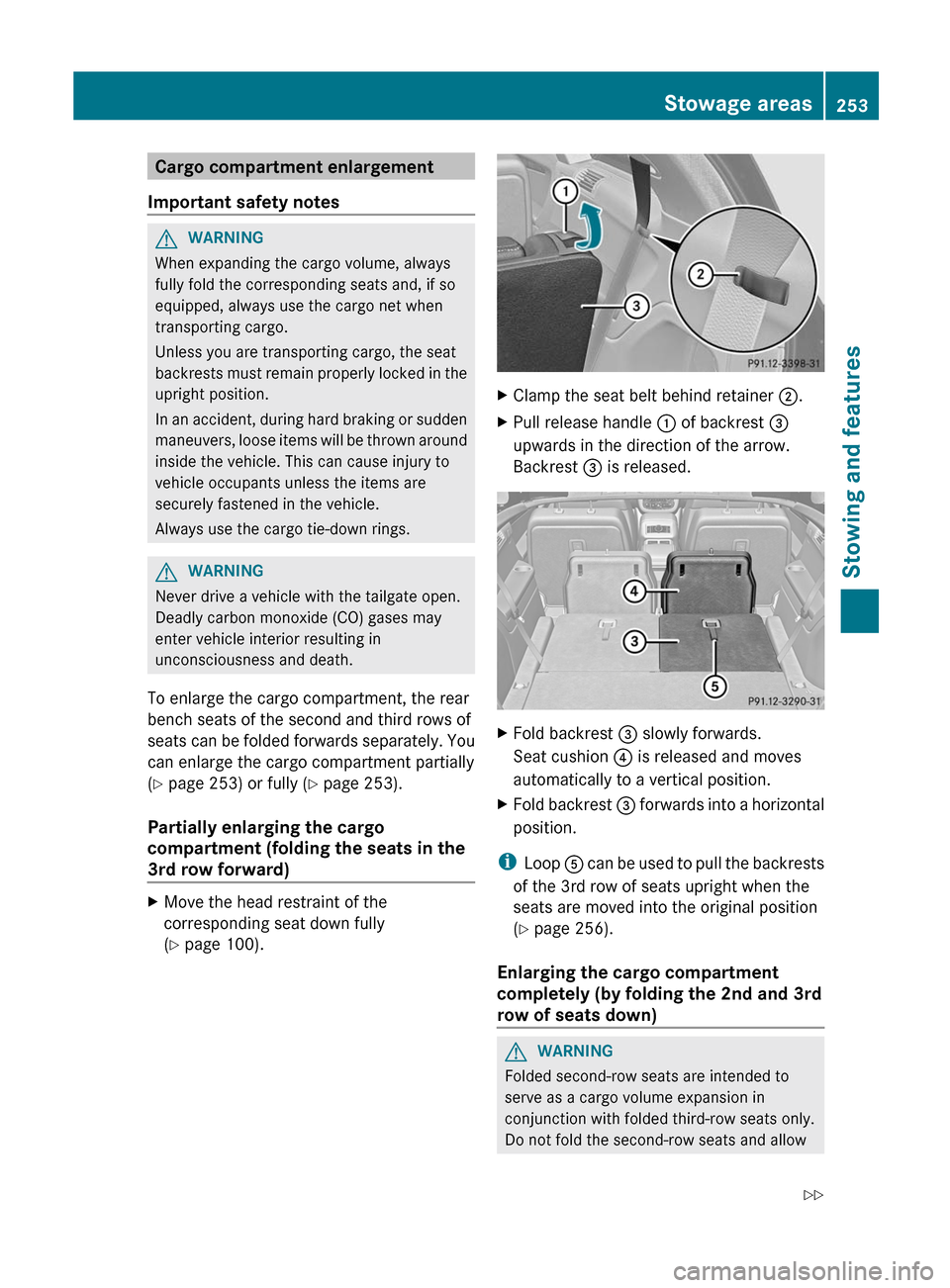
XMove the head restraint of the
corresponding seat down fully
( Y page 100).XClamp the seat belt behind retainer ;.XPull release handle : of backrest =
upwards in the direction of the arrow.
Backrest = is released.XFold backrest = slowly forwards.
Seat cushion ? is released and moves
automatically to a vertical position.XFold backrest = forwards into a horizontal
position.
i Loop A can be used to pull the backrests
of the 3rd row of seats upright when the
seats are moved into the original position
( Y page 256).
Enlarging the cargo compartment
completely (by folding the 2nd and 3rd
row of seats down)
GWARNING
Folded second-row seats are intended to
serve as a cargo volume expansion in
conjunction with folded third-row seats only.
Do not fold the second-row seats and allow
Stowage areas253Stowing and featuresZ
Page 256 of 368
third-row seat occupants to use folded
second-row seats as a footrest while driving.
Third-row seat occupants must, like all vehicle
occupants, keep both feet on the floor in front
of their seat. Otherwise, occupants could
slide under their seat belt in a collision. If
occupants slide under the seat belt, it would
apply force at the abdomen or neck. That
could cause serious or even fatal injuries. Do
not fold the second-row seats and allow third-
row seat occupants to use folded second-row
seats as a table while driving. Objects placed
on folded second-row seats may come loose
during braking, vehicle maneuvers, or an
accident and be thrown around the vehicle
interior. Objects thrown around the vehicle
interior may cause an accident and/or
serious personal injury.
! Make absolutely sure that you adhere to
the specified folding order when fully
enlarging the cargo compartment:
R fold down the center seat in the 2nd row
of seats (7-seat vehicles)
R fold down the outer seats in the 2nd row
of seats
R fold down the seats in the 3rd row of
seats
You could otherwise damage the seats.
Folding down the center seat in the 2nd
row of seats
! Close the cup holder in the 2nd row of
seats before folding down the 2nd row of
seats. You could otherwise damage the
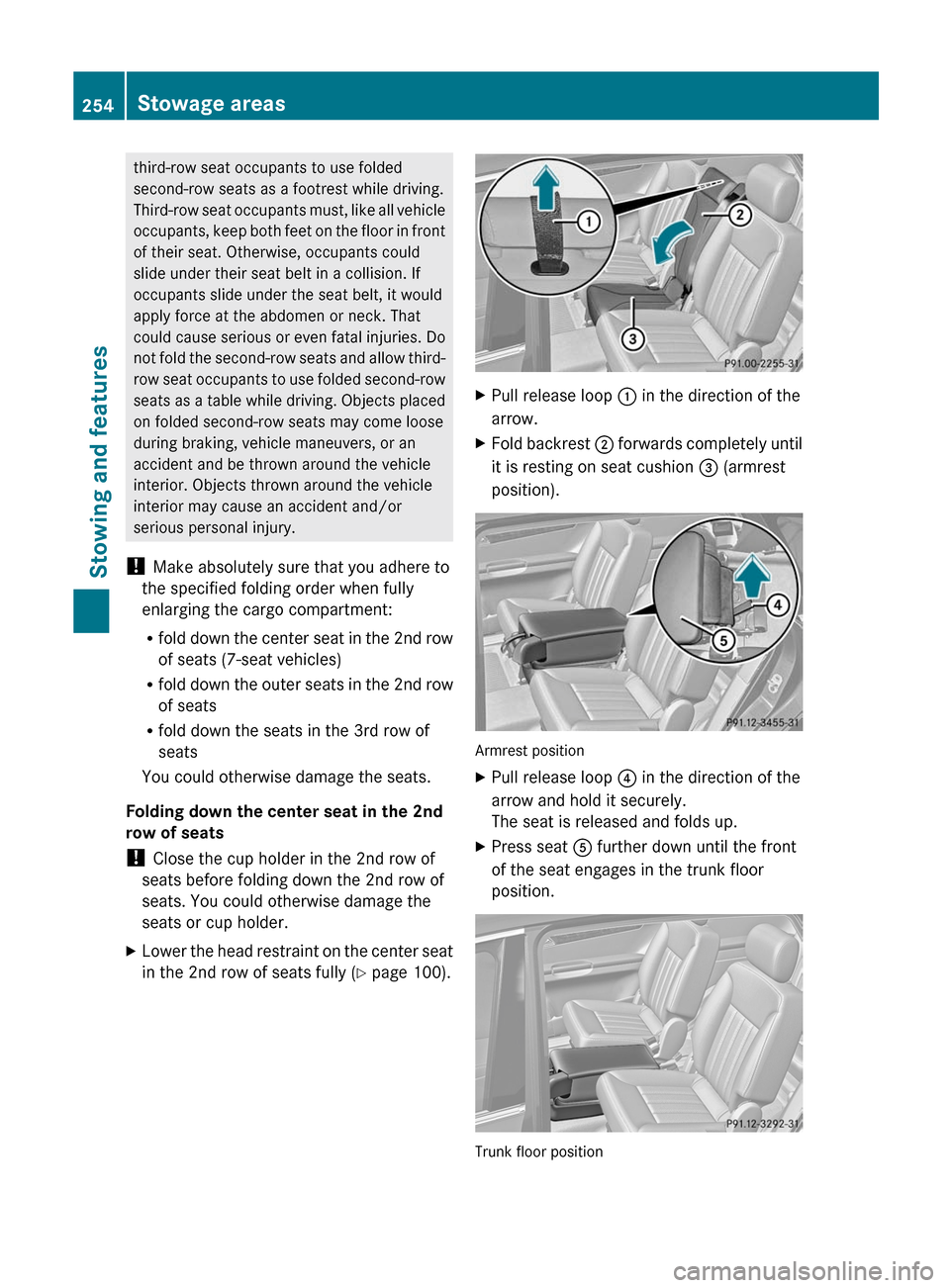
seats or cup holder.XLower the head restraint on the center seat
in the 2nd row of seats fully ( Y page 100).XPull release loop : in the direction of the
arrow.XFold backrest ; forwards completely until
it is resting on seat cushion = (armrest
position).
Armrest position
XPull release loop ? in the direction of the
arrow and hold it securely.
The seat is released and folds up.XPress seat A further down until the front
of the seat engages in the trunk floor
position.
Trunk floor position
254Stowage areasStowing and features
Page 257 of 368
Folding down the outer seats in the 2nd
row of seats
! If you want to fold the outer seats down
in the 2nd row of seats, the front seats must
not be in the rearmost position. Otherwise,
you could damage the front seats and outer
seats in the 2nd row.
! Close the cup holder in the 2nd row of
seats before folding down the 2nd row of
seats. You could otherwise damage the
seats or cup holder.XMove the seat concerned in the 2nd row to
its rearmost position ( Y page 101).XRemove the center console for the 2nd row
of seats, if installed ( Y page 251).
i
The center console of the 2nd row of
seats can remain installed if it is installed
in the front position (position 1)
( Y page 251). However, the loading area
will not be level.
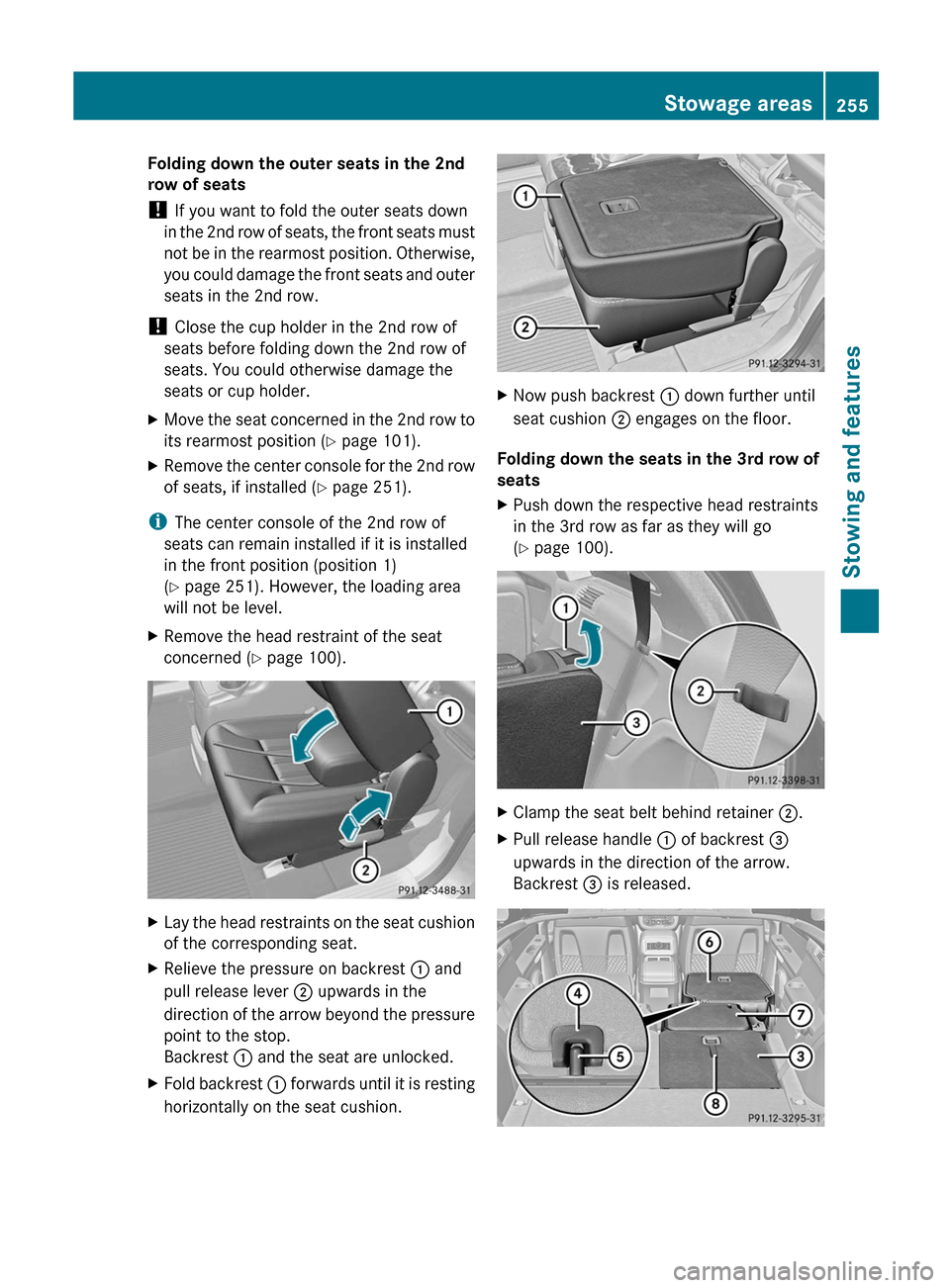
XRemove the head restraint of the seat
concerned ( Y page 100).XLay the head restraints on the seat cushion
of the corresponding seat.XRelieve the pressure on backrest : and
pull release lever ; upwards in the
direction of the arrow beyond the pressure
point to the stop.
Backrest : and the seat are unlocked.XFold backrest : forwards until it is resting
horizontally on the seat cushion.XNow push backrest : down further until
seat cushion ; engages on the floor.
Folding down the seats in the 3rd row of
seats
XPush down the respective head restraints
in the 3rd row as far as they will go
( Y page 100).XClamp the seat belt behind retainer ;.XPull release handle : of backrest =
upwards in the direction of the arrow.
Backrest = is released.Stowage areas255Stowing and featuresZ
Page 258 of 368
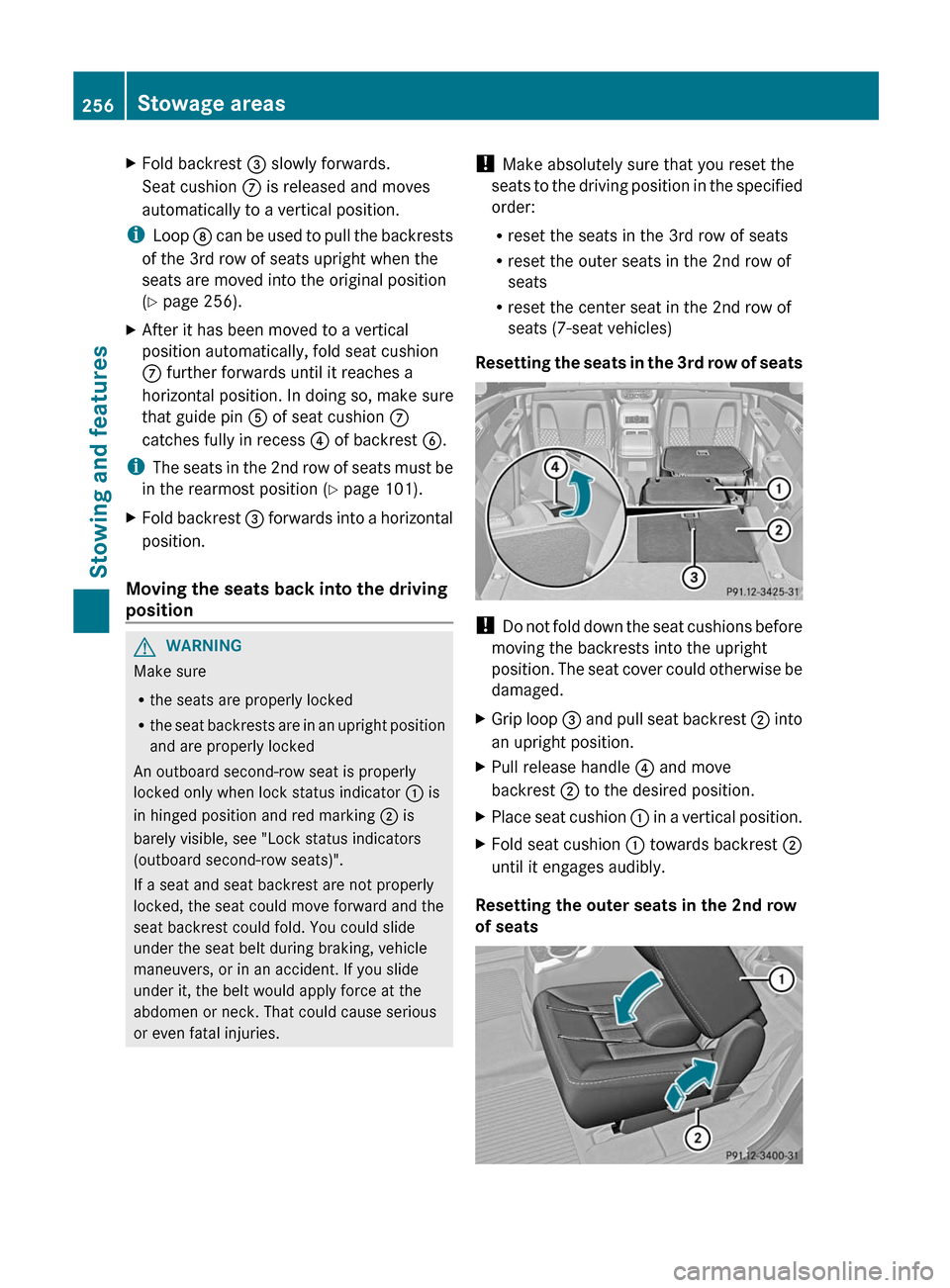
XFold backrest = slowly forwards.
Seat cushion C is released and moves
automatically to a vertical position.
i Loop D can be used to pull the backrests
of the 3rd row of seats upright when the
seats are moved into the original position
( Y page 256).
XAfter it has been moved to a vertical
position automatically, fold seat cushion
C further forwards until it reaches a
horizontal position. In doing so, make sure
that guide pin A of seat cushion C
catches fully in recess ? of backrest B.
i
The seats in the 2nd row of seats must be
in the rearmost position ( Y page 101).
XFold backrest = forwards into a horizontal
position.
Moving the seats back into the driving
position
GWARNING
Make sure
R the seats are properly locked
R the seat backrests are in an upright position
and are properly locked
An outboard second-row seat is properly
locked only when lock status indicator : is
in hinged position and red marking ; is
barely visible, see "Lock status indicators
(outboard second-row seats)".
If a seat and seat backrest are not properly
locked, the seat could move forward and the
seat backrest could fold. You could slide
under the seat belt during braking, vehicle
maneuvers, or in an accident. If you slide
under it, the belt would apply force at the
abdomen or neck. That could cause serious
or even fatal injuries.
! Make absolutely sure that you reset the
seats to the driving position in the specified
order:
R reset the seats in the 3rd row of seats
R reset the outer seats in the 2nd row of
seats
R reset the center seat in the 2nd row of
seats (7-seat vehicles)
Resetting the seats in the 3rd row of seats
! Do not fold down the seat cushions before
moving the backrests into the upright
position. The seat cover could otherwise be
damaged.
XGrip loop = and pull seat backrest ; into
an upright position.XPull release handle ? and move
backrest ; to the desired position.XPlace seat cushion : in a vertical position.XFold seat cushion : towards backrest ;
until it engages audibly.
Resetting the outer seats in the 2nd row
of seats
256Stowage areasStowing and features
Page 259 of 368
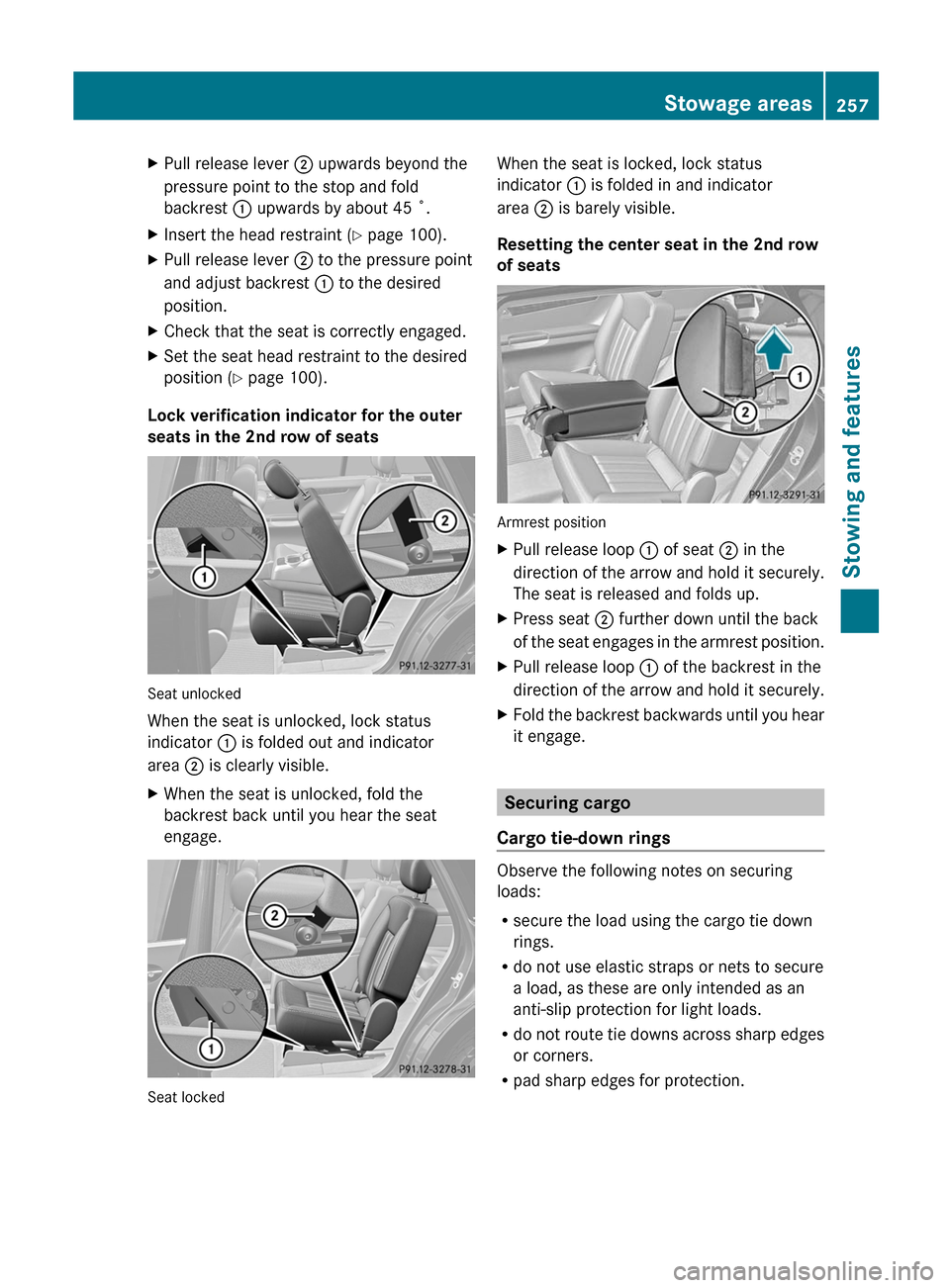
XPull release lever ; upwards beyond the
pressure point to the stop and fold
backrest : upwards by about 45 ˚.XInsert the head restraint ( Y page 100).XPull release lever ; to the pressure point
and adjust backrest : to the desired
position.XCheck that the seat is correctly engaged.XSet the seat head restraint to the desired
position ( Y page 100).
Lock verification indicator for the outer
seats in the 2nd row of seats
Seat unlocked
When the seat is unlocked, lock status
indicator : is folded out and indicator
area ; is clearly visible.
XWhen the seat is unlocked, fold the
backrest back until you hear the seat
engage.
Seat locked
When the seat is locked, lock status
indicator : is folded in and indicator
area ; is barely visible.
Resetting the center seat in the 2nd row
of seats
Armrest position
XPull release loop : of seat ; in the
direction of the arrow and hold it securely.
The seat is released and folds up.XPress seat ; further down until the back
of the seat engages in the armrest position.XPull release loop : of the backrest in the
direction of the arrow and hold it securely.XFold the backrest backwards until you hear
it engage.
Securing cargo
Cargo tie-down rings
Observe the following notes on securing
loads:
R secure the load using the cargo tie down
rings.
R do not use elastic straps or nets to secure
a load, as these are only intended as an
anti-slip protection for light loads.
R do not route tie downs across sharp edges
or corners.
R pad sharp edges for protection.
Stowage areas257Stowing and featuresZ
Page 261 of 368
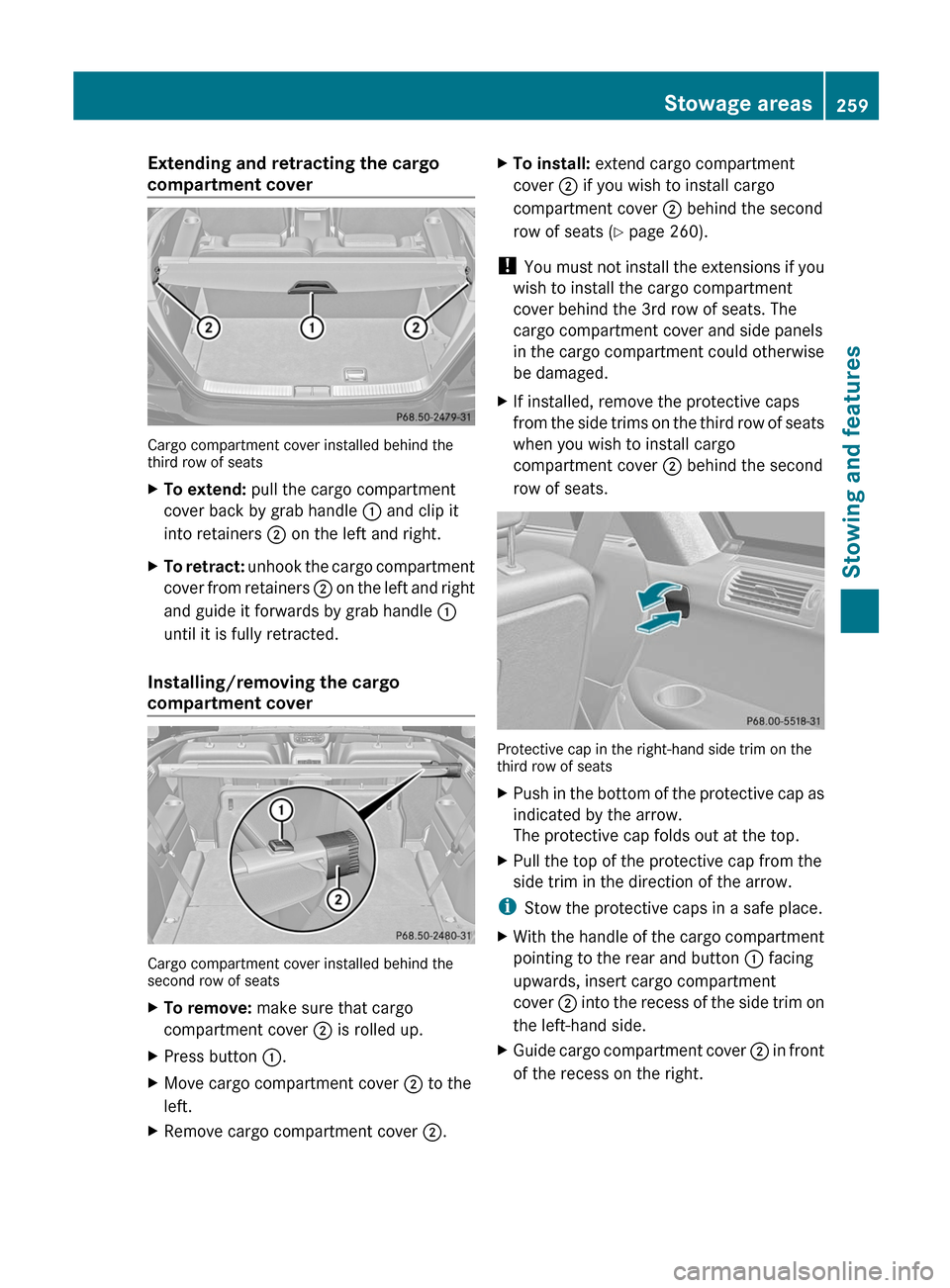
Extending and retracting the cargo
compartment cover
Cargo compartment cover installed behind the
third row of seats
XTo extend: pull the cargo compartment
cover back by grab handle : and clip it
into retainers ; on the left and right.XTo retract: unhook the cargo compartment
cover from retainers ; on the left and right
and guide it forwards by grab handle :
until it is fully retracted.
Installing/removing the cargo
compartment cover
Cargo compartment cover installed behind the
second row of seats
XTo remove: make sure that cargo
compartment cover ; is rolled up.XPress button :.XMove cargo compartment cover ; to the
left.XRemove cargo compartment cover ;.XTo install: extend cargo compartment
cover ; if you wish to install cargo
compartment cover ; behind the second
row of seats ( Y page 260).
!
You must not install the extensions if you
wish to install the cargo compartment
cover behind the 3rd row of seats. The
cargo compartment cover and side panels
in the cargo compartment could otherwise
be damaged.
XIf installed, remove the protective caps
from the side trims on the third row of seats
when you wish to install cargo
compartment cover ; behind the second
row of seats.
Protective cap in the right-hand side trim on the
third row of seats
XPush in the bottom of the protective cap as
indicated by the arrow.
The protective cap folds out at the top.XPull the top of the protective cap from the
side trim in the direction of the arrow.
i Stow the protective caps in a safe place.
XWith the handle of the cargo compartment
pointing to the rear and button : facing
upwards, insert cargo compartment
cover ; into the recess of the side trim on
the left-hand side.XGuide cargo compartment cover ; in front
of the recess on the right.Stowage areas259Stowing and featuresZ