wipers MERCEDES-BENZ R-CLASS MPV 2008 User Guide
[x] Cancel search | Manufacturer: MERCEDES-BENZ, Model Year: 2008, Model line: R-CLASS MPV, Model: MERCEDES-BENZ R-CLASS MPV 2008Pages: 373, PDF Size: 6.75 MB
Page 175 of 373

Air conditioning
172
X
Turn the key to position 2in the ignition
lock.
X Press the 6/Z/{/8/
Y/ 7ora button. Setting the airflow
X Turn the key to position 2in the ignition
lock.
X To increase/reduce: press theQor
· button. Switching the Mono function on/off
Multi-zone Thermotronic*: you can use the
MONO function to adopt the temperature, air
distribution and airflow settings on the driv-
er's side for the front-passenger side.
X Press the zbutton.
The indicator lamp in the zswitch lights
up or goes out. Demisting the windscreen
i You should only select the "demisting"
function until the windscreen is clear again.
X Turn the key to position 2in the ignition
lock.
X To activate: press the|button.
The indicator lamp in the |button
comes on.
The system automatically switches to the
following functions:
R cooling with air dehumidification on
R high airflow 26
R high temperature 26
R air distribution to the windscreen and
front side windows
R air-recirculation mode off
X To switch off: press the|button.
The indicator lamp in the |button goes
out. The previously selected settings come
into effect again. The cooling with air dehu-
midification function remains on. Air-recir-
culation mode remains deactivated.
or
X Press the ´button. or
X
Press the Ubutton.
or
X Turn the thumbwheels for the temperature
clockwise or anti-clockwise.
or
X Press the Qor· button. Demisting the windows
Windows misted up on the inside X
Activate the "cooling function with air-
dehumidification" function.
X Activate the automatic mode.
X If the windows continue to mist up, activate
the "demisting" function.
Windows misted up on the outside X
Activate the windscreen wipers.
X Press the a/7orY/ 8air
distribution button.
i You should only select this setting until
the windscreen is clear again.
26 Depending on the outside temperature. Cont
rols
* optional
251_AKB; 5; 7, en-GB
wobuchh
,V ersion: 2.10.6
2008-05-11T14:51:51+02:00 - Seite 172 Dateiname: 6515_1825_02_buchblock.pdf; preflight
Page 218 of 373
Features
215
X
Use æ orç on the multi-function
steering wheel to select the Vehiclesub-
menu.
X Keep pressing jork until the Com-
pass setting Zone message appears.
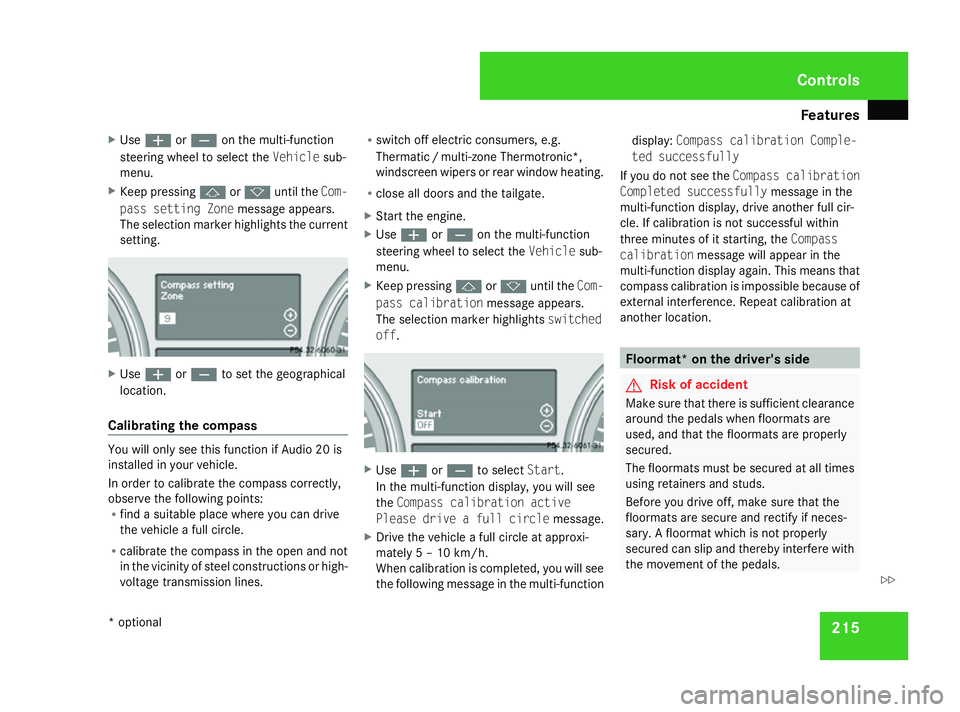
The selection marker highlights the current
setting. X
Use æ orç to set the geographical
location.
Calibrating the compass You will only see this function if Audio 20 is
installed in your vehicle.
In order to calibrate the compass correctly,
observe the following points:
R find a suitable place where you can drive
the vehicle a full circle.
R calibrate the compass in the open and not
in the vicinity of steel constructions or high-
voltage transmission lines. R
switch off electric consumers, e.g.
Thermati c/multi-zone Thermotronic*,
windscreen wipers or rear window heating.
R close all doors and the tailgate.
X Start the engine.
X Use æ orç on the multi-function
steering wheel to select the Vehiclesub-
menu.
X Keep pressing jork until the Com-
pass calibration message appears.
The selection marker highlights switched
off . X
Use æ orç to select Start.
In the multi-function display, you will see
the Compass calibration active
Please drive a full circle message.
X Drive the vehicle a full circle at approxi-
mately 5 – 10 km/h.
When calibration is completed, you will see
the following message in the multi-function display:
Compass calibration Comple-
ted successfully
If you do not see the Compass calibration
Completed successfully message in the
multi-function display, drive another full cir-
cle. If calibration is not successful within
three minutes of it starting, the Compass
calibration message will appear in the
multi-function display again. This means that
compass calibration is impossible because of
external interference. Repeat calibration at
another location. Floormat* on the driver's side
G
Risk of accident
Make sure that there is sufficient clearance
around the pedals when floormats are
used, and that the floormats are properly
secured.
The floormats must be secured at all times
using retainers and studs.
Before you drive off, make sure that the
floormats are secure and rectify if neces-
sary. A floormat which is not properly
secured can slip and thereby interfere with
the movement of the pedals. Controls
* optional
251_AKB; 5; 7, en-GB
wobuchh,
Version: 2.10.6 2008-05-11T14:51:51+02:00 - Seite 215 ZDateiname: 6515_1825_02_buchblock.pdf; preflight
Page 224 of 373

Engine compartment
221Vehicles with a petrol engine:
The electronic ignition system uses high
voltage. For this reason, you must never
touch components of the ignition system
(ignition coil, ignition cable, spark plug con-
nector or test socket) when:
R the engine is running
R the engine is being started
R the ignition is switched on and the engine
is being cranked by hand
Vehicles with a diesel engine:
The electronic injection control uses high
voltage. Therefore, never touch fuel injec-
tion system components when:
R the engine is running
R the engine is being started
R the ignition is switched on
X Make sure that the windscreen wipers are
switched off. G
Risk of injury
The windscreen wipers and wiper linkage
could be set in motion.
When the bonnet is open, you or others
could be injured by the wiper rods. Make sure that the windscreen wipers are
switched off and that the key has been
pulled out of the ignition lock before open-
ing the bonnet.
The bonnet release lever is located in the
driver's footwell. 1
Bonnet release lever
X Pull bonnet release lever 1.
The bonnet is released.
! Make sure that the windscreen wipers
are not folded out away from the wind-
screen. You can otherwise damage the
windscreen wipers or the bonnet. The handle for opening the bonnet is located
above the radiator grille.
2
Bonnet catch handle
X Reach into the gap, pull bonnet catch han-
dle 2up and lift the bonnet.
Closing G
Risk of injury
Make sure that nobody can become trap-
ped as you close the bonnet.
X Lower the bonnet and let it fall from a
height of approximately 20 cm.
X Check that the bonnet has engaged prop-
erly. Operation
251_AKB; 5; 7, en-GB
wobuchh,
Version: 2.10.6
2008-05-11T14:51:51+02:00 - Seite 221 ZDateiname: 6515_1825_02_buchblock.pdf; preflight
Page 248 of 373

Care
245
nozzle of the high-pressure cleaner and the
vehicle (at least 30 cm).
Move the high-pressure cleaner nozzle
around when cleaning your vehicle.
Do not aim directly at any of the following:
R
tyres
R door joint
R electrical components
R battery
R connectors
R lights
R seals
Damaged seals or electrical components
can lead to failures or leaks.
Cleaning the wiper blades and the out-
side of the windscreen G
Risk of injury
Turn the key to position 0in the ignition
lock before cleaning the windscreen or the
wiper blades. There is otherwise a risk of
the windscreen wipers being set in motion
and causing injury. X
Turn the key to position 1(Y page 76)in the
ignition lock.
X Set the windscreen wipers to position u
(Y page 104) on the combination switch.
X Turn the key to position 0(Y page 76)or
remove it when the wiper arms are vertical.
! Only fold the wiper arms away from the
windscreen when they are in a vertical posi-
tion, otherwise you will damage the bonnet.
X Fold the wiper arms away from the wind-
screen until you feel them engage.
X Clean the windscreen and the wiper blades.
X Fold the windscreen wipers back again
before the ignition is switched on.
! Do not clean the wiper blades too often
as this will result in the rubber becoming
porous, leading to wiper noise.
Cleaning the windows !
Do not use dry cloths, abrasive products,
solvents or cleaning agents containing sol-
vents to clean the inside of the windows.
Clean the insides of the windows with a
damp cloth or commercially-available glass
cleaner. Avoid touching the inside of the
rear windscreen and the side windows with hard objects, e.g. ice scrapers or rings. You
could otherwise cause damage to the win-
dows, rear window heating or aerial on the
rear window.
i Anti-glare film retrofitted to the insides of
the windows could interfere with radio or
mobile phone reception, especially if it is
conductive or metal-coated film. Informa-
tion about anti-glare film can be obtained
from any Mercedes-Benz Service Centre.
Cleaning the headlamps X
Clean the plastic lenses of the headlamps
with a damp sponge.
! Only use washer fluid which is suitable
for plastic lenses. Unsuitable washer fluid
could damage the plastic lenses of the
headlamps.
Do not use the following:
R dry cloths
R abrasive cleaning agents
R solvents
R cleaning agents containing solvent
You could otherwise scratch or damage the
surface of the lenses. Operation
251_AKB; 5; 7, en-GB
wobuchh,
Version: 2.10.6 2008-05-11T14:51:51+02:00 - Seite 245 ZDateiname: 6515_1825_02_buchblock.pdf; preflight
Page 297 of 373
Troubleshooting
294 Headlamps and turn signals
Problem Possible cause/consequence Suggested solutions
The headlamps or the turn signals
in the exterior mirrors are misted
up on the inside. Air humidity is very high. X
Drive with the headlamps switched on.
The headlamps are demisted after a short distance. The headlamp housing is not
sealed and moisture has been
able to enter. X
Have the headlamps checked at a qualified specialist workshop. Windscreen wipers
Problem Possible cause/consequence Suggested solutions
The windscreen wipers are jam-
med. Leaves or snow, for example, may
be obstructing the windscreen
wiper movement. The wiper
motor has been deactivated. X
For safety reasons, you should remove the key from the ignition
lock.
X Remove the cause of the obstruction.
X Switch the windscreen wipers back on. The windscreen wipers fail com-
pletely. The windscreen wiper drive is
malfunctioning. X
Select another wiper speed on the combination switch.
X Have the windscreen wipers checked at a qualified specialist work-
shop. Practical advice
251_AKB; 5; 7, en-GB
wobuchh
,V ersion: 2.10.6
2008-05-11T14:51:51+02:00 - Seite 294 Dateiname: 6515_1825_02_buchblock.pdf; preflight
Page 314 of 373
Replacing the wiper blades
311
Changing the bulbs in the licence plate
lamps
Licence plate lamp
1
Screws
X Switch off the lights.
X Open the tailgate.
X Remove screws 1.
X Remove the licence plate lamp.
X Replace the bulb.
X Insert the licence plate lamp.
X Replace and tighten screws 1. Replacing the wiper blades
Windscreen wiper blades
G
Risk of accident
The windscreen will not longer be properly
wiped if the wiper blades are worn. This
could prevent you from observing the traffic
conditions, thereby causing an accident.
Replace the wiper blades twice a year, ide-
ally in spring and autumn. G
Risk of accident
The wiper arms could start moving and
cause an injury if you leave the windscreen
wipers switched on.
Remove the key from the ignition lock
before replacing the wiper blades.
! Make sure that you touch only the wiper
arm of the windscreen wiper to avoid dam-
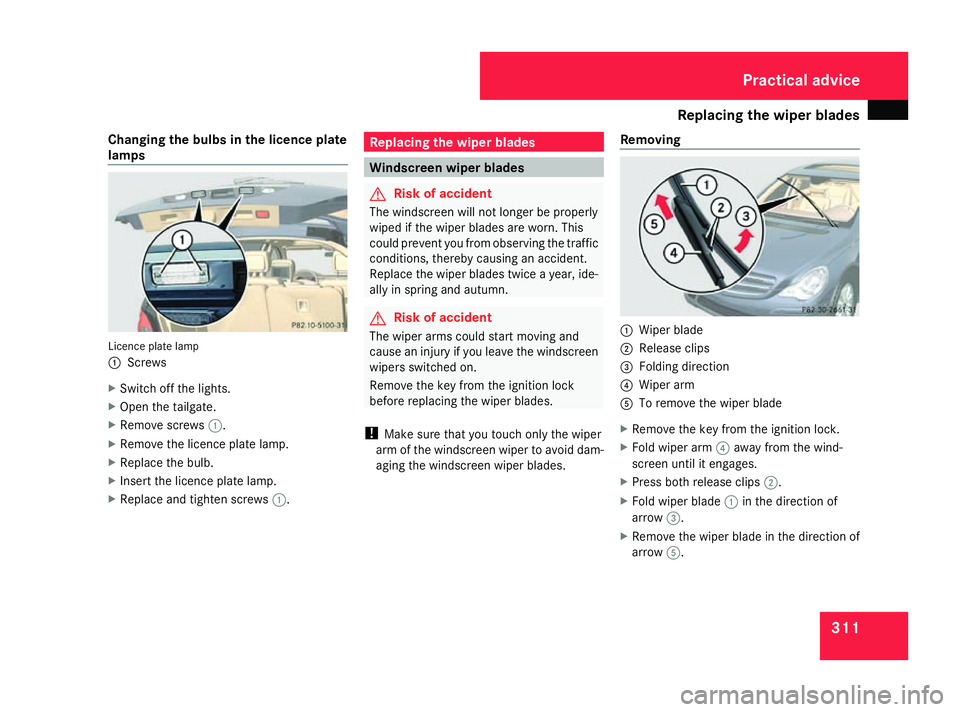
aging the windscreen wiper blades. Removing 1
Wiper blade
2 Release clips
3 Folding direction
4 Wiper arm
5 To remove the wiper blade
X Remove the key from the ignition lock.
X Fold wiper arm 4away from the wind-
screen until it engages.
X Press both release clips 2.
X Fold wiper blade 1in the direction of
arrow 3.
X Remove the wiper blade in the direction of
arrow 5. Practical advice
251_AKB; 5; 7, en-GB
wobuchh,
Version: 2.10.6 2008-05-11T14:51:51+02:00 - Seite 311 ZDateiname: 6515_1825_02_buchblock.pdf; preflight
Page 315 of 373

Replacing the wiper blades
312
Fitting
1
Wiper blade
2 Retaining clips
3 Folding direction
4 Bracket
5 Lug
6 Recess
X Position new wiper blade 1with
recess 6on lug 5.
X Fold wiper blade 1in the direction of
arrow 3onto the wiper arm, until retaining
clips 2engage in bracket 4.X
Make sure that wiper blade 1is seated
correctly.
X Fold the wiper arm back onto the wind-
screen. Rear window wiper blade
G
Risk of injury
The wiper arm could be set in motion and
injure you if the windscreen wipers are
switched on.
Remove the key from the ignition lock
before replacing the wiper blade.
Removing 1
Wiper arm
2 Wiper blade X
Remove the key from the ignition lock.
X Fold wiper arm 1away from the rear win-
dow until it engages.
X Position wiper blade 2at a right angle to
wiper arm 1.
X Hold wiper arm 1and press wiper
blade 2in the direction of the arrow until
it releases.
X Remove wiper blade 2.
Fitting X
Place the new wiper blade 2onto wiper
arm 1.
X Hold wiper arm 1and press wiper blade
2 in the opposite direction to the arrow
until it engages.
X Make sure that wiper blade 2is seated
correctly.
X Position wiper blade 2parallel to wiper
arm 1.
X Fold wiper arm 1back onto the rear win-
dow. Practical advice
251_AKB; 5; 7, en-GB
wobuchh,
Version: 2.10.6 2008-05-11T14:51:51+02:00 - Seite 312Dateiname: 6515_1825_02_buchblock.pdf; preflight