lock MERCEDES-BENZ R-CLASS MPV 2008 Owners Manual
[x] Cancel search | Manufacturer: MERCEDES-BENZ, Model Year: 2008, Model line: R-CLASS MPV, Model: MERCEDES-BENZ R-CLASS MPV 2008Pages: 373, PDF Size: 6.75 MB
Page 254 of 373
Where will I find...?
251
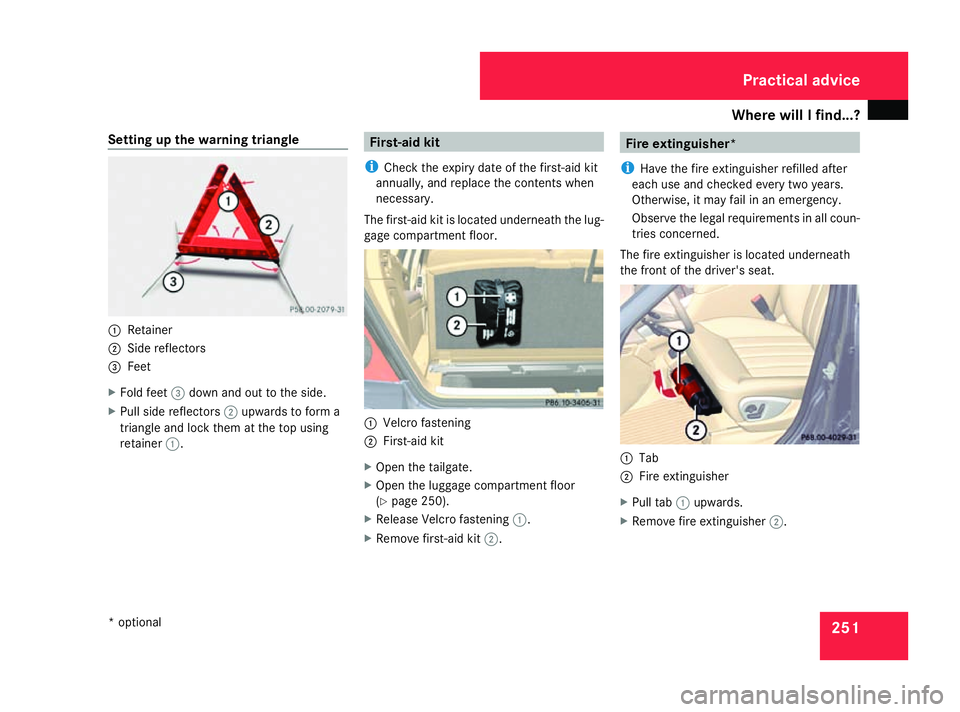
Setting up the warning triangle
1
Retainer
2 Side reflectors
3 Feet
X Fold feet 3down and out to the side.
X Pull side reflectors 2upwards to form a
triangle and lock them at the top using
retainer 1. First-aid kit
i Check the expiry date of the first-aid kit
annually, and replace the contents when
necessary.
The first-aid kit is located underneath the lug-
gage compartment floor. 1
Velcro fastening
2 First-aid kit
X Open the tailgate.
X Open the luggage compartment floor
(Y page 250).
X Release Velcro fastening 1.
X Remove first-aid kit 2. Fire extinguisher*
i Have the fire extinguisher refilled after
each use and checked every two years.
Otherwise, it may fail in an emergency.
Observe the legal requirements in all coun-
tries concerned.
The fire extinguisher is located underneath
the front of the driver's seat. 1
Tab
2 Fire extinguisher
X Pull tab 1upwards.
X Remove fire extinguisher 2. Practical advice
* optional
251_AKB; 5; 7, en-GB
wobuchh,
Version: 2.10.6 2008-05-11T14:51:51+02:00 - Seite 251 ZDateiname: 6515_1825_02_buchblock.pdf; preflight
Page 255 of 373

Where will I find...?
252 Vehicle tool kit, jack, TIREFIT kit and
emergency spare wheel*
The vehicle tool kit, jack, TIREFIT kit and
emergency spare wheel* are in the stowage
compartment under the luggage compart-
ment floor. G
Risk of injury
The jack is designed only to raise and hold
the vehicle for a short time while a wheel
is being changed.
You must use stands if you are carrying out
work on the vehicle.
Make sure that the jack is placed on a firm,
non-slip and level surface. Do not use
wooden blocks or similar objects as a jack
underlay. Otherwise, the jack will not be
able to achieve its load-bearing capacity
due to the restricted height.
Do not start the engine at any time while a
wheel is being changed.
Do not lie under the vehicle when it is being
supported by the jack. If you do not raise
the vehicle as described, it could slip off the
jack (e.g. if the engine is started or a door
or the tailgate is opened or closed) and you
could be seriously injured. X
Open the tailgate.
X Open the luggage compartment floor
(Y page 250).
! If the luggage compartment cover* is fit-
ted, roll it open fully.
Only for luggage compartment covers* fit-
ted behind the 3rd row of seats:
Fold forwards the section of the luggage
compartment cover* that is still protrud-
ing. Otherwise the strap of the retaining
hook may damage the luggage compart-
ment cover*.
Vehicles with a TIREFIT kit i
Depending on the date of production of
the vehicle, the appearance and stowage
location of the jack and of the other tools
may differ from those illustrated. Example
1
Ball coupling of the trailer tow hitch*
2 Folding wheel chock
3 Jack, ratchet ring spanner
4 TIREFIT kit 30
5 Electric air pump 30
6 Fuse allocation chart
7 Wheel wrench
8 Towing eye
9 Centring pin
Vehicles with an emergency spare
wheel* i
Depending on the date of production of
the vehicle, the appearance and stowage
30 Not on vehicles with MOExtended run-flat system. Practical advice
* optional
251_AKB; 5; 7, en-GB
wobuchh,
Version: 2.10.6 2008-05-11T14:51:51+02:00 - Seite 252Dateiname: 6515_1825_02_buchblock.pdf; preflight
Page 256 of 373

Where will I find...?
253
location of the jack and of the other tools
may differ from those illustrated.
Example
1
Tool holder
2 Wheel wrench
3 Electric air pump
4 Instructions on the installation position of
the tool holder
5 Fuse allocation chart
6 Jack, ratchet ring spanner
7 Centring pin
8 Folding wheel chock
9 Towing eye
a Wheel bolts
b Ball coupling of the trailer tow hitch*
c Emergency spare wheel* Removing the emergency spare wheel*
X
Remove the jack from the tool holder
(Y page 252). 1
Retaining screw
2 Emergency spare wheel*
3 Tool holder
X Turn retaining screw 1anticlockwise and
out of tool holder 3and remove it.
i If retaining screw 1does not come out
immediately, turn tool holder 3anticlock-
wise a little.
Retaining screw 1should then unscrew
with ease. X
Turn tool holder 3approximately 180°, so
that the electrical air pump points back-
wards (Y page 252).
X Remove tool holder 3from emergency
spare wheel* 2.
X Remove emergency spare wheel* 2from
the emergency spare wheel well.
Stowing the emergency spare wheel*
X Remove the warning triangle from the
emergency spare wheel well (Y page 250). 1
Guides
In the spare wheel well, there are two guides
1 to keep the emergency spare wheel* in
place. Practical advice
* optional
251_AKB; 5; 7, en-GB
wobuchh
, Version: 2.10.6 2008-05-11T14:51:51+02:00 - Seite 253 ZDateiname: 6515_1825_02_buchblock.pdf; preflight
Page 257 of 373

Where will I find...?
2541
Guides
2 Emergency spare wheel*
X Lay emergency spare wheel* 2in the
emergency spare wheel well.
i Make sure that emergency spare wheel*
2 is positioned on guides 1precisely.
X Lay the emergency spare wheel in the
emergency spare wheel well (Y page 250).
X Lay the tool holder in emergency spare
wheel* 2so that the electric air pump is
pointing towards the tailgate
(Y page 252). X
Turn the tool holder approximately 180°,
so that the electrical air pump points for-
wards.
The tool holder should now be positioned
in accordance with the instructions on the
installation position.
X Turn the tool holder screw clockwise into
the tool holder as far as it will go.
Setting up the foldable wheel chock The folding wheel chock serves as an addi-
tional measure for securing the vehicle
against rolling away, e.g. when a wheel is
being changed.
1
To fold the plates upwards
2 To fold out the lower plate
3 To insert the plate X
Fold both plates 1upwards.
X Fold out lower plate 2.
X Guide the lugs on the lower plate fully into
the openings in base plate 3.Practical advice
* optional
251_AKB; 5; 7, en-GB
wobuchh , Version: 2.10.6
2008-05-11T14:51:51+02:00 - Seite 254 Dateiname: 6515_1825_02_buchblock.pdf; preflight
Page 258 of 373

Display
messages 255Display messages
Notes
The on-board computer shows warnings or
malfunctions in the multi-function display.
Certain display messages are accompanied
by a warning tone or a continuous tone.
The multi-function display shows high-priority
display messages in red. In the following
tables, these display messages are printed in
red.
Please respond in accordance with the dis-
play messages and follow the additional
notes in this Owner's Manual. G
Risk of accident
If the instrument cluster or the multi-func-
tion display fails, no messages can be dis-
played.
This means that you will not see information
about the driving situation, such as the
speed, outside temperature, warning/indi- cator lamps, display messages or system
failures. The handling characteristics may
be affected. Adapt your driving style and
speed accordingly.
Immediately consult a qualified specialist
workshop which has the necessary special-
ist knowledge and tools to carry out the
work required. Mercedes-Benz recom-
mends that you use a Mercedes-Benz
Service Centre for this purpose. In particu-
lar, work relevant to safety or on safety-
related systems must be carried out at a
qualified specialist workshop.
Before starting a journey, check that the
warning and indicator lamps are operating
correctly. X
Turn the key to position 2in the ignition
lock.
or
X Press the KEYLESS GO button* twice.
All warning and indicator lamps (except for
the turn signal indicator lamps) light up and
the multi-function display is activated.
The following tables contain all the display
messages.
Hiding display messages After a few seconds, the on-board computer
automatically hides some low priority display
messages. Other messages remain visible in
the multi-function display until you hide them
yourself.
Some high priority display messages cannot
be hidden. The multi-function display shows
these messages continuously until the cau-
ses of the messages have been remedied.
Use the buttons on the multi-function steer-
ing wheel.
X
Use the è,·,jork button
to select another display.
The on-board computer saves certain dis-
play messages in the message memory
(Y page 128). Practical advice
* optional
251_AKB; 5; 7, en-GB
wobuchh,
Version: 2.10.6 2008-05-11T14:51:51+02:00 - Seite 255 ZDateiname: 6515_1825_02_buchblock.pdf; preflight
Page 259 of 373

Display
messages 256 Text messages
G
Risk of accident and injury
The operating safety of your vehicle could be compromised if service work is carried out improperly. You could lose control of the vehicle,
thereby causing an accident. Safety systems may also not be able to protect you or others as intended.
Always have maintenance work carried out at a qualified specialist workshop which has the necessary specialist knowledge and tools to
carry out the work required.
Mercedes-Benz recommends that you use a Mercedes-Benz Service Centre for this purpose.
In particular, work relevant to safety or on safety-related systems must be carried out at a qualified specialist workshop. Display messages Possible cause/consequence Possible solution
120 km/h Maximum speed
exceeded The maximum speed has been excee-
ded
31
. X
Drive more slowly. ABS ABS, ESP unavaila-
ble See Owner's
Manual
G
Risk of accident
ABS and ESP ®
and therefore also PRE-
SAFE ®
are temporarily unavailable. It is
possible that self diagnosis is not yet com-
plete.
BAS has also been deactivated.
The brake system continues to function
normally, but without the functions listed
above. X
Carefully drive a short distance at a speed
above 20 km/h.
If the display message disappears, ABS and
ESP ®
are available again. 31
Only for certain countries. Practical advi
ce
251_AKB; 5; 7, en-GB
wobuchh,
Version: 2.10.6 2008-05-11T14:51:51+02:00 - Seite 256Dateiname: 6515_1825_02_buchblock.pdf; preflight
Page 260 of 373
Display
messages 257Display messages Possible cause/consequence Possible solution
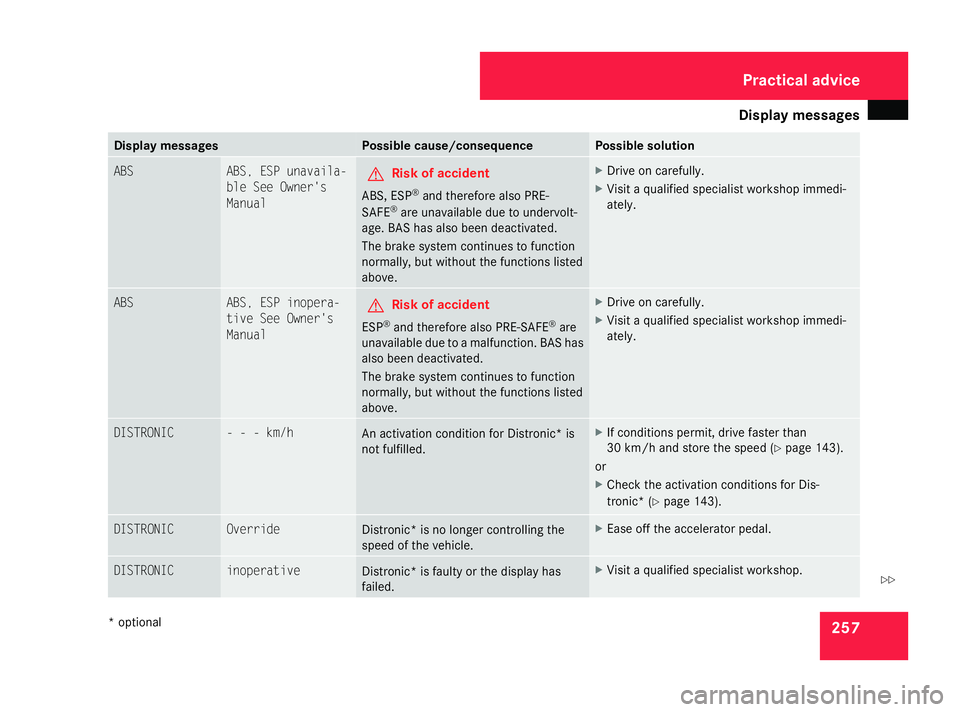
ABS ABS, ESP unavaila-
ble See Owner's
Manual G
Risk of accident
ABS, ESP ®
and therefore also PRE-
SAFE ®
are unavailable due to undervolt-
age. BAS has also been deactivated.
The brake system continues to function
normally, but without the functions listed
above. X
Drive on carefully.
X Visit a qualified specialist workshop immedi-
ately. ABS ABS, ESP inopera-
tive See Owner's
Manual G
Risk of accident
ESP ®
and therefore also PRE-SAFE ®
are
unavailable due to a malfunction. BAS has
also been deactivated.
The brake system continues to function
normally, but without the functions listed
above. X
Drive on carefully.
X Visit a qualified specialist workshop immedi-
ately. DISTRONIC - - - km/h
An activation condition for Distronic
*is
not fulfilled. X
If conditions permit, drive faster than
30 km/h and store the speed (Y page 143).
or
X Check the activation conditions for Dis-
tronic* (Y page 143). DISTRONIC Override
Distronic* is no longer controlling the
speed of the vehicle. X
Ease off the accelerator pedal. DISTRONIC inoperative
Distronic* is faulty or the display has
failed. X
Visit a qualified specialist workshop. Practical advice
* optional
251_AKB; 5; 7, en-GB
wobuchh,
Version: 2.10.6 2008-05-11T14:51:51+02:00 - Seite 257 ZDateiname: 6515_1825_02_buchblock.pdf; preflight
Page 261 of 373

Display
messages 258 Display messages Possible cause/consequence Possible solution
DISTRONIC currently unavail-
able See Owner's
Manual
Distronic
* is deactivated and is tempora-
rily not operational if:
R the Distronic* cover in the radiator
grille is dirty.
R its function is impaired due to heavy rain
or snow
R the radar sensor system is temporarily
not operational, e.g. due to electromag-
netic radiation emitted by nearby TV or
radio stations or other sources of radi-
ation
R the radar sensor system has not detec-
ted any vehicles or stationary objects,
e.g. traffic signs, for a long time.
R the system is outside the operating
temperature range Distronic* becomes available again and the dis-
play message disappears when:
R
the dirt (e.g. slush) falls off while you are driving
R the system detects that the sensors are fully
available again
R the system is within the operating temperature
range
If the display message does not disappear:
X Clean the Distronic* cover in the radiator grille
(Y page 247).
X Restart the engine. ESP unavailable See
Owner's Manual
G
Risk of accident
ESP ®
and therefore also PRE-SAFE ®
are
temporarily unavailable. It is possible that
self diagnosis is not yet complete. BAS
has also been deactivated. X
Carefully drive a short distance at a speed
above 20 km/h.
If the display message disappears, ESP ®
is
available again. Practical advice
* optional
251_AKB; 5; 7, en-GB
wobuchh
,V ersion: 2.10.6
2008-05-11T14:51:51+02:00 - Seite 258 Dateiname: 6515_1825_02_buchblock.pdf; preflight
Page 262 of 373

Display
messages 259Display messages Possible cause/consequence Possible solution
ESP unavailable See
Owner's Manual G
Risk of accident
ESP ®
and therefore also BAS and PRE-
SAFE ®
are unavailable due to undervolt-
age.
The brake system continues to function
normally, but without the functions listed
above. X
Drive on carefully.
X Visit a qualified specialist workshop immedi-
ately. ESP unavailable See
Owner's Manual If, when driving, this message appears and
the
v warning lamp flashes, this
means that 4ETS has been deactivated.
This prevents the brakes on the drive
wheels overheating. As soon as the brakes have cooled down again,
4ETS will be reactivated automatically.
The display message disappears and the v
warning lamp goes out. ESP inoperative See
Owner's Manual G
Risk of accident
ESP ®
and therefore also Brake Assist and
PRE-SAFE ®
are unavailable due to a mal-
function. The vwarning lamp also
lights up in the instrument cluster.
The brake system continues to function
normally, but without the functions listed
above. X
Drive on carefully.
X Visit a qualified specialist workshop immedi-
ately. Select position
P only when vehicle
is at a standstill You have attempted to move the auto-
matic transmission to
Peven though the
vehicle is still moving. X
Stop the vehicle immediately, paying attention
to the traffic conditions as you do so.
X Move the selector lever to P. Practical advi
ce
251_AKB; 5; 7, en-GB
wobuchh,
Version: 2.10.6 2008-05-11T14:51:51+02:00 - Seite 259 ZDateiname: 6515_1825_02_buchblock.pdf; preflight
Page 263 of 373

Display
messages 260 Display messages Possible cause/consequence Possible solution
Vehicle not in position P You have opened the driver's door and the
automatic transmission is in position
R,
N or D. X
Move the selector lever to P.
X Engage the parking brake. Compass unavailable
The compass* is malfunctioning. X
Have the compass* checked at a qualified spe-
cialist workshop. Compass - - -
The compass* is not calibrated. X
Calibrate the compass* (Y page 215).Compass - - -
The compass* is malfunctioning because
of exterior interference. As soon as the source of the interference has
been removed:
X
Turn the key to position 0in the ignition lock
and remove it.
X Wait until the total distance recorder has dis-
appeared from the multi-function display.
X Calibrate the compass* (Y page 215).No Service Your vehicle is outside the network pro-
vider transmitter/receiver range. X
Wait until the operational readiness symbol
appears in the multi-function display
(Y page 138). Drive to work-
shop without changing
gear The transmission position cannot be
changed due to a malfunction. If transmission position
Dis selected:
X Drive to a qualified specialist workshop without
shifting the transmission from position D.
If transmission position R,Nor Pis selected:
X Consult a qualified specialist workshop. Practical advi
ce
* optional
251_AKB; 5; 7, en-GB
wobuchh,
Version: 2.10.6 2008-05-11T14:51:51+02:00 - Seite 260Dateiname: 6515_1825_02_buchblock.pdf; preflight