key MERCEDES-BENZ R-CLASS MPV 2008 Workshop Manual
[x] Cancel search | Manufacturer: MERCEDES-BENZ, Model Year: 2008, Model line: R-CLASS MPV, Model: MERCEDES-BENZ R-CLASS MPV 2008Pages: 373, PDF Size: 6.75 MB
Page 123 of 373
On-board computer
120 Outside temperature display
G
Risk of accident
The road surface may be icy, especially in
wooded areas or on bridges, even if tem-
peratures are just above freezing point. The
vehicle could skid if you fail to adapt your
driving style. You should therefore always
adapt your driving style and speed to suit
the weather conditions.
There is a short delay before a change in out-
side temperature is displayed. On-board computer
Points to remember
The on-board computer is activated as soon
as you turn the key to position 1in the ignition
lock. You can use the on-board computer to
call up information relating to your vehicle
and to make and adjust settings.
You can call up the next service due date,
select the display language for the instrument
cluster and set other functions. G
Risk of accident
Only use the on-board computer when road
and traffic conditions permit. You would
otherwise be distracted and unable to con-
centrate properly on driving, and could
cause an accident.
The on-board computer shows information in
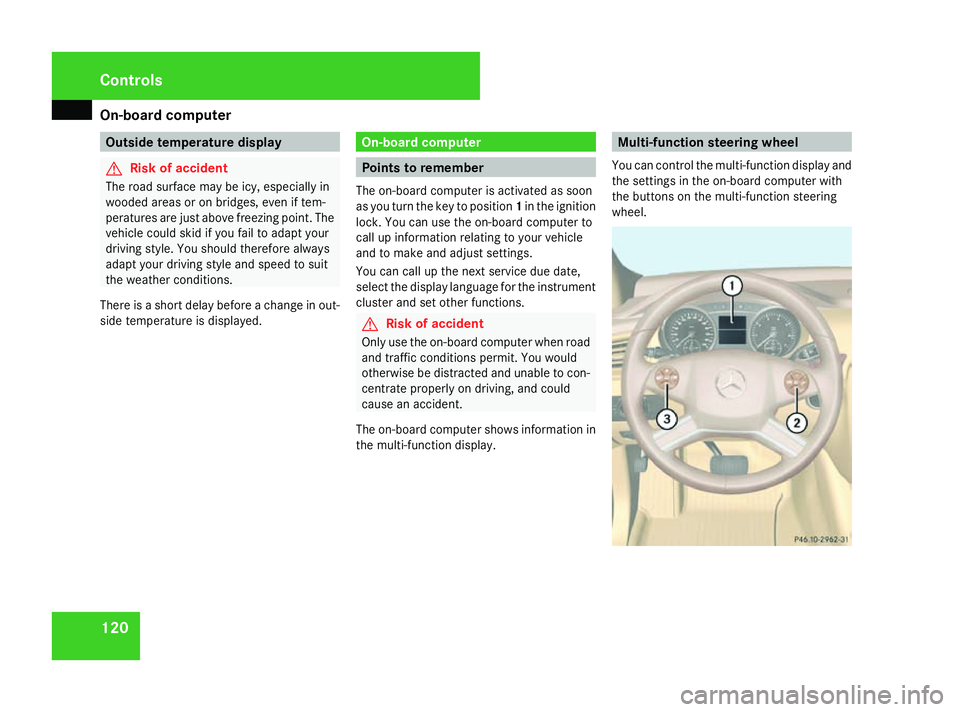
the multi-function display. Multi-function steering wheel
You can control the multi-function display and
the settings in the on-board computer with
the buttons on the multi-function steering
wheel. Controls
251_AKB; 5; 7, en-GB
wobuchh,
Version: 2.10.6 2008-05-11T14:51:51+02:00 - Seite 120Dateiname: 6515_1825_02_buchblock.pdf; preflight
Page 135 of 373
On-board computer
132
X
Press èor· to select the Set-
tings menu.
X Press the jbutton to call up the selec-
tion of submenus.
X Press the æorç button to select the
Time/Date submenu.
Setting the time
X Press the jbutton to select Clock Set
hour (orClock Set minute).
X Press the æorç button to set a
value.
Setting the date
X Press the jbutton to select Set date
Day (orSet date Month orSet date
Year).
X Press the æorç button to set the
values.
X Press the j,èorÿ button to
select a different display.
Setting constant headlamp mode If you have selected constant headlamp mode
and the light switch is set to the Mor
U position, the position lamps, dipped-
beam headlamps and licence plate lighting switch on automatically when the engine is
running. Turning the light switch to a different
position switches on the corresponding
lights. Make sure that the light switch is set
to
B orU if you switch off the constant
headlamp mode while driving at night.
In countries in which constant headlamp
mode is a legal requirement, Constantis the
factory setting.
X Press èor· to select the Set-
tings menu.
X Press the jbutton to call up the selec-
tion of submenus.
X Press the æorç button to select the
Lighting submenu.
X Press the jbutton to select Headlamp
mode.
X Press the æorç button to set the
switch-on mode for the headlamps to Man-
ual orConstant (constant headlamp
mode).
X Press the j,èorÿ button to
select a different display. Switching the surround lighting on or
off If the surround lighting is switched on, the
following lights will be switched on automat-
ically in the dark after you have unlocked the
vehicle using the key:
R
the position lamps
R the tail lamps
R the licence plate lighting
R the front foglamps
The surround lighting switches off automati-
cally if you open the driver's door or after 40
seconds.
X Press èor· to select the Set-
tings menu.
X Press the jbutton to call up the selec-
tion of submenus.
X Press the æorç button to select the
Lighting submenu.
X Press the jbutton to select the Sur-
round lighting function. Controls
251_AKB; 5; 7, en-GB
wobuchh,
Version: 2.10.6 2008-05-11T14:51:51+02:00 - Seite 132Dateiname: 6515_1825_02_buchblock.pdf; preflight
Page 136 of 373

On-board computer
133
X
Press the æorç button to switch
the Surround lighting function on or
off.
X Press the j,èorÿ button to
select a different display.
Activating or deactivating the exterior
lighting delayed switch-off Using the
Headlamp switch-off delay
function, you can set whether the exterior
lighting should remain on for 15 seconds after
the doors are closed when it is dark. If none
of the doors are opened after the engine is
switched off or if an open door is not closed,
the exterior lighting goes out after 60 sec-
onds.
When you have set a delayed switch-off time
and then switch off the engine, the following
remain lit:
R the position lamps
R the tail lamps
R the licence plate lighting
R the front foglamps X
Press èor· to select the Set-
tings menu.
X Press the jbutton to call up the selec-
tion of submenus.
X Press æorç to select the Light-
ing submenu.
X Press the jbutton to select Headlamps
delayed switch-off.
X Press the æorç button to activate
or deactivate the Headlamps delayed
switch-off function.
X Press the j,èorÿ button to
select a different display.
To temporarily deactivate the delayed switch-
off:
X Before leaving the vehicle, turn the key to
position 0in the ignition lock.
X Turn the key to position 2in the ignition
lock and back to position 0.
Delayed switch-off is deactivated.
Delayed switch-off is reactivated as soon as
you restart the engine.
Activating/deactivating the interior
lighting delayed switch-off Using the
Interior lighting delayed
switch-off function, you can set whether the interior lighting should remain on for 10
seconds after the key is removed from the
ignition lock when it is dark.
X Press èor· to select the Set-
tings menu.
X Press the jbutton to call up the selec-
tion of submenus.
X Press the æorç button to select the
Lighting submenu.
X Press the jbutton to select Interior
lighting delayed switch-off.
X Press the æorç button to activate
or deactivate Interior lighting
delayed switch-off.
X Press the j,èorÿ button to
select a different display.
Setting the display when the ignition is
switched off The
Display when ignition off function
allows you to set which display you see in the
multi-function display after the key is
removed from the ignition lock.
X Press èor· to select the Set-
tings menu.
X Press the jbutton to call up the selec-
tion of submenus. Controls
251_AKB; 5; 7, en-GB
wobuchh,
Version: 2.10.6 2008-05-11T14:51:51+02:00 - Seite 133 ZDateiname: 6515_1825_02_buchblock.pdf; preflight
Page 137 of 373

On-board computer
134
X
Press the æorç button to select the
Vehicle submenu.
X Press the jbutton to select Display
when ignition off.
X Press the æorç button to select
Interior motion sensor, Tow-away
protection orMiles/km.
X Press the j,èorÿ button to
select a different display.
Activating/deactivating the automatic
door locking feature The
Automatic door locking feature
allows you to set whether your vehicle will
lock centrally from a speed of about
15 km/h upwards.
i For more information on automatic lock-
ing, (Y page 75).
X Press èor· to select the Set-
tings menu.
X Press the jbutton to call up the selec-
tion of submenus.
X Press æorç to select the Vehicle
submenu.
X Press jto select Automatic door
locking . X
Press æorç to switch the Auto-
matic door locking feature on or off.
X Press the j,èorÿ button to
select a different display.
Selecting the switch-on time for the
auxiliary heating* This function is only available if the vehicle
has an auxiliary heating system.
The
Auxiliary heating function allows you
to select three switch-on times. You can set
the exact switch-on time using the other func-
tions in the Heatersubmenu.
You can switch off the auxiliary heating by
using the remote control or the auxiliary heat-
ing button on the centre console.
The auxiliary heating is switched off automat-
ically after 50 minutes. This time can be
changed. To do this, visit a qualified specialist
workshop, e.g. a Mercedes-Benz Service
Centre. G
Risk of poisoning
Exhaust fumes are produced when the aux-
iliary heating is in operation. Inhaling these
exhaust fumes can be poisonous. You
should therefore switch off the auxiliary heating in confined spaces without an
extraction system, e.g. a garage.
G
Risk of fire
When operating the auxiliary heating, parts
of the vehicle may become very hot, and
highly inflammable material such as fuels
could be ignited. Operating the auxiliary
heating is thus prohibited at filling stations
or when your vehicle is being refuelled. You
must therefore switch off the auxiliary heat-
ing at filling stations.
You can call up the Auxiliary heating.
function directly.
X Turn the key to position 1or 2in the ignition
lock.
X Press the button for the auxiliary heating on
the centre console (Y page 174).
or
X Press the èor· button to select the
Settings menu.
X Press the jbutton to call up the selec-
tion of submenus.
X Press the æorç button to select the
Heater submenu.
X Press the jbutton to select Auxiliary
heating . Controls
* optional
251_AKB; 5; 7, en-GB
wobuchh,
Version: 2.10.6 2008-05-11T14:51:51+02:00 - Seite 134Dateiname: 6515_1825_02_buchblock.pdf; preflight
Page 140 of 373

On-board computer
137
Priming/deactivating the interior
motion sensor* If you deactivate the
Interior motion sen-
sor, it will not be primed when you next lock
the vehicle.
X Press the èor· button to select the
Additional functions menu.
X If the Interior motion sensor function
is not displayed, press the jork
button to select the Interior motion
sensor.
X Press the æorç button to prime or
deactivate the Interior motion sen-
sor.
X Press the j,èorÿ button to
select a different display. Trip computer menu
You can use the Trip computermenu to call
up or reset statistical data for your vehicle.
i You can select kmormiles as the unit of
measurement for distance (Y page 130).
i Menu overview: (Y page 123).
Use the buttons on the multi-function steer-
ing wheel.
Consumption statistics from start The values refer to the start of the journey.
X
Press the èor· button to select
From start. 1
Kilometres
2 Time
3 Average speed
4 Average fuel consumption If the vehicle is parked for more than 4 hours,
the
From start consumption statistics are
reset (key in position 0of the ignition lock or
removed).
The values will not be reset if you turn the key
to position 1or 2during this time.
Consumption statistics from the last
reset The values refer to the last reset of the func-
tion.
X
Press the èor· button to select
From start.
X Press jork to select From
reset. 1
Kilometres
2 Time
3 Average speed
4 Average fuel consumption Controls
* optional
251_AKB; 5; 7, en-GB
wobuchh,
Version: 2.10.6 2008-05-11T14:51:51+02:00 - Seite 137 ZDateiname: 6515_1825_02_buchblock.pdf; preflight
Page 155 of 373

Driving sys
tems 152 AIRMATIC package*
AIRMATIC enables a suspension tuning set-
ting to be selected and regulates the damping
behaviour and level of your vehicle. The sys-
tem comprises two components: ADS*
(Adaptive Damping System) (Y page 152)
and level control* (Y page 152).
Observe the notes on driving with a trailer in
the "Operation" (Y page 239) section.
ADS* (Adaptive Damping System) ADS adapts the damping characteristics to
the current operating and driving situation.
How this is adjusted depends on:
R your driving style
R the road surface conditions
R the ADS setting
R the vehicle level setting
Your selection remains stored even if you
remove the key from the ignition lock. 1
ADS button
2 SPORT indicator lamp
3 COMF indicator lamp
You can choose between the following ADS
settings:
R AUTO for normal driving situations; indica-
tor lamps 2and 3are off.
R SPORT for sporty driving; indicator lamp
2 is on.
R COMF for a more comfortable ride; indica-
tor lamp 3is on.
X Start the engine.
X Press button 1repeatedly until the
desired setting is selected. Level control* The level control adapts the vehicle level
automatically to the current operating and
driving situation. This results in reduced fuel
consumption and improved handling.
Make changes to the vehicle level while the
vehicle is in motion. This enables the vehicle
to adjust to the new level as quickly as pos-
sible.
The vehicle level may change visibly when you
park the vehicle and the outside temperature
changes. When the temperature drops, the
vehicle level is lower; with an increase in tem-
perature, the vehicle level rises.
When you unlock the vehicle or open a door,
the vehicle begins to balance the load dis-
crepancies while still parked. However, for
significant level changes, e.g. after the vehi-
cle has been stationary for a long period, the
engine must be on. For safety reasons, the
vehicle is only lowered when the doors are
closed. Lowering is interrupted if a door is
opened and continues when the door has
been closed. G
Risk of injury
Make sure that nobody is in the vicinity of
the wheel arch or the underbody when you Controls
* optional
251_AKB; 5; 7, en-GB
wobuchh
,V ersion: 2.10.6
2008-05-11T14:51:51+02:00 - Seite 152 Dateiname: 6515_1825_02_buchblock.pdf; preflight
Page 158 of 373

Driving sys
tems 155If a drive wheel spins due to insufficient
grip:
R Only depress the accelerator pedal as far
as necessary when pulling away.
R Accelerate less when driving.
R Adapt your driving style to suit road and
traffic conditions.
i In wintry driving conditions, the maximum
effect of 4MATIC can only be achieved if
you use winter tyres (M+S tyres), with snow
chains if necessary.
! When testing the parking brake, operate
the vehicle only briefly (for a maximum of
ten seconds) on a brake dynamometer.
When doing this, turn the key to position
0 or 1in the ignition. Failure to do this can
cause damage to the drive train or the
brake system.
! A function or performance test should
only be carried out on a twin-axle dyna-
mometer. If you wish to operate the vehicle
on such a dynamometer, please consult a
Mercedes-Benz Service Centre in advance.
You could otherwise damage the drive train
or the brake system. Parktronic*
G
Risk of accident
Parktronic is only an aid and may not detect
all obstacles. It is not a substitute for atten-
tive driving.
You are always responsible for safety and
must continue to pay attention to your
immediate surroundings when parking and
manoeuvring. You could otherwise endan-
ger yourself and others. G
Risk of injury
Make sure that no persons or animals are
in the manoeuvring range. Otherwise, they
could be injured.
Parktronic is an electronic parking aid. It indi-
cates visually and audibly the distance
between your vehicle and an object.
Parktronic is activated automatically when
you:
R switch on the ignition
R release the parking brake
R shift the automatic transmission to D,Ror
N
Parktronic is deactivated at speeds above
18 km/h. It is reactivated at lower speeds. Parktronic monitors the area around your
vehicle using six sensors in the front bumper
and four sensors in the rear bumper.
1
Example: sensors in the front bumper,
left-hand side
Range of the sensors The sensors must be free of dirt, ice and
slush, otherwise they may not function cor-
rectly. Clean the sensors regularly, taking
care not to scratch or damage them
(Y
page 247). Controls
* optional
251_AKB; 5; 7, en-GB
wobuchh
, Version: 2.10.6 2008-05-11T14:51:51+02:00 - Seite 155 ZDateiname: 6515_1825_02_buchblock.pdf; preflight
Page 161 of 373

Driving sys
tems 158 G
Risk of accident
The reversing camera is only an aid and may
display obstacles in a distorted manner,
incorrectly or even not display them at all.
The reversing camera does not relieve you
of the responsibility to pay attention. The
camera cannot show objects:
R that are very close to the rear bumper.
R that are underneath the rear bumper.
R above the tailgate handle.
You are always responsible for safety and
must continue to pay attention to your
immediate surroundings when parking and
manoeuvring. This applies to the areas
behind, in front of and next to the vehicle.
You could otherwise endanger yourself and
others. G
Risk of accident
Under the following circumstances, the
reversing camera will not function, or func-
tion in a limited manner:
R if the tailgate is open.
R in heavy rain, snow or fog.
R at night or in very dark places.
R if the camera is exposed to very bright
white light.
R if the area is lit by fluorescent light (the
display may flicker).
R if there is a sudden change in tempera-
ture, e.g. when driving into a heated
garage in winter. R
if the camera lens is dirty or obstructed.
R if the rear of your vehicle is damaged.
Have the camera position and setting
checked at a qualified specialist work-
shop in this case. Mercedes-Benz recom-
mends that you use a Mercedes-Benz
Service Centre for this purpose.
Do not use the reversing camera in these
types of situation. You could otherwise
injure others or damage objects and your
vehicle while you are parking.
Activating the reversing camera X
Make sure that the key is in position 2in
the ignition lock.
X Engage reverse gear.
The area behind the vehicle is shown in the
COMAND APS display. Controls
251_AKB; 5; 7, en-GB
wobuchh
,V ersion: 2.10.6
2008-05-11T14:51:51+02:00 - Seite 158 Dateiname: 6515_1825_02_buchblock.pdf; preflight
Page 169 of 373
Air conditioning
166
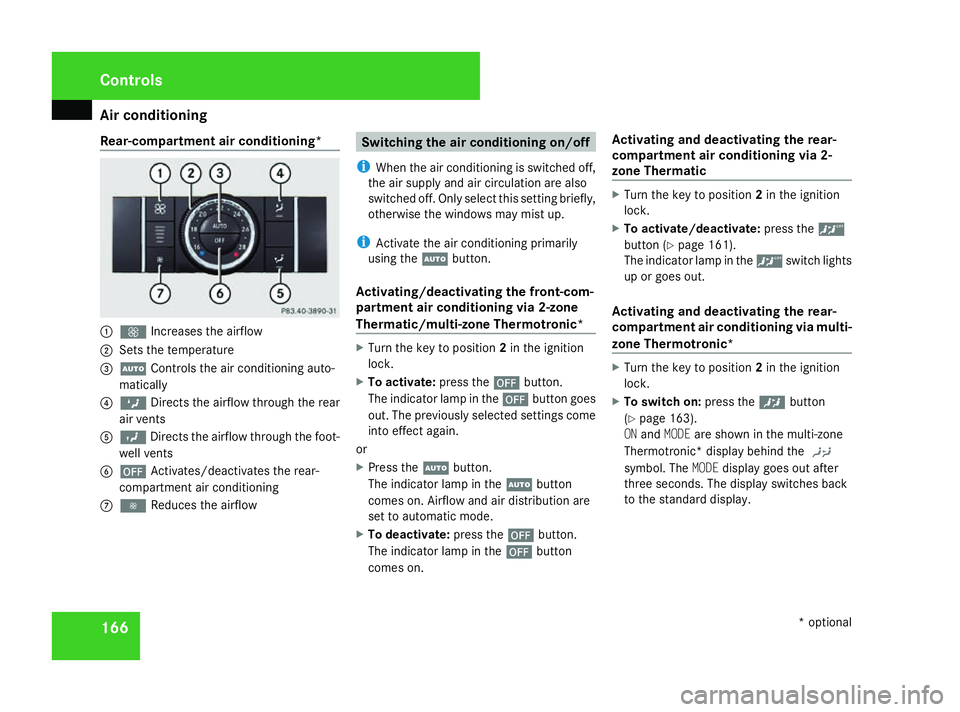
Rear-compartment air conditioning*
1
Q Increases the airflow
2 Sets the temperature
3 U Controls the air conditioning auto-
matically
4 Z Directs the airflow through the rear
air vents
5 Y Directs the airflow through the foot-
well vents
6 ´ Activates/deactivates the rear-
compartment air conditioning
7 · Reduces the airflow Switching the air conditioning on/off
i When the air conditioning is switched off,
the air supply and air circulation are also
switched off. Only select this setting briefly,
otherwise the windows may mist up.
i Activate the air conditioning primarily
using the Ubutton.
Activating/deactivating the front-com-
partment air conditioning via 2-zone
Thermatic/multi-zone Thermotronic* X
Turn the key to position 2in the ignition
lock.
X To activate: press the´button.
The indicator lamp in the ´button goes
out. The previously selected settings come
into effect again.
or
X Press the Ubutton.
The indicator lamp in the Ubutton
comes on. Airflow and air distribution are
set to automatic mode.
X To deactivate: press the´button.
The indicator lamp in the ´button
comes on. Activating and deactivating the rear-
compartment air conditioning via 2-
zone Thermatic X
Turn the key to position 2in the ignition
lock.
X To activate/deactivate: press the<
button (Y page 161).
The indicator lamp in the
Activating and deactivating the rear-
compartment air conditioning via multi-
zone Thermotronic* X
Turn the key to position 2in the ignition
lock.
X To switch on: press the™button
(Y page 163).
ON and MODE are shown in the multi-zone
Thermotronic* display behind the )
symbol. The MODEdisplay goes out after
three seconds. The display switches back
to the standard display. Cont
rols
* optional
251_AKB; 5; 7, en-GB
wobuchh
,V ersion: 2.10.6
2008-05-11T14:51:51+02:00 - Seite 166 Dateiname: 6515_1825_02_buchblock.pdf; preflight
Page 170 of 373

Air conditioning
167
X
To deactivate: press the™button
(Y page 163).
MODE is shown in the display behind
the ) symbol.
X Press the ´button (Y page 163).
OFF is shown in the display behind
the ) symbol.
Activating and deactivating the rear-
compartment air conditioning via the
rear-compartment air-conditioning sys-
tem* X
Turn the key to position 2in the ignition
lock.
X Activate multi-zone Thermotronic*.
X To activate: press theUbutton.
The indicator lamp in the Ubutton
comes on.
X To deactivate: press the´button.
The indicator lamp in the ´button
comes on. Switching cooling with air-dehumidi-
fication on/off
The "cooling with dehumidification" function
is only available when the engine is running.
The air inside the vehicle is cooled and dehu-
midified according to the temperature selec-
ted. This prevents the windows from misting
up. G
Risk of accident
If the "cooling with air dehumidification"
function is deactivated, the air inside the
vehicle will not be cooled (during warm
weather) or dehumidified. The windows
could mist up more quickly. This may pre-
vent you from observing the traffic condi-
tions, thereby causing an accident. H
Environmental note
The cooling system uses the refrigerant
R134A. This refrigerant does not damage
the earth's ozone layer.
Condensation may drip from the underside of
the vehicle when Thermatic is in cooling
mode. X
To activate: press the9button.
The indicator lamp in the 9button lights
up.
X To deactivate: press the9button.
The indicator lamp in the 9button goes
out. The cooling with air dehumidification
function has a delayed switch-off feature. Controlling the air conditioning auto-
matically
In automatic mode, the set temperature is
maintained automatically at a constant level.
The system automatically regulates the tem-
perature of the dispensed air, the airflow and
the air distribution.
The automatic air conditioning will achieve
optimal operation if "cooling with air dehu-
midification" is also activated. If necessary,
cooling with air dehumidification can be deac-
tivated. Cont
rols
* optional
251_AKB; 5; 7, en-GB
wobuchh
,V ersion: 2.10.6
2008-05-11T14:51:51+02:00 - Seite 167 ZDateiname: 6515_1825_02_buchblock.pdf; preflight