lights MERCEDES-BENZ S CLASS 2000 User Guide
[x] Cancel search | Manufacturer: MERCEDES-BENZ, Model Year: 2000, Model line: S CLASS, Model: MERCEDES-BENZ S CLASS 2000Pages: 421, PDF Size: 20.37 MB
Page 192 of 421
189 Interior equipment
Te ch n ica l
data Instruments
and controlsOperationDrivingInstrument
cluster displayPractical hints Car care Index Courtesy lighting
The interior of your vehicle is equipped with various
different lighting installations to help you to orient
yourself better in the dark.
Entrance lamps, exit lamps
With exterior lamps on or electronic key in starter
switch position 1, the lamps in the door trays illuminate.
The lights will remain on for approximately 5 minutes if
the electronic key is in starter switch position 0 and
exterior lamps are switched off.Footwell lighting
With exterior lamps on, the footwell is illuminated.
Center console lighting
Turn the electronic key in the starter switch to
position 1. The center console is illuminated from the
rear-view mirror.
Door entry lamps
The appropriate entry lamp switches on if a door is
opened in darkness and if the interior lighting is
switched to automatic function.
The entry lamp switches off automatically when the
door is closed.
Page 238 of 421
235 Automatic transmission
Te ch n ica l
data Instruments
and controlsOperationDrivingInstrument
cluster displayPractical hints Car care Index Stopping
For brief stops, e.g. at traffic lights, leave the
transmission in gear and hold vehicle with the service
brake.
For longer stops with the engine idling, shift into “N”
or “P” and hold the vehicle with the service brake.
When stopping the vehicle on an uphill gradient, do not
hold it with the accelerator, use the brake. This avoids
unnecessary transmission heat build up.
Maneuvering
To maneuver in tight areas, e.g. when pulling into a
parking space, control the vehicle speed by gradually
releasing the brakes. Accelerate gently and never
abruptly step on the accelerator.
To rock a vehicle out of soft ground (mud or snow),
alternately shift from forward to reverse, while applying
slight partial throttle.Rocking a vehicle free in this manner may cause the
ABS or traction system malfunction indicator lamp to
come on. Turn off and restart the engine to clear the
malfunction indication.
Wa r n i n g !
Getting out of your vehicle with the selector lever
not fully engaged in position “P” is dangerous.
Also, when parked on an incline, position “P” alone
may not prevent your vehicle from moving,
possibly hitting people or objects.Always set the parking brake in addition to shifting
to position “P”, see page 242 for parking brake. When parked on an incline, also turn front wheel
against curb.Wa r n i n g !
When leaving the vehicle always remove the
electronic key from the starter switch, take the
KEYLESS-GO-card (if so equipped) with you and
lock the vehicle. Do not leave children unattended
in the vehicle, or with access to an unlocked
vehicle. Children could move the gear selector lever
from position “P”, which could result in an
accident or serious injury.
Page 270 of 421
267 Driving systems
Te ch n ica l
data Instruments
and controlsOperationDrivingInstrument
cluster displayPractical hints Car care Index Distance warning function
Even if Distronic is deactivated, the distance to the
vehicle ahead continues to be measured, see page 269
for multifunction display.
The Distronic lamp in the speedometer dial illuminates
to advise the driver of a situation which under normal
braking conditions and dry surfaces should have been
addressed by the driver.
The distance notification function can be activated
separately, see page 267. It operates when driving at
speeds above approximately 25 mph
(Canada: 30 km/h).
When recognizing a stationary obstacle or a slower
vehicle moving in the vehicle’s path and the danger of a
collision exists, the distance warning lamp in the
speedometer dial lights up and simultaneously a
continuous warning sounds.
Note:
Model S 55 AMG only:
Distance notification function is deactivated if the
vehicle speed exceeds approximately 160 mph
(260 km/h).Important!
With the Distronic switched off, only the distance
notification function operates, meaning the vehicle does
not slow down.
Important!
Complex driving situations are not always fully
recognized by Distronic, which could result in wrong or
missing distance warnings.
See page 264 for additional driving hints.
Wa r n i n g !
If the distance warning lamp in the speedometer
dial lights up while driving and a continuous
warning sounds, immediate attention on the part of
the driver is required.As required by the traffic situation, apply the
service brakes and navigate around a possible
obstacle. However, do not drive by relying on the
distance notification function as that will result in
an emergency braking application which,
especially depending on road surface conditions
and driver reaction, will not always be able to avoid
a collision.
Page 271 of 421
268 Driving systems
Te ch n ica l
data Instruments
and controlsOperationDrivingInstrument
cluster displayPractical hints Car care Index
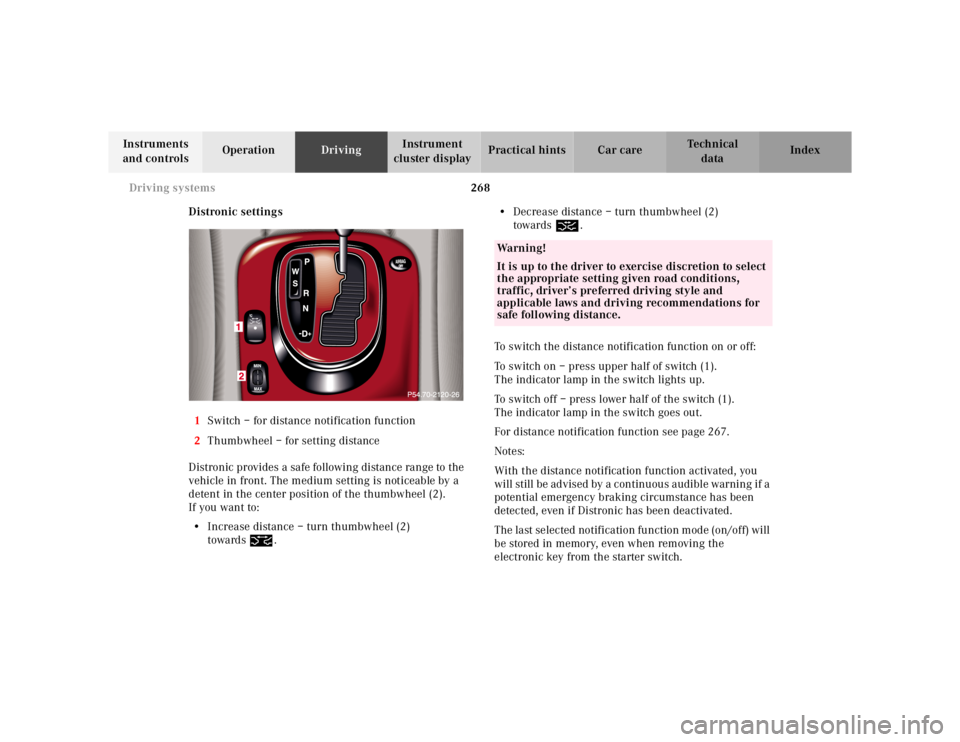
Distronic settings
1Switch – for distance notification function
2Thumbwheel – for setting distance
Distronic provides a safe following distance range to the
vehicle in front. The medium setting is noticeable by a
detent in the center position of the thumbwheel (2).
If you want to:
•Increase distance – turn thumbwheel (2)
towards¯.•Decrease distance – turn thumbwheel (2)
towards®.
To switch the distance notification function on or off:
To switch on – press upper half of switch (1).
The indicator lamp in the switch lights up.
To switch off – press lower half of the switch (1).
The indicator lamp in the switch goes out.
For distance notification function see page 267.
Notes:
With the distance notification function activated, you
will still be advised by a continuous audible warning if a
potential emergency braking circumstance has been
detected, even if Distronic has been deactivated.
The last selected notification function mode (on/off) will
be stored in memory, even when removing the
electronic key from the starter switch.
Wa r n i n g !
It is up to the driver to exercise discretion to select
the appropriate setting given road conditions,
traffic, driver’s preferred driving style and
applicable laws and driving recommendations for
safe following distance.
Page 282 of 421
279 Driving systems
Te ch n ica l
data Instruments
and controlsOperationDrivingInstrument
cluster displayPractical hints Car care Index Level control system for vehicles with
Airmatic system
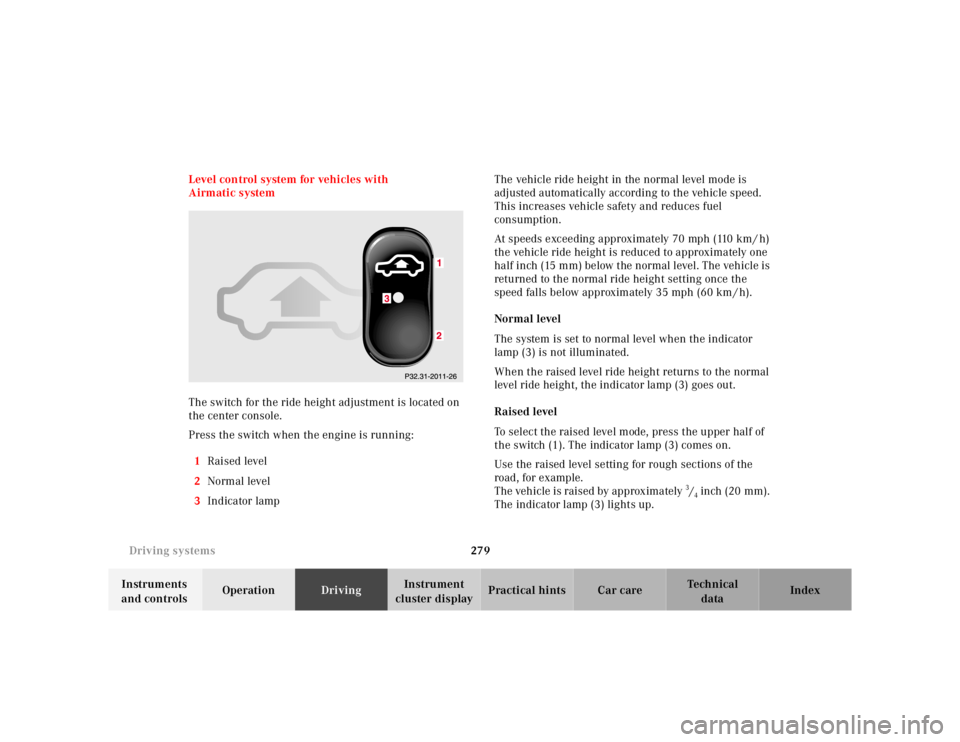
The switch for the ride height adjustment is located on
the center console.
Press the switch when the engine is running:
1Raised level
2Normal level
3Indicator lampThe vehicle ride height in the normal level mode is
adjusted automatically according to the vehicle speed.
This increases vehicle safety and reduces fuel
consumption.
At speeds exceeding approximately 70 mph (110 km / h)
the vehicle ride height is reduced to approximately one
half inch (15 mm) below the normal level. The vehicle is
returned to the normal ride height setting once the
speed falls below approximately 35 mph (60 km / h).
Normal level
The system is set to normal level when the indicator
lamp (3) is not illuminated.
When the raised level ride height returns to the normal
level ride height, the indicator lamp (3) goes out.
Raised level
To select the raised level mode, press the upper half of
the switch (1). The indicator lamp (3) comes on.
Use the raised level setting for rough sections of the
road, for example.
The vehicle is raised by approximately 3/4 inch (20 mm).
The indicator lamp (3) lights up.
Page 286 of 421
283 Driving systems
Te ch n ica l
data Instruments
and controlsOperationDrivingInstrument
cluster displayPractical hints Car care Index Adaptive damping system (ADS)
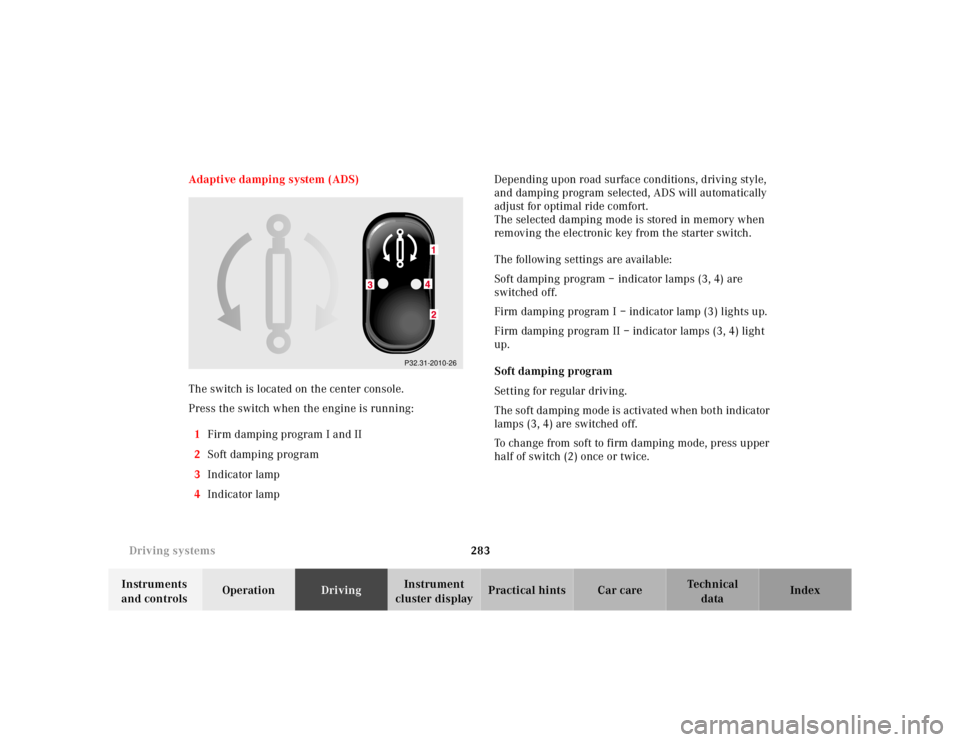
The switch is located on the center console.
Press the switch when the engine is running:
1Firm damping program I and II
2Soft damping program
3Indicator lamp
4Indicator lamp Depending upon road surface conditions, driving style,
and damping program selected, ADS will automatically
adjust for optimal ride comfort.
The selected damping mode is stored in memory when
removing the electronic key from the starter switch.
The following settings are available:
Soft damping program – indicator lamps (3, 4) are
switched off.
Firm damping program I – indicator lamp (3) lights up.
Firm damping program II – indicator lamps (3, 4) light
up.
Soft damping program
Setting for regular driving.
The soft damping mode is activated when both indicator
lamps (3, 4) are switched off.
To change from soft to firm damping mode, press upper
half of switch (2) once or twice.
P32.31-2010-26
Page 287 of 421
284 Driving systems
Te ch n ica l
data Instruments
and controlsOperationDrivingInstrument
cluster displayPractical hints Car care Index
Firm damping program I
Setting for sporty driving.
Changing from soft damping program:
Press upper half of switch (1) once. The indicator
lamp (3) lights up.
Changing from firm damping program II:
Press lower half of switch (2). The indicator lamp (4)
goes out.Firm damping program II
Setting for very sporty driving.
Changing from soft damping:
Press upper half of switch (1) twice. The indicator
lamps (3, 4) light up.
Changing from firm damping program I:
Press upper half of switch (1) once. The indicator
lamp (4) lights up in addition to indicator lamp (3).
Page 290 of 421
287 Parking system
Te ch n ica l
data Instruments
and controlsOperationDrivingInstrument
cluster displayPractical hints Car care Index Warning indicators
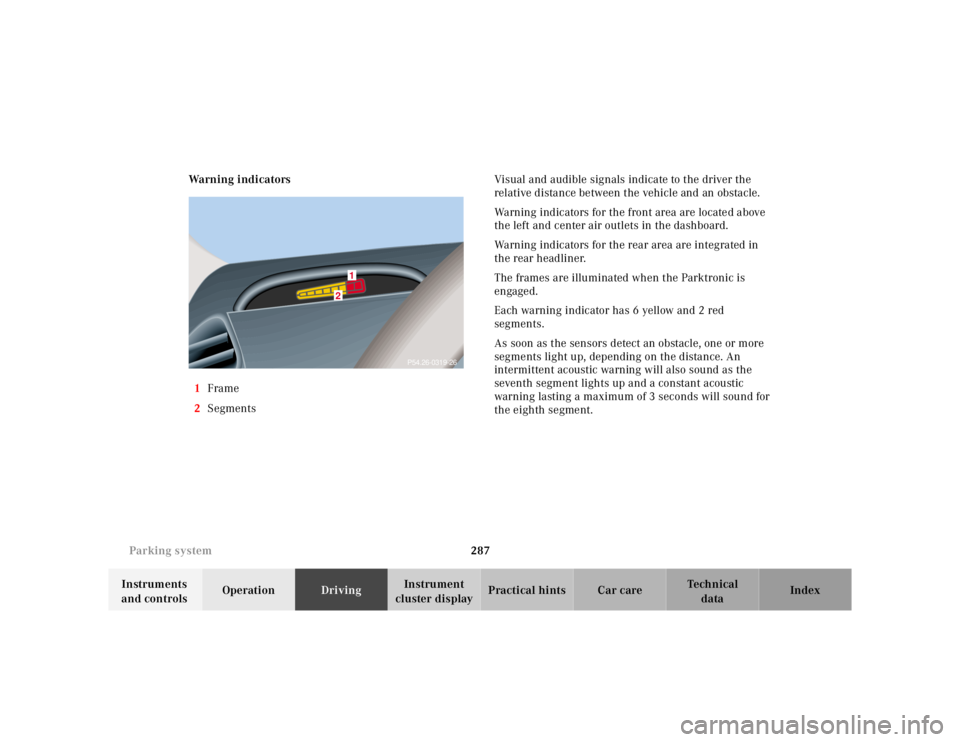
1Frame
2SegmentsVisual and audible signals indicate to the driver the
relative distance between the vehicle and an obstacle.
Warning indicators for the front area are located above
the left and center air outlets in the dashboard.
Warning indicators for the rear area are integrated in
the rear headliner.
The frames are illuminated when the Parktronic is
engaged.
Each warning indicator has 6 yellow and 2 red
segments.
As soon as the sensors detect an obstacle, one or more
segments light up, depending on the distance. An
intermittent acoustic warning will also sound as the
seventh segment lights up and a constant acoustic
warning lasting a maximum of 3 seconds will sound for
the eighth segment.
2
1
P54.26-0319-26
Page 291 of 421
288 Parking system
Te ch n ica l
data Instruments
and controlsOperationDrivingInstrument
cluster displayPractical hints Car care Index
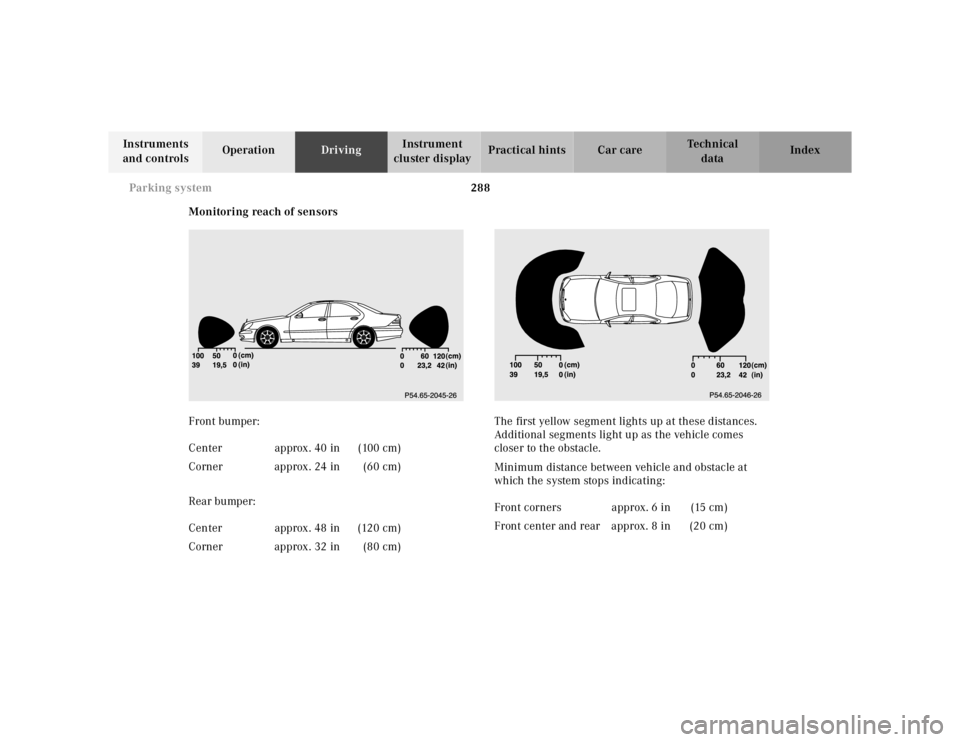
Monitoring reach of sensors
Front bumper:
Rear bumper:The first yellow segment lights up at these distances.
Additional segments light up as the vehicle comes
closer to the obstacle.
Minimum distance between vehicle and obstacle at
which the system stops indicating: Center approx. 40 in (100 cm)
Corner approx. 24 in (60 cm)
Center approx. 48 in (120 cm)
Corner approx. 32 in (80 cm)
Front corners approx. 6 in (15 cm)
Front center and rear approx. 8 in (20 cm)
Page 304 of 421
301 Malfunction and indicator lamps
Te ch n ica l
data Instruments
and controlsOperation DrivingInstrument
cluster displayPractical hints Car care Index Electronic stability program (ESP) — warning lamp
The yellow ESP warning lamp in the
speedometer dial comes on with the
electronic key in starter switch position 2. It
should go out with engine running.
If the ESP malfunction indicator lamp remains
illuminated with the engine running, a malfunction has
been detected in the system. Pressing the accelerator
pedal will require greater effort. Only partial engine
output will be available.
See electronic stability program (ESP) on page 274 if the
warning lamp lights up or flashes when the vehicle is
moving.Distronic (DTR) – warning lamp
With the electronic key in starter switch
position 2, the distance warning lamp in the
speedometer dial comes on and goes out
with the engine running.
See Distronic (DTR) system on page 326 for possible
malfunction messages.
Note:
The distance warning lamp is without warning function
on vehicles without Distronic (DTR).