light MERCEDES-BENZ S CLASS 2000 Workshop Manual
[x] Cancel search | Manufacturer: MERCEDES-BENZ, Model Year: 2000, Model line: S CLASS, Model: MERCEDES-BENZ S CLASS 2000Pages: 421, PDF Size: 20.37 MB
Page 253 of 421
250 Driving instructions
Te ch n ica l
data Instruments
and controlsOperationDrivingInstrument
cluster displayPractical hints Car care Index
Important!
Use of snow chains is not permissible with tire sizes
245 / 45 R18 or 275 / 40 R18.
Winter driving instructions
The most important rule for slippery or icy roads is to
drive sensibly and to avoid abrupt acceleration, braking
and steering maneuvers. Do not use the cruise control
system under such conditions.
When the vehicle is in danger of skidding, move
selector lever to position “N”. Try to keep the vehicle
under control by corrective steering action.
Road salts and chemicals can adversely affect braking
efficiency. Increased pedal force may become necessary
to produce the normal brake effect. We therefore
recommend depressing the brake pedal periodically
when traveling at length on salt-strewn roads. This can
bring road salt impaired braking efficiency back to
normal. A prerequisite is, however, that this be done
without endangering other drivers on the road.If the vehicle is parked after being driven on salt treated
roads, the braking efficiency should be tested as soon as
possible after driving is resumed while observing the
safety rules in the previous paragraph.
Wa r n i n g !
If the vehicle becomes stuck in snow, make sure
that snow is kept clear of the exhaust pipe and
from around the vehicle with engine running.
Otherwise, deadly carbon monoxide (CO) gases may
enter vehicle interior resulting in unconsciousness
and death.To assure sufficient fresh air ventilation, open a
window slightly on the side of the vehicle not
facing the wind.
Page 261 of 421
258 Driving systems
Te ch n ica l
data Instruments
and controlsOperationDrivingInstrument
cluster displayPractical hints Car care Index
The speed stored in memory is displayed in the
multifunction display, and one or two segments around
the stored speed light up in the speedometer dial, see
page 270.
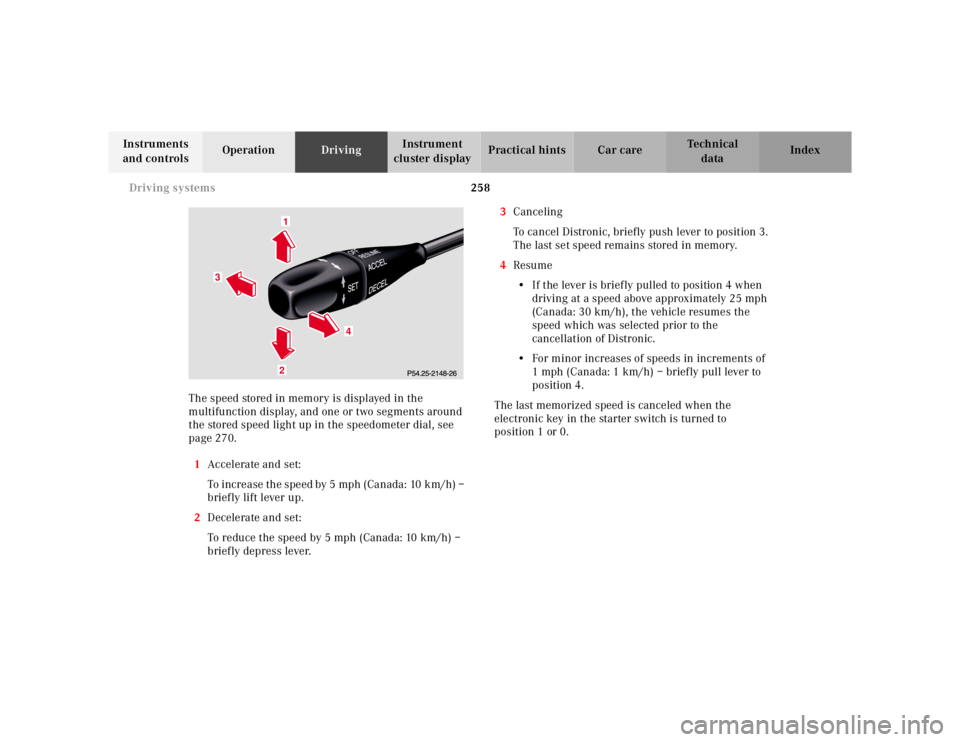
1Accelerate and set:
To increase the speed by 5 mph (Canada: 10 km/h) –
brief ly lift lever up.
2Decelerate and set:
To reduce the speed by 5 mph (Canada: 10 km/h) –
briefly depress lever.3Canceling
To cancel Distronic, briefly push lever to position 3.
The last set speed remains stored in memory.
4Resume
•If the lever is briefly pulled to position 4 when
driving at a speed above approximately 25 mph
(Canada: 30 km/h), the vehicle resumes the
speed which was selected prior to the
cancellation of Distronic.
•For minor increases of speeds in increments of
1 mph (Canada: 1 km/h) – briefly pull lever to
position 4.
The last memorized speed is canceled when the
electronic key in the starter switch is turned to
position 1 or 0.
1
3
4
2
Page 262 of 421
259 Driving systems
Te ch n ica l
data Instruments
and controlsOperationDrivingInstrument
cluster displayPractical hints Car care Index Activation of Distronic
Any given speed above approximately 25 mph
(Canada: 30 km/h) can be maintained:
•Normally the vehicle is accelerated to the desired
speed with the accelerator.•Speed is set by briefly moving the control lever to
position 1 or 2.
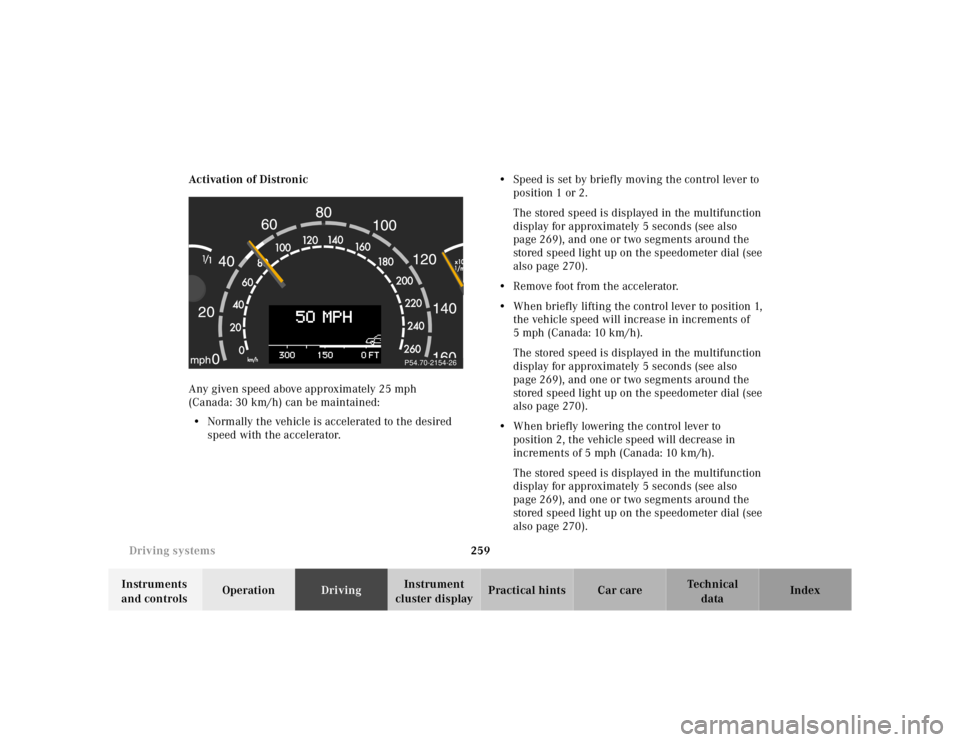
The stored speed is displayed in the multifunction
display for approximately 5 seconds (see also
page 269), and one or two segments around the
stored speed light up on the speedometer dial (see
also page 270).
•Remove foot from the accelerator.
•When briefly lifting the control lever to position 1,
the vehicle speed will increase in increments of
5 mph (Canada: 10 km/h).
The stored speed is displayed in the multifunction
display for approximately 5 seconds (see also
page 269), and one or two segments around the
stored speed light up on the speedometer dial (see
also page 270).
•When briefly lowering the control lever to
position 2, the vehicle speed will decrease in
increments of 5 mph (Canada: 10 km/h).
The stored speed is displayed in the multifunction
display for approximately 5 seconds (see also
page 269), and one or two segments around the
stored speed light up on the speedometer dial (see
also page 270).
P54.70-2154-26
Page 270 of 421
267 Driving systems
Te ch n ica l
data Instruments
and controlsOperationDrivingInstrument
cluster displayPractical hints Car care Index Distance warning function
Even if Distronic is deactivated, the distance to the
vehicle ahead continues to be measured, see page 269
for multifunction display.
The Distronic lamp in the speedometer dial illuminates
to advise the driver of a situation which under normal
braking conditions and dry surfaces should have been
addressed by the driver.
The distance notification function can be activated
separately, see page 267. It operates when driving at
speeds above approximately 25 mph
(Canada: 30 km/h).
When recognizing a stationary obstacle or a slower
vehicle moving in the vehicle’s path and the danger of a
collision exists, the distance warning lamp in the
speedometer dial lights up and simultaneously a
continuous warning sounds.
Note:
Model S 55 AMG only:
Distance notification function is deactivated if the
vehicle speed exceeds approximately 160 mph
(260 km/h).Important!
With the Distronic switched off, only the distance
notification function operates, meaning the vehicle does
not slow down.
Important!
Complex driving situations are not always fully
recognized by Distronic, which could result in wrong or
missing distance warnings.
See page 264 for additional driving hints.
Wa r n i n g !
If the distance warning lamp in the speedometer
dial lights up while driving and a continuous
warning sounds, immediate attention on the part of
the driver is required.As required by the traffic situation, apply the
service brakes and navigate around a possible
obstacle. However, do not drive by relying on the
distance notification function as that will result in
an emergency braking application which,
especially depending on road surface conditions
and driver reaction, will not always be able to avoid
a collision.
Page 271 of 421
268 Driving systems
Te ch n ica l
data Instruments
and controlsOperationDrivingInstrument
cluster displayPractical hints Car care Index
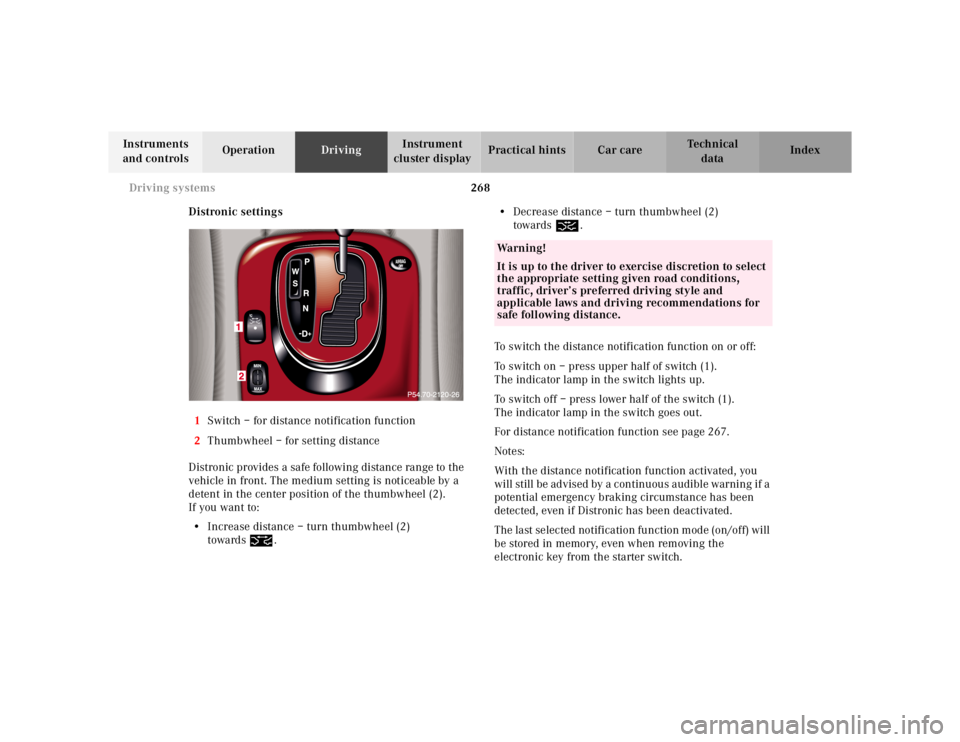
Distronic settings
1Switch – for distance notification function
2Thumbwheel – for setting distance
Distronic provides a safe following distance range to the
vehicle in front. The medium setting is noticeable by a
detent in the center position of the thumbwheel (2).
If you want to:
•Increase distance – turn thumbwheel (2)
towards¯.•Decrease distance – turn thumbwheel (2)
towards®.
To switch the distance notification function on or off:
To switch on – press upper half of switch (1).
The indicator lamp in the switch lights up.
To switch off – press lower half of the switch (1).
The indicator lamp in the switch goes out.
For distance notification function see page 267.
Notes:
With the distance notification function activated, you
will still be advised by a continuous audible warning if a
potential emergency braking circumstance has been
detected, even if Distronic has been deactivated.
The last selected notification function mode (on/off) will
be stored in memory, even when removing the
electronic key from the starter switch.
Wa r n i n g !
It is up to the driver to exercise discretion to select
the appropriate setting given road conditions,
traffic, driver’s preferred driving style and
applicable laws and driving recommendations for
safe following distance.
Page 273 of 421
270 Driving systems
Te ch n ica l
data Instruments
and controlsOperationDrivingInstrument
cluster displayPractical hints Car care Index
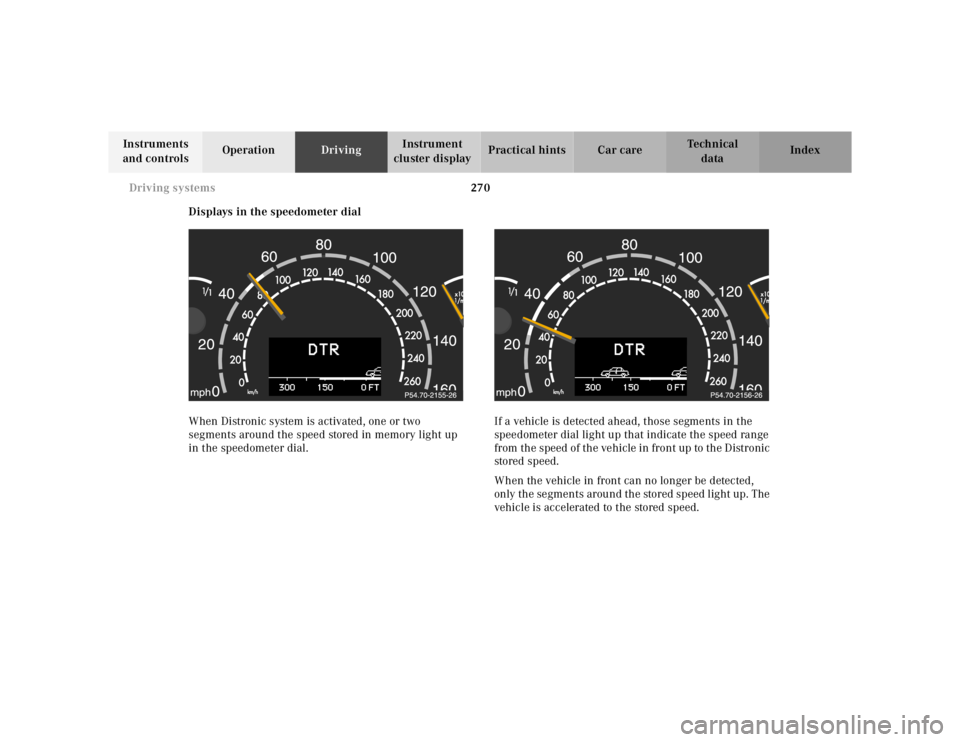
Displays in the speedometer dial
When Distronic system is activated, one or two
segments around the speed stored in memory light up
in the speedometer dial.If a vehicle is detected ahead, those segments in the
speedometer dial light up that indicate the speed range
from the speed of the vehicle in front up to the Distronic
stored speed.
When the vehicle in front can no longer be detected,
only the segments around the stored speed light up. The
vehicle is accelerated to the stored speed.
Page 275 of 421
272 Driving systems
Te ch n ica l
data Instruments
and controlsOperationDrivingInstrument
cluster displayPractical hints Car care Index
Antilock brake system (ABS)
Important!
The ABS improves steering control of the vehicle during
hard braking maneuvers.
The ABS prevents the wheels from locking up above a
vehicle speed of approximately 5 mph (8 km / h)
independent of road surface conditions.At the instant one of the wheels is about to lock up, a
slight pulsation can be felt in the brake pedal,
indicating that the ABS is in the regulating mode. Keep
firm and steady pressure on the brake pedal while
experiencing the pulsation.
Continuous steady brake pedal pressure results in
applying the advantages of the ABS, namely braking
power and ability to steer the vehicle.
In the case of an emergency brake maneuver keep
continuous full pressure on the brake pedal. In this
manner only can the ABS be most effective.
On slippery road surfaces, the ABS will respond even
with light brake pedal pressure because of the
increased likelihood of locking wheels. The pulsating
brake pedal can be an indication of hazardous road
conditions and functions as a reminder to take extra
care while driving.
Wa r n i n g !
Do not pump the brake pedal, rather use firm,
steady brake pedal pressure. Pumping the brake
pedal defeats the purpose for ABS and significantly
reduces braking effectiveness.
Page 282 of 421
279 Driving systems
Te ch n ica l
data Instruments
and controlsOperationDrivingInstrument
cluster displayPractical hints Car care Index Level control system for vehicles with
Airmatic system
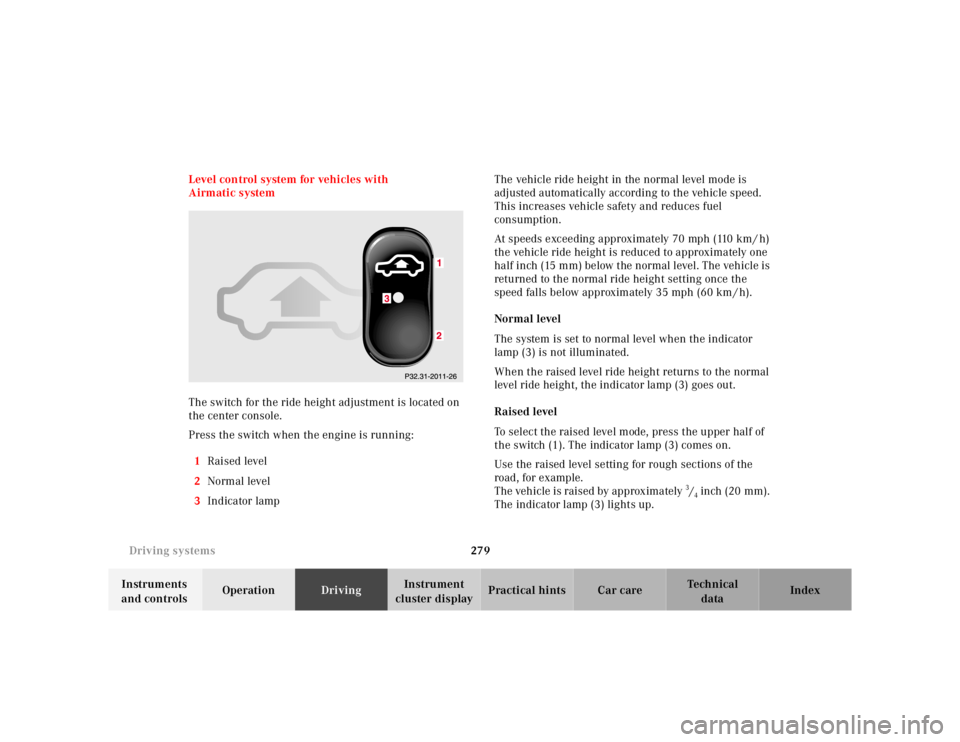
The switch for the ride height adjustment is located on
the center console.
Press the switch when the engine is running:
1Raised level
2Normal level
3Indicator lampThe vehicle ride height in the normal level mode is
adjusted automatically according to the vehicle speed.
This increases vehicle safety and reduces fuel
consumption.
At speeds exceeding approximately 70 mph (110 km / h)
the vehicle ride height is reduced to approximately one
half inch (15 mm) below the normal level. The vehicle is
returned to the normal ride height setting once the
speed falls below approximately 35 mph (60 km / h).
Normal level
The system is set to normal level when the indicator
lamp (3) is not illuminated.
When the raised level ride height returns to the normal
level ride height, the indicator lamp (3) goes out.
Raised level
To select the raised level mode, press the upper half of
the switch (1). The indicator lamp (3) comes on.
Use the raised level setting for rough sections of the
road, for example.
The vehicle is raised by approximately 3/4 inch (20 mm).
The indicator lamp (3) lights up.
Page 286 of 421
283 Driving systems
Te ch n ica l
data Instruments
and controlsOperationDrivingInstrument
cluster displayPractical hints Car care Index Adaptive damping system (ADS)
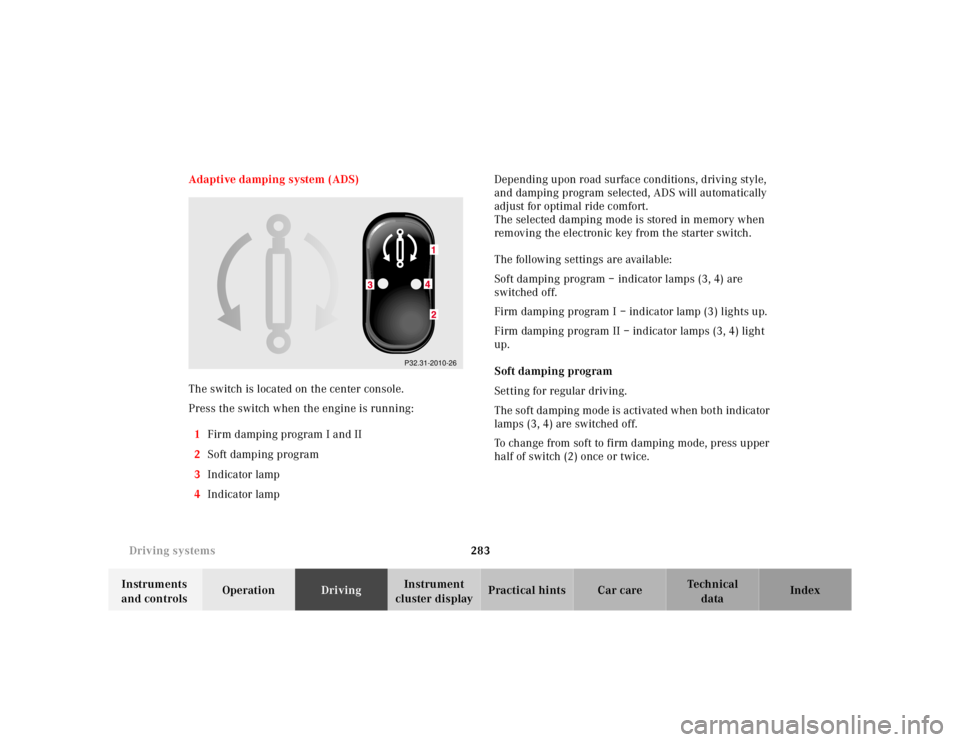
The switch is located on the center console.
Press the switch when the engine is running:
1Firm damping program I and II
2Soft damping program
3Indicator lamp
4Indicator lamp Depending upon road surface conditions, driving style,
and damping program selected, ADS will automatically
adjust for optimal ride comfort.
The selected damping mode is stored in memory when
removing the electronic key from the starter switch.
The following settings are available:
Soft damping program – indicator lamps (3, 4) are
switched off.
Firm damping program I – indicator lamp (3) lights up.
Firm damping program II – indicator lamps (3, 4) light
up.
Soft damping program
Setting for regular driving.
The soft damping mode is activated when both indicator
lamps (3, 4) are switched off.
To change from soft to firm damping mode, press upper
half of switch (2) once or twice.
P32.31-2010-26
Page 287 of 421
284 Driving systems
Te ch n ica l
data Instruments
and controlsOperationDrivingInstrument
cluster displayPractical hints Car care Index
Firm damping program I
Setting for sporty driving.
Changing from soft damping program:
Press upper half of switch (1) once. The indicator
lamp (3) lights up.
Changing from firm damping program II:
Press lower half of switch (2). The indicator lamp (4)
goes out.Firm damping program II
Setting for very sporty driving.
Changing from soft damping:
Press upper half of switch (1) twice. The indicator
lamps (3, 4) light up.
Changing from firm damping program I:
Press upper half of switch (1) once. The indicator
lamp (4) lights up in addition to indicator lamp (3).