display MERCEDES-BENZ S CLASS 2010 Owners Manual
[x] Cancel search | Manufacturer: MERCEDES-BENZ, Model Year: 2010, Model line: S CLASS, Model: MERCEDES-BENZ S CLASS 2010Pages: 548, PDF Size: 11.45 MB
Page 441 of 548
vehicle damage not covered by the
Mercedes-Benz Limited Warranty.
Maintenance service indicator
message
Information on maintenance work and
maintenance intervals are specified in the
Maintenance Booklet. Contact an authorized
Mercedes-Benz Center, or visit
www.mbusa.com (USA only) for additional
information.
The maintenance service indicator message
will notify you when the next maintenance
service is required.
Starting approximately 1 month before the
next maintenance service is required, one of
the following messages will appear in the
multifunction display. The messages will
appear while you are driving or when you
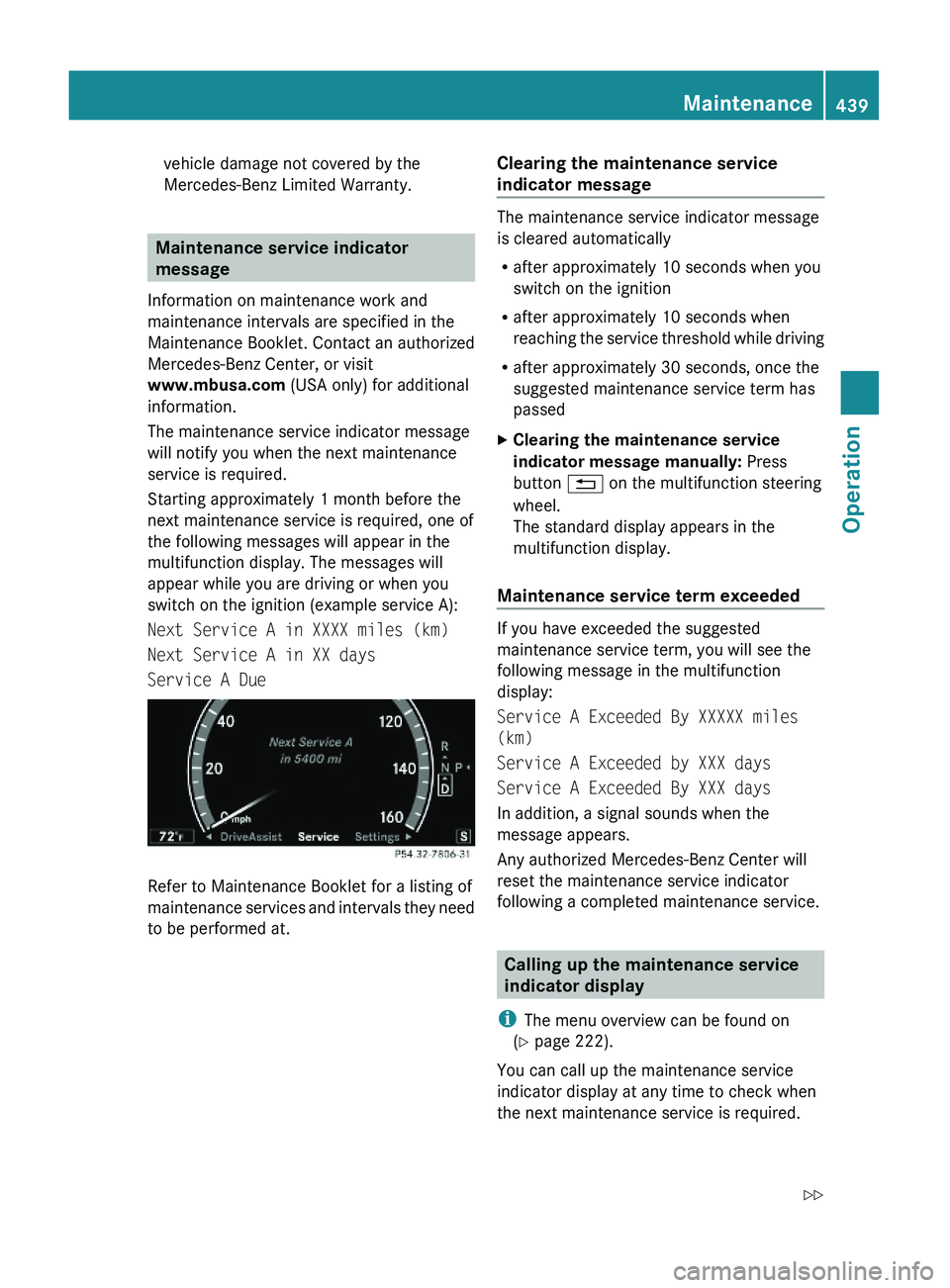
switch on the ignition (example service A):
Next Service A in XXXX miles (km)
Next Service A in XX days
Service A Due
Refer to Maintenance Booklet for a listing of
maintenance services and intervals they need
to be performed at.
Clearing the maintenance service
indicator message
The maintenance service indicator message
is cleared automatically
Rafter approximately 10 seconds when you
switch on the ignition
Rafter approximately 10 seconds when
reaching the service threshold while driving
Rafter approximately 30 seconds, once the
suggested maintenance service term has
passed
XClearing the maintenance service
indicator message manually: Press
button \000A on the multifunction steering
wheel.
The standard display appears in the
multifunction display.
Maintenance service term exceeded
If you have exceeded the suggested
maintenance service term, you will see the
following message in the multifunction
display:
Service A Exceeded By XXXXX miles
(km)
Service A Exceeded by XXX days
Service A Exceeded By XXX days
In addition, a signal sounds when the
message appears.
Any authorized Mercedes-Benz Center will
reset the maintenance service indicator
following a completed maintenance service.
Calling up the maintenance service
indicator display
iThe menu overview can be found on
(Y page 222).
You can call up the maintenance service
indicator display at any time to check when
the next maintenance service is required.
Maintenance439Operation221_AKB; 6; 20, en-USd2ugruen,Version: 2.11.8.12009-09-24T13:28:17+02:00 - Seite 439Z
Page 442 of 548
XSwitch on the ignition.
The standard display of the control system
appears ( Y page 223).XPress button 0040 or 003E on the
multifunction steering wheel to select the
Service menu.XPress button 003D or 003C to select
ASSYST PLUS .XPress button 0064 on the multifunction
steering wheel to confirm.
The maintenance service indicator display
with the maintenance service deadline
appears in the multifunction display.
i If the battery was disconnected, the days
of disconnection will not be included in the
count shown by the maintenance service
indicator. To arrive at the true maintenance
service deadline, you will need to subtract
these days from the days shown in the
maintenance service indicator message or
maintenance service indicator display.
Resetting the maintenance service
indicator
In the event that the maintenance service on
your vehicle is not carried out at an authorized
Mercedes-Benz Center, you can have the
maintenance service indicator reset.
The automotive maintenance facility carrying
out the maintenance service will find the
information for resetting the maintenance
service indicator in the maintenance-relevant
literature for your vehicle.
Such literature is available at any authorized
Mercedes-Benz Center or directly from
Mercedes-Benz.
! If the maintenance service indicator was
reset inadvertently, have an authorized
Mercedes-Benz Center correct it.
Only reset the maintenance service
indicator if the proper maintenance service
has been performed. Not following the
proper maintenance service as described
in the Maintenance Booklet will result in
engine damage and/or other vehicle
damage not covered by the Mercedes-Benz
Limited Warranty.
Vehicle care
Cleaning and care of the vehicle
Notes
Regular and proper care will help to maintain
the value of your vehicle.
GWarning!
Many cleaning products can be hazardous.
Some are poisonous, others are flammable.
Always follow the instructions on the
particular container. Always open your
vehicle’s doors or windows when cleaning the
inside.
Never use fluids or solvents that are not
designed for cleaning your vehicle.
Always lock away cleaning products and keep
them out of reach of children.
! When cleaning the vehicle, do not use
scouring agents. Never apply strong force
and only use a soft, wet cloth or sponge.
Otherwise you may scratch or damage the
surface to be cleaned.
While in operation, even while parked, your
vehicle is subjected to varying external
influences which, if gone unchecked, can
attack the paintwork as well as the vehicle
underbody and cause lasting damage.
Such damage is caused not only by extreme
and varying climatic conditions, but also by:
R Air pollution
R Road salt
R Tar
R Gravel and stone chipping
440Vehicle careOperation
221_AKB; 6; 20, en-USd2ugruen,Version: 2.11.8.12009-09-24T13:28:17+02:00 - Seite 440
Page 448 of 548
wheel cleaners may also damage the wheel
paint if the vehicle is not driven after
cleaning.
Therefore, the vehicle’s brake system
should always be warmed-up before it is
parked after cleaning. Drive your vehicle for
several minutes to allow the brakes to dry.
When applying Mercedes-Benz approved
Tire Care and Mercedes-Benz approved
Wheel Care products, take care not to
spray them on the brake disks.
Plastic and rubber partsXUse a gentle dishwashing detergent or mild
detergent for delicate fabrics as a washing
solution.XWipe with a cloth moistened in a lukewarm
solution.
The surface may temporarily change color.
If this is the case, wait for it to dry.GWarning!
Do not use cleaners or cockpit care sprays
containing solvents to clean the cockpit or the
steering wheel. Cleaners containing solvents
will make the surface porous and vehicle
occupants could suffer serious injuries from
plastic parts coming loose in the event of air
bag deployment.
! Do not use oil, wax or scouring agents.
Otherwise you may scratch or damage the
surface.
Hard plastic trim items
XUse Mercedes-Benz approved Interior Care
on a soft, lint-free cloth and apply with light
pressure.
COMAND display
! You must switch off the COMAND display
and allow it to cool prior to cleaning.
! Do not use any liquids or cleaning agents.
These can damage or even destroy the
COMAND display screen.XUse a standard microfiber cloth and apply
with light pressure.
Steering wheel
XWipe with a damp cloth and dry thoroughly
or clean with Mercedes-Benz approved
Leather Care.
Carpets
XUse Mercedes-Benz approved Carpet and
Fabric Care for cleaning the carpets.
Headliner and shelf below rear window
XUse a soft bristle brush or a dry-shampoo
cleaner in case of excessive dirt.
Seat belts
XOnly use clear, lukewarm water and soap.
! The seat belts must not be treated with
chemical cleaning agents. Do not dry the
seat belts at temperatures above 176‡
(80†) or in direct sunlight.
GWarning!
Do not bleach or dye seat belts as this may
severely weaken them. In a crash they may
not be able to provide adequate protection.
Upholstery
Using aftermarket seat covers or wearing
clothing that have the tendency to give off
coloring (e.g. when wet, etc.) may cause the
upholstery to become permanently
discolored. By lining the seats with a proper
intermediate cover, contact-discoloration will
be prevented.
446Vehicle careOperation
221_AKB; 6; 20, en-USd2ugruen,Version: 2.11.8.12009-09-24T13:28:17+02:00 - Seite 446
Page 451 of 548
Vehicle equipment ............................450
Where will I find ...? ..........................450
Vehicle status messages in the
multifunction display .......................452
What to do if … ..................................489
Unlocking/locking manually ...........499
Resetting activated NECK-PRO
active front head restraints .............501
Replacing batteries (SmartKey,
remote control, headphone) ............502
Replacing bulbs .................................504
Replacing wiper blades ....................507
Flat tire ..............................................508
Battery ...............................................512
Jump starting ....................................514
Towing the vehicle ............................516
Fuses ..................................................519
449Practical hints221_AKB; 6; 20, en-USd2ugruen,Version: 2.11.8.12009-09-24T13:28:17+02:00 - Seite 449
Page 455 of 548
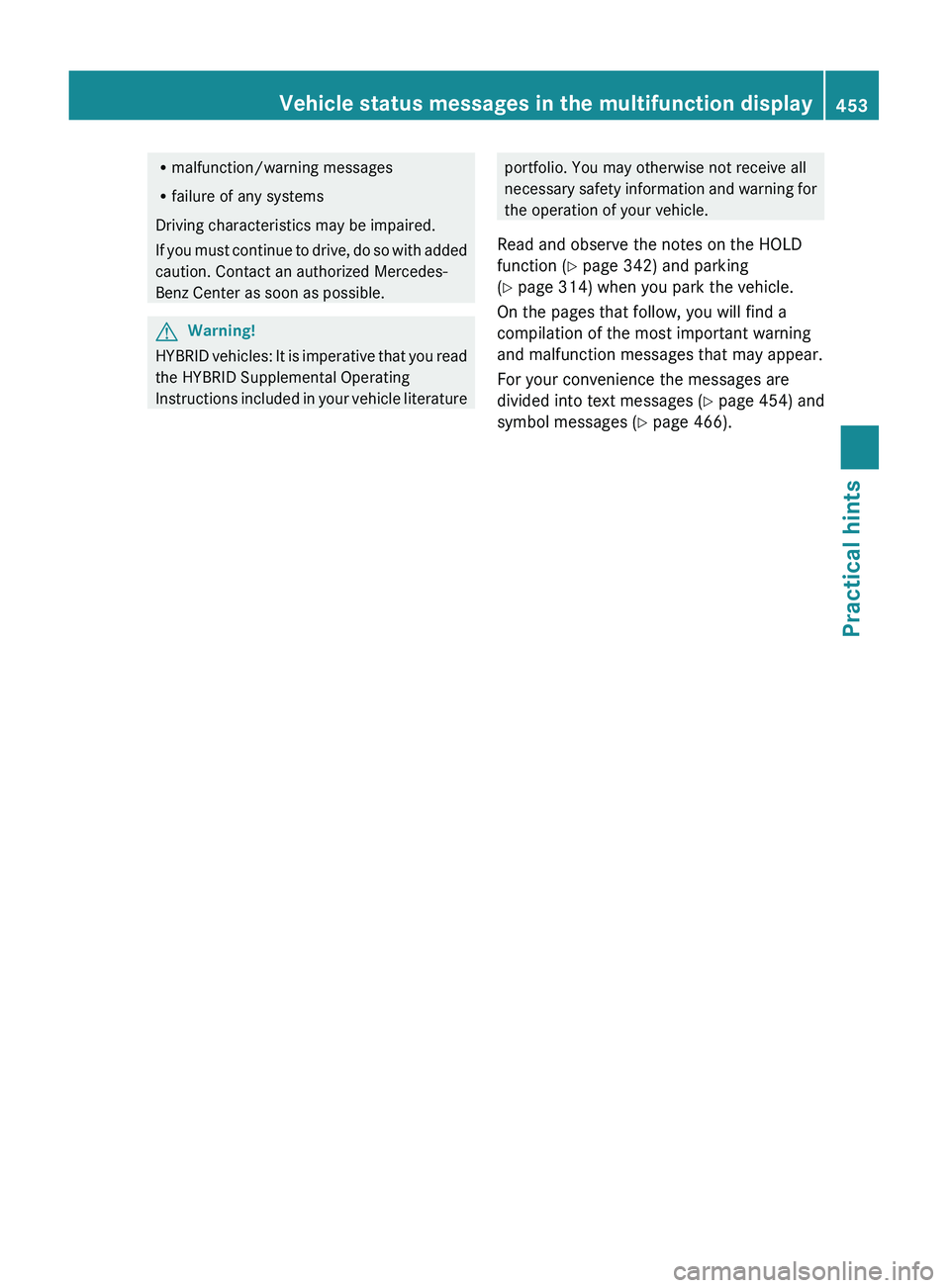
Rmalfunction/warning messages
R failure of any systems
Driving characteristics may be impaired.
If you must continue to drive, do so with added
caution. Contact an authorized Mercedes-
Benz Center as soon as possible.GWarning!
HYBRID vehicles: It is imperative that you read
the HYBRID Supplemental Operating
Instructions included in your vehicle literature
portfolio. You may otherwise not receive all
necessary safety information and warning for
the operation of your vehicle.
Read and observe the notes on the HOLD
function ( Y page 342) and parking
( Y page 314) when you park the vehicle.
On the pages that follow, you will find a
compilation of the most important warning
and malfunction messages that may appear.
For your convenience the messages are
divided into text messages ( Y page 454) and
symbol messages ( Y page 466).Vehicle status messages in the multifunction display453Practical hints221_AKB; 6; 20, en-USd2ugruen,Version: 2.11.8.12009-09-24T13:28:17+02:00 - Seite 453Z
Page 456 of 548
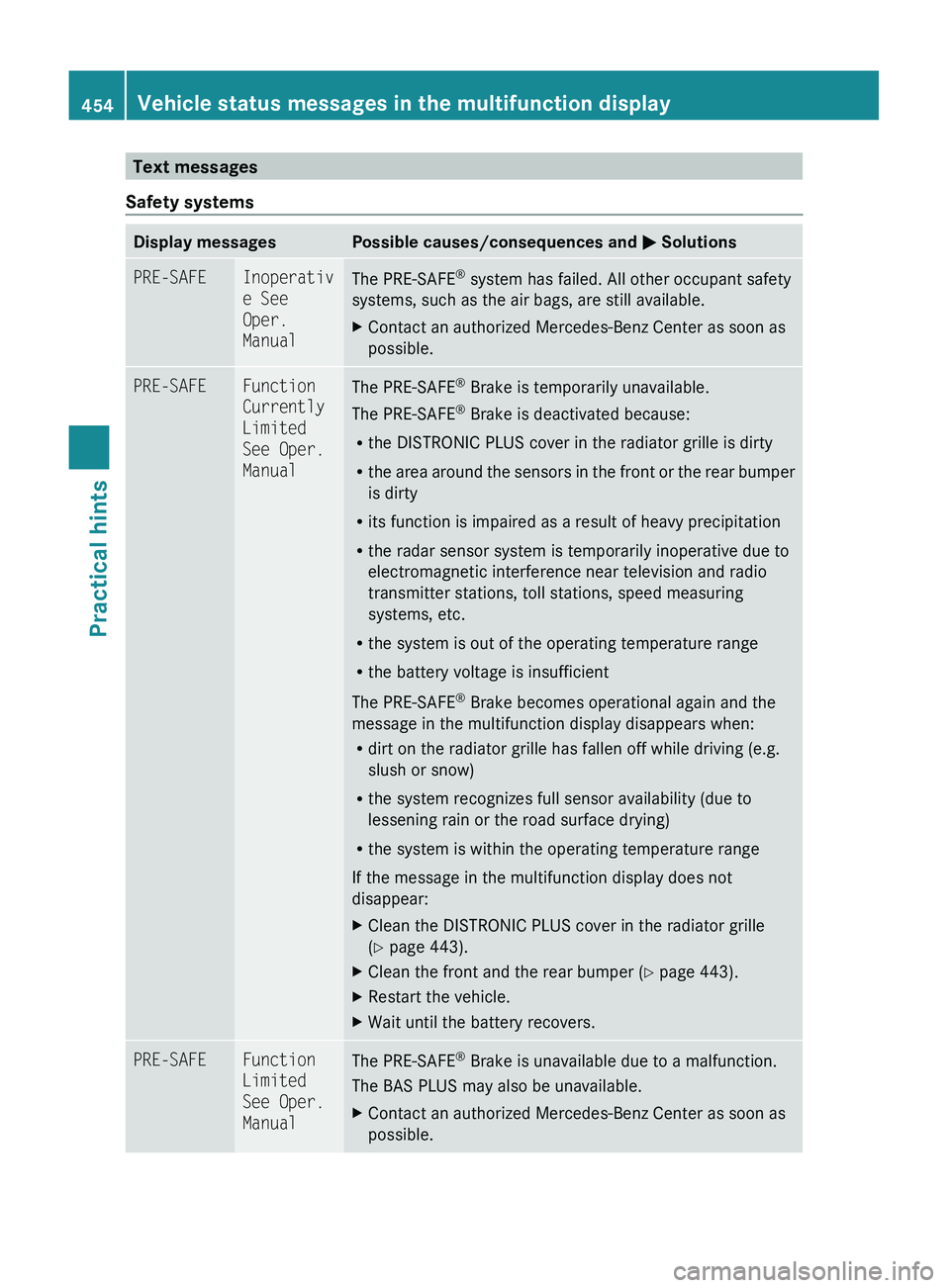
Text messages
Safety systemsDisplay messagesPossible causes/consequences and 0050 SolutionsPRE-SAFEInoperativ
e See
Oper.
ManualThe PRE-SAFE ®
system has failed. All other occupant safety
systems, such as the air bags, are still available.XContact an authorized Mercedes-Benz Center as soon as
possible.PRE-SAFEFunction
Currently
Limited
See Oper.
ManualThe PRE-SAFE ®
Brake is temporarily unavailable.
The PRE-SAFE ®
Brake is deactivated because:
R the DISTRONIC PLUS cover in the radiator grille is dirty
R the area around the sensors in the front or the rear bumper
is dirty
R its function is impaired as a result of heavy precipitation
R the radar sensor system is temporarily inoperative due to
electromagnetic interference near television and radio
transmitter stations, toll stations, speed measuring
systems, etc.
R the system is out of the operating temperature range
R the battery voltage is insufficient
The PRE-SAFE ®
Brake becomes operational again and the
message in the multifunction display disappears when:
R dirt on the radiator grille has fallen off while driving (e.g.
slush or snow)
R the system recognizes full sensor availability (due to
lessening rain or the road surface drying)
R the system is within the operating temperature range
If the message in the multifunction display does not
disappear:XClean the DISTRONIC PLUS cover in the radiator grille
( Y page 443).XClean the front and the rear bumper ( Y page 443).XRestart the vehicle.XWait until the battery recovers.PRE-SAFEFunction
Limited
See Oper.
ManualThe PRE-SAFE ®
Brake is unavailable due to a malfunction.
The BAS PLUS may also be unavailable.XContact an authorized Mercedes-Benz Center as soon as
possible.454Vehicle status messages in the multifunction displayPractical hints
221_AKB; 6; 20, en-USd2ugruen,Version: 2.11.8.12009-09-24T13:28:17+02:00 - Seite 454
Page 457 of 548
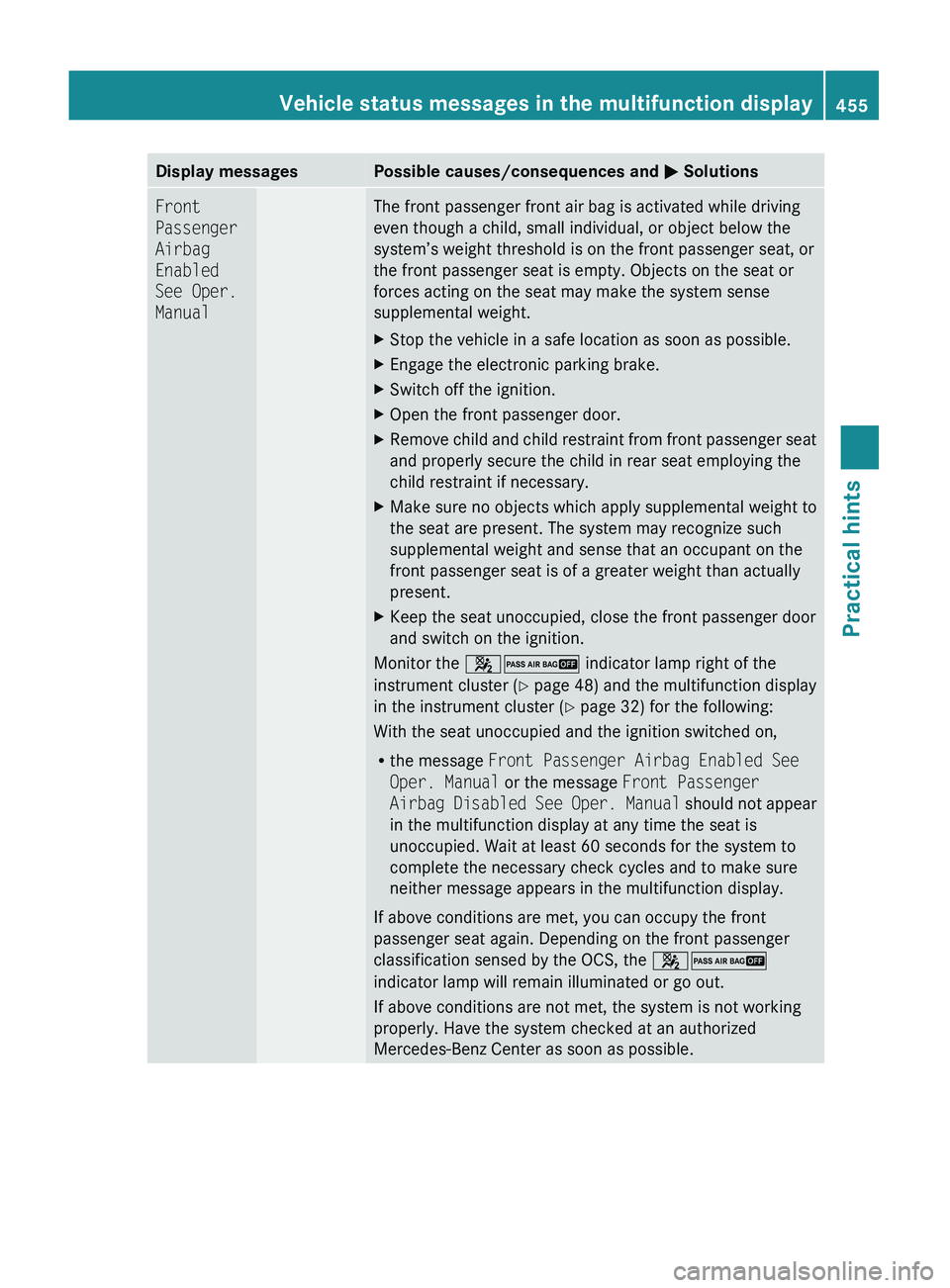
Display messagesPossible causes/consequences and 0050 SolutionsFront
Passenger
Airbag
Enabled
See Oper.
ManualThe front passenger front air bag is activated while driving
even though a child, small individual, or object below the
system’s weight threshold is on the front passenger seat, or
the front passenger seat is empty. Objects on the seat or
forces acting on the seat may make the system sense
supplemental weight.XStop the vehicle in a safe location as soon as possible.XEngage the electronic parking brake.XSwitch off the ignition.XOpen the front passenger door.XRemove child and child restraint from front passenger seat
and properly secure the child in rear seat employing the
child restraint if necessary.XMake sure no objects which apply supplemental weight to
the seat are present. The system may recognize such
supplemental weight and sense that an occupant on the
front passenger seat is of a greater weight than actually
present.XKeep the seat unoccupied, close the front passenger door
and switch on the ignition.
Monitor the 007F007D indicator lamp right of the
instrument cluster ( Y page 48) and the multifunction display
in the instrument cluster ( Y page 32) for the following:
With the seat unoccupied and the ignition switched on,
R the message Front Passenger Airbag Enabled See
Oper. Manual or the message Front Passenger
Airbag Disabled See Oper. Manual should not appear
in the multifunction display at any time the seat is
unoccupied. Wait at least 60 seconds for the system to
complete the necessary check cycles and to make sure
neither message appears in the multifunction display.
If above conditions are met, you can occupy the front
passenger seat again. Depending on the front passenger
classification sensed by the OCS, the 007F007D
indicator lamp will remain illuminated or go out.
If above conditions are not met, the system is not working
properly. Have the system checked at an authorized
Mercedes-Benz Center as soon as possible.
Vehicle status messages in the multifunction display455Practical hints221_AKB; 6; 20, en-USd2ugruen,Version: 2.11.8.12009-09-24T13:28:17+02:00 - Seite 455Z
Page 458 of 548
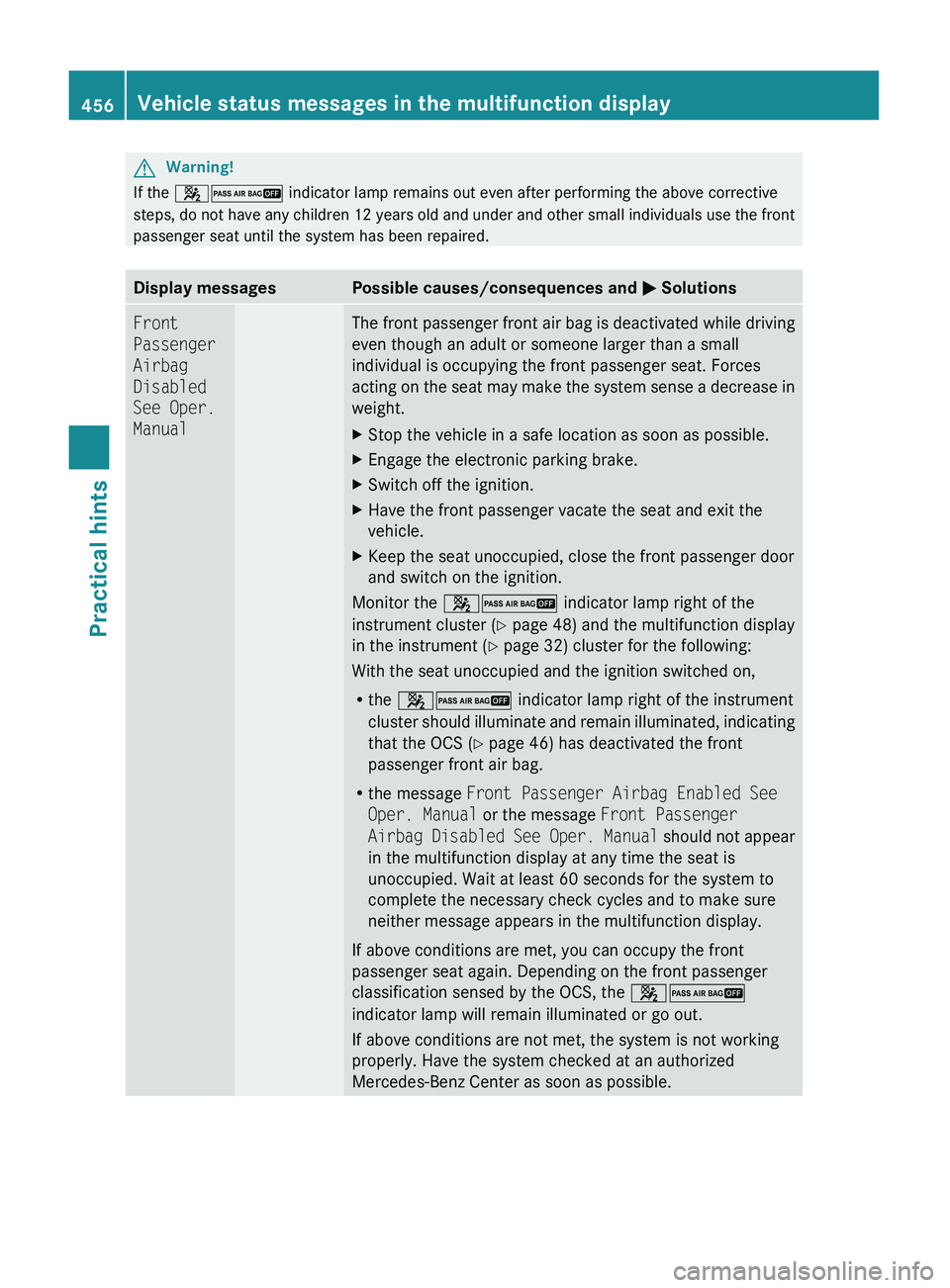
GWarning!
If the 007F007D indicator lamp remains out even after performing the above corrective
steps, do not have any children 12 years old and under and other small individuals use the front
passenger seat until the system has been repaired.
Display messagesPossible causes/consequences and 0050 SolutionsFront
Passenger
Airbag
Disabled
See Oper.
ManualThe front passenger front air bag is deactivated while driving
even though an adult or someone larger than a small
individual is occupying the front passenger seat. Forces
acting on the seat may make the system sense a decrease in
weight.XStop the vehicle in a safe location as soon as possible.XEngage the electronic parking brake.XSwitch off the ignition.XHave the front passenger vacate the seat and exit the
vehicle.XKeep the seat unoccupied, close the front passenger door
and switch on the ignition.
Monitor the 007F007D indicator lamp right of the
instrument cluster ( Y page 48) and the multifunction display
in the instrument ( Y page 32) cluster for the following:
With the seat unoccupied and the ignition switched on,
R the 007F007D indicator lamp right of the instrument
cluster should illuminate and remain illuminated, indicating
that the OCS ( Y page 46) has deactivated the front
passenger front air bag.
R the message Front Passenger Airbag Enabled See
Oper. Manual or the message Front Passenger
Airbag Disabled See Oper. Manual should not appear
in the multifunction display at any time the seat is
unoccupied. Wait at least 60 seconds for the system to
complete the necessary check cycles and to make sure
neither message appears in the multifunction display.
If above conditions are met, you can occupy the front
passenger seat again. Depending on the front passenger
classification sensed by the OCS, the 007F007D
indicator lamp will remain illuminated or go out.
If above conditions are not met, the system is not working
properly. Have the system checked at an authorized
Mercedes-Benz Center as soon as possible.
456Vehicle status messages in the multifunction displayPractical hints
221_AKB; 6; 20, en-USd2ugruen,Version: 2.11.8.12009-09-24T13:28:17+02:00 - Seite 456
Page 459 of 548
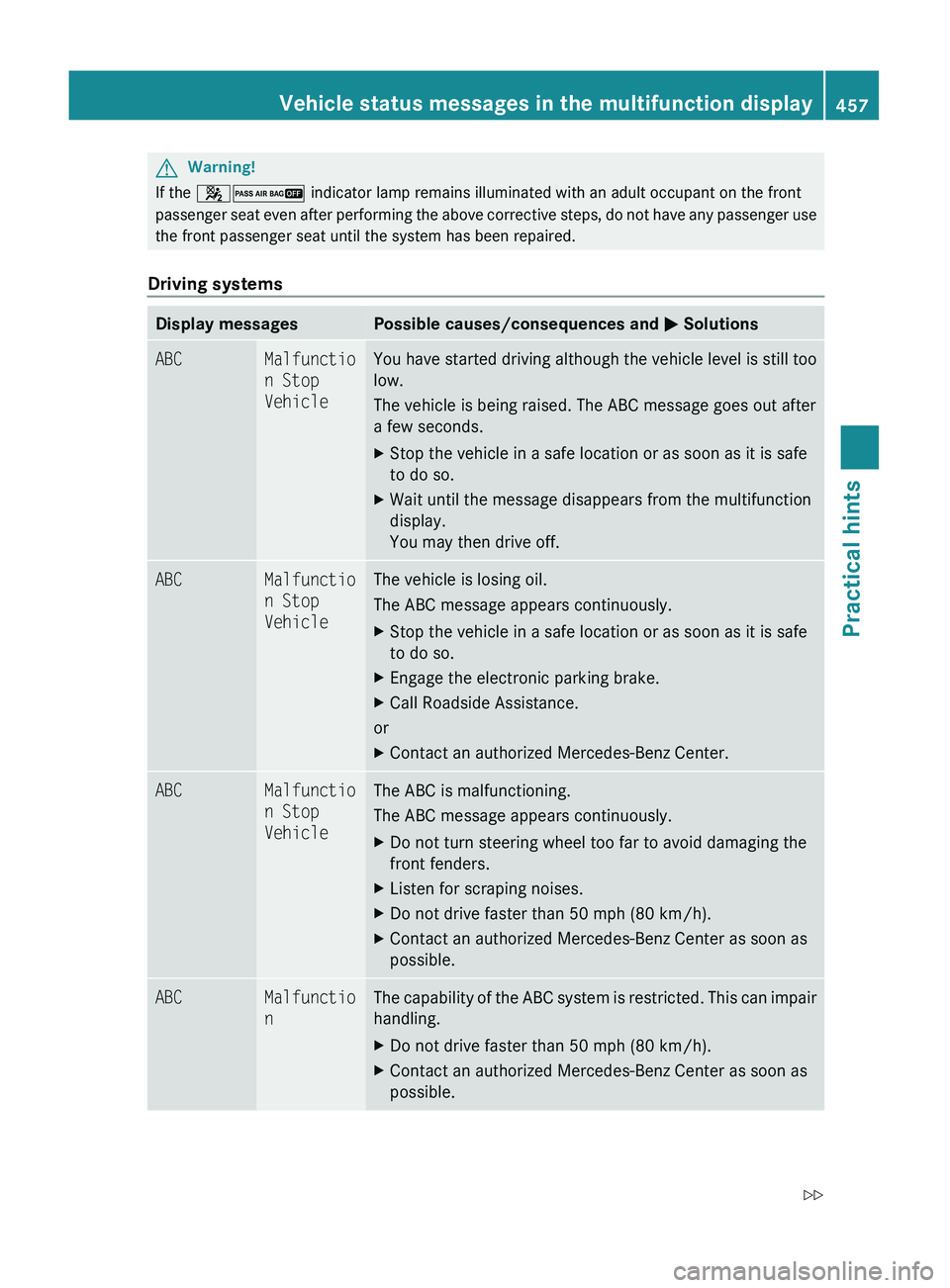
GWarning!
If the 007F007D indicator lamp remains illuminated with an adult occupant on the front
passenger seat even after performing the above corrective steps, do not have any passenger use
the front passenger seat until the system has been repaired.Driving systems
Display messagesPossible causes/consequences and 0050 SolutionsABCMalfunctio
n Stop
VehicleYou have started driving although the vehicle level is still too
low.
The vehicle is being raised. The ABC message goes out after
a few seconds.XStop the vehicle in a safe location or as soon as it is safe
to do so.XWait until the message disappears from the multifunction
display.
You may then drive off.ABCMalfunctio
n Stop
VehicleThe vehicle is losing oil.
The ABC message appears continuously.XStop the vehicle in a safe location or as soon as it is safe
to do so.XEngage the electronic parking brake.XCall Roadside Assistance.
or
XContact an authorized Mercedes-Benz Center.ABCMalfunctio
n Stop
VehicleThe ABC is malfunctioning.
The ABC message appears continuously.XDo not turn steering wheel too far to avoid damaging the
front fenders.XListen for scraping noises.XDo not drive faster than 50 mph (80 km/h).XContact an authorized Mercedes-Benz Center as soon as
possible.ABCMalfunctio
nThe capability of the ABC system is restricted. This can impair
handling.XDo not drive faster than 50 mph (80 km/h).XContact an authorized Mercedes-Benz Center as soon as
possible.Vehicle status messages in the multifunction display457Practical hints221_AKB; 6; 20, en-USd2ugruen,Version: 2.11.8.12009-09-24T13:28:17+02:00 - Seite 457Z
Page 460 of 548
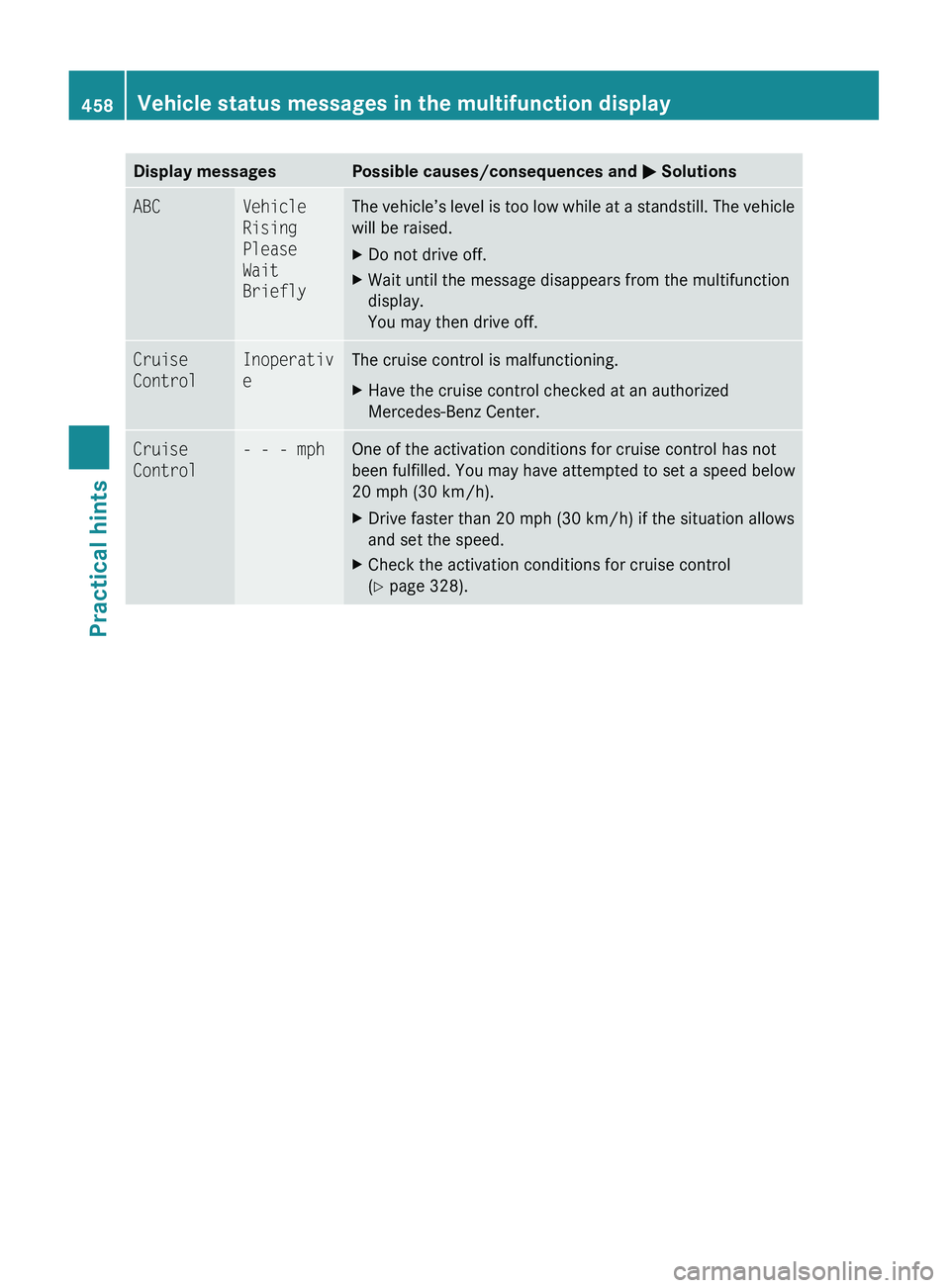
Display messagesPossible causes/consequences and 0050 SolutionsABCVehicle
Rising
Please
Wait
BrieflyThe vehicle’s level is too low while at a standstill. The vehicle
will be raised.XDo not drive off.XWait until the message disappears from the multifunction
display.
You may then drive off.Cruise
ControlInoperativ
eThe cruise control is malfunctioning.XHave the cruise control checked at an authorized
Mercedes-Benz Center.Cruise
Control- - - mphOne of the activation conditions for cruise control has not
been fulfilled. You may have attempted to set a speed below
20 mph (30 km/h).XDrive faster than 20 mph (30 km/h) if the situation allows
and set the speed.XCheck the activation conditions for cruise control
( Y page 328).458Vehicle status messages in the multifunction displayPractical hints
221_AKB; 6; 20, en-USd2ugruen,Version: 2.11.8.12009-09-24T13:28:17+02:00 - Seite 458