battery MERCEDES-BENZ S CLASS 2010 Owner's Manual
[x] Cancel search | Manufacturer: MERCEDES-BENZ, Model Year: 2010, Model line: S CLASS, Model: MERCEDES-BENZ S CLASS 2010Pages: 548, PDF Size: 11.45 MB
Page 390 of 548
To avoid possible injury to children sitting in
the rear seat, activate the override switch.
Activation of the override switch deactivates
the rear center console lighter.
If the engine is off and the cigarette lighter is
being used extensively, the vehicle battery
may become discharged.
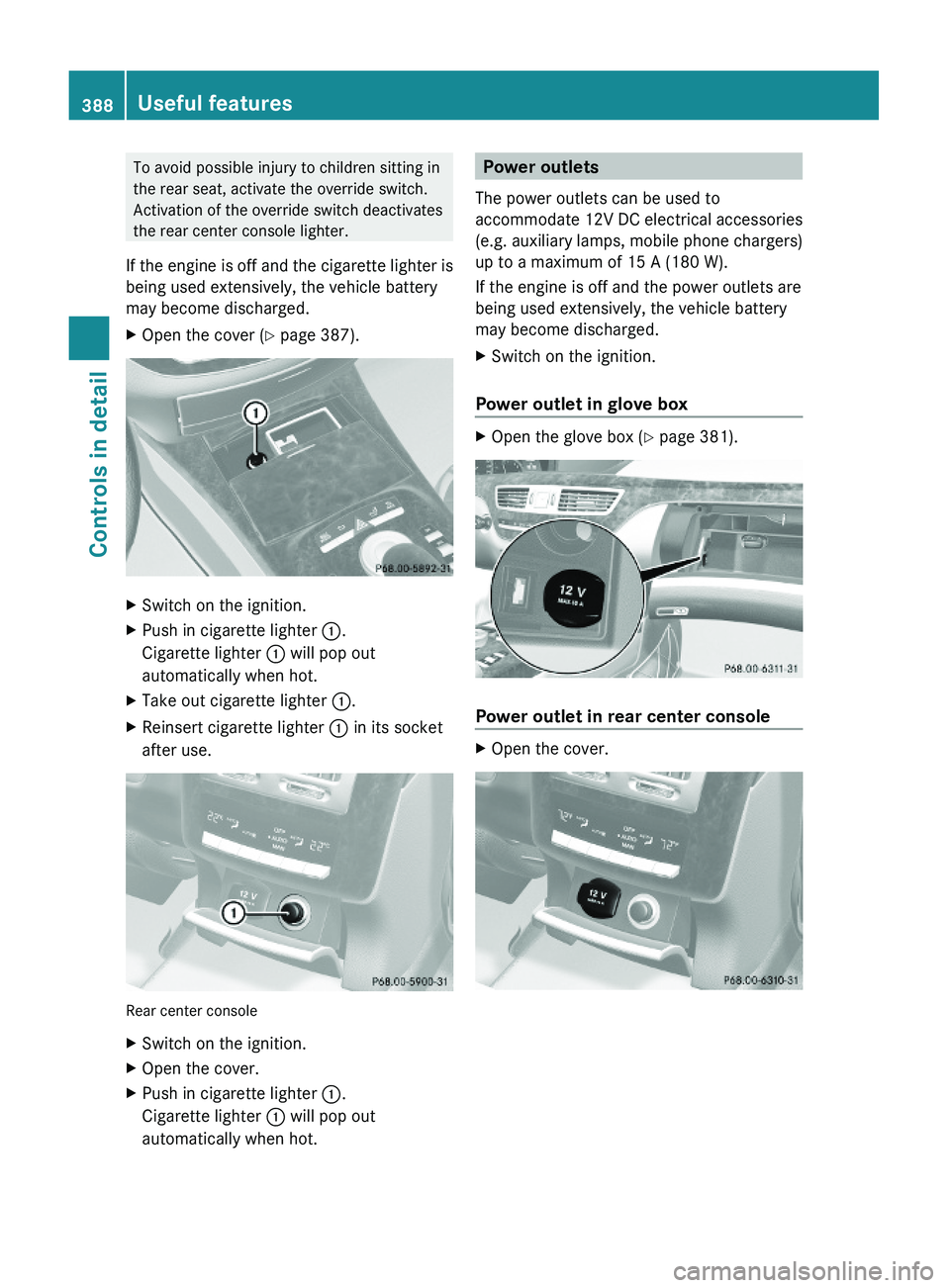
XOpen the cover (Y page 387).XSwitch on the ignition.XPush in cigarette lighter \000F.
Cigarette lighter \000F will pop out
automatically when hot.
XTake out cigarette lighter \000F.XReinsert cigarette lighter \000F in its socket
after use.
Rear center console
XSwitch on the ignition.XOpen the cover.XPush in cigarette lighter \000F.
Cigarette lighter \000F will pop out
automatically when hot.
Power outlets
The power outlets can be used to
accommodate 12V DC electrical accessories
(e.g. auxiliary lamps, mobile phone chargers)
up to a maximum of 15 A (180 W).
If the engine is off and the power outlets are
being used extensively, the vehicle battery
may become discharged.
XSwitch on the ignition.
Power outlet in glove box
XOpen the glove box (Y page 381).
Power outlet in rear center console
XOpen the cover.388Useful featuresControls in detail
221_AKB; 6; 20, en-USd2ugruen,Version: 2.11.8.12009-09-24T13:28:17+02:00 - Seite 388
Page 391 of 548
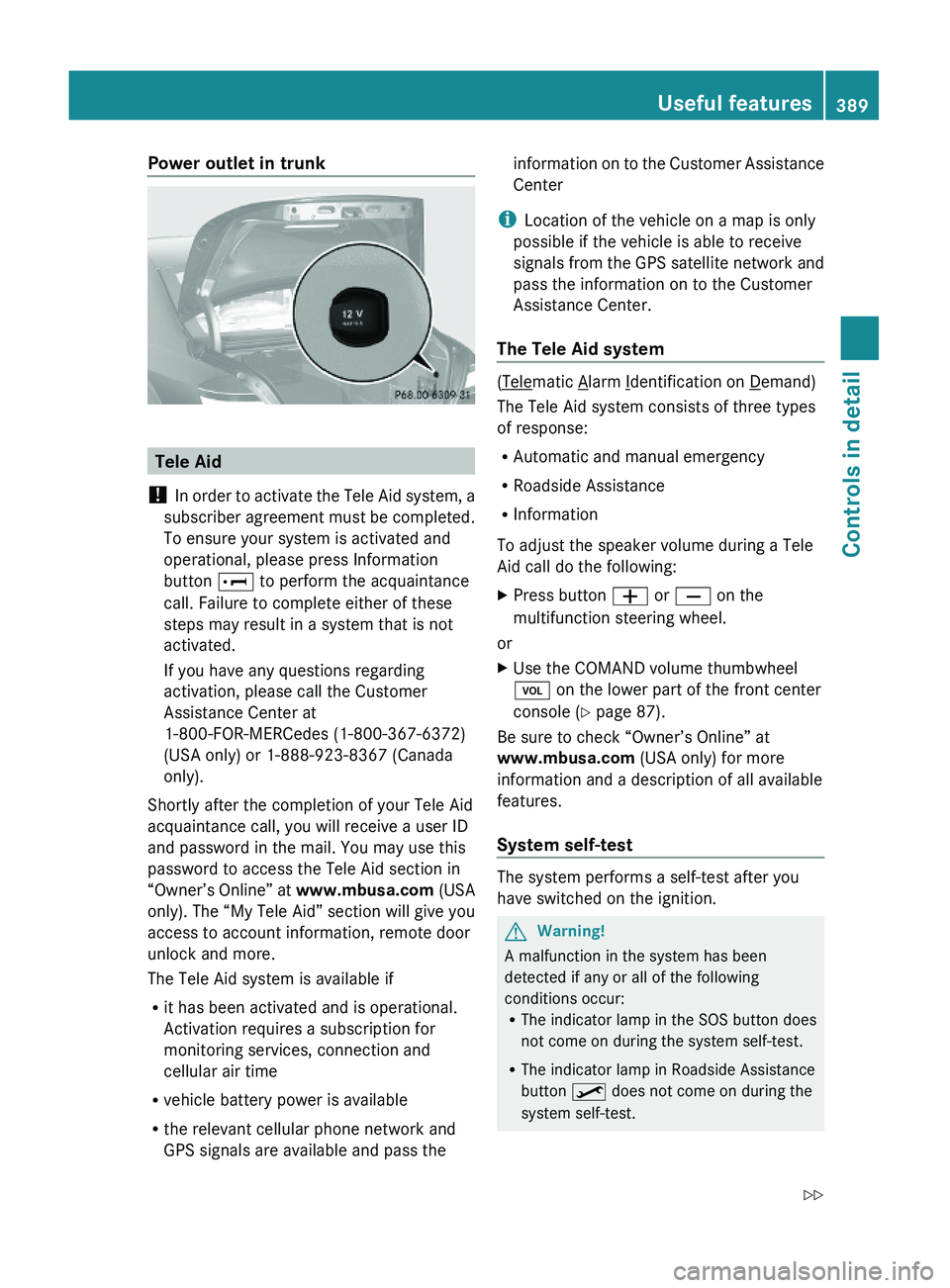
Power outlet in trunk
Tele Aid
! In order to activate the Tele Aid system, a
subscriber agreement must be completed.
To ensure your system is activated and
operational, please press Information
button \000] to perform the acquaintance
call. Failure to complete either of these
steps may result in a system that is not
activated.
If you have any questions regarding
activation, please call the Customer
Assistance Center at
1-800-FOR-MERCedes (1-800-367-6372)
(USA only) or 1-888-923-8367 (Canada
only).
Shortly after the completion of your Tele Aid
acquaintance call, you will receive a user ID
and password in the mail. You may use this
password to access the Tele Aid section in
“Owner’s Online” at www.mbusa.com (USA
only). The “My Tele Aid” section will give you
access to account information, remote door
unlock and more.
The Tele Aid system is available if
Rit has been activated and is operational.
Activation requires a subscription for
monitoring services, connection and
cellular air time
Rvehicle battery power is available
Rthe relevant cellular phone network and
GPS signals are available and pass the
information on to the Customer Assistance
Center
iLocation of the vehicle on a map is only
possible if the vehicle is able to receive
signals from the GPS satellite network and
pass the information on to the Customer
Assistance Center.
The Tele Aid system
(Telematic Alarm Identification on Demand)
The Tele Aid system consists of three types
of response:
RAutomatic and manual emergency
RRoadside Assistance
RInformation
To adjust the speaker volume during a Tele
Aid call do the following:
XPress button \000Z or \000[ on the
multifunction steering wheel.
or
XUse the COMAND volume thumbwheel
\000M on the lower part of the front center
console (Y page 87).
Be sure to check “Owner’s Online” at
www.mbusa.com (USA only) for more
information and a description of all available
features.
System self-test
The system performs a self-test after you
have switched on the ignition.
GWarning!
A malfunction in the system has been
detected if any or all of the following
conditions occur:RThe indicator lamp in the SOS button does
not come on during the system self-test.
RThe indicator lamp in Roadside Assistance
button \000
Page 400 of 548
Reprogramming a single signal
transmitter button
To program a device using a signal
transmitter button previously trained, follow
these steps:
XSwitch on the ignition.XPress and hold the desired signal
transmitter button ( 0047, 008A or 0088). Do not
release the button.
Indicator lamp 0046 will begin to flash after
20 seconds.XWithout releasing the signal transmitter
button, proceed with programming starting
with step 3.
Operation of integrated remote control
XSwitch on the ignition.XSelect and press the appropriate
integrated signal transmitter button ( 0047,
008A or 0088) to activate the remote controlled
device.
The integrated remote control transmitter
continues to send the signal as long as the
button is pressed – up to 20 seconds.
Erasing the integrated remote control
memory
i If you sell your vehicle, erase the codes of
all three channels.
XSwitch on the ignition.XSimultaneously press and hold outer signal
transmitter buttons 0047 and 0088, for
approximately 20 seconds, until indicator
lamp 0046 flashes rapidly. Do not hold for
longer than 30 seconds.
The codes of all three channels are erased.Programming tips
If you are having difficulty programming the
integrated remote control, here are some
helpful tips:
R Check the frequency of hand-held remote
control 0086 (typically located on the reverse
side of the remote). The integrated remote
control is compatible with radio-frequency
devices operating between 280-390 MHz.
R Put a new battery in hand-held remote
control 0086. This will increase the likelihood
of the hand-held remote control sending a
stronger and more accurate signal to the
integrated remote control.
R While performing step 3, hold hand-held
remote control 0086 at different lengths and
angles from the signal transmitter button
( 0047 , 008A or 0088) you are programming.
Attempt varying angles at the distance of 2
to 12 inches (5 to 30 cm) away or the same
angle at varying distances.
R If another hand-held remote control is
available for the same device, try the
programming steps again using that other
hand-held remote control. Make sure new
batteries are in the hand-held remote
control before beginning the procedure.
R Straighten the antenna wire from the
garage door opener assembly. This may
help improve transmitting and/or receiving
signals.
i Certain types of garage door openers are
incompatible with the integrated remote
control. If you should experience further
difficulties with programming the
integrated remote control, contact an
authorized Mercedes-Benz Center, or call
the Mercedes-Benz Customer Assistance
Center (USA only) at
1-800-FOR-MERCedes (1-800-367-6372),
or the HomeLink ®
Hotline (USA only) at
1-800-355-3515, or the Customer Service
(Canada only) at 1-800-387-0100.
398Useful featuresControls in detail
221_AKB; 6; 20, en-USd2ugruen,Version: 2.11.8.12009-09-24T13:28:17+02:00 - Seite 398
Page 433 of 548
GAWR (Gross Axle Weight Rating)
The GAWR is the maximum permissible axle
weight. The gross vehicle weight on each axle
must never exceed the GAWR for the front
and rear axle indicated on the certification
label located on the driver’s door B-pillar.
GVW (Gross Vehicle Weight)
The GVW comprises the weight of the vehicle
including fuel, tools, spare wheel, installed
accessories, passengers and cargo and, if
applicable, trailer tongue load. The GVW must
never exceed the GVWR indicated on the
certification label located on the driver’s door
B-pillar.
GVWR (Gross Vehicle Weight Rating)
This is the maximum permissible vehicle
weight of the fully loaded vehicle (weight of
the vehicle including all options, passengers,
fuel, and cargo and, if applicable, trailer
tongue load). It is indicated on the
certification label located on the driver’s door
B-pillar.
Kilopascal (kPa)
Metric unit for air pressure. There are 6.9 kPa
to 1 psi; another metric unit for air pressure
is bar. There are 100 kilopascals (kPa) to
1 bar.
Load index
Numerical code associated with the
maximum load a tire can support.
Maximum load rating
The maximum load in kilograms and pounds
that can be carried by the tire.
Maximum loaded vehicle weight
The sum of curb weight, accessory weight,
total load limit, and production options
weight.
Maximum permissible tire inflation
pressure
This number is the greatest amount of air
pressure that should ever be put in the tire.
Normal occupant weight
The number of occupants the vehicle is
designed to seat, multiplied by 68 kilograms
(150 lb).
Occupant distribution
The distribution of occupants in a vehicle at
their designated seating positions.
Production options weight
The combined weight of those installed
regular production options weighing over
5 lbs (2.3 kilograms) in excess of those
standard items which they replace, not
previously considered in curb weight or
accessory weight, including heavy duty
brakes, ride levelers, roof rack, heavy duty
battery, and special trim.
PSI (Pounds per square inch)
A standard unit of measure for air pressure.
Recommended tire inflation pressure
The recommended tire inflation pressure for
normal driving conditions is listed on the Tire
and Loading Information placard located on
the driver’s door B-pillar. It provides best
handling, tread life and riding comfort.
Supplemental information pertaining to
special driving situations can be found on the
tire inflation pressure label on the inside of
the fuel filler flap.
Rim
A metal support for a tire or a tire and tube
assembly upon which the tire beads are
seated.
Tires and wheels431Operation221_AKB; 6; 20, en-USd2ugruen,Version: 2.11.8.12009-09-24T13:28:17+02:00 - Seite 431Z
Page 442 of 548
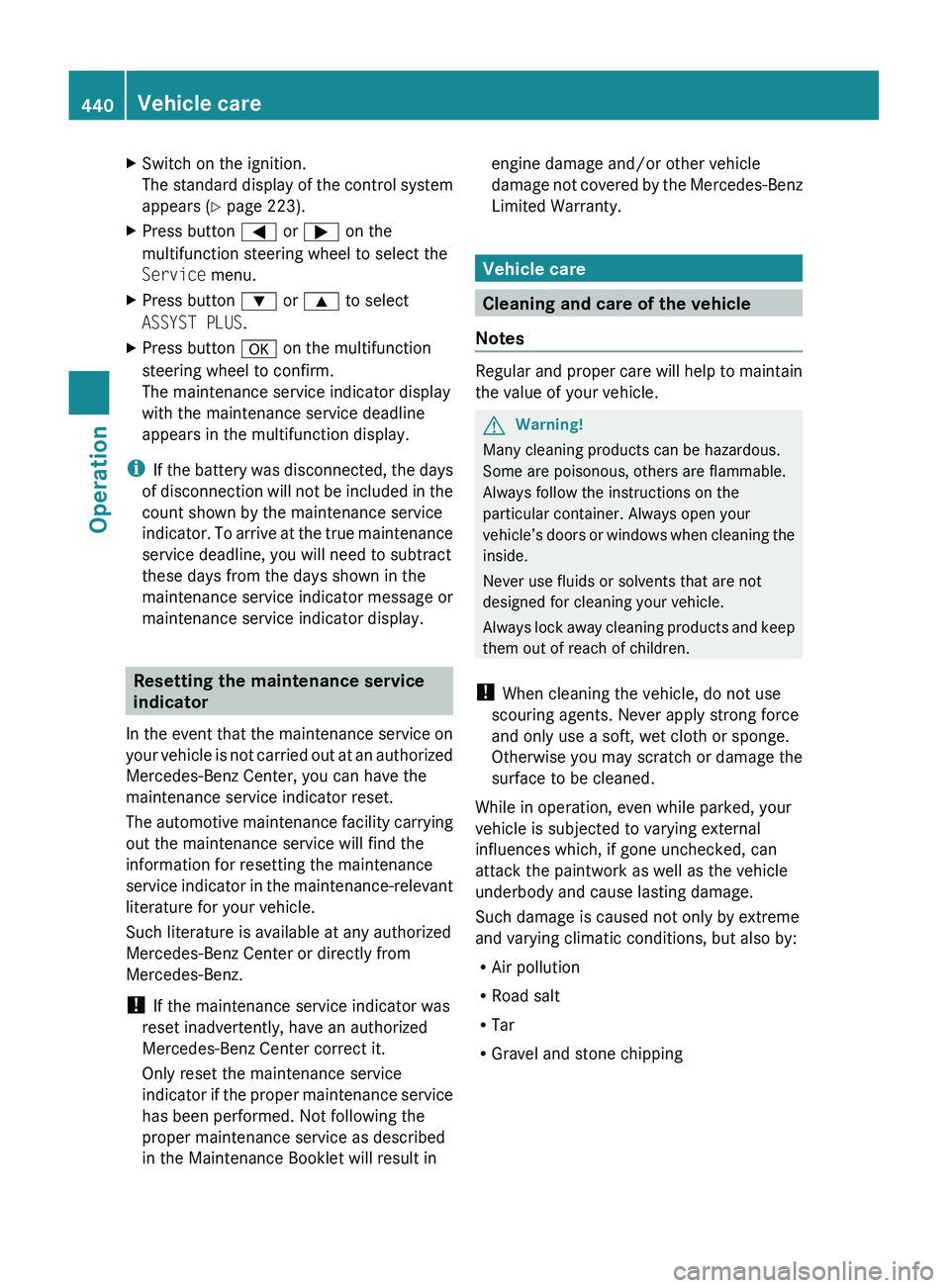
XSwitch on the ignition.
The standard display of the control system
appears ( Y page 223).XPress button 0040 or 003E on the
multifunction steering wheel to select the
Service menu.XPress button 003D or 003C to select
ASSYST PLUS .XPress button 0064 on the multifunction
steering wheel to confirm.
The maintenance service indicator display
with the maintenance service deadline
appears in the multifunction display.
i If the battery was disconnected, the days
of disconnection will not be included in the
count shown by the maintenance service
indicator. To arrive at the true maintenance
service deadline, you will need to subtract
these days from the days shown in the
maintenance service indicator message or
maintenance service indicator display.
Resetting the maintenance service
indicator
In the event that the maintenance service on
your vehicle is not carried out at an authorized
Mercedes-Benz Center, you can have the
maintenance service indicator reset.
The automotive maintenance facility carrying
out the maintenance service will find the
information for resetting the maintenance
service indicator in the maintenance-relevant
literature for your vehicle.
Such literature is available at any authorized
Mercedes-Benz Center or directly from
Mercedes-Benz.
! If the maintenance service indicator was
reset inadvertently, have an authorized
Mercedes-Benz Center correct it.
Only reset the maintenance service
indicator if the proper maintenance service
has been performed. Not following the
proper maintenance service as described
in the Maintenance Booklet will result in
engine damage and/or other vehicle
damage not covered by the Mercedes-Benz
Limited Warranty.
Vehicle care
Cleaning and care of the vehicle
Notes
Regular and proper care will help to maintain
the value of your vehicle.
GWarning!
Many cleaning products can be hazardous.
Some are poisonous, others are flammable.
Always follow the instructions on the
particular container. Always open your
vehicle’s doors or windows when cleaning the
inside.
Never use fluids or solvents that are not
designed for cleaning your vehicle.
Always lock away cleaning products and keep
them out of reach of children.
! When cleaning the vehicle, do not use
scouring agents. Never apply strong force
and only use a soft, wet cloth or sponge.
Otherwise you may scratch or damage the
surface to be cleaned.
While in operation, even while parked, your
vehicle is subjected to varying external
influences which, if gone unchecked, can
attack the paintwork as well as the vehicle
underbody and cause lasting damage.
Such damage is caused not only by extreme
and varying climatic conditions, but also by:
R Air pollution
R Road salt
R Tar
R Gravel and stone chipping
440Vehicle careOperation
221_AKB; 6; 20, en-USd2ugruen,Version: 2.11.8.12009-09-24T13:28:17+02:00 - Seite 440
Page 451 of 548
Vehicle equipment ............................450
Where will I find ...? ..........................450
Vehicle status messages in the
multifunction display .......................452
What to do if … ..................................489
Unlocking/locking manually ...........499
Resetting activated NECK-PRO
active front head restraints .............501
Replacing batteries (SmartKey,
remote control, headphone) ............502
Replacing bulbs .................................504
Replacing wiper blades ....................507
Flat tire ..............................................508
Battery ...............................................512
Jump starting ....................................514
Towing the vehicle ............................516
Fuses ..................................................519
449Practical hints221_AKB; 6; 20, en-USd2ugruen,Version: 2.11.8.12009-09-24T13:28:17+02:00 - Seite 449
Page 456 of 548
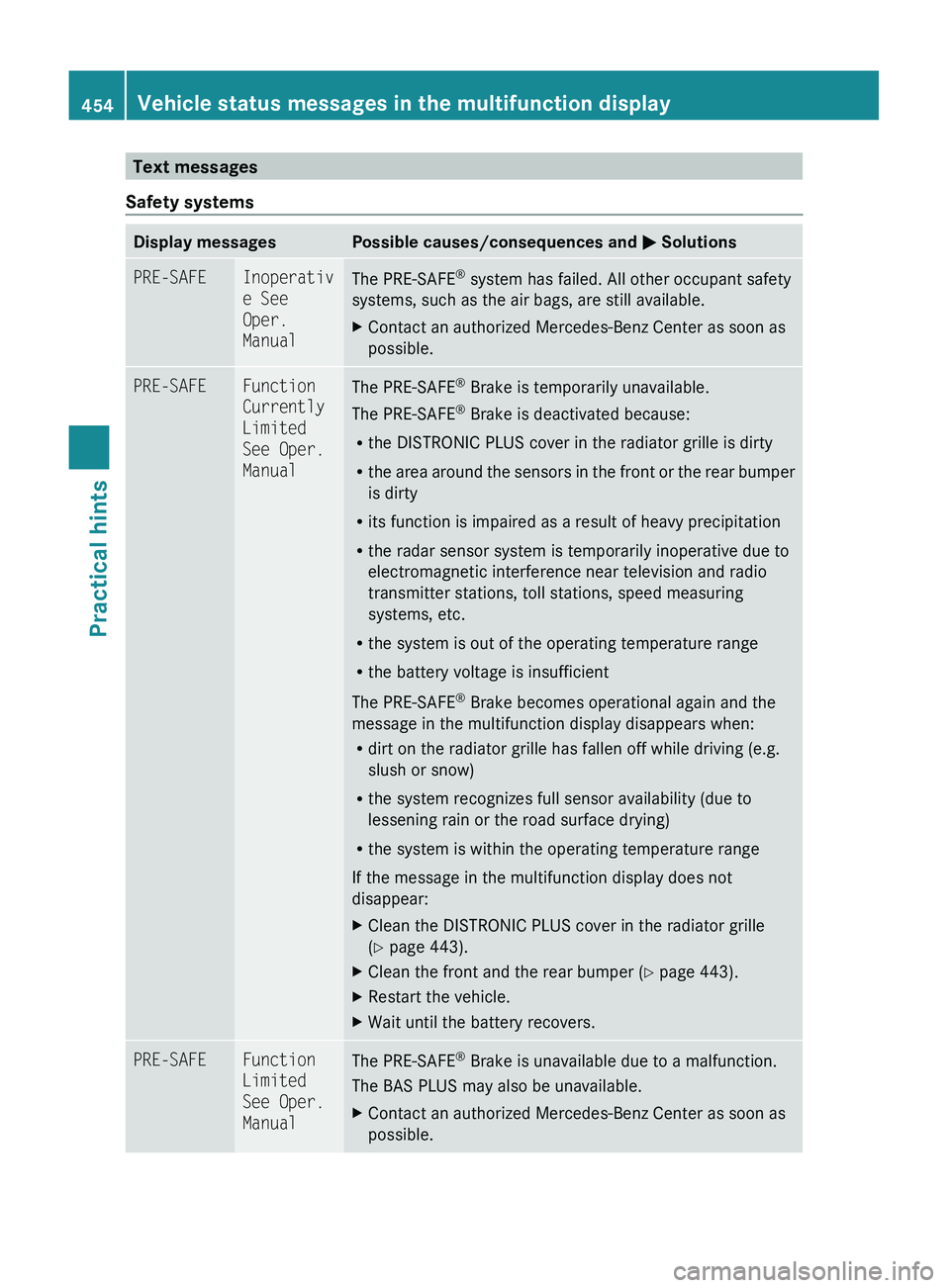
Text messages
Safety systemsDisplay messagesPossible causes/consequences and 0050 SolutionsPRE-SAFEInoperativ
e See
Oper.
ManualThe PRE-SAFE ®
system has failed. All other occupant safety
systems, such as the air bags, are still available.XContact an authorized Mercedes-Benz Center as soon as
possible.PRE-SAFEFunction
Currently
Limited
See Oper.
ManualThe PRE-SAFE ®
Brake is temporarily unavailable.
The PRE-SAFE ®
Brake is deactivated because:
R the DISTRONIC PLUS cover in the radiator grille is dirty
R the area around the sensors in the front or the rear bumper
is dirty
R its function is impaired as a result of heavy precipitation
R the radar sensor system is temporarily inoperative due to
electromagnetic interference near television and radio
transmitter stations, toll stations, speed measuring
systems, etc.
R the system is out of the operating temperature range
R the battery voltage is insufficient
The PRE-SAFE ®
Brake becomes operational again and the
message in the multifunction display disappears when:
R dirt on the radiator grille has fallen off while driving (e.g.
slush or snow)
R the system recognizes full sensor availability (due to
lessening rain or the road surface drying)
R the system is within the operating temperature range
If the message in the multifunction display does not
disappear:XClean the DISTRONIC PLUS cover in the radiator grille
( Y page 443).XClean the front and the rear bumper ( Y page 443).XRestart the vehicle.XWait until the battery recovers.PRE-SAFEFunction
Limited
See Oper.
ManualThe PRE-SAFE ®
Brake is unavailable due to a malfunction.
The BAS PLUS may also be unavailable.XContact an authorized Mercedes-Benz Center as soon as
possible.454Vehicle status messages in the multifunction displayPractical hints
221_AKB; 6; 20, en-USd2ugruen,Version: 2.11.8.12009-09-24T13:28:17+02:00 - Seite 454
Page 461 of 548
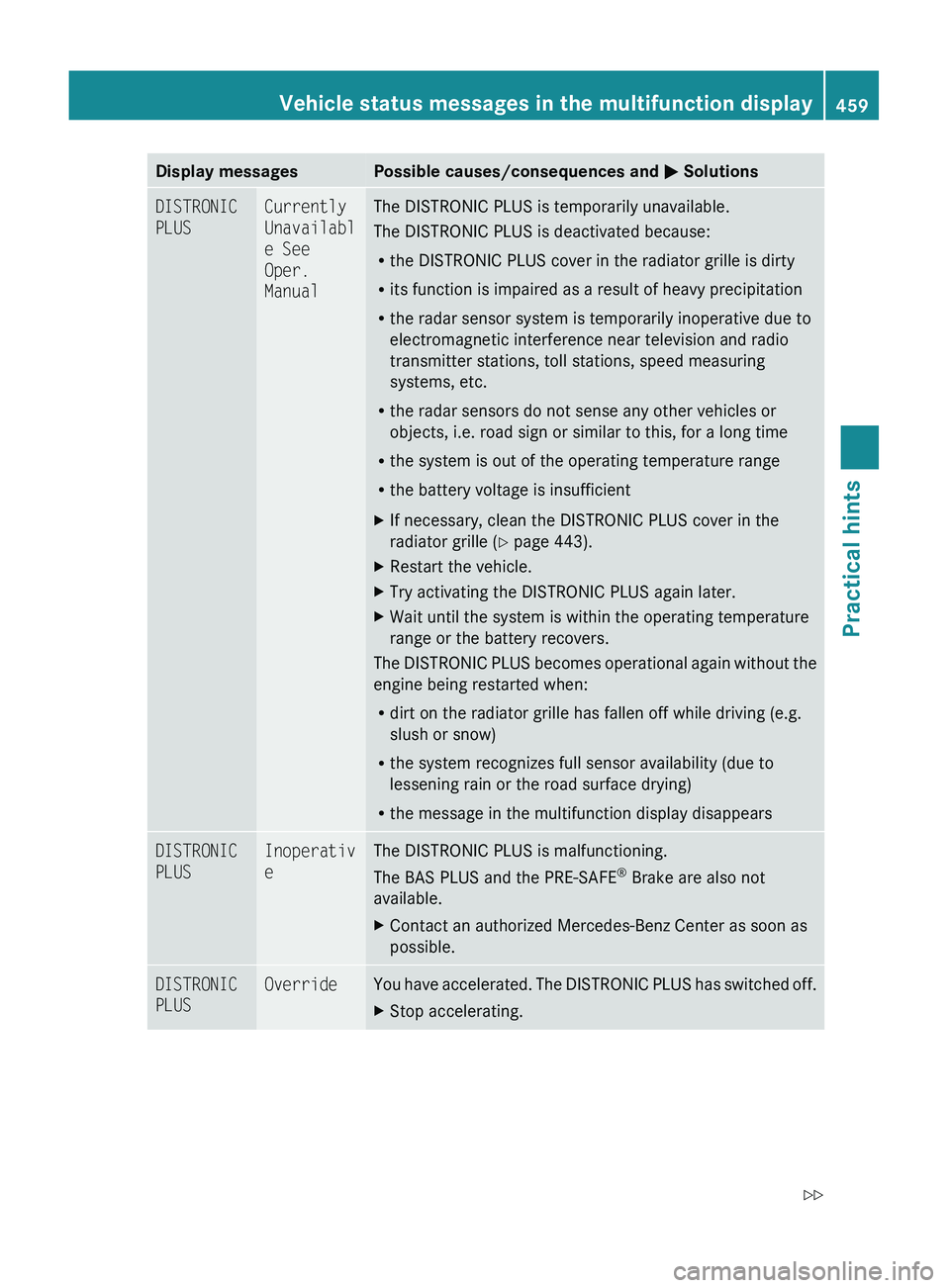
Display messagesPossible causes/consequences and 0050 SolutionsDISTRONIC
PLUSCurrently
Unavailabl
e See
Oper.
ManualThe DISTRONIC PLUS is temporarily unavailable.
The DISTRONIC PLUS is deactivated because:
R the DISTRONIC PLUS cover in the radiator grille is dirty
R its function is impaired as a result of heavy precipitation
R the radar sensor system is temporarily inoperative due to
electromagnetic interference near television and radio
transmitter stations, toll stations, speed measuring
systems, etc.
R the radar sensors do not sense any other vehicles or
objects, i.e. road sign or similar to this, for a long time
R the system is out of the operating temperature range
R the battery voltage is insufficientXIf necessary, clean the DISTRONIC PLUS cover in the
radiator grille ( Y page 443).XRestart the vehicle.XTry activating the DISTRONIC PLUS again later.XWait until the system is within the operating temperature
range or the battery recovers.
The DISTRONIC PLUS becomes operational again without the
engine being restarted when:
R dirt on the radiator grille has fallen off while driving (e.g.
slush or snow)
R the system recognizes full sensor availability (due to
lessening rain or the road surface drying)
R the message in the multifunction display disappears
DISTRONIC
PLUSInoperativ
eThe DISTRONIC PLUS is malfunctioning.
The BAS PLUS and the PRE-SAFE ®
Brake are also not
available.XContact an authorized Mercedes-Benz Center as soon as
possible.DISTRONIC
PLUSOverrideYou have accelerated. The DISTRONIC PLUS has switched off.XStop accelerating.Vehicle status messages in the multifunction display459Practical hints221_AKB; 6; 20, en-USd2ugruen,Version: 2.11.8.12009-09-24T13:28:17+02:00 - Seite 459Z
Page 462 of 548
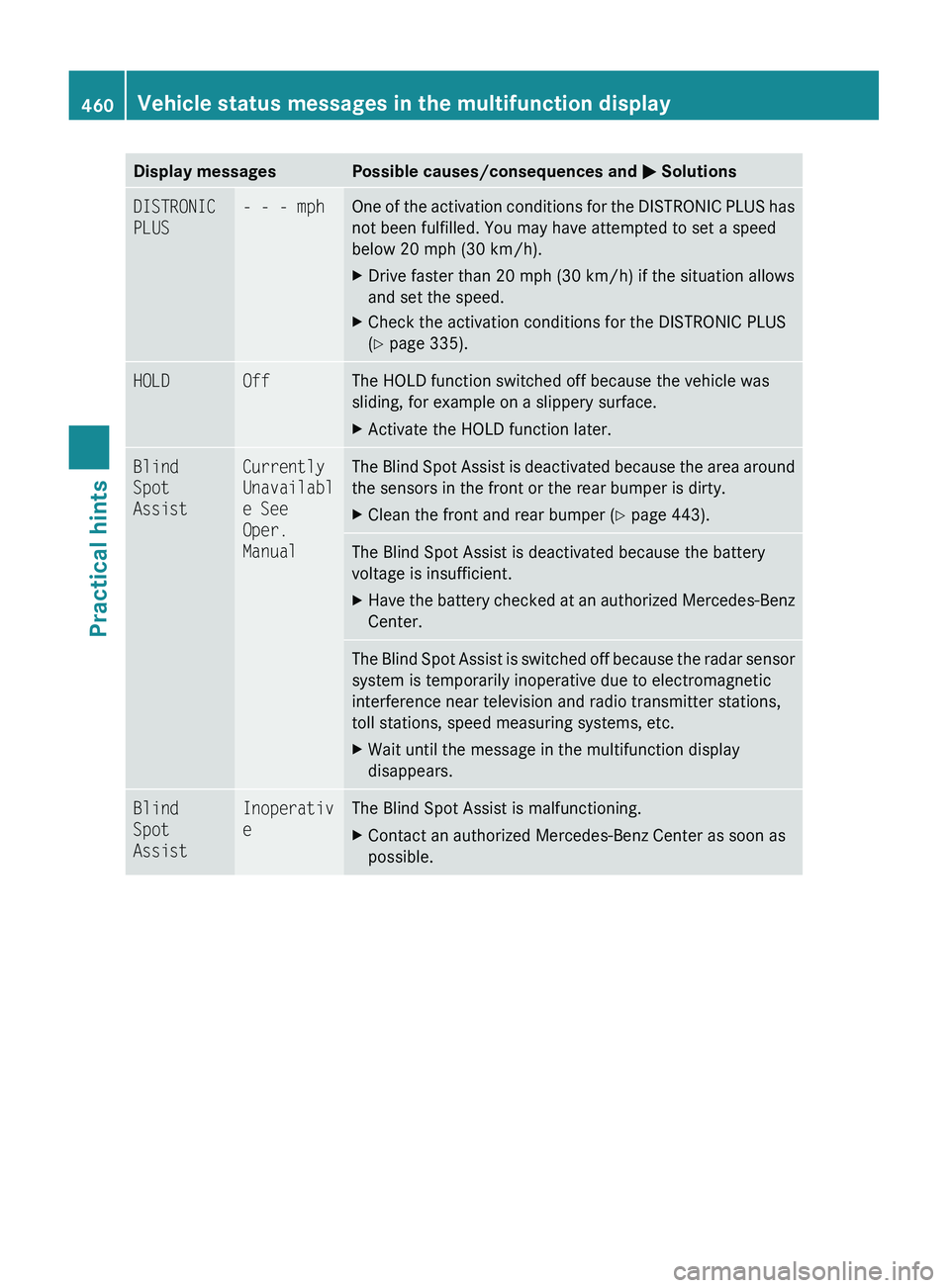
Display messagesPossible causes/consequences and 0050 SolutionsDISTRONIC
PLUS- - - mphOne of the activation conditions for the DISTRONIC PLUS has
not been fulfilled. You may have attempted to set a speed
below 20 mph (30 km/h).XDrive faster than 20 mph (30 km/h) if the situation allows
and set the speed.XCheck the activation conditions for the DISTRONIC PLUS
( Y page 335).HOLDOffThe HOLD function switched off because the vehicle was
sliding, for example on a slippery surface.XActivate the HOLD function later.Blind
Spot
AssistCurrently
Unavailabl
e See
Oper.
ManualThe Blind Spot Assist is deactivated because the area around
the sensors in the front or the rear bumper is dirty.XClean the front and rear bumper ( Y page 443).The Blind Spot Assist is deactivated because the battery
voltage is insufficient.XHave the battery checked at an authorized Mercedes-Benz
Center.The Blind Spot Assist is switched off because the radar sensor
system is temporarily inoperative due to electromagnetic
interference near television and radio transmitter stations,
toll stations, speed measuring systems, etc.XWait until the message in the multifunction display
disappears.Blind
Spot
AssistInoperativ
eThe Blind Spot Assist is malfunctioning.XContact an authorized Mercedes-Benz Center as soon as
possible.460Vehicle status messages in the multifunction displayPractical hints
221_AKB; 6; 20, en-USd2ugruen,Version: 2.11.8.12009-09-24T13:28:17+02:00 - Seite 460
Page 463 of 548
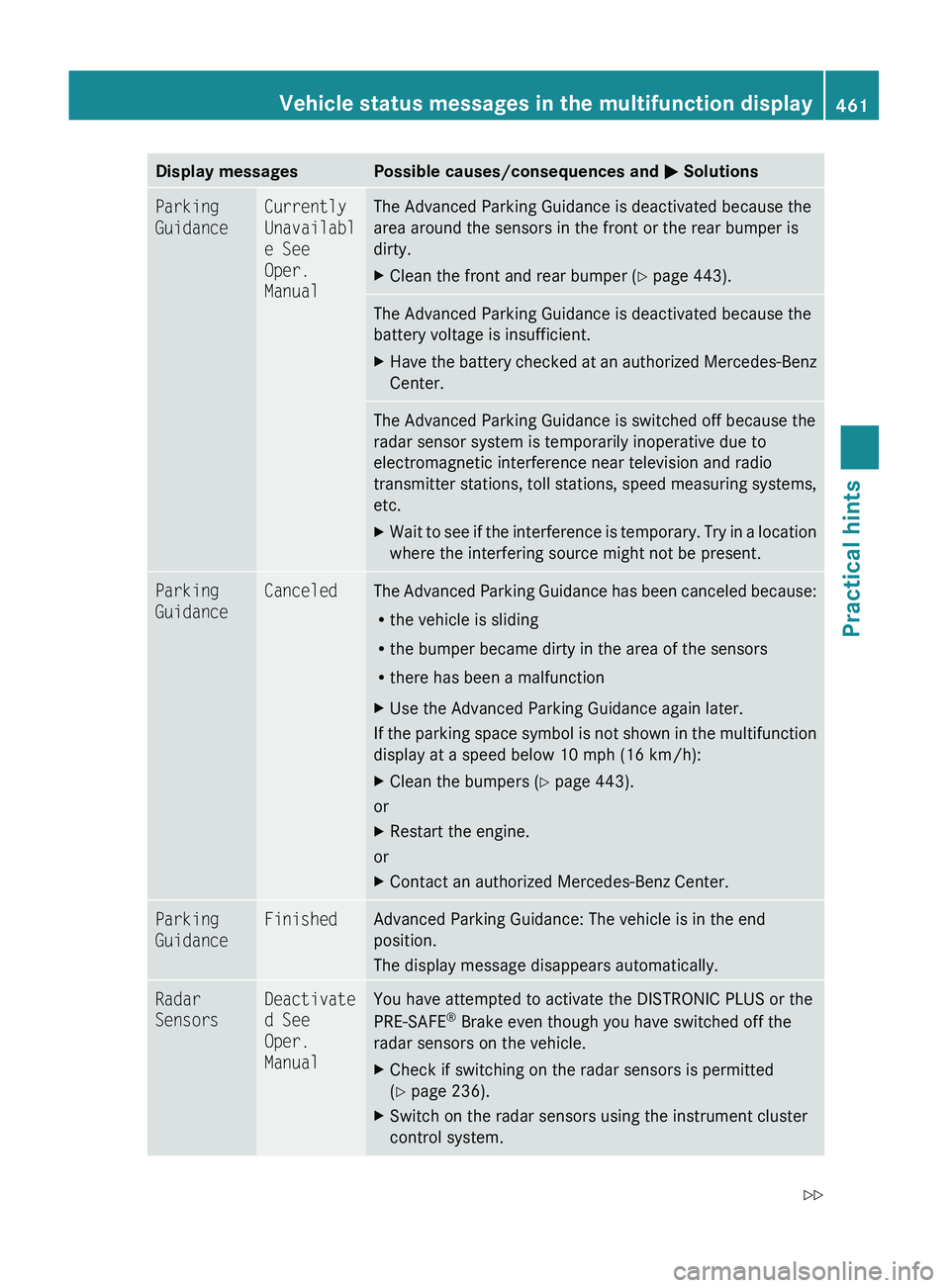
Display messagesPossible causes/consequences and 0050 SolutionsParking
GuidanceCurrently
Unavailabl
e See
Oper.
ManualThe Advanced Parking Guidance is deactivated because the
area around the sensors in the front or the rear bumper is
dirty.XClean the front and rear bumper ( Y page 443).The Advanced Parking Guidance is deactivated because the
battery voltage is insufficient.XHave the battery checked at an authorized Mercedes-Benz
Center.The Advanced Parking Guidance is switched off because the
radar sensor system is temporarily inoperative due to
electromagnetic interference near television and radio
transmitter stations, toll stations, speed measuring systems,
etc.XWait to see if the interference is temporary. Try in a location
where the interfering source might not be present.Parking
GuidanceCanceledThe Advanced Parking Guidance has been canceled because:
R the vehicle is sliding
R the bumper became dirty in the area of the sensors
R there has been a malfunctionXUse the Advanced Parking Guidance again later.
If the parking space symbol is not shown in the multifunction
display at a speed below 10 mph (16 km/h):
XClean the bumpers ( Y page 443).
or
XRestart the engine.
or
XContact an authorized Mercedes-Benz Center.Parking
GuidanceFinishedAdvanced Parking Guidance: The vehicle is in the end
position.
The display message disappears automatically.Radar
SensorsDeactivate
d See
Oper.
ManualYou have attempted to activate the DISTRONIC PLUS or the
PRE-SAFE ®
Brake even though you have switched off the
radar sensors on the vehicle.XCheck if switching on the radar sensors is permitted
( Y page 236).XSwitch on the radar sensors using the instrument cluster
control system.Vehicle status messages in the multifunction display461Practical hints221_AKB; 6; 20, en-USd2ugruen,Version: 2.11.8.12009-09-24T13:28:17+02:00 - Seite 461Z