lock MERCEDES-BENZ S CLASS 2010 Owner's Guide
[x] Cancel search | Manufacturer: MERCEDES-BENZ, Model Year: 2010, Model line: S CLASS, Model: MERCEDES-BENZ S CLASS 2010Pages: 548, PDF Size: 11.45 MB
Page 142 of 548
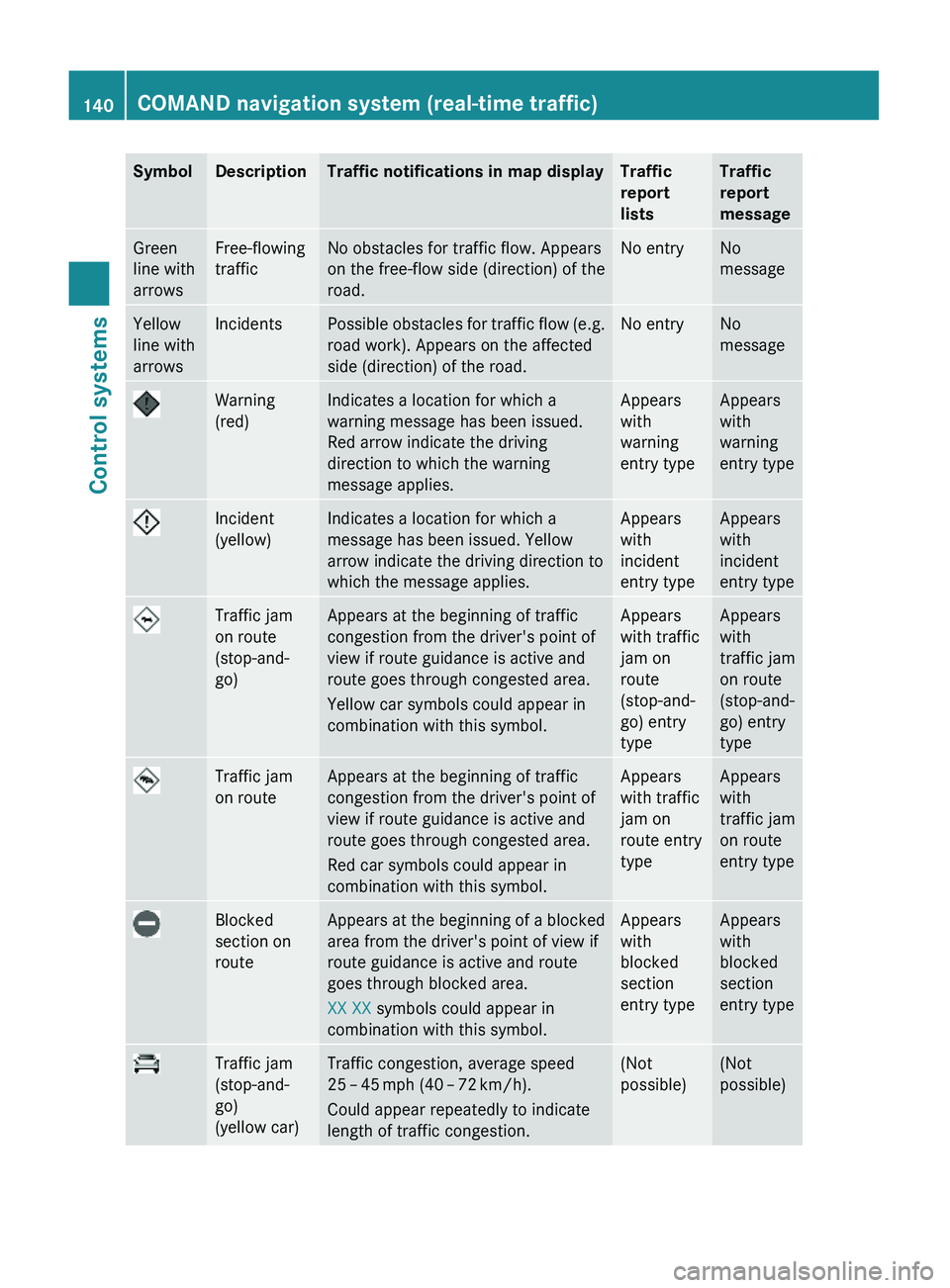
SymbolDescriptionTraffic notifications in map displayTraffic
report
lists
Traffic
report
message
Green
line with
arrows
Free-flowing
traffic
No obstacles for traffic flow. Appears
on the free-flow side (direction) of the
road.
No entryNo
message
Yellow
line with
arrows
IncidentsPossible obstacles for traffic flow (e.g.
road work). Appears on the affected
side (direction) of the road.
No entryNo
message
Warning
(red)
Indicates a location for which a
warning message has been issued.
Red arrow indicate the driving
direction to which the warning
message applies.
Appears
with
warning
entry type
Appears
with
warning
entry type
Incident
(yellow)
Indicates a location for which a
message has been issued. Yellow
arrow indicate the driving direction to
which the message applies.
Appears
with
incident
entry type
Appears
with
incident
entry type
Traffic jam
on route
(stop-and-
go)
Appears at the beginning of traffic
congestion from the driver's point of
view if route guidance is active and
route goes through congested area.
Yellow car symbols could appear in
combination with this symbol.
Appears
with traffic
jam on
route
(stop-and-
go) entry
type
Appears
with
traffic jam
on route
(stop-and-
go) entry
type
Traffic jam
on route
Appears at the beginning of traffic
congestion from the driver's point of
view if route guidance is active and
route goes through congested area.
Red car symbols could appear in
combination with this symbol.
Appears
with traffic
jam on
route entry
type
Appears
with
traffic jam
on route
entry type
Blocked
section on
route
Appears at the beginning of a blocked
area from the driver's point of view if
route guidance is active and route
goes through blocked area.
XX XX symbols could appear in
combination with this symbol.
Appears
with
blocked
section
entry type
Appears
with
blocked
section
entry type
Traffic jam
(stop-and-
go)
(yellow car)
Traffic congestion, average speed
25 – 45 mph (40 – 72 km/h).
Could appear repeatedly to indicate
length of traffic congestion.
(Not
possible)
(Not
possible)
140COMAND navigation system (real-time traffic)Control systems
221_AKB; 6; 20, en-USd2ugruen,Version: 2.11.8.12009-09-24T13:28:17+02:00 - Seite 140
Page 143 of 548
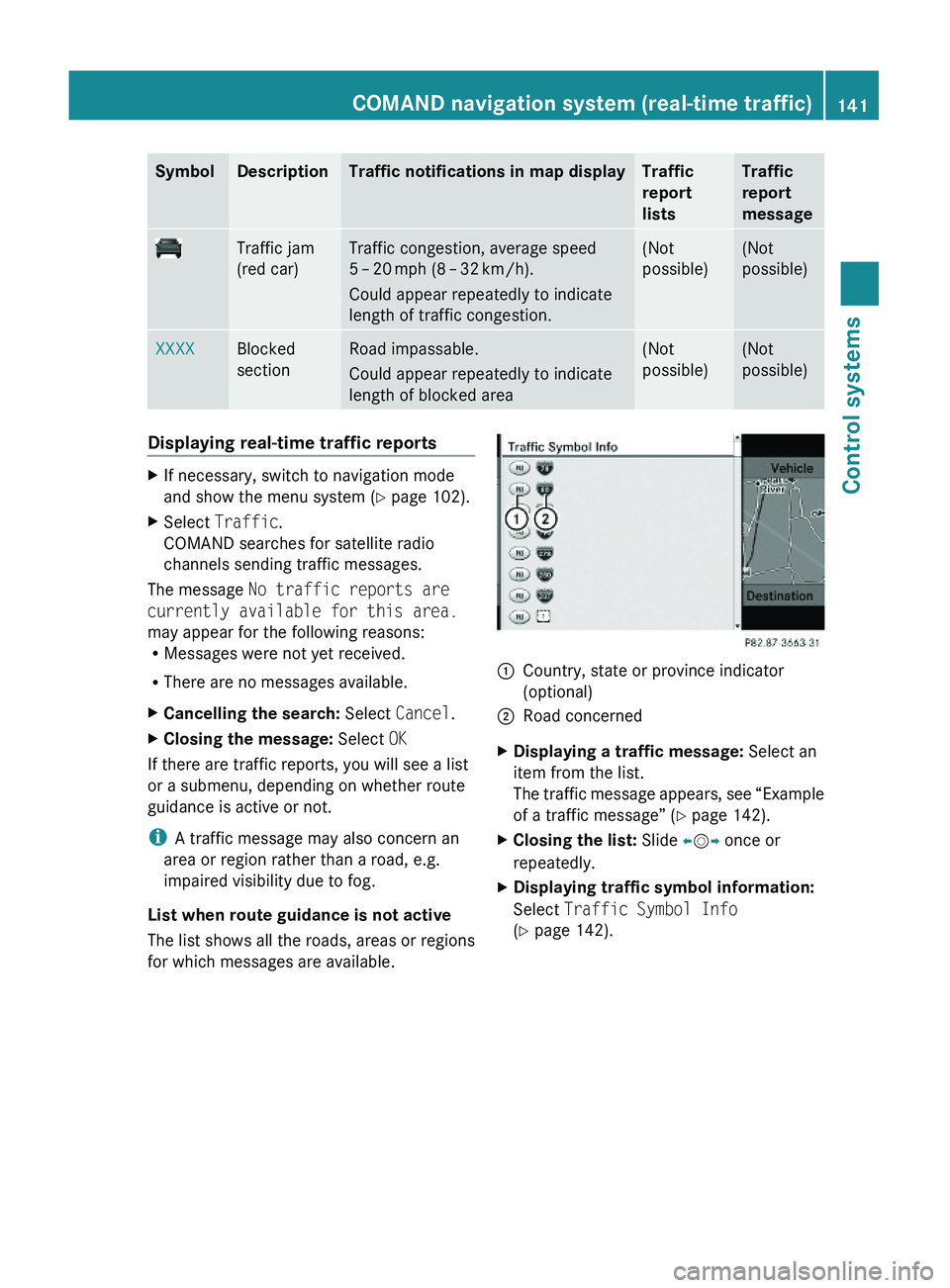
SymbolDescriptionTraffic notifications in map displayTraffic
report
lists
Traffic
report
message
Traffic jam
(red car)
Traffic congestion, average speed
5 – 20 mph (8 – 32 km/h).
Could appear repeatedly to indicate
length of traffic congestion.
(Not
possible)
(Not
possible)
XXXXBlocked
section
Road impassable.
Could appear repeatedly to indicate
length of blocked area
(Not
possible)
(Not
possible)
Displaying real-time traffic reportsXIf necessary, switch to navigation mode
and show the menu system (Y page 102).
XSelect Traffic.
COMAND searches for satellite radio
channels sending traffic messages.
The message No traffic reports are
currently available for this area.
may appear for the following reasons:RMessages were not yet received.
RThere are no messages available.
XCancelling the search: Select Cancel.XClosing the message: Select OK
If there are traffic reports, you will see a list
or a submenu, depending on whether route
guidance is active or not.
iA traffic message may also concern an
area or region rather than a road, e.g.
impaired visibility due to fog.
List when route guidance is not active
The list shows all the roads, areas or regions
for which messages are available.
1Country, state or province indicator
(optional)
2Road concernedXDisplaying a traffic message: Select an
item from the list.
The traffic message appears, see “Example
of a traffic message” (Y page 142).
XClosing the list: Slide \000
Page 153 of 548
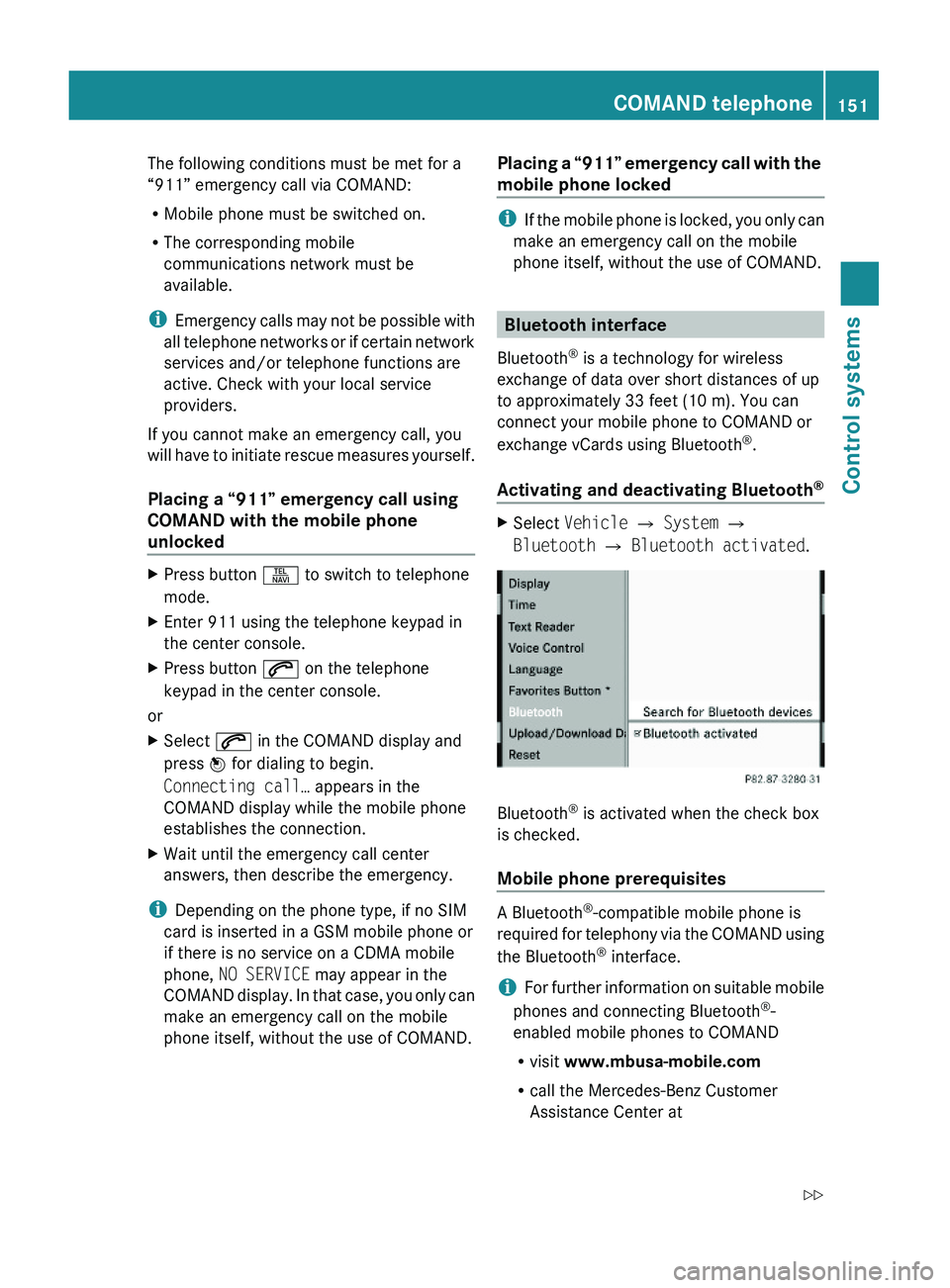
The following conditions must be met for a
“911” emergency call via COMAND:
RMobile phone must be switched on.
RThe corresponding mobile
communications network must be
available.
iEmergency calls may not be possible with
all telephone networks or if certain network
services and/or telephone functions are
active. Check with your local service
providers.
If you cannot make an emergency call, you
will have to initiate rescue measures yourself.
Placing a “911” emergency call using
COMAND with the mobile phone
unlocked
XPress button \000X to switch to telephone
mode.
XEnter 911 using the telephone keypad in
the center console.
XPress button \000j on the telephone
keypad in the center console.
or
XSelect \000j in the COMAND display and
press \000
Page 209 of 548
FunctionAutomatic Locking (Y page 210)Trunk Opening-height Restriction
(Y page 210)
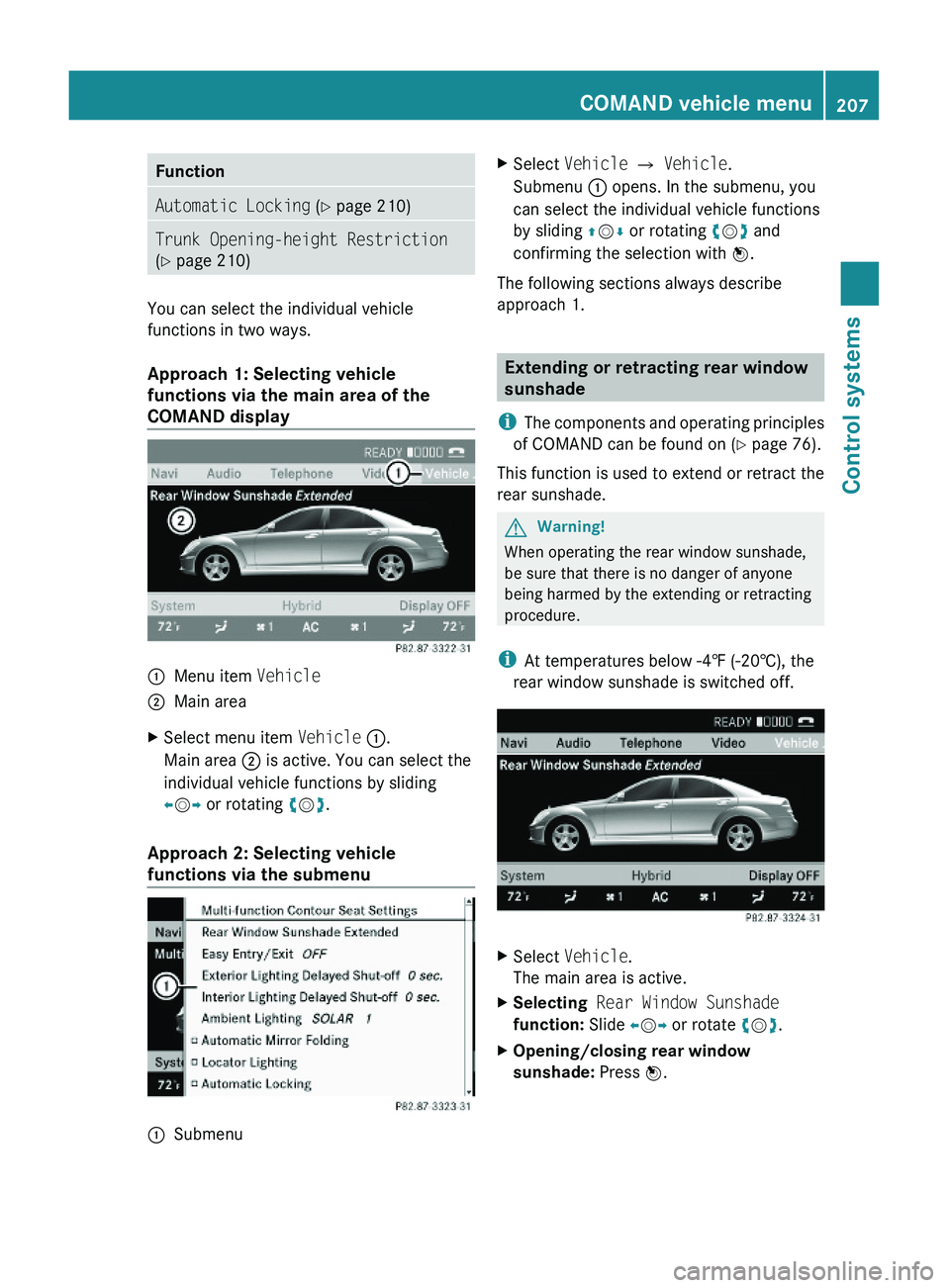
You can select the individual vehicle
functions in two ways.
Approach 1: Selecting vehicle
functions via the main area of the
COMAND display
\000FMenu item Vehicle\000GMain areaXSelect menu item Vehicle \000F.
Main area \000G is active. You can select the
individual vehicle functions by sliding
\000
Page 210 of 548
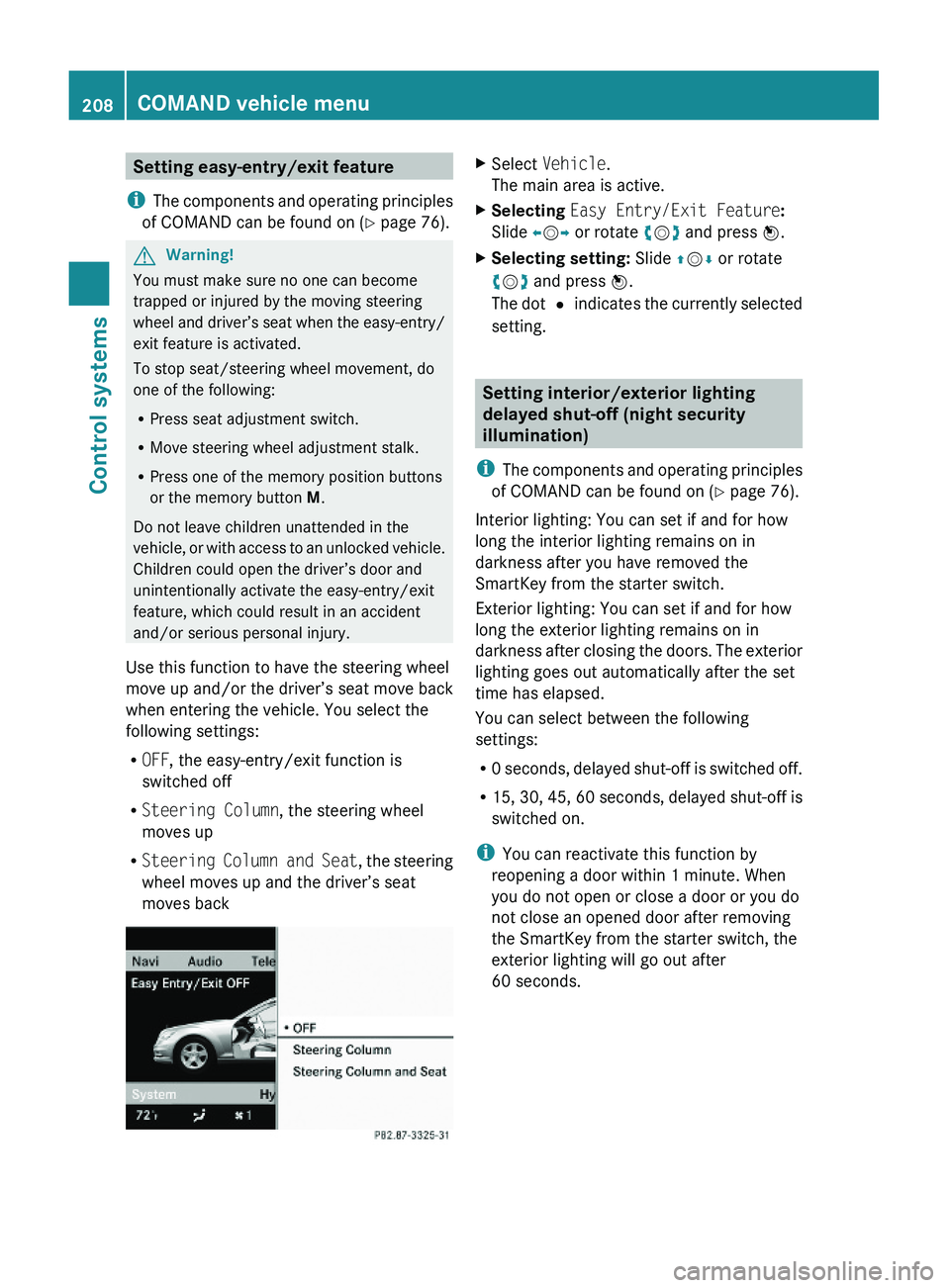
Setting easy-entry/exit feature
iThe components and operating principles
of COMAND can be found on (Y page 76).
GWarning!
You must make sure no one can become
trapped or injured by the moving steering
wheel and driver’s seat when the easy-entry/
exit feature is activated.
To stop seat/steering wheel movement, do
one of the following:
RPress seat adjustment switch.
RMove steering wheel adjustment stalk.
RPress one of the memory position buttons
or the memory button M.
Do not leave children unattended in the
vehicle, or with access to an unlocked vehicle.
Children could open the driver’s door and
unintentionally activate the easy-entry/exit
feature, which could result in an accident
and/or serious personal injury.
Use this function to have the steering wheel
move up and/or the driver’s seat move back
when entering the vehicle. You select the
following settings:
ROFF, the easy-entry/exit function is
switched off
RSteering Column, the steering wheel
moves up
RSteering Column and Seat, the steering
wheel moves up and the driver’s seat
moves back
XSelect Vehicle.
The main area is active.
XSelecting Easy Entry/Exit Feature:
Slide \000
Page 248 of 548
Safety notes for using the Voice Control
SystemGObserve Safety notes, see page 237.
Safety notes for using the telephone
GObserve Safety notes, see page 148.
Telephone operation
You can use the Voice Control System to
R dial phone number
R store names and numbers in the COMAND
address book
R dial a phone number directly from the
COMAND address book
R delete the voice name of an address book
entry
R have the system read out the phone book
of the address book entry by entry
R manage and access an automated
answering system/voice mail box 36
R redial
The Voice Control System detects whether
R your telephone is switched on
R your telephone is connected via Bluetooth ®
R the corresponding mobile network is
logged in
R it is possible to dial
If dialing is not possible, the Voice Control
System will advise you accordingly.
i You can continue operating your mobile
phone using the telephone keypad or the
keypad on your phone.
Telephone commands
For a list of commands, see ( Y page 257).
“Telephone”
Use the command “Telephone” to activate
the telephone main menu. Use this command
if you want the digits you are entering to
appear on the COMAND display.
“Help telephone”
The Voice Control System features a
comprehensive help function.
Use the command “Help telephone” and the
Voice Control System will read out an option
list of available functions and commands that
can be used in conjunction with the telephone
( Y page 93).
“Dial number”
You can dial a phone number using the
command “Dial number”.
The digits 0 to 9 and the word “Plus” are
permitted. “Plus” replaces the international
dialing code “00”.
Speak the telephone number
R as a continuous string
or, with longer phone numbers,
R in digit blocks (three to five digits in each
block).
After each digit block (separate the digit
blocks by using an approximately 0.5 second
pause), the Voice Control System repeats the
recognized digits and waits until you continue
speaking.
Sample dialog:
009DDial number.009CPlease say the number.009DOne two three four five six seven.009COne two three four five six seven.009DOk.009CDialing.
i You can also dial the specified number if
you press button 006A on the multifunction
36
Only when supported by the mobile phone.246Voice Control System telephoneControl systems
221_AKB; 6; 20, en-USd2ugruen,Version: 2.11.8.12009-09-24T13:28:17+02:00 - Seite 246
Page 249 of 548
steering wheel instead of the concluding
command “Ok”.
“Repeat”
Using the command “Repeat” will repeat all
digits spoken up to that point. Upon repeating
the digits, the system will prompt you to
continue your input.
Sample dialog:
009DDial number.009CPlease say the number.009DOne two three.009COne two three.009DRepeat.009COne two three, please continue.009DFour five six seven.009CFour five six seven.009DOk.009CDialing.
“Correction”
Using the command “Correction” will correct
the last entered digit block. After speaking
the command, the last digit block is deleted
and all previously entered digits are repeated.
The system then prompts you to continue
your input.
Sample dialog:
009DDial number.009CPlease say the number.009DOne two three.009COne two three.009DFour five six seven.009CFive five six seven.009DCorrection.009COne two three, please continue.009DFour five six seven.009CFour five six seven009DOk.009CDialing.“Delete”
Using the command “Delete” will erase all
digits entered. The system then prompts you
to start your input again.
Sample dialog:
009DDial number.009CPlease say the number.009DOne two three four five six seven.009COne two three four five six seven.009DDelete.009CNumber deleted. Please say the
number again.009DFour two seven three three nine one.009CFour two seven three three nine one.009DOk.009CDialing.
“Redial”
Use the command “Redial” to dial the last
dialed number.
“Save name” (COMAND address book)
The command “Save name” saves a phone
number with a voice name in the address
book. Use this command for names that are
rather difficult or when spelling and
pronunciation of a name differ. After speaking
the command, the Voice Control System
prompts you to enter a phone number.
The digits 0 to 9 and the word “Plus” are
permitted. “Plus” replaces the international
dialing code “00”.
i Speak the telephone number as a
continuous string.
The Voice Control System repeats the
recognized digits and waits for you to
continue or to confirm.
After speaking the command “Ok”, the Voice
Control System prompts you two to three
times to speak the name. When speaking the
Voice Control System telephone247Control systems221_AKB; 6; 20, en-USd2ugruen,Version: 2.11.8.12009-09-24T13:28:17+02:00 - Seite 247Z
Page 270 of 548
Help window
You can use the help window to view a
selection of valid commands on the COMAND
display.
The help functions can be switched on or off
via COMAND in the System menu
( Y page 93).
Entering digits and spelling
Entering digits
R Digits from “Zero” to “Nine” may be used.
R Speaking phone numbers in digit blocks of
3 to 5 digits has proven a very reliable
method for the input of phone numbers.
Spelling
R The letters of the English alphabet and the
digits 0 - 9 may be used.
R Speak the letters in blocks of 5 - 7 letters
at a time.
R Speak each individual letter clearly.What to do if ...
ProblemPossible cause/consequenceSuggested solutionThe Voice
Control
System does
not
recognize
commands.You have not operated the system
from the driver’s seat.XOperate the Voice Control System
only by the driver as the
microphone is geared to the driver
side.You have spoken unclearly, too
loudly or too quietly.XSpeak the commands in a
continuous manner using a normal
tone.The blower could be set to the
highest setting, vents could be
pointing at microphones or wind
noise could be created due to open
windows.XAvoid loud disturbances.268Voice Control System troubleshootingControl systems
221_AKB; 6; 20, en-USd2ugruen,Version: 2.11.8.12009-09-24T13:28:17+02:00 - Seite 268
Page 275 of 548
Vehicle equipment ............................274
Locking and unlocking .....................274
Starter switch positions ...................284
Seats ..................................................286
Multifunction steering wheel ..........293
Mirrors ...............................................294
Memory function ..............................297
Lighting ..............................................298
Wipers ................................................305
Power windows .................................307
Driving and parking ..........................311
Automatic transmission ...................317
Transfer case ....................................325
Instrument cluster ............................326
Driving systems ................................327
Climate control system ....................363
Rear window defroster .....................372
Power tilt/sliding sunroof ...............373
Panorama roof with power tilt/
sliding panel ......................................375
Loading and storing ..........................379
Useful features .................................384
273Controls in detail221_AKB; 6; 20, en-USd2ugruen,Version: 2.11.8.12009-09-24T13:28:17+02:00 - Seite 273
Page 276 of 548
Vehicle equipment
iThis Operator’s Manual describes all
features, standard or optional, potentially
available for your vehicle at the time of
purchase. Please be aware that your
vehicle might not be equipped with all
features described in this manual.
Locking and unlocking
Notes
GObserve Safety notes, see page 56.
When unlocking or locking the vehicle with
the SmartKey an acoustic signal sounds. The
acoustic signal is activated at the factory. If
you wish to deactivate the feature, or adjust
its signal volume, contact an authorized
Mercedes-Benz Center.
When unlocking the vehicle, all turn signal
lamps flash once. An acoustic signal sounds
once, and the locking knobs in the doors
move up. The anti-theft alarm system is
disarmed.
When locking the vehicle, all turn signal lamps
flash three times. An acoustic signal sounds
three times, and the locking knobs in the
doors move down. The anti-theft alarm
system is armed.
All doors and the trunk must be closed.
If you cannot lock or unlock the vehicle with
the SmartKey, the batteries in the SmartKey
are discharged, the SmartKey is
malfunctioning, or the vehicle battery is
drained.
XCheck the batteries in the SmartKey
(Y page 277) and replace them if
necessary.
XUse the mechanical key to unlock the
driver’s door and the trunk (Y page 499).
XUse the mechanical key to lock the vehicle
(Y page 500).
XHave the vehicle battery and the vehicle
battery connections checked at an
authorized Mercedes-Benz Center.
If the SmartKey is malfunctioning, contact
Roadside Assistance or an authorized
Mercedes-Benz Center.
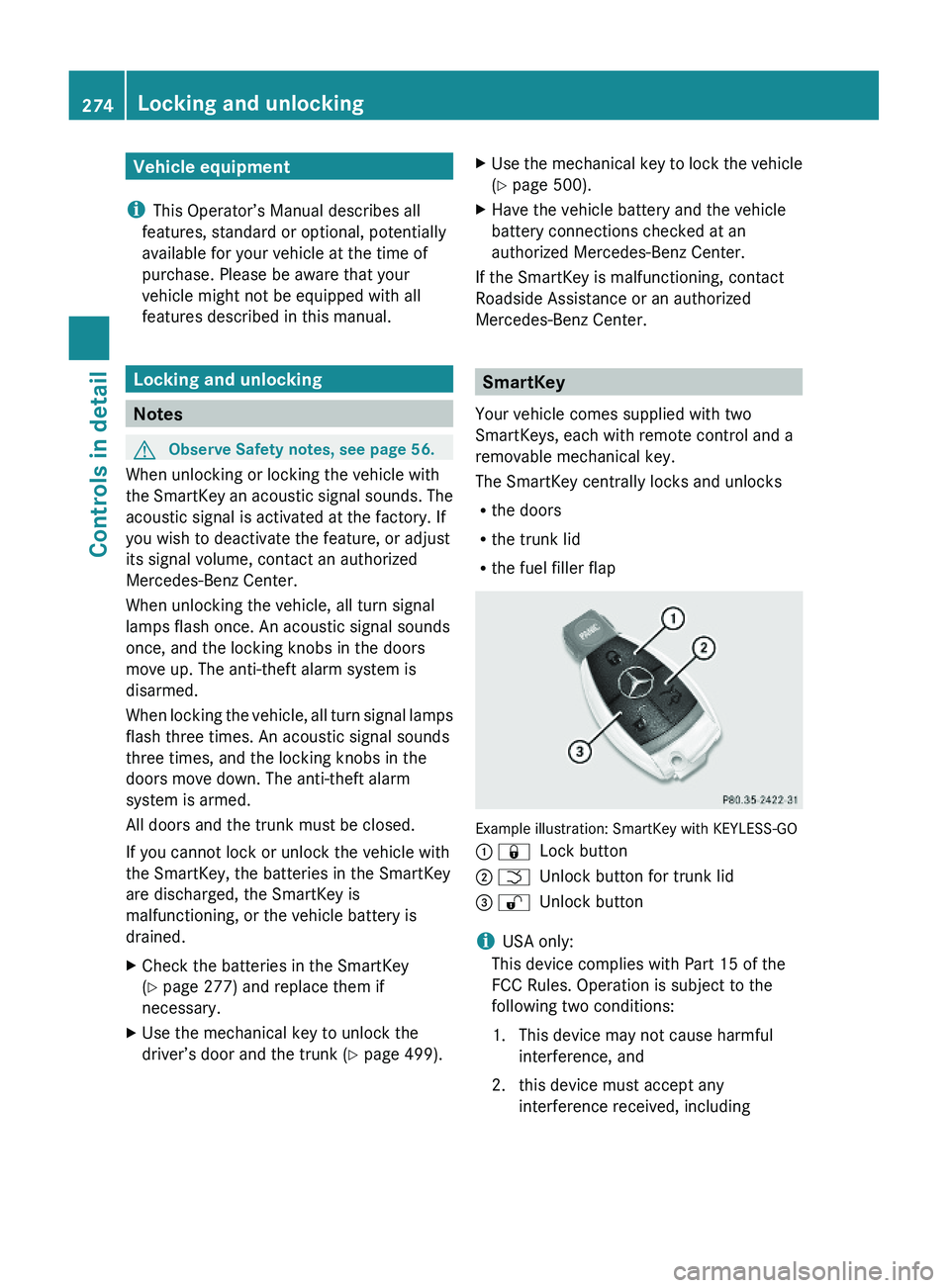
SmartKey
Your vehicle comes supplied with two
SmartKeys, each with remote control and a
removable mechanical key.
The SmartKey centrally locks and unlocks
Rthe doors
Rthe trunk lid
Rthe fuel filler flap
Example illustration: SmartKey with KEYLESS-GO
\000F \0007Lock button\000G \000TUnlock button for trunk lid\000