climate settings MERCEDES-BENZ S CLASS 2010 Owners Manual
[x] Cancel search | Manufacturer: MERCEDES-BENZ, Model Year: 2010, Model line: S CLASS, Model: MERCEDES-BENZ S CLASS 2010Pages: 548, PDF Size: 11.45 MB
Page 8 of 548
Break-in period .................................. 402
Bulbs see Replacing bulbs
C
CAC (Customer Assistance Center) ... 24
California retail buyers and
lessees, important notice for ............. 22
Calls (phone) .............................. 148, 230
Can holders see Cup holders
Capacities and recommended
fuel/lubricants .................................. 537
Carpets, cleaning .............................. 446
CD player ............................................ 176
Central locking
Automatic ...................................... 278
KEYLESS-GO .................................. 275
Locking/unlocking from inside ......279
SmartKey ....................................... 274
Central locking/unlocking switch ... 279
Certification label .............................. 524
Children in the vehicle
Air bags ........................................... 41
Child safety locks (rear doors) .........61
Child seat anchors – LATCH-type
(ISOFIX) ........................................... 60
Indicator lamp, front passenger
front air bag off ................................ 46
Infant and child restraint systems .... 57
ISOFIX (Child seat anchors –
LATCH-type) ..................................... 60
OCS (Occupant Classification
System) ........................................... 46
Override switch ................................ 61
Safety notes ..................................... 56
Tether anchorage points ..................59
Top tether ........................................ 59
Child safety
see Children in the vehicle
Child seat anchors – LATCH-type
(ISOFIX) see Children in the vehicle
Chrome-plated exhaust tip,
cleaning .............................................. 447
Cigarette lighters .............................. 387
Climate control system .................... 363
Air conditioning ............................. 366
Air conditioning refrigerant ............540
Air distribution ............................... 370
Air recirculation mode ...................371
Air volume ..................................... 370
Automatic mode ............................ 366
Deactivating system ......................366
Front defroster .............................. 370
Maximum cooling MAX COOL ........371
Residual heat and ventilation .........372
Temperature .................................. 367
Coat hooks ......................................... 380
Cockpit ................................................. 30
Cold tire inflation pressure .............. 430
Collapsible wheel chock ................... 450
COMAND .............................................. 76
Address book ................................. 159
Audio playback .............................. 176
AUX sockets .................................. 186
Components .................................... 77
Controller ......................................... 79
FM/AM Radio ................................ 165
Gracenote ®
Media Database .........185
HD Radio™ .................................... 167
Headphone ...................................... 82
Inserting/ejecting CDs and DVDs . 179
Introduction ..................................... 76
iPod ®
............................................. 200
Media interface .............................. 200
Music Register ............................... 196
Navigation ........................................ 95
Operating ......................................... 84
Phone book .................................... 159
Rear Seat Entertainment System ...189
Remote control (Rear Seat
Entertainment System) ....................81
Remote control (SPLITVIEW) ............81
Reset to factory settings ..................95
Satellite radio ................................ 170
SD card .......................................... 180
Shortcut buttons .............................. 77
SPLITVIEW ....................................... 90
Switching on or off ........................... 77
System settings ............................... 91
Telephone ...................................... 148
Telephone keypad ............................ 796Index221_AKB; 6; 20, en-USd2ugruen,Version: 2.11.8.12009-09-24T13:28:17+02:00 - Seite 6
Page 9 of 548
Upload/Download of Data ...............95
USB socket ...................................... 80
Vehicle settings ............................. 206
Video DVD ..................................... 191
Voice Control System ....................237
Combination switch .......................... 301
Controller (COMAND) .......................... 79
Control system .................................. 220
Multifunction display .....................222
Multifunction steering wheel .........221
Control system menus ...................... 222
AMG ............................................... 227
Assistance ..................................... 231
Audio ............................................. 226
Navi ............................................... 225
Service ........................................... 233
Settings ......................................... 234
Telephone ...................................... 230
Trip ................................................ 223
Coolant
Anticorrosion/antifreeze ...............543
Capacities .............................. 538, 539
Checking level ............................... 408
Messages in the multifunction
display ........................................... 480
Temperature gauge ........................ 327
Corner-illuminating lamps ................ 303
Cruise control .................................... 328
Activating ....................................... 328
Canceling ....................................... 329
Changing the set speed .................329
Last stored speed ..........................330
Lever .............................................. 328
Messages in the multifunction
display ........................................... 458
Resume function ............................ 330
Setting current speed ....................329
Cup holders ........................................ 384
Curb weight ....................................... 430
Customer Assistance Center (CAC) ... 24
Customer Relations Department ....... 24
D
Dashboard see Instrument cluster
Data recording ..................................... 25
Daytime running lamp mode ............ 299
Switching on or off ......................... 234
Deep water
see Standing water
Defogging (windshield) ..................... 371
Defroster
Front (Climate control system) ......370
Rear window .................................. 372
Department of Transportation
see DOT
Difficulties
While driving .................................. 314
With starting .................................. 312
Digital speedometer
Additional speedometer ................. 235
Dimensions (vehicle)
see Vehicle specification
Direction of rotation (tires) .............. 422
Displays
COMAND display ............................. 78
DISTRONIC PLUS ........................... 333
Maintenance service indicator .......439
Messages in the multifunction
display ........................................... 452
Multifunction display .....................222
Symbol messages ..........................466
Text messages ............................... 454
Trip computer ................................ 223
Vehicle status message memory ...233
Display settings (COMAND) ................ 92
DISTRONIC PLUS ............................... 330
Cleaning system sensors ...............443
Displaying the distance graphic .....334
Displays in the multifunction
display ........................................... 333
Distance warning lamp ..........333, 496
Driving ........................................... 336
Driving with .................................... 339
Lever .............................................. 335
Messages in the multifunction
display ........................................... 459
Resume function ............................ 338
Sensor cover .................................. 443
Speed settings ............................... 337
Stopping ........................................ 337
Doors
Child safety locks ............................ 61
Locking/unlocking (KEYLESS-GO) . 275Index7221_AKB; 6; 20, en-USd2ugruen,Version: 2.11.8.12009-09-24T13:28:17+02:00 - Seite 7
Page 77 of 548
Vehicle equipment ..............................76
COMAND introduction ........................76
COMAND system settings .................91
COMAND navigation (introduction) ...95
COMAND navigation system
(entering a destination) ....................106
COMAND navigation system (Point
of interest entry) ...............................124
COMAND navigation system (route
guidance) ...........................................129
COMAND navigation system (dur-
ing route guidance) ...........................135
COMAND navigation system (real-
time traffic) .......................................138
COMAND navigation system (des-
tination memory) ..............................143
COMAND navigation system (last
destinations) .....................................147
COMAND telephone ..........................148
COMAND FM/AM radio ....................165
COMAND satellite radio ...................170
COMAND audio CD/audio DVD/
MP3 ....................................................176
Audio AUX and video AUX ................186
Rear Seat Entertainment System ....189
COMAND video DVD .........................191
Music Register ..................................196
Media Interface .................................200
COMAND vehicle menu ....................206
COMAND automatic climate control 211
COMAND seats ..................................216
Instrument cluster control system .220
Voice Control System introduction .237
Voice Control System navigation ....240
Voice Control System telephone .....245
Voice Control System address book 249
Voice Control System radio .............252
Voice Control System CD/DVD
changer/MP3 ....................................255
Voice Control System external
devices ...............................................257
Voice Control System command list 257
Voice Control System trouble-
shooting .............................................267
Voice Control System individuali-
zation .................................................271
75Control systems221_AKB; 6; 20, en-USd2ugruen,Version: 2.11.8.12009-09-24T13:28:17+02:00 - Seite 75
Page 216 of 548
! If the air conditioning cannot be activated
again, this indicates that the air
conditioning is losing refrigerant. The
compressor has turned off.
Have the air conditioning checked at the
nearest authorized Mercedes-Benz Center.
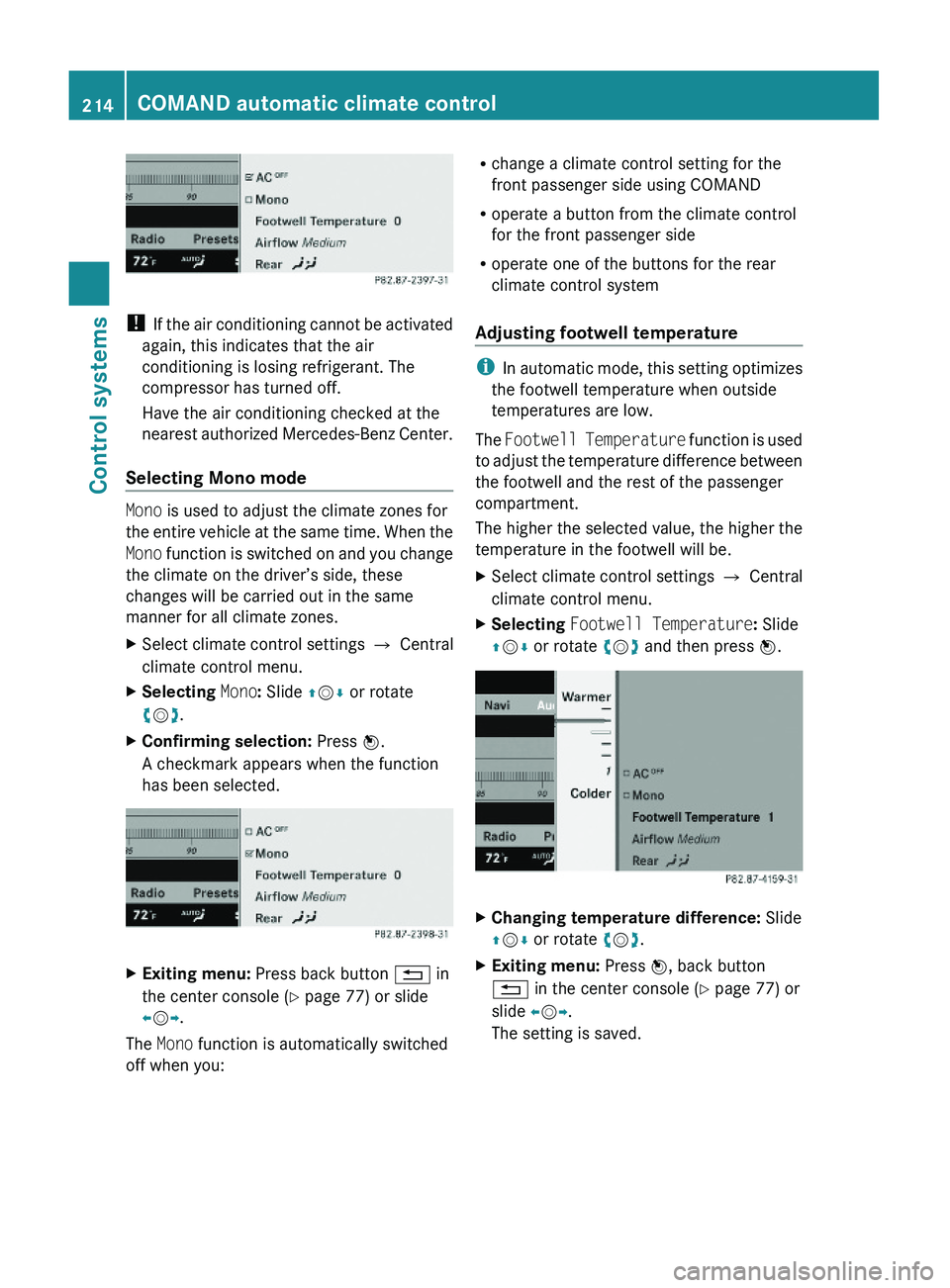
Selecting Mono mode
Mono is used to adjust the climate zones for
the entire vehicle at the same time. When the
Mono function is switched on and you change
the climate on the driver’s side, these
changes will be carried out in the same
manner for all climate zones.
XSelect climate control settings \000T Central
climate control menu.
XSelecting Mono: Slide \000
Page 217 of 548
Adjusting air flow from air vents
iIn automatic mode, this setting optimizes
the air flow when outside temperatures are
high.
The Airflow setting defines air distribution
and air volume in automatic mode:
RFocused (default setting, increased air
flow)
RMedium (reduced air flow)
RDiffuse (minimal air flow)
iWhen the interior ambient temperature of
the vehicle is very hot and the climate
control is cooling the interior, the setting
for air flow is temporarily overridden.
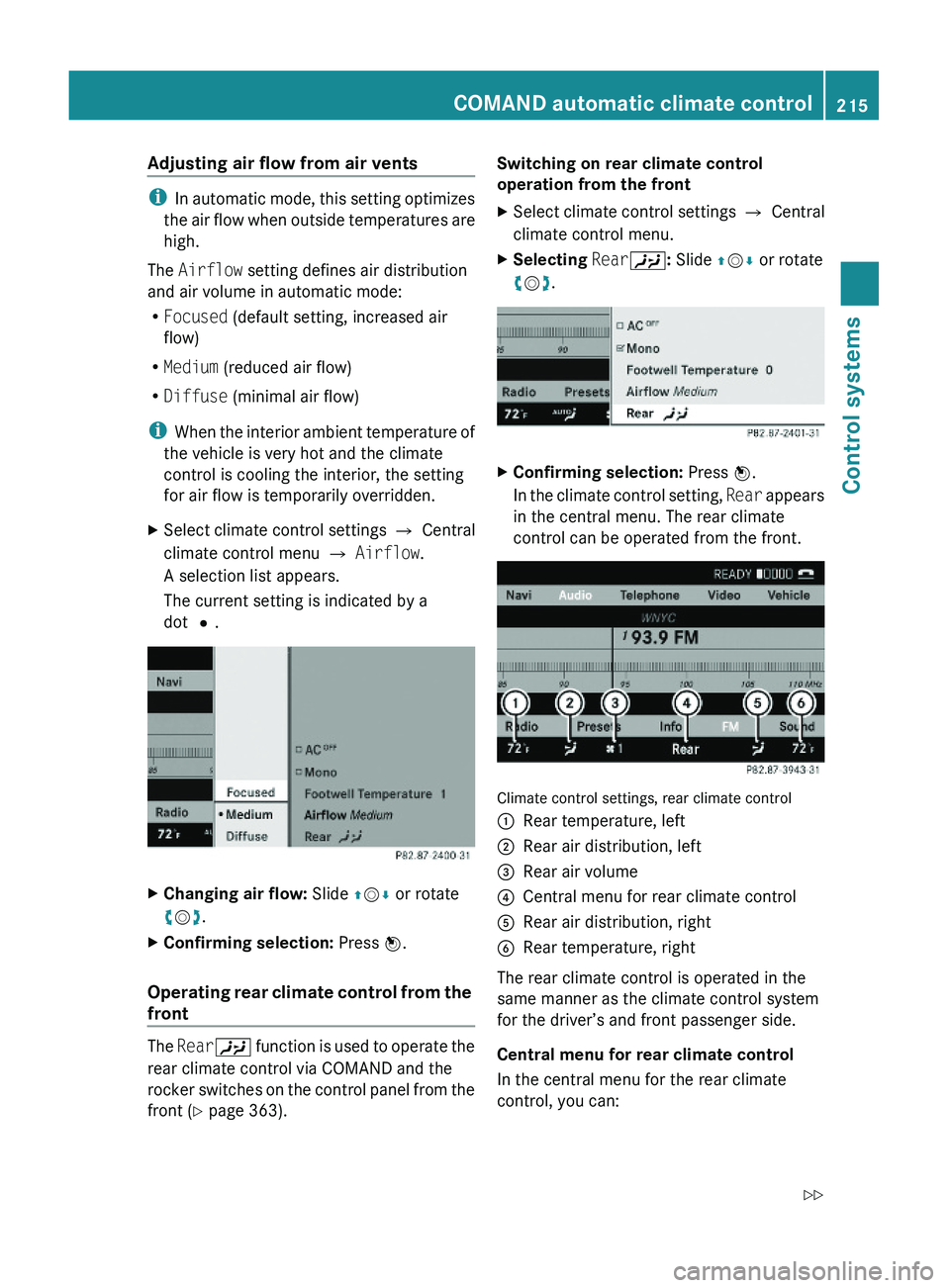
XSelect climate control settings \000T Central
climate control menu \000T Airflow.
A selection list appears.
The current setting is indicated by a
dot \000?.
XChanging air flow: Slide \000
Page 218 of 548
Rswitch back to operating the front climate
control system
Rswitch off the rear climate control
Rswitch the automatic function of the rear
climate control from automatic to manual
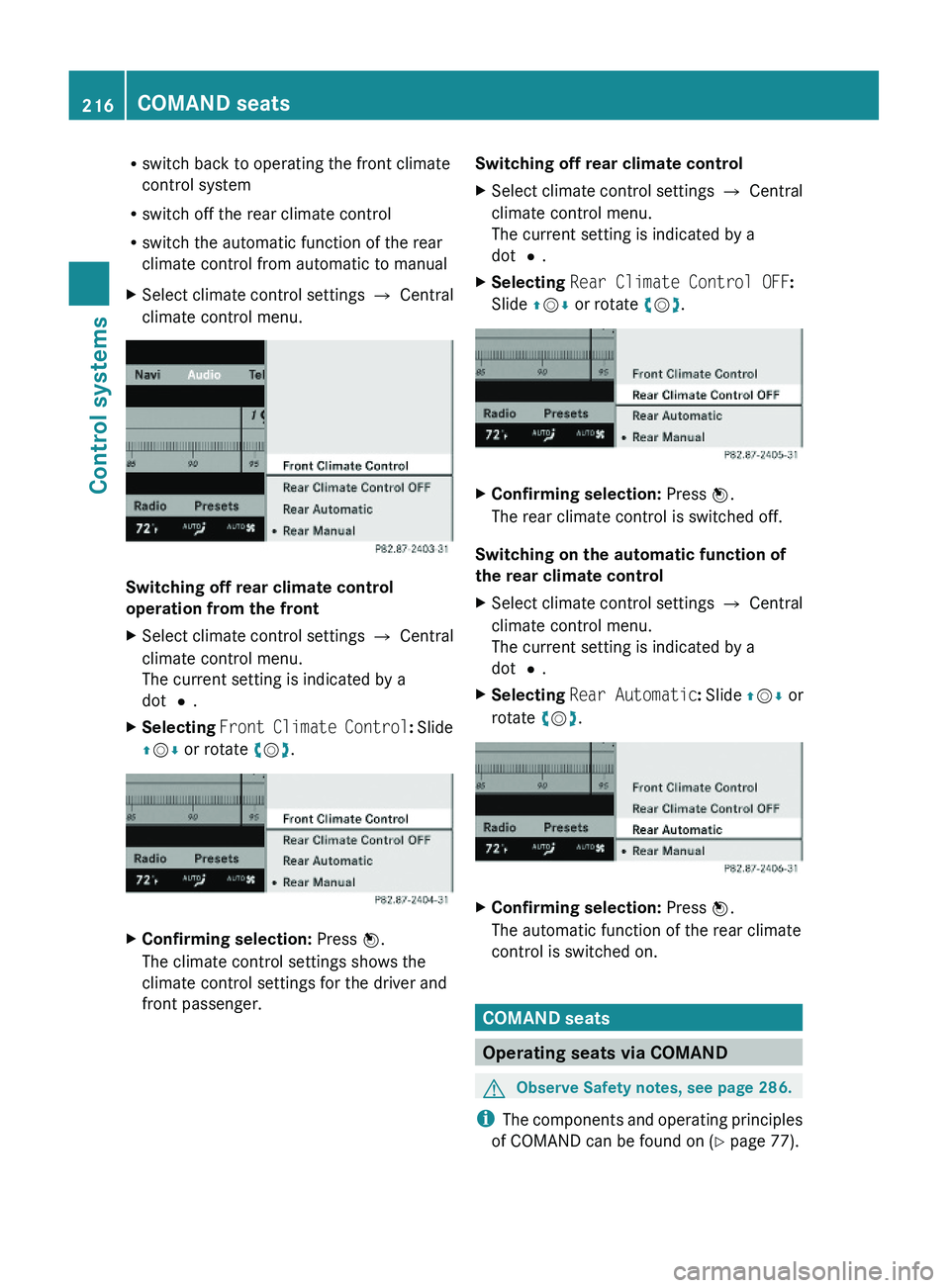
XSelect climate control settings \000T Central
climate control menu.
Switching off rear climate control
operation from the front
XSelect climate control settings \000T Central
climate control menu.
The current setting is indicated by a
dot \000?.
XSelecting Front Climate Control: Slide
\000
Page 361 of 548
XDimming illumination: Turn knob 0046
counterclockwise.
Dirty or fogged-up windshield
The Night View Assist Plus image is
diminished when the windshield in front of the
camera is
R dirty
R fogged up on the outside
R fogged up on the inside
GWarning!
Please do not forget that your primary
responsibility is to drive the vehicle. A driver’s
attention to the road must always be his/her
primary focus when driving. For your safety
and the safety of others, stop before trying to
remove window fogging or cleaning the
windshield in front of the Night View Assist
Plus camera.
Bear in mind that at a speed of just 30 mph
(approximately 50 km/h), your vehicle is
covering a distance of 44 feet
(approximately 14 m) every second.
XRemoving condensation: Check settings
of the climate control and change them, if
necessary ( Y page 363).XSwing the camera cover downward
( Y page 444).XCleaning inside of windshield: Use a soft,
non-scratching cloth ( Y page 444).
Blind Spot Assist
The Blind Spot Assist uses radar sensors to
monitor the area on both sides of your
vehicle. It will assist you when you change
lanes driving at speeds of above 20 mph
(30 km/h). A red warning lamp will come on
in the exterior rear view mirror as soon as
another vehicle is detected. If you then
activate the corresponding turn signals to
change lanes, the red warning lamp flashes
and warning sounds (collision warning). The
Blind Spot Assist operates using sensors in
the rear bumper.GWarning!
The Blind Spot Assist is only a driving aid and
may not detect all vehicles.
The Blind Spot Assist may not be able to
detect narrow vehicles such as motorcycles
or bicycles, or it may not detect them until it
is too late.
The monitoring function may be impaired if
your sensors are dirty, subject to heavy spray,
or if visibility is poor due to e.g. snow, rain, or
fog. This can result in vehicles not being
detected or being detected too late.
The Blind Spot Assist cannot detect road,
traffic and weather conditions.
It is the driver’s responsibility at all times to
be attentive to road, weather and traffic
conditions and to provide the steering,
braking and other driving inputs necessary to
retain control of the vehicle. Failure to do so
could result in recognizing dangers too late,
possibly resulting in an accident and serious
injury to yourself and others.
In order for the Blind Spot Assist to function,
the radar sensors must be switched on and
operational.
When traveling in Canada in a vehicle not
registered in Canada, you must switch off the
radar sensor system ( Y page 236). Canadian
law does not permit the use of the radar
sensor system for vehicles from outside of
Canada. When you switch off the radar sensor
system, the following functions are
deactivated:
R Blind Spot Assist
R BAS PLUS ( Y page 64)
R PRE-SAFE ®
Brake ( Y page 69)
R DISTRONIC PLUS ( Y page 330)
i USA only:
This device has been approved by the FCC
as a “Vehicular Radar System”. The radar
Driving systems359Controls in detail221_AKB; 6; 20, en-USd2ugruen,Version: 2.11.8.12009-09-24T13:28:17+02:00 - Seite 359Z
Page 367 of 548
FunctionRecommendation/Notes0077Air distribution, left0078Temperature
control, lefti Set the temperature to 72‡ (22†).Notes on climate control system
i If you have the air distribution and air
volume automatically controlled, you can
adjust the temperature, footwell
temperature and air flow. The following
basic settings are recommended:
R Automatic air distribution control
( Y page 366)
R Temperature: 72‡ (22†) ( Y page 367)
R Footwell temperature: 0 ( Y page 214)
R Air flow: focused ( Y page 215)
The climate control system is operational
whenever the engine is running. You can
operate the climate control system in either
the automatic or manual mode. The system
cools or heats the interior depending on the
selected interior temperature.
It can only function optimally when you are
driving with the windows, the tilt/sliding
sunroof or tilt/sliding panel closed.
Nearly all dust particles, pollutants and odors
are filtered out before outside air enters the
passenger compartment through the air
distribution system.GWarning!
Severe conditions (e.g. strong air pollution)
may require replacement of the filter before
its scheduled replacement interval. A clogged
filter will reduce the air volume to the interior
and the windows could fog up, impairing
visibility and endangering you and others.
Have a clogged filter replaced as soon as
possible at an authorized Mercedes-Benz
Center.
GWarning!
Follow the recommended settings for heating
and cooling given on the following pages and
in the “COMAND automatic climate control”
section. Otherwise the windows could fog up,
impairing visibility and endangering you and
others.
XKeep the air intake grille in front of the
windshield free of snow and debris.
Do not obstruct air flow by placing objects on
the air flow-through exhaust slots below the
rear window.
i If the vehicle interior is hot, ventilate the
interior before driving off, see “Summer
opening feature” (Y page 309). The climate
control will then adjust the interior
temperature to the set value much faster.
The following climate control functions can
be operated via COMAND:
R Temperature ( Y page 211)
R Air distribution ( Y page 212)
R Air volume ( Y page 212)
R Switching off cooling ( 0055) (Y page 213)
R Central climate control ( Mono)
( Y page 214)
R Footwell temperature ( Y page 214)
R Air flow from air vents ( Y page 215)
R Rear climate control ( Y page 215)
Climate control system365Controls in detail221_AKB; 6; 20, en-USd2ugruen,Version: 2.11.8.12009-09-24T13:28:17+02:00 - Seite 365Z
Page 368 of 548
Deactivating the climate control
systemGWarning!
When the climate control system is
deactivated, the outside air supply and
circulation are also deactivated. Only choose
this setting for a short time. Otherwise the
windows could fog up, impairing visibility and
endangering you and others.
Deactivating the front climate control
XDeactivating: Press rocker switch 0061 up
or down.
The indicator lamp in the rocker switch
comes on. You will see Climate Control
OFF in the COMAND display.XReactivating: Press rocker switch 0061 up
or down.
The indicator lamp in the rocker switch
goes out. You will see the previous settings
in the COMAND display.
Deactivating the rear climate control
Operating on the front climate control
panel
XActivate the Rear00A6 function via
COMAND ( Y page 215). This function is
used to operate the rear climate control via
COMAND and the rocker switches on the
control panel from the front.XDeactivating: Press rocker switch 0061 up
or down.
The indicator lamp in the rocker switch
comes on.XReactivating: Press rocker switch 0061 up
or down.
The indicator lamp in the rocker switch
goes out. The previous settings are once
again in effect.Operating on the rear climate control
panelXDeactivating: Press rocker switch 0075
( Y page 363) up or down repeatedly until
OFF mode is selected in display.XReactivating: Press rocker switch 0075 up or
down repeatedly until AUTO mode is
selected in display.
or
XPress rocker switch 0075 up or down
repeatedly until MAN mode is selected in
display.
Air conditioning
The air conditioning is operational while the
engine is running and cools the interior air to
the temperature set by the operator. In
addition, the air conditioning dehumidifies
the interior air and helps prevent window
fogging.
GWarning!
If you deactivate the air conditioning, the
vehicle will not be cooled when weather
conditions are warm. The windows can fog up
more quickly. Window fogging may impair
visibility and endanger you and others.
i Condensated water may drip out from
underneath the vehicle. This is normal and
not an indication of a malfunction.
The air conditioning uses the refrigerant
R134a. This refrigerant is free of CFCs which
are harmful to the ozone layer.
The cooling function can be activated or
deactivated via COMAND ( Y page 213).
Automatic mode
When operating the climate control system in
automatic mode, the interior air temperature,
air volume and air distribution are adjusted
automatically.
366Climate control systemControls in detail
221_AKB; 6; 20, en-USd2ugruen,Version: 2.11.8.12009-09-24T13:28:17+02:00 - Seite 366
Page 373 of 548
ActivatingXPress rocker switch 0066 up or down.
The indicator lamp in the rocker switch
comes on.
The climate control switches to the following
functions automatically:
R most efficient blower speed and heating
power, depending on outside temperature
R air flows onto the windshield and the front
door windows
R the air conditioning compressor switches
on at outside temperatures above
approximately 41‡ (5†) for air-drying
Adjustments
You can adjust the air volume and the
temperature when the front defroster is
switched on. The air flow will remain on the
windshield and front door windows.
XPress rocker switch 0099 up or down to
increase or decrease air volume to the
desired level.
The air volume increases/decreases to the
next higher/lower blower speed and
heating switches to the temperature that
was set before the front defroster was
switched on.
The indicator lamp in rocker switch 0066
goes out.
or
XPress rocker switches 0084 up or down.
Heating switches to the temperature that
was set before the front defroster was
switched on.
The indicator lamp in rocker switch 0066
goes out.
i The air conditioning compressor remains
on even with the indicator lamp in button
0066 goes out. This helps to prevent
windshield from fogging.
DeactivatingXPress rocker switch 0066 up or down.
The indicator lamp in the rocker switch
goes out.
The previous settings are once again in
effect, except air recirculation mode stays
off.
Windshield fogged on the outside
XSwitch the windshield wipers on
( Y page 305).XPress rocker switch 005A up or down.
The indicator lamp in the rocker switch
comes on.
Maximum cooling MAX COOL
MAX COOL is only available in U.S. vehicles.
MAX COOL is only operational when the
engine is running.
If 005A is selected on both the left and right
side and there is a high demand for cooling,
the display MAXCOOL appears in the COMAND
display.
This provides the fastest possible cooling of
the vehicle interior (when windows and tilt/
sliding sunroof or tilt/sliding panel are
closed).
Air recirculation mode
Switch to air recirculation mode to prevent
unpleasant odors from entering the vehicle
from the outside (e. g. before driving through
a tunnel). This setting cuts off the intake of
outside air and recirculates the air in the
passenger compartment.
GWarning!
Fogged windows impair visibility,
endangering you and others. If the windows
begin to fog on the inside, switching off the
air recirculation mode immediately should
clear interior window fogging. If interior
Climate control system371Controls in detail221_AKB; 6; 20, en-USd2ugruen,Version: 2.11.8.12009-09-24T13:28:17+02:00 - Seite 371Z