Distronic plus MERCEDES-BENZ S-Class 2011 W221 Owner's Guide
[x] Cancel search | Manufacturer: MERCEDES-BENZ, Model Year: 2011, Model line: S-Class, Model: MERCEDES-BENZ S-Class 2011 W221Pages: 524, PDF Size: 22.53 MB
Page 336 of 524
GWarning!
The DISTRONIC PLUS should not be used in
snowy or icy road conditions.
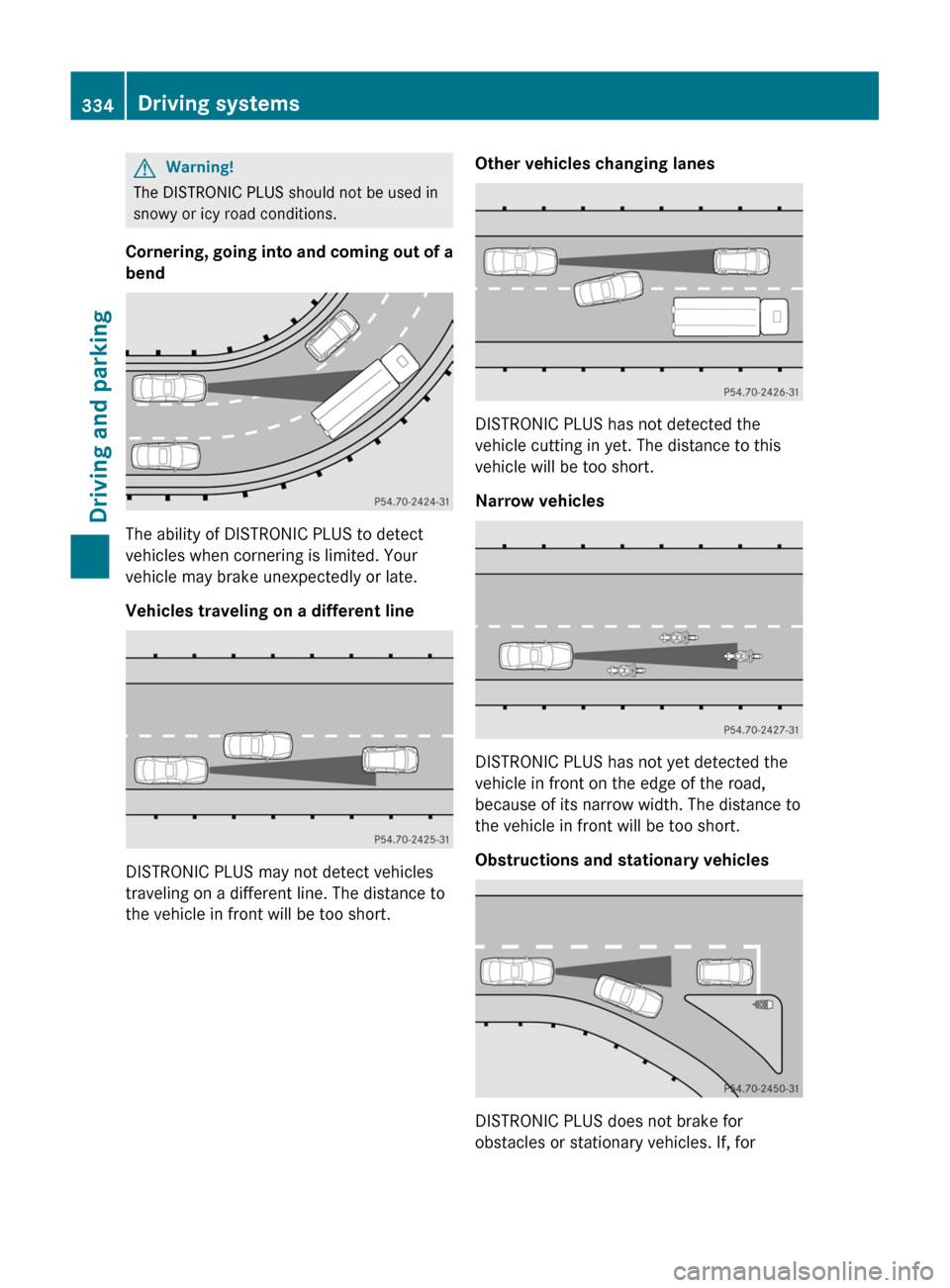
Cornering, going into and coming out of a
bend
The ability of DISTRONIC PLUS to detect
vehicles when cornering is limited. Your
vehicle may brake unexpectedly or late.
Vehicles traveling on a different line
DISTRONIC PLUS may not detect vehicles
traveling on a different line. The distance to
the vehicle in front will be too short.
Other vehicles changing lanes
DISTRONIC PLUS has not detected the
vehicle cutting in yet. The distance to this
vehicle will be too short.
Narrow vehicles
DISTRONIC PLUS has not yet detected the
vehicle in front on the edge of the road,
because of its narrow width. The distance to
the vehicle in front will be too short.
Obstructions and stationary vehicles
DISTRONIC PLUS does not brake for
obstacles or stationary vehicles. If, for
334Driving systemsDriving and parking
Page 337 of 524
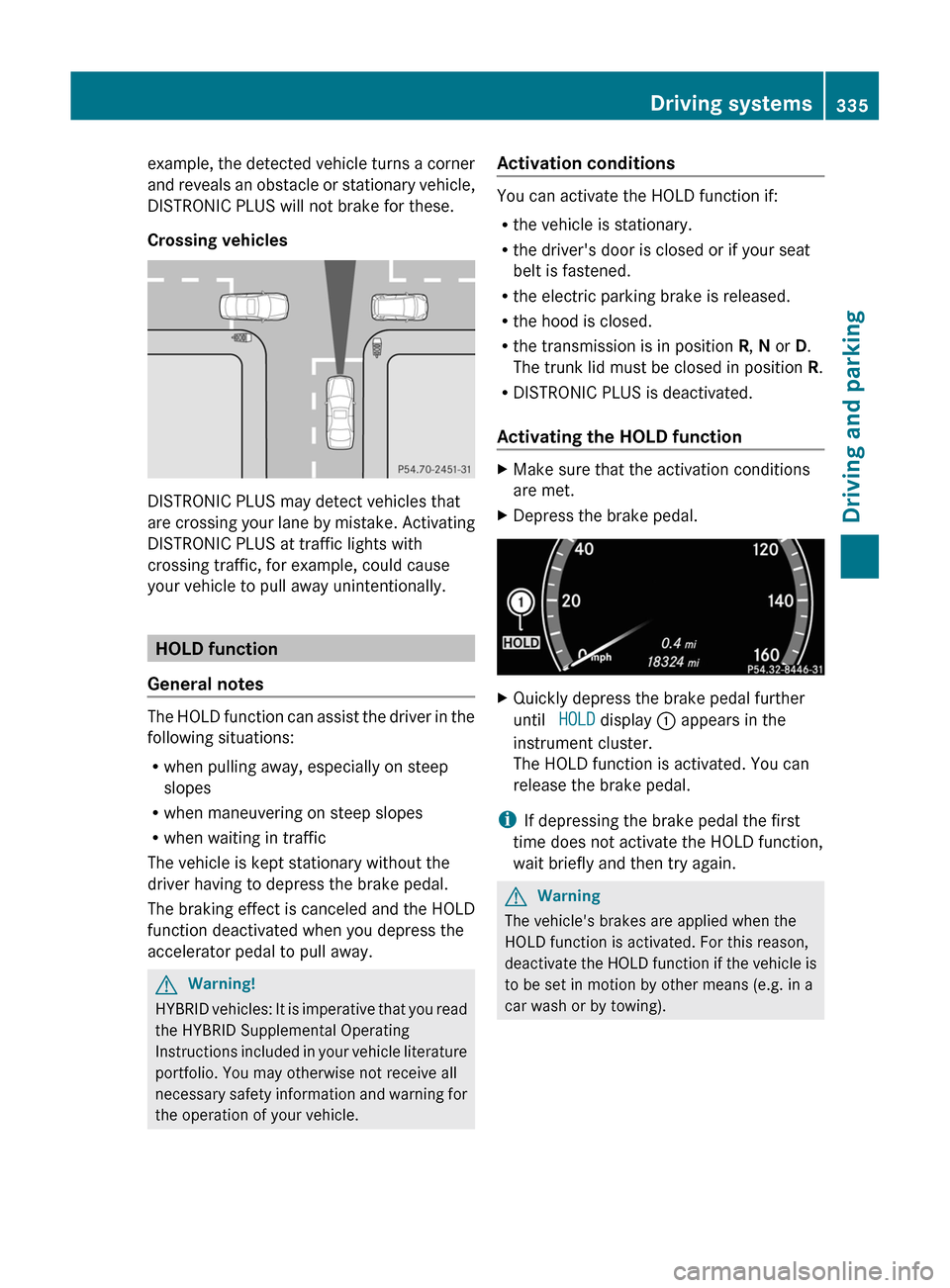
example, the detected vehicle turns a corner
and reveals an obstacle or stationary vehicle,
DISTRONIC PLUS will not brake for these.
Crossing vehicles
DISTRONIC PLUS may detect vehicles that
are crossing your lane by mistake. Activating
DISTRONIC PLUS at traffic lights with
crossing traffic, for example, could cause
your vehicle to pull away unintentionally.
HOLD function
General notes
The HOLD function can assist the driver in the
following situations:
Rwhen pulling away, especially on steep
slopes
Rwhen maneuvering on steep slopes
Rwhen waiting in traffic
The vehicle is kept stationary without the
driver having to depress the brake pedal.
The braking effect is canceled and the HOLD
function deactivated when you depress the
accelerator pedal to pull away.
GWarning!
HYBRID vehicles: It is imperative that you read
the HYBRID Supplemental Operating
Instructions included in your vehicle literature
portfolio. You may otherwise not receive all
necessary safety information and warning for
the operation of your vehicle.
Activation conditions
You can activate the HOLD function if:
Rthe vehicle is stationary.
Rthe driver's door is closed or if your seat
belt is fastened.
Rthe electric parking brake is released.
Rthe hood is closed.
Rthe transmission is in position R, N or D.
The trunk lid must be closed in position R.
RDISTRONIC PLUS is deactivated.
Activating the HOLD function
XMake sure that the activation conditions
are met.
XDepress the brake pedal.XQuickly depress the brake pedal further
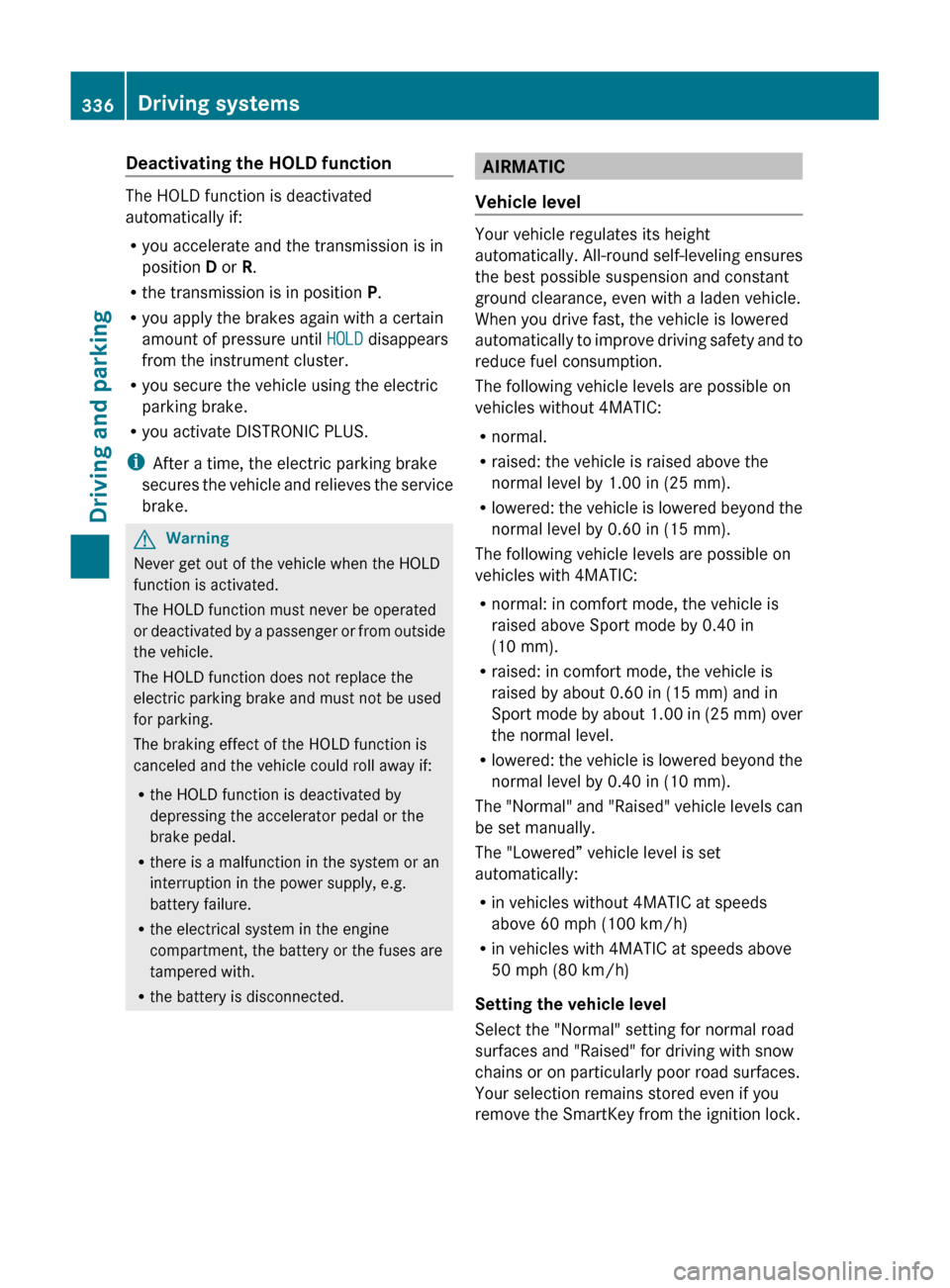
until HOLD display : appears in the
instrument cluster.
The HOLD function is activated. You can
release the brake pedal.
iIf depressing the brake pedal the first
time does not activate the HOLD function,
wait briefly and then try again.
GWarning
The vehicle's brakes are applied when the
HOLD function is activated. For this reason,
deactivate the HOLD function if the vehicle is
to be set in motion by other means (e.g. in a
car wash or by towing).
Driving systems335Driving and parkingZ
Page 338 of 524
Deactivating the HOLD function
The HOLD function is deactivated
automatically if:
R you accelerate and the transmission is in
position D or R.
R the transmission is in position P.
R you apply the brakes again with a certain
amount of pressure until HOLD disappears
from the instrument cluster.
R you secure the vehicle using the electric
parking brake.
R you activate DISTRONIC PLUS.
i After a time, the electric parking brake
secures the vehicle and relieves the service
brake.
GWarning
Never get out of the vehicle when the HOLD
function is activated.
The HOLD function must never be operated
or deactivated by a passenger or from outside
the vehicle.
The HOLD function does not replace the
electric parking brake and must not be used
for parking.
The braking effect of the HOLD function is
canceled and the vehicle could roll away if:
R the HOLD function is deactivated by
depressing the accelerator pedal or the
brake pedal.
R there is a malfunction in the system or an
interruption in the power supply, e.g.
battery failure.
R the electrical system in the engine
compartment, the battery or the fuses are
tampered with.
R the battery is disconnected.
AIRMATIC
Vehicle level
Your vehicle regulates its height
automatically. All-round self-leveling ensures
the best possible suspension and constant
ground clearance, even with a laden vehicle.
When you drive fast, the vehicle is lowered
automatically to improve driving safety and to
reduce fuel consumption.
The following vehicle levels are possible on
vehicles without 4MATIC:
R normal.
R raised: the vehicle is raised above the
normal level by 1.00 in (25 mm).
R lowered: the vehicle is lowered beyond the
normal level by 0.60 in (15 mm).
The following vehicle levels are possible on
vehicles with 4MATIC:
R normal: in comfort mode, the vehicle is
raised above Sport mode by 0.40 in
(10 mm).
R raised: in comfort mode, the vehicle is
raised by about 0.60 in (15 mm) and in
Sport mode by about 1.00 in (25 mm) over
the normal level.
R lowered: the vehicle is lowered beyond the
normal level by 0.40 in (10 mm).
The "Normal" and "Raised" vehicle levels can
be set manually.
The "Lowered” vehicle level is set
automatically:
R in vehicles without 4MATIC at speeds
above 60 mph (100 km/h)
R in vehicles with 4MATIC at speeds above
50 mph (80 km/h)
Setting the vehicle level
Select the "Normal" setting for normal road
surfaces and "Raised" for driving with snow
chains or on particularly poor road surfaces.
Your selection remains stored even if you
remove the SmartKey from the ignition lock.
336Driving systemsDriving and parking
Page 354 of 524
Problems with Night View Assist PlusProblemPossible causes/consequences and M SolutionsThe picture quality of
Night View Assist Plus
has deteriorated.The windshield wipers are smearing the windshield.XReplace the wiper blades ( Y page 281).The windshield is smeared after the vehicle has been cleaned in a
car wash.XClean the windshield ( Y page 455).There is windshield chip damage in the camera's field of vision.XReplace the windshield.The windshield is fogged up on the inside.XDefrost the windshield ( Y page 293).The windshield is iced up.XDe-ice the windshield ( Y page 292).There is dirt on the inside of the windshield.XClean the inside of the windshield ( Y page 455).Driving Assistance package
General information
i The Driving Assistance package is only
available on vehicles with HYBRID.
The Driving Assistance package consists of
DISTRONIC PLUS ( Y page 325), Blind Spot
Assist ( Y page 352) and Lane Keeping Assist
( Y page 354).
Blind Spot Assist
Important safety guidelines
Blind Spot Assist uses a radar sensor system
to monitor the areas on both sides of your
vehicle. Blind Spot Assist provides assistance
at speeds higher than 20 mph (30 km/h). A
warning display in the exterior mirrors draws
your attention to vehicles in the monitored
area. If you then indicate a turn towards that
side before changing lanes, you will also
receive visual and audible collision warnings.
For this purpose, Blind Spot Assist uses
sensors in the rear bumper.GWarning
Blind Spot Assist is only an aid designed to
assist driving. It may fail to detect some
vehicles and is no substitute for attentive
driving.
Blind Spot Assist cannot detect road and
traffic conditions. It may fail to detect narrow
vehicles, such as motorcycles or bicycles, or
may only detect them too late.
Monitoring may be affected by dirty sensors,
strong spray or poor visibility caused by snow,
rain or mist, for example. In this case, vehicles
are detected late or not at all.
Always pay attention to traffic conditions and
your surroundings. Otherwise, you may fail to
recognize dangers in time, cause an accident
and injure yourself and others.
i USA only:
352Driving systemsDriving and parking
Page 357 of 524
The system may be impaired or may not
function if:
Rthere is poor visibility, e.g. due to
insufficient illumination of the road, or due
to snow, rain, fog or spray.
Rthere is glare, e.g. from oncoming traffic,
the sun, or reflection from other vehicles.
Rthe windshield is dirty, fogged up or
covered, for instance by a sticker, in the
vicinity of the camera.
Rseveral or no lane markings for a single lane
are present.
Rthe lane markings are worn away, dark or
covered up, e.g. by dirt or snow.
Rthe distance to the vehicle in front is too
small and the lane markings thus cannot be
detected.
Rthe lane markings on the road are unclear,
e.g. near roadworks.
Rthe lane markings change quickly, e.g.
lanes branch off, cross one another or
merge.
Rthe road is narrow and winding.
Lane Keeping Assist cannot detect road and
traffic conditions. It is not a substitute for
attentive driving. You are responsible for the
vehicle's speed, braking in good time, and
steering correctly. Always adapt your driving
style to suit the prevailing road and weather
conditions. Always pay attention to traffic
conditions and your surroundings. Otherwise,
you may fail to recognize dangers in time,
cause an accident and injure yourself and
others.
A warning can be given when a front wheel
passes over a lane marking. It will warn you
by means of intermittent vibration in the
steering wheel for up to 1.5 seconds.
In order that you are warned only when
necessary and in good time if you cross the
lane marking, the system recognizes certain
conditions and warns you accordingly.
The warning vibration occurs earlier if:
Ryou approach the outer lane marking on a
bend.
Rthe road has very wide lanes, e.g. a
freeway.
Rthe system recognizes solid lane markings.
The warning vibration occurs later if:
Rthe road has narrow lanes.
Ryou cut the corner on a bend.
No warning vibration occurs if:
Ryou clearly and actively steer, brake, or
accelerate.
Ryou cut the corner on a sharp bend.
Ra driving safety system intervenes, such as
ABS, BAS or ESP®.
Ryou switch on the turn signals. In this event,
the warnings are suppressed for a certain
period of time.
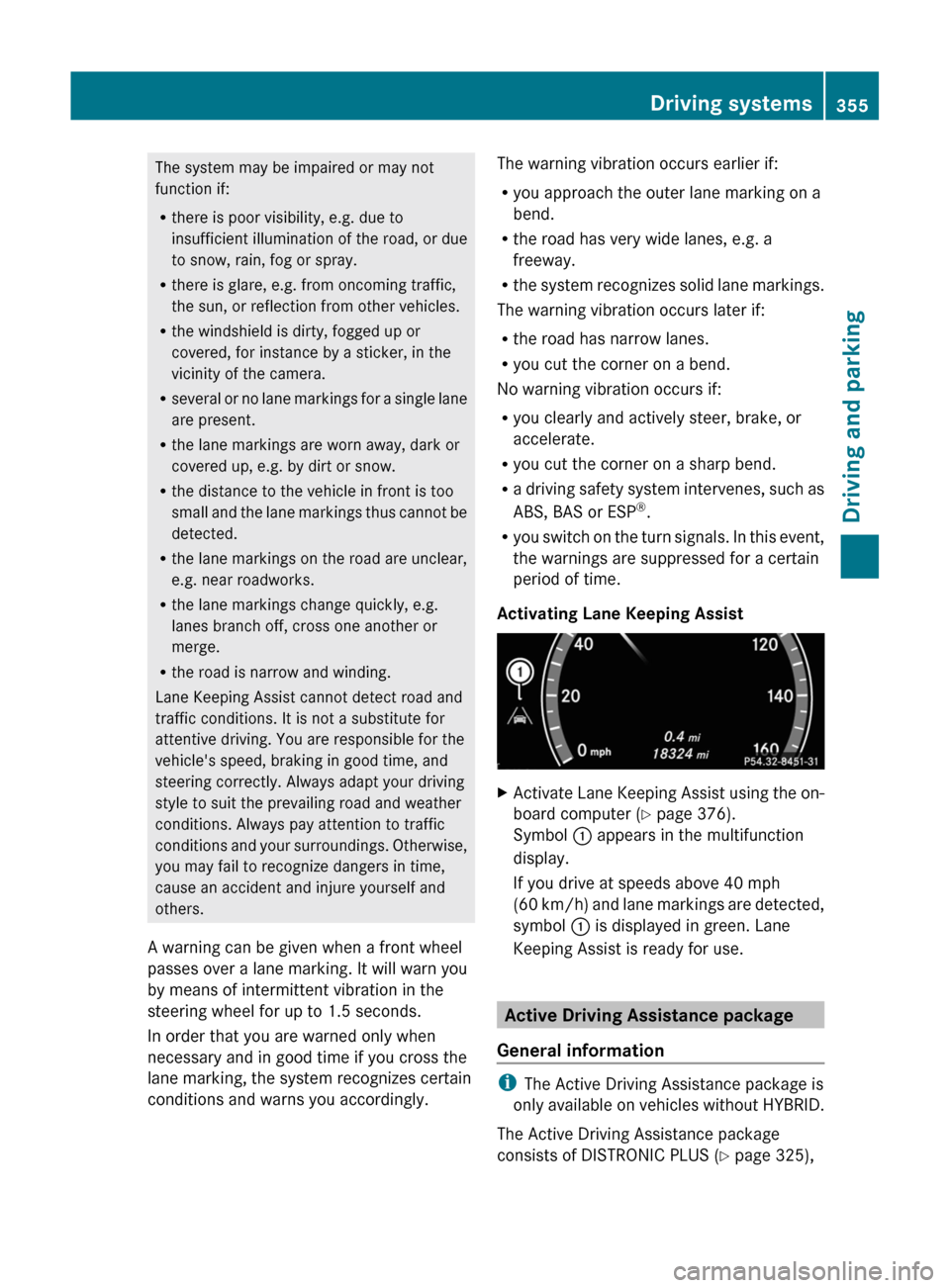
Activating Lane Keeping Assist
XActivate Lane Keeping Assist using the on-
board computer (Y page 376).
Symbol : appears in the multifunction
display.
If you drive at speeds above 40 mph
(60 km/h) and lane markings are detected,
symbol : is displayed in green. Lane
Keeping Assist is ready for use.
Active Driving Assistance package
General information
iThe Active Driving Assistance package is
only available on vehicles without HYBRID.
The Active Driving Assistance package
consists of DISTRONIC PLUS (Y page 325),
Driving systems355Driving and parkingZ
Page 377 of 524
XPress the = or ; button on the
steering wheel to select the Telephone
menu.XPress the 9, : or a button to call
up the phone book.XPress 9 or : to select the name you
are searching for.
To scroll rapidly, press and hold the :
or 9 button for longer than one second.
After skipping eight entries, the rapid scroll
speeds up.
Rapid scrolling stops when you release the
button or reach the end of the list.XIf only one telephone number is stored
for a name: press the 6 or a button
to start dialing.
or
XIf there is more than one number for a
particular name: press the 6 or a
button to display the numbers.XPress the 9 or : button to select the
number you want to dial.XPress the 6 or a button to start
dialing.
or
XIf you do not want to make a call: press
the ~ button.
Redialing
The on-board computer saves the last names
or numbers dialed in the redial memory
( Calls Dialed list).
XPress the = or ; button on the
steering wheel to select the Telephone
menu.XPress the 6 button to switch to the
redial memory.XPress the 9 or : button to select the
desired name or number.
To scroll rapidly, press and hold the :
or 9 button for longer than one second.XPress the 6 or a button to start
dialing.Assistance menu
Showing the distance display
This function is only available with
DISTRONIC PLUS.
XPress = or ; on the steering wheel
to select the DriveAssist menu.XPress 9 or : to select Distance
Display .XPress a.
The DISTRONIC PLUS distance display
( Y page 332) appears in the multifunction
display.
Activating/deactivating ESP ®
GWarning
Under no circumstances should you
deactivate ESP ®
when the ÷ ESP®
warning lamp in the instrument cluster
flashes. Proceed as follows:
R when driving off, apply as little throttle as
possible.
R while driving, ease up on the accelerator
pedal.
R adapt your speed to suit the prevailing road
and weather conditions.
failure to observe these guidelines could
cause the vehicle to skid. ESP ®
cannot
prevent accidents resulting from excessive
speed.
For further information about
ESP ®
(Y page 69).
XStart the engine.XPress = or ; on the steering wheel
to select the DriveAssist menu.XPress 9 or : to select ESP.XPress a.XTo deactivate: press a again.
The å warning lamp in the instrument
cluster comes on.Menus and submenus375On-board computer and displaysZ
Page 378 of 524
GWarning
When the å ESP®
OFF warning lamp is lit,
ESP ®
is deactivated.
If the ÷ ESP®
warning lamp and the
å ESP®
OFF warning lamp remain lit,
ESP ®
is not available due to a malfunction.
When ESP ®
is deactivated or not operational,
vehicle stability in standard driving
maneuvers is reduced.
Adapt your speed and driving to the prevailing
road conditions and to the non-operating
status of the ESP ®
.
XTo activate: press a again.
The å warning lamp in the instrument
cluster goes out.
Activating/deactivating PRE-SAFE ®
Brake
This function is only available with
DISTRONIC PLUS.
XPress = or ; on the steering wheel
to select the DriveAssist menu.XPress the 9 or : button to select
PRE-SAFE Brake .XPress a.
The current selection is displayed.XTo activate/deactivate: press a
again.
When PRE-SAFE ®
Brake ( Y page 71) is
activated, the multifunction display shows
the Ä symbol as long as the HOLD
function is not activated ( Y page 335).
Activating/deactivating ATTENTION
ASSIST
This function is not available in vehicles with
HYBRID.
XPress = or ; on the steering wheel
to select the DriveAssist menu.XPress 9 or : to select the
Attention Assist menu.XPress a.
The current selection is displayed.XTo activate/deactivate: press a
again.
When ATTENTION ASSIST ( Y page 347) is
activated, the À symbol appears in the
multifunction display when the ignition is on.
Activating/deactivating Blind Spot
Assist
You can use the Blind Spot Assist
function to activate Blind Spot Assist
( Y page 352) or Active Blind Spot Assist
( Y page 356).
XPress = or ; on the steering wheel
to select the DriveAssist menu.XPress 9 or : to select Blind Spot
Assist .XPress a.
The current selection is displayed.XTo activate/deactivate: press a
again.
Activating/deactivating Lane Keeping
Assist
You can use the Lane Keeping Assist
function to activate/deactivate Lane Keeping
Assist ( Y page 354) or Active Lane Keeping
Assist ( Y page 359).
XPress = or ; on the steering wheel
to select the DriveAssist menu.XPress 9 or : on the steering wheel
to select Lane Keeping Assist .XPress a.
The current selection is displayed.XTo activate/deactivate: press a
again.
When Lane Keeping Assist or Active Lane
keeping Assist is activated, the multifunction
display shows the à symbol when the
ignition is switched on.
376Menus and submenusOn-board computer and displays
Page 380 of 524
The selected unit of measurement for
distance applies to:
R the analog speedometer
R the digital speedometer in the Trip menu
R the odometer and the trip odometer
R the trip computer
R the navigation instruction in the Navi menu
R DISTRONIC PLUS
R ASSYST PLUS service interval display
The digital speedometer shows alternative
speed units ( Y page 377).XPress the = or ; button on the
steering wheel to select the Settings
menu.XPress 9 or : to select Units.XPress the a button to confirm.XPress the a button to save the setting.
The unit switches km/h and mph.
Switching the belt adjustment on/off
Further information on belt adjustment:
( Y page 58).
XPress = or ; on the steering wheel
to select the Settings menu.XPress the 9 or : button to select
Belt Adjustment .XPress the a button to confirm.XTo activate/deactivate: press a
again.
Activating/deactivating the acoustic
locking confirmation
If you activate the Acoustic Lock Feedb.
function, an audible signal sounds when the
vehicle is locked or unlocked. When
unlocking, the signal sounds once. When
locking, it sounds three times.
XPress the = or ; button on the
steering wheel to select the Settings
menu.XPress 9 or : to select Acoustic
Lock Feedb. .XPress the a button to confirm.XTo activate/deactivate: press a
again.
Activating/deactivating the radar
sensor system
The following systems are switched off when
the radar sensor system is deactivated:
R DISTRONIC PLUS ( Y page 325)
R BAS PLUS ( Y page 68)
R PRE-SAFE ®
Brake ( Y page 71)
R Blind Spot Assist ( Y page 352)
R Active Blind Spot Assist ( Y page 356)
i USA only: This device has been approved
by the FCC as a “Vehicular Radar System”.
The radar sensor is intended for use in an
automotive radar system only. Removal,
tampering, or altering of the device will void
any warranties, and is not permitted by the
FCC. Do not tamper with, alter, or use in
any non-approved way.
Any unauthorized modification to this
device could void the user’s authority to
operate the equipment.
i Canada only:
This device complies with RSS-210 of
Industry Canada. Operation is subject to
the following two conditions:
1. This device may not cause interference,
and
2. This device must accept any interference
received, including interference that may
cause undesired operation of the device.
Any unauthorized modification to this
device could void the user’s authority to
operate the equipment.
378Menus and submenusOn-board computer and displays
Page 385 of 524
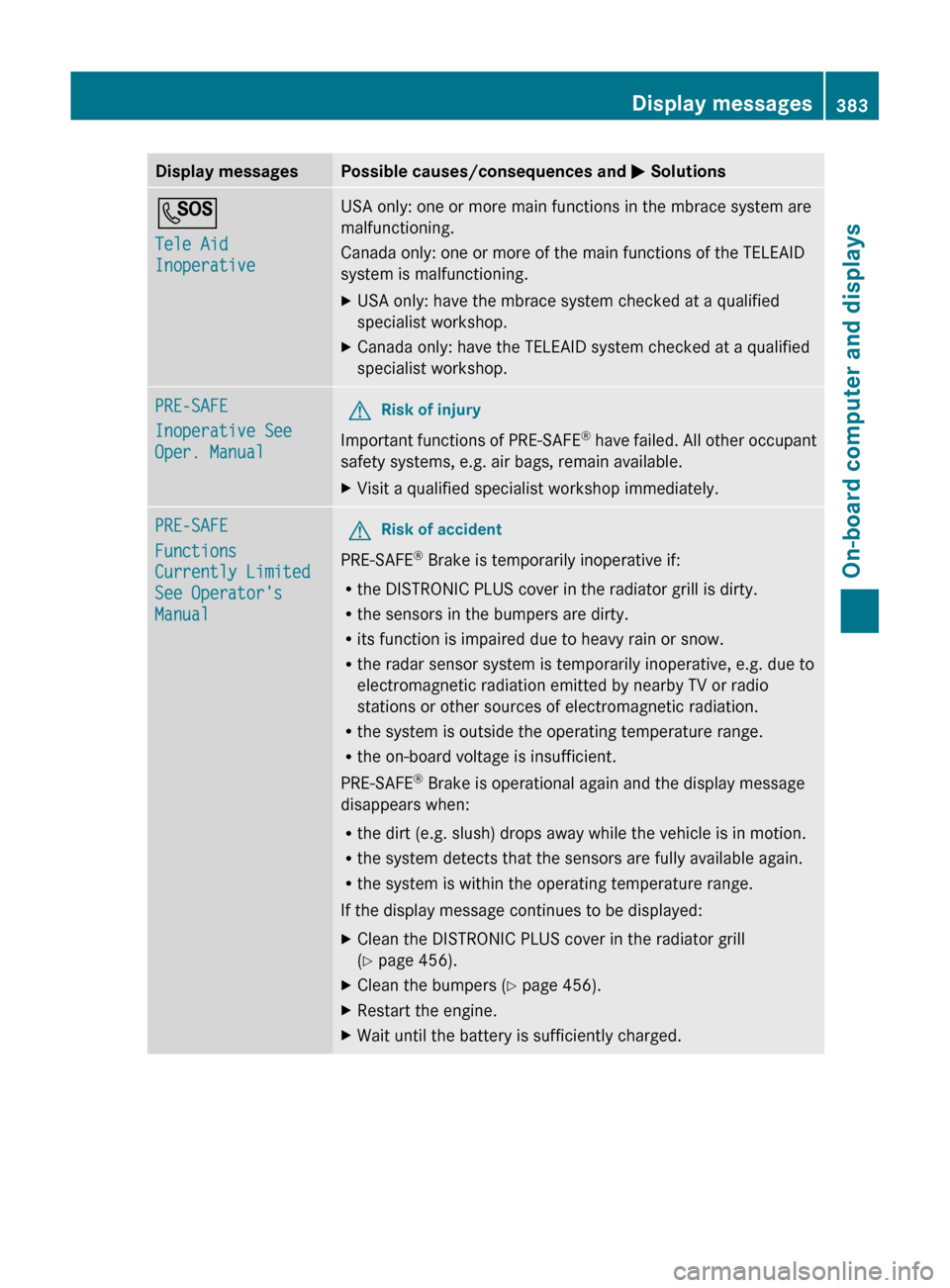
Display messagesPossible causes/consequences and M SolutionsG
Tele Aid
InoperativeUSA only: one or more main functions in the mbrace system are
malfunctioning.
Canada only: one or more of the main functions of the TELEAID
system is malfunctioning.XUSA only: have the mbrace system checked at a qualified
specialist workshop.XCanada only: have the TELEAID system checked at a qualified
specialist workshop.PRE-SAFE
Inoperative See
Oper. ManualGRisk of injury
Important functions of PRE-SAFE ®
have failed. All other occupant
safety systems, e.g. air bags, remain available.
XVisit a qualified specialist workshop immediately.PRE-SAFE
Functions
Currently Limited
See Operator's
ManualGRisk of accident
PRE-SAFE ®
Brake is temporarily inoperative if:
R the DISTRONIC PLUS cover in the radiator grill is dirty.
R the sensors in the bumpers are dirty.
R its function is impaired due to heavy rain or snow.
R the radar sensor system is temporarily inoperative, e.g. due to
electromagnetic radiation emitted by nearby TV or radio
stations or other sources of electromagnetic radiation.
R the system is outside the operating temperature range.
R the on-board voltage is insufficient.
PRE-SAFE ®
Brake is operational again and the display message
disappears when:
R the dirt (e.g. slush) drops away while the vehicle is in motion.
R the system detects that the sensors are fully available again.
R the system is within the operating temperature range.
If the display message continues to be displayed:
XClean the DISTRONIC PLUS cover in the radiator grill
( Y page 456).XClean the bumpers ( Y page 456).XRestart the engine.XWait until the battery is sufficiently charged.Display messages383On-board computer and displaysZ
Page 407 of 524
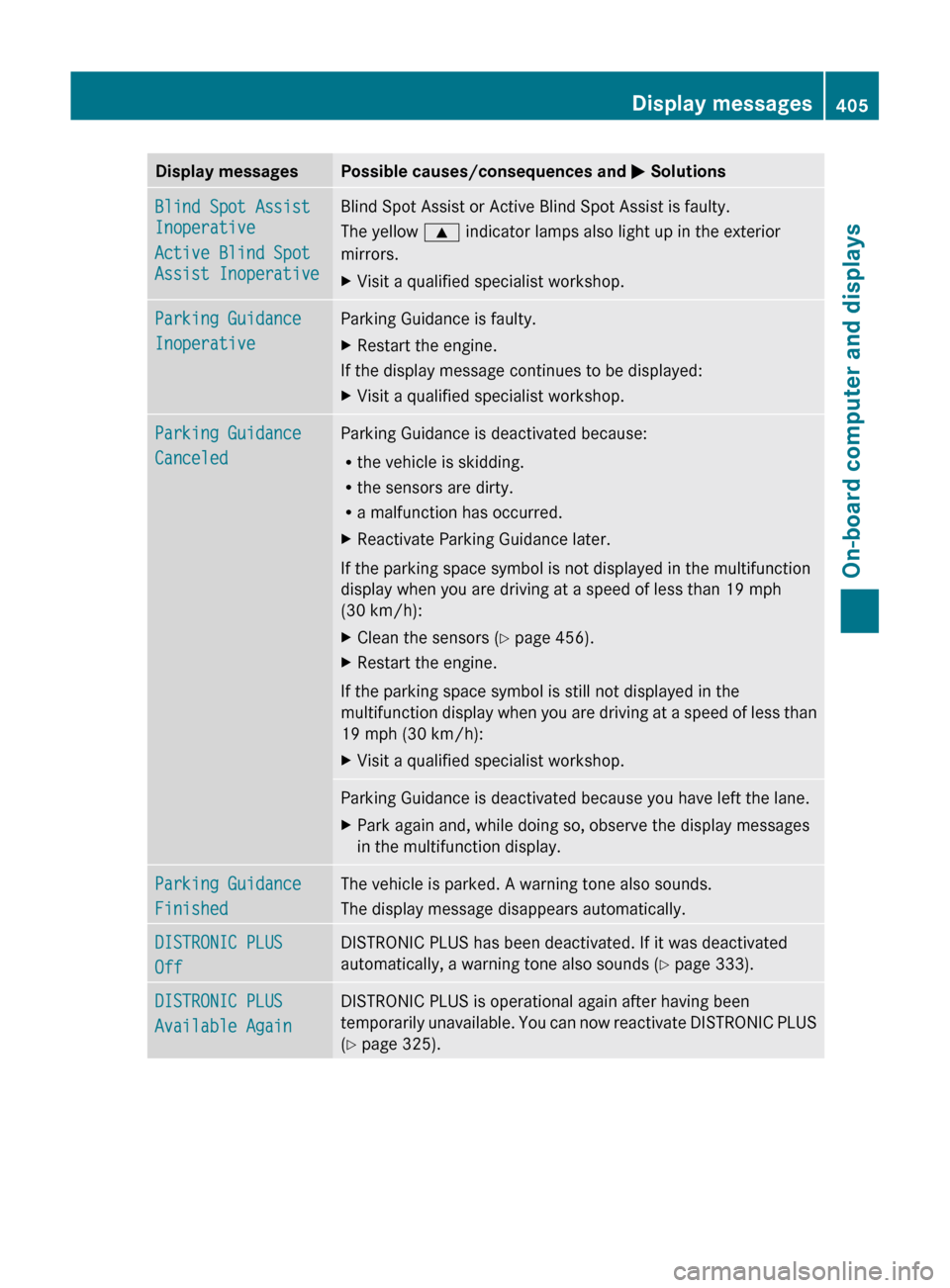
Display messagesPossible causes/consequences and M SolutionsBlind Spot Assist
Inoperative
Active Blind Spot
Assist InoperativeBlind Spot Assist or Active Blind Spot Assist is faulty.
The yellow 9 indicator lamps also light up in the exterior
mirrors.XVisit a qualified specialist workshop.Parking Guidance
InoperativeParking Guidance is faulty.XRestart the engine.
If the display message continues to be displayed:
XVisit a qualified specialist workshop.Parking Guidance
CanceledParking Guidance is deactivated because:
R the vehicle is skidding.
R the sensors are dirty.
R a malfunction has occurred.XReactivate Parking Guidance later.
If the parking space symbol is not displayed in the multifunction
display when you are driving at a speed of less than 19 mph
(30 km/h):
XClean the sensors ( Y page 456).XRestart the engine.
If the parking space symbol is still not displayed in the
multifunction display when you are driving at a speed of less than
19 mph (30 km/h):
XVisit a qualified specialist workshop.Parking Guidance is deactivated because you have left the lane.XPark again and, while doing so, observe the display messages
in the multifunction display.Parking Guidance
FinishedThe vehicle is parked. A warning tone also sounds.
The display message disappears automatically.DISTRONIC PLUS
OffDISTRONIC PLUS has been deactivated. If it was deactivated
automatically, a warning tone also sounds ( Y page 333).DISTRONIC PLUS
Available AgainDISTRONIC PLUS is operational again after having been
temporarily unavailable. You can now reactivate DISTRONIC PLUS
( Y page 325).Display messages405On-board computer and displaysZ