roller sunblind MERCEDES-BENZ S-Class 2011 W221 Owner's Manual
[x] Cancel search | Manufacturer: MERCEDES-BENZ, Model Year: 2011, Model line: S-Class, Model: MERCEDES-BENZ S-Class 2011 W221Pages: 524, PDF Size: 22.53 MB
Page 7 of 524
Alertness Assistantsee ATTENTION ASSIST
Alternative route ............................... 169
Ambient light Adjusting (COMAND) .....................260
AMG menu (on-board computer) ..... 371
Anti-lock Braking System see ABS
Anti-Theft Alarm system
see ATA
Anti-theft system
ATA (Anti-Theft Alarm system) .........73
Ashtray ............................................... 430
Assistance menu (on-board
computer) .......................................... 375
ATA (Anti-Theft Alarm system) Activating/deactivating ...................73
Function ........................................... 73
Switching off the alarm ....................73
ATTENTION ASSIST ........................... 347
Activating/deactivating (on-
board computer) ............................ 376
Display message ............................ 401
Audio AUX jack .................................. 234
Audio CD/DVD or MP3 mode Switching to ................................... 218
Audio DVD
Pause function ............................... 249
Stop function ................................. 220
Audio format
Setting (audio DVD mode) .............223
Audio menu (on-board computer) .... 370
AUTO lights see Light sensor
Automatic car wash .......................... 453
Automatic engine start Using the ECO start/stop
function ......................................... 303
Automatic engine stop
Using the ECO start/stop
function ......................................... 303
Automatic transmission
DIRECT SELECT lever .....................306
Display message ............................ 409
Driving tips .................................... 309
Emergency running mode ..............313
Kickdown ....................................... 309Malfunction .................................... 313
Program selector button ................310
Pulling away ................................... 301
Starting .......................................... 301
Autostore ........................................... 210
B
Back button ....................................... 117
Bag hook ............................................ 426
Bang & Olufsen sound system ......... 135
BAS (Brake Assist System) ................. 67
BAS PLUS (Brake Assist System
Plus*) .................................................... 68
Battery Charging ........................................ 470
Checking (SmartKey) .......................80
Display message ............................ 399
Important safety guidelines
(SmartKey) ....................................... 79
Jump-starting ................................. 471
Replacing (SmartKey) ......................80
Safety notes .................................. 468
Voltage (on-board computer) .........371
Belt
see Seat belts
Bird's-eye view .................................. 181
Blind see Roller sunblind
Blind Spot Assist ............................... 352
Activating/deactivating (on-
board computer) ............................ 376
Display message ............................ 404
Bluetooth ®
Activating/deactivating .................145
Authorizing a device ......................146
Connecting devices .......................145
Devices .......................................... 146
External authorization ............147, 194
General information .......................145
Interface ........................................ 192
Revoking authorization ..................147
Settings ......................................... 145
Telephony .............................. 191, 192
Bluetooth ®
interface
Telephony ...................................... 191
Bluetooth ®
interface telephony
Conditions ..................................... 192
Index5
Page 18 of 524
Entering a phone number ..............161
Entering using the map ..................163
ZAGAT ®
rating service ...................163
Point of interest icon
Setting ........................................... 181
Point of interest list .......................... 162
Power closing feature ......................... 84
Power steering Filling capacity ............................... 511
Power washers .................................. 454
Power windows see Side windows
Pre-emptive occupant safety
system
see PRE-SAFE ®
system
PRE-SAFE ®
Brake (vehicles with
DISTRONIC PLUS) Activating/deactivating (on-
board computer) ............................ 376
Function/notes ................................ 71
PRE-SAFE ®
Brake (vehicles with
DISTRONIC PLUS) Display message ............................ 383
Warning lamp ................................. 419
PRE-SAFE ®
system
Display message ............................ 383
Operation ......................................... 53
Previous destinations ....................... 178
Product information ............................ 24
Programmable button ....................... 118
Program selector button .................. 310
Pulling away Automatic transmission .................301
PULSE
see Massage function
R
RACETIMER (on-board computer) .... 372
Radar sensor system Display message ............................ 403
Radar sensor system (on-board
computer) .......................................... 378
Radiator cover ................................... 447
Radio
Changing stations (on-board
computer) ...................................... 370
HD Radio™ .................................... 212
see separate operating instructions
Radio-controlled equipment
Assembly ....................................... 442
Radio mode
Switching to ................................... 208
Radio station
Storing ........................................... 210
Range (on-board computer) ............. 368
Read-aloud function .......................... 172
Read-aloud speed Setting ........................................... 143
Real-time traffic reports ........... 172, 175
Rear compartment Activating/deactivating climate
control ........................................... 289
Setting the airflow .........................292
Setting the air vents ..............295, 296
Setting the temperature ................291
Rear-compartment screens .............. 137
Rear-compartment seats .................. 102
Rear fog lamp (display message) ..... 396
Rear Seat Entertainment System Audio CD/DVD and MP3 mode .....247
AUX mode ............................. 139, 255
Changing the batteries ..................243
Remote control .............................. 138
Several users ................................. 245
System settings ............................. 246
Using headphones .........................244
Using the main loudspeaker ..........244
Video DVD mode ........................... 250
Wireless headphones .....................140
Rear seats
Overview .......................................... 39
Rear view camera .............................. 346
Rear view camera (cleaning
instructions) ...................................... 456
Rear-view mirror Dipping (automatic) .......................110
Rear window blind ............................ 429
see Rear window roller sunblind 16Index
Page 19 of 524
Rear window heatingMalfunction .................................... 293
Switching on/off ........................... 293
Redials ................................................ 197
Refueling ............................................ 313
Remote control .................................. 123
Programming (garage door
opener) .......................................... 440
Rear Seat Entertainment System ...138
Reporting
Malfunctions relevant to safety ........ 27
Reserve (fuel tank)
see Fuel
Reserve fuel
Display message ............................ 400
Warning lamp ................................. 418
Reset .................................................. 148
Residual heat Switching on/off ........................... 294
Restraint systems
see SRS
Reversing lamp (display message) .. 396
Roadside Assistance (breakdown) .... 25
Roller blind see Roller sunblind
Roller sunblind
Panorama roof with power tilt/
sliding panel ..................................... 95
Rear side windows ...........................90
Rear window .................................. 429
Rear window (COMAND) ................258
Roller sunblind of the panorama
roof with power tilt/sliding panel Operating (front roller sunblind) ....... 95
Operating (rear roller sunblind) ........96
Roof carrier ................................ 426, 427
Roof lining and carpets (cleaning
guidelines) ......................................... 459
Roof load (maximum) ........................ 516
Route Calculating ..................................... 154
Estimated time of arrival ................169
Route overview .............................. 170
see Route guidance (on-board
computer)
Route calculation
Starting .......................................... 154Route guidance .................................. 164
Cancel ........................................... 167
Continue ........................................ 167
Continuing ..................................... 167
Destination reached ......................168
Lane recommendations .................165
Off-road ......................................... 171
Traffic reports ................................ 172
Route guidance (on-board
computer) .......................................... 369
Route options Setting ........................................... 150
Route overview .................................. 170
Route type Setting ........................................... 150
S
Safety Children in the vehicle .....................60
Child restraint systems ....................61
Occupant Classification System
(OCS) ............................................... 48
Overview of occupant safety
systems ........................................... 42
Safety notes
Audio CD/DVD and MP3
mode ..................................... 217, 247
Operating safety ....................114, 266
Using the telephone ....................... 191
Video DVD mode ........................... 236
Safety systems
see Driving safety systems
SatRadio ............................................. 213
Displaying information ...................217
Registering .................................... 214
Selecting a category ......................215
Switching to ................................... 214
Screen
Selecting for remote operation ......138
SD memory card
Loading .......................................... 218
Seat
Active multicontour seat ........ 106, 268
Adjusting (rear compartment) ........102
Selecting (COMAND) .....................266
Index17
Page 37 of 524
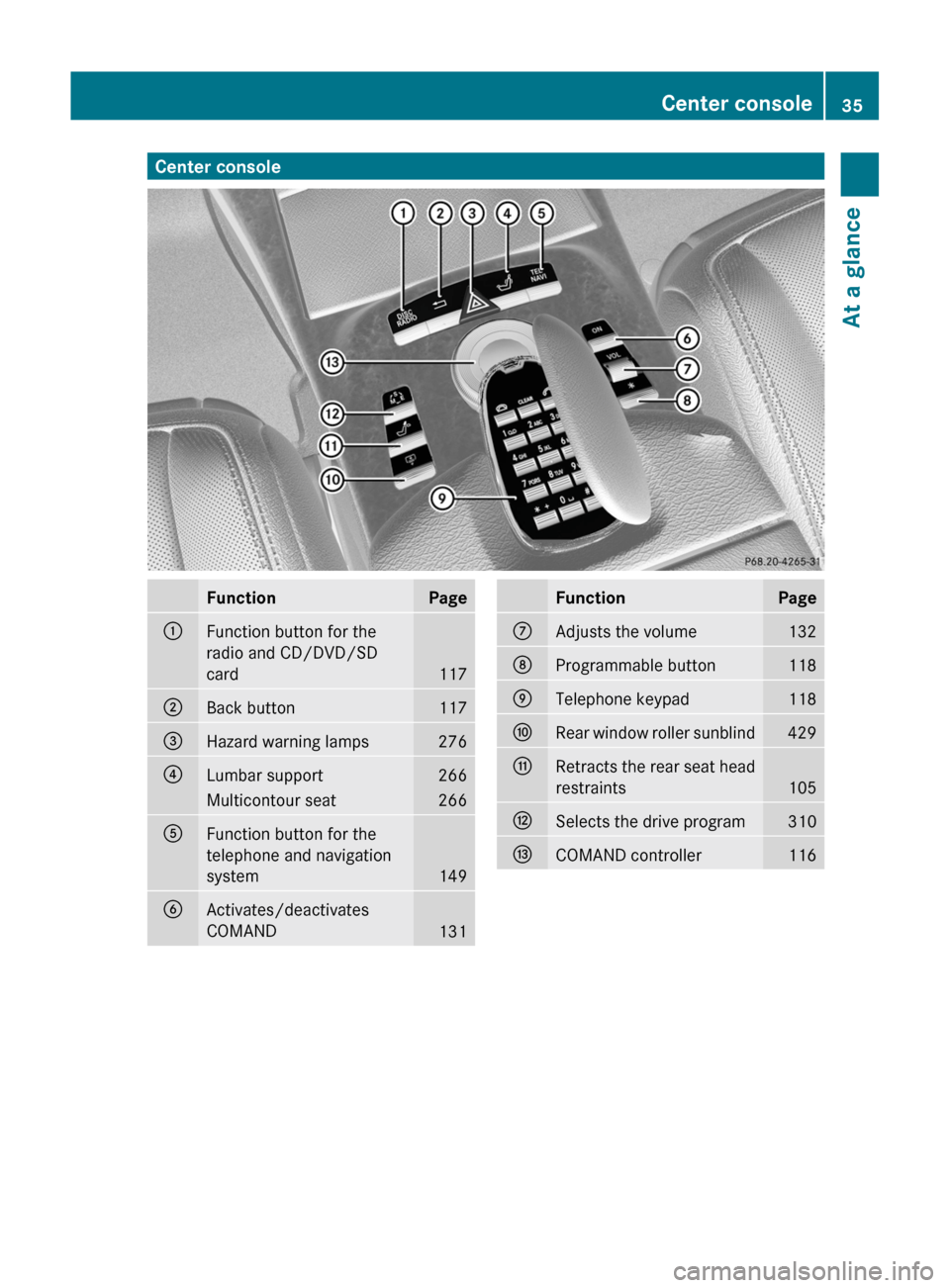
Center consoleFunctionPage:Function button for the
radio and CD/DVD/SD
card117
;Back button117=Hazard warning lamps276?Lumbar support266Multicontour seat266AFunction button for the
telephone and navigation
system149
BActivates/deactivates
COMAND131
FunctionPageCAdjusts the volume132DProgrammable button118ETelephone keypad118FRear window roller sunblind429GRetracts the rear seat head
restraints105
HSelects the drive program310ICOMAND controller116Center console35At a glance
Page 38 of 524
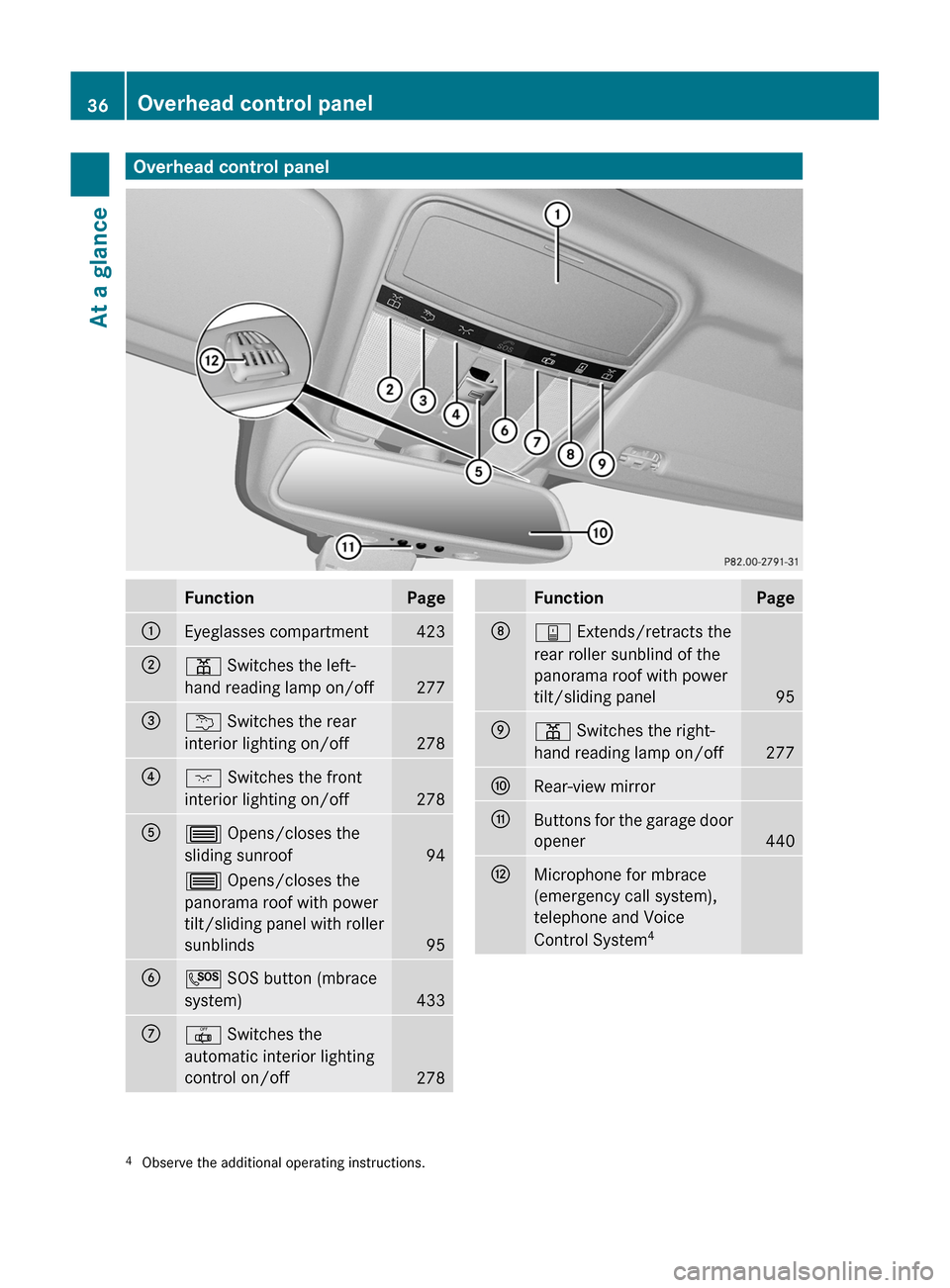
Overhead control panelFunctionPage:Eyeglasses compartment423;p Switches the left-
hand reading lamp on/off277
=u Switches the rear
interior lighting on/off278
?c Switches the front
interior lighting on/off278
A3 Opens/closes the
sliding sunroof94
3 Opens/closes the
panorama roof with power
tilt/sliding panel with roller
sunblinds95
BG SOS button (mbrace
system)433
C| Switches the
automatic interior lighting
control on/off278
FunctionPageDy Extends/retracts the
rear roller sunblind of the
panorama roof with power
tilt/sliding panel95
Ep Switches the right-
hand reading lamp on/off277
FRear-view mirrorGButtons for the garage door
opener440
HMicrophone for mbrace
(emergency call system),
telephone and Voice
Control System4
4Observe the additional operating instructions.36Overhead control panelAt a glance
Page 39 of 524
Door control panel
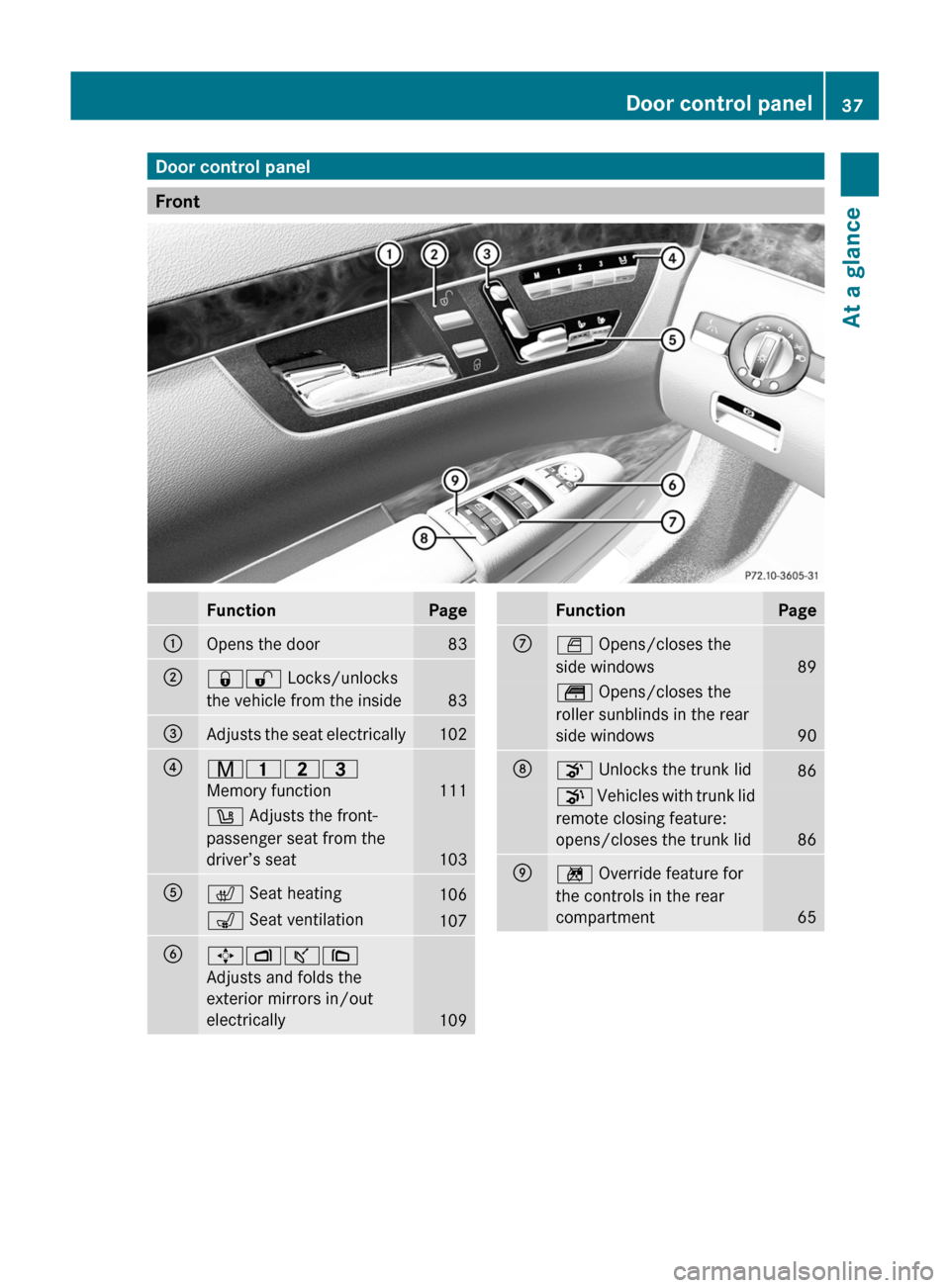
Front
FunctionPage:Opens the door83;&% Locks/unlocks
the vehicle from the inside
83
=Adjusts the seat electrically102?r 45=
Memory function
111
w Adjusts the front-
passenger seat from the
driver’s seat
103
Ac Seat heating106s Seat ventilation107B7Zª\
Adjusts and folds the
exterior mirrors in/out
electrically
109
FunctionPageCW Opens/closes the
side windows
89
t Opens/closes the
roller sunblinds in the rear
side windows
90
Do Unlocks the trunk lid86p Vehicles with trunk lid
remote closing feature:
opens/closes the trunk lid
86
En Override feature for
the controls in the rear
compartment
65
Door control panel37At a glance
Page 40 of 524
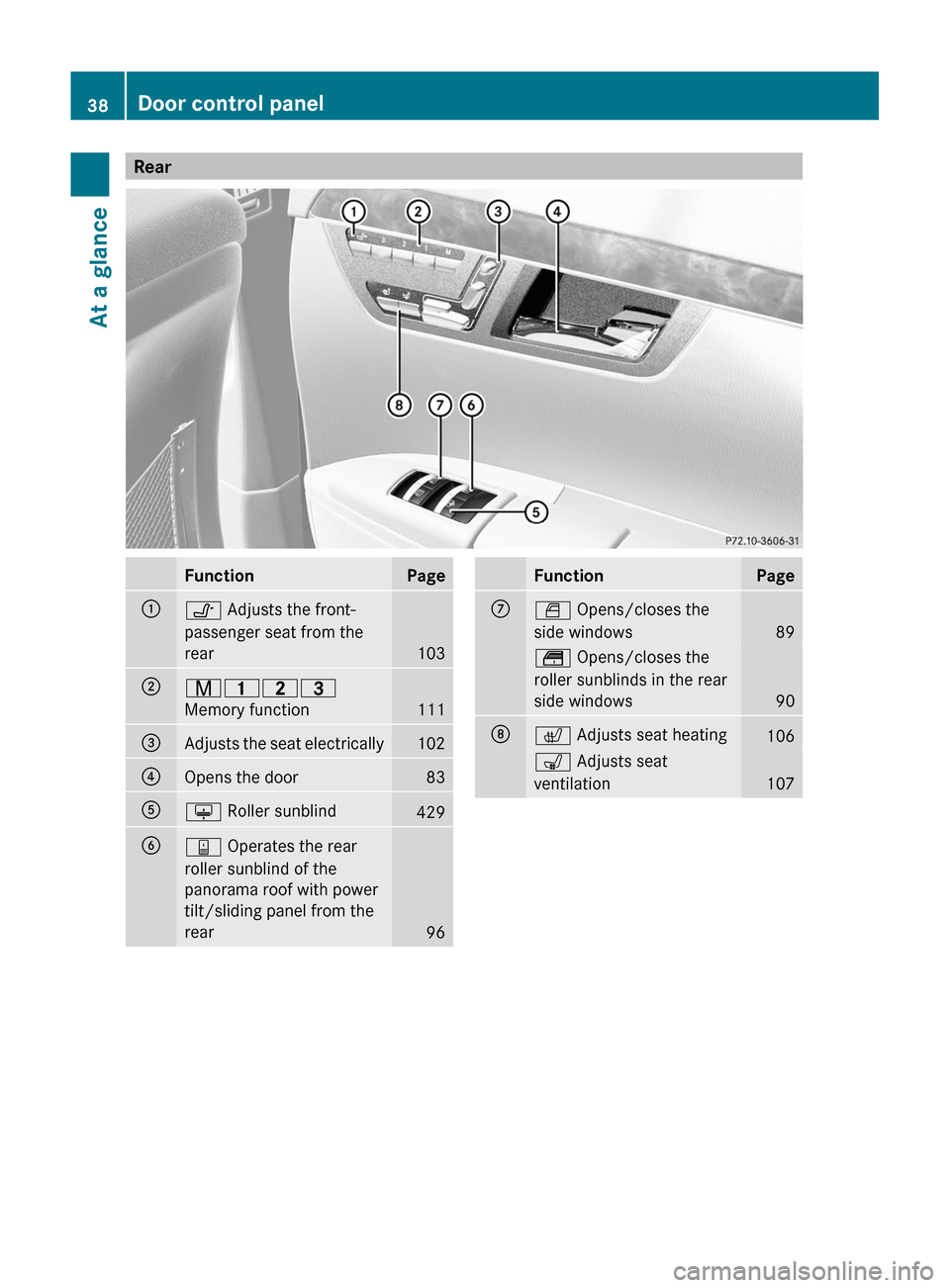
RearFunctionPage:v Adjusts the front-
passenger seat from the
rear
103
;r 45=
Memory function
111
=Adjusts the seat electrically102?Opens the door83Au Roller sunblind429By Operates the rear
roller sunblind of the
panorama roof with power
tilt/sliding panel from the
rear
96
FunctionPageCW Opens/closes the
side windows
89
t Opens/closes the
roller sunblinds in the rear
side windows
90
Dc Adjusts seat heating106s Adjusts seat
ventilation
107
38Door control panelAt a glance
Page 92 of 524
Opening and closing the side
windows
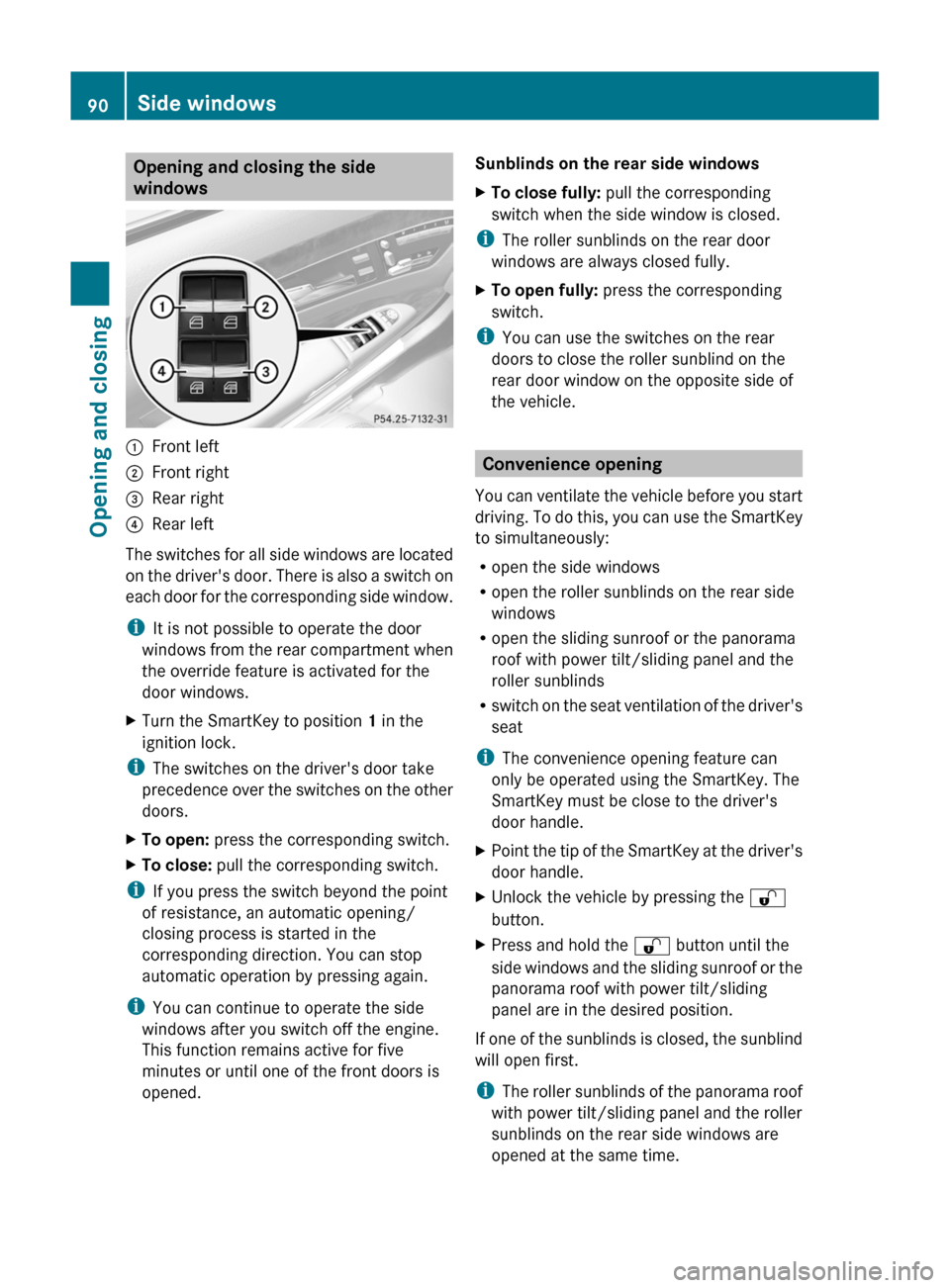
:Front left;Front right=Rear right?Rear left
The switches for all side windows are located
on the driver's door. There is also a switch on
each door for the corresponding side window.
iIt is not possible to operate the door
windows from the rear compartment when
the override feature is activated for the
door windows.
XTurn the SmartKey to position 1 in the
ignition lock.
iThe switches on the driver's door take
precedence over the switches on the other
doors.
XTo open: press the corresponding switch.XTo close: pull the corresponding switch.
iIf you press the switch beyond the point
of resistance, an automatic opening/
closing process is started in the
corresponding direction. You can stop
automatic operation by pressing again.
iYou can continue to operate the side
windows after you switch off the engine.
This function remains active for five
minutes or until one of the front doors is
opened.
Sunblinds on the rear side windowsXTo close fully: pull the corresponding
switch when the side window is closed.
iThe roller sunblinds on the rear door
windows are always closed fully.
XTo open fully: press the corresponding
switch.
iYou can use the switches on the rear
doors to close the roller sunblind on the
rear door window on the opposite side of
the vehicle.
Convenience opening
You can ventilate the vehicle before you start
driving. To do this, you can use the SmartKey
to simultaneously:
Ropen the side windows
Ropen the roller sunblinds on the rear side
windows
Ropen the sliding sunroof or the panorama
roof with power tilt/sliding panel and the
roller sunblinds
Rswitch on the seat ventilation of the driver's
seat
iThe convenience opening feature can
only be operated using the SmartKey. The
SmartKey must be close to the driver's
door handle.
XPoint the tip of the SmartKey at the driver's
door handle.
XUnlock the vehicle by pressing the %
button.
XPress and hold the % button until the
side windows and the sliding sunroof or the
panorama roof with power tilt/sliding
panel are in the desired position.
If one of the sunblinds is closed, the sunblind
will open first.
iThe roller sunblinds of the panorama roof
with power tilt/sliding panel and the roller
sunblinds on the rear side windows are
opened at the same time.
90Side windowsOpening and closing
Page 93 of 524
XPress and hold the % button again until
the side windows and the sliding sunroof or
the panorama roof with power tilt/sliding
panel are in the desired position.
XTo interrupt the convenience opening:
release the % button.
Convenience closing
General information
When you lock the vehicle, you can
simultaneously:
Rclose the side windows
Rclose the sliding sunroof or the panorama
roof with power tilt/sliding panel
On vehicles with roller sunblinds, you can
then close the roller sunblinds.
iThe roller sunblinds of the panorama roof
with power tilt/sliding panel and the roller
sunblinds on the rear side windows are
closed at the same time.
GWarning
When closing the door windows and the
sliding sunroof or panorama roof with power
tilt/sliding panel, make sure that there is no
danger of anyone being harmed by the closing
procedure.
If potential danger exists, proceed as follows:
RRelease the & button to stop the closing
procedure. To open, press and hold the
% button. To continue the closing
procedure after making sure that there is
no danger of anyone being harmed by the
closing procedure, press and hold the
& button.
Vehicles with KEYLESS-GO:
RRelease the sensor surface on the outside
door handle to stop the closing procedure.
RImmediately pull on the same outside door
handle and hold firmly. The door windows
and the sliding sunroof or panorama roof
with power tilt/sliding panel will open for
as long as the door handle is held but the
door is not opened.
Using the SmartKey
iThe SmartKey must be close to the
driver's door handle.
XPoint the tip of the SmartKey at the driver's
door handle.
XLock the vehicle by pressing the &
button.
XPress and hold the & button until the
side windows and the sliding sunroof or the
panorama roof with power tilt/sliding
panel are fully closed.
XMake sure that all the side windows and the
sliding sunroof or panorama roof with
power tilt/sliding panel are closed.
XTo interrupt the convenience closing:
release the & button.
On vehicles with roller sunblinds:
XPress the & button again until the roller
sunblinds close.
XTo interrupt the roller sunblind closing
procedure: press the % button.
With KEYLESS-GO
The KEYLESS-GO key must be outside the
vehicle but must not be further than 3 ft (1 m)
from a door.
XClose all the doors.Side windows91Opening and closingZ
Page 94 of 524
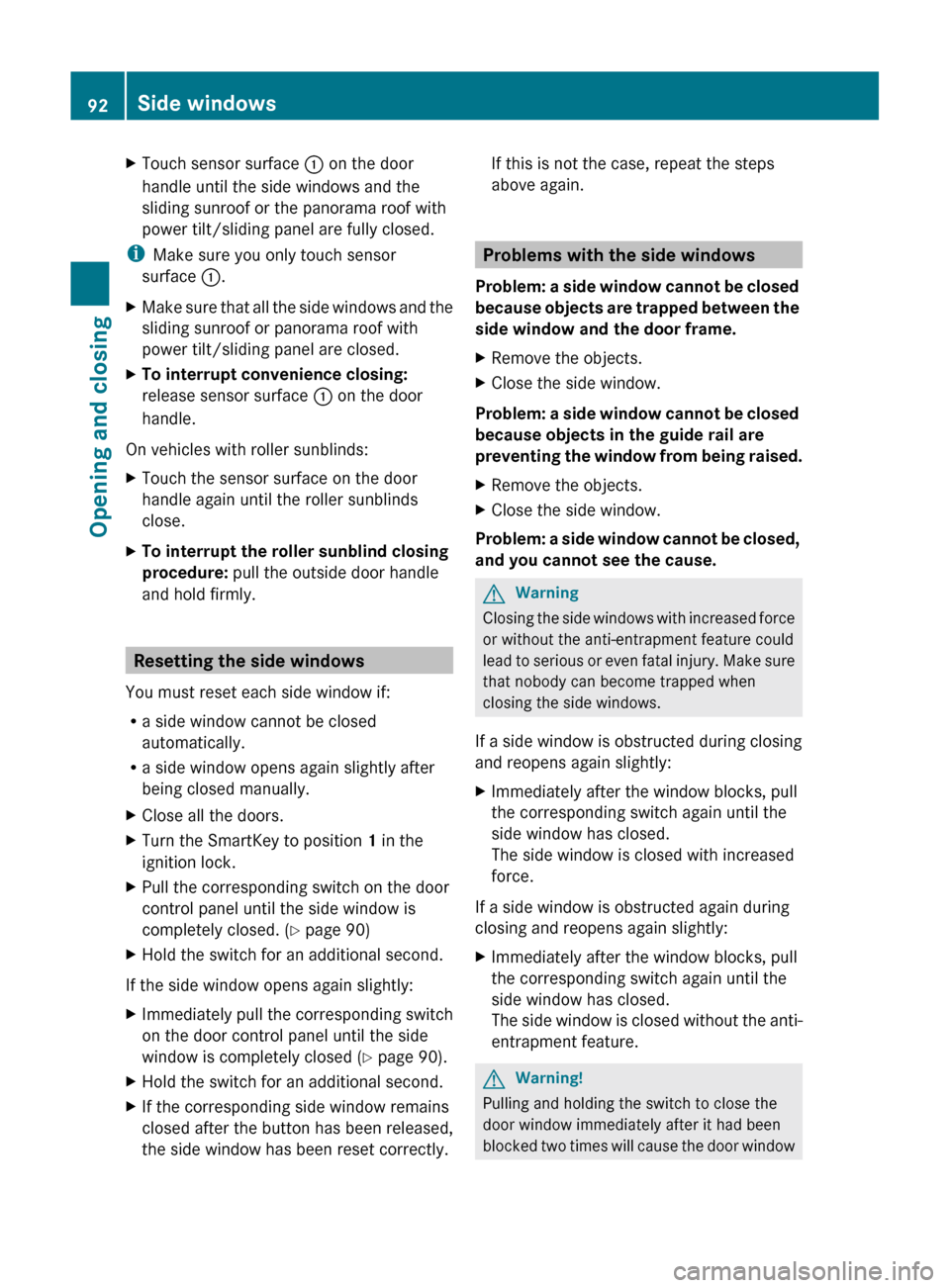
XTouch sensor surface : on the door
handle until the side windows and the
sliding sunroof or the panorama roof with
power tilt/sliding panel are fully closed.
i Make sure you only touch sensor
surface :.
XMake sure that all the side windows and the
sliding sunroof or panorama roof with
power tilt/sliding panel are closed.XTo interrupt convenience closing:
release sensor surface : on the door
handle.
On vehicles with roller sunblinds:
XTouch the sensor surface on the door
handle again until the roller sunblinds
close.XTo interrupt the roller sunblind closing
procedure: pull the outside door handle
and hold firmly.
Resetting the side windows
You must reset each side window if:
R a side window cannot be closed
automatically.
R a side window opens again slightly after
being closed manually.
XClose all the doors.XTurn the SmartKey to position 1 in the
ignition lock.XPull the corresponding switch on the door
control panel until the side window is
completely closed. ( Y page 90)XHold the switch for an additional second.
If the side window opens again slightly:
XImmediately pull the corresponding switch
on the door control panel until the side
window is completely closed ( Y page 90).XHold the switch for an additional second.XIf the corresponding side window remains
closed after the button has been released,
the side window has been reset correctly.If this is not the case, repeat the steps
above again.
Problems with the side windows
Problem: a side window cannot be closed
because objects are trapped between the
side window and the door frame.
XRemove the objects.XClose the side window.
Problem: a side window cannot be closed
because objects in the guide rail are
preventing the window from being raised.
XRemove the objects.XClose the side window.
Problem: a side window cannot be closed,
and you cannot see the cause.
GWarning
Closing the side windows with increased force
or without the anti-entrapment feature could
lead to serious or even fatal injury. Make sure
that nobody can become trapped when
closing the side windows.
If a side window is obstructed during closing
and reopens again slightly:
XImmediately after the window blocks, pull
the corresponding switch again until the
side window has closed.
The side window is closed with increased
force.
If a side window is obstructed again during
closing and reopens again slightly:
XImmediately after the window blocks, pull
the corresponding switch again until the
side window has closed.
The side window is closed without the anti-
entrapment feature.GWarning!
Pulling and holding the switch to close the
door window immediately after it had been
blocked two times will cause the door window
92Side windowsOpening and closing