ignition MERCEDES-BENZ S-Class 2012 W221 Workshop Manual
[x] Cancel search | Manufacturer: MERCEDES-BENZ, Model Year: 2012, Model line: S-Class, Model: MERCEDES-BENZ S-Class 2012 W221Pages: 536, PDF Size: 25.27 MB
Page 294 of 536
Notes on using climate control
Below, you can find a number of notes and
recommendations to help you use climate
control optimally.
R Activate climate control using the Ã
rocker switch. The indicator lamp in the
à rocker switch lights up.
R Set the temperature to 72 ‡ (22 †).
R Only use the "defrosting" function briefly
until the windshield is clear again.
R Only use "air-recirculation" mode briefly,
e.g. if there are unpleasant outside odors
or when in a tunnel. The windows could
otherwise fog up as, in air-recirculation
mode, no fresh air is drawn into the vehicle.
R Use the residual heat function if you want
to heat or ventilate the vehicle interior
when the ignition is switched off. The
"residual heat" function can only be
activated or deactivated with the ignition
switched off.
Operating the climate control system
Activating/deactivating climate
control
Important information
GWARNING
When the climate control system is
deactivated, the outside air supply and
circulation are also deactivated. Only choose
this setting for a short time. Otherwise the
windows could fog up, impairing visibility and
endangering you and others.
i Switch on climate control primarily using
the à rocker switch ( Y page 293).
Switching the front climate control on/
off using the front control panelXTurn the SmartKey to position 2 in the
ignition lock.XTo activate: press the ^ rocker switch
up or down.
The indicator lamp in the rocker switch
goes out. The previously selected settings
come into effect again.XTo deactivate: press the ^ rocker
switch up or down.
The indicator lamp in the rocker switch
lights up.
Switching the rear-compartment
climate control on/off using the front
control panel
XTurn the SmartKey to position 2 in the
ignition lock.XActivate the Y rear compartment
function via COMAND ( Y page 268).
The rear-compartment climate control can
be controlled via the front control panel
using the Y rear compartment function.XTo activate: press the ^ rocker switch
up or down.
The indicator lamp in the rocker switch
goes out. The previously selected settings
come into effect again.XTo deactivate: press the ^ rocker
switch up or down.
The indicator lamp in the rocker switch
lights up.292Operating the climate control systemClimate control
Page 295 of 536
Switching the rear-compartment
climate control on/off using the rear
control panelXTurn the SmartKey to position 2 in the
ignition lock.XTo switch on: press rocker switch
K (Y page 291) up or down and select
AUTO .
or
XPress rocker switch K(Y page 291) up or
down and select MAN.XTo switch off: press rocker switch
K (Y page 291) up or down and select
OFF .
Activating/deactivating cooling with
the air dehumidification function
Important information
The cooling with air dehumidification function
is only available when the engine is running.
The air inside the vehicle is cooled and
dehumidified according to the temperature
selected.
GWARNING
If you switch off the cooling function, the
vehicle will not be cooled when weather
conditions are warm. The windows can fog up
more quickly. Window fogging may impair
visibility and endanger you and others.
Condensation may drip from the underside of
the vehicle when it is in cooling mode. This is
normal and not a sign that there is a
malfunction.
You can activate or deactivate the cooling
with air dehumidification function via
COMAND ( Y page 267).
i The cooling with air dehumidification
function uses refrigerant R134a. This
coolant does not contain
chlorofluorocarbons, and therefore does
not damage the ozone layer.
Problems with the cooling with air
dehumidification function
If you can no longer switch on the cooling with
air dehumidification function via COMAND,
the cooling with air dehumidification function
is switched off due to a malfunction.
XConsult a qualified specialist workshop.
Setting climate control to automatic
GWARNING
If you switch off the cooling function, the
vehicle will not be cooled when weather
conditions are warm. The windows can fog up
more quickly. Window fogging may impair
visibility and endanger you and others.
In automatic mode, the set temperature is
maintained automatically at a constant level.
The system automatically regulates the
temperature of the dispensed air, the airflow
and the air distribution.
Automatic mode will achieve optimal
operation if cooling with air dehumidification
is also activated. If desired, cooling with air
dehumidification can be deactivated.
Controlling the front climate control
using the front control panel
XTurn the SmartKey to position 2 in the
ignition lock.XSet the desired temperature.X To switch on: press the à rocker
switch up or down.
The indicator lamp in the à rocker
switch lights up.Operating the climate control system293Climate controlZ
Page 296 of 536
XTo deactivate: press the K rocker
switch up or down.
The indicator lamp in the à rocker
switch goes out.
or
XSet the air distribution using COMAND
( Y page 266).
The indicator lamp in the à rocker
switch goes out.
Controlling the rear-compartment
climate control automatically using the
front control panel
XTurn the SmartKey to position 2 in the
ignition lock.XActivate the Y rear compartment
function via COMAND ( Y page 268).
Rear-compartment climate control can be
controlled via the front control panel using
the Y rear compartment function.XSet the desired temperature.X To switch on: press rocker switch Ã
up or down.
The indicator lamp in the à rocker
switch lights up.XTo deactivate: press the K rocker
switch up or down.
The indicator lamp in the à rocker
switch goes out.
or
XSet the air distribution using COMAND
( Y page 266).
The indicator lamp in the à rocker
switch goes out.
i To return to the standard display, activate
the front climate control function via
COMAND ( Y page 268).
i The rear display changes to the standard
display automatically after five seconds.
Controlling the rear-compartment
climate control automatically using the
rear control panelXTurn the SmartKey to position 2 in the
ignition lock.XSet the desired temperature.X To activate: press rocker switch K up or
down and select AUTO(Y page 291).XTo deactivate: press rocker switch K up
or down and select MAN or
OFF (Y page 291).
Setting the temperature
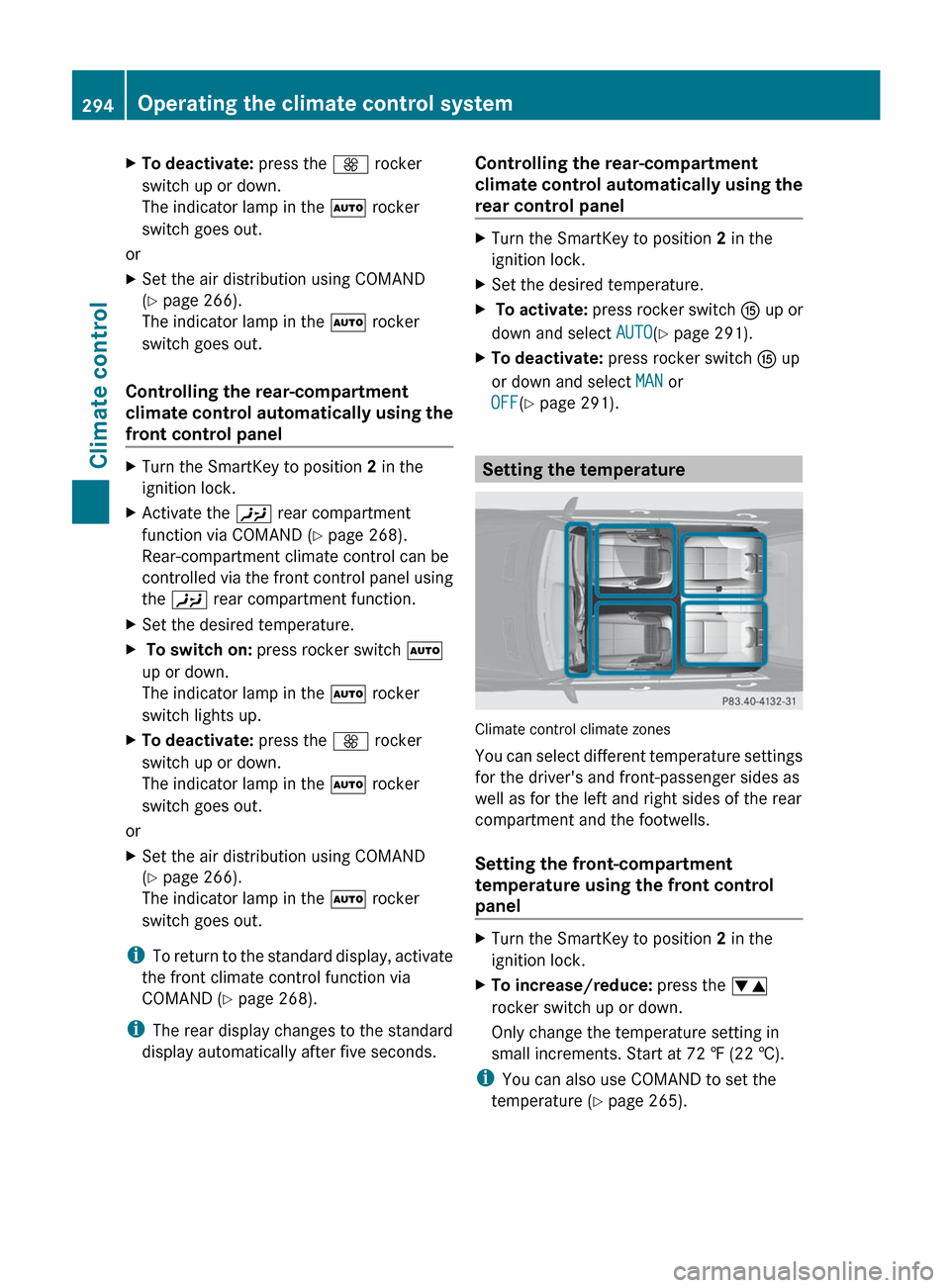
Climate control climate zones
You can select different temperature settings
for the driver's and front-passenger sides as
well as for the left and right sides of the rear
compartment and the footwells.
Setting the front-compartment
temperature using the front control
panel
XTurn the SmartKey to position 2 in the
ignition lock.XTo increase/reduce: press the w
rocker switch up or down.
Only change the temperature setting in
small increments. Start at 72 ‡ (22 †).
i You can also use COMAND to set the
temperature ( Y page 265).
294Operating the climate control systemClimate control
Page 297 of 536
Setting the temperature in the rear
compartment using the front control
panelXTurn the SmartKey to position 2 in the
ignition lock.XActivate the Y rear compartment
function via COMAND ( Y page 268).
The rear-compartment climate control can
be controlled via the front control panel
using the Y rear compartment function.XTo increase/reduce: press the w
rocker switch up or down.
Only change the temperature setting in
small increments. Start at 72 ‡ (22 †).
i To return to the standard display, activate
the front climate control function via
COMAND ( Y page 268).
i The rear display changes to the standard
display automatically after five seconds.
Setting the temperature in the rear
compartment using the rear control
panel
XTurn the SmartKey to position 2 in the
ignition lock.XTo increase/reduce: press rocker
switch H or M up or down ( Y page 291).
Only change the temperature setting in
small increments. Start at 72 ‡ (22 †).
Setting the footwell temperature
The footwell temperature can be set via
COMAND ( Y page 268).
Setting the air distribution
Air distribution settings
The air distribution can be set individually for
the driver's and front-passenger sides.
¯Directs air through the defroster ventsPDirects air through the center and side
air ventsODirects the airflow through the
footwell air ventsSDirects air through the center, side and
footwell ventsaDirects air through the defroster and
footwell vents_Directs air through the defroster,
center, side and footwell ventsbDirects air through the defroster,
center and side air ventsWSets the air distribution to automatic
Setting the air distribution in the front/
rear compartment using COMAND
The air distribution can be set using COMAND
( Y page 266).
Setting the rear-compartment air
distribution using the rear control panel
XTurn the SmartKey to position 2 in the
ignition lock.XPress rocker switch I or L up or down
repeatedly ( Y page 291) until the desired
air distribution symbol is shown in the
display.
Setting the airflow
Setting the front-compartment airflow
using the front control panel
You can select different airflow settings for
the driver's and front-passenger sides as well
as for the rear compartment.
You can also use COMAND to set the airflow
( Y page 266).
XTurn the SmartKey to position 2 in the
ignition lock.XTo increase/reduce: press the K
rocker switch up or down.Operating the climate control system295Climate controlZ
Page 298 of 536
Setting the rear-compartment airflow
using the front control panelXTurn the SmartKey to position 2 in the
ignition lock.XActivate the Y rear compartment
function via COMAND ( Y page 268).
The rear-compartment climate control can
be controlled via the front control panel
using the Y rear compartment function.XTo increase/reduce: press the K
rocker switch up or down.
Setting the rear-compartment airflow
using the rear control panel
XTurn the SmartKey to position 2 in the
ignition lock.XTo increase/reduce: press rocker switch
J up or down ( Y page 291).
Defrosting the windshield
You can use this function to defrost the
windshield or to defrost the inside of the
windshield and the side windows.
i You should only select the defrosting
function until the windshield is clear again.
XTurn the SmartKey to position 2 in the
ignition lock.XTo switch on: press the ¬ rocker
switch up or down.
The indicator lamp in the ¬ rocker
switch lights up.
The climate control system switches to the
following functions:
R cooling with air dehumidification on
R high airflow 17
R high temperature 17
R air distribution to the windshield and
front side windows
R air-recirculation mode offXTo deactivate: press the ¬ rocker
switch up or down.
The indicator lamp in the ¬ rocker
switch goes out. The previously selected
settings come into effect again. The cooling
with air dehumidification function remains
on. Air-recirculation mode remains
deactivated.
or
XPress the w rocker switch up or down.
or
XPress the K rocker switch up or down.
MAX COOL maximum cooling
The MAX COOL function is only available in
vehicles for the USA.
MAX COOL is only operational when the
engine is running.
The MAX COOL function is activated
automatically:
R if climate control is set to automatic
( Ã ) on both sides
R if additional cooling is used
The display shows MAX COOL.
This is the quickest way to cool the vehicle
interior when the sliding sunroof and the side
windows are closed.
Defrosting the windows
Windows fogged up on the inside
XActivate the cooling with air
dehumidification function via COMAND
( Y page 267).XActivate automatic mode Ã.XIf the windows continue to fog up, activate
the defrosting function ( Y page 296).
i
You should only select this setting until
the windshield is clear again.
17 Depending on the outside temperature.296Operating the climate control systemClimate control
Page 299 of 536
Windows fogged up on the outsideXSwitch on the windshield wipers.XActivate automatic climate control.
iYou should only select this setting until
the windshield is clear again.
Rear window defroster
Activating/deactivating
GWARNING
Any accumulation of snow and ice should be
removed from the rear window before driving.
Visibility could otherwise be impaired,
endangering you and others.
The rear window defroster has a high current
draw. You should therefore switch it off as
soon as the window is clear as it only switches
off automatically after several minutes.
If the battery voltage is too low, the rear
window defroster may switch off.
XTurn the SmartKey to position 2 in the
ignition lock.XPress the ¤ rocker switch up or down.
The indicator lamp in the ¤ rocker
switch lights up or goes out.
Problems with the rear window
defroster
The rear window defroster has deactivated
itself prematurely or cannot be activated.
XSwitch off any consumers that are not
required, e.g. reading lamps or interior
lighting.
When the battery is sufficiently charged,
the rear window defroster is activated
again automatically.
Activating/deactivating air-
recirculation mode
You can deactivate the flow of fresh air if
unpleasant odors are entering the vehicle
from outside. The air already inside the
vehicle will then be recirculated.GWARNING
Fogged windows impair visibility,
endangering you and others. If the windows
begin to fog on the inside, switching off the
air recirculation mode immediately should
clear interior window fogging. If interior
window fogging persists, make sure the air
conditioning is activated, or press the ¬
button.
XTurn the SmartKey to position 2 in the
ignition lock.XTo activate: press the g rocker switch
up or down.
The indicator lamp in the g rocker
switch lights up.
i Air-recirculation mode is activated
automatically at high outside
temperatures. The indicator lamp in the
g rocker switch is not lit when
automatic air-recirculation mode is
activated.
Outside air is added after about 30
minutes.
X To deactivate: press the g rocker
switch up or down.
The indicator lamp in the g rocker
switch goes out.
i Air-recirculation mode deactivates
automatically:
R after approximately five minutes if
outside temperatures are less than about
41 ‡ (5 †)
R after approximately five minutes if
cooling with air dehumidification is
deactivated
R after approximately 30 minutes if outside
temperatures are over about
41 ‡ (5 †)
Operating the climate control system297Climate controlZ
Page 300 of 536
Activating/deactivating the residual
heat function
It is possible to make use of the residual heat
of the engine to continue heating the
stationary vehicle for up to 30 minutes after
the engine has been switched off. The heating
time depends on the temperature that has
been set.
i The blower will run at a low speed
regardless of the airflow setting.
i If you activate the residual heat function
at high temperatures, only the ventilation
will be activated. The blower runs at
medium speed.XTurn the SmartKey to position 0 in the
ignition lock or remove it.XTo activate: press the Ì rocker switch
up or down.
The indicator lamp in the Ì rocker
switch lights up.XTo deactivate: press the Ì rocker
switch up or down.
The indicator lamp in the Ì rocker
switch goes out.
i Residual heat is deactivated
automatically:
R after about 30 minutes
R when the ignition is switched on
R if the battery voltage drops
R if the coolant temperature is too low
Setting the air vents
Important safety notes
GWARNING
When operating the climate control, the air
that enters the passenger compartment
through the air vents can be very hot or very
cold (depending on the set temperature). This
could cause burns or frostbite to unprotected
skin in the immediate area of the air vents.
Always keep sufficient distance between
unprotected parts of the body and the air
vents. If necessary, use the air distribution
adjustment to direct the air to air vents in the
vehicle interior that are not in the immediate
area of unprotected skin.
In order to ensure the direct flow of fresh air
through the air vents into the vehicle interior,
please observe the following notes:
R keep the air intake grille on the hood free
of blockages, such as ice, snow or leaves
R never cover the air vents or air intake grille
in the vehicle interior.
i For virtually draft-free ventilation, adjust
the sliders of the air vents to the center
position.
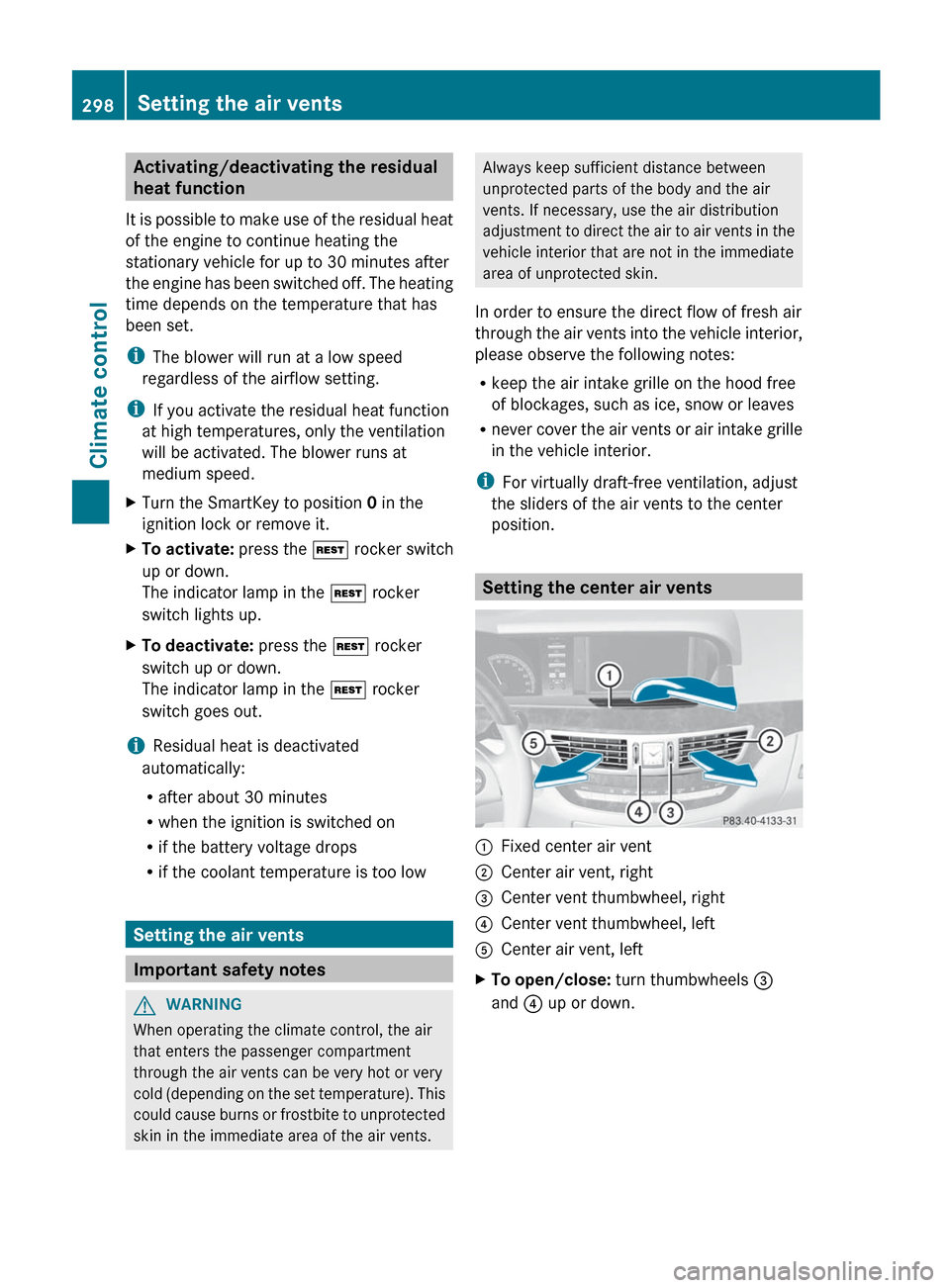
Setting the center air vents
:Fixed center air vent;Center air vent, right=Center vent thumbwheel, right?Center vent thumbwheel, leftACenter air vent, leftXTo open/close: turn thumbwheels =
and ? up or down.298Setting the air ventsClimate control
Page 305 of 536
could lose control of the vehicle and hit
someone or something. Only shift into gear
when the engine is idling normally and when
your right foot is firmly on the brake pedal.GWARNING
HYBRID vehicles: It is imperative that you read
the HYBRID Supplemental Operating
Instructions included in your vehicle literature
portfolio. You may otherwise not receive all
necessary safety information and warning for
the operation of your vehicle.
! Warm up the engine quickly. Do not use
the engine's full performance until it has
reached operating temperature.
Only shift the automatic transmission to
the desired drive position when the vehicle
is stationary.
Where possible, avoid spinning the drive
wheels when pulling away on slippery
roads. You could otherwise damage the
drive train.
! S 63 AMG: at low engine oil temperatures
below 68 ‡ (+20 † ), the maximum engine
speed is restricted in order to protect the
engine. To protect the engine and maintain
smooth engine operation, avoid driving at
full throttle when the engine is cold.
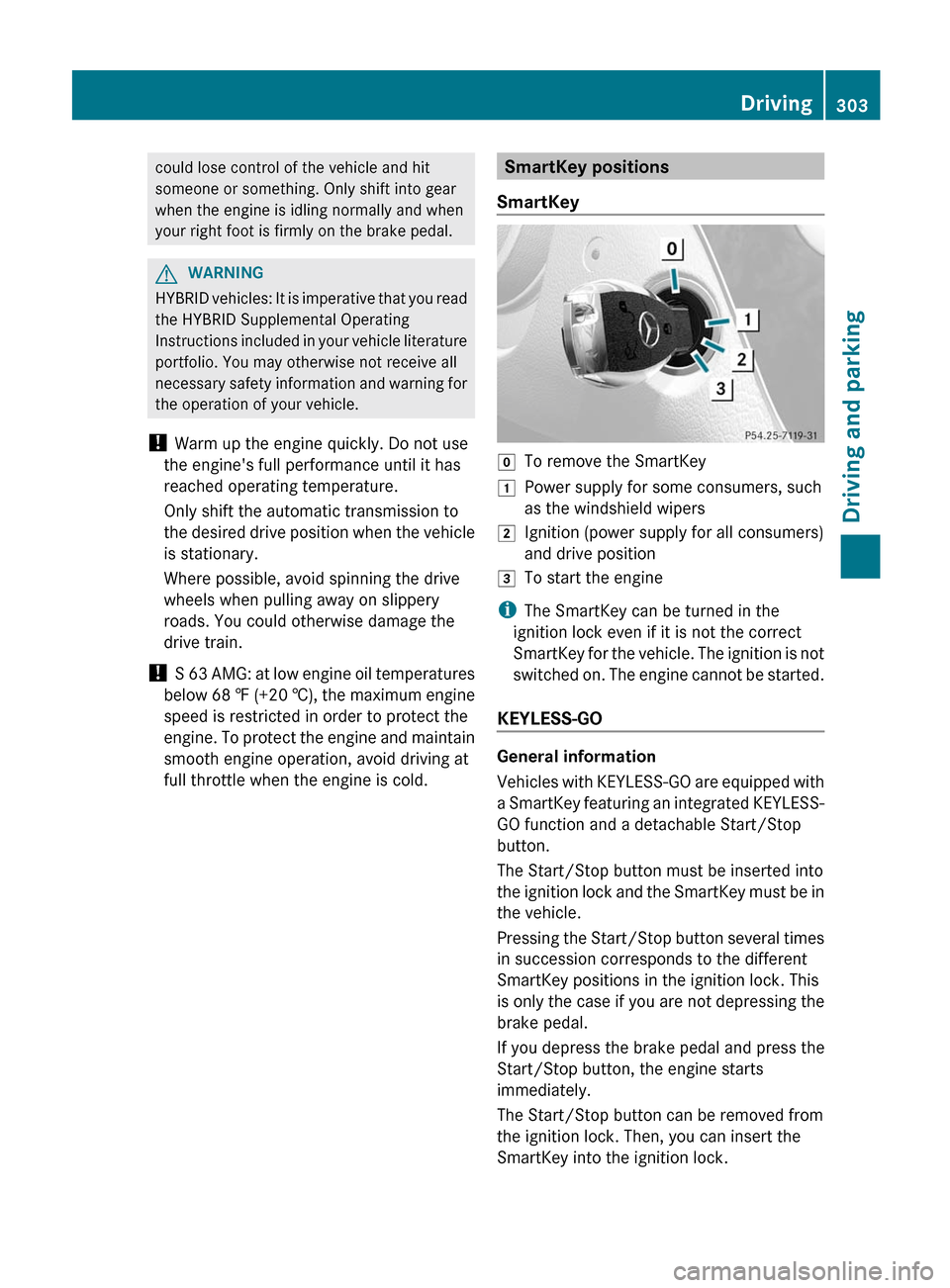
SmartKey positions
SmartKeygTo remove the SmartKey1Power supply for some consumers, such
as the windshield wipers2Ignition (power supply for all consumers)
and drive position3To start the engine
i The SmartKey can be turned in the
ignition lock even if it is not the correct
SmartKey for the vehicle. The ignition is not
switched on. The engine cannot be started.
KEYLESS-GO
General information
Vehicles with KEYLESS-GO are equipped with
a SmartKey featuring an integrated KEYLESS-
GO function and a detachable Start/Stop
button.
The Start/Stop button must be inserted into
the ignition lock and the SmartKey must be in
the vehicle.
Pressing the Start/Stop button several times
in succession corresponds to the different
SmartKey positions in the ignition lock. This
is only the case if you are not depressing the
brake pedal.
If you depress the brake pedal and press the
Start/Stop button, the engine starts
immediately.
The Start/Stop button can be removed from
the ignition lock. Then, you can insert the
SmartKey into the ignition lock.
Driving303Driving and parkingZ
Page 306 of 536
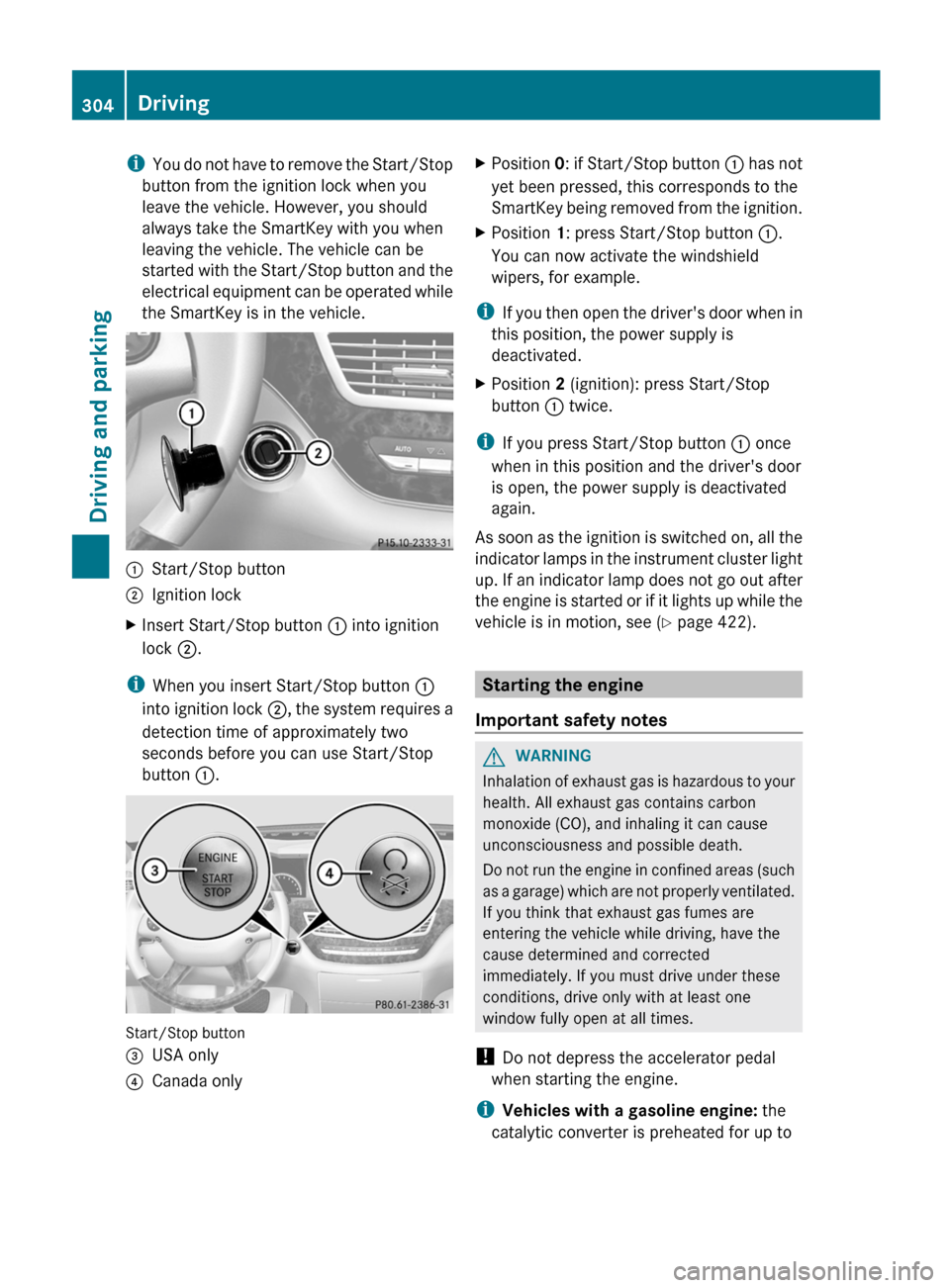
iYou do not have to remove the Start/Stop
button from the ignition lock when you
leave the vehicle. However, you should
always take the SmartKey with you when
leaving the vehicle. The vehicle can be
started with the Start/Stop button and the
electrical equipment can be operated while
the SmartKey is in the vehicle.:Start/Stop button;Ignition lockXInsert Start/Stop button : into ignition
lock ;.
i
When you insert Start/Stop button :
into ignition lock ;, the system requires a
detection time of approximately two
seconds before you can use Start/Stop
button :.
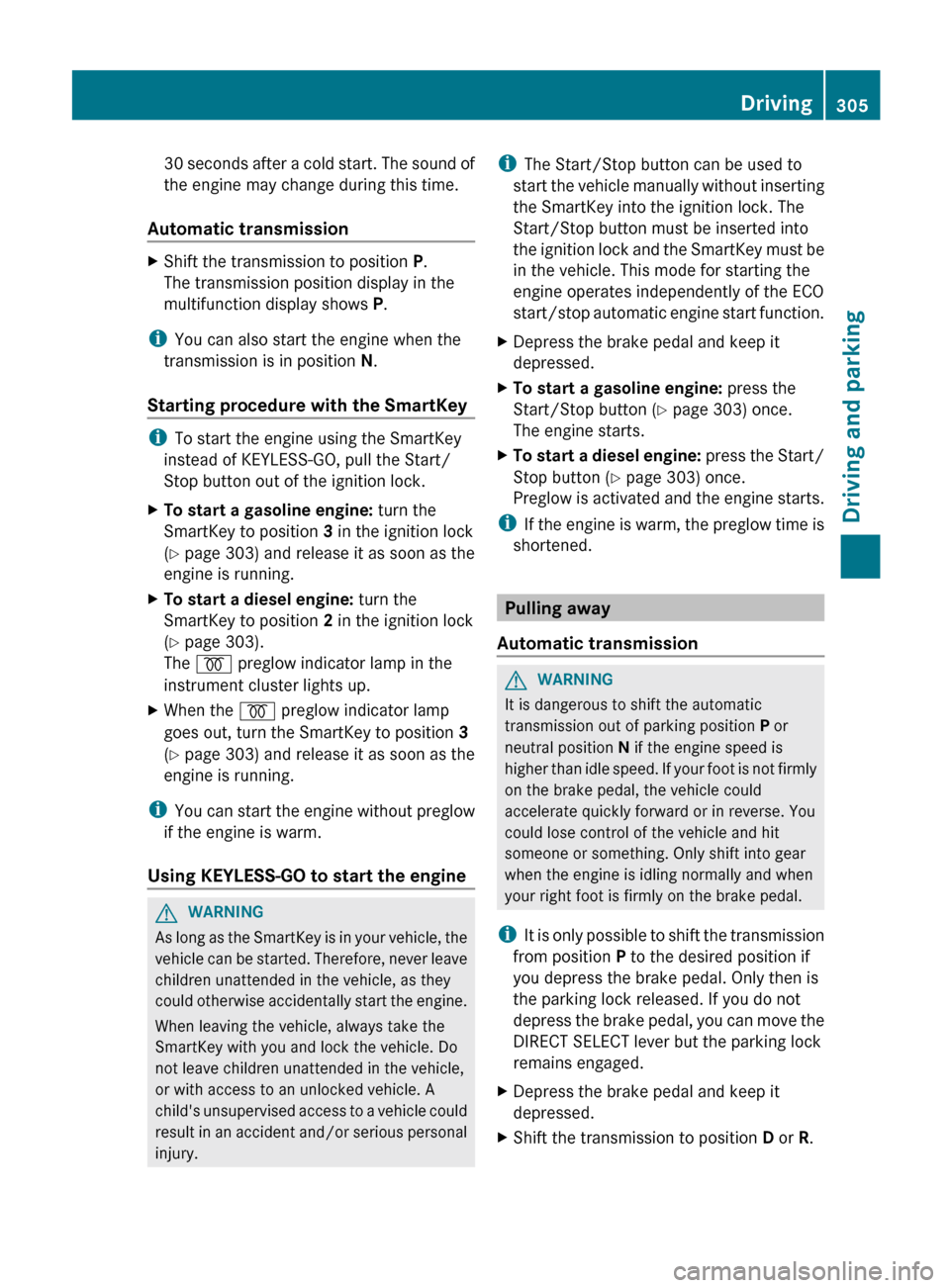
Start/Stop button
=USA only?Canada onlyXPosition 0: if Start/Stop button : has not
yet been pressed, this corresponds to the
SmartKey being removed from the ignition.XPosition 1: press Start/Stop button :.
You can now activate the windshield
wipers, for example.
i If you then open the driver's door when in
this position, the power supply is
deactivated.
XPosition 2 (ignition): press Start/Stop
button : twice.
i
If you press Start/Stop button : once
when in this position and the driver's door
is open, the power supply is deactivated
again.
As soon as the ignition is switched on, all the
indicator lamps in the instrument cluster light
up. If an indicator lamp does not go out after
the engine is started or if it lights up while the
vehicle is in motion, see ( Y page 422).
Starting the engine
Important safety notes
GWARNING
Inhalation of exhaust gas is hazardous to your
health. All exhaust gas contains carbon
monoxide (CO), and inhaling it can cause
unconsciousness and possible death.
Do not run the engine in confined areas (such
as a garage) which are not properly ventilated.
If you think that exhaust gas fumes are
entering the vehicle while driving, have the
cause determined and corrected
immediately. If you must drive under these
conditions, drive only with at least one
window fully open at all times.
! Do not depress the accelerator pedal
when starting the engine.
i Vehicles with a gasoline engine: the
catalytic converter is preheated for up to
304DrivingDriving and parking
Page 307 of 536
30 seconds after a cold start. The sound of
the engine may change during this time.
Automatic transmissionXShift the transmission to position P.
The transmission position display in the
multifunction display shows P.
i
You can also start the engine when the
transmission is in position N.
Starting procedure with the SmartKey
i To start the engine using the SmartKey
instead of KEYLESS-GO, pull the Start/
Stop button out of the ignition lock.
XTo start a gasoline engine: turn the
SmartKey to position 3 in the ignition lock
( Y page 303) and release it as soon as the
engine is running.XTo start a diesel engine: turn the
SmartKey to position 2 in the ignition lock
( Y page 303).
The % preglow indicator lamp in the
instrument cluster lights up.XWhen the % preglow indicator lamp
goes out, turn the SmartKey to position 3
( Y page 303) and release it as soon as the
engine is running.
i You can start the engine without preglow
if the engine is warm.
Using KEYLESS-GO to start the engine
GWARNING
As long as the SmartKey is in your vehicle, the
vehicle can be started. Therefore, never leave
children unattended in the vehicle, as they
could otherwise accidentally start the engine.
When leaving the vehicle, always take the
SmartKey with you and lock the vehicle. Do
not leave children unattended in the vehicle,
or with access to an unlocked vehicle. A
child's unsupervised access to a vehicle could
result in an accident and/or serious personal
injury.
i The Start/Stop button can be used to
start the vehicle manually without inserting
the SmartKey into the ignition lock. The
Start/Stop button must be inserted into
the ignition lock and the SmartKey must be
in the vehicle. This mode for starting the
engine operates independently of the ECO
start/stop automatic engine start function.XDepress the brake pedal and keep it
depressed.XTo start a gasoline engine: press the
Start/Stop button ( Y page 303) once.
The engine starts.XTo start a diesel engine: press the Start/
Stop button ( Y page 303) once.
Preglow is activated and the engine starts.
i If the engine is warm, the preglow time is
shortened.
Pulling away
Automatic transmission
GWARNING
It is dangerous to shift the automatic
transmission out of parking position P or
neutral position N if the engine speed is
higher than idle speed. If your foot is not firmly
on the brake pedal, the vehicle could
accelerate quickly forward or in reverse. You
could lose control of the vehicle and hit
someone or something. Only shift into gear
when the engine is idling normally and when
your right foot is firmly on the brake pedal.
i It is only possible to shift the transmission
from position P to the desired position if
you depress the brake pedal. Only then is
the parking lock released. If you do not
depress the brake pedal, you can move the
DIRECT SELECT lever but the parking lock
remains engaged.
XDepress the brake pedal and keep it
depressed.XShift the transmission to position D or R.Driving305Driving and parkingZ