navigation MERCEDES-BENZ S-Class 2012 W221 Workshop Manual
[x] Cancel search | Manufacturer: MERCEDES-BENZ, Model Year: 2012, Model line: S-Class, Model: MERCEDES-BENZ S-Class 2012 W221Pages: 536, PDF Size: 25.27 MB
Page 177 of 536
iCOMAND uses corresponding icons to
highlight the entire section of the affected
route, regardless of how long the incident
actually is. The icons are placed on the side
of the road affected by the incident.Navigation175COMANDZ
Page 178 of 536
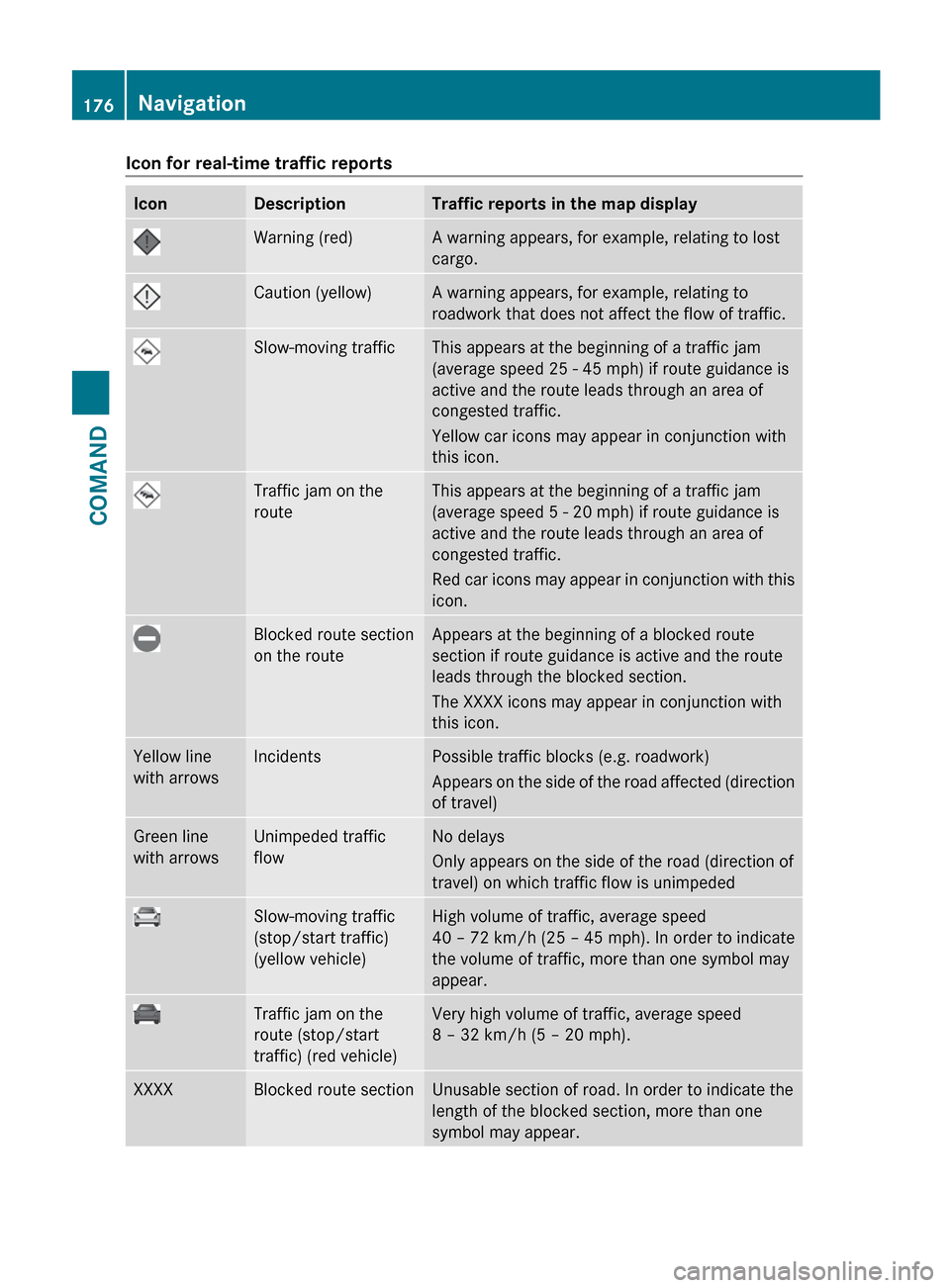
Icon for real-time traffic reportsIconDescriptionTraffic reports in the map displayWarning (red)A warning appears, for example, relating to lost
cargo.Caution (yellow)A warning appears, for example, relating to
roadwork that does not affect the flow of traffic.Slow-moving trafficThis appears at the beginning of a traffic jam
(average speed 25 - 45 mph) if route guidance is
active and the route leads through an area of
congested traffic.
Yellow car icons may appear in conjunction with
this icon.Traffic jam on the
routeThis appears at the beginning of a traffic jam
(average speed 5 - 20 mph) if route guidance is
active and the route leads through an area of
congested traffic.
Red car icons may appear in conjunction with this
icon.Blocked route section
on the routeAppears at the beginning of a blocked route
section if route guidance is active and the route
leads through the blocked section.
The XXXX icons may appear in conjunction with
this icon.Yellow line
with arrowsIncidentsPossible traffic blocks (e.g. roadwork)
Appears on the side of the road affected (direction
of travel)Green line
with arrowsUnimpeded traffic
flowNo delays
Only appears on the side of the road (direction of
travel) on which traffic flow is unimpededSlow-moving traffic
(stop/start traffic)
(yellow vehicle)High volume of traffic, average speed
40 – 72 km/h (25 – 45 mph). In order to indicate
the volume of traffic, more than one symbol may
appear.Traffic jam on the
route (stop/start
traffic) (red vehicle)Very high volume of traffic, average speed
8 – 32 km/h (5 – 20 mph).XXXXBlocked route sectionUnusable section of road. In order to indicate the
length of the blocked section, more than one
symbol may appear.176NavigationCOMAND
Page 179 of 536
Displaying real-time traffic reportsXIf necessary, switch to navigation mode
and show the menu ( Y page 152).XSelect Traffic in the navigation system
menu bar by turning cVd the COMAND
controller and press W to confirm.
If you see the No traffic messages.
message:
This means that:
R no traffic reports have been received yet.
R no traffic reports are available.
XTo cancel the search: select Cancel .XTo close the message window: select
OK .
If there are any traffic reports, a list is shown.
The content of the list varies depending on
whether route guidance is active or not.
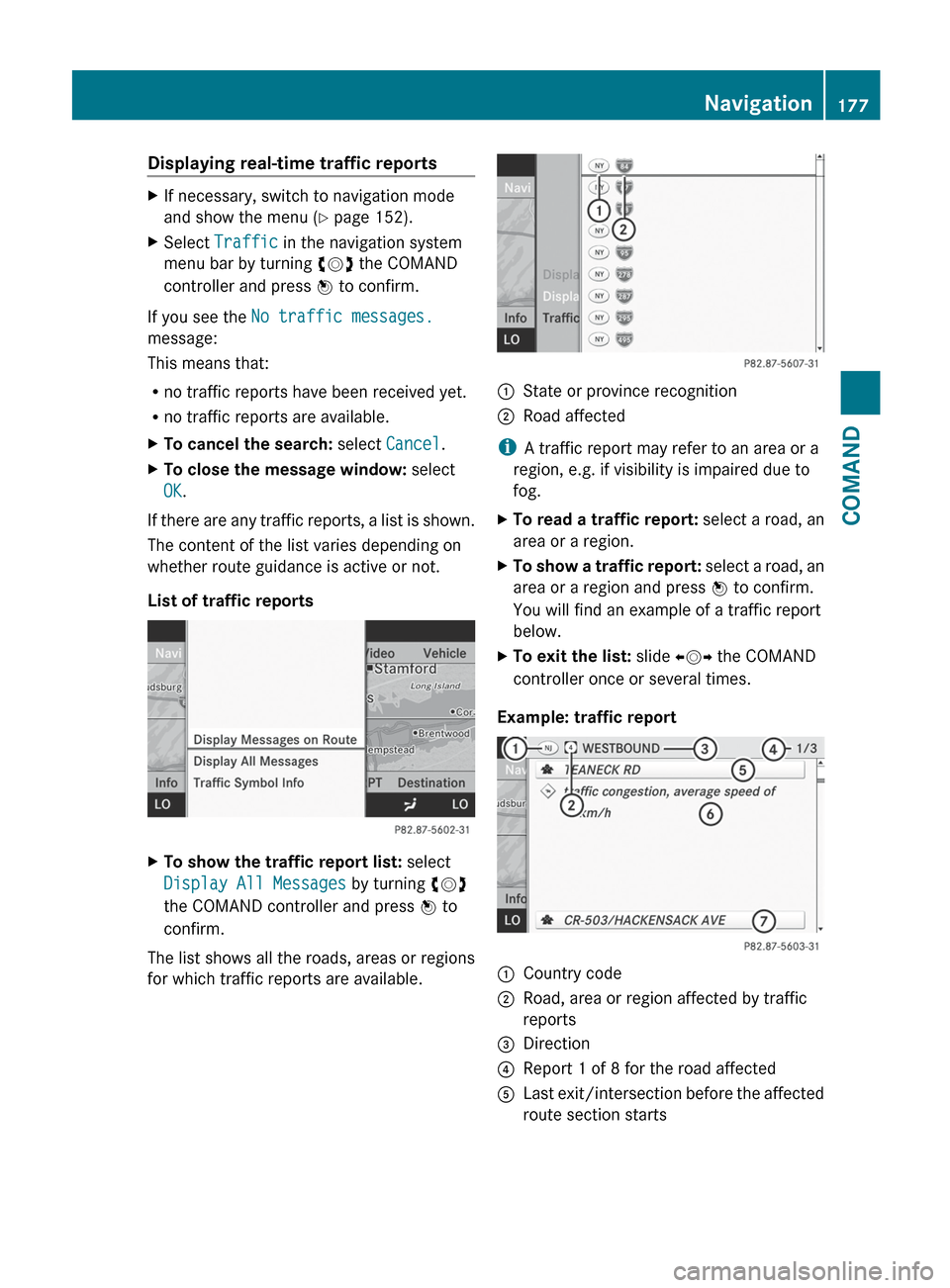
List of traffic reports
XTo show the traffic report list: select
Display All Messages by turning cVd
the COMAND controller and press W to
confirm.
The list shows all the roads, areas or regions
for which traffic reports are available.
1State or province recognition2Road affected
i A traffic report may refer to an area or a
region, e.g. if visibility is impaired due to
fog.
XTo read a traffic report: select a road, an
area or a region.XTo show a traffic report: select a road, an
area or a region and press W to confirm.
You will find an example of a traffic report
below.XTo exit the list: slide XVY the COMAND
controller once or several times.
Example: traffic report
1Country code2Road, area or region affected by traffic
reports3Direction4Report 1 of 8 for the road affected5Last exit/intersection before the affected
route section startsNavigation177COMANDZ
Page 180 of 536
6Report textCFirst exit/intersection after the affected
route section endsXTo scroll within a report or to access
the next report: turn cVd the COMAND
controller.XTo return to the list of messages: press
W or slide XVY the COMAND controller.
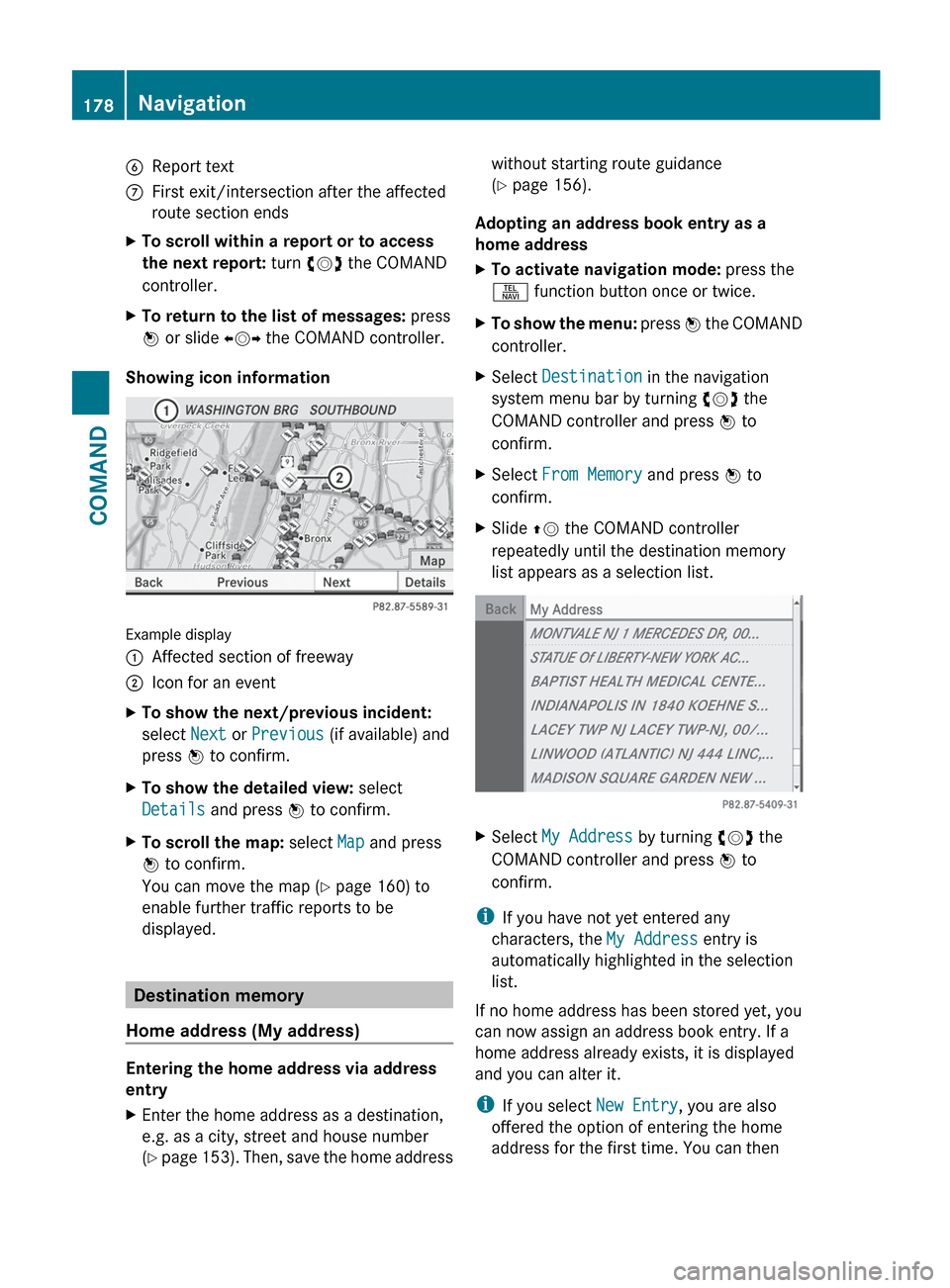
Showing icon information
Example display
:Affected section of freeway;Icon for an eventXTo show the next/previous incident:
select Next or Previous (if available) and
press W to confirm.XTo show the detailed view: select
Details and press W to confirm.XTo scroll the map: select Map and press
W to confirm.
You can move the map ( Y page 160) to
enable further traffic reports to be
displayed.
Destination memory
Home address (My address)
Entering the home address via address
entry
XEnter the home address as a destination,
e.g. as a city, street and house number
( Y page 153). Then, save the home addresswithout starting route guidance
( Y page 156).
Adopting an address book entry as a
home address
XTo activate navigation mode: press the
S function button once or twice.XTo show the menu: press W the COMAND
controller.XSelect Destination in the navigation
system menu bar by turning cVd the
COMAND controller and press W to
confirm.XSelect From Memory and press W to
confirm.XSlide ZV the COMAND controller
repeatedly until the destination memory
list appears as a selection list.XSelect My Address by turning cVd the
COMAND controller and press W to
confirm.
i If you have not yet entered any
characters, the My Address entry is
automatically highlighted in the selection
list.
If no home address has been stored yet, you
can now assign an address book entry. If a
home address already exists, it is displayed
and you can alter it.
i If you select New Entry, you are also
offered the option of entering the home
address for the first time. You can then
178NavigationCOMAND
Page 181 of 536
save the home address without starting
route guidance.XTo enter the home address for the first
time: select Assign Address Book
Entry and press W to confirm.XSelect Home or Work and press W to
confirm.XTo change the home address: select
Change and press W to confirm.XSelect Assign Address Book Entry and
press W to confirm.
i
If you select New Entry, you are also
offered the option of changing the home
address by entering an address. You can
then save the home address without
starting route guidance.
XSelect Home or Work and press W to
confirm.
In both cases, you will see the address book
either with the character bar or as a
selection list.XTo select an address book entry:
proceed as described in the "Searching for
an address book entry" section
( Y page 205).XTo confirm the selection: press W the
COMAND controller.
If no home address has been stored,
COMAND saves the entry. You will see a
message and then the address menu with
the selected address. Start is highlighted
automatically.
If a home address has already been stored,
you will see a prompt asking you whether
the My Address entry should be
overwritten.XSelect Yes or No and press W to confirm.
If you select Yes, COMAND overwrites the
destination. You will see a message and
then the address menu with the selected
address. Start is highlighted
automatically.
If you select No, the list will reappear.Selecting the home address for route
guidanceXProceed as described in the "Selecting a
destination from the destination memory"
section ( Y page 159).
Storing a destination in the destination
memory
Note
This function also stores the destination in
the address book.
After destination entry
XThe destination has been entered and is
shown in the address entry menu
( Y page 156).XSelect Save by sliding VÆ and turning
cVd the COMAND controller and press
W to confirm.
You can now select storage options.
During route guidance
XTo show the menu: press W the COMAND
controller.XSelect Destination in the navigation
system menu bar by turning cVd the
COMAND controller and press W to
confirm.XSelect Save Destination and press W to
confirm.
You can now select storage options.
From the list of previous destinations
XTo show the menu: press W the COMAND
controller.XSelect Destination in the navigation
system menu bar by turning cVd the
COMAND controller and press W to
confirm.XSelect From Last Destinations and
press W to confirm.
The list of last destinations appears.Navigation179COMANDZ
Page 182 of 536
XSelect a destination by turning cVd the
COMAND controller and press W to
confirm.
The destination address is shown.XSelect Save and press W to confirm.
You can now select storage options.
Selecting storing options
XTo save the destination without a
name: select Save without Name and
press W to confirm.
COMAND stores the destination in the
destination memory and uses the address
as the destination name.XTo save the destination as My address:
select Save as "My Address" and press
W to confirm.
COMAND stores the destination in the
destination memory as My Address. If the
entry already contains navigable data
(symbol L), a prompt appears asking you
whether the entry should be overwritten.XSelect Yes or No and press W to confirm.
If you select Yes, the entry is overwritten.
If you select No, the process will be aborted.XTo save the destination with a name:
select Save with Name and press W to
confirm.XSelect a category, e.g. Home, and press W
to confirm.
The input menu appears with data fields
and the character bar.
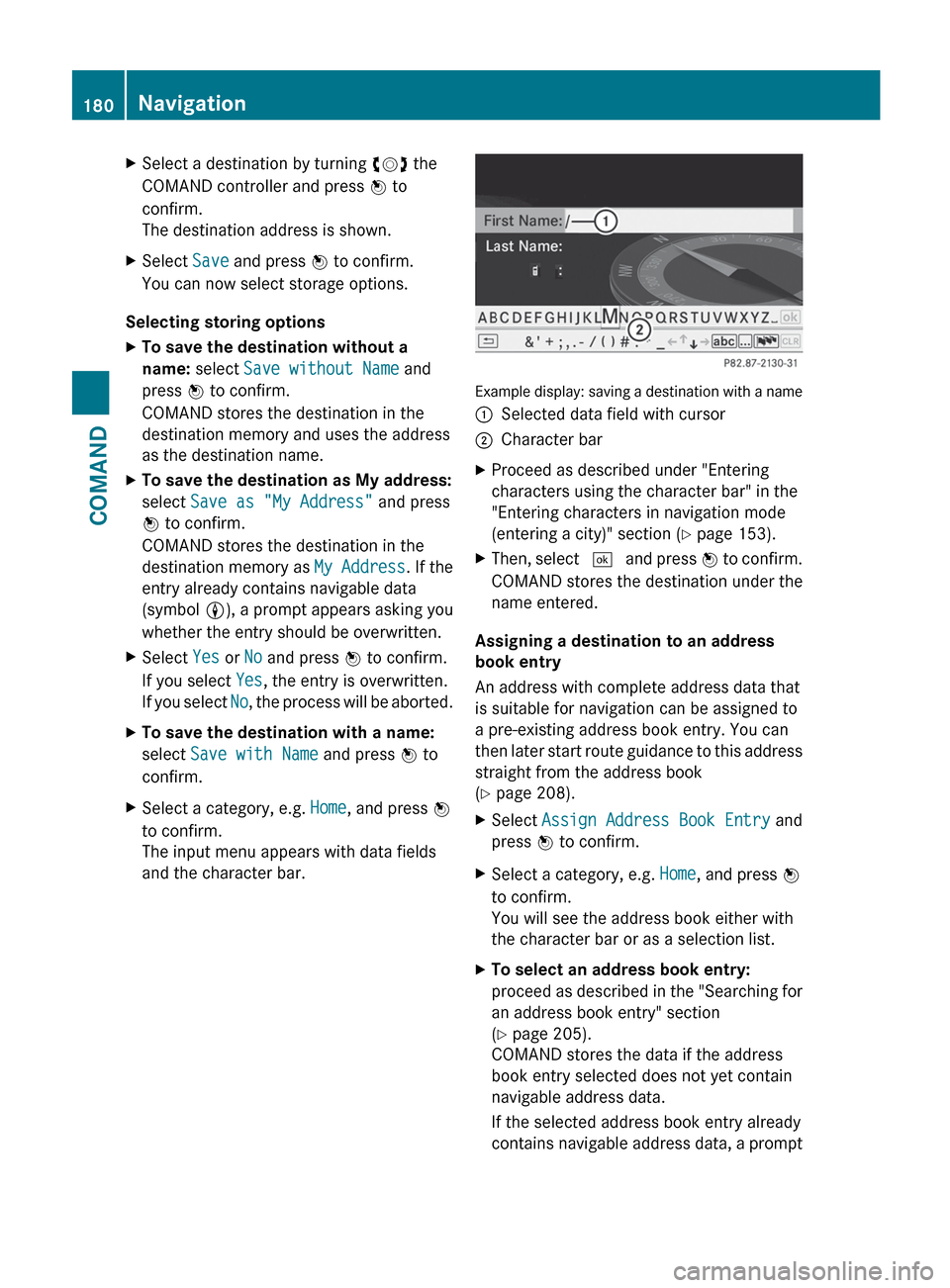
Example display: saving a destination with a name
:Selected data field with cursor;Character barXProceed as described under "Entering
characters using the character bar" in the
"Entering characters in navigation mode
(entering a city)" section ( Y page 153).XThen, select ¬ and press W to confirm.
COMAND stores the destination under the
name entered.
Assigning a destination to an address
book entry
An address with complete address data that
is suitable for navigation can be assigned to
a pre-existing address book entry. You can
then later start route guidance to this address
straight from the address book
( Y page 208).
XSelect Assign Address Book Entry and
press W to confirm.XSelect a category, e.g. Home, and press W
to confirm.
You will see the address book either with
the character bar or as a selection list.XTo select an address book entry:
proceed as described in the "Searching for
an address book entry" section
( Y page 205).
COMAND stores the data if the address
book entry selected does not yet contain
navigable address data.
If the selected address book entry already
contains navigable address data, a prompt180NavigationCOMAND
Page 183 of 536
will appear asking whether you wish to
overwrite the existing data.XSelect Yes or No and press W to confirm.
If you select Yes, COMAND stores the data.
Deleting a destination or the home
address from the destination memory
XTo activate navigation mode: press the
S function button once or twice.XTo show the menu: press W the COMAND
controller.XSelect Destination in the navigation
system menu bar by turning cVd the
COMAND controller and press W to
confirm.XSelect From Memory and press W to
confirm.
You will see the destination memory list
either with the character bar (option 1) or
as a selection list (option 2).XOption 1: destination memory list with
character bar: proceed as described in the
"Entering characters using the character
bar" section ( Y page 129).XOption 2: destination memory list as
selection list: select a destination by
turning cVd the COMAND controller and
press W to confirm.
You see the address data of the selected
entry.XSelect Delete and press W to confirm.
A prompt appears asking whether you wish
to delete the destination.XSelect Yes or No and press W to confirm.
If you select Yes, COMAND deletes the
destination. You will see a message to this
effect.
If you select No, the process is aborted.
i
If the navigable address data for the
destination being deleted is also assigned
to an address book entry, COMAND will
also delete this data from there. If the
corresponding address book entry does
not contain any further data, such as
telephone numbers, COMAND deletes the
entire address book entry.
Previous destinations
Introduction
COMAND automatically stores the previous
destinations for which the route calculation
has been started. If the memory is full,
COMAND deletes the oldest destination. You
can also save a destination from the list of
previous destinations in the destination
memory. It will be stored there permanently.
Storing a destination permanently in
the destination memory
XProceed as described in the "From the list
of previous destinations" section
( Y page 179).
Storing the vehicle position in the list of
previous destinations
XTo activate navigation mode: press the
S function button once or twice.XTo show the menu: press W the COMAND
controller.XSelect Position in the navigation system
menu bar by turning cVd the COMAND
controller and press W to confirm.XSelect Store Vehicle Position and
press W to confirm.
COMAND stores the current vehicle
position as a destination in the list of
previous destinations.Navigation181COMANDZ
Page 184 of 536
Storing the crosshair position in the list
of previous destinations
Route guidance not active
A crosshair appears on the map if you have
moved the map manually. You can store the
crosshair position as a destination in the list
of previous destinations.
XTo show the menu: press W the COMAND
controller.XSelect Position in the navigation system
menu bar by turning cVd the COMAND
controller and press W to confirm.XSelect Save Crosshair Position and
press W to confirm.
Route guidance is active
XSelect Destination in the navigation
system menu bar by turning cVd the
COMAND controller and press W to
confirm.XSelect Save Destination and press W to
confirm.
Deleting one of the previous
destinations
XTo activate navigation mode: press the
S function button once or twice.XTo show the menu: press W the COMAND
controller.XSelect Destination in the navigation
system menu bar by turning cVd the
COMAND controller and press W to
confirm.XSelect From Last Destinations and
press W to confirm.
The list of last destinations appears.XSelect the desired destination and press
W to confirm.
The destination address appears.XSelect Delete and press W to confirm.
A prompt appears asking whether the entry
should be deleted.XSelect Yes or No and press W to confirm.
If you select Yes, the entry is deleted.
If you select No, the process is aborted.
Map operation and settings
Note
Company logos displayed on the map are
trademarks of the respective companies and
used solely for the purpose of indicating the
location of these companies. The use of such
logos on the map does not indicate approval
of, support of or advertising by these
companies for the navigation system itself.
Setting the map scale
XTo hide the menu: slide ZV the COMAND
controller and, when the Full screen
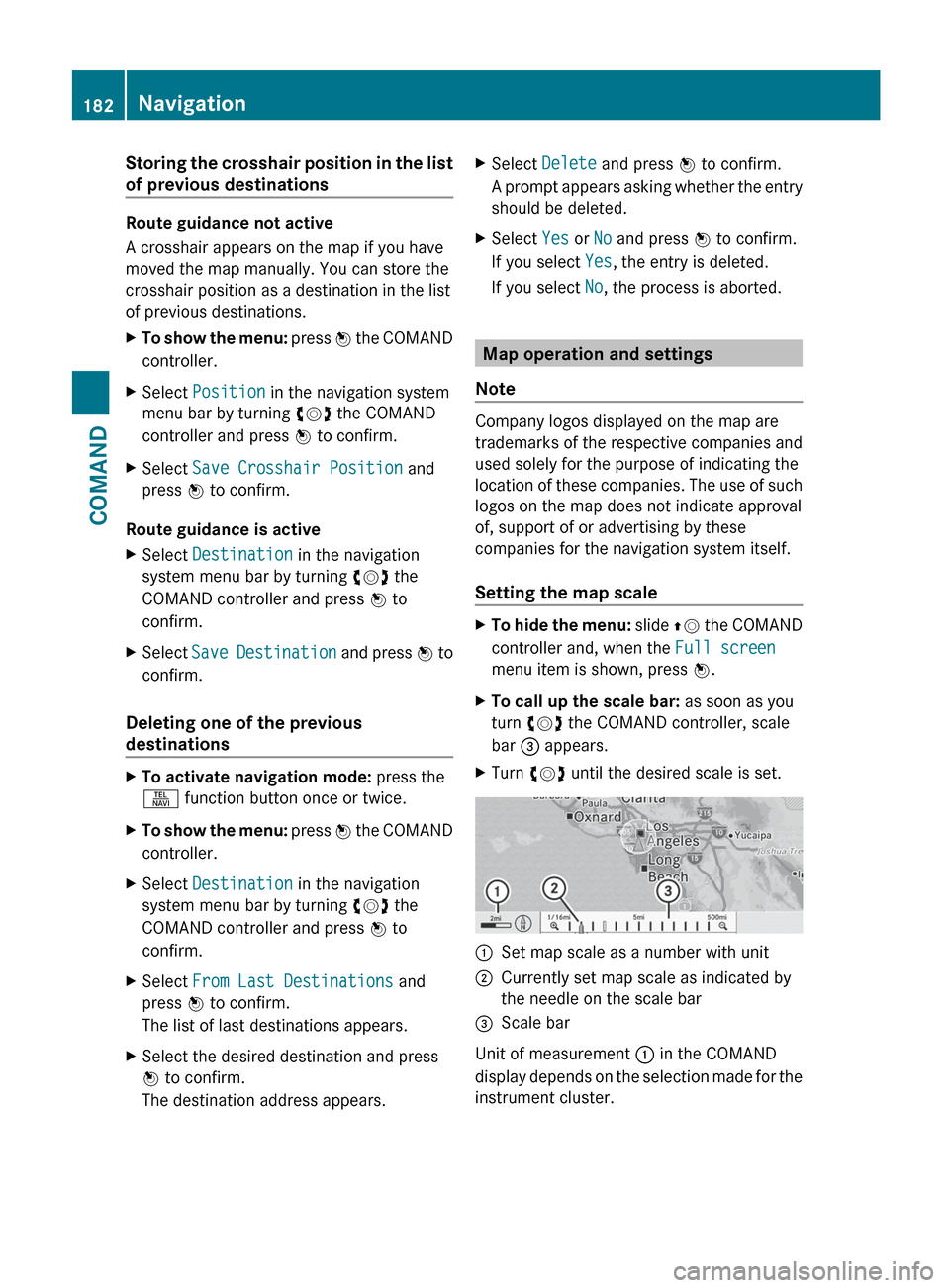
menu item is shown, press W.XTo call up the scale bar: as soon as you
turn cVd the COMAND controller, scale
bar = appears.XTurn cVd until the desired scale is set.:Set map scale as a number with unit;Currently set map scale as indicated by
the needle on the scale bar=Scale bar
Unit of measurement : in the COMAND
display depends on the selection made for the
instrument cluster.
182NavigationCOMAND
Page 185 of 536
Moving the map
Showing the crosshair
XTo hide the menu: slide ZV the COMAND
controller and, when the Full screen
menu item is shown, press W.XTo move the map: slide XVY, ZV Æ or
aVb the COMAND controller.
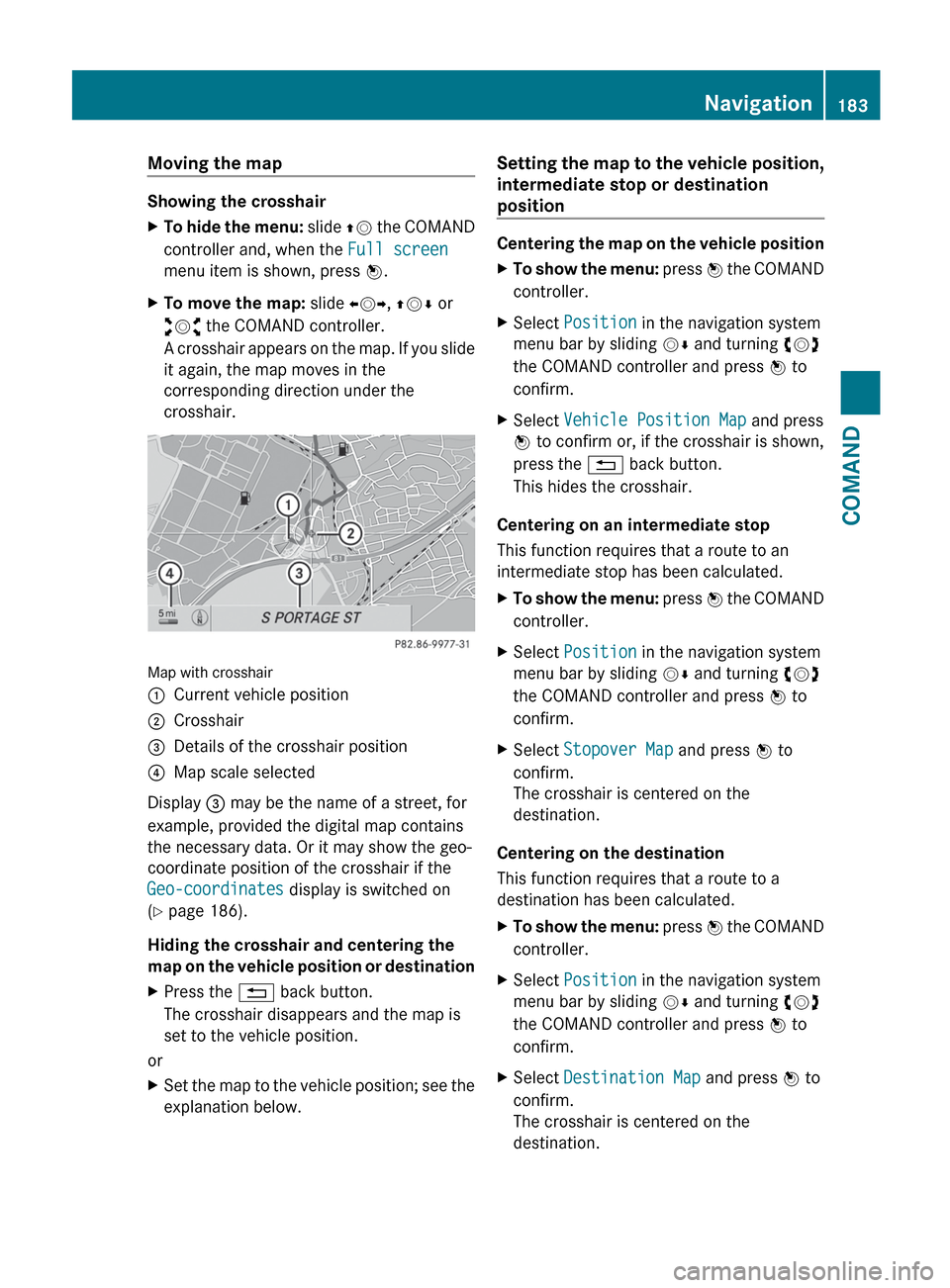
A crosshair appears on the map. If you slide
it again, the map moves in the
corresponding direction under the
crosshair.
Map with crosshair
:Current vehicle position;Crosshair=Details of the crosshair position?Map scale selected
Display = may be the name of a street, for
example, provided the digital map contains
the necessary data. Or it may show the geo-
coordinate position of the crosshair if the
Geo-coordinates display is switched on
( Y page 186).
Hiding the crosshair and centering the
map on the vehicle position or destination
XPress the % back button.
The crosshair disappears and the map is
set to the vehicle position.
or
XSet the map to the vehicle position; see the
explanation below.Setting the map to the vehicle position,
intermediate stop or destination
position
Centering the map on the vehicle position
XTo show the menu: press W the COMAND
controller.XSelect Position in the navigation system
menu bar by sliding VÆ and turning cVd
the COMAND controller and press W to
confirm.XSelect Vehicle Position Map and press
W to confirm or, if the crosshair is shown,
press the % back button.
This hides the crosshair.
Centering on an intermediate stop
This function requires that a route to an
intermediate stop has been calculated.
XTo show the menu: press W the COMAND
controller.XSelect Position in the navigation system
menu bar by sliding VÆ and turning cVd
the COMAND controller and press W to
confirm.XSelect Stopover Map and press W to
confirm.
The crosshair is centered on the
destination.
Centering on the destination
This function requires that a route to a
destination has been calculated.
XTo show the menu: press W the COMAND
controller.XSelect Position in the navigation system
menu bar by sliding VÆ and turning cVd
the COMAND controller and press W to
confirm.XSelect Destination Map and press W to
confirm.
The crosshair is centered on the
destination.Navigation183COMANDZ
Page 186 of 536
Map display
Setting the map orientation
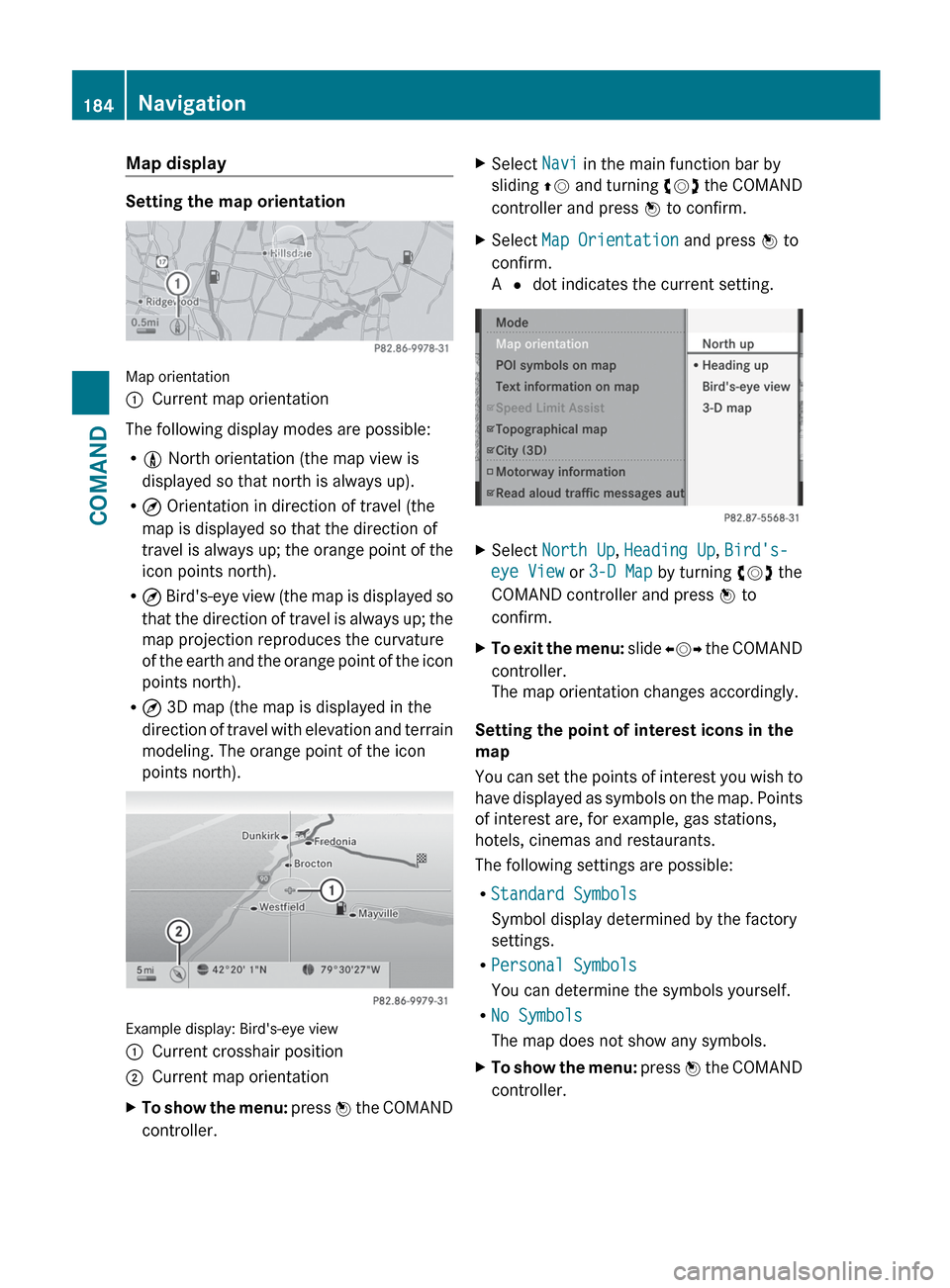
Map orientation
:Current map orientation
The following display modes are possible:
R 0 North orientation (the map view is
displayed so that north is always up).
R ¤ Orientation in direction of travel (the
map is displayed so that the direction of
travel is always up; the orange point of the
icon points north).
R ¤ Bird's-eye view (the map is displayed so
that the direction of travel is always up; the
map projection reproduces the curvature
of the earth and the orange point of the icon
points north).
R ¤ 3D map (the map is displayed in the
direction of travel with elevation and terrain
modeling. The orange point of the icon
points north).
Example display: Bird's-eye view
:Current crosshair position;Current map orientationXTo show the menu: press W the COMAND
controller.XSelect Navi in the main function bar by
sliding ZV and turning cVd the COMAND
controller and press W to confirm.XSelect Map Orientation and press W to
confirm.
A # dot indicates the current setting.XSelect North Up , Heading Up , Bird's-
eye View or 3-D Map by turning cVd the
COMAND controller and press W to
confirm.XTo exit the menu: slide XVY the COMAND
controller.
The map orientation changes accordingly.
Setting the point of interest icons in the
map
You can set the points of interest you wish to
have displayed as symbols on the map. Points
of interest are, for example, gas stations,
hotels, cinemas and restaurants.
The following settings are possible:
R Standard Symbols
Symbol display determined by the factory
settings.
R Personal Symbols
You can determine the symbols yourself.
R No Symbols
The map does not show any symbols.
XTo show the menu: press W the COMAND
controller.184NavigationCOMAND