low beam MERCEDES-BENZ S-Class 2013 W221 User Guide
[x] Cancel search | Manufacturer: MERCEDES-BENZ, Model Year: 2013, Model line: S-Class, Model: MERCEDES-BENZ S-Class 2013 W221Pages: 542, PDF Size: 7.97 MB
Page 356 of 542
G
WARNING
Objects located above the height range of
Parking Guidance will not be detected when
the parking space is measured. These objects
are not taken into account when the parking
procedure is calculated, e.g. overhanging
loads, tail sections or loading ramps of goods
vehicles. Under some circumstances, Parking
Guidance might therefore issu esteering
instructions too soon. Thi smay lead to a
collision .For this reason, you should avoid
using Parking Guidance in such situations. G
WARNING
Make sure that no persons or animals are in
the maneuvering range. Otherwise, they
could be injured.
! Pay particular attention to low objects or
objects with flat surfaces, such as trailer
drawbars, posts, cross beams and curbs.
These types of objects cannot be detected
by Parking Guidance and may damage the
vehicle.
When PARKTRONIC is deactivated, Parking
Guidance is also unavailable.
Use Parking Guidance for parking spaces:
R that are parallel to the direction of travel
R that are on straight roads, not bends
R that are on the same level as the road, i.e.
not on the pavement, for example. Parking
Guidance may not detect flat curbs
Parking tips:
R on narrow roads, drive past the parking
space as close as possible.
R parking spaces that are littered, overgrown
or partially occupied by trailer drawbars
might be identified incorrectly or not at all.
R snowfall or heavy rain may lead to a parking
space being measured inaccurately.
R pay attention to the PARKTRONIC
(Y page 351) warning messages during the
parking procedure. R
when transporting a load which protrudes
from your vehicle, you must not use Parking
Guidance.
R never use Parking Guidance with snow
chains or an emergency spare wheel
mounted.
R make sure that the tire pressures are
always correct. This has adirec teffect on
the steering instructions.
R the way you rvehicle is positioned in the
parking space after parkin gis dependent
on various factors. These include the
position and shape of the vehicles parked
in front and behind it and the conditions of
the location. In some cases, Parking
Guidance may guide you too far or not far
enough into a parking space. In some
cases, it may also lead you across or onto
the curb. If necessary, cancel the parking
procedure with Parking Guidance.
! If unavoidable, you should drive over
obstacles such as curbs slowly and not at
a sharp angle. Otherwise, you may damage
the wheels or tires.
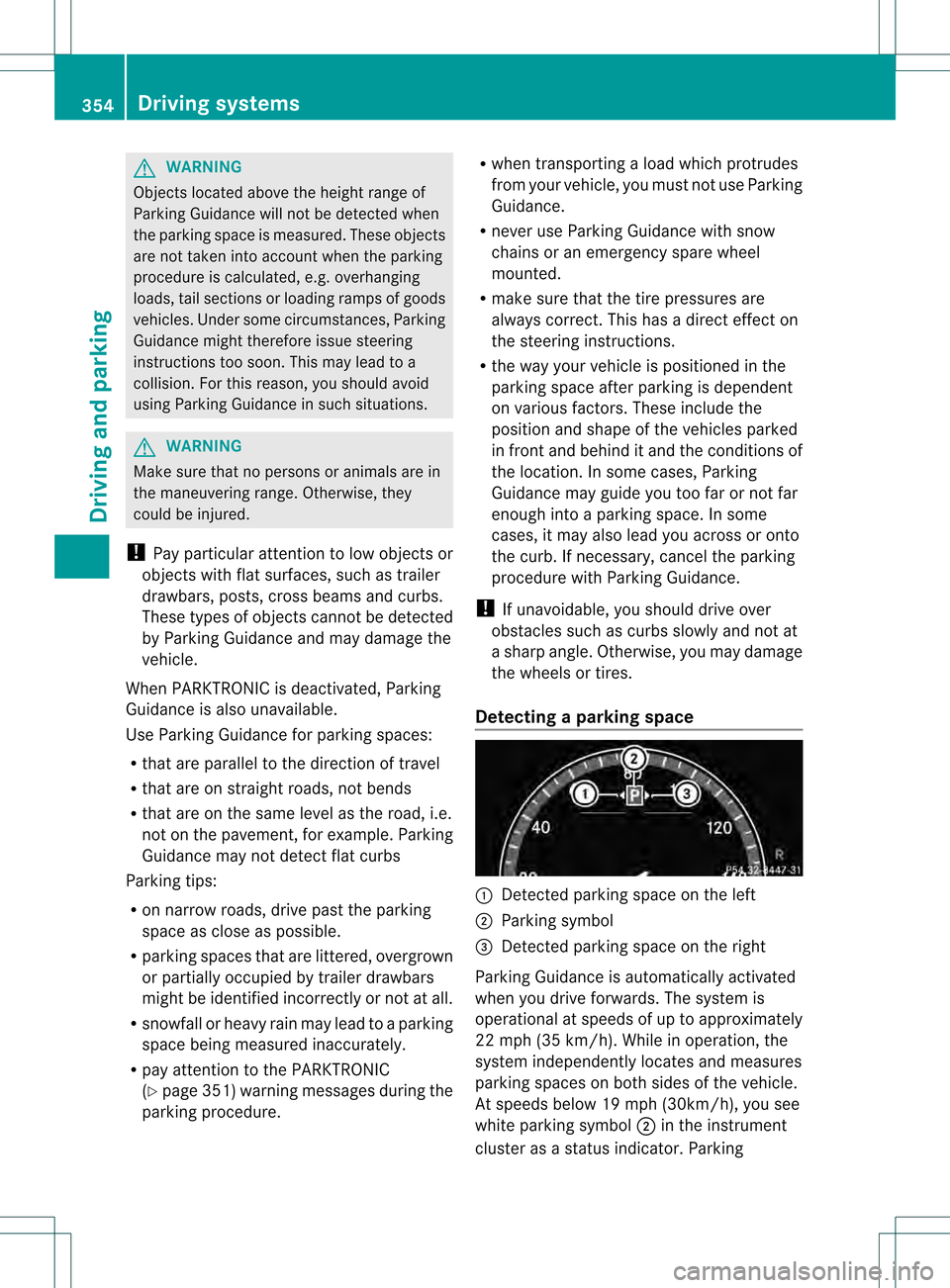
Detecting aparking space 0002
Detected parking space on the left
0003 Parking symbol
0026 Detected parking space on the right
Parking Guidance is automatically activated
whe nyou drive forwards. The system is
operational at speeds of up to approximately
22 mph (35 km/h). While in operation, the
system independently locates and measures
parking spaces on both sides of the vehicle.
At speeds below 19 mph (30km/h), you see
white parking symbol 0003in the instrument
cluster as a status indicator. Parking 354
Driving systemsDriving and parking
Page 389 of 542
Activating/deactivating Blind Spot
Assist You can use the
Blind Spot Assist function to activate or deactivate Blind Spot
Assis t(Ypage 363) or Active Blind Spot
Assist (Y page 367).
X Press the 0009or000C button on the
steering wheel to select the DriveAssistmenu.
X Press 000Aor000B to select Blind Spot
Assist .
X Press the 0011button.
The curren tselection is displayed.
X To activate/deactivate: press the0011
button again.
Activating/deactivating Lane Keeping
Assist You can use the
Lane Keeping Assist function to activate/deactivate Lane Keeping
Assist (Y
page 365) or Active Lane Keeping
Assist (Y page 369).
X Press the 0009or000C button on the
steering wheel to select the DriveAssistmenu.
X Press 000Aor000B to select Lane Keeping Assist .
X Press the 0011button.
The curren tselection is displayed.
X To activate/deactivate: press the0011
button again.
When Lane Keeping Assist or Active Lane
Keeping Assist is activated, the 0001symbol
appears in the multifunction display when the
ignition is on. Service menu
In the Service menu, you have the following
options:
R calling up display messages ( Ypage 390)
R checking the tire pressure electronically
(Y page 505) R
calling up a service due date
(Y page 469)
R checking the oil level (Y page 463) Settings menu
Introduction The
Settings menu can be used for:
R Switching the daytime running lamps on/
off
R switching Adaptive Highbeam Assist on/
off
R showing or hiding the additional
speedometer
R selecting the units for speed and distance
R switching the belt adjustment on/off
R activating/deactivating the radar sensor
system
Switching the daytime running lamps
on/off This function is not available in Canada.
If you have activated the
Daytime running
lights function and the light switch is in the
000E or000D position, the daytime running
lamps are automatically switched on when
the engine is running.
Depending on the ambient light, the following
will additionally light up:
R parking lamps
R tail lamps
R license plate lamp
R side marker lamps
If you turn the light switch to a different
position, the corresponding lights are
switched on. If you switch off the daytime
running lamps at night, make sure that the
light switch is set to 000Aor000D.
The factory setting is On .Menus and submenus
387On-board computer and displays Z
Page 390 of 542
X
Press the 0009or000C button on the
steering wheel to select the Settingsmenu.
X Press the 000Aor000B button to select
daytime running lamps .
X Press the 0011button to confirm.
X To activate/deactivate: press0011
again.
Switching Adaptive Highbeam Assist
on/off X
Press the 0009or000C button on the
steering wheel to select the Settingsmenu.
X Press the 000Bor000A button to select
Adapt. High-beam Asst. .
X Press the 0011button to confirm.
X To activate/deactivate: press0011
again.
Switching the additional speedometer
on or off An additional digital speedometer can be
shown in the multifunction display.
Vehicles with a kilometer speedometer: the
digital speedometer has mph units.
Vehicles with a miles speedometer: the digital
speedometer has km/h units.
X Press the 0009or000C button on the
steering wheel to select the Settingsmenu.
X Press 000Aor000B to select Add. Speedometer .
X Press the 0011button to confirm.
X Press the 0011button to save the setting.
Selecting the unit of measurement for
distance The
Display Unit Speed-/Odometer: function allows you to choose whether
certain displays appear in kilometers or miles. The selected unit of measurement for
distance applies to:
R
analog speedometers
R digital speedometers in the Trip menu
R odometer and the trip odometer
R Trip computer
R navigation instructions in the Navi menu
R DISTRONIC PLUS
R ASSYST PLUS service interval display
The digital speedometer shows alternative
speed units (Y page 388).
X Press the 0009or000C button on the
steering wheel to select the Settings menu.
X Press 000Aor000B to select Units .
X Press 0011to confirm.
X Press the 0011button to save the setting.
The unit switches km/h and
mph .
Switching the belt adjustment on/off For further information on belt adjustment,
see (Y
page 64).
X Press the 0009or000C button on the
steering wheel to select the Settings menu.
X Press the 000Aor000B button to select
Belt Adjustment .
X Press 0011to confirm.
X To activate/deactivate: press the0011
button again.
Activating/deactivating the acoustic
locking verification signal If you activate the
Acoustic Lock Feedb. function, an audible signal sounds depending
on the vehicle's date of manufacture:
R
when locking
or
R once when unlocking and three times when
locking 388
Menus and submenusOn-board computer and displays
Page 407 of 542
G
WARNING
If the 00170016 indicator lamp remains lit with an adult occupant on the front-passenger
seat even after performing the above corrective steps, do not have any passenger use the front-
passenger seat until the system has been repaired. Lights
i Display messages about LEDs:
This display message will only appear if all LEDs have failed. Display messages Possible causes/consequences and
0004 Solutions
0002
Check Left
Cornering
Light or
Check Right Cornering
Light The left or right-hand cornering light is defective.
X
Check whethe ryou are permitted to change the bulb yourself
(Y page 286).
or
X Visit a qualified specialist workshop. 0002
Check Left Low
Beam or
Check Right
Low Beam The left or right-hand low-beam headlamp is defective.
X
Check whether you are permitted to change the bulb yourself
(Y page 286).
or
X Visit a qualified specialist workshop. 0002
Check Rear Left
Turn
Signal or
Check Rear Right Turn
Signal The rear left-hand or rear right-hand turn signal is defective.
X
Check whether you are permitted to change the bulb yourself
(Y page 286).
or
X Visit a qualified specialist workshop. 0002
Check Front Left
Turn
Signal or
Check Front Right Turn
Signal The front left-hand or front right-hand turn signal is defective.
X
Check whether you are permitted to change the bulb yourself
(Y page 286).
or
X Visit a qualified specialist workshop. Display messages
405On-board computer and displays Z
Page 410 of 542
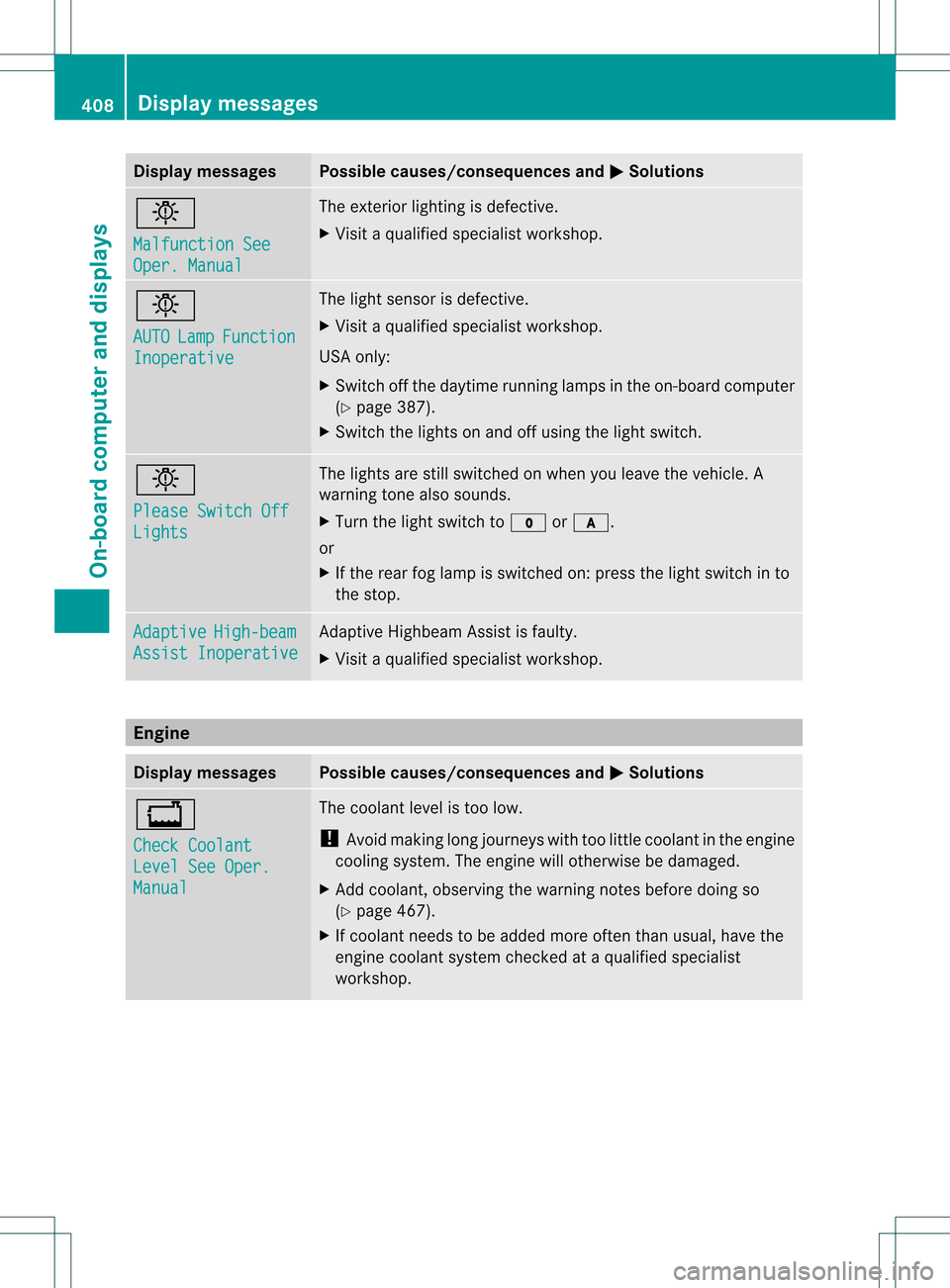
Display messages Possible causes/consequences and
0004 Solutions
0002
Malfunction See
Oper. Manual The exterio
rlighting is defective.
X Visit a qualified specialist workshop. 0002
AUTO
Lamp Function
Inoperative The light sensor is defective.
X
Visit a qualified specialist workshop.
USA only:
X Switch off the daytime running lamps in the on-board computer
(Y page 387).
X Switch the lights on and off using the light switch. 0002
Please Switch Off
Lights The lights are still switched on when you leave the vehicle. A
warning tone also sounds.
X
Turn the light switch to 000Eor000D.
or
X If the rear fog lamp is switched on: press the light switch in to
the stop. Adaptive High-beam
Assist Inoperative Adaptive Highbeam Assist is faulty.
X
Visit a qualified specialist workshop. Engine
Displa
ymessages Possible causes/consequences and
0004 Solutions
000D
Check Coolant
Level See Oper.
Manual The coolant level is too low.
!
Avoid making long journeys with too little coolant in the engine
cooling system. The engine will otherwise be damaged.
X Add coolant, observing the warning notes before doing so
(Y page 467).
X If coolant needs to be added more often than usual, have the
engine coolant system checked at a qualified specialist
workshop. 408
Displa
ymessagesOn-board computer and displays