reset MERCEDES-BENZ S-Class 2013 W221 User Guide
[x] Cancel search | Manufacturer: MERCEDES-BENZ, Model Year: 2013, Model line: S-Class, Model: MERCEDES-BENZ S-Class 2013 W221Pages: 542, PDF Size: 7.97 MB
Page 63 of 542

workshop, e.g
.anauthorized Mercedes-
Benz Center. X
Remove resetting tool 0002from the vehicle
tool kit in the trunk.
X Slide resetting tool 0002into guide 0003
between the NECK-PRO luxury head
restraint and the rear cover of the head
restraint.
X Push resetting tool 0002downwards until you
hear the head restraint deployment
mechanism engage.
X Pull out resetting tool 0002.
X Firmly press the NECK-PRO luxury head
restraint cushion back 0026until it engages.
X Repeat this procedure for the second
NECK-PRO luxury head restraint.
X Put resetting tool 0002back into the vehicle
tool kit. Sea
tbelts
Important safety notes The use of seat belts and infant and child
restraint systems is required by law in all 50
states, the District of Columbia, the U.S.
territories and all Canadian provinces.
Even where this is no tthe case, all vehicle
occupants should have their seat belts
fastened when the vehicle is in motion.
i For further information on infants and
children traveling in the vehicle and on
infant and child restraint systems, see
"Children in the vehicle" (Y page 66). G
WARNING
Always fasten your seat belt before driving off.
Always make sure all of your passengers are
properly restrained. You and your passengers
should always wear seat belts.
Failure to wear and properly fasten and
position your seat belt greatly increases your
risk of injuries and their likely severity in an
accident.
If you are ever in an accident, your injuries can
be considerably more severe without your
seat belt properly buckled. Without your seat
belt buckled, you are much more likely to hit
the interior of the vehicle or be ejected from
it. You can be seriously injured or killed.
In the same crash, the possibility of injury or
death is lessened if you are properly wearing
your seat belt. The air bags can only protect
as intended if the occupants are properly
wearing their seat belts. G
WARNING
Never ride in a moving vehicle with the seat
backrest in an excessively reclined position as
this can be dangerous. You could slide under
the seat belt in a collision. If you slide under
it, the seat belt would apply force at the
abdomen or neck.T hat could cause serious
or even fatal injuries. The seat backrest and
seat belt provide the best restraint when the
wearer is in a position that is as upright as
possible and the seat belt is properly
positioned on the body. G
WARNING
Never let more people ride in the vehicle than
there are seat belts available. Make sure
everyone riding in the vehicle is correctly
restrained with a separate seat belt. Never
use a seat belt for more than one person at a
time. G
WARNING
Damaged seat belts or seat belts that have
been subjected to stress in an accident must Occupant safety
61Safety
Z
Page 100 of 542
X
Make sure that all the side windows and the
sliding sunroof or panorama roof with
power tilt/sliding panel are closed.
X To interrupt convenience closing:
release recessed sensor surface 0002on the
door handle.
On vehicles with roller sunblinds:
X Touch the recessed sensor surface on the
door handle again until the roller sunblinds
close.
X To interrupt the roller sunblind closing
procedure: pull the exterior door handle
and hold it firmly. Resetting the side windows
You must reset each side window if:
R a side window cannot be closed
automatically
R a side window opens again slightly after
being closed manually
X Close all the doors.
X Turn the SmartKey to position 1or 2in the
ignition lock.
X Pull the corresponding switch on the door
control panel until the side window is
completely closed. (Y page 96)
X Hold the switch for an additional second.
If the side window opens again slightly:
X Immediately pull the corresponding switch
on the door control panel until the side
window is completely closed (Y page 96).
X Hold the switch for an additional second.
X If the corresponding side window remains
closed after the button has been released,
the side window has been reset correctly.
If this is not the case, repeat the steps
above again. Problems with the side windows
Problem: aside window cannot be closed
because it is blocked by objects, e.g.
leaves in the window guide.
X Remove the objects.
X Close the side window.
Problem :aside window cannot be closed
and you cannot see the cause. G
WARNING
Closing the side windows with increased force
or without the anti-entrapment feature could
lead to serious or even fatal injury. Make sure
that nobody can become trapped when
closing the side windows.
If a side window is obstructed during closing
and reopens again slightly:
X Immediately afte rthe window blocks, pull
the corresponding switch again until the
side window has closed.
The side window is closed with increased
force.
If a side window is obstructed again during
closing and reopens again slightly:
X Immediately after the window blocks, pull
the corresponding switch again until the
side window has closed.
The side window is closed without the anti-
entrapment feature. G
WARNING
Pulling and holding the switch to close the
door window immediately after it had been
blocked two times will cause the door window
to close without the anti-entrapment feature
for as long as you hold the switch. Sliding sunroof
Important safety notes
Your vehicle may be equipped with a sliding
sunroof or a panorama roof with power tilt/
sliding panel. In the following section, the 98
Sliding sunroofOpening/closing
Page 102 of 542

The automatic raising feature is available
only when the sliding sunroof is closed.
The automatic opening feature is available
only when the sliding sunroof is not raised.
The sun protection cover automatically opens
along with the sliding sunroof. You can open
or close the sun protection cover manually
when the sliding sunroof is raised or closed.
Resetting Reset the sliding sunroof if it does not move
smoothly.
X
Turn the SmartKey to position 2in the
ignition lock.
X Raise the sliding sunroof fully at the rear
(Y page 99).
X Keep the 0003switch pressed for another
second.
X Make sure that the sliding sunroof can be
fully opened and closed again (Y page 99).
X If this is not the case, repeat the steps
above again.
! If the sliding sunroof still cannot be
opened or closed fully after resetting,
contact a qualified specialist workshop. Operating the panorama roof with
power tilt/sliding panel
Opening and closing Overhead control panel
0002
To raise
0003 To open
0026 To close/lower
The panorama roof with power tilt/sliding
panel can only be operated when the roller
sunblind is open.
i If the frontr oller sunblind is closed, it
opens first when the panorama roof with
power tilt/sliding panel is raised.
X Turn the SmartKey to position 1or 2in the
ignition lock.
X Push or pull the 0003switch in the
corresponding direction.
i If you press the 0003switch beyond the
point of resistance, an automatic opening/
closing process is started in the
corresponding direction .You can stop
automatic operation by operating the
switch again. Operating the roller sunblinds for the
panorama roof with power tilt/sliding
panel
General notes The roller sunblinds shield the vehicle interior
from sunlight. The front roller sunblind can
only be opened and closed when the100
Sliding sunroofOpening/closing
Page 104 of 542
being injured by the opening or closing
procedure.
The rear roller sunblind is equipped with
automatic operation and the anti-entrapment
feature. If the movement of the rear roller
sunblind is blocked during the closing
procedure, the rear roller sunblind will stop
and retract slightly.
The opening or closing of the rear roller
sunblind can be immediately halted by
releasing the sunblind switch or, if the
sunblind switch was moved past the
resistance point and released, by pressing or
pulling the sunblind switch again.
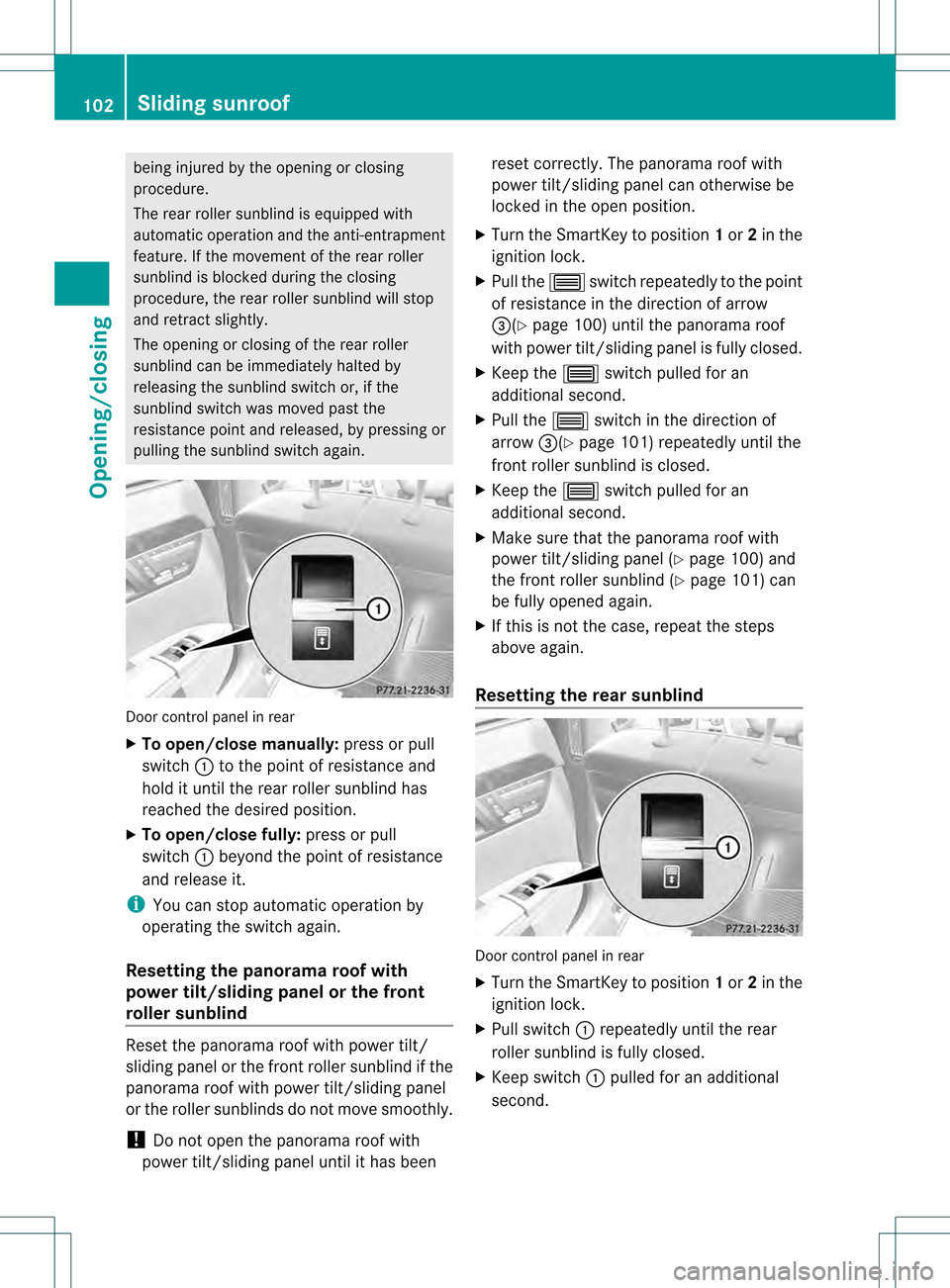
Door control panel in rear
X
To open/close manually: press or pull
switch 0002to the point of resistance and
hold it until the rear roller sunblind has
reached the desired position.
X To open/close fully: press or pull
switch 0002beyond the point of resistance
and release it.
i You can stop automatic operation by
operating the switch again.
Resetting the panorama roof with
power tilt/sliding panel or the front
roller sunblind Reset the panorama roof with power tilt/
sliding panel or the fron
troller sunblind if the
panorama roof with power tilt/sliding panel
or the roller sunblinds do not move smoothly.
! Do not open the panorama roof with
power tilt/sliding panel until it has been reset correctly. The panorama roof with
power tilt/sliding panel can otherwise be
locked in the open position.
X Turn the SmartKey to position 1or 2in the
ignition lock.
X Pull the 0003switch repeatedly to the point
of resistance in the direction of arrow
0026(Y page 100) until the panorama roof
with power tilt/sliding panel is fully closed.
X Keep the 0003switch pulled for an
additional second.
X Pull the 0003switch in the direction of
arrow 0026(Ypage 101) repeatedly until the
front roller sunblind is closed.
X Keep the 0003switch pulled for an
additional second.
X Make sure that the panorama roof with
power tilt/sliding panel (Y page 100) and
the front roller sunblind (Y page 101) can
be fully opened again.
X If this is not the case, repeat the steps
above again.
Resetting the rear sunblind Door control panel in rear
X
Turn the SmartKey to position 1or 2in the
ignition lock.
X Pull switch 0002repeatedly until the rear
roller sunblind is fully closed.
X Keep switch 0002pulled for an additional
second. 102
Sliding sunroofOpening/closing
Page 110 of 542

Do not drive the vehicle withou
tthe seat head
restraints. Head restraints are intended to
help reduce injuries during an accident.
! To avoid damage to the seats and the seat
heating, observe the following information:
R keep liquids from spilling on the seats. If
liquid is spilled on the seats, dry them as
soon as possible.
R if the seat covers are damp or wet, do not
switch on the seat heating. The seat
heating should also not be used to dry
the seats.
R clean the seat covers as recommended;
see the "Interior care" section.
R do not transport heavy loads on the
seats. Do not place sharp objects on the
seat cushions, e.g. knives, nails or tools.
The seats should only be occupied by
passengers, if possible.
R when the seat heating is in operation, do
not cover the seats with insulating
materials, e.g. blankets, coats, bags,
seat covers, child seats or booster seats.
! Make sure that there are no objects in the
footwell or behind the seats when resetting
the seats. There is a risk that the seats
and/or the objects could be damaged.
i The head restraints in the front seats are
equipped with the NECK-PRO system. For
this reason, it is not possible to remove the
head restraints from the front seats.
For design reasons, the rear-compartment
head restraints cannot be removed.
For more information, contact a qualified
specialist workshop. Adjusting the seats
0002
Head restraint height
0003 Seat height
0026 Seat cushion angle
0025 Seat cushion length
0023 Seat fore-and-aft adjustment
0024 Backrest angle
i If PRE-SAFE ®
has been activated, the
front-passenger seat and the electrically
adjustable rear seats are moved into a
more favorable position.
i You can store the seat settings using the
memory function (Y page 118).
i To ensure the largest possible range of
seat settings, certain seat adjustment
functions will automatically activate other
seat adjustment functions.
i Depending on the seat fore-and-aft
setting, the head restraint height is
adjusted automatically. Adjusting the rear seat electrically
You can only adjust the outer seats in the rear
electrically. 108
SeatsSeats, steering wheel and mirrors
Page 112 of 542

You can use the override button to disable
this function (Y
page 71).
The button is located in the rear door on the
front-passenge rside. 0002
To selec tthe front-passenger seat or rear-
compartment seat
0003 Seat height
0026 Head restraint height
0025 Backrest angle
0023 Seat fore-and-aft adjustment
X To selectt he front-passenge rseat:
press button 0002.
The front-passenger seat is selected if the
indicator lamp in the button lights up.
X Adjust the front-passenger seat with
buttons 0003,0026,0025and 0023.
X To select the rear-compartment seat:
press button 0002.
The rear-compartment seat is selected
again. Adjusting the head restraints
Adjusting the head restraint height
electrically X
To adjust th ehead restraint height: slide
the switch for head restrain tadjustment
(Y page 108 )up or down in the direction of
the arrow. Adjusting the NECK-PRO head
restraints Adjusting
X
Pull or push the bottom of NECK-PRO head
restraint 0002.
Resetting
The NECK-PRO head restraints are moved
forwards in the event of a rear collision in the
direction of travel and have to be reset
afterwards (Y page 60).
Adjusting NECK-PRO luxury head
restraints Adjusting
G
WARNING
When folding back the side cushions, do not
hold the area between the side cushion and
the cushion holder. There is a danger of
becoming trapped. You can adjust side bolsters
0002of the NECK-
PRO luxury head restraints individually. 110
SeatsSeats, steering wheel and mirrors
Page 113 of 542

X
To adjust the side bolsters of the head
restraint: push or pull side bolsters 0002into
the desired position.
X To move forwards and backwards: pull
or push the NECK-PRO luxury head
restraints in the direction of arrow 0003.
Resetting
The NECK-PRO luxury head restraints are
moved forwards in the event of a rea rcollision
in the direction of travel and have to be reset
afterwards (Y page 60).
Rear seat head restraints G
WARNING
For safety reasons, always drive with the rear
head restraints in the upright position when
the rear seats are occupied.
Keep the area around head restraints clear of
articles (e.g. clothing) to not obstruct the
folding operation of the head restraints. G
WARNING
Make sure the rear seat head restraints
engage when placing them upright manually.
Otherwise their protective function cannot be
ensured.
The back of the head will not be supported in
the event of a collision. That could cause
serious or even fatal injuries. Rear seat
occupants can be seriously injured or killed.
Folding back the rear seat head restraints
from the front X
Make sure that the SmartKey is in position
1or 2in the ignition lock.
X Press button 0002.
Folding the rear seat head restraints into
position electrically (outer head
restraints)
X Press and hold button 0002until the head
restraints have folded into position.
i If a rear-seat passenger inserts the seat
belt into the buckle, the head restraint on
the corresponding outer seat folds up
automatically.
Folding the rear seat head restraints into
position manually
Only the center rear seat head restraint can
be folded into position manually. X
Pull the head restraint up until it engages.
Adjusting the luxury head restraints in the
rear compartment G
WARNING
When folding back the side cushions, never
reach between the side cushion and the
mounting post. You could otherwise be
trapped. Seats
111Seats, steering wheel and mirrors Z
Page 119 of 542
X
Press the mirror-folding button
(Y page 116) repeatedly until you hear the
mirror engage in position.
The mirror housing is engaged again and
you can adjust the exterior mirrors as usual
(Y page 116). Automatic anti-glare mirrors
G
WARNING
If inciden tlight fro mheadlamps is prevented
from striking the sensor in the rear-view
mirror, for instance, by luggage piled too high
in the vehicle, the mirror's automatic anti-
glare function will not operate.
Incident light could then blind you. This may
distract you from the traffic conditions and,
as a result, you may cause an accident.
The rear-view mirror and the exterior mirror
on the driver's side automatically go into anti-
glare mode if the ignition is switched on and
inciden tlight fro mheadlamps strikes the
sensor in the rear-view mirror.
The mirrors do not go into anti-glare mode if
reverse gear is engaged or the interior lighting
is switched on. Parking position for the exterior
mirror on the front-passenger side
Setting and storing the parking position You can position the front-passenger side
exterior mirror in such a way that you can see
the rear wheel on that side as soon as you
engage reverse gear. You can store this
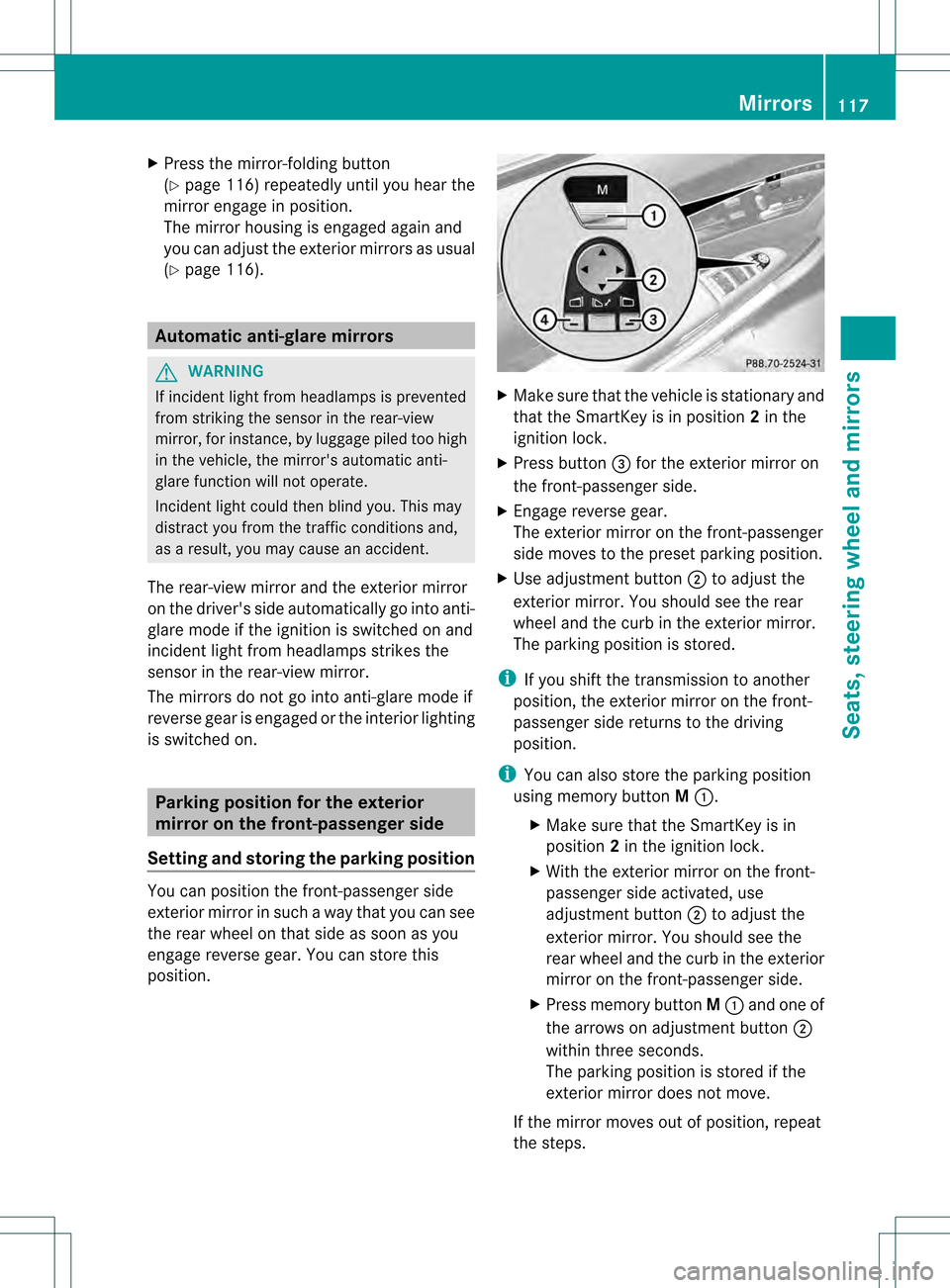
position. X
Make sure that the vehicle is stationary and
that the SmartKey is in position 2in the
ignition lock.
X Press button 0026for the exterior mirror on
the front-passenger side.
X Engage reverse gear.
The exterior mirror on the front-passenger
side moves to the preset parking position.
X Use adjustment button 0003to adjust the
exterior mirror .You should see the rear
wheel and the curb in the exterior mirror.
The parking position is stored.
i If you shift the transmission to another
position, the exterior mirror on the front-
passenger side returns to the driving
position.
i You can also store the parking position
using memory button M0002.
X Make sure that the SmartKey is in
position 2in the ignition lock.
X With the exterior mirror on the front-
passenger side activated, use
adjustment button 0003to adjust the
exterior mirror. You should see the
rear wheel and the curb in the exterior
mirror on the front-passenger side.
X Press memory button M0002 and one of
the arrows on adjustment button 0003
within three seconds.
The parking position is stored if the
exterior mirror does not move.
If the mirror moves out of position, repeat
the steps. Mirrors
117Seats, steering wheel and mirrors Z
Page 120 of 542
Calling up a stored parking position
setting X
Turn the SmartKey to position 2in the
ignition lock.
X Adjust the exterior mirror on the front-
passenger side with the corresponding
button (Y page 116).
X Engage reverse gear.
The exterior mirror on the front-passenger
side moves to the stored parking position.
The exterior mirror on the front-passenger
side moves back to its original position:
R as soon as you exceed a speed of 9mph
(15 km/h)
R about ten seconds after you have
disengaged reverse gear
R if you press button 0025for the exterior
mirror on the driver's side Memory function
Storing settings
G
WARNING
Do not activate the memory function while
driving. Activating the memory function while
driving could cause the driver to lose control
of the vehicle.
With the memory function, you can store up
to three different settings, e.g. for three
differen tpeople.
The following settings are stored as a single
memory preset:
R seat, backrest, head restraint position and
contour of the backrest in the lumbar
region
R active multicontour seat: activated/
deactivated
R multicontour seat: the side bolsters of the
seat cushion and the backrest as well as
the contour of the backrest in the lumbar
and shoulder regions R
driver's side: steering wheel position
R driver's side: position of the exterior
mirrors on the driver's and front-passenger
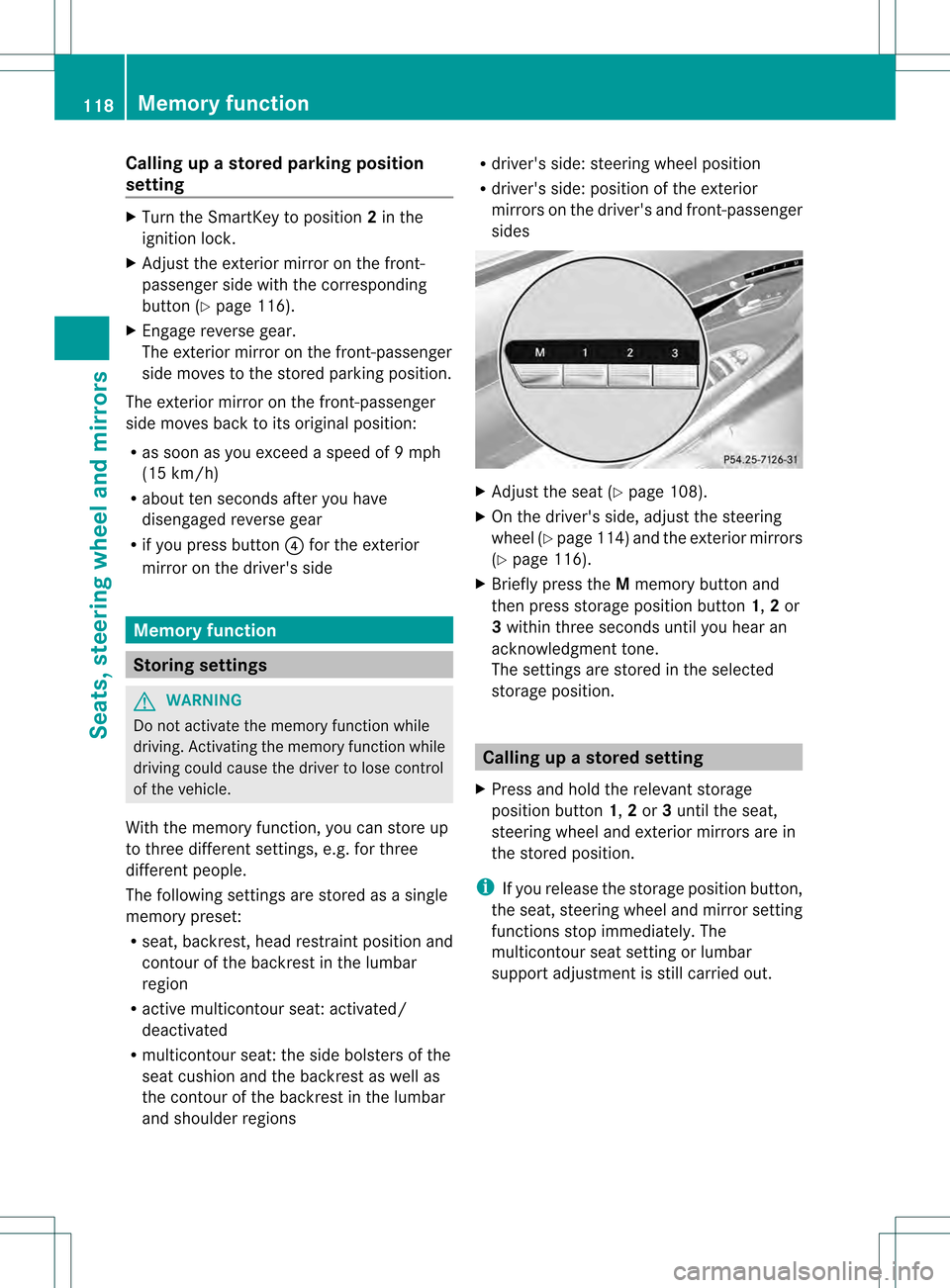
sides X
Adjust the seat (Y page 108).
X On the driver's side, adjust the steering
wheel (Y page 114)a nd the exterio rmirrors
(Y page 116).
X Briefly press the Mmemory button and
the npress storage position button 1,2or
3 withi nthree seconds until you hear an
acknowledgment tone.
The settings are stored in the selected
storage position. Calling up
astore dsetting
X Press and hold the relevant storage
position button 1,2or 3until the seat,
steering wheel and exterio rmirrors are in
the stored position.
i If you release the storage position button,
the seat, steering wheel and mirror setting
functions stop immediately. The
multicontour seat setting or lumbar
support adjustmen tis still carried out. 118
Memory functionSeats, steering wheel and mirrors
Page 131 of 542
Cleaning instructions
!
Do no ttouch the COMAND display .The
display has a very sensitive high-gloss
surface; there is a risk of scratching. If you
have to clean the screen, however, use a
mild cleaning agent and a soft, lint-free
cloth.
The display must be switched off and have
cooled down before you start cleaning. Clean
the display screen, when necessary, with a
commercially available microfiber cloth and
cleaning agent for TFT/LCD displays. Then,
dry the surface with a dry microfiber cloth.
Avoid using alcoholic thinners, gasoline or
abrasive cleaning agents. These could
damage the display surface. Do not apply
pressure to the display surface when cleaning
it, as this could cause irreversible damage. Remote control
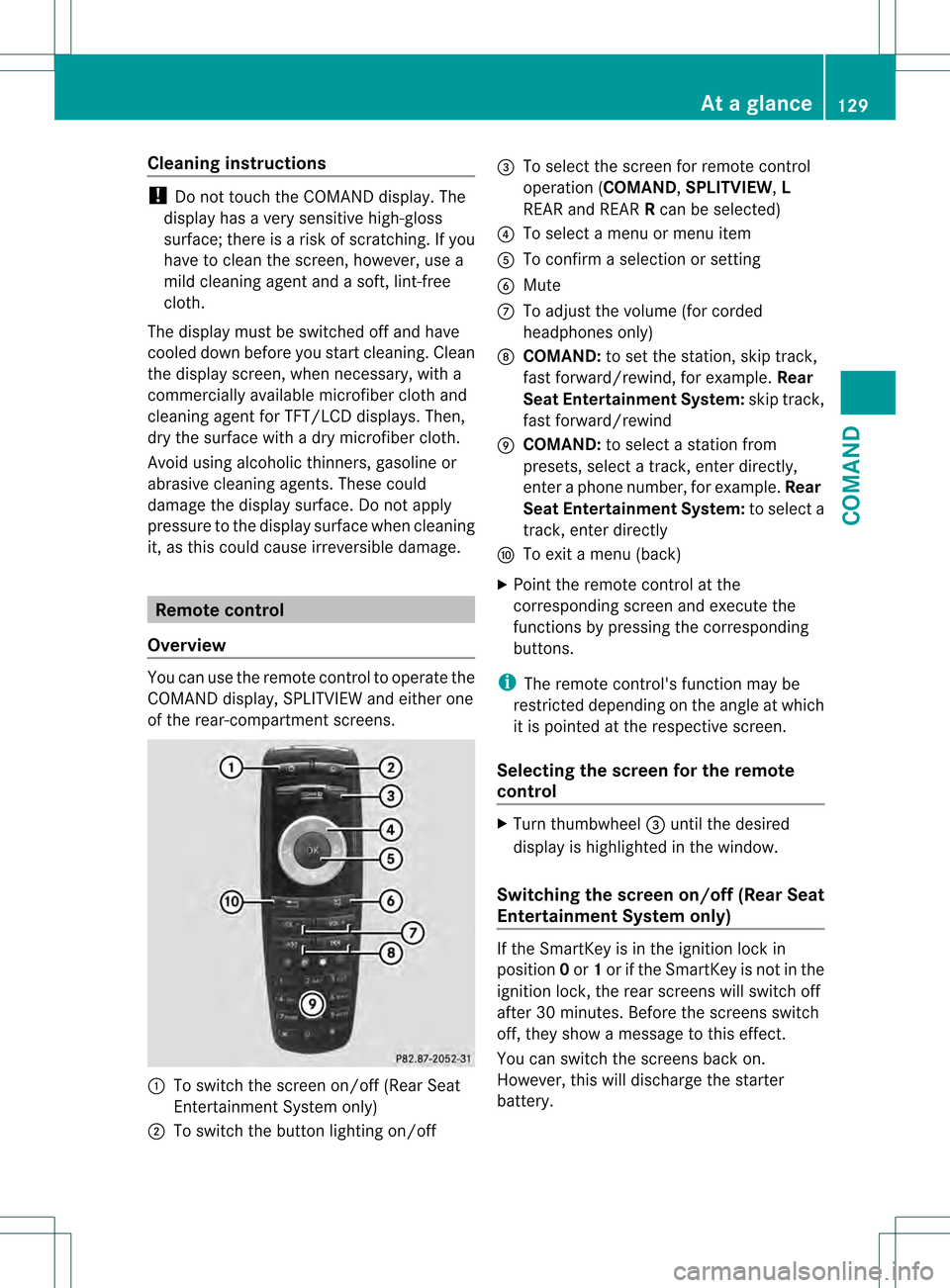
Overview You can use the remote control to operate the
COMAND display, SPLITVIEWa nd either one
of the rear-compartment screens. 0002
To switch the screen on/off (Rea rSeat
Entertainment System only)
0003 To switch the button lighting on/off 0026
To select the screen for remote control
operation (COMAND ,SPLITVIEW ,L
REAR and REAR Rcan be selected)
0025 To select a menu or menu item
0023 To confirm a selection or setting
0024 Mute
0014 To adjust the volume (for corded
headphones only)
0015 COMAND: to set the station, skip track,
fast forward/rewind, for example. Rear
Seat Entertainment System: skip track,
fast forward/rewind
0016 COMAND: to select a station from
presets, select a track, enter directly,
enter a phone number, for example. Rear
Seat Entertainment System: to select a
track, enter directly
0017 To exit a menu (back)
X Point the remote control at the
corresponding screen and execute the
functions by pressing the corresponding
buttons.
i The remote control's function may be
restricted depending on the angle at which
it is pointed at the respective screen.
Selecting the screen for the remote
control X
Turn thumbwheel 0026until the desired
display is highlighted in the window.
Switching the screen on/off (Rear Seat
Entertainment System only) If the SmartKey is in the ignition lock in
position
0or 1or if the SmartKey is not in the
ignition lock, the rear screens will switch off
after 30 minutes. Before the screens switch
off, they show a message to this effect.
You can switch the screen sback on.
However, this will discharge the starter
battery. At
ag lance
129COMAND Z