sensor MERCEDES-BENZ S-Class 2013 W221 Service Manual
[x] Cancel search | Manufacturer: MERCEDES-BENZ, Model Year: 2013, Model line: S-Class, Model: MERCEDES-BENZ S-Class 2013 W221Pages: 542, PDF Size: 7.97 MB
Page 418 of 542
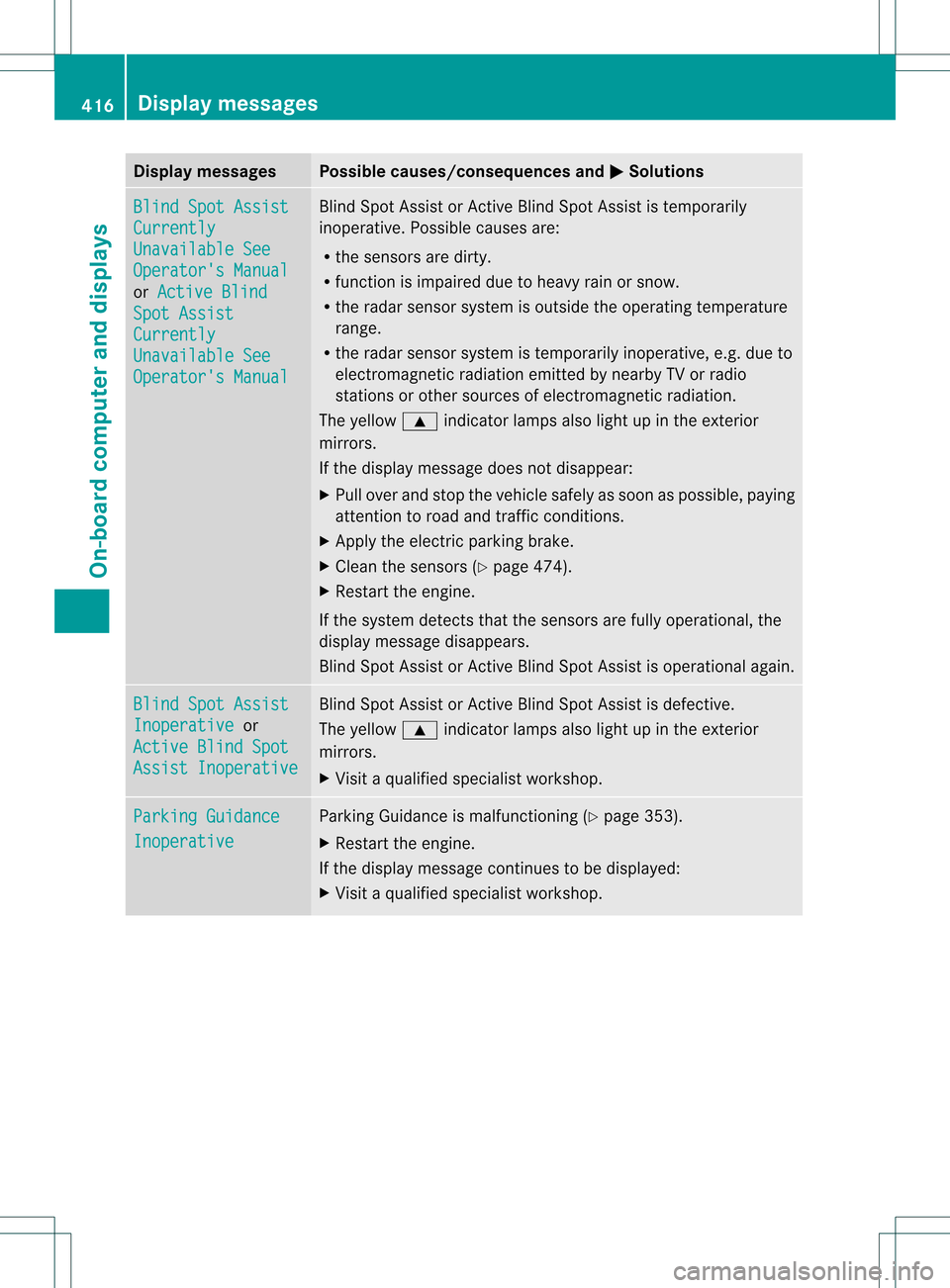
Display messages Possible causes/consequences and
0004 Solutions
Blind Spot Assist
Currently
Unavailable See
Operator's Manual
or
Active Blind Spot Assist
Currently
Unavailable See
Operator's Manual Blind Spot Assist or Active Blind Spot Assist is temporarily
inoperative. Possible causes are:
R
the sensors are dirty.
R function is impaired due to heavy rain or snow.
R the rada rsensor system is outside the operating temperature
range.
R the radar sensor system is temporarily inoperative, e.g. due to
electromagnetic radiation emitted by nearby TV or radio
stations or other sources of electromagnetic radiation.
The yellow 000Aindicator lamps also light up in the exterior
mirrors.
If the display message does not disappear:
X Pull over and stop the vehicle safely as soon as possible, paying
attention to road and traffic conditions.
X Apply the electric parkin gbrake.
X Clean the sensors (Y page 474).
X Restart the engine.
If the system detects that the sensors are fully operational, the
display message disappears.
Blind Spot Assist or Active Blind Spot Assist is operational again. Blind Spot Assist
Inoperative or
Active Blind Spot Assist Inoperative Blind Spot Assist or Active Blind Spot Assist is defective.
The yellow
000Aindicator lamps also light up in the exterior
mirrors.
X Visi taqualified specialist workshop. Parking Guidance
Inoperative Parking Guidance is malfunctioning (
Ypage 353).
X Restart the engine.
If the display message continues to be displayed:
X Visit a qualified specialist workshop. 416
Display messagesOn-board computer and displays
Page 419 of 542
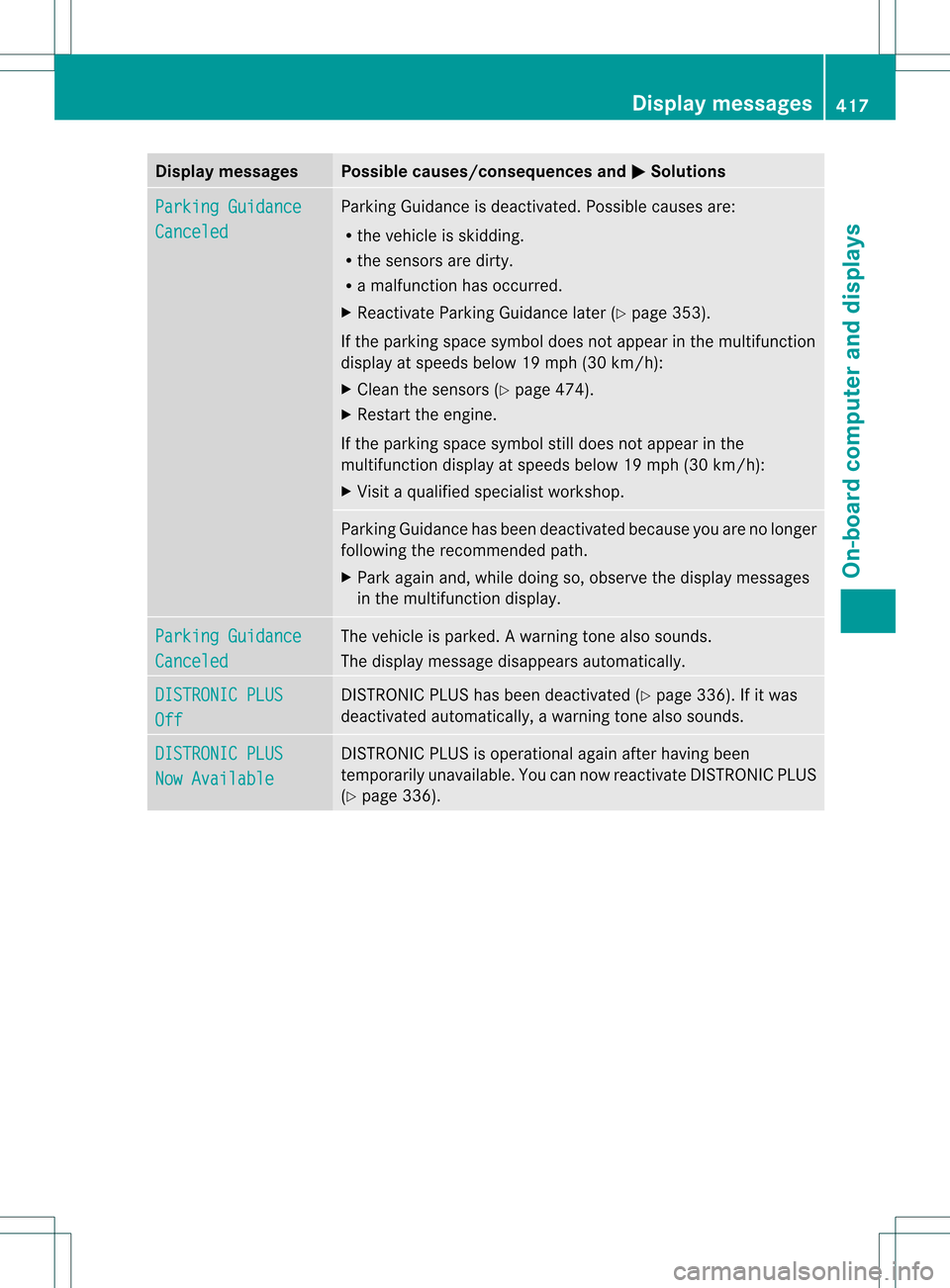
Display messages Possible causes/consequences and
0004 Solutions
Parking Guidance
Canceled Parking Guidance is deactivated. Possible causes are:
R
the vehicle is skidding.
R the sensors are dirty.
R a malfunction has occurred.
X Reactivate Parking Guidance later ( Ypage 353).
If the parking space symbol does no tappear in the multifunction
display at speeds below 19 mph (30 km/h):
X Clean the sensors (Y page 474).
X Restart the engine.
If the parking space symbol still does not appear in the
multifunction display at speeds below 19 mph (30 km/h):
X Visit a qualified specialist workshop. Parking Guidance has been deactivated because you are no longer
following the recommended path.
X Park again and, while doing so, observe the display messages
in the multifunction display. Parking Guidance
Canceled The vehicle is parked.
Awarning tone also sounds.
The display message disappears automatically. DISTRONIC PLUS
Off DISTRONIC PLU
Shas been deactivated (Y page 336). If it was
deactivated automatically, a warning tone also sounds. DISTRONIC PLUS
Now Available DISTRONIC PLU
Sis operational againa fter having been
temporarily unavailable .You can now reactivate DISTRONIC PLUS
(Y page 336). Display messages
417On-board computer and displays Z
Page 420 of 542
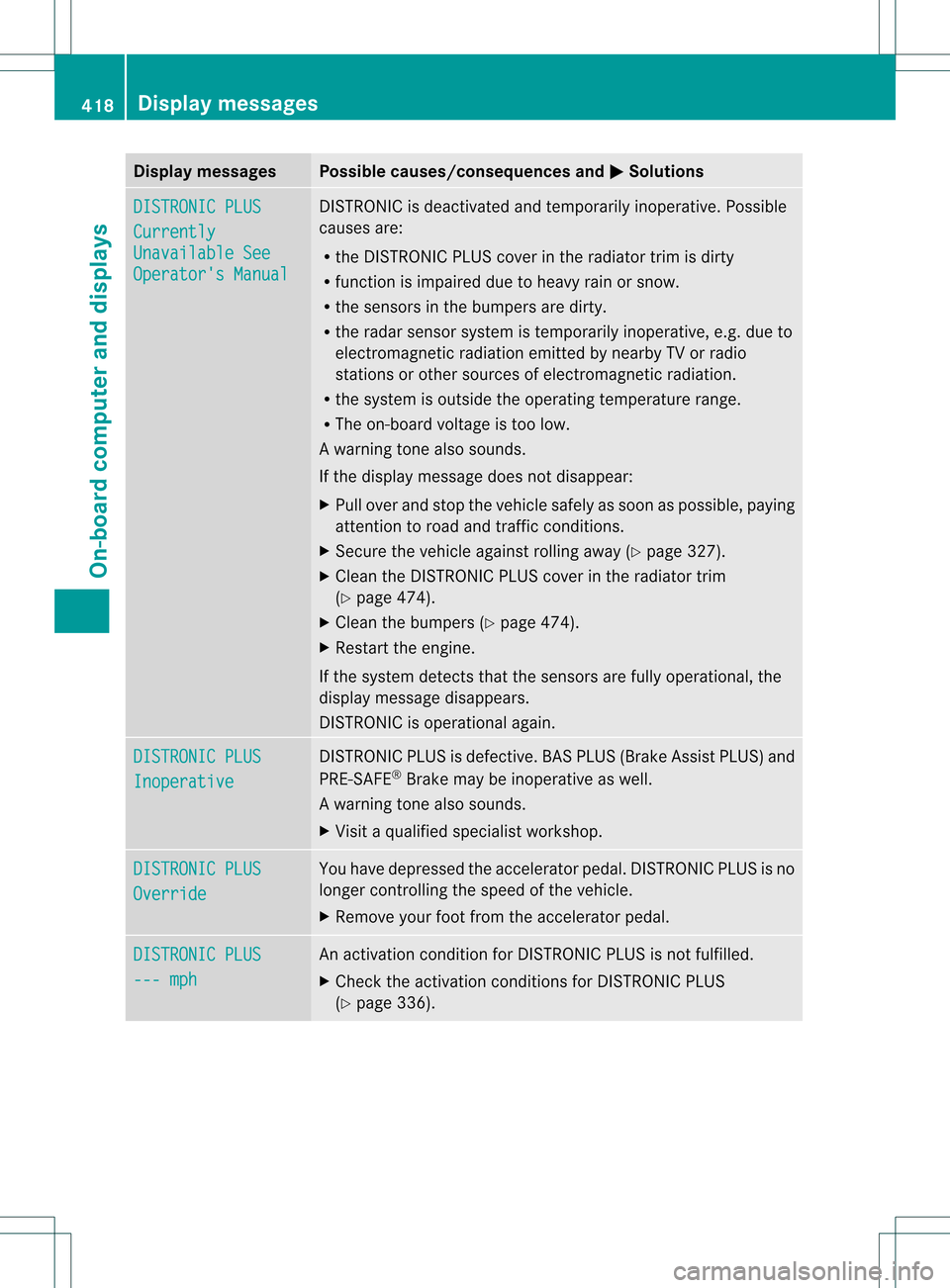
Display messages Possible causes/consequences and
0004 Solutions
DISTRONIC PLUS
Currently
Unavailable See
Operator's Manual DISTRONIC is deactivated and temporarily inoperative. Possible
causes are:
R
the DISTRONIC PLUS cover in the radiator trim is dirty
R function is impaired due to heavy rain or snow.
R the sensors in the bumpers are dirty.
R the rada rsensor system is temporarily inoperative, e.g. due to
electromagnetic radiation emitted by nearby TV or radio
stations or other sources of electromagnetic radiation.
R the system is outside the operating temperature range.
R The on-board voltage is too low.
Aw arning tone also sounds.
If the display message does no tdisappear:
X Pull over and stop the vehicle safely as soon as possible, paying
attention to road and traffic conditions.
X Secure the vehicle against rolling away (Y page 327).
X Clean the DISTRONIC PLUS cover in the radiator trim
(Y page 474).
X Clean the bumpers (Y page 474).
X Restar tthe engine.
If the system detects that the sensors are fully operational, the
display message disappears.
DISTRONIC is operational again. DISTRONIC PLUS
Inoperative DISTRONIC PLUS is defective. BAS PLUS (Brake Assist PLUS) and
PRE-SAFE
®
Brake may be inoperative as well.
Aw arning tone also sounds.
X Visi taqualified specialist workshop. DISTRONIC PLUS
Override You have depressed the accelerator pedal. DISTRONIC PLUS is no
longer controlling the speed of the vehicle.
X
Remove your foot from the accelerator pedal. DISTRONIC PLUS
--- mph An activation condition for DISTRONIC PLUS is not fulfilled.
X
Check the activation conditions for DISTRONIC PLUS
(Y page 336). 418
Display messagesOn-board computer and displays
Page 421 of 542
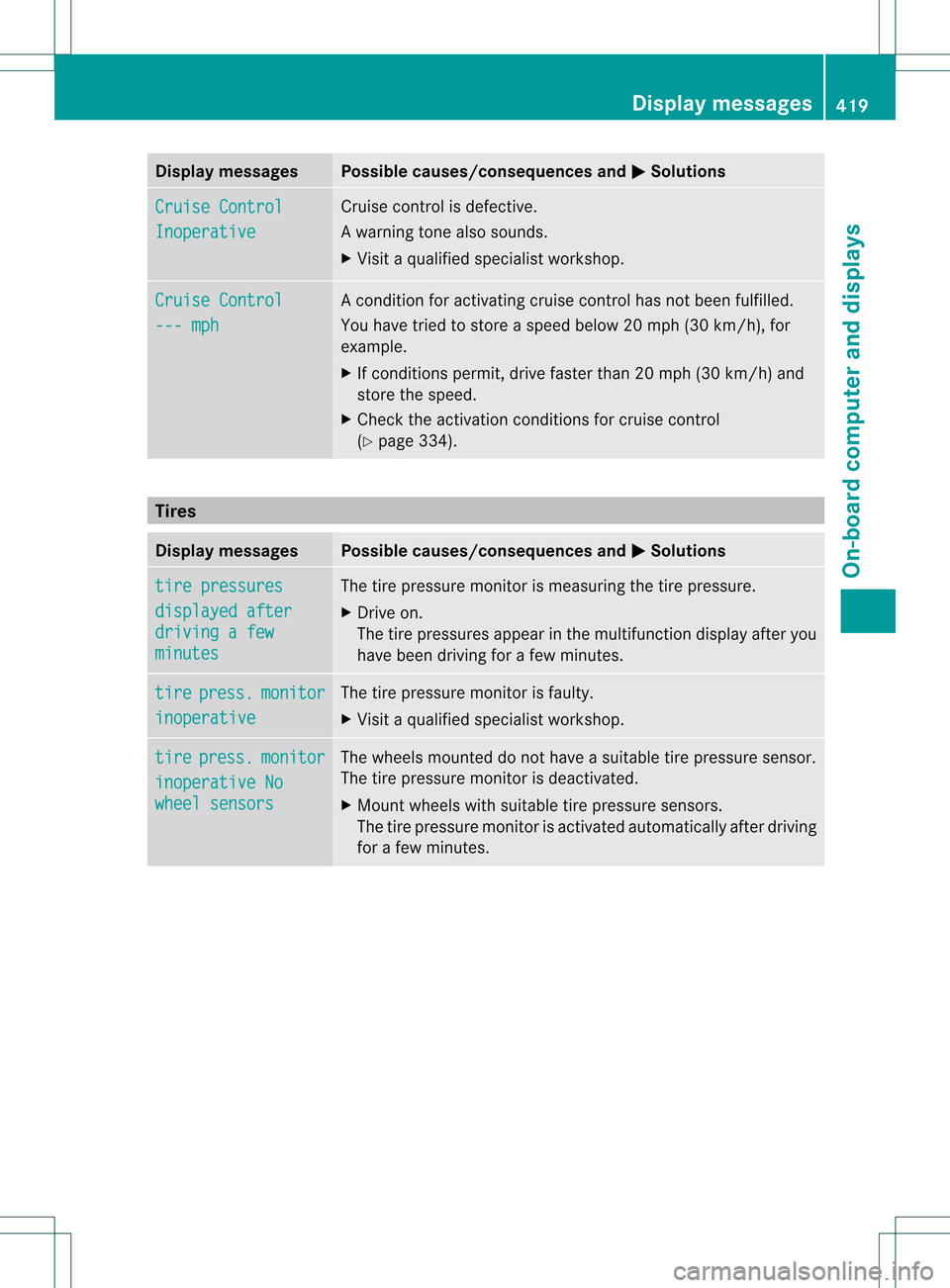
Display messages Possible causes/consequences and
0004 Solutions
Cruise Control
Inoperative Cruise control is defective.
Aw
arning tone also sounds.
X Visi taqualified specialist workshop. Cruise Control
--- mph Ac
ondition for activating cruise control has not been fulfilled.
You have tried to store aspeed below 20 mph (30 km/h), for
example.
X If conditions permit, drive faster than 20 mph (30 km/h) and
store the speed.
X Check the activation conditions for cruise control
(Y page 334). Tires
Display messages Possible causes/consequences and
0004 Solutions
tire pressures
displayed after
driving a few
minutes The tire pressure monitor is measuring the tire pressure.
X
Drive on.
The tire pressures appear in the multifunction display after you
have been driving for a few minutes. tire press. monitor
inoperative The tire pressure monitor is faulty.
X
Visit a qualified specialist workshop. tire press. monitor
inoperative No
wheel sensors The wheels mounted do not have a suitable tire pressure sensor.
The tire pressure monitor is deactivated.
X
Mount wheels with suitable tire pressure sensors.
The tire pressure monitor is activated automatically after driving
for a few minutes. Display messages
419On-board computer and displays Z
Page 423 of 542
Display messages Possible causes/consequences and
0004 Solutions
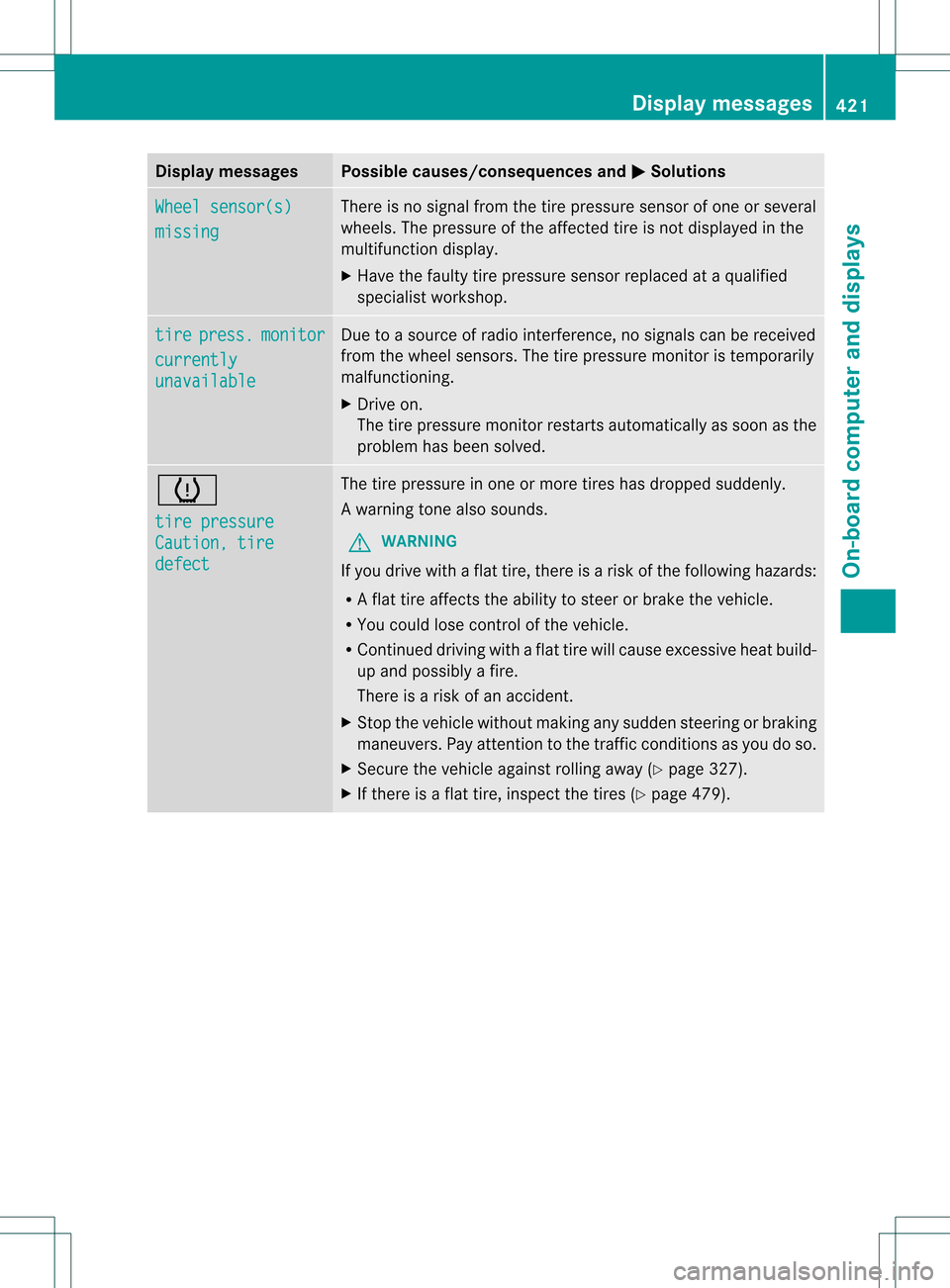
Wheel sensor(s)
missing There is no signal from the tire pressure sensor of one or several
wheels. The pressure of the affected tire is no tdisplayed in the
multifunction display.
X Have the faulty tire pressure sensor replaced at a qualified
specialist workshop. tire press. monitor
currently
unavailable Due to a source of radio interference, no signals can be received
fro
mt he wheel sensors. The tire pressure monitor is temporarily
malfunctioning.
X Drive on.
The tire pressure monitor restarts automatically as soon as the
problem has been solved. 0019
tire pressure
Caution, tire
defect The tire pressure in one or more tires has dropped suddenly.
Aw
arning tone also sounds.
G WARNING
If you drive with a flat tire, there is a ris kofthe following hazards:
R A flat tire affects the ability to steer or brake the vehicle.
R You could lose control of the vehicle.
R Continued driving with a flat tire will cause excessive heat build-
up and possibly a fire.
There is a risk of an accident.
X Stop the vehicle without making any sudden steering or braking
maneuvers. Pay attention to the traffic conditions as you do so.
X Secure the vehicle against rolling away (Y page 327).
X If there is a flat tire, inspect the tires (Y page 479). Display messages
421On-board computer and displays Z
Page 462 of 542
i
Make sure that you clear the memory of
the integrated garage door opener before
selling the vehicle. Floormat on the driver's side
G
WARNING
Whenever you are using a floormat, make sure
there is enough clearance and that the
floormat is securely fastened.
The floormat should always be securely
fastened using the fastening equipment.
Before driving off, check that the floormat is
securely in place and adjust it if necessary. A
loose floormat could slip and hinder proper
functioning of the pedals.
Do not place several floormats on top of each
other as this may impair pedal movement. X
Slide the seat backwards.
X To install: place the floormat in the
footwell.
X Press studs 0002onto retainers 0003.
X To remove: pull the floormat off
retainers 0003.
X Remove the floormat. Infrared reflective windshield
The infrared reflecting glass prevents the
vehicle interior from becoming too hot. It also
blocks radio waves up into the gigahertz
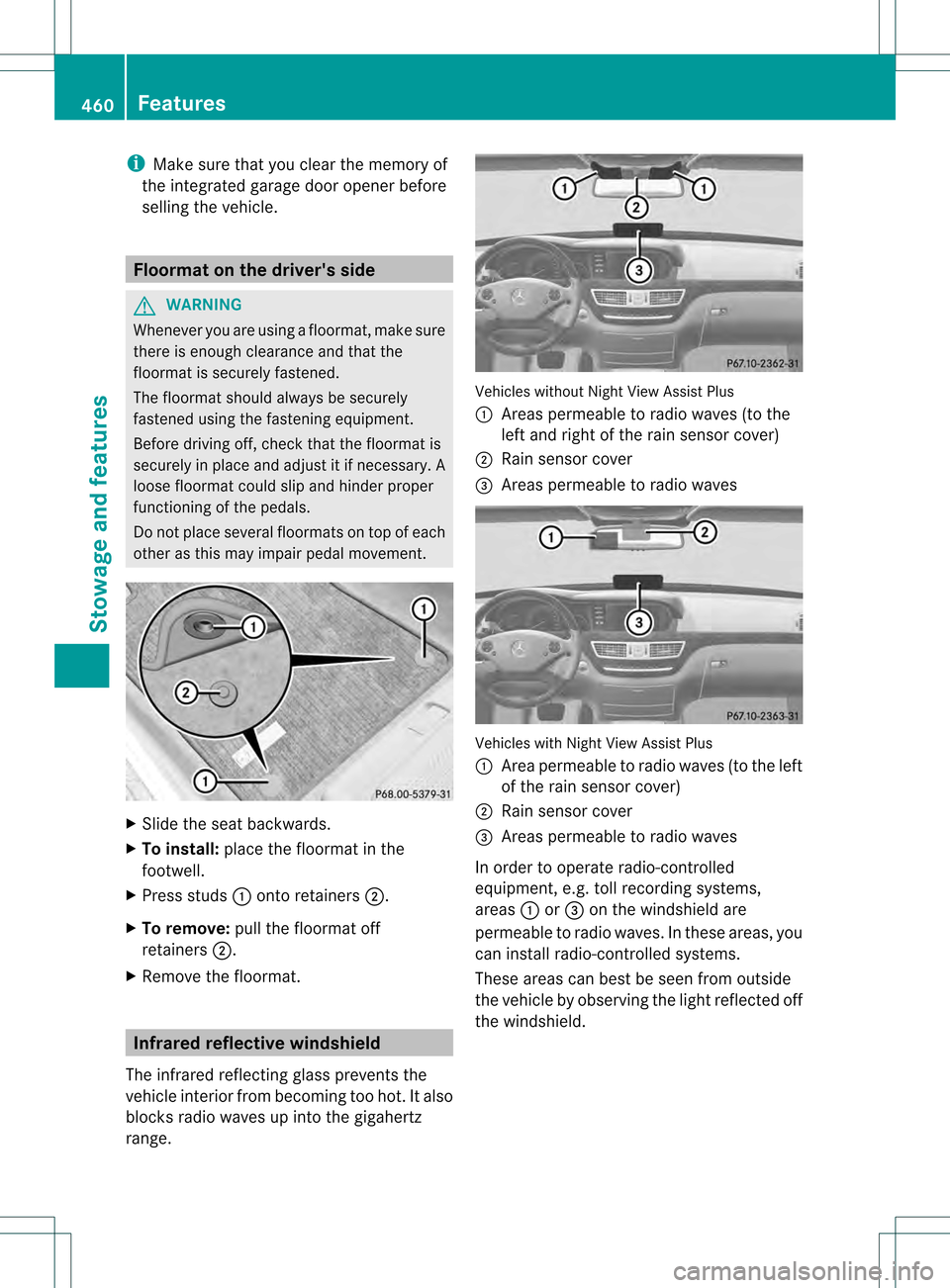
range. Vehicles without Night View Assist Plus
0002
Areas permeable to radio waves (to the
left and right of the rain sensor cover)
0003 Rain sensor cover
0026 Areas permeable to radio waves Vehicles with Night View Assist Plus
0002
Area permeable to radio waves (to the left
of the rain sensor cover)
0003 Rain sensor cover
0026 Areas permeable to radio waves
In order to operate radio-controlled
equipment, e.g. toll recording systems,
areas 0002or0026 on the windshield are
permeable to radio waves. In these areas, you
can install radio-controlled systems.
These areas can best be seen from outside
the vehicle by observing the light reflected off
the windshield. 460
FeaturesStowage and features
Page 476 of 542

Cleaning the mirror turn signals
!
Only use cleaning agents or cleaning
cloths that are suitable for plastic lenses.
Unsuitable cleaning agents or cleaning
cloths could scratch or damage the plastic
lenses of the mirror tur nsignals.
X Clean the plastic lenses of the mirror turn
signals using a wet sponge and a mild
cleaning agent, e.g. Mercedes-Ben zcar
shampoo. Cleaning cloths may be used as
well.
Cleaning the sensors X
Clean sensors 0002of the driving systems
with water, car shampoo and a sof tcloth.
! If you clean the sensors with a power
washer, make sure that you keep a
distance of at least 11. 8in(30 cm) between
the vehicle and the power washer nozzle.
Information about the correct distance is
available from the equipment
manufacturer. Cleaning the rear view camera X
Use clea rwate rand a sof tcloth to clean
camera lens 0002.
! Do not clean the camera lens and the area
around the rear view camera with a power
washer.
Cleaning the exhaust pipes Impurities combined with the effects of road
grit and corrosive environmental factors may
cause flash rust to form on the surface. You
can restore the original shine of the exhaust
tail pipe by cleaning it regularly, especially in
winter and after washing.
! Do not clean the exhaust tail pipes with
alkaline-based cleaning agents, such as
wheel cleaner.
X Clean the exhaust tail pipes with a chrome
care produc ttested and approved by
Mercedes-Benz. Interior care
Cleaning the display X
Before cleaning the display, make sure that
it is switched off and has cooled down.
X Clean the display surface using a
commercially-available microfiber cloth
and TFT/LCD display cleaner.
X Dry the display surface using a dry
microfiber cloth. 474
CareMaintenance and care
Page 485 of 542

X
Slide the emergency spare wheel onto the
alignment bol tand push it on.
X Tighte nthe wheel bolts until they are
finger-tight.
X Unscrew the alignment bolt.
X Tighten the last wheel bolt until it is finger-
tight.
Lowering the vehicle G
WARNING
Tire pressure that is too high or too low can
lead to a blowoutoft he mounted emergency
spare wheel/spare wheel, particularly when
driving with a heavy load and increasing
speed. There is a risk of accident.
Check the tire pressure of the emergency
spare wheel or spare wheel and adjust it.
When doing so, observe the specified tire
pressure.
X Turn the crank of the jack counter-
clockwise until the vehicle is once again
standing firmly on the ground.
X Place the jack to one side. G
WARNING
The wheels could work loose if the wheel nuts
and bolts are not tightened to the specified
tightening torque. There is a risk of accident.
Have the tightening torque immediately
checked at a qualified specialist workshop
after a wheel is changed.
X Tighten the wheel bolts evenly in a
crosswise pattern in the sequence
indicated ( 0002to0023). The tightening torque
must be 110 lb-ft (150 Nm) .
X Turn the jack back to its initial position and
store it together with the rest of the tire-
change tool kit in the stowage well under
the trunk floor.
i When you are driving with the emergency
spare wheel mounted, the tire pressure
monitoring system cannot function
reliably. Only restart the tire pressure
monitoring system when the defective
wheel has been replaced with a new wheel.
All wheels mounted must be equipped with
functioning sensors. The defective wheel
should no longer be in the vehicle. MOExtended tires (tires with run-flat
properties)
With MOExtended tires (tires with run flat
characteristics), you can continue to drive
your vehicle even if there is a total loss of
pressure in one or more tires. Flat tire
483Breakdown assistance Z
Page 507 of 542
Checking the tire pressures
Important safety notes Observe the "Tire pressure information"
sectio n(Ypage 501).
Information on air pressure for the tires on
your vehicle can be found:
R on the vehicle's Tire and Loading
Information placard on the B-pillar
R on the tire pressure label on the fuel filler
flap
R in the "Tire pressure information" section
Checking tire pressures manually To determine and set the correct tire
pressure, proceed as follows:
X Remove the valve cap of the tire that is to
be checked.
X Press the tire pressure gauge securely onto
the valve.
X Read the tire pressure and compare it with
the recommended value on the Tire and
Loading Information placard on the
B-pillar on the driver's side of your vehicle.
X If necessary, increase the tire pressure to
the recommended value (Y page 501).
X If the tire pressure is too high, release air
by pressing down the metal pin in the valve
using the tip of a pen, for example. Then
chec kthe tire pressure again using the tire
pressure gauge.
X Screw the valve cap onto the valve.
X Repeatt hese steps for the other tires. Tire pressure monitor
Important safety notes It is the driver's responsibility to set the tire
pressure to that recommended for cold tires
which is suitable for the operating situation
(Y page 501). Note that the correct tire
pressure for the current operating situation
must first be taught-in to the tire pressure monitor. If there is a substantial loss of
pressure, the warning threshold for the
warning message is aligned to the reference
values taught-in. Restart the tire pressure
monitor after adjusting the pressure of the
cold tires (Y page 507). The current
pressures are saved as new reference values.
As a result, a warning message will appearif
the tire pressure drops significantly.
The tire pressure monitor does not warn you
of an incorrectly set tire pressure. Observe
the notes on the recommended tire pressure
(Y page 501).
The tire pressure monitor is not able to warn
you of a sudden loss of pressure, e.g .ifthe
tire is penetrated by a foreign object. In the
event of a sudden loss of pressure, bring the
vehicle to a halt by braking carefully. Avoid
abrupt steering maneuvers.
If a tire pressure monitor system is installed,
the vehicle's wheels have sensors that
monitor the tire pressures in all four tires. The
tire pressure monitor warns you if the
pressure drops in one or more of the tires. The
tire pressure monitor only functions if the
correct sensors are installed to all wheels.
The tire pressure monitor has a yellow
warning lamp in the instrument cluster for
indicating pressure loss/malfunctions (USA)
or pressure loss (Canada). Whether the
warning lamp flashes or lights up indicates
whether a tire pressure is too low or the tire
pressure monitoring system is
malfunctioning:
R if the warning lamp is lit continuously, the
tire pressure on one or more tires is
significantly too low. The tire pressure
monitor is not malfunctioning.
R USA only: if the warning lamp flashes for
around a minute and then remains lit
constantly, the tire pressure monitor is
malfunctioning. G
WARNING
Each tire, including the spare (if provided),
should be checked at least once a month
when cold and inflated to the pressure Tire pressure
505Wheels and tires
Z
Page 509 of 542
2. this device must accep
tany interference
received, including interference tha tmay
cause undesired operatio nofthe device.
Any unauthorized modification to this
device could void the user’s authority to
operate the equipment.
i Canada only:
This device complies with RSS-210 of
Industry Canada.O peration is subjectto
the following two conditions:
1. This device may not cause harmful
interference, and
2. this device must accep tany interference
received, including interference tha tmay
cause undesired operatio nofthe device.
Any unauthorized modification to this
device could void the user’s authority to
operate the equipment.
Checking tire pressure electronically X
Make sure that the SmartKey is in
position 2(Ypage 307) in the ignition lock.
X Press the 0009or000C button on the
steering wheel to select the Servicemenu.
X Press the 000Aor000B button to select
Tire Pressure .
X Press the 0011button.
The current tire pressure for each wheel will
be displayed in the multifunction display.
If the vehicle has been parked for longer than
20minutes, the Tire pressures will be displayed after driving for a few
minutes message appears.
After a teach-in period, the tire pressure
monitor automatically recognizes new wheels
or new sensors. As long as a clear allocation
of the tire pressure values to the individual
wheels is not possible, the Tire PressureMonitor Active display message is shown
instead of the tire pressure display. The tire
pressures are already being monitored.
i If a spare wheel/emergency spare wheel
is mounted, the system may continue to show the tire pressure of the wheel that has
been removed for a few minutes. If this
occurs, note that the value displayed for
the position where the spare tire is
mounted is not the same as the spare
wheel/emergency spare wheel's current
tire pressure.
Tire pressure monitor warning
messages If the tire pressure monitor detects a
significant pressure loss on one or more tires,
a warning message is shown in the
multifunction display.
Awarning tone also
sounds and the tire pressure warning lamp
lights up in the instrumen tcluster.
Each tire that is affected by a significant loss
of pressure is highlighted with a color.
If the Correct Tire Pressure message
appears in the multifunction display:
X Check the tire pressure on all four wheels
and correct it if necessary.
i If the wheel positions on the vehicle are
interchanged, the tire pressures may be
displayed for the wrong positions for a
shor ttime. This is rectified after a few
minutes of driving, and the tire pressures
are displayed for the correc tpositions.
Restarting the tire pressure monitor When you restart the tire pressure monitor,
all existing warning messages are deleted and
the warning lamps go out. The monitor uses
the currently set tire pressures as the
reference values for monitoring.
The tire pressure monitor must be restarted
when you set the tire pressure to a new value
(as a result of changed drive or load
characteristics, for example). The tire
pressure monitor then monitors the new tire
pressure values.
i
Canada only: in most cases, the tire
pressure monitor recognizes the new
reference values automatically. However, Tire pressure
507Wheels and tires Z