light MERCEDES-BENZ S-Class 2013 W221 Manual PDF
[x] Cancel search | Manufacturer: MERCEDES-BENZ, Model Year: 2013, Model line: S-Class, Model: MERCEDES-BENZ S-Class 2013 W221Pages: 542, PDF Size: 7.97 MB
Page 184 of 542
6
Repor ttext
0014 First exit/intersection after the affected
route section ends
X To scroll within arepor tort o access
the next report: turn0031001C0032 the COMAND
controller.
X To return to the list of messages: press
0021 or slide 003C001C003Dthe COMAND controller.
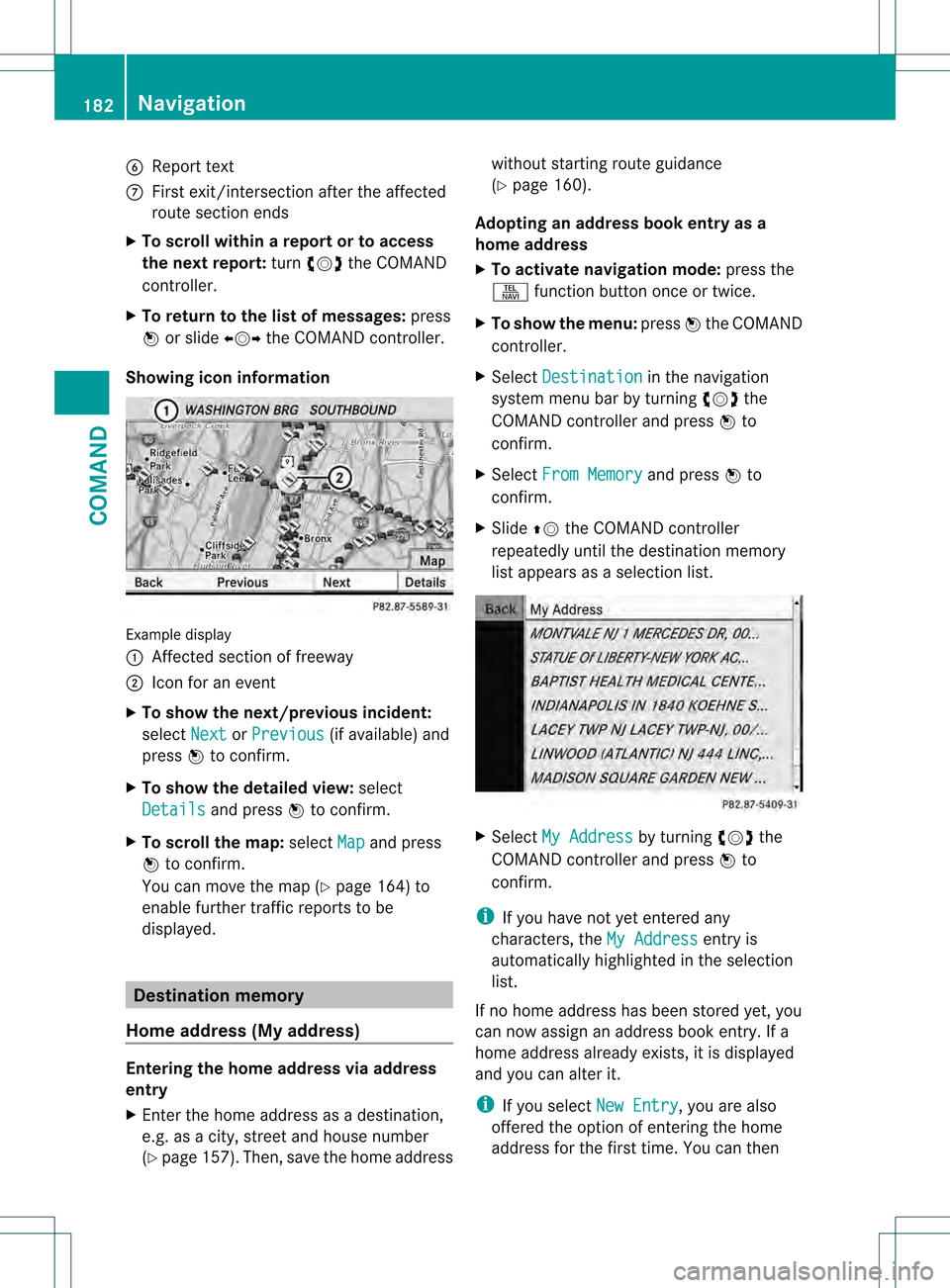
Showing icon information Example display
0002
Affected section of freeway
0003 Icon for an event
X To show the next/previous incident:
select Next or
Previous (if available) and
press 0021to confirm.
X To show the detailed view: select
Details and press
0021to confirm.
X To scroll the map: selectMap and press
0021 to confirm.
You can move the map (Y page 164) to
enable further traffic reports to be
displayed. Destination memory
Home address (My address) Entering the home address via address
entry
X Enter the home address as a destination,
e.g .as a city, street and house number
(Y page 157). Then, save the home address without starting route guidance
(Y
page 160).
Adopting an address book entry as a
home address
X To activate navigation mode: press the
0011 function button once or twice.
X To show the menu: press0021the COMAND
controller.
X Select Destination in the navigation
system menu bar by turning 0031001C0032the
COMAND controller and press 0021to
confirm.
X Select From Memory and press
0021to
confirm.
X Slide 002A001Cthe COMAND controller
repeatedly until the destination memory
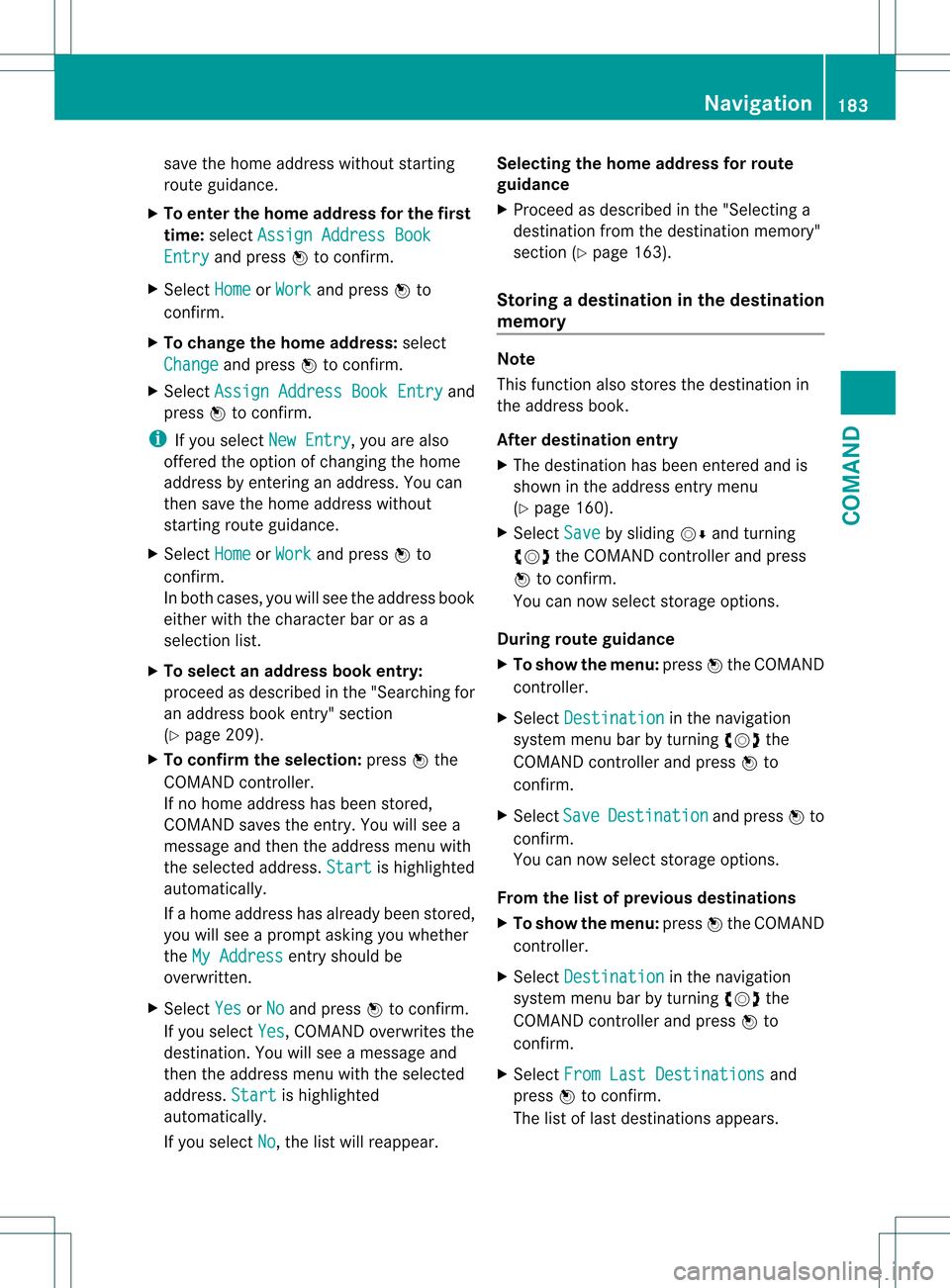
list appears as a selection list. X
Select My Address by turning
0031001C0032the
COMAND controller and press 0021to
confirm.
i If you have not yet entered any
characters, the My Address entry is
automatically highlighted in the selection
list.
If no home address has been stored yet, you
can now assign an address book entry. If a
home address already exists, it is displayed
and you can alter it.
i If you select New Entry , you are also
offered the option of entering the home
address for the first time. You can then 182
NavigationCOMAND
Page 185 of 542
save the home address without starting
route guidance.
X To enter the home address for the first
time: select Assign Address Book Entry and press
0021to confirm.
X Select Home or
Work and press
0021to
confirm.
X To change the home address: select
Change and press
0021to confirm.
X Select Assign Address Book Entry and
press 0021to confirm.
i If you select New Entry , you are also
offered the option of changing the home
address by entering an address. You can
then save the home address without
starting route guidance.
X Select Home or
Work and press
0021to
confirm.
In both cases, you will see the address book
either with the character bar or as a
selection list.
X To select an address book entry:
proceed as described in the "Searching for
an address book entry" section
(Y page 209).
X To confirm the selection: press0021the
COMAND controller.
If no home address has been stored,
COMAND saves the entry. You will see a
message and then the address menu with
the selected address. Start is highlighted
automatically.
If a home address has already been stored,
you will see a prompt asking you whether
the My Address entry should be
overwritten.
X Select Yes or
No and press
0021to confirm.
If you select Yes , COMAND overwrites the
destination. You will see a message and
then the address menu with the selected
address. Start is highlighted
automatically.
If you select No , the list will reappear.Selecting the home address for route
guidance
X
Proceed as described in the "Selecting a
destination from the destination memory"
section (Y page 163).
Storing adestination in the destination
memory Note
This function also stores the destination in
the address book.
After destination entry
X
The destination has been entered and is
shown in the address entry menu
(Y page 160).
X Select Save by sliding
001C0006and turning
0031001C0032 the COMAND controller and press
0021 to confirm.
You can now selec tstorage options.
During route guidance
X To show the menu: press0021the COMAND
controller.
X Select Destination in the navigation
syste mmenu bar by turning 0031001C0032the
COMAND controller and press 0021to
confirm.
X Select Save Destination and press
0021to
confirm.
You can now select storage options.
From the list of previous destinations
X To show the menu: press0021the COMAND
controller.
X Select Destination in the navigation
system menu bar by turning 0031001C0032the
COMAND controller and press 0021to
confirm.
X Select From Last Destinations and
press 0021to confirm.
The list of last destinations appears. Navigation
183COMAND Z
Page 195 of 542
Information about new versions of map
software can be obtained from an authorized
Mercedes-Benz Center.
You can have yourm ap software updated
there with a DVD, or you can update it
yourself.
Updating process G
WARNING
Never leave the engine running in enclosed
spaces. The exhaust gases contain toxic
carbon monoxide. Breathing in exhaust fumes
is a health hazard and can lead to
unconsciousness or death.
The update process can take a long time (over
an hour), depending on th esize of the digital
map. During this time, you will only be able to
switch on radio mode and to accept incoming
calls. The update will be completed more
quickly if the vehicle is stationary.
If the starter battery is not sufficiently
charged, COMAND may end the process
automatically. This protect sthe battery. If
this occurs, restart the update with the
engine running.
Displaying information on the map
version currently in use
X To activate navigation mode: press the
0011 function button once or twice.
X To show the menu: press0021the COMAND
controller.
X Select Navi in the main function bar by
sliding 001C0006and turning 0031001C0032the COMAND
controller and press 0021to confirm.
X Select Map version and press
0021to
confirm.
Notes on handling DVDs
R Only hold DVDs by the edge.
R Handle DVDs carefully to prevent reading
errors.
R Avoid getting scratches, fingerprints and
dust on DVDs. R
Use a commercially-available cleaning
cloth to clean discs. When cleaning CDs,
you should wipe in straight lines from the
center outwards rather than in a circular
motion.
R Place DVDs back in their cases after use.
R Protect DVDs from heat and direct sunlight.
Map software copy protection
Map software for COMAND is subject to a
charge. The map software has just one
activation code which is usable in one vehicle
only, and is not transferable. You can obtain
the six-digit activation code from an
authorized Mercedes-Ben zCenter. If you
have lost the activation code, contact an
authorized Mercedes-BenzC enter. If
COMAND does not accept the activation
code that you have received, also contact an
authorized Mercedes-BenzC enter.
Your vehicle is supplied with map software at
the factory. Depending on the country, map
software for your region is either pre-installed
or the map software is supplied as a DVD.Y ou
do not require an activation code for the map
software that is provided with your vehicle.
If the map software on your vehicle has been
installed at the factory and you wish to
reinstall it, this also does not necessitate
entry of the activation code.
Installation process
X Load the map software DVD in the DVD
drive (Y page 225).
COMAND checks the DVD and shows a
corresponding message in the display.
Map software is not compatible with the
navigation system
You will see a message that the map software
cannot be installed.
X To confirm the message: press0021.
COMAND ejects the DVD.
X Take the DVD out of the slot.
X Insert a DVD which is compatible with the
vehicle’s navigation system. Navigation
193COMAND Z
Page 230 of 542
Only in audio DVD mode
X To pause playback: switch on audio DVD
mode (Y page 226).
X Select 0007by sliding 001C0006and turning
0031001C0032 the COMAND controller and press
0021 to confirm.
The 0007 display changes to 000E.
X To continue playback: select000Eand
press 0021to confirm.
Playback continues from the point where it
was interrupted. The 000Edisplay changes
to 0007.
Stop function This function is only available in audio DVD
mode.
X
Switch on audio DVD mode (Y page 226).
X To interrupt playback: select0018by
sliding 001C0006and turning 0031001C0032the COMAND
controller and press 0021to confirm.
The 0007 display changes to 000E.0018
remains highlighted.
X To continue playback: select000Eand
press 0021to confirm.
Playback continues from the point where it
was interrupted.
X To stop playback: while playback is
interrupted, select 0018again and press
0021 to confirm.
or
X Select 0018and confirm by pressing 0021
twice in rapid succession.
000E is highlighted.
X To restart playback: select000Eand
press 0021to confirm.
Playback starts at the beginning of the
DVD. Selecting CD/audio DVD/MP3 discs Selecting via the media list
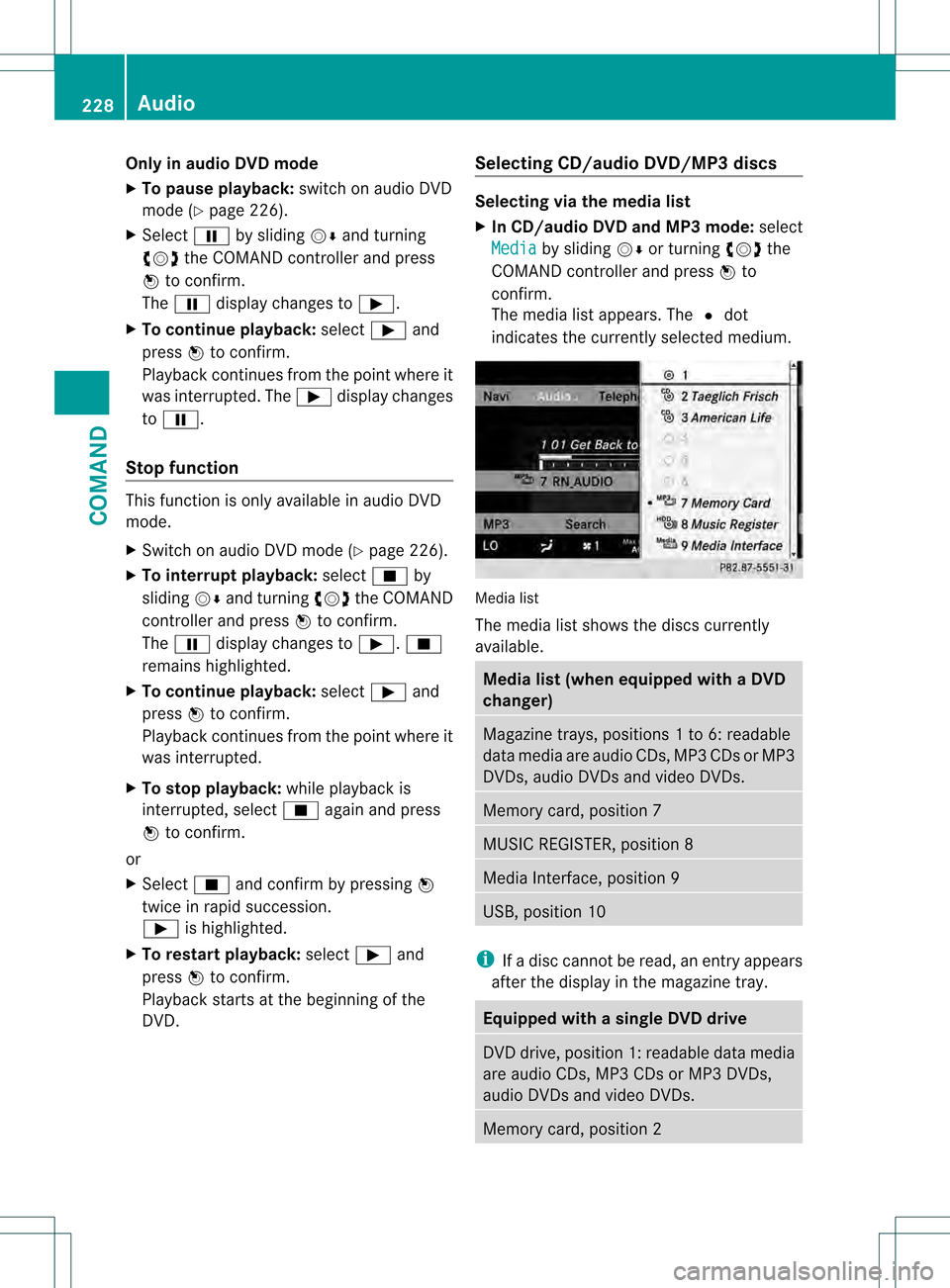
X
In CD/audio DVD and MP3 mode: select
Media by sliding
001C0006or turning 0031001C0032the
COMAND controller and press 0021to
confirm.
The media list appears. The 002Cdot
indicates the currently selected medium. Media list
The media list shows the discs currently
available.
Media list (when equipped with a DVD
changer)
Magazine trays, positions
1to 6: readable
data media are audio CDs, MP3 CDs or MP3
DVDs, audio DVDs and video DVDs. Memory card, position 7
MUSIC REGISTER, position 8
Media Interface, position 9
USB, position 10
i
If a disc cannot be read, an entry appears
after the display in the magazine tray. Equipped with a single DVD drive
DVD drive, position 1: readable data media
are audio CDs, MP3 CDs or MP3 DVDs,
audio DVDs and video DVDs.
Memory card, position 2228
AudioCOMAND
Page 237 of 542
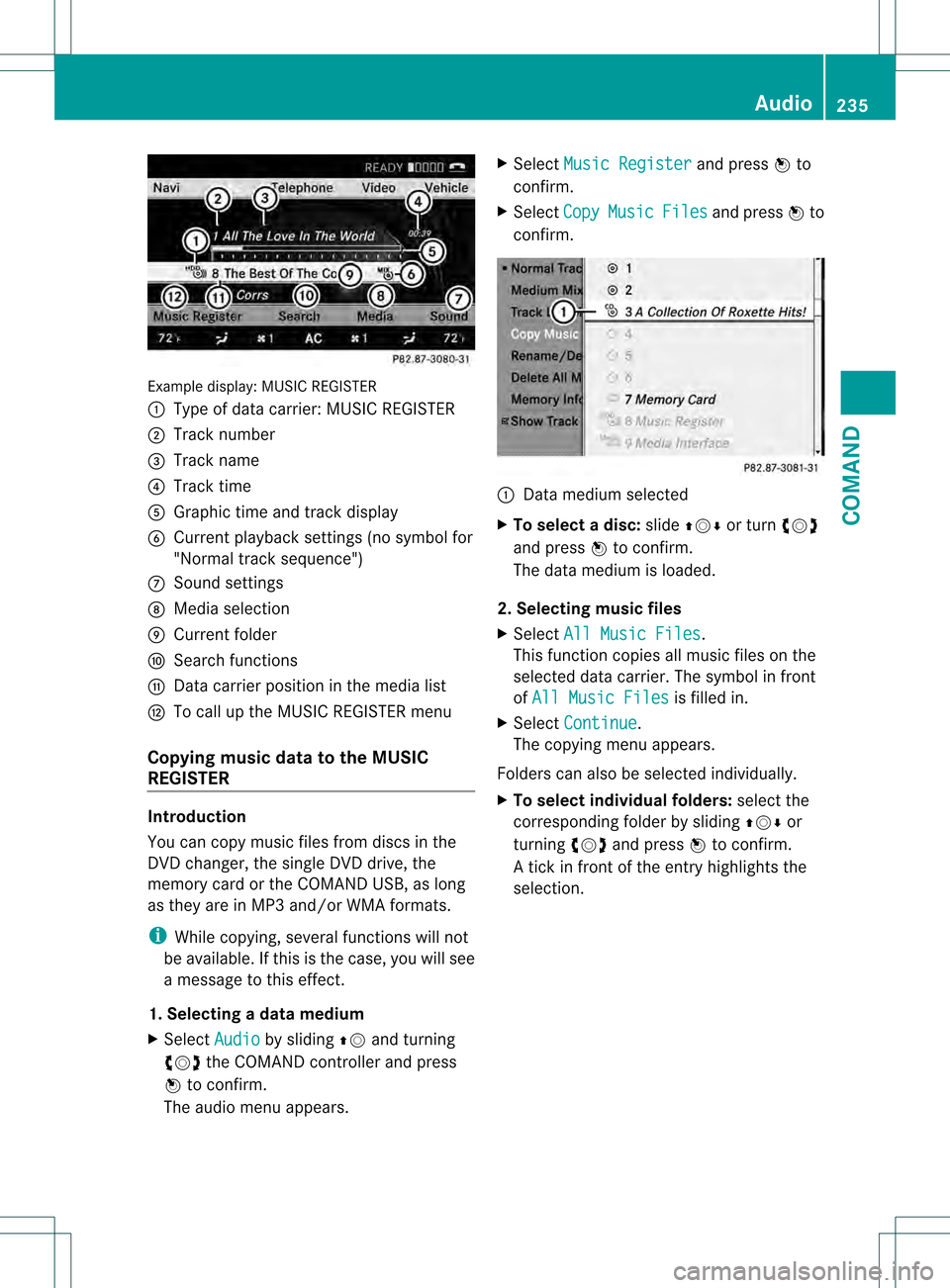
Example display
:MUSIC REGISTER
0002 Type of data carrier: MUSIC REGISTER
0003 Track number
0026 Track name
0025 Track time
0023 Graphict ime and track display
0024 Curren tplayback settings (no symbol for
"Normal track sequence")
0014 Sound settings
0015 Media selection
0016 Curren tfolder
0017 Search functions
0018 Data carrier position in the media list
001C To call up the MUSIC REGISTER menu
Copying music data to the MUSIC
REGISTER Introduction
You can copy music files from discs in the
DVD changer, the single DVD drive, the
memory card or the COMAND USB, as long
as they are in MP3 and/or WMA formats.
i While copying, several functions will not
be available. If this is the case, you will see
a message to this effect.
1. Selecting a data medium
X Select Audio by sliding
002A001Cand turning
0031001C0032 the COMAND controller and press
0021 to confirm.
The audio menu appears. X
Select Music Register and press
0021to
confirm.
X Select Copy Music Files and press
0021to
confirm. 0002
Data medium selected
X To select adisc: slide 002A001C0006 or turn 0031001C0032
and press 0021to confirm.
The data medium is loaded.
2. Selecting music files
X Select All Music Files .
This function copies all music files on the
selected data carrier. The symbol in front
of All Music Files is filled in.
X Select Continue .
The copying menu appears.
Folders can also be selected individually.
X To select individual folders: select the
corresponding folder by sliding 002A001C0006or
turning 0031001C0032and press 0021to confirm.
A tick in front of the entry highlights the
selection. Audio
235COMAND Z
Page 238 of 542
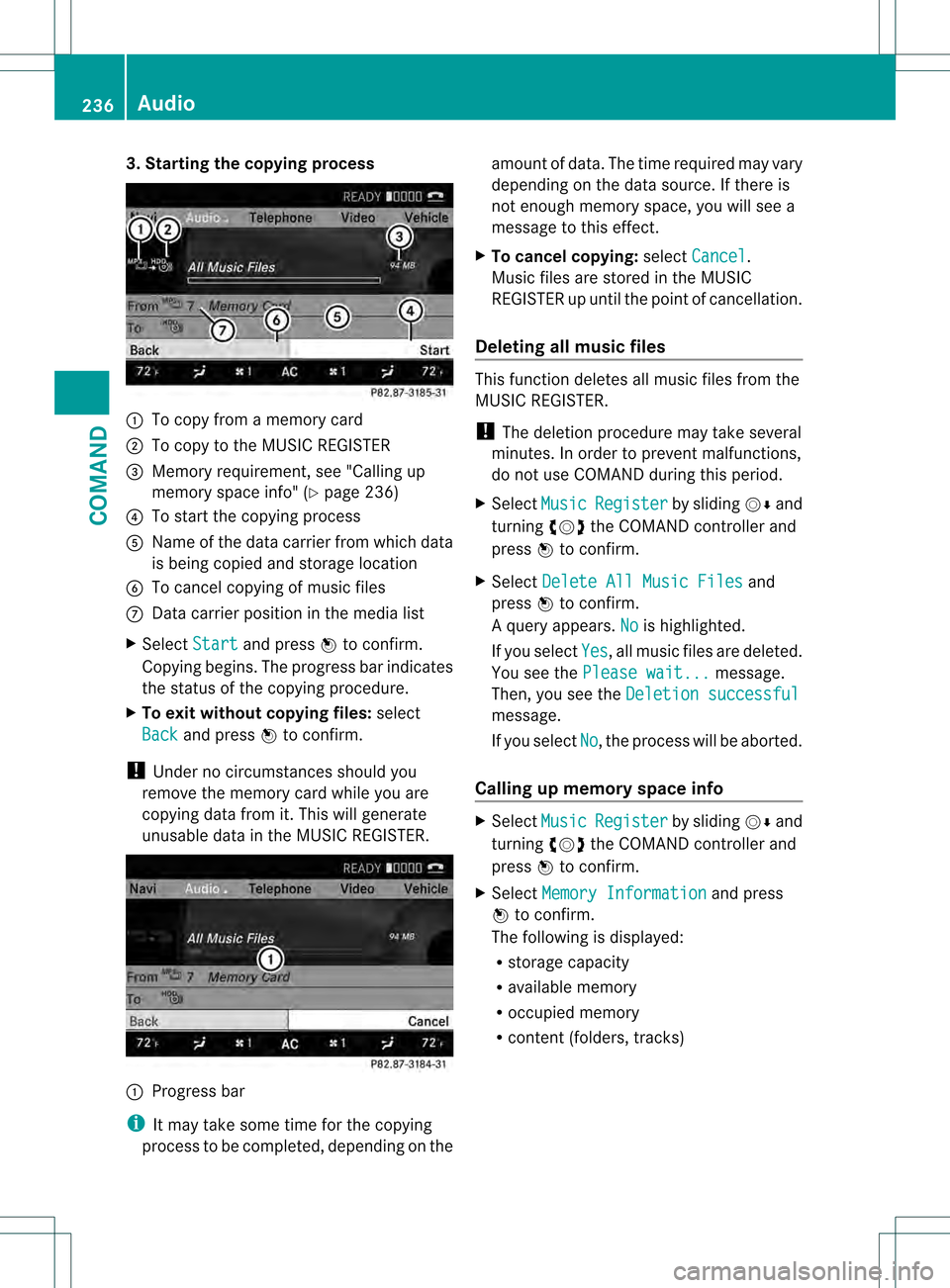
3. Starting the copying process
0002
To copy from a memory card
0003 To copy to the MUSIC REGISTER
0026 Memory requirement, see "Calling up
memory space info" (Y page 236)
0025 To start the copying process
0023 Name of the data carrier from which data
is being copied and storage location
0024 To cancel copying of music files
0014 Data carrier position in the media list
X Select Start and press
0021to confirm.
Copying begins. The progress bar indicates
the status of the copying procedure.
X To exit without copying files: select
Back and press
0021to confirm.
! Under no circumstances should you
remove the memory card while you are
copying data from it. This will generate
unusable data in the MUSIC REGISTER. 0002
Progress bar
i It may take some time for the copying
process to be completed, depending on the amount of data. The time required may vary
depending on the data source. If there is
not enough memory space, you will see a
message to this effect.
X To cancel copying: selectCancel .
Music files are stored in the MUSIC
REGISTER up until the point of cancellation.
Deleting all music files This function deletes all music files from the
MUSIC REGISTER.
!
The deletion procedure may take several
minutes. In order to prevent malfunctions,
do not use COMAND during this period.
X Select Music Register by sliding
001C0006and
turning 0031001C0032the COMAND controller and
press 0021to confirm.
X Select Delete All Music Files and
press 0021to confirm.
Aq uery appears. No is highlighted.
If you select Yes , all musi
cfiles are deleted.
You see the Please wait... message.
Then, you see the Deletion successful message.
If you select
No , the process will be aborted.
Calling up memory space info X
Select Music Register by sliding
001C0006and
turning 0031001C0032the COMAND controller and
press 0021to confirm.
X Select Memory Information and press
0021 to confirm.
The following is displayed:
R storage capacity
R available memory
R occupied memory
R content (folders, tracks) 236
AudioCOMAND
Page 239 of 542
Folde
rfunctions Introduction
You can view the content of the MUSIC
REGISTER, change folder or track names and
delete individual folders or tracks.
Calling up afolder
X Select Search by sliding
001C0006and turning
0031001C0032 the COMAND controller and press
0021 to confirm.
X Select Folder and press
0021to confirm.
You see the contents of the curren tfolder.
X To switch to the superordinate folder:
select the 0013icon and press 0021to
confirm.
The display changes to the next folder up.
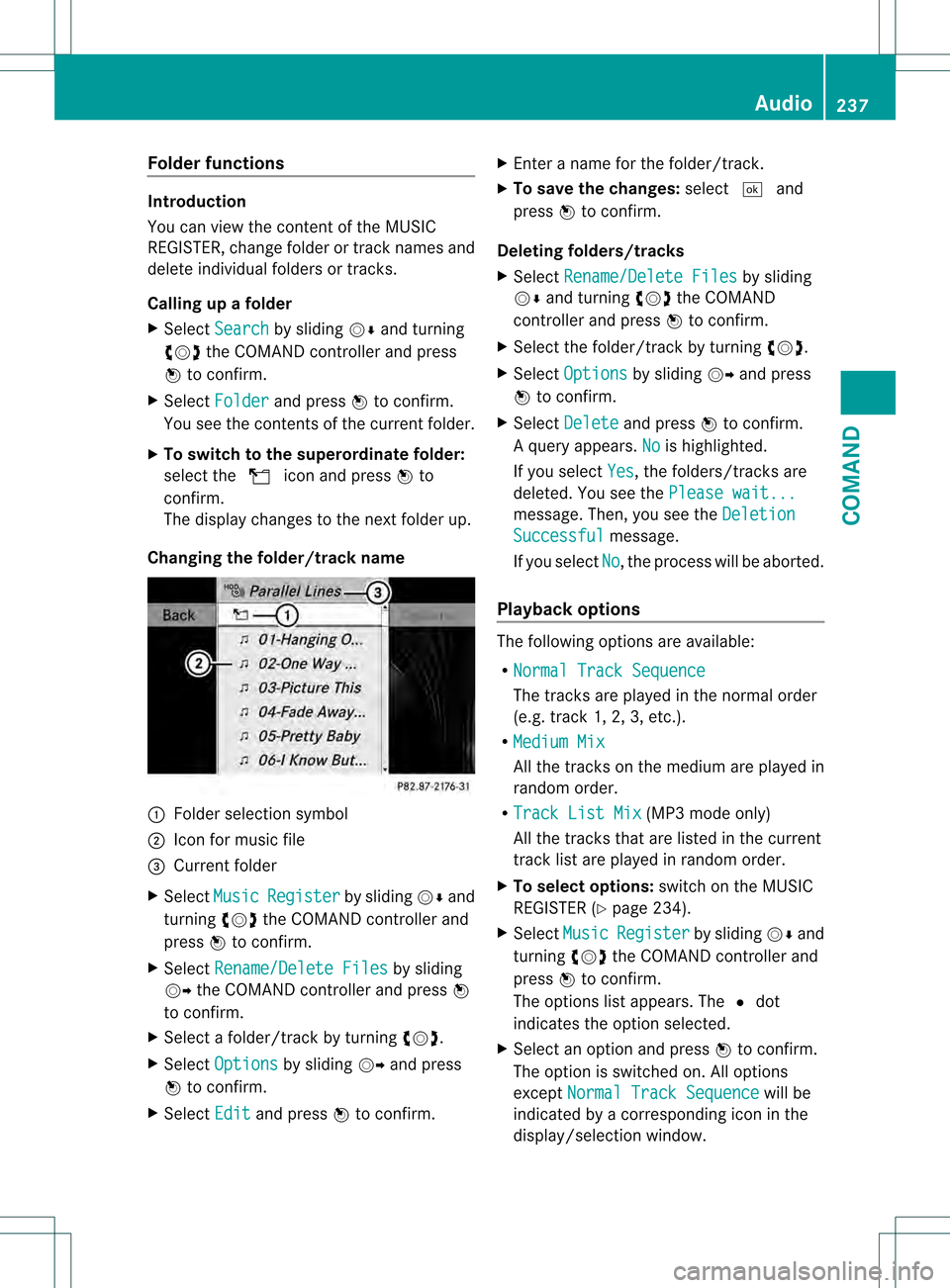
Changing the folder/track name 0002
Folder selection symbol
0003 Icon for music file
0026 Current folder
X Select Music Register by sliding
001C0006and
turning 0031001C0032the COMAND controller and
press 0021to confirm.
X Select Rename/Delete Files by sliding
001C003D the COMAND controller and press 0021
to confirm.
X Select a folder/track by turning 0031001C0032.
X Select Options by sliding
001C003Dand press
0021 to confirm.
X Select Edit and press
0021to confirm. X
Enter a name for the folder/track.
X To save the changes: select0003and
press 0021to confirm.
Deleting folders/tracks
X Select Rename/Delete Files by sliding
001C0006 and turning 0031001C0032the COMAND
controller and press 0021to confirm.
X Select the folder/track by turning 0031001C0032.
X Select Options by sliding
001C003Dand press
0021 to confirm.
X Select Delete and press
0021to confirm.
Aq uery appears. No is highlighted.
If you select Yes , the folders/tracks are
deleted. You see the Please wait... message
.Then, you see the Deletion Successful message.
If you select No , the process will be aborted.
Playback options The following options are available:
R
Normal Track Sequence The tracks are played in the normal order
(e.g. track 1, 2, 3, etc.).
R Medium Mix All the tracks on the medium are played in
random order.
R Track List Mix (MP3 mode only)
All the tracks that are listed in the current
track list are played in random order.
X To selecto ptions:switch on the MUSIC
REGISTER (Y page 234).
X Select Music Register by sliding
001C0006and
turning 0031001C0032the COMAND controller and
press 0021to confirm.
The options list appears. The 002Cdot
indicates the option selected.
X Select an option and press 0021to confirm.
The option is switched on. All options
except Normal Track Sequence will be
indicated by a corresponding ico ninthe
display/selection window. Audio
237COMAND Z
Page 240 of 542
i
The Normal Track Sequence option is
automatically selected when you change
the disc you are currently listening to or
when you select a different medium. If an
option is selected, it remains selected after
COMAND is switched on or off. Media Interface mode
Connection options Overview
You will find the connection sockets in the
glove box.
Device-specific adapter cables are required
to connect external devices to the Media
Interface. These cables are included in the
Media Interface scope of delivery.
i Store individual parts in asafe place.
Only use genuine Mercedes-Benz
connection cables.
You can connect the following data carriers
to COMAND via the Media Interface:
R iPod ®
R USB devices (USB sticks, USB hard drives,
MP3 players)
i iPod ®
is a registered trademar kofApple
Inc., Cupertino, California, USA.
Supported iPod ®
variants
The following are examples of supported
iPod ®
variants:
R iPod ®
nano
R iPod ®
classic
R iPod ®
touch
R iPhone ®
Supported USB devices
The following USB devices are supported:
R USB sticks (flash memory)
R USB hard drives requiring a startup/
permanent current of a maximum of 800 mA (it may be necessary to connect a
separate power supply)
R certain MP3 players
i The Media Interface supports USB
storage media of "USB Device Subclass 6".
Information concerning USB Device
Subclass 6is available from the equipment
manufacturer.
For details and a list of supported devices,
visit http://www.mbusa-mobile.com. Or
call the Mercedes-Benz Customer Assistance
Center at
1-800-FOR-MERCedes(1-800-367-6372) (for
the USA) or Customer Relations at
1-800-387-0100 (for Canada).
Connecting an external device i
Do not leave external devices in the
vehicle as extreme temperatures (e.g.
direct sunlight or extremely low outside
temperatures) could cause them to
malfunction (see the operating instructions
for the respective device). Mercedes-Benz
USA, LLC accepts no liability for damage to
external devices.
Never connect more than one device at a
time. You will otherwise not be able to
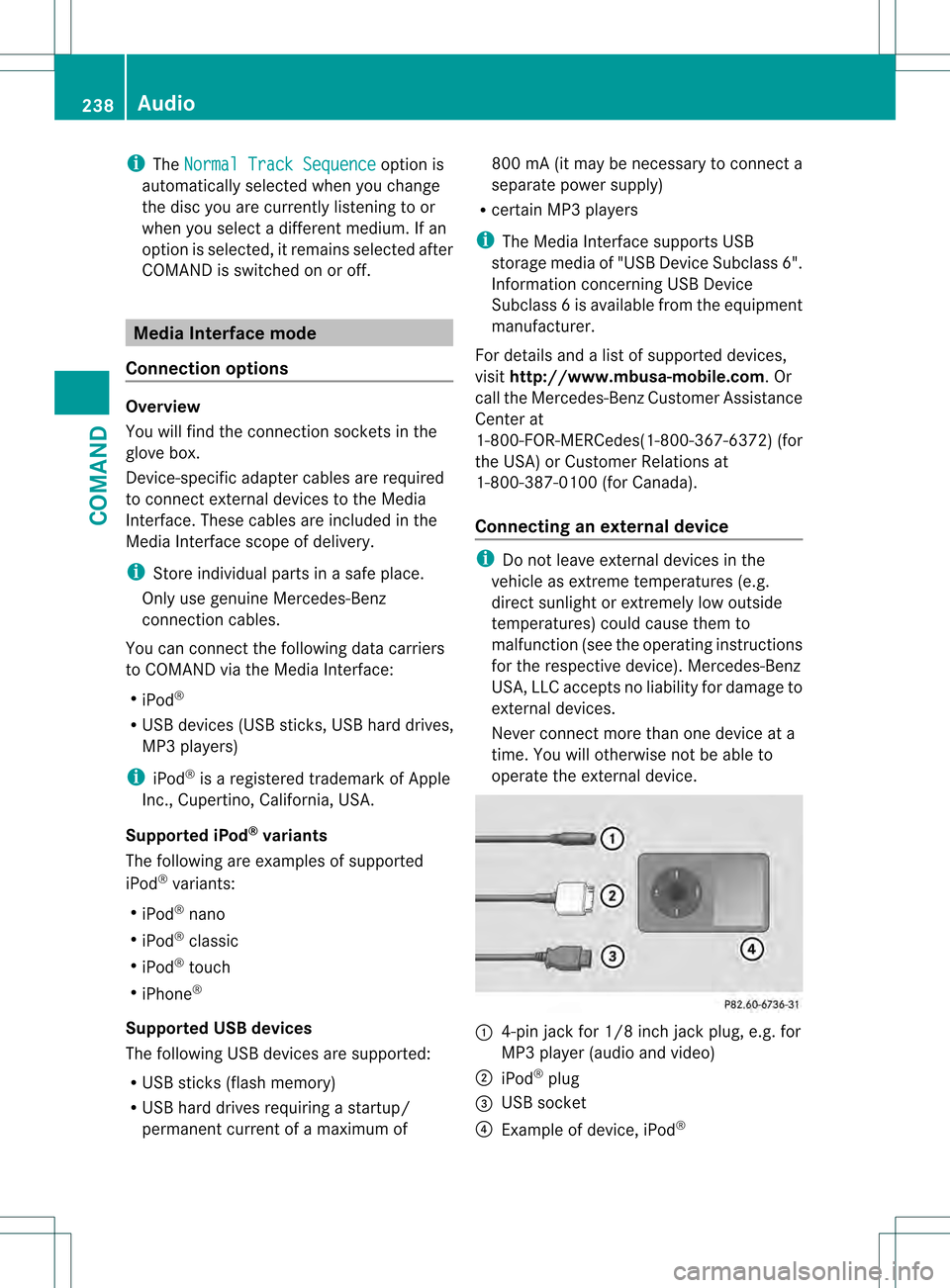
operate the external device. 0002
4-pin jack for 1/8 inch jack plug, e.g. for
MP3 player (audio and video)
0003 iPod ®
plug
0026 USB socket
0025 Example of device, iPod ®238
AudioCOMAND
Page 244 of 542
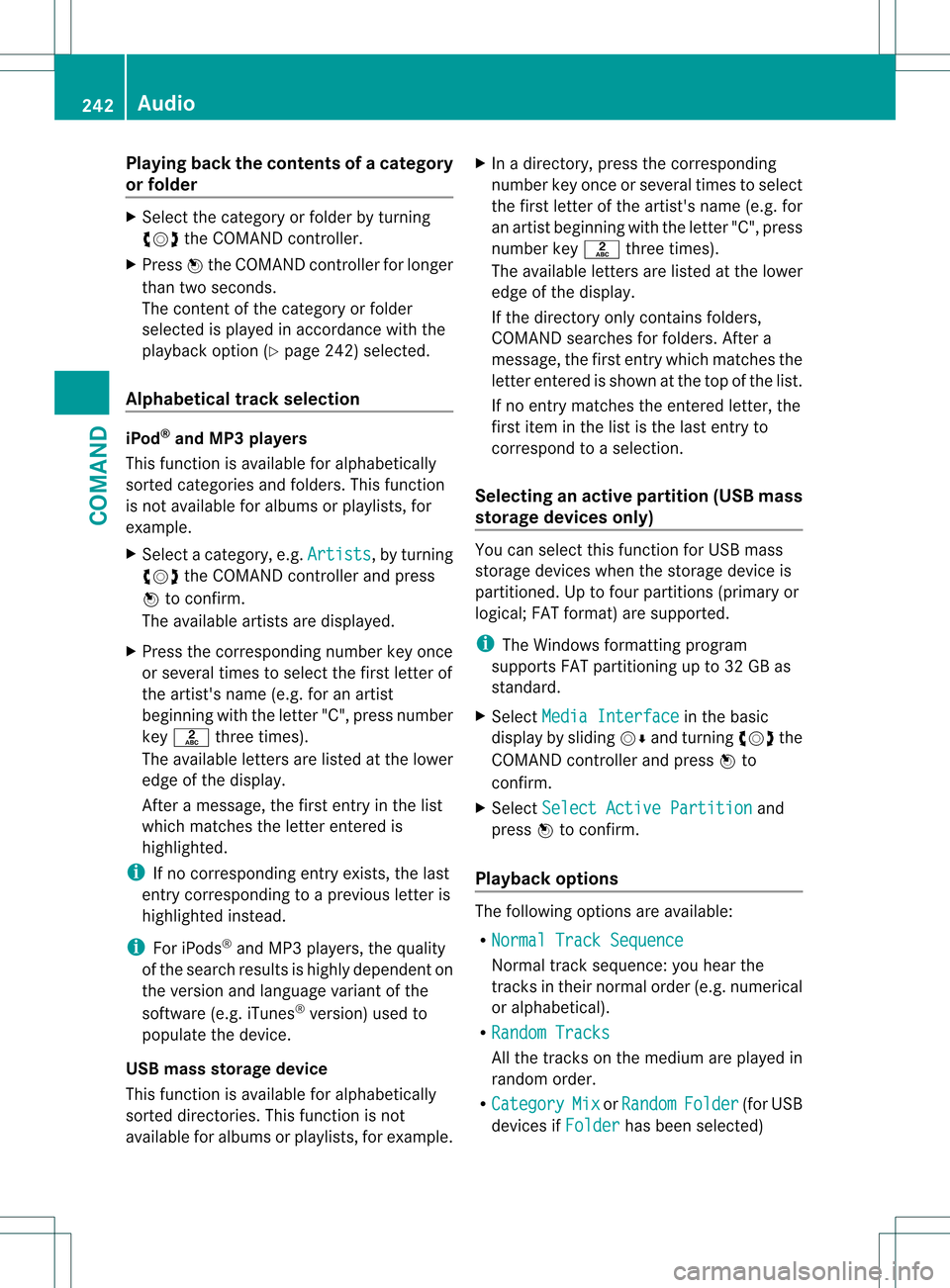
Playing back the contents of
acategory
or folder X
Select the category or folder by turning
0031001C0032 the COMAND controller.
X Press 0021the COMAND controller for longer
than two seconds.
The content of the category or folder
selected is played in accordance with the
playback optio n(Ypage 242) selected.
Alphabetical track selection iPod
®
and MP3 players
This function is available for alphabetically
sorted categories and folders. This function
is not available for albums or playlists, for
example.
X Select a category, e.g. Artists , by turning
0031001C0032 the COMAND controller and press
0021 to confirm.
The available artists are displayed.
X Press the corresponding number key once
or several times to select the first letter of
the artist's name (e.g. for an artist
beginning with the letter "C", press number
key 0034 three times).
The available letters are listed at the lower
edge of the display.
After a message, the first entry in the list
which matches the letter entered is
highlighted.
i If no corresponding entry exists, the last
entry corresponding to aprevious letter is
highlighted instead.
i For iPods ®
and MP3 players, the quality
of the search results is highly dependent on
the versio nand language variant of the
software (e.g. iTunes ®
version) used to
populate the device.
US Bm ass storage device
This function is available for alphabetically
sorted directories .This function is not
available for albums or playlists, for example. X
In a directory, press the corresponding
number key once or several times to select
the first letter of the artist's name (e.g. for
an artist beginning with the letter "C", press
number key 0034three times).
The available letters are listed at the lower
edge of the display.
If the directory only contains folders,
COMAND searches for folders. After a
message, the first entryw hich matches the
letter entered is shown at the top of the list.
If no entry matches the entered letter, the
first item in the list is the last entry to
correspond to a selection.
Selecting an active partition (USB mass
storage devices only) You can select this function for USB mass
storage devices when the storage device is
partitioned. Up to four partitions (primary or
logical; FAT format) are supported.
i
The Windows formatting program
supports FAT partitioning up to 32 GB as
standard.
X Select Media Interface in the basic
display by sliding 001C0006and turning 0031001C0032the
COMAND controller and press 0021to
confirm.
X Select Select Active Partition and
press 0021to confirm.
Playback options The following options are available:
R
Normal Track Sequence Normal track sequence: you hear the
tracks in their normal order (e.g. numerical
or alphabetical).
R Random Tracks All the tracks on the medium are played in
random order.
R Category Mix or
Random Folder (for USB
devices if Folder has been selected)242
AudioCOMAND
Page 252 of 542
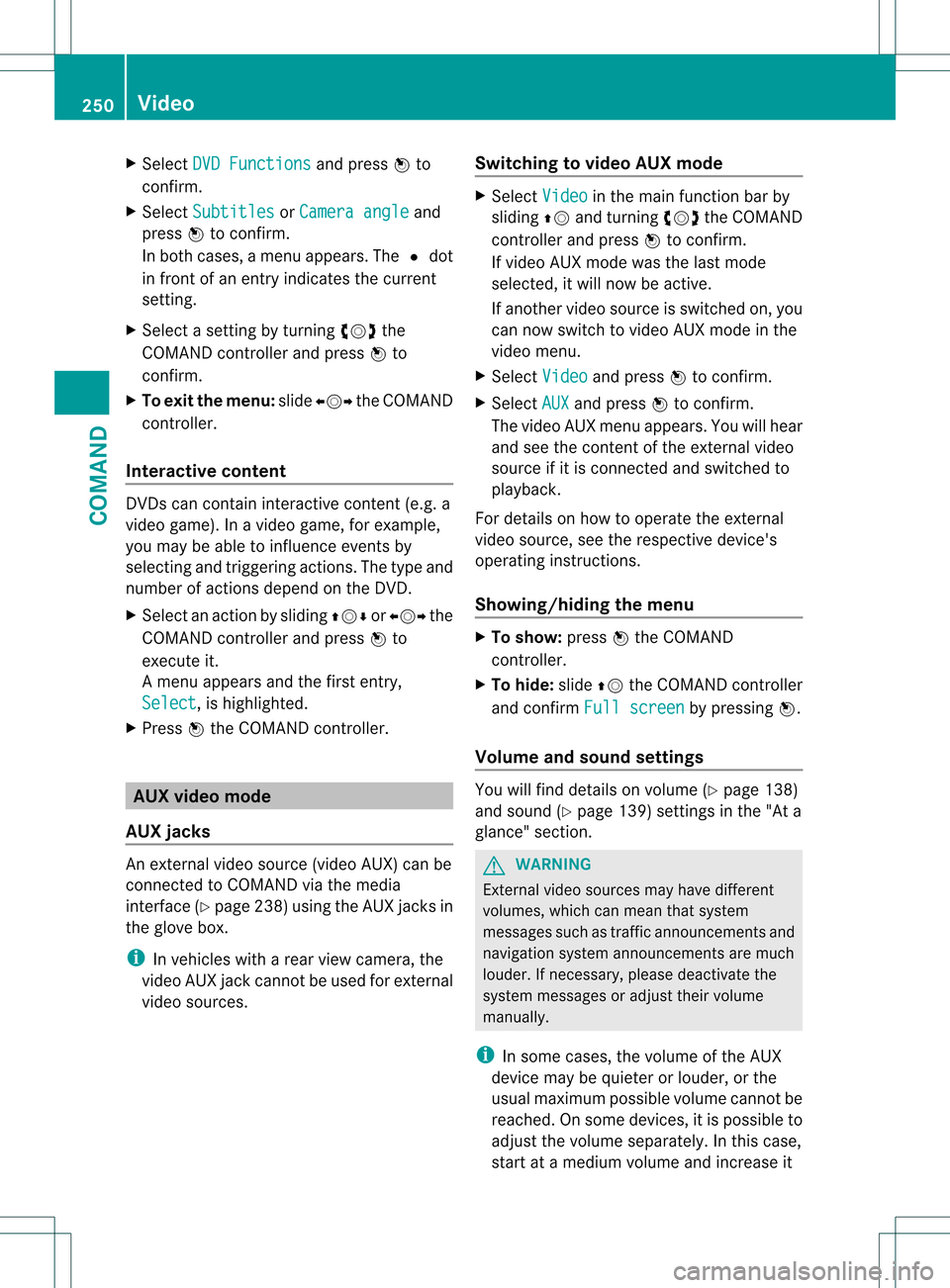
X
Select DVD Functions and press
0021to
confirm.
X Select Subtitles or
Camera angle and
press 0021to confirm.
In both cases, a menu appears .The 002C dot
in front of an entry indicates the current
setting.
X Select a setting by turning 0031001C0032the
COMAND controller and press 0021to
confirm.
X To exit the menu: slide003C001C003D the COMAND
controller.
Interactive content DVDs can contain interactive content (e.g. a
video game). In a video game, for example,
you may be able to influence events by
selecting and triggering actions. The type and
number of actions depend on the DVD.
X
Select an action by sliding 002A001C0006or003C001C003D the
COMAND controller and press 0021to
execute it.
A menu appears and the first entry,
Select , is highlighted.
X Press 0021the COMAND controller. AUX video mode
AUX jacks An external video source (video AUX) can be
connected to COMAND via the media
interface( Ypage 238 )using the AUX jacks in
the glove box.
i In vehicles with a rear view camera, the
video AUX jack cannot be used for external
video sources. Switching to video AUX mode X
Select Video in the main function bar by
sliding 002A001Cand turning 0031001C0032the COMAND
controller and press 0021to confirm.
If video AUX mode was the last mode
selected, it will now be active.
If another video source is switched on, you
can now switch to video AUX mode in the
video menu.
X Select Video and press
0021to confirm.
X Select AUX and press
0021to confirm.
The video AUX menu appears. You will hear
and see the content of the external video
source if it is connected and switched to
playback.
For details on how to operate the external
video source, see the respective device's
operating instructions.
Showing/hiding the menu X
To show: press0021the COMAND
controller.
X To hide: slide002A001Cthe COMAND controller
and confirm Full screen by pressing
0021.
Volume and sound settings You will find details on volume (Y
page 138)
and sound (Y page 139) settings in the "At a
glance" section. G
WARNING
External video sources may have different
volumes, which can mean that system
messages such as traffic announcements and
navigation system announcements are much
louder. If necessary, please deactivate the
system messages or adjust their volume
manually.
i In some cases, the volume of the AUX
device may be quieter or louder, or the
usual maximum possible volume cannot be
reached. On some devices, it is possible to
adjust the volume separately.Int his case,
start at a medium volume and increase it 250
VideoCOMAND