start stop button MERCEDES-BENZ S-Class 2013 W221 Owner's Manual
[x] Cancel search | Manufacturer: MERCEDES-BENZ, Model Year: 2013, Model line: S-Class, Model: MERCEDES-BENZ S-Class 2013 W221Pages: 542, PDF Size: 7.97 MB
Page 7 of 542
Alarm system
see ATA (Anti-Theft Alarm system)
Alertness Assistant
see ATTENTION ASSIST
Alternative route ............................... 175
Ambient light setting (COMAND) .....268
AMG menu (on-board computer) .....381
Anticipatory occupant protection
see PRE-SAFE ®
(anticipatory
occupant protection)
Anti-loc kBraking System
see ABS (Anti-lock Braking System)
Anti-Theft Alarm system
see ATA (Anti-Theft Alarm system)
Ashtray ............................................... 446
Assistance menu (on-board
computer) .......................................... 385
ATA (Anti-Theft Alarm system) Activating/deactivating ...................79
Function .......................................... .79
Switching off the alarm ....................79
ATTENTIO NASSIST
Activating/deactivating .................386
Display message ............................ 412
Function/notes ............................. 359
Audio
Radio mode ................................... 215
Audio database
see MUSIC REGISTER
Audio DVD
Mode ,switchin gto........................ 226
Pause function ............................... 227
Playback options ........................... 232
Safety notes .................................. 225
Setting the audio forma t................ 232
Stop function ................................. 228
Audio format, setting
Audi oDVD ..................................... 232
Rear Seat Entertainment System ...262
Video DVD ..................................... 249
Audio menu (on-board computer) ....380
Authorized Mercedes-Benz Center see Qualified specialist workshop
Authorized workshop
see Qualified specialist workshop AUTO lights
Display message ............................ 408
see Lights
Automatic engine start (ECO start/
stop function) .................................... 311
Automatic engine switch-off (ECO
start/stop function) ..........................311
Automatic headlamp mode ..............281
Automatic transmission Automatic drive program ...............318
Changing gea r............................... 317
DIRECT SELECT leve r..................... 314
Display message ............................ 422
Drive position (ECO start/stop
function) ........................................ 315
Driving tips .................................... 317
Emergency running mode ..............321
Engaging drive position .................. 316
Engaging neutra l............................ 315
Engaging revers egear ................... 314
Engaging the par kposition ............ 314
Kickdow n....................................... 317
Manual drive program ....................319
Neutral (ECO start/stop function) .315
Problem (malfunction) ...................321
Progra mselector button ................317
Pulling away ................................... 309
Shift range s................................... 318
Starting the engine ........................309
Steering wheel paddle shifters ......318
Transmission position displa y........ 316
Transmissio npositions .................. 316
Automatic transmission
emergency mode ............................... 321
Autostore ........................................... 217
see Station memory (radio)
AUX (audio)
Notes/socket ................................ 243
Switching to ................................... 244
AUX (video)
Setting the picture .........................244
Setting the volume and sound .......250
Showing/hiding the menu .............250
Switching to ................................... 250 Index
5
Page 16 of 542
Manual control ...............................2
86
Overview ........................................ 285
Reading lamp ................................. 285
Intermediate stop
Deleting ......................................... 166
Entering ......................................... 165
iPod ®
Alphabetical track selection ..........242
Connecting to the Media
Interface ........................................ 238
Selecting a category/playlis t......... 241
Supported variants ........................238 J
Jack Storage location ............................ 478
Using ............................................. 480
Jump starting (engine) ......................488 K
Key see SmartKey
KEYLESS-GO
Convenience closing feature ............97
Locking ............................................ 83
Start/Stop button .......................... 307
Starting the engine ........................309
Unlocking ......................................... 83
Keyp ositions
KEYLESS-GO .................................. 307
SmartKey ....................................... 307
Kickdown
Driving tips .................................... 317
Manual drive program ....................320 L
Lamps see Warning and indicator lamps
Lane-change assistant
see Blind Spot Assist
Lane detection (automatic)
see Lane Keeping Assist
Lane Keeping Assist
Activating/deactivating .................387
Display message ............................ 415
Function/informatio n.................... 365Lap time (RACETIMER)
......................382
LATCH-type (ISOFIX) child seat
anchors ................................................ 68
Letter bar see Character bar
License plate lamp (display
message) ............................................ 406
Light function ,active
Display message ............................ 407
Lighting
see Lights
Lights
Automatic headlamp mode ............281
Cornering light function .................284
Display message ............................ 405
Driving abroad ............................... 280
Fog lamps ...................................... 282
Hazard warning lamps ...................283
High beam flasher .......................... 283
High-beam headlamps ...................283
Ligh tswitc h................................... 280
Low-beam headlamps ....................281
Rea rfog lamp ................................ 282
Standing lamps .............................. 280
Switching Adaptive Highbeam
Assist on/off ................................. 388
Switching the daytime running
lamps on/off (on-board
computer) ...................................... 387
Switching the daytime running
lamps on/off (switch) ....................281
Turn signals ................................... 283
see Changing bulbs
see Interior lighting
Light sensor (display message) .......408
Loading guidelines ............................438
Locator lighting setting (COMAND) .268
Locking see Centra llocking
Locking (doors)
Automatic ........................................ 89
Emergency locking ........................... 91
From inside (central locking
button) ............................................. 89
Locking centrally
see Centra llocking
Locking verification signal (on-
board computer) ............................... 38814
Index
Page 24 of 542
Sound settings
Balance and fader ..........................139
Calling up the sound menu ............139
Rear Seat Entertainment System ...253
Surround sound ............................. 140
Treble and bas s............................. 139
Spare wheel
Notes/data .................................... 524
Storage location ............................ 478
see Emergency spare wheel
Specialist workshop ............................ 31
Speech control see Voice Control System
Speed, controlling
see Cruise control
Speedometer
Activating/deactivating the
additional speedometer .................388
Digita l............................................ 378
In the Instrument cluster .................37
Selecting the unit of
measurement ................................ 388
see Instrument cluster
SPLITVIEW ......................................... 126
SRS (Supplemental Restraint
System)
Display message ............................ 400
Introduction ..................................... 48
Warning lamp ................................. 433
Warning lamp (function) ................... 48
Standing lamps
Display message ............................ 407
Switching on/off ........................... 280
Starting (engine) ................................ 308
Station memory ................................. 217
Steering (display message) ..............424
Steering wheel Adjusting (electrically). ..................114
Button overview ............................... 39
Buttons (on-board
computer) ...................................... 375
Cleaning ......................................... 476
Important safety notes ..................114
Paddle shifters ............................... 318
Steering wheel heating ..................114
Storing settings (memory
function) ........................................ 118Steering wheel heating
Switching on/off ........................... 114
Steering wheel paddle shifters ........318
Stop function Audi oDVD ..................................... 228
Rear Seat Entertainment System ...260
Video DVD ..................................... 247
Stopwatch (RACETIMER) ................... 382
Storing stations Manually ........................................ 217
Storing stations (radio)
Automatically ................................. 217
Stowage areas ................................... 438
Stowage compartments Armrest (under) ............................. 439
Cuph olders ................................... 443
Door ............................................... 439
Eyeglasses compartment ...............439
Glove box ...................................... .438
Important safety information .........438
Parce lnet ...................................... 441
Rea r............................................... 440
Rear seat backrest ......................... 440
Rea rseats (between) .....................440
Stowage well ..................................... 442
Stowage well beneath the trunk
floor .................................................... 442
Summer opening see Convenience opening feature
Summer tires ..................................... 500
Sun visor ............................................ 444
Supplemental Restraint System see SRS (Supplemental Restraint
System)
Surround sound
see 3D sound (Harman Kardon ®
surround sound system)
Surround sound (harman/
kardon ®
surround sound system)
Notes ............................................. 140
Switching on/off ........................... 140
Suspension tuning
Active Body Control .......................349
AIRMATIC ...................................... 348
Switching air-recirculation mode
on/off ................................................. 30122
Index
Page 38 of 542
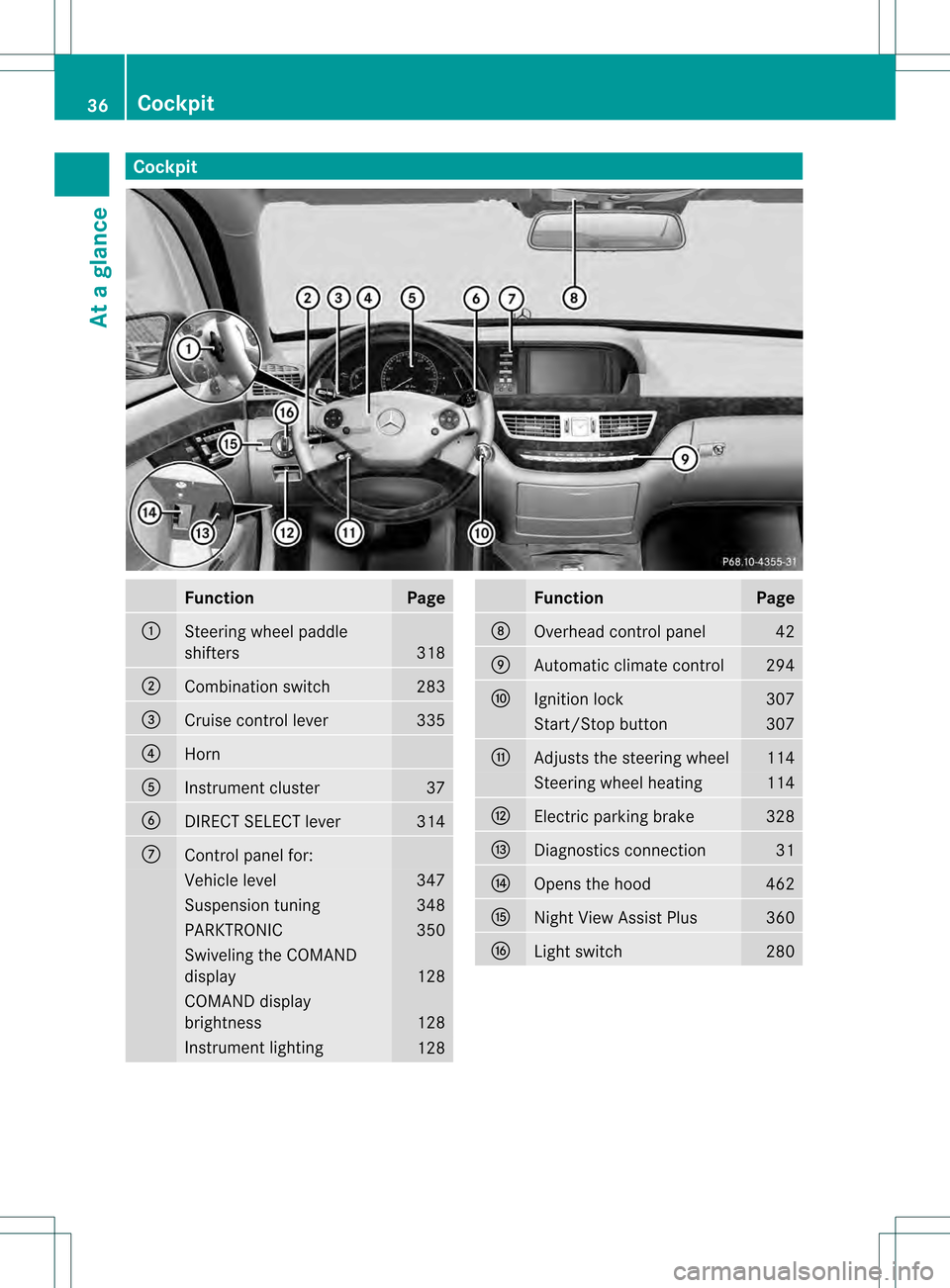
Cockpit
Function Page
0002
Steering wheel paddle
shifters
318
0003
Combination switch 283
0026
Cruise control lever 335
0025
Horn
0023
Instrument cluster 37
0024
DIRECT SELECT lever 314
0014
Control panel for:
Vehicle level 347
Suspension tuning 348
PARKTRONIC 350
Swiveling the COMAND
display
128
COMAND display
brightness
128
Instrument lighting
128 Function Page
0015
Overhead control panel 42
0016
Automatic climate control 294
0017
Ignition lock 307
Start/Stop button 307
0018
Adjusts the steering wheel 114
Steering wheel heating 114
001C
Electric parking brake 328
001D
Diagnostics connection 31
001E
Opens the hood 462
001F
Nigh
tView Assist Plus 360
0021
Light switch 28036
CockpitAt a glance
Page 59 of 542

In order to ensure proper operation of the air
bag system and OCS:
R Sit with the seat belt properly fastened in a
positio nthat is as upright as possible with
your back against the seat backrest.
R When seated, a passenger should not
position him/herself in such a way as to
cause the passenger's weight to be lifted
from the seat cushion as this may result in
the OCS being unable to correctly
approximate the passenger's weight
category.
R Read and observe all warnings in this
chapter.
System self-test The
00170016 indicator lamp
illuminates when you:
R turn the SmartKey to position 1or 2in the
ignition lock
R press the KEYLESS-GO Start/Stop button
once or twice
If an adulto ccupant is sitting properly on the
front-passenger sea tand the OC Sclassifies
the occupant as an adult, the
00170016 indicator lamp will illuminate
and go out again after approximately six
seconds.
If the seat is not occupied and the OCS
classifies the front passenger seat as being
unoccupied, the 00170016indicator
lamp will illuminate and not go out. G
WARNING
If the 00170016indicator lamp does
not illuminate, the system is not functioning.
You must contac tanauthorized Mercedes-
Benz Center before seating any child on the
fron tpassenger seat.
For more information, see "Problems with the
Occupan tClassification System"
(Y page 58). G
WARNING
Neve rplace anything betwee nseat cushion
and child seat (e.g. a pillow), since it reduces
the effectiveness of the OCS. The underside
and rear side child restraint system must be
placed entirely on the seat cushion and the
backrest of the front-passenger seat
backrest.
If necessary, adjust the tilt of the passenger
seat backrest.
An incorrectly mounted child seat could cause
injuries to the child in case of an accident,
instead of increasing protection for the child.
Follow the manufacturer's instructions for
installation of child restraint systems. Occupant safety
57Safety Z
Page 74 of 542
X
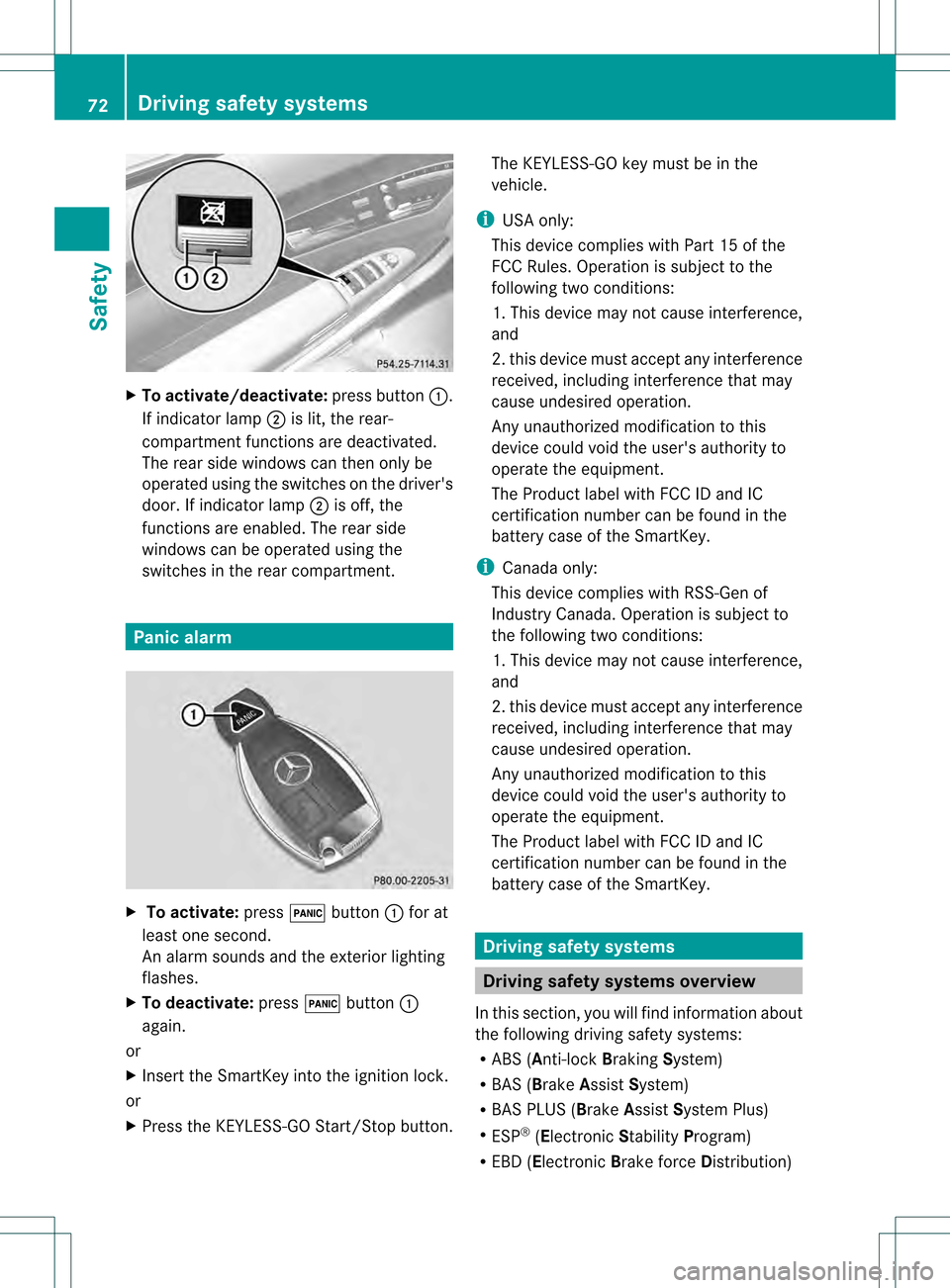
To activate/deactivate: press button0002.
If indicator lamp 0003is lit, the rear-
compartment functions ar edeactivated.
The rear side windows can then only be
operated using the switches on the driver's
door. If indicator lamp 0003is off, the
functions are enabled. The rear side
windows can be operated using the
switches in the rear compartment. Panic alarm
X
To activate: press000Cbutton 0002for at
least one second.
An alarm sounds and the exterior lighting
flashes.
X To deactivate: press000Cbutton 0002
again.
or
X Insert the SmartKey into the ignition lock.
or
X Press the KEYLESS-GO Start/Stop button. The KEYLESS-GO key must be in the
vehicle.
i USA only:
This device complies with Part 15 of the
FCC Rules. Operation is subject to the
following two conditions:
1. This device may not cause interference,
and
2. this device must accept any interference
received, including interference that may
cause undesired operation.
Any unauthorized modification to this
device could void the user's authority to
operate the equipment.
The Product label with FCC ID and IC
certification number can be found in the
battery case of the SmartKey.
i Canada only:
This device complies with RSS-Gen of
Industry Canada. Operation is subject to
the following two conditions:
1. This device may not cause interference,
and
2. this device must accept any interference
received, including interference that may
cause undesired operation.
Any unauthorized modification to this
device could void the user's authority to
operate the equipment.
The Product label with FCC ID and IC
certification number can be found in the
battery case of the SmartKey. Driving safet
ysystems Driving safety systems overview
In this section, you will find information about
the following driving safety systems:
R ABS ( Anti-lock BrakingSystem)
R BAS ( Brake Assist System)
R BAS PLUS ( BrakeAssist System Plus)
R ESP ®
(Electronic StabilityProgram)
R EBD ( Electronic Brake force Distribution)72
Driving safety systemsSafety
Page 81 of 542
2. this device must accep
tany interference
received, including interference tha tmay
cause undesired operatio nofthe device.
Removal, tampering, or altering of the
device will void any warranties, and is not
permitted. Do not tamper with, alter, or use
the device in any non-approved way.
Any unauthorized modification to this
device could void the user's authority to
operate the equipment. Theft deterrent locking system
Immobilizer
The immobilizer prevents your vehicle from
being started without the correct SmartKey.
When leaving the vehicle, always take the
SmartKey with you and lock the vehicle. The
engine can be started by anyone with a valid
SmartKey that is left inside the vehicle.
X To activate with the SmartKey: remove
the SmartKey from the ignition lock.
X To activate with KEYLESS-GO: switch the
ignition off and open the driver's door.
X To deactivate: switch on the ignition.
i The immobilizer is always deactivated
when you start the engine. ATA (anti-theft alarm system)
Av isual and audible alarm is triggered if the
alarm system is armed and you open:
R a door
R the vehicle with the mechanical key
R the trunk lid
R the hood
The alarm is not switched off, even if you
close the open door that has triggered it, for
example. i
If the alarm stays on for more than
30 seconds, the mbrace (USA only) or TELE
AI D( Canada only) emergency call system
initiates a call to the Custome rAssistance
Center automatically. The emergency call
system initiates the call provided that:
R you have subscribed to the mbrace/
TELE AID service.
R the mbrace/TELE AID service has been
activated properly.
R the required mobile phone, power supply
and GPS are available. X
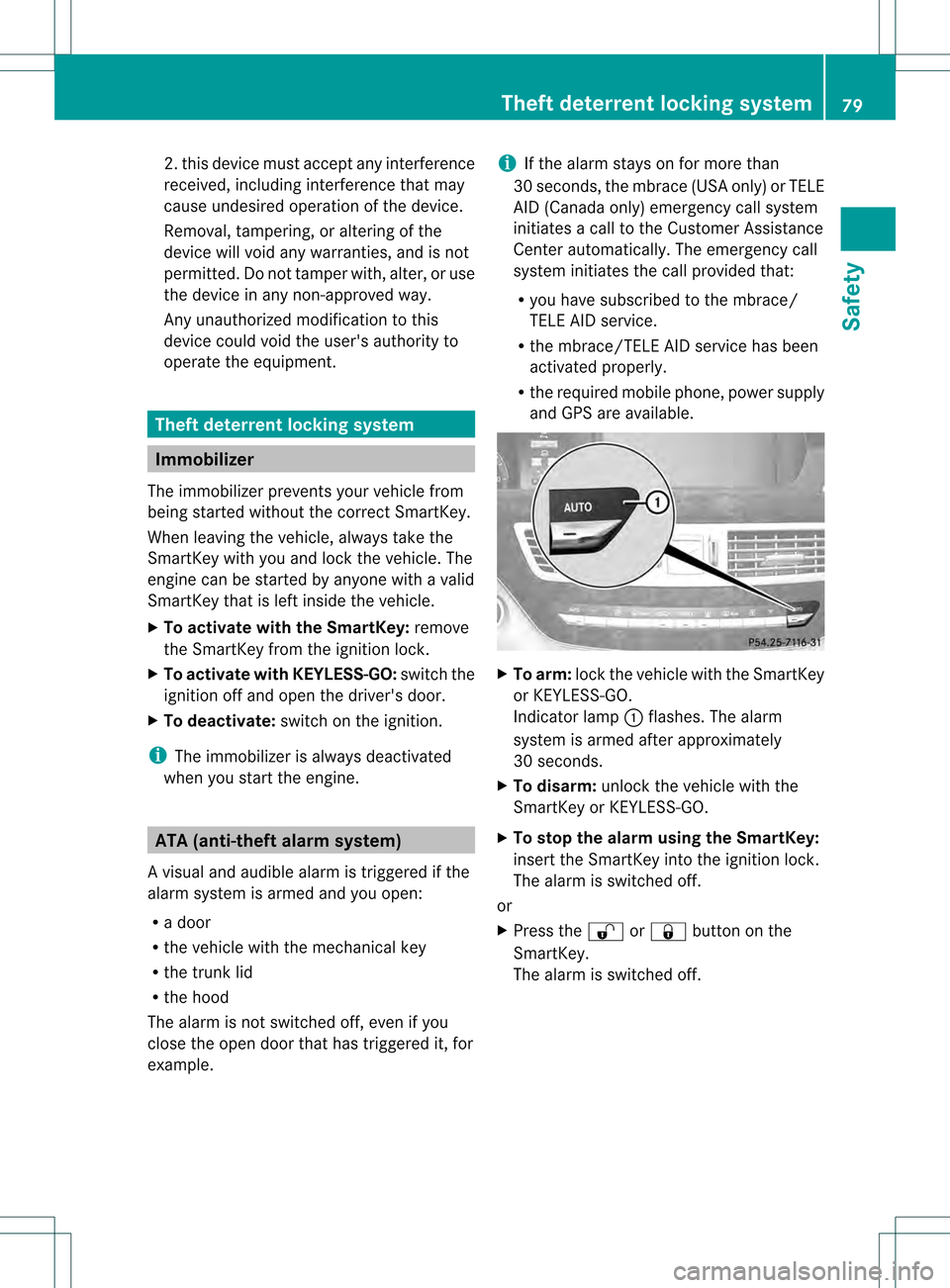
To arm: lock the vehicle with the SmartKey
or KEYLESS-GO.
Indicator lamp 0002flashes. The alarm
system is armed after approximately
30 seconds.
X To disarm: unlock the vehicle with the
SmartKey or KEYLESS-GO.
X To stop the alarm using the SmartKey:
insert the SmartKey into the ignition lock.
The alarm is switched off.
or
X Press the 000Bor0009 button on the
SmartKey.
The alarm is switched off. Theft deterrent locking system
79Safety Z
Page 82 of 542
X
To sto pthe alarm using KEYLESS-GO:
grasp the outside door handle. The
SmartKey must be outside the vehicle.
The alarm is switched off.
or
X Press the Start/Stop button on the
dashboard. The SmartKey must be inside
the vehicle.
The alarm is switched off. 80
Theft deterrent locking systemSafety
Page 86 of 542
X
To unloc kthe vehicle: pull the door
handle.
X To loc kthe vehicle: touch sensor
surface 0002.
X Convenience closing feature: touch
recessed sensor surface 0003for an
extended period (Y page 97).
If you pull on the handl eofthe trunk lid, only
the trunk of the vehicle is unlocked.
If the vehicle has been parked for a long time,
the sensor surfaces are deactivated
automatically .Inorder to unlock the door,
pull the door handle. In order to reactivate the
sensor surface, switch the ignitio nonagain. Changing the settings of the locking
system
You can change the setting of the locking
system in such a way that only the driver's
door and the fuel filler flap are unlocked. This
is useful if you frequently travel on your own.
X To change the setting: press and hold
down the 000Band0009 buttons
simultaneously for approximately
six seconds until the battery check lamp
flashes twice (Y page 85).
i If the setting of the locking system is
changed within the signal range of the
vehicle, pressing the 0009or000B button
locks or unlocks the vehicle.
The SmartKey now functions as follows:
X To unlock the driver's door: press the
000B button once.
X To unlock centrally: press the000B
button twice.
X To lock centrally: press the0009button. The KEYLESS-GO function is changed as
follows:
X
To unlock the driver's door :pull the door
handle on the driver's door.
X To unlock centrally: pull the door handle
on the front-passenger door or on the rear
doors.
X To lock centrally: touch the outer sensor
surface on one of the door handles. Restoring the factory settings
X Press the 000Band0009 buttons
simultaneously for approximately
six seconds until the battery chec klamp
flashes twice. Mechanical key
General notes If you use the mechanical key to unlock and
open the driver's door or the trunk lid, the
anti-thef
talarm system will be triggered
(Y page 79).
There are several ways to tur noff the alarm:
X To turn the alarm off with the
SmartKey: press the000Bor0009 button
on the SmartKey.
or
X Insert the SmartKey into the ignition lock.
or
X To deactivate the alarm with KEYLESS-
GO: press the Start/Stop button in the
ignition lock. The SmartKey must be in the
vehicle.
or
X Lock or unlock the vehicle using KEYLESS-
GO. The SmartKey must be outside the
vehicle. 84
SmartKeyOpening/closing
Page 95 of 542
Opening/closing automatically from
outside
Important safety notes G
WARNING
Make sure the trun klid is closed when the
engine is running and while driving. Among
other dangers, deadly carbo nmonoxide (CO)
gases may enter the vehicle interior resulting
in unconsciousness and death.
! The trunk lid swings upwards when
opened. Therefore, make sure that there is
sufficient clearance above the trunk lid.
To open the trunk lid completely, a minimum
clearance of 5.90 ft (1.80 m) above the
ground is necessary.
Opening You can open the trunk lid using the
SmartKey.
X
Press and hold the 0004button on the
SmartKey until the trunk lid opens.
Closing G
WARNING
Monitor the closing procedure carefully to
make sure no one is in danger of being
injured. To prevent possible personal injury,
always keep hands and fingers away from the
trunk opening when closing the trunk lid. Be
especially careful when small children are
around. To stop the closing procedure, do one
of the following:
R Press button 0004on the SmartKey.
R Press the remote trunk opening/closing
switch (on the driver's door).
R Press the trunk closing switch.
R Press the KEYLESS-GO locking/closing
switch.
R Pull the trunk lid handle. Even with the SmartKey removed from the
starter switch or the SmartKey with KEYLESS-
GO removed from the vehicle, the remote
trunk opening/closing switch can be
operated. Therefore, do not leave children
unattended in the vehicle, or with access to
an unlocked vehicle.
Achild's unsupervised
access to a vehicle could result in an accident
and/or serious personal injury.
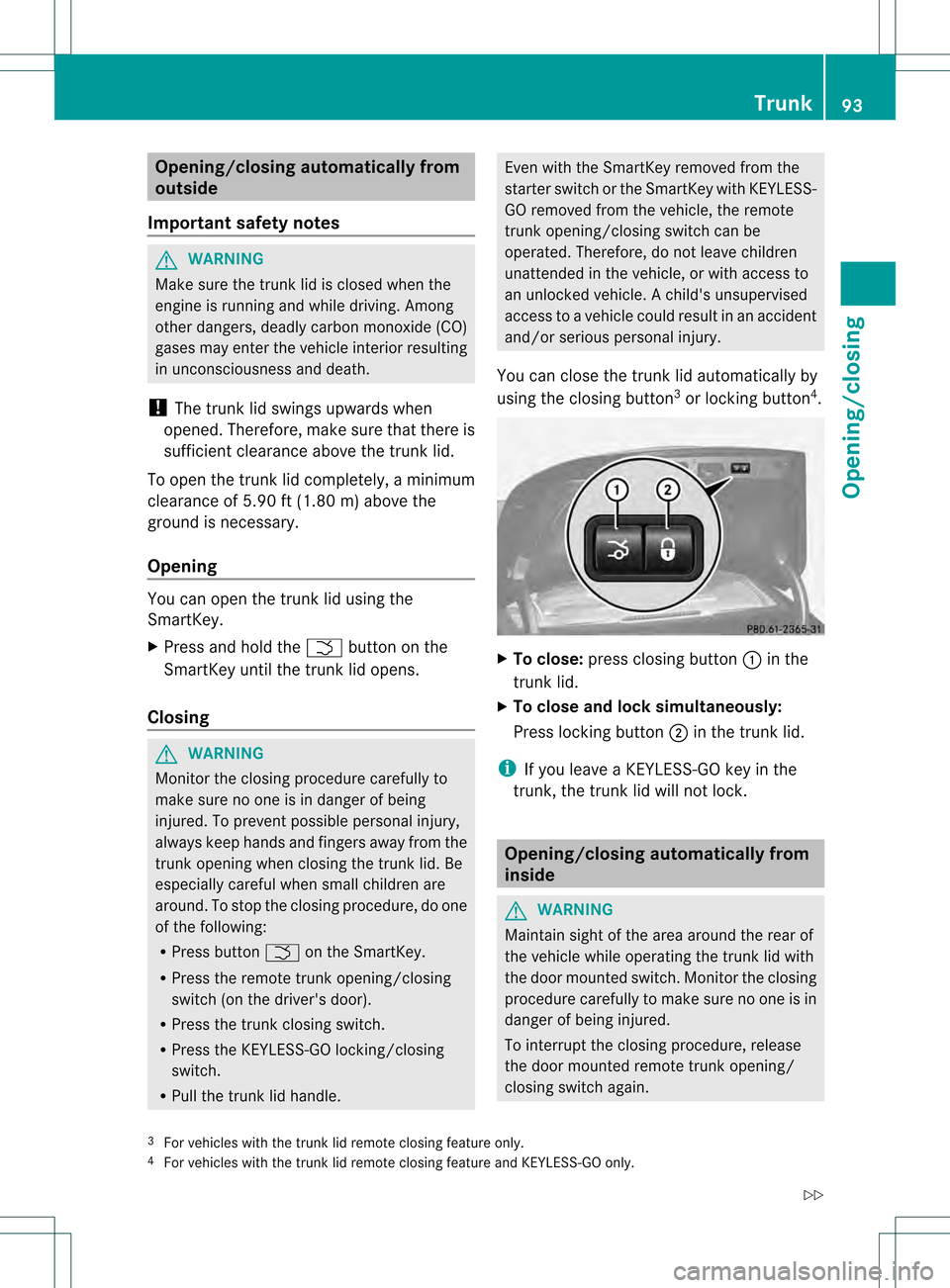
You can close the trunk lid automatically by
using the closing button 3
or locking button 4
. X
To close: press closing button 0002in the
trunk lid.
X To close and lock simultaneously:
Press locking button 0003in the trunk lid.
i If you leave a KEYLESS-GO key in the
trunk, the trunk lid will not lock. Opening/closing automatically from
inside
G
WARNING
Maintain sight of the area around the rear of
the vehicle while operating the trunk lid with
the door mounted switch. Monitor the closing
procedure carefully to make sure no one is in
danger of being injured.
To interrupt the closing procedure, release
the door mounted remote trunk opening/
closing switch again.
3 For vehicles with the trunk lid remote closing feature only.
4 For vehicles with the trunk lid remote closing feature and KEYLESS-GO only. Trunk
93Opening/closing
Z