language MERCEDES-BENZ S-Class 2014 W222 Comand Manual
[x] Cancel search | Manufacturer: MERCEDES-BENZ, Model Year: 2014, Model line: S-Class, Model: MERCEDES-BENZ S-Class 2014 W222Pages: 278, PDF Size: 6.65 MB
Page 227 of 278
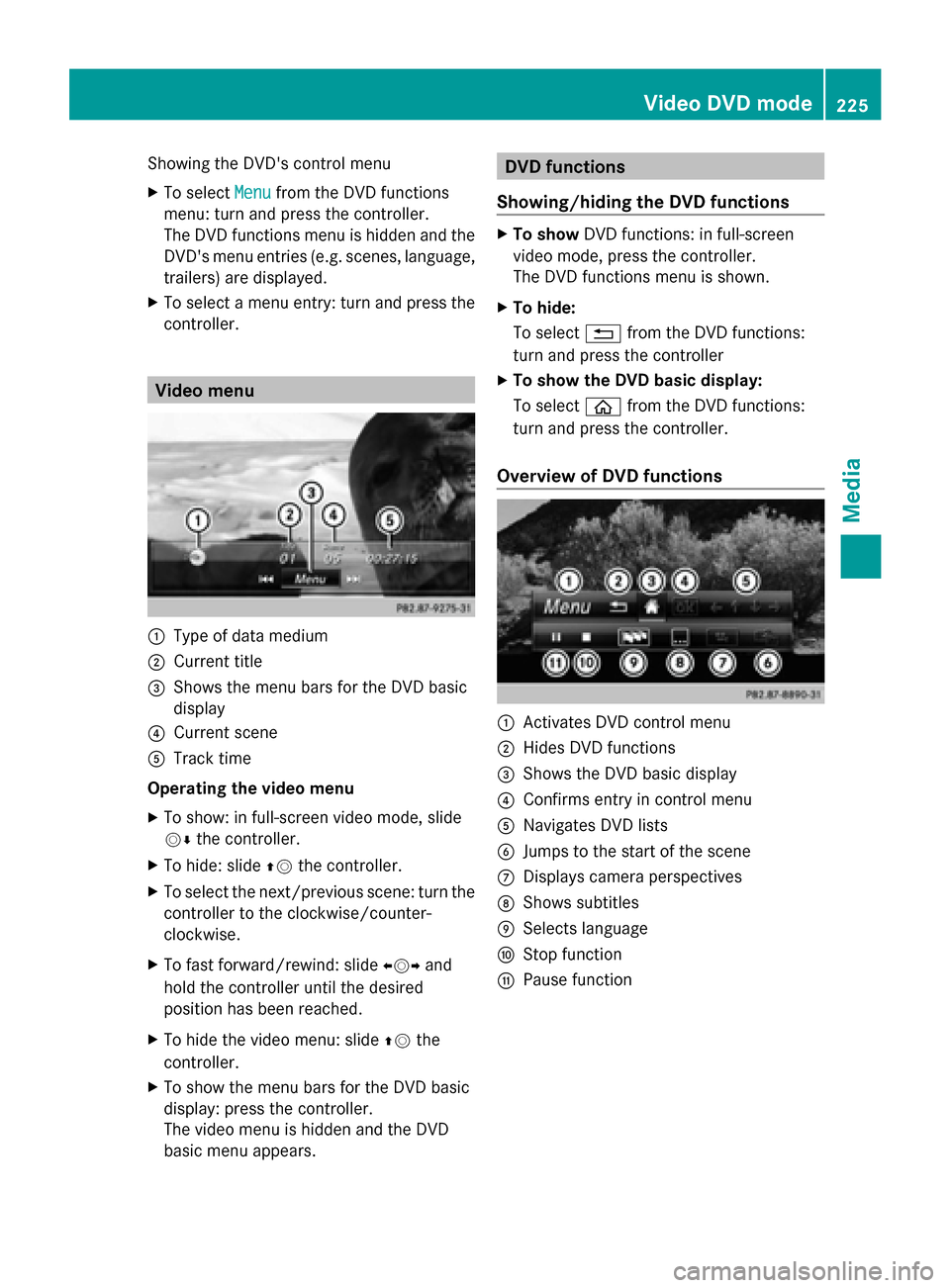
Showing the DVD's control menu
X
To select Menu Menufrom the DVD functions
menu: turn and press the controller.
The DVD functions menu is hidden and the
DVD's menu entries (e.g. scenes, language,
trailers) are displayed.
X To select a menu entry: turn and press the
controller. Video menu
0043
Type of data medium
0044 Current title
0087 Shows the menu bars for the DVD basic
display
0085 Current scene
0083 Track time
Operating the video menu
X To show: in full-screen video mode, slide
00520064 the controller.
X To hide: slide 00970052the controller.
X To select the next/previous scene: turn the
controller to the clockwise/counter-
clockwise.
X To fast forward/rewind: slide 009500520096and
hold the controller until the desired
position has been reached.
X To hide the video menu: slide 00970052the
controller.
X To show the menu bars for the DVD basic
display: press the controller.
The video menu is hidden and the DVD
basic menu appears. DVD functions
Showing/hiding the DVD functions X
To show DVD functions: in full-screen
video mode, press the controller.
The DVD functions menu is shown.
X To hide:
To select 0038from the DVD functions:
turn and press the controller
X To show the DVD basic display:
To select 00E2from the DVD functions:
turn and press the controller.
Overview of DVD functions 0043
Activates DVD control menu
0044 Hides DVD functions
0087 Shows the DVD basic display
0085 Confirms entry in control menu
0083 Navigates DVD lists
0084 Jumps to the start of the scene
006B Displays camera perspectives
006C Shows subtitles
006D Selects language
006E Stop function
006F Pause function Video DVD mode
225Media Z
Page 250 of 278
0085
Retaining lugs
0083 Batteries
The remote control contains two type AAA,
1.5 V batteries.
X To open the battery compartment:
remove battery compartment cover 0087on
the back of the remote control.
X Push catch tab 0044down and take off
battery compartment cover 0087.
X Remove discharged batteries 0083from the
tray.
X Insert the new batteries. Observe the
polarity markings on the batteries and
battery compartment when doing so.
Left-hand battery: the positive pole (+)
must face upwards.
Right-hand battery: the positive pole (+)
must face downwards.
X To close the battery compartment:
insert battery compartment cover 0087
starting with retaining lugs 0085into the
battery compartment and allow catch
tab 0044to engage in place.
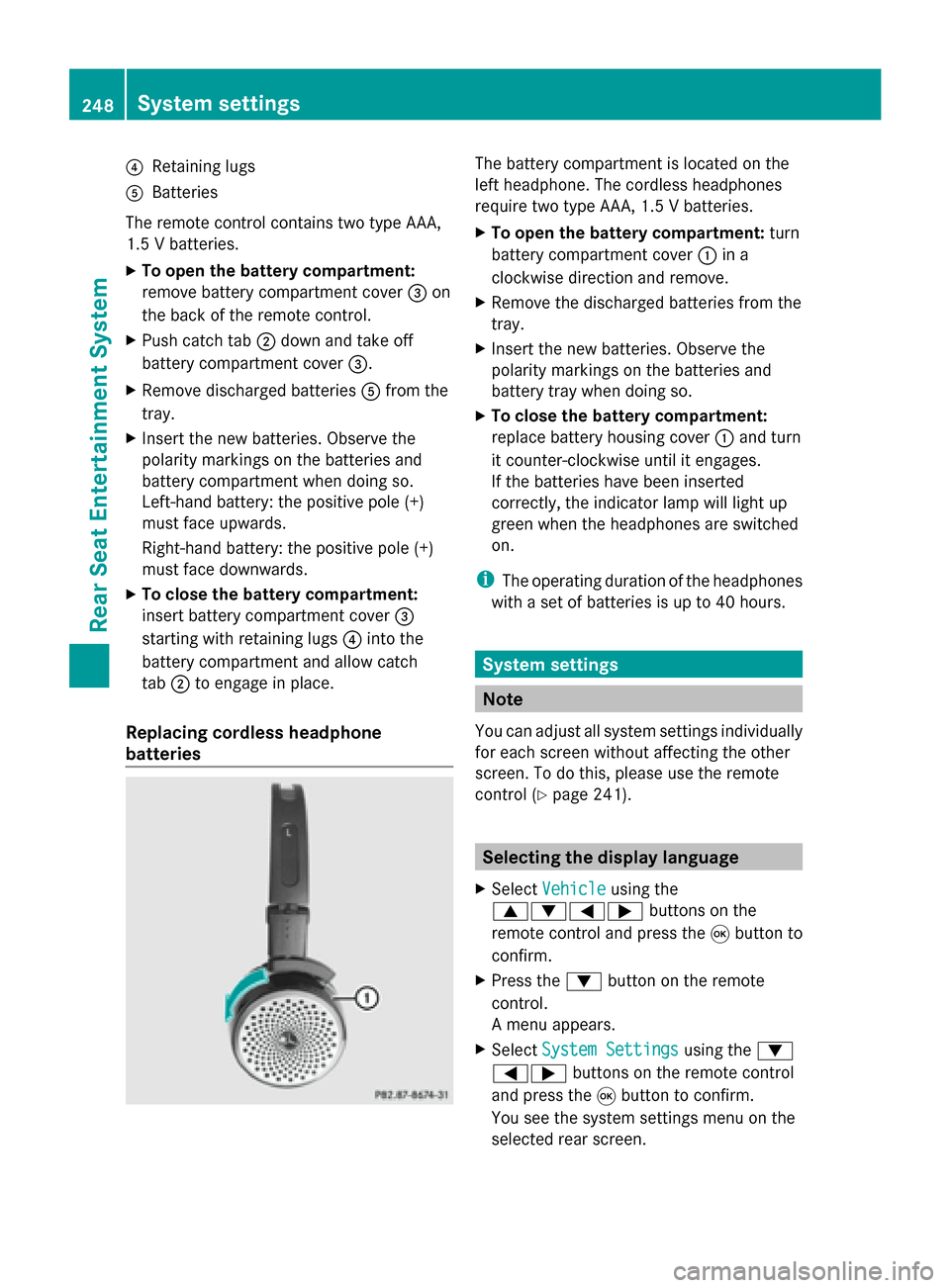
Replacing cordless headphone
batteries The battery compartment is located on the
left headphone. The cordless headphones
require two type AAA, 1.5 V batteries.
X To open the battery compartment: turn
battery compartment cover 0043in a
clockwise direction and remove.
X Remove the discharged batteries from the
tray.
X Insert the new batteries. Observe the
polarity markings on the batteries and
battery tray when doing so.
X To close the battery compartment:
replace battery housing cover 0043and turn
it counter-clockwise until it engages.
If the batteries have been inserted
correctly, the indicator lamp will light up
green when the headphones are switched
on.
i The operating duration of the headphones
with a set of batteries is up to 40 hours. System settings
Note
You can adjust all system settings individually
for each screen without affecting the other
screen. To do this, please use the remote
control (Y page 241). Selecting the display language
X Select Vehicle Vehicle using the
006300640059 buttons on the
remote control and press the 008Bbutton to
confirm.
X Press the 0064button on the remote
control.
A menu appears.
X Select System Settings System Settings using the0064
00590065 buttons on the remote control
and press the 008Bbutton to confirm.
You see the system settings menu on the
selected rear screen. 248
System settingsRea
r Seat Entertainment System
Page 251 of 278
X
Select Language
Language using the00630064
buttons and press the 008Bbutton to confirm.
The list of languages appears. A 0036dot
indicates the current setting.
X Select the language using the 00630064
buttons and press the 008Bbutton to confirm.
The system activates the corresponding
language. Switching the display design
X Select Vehicle
Vehicle using the
006300640059 buttons on the
remote control and press the 008Bbutton to
confirm.
X Select System Settings
System Settings using the0064
00590065 buttons on the remote control
and press the 008Bbutton to confirm.
You see the system settings menu on the
selected rear screen.
X Select Display
Display using the 00630064
buttons on the remote control and press
the 008Bbutton to confirm.
X Select Day Mode
Day Mode, Night Mode Night Mode or
Automatic
Automatic using the00630064 buttons
and press the 008Bbutton to confirm.
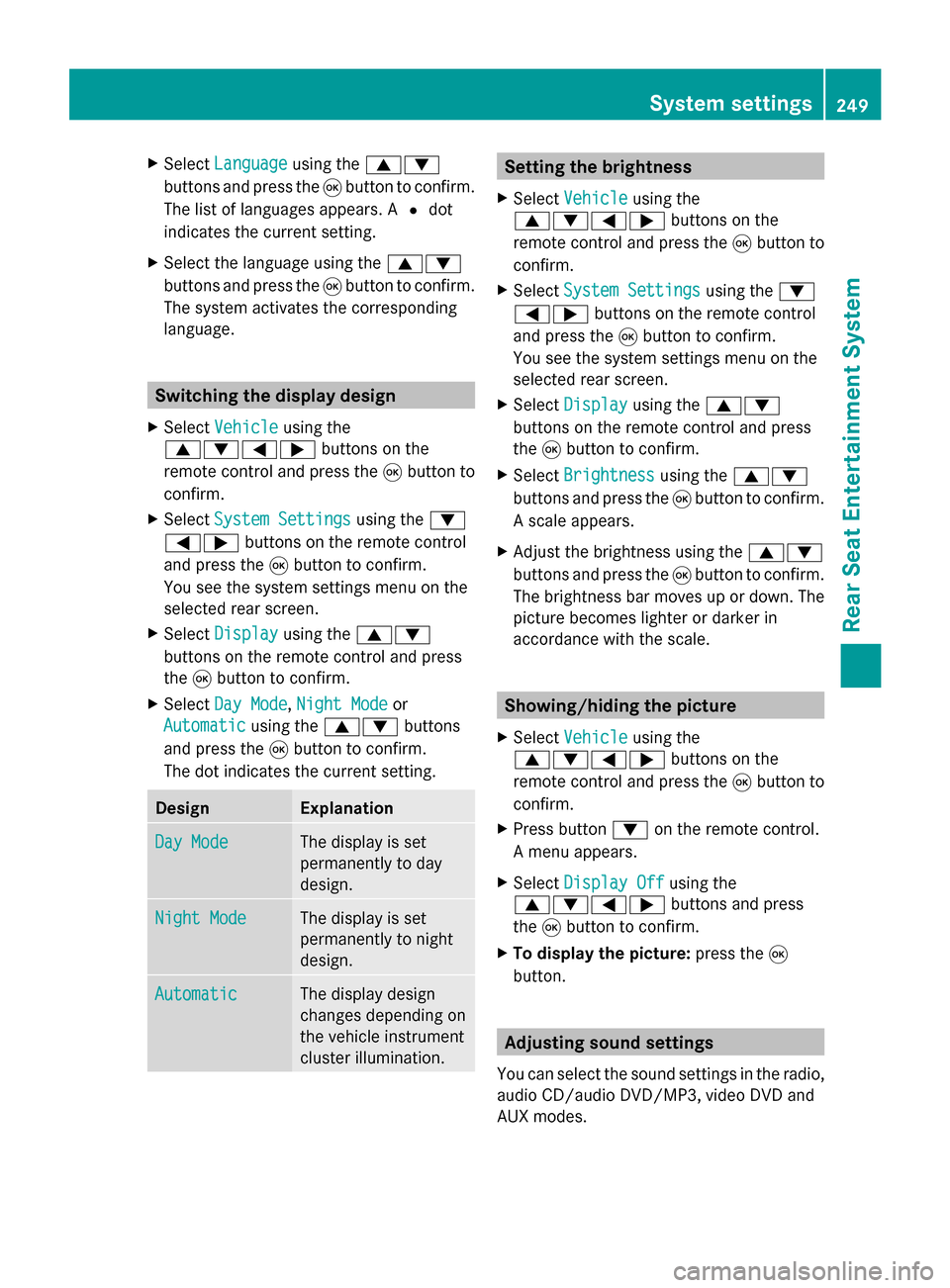
The dot indicates the current setting. Design Explanation
Day Mode Day Mode The display is set
permanently to day
design. Night Mode
Night Mode The display is set
permanently to night
design. Automatic Automatic The display design
changes depending on
the vehicle instrument
cluster illumination. Setting the brightness
X Select Vehicle Vehicle using the
006300640059 buttons on the
remote control and press the 008Bbutton to
confirm.
X Select System Settings
System Settings using the0064
00590065 buttons on the remote control
and press the 008Bbutton to confirm.
You see the system settings menu on the
selected rear screen.
X Select Display
Display using the 00630064
buttons on the remote control and press
the 008Bbutton to confirm.
X Select Brightness Brightness using the00630064
buttons and press the 008Bbutton to confirm.
A scale appears.
X Adjust the brightness using the 00630064
buttons and press the 008Bbutton to confirm.
The brightness bar moves up or down. The
picture becomes lighter or darker in
accordance with the scale. Showing/hiding the picture
X Select Vehicle Vehicle using the
006300640059 buttons on the
remote control and press the 008Bbutton to
confirm.
X Press button 0064on the remote control.
A menu appears.
X Select Display Off
Display Off using the
006300640059 buttons and press
the 008Bbutton to confirm.
X To display the picture: press the008B
button. Adjusting sound settings
You can select the sound settings in the radio,
audio CD/audio DVD/MP3, video DVD and
AUX modes. System settings
249Rear Seat Entertainment System Z
Page 259 of 278
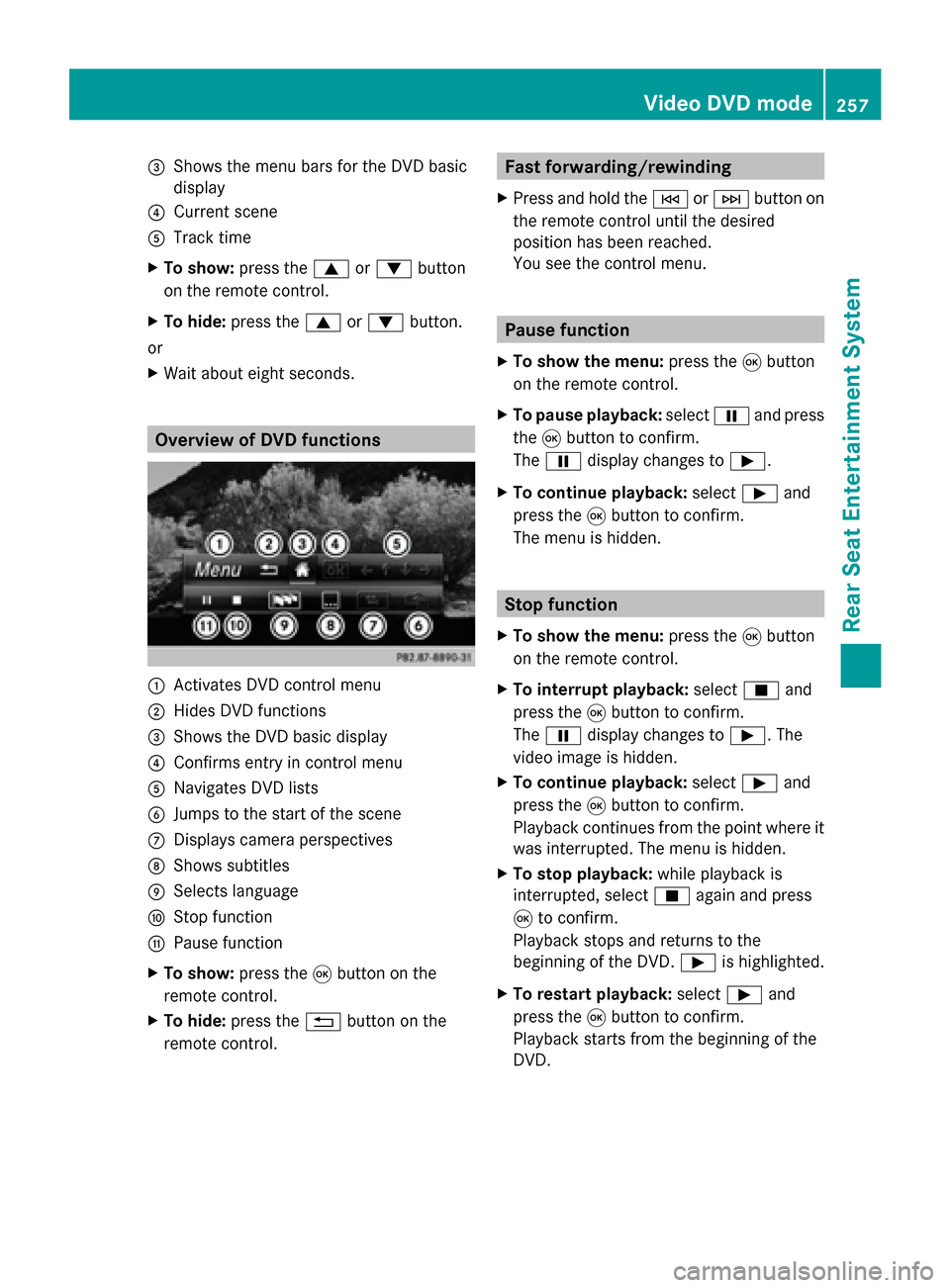
0087
Shows the menu bars for the DVD basic
display
0085 Current scene
0083 Track time
X To show: press the0063or0064 button
on the remote control.
X To hide: press the 0063or0064 button.
or
X Wait about eight seconds. Overview of DVD functions
0043
Activates DVD control menu
0044 Hides DVD functions
0087 Shows the DVD basic display
0085 Confirms entry in control menu
0083 Navigates DVD lists
0084 Jumps to the start of the scene
006B Displays camera perspectives
006C Shows subtitles
006D Selects language
006E Stop function
006F Pause function
X To show: press the008Bbutton on the
remote control.
X To hide: press the 0038button on the
remote control. Fast forwarding/rewinding
X Press and hold the 0048or0049 button on
the remote control until the desired
position has been reached.
You see the control menu. Pause function
X To show the menu: press the008Bbutton
on the remote control.
X To pause playback: select00CFand press
the 008Bbutton to confirm.
The 00CF display changes to 00D0.
X To continue playback: select00D0and
press the 008Bbutton to confirm.
The menu is hidden. Stop function
X To show the menu: press the008Bbutton
on the remote control.
X To interrupt playback: select00DBand
press the 008Bbutton to confirm.
The 00CF display changes to 00D0. The
video image is hidden.
X To continue playback: select00D0and
press the 008Bbutton to confirm.
Playback continues from the point where it
was interrupted. The menu is hidden.
X To stop playback: while playback is
interrupted, select 00DBagain and press
008B to confirm.
Playback stops and returns to the
beginning of the DVD. 00D0is highlighted.
X To restart playback: select00D0and
press the 008Bbutton to confirm.
Playback starts from the beginning of the
DVD. Video DVD mode
257Rear Seat Entertainment System Z
Page 260 of 278
Selecting a scene/chapter
General notes Observe the information on DVD video mode
(Y page 226).
Skipping forwards/backwards X
Press 0059or0065 on the remote control.
The control menu appears for
approximately eight seconds.
Selecting a scene/chapter directly These examples illustrate how to select
scene/chapter 5.
X
Option 1: while the film is playing, press
the 007E button on the remote control.
X Press the corresponding number key, such
as 5.
X Option 2: while the film is playing, press
the 008Bbutton on the remote control and
show the menu.
X Select Menu
Menu and press the 008Bbutton to
confirm.
The DVD menu appears.
X Select Scene Selection
Scene Selection and press the
008B button to confirm.
X Using button 0063or0064, select 5
5 and
press the 008Bbutton to confirm.
In both cases, playback will begin from the
5th scene/chapter after a brief pause. Selecting a film/title
Option 1:
X Press the 008Bbutton on the remote control
and show the menu.
X Select Menu
Menu using the
0063006400590065 buttons on the
remote control and press the 008Bbutton to
confirm.
The DVD menu appears. X
Select Track Selection Track Selection using the
0063006400590065 buttons on the
remote control and press the 008Bbutton to
confirm.
X To call up the selection list: press the
008B button.
X Select a film/title.
Option 2:
Example: selecting film 2
X Press button 2.
After a brief pause, the second film is
played. DVD menu
Calling up the DVD menu The DVD menu is the menu stored on the DVD
itself. It is structured in various ways
according to the individual DVD and permits
certain actions and settings.
In the case of multi-language DVDs, for
example, you can change the DVD language
in the DVD menu.
X Press the 008Bbutton on the remote control
and show the menu.
X Select Menu Menuusing the
0063006400590065 buttons on the
remote control and press the 008Bbutton to
confirm.
The DVD menu appears.
Selecting menu items in the DVD menu X
Select a menu item using the
0063006400590065 buttons on the
remote control and press the 008Bbutton to
confirm.
X Select Select
Select using the
0063006400590065 buttons on the258
Video DVD modeRear Seat Entertainment System
Page 261 of 278
remote control and press the
008Bbutton to
confirm.
The system executes the function or shows
a submenu.
X If available, additional options can now be
selected.
The system then switches back to the DVD
menu.
i Menu items which cannot be selected are
shown in gray.
i Depending on the DVD, certain menu
items may not function. For example, the
menu items:
R Back (to movie) Back (to movie)
R Play
Play
R Stop
Stop
R 0048
R 0049
R Go Up
Go Up.
To indicate this, the 0047symbol then
appears in the display.
Stopping a film or skipping to the
beginning or end of a scene X
Select any menu item from the DVD menu.
The menu appears.
X To stop the film: select theStop Stopmenu
item and press the 008Bbutton on the remote
control to confirm.
X To skip to the end of a scene: select the
0049 menu item and press 008Bto confirm.
X To skip to the start of a scene: select the
0048 menu item and press 008Bto confirm.
Moving up one level in the DVD menu X
Show the DVD menu.
X Press the 0038back button on the remote
control or select the corresponding menu
item in the DVD menu. Back to the movie X
Press the 0038button repeatedly until you
see the movie. Setting the audio format
This function is not available on all DVDs. If it
is available, you can set the audio language
or the audio format. The number of settings
is determined by the DVD content. It may also
be possible to access the settings from the
DVD menu.
X Press the 008Bbutton on the remote control
and show the menu.
X Select DVD-Video
DVD-Video using the
0063006400590065 buttons on the
remote control and press the 008Bbutton to
confirm.
X Select DVD Functions
DVD Functions and press the008B
button to confirm.
X Select Audio Language
Audio Language and press the008B
button to confirm.
A menu appears after a short while.
The 0036dot in front of an entry indicates the
currently selected language.
X Select the language using the 00630064
buttons and press the 008Bbutton to confirm.
X To exit the menu: press the0059
or 0065 button. Subtitles and camera angle
These functions are not available on all DVDs.
The number of subtitle languages and camera
angles available depends on the content of
the DVD. It may also be possible to access
the settings from the DVD menu.
X Press the 008Bbutton on the remote control
and show the menu.
X Select Video DVD
Video DVD using the
0063006400590065 buttons on the
remote control and press the 008Bbutton to
confirm. Video DVD mode
259Rear Seat Entertainment System Z