climate control MERCEDES-BENZ S-Class 2015 W222 Comand Manual
[x] Cancel search | Manufacturer: MERCEDES-BENZ, Model Year: 2015, Model line: S-Class, Model: MERCEDES-BENZ S-Class 2015 W222Pages: 298, PDF Size: 6.39 MB
Page 73 of 298
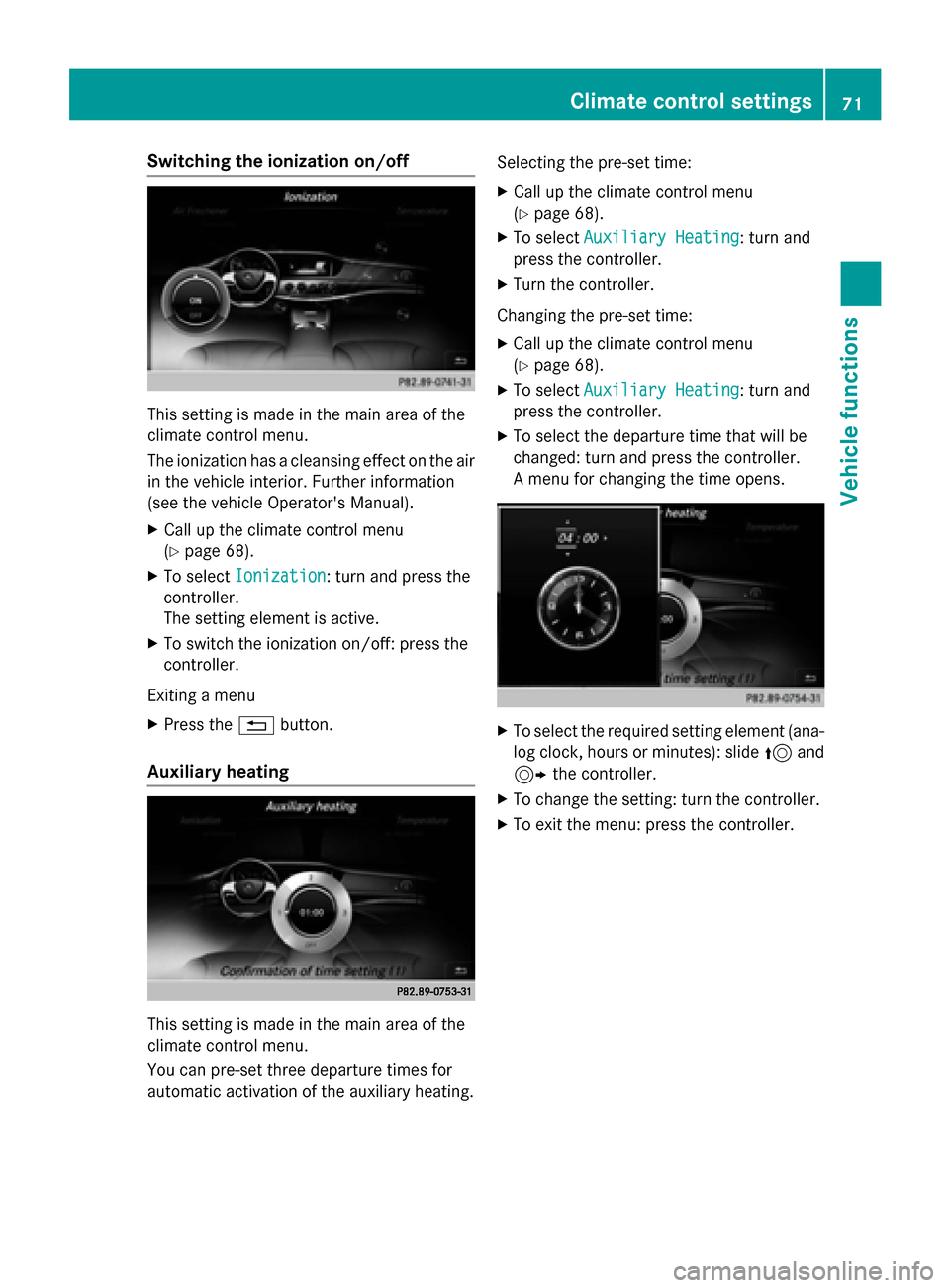
Switching the ionization on/off
This setting is made in the main area of the
climate control menu.
The ionization has a cleansing effect on the air in the vehicle interior. Further information
(see the vehicle Operator's Manual).
X Call up the climate control menu
(Y page 68).
X To select Ionization Ionization: turn and press the
controller.
The setting element is active.
X To switch the ionization on/off: press the
controller.
Exiting a menu X Press the 0038button.
Auxiliary heating This setting is made in the main area of the
climate control menu.
You can pre-set three departure times for
automatic activation of the auxiliary heating. Selecting the pre-set time:
X Call up the climate control menu
(Y page 68).
X To select Auxiliary Heating
Auxiliary Heating: turn and
press the controller.
X Turn the controller.
Changing the pre-set time:
X Call up the climate control menu
(Y page 68).
X To select Auxiliary Heating Auxiliary Heating: turn and
press the controller.
X To select the departure time that will be
changed: turn and press the controller.
A menu for changing the time opens. X
To select the required setting element (ana-
log clock, hours or minutes): slide 5and
9 the controller.
X To change the setting: turn the controller.
X To exit the menu: press the controller. Climate control settings
71Vehicle functions
Page 200 of 298
Radio mode
Radio overview
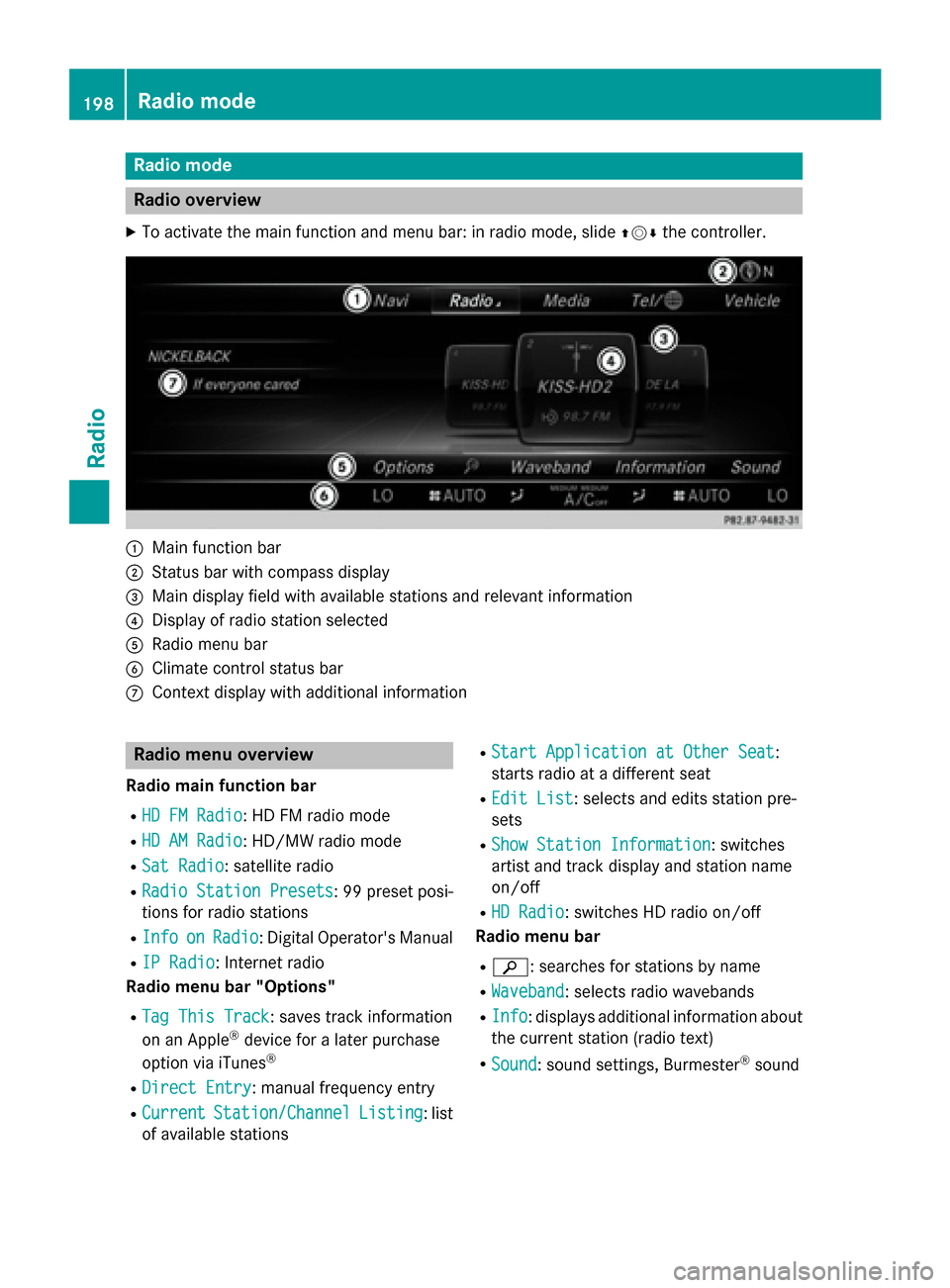
X To activate the main function and menu bar: in radio mode, slide 009700520064the controller. 0043
Main function bar
0044 Status bar with compass display
0087 Main display field with available stations and relevant information
0085 Display of radio station selected
0083 Radio menu bar
0084 Climate control status bar
006B Context display with additional information Radio menu overview
Radio main function bar
R HD FM Radio
HD FM Radio: HD FM radio mode
R HD AM Radio
HD AM Radio: HD/MW radio mode
R Sat Radio
Sat Radio: satellite radio
R Radio Station Presets
Radio Station Presets : 99 preset posi-
tions for radio stations
R Info
Info on
onRadio
Radio: Digital Operator's Manual
R IP Radio
IP Radio: Internet radio
Radio menu bar "Options"
R Tag This Track
Tag This Track: saves track information
on an Apple ®
device for a later purchase
option via iTunes ®
R Direct Entry
Direct Entry: manual frequency entry
R Current
Current Station/Channel
Station/Channel Listing
Listing: list
of available stations R
Start Application at Other Seat
Start Application at Other Seat :
starts radio at a different seat
R Edit List
Edit List : selects and edits station pre-
sets
R Show Station Information
Show Station Information: switches
artist and track display and station name
on/off
R HD Radio HD Radio: switches HD radio on/off
Radio menu bar
R 00D3: searches for stations by name
R Waveband
Waveband : selects radio wavebands
R Info
Info : displays additional information about
the current station (radio text)
R Sound
Sound: sound settings, Burmester ®
sound 198
Radio modeRadio
Page 215 of 298
Menu overview
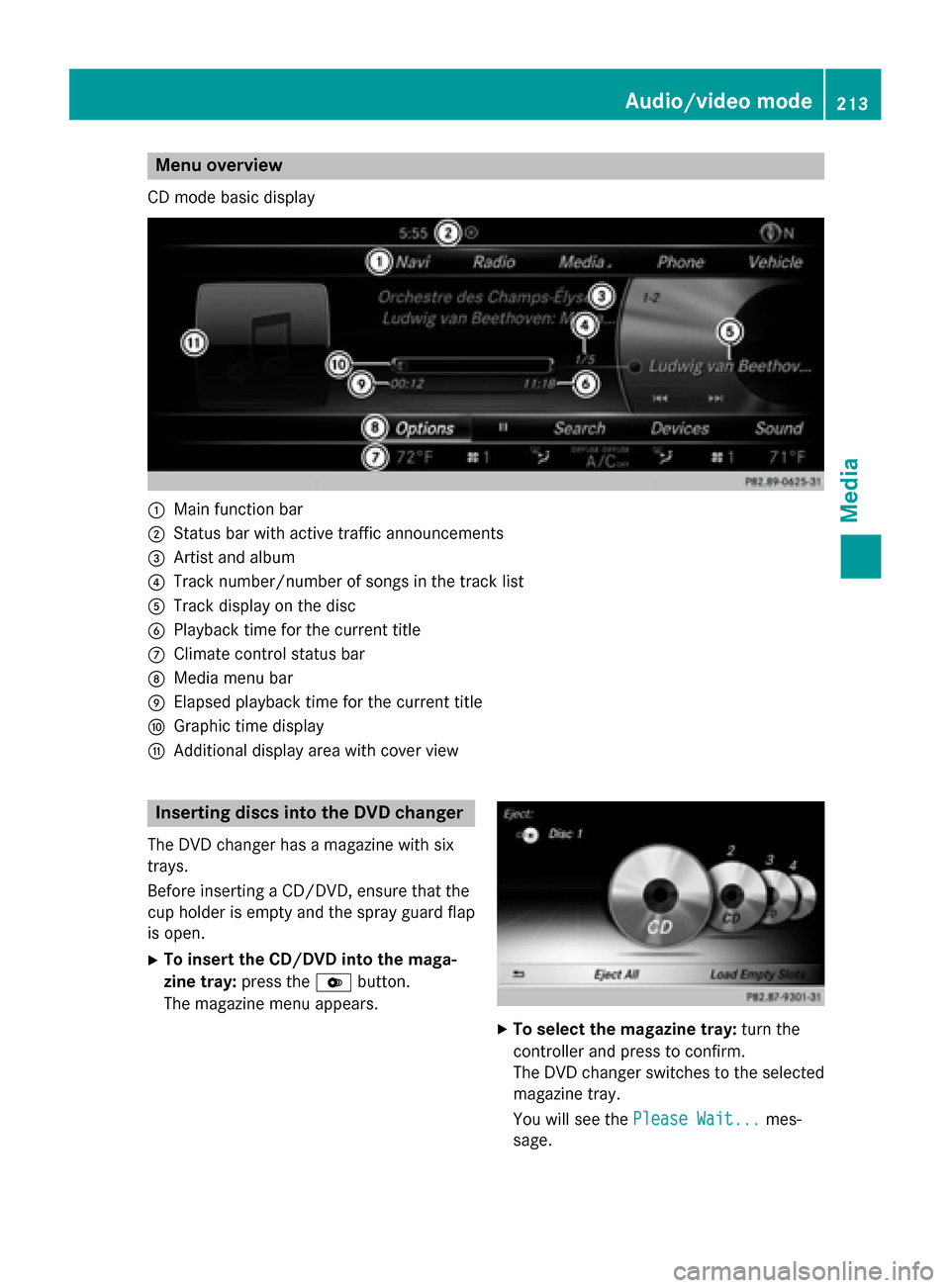
CD mode basic display 0043
Main function bar
0044 Status bar with active traffic announcements
0087 Artist and album
0085 Track number/number of songs in the track list
0083 Track display on the disc
0084 Playback time for the current title
006B Climate control status bar
006C Media menu bar
006D Elapsed playback time for the current title
006E Graphic time display
006F Additional display area with cover view Inserting discs into the DVD changer
The DVD changer has a magazine with six
trays.
Before inserting a CD/DVD, ensure that the
cup holder is empty and the spray guard flap is open.
X To insert the CD/DVD into the maga-
zine tray: press the0065button.
The magazine menu appears. X
To select the magazine tray: turn the
controller and press to confirm.
The DVD changer switches to the selected magazine tray.
You will see the Please Wait... Please Wait... mes-
sage. Audio/video mode
213Media Z
Page 244 of 298
DVD overview
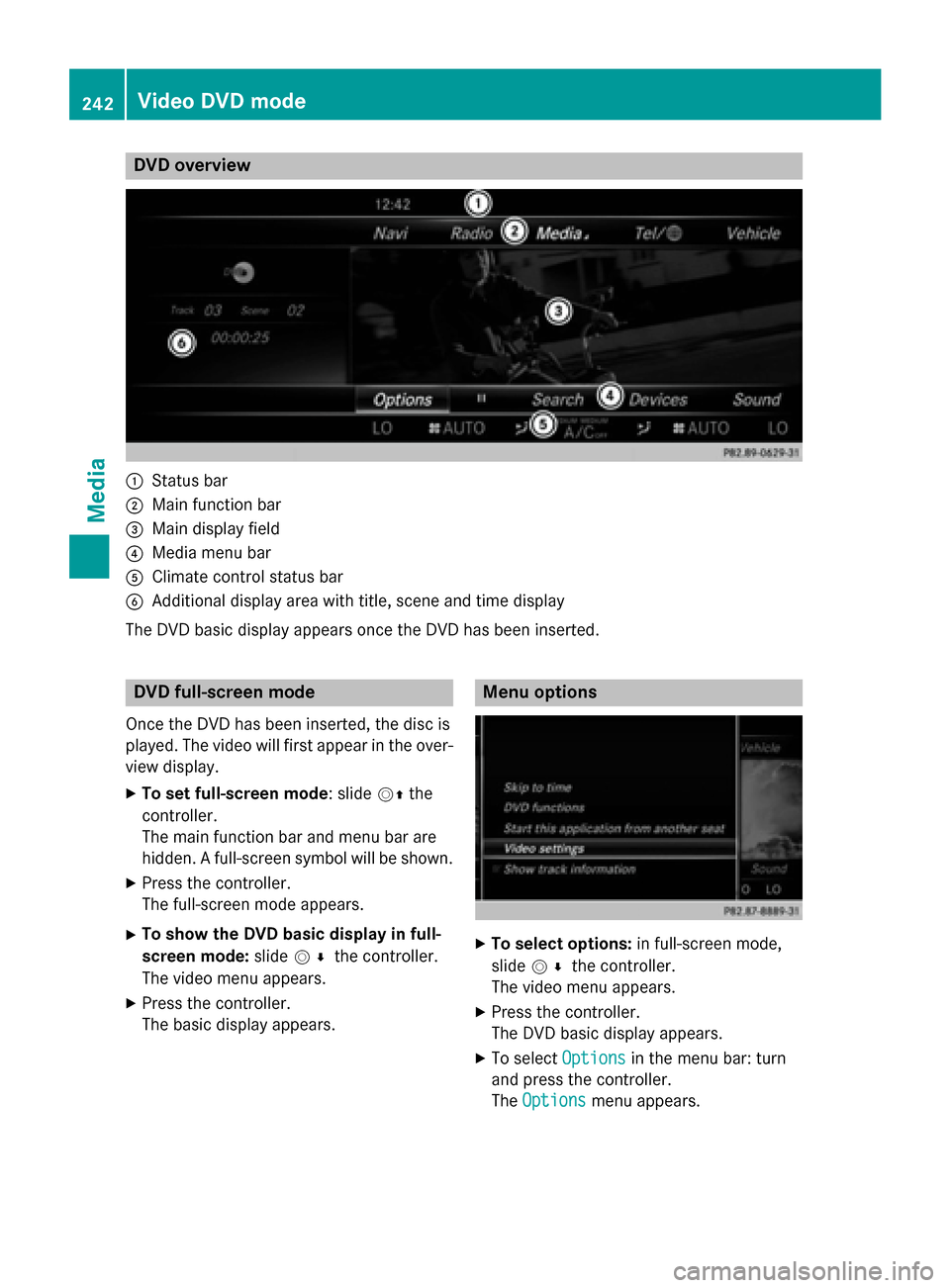
0043
Status bar
0044 Main function bar
0087 Main display field
0085 Media menu bar
0083 Climate control status bar
0084 Additional display area with title, scene and time display
The DVD basic display appears once the DVD has been inserted. DVD full-screen mode
Once the DVD has been inserted, the disc is
played. The video will first appear in the over- view display.
X To set full-screen mode : slide00520097the
controller.
The main function bar and menu bar are
hidden. A full-screen symbol will be shown.
X Press the controller.
The full-screen mode appears.
X To show the DVD basic display in full-
screen mode: slide005200C5 the controller.
The video menu appears.
X Press the controller.
The basic display appears. Menu options
X
To select options: in full-screen mode,
slide 005200C5 the controller.
The video menu appears.
X Press the controller.
The DVD basic display appears.
X To select Options Optionsin the menu bar: turn
and press the controller.
The Options Options menu appears. 242
Video DVD
modeMedia
Page 266 of 298
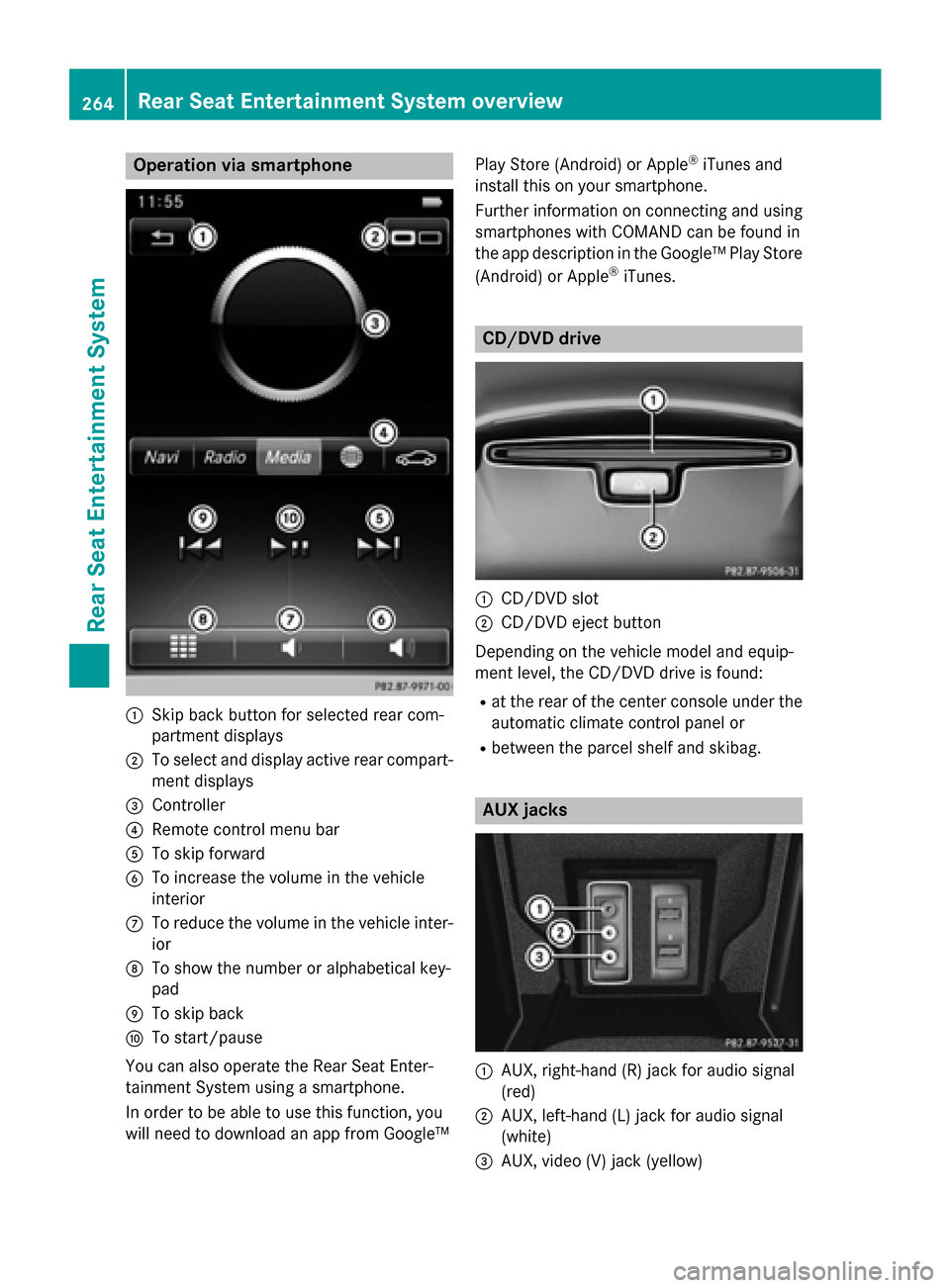
Operation via smartphone
0043
Skip back button for selected rear com-
partment displays
0044 To select and display active rear compart-
ment displays
0087 Controller
0085 Remote control menu bar
0083 To skip forward
0084 To increase the volume in the vehicle
interior
006B To reduce the volume in the vehicle inter-
ior
006C To show the number or alphabetical key-
pad
006D To skip back
006E To start/pause
You can also operate the Rear Seat Enter-
tainment System using a smartphone.
In order to be able to use this function, you
will need to download an app from Google™ Play Store (Android) or Apple
®
iTunes and
install this on your smartphone.
Further information on connecting and using
smartphones with COMAND can be found in
the app description in the Google™ Play Store
(Android) or Apple ®
iTunes. CD/DVD drive
0043
CD/DVD slot
0044 CD/DVD eject button
Depending on the vehicle model and equip-
ment level, the CD/DVD drive is found:
R at the rear of the center console under the
automatic climate control panel or
R between the parcel shelf and skibag. AUX jacks
0043
AUX, right-hand (R) jack for audio signal
(red)
0044 AUX, left-hand (L) jack for audio signal
(white)
0087 AUX, video (V) jack (yellow) 264
Rear Seat Entertainment System overviewRear Seat Entertainment System
Page 276 of 298
Depending on the vehicle model and equip-
ment level, the CD/DVD drive is found:
R at the rear of the center console under the
automatic climate control panel or
R between the parcel shelf and skibag.
The CD/DVD drive is a single disc drive. If
there is already a disc inserted, this must be
ejected before another is inserted.
X Insert a disc into the disc slot.
The printed side of the disc must face
upwards. If neither side of the disc is
printed, the side you wish to play must face
downwards.
The CD/DVD drive draws in the disc.
The CD/DVD drive plays the disc:
R if it has been inserted correctly and is a
permissible disc, and
R once you have activated disc mode.
Data on an MP3 CD first needs to be loaded by the drive. Loading may take some time,
depending on the number of folders and
tracks. Switching to audio/video mode
X Insert a CD/DVD (Y page 264).
The system loads the inserted disc and
starts playback.
or
X Select Media Mediausing the 006300590065
buttons on the remote control and press
the 008Bbutton to confirm.
X Select Disc
Discusing the 00590065 buttons
and press the 008Bbutton to confirm.
The system plays the disc.
X To switch to other media: insert the
device into the corresponding jack.
The system searches for files on the device that can be played back, and then plays
them. Selecting a track
Selecting by skipping to a track X
To skip forwards or backwards to a
track: press the 0059or0065 button on
the remote control.
or
X Press the 0048or0049 button.
The skip forward function skips to the next track.
If the elapsed track time has exceeded 8
seconds, the function skips back to the
beginning of the track. If the elapsed time is shorter, it will skip to the start of the pre-
vious track.
If the Random Tracks Random Tracks orRandom Folder
Random Folder
playback option has been selected, the
track order is random.
Selecting by track list In audio CD mode, the track list contains all
tracks on the disc currently playing.
In MP3 mode, the track list shows all tracks in
the currently active folder as well as the folder
structure, allowing you to select any track on
the MP3 CD.
X Select Search Search using the 006400590065
buttons on the remote control and press
the 008Bbutton to confirm.
X Select Current Tracklist
Current Tracklist using the
00630064 buttons and press the 008Bbutton
to confirm.
The track list appears. The 0036dot indicates
the current track.
X Select the track using the 00630064but-
tons and press the 008Bbutton to confirm.
Making a selection by entering the track number directly This function is only available in Media mode.
X Press the 007Ebutton on the remote
control.
The track entry display appears. 274
Audio/video modeRear Seat Entertainment System