door lock MERCEDES-BENZ S-Class 2015 W222 Owner's Guide
[x] Cancel search | Manufacturer: MERCEDES-BENZ, Model Year: 2015, Model line: S-Class, Model: MERCEDES-BENZ S-Class 2015 W222Pages: 502, PDF Size: 9.59 MB
Page 103 of 502
If somebody becomes trapped:
R press the Fbutton on the SmartKey, or
R pull or press the remote operating switch
on the driver's door or
R press the closing or locking button on the
trunk lid, or
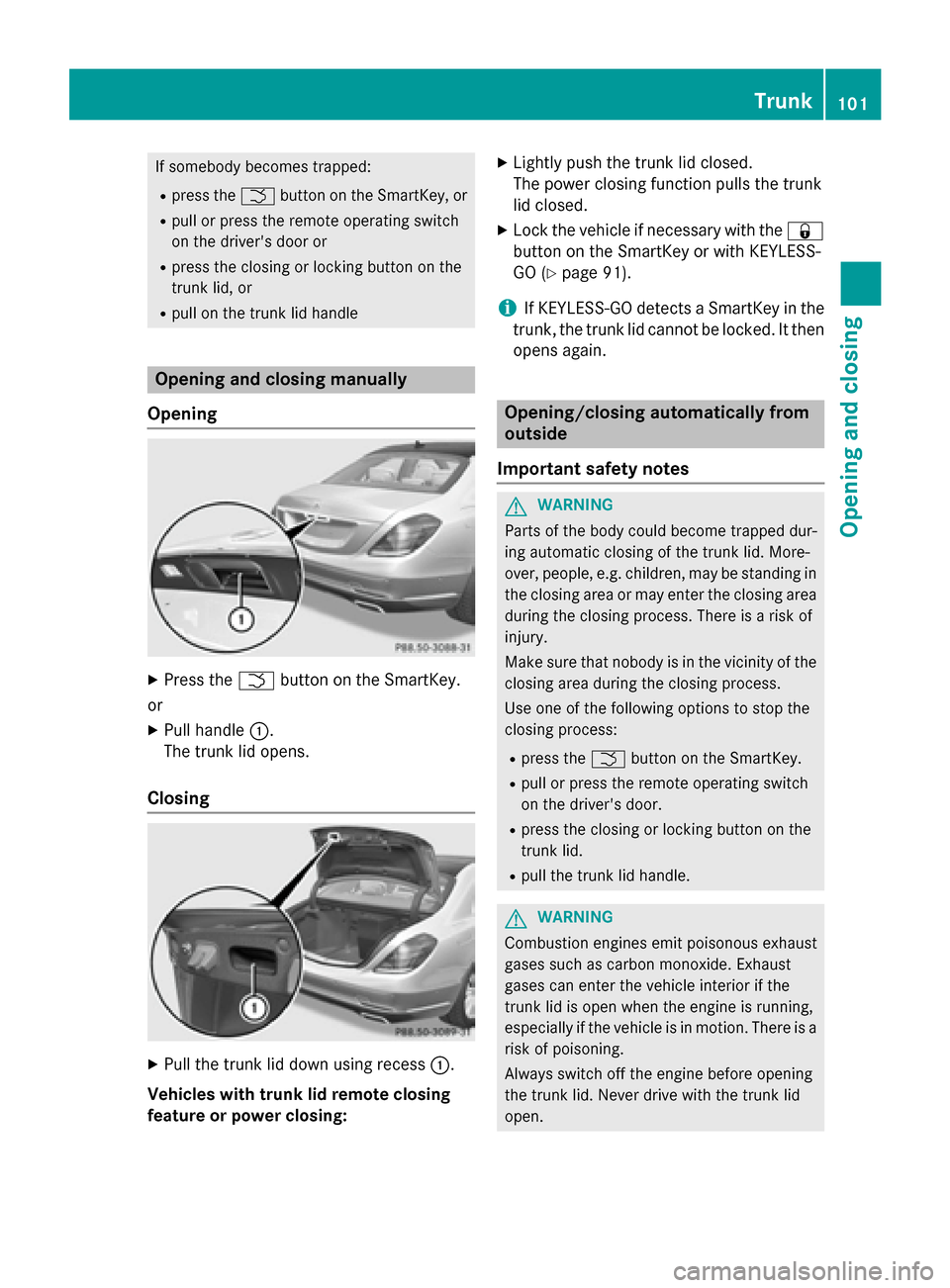
R pull on the trunk lid handle Opening and closing manually
Opening X
Press the Fbutton on the SmartKey.
or X Pull handle :.
The trunk lid opens.
Closing X
Pull the trunk lid down using recess :.
Vehicles with trunk lid remote closing
feature or power closing: X
Lightly push the trunk lid closed.
The power closing function pulls the trunk
lid closed.
X Lock the vehicle if necessary with the &
button on the SmartKey or with KEYLESS-
GO (Y page 91).
i If KEYLESS-GO detects a SmartKey in the
trunk, the trunk lid cannot be locked. It then opens again. Opening/closing automatically from
outside
Important safety notes G
WARNING
Parts of the body could become trapped dur-
ing automatic closing of the trunk lid. More-
over, people, e.g. children, may be standing in the closing area or may enter the closing area
during the closing process. There is a risk of
injury.
Make sure that nobody is in the vicinity of the closing area during the closing process.
Use one of the following options to stop the
closing process:
R press the Fbutton on the SmartKey.
R pull or press the remote operating switch
on the driver's door.
R press the closing or locking button on the
trunk lid.
R pull the trunk lid handle. G
WARNING
Combustion engines emit poisonous exhaust
gases such as carbon monoxide. Exhaust
gases can enter the vehicle interior if the
trunk lid is open when the engine is running,
especially if the vehicle is in motion. There is a risk of poisoning.
Always switch off the engine before opening
the trunk lid. Never drive with the trunk lid
open. Trunk
101Opening and closing Z
Page 104 of 502
!
The trunk lid swings upwards when
opened. Therefore, make sure that there is sufficient clearance above the trunk lid.
i The opening dimensions of the trunk lid
can be found in the "Vehicle data" section
(Y page 495).
Opening You can open the trunk lid automatically
using the SmartKey or the handle in the trunk
lid.
X Press and hold the Fbutton on the
SmartKey until the trunk lid opens.
or
X If the trunk lid is unlocked, pull the trunk lid
handle and let it go again immediately.
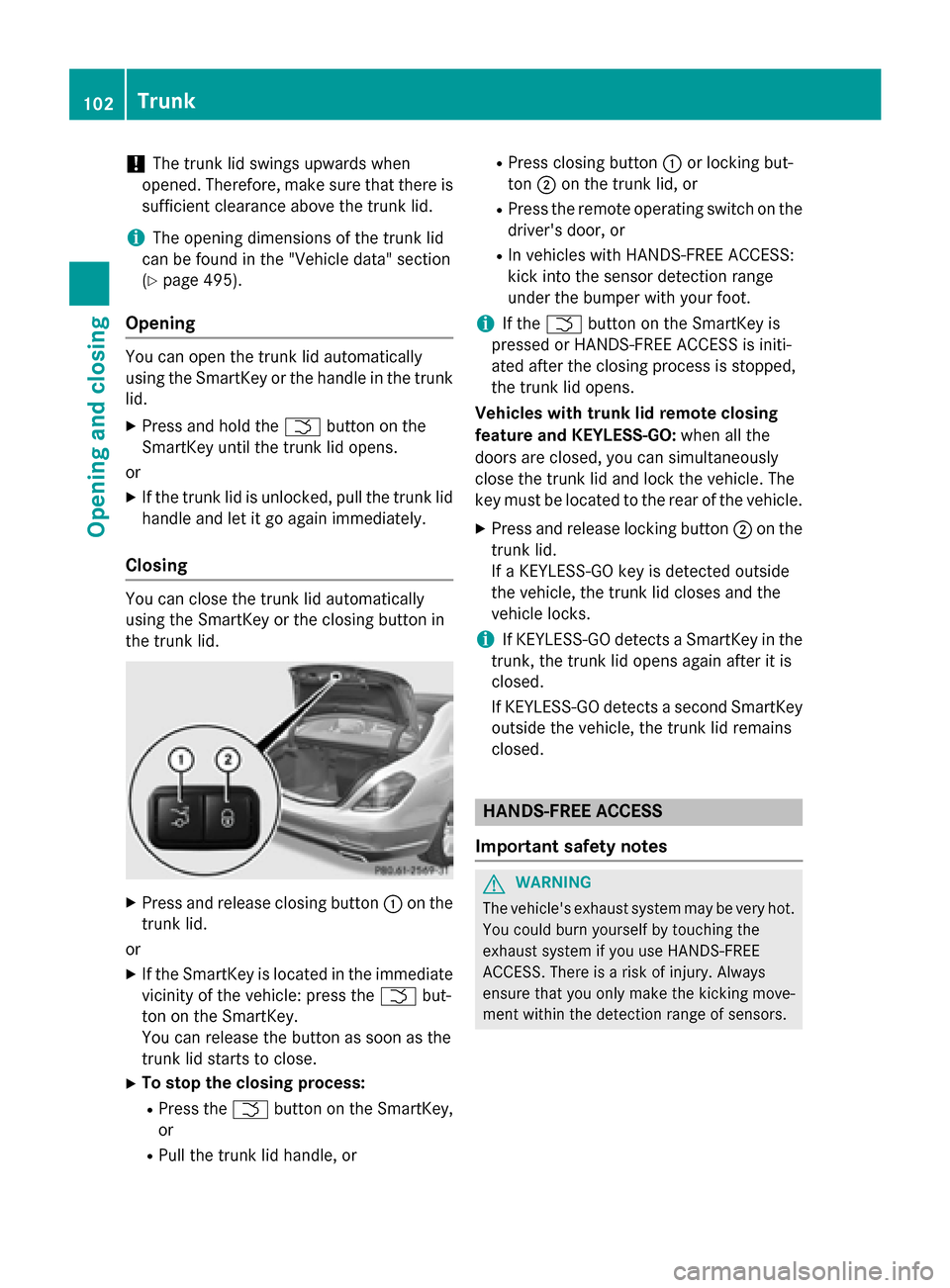
Closing You can close the trunk lid automatically
using the SmartKey or the closing button in
the trunk lid. X
Press and release closing button :on the
trunk lid.
or X If the SmartKey is located in the immediate
vicinity of the vehicle: press the Fbut-
ton on the SmartKey.
You can release the button as soon as the
trunk lid starts to close.
X To stop the closing process:
R Press the Fbutton on the SmartKey,
or
R Pull the trunk lid handle, or R
Press closing button :or locking but-
ton ;on the trunk lid, or
R Press the remote operating switch on the
driver's door, or
R In vehicles with HANDS-FREE ACCESS:
kick into the sensor detection range
under the bumper with your foot.
i If the
F button on the SmartKey is
pressed or HANDS-FREE ACCESS is initi-
ated after the closing process is stopped,
the trunk lid opens.
Vehicles with trunk lid remote closing
feature and KEYLESS-GO: when all the
doors are closed, you can simultaneously
close the trunk lid and lock the vehicle. The
key must be located to the rear of the vehicle.
X Press and release locking button ;on the
trunk lid.
If a KEYLESS-GO key is detected outside
the vehicle, the trunk lid closes and the
vehicle locks.
i If KEYLESS-GO detects a SmartKey in the
trunk, the trunk lid opens again after it is
closed.
If KEYLESS-GO detects a second SmartKey outside the vehicle, the trunk lid remains
closed. HANDS-FREE ACCESS
Important safety notes G
WARNING
The vehicle's exhaust system may be very hot. You could burn yourself by touching the
exhaust system if you use HANDS-FREE
ACCESS. There is a risk of injury. Always
ensure that you only make the kicking move-
ment within the detection range of sensors. 102
TrunkOpening and closing
Page 106 of 502
close. Repeat the leg movement more
quickly if this occurs.
To stop the opening or closing procedure:
R kick with your leg in the sensor detection
range :under the bumper or
R pull the handle on the outside of the trunk
lid or
R press the closing button in the trunk lid or
R press the Fbutton on the SmartKey
If the trunk lid closing procedure has been
stopped:
R move your foot under the bumper again and
the trunk lid will open.
If the trunk lid opening procedure has been
stopped:
R move your foot under the bumper again and
the trunk lid will close. Opening/closing automatically from
inside
Important safety notes G
WARNING
Parts of the body could become trapped dur-
ing automatic closing of the trunk lid. More-
over, people, e.g. children, may be standing in the closing area or may enter the closing area
during the closing process. There is a risk of
injury.
Make sure that nobody is in the vicinity of the closing area during the closing process.
Use one of the following options to stop the
closing process:
R press the Fbutton on the SmartKey.
R pull or press the remote operating switch
on the driver's door.
R press the closing or locking button on the
trunk lid.
R pull the trunk lid handle. G
WARNING
Combustion engines emit poisonous exhaust
gases such as carbon monoxide. Exhaust
gases can enter the vehicle interior if the
trunk lid is open when the engine is running,
especially if the vehicle is in motion. There is a risk of poisoning.
Always switch off the engine before opening
the trunk lid. Never drive with the trunk lid
open.
! The trunk lid swings upwards when
opened. Therefore, make sure that there is
sufficient clearance above the trunk lid.
i The opening dimensions of the trunk lid
can be found in the "Vehicle data" section
(Y page 495).
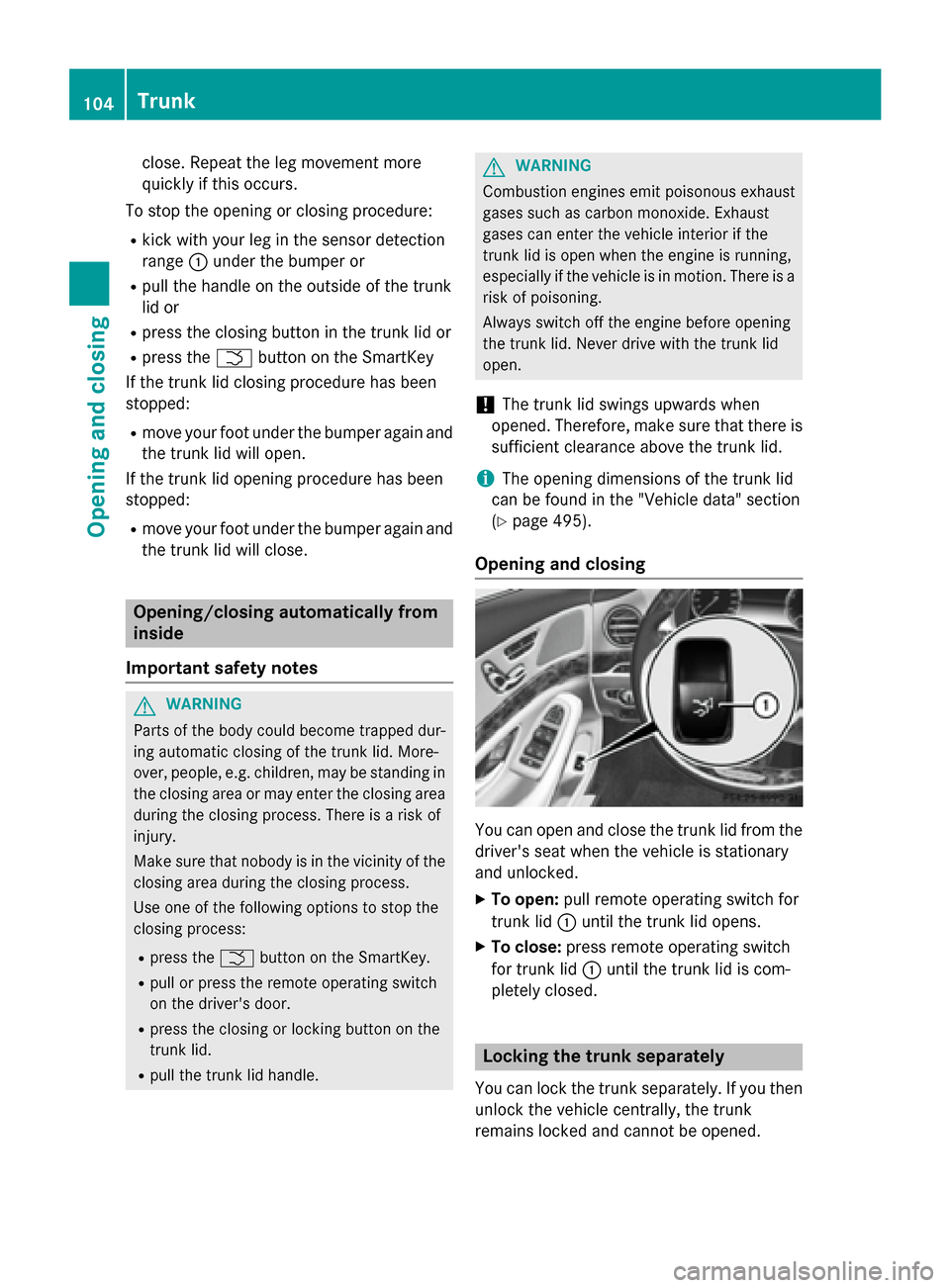
Opening and closing You can open and close the trunk lid from the
driver's seat when the vehicle is stationary
and unlocked.
X To open: pull remote operating switch for
trunk lid :until the trunk lid opens.
X To close: press remote operating switch
for trunk lid :until the trunk lid is com-
pletely closed. Locking the trunk separately
You can lock the trunk separately. If you then
unlock the vehicle centrally, the trunk
remains locked and cannot be opened. 104
TrunkOpening and closing
Page 107 of 502
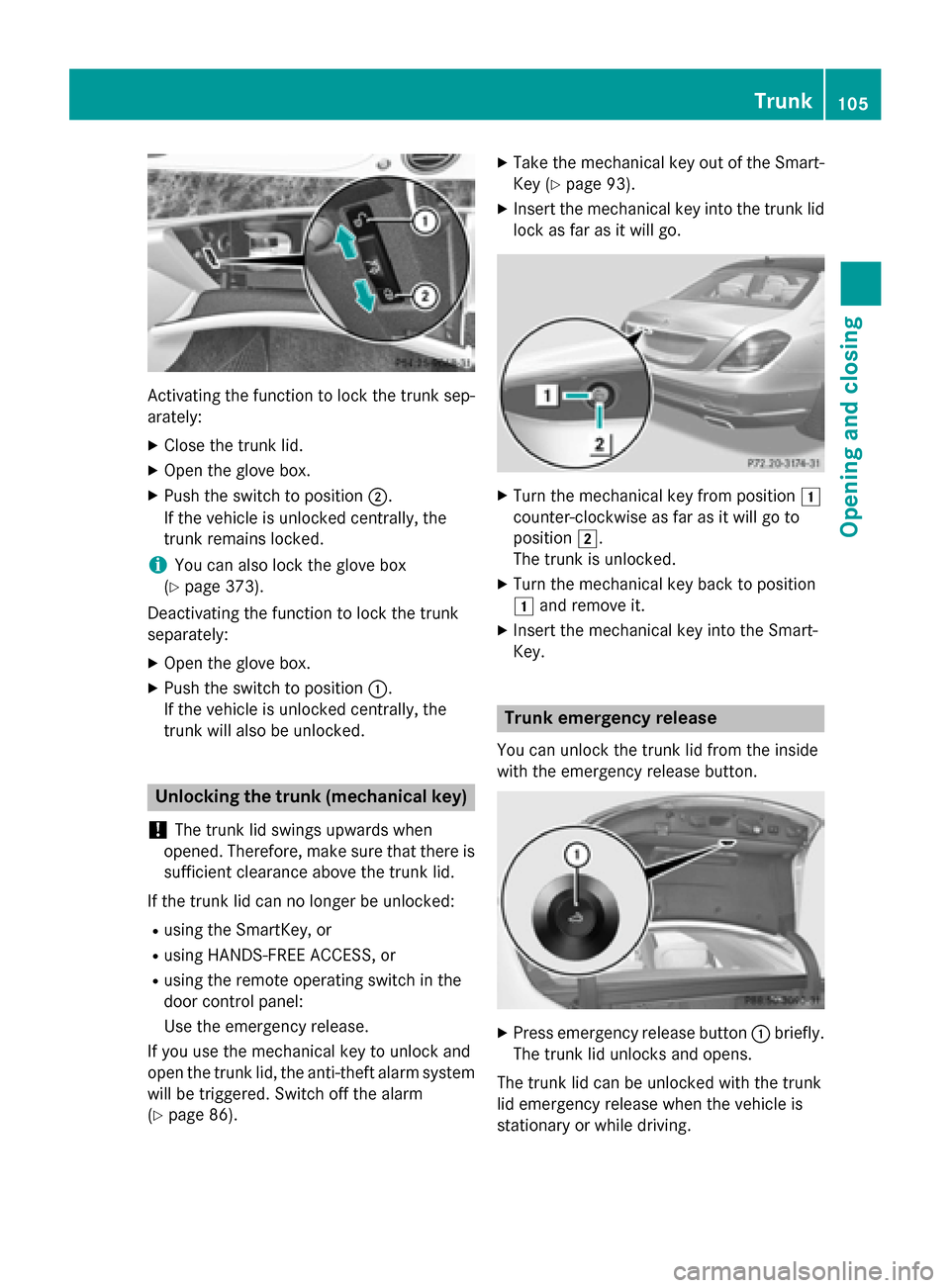
Activating the function to lock the trunk sep-
arately:
X Close the trunk lid.
X Open the glove box.
X Push the switch to position ;.
If the vehicle is unlocked centrally, the
trunk remains locked.
i You can also lock the glove box
(Y page 373).
Deactivating the function to lock the trunk
separately:
X Open the glove box.
X Push the switch to position :.
If the vehicle is unlocked centrally, the
trunk will also be unlocked. Unlocking the trunk (mechanical key)
! The trunk lid swings upwards when
opened. Therefore, make sure that there is sufficient clearance above the trunk lid.
If the trunk lid can no longer be unlocked: R using the SmartKey, or
R using HANDS-FREE ACCESS, or
R using the remote operating switch in the
door control panel:
Use the emergency release.
If you use the mechanical key to unlock and
open the trunk lid, the anti-theft alarm system
will be triggered. Switch off the alarm
(Y page 86). X
Take the mechanical key out of the Smart-
Key (Y page 93).
X Insert the mechanical key into the trunk lid
lock as far as it will go. X
Turn the mechanical key from position 1
counter-clockwise as far as it will go to
position 2.
The trunk is unlocked.
X Turn the mechanical key back to position
1 and remove it.
X Insert the mechanical key into the Smart-
Key. Trunk emergency release
You can unlock the trunk lid from the inside
with the emergency release button. X
Press emergency release button :briefly.
The trunk lid unlocks and opens.
The trunk lid can be unlocked with the trunk
lid emergency release when the vehicle is
stationary or while driving. Trunk
105Opening and closing Z
Page 108 of 502
The trunk lid emergency release does not
unlock the trunk lid if the battery is discon-
nected or discharged.
Trunk lid emergency release light:
R emergency release button :flashes for
30 minutes after the trunk lid is opened
R emergency release button :flashes for
60 minutes after the trunk lid is closed Side windows
Important safety notes
G
WARNING
While opening the side windows, body parts
could become trapped between the side win- dow and the door frame as the side window
moves. There is a risk of injury.
Make sure that nobody touches the side win-
dow during the opening procedure. If some-
body becomes trapped, release the switch or pull the switch to close the side window again. G
WARNING
While closing the side windows, body parts in the closing area could become trapped. There is a risk of injury.
When closing make sure that no parts of the
body are in the closing area. If somebody
becomes trapped, release the switch or press
the switch to open the side window again. G
WARNING
If children operate the side windows they
could become trapped, particularly if they are left unsupervised. There is a risk of injury.
Activate the override feature for the rear side
windows. When leaving the vehicle, always
take the SmartKey with you and lock the vehi-
cle. Never leave children unsupervised in the
vehicle. Side window reversing feature
The side windows are equipped with an auto- matic reversing feature. If a solid object
blocks or restricts a side window from trav-
eling upwards during automatic operation,
the side window opens again automatically.
During the manual closing process, the side
window only opens again automatically after
the corresponding switch is released. The
automatic reversing feature is only an aid and
is no substitute for your attention when clos- ing a side window. G
WARNING
The reversing feature does not react:
R to soft, light and thin objects, e.g. small fin-
gers
R while resetting
This means that the reversing feature cannot
prevent someone being trapped in these sit-
uations. There is a risk of injury.
Make sure that no body parts are in close
proximity during the closing procedure. If
someone becomes trapped, press the switch
to open the side window again. Opening and closing the side win-
dows
The switches for all side windows are located on the driver's door. There is also a switch on
each door for the corresponding side window.
The switches on the driver's door take prec-
edence. 106
Side windowsOpening and closing
Page 109 of 502
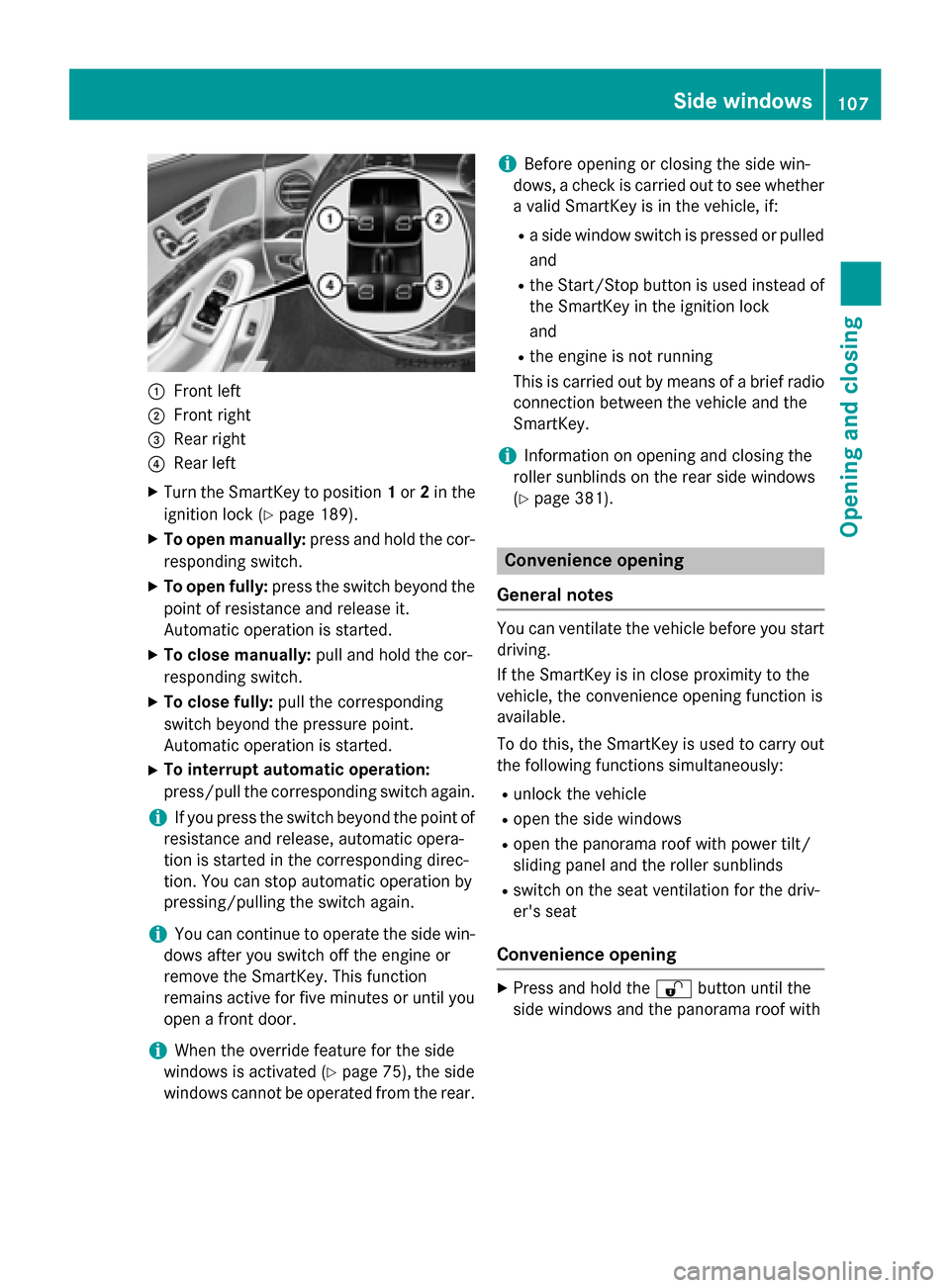
:
Front left
; Front right
= Rear right
? Rear left
X Turn the SmartKey to position 1or 2in the
ignition lock (Y page 189).
X To open manually: press and hold the cor-
responding switch.
X To open fully: press the switch beyond the
point of resistance and release it.
Automatic operation is started.
X To close manually: pull and hold the cor-
responding switch.
X To close fully: pull the corresponding
switch beyond the pressure point.
Automatic operation is started.
X To interrupt automatic operation:
press/pull the corresponding switch again.
i If you press the switch beyond the point of
resistance and release, automatic opera-
tion is started in the corresponding direc-
tion. You can stop automatic operation by
pressing/pulling the switch again.
i You can continue to operate the side win-
dows after you switch off the engine or
remove the SmartKey. This function
remains active for five minutes or until you
open a front door.
i When the override feature for the side
windows is activated (Y page 75), the side
windows cannot be operated from the rear. i
Before opening or closing the side win-
dows, a check is carried out to see whether a valid SmartKey is in the vehicle, if:
R a side window switch is pressed or pulled
and
R the Start/Stop button is used instead of
the SmartKey in the ignition lock
and
R the engine is not running
This is carried out by means of a brief radio connection between the vehicle and the
SmartKey.
i Information on opening and closing the
roller sunblinds on the rear side windows
(Y page 381). Convenience opening
General notes You can ventilate the vehicle before you start
driving.
If the SmartKey is in close proximity to the
vehicle, the convenience opening function is
available.
To do this, the SmartKey is used to carry out
the following functions simultaneously:
R unlock the vehicle
R open the side windows
R open the panorama roof with power tilt/
sliding panel and the roller sunblinds
R switch on the seat ventilation for the driv-
er's seat
Convenience opening X
Press and hold the %button until the
side windows and the panorama roof with Side windows
107Opening and closing Z
Page 110 of 502
power tilt/sliding panel are in the desired
position.
If the roller sunblinds of the panorama roof
with power tilt/sliding panel are closed, the roller sunblinds are opened first.
X Press and hold the %button again until
the panorama roof with power tilt/sliding
panel is in the desired position.
X To interrupt convenience opening:
release the %button. Convenience closing feature
Important safety notes G
WARNING
When the convenience closing feature is oper- ating, parts of the body could become trapped
in the closing area of the side window and the
sliding sunroof. There is a risk of injury.
Observe the complete closing procedure
when the convenience closing feature is oper-
ating. Make sure that no body parts are in
close proximity during the closing procedure.
When you lock the vehicle, you can simulta-
neously:
R close the side windows
R close the panorama roof with power tilt/
sliding panel
On vehicles with a panorama roof with power tilt/sliding panel, you can then close the
roller sunblinds.
i Notes on the automatic reversing feature
for:
R the side window (Y page 106)
R the panorama roof with power tilt/slid-
ing panel (Y page 111)
R the roller sunblinds (Y page 112)Using the SmartKey X
Press and hold the &button until the
side windows and the panorama roof with
power tilt/sliding panel are fully closed.
X Make sure that all the side windows and the
panorama roof with power tilt/sliding
panel are closed.
On vehicles with a panorama roof with power tilt/sliding panel:
X Press and hold the &button again until
the roller sunblinds of the panorama roof
with power tilt/sliding panel close.
X To interrupt convenience closing:
release the &button.
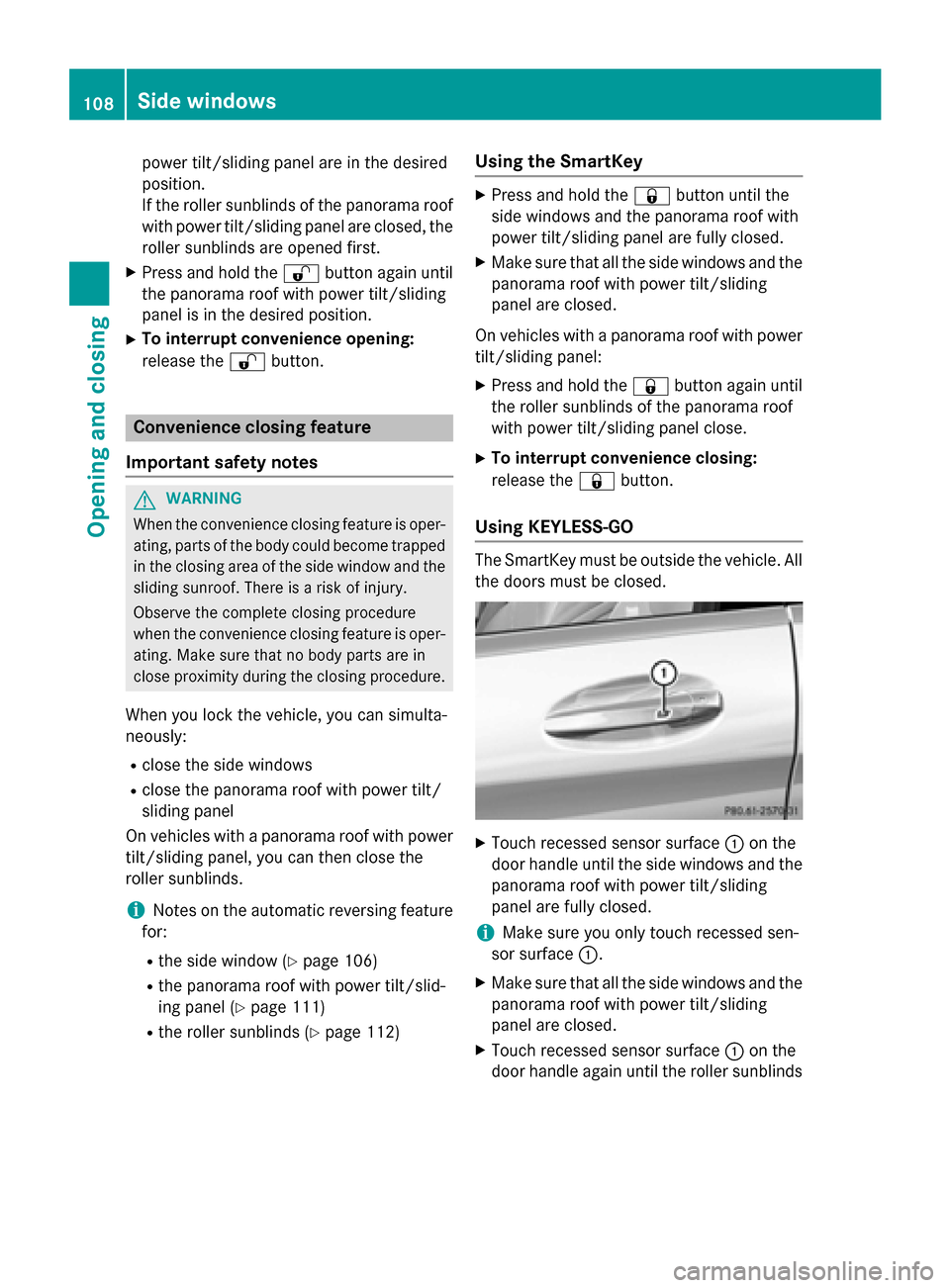
Using KEYLESS-GO The SmartKey must be outside the vehicle. All
the doors must be closed. X
Touch recessed sensor surface :on the
door handle until the side windows and the panorama roof with power tilt/sliding
panel are fully closed.
i Make sure you only touch recessed sen-
sor surface :.
X Make sure that all the side windows and the
panorama roof with power tilt/sliding
panel are closed.
X Touch recessed sensor surface :on the
door handle again until the roller sunblinds 108
Side windowsOpening and closing
Page 111 of 502
of the panorama roof with power tilt/slid-
ing panel close.
X To interrupt convenience closing:
release recessed sensor surface :on the
door handle. Resetting the side windows
If a side window can no longer be closed fully, you must reset it.
X Close all the doors.
X Turn the SmartKey to position 1or 2in the
ignition lock (Y page 189).
X Pull the corresponding switch on the door
control panel until the side window is com-
pletely closed (Y page 106).
X Hold the switch for an additional second.
If the side window opens again slightly: X Immediately pull the corresponding switch
on the door control panel until the side win-
dow is completely closed (Y page 106).
X Hold the switch for an additional second.
X If the respective side window remains
closed after the button is released, then it
has been set correctly. If this is not the
case, repeat the steps above again. Side windows
109Opening and closing Z
Page 114 of 502
operation is started in the corresponding
direction. You can stop automatic opera-
tion by pressing or pulling again.
i If the sliding sunroof is raised at the rear,
it lowers slightly automatically at higher
speeds. The noise level in the vehicle inte-
rior is reduced as a result.
At low speeds it raises again automatically.
You can also temporarily deactivate auto-
matic lowering. To do so, press the 3
switch. The sliding sunroof raises again
automatically.
i You can continue to operate the sliding
sunroof after switching off the engine or
removing the SmartKey from the ignition
lock. This function remains active for five
minutes or until you open a front door.
i The sliding sunroof cannot be opened if a
roof carrier is installed. In order to allow
ventilation of the vehicle interior, you can
raise the sliding sunroof.
If contact is made with a roof carrier
approved by Mercedes-Benz, the sliding
sunroof lowers slightly but remains raised
at the rear .
i Before opening, raising or closing the slid-
ing sunroof, a check is carried out to see
whether a valid SmartKey is in the vehicle,
if:
R the 3 switch is pressed or pulled
and
R the Start/Stop button is used instead of
the SmartKey in the ignition lock
and
R the engine is not running
This is carried out by means of a brief radio connection between the vehicle and the
SmartKey. Rain-closing feature The raised sliding sunroof automatically low-
ers at the rear when driving if it starts to rain.
The sliding sunroof is lowered depending on:
R the road speed and
R the intensity of the rain.
You can manually cancel the automatic clos-
ing procedure. Press or pull the 3switch
in any direction.
To raise the sliding sunroof again, press the
3 switch in direction :. The rain-closing
feature remains activated. Operating the roller sunblinds for the
sliding sunroof
Important safety notes G
WARNING
When opening or closing the roller sunblind,
parts of the body could be trapped between
the roller sunblind and the frame or sliding
sunroof. There is a risk of injury.
When opening or closing make sure that no
parts of the body are in the sweep of the roller sunblind.
If somebody becomes trapped:
R release the switch immediately, or
R during automatic operation, push the
switch briefly in any direction
The opening or closing procedure will be stop-
ped.
The roller sunblinds shield the vehicle interior from sunlight. The front roller sunblind can
only be opened and closed when the sliding
sunroof is closed.
Roller sunblind reversing feature The roller sunblinds are equipped with an
automatic reversing feature. If a solid object
blocks or restricts a roller sunblind during the
closing process, the roller sunblind opens
again automatically. The automatic reversing 112
Panorama roof with power tilt/sliding panelOpening and closing
Page 137 of 502
ability to react to excessively high tempera-
tures may be affected or they may even suffer burn-like injuries. There is a risk of injury.
Therefore, do not switch the seat heating on
repeatedly.
For vehicles equipped with the Warmth Com-
fort package: the armrest in the door and the center console can also be heated when you
switch on the seat heating of one of the front
seats. This can be set with COMAND (see the
separate operating instructions).
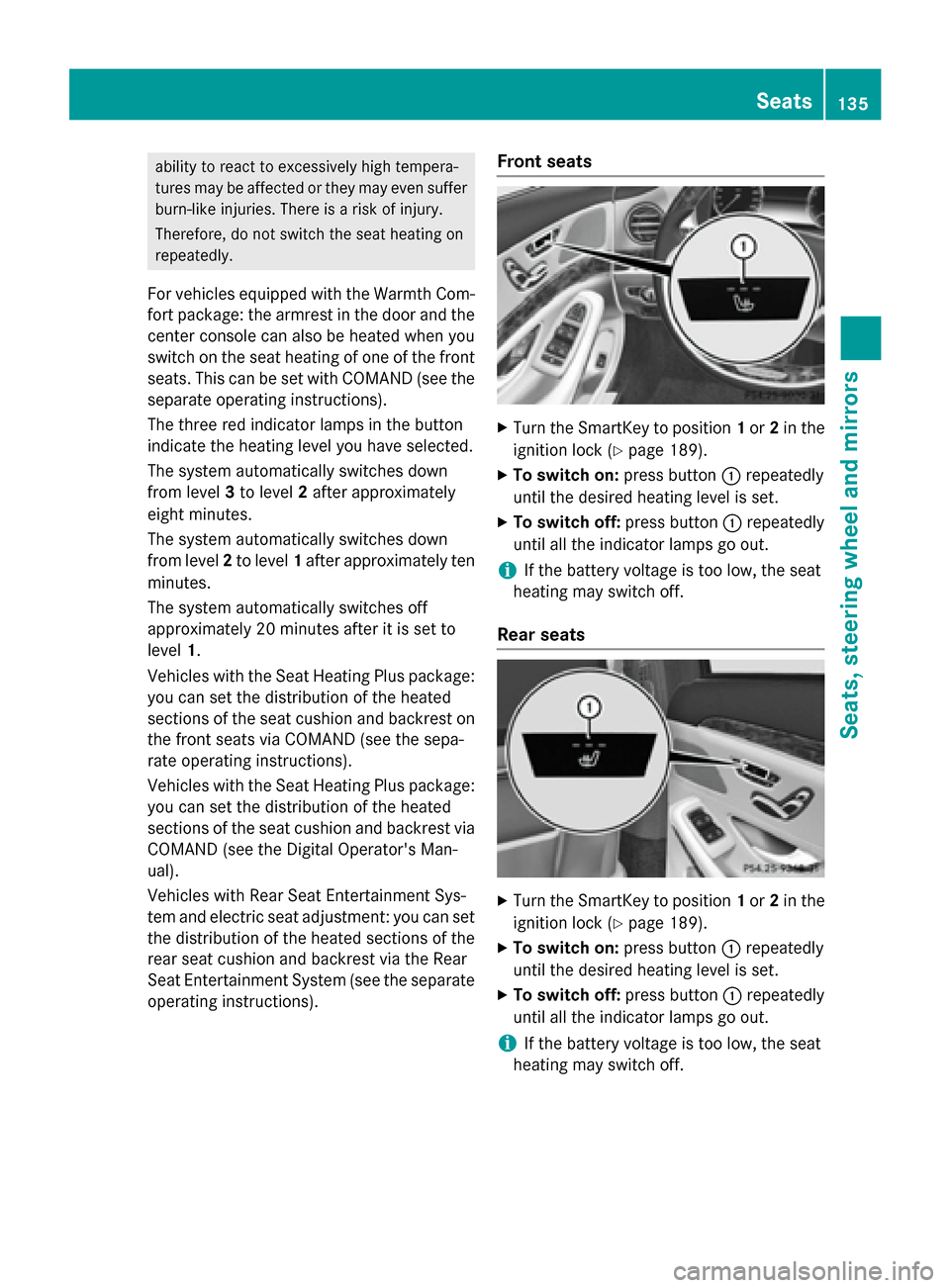
The three red indicator lamps in the button
indicate the heating level you have selected.
The system automatically switches down
from level 3to level 2after approximately
eight minutes.
The system automatically switches down
from level 2to level 1after approximately ten
minutes.
The system automatically switches off
approximately 20 minutes after it is set to
level 1.
Vehicles with the Seat Heating Plus package: you can set the distribution of the heated
sections of the seat cushion and backrest on the front seats via COMAND (see the sepa-
rate operating instructions).
Vehicles with the Seat Heating Plus package: you can set the distribution of the heated
sections of the seat cushion and backrest via
COMAND (see the Digital Operator's Man-
ual).
Vehicles with Rear Seat Entertainment Sys-
tem and electric seat adjustment: you can set
the distribution of the heated sections of the rear seat cushion and backrest via the Rear
Seat Entertainment System (see the separate operating instructions). Front seats X
Turn the SmartKey to position 1or 2in the
ignition lock (Y page 189).
X To switch on: press button:repeatedly
until the desired heating level is set.
X To switch off: press button:repeatedly
until all the indicator lamps go out.
i If the battery voltage is too low, the seat
heating may switch off.
Rear seats X
Turn the SmartKey to position 1or 2in the
ignition lock (Y page 189).
X To switch on: press button:repeatedly
until the desired heating level is set.
X To switch off: press button:repeatedly
until all the indicator lamps go out.
i If the battery voltage is too low, the seat
heating may switch off. Seats
135Seats, steering wheel and mirrors Z