trunk MERCEDES-BENZ S-Class 2015 W222 Owner's Guide
[x] Cancel search | Manufacturer: MERCEDES-BENZ, Model Year: 2015, Model line: S-Class, Model: MERCEDES-BENZ S-Class 2015 W222Pages: 502, PDF Size: 9.59 MB
Page 106 of 502
close. Repeat the leg movement more
quickly if this occurs.
To stop the opening or closing procedure:
R kick with your leg in the sensor detection
range :under the bumper or
R pull the handle on the outside of the trunk
lid or
R press the closing button in the trunk lid or
R press the Fbutton on the SmartKey
If the trunk lid closing procedure has been
stopped:
R move your foot under the bumper again and
the trunk lid will open.
If the trunk lid opening procedure has been
stopped:
R move your foot under the bumper again and
the trunk lid will close. Opening/closing automatically from
inside
Important safety notes G
WARNING
Parts of the body could become trapped dur-
ing automatic closing of the trunk lid. More-
over, people, e.g. children, may be standing in the closing area or may enter the closing area
during the closing process. There is a risk of
injury.
Make sure that nobody is in the vicinity of the closing area during the closing process.
Use one of the following options to stop the
closing process:
R press the Fbutton on the SmartKey.
R pull or press the remote operating switch
on the driver's door.
R press the closing or locking button on the
trunk lid.
R pull the trunk lid handle. G
WARNING
Combustion engines emit poisonous exhaust
gases such as carbon monoxide. Exhaust
gases can enter the vehicle interior if the
trunk lid is open when the engine is running,
especially if the vehicle is in motion. There is a risk of poisoning.
Always switch off the engine before opening
the trunk lid. Never drive with the trunk lid
open.
! The trunk lid swings upwards when
opened. Therefore, make sure that there is
sufficient clearance above the trunk lid.
i The opening dimensions of the trunk lid
can be found in the "Vehicle data" section
(Y page 495).
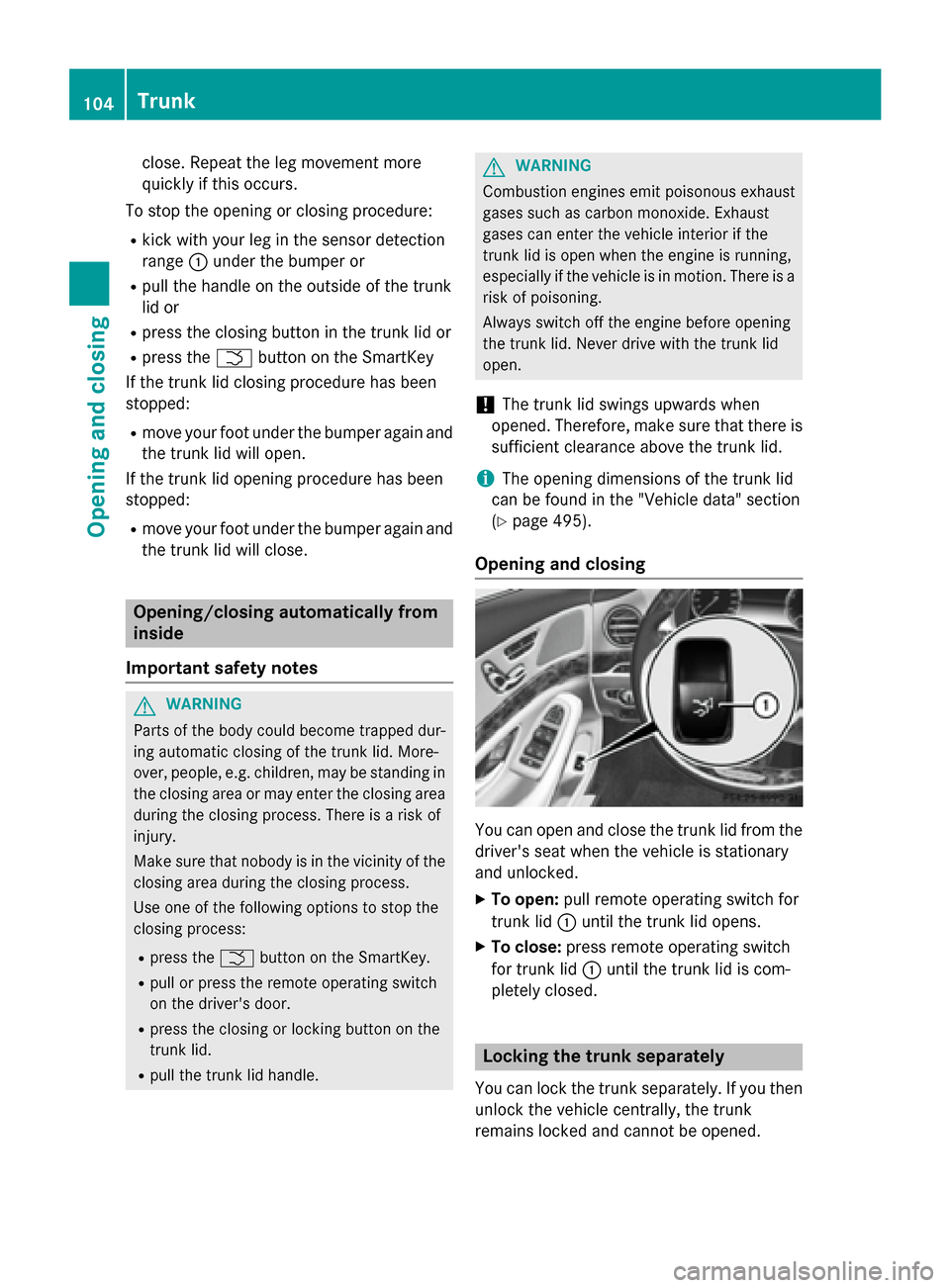
Opening and closing You can open and close the trunk lid from the
driver's seat when the vehicle is stationary
and unlocked.
X To open: pull remote operating switch for
trunk lid :until the trunk lid opens.
X To close: press remote operating switch
for trunk lid :until the trunk lid is com-
pletely closed. Locking the trunk separately
You can lock the trunk separately. If you then
unlock the vehicle centrally, the trunk
remains locked and cannot be opened. 104
TrunkOpening and closing
Page 107 of 502
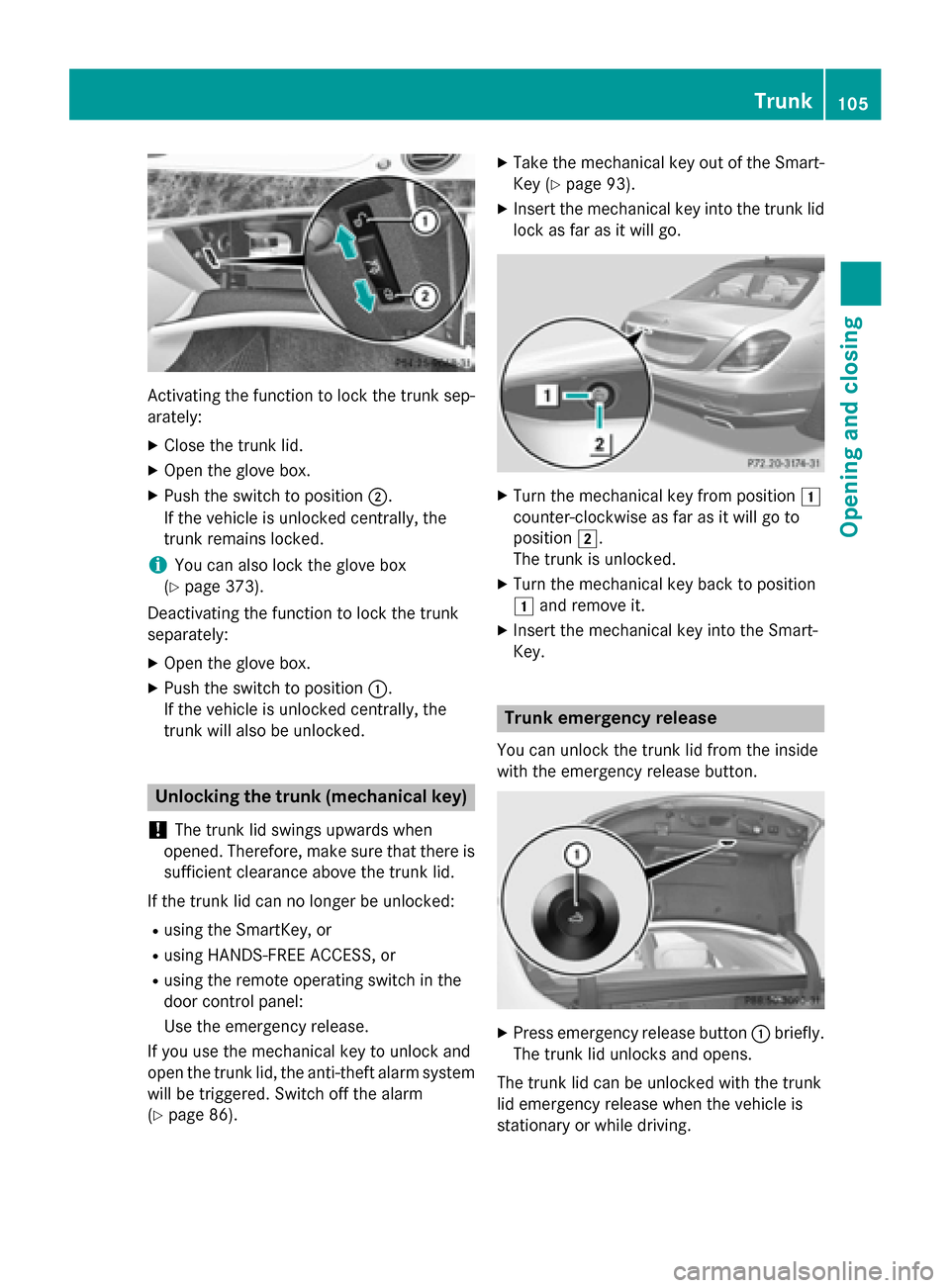
Activating the function to lock the trunk sep-
arately:
X Close the trunk lid.
X Open the glove box.
X Push the switch to position ;.
If the vehicle is unlocked centrally, the
trunk remains locked.
i You can also lock the glove box
(Y page 373).
Deactivating the function to lock the trunk
separately:
X Open the glove box.
X Push the switch to position :.
If the vehicle is unlocked centrally, the
trunk will also be unlocked. Unlocking the trunk (mechanical key)
! The trunk lid swings upwards when
opened. Therefore, make sure that there is sufficient clearance above the trunk lid.
If the trunk lid can no longer be unlocked: R using the SmartKey, or
R using HANDS-FREE ACCESS, or
R using the remote operating switch in the
door control panel:
Use the emergency release.
If you use the mechanical key to unlock and
open the trunk lid, the anti-theft alarm system
will be triggered. Switch off the alarm
(Y page 86). X
Take the mechanical key out of the Smart-
Key (Y page 93).
X Insert the mechanical key into the trunk lid
lock as far as it will go. X
Turn the mechanical key from position 1
counter-clockwise as far as it will go to
position 2.
The trunk is unlocked.
X Turn the mechanical key back to position
1 and remove it.
X Insert the mechanical key into the Smart-
Key. Trunk emergency release
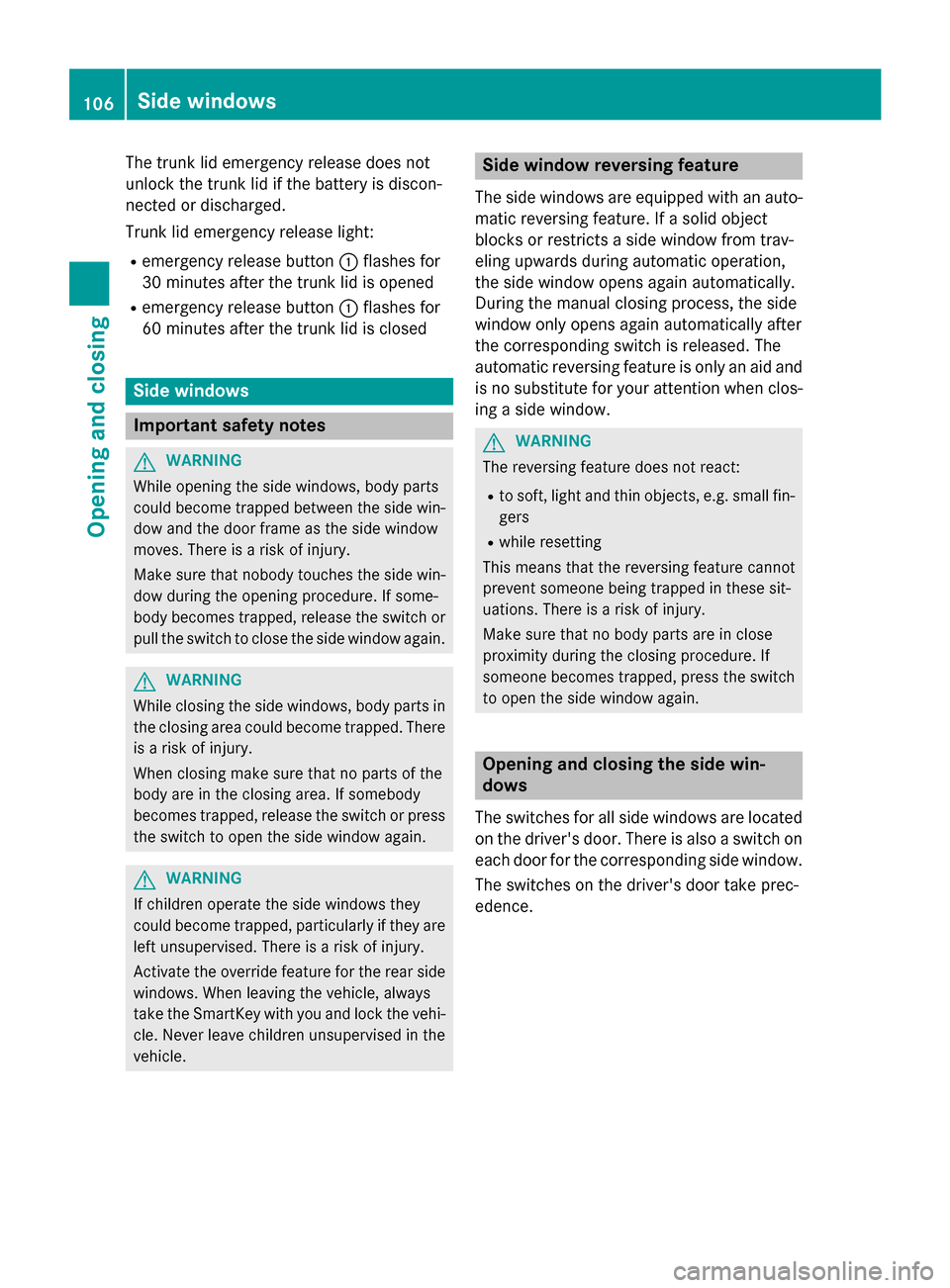
You can unlock the trunk lid from the inside
with the emergency release button. X
Press emergency release button :briefly.
The trunk lid unlocks and opens.
The trunk lid can be unlocked with the trunk
lid emergency release when the vehicle is
stationary or while driving. Trunk
105Opening and closing Z
Page 108 of 502
The trunk lid emergency release does not
unlock the trunk lid if the battery is discon-
nected or discharged.
Trunk lid emergency release light:
R emergency release button :flashes for
30 minutes after the trunk lid is opened
R emergency release button :flashes for
60 minutes after the trunk lid is closed Side windows
Important safety notes
G
WARNING
While opening the side windows, body parts
could become trapped between the side win- dow and the door frame as the side window
moves. There is a risk of injury.
Make sure that nobody touches the side win-
dow during the opening procedure. If some-
body becomes trapped, release the switch or pull the switch to close the side window again. G
WARNING
While closing the side windows, body parts in the closing area could become trapped. There is a risk of injury.
When closing make sure that no parts of the
body are in the closing area. If somebody
becomes trapped, release the switch or press
the switch to open the side window again. G
WARNING
If children operate the side windows they
could become trapped, particularly if they are left unsupervised. There is a risk of injury.
Activate the override feature for the rear side
windows. When leaving the vehicle, always
take the SmartKey with you and lock the vehi-
cle. Never leave children unsupervised in the
vehicle. Side window reversing feature
The side windows are equipped with an auto- matic reversing feature. If a solid object
blocks or restricts a side window from trav-
eling upwards during automatic operation,
the side window opens again automatically.
During the manual closing process, the side
window only opens again automatically after
the corresponding switch is released. The
automatic reversing feature is only an aid and
is no substitute for your attention when clos- ing a side window. G
WARNING
The reversing feature does not react:
R to soft, light and thin objects, e.g. small fin-
gers
R while resetting
This means that the reversing feature cannot
prevent someone being trapped in these sit-
uations. There is a risk of injury.
Make sure that no body parts are in close
proximity during the closing procedure. If
someone becomes trapped, press the switch
to open the side window again. Opening and closing the side win-
dows
The switches for all side windows are located on the driver's door. There is also a switch on
each door for the corresponding side window.
The switches on the driver's door take prec-
edence. 106
Side windowsOpening and closing
Page 214 of 502
The charging cable and connector will only
heat up within the permissible limiting values,
provided that:
R the power supply and the charging cable
are not damaged
R the instructions for handling the charging
cable and controls on the charging cable
are observed
If the charging cable or plug get too hot, have the mains power supply checked.
Protection device against overvoltage !
Overvoltage in the mains supply may
damage the vehicle. For this reason, the
vehicle is equipped with a protection device
against overvoltage in the mains supply.
This device may be triggered during severe thunderstorms, for example, and may lead
to the building's fuse being tripped and an
interruption in the power supply. These
functions protect the vehicle. After the
building fuse is switched on again, the
charging process resumes automatically.
Following an interruption in the power sup-
ply or tripping of the building's fuse, it may take up to 10 minutes for charging to
resume automatically.
Switch on the building's fuse again after it has
been triggered. Otherwise, the charging proc-
ess cannot be continued.
General information about the charging
procedure Pay attention to the important safety notes
(Y
page 209).
If you unlock/lock the vehicle from the out-
side, the charge socket flap also unlocks/
locks.
The charge socket flap is behind the bumper
on the right-hand side below the rear lamp
cluster. Charging the high-voltage battery via
the electrical outlet
Charging cable for mains sockets Important safety notes
! Only use the charging cable to charge the
high-voltage battery. Do not use the charg-
ing cable for other purposes. It may other-
wise be damaged.
A charging cable for connection to the mains
socket is included with the vehicle. Only use
the charging cable included with the vehicle
or charging cables that have been approved
for the vehicle.
i If you use the supplied 12 A charging
cable to charge a high-voltage battery:
R the charge time increases considerably
R electrical consumption increases consid-
erably
Where possible, charge the high-voltage
battery at a charging station (Y page 216).
Only then can certified electrical energy
consumption levels be reached.
i The charging process can vary depending
on the power supply. Therefore, always
observe the local information.
i For short charge times (charging with
16A), connect the fast-charging cable to
the wallbox/charging station. You can also
use the optionally available charging cable
with the CE plug.
Information about charging from a wallbox
can be found at (Y page 215).
Information about charging at a charging sta-
tion can be found at (Y page 216).
Stowing the charging cable
The charging cable can be stowed in the bag
supplied in the trunk of the vehicle and held in place with the Velcro fastener. 212
Charging the high-voltage battery (plug-in hybrid vehicles)Driving and parking
Page 217 of 502
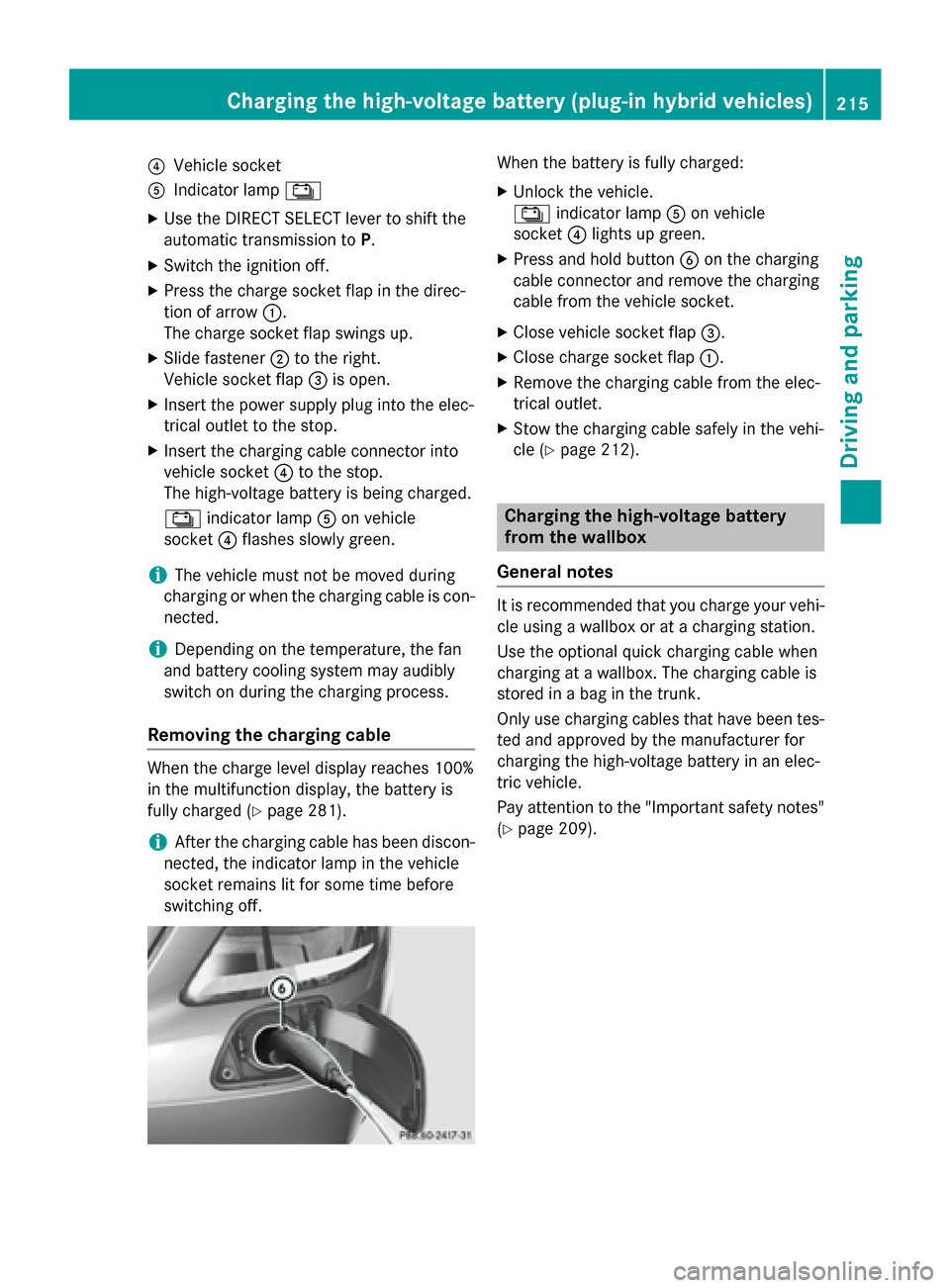
?
Vehicle socket
A Indicator lamp Ý
X Use the DIRECT SELECT lever to shift the
automatic transmission to P.
X Switch the ignition off.
X Press the charge socket flap in the direc-
tion of arrow :.
The charge socket flap swings up.
X Slide fastener ;to the right.
Vehicle socket flap =is open.
X Insert the power supply plug into the elec-
trical outlet to the stop.
X Insert the charging cable connector into
vehicle socket ?to the stop.
The high-voltage battery is being charged.
Ý indicator lamp Aon vehicle
socket ?flashes slowly green.
i The vehicle must not be moved during
charging or when the charging cable is con- nected.
i Depending on the temperature, the fan
and battery cooling system may audibly
switch on during the charging process.
Removing the charging cable When the charge level display reaches 100%
in the multifunction display, the battery is
fully charged (Y page 281).
i After the charging cable has been discon-
nected, the indicator lamp in the vehicle
socket remains lit for some time before
switching off. When the battery is fully charged:
X Unlock the vehicle.
Ý indicator lamp Aon vehicle
socket ?lights up green.
X Press and hold button Bon the charging
cable connector and remove the charging
cable from the vehicle socket.
X Close vehicle socket flap =.
X Close charge socket flap :.
X Remove the charging cable from the elec-
trical outlet.
X Stow the charging cable safely in the vehi-
cle (Y page 212). Charging the high-voltage battery
from the wallbox
General notes It is recommended that you charge your vehi-
cle using a wallbox or at a charging station.
Use the optional quick charging cable when
charging at a wallbox. The charging cable is
stored in a bag in the trunk.
Only use charging cables that have been tes- ted and approved by the manufacturer for
charging the high-voltage battery in an elec-
tric vehicle.
Pay attention to the "Important safety notes"
(Y page 209). Charging the high-voltage battery (plug-in hybrid vehicles)
215Driving and parking Z
Page 225 of 502
The electric parking brake is also engaged
automatically if:
R DISTRONIC PLUS brings the vehicle to a
standstill or
R the HOLD function is keeping the vehicle
stationary
R Active Parking Assist is holding the vehicle
at a standstill
In addition, at least one of the following con-
ditions must be fulfilled:
R there is a system malfunction.
R the power supply is insufficient.
R the vehicle is stationary for a lengthy
period.
The red F(USA only) or !(Canada
only) indicator lamp in the instrument cluster
lights up.
The electric parking brake is not automati-
cally engaged if the engine is switched off by the ECO start/stop function.
Releasing automatically The electric parking brake is released auto-
matically when all of the following conditions
are fulfilled:
R the engine is running.
R the transmission is in position Dor R.
R the seat belt has been fastened.
R you depress the accelerator pedal.
If the automatic transmission is in position R,
the trunk lid must be closed.
If your seat belt is not fastened, the following conditions must be fulfilled to automatically
release the electric parking brake:
R the driver's door is closed.
R you have shifted out of transmission posi-
tion Por you have previously driven faster
than 2 mph (3 km/h).
Ensure that you do not depress the acceler-
ator pedal unintentionally. Otherwise the
parking brake will be released and the vehicle
will start to move. Emergency braking The vehicle can also be braked during an
emergency by using the electric parking
brake.
X While driving, push handle :of the electric
parking brake (Y page 222).
The vehicle is braked as long as you keep
handle :of the electric parking brake
pressed. The longer electric parking brake
handle :is depressed, the greater the brak-
ing force.
During braking:
R a warning tone sounds
R the Release parking brake Release parking brake message
appears
R the red F(USA only) or !(Canada
only) indicator lamp in the instrument clus- ter flashes
When the vehicle has been braked to a stand- still, the electric parking brake is engaged. Parking the vehicle for a long period
If you leave the vehicle parked for longer than
four weeks, the battery may be damaged by
exhaustive discharging and further damaged
in the event of this occurring again.
X Connect a trickle charger.
i You can obtain information about trickle
chargers from a qualified specialist work-
shop.
If you leave the vehicle parked for longer than
six weeks, the vehicle may suffer damage as a result of lack of use.
X Visit a qualified specialist workshop and
seek advice.
PLUG-IN HYBRID vehicles: observe the
important safety notes for the high-voltage
battery (Y page 429). Parking
223Driving and parking Z
Page 258 of 502
shows the
Park Assist Canceled
Park Assist Canceled mes-
sage.
When Active Parking Assist is canceled, you
must steer and brake again yourself.
If a system malfunction occurs, the vehicle is braked to a standstill. To drive on, depress the
accelerator again. Rear view camera
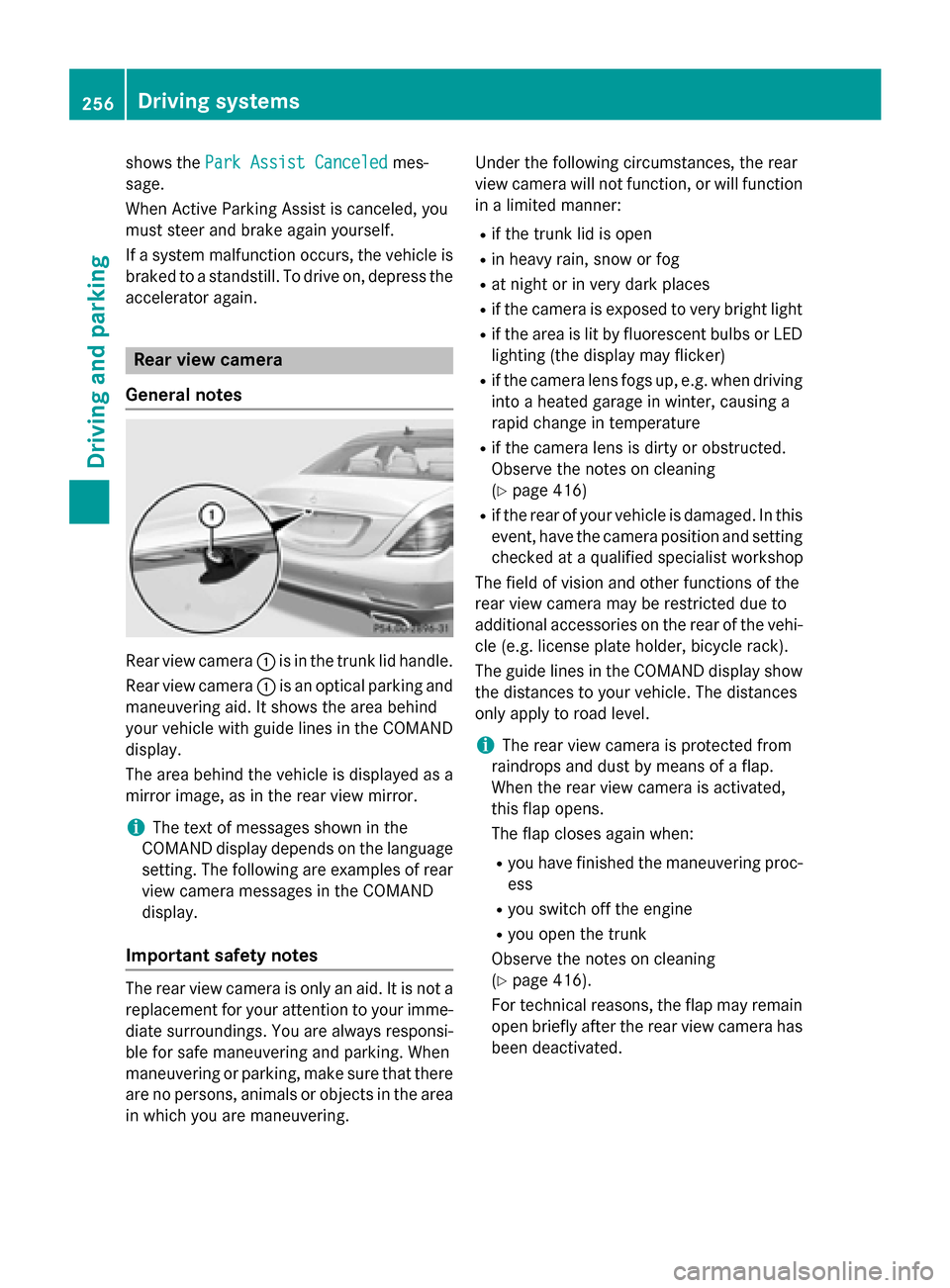
General notes Rear view camera
:is in the trunk lid handle.
Rear view camera :is an optical parking and
maneuvering aid. It shows the area behind
your vehicle with guide lines in the COMAND
display.
The area behind the vehicle is displayed as a
mirror image, as in the rear view mirror.
i The text of messages shown in the
COMAND display depends on the language
setting. The following are examples of rear view camera messages in the COMAND
display.
Important safety notes The rear view camera is only an aid. It is not a
replacement for your attention to your imme-
diate surroundings. You are always responsi-
ble for safe maneuvering and parking. When
maneuvering or parking, make sure that there are no persons, animals or objects in the area in which you are maneuvering. Under the following circumstances, the rear
view camera will not function, or will function
in a limited manner:
R if the trunk lid is open
R in heavy rain, snow or fog
R at night or in very dark places
R if the camera is exposed to very bright light
R if the area is lit by fluorescent bulbs or LED
lighting (the display may flicker)
R if the camera lens fogs up, e.g. when driving
into a heated garage in winter, causing a
rapid change in temperature
R if the camera lens is dirty or obstructed.
Observe the notes on cleaning
(Y page 416)
R if the rear of your vehicle is damaged. In this
event, have the camera position and setting checked at a qualified specialist workshop
The field of vision and other functions of the
rear view camera may be restricted due to
additional accessories on the rear of the vehi-
cle (e.g. license plate holder, bicycle rack).
The guide lines in the COMAND display show
the distances to your vehicle. The distances
only apply to road level.
i The rear view camera is protected from
raindrops and dust by means of a flap.
When the rear view camera is activated,
this flap opens.
The flap closes again when:
R you have finished the maneuvering proc-
ess
R you switch off the engine
R you open the trunk
Observe the notes on cleaning
(Y page 416).
For technical reasons, the flap may remain
open briefly after the rear view camera has
been deactivated. 256
Driving systemsDriving and parking
Page 262 of 502
Object detection
The rear view camera can detect moving and
stationary objects. If, for example, a pedes-
trian or another vehicle is detected, these
objects are marked with bars. The system is
only able to detect and mark stationary
objects when your vehicle is moving. When
the vehicle is stationary, moving objects can
be detected and marked.
To ensure that you can use the function, it
must be switched on in COMAND (see the
separate operating instructions). 360° camera (surround view)
General notes The 360° camera is a system consisting of
four cameras.
The system analyzes images from the follow- ing cameras:
R Rear view camera
R Front camera
R Two side cameras in the exterior mirrors
The cameras capture the immediate sur-
roundings of the vehicle. The 360° camera
assists you, for instance when parking or at
exits with reduced visibility.
The 360° camera images can be shown in full screen mode or in seven different split-screenviews on the COMAND display. A split-screen
view also includes a top view of the vehicle.
This view is calculated from the data supplied by the installed cameras (virtual camera).
The seven split-screen views are: R top view and picture from the rear view
camera (130° viewing angle)
R top view and image from the front camera
(130° viewing angle without displaying the
maximum steering wheel angle)
R top view and enlarged rear view
R top view and enlarged front view
R top view and trailer view (vehicles with
trailer tow hitch) R
top view and images from the rear-facing
side cameras (rear wheel view)
R top view and images from the forward-
facing side cameras (front wheel view)
When the function is active and you shift the
transmission from Dor Rto N, the guide lines
in the COMAND display are hidden.
When you change between transmission
positions Dand R, you see the previously
selected front or rear view.
Important safety notes The 360°camera is only an aid and may show
a distorted view of obstacles, show them
incorrectly or not at all. The 360°camera is
not a substitute for attentive driving.
You are always responsible for safe maneu-
vering and parking. When maneuvering or
parking, make sure that there are no persons, animals or objects in the area in which you are
maneuvering.
You are always responsible for safety, and
must always pay attention to your surround-
ings when parking and maneuvering. This
applies to the areas behind, in front of and
beside the vehicle. You could otherwise
endanger yourself and others.
The 360° camera will not function or will
function in a limited manner:
R if the doors are open
R if the exterior mirrors are folded in
R if the trunk lid is open
R in heavy rain, snow or fog
R at night or in very dark places
R if the cameras are exposed to very bright
light
R if the area is lit by fluorescent bulbs or LED
lighting (the display may flicker)
R if the camera lenses fog up, e.g. when driv-
ing into a heated garage in winter, causing
a rapid change in temperature 260
Driving systemsDriving and parking
Page 264 of 502
Activating the 360° camera using
reverse gear The 360° camera images can be automati-
cally displayed by engaging reverse gear.
X Make sure that the SmartKey is in position
2 in the ignition lock.
X Make sure that the Activation by R
Activation by R
gear gear function is selected in COMAND (see
separate operating instructions).
X To show the 360° camera image: engage
reverse gear.
The area behind the vehicle is shown in the
COMAND display in split-screen mode. You see the top view of the vehicle and the
image from the rear view camera.
Selecting the split-screen and full
screen displays Switching between split screen views:
X To switch to the line with the vehicle icons:
slide ZVthe controller.
X To select a vehicle icon: turn the controller.
Switching to full screen mode:
X 180° View
180° View Turn and press the controller.
i The 180° option is only available in the
following views:
R Top view with picture from the rear view
camera
R Top view with picture from the front cam-
era
Displays in the COMAND display Important safety notes
The camera system may show a distorted
view of obstacles, show them incorrectly or
not at all. Obstacles are not shown by the
system in the following locations:
R under the front and rear bumpers
R very close to the front and rear bumpers
R in close range above the handle on the
trunk lid R
very close to the exterior mirrors
R in the transitional areas between the vari-
ous cameras in the virtual top view
! Objects not at ground level may appear to
be further away than they actually are, e.g.:
R the bumper of a parked vehicle
R the drawbar of a trailer
R the ball coupling of a trailer tow hitch
R the rear section of an HGV
R a slanted post
Use the guidelines only for orientation.
Approach objects no further than the bot-
tom-most guideline.
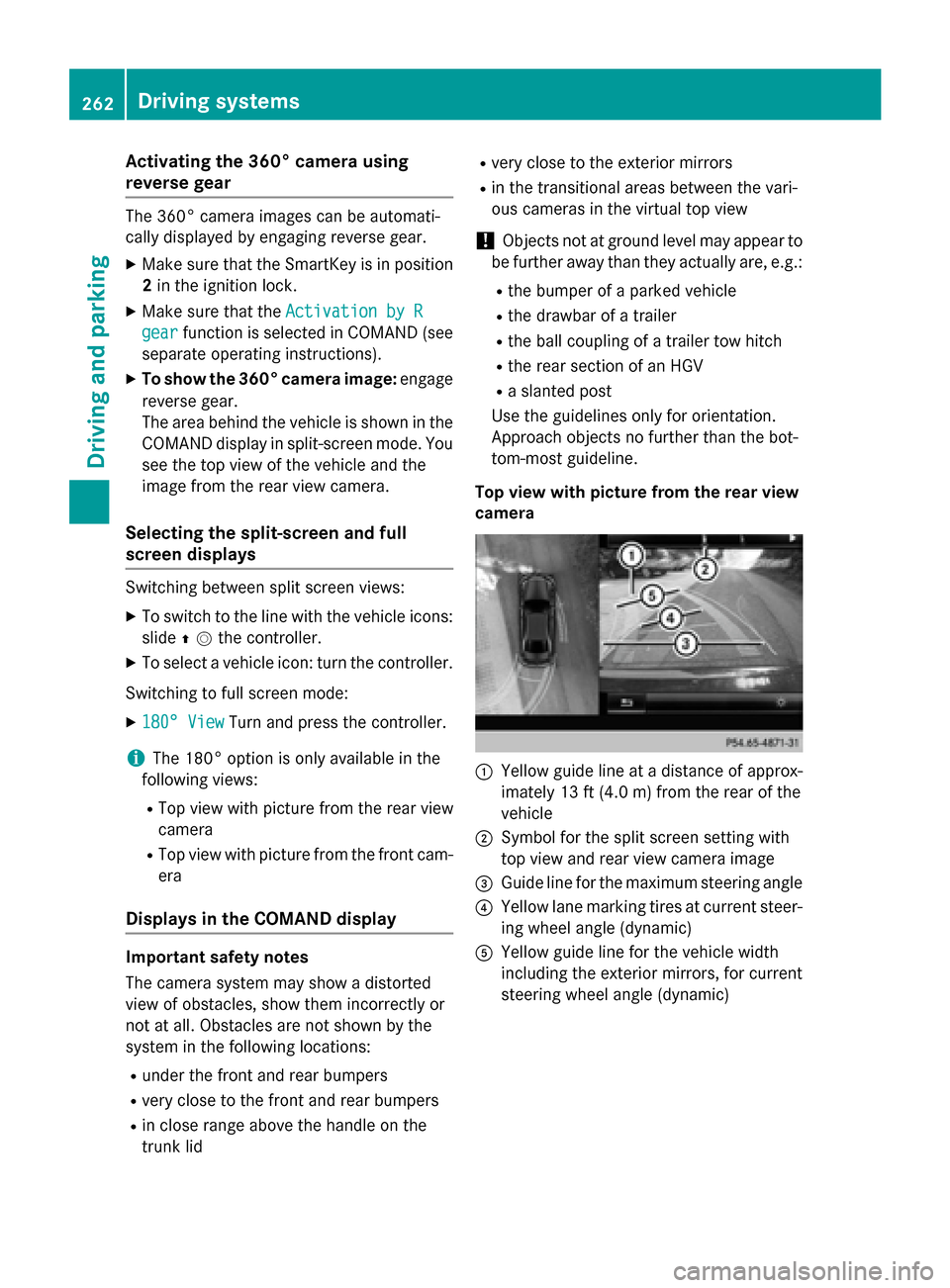
Top view with picture from the rear view
camera :
Yellow guide line at a distance of approx-
imately 13 ft (4.0 m) from the rear of the
vehicle
; Symbol for the split screen setting with
top view and rear view camera image
= Guide line for the maximum steering angle
? Yellow lane marking tires at current steer-
ing wheel angle (dynamic)
A Yellow guide line for the vehicle width
including the exterior mirrors, for current
steering wheel angle (dynamic) 262
Driving systemsDriving an
d parking
Page 354 of 502
Display messages
Possible causes/consequences and
M
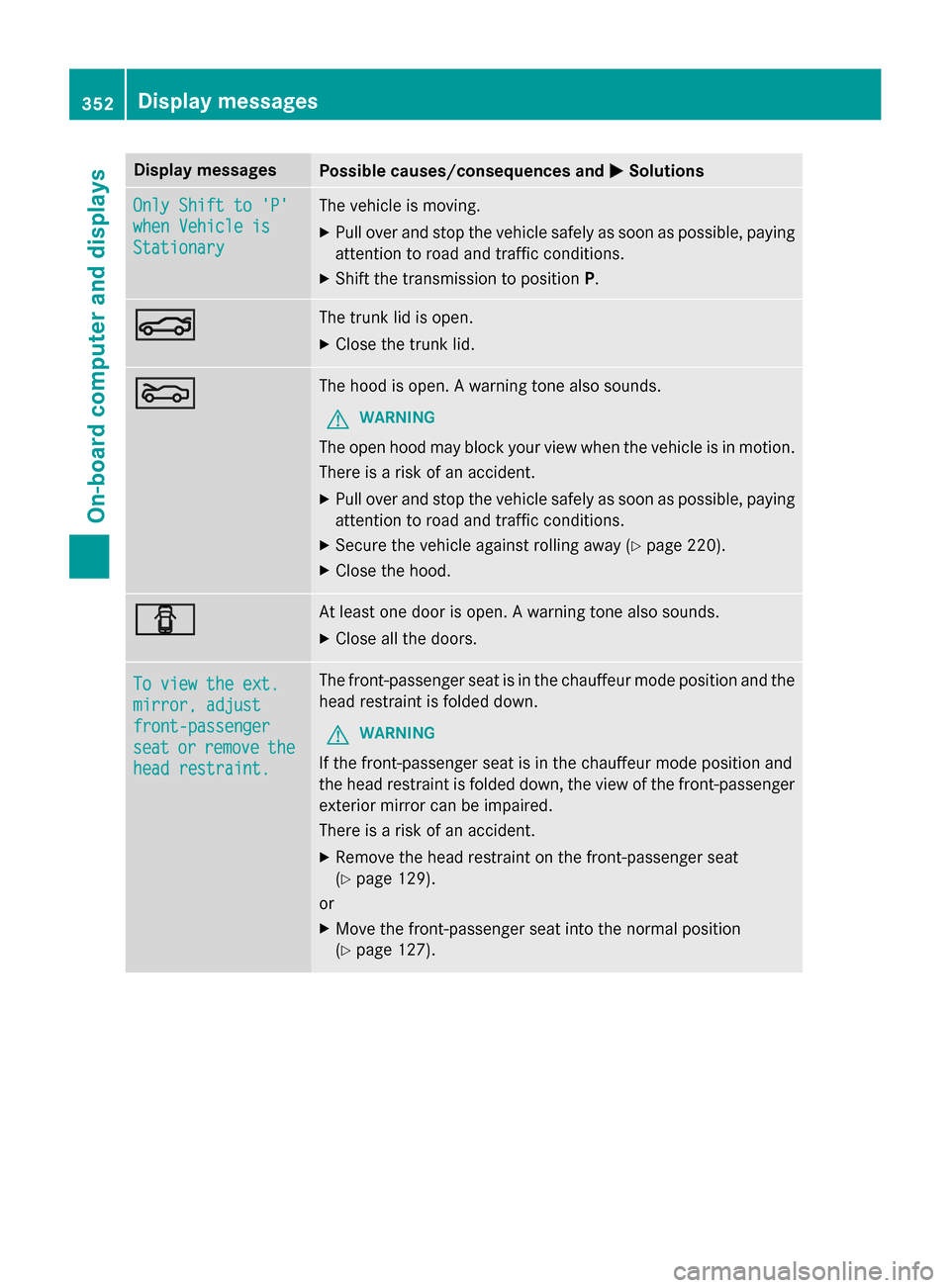
MSolutions Only Shift to 'P'
Only Shift to 'P'
when Vehicle is when Vehicle is
Stationary Stationary The vehicle is moving.
X
Pull over and stop the vehicle safely as soon as possible, paying
attention to road and traffic conditions.
X Shift the transmission to position P.N N The trunk lid is open.
X Close the trunk lid. M
M The hood is open. A warning tone also sounds.
G WARNING
The open hood may block your view when the vehicle is in motion.
There is a risk of an accident.
X Pull over and stop the vehicle safely as soon as possible, paying
attention to road and traffic conditions.
X Secure the vehicle against rolling away (Y page 220).
X Close the hood. C
C At least one door is open. A warning tone also sounds.
X Close all the doors. To view the ext.
To view the ext.
mirror, adjust mirror, adjust
front-passenger front-passenger
seat seat
or
orremove
remove the
the
head restraint.
head restraint. The front-passenger seat is in the chauffeur mode position and the
head restraint is folded down.
G WARNING
If the front-passenger seat is in the chauffeur mode position and
the head restraint is folded down, the view of the front-passenger
exterior mirror can be impaired.
There is a risk of an accident.
X Remove the head restraint on the front-passenger seat
(Y page 129).
or
X Move the front-passenger seat into the normal position
(Y page 127). 352
Display
messagesOn-board computer and displays