climate control MERCEDES-BENZ S-Class 2015 W222 Owner's Guide
[x] Cancel search | Manufacturer: MERCEDES-BENZ, Model Year: 2015, Model line: S-Class, Model: MERCEDES-BENZ S-Class 2015 W222Pages: 502, PDF Size: 9.59 MB
Page 185 of 502
When the vehicle is heated, the following
functions are activated:
R Climate control system
R Blower
R Seat heating
R Steering wheel heating
R Armrest heating
R Exterior mirror heating
R Rear window defroster
i In contrast to the rest of the climate con-
trol functions, the seat heating/ventilation,
steering wheel heating and armrest heating only switch on if required.
If you have switched on the perfume atomizer or the ionization using COMAND, these will beactivated together with the "Pre-entry climate control at departure time".
Activating the perfume atomizer/ionization
(see separate COMAND operating instruc-
tions).
Setting the departure time You can set the departure time using the
instrument cluster or via the "Vehicle Home-
page" (Y
page 220). The activation of the
"Pre-entry climate control at departure time"
function can be linked to this departure time.
Your vehicle will then be cooled or heated
until the desired temperature is reached in
time for the set departure time. "Pre-entry
climate control at departure time" will be acti- vated a maximum of 55 minutes before
departure. If the departure is delayed, the
vehicle will be heated or cooled for a further
five minutes.
X To set the departure time: set the depar-
ture time via the instrument cluster. To set the departure time via the "Vehicle Home-
page" (Y page 220).
X To activate/deactivate "Pre-entry cli-
mate control at departure time": acti-
vate/deactivate "Pre-entry climate control
at departure time" via COMAND (see sep-
arate operating instructions). To activate/ deactivate the "Pre-entry climate control at
departure time" function via the Vehicle
Homepage (Y page 220).
When activating the "Pre-entry climate con-
trol at departure time" function: you can
select whether only the driver's area or the
whole vehicle interior should be heated or
cooled.
The "Pre-entry climate control at departure
time" function switches off automatically
when the vehicle is started. The following
functions remain active:
R Seat heating
R Seat ventilation
R Armrest heating
R Steering wheel heating
R Perfume atomizer
R Ionization
Switching off "Pre-entry climate control
at departure time": the activated "Pre-entry
climate control at departure time" can be
switched off using the rocker switch
(Y page 183).
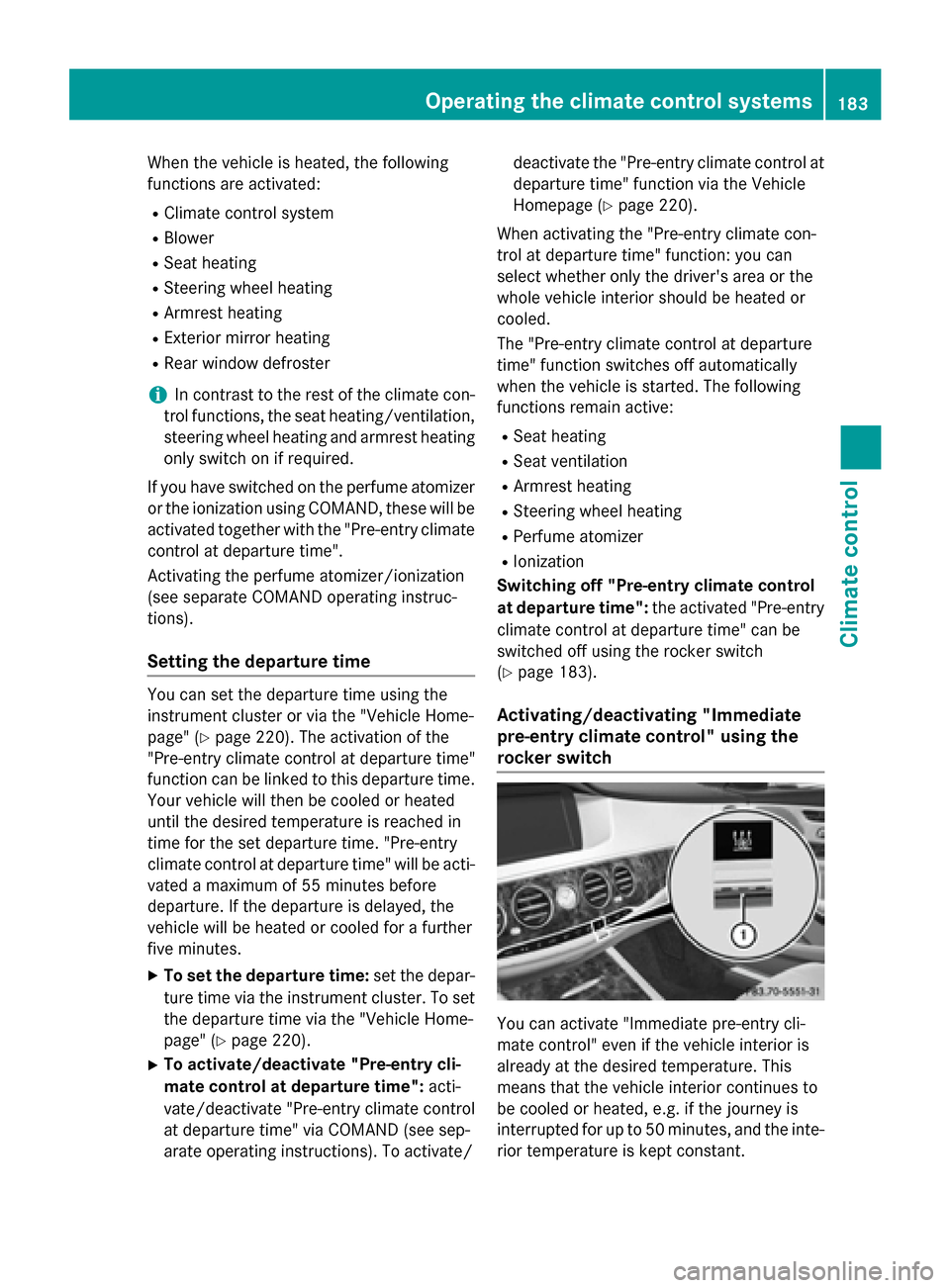
Activating/deactivating "Immediate
pre-entry climate control" using the
rocker switch You can activate "Immediate pre-entry cli-
mate control" even if the vehicle interior is
already at the desired temperature. This
means that the vehicle interior continues to
be cooled or heated, e.g. if the journey is
interrupted for up to 50 minutes, and the inte-
rior temperature is kept constant. Operating the climate control systems
183Climate control Z
Page 186 of 502
The colors of the indicator lamps in the rocker
switch have the following meanings:
R blue: cooling activated
R red: heating activated
R yellow: departure time preselected
X To activate/deactivate "Immediate pre-
entry climate control" : press rocker
switch :up or down.
The blue or red indicator lamp above the
rocker switch lights up or goes out. Setting the air vents
Important safety notes
G
WARNING
Very hot or very cold air can flow from the air vents. This could result in burns or frostbite in the immediate vicinity of the air vents. There
is a risk of injury.
Make sure that all vehicle occupants always
maintain a sufficient distance to the air out-
lets. If necessary, redirect the airflow to
another area of the vehicle interior.
In order to ensure the direct flow of fresh air
through the air vents into the vehicle interior,
please observe the following notes:
R keep the air inlet between the windshield
and the hood free of blockages, such as ice, snow or leaves.
R never cover the air vents or air intake grilles
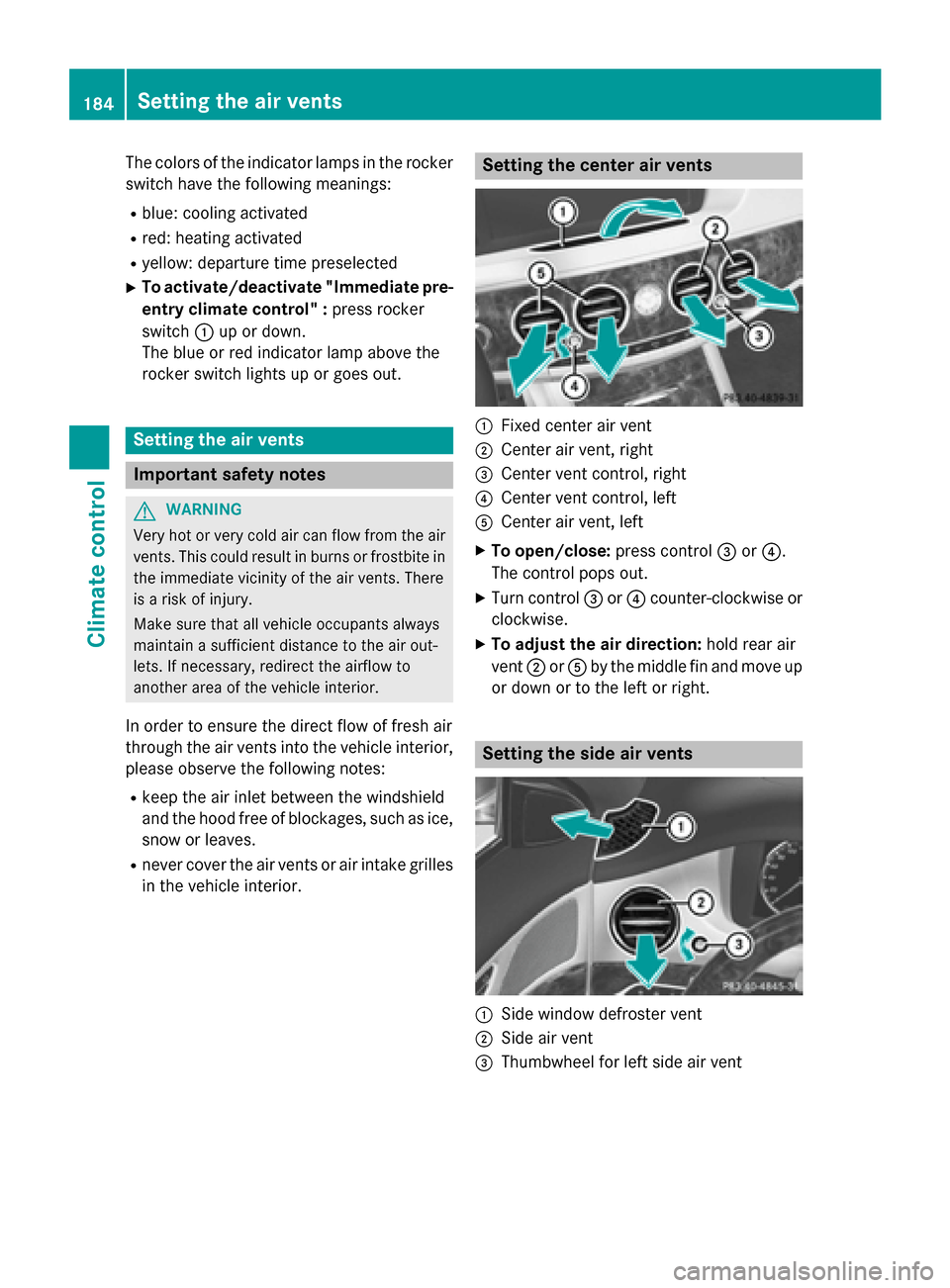
in the vehicle interior. Setting the center air vents
:
Fixed center air vent
; Center air vent, right
= Center vent control, right
? Center vent control, left
A Center air vent, left
X To open/close: press control=or?.
The control pops out.
X Turn control =or? counter-clockwise or
clockwise.
X To adjust the air direction: hold rear air
vent ;orA by the middle fin and move up
or down or to the left or right. Setting the side air vents
:
Side window defroster vent
; Side air vent
= Thumbwheel for left side air vent 184
Setting the air ventsClimate control
Page 187 of 502
X
To open/close: press control=.
The control pops out.
X Turn control =counter-clockwise or
clockwise.
X To adjust the air direction: hold side air
vent ;by the middle fin and move it up or
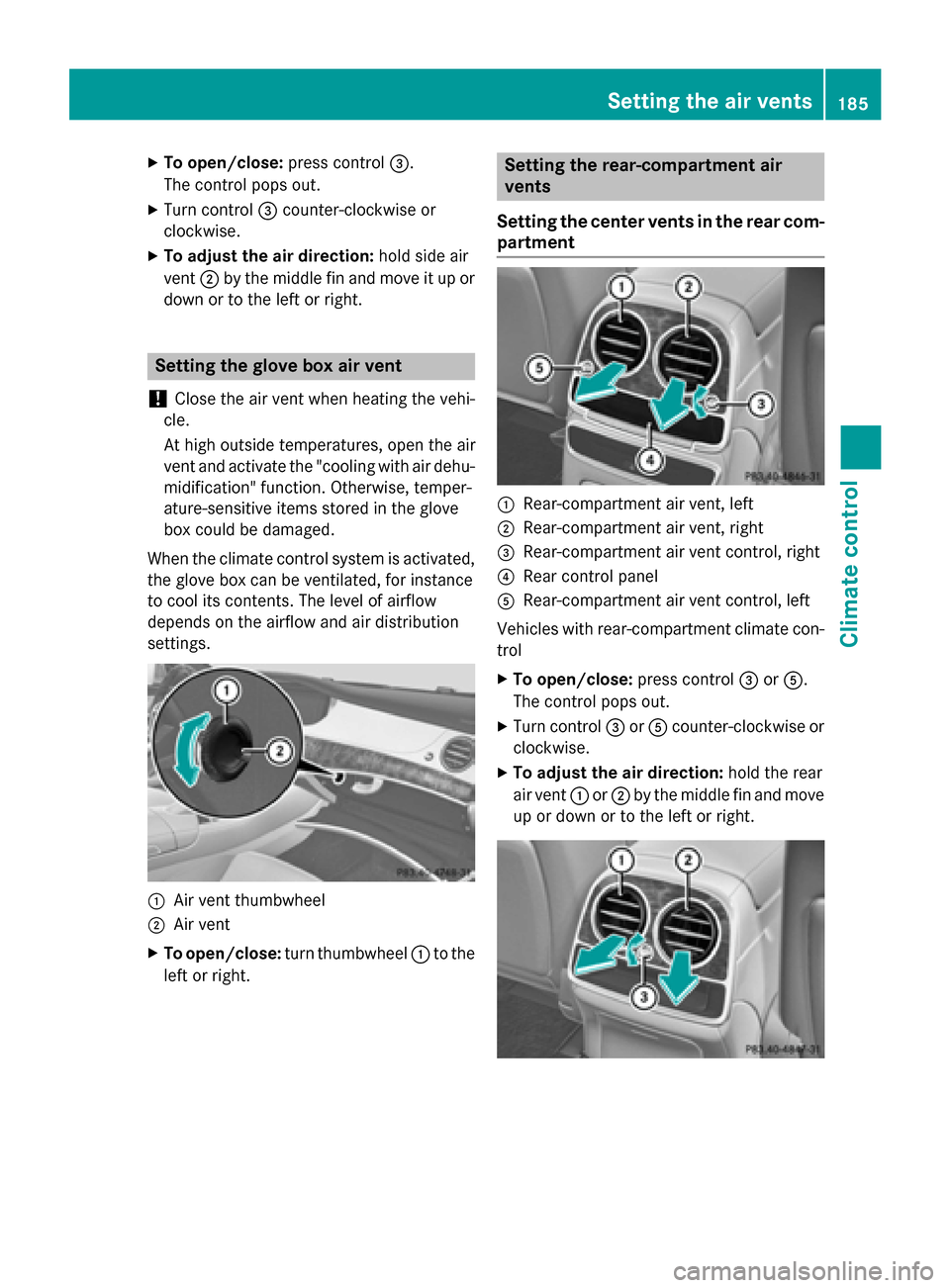
down or to the left or right. Setting the glove box air vent
! Close the air vent when heating the vehi-
cle.
At high outside temperatures, open the air
vent and activate the "cooling with air dehu- midification" function. Otherwise, temper-
ature-sensitive items stored in the glove
box could be damaged.
When the climate control system is activated, the glove box can be ventilated, for instance
to cool its contents. The level of airflow
depends on the airflow and air distribution
settings. :
Air vent thumbwheel
; Air vent
X To open/close: turn thumbwheel :to the
left or right. Setting the rear-compartment air
vents
Setting the center vents in the rear com-
partment :
Rear-compartment air vent, left
; Rear-compartment air vent, right
= Rear-compartment air vent control, right
? Rear control panel
A Rear-compartment air vent control, left
Vehicles with rear-compartment climate con-
trol
X To open/close: press control=orA.
The control pops out.
X Turn control =orA counter-clockwise or
clockwise.
X To adjust the air direction: hold the rear
air vent :or; by the middle fin and move
up or down or to the left or right. Setting the air vents
185Climate control Z
Page 188 of 502
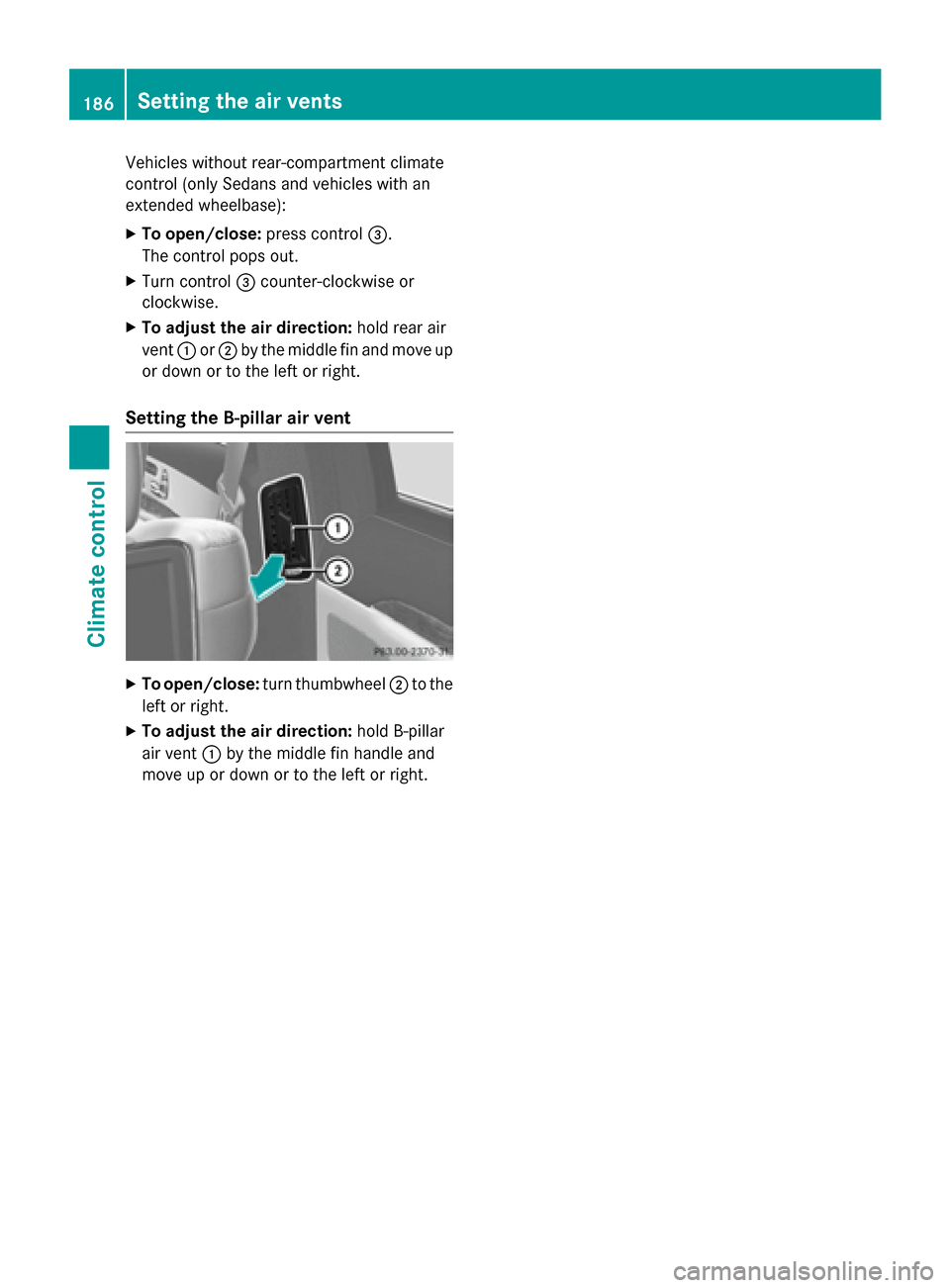
Vehicles without rear-compartment climate
control (only Sedans and vehicles with an
extended wheelbase):
X To open/close: press control=.
The control pops out.
X Turn control =counter-clockwise or
clockwise.
X To adjust the air direction: hold rear air
vent :or; by the middle fin and move up
or down or to the left or right.
Setting the B-pillar air vent X
To open/close: turn thumbwheel ;to the
left or right.
X To adjust the air direction: hold B-pillar
air vent :by the middle fin handle and
move up or down or to the left or right. 186
Setting the air ventsClimate control
Page 222 of 502
code (VVC) issued by the Mercedes-Benz
Center after purchase. With this new
code you can set up the access to your
vehicle. This is described in the "Setting
up a personal area" section on the "Vehi-
cle Homepage". There, you may also
deactivate the existing access of the pre- vious owner.
Calling up functions in the "My
Mercedes Electric - Vehicle Homepage" The "Vehicle Homepage" allows you access to
vehicle information and your vehicle's func-
tions using remote query and remote config-
uration.
The following functions can be accessed via
the "Vehicle Homepage":
R request the current condition of charge of
the high-voltage battery
R program the departure time (Y page 310)
R set/activate the "Pre-entry climate control
at departure time" function (REMOTE CLI-
MATE CONTROL), (see the separate
COMAND operating instructions)
Information on additional functions and oper- ating instructions can be found on the "Vehi-
cle Homepage".
Connecting the vehicle to the Internet i
This function is not available in all coun-
tries and requires activated access to the
mbrace emergency call system.
i This function is only available if the vehi-
cle is equipped with a telephone module.
You can use the "Vehicle Homepage" if the
vehicle has a connection to the Internet via
the telephone module. The telephone module uses CDMA (Code Division Multiple Access)
and transmits the necessary data by radio.
The vehicle automatically recognizes whether a connection to the Internet via the telephone
module is possible or not. No presets are
necessary. i
Restrictions in reception are possible if
the vehicle is in an underground car park,
for example. Restrictions may also occur in areas with poor mobile network coverage.
To enable the transfer of data via the tele-
phone module, you do not need a SIM card. Parking
Important safety notes
G
WARNING
Flammable material such as leaves, grass or
twigs may ignite if they come into contact with hot parts of the exhaust system or exhaust
gas flow. There is a risk of fire.
Park the vehicle so that no flammable mate-
rials come into contact with parts of the vehi-cle which are hot. Take particular care not to
park on dry grassland or harvested grain
fields. G
WARNING
If you leave children unsupervised in the vehi- cle, they could set it in motion by, for example:
R release the parking brake.
R shift the automatic transmission out of the
parking position P.
R start the engine.
In addition, they may operate vehicle equip-
ment and become trapped. There is a risk of
an accident and injury.
When leaving the vehicle, always take the
SmartKey with you and lock the vehicle. Never
leave children unsupervised in the vehicle.
! Always secure the vehicle correctly
against rolling away. Otherwise, the vehicle
or its drivetrain could be damaged.
To ensure that the vehicle is secured against rolling away unintentionally:
R the electric parking brake must be applied.
R the transmission must be in position Pand
the SmartKey must be removed from the
ignition lock. 220
ParkingDriving and parking
Page 289 of 502
Additional point of resistance in the hap-
tic accelerator pedal
The maximum available electric performance is indicated by a tangible point of resistance
in the haptic accelerator pedal.
The additional point of resistance is available
in E-MODE operating mode (Y page 280)
If you depress the haptic accelerator pedal
beyond the pressure point, the combustion
engine is switched on.
Double pulses in the haptic accelerator
pedal
A tangible double pulse in the haptic acceler- ator pedal gives you a recommendation to
release the accelerator pedal. By this means, in HYBRID, E-MODEorE-SAVE operating
mode the combustion engine can be switched
off and disconnected from the power train
(overrun mode).
The double pulse is available in drive program
E+ (Ypage 285).
After the accelerator pedal has been
released, the coasting characteristics of the
vehicle are adapted to the traffic conditions.
To avoid getting too close to the vehicle in
front, you must apply the brakes manually
when necessary.
Driving tips General driving tips
Drive carefully and maintain a safe distance
from the vehicle in front. Avoid frequent and
sudden acceleration as well as abrupt brak-
ing.
During partial electric driving, pulling away
and acceleration, the electric motor supports
the internal combustion engine.
During overrun in transmission position Dand
braking, the electric motor will operate as a
generator.
Further information on the ECO start/stop
function (Y page 288).
Additional driving tips (Y page 224).Stationary vehicle
If the vehicle is stopped, the combustion
engine is, for the most part, switched off.
Automatic climate control continues to func-
tion. The electromechanically assisted steer-
ing gear allows you to use the power steering
without reduced comfort.
Acceleration
Depending on the operating mode, pulling
away and driving under low load conditions
are performed:
R entirely by electric propulsion
R in combination with the internal combus-
tion engine
When accelerating at an increased or full
load, boost mode is utilized. The electric
motor supports the internal combustion
engine by providing additional torque when
the accelerator is depressed rapidly.
Overrun mode or braking
There are three possible operating modes
when the hybrid vehicle is decelerating:
R energy recovery takes place even when the
vehicle is decelerating purely in overrun
mode (Y page 276). The electric motor
operates as a generator and stores the
recovered energy in the high-voltage bat-
tery.
R when the brakes are applied lightly, the
vehicle is slowed down further by the elec-
tric motor. This increases the energy recov- ery taking place (Y page 276). The electric
motor operates as a generator and stores
the recovered energy in the high-voltage
battery.
R when the brakes are applied with greater
force, the service brakes are also used to
slow the vehicle down. The two systems
work together.
Urban driving
Energy is recuperated during frequent decel-
eration and stopping in city traffic. PLUG-IN HYBRID operation
287Driving and parking Z
Page 290 of 502
The vehicle can be driven by the electric
motor alone up to a speed of approximately
130 km/h.
The vehicle is driven by the electric motor
alone only when all conditions for the auto-
matic engine switch-off are fulfilled.
Further information on the automatic engine
switch-off (Y page 288).
Driving on inter-urban roads
The following phases are possible when driv-
ing on inter-urban roads: R rapid acceleration (boost mode)
R constant energy consumption
R energy recuperation
R electric operation mode
A great deal of recovered energy may be
available, depending on the route profile. This reduces consumption and emissions.
Highway driving
During highway driving, fuel consumption andemissions are favorably influenced in partic-
ular by reduced power losses.
The internal combustion engine will be
switched off automatically, if:
R the driver removes his foot from the accel-
erator pedal in drive program Eand a speed
of 130 km/h is not exceeded
R the driver removes his foot from the accel-
erator pedal in drive program E+and a
speed of 180 km/h is not exceeded.
Further information on the automatic engine
switch-off (Y page 288).
ECO start/stop function General notes
The ECO start/stop function switches the
internal combustion engine off automatically
when the vehicle stops moving and at high
speeds (Y
page 289).
All vehicle systems remain active, e.g. the
automatic climate control. The ECO start/stop function is only available
in drive programs Eand E+. Electric-only
operation is only possible in drive programs E
and E+. Additional information for drive pro-
grams Eand E+(Ypage 285).
Automatic engine switch-off
The engine is switched off automatically,
including when:
R the driver removes his foot from the accel-
erator in drive program Eand a speed of
130 km/h is not exceeded (Y page 289)
R the driver removes his foot from the accel-
erator in drive program E+and a speed of
180 km/h is not exceeded (Y page 289)
R the engine has reached its operating tem-
perature
R the driver’s seat belt is fastened and the
driver’s door is closed
R the driver only slightly depresses the accel-
erator pedal in order to, for example, main- tain the current speed for a limited distance
R the hood is closed and engaged properly
R the high-voltage battery is charged suffi-
ciently
R there are no malfunctions in the hybrid sys-
tem
The internal combustion engine will not be
switched off automatically, if:
R the self-diagnosis function of the engine
control unit is still active
R there is a malfunction in the hybrid system
R the climate control of the vehicle requires it
R the high-voltage battery is being charged
(Y page 282)
R automatic emissions tests are running 288
PLUG-IN HYBRID operationDriving and parking
Page 291 of 502
Automatic engine start
The automatically switched-off internal com-
bustion engine starts automatically in certain situations, if:
R the power demand from the driver via the
accelerator pedal is greater than the elec-
tric motor alone can provide
R the driver switches to drive program Sor M
R the condition of charge of the high-voltage
battery has reached the lower limit
R the settings of the automatic climate con-
trol require it, e.g. at external temperatures
above 30 †
Overrun mode
In overrun mode, the combustion engine is
switched off and is disconnected from the
drive train. The electric motor:
R generates low thrust, which corresponds to
the overrun mode of an active combustion
engine
R functions as a generator and produces the
necessary energy for the auxiliary consum-
ers and charges the high-voltage battery
Overrun mode is possible in the following
speed range:
R in drive program Ebelow 130 km/h
R in drive program E+below 180 km/h
In drive program E+, after the accelerator
pedal has been released the coasting char-
acteristics of the vehicle are adapted to the
traffic conditions. Further information about
the haptic accelerator pedal (Y page 286).
Map-based energy management For map-based energy management, the sys-
tem factors in information about the expec-
ted route when route guidance is active.
The information on the route is provided by
COMAND and includes the following:
R road categories
R speed limitations
R data on downhill gradients The use of electric energy is automatically
optimally distributed from the beginning to
the end of the journey, using information
about the route. The distribution is pre-emp-
tive and takes into consideration:
R the sections of the journey ahead
R the energy consumption on the whole route
The condition of charge of the high-voltage
battery is thus systematically controlled. In
addition, the control function takes into
account that:
R the fuel saving through the use of electrical
energy can vary, dependent on the route
(e.g. urban, interurban or highway)
R the use of electrical energy is held available
for electric driving, particularly for urban
routes
The vehicle thus automatically selects the
optimum driving mode for the respective sec- tion of the route.
Map-based energy management is available
under the following conditions:
R drive program E+is selected
R HYBRID driving mode is selected
R active route guidance is activated
R suitable map data is available
When map-based energy management is
engaged, the area in front of the vehicle in the
multifunction display will be green. Parking
X Apply the electric parking brake.
The red !indicator lamp in the instru-
ment cluster lights up.
X Use the DIRECT SELECT lever to shift the
automatic transmission to P.
X Switch the ignition off.
The READY indicator in the instrument clus-
ter goes out.
Further information on parking and switching off the internal combustion engine
(Y page 221). PLUG-IN HYBRID operation
289Driving and parking Z
Page 313 of 502
If a departure time is pre-selected, charging
starts immediately. Further information can
be obtained at any qualified specialist work-
shop.
Pre-entry climate control depends on the
departure time set. Further information on
pre-entry climate control (Y page 182).
X Use ò on the steering wheel to call up
the list of menus.
X Press the :or9 button on the steer-
ing wheel to select the Settings
Settings menu.
X Confirm by pressing aon the steering
wheel.
X Use : or9 to select the Hybrid Hybridsub-
menu.
X Press ato confirm.
X Press :or9 to select the Depar‐
Depar‐
ture Time
ture Time function.
You will see the selected setting.
X Press the abutton to save the setting.
X Immediate charging without any depar-
ture time set: use: or9 to select
No Pre-selection
No Pre-selection.
X Press ato confirm.
or
X To set the departure time: use: or
9 A
A,B
Bor C
Cto select the required storage
space.
X Press the abutton to confirm the selec-
tion.
X Press :or9 to set the hours.
X Press ato confirm.
X Press :or9 to set the minutes.
X Press ato confirm.
If the transmission is in position Pand the
charging cable connector is plugged in, the
multifunction display will show the com-
plete charging prediction after a few
moments.
Further information on charging the high-volt-
age battery (PLUG-IN HYBRID vehicles)
(Y page 210). Head-up display submenu Switching other displays on/off
You can switch the display of additional infor-
mation on and off in the on-board computer. If
the head-up display (Y page 297) is activated,
this will be shown on the windshield.
X Use ò on the steering wheel to call up
the list of menus.
X Press the :or9 button on the steer-
ing wheel to select the Settings Settingsmenu.
X Confirm by pressing aon the steering
wheel.
X Press the :or9 button to select the
Head-up Display
Head-up Display submenu.
X Press ato confirm.
X Press the :or9 buttons to select
Display Content
Display Content.
X Press ato confirm.
Switching the navigation messages dis-
play on/off
X Press the abutton to save the setting.
When you switch on the Navigation NavigationMes‐
Mes‐
sages
sages display, navigation messages are
shown on the windshield when the head-up display is activated.
Further information on navigation (see the
separate operating instructions).
Setting the position
You can adjust the position of the head-up
display. This allows you to compensate for
differences in the seat position.
X Switch on the Head-up display
(Y page 297).
X Use ò on the steering wheel to call up
the list of menus.
X Press the :or9 button on the steer-
ing wheel to select the Settings
Settings menu.
X Confirm by pressing aon the steering
wheel.
X Use the :or9 button to select the
Head-up Display Head-up Display submenu.
X Press ato confirm. Menus and submenus
311On-board computer and displays Z
Page 460 of 502
All about wheels and tires
Uniform Tire Quality Grading Stand-
ards
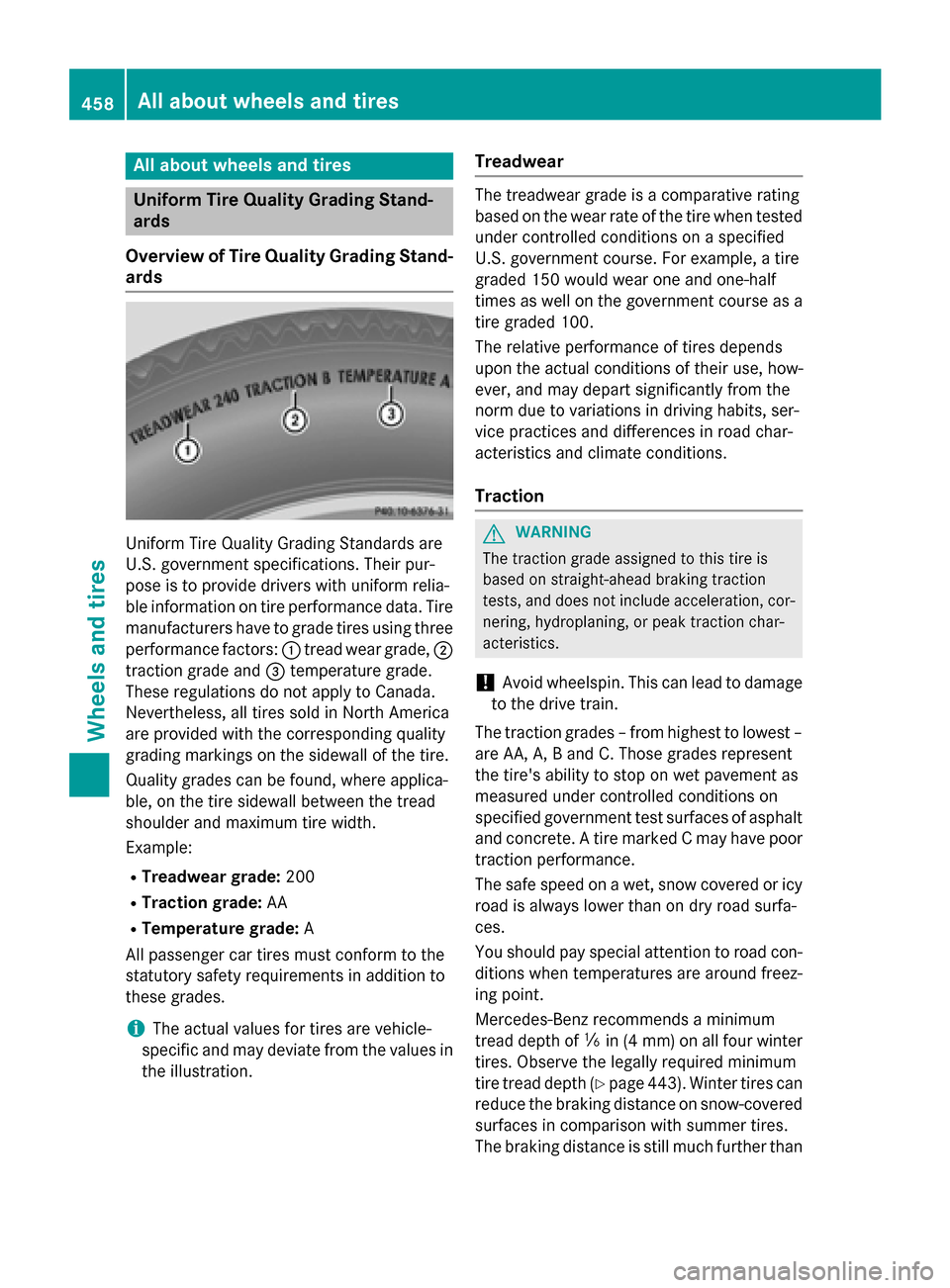
Overview of Tire Quality Grading Stand- ards Uniform Tire Quality Grading Standards are
U.S. government specifications. Their pur-
pose is to provide drivers with uniform relia-
ble information on tire performance data. Tire
manufacturers have to grade tires using three
performance factors: :tread wear grade, ;
traction grade and =temperature grade.
These regulations do not apply to Canada.
Nevertheless, all tires sold in North America
are provided with the corresponding quality
grading markings on the sidewall of the tire.
Quality grades can be found, where applica-
ble, on the tire sidewall between the tread
shoulder and maximum tire width.
Example:
R Treadwear grade: 200
R Traction grade: AA
R Temperature grade: A
All passenger car tires must conform to the
statutory safety requirements in addition to
these grades.
i The actual values for tires are vehicle-
specific and may deviate from the values in
the illustration. Treadwear The treadwear grade is a comparative rating
based on the wear rate of the tire when tested
under controlled conditions on a specified
U.S. government course. For example, a tire
graded 150 would wear one and one-half
times as well on the government course as a
tire graded 100.
The relative performance of tires depends
upon the actual conditions of their use, how-
ever, and may depart significantly from the
norm due to variations in driving habits, ser-
vice practices and differences in road char-
acteristics and climate conditions.
Traction G
WARNING
The traction grade assigned to this tire is
based on straight-ahead braking traction
tests, and does not include acceleration, cor- nering, hydroplaning, or peak traction char-
acteristics.
! Avoid wheelspin. This can lead to damage
to the drive train.
The traction grades – from highest to lowest –
are AA, A, B and C. Those grades represent
the tire's ability to stop on wet pavement as
measured under controlled conditions on
specified government test surfaces of asphalt
and concrete. A tire marked C may have poor
traction performance.
The safe speed on a wet, snow covered or icy road is always lower than on dry road surfa-
ces.
You should pay special attention to road con-
ditions when temperatures are around freez-
ing point.
Mercedes-Benz recommends a minimum
tread depth of ãin (4 mm) on all four winter
tires. Observe the legally required minimum
tire tread depth (Y page 443). Winter tires can
reduce the braking distance on snow-covered surfaces in comparison with summer tires.
The braking distance is still much further than 458
All about wheels and tiresWheels and ti
res