key battery MERCEDES-BENZ S-Class 2015 W222 Owner's Guide
[x] Cancel search | Manufacturer: MERCEDES-BENZ, Model Year: 2015, Model line: S-Class, Model: MERCEDES-BENZ S-Class 2015 W222Pages: 502, PDF Size: 9.59 MB
Page 222 of 502
code (VVC) issued by the Mercedes-Benz
Center after purchase. With this new
code you can set up the access to your
vehicle. This is described in the "Setting
up a personal area" section on the "Vehi-
cle Homepage". There, you may also
deactivate the existing access of the pre- vious owner.
Calling up functions in the "My
Mercedes Electric - Vehicle Homepage" The "Vehicle Homepage" allows you access to
vehicle information and your vehicle's func-
tions using remote query and remote config-
uration.
The following functions can be accessed via
the "Vehicle Homepage":
R request the current condition of charge of
the high-voltage battery
R program the departure time (Y page 310)
R set/activate the "Pre-entry climate control
at departure time" function (REMOTE CLI-
MATE CONTROL), (see the separate
COMAND operating instructions)
Information on additional functions and oper- ating instructions can be found on the "Vehi-
cle Homepage".
Connecting the vehicle to the Internet i
This function is not available in all coun-
tries and requires activated access to the
mbrace emergency call system.
i This function is only available if the vehi-
cle is equipped with a telephone module.
You can use the "Vehicle Homepage" if the
vehicle has a connection to the Internet via
the telephone module. The telephone module uses CDMA (Code Division Multiple Access)
and transmits the necessary data by radio.
The vehicle automatically recognizes whether a connection to the Internet via the telephone
module is possible or not. No presets are
necessary. i
Restrictions in reception are possible if
the vehicle is in an underground car park,
for example. Restrictions may also occur in areas with poor mobile network coverage.
To enable the transfer of data via the tele-
phone module, you do not need a SIM card. Parking
Important safety notes
G
WARNING
Flammable material such as leaves, grass or
twigs may ignite if they come into contact with hot parts of the exhaust system or exhaust
gas flow. There is a risk of fire.
Park the vehicle so that no flammable mate-
rials come into contact with parts of the vehi-cle which are hot. Take particular care not to
park on dry grassland or harvested grain
fields. G
WARNING
If you leave children unsupervised in the vehi- cle, they could set it in motion by, for example:
R release the parking brake.
R shift the automatic transmission out of the
parking position P.
R start the engine.
In addition, they may operate vehicle equip-
ment and become trapped. There is a risk of
an accident and injury.
When leaving the vehicle, always take the
SmartKey with you and lock the vehicle. Never
leave children unsupervised in the vehicle.
! Always secure the vehicle correctly
against rolling away. Otherwise, the vehicle
or its drivetrain could be damaged.
To ensure that the vehicle is secured against rolling away unintentionally:
R the electric parking brake must be applied.
R the transmission must be in position Pand
the SmartKey must be removed from the
ignition lock. 220
ParkingDriving and parking
Page 284 of 502
?
High-voltage battery
A Energy flow
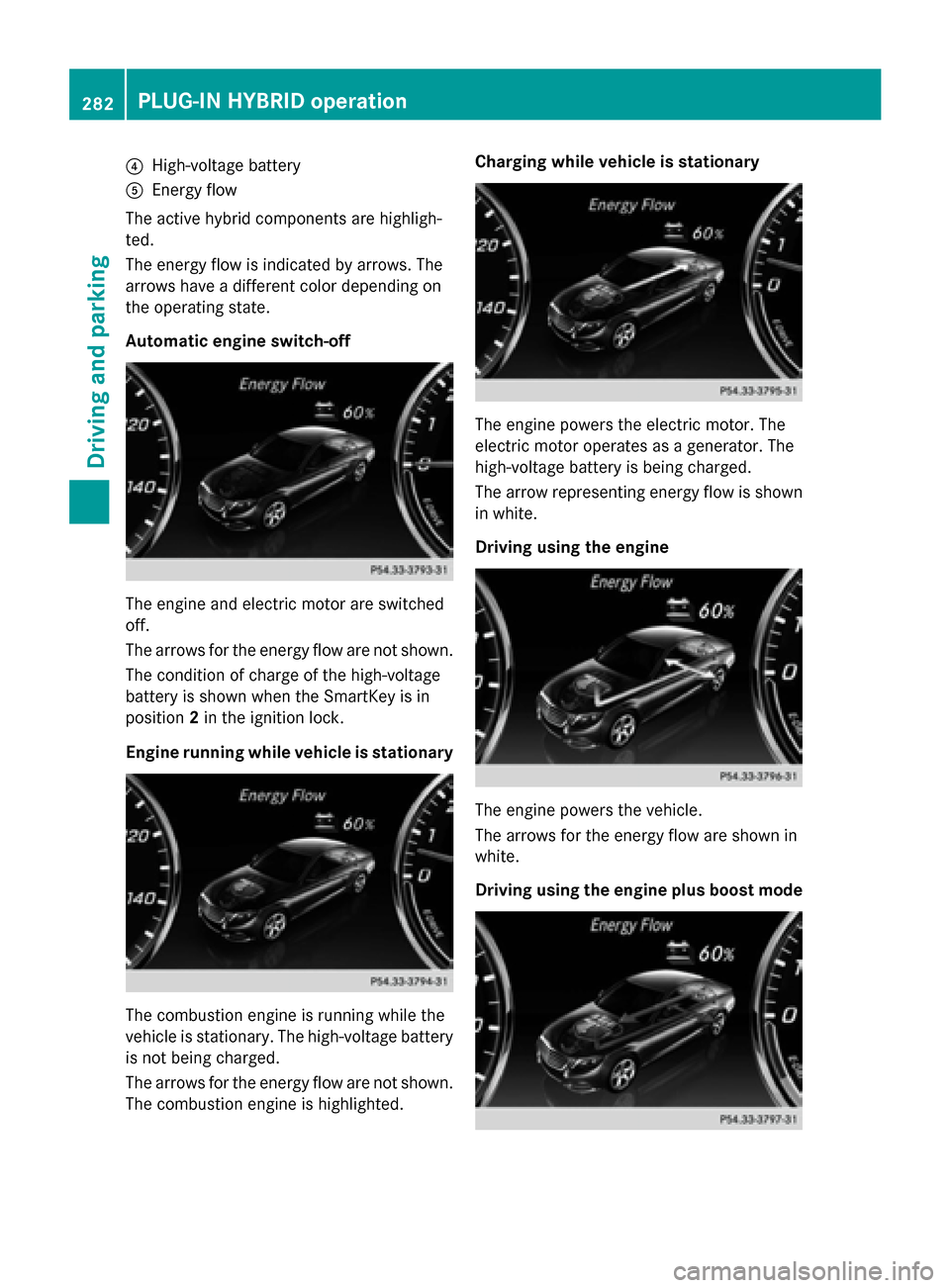
The active hybrid components are highligh-
ted.
The energy flow is indicated by arrows. The
arrows have a different color depending on
the operating state.
Automatic engine switch-off The engine and electric motor are switched
off.
The arrows for the energy flow are not shown.
The condition of charge of the high-voltage
battery is shown when the SmartKey is in
position 2in the ignition lock.
Engine running while vehicle is stationary The combustion engine is running while the
vehicle is stationary. The high-voltage battery
is not being charged.
The arrows for the energy flow are not shown. The combustion engine is highlighted. Charging while vehicle is stationary
The engine powers the electric motor. The
electric motor operates as a generator. The
high-voltage battery is being charged.
The arrow representing energy flow is shown
in white.
Driving using the engine The engine powers the vehicle.
The arrows for the energy flow are shown in
white.
Driving using the engine plus boost mode282
PLUG-IN HYBRID operationDriving and parking
Page 342 of 502
Hybrid system
Display messages
Possible causes/consequences and
M
MSolutions d
Vehicle Opera‐ Vehicle Opera‐
tional Switch the tional Switch the
Ignition Off Ignition Off
Before Exiting Before Exiting PLUG-IN HYBRID vehicles only:
You are exiting the vehicle when it is in a ready-to-drive state. The
READY indicator in the multifunction display is on. A warning tone also sounds.
Please note the following: The electrical consumers are supplied
by the 12 V battery. If the vehicle is left in a ready-to-drive state foran extended period, it will switch off once the 12 V battery is
almost empty. It will then only be possible to start the vehicle using
a second battery (jump-starting).
If you leave the vehicle:
X Secure the vehicle against rolling away (Y page 220).
X Switch off the ignition and remove the key.
If you do not leave the vehicle: X Switch off the electrical consumers, e.g. automatic climate con-
trol, seat heating. i
Change Change
the
thecurrent
current
drive program
drive program
before changing before changing
the operating the operating
mode. mode. orExit man‐
Exit man‐
ual drive program
ual drive program
M before changing M before changing
the the operating
operating mode.
mode. PLUG-IN HYBRID vehicles only:
You have attempted to change the operating mode when in auto- matic drive program Sor manual drive program M.
X Select drive program Eor E+ (Ypage 285).
X Select the preferred operating mode HYBRID,E-MODE orE-
SAVE (Ypage 280). Only E-MODE Avail‐
Only E-MODE Avail‐
able able
Power
Power Limited
Limited
Refuel Immediately
Refuel Immediately PLUG-IN HYBRID vehicles only:
The fuel tank has been run dry and the combustion engine has
been switched off.
A warning tone also sounds.
The vehicle will be powered by electrical energy only. Performance
is restricted and the vehicle may accelerate more slowly than nor-
mal.
X Refuel at the nearest gas station without fail.
In the "Total range and electric range" menu, you can display the
approximate range of the vehicle (Y page 284).340
Display messagesOn-board computer and displays
Page 356 of 502
SmartKey
Display messages
Possible causes/consequences and
M
MSolutions Â
Key Does Not Key Does Not
Belong to Vehicle Belong to Vehicle You have put the wrong SmartKey in the ignition lock.
X Use the correct SmartKey. Â
Take Take
Your
YourKey
Keyfrom
from
Ignition
Ignition The SmartKey is in the ignition lock.
X Remove the SmartKey. Â
Obtain a New Key Obtain a New Key The SmartKey needs to be replaced.
X Visit a qualified specialist workshop. Â
Replace Replace
Key
KeyBattery
Battery The SmartKey batteries are discharged.
X Change the batteries (Y page 94).Â
Don't Forget Your Don't Forget Your
Key Key The SmartKey is not in the ignition lock. You have opened the
driver's door with the engine switched off.
This display message is displayed for a maximum of 60 seconds
and is simply a reminder.
X Take the SmartKey with you when you leave the vehicle. Â
Key Not Detected Key Not Detected
(white display mes-
sage) The SmartKey is currently undetected.
X Change the location of the SmartKey in the vehicle.
If the SmartKey still cannot be detected:
X Insert the SmartKey into the ignition lock and turn it to the
desired position. Â
Key Not Detected Key Not Detected
(red display message) The SmartKey is not in the vehicle.
A warning tone also sounds.
If the engine is switched off, you can no longer lock the vehicle
centrally or start the engine.
X Pull over and stop the vehicle safely as soon as possible, paying
attention to road and traffic conditions.
X Secure the vehicle against rolling away (Y page 220).
X Locate the SmartKey.
X Press aon the steering wheel to confirm the display mes-
sage. 354
Display messagesOn-board computer and displays
Page 386 of 502
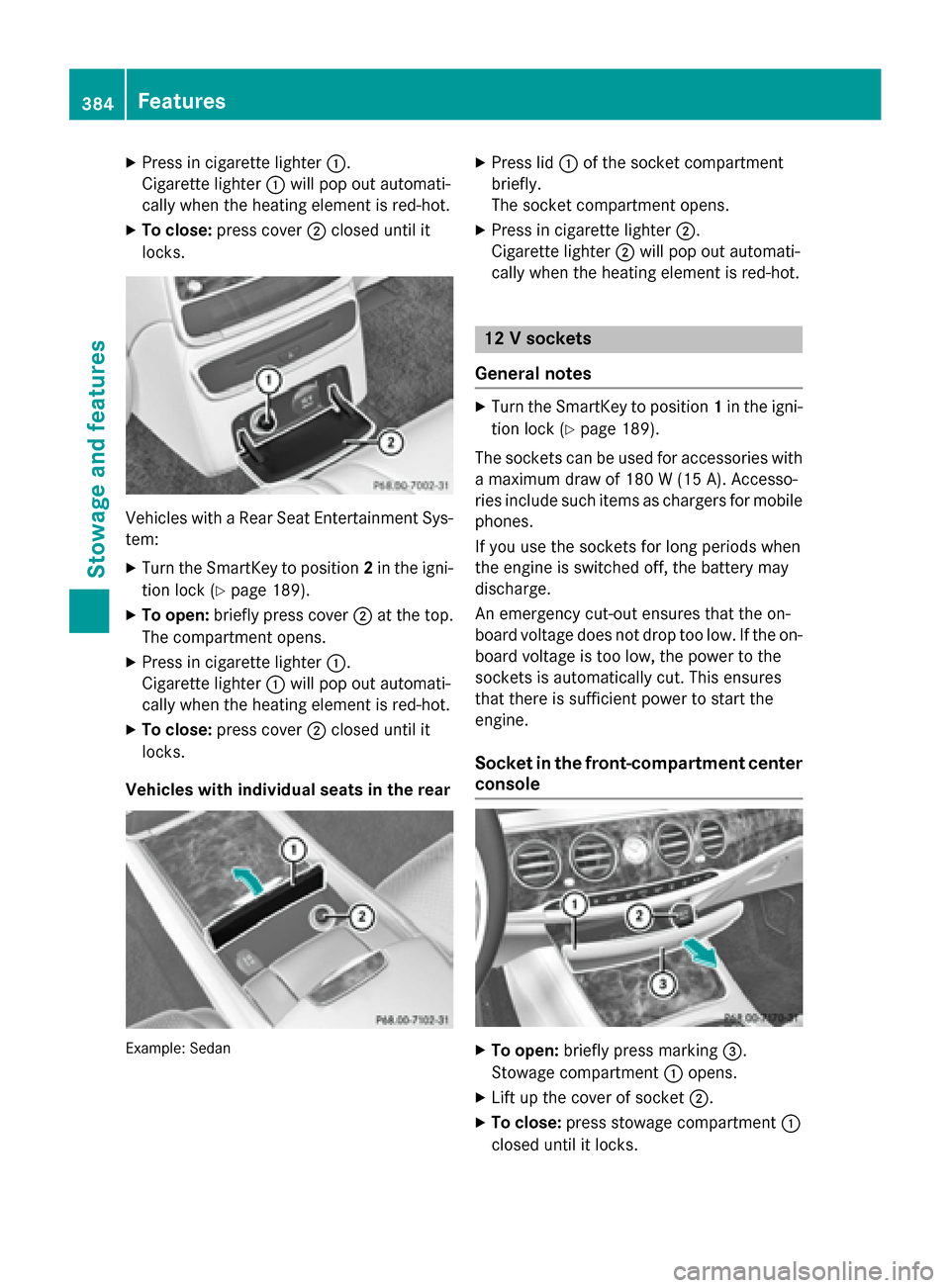
X
Press in cigarette lighter :.
Cigarette lighter :will pop out automati-
cally when the heating element is red-hot.
X To close: press cover ;closed until it
locks. Vehicles with a Rear Seat Entertainment Sys-
tem:
X Turn the SmartKey to position 2in the igni-
tion lock (Y page 189).
X To open: briefly press cover ;at the top.
The compartment opens.
X Press in cigarette lighter :.
Cigarette lighter :will pop out automati-
cally when the heating element is red-hot.
X To close: press cover ;closed until it
locks.
Vehicles with individual seats in the rear Example: Sedan X
Press lid :of the socket compartment
briefly.
The socket compartment opens.
X Press in cigarette lighter ;.
Cigarette lighter ;will pop out automati-
cally when the heating element is red-hot. 12 V sockets
General notes X
Turn the SmartKey to position 1in the igni-
tion lock (Y page 189).
The sockets can be used for accessories with a maximum draw of 180 W (15 A). Accesso-
ries include such items as chargers for mobile
phones.
If you use the sockets for long periods when
the engine is switched off, the battery may
discharge.
An emergency cut-out ensures that the on-
board voltage does not drop too low. If the on-
board voltage is too low, the power to the
sockets is automatically cut. This ensures
that there is sufficient power to start the
engine.
Socket in the front-compartment center console X
To open: briefly press marking =.
Stowage compartment :opens.
X Lift up the cover of socket ;.
X To close: press stowage compartment :
closed until it locks. 384
FeaturesStowage and features
Page 415 of 502
You can wash the vehicle in an automatic car
wash from the very start.
If the vehicle is very dirty, pre-wash it before
cleaning it in an automatic car wash.
After using an automatic car wash, wipe off
wax from the windshield and the wiper
blades. This will prevent smears and reduce
wiping noises caused by residue on the wind- shield.
Washing by hand In some countries, washing by hand is only
allowed at specially equipped washing bays.
Observe the legal requirements in each coun-
try.
X Do not use hot water and do not wash the
vehicle in direct sunlight.
X Use a soft sponge to clean.
X Use a mild cleaning agent, such as a car
shampoo approved by Mercedes-Benz.
X Thoroughly hose down the vehicle with a
gentle jet of water.
X Do not point the water jet directly towards
the air inlet.
X Use plenty of water and rinse out the
sponge frequently.
X Rinse the vehicle with clean water and dry
thoroughly with a chamois.
X Do not let the cleaning agent dry on the
paintwork.
Carefully remove all deposits of road salt as
soon as possible when driving in winter.
Power washers G
WARNING
The water jet from a circular jet nozzle (dirt
blasters) can cause invisible exterior damage to the tires or chassis components. Compo-
nents damaged in this way may fail unexpect-edly. There is a risk of an accident.
Do not use power washers with circular jet
nozzles to clean the vehicle. Have damaged tires or chassis components replaced imme-
diately.
! Always maintain a distance of at least
11.8 in (30 cm) between the vehicle and the power washer nozzle. Information about
the correct distance is available from the
equipment manufacturer.
Move the power washer nozzle around
when cleaning your vehicle.
Do not aim directly at any of the following:
R tires
R door gaps, roof gaps, joints, etc.
R electrical components
R battery
R connectors
R lights
R seals
R trim
R ventilation slots
Damaged seals or electrical components
can lead to leaks or failures.
! If the SmartKey is within the rear detec-
tion range of KEYLESS-GO, the following
situations, for example, could lead to the
unintentional opening of the trunk:
R using a car wash
R using a power washer
Make sure that the SmartKey is at least
10 ft (3 m) away from the vehicle.
Cleaning the paintwork !
Do not affix:
R stickers
R films
R magnetic plates or similar items
to painted surfaces. You could otherwise
damage the paintwork.
Scratches, corrosive deposits, areas affected
by corrosion and damage caused by inade-
quate care cannot always be completely Care
413Maintenance and care Z
Page 430 of 502
G
WARNING
Electrostatic build-up can lead to the creation of sparks, which could ignite the highly explo-
sive gases of a battery. There is a risk of an
explosion.
Before handling the battery, touch the vehicle body to remove any existing electrostatic
build-up.
The highly flammable gas mixture forms when
charging the battery as well as when jump-
starting.
Always make sure that neither you nor the
battery is electrostatically charged. A build-
up of electrostatic charge can be caused, for
example:
R by wearing clothing made from synthetic
fibers
R due to friction between clothing and seats
R if you push or pull the battery across the
carpet or other synthetic materials
R if you wipe the battery with a cloth G
WARNING
During the charging process, a battery produ- ces hydrogen gas. If a short circuit occurs or
sparks are created, the hydrogen gas can
ignite. There is a risk of an explosion.
R Make sure that the positive terminal of a
connected battery does not come into con-
tact with vehicle parts.
R Never place metal objects or tools on a bat-
tery.
R It is important that you observe the descri-
bed order of the battery terminals when
connecting and disconnecting a battery.
R When jump-starting, make sure that the
battery poles with identical polarity are
connected.
R It is particularly important to observe the
described order when connecting and dis-
connecting the jumper cables.
R Never connect or disconnect the battery
terminals while the engine is running. G
WARNING
Battery acid is caustic. There is a risk of injury. Avoid contact with skin, eyes or clothing. Do
not inhale any battery gases. Do not lean over
the battery. Keep children away from batter-
ies. Wash away battery acid immediately with
plenty of clean water and seek medical atten- tion.
All vehicles: H
Environmental note Batteries contain dangerous
substances. It is against the
law to dispose of them with
the household rubbish. They
must be collected separately
and recycled to protect the
environment. Dispose of batteries in an
environmentally friendly
manner. Take discharged
batteries to a qualified spe-
cialist workshop or a special
collection point for used bat-
teries.
! Have the battery checked regularly at a
qualified specialist workshop.
Observe the service intervals in the Main-
tenance Booklet or contact a qualified spe-
cialist workshop for more information.
! Always have work on the batteries carried
out at a qualified specialist workshop.
Should it, in exceptional circumstances, be absolutely necessary to disconnect the 12-
volt battery yourself, please observe the
following:
R secure the vehicle to prevent it from roll-
ing away.
R you switch off the engine and remove the
SmartKey. Make sure the ignition is
switched off. Check that all the indicator lamps in the instrument cluster are off.
Otherwise, electronic components, such
as the alternator, may be damaged. 428
Battery (vehicle)Roadside Assistance
Page 431 of 502
R
you first remove the negative terminal
clamp and then the positive terminal
clamp. Never swap the terminal clamps.
Otherwise, the vehicle's electronic sys-
tem may be damaged.
R the transmission is locked in position P
after disconnecting the battery. The vehi-
cle is secured against rolling away. You
can then no longer move the vehicle.
The batteries and the covers of the positive
terminal clamps must always be installed
securely during operation.
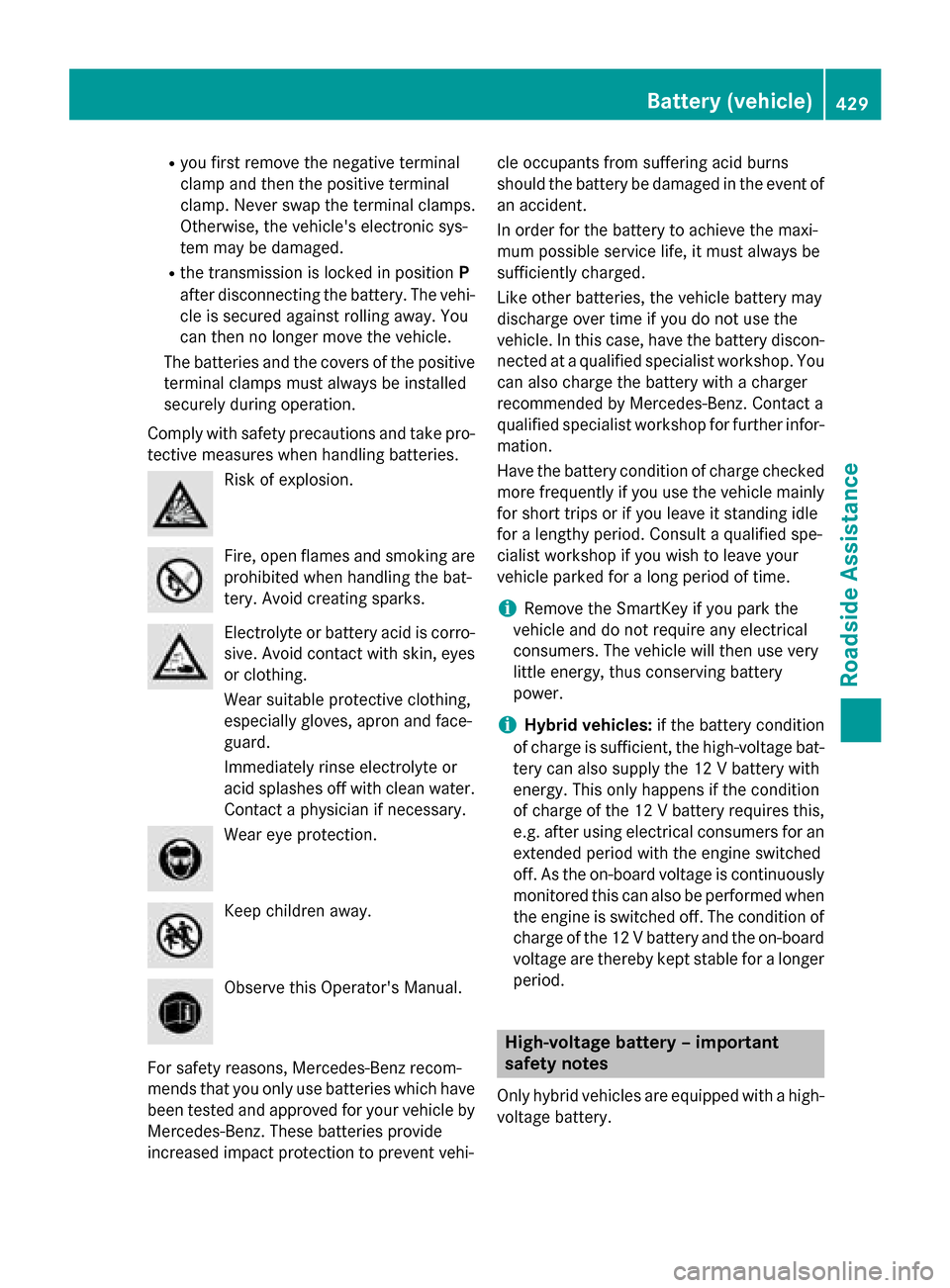
Comply with safety precautions and take pro-
tective measures when handling batteries. Risk of explosion.
Fire, open flames and smoking are
prohibited when handling the bat-
tery. Avoid creating sparks. Electrolyte or battery acid is corro-
sive. Avoid contact with skin, eyes
or clothing.
Wear suitable protective clothing,
especially gloves, apron and face-
guard.
Immediately rinse electrolyte or
acid splashes off with clean water. Contact a physician if necessary. Wear eye protection.
Keep children away.
Observe this Operator's Manual.
For safety reasons, Mercedes-Benz recom-
mends that you only use batteries which have been tested and approved for your vehicle by
Mercedes-Benz. These batteries provide
increased impact protection to prevent vehi- cle occupants from suffering acid burns
should the battery be damaged in the event of
an accident.
In order for the battery to achieve the maxi-
mum possible service life, it must always be
sufficiently charged.
Like other batteries, the vehicle battery may
discharge over time if you do not use the
vehicle. In this case, have the battery discon- nected at a qualified specialist workshop. You
can also charge the battery with a charger
recommended by Mercedes-Benz. Contact a
qualified specialist workshop for further infor- mation.
Have the battery condition of charge checked
more frequently if you use the vehicle mainly
for short trips or if you leave it standing idle
for a lengthy period. Consult a qualified spe-
cialist workshop if you wish to leave your
vehicle parked for a long period of time.
i Remove the SmartKey if you park the
vehicle and do not require any electrical
consumers. The vehicle will then use very
little energy, thus conserving battery
power.
i Hybrid vehicles:
if the battery condition
of charge is sufficient, the high-voltage bat- tery can also supply the 12 V battery with
energy. This only happens if the condition
of charge of the 12 V battery requires this,
e.g. after using electrical consumers for an extended period with the engine switched
off. As the on-board voltage is continuously
monitored this can also be performed when the engine is switched off. The condition of
charge of the 12 V battery and the on-board
voltage are thereby kept stable for a longer period. High-voltage battery – important
safety notes
Only hybrid vehicles are equipped with a high-
voltage battery. Battery (vehicle)
429Roadside Assistance Z
Page 435 of 502
Do not start the vehicle using a rapid charging device. If your vehicle's battery is discharged,
the engine can be jump-started from another vehicle or from a second battery using jumper
cables. Observe the following points:
R The battery is not accessible in all vehicles. If the other vehicle's battery is not accessible,
jump-start the vehicle using a second battery or a jump-starting device.
R You may only jump-start the vehicle when the engine and exhaust system are cold.
R Keep away from fire and open flames.
R Do not start the engine if the battery is frozen. Let the battery thaw first.
R All vehicles except AMG vehicles: do not start the engine if the battery is frozen. Let the
battery thaw first.
R Only jump-start from batteries with a 12 V voltage rating.
R Only use jumper cables which have a sufficient cross-section and insulated terminal clamps.
R Do not lean over the battery.
R If the battery is fully discharged, leave the battery that is being used to jump-start connected
for a few minutes before attempting to start. This charges the battery slightly.
R Make sure that the two vehicles do not touch.
Make sure that:
R the jumper cables are not damaged.
R when the jumper cables are connected to the battery, uninsulated sections of the terminal
clamp do not come into contact with other metal sections.
R the jumper cables cannot come into contact with parts which can move when the engine is
running, such as the V-belt pulley or the fan.
X Secure the vehicle by applying the electric parking brake.
X Shift the transmission to position P.
X Make sure that the ignition is switched off (Y page 189). All indicator lamps in the instrument
cluster must be off. When using the SmartKey, turn the SmartKey to position 0in the ignition
lock and remove it (Y page 189).
X Switch off all electrical consumers, e.g. rear window defroster, lighting, etc.
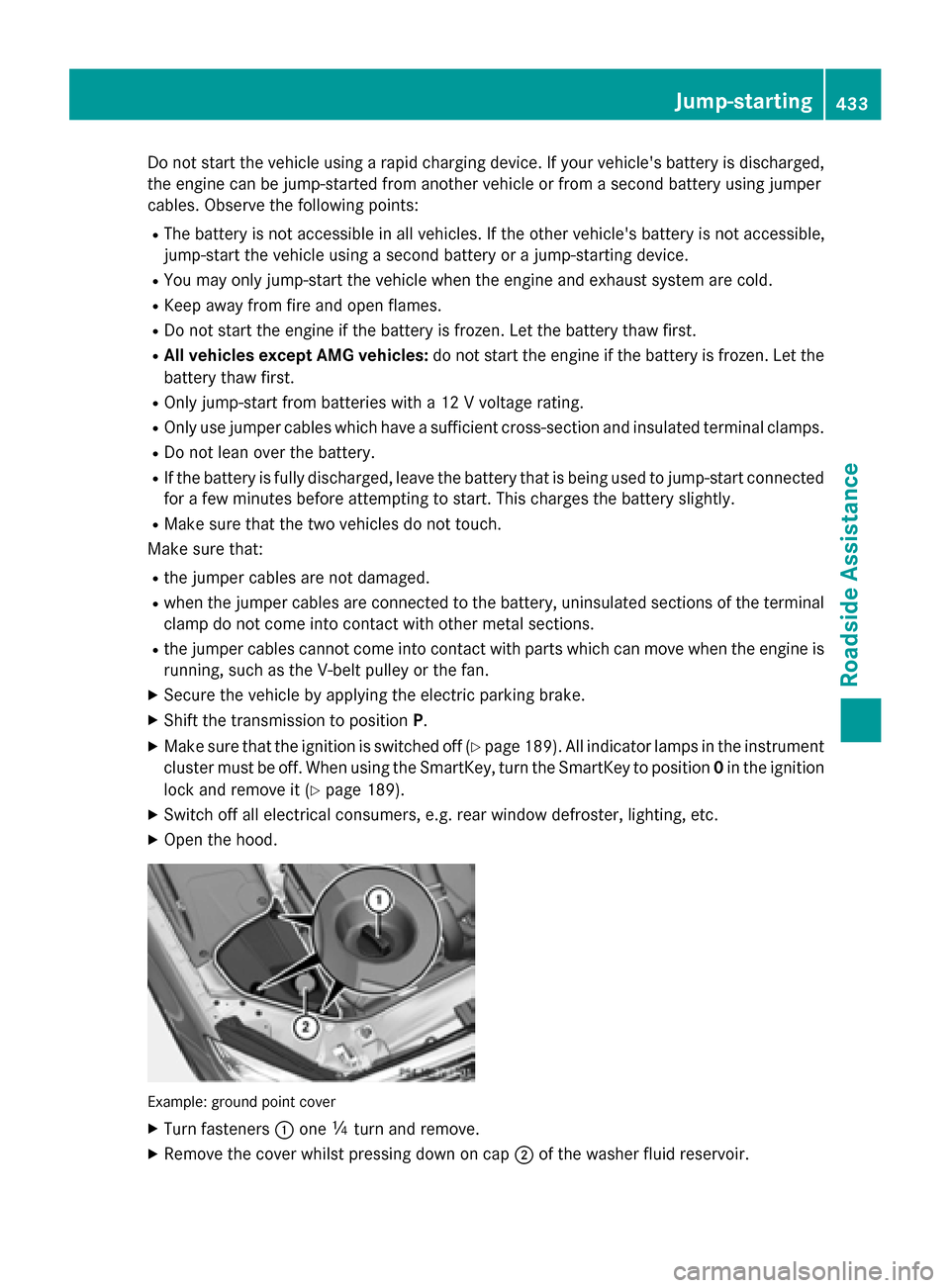
X Open the hood. Example: ground point cover
X Turn fasteners :one Õturn and remove.
X Remove the cover whilst pressing down on cap ;of the washer fluid reservoir. Jump-starting
433RoadsideAssistance Z
Page 438 of 502
If the automatic transmission cannot be shif-
ted to position N, have the vehicle transpor-
ted on a transporter or trailer.
The battery must be connected and charged.
Otherwise, you:
R cannot turn the SmartKey to position 2in
the ignition lock
R cannot release the electric parking brake
R cannot shift the automatic transmission to
position N
i Deactivate the automatic locking feature
(Y page 98). You could otherwise be locked
out when pushing or towing the vehicle.
Hybrid vehicles:
Hybrid vehicles may not be towed away but
only transported if:
R the multifunction display is not working or
R the ~ Malfunction
Malfunction display message
appears in the multifunction display
If the vehicle is in a dangerous area, it can be towed out of that area with both axles on the
ground. In this case, the towing distance may
not be greater than 50 mand must not exceed
a towing speed of 10 km/h. For longer dis-
tances, have the vehicle loaded and trans-
ported. Installing/removing the towing eye
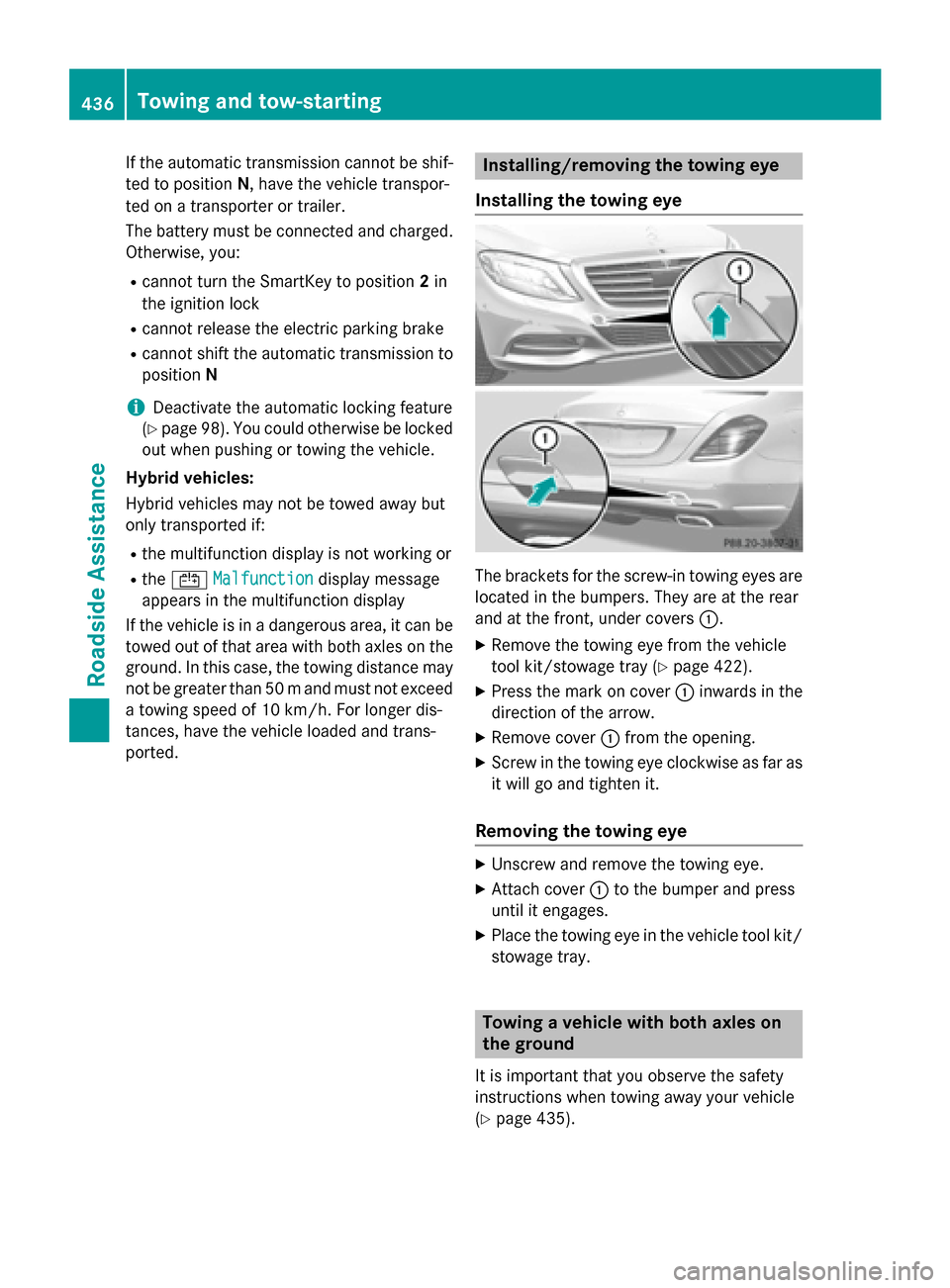
Installing the towing eye The brackets for the screw-in towing eyes are
located in the bumpers. They are at the rear
and at the front, under covers :.
X Remove the towing eye from the vehicle
tool kit/stowage tray (Y page 422).
X Press the mark on cover :inwards in the
direction of the arrow.
X Remove cover :from the opening.
X Screw in the towing eye clockwise as far as
it will go and tighten it.
Removing the towing eye X
Unscrew and remove the towing eye.
X Attach cover :to the bumper and press
until it engages.
X Place the towing eye in the vehicle tool kit/
stowage tray. Towing a vehicle with both axles on
the ground
It is important that you observe the safety
instructions when towing away your vehicle
(Y page 435). 436
Towing and tow-startingRoadside Assistance