parking brake MERCEDES-BENZ S-Class 2015 W222 Repair Manual
[x] Cancel search | Manufacturer: MERCEDES-BENZ, Model Year: 2015, Model line: S-Class, Model: MERCEDES-BENZ S-Class 2015 W222Pages: 502, PDF Size: 9.59 MB
Page 258 of 502
shows the
Park Assist Canceled
Park Assist Canceled mes-
sage.
When Active Parking Assist is canceled, you
must steer and brake again yourself.
If a system malfunction occurs, the vehicle is braked to a standstill. To drive on, depress the
accelerator again. Rear view camera
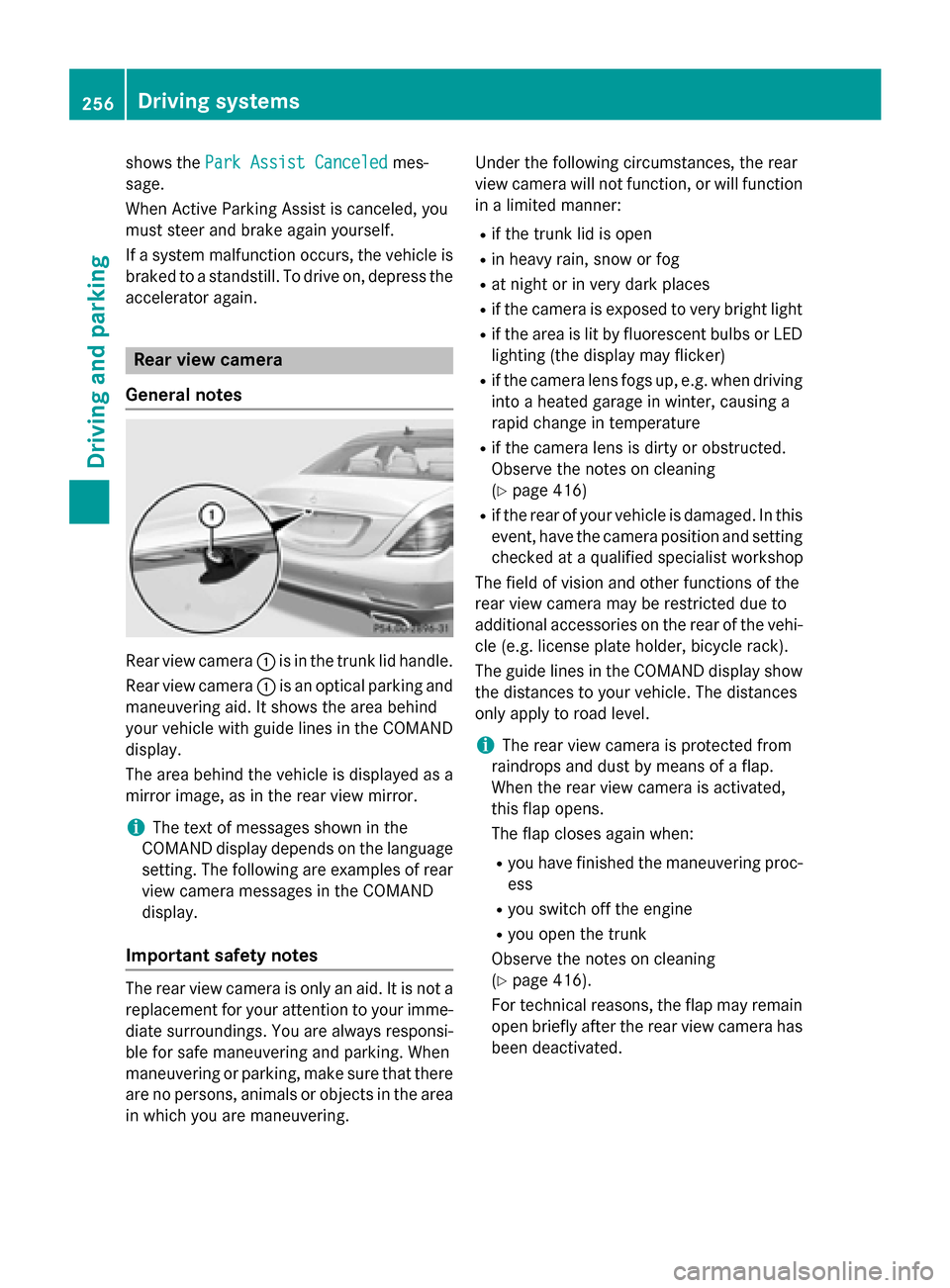
General notes Rear view camera
:is in the trunk lid handle.
Rear view camera :is an optical parking and
maneuvering aid. It shows the area behind
your vehicle with guide lines in the COMAND
display.
The area behind the vehicle is displayed as a
mirror image, as in the rear view mirror.
i The text of messages shown in the
COMAND display depends on the language
setting. The following are examples of rear view camera messages in the COMAND
display.
Important safety notes The rear view camera is only an aid. It is not a
replacement for your attention to your imme-
diate surroundings. You are always responsi-
ble for safe maneuvering and parking. When
maneuvering or parking, make sure that there are no persons, animals or objects in the area in which you are maneuvering. Under the following circumstances, the rear
view camera will not function, or will function
in a limited manner:
R if the trunk lid is open
R in heavy rain, snow or fog
R at night or in very dark places
R if the camera is exposed to very bright light
R if the area is lit by fluorescent bulbs or LED
lighting (the display may flicker)
R if the camera lens fogs up, e.g. when driving
into a heated garage in winter, causing a
rapid change in temperature
R if the camera lens is dirty or obstructed.
Observe the notes on cleaning
(Y page 416)
R if the rear of your vehicle is damaged. In this
event, have the camera position and setting checked at a qualified specialist workshop
The field of vision and other functions of the
rear view camera may be restricted due to
additional accessories on the rear of the vehi-
cle (e.g. license plate holder, bicycle rack).
The guide lines in the COMAND display show
the distances to your vehicle. The distances
only apply to road level.
i The rear view camera is protected from
raindrops and dust by means of a flap.
When the rear view camera is activated,
this flap opens.
The flap closes again when:
R you have finished the maneuvering proc-
ess
R you switch off the engine
R you open the trunk
Observe the notes on cleaning
(Y page 416).
For technical reasons, the flap may remain
open briefly after the rear view camera has
been deactivated. 256
Driving systemsDriving and parking
Page 272 of 502
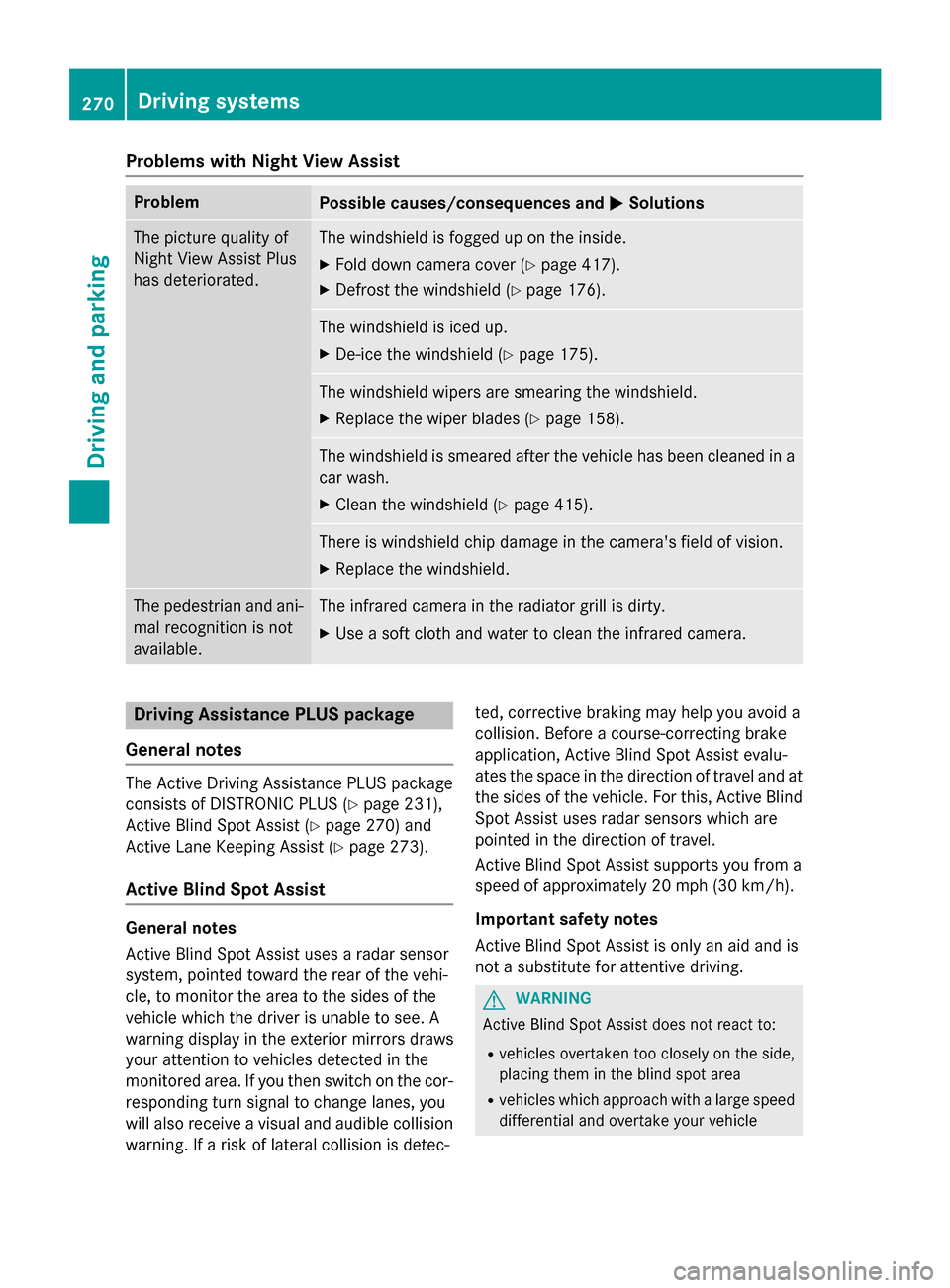
Problems with Night View Assist
Problem
Possible causes/consequences and
M
MSolutions The picture quality of
Night View Assist Plus
has deteriorated. The windshield is fogged up on the inside.
X Fold down camera cover (Y page 417).
X Defrost the windshield (Y page 176). The windshield is iced up.
X De-ice the windshield (Y page 175). The windshield wipers are smearing the windshield.
X Replace the wiper blades (Y page 158). The windshield is smeared after the vehicle has been cleaned in a
car wash.
X Clean the windshield (Y page 415). There is windshield chip damage in the camera's field of vision.
X Replace the windshield. The pedestrian and ani-
mal recognition is not
available. The infrared camera in the radiator grill is dirty.
X Use a soft cloth and water to clean the infrared camera. Driving Assistance PLUS package
General notes The Active Driving Assistance PLUS package
consists of DISTRONIC PLUS (Y page 231),
Active Blind Spot Assist (Y page 270) and
Active Lane Keeping Assist (Y page 273).
Active Blind Spot Assist General notes
Active Blind Spot Assist uses a radar sensor
system, pointed toward the rear of the vehi-
cle, to monitor the area to the sides of the
vehicle which the driver is unable to see. A
warning display in the exterior mirrors draws
your attention to vehicles detected in the
monitored area. If you then switch on the cor- responding turn signal to change lanes, you
will also receive a visual and audible collision
warning. If a risk of lateral collision is detec- ted, corrective braking may help you avoid a
collision. Before a course-correcting brake
application, Active Blind Spot Assist evalu-
ates the space in the direction of travel and at
the sides of the vehicle. For this, Active Blind
Spot Assist uses radar sensors which are
pointed in the direction of travel.
Active Blind Spot Assist supports you from a
speed of approximately 20 mph (30 km/h).
Important safety notes
Active Blind Spot Assist is only an aid and is
not a substitute for attentive driving. G
WARNING
Active Blind Spot Assist does not react to:
R vehicles overtaken too closely on the side,
placing them in the blind spot area
R vehicles which approach with a large speed
differential and overtake your vehicle 270
Driving systemsDriving and parking
Page 274 of 502
Due to the nature of the system:
R warnings may be issued in error when driv-
ing close to crash barriers or similar solid
lane borders.
R warnings may be interrupted when driving
alongside particularly long vehicles, e.g.
trucks, for a prolonged time.
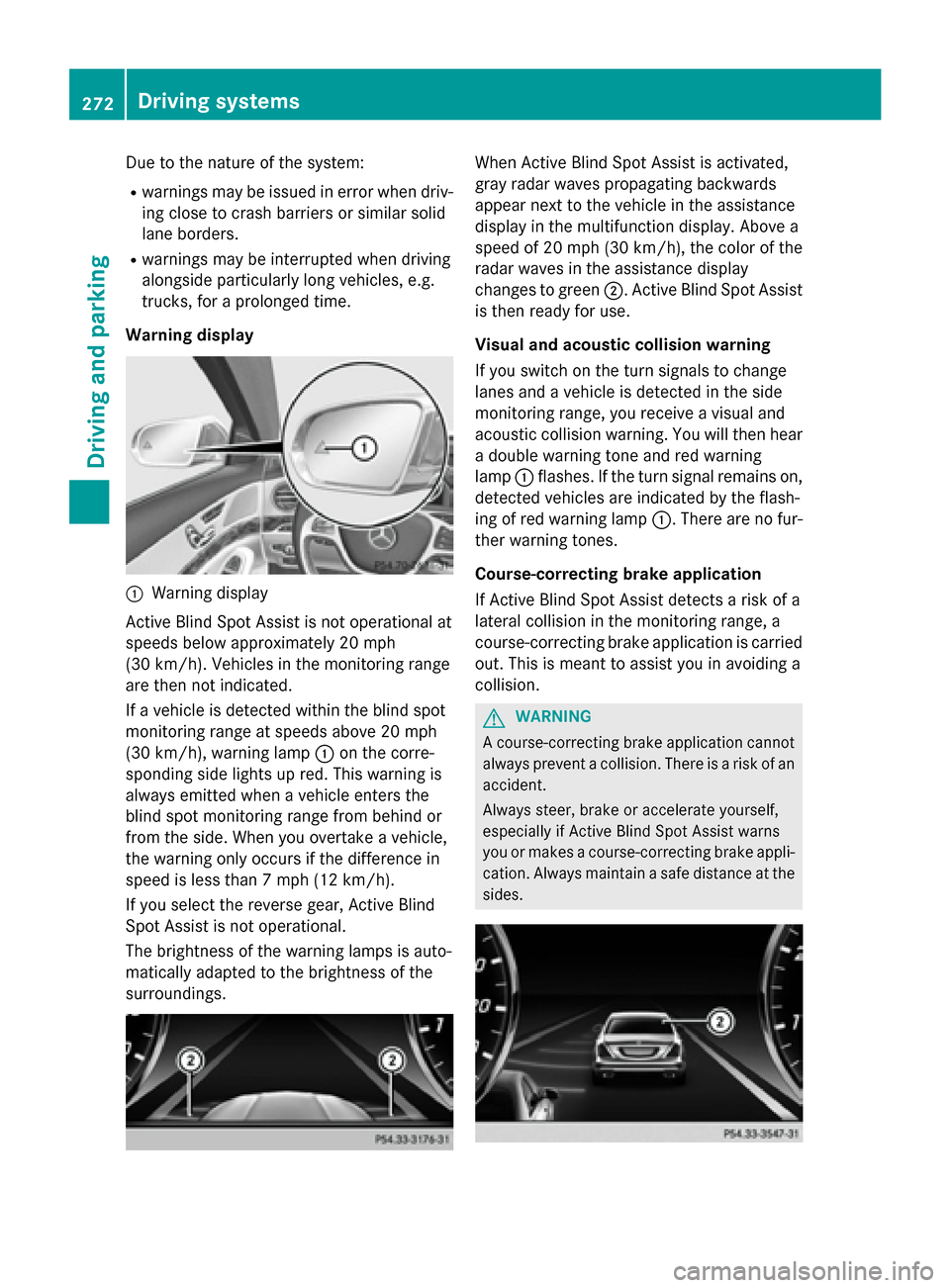
Warning display :
Warning display
Active Blind Spot Assist is not operational at
speeds below approximately 20 mph
(30 km/h). Vehicles in the monitoring range
are then not indicated.
If a vehicle is detected within the blind spot
monitoring range at speeds above 20 mph
(30 km/h), warning lamp :on the corre-
sponding side lights up red. This warning is
always emitted when a vehicle enters the
blind spot monitoring range from behind or
from the side. When you overtake a vehicle,
the warning only occurs if the difference in
speed is less than 7 mph (12 km/h).
If you select the reverse gear, Active Blind
Spot Assist is not operational.
The brightness of the warning lamps is auto-
matically adapted to the brightness of the
surroundings. When Active Blind Spot Assist is activated,
gray radar waves propagating backwards
appear next to the vehicle in the assistance
display in the multifunction display. Above a
speed of 20 mph (30 km/h), the color of the
radar waves in the assistance display
changes to green ;. Active Blind Spot Assist
is then ready for use.
Visual and acoustic collision warning
If you switch on the turn signals to change
lanes and a vehicle is detected in the side
monitoring range, you receive a visual and
acoustic collision warning. You will then hear a double warning tone and red warning
lamp :flashes. If the turn signal remains on,
detected vehicles are indicated by the flash-
ing of red warning lamp :. There are no fur-
ther warning tones.
Course-correcting brake application
If Active Blind Spot Assist detects a risk of a
lateral collision in the monitoring range, a
course-correcting brake application is carried
out. This is meant to assist you in avoiding a
collision. G
WARNING
A course-correcting brake application cannot always prevent a collision. There is a risk of an
accident.
Always steer, brake or accelerate yourself,
especially if Active Blind Spot Assist warns
you or makes a course-correcting brake appli-
cation. Always maintain a safe distance at the sides. 272
Driving systemsDriving an
d parking
Page 275 of 502
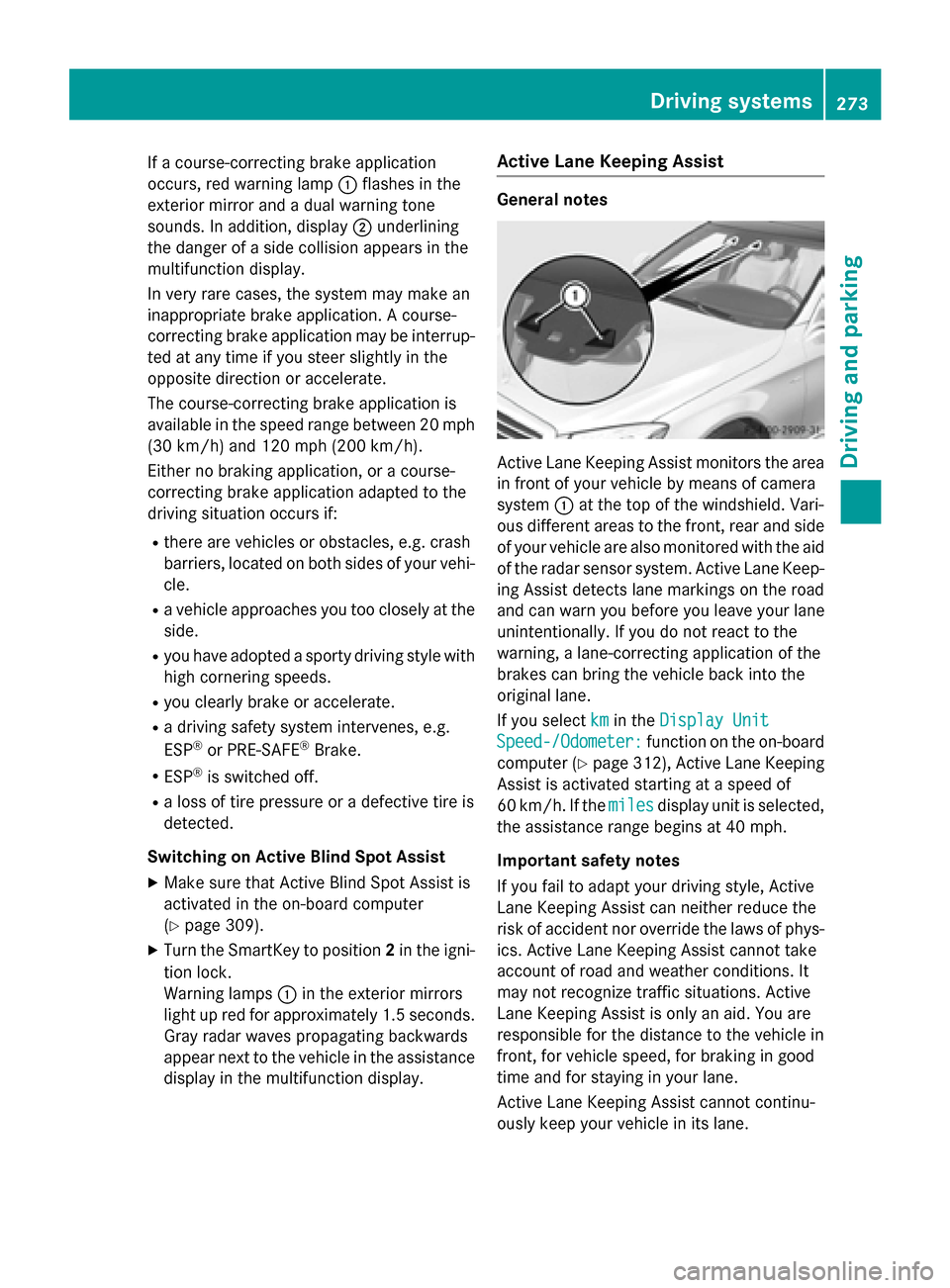
If a course-correcting brake application
occurs, red warning lamp :flashes in the
exterior mirror and a dual warning tone
sounds. In addition, display ;underlining
the danger of a side collision appears in the
multifunction display.
In very rare cases, the system may make an
inappropriate brake application. A course-
correcting brake application may be interrup-
ted at any time if you steer slightly in the
opposite direction or accelerate.
The course-correcting brake application is
available in the speed range between 20 mph (30 km/h) and 120 mph (200 km/h).
Either no braking application, or a course-
correcting brake application adapted to the
driving situation occurs if:
R there are vehicles or obstacles, e.g. crash
barriers, located on both sides of your vehi-
cle.
R a vehicle approaches you too closely at the
side.
R you have adopted a sporty driving style with
high cornering speeds.
R you clearly brake or accelerate.
R a driving safety system intervenes, e.g.
ESP ®
or PRE-SAFE ®
Brake.
R ESP ®
is switched off.
R a loss of tire pressure or a defective tire is
detected.
Switching on Active Blind Spot Assist X Make sure that Active Blind Spot Assist is
activated in the on-board computer
(Y page 309).
X Turn the SmartKey to position 2in the igni-
tion lock.
Warning lamps :in the exterior mirrors
light up red for approximately 1.5 seconds. Gray radar waves propagating backwards
appear next to the vehicle in the assistance
display in the multifunction display. Active Lane Keeping Assist General notes
Active Lane Keeping Assist monitors the area
in front of your vehicle by means of camera
system :at the top of the windshield. Vari-
ous different areas to the front, rear and side of your vehicle are also monitored with the aid
of the radar sensor system. Active Lane Keep-
ing Assist detects lane markings on the road
and can warn you before you leave your lane
unintentionally. If you do not react to the
warning, a lane-correcting application of the
brakes can bring the vehicle back into the
original lane.
If you select km kmin the Display Unit
Display Unit
Speed-/Odometer:
Speed-/Odometer: function on the on-board
computer (Y page 312), Active Lane Keeping
Assist is activated starting at a speed of
60 km/h. If the miles milesdisplay unit is selected,
the assistance range begins at 40 mph.
Important safety notes
If you fail to adapt your driving style, Active
Lane Keeping Assist can neither reduce the
risk of accident nor override the laws of phys- ics. Active Lane Keeping Assist cannot take
account of road and weather conditions. It
may not recognize traffic situations. Active
Lane Keeping Assist is only an aid. You are
responsible for the distance to the vehicle in
front, for vehicle speed, for braking in good
time and for staying in your lane.
Active Lane Keeping Assist cannot continu-
ously keep your vehicle in its lane. Driving systems
273Driving and parking Z
Page 276 of 502
G
WARNING
Active Lane Keeping Assist cannot always
clearly detect lane markings.
In such cases, Active Lane Keeping Assist
can:
R give an unnecessary warning and then
make a course-correcting brake application
to the vehicle
R not give a warning or intervene
There is a risk of an accident.
Always pay particular attention to the traffic
situation and keep within the lane, especially
if Active Lane Keeping Assist alerts you. Ter-
minate the intervention in a non-critical driv-
ing situation.
The system may be impaired or may not func-
tion if:
R there is poor visibility, e.g. due to insuffi-
cient illumination of the road, or due to
snow, rain, fog or spray
R there is glare, e.g. from oncoming traffic,
the sun or reflections (e.g. when the road
surface is wet)
R the windshield is dirty, fogged up, damaged
or covered, for instance by a sticker, in the
vicinity of the camera
R the radar sensors in the front or rear bump-
ers or the radiator trim are dirty, e.g.
obscured by snow
R there are no, several or unclear lane mark-
ings for a lane, e.g. in areas with road con-
struction work
R the lane markings are worn away, dark or
covered up, e.g. by dirt or snow
R the distance to the vehicle in front is too
small and the lane markings thus cannot be
detected
R the lane markings change quickly, e.g.
lanes branch off, cross one another or
merge
R the road is narrow and winding
R there are strong shadows cast on the road If no vehicle is detected in the adjacent lane
and broken lane markings are detected, no
lane-correcting brake application is made.
Warning vibration in the steering wheel
A warning may be given if a front wheel
passes over a lane marking. It will warn you by
means of intermittent vibration in the steer-
ing wheel for up to 1.5 seconds.
Lane-correcting brake application
If you leave your lane, under certain circum-
stances the vehicle will brake briefly on one
side. This is meant to assist you in bringing
the vehicle back to the original lane. G
WARNING
A lane-correcting brake application cannot
always bring the vehicle back into the original lane. There is a risk of an accident.
Always steer, brake or accelerate yourself,
especially if Active Lane Keeping Assist warns
you or makes a lane-correcting brake appli-
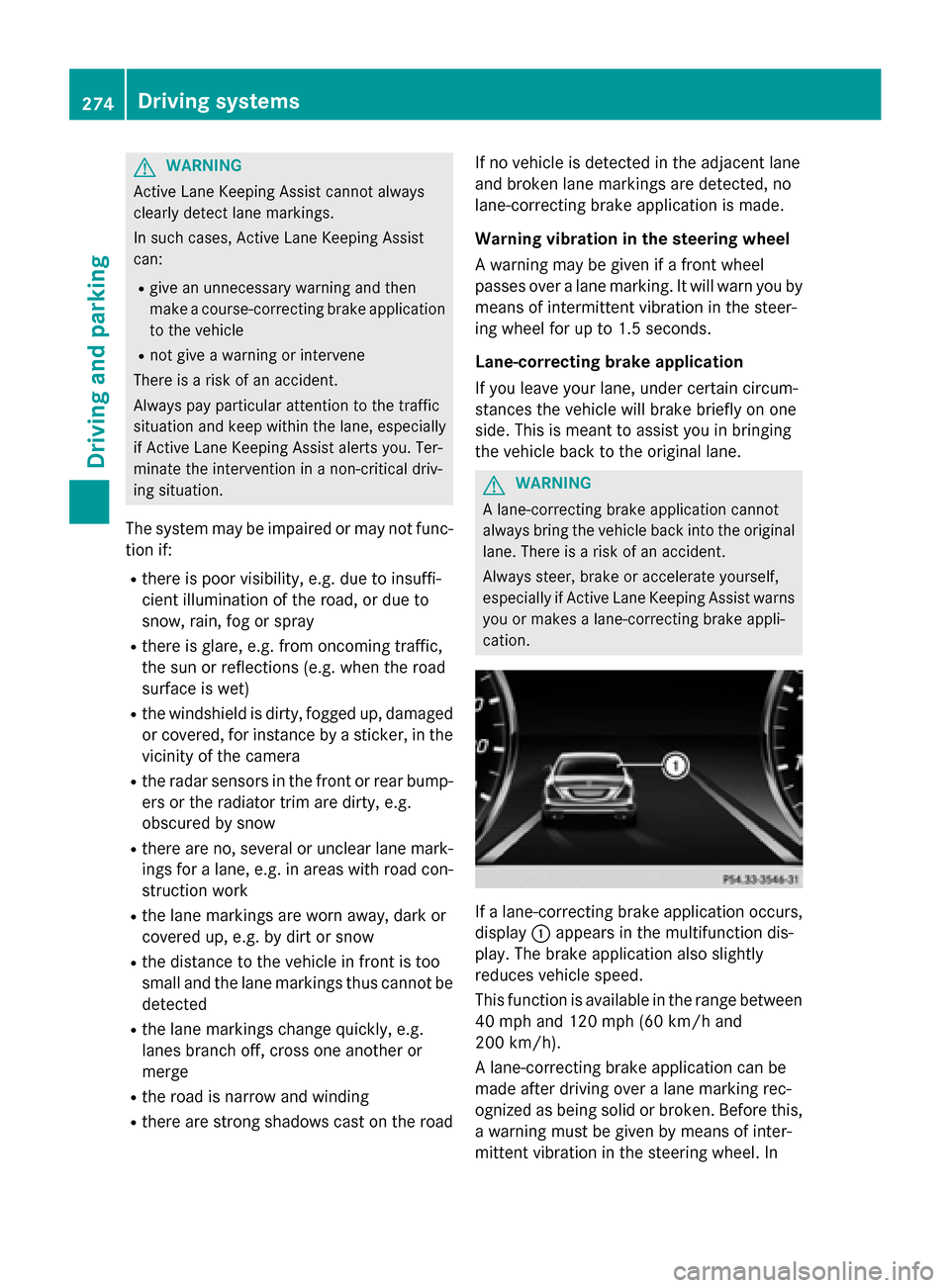
cation. If a lane-correcting brake application occurs,
display :appears in the multifunction dis-
play. The brake application also slightly
reduces vehicle speed.
This function is available in the range between
40 mph and 120 mph (60 km/h and
200 km/h).
A lane-correcting brake application can be
made after driving over a lane marking rec-
ognized as being solid or broken. Before this,
a warning must be given by means of inter-
mittent vibration in the steering wheel. In 274
Driving systemsDriving and parking
Page 277 of 502
addition, a lane with lane markings on both
sides must be recognized.
In the case of a broken lane marking being
detected, a lane-correcting brake application can only be made if a vehicle has been detec-
ted in the adjacent lane. Oncoming vehicles,
overtaking vehicles and vehicles in adjacent
lanes can be detected.
i A further lane-correcting brake applica-
tion can only occur after your vehicle has
returned to the original lane.
No lane-correcting brake application occurs
if:
R you clearly and actively steer, brake or
accelerate.
R you cut the corner on a sharp bend.
R you have switched on the turn signal.
R a driving safety system intervenes, e.g.
ESP ®
, PRE-SAFE ®
Brake or Active Blind
Spot Assist.
R you have adopted a sporty driving style with
high cornering speeds or high rates of
acceleration.
R ESP ®
is switched off.
R the transmission is not in position D.
R a loss of tire pressure or a defective tire has
been detected and displayed.
R an obstacle in the lane in which you are
driving has been detected.
Active Lane Keeping Assist may not detect
other road users or traffic situations. An inap- propriate brake application may be interrup-
ted at any time if you:
R steer slightly in the opposite direction
R switch on the turn signal
R clearly brake or accelerate
A lane-correcting brake application is inter-
rupted automatically if:
R a driving safety system intervenes, e.g.
ESP ®
, PRE-SAFE ®
Brake or Active Blind
Spot Assist.
R lane markings can no longer be recognized. Switching on Active Lane Keeping Assist
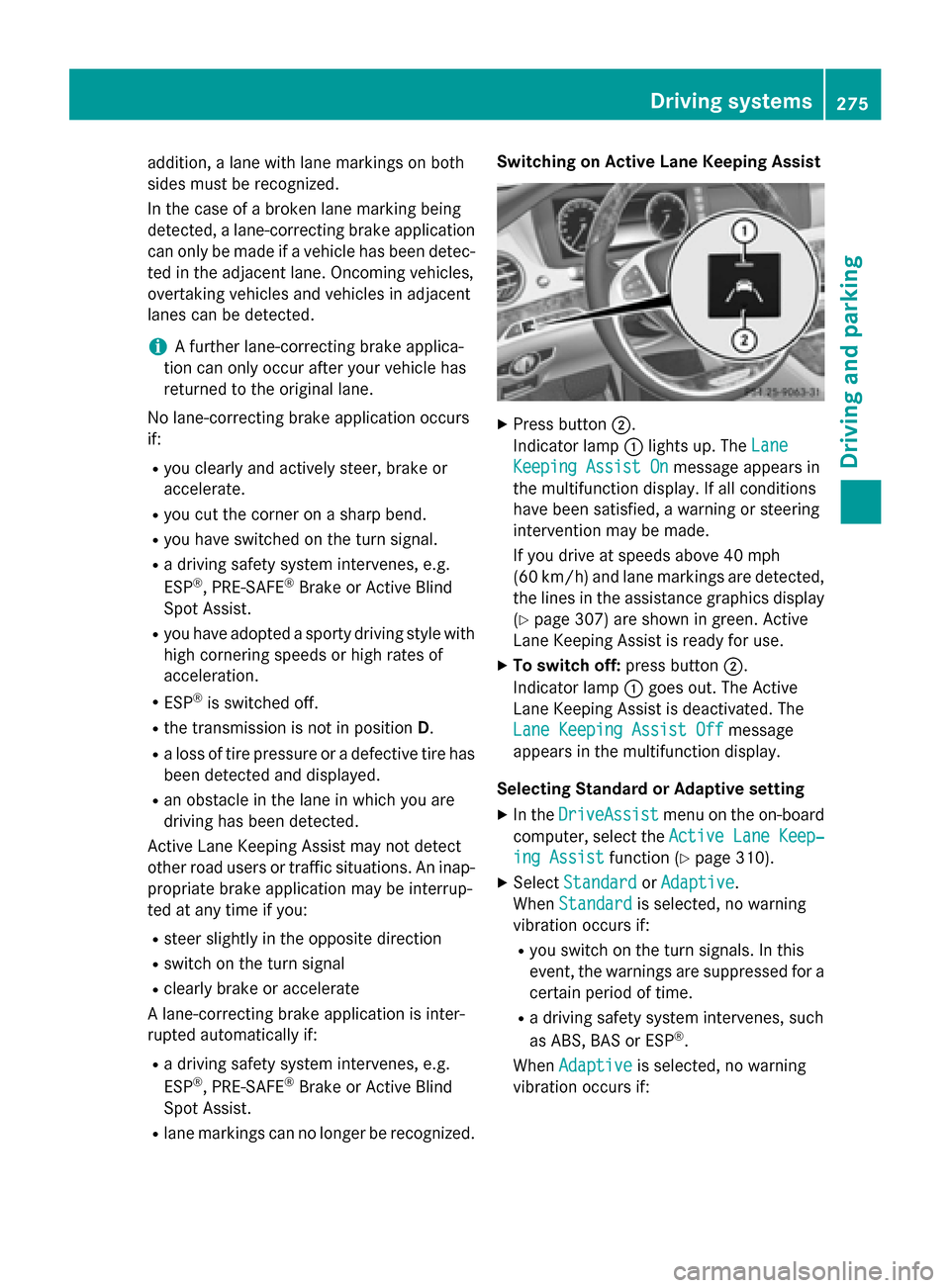
X
Press button ;.
Indicator lamp :lights up. The Lane Lane
Keeping Assist On
Keeping Assist On message appears in
the multifunction display. If all conditions
have been satisfied, a warning or steering
intervention may be made.
If you drive at speeds above 40 mph
(60 km/h) and lane markings are detected, the lines in the assistance graphics display(Y page 307) are shown in green. Active
Lane Keeping Assist is ready for use.
X To switch off: press button;.
Indicator lamp :goes out. The Active
Lane Keeping Assist is deactivated. The
Lane Keeping Assist Off Lane Keeping Assist Off message
appears in the multifunction display.
Selecting Standard or Adaptive setting X In the DriveAssist
DriveAssist menu on the on-board
computer, select the Active Lane Keep‐
Active Lane Keep‐
ing Assist
ing Assist function (Ypage 310).
X Select Standard
Standard orAdaptive
Adaptive.
When Standard
Standard is selected, no warning
vibration occurs if:
R you switch on the turn signals. In this
event, the warnings are suppressed for a
certain period of time.
R a driving safety system intervenes, such
as ABS, BAS or ESP ®
.
When Adaptive
Adaptive is selected, no warning
vibration occurs if: Driving systems
275Driving and parking Z
Page 280 of 502
Hybrid system overview
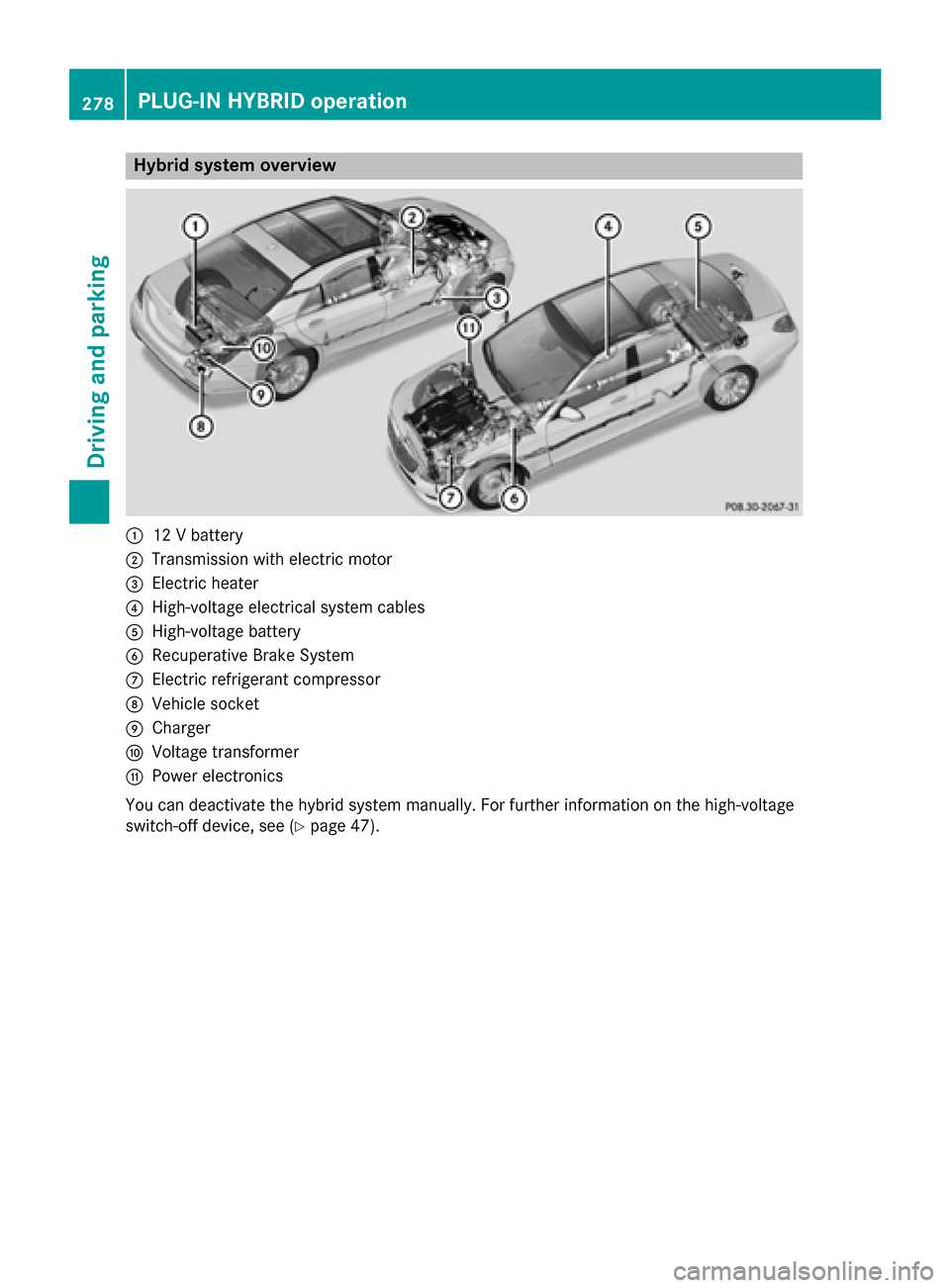
:
12 V battery
; Transmission with electric motor
= Electric heater
? High-voltage electrical system cables
A High-voltage battery
B Recuperative Brake System
C Electric refrigerant compressor
D Vehicle socket
E Charger
F Voltage transformer
G Power electronics
You can deactivate the hybrid system manually. For further information on the high-voltage
switch-off device, see (Y page 47).278
PLUG-IN HYBRID operationDriving and parking
Page 281 of 502
Instrument cluster
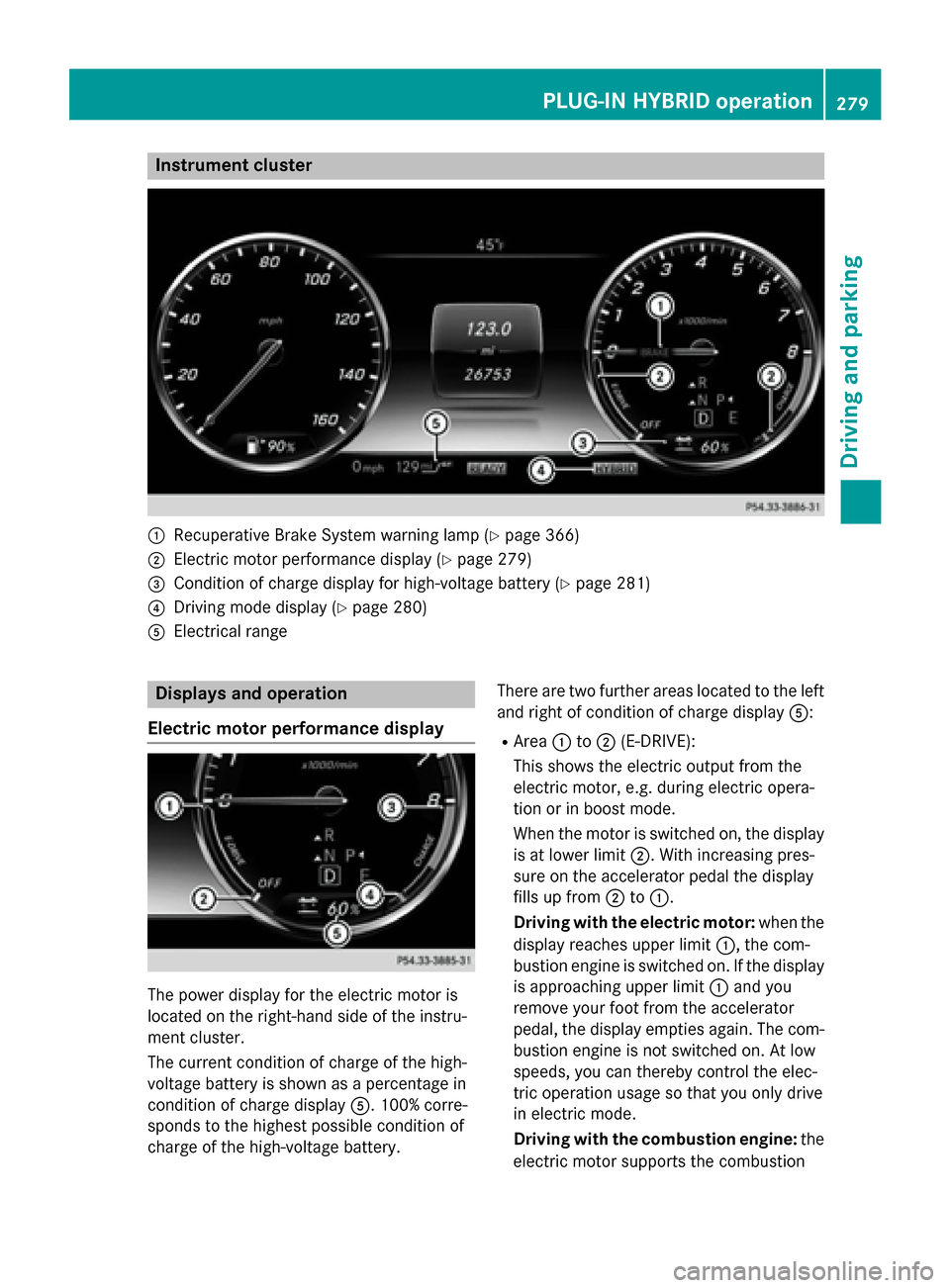
:
Recuperative Brake System warning lamp (Y page 366)
; Electric motor performance display (Y page 279)
= Condition of charge display for high-voltage battery (Y page 281)
? Driving mode display (Y page 280)
A Electrical range Displays and operation
Electric motor performance display The power display for the electric motor is
located on the right-hand side of the instru-
ment cluster.
The current condition of charge of the high-
voltage battery is shown as a percentage in
condition of charge display A. 100% corre-
sponds to the highest possible condition of
charge of the high-voltage battery. There are two further areas located to the left
and right of condition of charge display A:
R Area :to; (E-DRIVE):
This shows the electric output from the
electric motor, e.g. during electric opera-
tion or in boost mode.
When the motor is switched on, the display is at lower limit ;. With increasing pres-
sure on the accelerator pedal the display
fills up from ;to:.
Driving with the electric motor: when the
display reaches upper limit :, the com-
bustion engine is switched on. If the display is approaching upper limit :and you
remove your foot from the accelerator
pedal, the display empties again. The com- bustion engine is not switched on. At low
speeds, you can thereby control the elec-
tric operation usage so that you only drive
in electric mode.
Driving with the combustion engine: the
electric motor supports the combustion PLUG-IN HYBRID operation
279Driving and parking Z
Page 282 of 502
engine by providing additional torque
(boost mode) until the display reaches
upper limit
:.
You can also select the operating mode of
the hybrid system (Y page 280).
R Area =to? (CHARGE):
This shows the recuperated energy which is stored in the high-voltage battery as elec-
trical energy.
When the display reaches lower limit ?,
the maximum recuperative braking power
has been exhausted. The mechanical brake is activated.
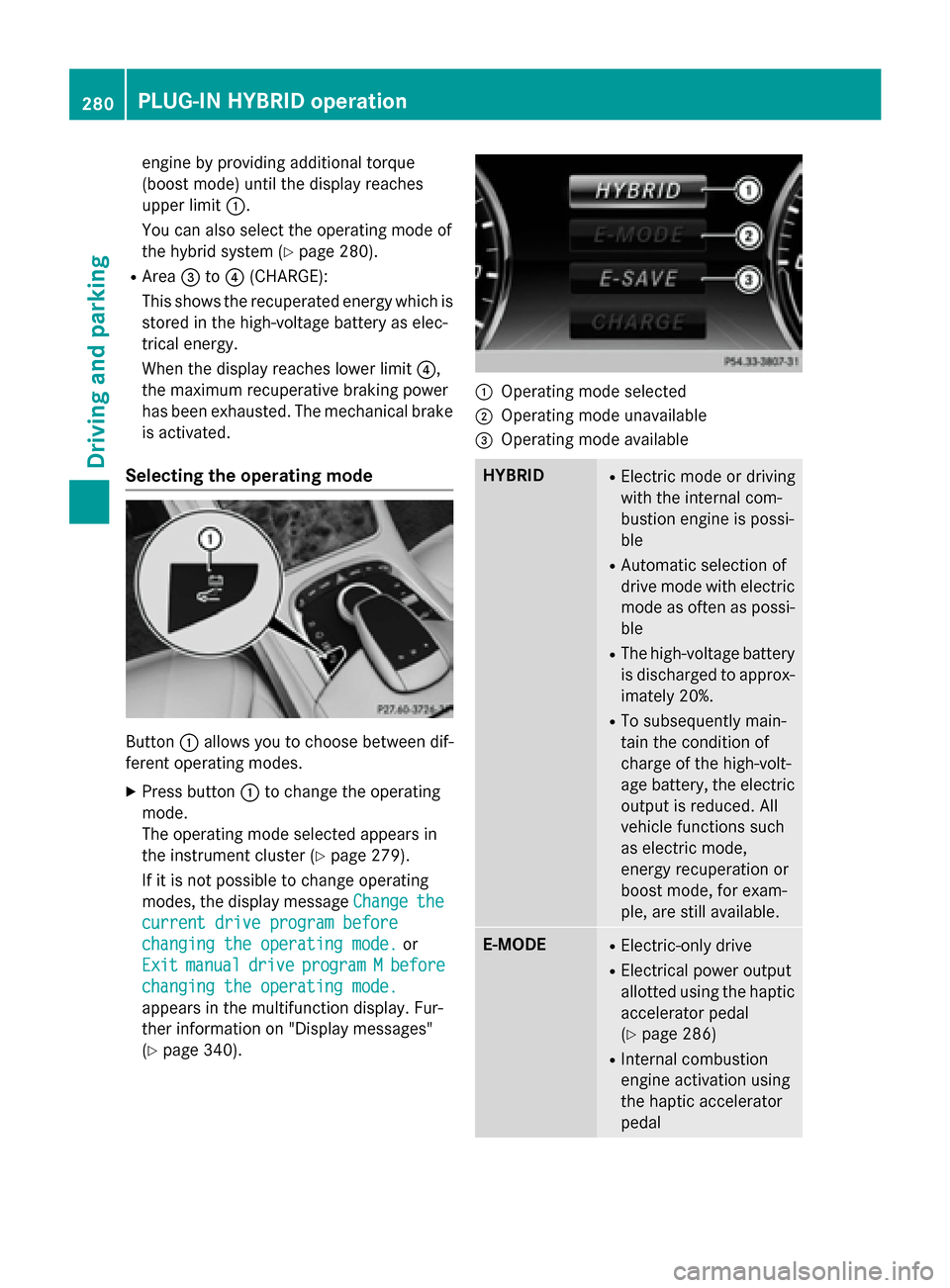
Selecting the operating mode Button
:allows you to choose between dif-
ferent operating modes.
X Press button :to change the operating
mode.
The operating mode selected appears in
the instrument cluster (Y page 279).
If it is not possible to change operating
modes, the display message Change
Change the the
current drive program before
current drive program before
changing the operating mode. changing the operating mode. or
Exit
Exit manual
manual drive
driveprogram
program M
Mbefore
before
changing the operating mode.
changing the operating mode.
appears in the multifunction display. Fur-
ther information on "Display messages"
(Y page 340). :
Operating mode selected
; Operating mode unavailable
= Operating mode available HYBRID R
Electric mode or driving
with the internal com-
bustion engine is possi-
ble
R Automatic selection of
drive mode with electric
mode as often as possi-
ble
R The high-voltage battery
is discharged to approx-imately 20%.
R To subsequently main-
tain the condition of
charge of the high-volt-
age battery, the electric
output is reduced. All
vehicle functions such
as electric mode,
energy recuperation or
boost mode, for exam-
ple, are still available. E-MODE R
Electric-only drive
R Electrical power output
allotted using the haptic
accelerator pedal
(Y page 286)
R Internal combustion
engine activation using
the haptic accelerator
pedal 280
PLUG-IN HYBRID operationDriving and parking
Page 287 of 502
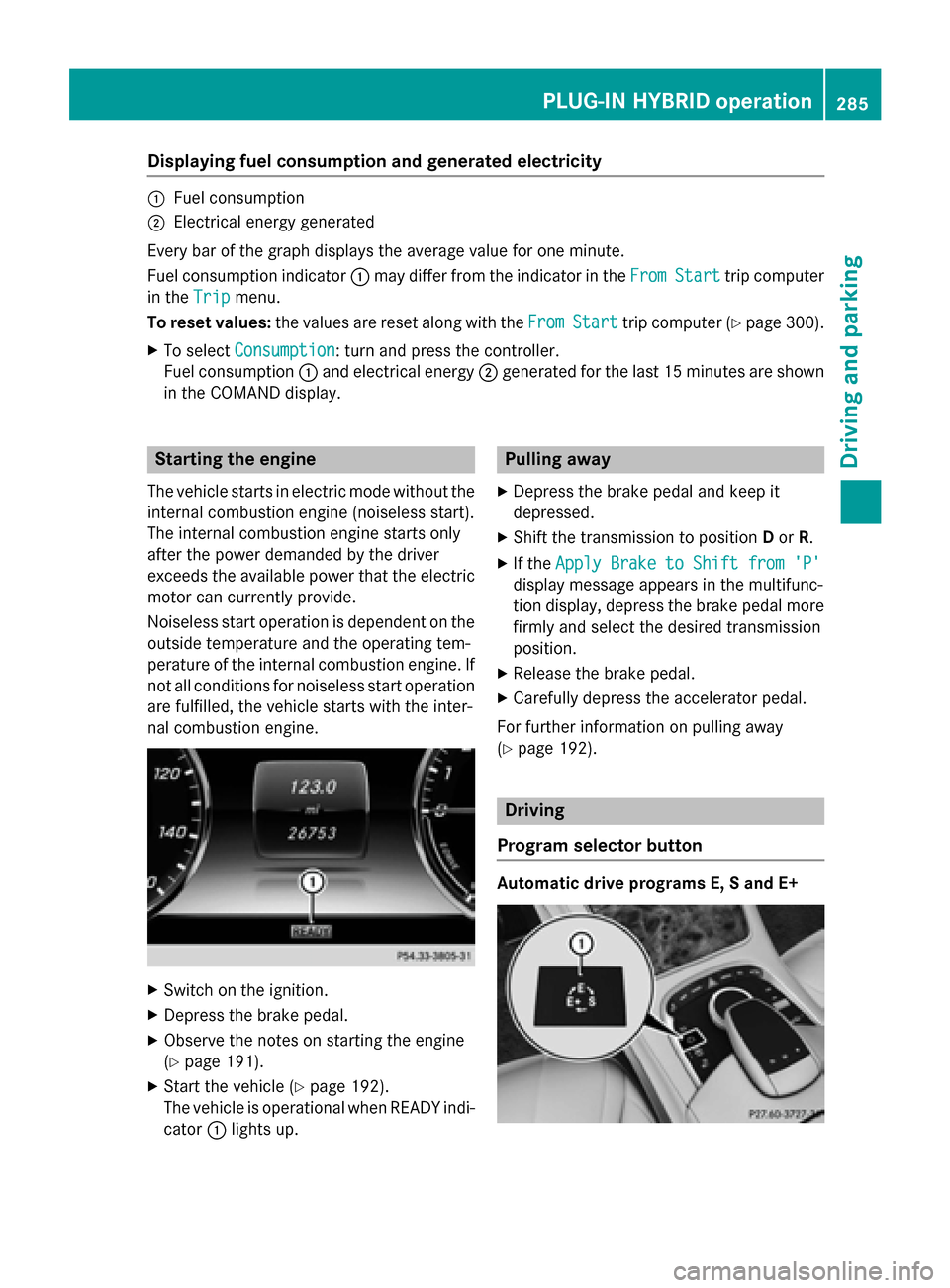
Displaying fuel consumption and generated electricity
:
Fuel consumption
; Electrical energy generated
Every bar of the graph displays the average value for one minute.
Fuel consumption indicator :may differ from the indicator in the From
FromStart
Start trip computer
in the Trip
Trip menu.
To reset values: the values are reset along with the From
FromStart
Start trip computer (Y page 300).
X To select Consumption
Consumption: turn and press the controller.
Fuel consumption :and electrical energy ;generated for the last 15 minutes are shown
in the COMAND display. Starting the engine
The vehicle starts in electric mode without the
internal combustion engine (noiseless start).
The internal combustion engine starts only
after the power demanded by the driver
exceeds the available power that the electric motor can currently provide.
Noiseless start operation is dependent on the
outside temperature and the operating tem-
perature of the internal combustion engine. If
not all conditions for noiseless start operation are fulfilled, the vehicle starts with the inter-
nal combustion engine. X
Switch on the ignition.
X Depress the brake pedal.
X Observe the notes on starting the engine
(Y page 191).
X Start the vehicle (Y page 192).
The vehicle is operational when READY indi-
cator :lights up. Pulling away
X Depress the brake pedal and keep it
depressed.
X Shift the transmission to position Dor R.
X If the Apply Brake to Shift from 'P' Apply Brake to Shift from 'P'
display message appears in the multifunc-
tion display, depress the brake pedal more firmly and select the desired transmission
position.
X Release the brake pedal.
X Carefully depress the accelerator pedal.
For further information on pulling away
(Y page 192). Driving
Program selector button Automatic drive programs E, S and E+ PLUG-IN HYBRID ope
ration
285Driving an d parking Z