trip computer MERCEDES-BENZ S-Class 2015 W222 Owner's Manual
[x] Cancel search | Manufacturer: MERCEDES-BENZ, Model Year: 2015, Model line: S-Class, Model: MERCEDES-BENZ S-Class 2015 W222Pages: 502, PDF Size: 9.59 MB
Page 10 of 502
Warning lamp ................................. 364
Coolbox ..............................................3 88
Cooling
see Climate control
Copyright ............................................. 31
Cornering light function
Display message ............................ 333
Function/notes ............................ .153
Crash-responsive emergency light-
ing ....................................................... 156
Crosswind Assist (vehicles with
MAGIC BODY CONTROL) ................... 244
Crosswind Assist (vehicles with-
out MAGIC BODY CONTROL) ...............83
Cruise control
Cruise control leve r .......................230
Deactivating ................................... 231
Display message ............................ 347
Driving system ............................... 229
Function/notes ............................ .229
Important safety notes .................. 229
Setting a speed .............................. 231
Storing and maintaining current
speed ............................................. 230
Cup holder
Center console .............................. 378
Important safety notes .................. 378
Rear compartment ......................... 379
Temperature controlled ................. 380
Cushion air bags .................................. 59
Customer Assistance Center
(CAC) ..................................................... 29
Customer Relations Department ....... 29D
Data see Technical data
Daytime running lamps
Display message ............................ 335
Function/notes ............................ .150
Switching on/off (on-board com-
puter) ............................................. 312
Declarations of conformity ................. 28
Diagnostics connection ......................28
Digital speedometer .........................301
DIRECT SELECT lever
Automatic transmission ................. 197 Display
see Display messages
see Warning and indicator lamps
Display messages
ASSYST PLUS ................................ 410
Calling up (on-board computer) ..... 316
Driving systems ............................ .341
Engine ............................................ 336
General notes ................................ 316
Hiding (on-board computer) ........... 316
Hybrid system ................................ 340
Introduction ................................... 316
Lights ............................................. 333
Safety systems .............................. 317
SmartKey ....................................... 354
Tires ............................................... 348
Vehicle .......................................... .351
Distance recorder
see Odometer
see Trip odometer
Distance warning (warning lamp) .... 367
Distance warning function
Function/notes ................................ 80
DISTRONIC PLUS
Activating ....................................... 233
Activation conditions ..................... 233
Cruise control lever ....................... 233
Deactivating ................................... 238
Display message ............................ 346
Displays in the multifunction dis-
pla y................................................ 237
Driving tips .................................... 238
Function/note s............................. 231
Important safety notes .................. 232
Setting the specified minimum
distance ......................................... 236
Doors
Automatic locking (switch) ............... 98
Central locking/unlocking
(SmartKey) ....................................... 91
Control panel ................................... 42
Display message ............................ 352
Emergency locking ........................... 99
Emergency unlocking ....................... 98
Important safety notes .................... 97
Opening (from inside) ...................... 97
Power closing .................................. 98
Drinking and driving ......................... 2248
Index
Page 17 of 502
Operation ......................................... 60
System self-test ...............................62
Odometer ...........................................2 99
Oil
see Engine oil
On-board computer
AMG menu ..................................... 314
Assistance graphic menu .............. .307
Assistance menu ........................... 308
Display messages .......................... 316
Displaying a service message ....... .410
DISTRONIC PLUS ........................... 237
Factory settings ............................ .314
Head-up displa y............................. 297
Important safety notes .................. 294
Instrument cluster menu ............... 312
Lights menu ................................... 312
Media menu ................................... 304
Menu overview .............................. 299
Message memory .......................... 316
Navigation menu ............................ 301
Operation ....................................... 295
Radio menu ................................... 303
Service menu ................................. 307
Settings menu ............................... 308
Standard display ............................ 299
Telephone menu ............................ 305
Trip menu ...................................... 299
Video DVD operation ..................... 305
Online access .................................... 219
Operating safety
Declaration of conformity ................ 28
Important safety notes .................... 27
Operating system
see On-board computer
Operator's Manual
Overview .......................................... 25
Vehicle equipment ........................... 25
Outside temperature display ........... 295
Overhead control panel ...................... 41
Override feature
Rear side window s........................... 75 P
Paint code number ............................ 488
Paintwork (cleaning instructions) ... 413
Panic alarm .......................................... 49 Panorama roof with power tilt/
sliding panel
Important safety notes .................. 110
Opening/closing ............................ 111
Problem (malfunction) ................... 117
Resetting ....................................... 115
Parcel net hooks ............................... 376
Parking
Important safety notes .................. 220
Parking brake ................................ 222
Position of exterior mirror, front-
passenger side ............................... 142
Rear view camera .......................... 256
see PARKTRONIC
Parking aid
Active Parking Assist ..................... 251
see Exterior mirrors
see PARKTRONIC
Parking assistance
see PARKTRONIC
Parking brake
Display message ............................ 320
Electric parking brake .................... 222
Warning lamp ................................. 362
Parking lamps
Switching on/of f........................... 151
PARKTRONIC
Deactivating/activating ................. 250
Driving system ............................... 248
Function/note s............................. 248
Important safety notes .................. 248
Problem (malfunction) ................... 251
Range of the sensors ..................... 249
Warning display ............................. 250
PASSENGER AIR BAG
Indicator lamps ................................ 50
PASSENGER AIR BAG indicator
lamp
Problem (malfunction) ................... 332
Perfume atomizer
Operating ....................................... 178
Perfume vial ................................... 178
Problem (malfunction) ................... 180
Pets in the vehicle ............................... 76
Plastic trim (cleaning instruc-
tions) .................................................. 418 Index
15
Page 23 of 502
Structure and characteristics
(definition) ..................................... 463
Summer tires in winter .................. 444
Temperature .................................. 459
TIN (Tire Identification Number)
(definition) ..................................... 465
Tire bead (definition) ...................... 465
Tire pressure (definition) ................ 464
Tire pressures (recommended) ...... 463
Tire size (data )............................... 471
Tire size designation, load-bearing capacity, speed rating .................... 459
Tire tread ....................................... 443
Tire tread (definition) ..................... 465
Total load limit (definition) ............. 465
Traction ......................................... 458
Traction (definition) ....................... 465
Tread wear ..................................... 458
Uniform Tire Quality Grading
Standards ...................................... 458
Uniform Tire Quality Grading
Standards (definition) .................... 463
Wear indicator (definition) ............. 465
Wheel and tire combination ........... 473
Wheel rim (definition) .................... 463
see Flat tire
Top Tether ............................................ 73
Tow-starting
Emergency engine starting ............ 438
Important safety notes .................. 435
Towing away
Important safety guidelines ........... 435
Installing the towing eye ................ 436
Notes for 4MATIC vehicles ............ 438
Removing the towing eye ............... 436
With both axles on the ground ....... 436
With the rear axle raised ................ 437
Towing eye ......................................... 422
Transfer case ..................................... 205
Transmission
see Automatic transmission
Transporting the vehicle .................. 437
Trim pieces (cleaning instruc-
tions) .................................................. 418
Trip computer (on-board com-
puter) .................................................. 300 Trip odometer
Calling up ....................................... 299
Resetting (on-board computer) ...... 301
Trunk
Emergency release ........................ 105
Important safety notes .................. 100
Locking separately ......................... 104
Opening/closing (automatically
from inside) ................................... 104
Opening/closing (automatically
from outside) ................................. 101
Opening/closing (from outside,
HANDS-FREE ACCESS) .................. 102
Opening/closing (manually from
outside) ......................................... 101
Power closing .................................. 98
Trunk lid
Display message ............................ 352
Obstacle recognition ...................... 100
Opening dimensions ...................... 495
Opening/closing ............................ 100
Trunk load (maximum) ...................... 495
Turn signals
Display message ............................ 333
Switching on/of f........................... 152
Two-way radio
Windshield (infrared reflective) ...... 401
Type identification plate
see Vehicle identification plate U
Unlocking Emergency unlocking ....................... 98
From inside the vehicle (central
unlocking button) ............................. 97 V
Vanity mirror (in the sun visor) ........ 381
Vehicle
Correct use ...................................... 29
Data acquisition ............................... 30
Display message ............................ 351
Equipment ....................................... 25
Individual settings .......................... 308
Limited Warranty ............................. 30
Loading .......................................... 453
Locking (in an emergency) ............... 99 Index
21
Page 283 of 502
E-SAVE R
Electric mode or driving
with the internal com-
bustion engine is possi-
ble
R Automatic selection of
drive mode with electric
mode as often as possi-
ble
R The current condition of
charge of the high-volt-
age battery is main-
tained so the electrical
energy can be used at a
later time. CHARGE R
Electric drive is not pos-
sible
R Charging the high-volt-
age battery while driv-
ing using the combus-
tion engine In automatic drive program
S(Y page 285)
and in manual drive program M(Y page 286),
only HYBRID operating mode is available.
If you switch from automatic drive program S
to automatic drive program Eor E+ ,HYBRID
operating mode continues to be selected.
If manual drive program Mis deactivated, the
automatic transmission shifts:
R into the automatic drive program that was
last selected
R into the driving mode that was last selected
Operating the on-board computer You can display the current operating condi-
tion of the hybrid system in the multifunction
display and the COMAND display
(Y page 281).
In the COMAND display, you can also call up a graphic display of the fuel consumption and
generated electricity (Y page 285). Menus and submenus
Selecting displays in the COMAND dis-
play X
Press button Øon the controller.
The vehicle menu is displayed.
X To select Energy EnergyFlow
Flow: turn and press the
controller.
The energy flow is displayed.
X To select Consumption Consumption: turn and press the
controller.
Fuel consumption and the generated elec-
tric energy are displayed.
X To exit the display: press the %button
on the controller.
Selecting the energy flow display in the
multifunction display X
Use Ñ on the steering wheel to call up
the list of menus.
X Press the :or9 button on the steer-
ing wheel to select the Trip Tripmenu.
X Confirm by pressing aon the steering
wheel.
X Use : or9 to select Energy Flow
Energy Flow .
The active hybrid components are highligh-
ted in the energy flow display.
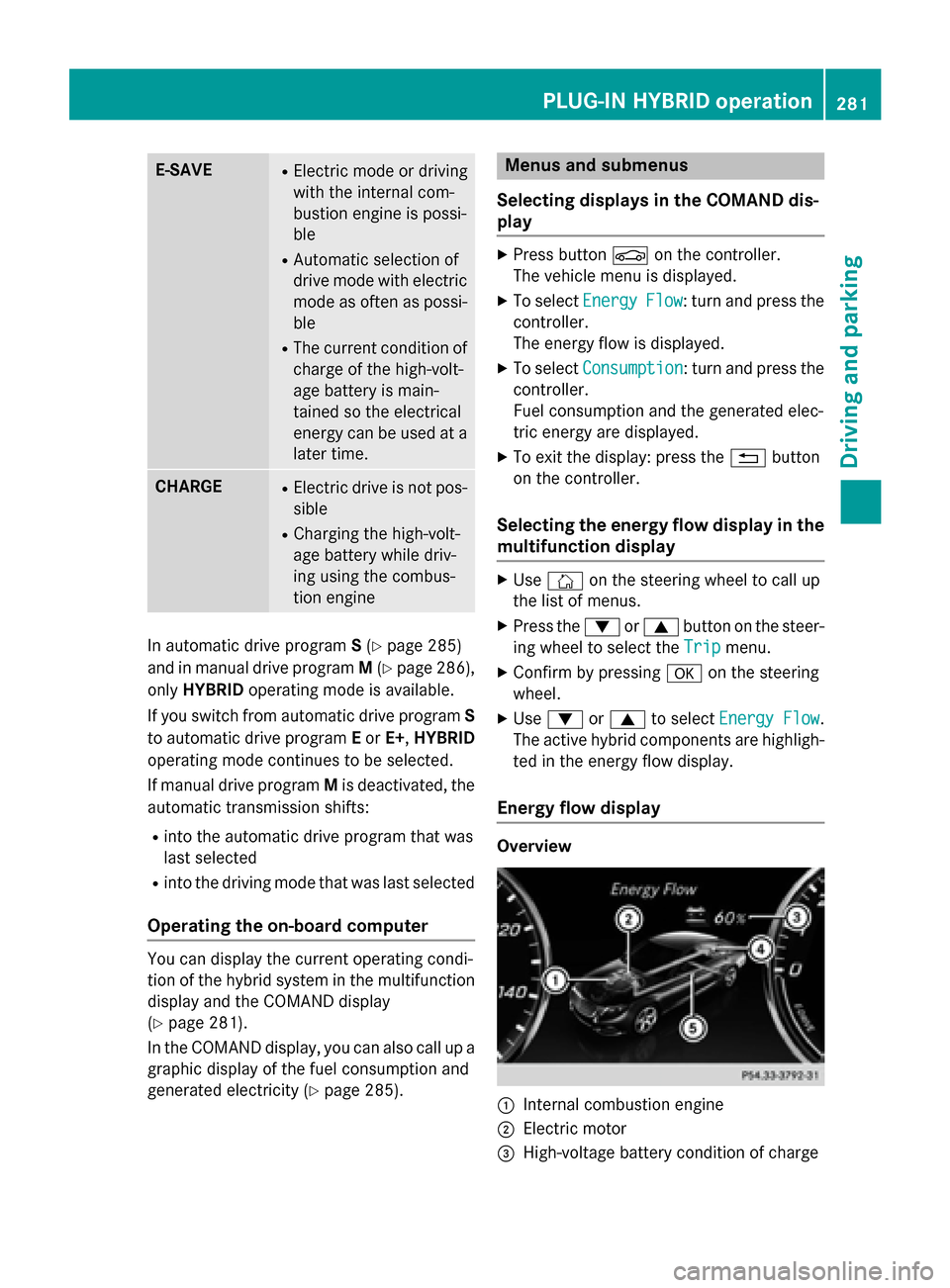
Energy flow display Overview
:
Internal combustion engine
; Electric motor
= High-voltage battery condition of charge PLUG-IN HYBRID operation
281Driving and parking Z
Page 287 of 502
Displaying fuel consumption and generated electricity
:
Fuel consumption
; Electrical energy generated
Every bar of the graph displays the average value for one minute.
Fuel consumption indicator :may differ from the indicator in the From
FromStart
Start trip computer
in the Trip
Trip menu.
To reset values: the values are reset along with the From
FromStart
Start trip computer (Y page 300).
X To select Consumption
Consumption: turn and press the controller.
Fuel consumption :and electrical energy ;generated for the last 15 minutes are shown
in the COMAND display. Starting the engine
The vehicle starts in electric mode without the
internal combustion engine (noiseless start).
The internal combustion engine starts only
after the power demanded by the driver
exceeds the available power that the electric motor can currently provide.
Noiseless start operation is dependent on the
outside temperature and the operating tem-
perature of the internal combustion engine. If
not all conditions for noiseless start operation are fulfilled, the vehicle starts with the inter-
nal combustion engine. X
Switch on the ignition.
X Depress the brake pedal.
X Observe the notes on starting the engine
(Y page 191).
X Start the vehicle (Y page 192).
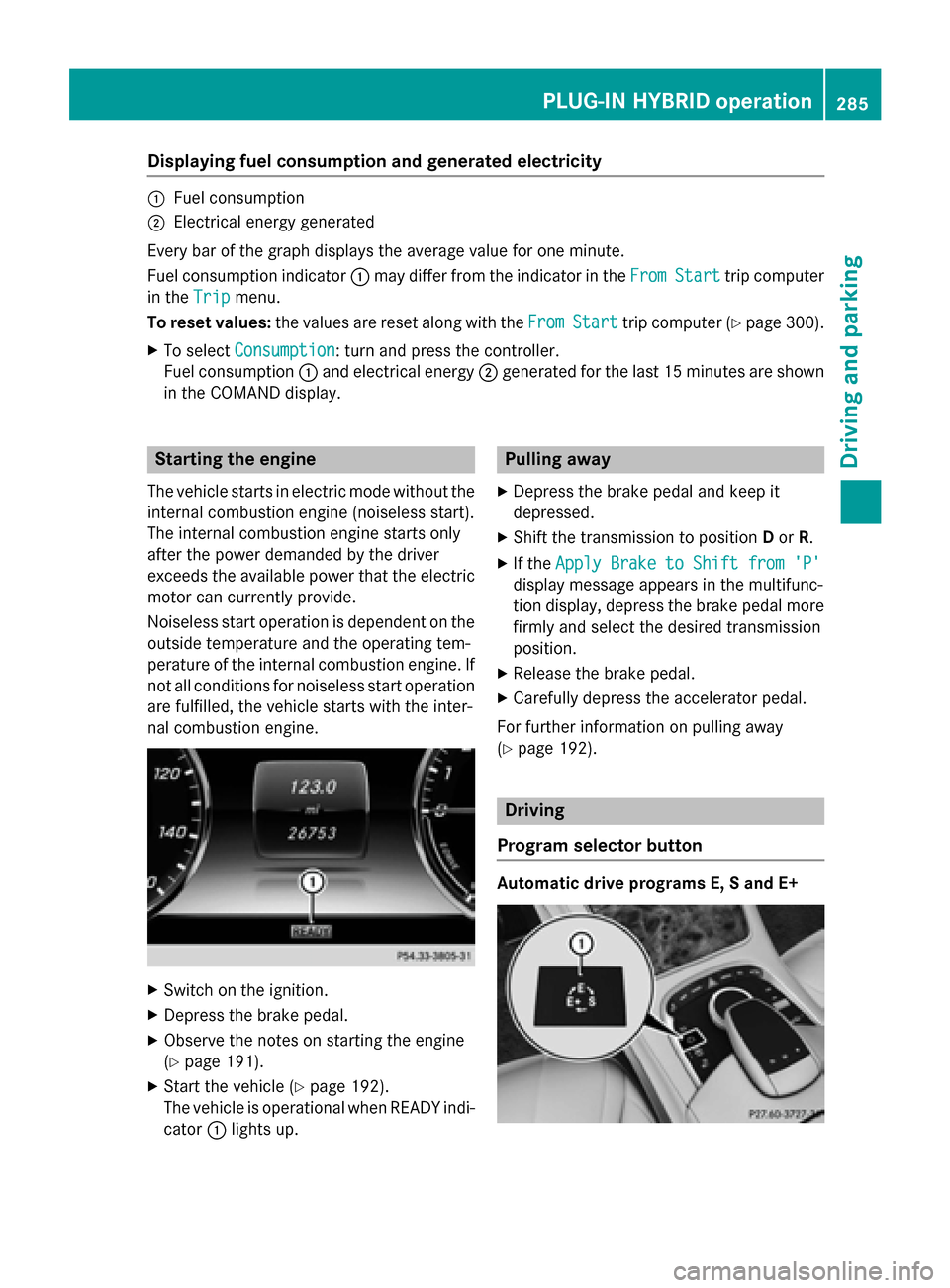
The vehicle is operational when READY indi-
cator :lights up. Pulling away
X Depress the brake pedal and keep it
depressed.
X Shift the transmission to position Dor R.
X If the Apply Brake to Shift from 'P' Apply Brake to Shift from 'P'
display message appears in the multifunc-
tion display, depress the brake pedal more firmly and select the desired transmission
position.
X Release the brake pedal.
X Carefully depress the accelerator pedal.
For further information on pulling away
(Y page 192). Driving
Program selector button Automatic drive programs E, S and E+ PLUG-IN HYBRID ope
ration
285Driving an d parking Z
Page 298 of 502
9
: Press and hold:
R Rapid scrolling in all lists
R In the Radio Radio/Media Mediamenu:
selects a station, audio track or
video scene using rapid scrolling
R In the Telephone
Telephone menu: starts
rapid scrolling if the phone book is open a R
In all menus: confirms the selec-
ted entry in the list
R In the Radio Radio/Media Mediamenu:
opens the list of available radio
sources/media
R In the Telephone Telephone menu:
switches to the phone book and
starts dialing the selected num-
ber ñ
Switches off the Voice Control Sys-
tem; see the separate operating
instructions % Press briefly:
R Back
R In the Radio
Radio/Media Mediamenu: dese-
lects the track or station list or
list of available radio sources/
media
R Hides display messages
R Exits the telephone book/redial
memory % Press and hold:
R Calls up the standard display in
the Trip Trip menu Right control panel
~ R
Rejects or ends a call
R Exits phone book/redial mem-
ory 6 R
Makes or accepts a call
R Switches to the redial memory W
X R
Adjusts the volume 8 R
Mute ó
Switches on the Voice Control Sys-
tem; see the separate operating
instructions Multifunction display
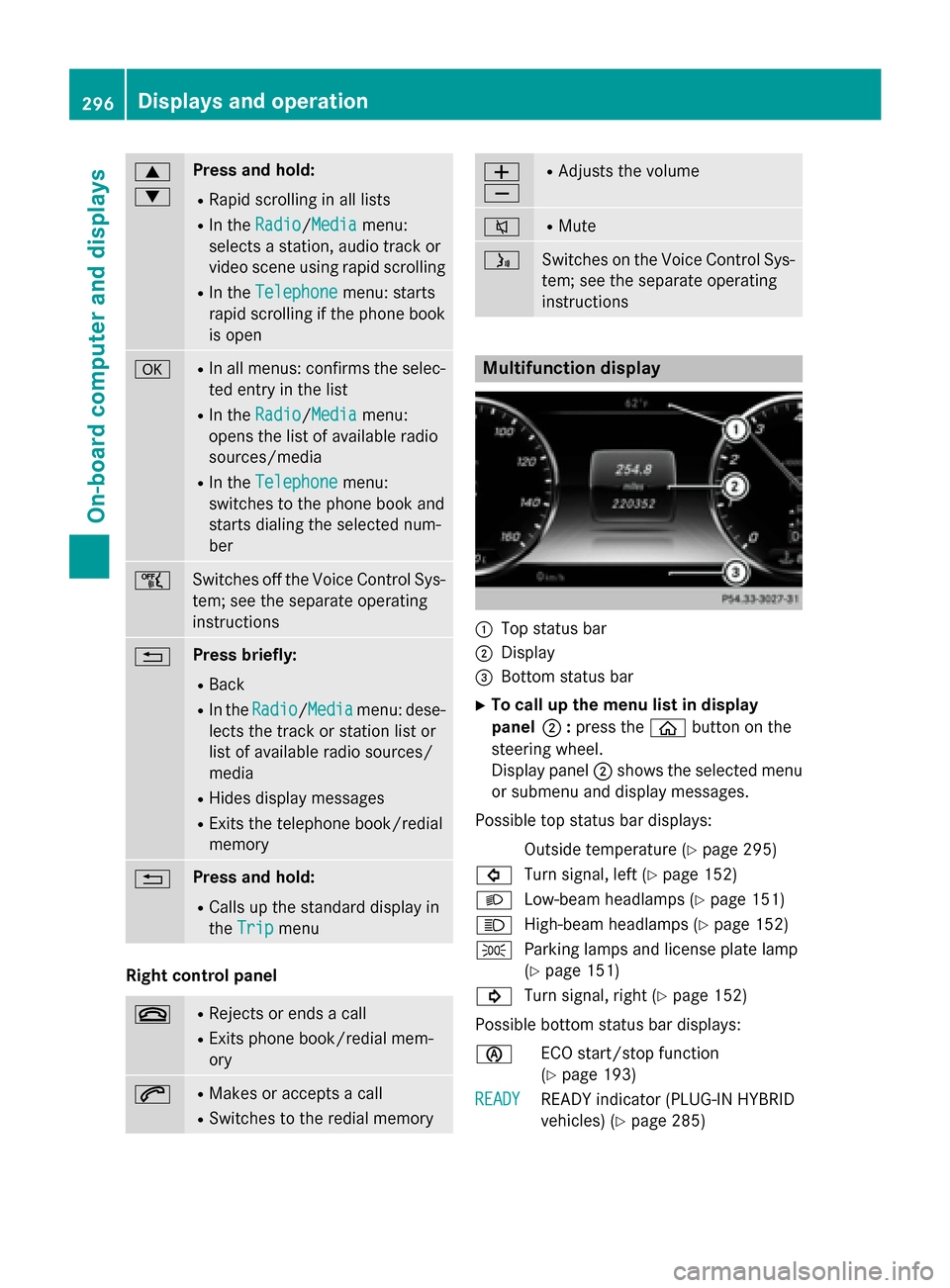
:
Top status bar
; Display
= Bottom status bar
X To call up the menu list in display
panel ;:press the òbutton on the
steering wheel.
Display panel ;shows the selected menu
or submenu and display messages.
Possible top status bar displays: Outside temperature (Y page 295)
# Turn signal, left (Y page 152)
L Low-beam headlamps (Y page 151)
K High-beam headlamps (Y page 152)
T Parking lamps and license plate lamp
(Ypage 151)
! Turn signal, right (Y page 152)
Possible bottom status bar displays:
è ECO start/stop function
(Ypage 193)
READY READY READY indicator (PLUG-IN HYBRID
vehicles) (Y
page 285)296
Displays and operationOn-board computer and displays
Page 301 of 502
In the Settings menu, in the submenu head-up display, you have the following settings options:
R Switching other displays on/off (Y page 311)
R Setting the position (Y page 311)
R Setting the brightness (Y page 312)Menus and submenus
Menu overview
Press the òbutton on the steering wheel
to call up the list of menus and select a menu.
Operating the on-board computer
(Y page 295).
Depending on the equipment installed in the
vehicle, you can call up the following menus:
R Trip Trip menu (Y page 299)
R Navi Navi menu (navigation instructions)
(Y page 301)
R Radio
Radio menu (Y page 303)
R Media
Media menu (Y page 304)
R Telephone
Telephone menu (Ypage 305)
R Assistance Info Display
Assistance Info Display menu
(Y page 307)
R Service
Service menu (Ypage 307)
R Settings
Settings menu (Ypage 308)
R AMG
AMG menu in AMG vehicles (Y page 314)Trip menu
Standard display X
Press and hold the %button on the
steering wheel until the Trip
Trip menu with trip odometer
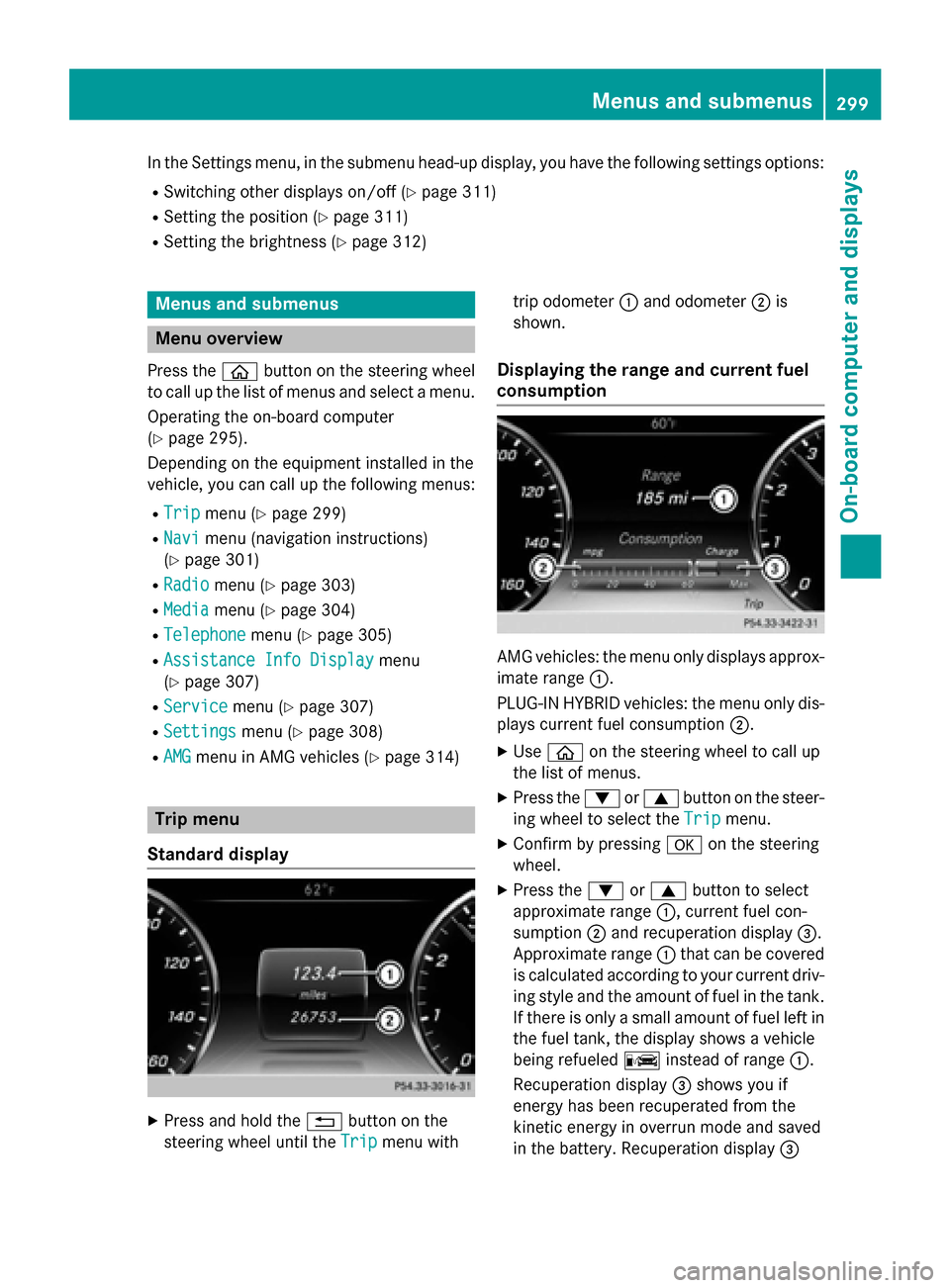
:and odometer ;is
shown.
Displaying the range and current fuel
consumption AMG vehicles: the menu only displays approx-
imate range :.
PLUG-IN HYBRID vehicles: the menu only dis-
plays current fuel consumption ;.
X Use ò on the steering wheel to call up
the list of menus.
X Press the :or9 button on the steer-
ing wheel to select the Trip
Trip menu.
X Confirm by pressing aon the steering
wheel.
X Press the :or9 button to select
approximate range :, current fuel con-
sumption ;and recuperation display =.
Approximate range :that can be covered
is calculated according to your current driv- ing style and the amount of fuel in the tank.If there is only a small amount of fuel left in
the fuel tank, the display shows a vehicle
being refueled Cinstead of range :.
Recuperation display =shows you if
energy has been recuperated from the
kinetic energy in overrun mode and saved
in the battery. Recuperation display = Menus and submenus
299On-board computer and displays Z
Page 302 of 502
depends on the engine installed and is
therefore not available in all vehicles.
PLUG-IN HYBRID vehicles: information on
total range and electric range can be found in
the "PLUG-IN HYBRID drive" section
(Y page 284).
ECO display The ECO display is not available for AMG vehi-
cles.
X Use ò on the steering wheel to call up
the list of menus.
X Press the :or9 button on the steer-
ing wheel to select the Trip
Trip menu.
X Confirm by pressing aon the steering
wheel.
X Press :or9 to select ECO ECODisplay
Display.
If the ignition remains switched off for longer than four hours, the ECO display will be auto-
matically reset.
For further information on the ECO display,
see (Y page 225). Trip computer "From Start" or "From
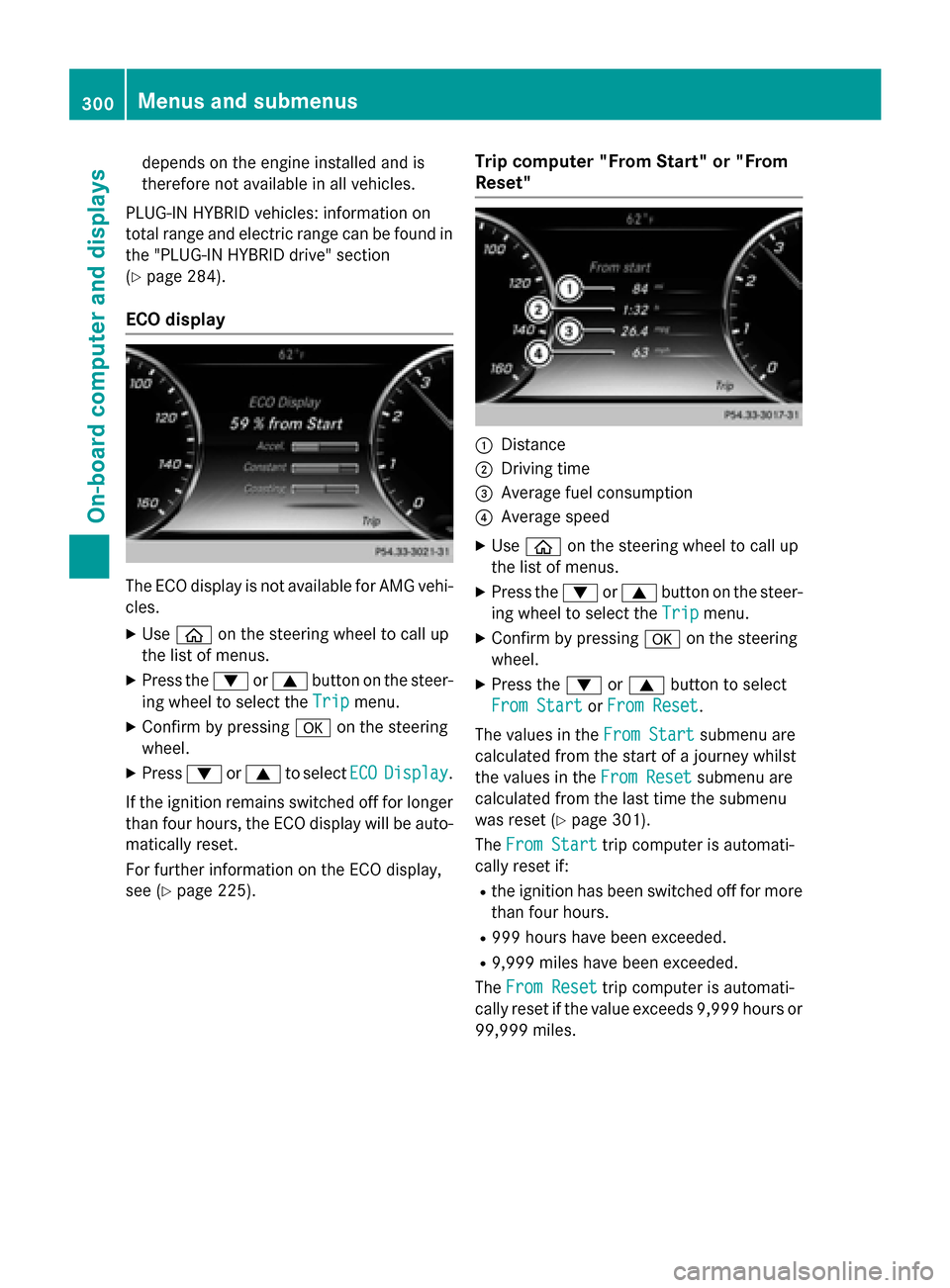
Reset" :
Distance
; Driving time
= Average fuel consumption
? Average speed
X Use ò on the steering wheel to call up
the list of menus.
X Press the :or9 button on the steer-
ing wheel to select the Trip Tripmenu.
X Confirm by pressing aon the steering
wheel.
X Press the :or9 button to select
From Start
From Start orFrom Reset
From Reset.
The values in the From Start
From Start submenu are
calculated from the start of a journey whilst
the values in the From Reset From Resetsubmenu are
calculated from the last time the submenu
was reset (Y page 301).
The From Start
From Start trip computer is automati-
cally reset if:
R the ignition has been switched off for more
than four hours.
R 999 hours have been exceeded.
R 9,999 miles have been exceeded.
The From Reset
From Reset trip computer is automati-
cally reset if the value exceeds 9,999 hours or
99,999 miles. 300
Menus and submenusOn-board computer and displays
Page 303 of 502
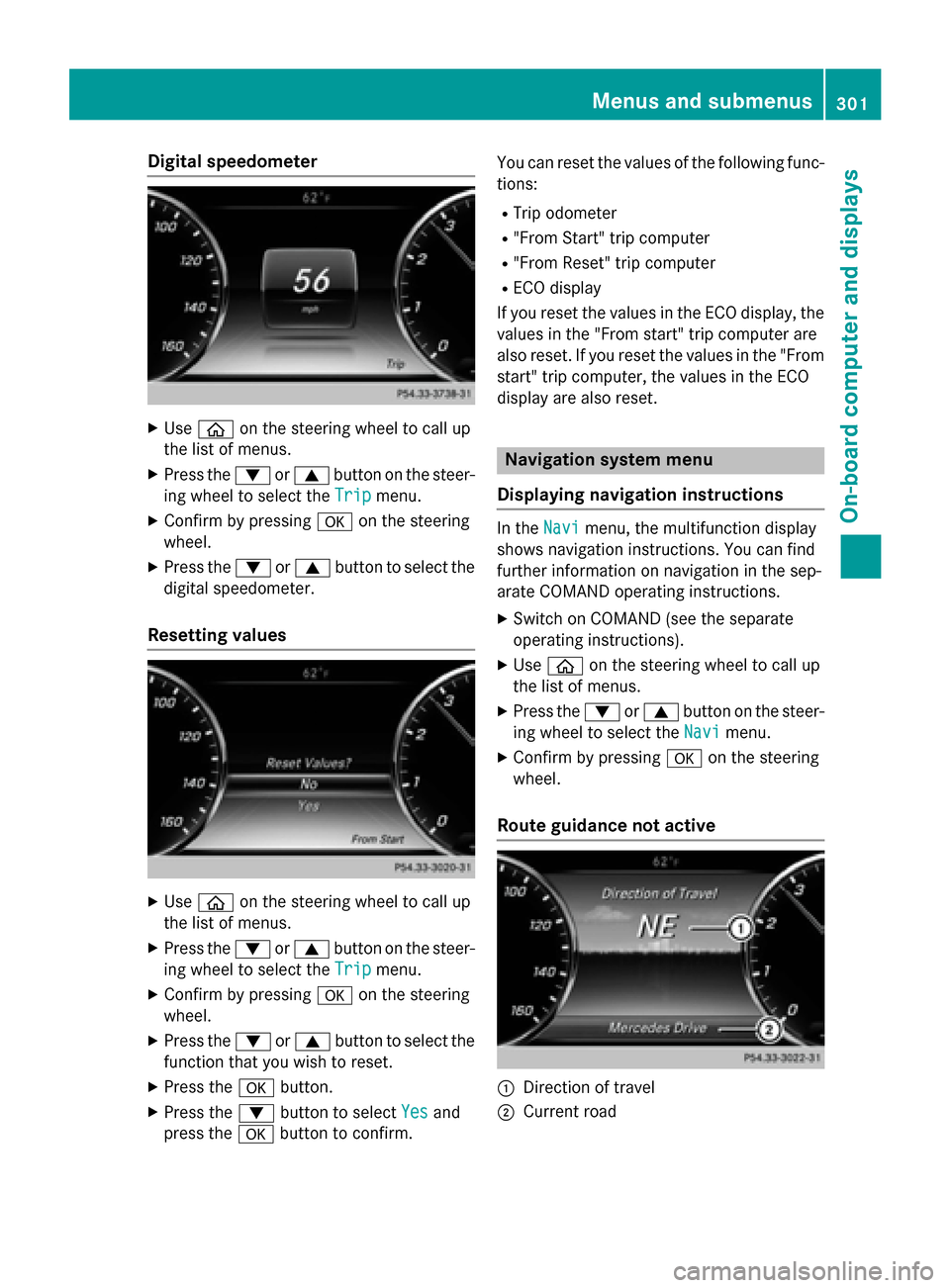
Digital speedometer
X
Use ò on the steering wheel to call up
the list of menus.
X Press the :or9 button on the steer-
ing wheel to select the Trip
Trip menu.
X Confirm by pressing aon the steering
wheel.
X Press the :or9 button to select the
digital speedometer.
Resetting values X
Use ò on the steering wheel to call up
the list of menus.
X Press the :or9 button on the steer-
ing wheel to select the Trip
Tripmenu.
X Confirm by pressing aon the steering
wheel.
X Press the :or9 button to select the
function that you wish to reset.
X Press the abutton.
X Press the :button to select Yes
Yes and
press the abutton to confirm. You can reset the values of the following func-
tions:
R Trip odometer
R "From Start" trip computer
R "From Reset" trip computer
R ECO display
If you reset the values in the ECO display, the
values in the "From start" trip computer are
also reset. If you reset the values in the "From start" trip computer, the values in the ECO
display are also reset. Navigation system menu
Displaying navigation instructions In the
Navi Navimenu, the multifunction display
shows navigation instructions. You can find
further information on navigation in the sep-
arate COMAND operating instructions.
X Switch on COMAND (see the separate
operating instructions).
X Use ò on the steering wheel to call up
the list of menus.
X Press the :or9 button on the steer-
ing wheel to select the Navi
Navi menu.
X Confirm by pressing aon the steering
wheel.
Route guidance not active :
Direction of travel
; Current road Menus and submenus
301On-boardcompu ter and displays Z
Page 315 of 502
X
Use ò on the steering wheel to call up
the list of menus.
X Press the :or9 button on the steer-
ing wheel to select the Settings
Settingsmenu.
X Confirm by pressing aon the steering
wheel.
X Press the :or9 button to select the
Instrument Cluster
Instrument Cluster submenu.
X Press ato confirm.
X Press the :or9 button to select the
Display Unit Speed-/Odometer
Display Unit Speed-/Odometer func-
tion.
You will see the selected setting: km
km or
miles miles.
X Press the abutton to save the setting.
The selected unit of measurement for dis-
tance applies to:
R Speedometer
R Digital speedometer in the Trip
Trip menu
R Additional speedometer in the status area
on the multi-function display
The unit in the additional speedometer is
displayed inversely to the selected dis-
tance unit.
R Odometer and the trip odometer
R Trip computer
R Current consumption and the range
R Navigation instructions in the Navi
Navi menu
R Cruise Control
R SPEEDTRONIC
R DISTRONIC PLUS
R ASSYST PLUS service interval display
Selecting the permanent display function
All vehicles except PLUG-IN HYBRID vehi-
cles: with the Permanent Display
Permanent Display function
you can switch on the outside temperature in the status bar of the multifunction display.
PLUG-IN HYBRID vehicles: with thePerma‐ Perma‐
nent
nent Display
Display function you can switch on the
following displays in the status bar of the mul-
tifunction display. R
outside temperature
R coolant temperature (PLUG‑IN HYBRID
vehicles)
R the total electric range (PLUG-IN HYBRID
vehicles)
X Use ò on the steering wheel to call up
the list of menus.
X Press the :or9 button on the steer-
ing wheel to select the Settings
Settings menu.
X Confirm by pressing aon the steering
wheel.
X Press the :or9 button to select the
Instrument Cluster Instrument Cluster submenu.
X Press ato confirm.
X Press :or9 to select the Perma‐
Perma‐
nent Display
nent Display function.
X Press ato confirm.
All vehicles except PLUG-IN HYBRID
vehicles: the current setting for Outside Outside
Temperature
Temperature is shown.
Only PLUG-IN HYBRID vehicles: the cur-
rent selection of Outside Temperature
Outside Temperature,
Coolant Temperature
Coolant Temperature orElectric
Electric
Range
Range is displayed.
X Only PLUG-IN HYBRID vehicles: select
the desired option with :or9.
X To change the setting: pressa.
Switching the additional speedometer
on/off
Use the Additional Speedometer Additional Speedometer function
to choose whether the status area in the mul- tifunction display shows the speed digitally.
X Use ò on the steering wheel to call up
the list of menus.
X Press the :or9 button on the steer-
ing wheel to select the Settings Settingsmenu.
X Confirm by pressing aon the steering
wheel.
X Press the :or9 button to select the
Instrument Cluster
Instrument Cluster submenu.
X Press ato confirm. Menus and submenus
313On-board computer and displays Z