heating MERCEDES-BENZ S CLASS 2016 Owner's Manual
[x] Cancel search | Manufacturer: MERCEDES-BENZ, Model Year: 2016, Model line: S CLASS, Model: MERCEDES-BENZ S CLASS 2016Pages: 438, PDF Size: 13.22 MB
Page 199 of 438
Drive particularly carefully on slippery road sur-
faces. Avoid sudden acceleration, steering and
braking maneuvers. Do not use the cruise con-
trol or DISTRONIC PLUS.
If the vehicle threatens to skid or cannot be
stopped when moving at low speed: X
Shift the transmission to position N .
The outside temperature indicator is not
designed to serve as an ice-warning device and
is therefore unsuitable for that purpose.
Changes in the outside temperature are dis-
played after a short delay.
Indicated temperatures just above the freezing
point do not guarantee that the road surface is
free of ice. The road may still be icy, especially in
wooded areas or on bridges.
You should pay special attention to road condi-
tions when temperatures are around freezing
point.
For more information on driving with snow
chains, see ( Y
page 386).
For more information on driving with summer
tires, see ( Y
page 386).
Observe the notes in the "Winter operation" sec-
tion ( Y
page 386).
Driving systems
Mercedes-Benz Intelligent Drive Mercedes-Benz Intelligent Drive stands for inno-
vative driver assistance and safety systems
which enhance comfort and support the driver in
critical situations. With these intelligent co-ordi-
nated systems Mercedes-Benz has set a mile-
stone on the path towards autonomous driving.
Mercedes-Benz Intelligent Drive embraces all
elements of active and passive safety in one well
thought out system – for the safety of the vehi-
cle occupants and that of other road users.
Further information on driving safety systems
( Y
page 68).
Cruise control
General notes
Cruise control maintains a constant road speed
for you. It brakes automatically in order to avoid
exceeding the set speed. Change into a lower
gear in good time on long and steep downhill gradients. This is especially important if the
vehicle is laden. By doing so, you will make use
of the braking effect of the engine. This relieves
the load on the brake system and prevents the
brakes from overheating and wearing too
quickly.
You can use cruise control if you want to drive at
a steady speed for a prolonged period of time.
You can store any road speed above 20 mph
(30 km/h).
Important safety notes If you fail to adapt your driving style, cruise con-
trol can neither reduce the risk of an accident
nor override the laws of physics. Cruise control
cannot take into account the road, traffic and
weather conditions. Cruise control is only an
aid. You are responsible for the distance to the
vehicle in front, for vehicle speed, for braking in
good time and for staying in your lane.
Do not use cruise control: R
in road and traffic conditions which do not
allow you to maintain a constant speed, e.g. in
heavy traffic or on winding roads R
on slippery road surfaces. Braking or accel-
erating could cause the drive wheels to lose
traction and the vehicle could then skid R
when there is poor visibility, e.g. due to fog,
heavy rain or snow
If there is a change of drivers, advise the new
driver of the speed stored.
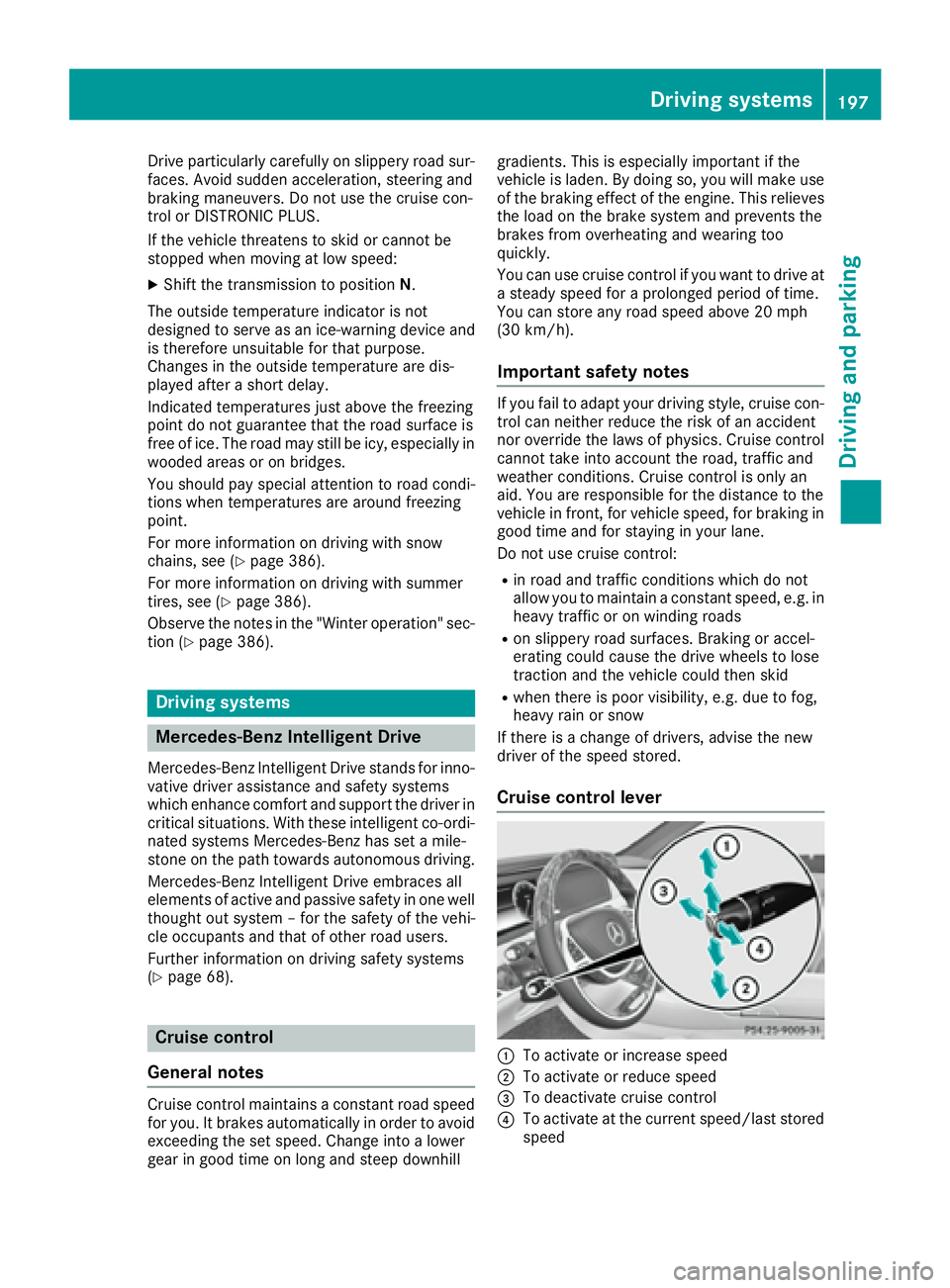
Cruise control lever
C
To activate or increase speed
D
To activate or reduce speed
Page 201 of 438
i Cruise control is not deactivated if you
depr ess the accelerator pedal. If you acceler-
ate to overtake, cruise control adjusts the
veh icle 's speed to the last speed stored after
you have finished overtaking.
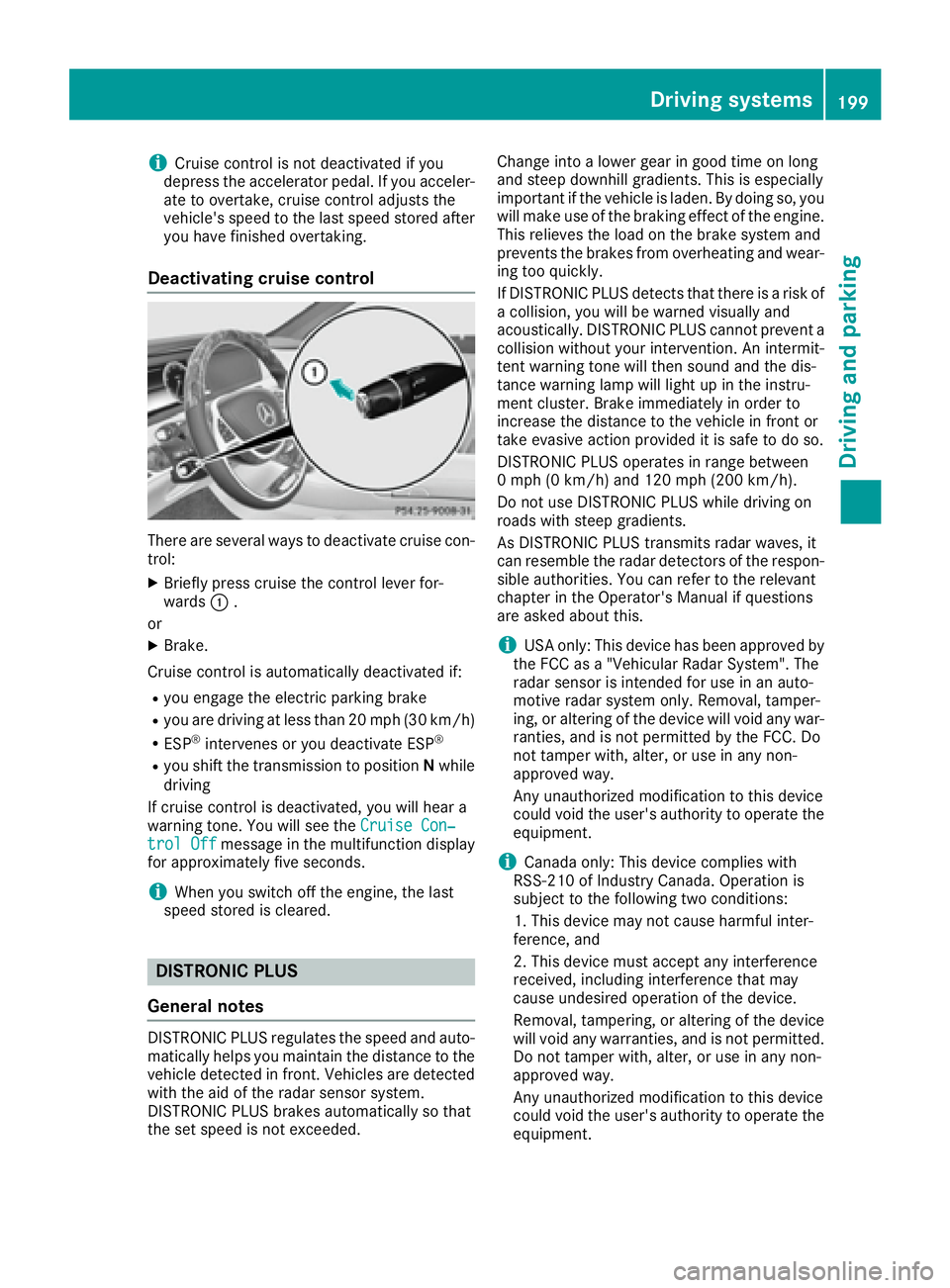
Deactivating cruise control
There are several ways to deactivate cruise con-
trol: X
Briefly press cruise the control lever for-
wards C .
or X
Brake.
Cruise control is automatically deactivated if:R
you engage the electr ic parking brakeR
you are driv ing at less than 20 mph (30 km/h)R
ESP ®
intervenes or you deactivate ESP ®
R
you shift the transmission to position N while
driv ing
If cruise control is deactivate d, you will hear a
warning tone. You will see the Cruise Con‐
trol Off message in the multifunction displ ay
for approximate ly five seconds.
i When you swit ch off the engine, the last
speed stored is cleared.
DISTRONIC PLUS
General notes
DI ST RONIC PLUS regulates the speed and auto-
matically helps you maintain the dist ance to the
veh icle detected in front. Veh icle s are detected
wit h the aid of the radar sensor system.
DI ST RONIC PLUS brakes automatically so that
the set speed is not excee ded. Change into a lower gear in good time on long
and steep downhill gradients. This is especially
important if the vehicle is laden. By doing so, you
will make use of the braking effect of the engine.
This relieves the load on the brake system and
prevents the brakes from overheating and wear-
ing too quickly.
If DI ST RONIC PLUS detects that there is a risk of
a collision, you will be warned visually and
acoustically. DI ST RONIC PLUS cannot prevent a
collision without your intervention. An intermit-
tent warning tone will then sound and the dis-
tance warning lamp will light up in the instru-
ment cluster. Brake immediately in order to
increase the distance to the vehicle in front or
take evasive action provided it is safe to do so.
DISTRONIC PLUS operates in range between
0 mph (0 km/ h) and 120 mph (20 0 km/ h) .
Do not use DISTRONIC PLUS while driving on
roads with steep gradients.
As DISTRONIC PLUS transmits radar waves, it
can resemble the radar de tectors o f the respon-
s
ible authorities. You can refer to the relevant
chapter in the Operator's Manual if questions
are asked about this.
i USA only: This device has been approved by
the FCC as a "Vehicular Radar System". The
radar sensor is intended for use in an auto-
motive radar system only. Removal, tamper-
ing, or altering of the device will void any war-
ranties, and is not permitted by the FCC. Do
not tamper with, alter, or use in any non-
approved way.
Any unauthorized modification to this device
could void the user's authority to operate the
equipment.
i Canada only: This device complies with
RSS-210 of Industry Canada. Operation is
subject to the following two conditions:
1. This device may not cause harmful inter-
ference, and
2. This device must accept any interference
received, including interference that may
cause undesired operation of the device.
Removal, tampering, or altering of the device
will void any warranties, and is not permitted.
Do not tamper with, alter, or use in any non-
approved way.
Any unauthorized modification to this device
could void the user's authority to operate the
equipment.Driving system s 199
Dr ivi ng an d parking Z
Page 299 of 438
Hybrid drive system Display messages
Possible causes/consequences and P Solutions
r Vehicle Operational
Switch the Ignition
Off Before Exiting PLUG-IN HYBRID vehicles:
You are leaving the vehicle when it is in a ready-to-drive state. The
READY indicator in the multifunction display is on. A warning tone also
sounds.
If you leave the vehicle: X
Secure the vehicle against rolling away ( Y
page 189).X
Switch off the ignition and remove the SmartKey.
If you do not leave the vehicle: X
Switch off the electrical consumers, e.g. automatic climate control,
seat heating.
Please note the following: the electrical consumers are supplied by the
12 V battery. If the vehicle is left in a ready-to-drive state for an exten-
ded period, it will switch off once the 12 V battery is almost empty. It
will then only be possible to start the vehicle using a second battery
(jump-starting).
Change the current
drive program
before changing the
operating mode. or
Exit manual drive
program M before
changing the operat‐
ing mode. PLUG-IN HYBRID vehicles:
You have attempted to change the operating mode when in automatic
drive program S (Sport) or manual drive program M .X
Activate the drive program E (Economy) or E+ (Economy Plus)
( Y
page 250). X
Select the preferred operating mode HYBRID , E-MODE , E-SAVE or
CHARGE ( Y
page 243).
E-MODE Currently
Unavailable PLUG-IN HYBRID vehicles:
The condition of charge of the high-voltage battery has dropped to the
lower limit and the E-MODE operating mode has been switched off.
Driving with the internal combustion engine is activated and the oper-
ating mode switches to the basic HYBRID setting.X
Continue driving using the internal combustion engine.
You can switch to the E-SAVE or CHARGE operating mode as
required ( Y
page 243).
If you select CHARGE , the high-voltage battery is charged.
Once the charge level display for the high-voltage battery has
increased slightly, you can switch to the E-MODE operating mode
again. Display messages 297
On-board computer and displays Z
Page 335 of 438
X
To switch on the heating function: press
and hold button D until the red indicator
lamp on the button lights up. X
To switch off the function: press and hold
button D until the indicator lamp on the but-
ton goes out.
The rubber mat can be removed for cleaning.
Clean with clear, lukewarm water only.
Do not use hard or sharp objects to clean the
cup holder. Use only a soft cloth to clean it.
Sun visors
Overview
G WARNING
If the mirror cover of the vanity mirror is folded
up when the vehicle is in motion, you could be
blinded by incident light. There is a risk of an
accident.
Always keep the mirror cover folded down
while driving.
C
Mirror lightD
Additional sun visor
Page 338 of 438
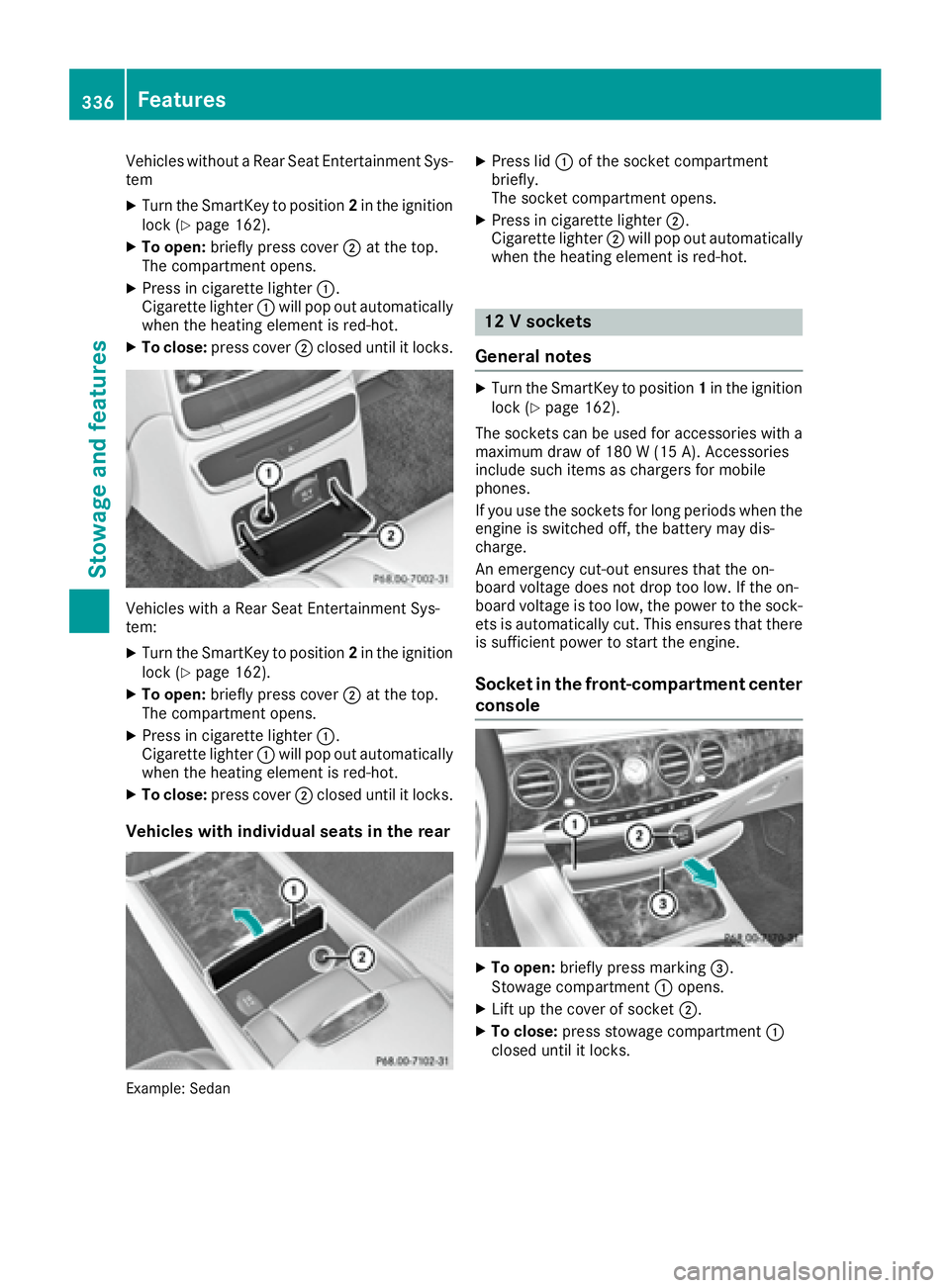
Vehicles without a Rear Seat Entertainment Sys-
tem X
Turn the SmartKey to position 2 in the ignition
lock ( Y
page 162).X
To open: briefly press cover D at the top.
The compartment opens. X
Press in cigarette lighter C .
Cigarette lighter C will pop out automatically
when the heating element is red-hot. X
To close: press cover D closed until it locks.
Vehicles with a Rear Seat Entertainment Sys-
tem: X
Turn the SmartKey to position 2 in the ignition
lock ( Y
page 162).X
To open: briefly press cover D at the top.
The compartment opens. X
Press in cigarette lighter C .
Cigarette lighter C will pop out automatically
when the heating element is red-hot. X
To close: press cover D closed until it locks.
Vehicles with individual seats in the rear
Example: Sedan X
Press lid C of the socket compartment
briefly.
The socket compartment opens. X
Press in cigarette lighter D .
Cigarette lighter D will pop out automatically
when the heating element is red-hot.
12 V sockets
General notes X
Turn the SmartKey to position 1 in the ignition
lock ( Y
page 162).
The sockets can be used for accessories with a
maximum draw of 180 W (15 A). Accessories
include such items as chargers for mobile
phones.
If you use the sockets for long periods when the
engine is switched off, the battery may dis-
charge.
An emergency cut-out ensures that the on-
board voltage does not drop too low. If the on-
board voltage is too low, the power to the sock-
ets is automatically cut. This ensures that there
is sufficient power to start the engine.
Socket in the front-compartment center
console
X
To open: briefly press marking
Page 361 of 438
Care
General notes
H Environmental note
Dispose of empty packaging and cleaning
cloths in an environmentally responsible man-
ner.
! For cleaning your vehicle, do not use any of
the following: R
dry, rough or hard cloths R
abrasive cleaning agents R
solvents R
cleaning agents containing solvents
Do not scrub.
Do not touch the surfaces or protective films
with hard objects, e.g. a ring or ice scraper.
You could otherwise scratch or damage the
surfaces and protective film.
! Do not park the vehicle for an extended
period straight after cleaning it, particularly
after having cleaned the wheels with wheel
cleaner. Wheel cleaners could cause
increased corrosion of the brake discs and
brake pads/linings. For this reason, you
should drive for a few minutes after cleaning.
Braking heats the brake discs and the brake
pads/linings, thus drying them. The vehicle
can then be parked.
Regular care of your vehicle is a condition for
retaining the quality in the long term.
Use care products and cleaning agents recom-
mended and approved by Mercedes-Benz.
Washing the vehicle and cleaning the
paintwork
Automatic car wash
G WARNING
Braking efficiency is reduced after washing
the vehicle. There is a risk of an accident.
After the vehicle has been washed, brake
carefully while paying attention to the traffic
conditions until full braking power is restored. ! If DISTRONIC PLUS or the HOLD function is
activated, the vehicle brakes automatically in
certain situations.
To prevent damage to the vehicle, deactivate
DISTRONIC PLUS and the HOLD function in
the following or other similar situations: R
when towing the vehicle R
in the car wash
! Never clean your vehicle in a Touchless
Automatic Car Wash as these use special
cleaning agents. These cleaning agents can
damage the paintwork or plastic parts.
! Make sure that: R
the side windows and the sliding sunroof
are fully closed. R
the ventilation/heating is switched off (the
OFF button has been pressed). R
the windshield wiper switch is at position 0 .R
the 360° camera or rear view camera is
switched off.
The vehicle may otherwise be damaged.
! If the SmartKey is within the rear detection
range of KEYLESS-GO, the following situa-
tions, for example, could lead to the uninten-
tional opening of the trunk: R
using a car wash R
using a power washer
Make sure that the SmartKey is at least 10 ft
(3 m ) away from the vehicle.
! Make sure that the automatic transmission
is in neutral position N when washing your
vehicle in a tow-through car wash. The vehicle
may otherwise be damaged. R
Operating with the SmartKey:
Do not remove the SmartKey from the igni-
tion lock. Do not open the driver's door
when the engine is switched off or at very
low speeds. Otherwise, when in transmis-
sion position D or R the automatic trans-
mission will automatically switch to park
position P and block the wheels. R
Operating with the Start/Stop button:
Do not open the driver's door when the
engine is switched off or at very low
speeds. Otherwise, when in transmission
position D or R the automatic transmission
will automatically switch to park position P
and block the wheels. Care 359
Maintenance and care Z
Page 368 of 438
the seat to dry afterwards. Cleaning results
depend on the type of dirt and how long it
has been there. R
clean DINAMICA covers with a damp cloth.
Make sure that you wipe entire seat sec-
tions to avoid leaving visible lines.
Cleaning the seat belts
G WARNING
Seat belts can become severely weakened if
bleached or dyed. This could cause the seat
belts to tear or fail, for instance, in the event of
an accident. This poses an increased risk of
injury or fatal injury.
Never bleach or dye the seat belts.
! Do not clean the seat belts using chemical
cleaning agents. Do not dry the seat belts by
heating at temperatures above 176 ‡( 80 †)
or in direct sunlight. X
Use clean, lukewarm water and soap solution.
Cleaning the headliner and carpets X
Headliner: if it is very dirty, use a soft brush or
dry shampoo. X
Carpets: use the carpet and textile cleaning
agents recommended and approved by
Mercedes-Benz.366
Care
Maintenance and care
Page 430 of 438
Other identifications, for example: R
0 W-30 R
5 W-30 R
5 W-40
Fuel
Important safety notes
G WARNING
Fuel is highly flammable. If you handle fuel
incorrectly, there is a risk of fire and explo-
sion.
You must avoid fire, open flames, creating
sparks and smoking. Switch off the engine
and, if applicable, the auxiliary heating before
refueling.
G WARNING
Fuel is poisonous and hazardous to health.
There is a risk of injury.
You must make sure that fuel does not come
into contact with your skin, eyes or clothing
and that it is not swallowed. Do not inhale fuel
vapors. Keep fuel away from children.
If you or others come into contact with fuel,
observe the following: R
Wash away fuel from skin immediately
using soap and water. R
If fuel comes into contact with your eyes,
immediately rinse them thoroughly with
clean water. Seek medical assistance with-
out delay. R
If fuel is swallowed, seek medical assis-
tance without delay. Do not induce vomit-
ing. R
Immediately change out of clothing which
has come into contact with fuel. Tank capacity Missing values were not available at time of
going to print.
Model Total capacity
S 400 4MATIC
PLUG-IN HYBRID vehi-
cles 16.6 US gal
(63.0 l)
Al l ot her models
21.1 US gal
(80.0 l)
Model Of which
reserve
S 400 4MATIC
Mercedes ‑ AMG vehicles
Approx.
3.2 US gal
(12.0 l)
Al l ot her models
Approx.
2.1 US gal (8.0 l)
Gasoline
Fuel grade
! Do not use diesel to refuel vehicles with a
gasoline engine. Do not switch on the ignition
if you accidentally refuel with the wrong fuel.
Otherwise, the fuel will enter the fuel system.
Even small amounts of the wrong fuel could
result in damage to the fuel system and the
engine. Notify a qualified specialist workshop
and have the fuel tank and fuel lines drained
completely.
! Only refuel using unleaded premium grade
gasoline with at least 91 AKI/95 RON.
i E10 fuel contains up to 10% bioethanol.
Your vehicle is E10-compatible. You can
refuel your vehicle using E10 fuel.
! Only use the fuel recommended. Operating
the vehicle with other fuels can lead to engine
failure.
! Do not use the following: R
E15 (gasoline with 15% ethanol) R
E85 (gasoline with 85% ethanol) R
E100 (1 00% ethanol) R
M15 (gasoline with 15% methanol)428
Service products and filling capacities
Technical data
Page 433 of 438
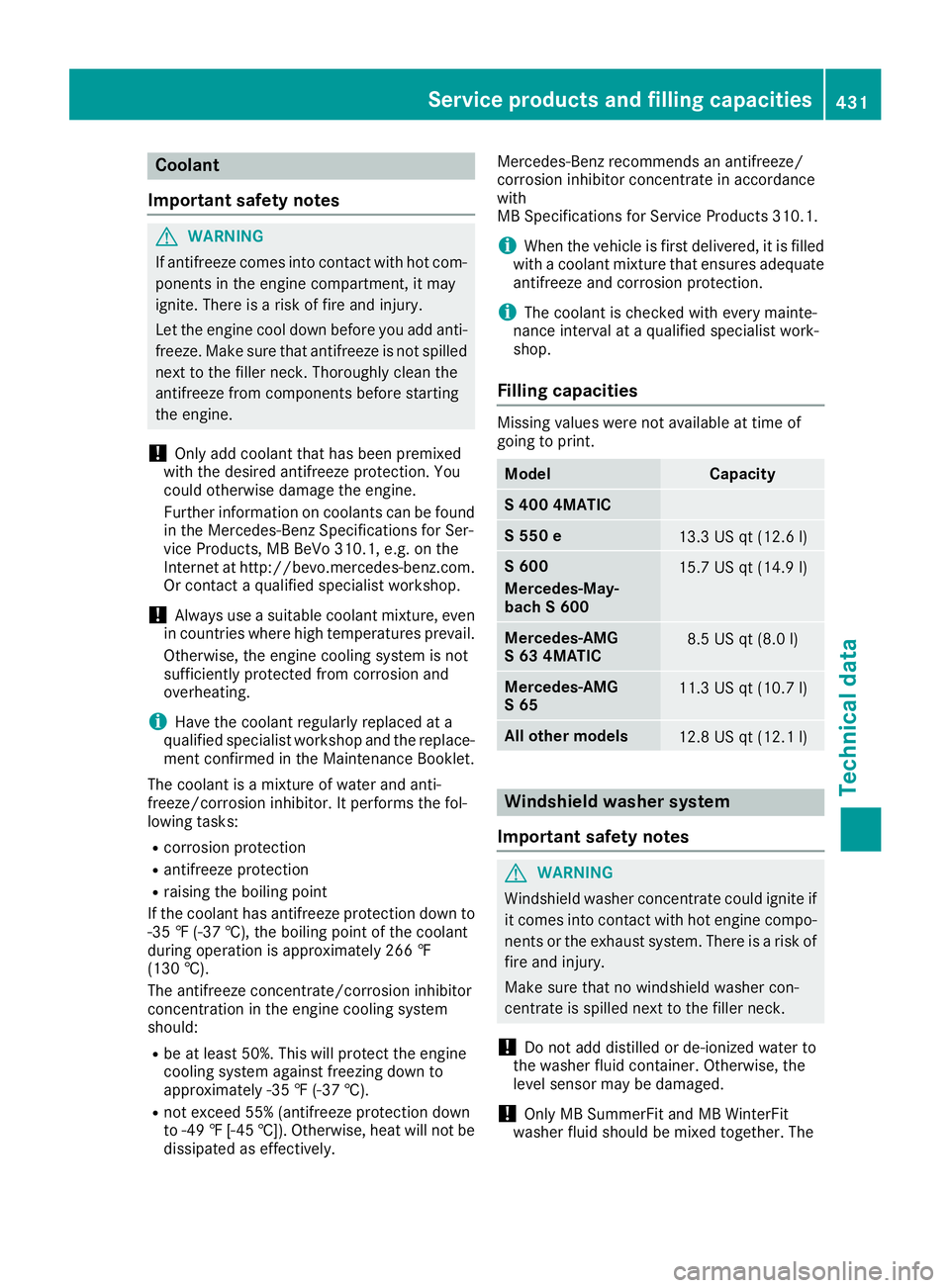
Coolant
Important safety notes
G WARNING
If antifreeze comes into contact with hot com-
ponents in the engine compartment, it may
ignite. There is a risk of fire and injury.
Let the engine cool down before you add anti-
freeze. Make sure that antifreeze is not spilled
next to the filler neck. Thoroughly clean the
antifreeze from components before starting
the engine.
! Only add coolant that has been premixed
with the desired antifreeze protection. You
could otherwise damage the engine.
Further information on coolants can be found
in the Mercedes-Benz Specifications for Ser-
vice Products, MB BeVo 310.1, e.g. on the
Internet at http://bevo.mercedes-benz.com.
Or contact a qualified specialist workshop.
! Always use a suitable coolant mixture, even
in countries where high temperatures prevail.
Otherwise, the engine cooling system is not
sufficiently protected from corrosion and
overheating.
i Have the coolant regularly replaced at a
qualified specialist workshop and the replace-
ment confirmed in the Maintenance Booklet.
The coolant is a mixture of water and anti-
freeze/corrosion inhibitor. It performs the fol-
lowing tasks: R
corrosion protection R
antifreeze protection R
raising the boiling point
If the c oolant has antifreeze protection down to
- 35 ‡ (-37 †), the boiling point of the coolant
during operation is approximately 266 ‡
(130 †).
The antifreeze concentrate/corrosion inhibitor
concentration in the engine cooling system
should: R
be at least 50%. This will protect the engine
cooling system against freezing down to
approximately -35 ‡ (-37 †). R
not exceed 55% (antifreeze protection down
to -49 ‡ [-45 †]). Otherwise, heat will not be
dissipated as effectively. Mercedes-Benz recommends an antifreeze/
corrosion inhibitor concentrate in accordance
with
MB Specifications for Service Products 310. 1.
i When the vehicle is first delivered, it is filled
with a coolant mixture that ensures adequate
antifreeze and corrosion protection.
i The coolant is checked with every mainte-
nance interval at a qualified specialist work-
shop.
Filling capacities Missing values were not available at time of
going to print.
Model Capacity
S 400 4MATIC
S 550 e
13.3 US qt (12.6 l)
S 600
Mercedes ‑ May-
bach S 600 15.7 US qt (14.9 l)
Mercedes ‑ AMG
S 63 4MATIC 8.5 US qt (8.0 l)
Mercedes ‑ AMG
S 65 11.3 US qt (10.7 l)
Al l ot her models
12.8 US qt (12.1 l)
Windshield washer system
Important safety notes
G WARNING
Windshield washer concentrate could ignite if
it comes into contact with hot engine compo-
nents or the exhaust system. There is a risk of
fire and injury.
Make sure that no windshield washer con-
centrate is spilled next to the filler neck.
! Do not add distilled or de-ionized water to
the washer fluid container. Otherwise, the
level sensor may be damaged.
! Only MB SummerFit and MB WinterFit
washer fluid should be mixed together. TheService products and filling capacities 431
Technical data Z