trunk MERCEDES-BENZ S CLASS 2016 Owner's Manual
[x] Cancel search | Manufacturer: MERCEDES-BENZ, Model Year: 2016, Model line: S CLASS, Model: MERCEDES-BENZ S CLASS 2016Pages: 438, PDF Size: 13.22 MB
Page 194 of 438
R
the seat belt has been fastened R
you depress the accelerator pedal
If the automatic transmission is in position R ,
the trunk lid must be closed.
If your seat belt is not fastened, the following
conditions must be fulfilled to automatically
release the electric parking brake: R
the driver's door is closed. R
you have shifted out of transmission position
P or you have previously driven faster than
2 mph (3 km/h).
Ensure that you do not depress the accelerator
pedal unintentionally. Otherwise the parking
brake will be released and the vehicle will start
to move.
Emergency braking The vehicle can also be braked during an emer-
gency by using the electric parking brake. X
While driving, push handle C of the electric
parking brake ( Y
page 190).
The vehicle is braked as long as you keep
handle C of the electric parking brake
pressed. The longer electric parking brake
handle C is depressed, the greater the brak-
ing force.
During braking: R
a warning tone sounds R
the Please Release Parking Brake mes-
sage appears R
the red I (USA only) or $ (Canada
only) indicator lamp in the instrument cluster
flashes
When the vehicle has been braked to a stand-
still, the electric parking brake is engaged.
Parking the vehicle for a long period If you leave the vehicle parked for longer than
four weeks, the battery may be damaged by
exhaustive discharging.
If you leave the vehicle parked for longer than six
weeks, the vehicle may suffer damage as a
result of lack of use. X
Visit a qualified specialist workshop and seek
advice.
PLUG-IN HYBRID vehicles: observe the impor-
tant safety notes for the high-voltage battery
( Y
page 374). Driving tips
General driving tips
Important safety notes
G WARNING
If you switch off the ignition while driving,
safety-relevant functions are only available
with limitations, or not at all. This could affect,
for example, the power steering and the brake
boosting effect. You will require considerably
more effort to steer and brake. There is a risk
of an accident.
Do not switch off the ignition while driving.
G WARNING
If you operate mobile communication equip-
ment while driving, you will be distracted from
traffic conditions. You could also lose control
of the vehicle. There is a risk of an accident.
Only operate this equipment when the vehicle
is stationary.
Observe the legal requirements for the country
in which you are driving. Some jurisdictions pro-
hibit the driver from using a mobile phone while
driving a vehicle.
If you make a call while driving, always use
hands-free mode. Only operate the telephone
when the traffic situation permits. If you are
unsure, pull over to a safe location and stop
before operating the telephone.
Bear in mind that at a speed of only 30 mph
(approximately 50 km/h), the vehicle covers a
distance of 44 ft (approximately 14 m) per sec-
ond.
Drive sensibly – save fuel Observe the following tips to save fuel: X
The tires should always be inflated to the rec-
ommended tire pressure. X
Remove unnecessary loads. X
Remove roof racks when they are not needed. X
Warm up the engine at low engine speeds. X
Avoid frequent acceleration or braking. X
Have all maintenance work carried out as
indicated by the service intervals in the Main-192
Driving tips
Driving and parking
Page 223 of 438
The flap closes again when: R
you have finished the maneuvering process R
you switch off the engine R
you open the trunk
Observe the notes on cleaning ( Y
page 363).
For technical reasons, the flap may remain
open briefly after the rear view camera has
been deactivated.
Activating/deactivating the rear view
camera X
To activate: make sure that the SmartKey is
in position 2 in the ignition lock.X
Make sure that the Activation by R gear
function is selected in the multimedia system
(see the separate operating instructions). X
Engage reverse gear.
The rear view camera flap opens. The multi-
media system shows the area behind the vehi-
cle with guide lines.
The image from the rear view camera is avail-
able throughout the maneuvering process.
To deactivate: the rear view camera deacti-
vates if you shift the transmission to P or after
driving forwards a short distance.
Displays in the multimedia system The rear view camera may show a distorted view
of obstacles, show them incorrectly or not at all.
The rear view camera does not show objects in
the following positions: R
very close to the rear bumper R
under the rear bumper R
in the area immediately above the handle in
the trunk lid
! Objects not at ground level may appear to
be further away than they actually are, e.g.: R
the bumper of a parked vehicle R
the drawbar of a trailer R
the ball coupling of a trailer tow hitch R
the rear section of an HGV R
a slanted post
Use the guidelines only for orientation.
Approach objects no further than the bottom-
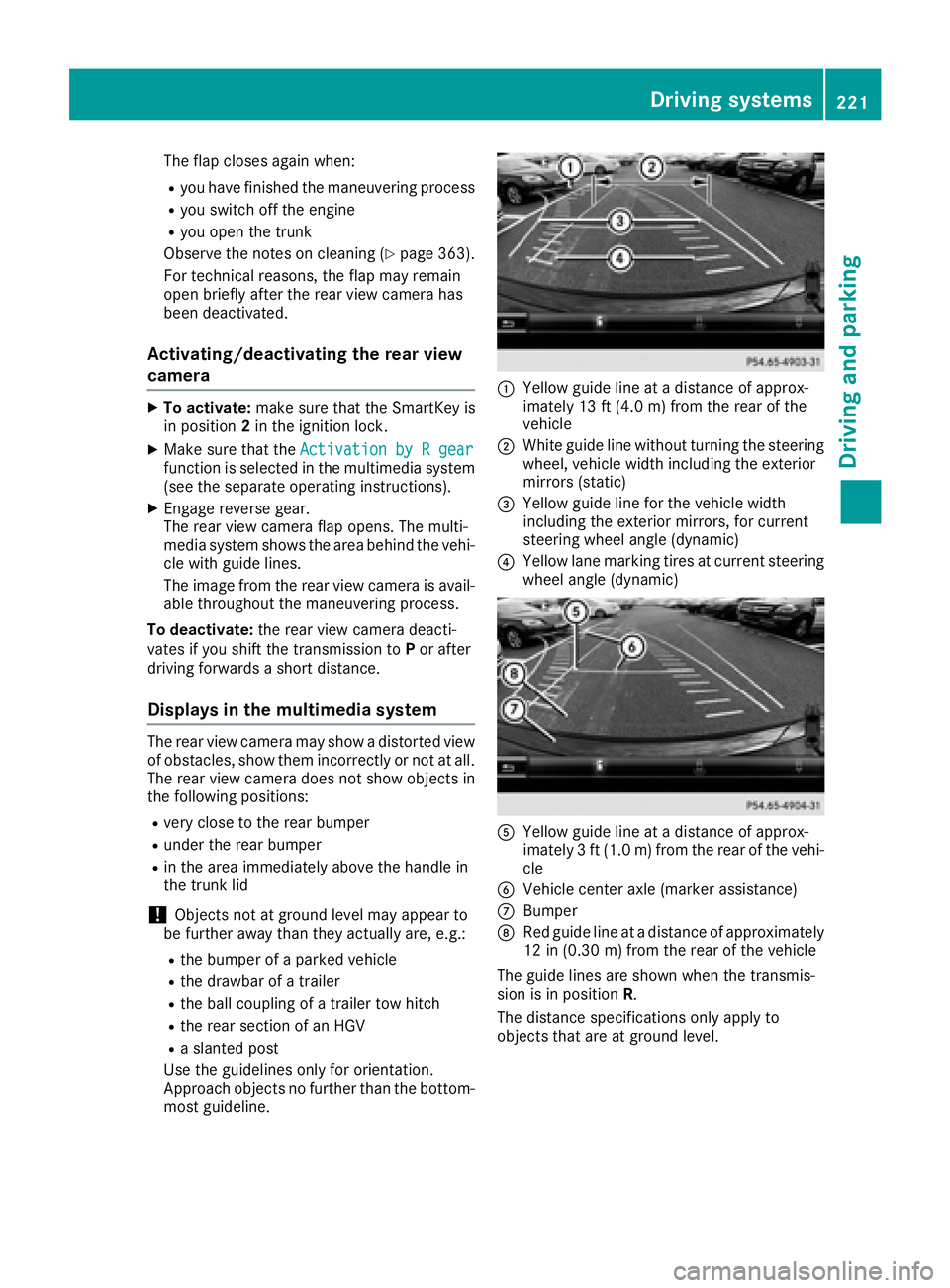
most guideline. C
Yellow guide line at a distance of approx-
imately 13 ft (4.0 m) from the rear of the
vehicle D
White guide line without turning the steering
wheel, vehicle width including the exterior
mirrors (static)
Page 226 of 438
Object detection The rear view camera can detect moving and
stationary objects. If, for example, a pedestrian
or another vehicle is detected, these objects are
marked with bars. The system is only able to
detect and mark stationary objects when your
vehicle is moving. When the vehicle is station-
ary, moving objects can be detected and
marked.
To ensure that you can use the function, it must
be switched on in the multimedia system (see
the separate operating instructions).
360° camera (surround view)
General notes The 360° camera is a system consisting of four
cameras.
The system processes images from the follow-
ing cameras: R
Rear view camera R
Front camera R
Two side cameras in the exterior mirrors
The cameras capture the immediate surround-
ings of the vehicle. The 360° camera assists
you, for instance when parking or at exits with
reduced visibility.
You can show images from the 360° camera in
full-screen mode or in six different split-screen
views on the multimedia system. A split-screen
view also includes a top view of the vehicle. This
view is calculated from the data supplied by the
installed cameras (virtual camera).
The six split-screen views are: R
top view and picture from the rear view cam-
era (130° viewing angle) R
top view and image from the front camera
(130° viewing angle without displaying the
maximum steering wheel angle) R
top view and enlarged rear view R
top view and enlarged front view R
top view and images from the rear-facing side
cameras (rear wheel view) R
top view and images from the forward-facing
side cameras (front wheel view)
When the function is active and you shift the
transmission from D or R to N , the guide lines
are hidden in the multimedia system. When you change between transmission posi-
tions D and R , you see the previously selected
front or rear view.
Distances measured by PARKTRONIC will also
be optically displayed: R
in split screen view as red or yellow brackets
around the vehicle icon in the top view, or R
at the bottom right as red or yellow brackets
around the vehicle symbol in full-screen mode
The line thickness and color of the brackets
show how far the vehicle is from an object. R
yellow brackets with thin lines: PARKTRONIC
is active R
yellow brackets with normal lines: an object is
present in close range of the vehicle R
red line: an object is present in the immediate
close range of the vehicle
Important safety notes The 360°camera is only an aid and may show a
distorted view of obstacles, show them incor-
rectly or not at all. The 360°camera is not a
substitute for attentive driving.
You are always responsible for safe maneuver-
ing and parking. When maneuvering or parking,
make sure that there are no persons, animals or
objects in the area in which you are maneuver-
ing.
You are always responsible for safety, and must
always pay attention to your surroundings when
parking and maneuvering. This applies to the
areas behind, in front of and beside the vehicle.
You could otherwise endanger yourself and oth-
ers.
The 360° camera will not function or will func-
tion in a limited manner: R
if the doors are open R
if the exterior mirrors are folded in R
if the trunk lid is open R
in heavy rain, snow or fog R
at night or in very dark places R
if the cameras are exposed to very bright light R
if the area is lit by fluorescent bulbs or LED
lighting (the display may flicker) R
if the camera lenses fog up, e.g. when driving
into a heated garage in winter, causing a rapid
change in temperature224
Driving systems
Driving and parking
Page 228 of 438
see the top view of the vehicle and the image
from the rear view camera.
Selecting the split-screen and full
screen displays Switching between split screen views: X
To switch to the line with the vehicle icons:
slide 5 the controller.X
To select a vehicle icon: turn the controller.
Switching to full screen mode: X
180° View Turn and press the controller.
i The 180° option is only available in the fol-
lowing views: R
Top view with picture from the rear view
camera R
Top view with picture from the front camera
Displays in the multimedia system
Important safety notes The camera system may show a distorted view
of obstacles, show them incorrectly or not at all.
Obstacles are not shown by the system in the
following locations: R
under the front and rear bumpers R
very close to the front and rear bumpers R
in close range above the handle on the trunk
lid R
very close to the exterior mirrors R
in the transitional areas between the various
cameras in the virtual top view
! Objects not at ground level may appear to
be further away than they actually are, e.g.: R
the bumper of a parked vehicle R
the drawbar of a trailer R
the ball coupling of a trailer tow hitch R
the rear section of an HGV R
a slanted post
Use the guidelines only for orientation.
Approach objects no further than the bottom-
most guideline. Top view with picture from the rear view
camera
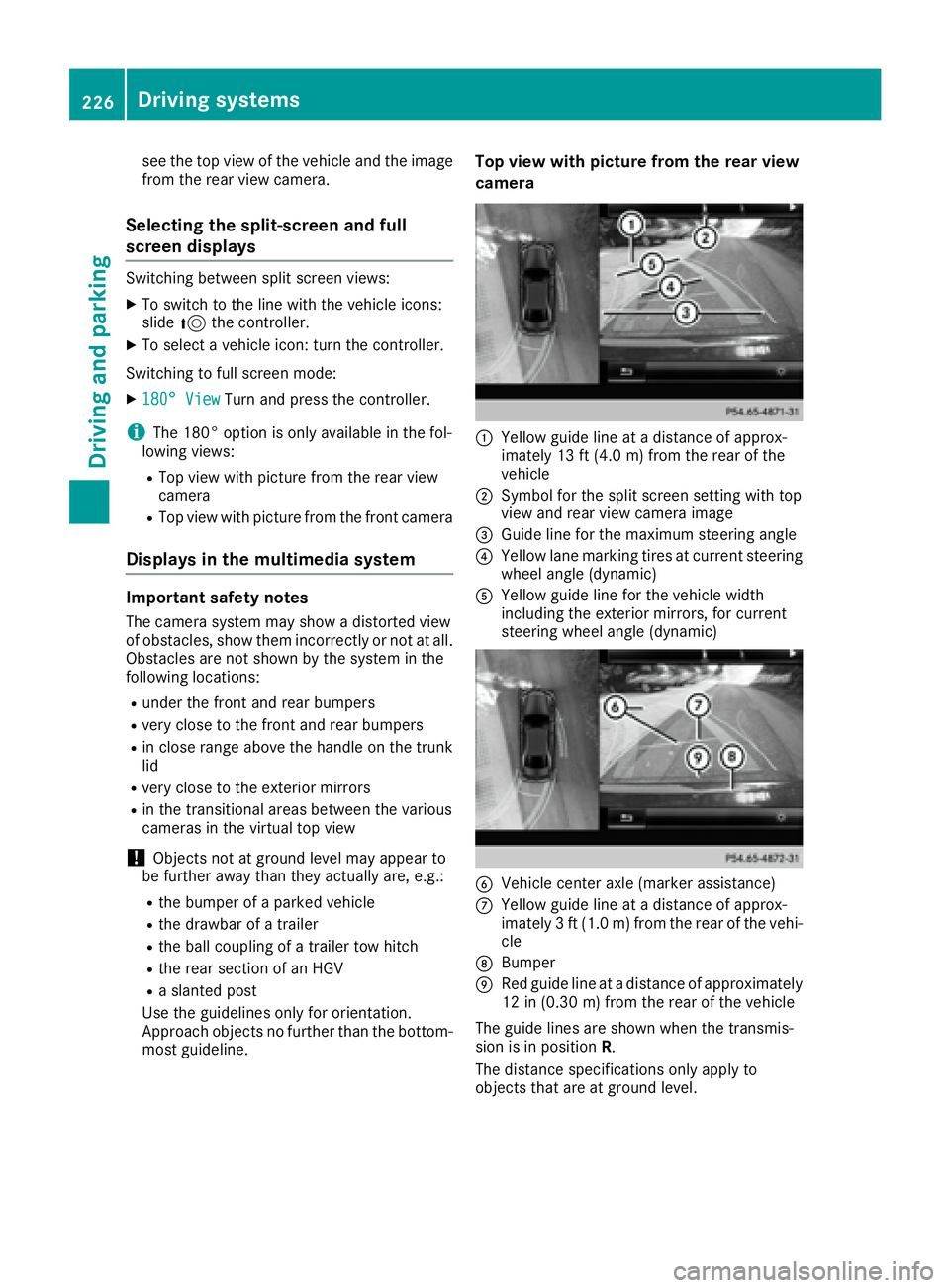
C
Yellow guide line at a distance of approx-
imately 13 ft (4.0 m) from the rear of the
vehicle D
Symbol for the split screen setting with top
view and rear view camera image
Page 327 of 438
Useful information
i This Operator's Manual describes all models
and all standard and optional equipment of
your vehicle available at the time of publica-
tion of the Operator's Manual. Country-spe-
cific differences are possible. Please note
that your vehicle may not be equipped with all
features described. This also applies to
safety-related systems and functions.
i Read the information on qualified specialist
workshops ( Y
page 28).
Stowage areas
Loading guidelines
G WARNING
Combustion engines emit poisonous exhaust
gases such as carbon monoxide. Exhaust
gases can enter the vehicle interior if the
trunk lid is open when the engine is running,
especially if the vehicle is in motion. There is a
risk of poisoning.
Always switch off the engine before opening
the trunk lid. Never drive with the trunk lid
open.
G WARNING
If objects, luggage or loads are not secured or
not secured sufficiently, they could slip, tip
over or be flung around and thereby hit vehicle
occupants. There is a risk of injury, particu-
larly in the event of sudden braking or a sud-
den change in direction.
Always store objects so that they cannot be
flung around. Secure objects, luggage or
loads against slipping or tipping before the
journey.
G WARNING
The exhaust tail pipe and tail pipe trim can
become very hot. If you come into contact
with these parts of the vehicle, you could burn
yourself. There is a risk of injury.
Always be particularly careful around the
exhaust tail pipe and the tail pipe trim. Allow these components to cool down before touch-
ing them.
The handling characteristics of a laden vehicle
are dependent on the distribution of the load
within the vehicle. For this reason, you should
observe the following notes when transporting a
load: R
Never exceed the maximum permissible
gross vehicle weight or the gross axle weight
rating of the vehicle (including occupants).
The values are specified on the vehicle iden-
tification plate on the B-pillar of the driver's
door. R
The trunk is the preferred place to carry
objects. R
Position heavy loads as far forwards as pos-
sible and as low down in the trunk as possible. R
The load must not protrude above the upper
edge of the seat backrests. R
Always place the load behind unoccupied
seats if possible. R
Secure the load with sufficiently strong and
wear-resistant tie-downs. Pad sharp edges for
protection.
Stowage spaces
Important safety notes
G WARNING
If objects in the passenger compartment are
stowed incorrectly, they can slide or be
thrown around and hit vehicle occupants. In
addition, cupholders, open stowage spaces
and mobile phone brackets cannot always
retain all objects they contain. There is a risk
of injury, particularly in the event of sudden
braking or a sudden change in direction. R
Always stow objects so that they cannot be
thrown around in such situations. R
Always make sure that objects do not pro-
trude from stowage spaces, parcel nets or
stowage nets.Stowage areas 325
Stowage and features Z
Page 328 of 438
R
Close the lockab le stowage spaces before
starting a jo urney.R
Alwa ys stow and secure heavy, hard, poin -
te d, sharp-edged, fragile or bulk y objects in
the trunk.
Observe the loadin g guidelines ( Y
page 325).
Stowage compartments in the front Glove box
X
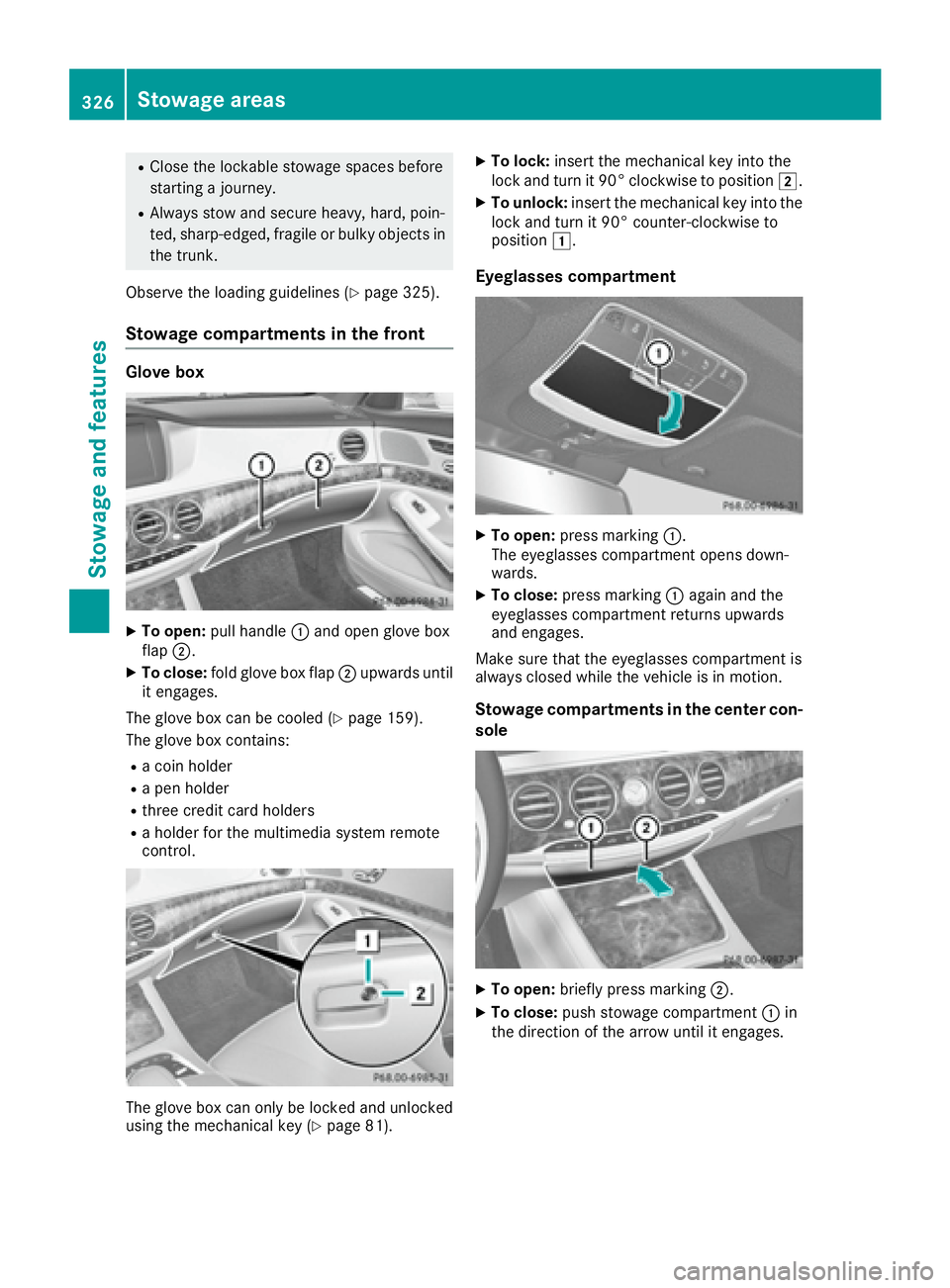
To open: pull han dle C and open glove box
flap D .X
To close: fold glove box flap D upwards unt il
it engages.
The glove box can be cooled ( Y
page 159).
The glove box contains: R
a co in holderR
a pen holder R
three cr edit card holdersR
a holder for the multimed ia system remote
control.
The glove box can on ly be locked and unlocked
using the mechanical key ( Y
page 81). X
To lock: insert the mechanical key into the
lock and turn it 90° clockwise to position H .X
To unlock: insert the mechanical key into the
lock and turn it 90° counter-clockwise to
position G .
Eyeglasses compartment X
To open: press marking C .
The eyeglasses compartment opens down-
wards. X
To close: press marking C again and the
eyeglasses compartment returns upwards
and engages.
Make sure that the eyeglasses compartment is
always closed while the vehicle is in motion.
Stowage compartments in the center con-
sole
X
To open: briefly press marking D .X
To close: push stowage compartment C in
the direction of the arrow until it engages.326
Stowage areas
Stowage and features
Page 331 of 438
Stowage nets Stowage nets are located: R
in the front-passenger footwell R
on the back of the driver's and the front-
passenger seat R
on the left and right-hand side in the trunk
Observe the loading guidelines ( Y
page 325)
and the safety notes regarding stowage spaces
( Y
page 325).
Securing loads using parcel net hooks
General notes Observe the following notes on securing loads: R
Secure the load using the parcel net hooks. R
Do not use elastic straps or nets to secure a
load, as these are only intended as an anti-slip
protection for light loads. R
Do not route tie-downs across sharp edges or
corners. R
Pad sharp edges for protection.
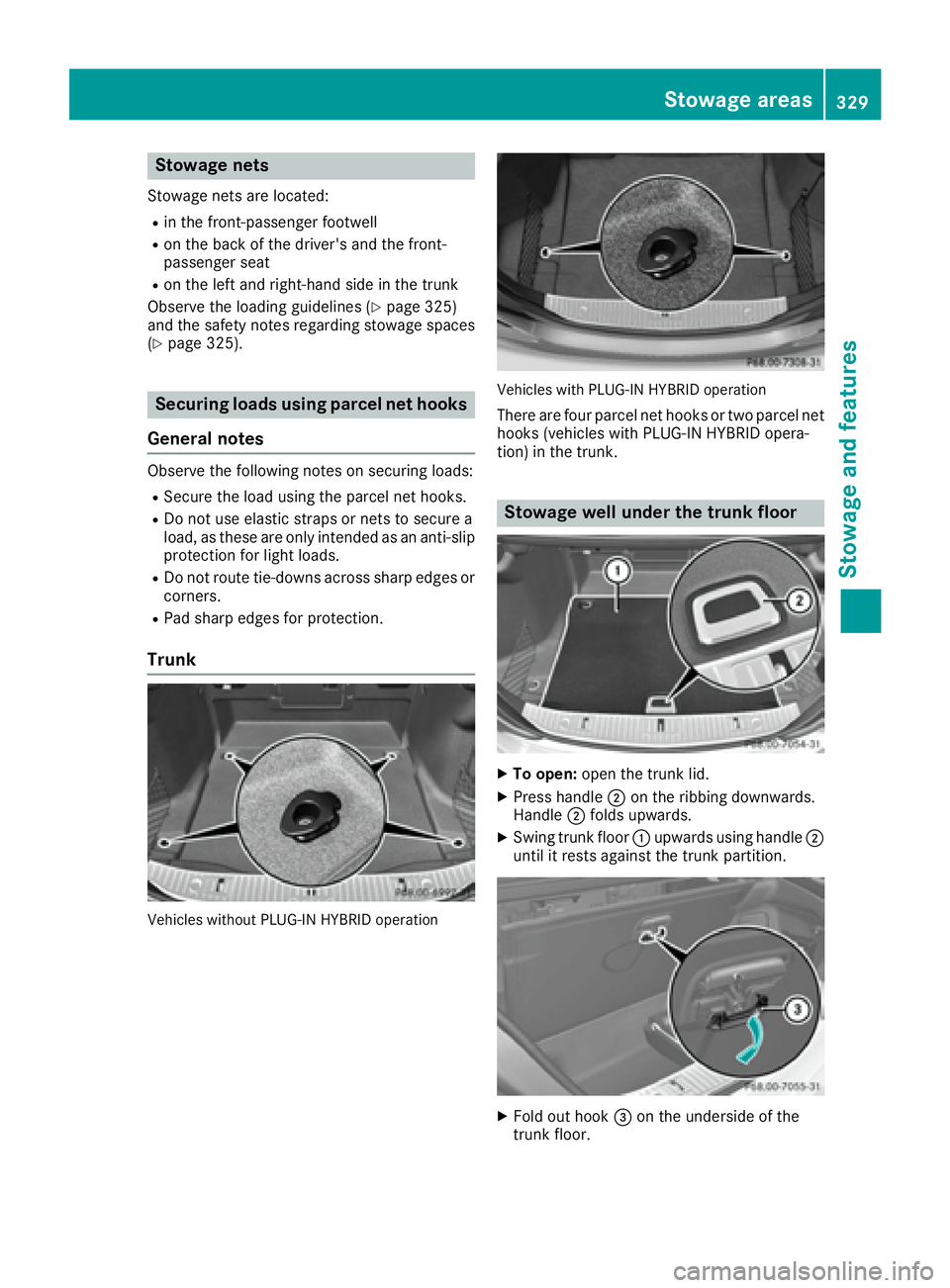
Trunk
Vehicles without PLUG-IN HYBRID operation Vehicles with PLUG-IN HYBRID operation
There are four parcel net hooks or two parcel net
hooks (vehicles with PLUG-IN HYBRID opera-
tion) in the trunk.
Stowage well under the trunk floor
X
To open: open the trunk lid. X
Press handle D on the ribbing downwards.
Handle D folds upwards. X
Swing trunk floor C upwards using handle D
until it rests against the trunk partition.
X
Fold out hook
Page 333 of 438
retain all objects they contain. There is a risk
of injury, particularly in the event of sudden
braking or a sudden change in direction. R
Always stow objects so that they cannot be
thrown around in such situations. R
Always make sure that objects do not pro-
trude from stowage spaces, parcel nets or
stowage nets. R
Close the lockable stowage spaces before
starting a journey. R
Always stow and secure heavy, hard, poin-
ted, sharp-edged, fragile or bulky objects in
the trunk.
Observe the loading guidelines ( Y
page 325).
Mercedes-Maybach vehicles equipped with
champagne glasses: for your own safety, when
using champagne glasses, please observe the
following: R
do not use the champagne glasses while the
vehicle is in motion R
do not use champagne glasses made of
breakable glass, and store them in the trunk if
possible
! Only use the cup holders for containers of
the right size and which have lids. The drinks
could otherwise spill.
! Do not expose drinks bottles in the cup
holder in the center console to continuous,
strong and direct sunlight. The passenger
compartment in the area of the center con-
sole can otherwise be damaged by the con-
centrated and reflected sunlight.
Cup holder in the front-compartment
center console X
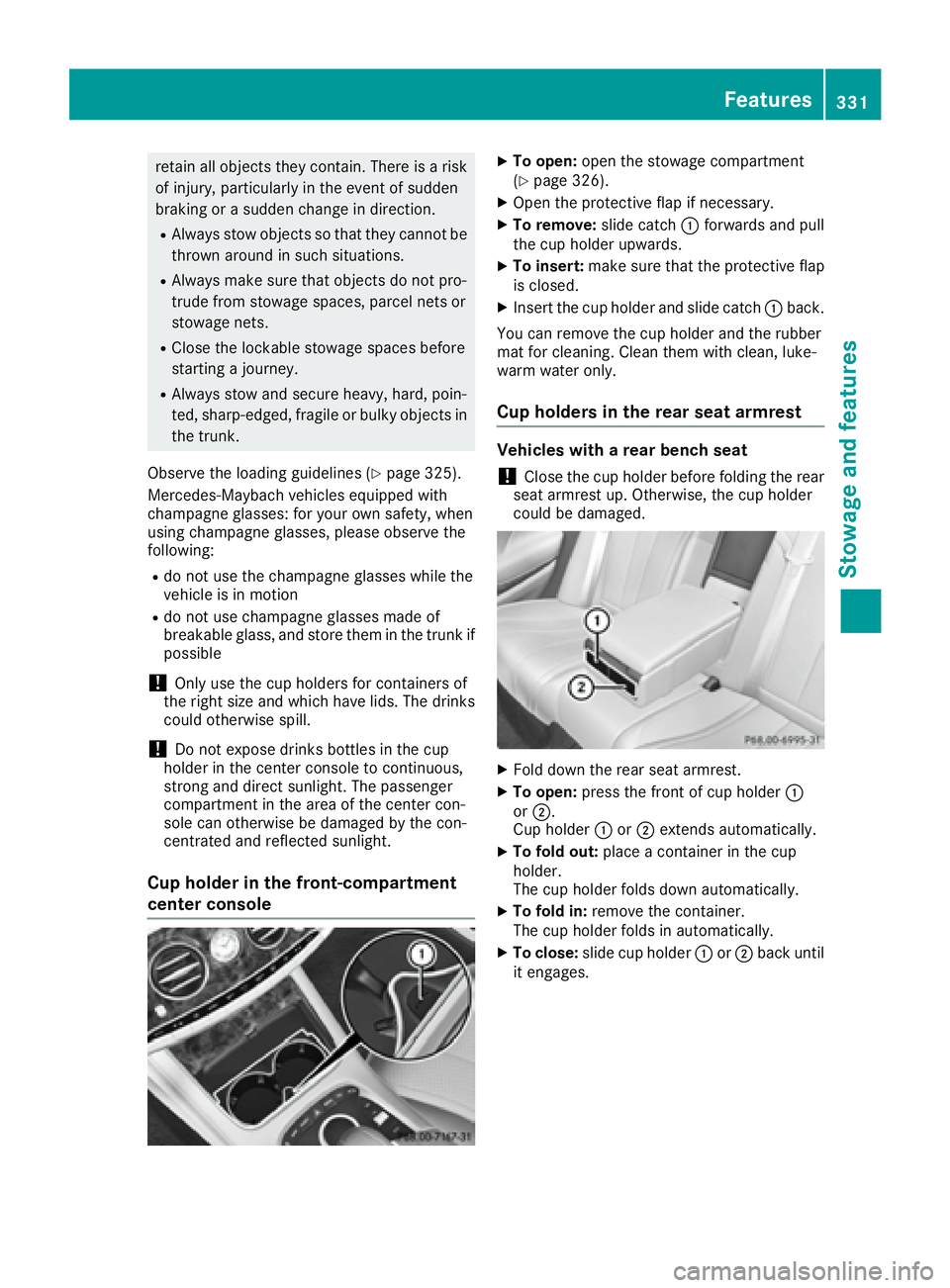
To open: open the stowage compartment
( Y
page 326). X
Open the protective flap if necessary. X
To remove: slide catch C forwards and pull
the cup holder upwards. X
To insert: make sure that the protective flap
is closed. X
Insert the cup holder and slide catch C back.
You can remove the cup holder and the rubber
mat for cleaning. Clean them with clean, luke-
warm water only.
Cup holders in the rear seat armrest Vehicles with a rear bench seat
! Close the cup holder before folding the rear
seat armrest up. Otherwise, the cup holder
could be damaged.
X
Fold down the rear seat armrest. X
To open: press the front of cup holder C
or D .
Cup holder C or D extends automatically.X
To fold out: place a container in the cup
holder.
The cup holder folds down automatically. X
To fold in: remove the container.
The cup holder folds in automatically. X
To close: slide cup holder C or D back until
it engages. Features 331
Stowage and features Z
Page 339 of 438
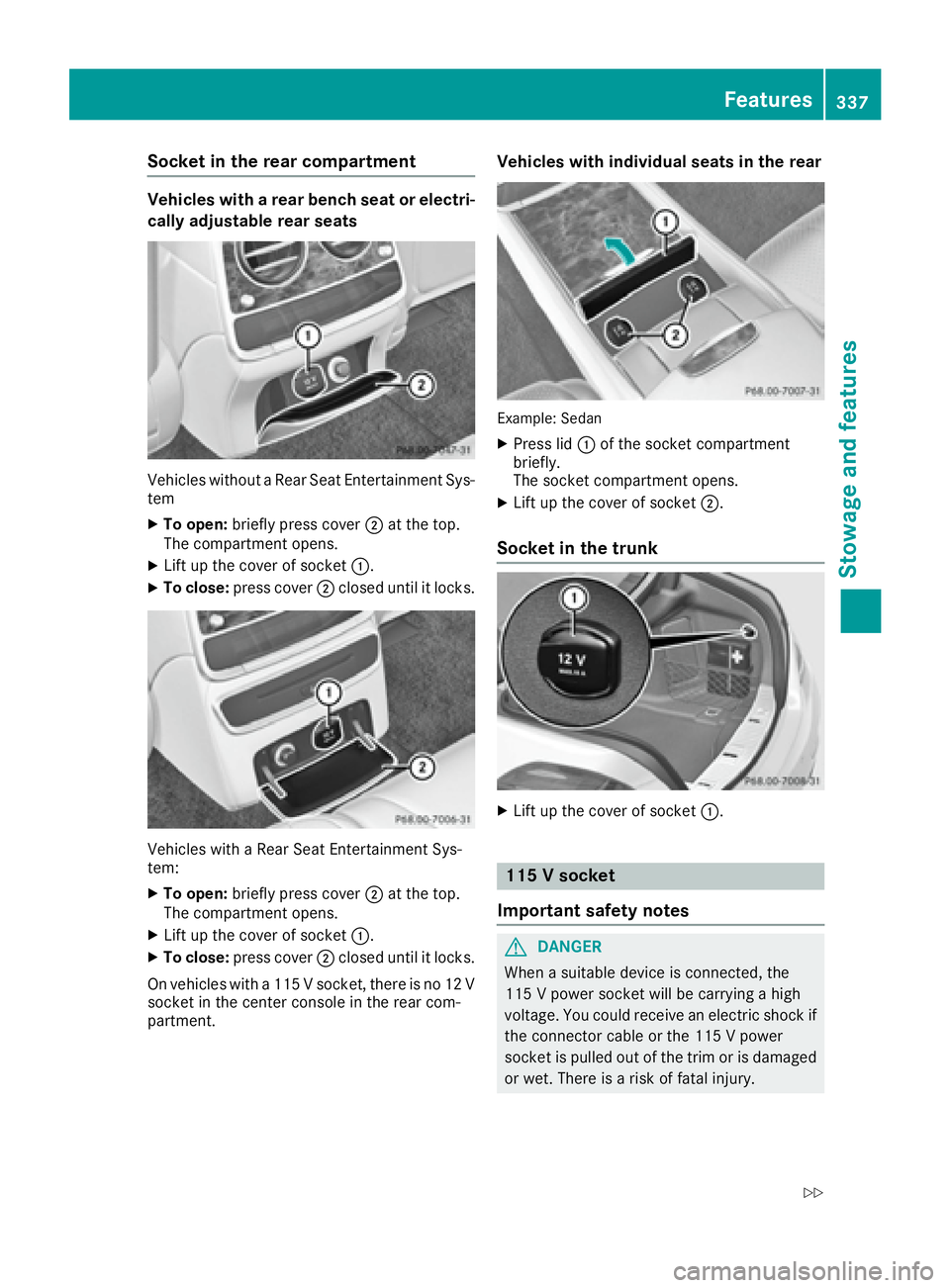
Socket in the rear compartment Vehicles with a rear bench seat or electri-
cally adjustable rear seats
Vehicles without a Rear Seat Entertainment Sys-
tem X
To open: briefly press cover D at the top.
The compartment opens. X
Lift up the cover of socket C .X
To close: press cover D closed until it locks.
Vehicles with a Rear Seat Entertainment Sys-
tem: X
To open: briefly press cover D at the top.
The compartment opens. X
Lift up the cover of socket C .X
To close: press cover D closed until it locks.
On vehicles with a 115 V socket, there is no 12 V
socket in the center console in the rear com-
partment. Vehicles with individual seats in the rear
Example: Sedan X
Press lid C of the socket compartment
briefly.
The socket compartment opens. X
Lift up the cover of socket D .
Socket in the trunk
X
Lift up the cover of socket C .
115 V socket
Important safety notes
G DANGER
When a suitable device is connected, the
115 V power socket will be carrying a high
voltage. You could receive an electric shock if
the connector cable or the 115 V power
socket is pulled out of the trim or is damaged
or wet. There is a risk of fatal injury. Features 337
Stowage and features Z
Page 340 of 438
R
Use only connector cables that are dry and
free of damage. R
When the ignition is off, make sure that the
115 V power socket is dry. R
Have the 115 V power socket checked or
replaced immediately at a qualified speci-
alized workshop if it is damaged or has been
pulled out of the trim. R
Never plug the connector cable into a 115 V
power socket that is damaged or has been
pulled out of the trim.
G DANGER
If you reach into the power socket or plug
inappropriate devices into the power socket,
you could receive an electric shock. There is a
risk of fatal injury.
Only connect appropriate devices to the
power socket.
! Note that work and repairs on the 115 V
power socket should only be carried out by
qualified specialist personnel.
General notes The 115 V power socket provides an alternating
voltage of 115 V so that small electronic devices
can be connected. These devices, such as
games consoles, chargers and laptops, must not
consume more than a maximum of 150 watts
altogether.
Requirements for operation of these devices: R
the electronic device that you connect has a
suitable connector and conforms to stand-
ards specific to the country you are in. R
the plug of the electronic device is plugged
correctly into 115 V power socket. R
the maximum wattage of the device to be
connected must not exceed 150 watts. R
the on-board power supply is within a permis-
sible voltage range. R
the 12 V sockets in the center console in the
front compartment ( Y
page 336) and in the
trunk are functional ( Y
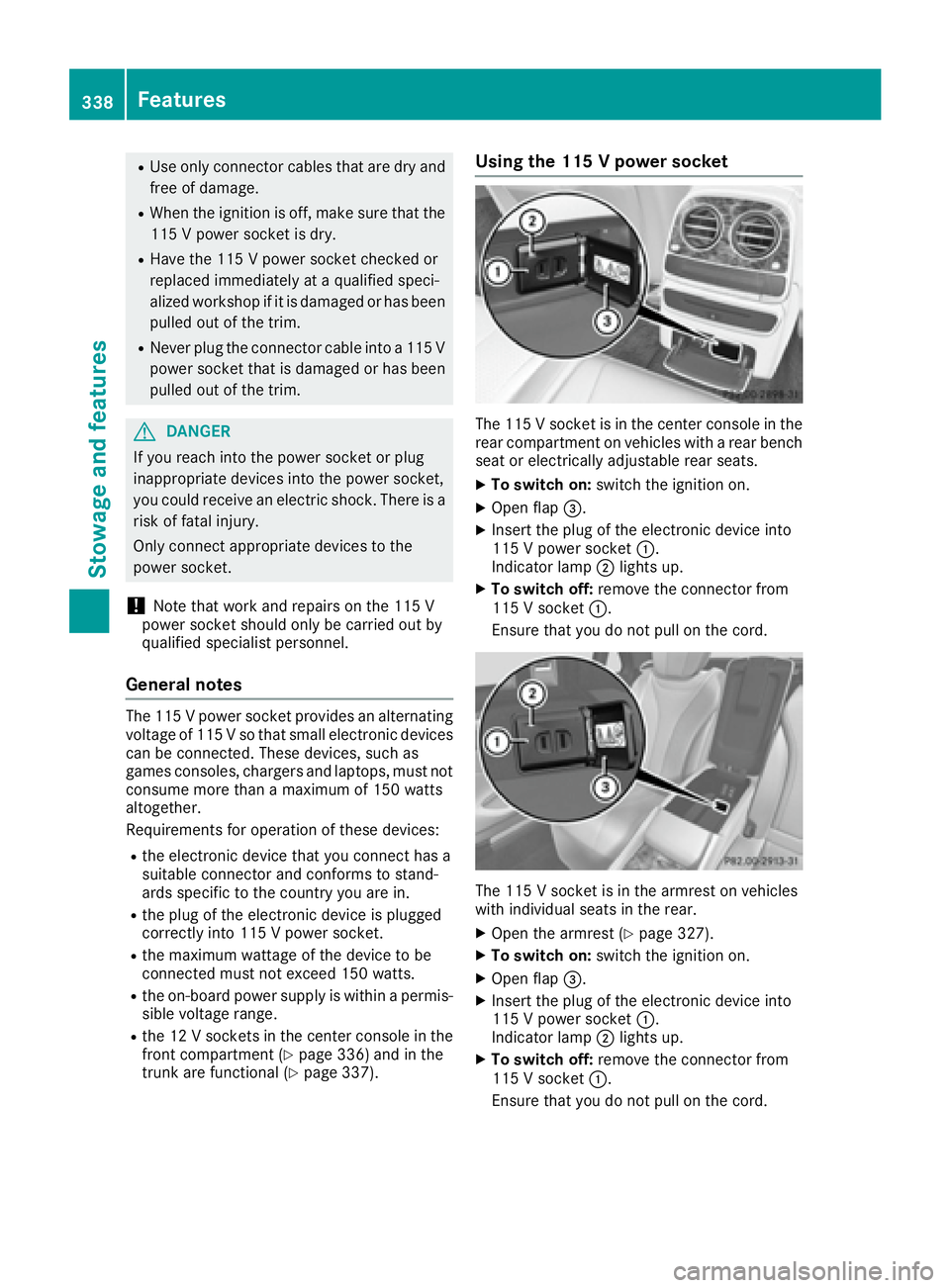
page 337). Using the 115 V power socket
The 115 V socket is in the center console in the
rear compartment on vehicles with a rear bench
seat or electrically adjustable rear seats. X
To switch on: switch the ignition on. X
Open flap