Tv screen MERCEDES-BENZ S CLASS 2016 Owners Manual
[x] Cancel search | Manufacturer: MERCEDES-BENZ, Model Year: 2016, Model line: S CLASS, Model: MERCEDES-BENZ S CLASS 2016Pages: 438, PDF Size: 13.22 MB
Page 226 of 438
Object detection The rear view camera can detect moving and
stationary objects. If, for example, a pedestrian
or another vehicle is detected, these objects are
marked with bars. The system is only able to
detect and mark stationary objects when your
vehicle is moving. When the vehicle is station-
ary, moving objects can be detected and
marked.
To ensure that you can use the function, it must
be switched on in the multimedia system (see
the separate operating instructions).
360° camera (surround view)
General notes The 360° camera is a system consisting of four
cameras.
The system processes images from the follow-
ing cameras: R
Rear view camera R
Front camera R
Two side cameras in the exterior mirrors
The cameras capture the immediate surround-
ings of the vehicle. The 360° camera assists
you, for instance when parking or at exits with
reduced visibility.
You can show images from the 360° camera in
full-screen mode or in six different split-screen
views on the multimedia system. A split-screen
view also includes a top view of the vehicle. This
view is calculated from the data supplied by the
installed cameras (virtual camera).
The six split-screen views are: R
top view and picture from the rear view cam-
era (130° viewing angle) R
top view and image from the front camera
(130° viewing angle without displaying the
maximum steering wheel angle) R
top view and enlarged rear view R
top view and enlarged front view R
top view and images from the rear-facing side
cameras (rear wheel view) R
top view and images from the forward-facing
side cameras (front wheel view)
When the function is active and you shift the
transmission from D or R to N , the guide lines
are hidden in the multimedia system. When you change between transmission posi-
tions D and R , you see the previously selected
front or rear view.
Distances measured by PARKTRONIC will also
be optically displayed: R
in split screen view as red or yellow brackets
around the vehicle icon in the top view, or R
at the bottom right as red or yellow brackets
around the vehicle symbol in full-screen mode
The line thickness and color of the brackets
show how far the vehicle is from an object. R
yellow brackets with thin lines: PARKTRONIC
is active R
yellow brackets with normal lines: an object is
present in close range of the vehicle R
red line: an object is present in the immediate
close range of the vehicle
Important safety notes The 360°camera is only an aid and may show a
distorted view of obstacles, show them incor-
rectly or not at all. The 360°camera is not a
substitute for attentive driving.
You are always responsible for safe maneuver-
ing and parking. When maneuvering or parking,
make sure that there are no persons, animals or
objects in the area in which you are maneuver-
ing.
You are always responsible for safety, and must
always pay attention to your surroundings when
parking and maneuvering. This applies to the
areas behind, in front of and beside the vehicle.
You could otherwise endanger yourself and oth-
ers.
The 360° camera will not function or will func-
tion in a limited manner: R
if the doors are open R
if the exterior mirrors are folded in R
if the trunk lid is open R
in heavy rain, snow or fog R
at night or in very dark places R
if the cameras are exposed to very bright light R
if the area is lit by fluorescent bulbs or LED
lighting (the display may flicker) R
if the camera lenses fog up, e.g. when driving
into a heated garage in winter, causing a rapid
change in temperature224
Driving systems
Driving and parking
Page 227 of 438
R
if the camera lenses are dirty or covered.
Observe the notes on cleaning
( Y
page 363) R
if the vehicle components in which the cam-
eras are installed are damaged. In this event,
have the camera position and setting checked
at a qualified specialist workshop
Do not use the 360° camera in this case. You
can otherwise injure others or cause damage to
objects or the vehicle.
The guide lines on the multimedia system show
the distances to your vehicle. The distances only
apply to road level.
The cameras in the front and in the rear area are
each protected by a flap. These flaps are opened
when the 360° camera is activated. Observe the
notes on cleaning ( Y
page 363). For technical
reasons, the flaps may remain open briefly after
the 360° camera has been deactivated.
The field of vision and other functions of the
camera system may be restricted due to addi-
tional accessories on the rear of the vehicle (e.g.
license plate holder, bicycle rack).
On vehicles with height-adjustable chassis,
depending on technical conditions, leaving the
standard height can result in: R
inaccuracies in the guide lines R
inaccuracies in the display of generated
images (top view)
Activation conditions The 360° camera image can be displayed if: R
the multimedia system is switched on R
the 360° Camera function is switched on
i If the 360° camera is activated at speeds
above approximately 19 mph (30 km/h), a
warning message appears.
The warning message disappears if: R
the vehicle's speed falls below approx-
imately 19 mph (30 km/h). The 360° cam-
era is then activated. R
the message is confirmed with the 8
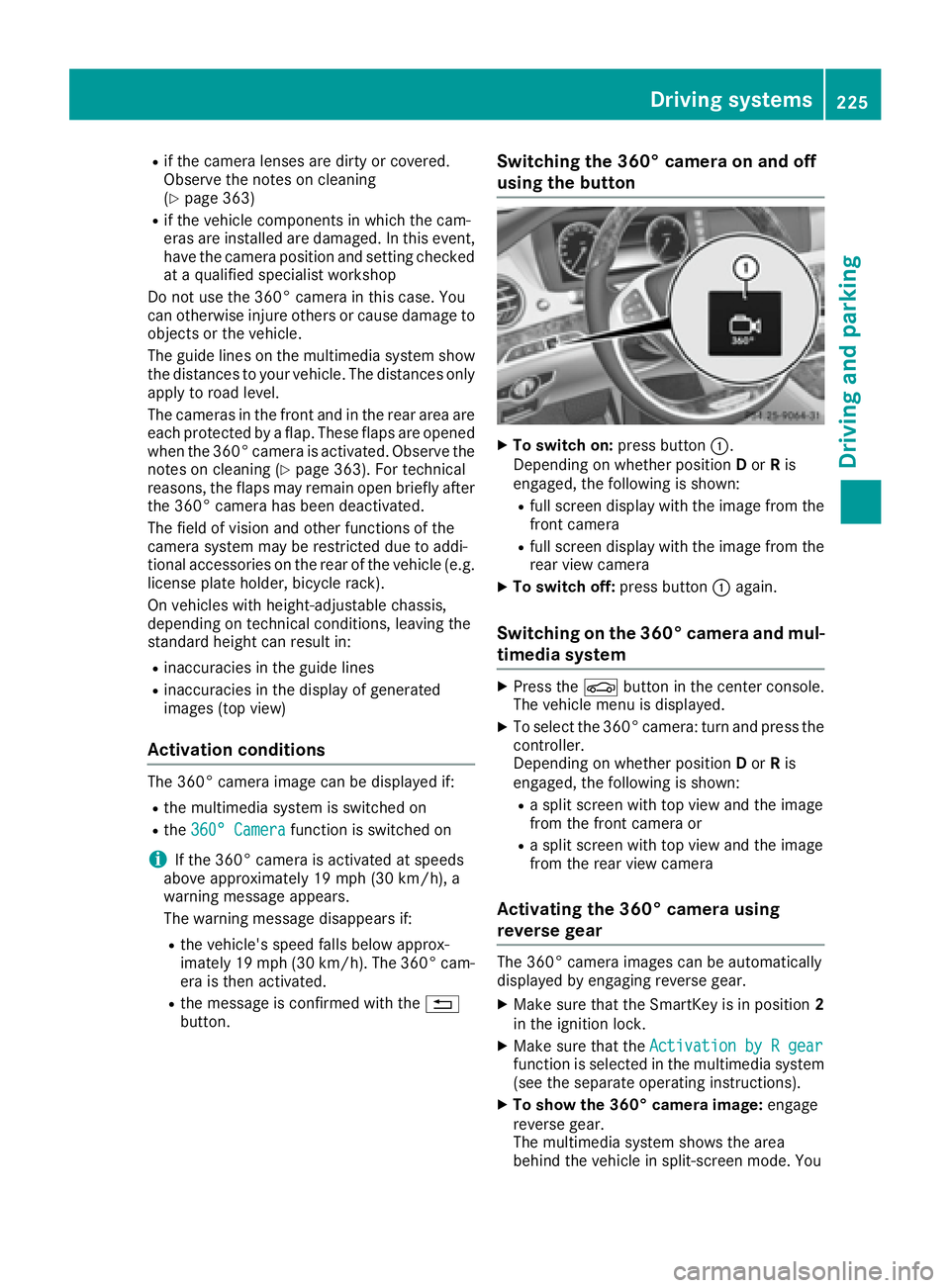
button. Switching the 360° camera on and off
using the button X
To switch on: press button C .
Depending on whether position D or R is
engaged, the following is shown: R
full screen display with the image from the
front camera R
full screen display with the image from the
rear view camera X
To switch off: press button C again.
Switching on the 360° camera and mul-
timedia system X
Press the
Page 228 of 438
see the top view of the vehicle and the image
from the rear view camera.
Selecting the split-screen and full
screen displays Switching between split screen views: X
To switch to the line with the vehicle icons:
slide 5 the controller.X
To select a vehicle icon: turn the controller.
Switching to full screen mode: X
180° View Turn and press the controller.
i The 180° option is only available in the fol-
lowing views: R
Top view with picture from the rear view
camera R
Top view with picture from the front camera
Displays in the multimedia system
Important safety notes The camera system may show a distorted view
of obstacles, show them incorrectly or not at all.
Obstacles are not shown by the system in the
following locations: R
under the front and rear bumpers R
very close to the front and rear bumpers R
in close range above the handle on the trunk
lid R
very close to the exterior mirrors R
in the transitional areas between the various
cameras in the virtual top view
! Objects not at ground level may appear to
be further away than they actually are, e.g.: R
the bumper of a parked vehicle R
the drawbar of a trailer R
the ball coupling of a trailer tow hitch R
the rear section of an HGV R
a slanted post
Use the guidelines only for orientation.
Approach objects no further than the bottom-
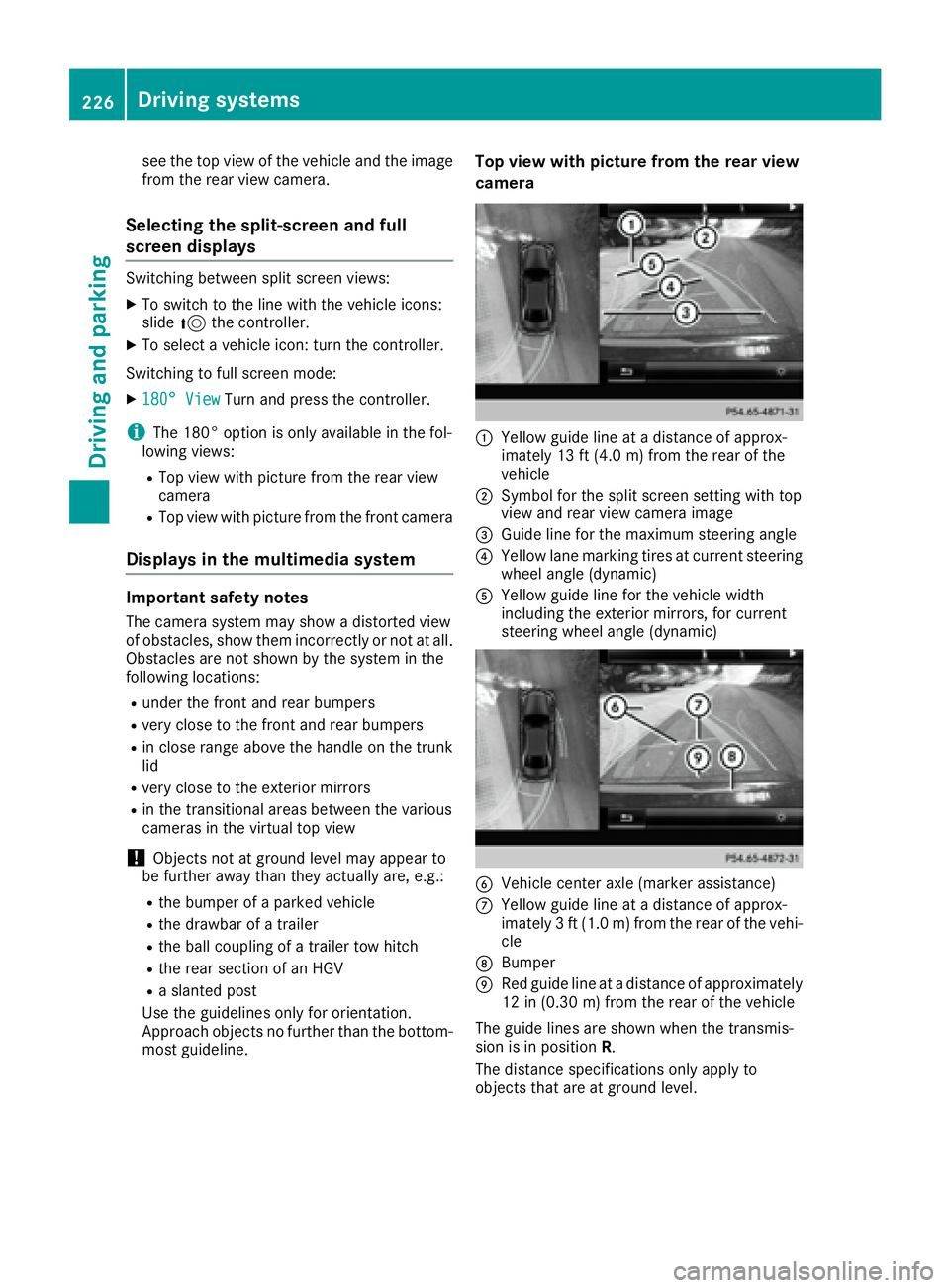
most guideline. Top view with picture from the rear view
camera
C
Yellow guide line at a distance of approx-
imately 13 ft (4.0 m) from the rear of the
vehicle D
Symbol for the split screen setting with top
view and rear view camera image
Page 229 of 438
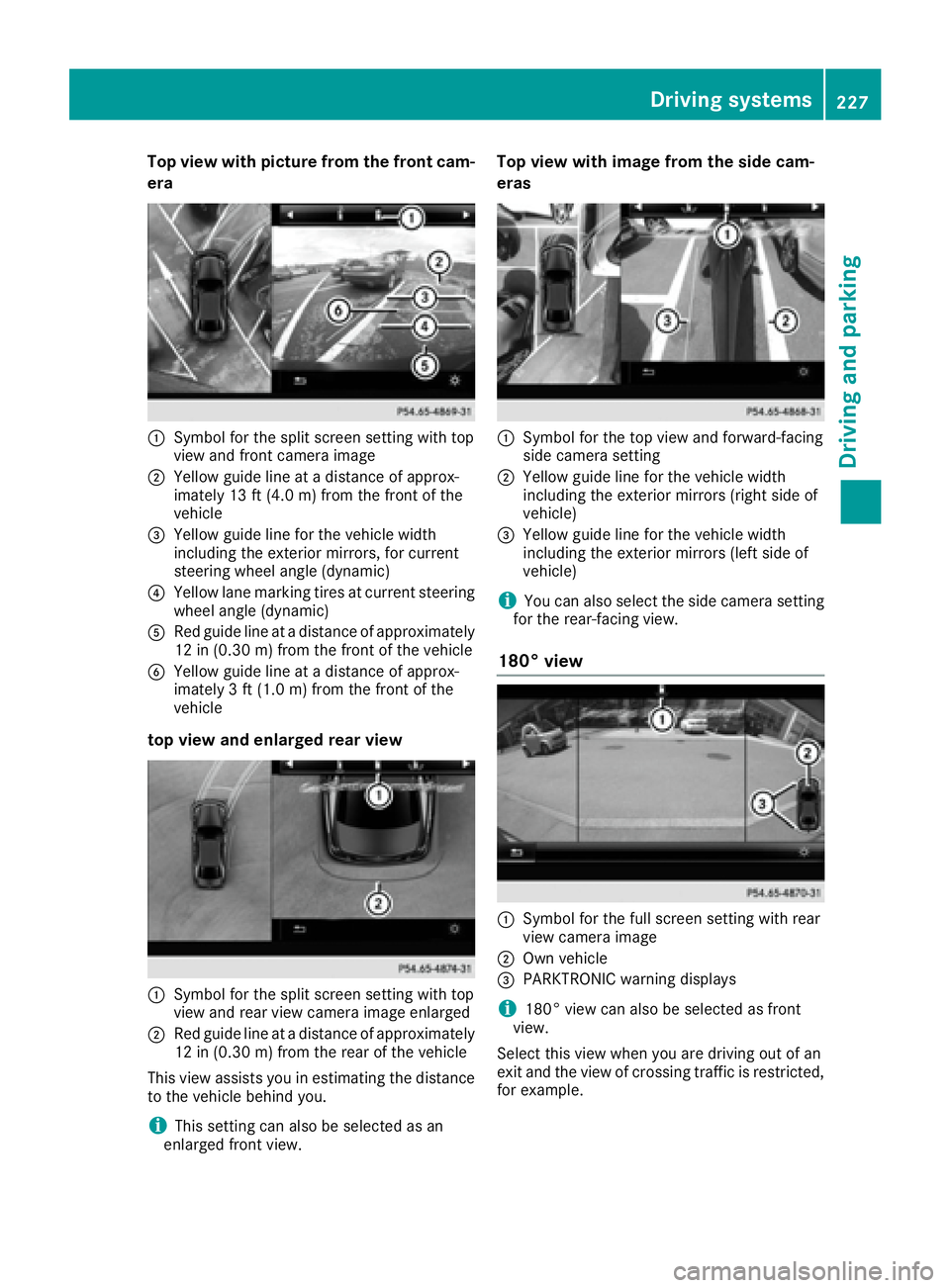
Top view with picture from the front cam-
era
C
Symbol for the split screen setting with top
view and front camera imageD
Yellow guide line at a distance of approx-
imately 13 ft (4.0 m) from the front of the
vehicle
Page 230 of 438
Exiting 360° camera display mode The 360° camera display is stopped R
when you select transmission position P , orR
when you are driving at moderate speeds
The view which was active before the 360° cam-
era was displayed appears in the multimedia
system. You can also stop the 360° camera dis-
play split-screen view by selecting the 8
symbol in the display and then confirming with
the COMAND controller.
ATTENTION ASSIST
General notes ATTENTION ASSIST helps you during long,
monotonous journeys, such as on highways. It is
active in the 37 mph (60 km/h) to 125 mph
(200 km/h) range. If ATTENTION ASSIST
detects typical indicators of fatigue or increas-
ing lapses in concentration on the part of the
driver, it suggests taking a break.
Important safety notes ATTENTION ASSIST is only an aid to the driver. It
might not always recognize fatigue or increasing
inattentiveness in time or fail to recognize them
at all. The system is not a substitute for a well-
rested and attentive driver.
The functionality of ATTENTION ASSIST is
restricted and warnings may be delayed or not
occur at all: R
if the length of the journey is less than approx-
imately 30 minutes R
if the road condition is poor, e.g. if the surface
is uneven or if there are potholes R
if there is a strong side wind R
if you have adopted a sporty driving style with
high cornering speeds or high rates of accel-
eration R
if you are predominantly driving slower than
37 mph (60 km/ h) or faster than 125 mph
(200 km/ h)R
if you are driving with the active Steer Assist
of DISTRONIC PLUS R
if the time has been set incorrectly R
in active driving situations, such as when you
change lanes or change your speed The ATTENTION ASSIST tiredness assessment
is deleted and restarted when continuing the
journey, if: R
you switch off the engine R
you take off your seat belt and open the driv-
er's door, e.g. for a change of drivers or to
take a break
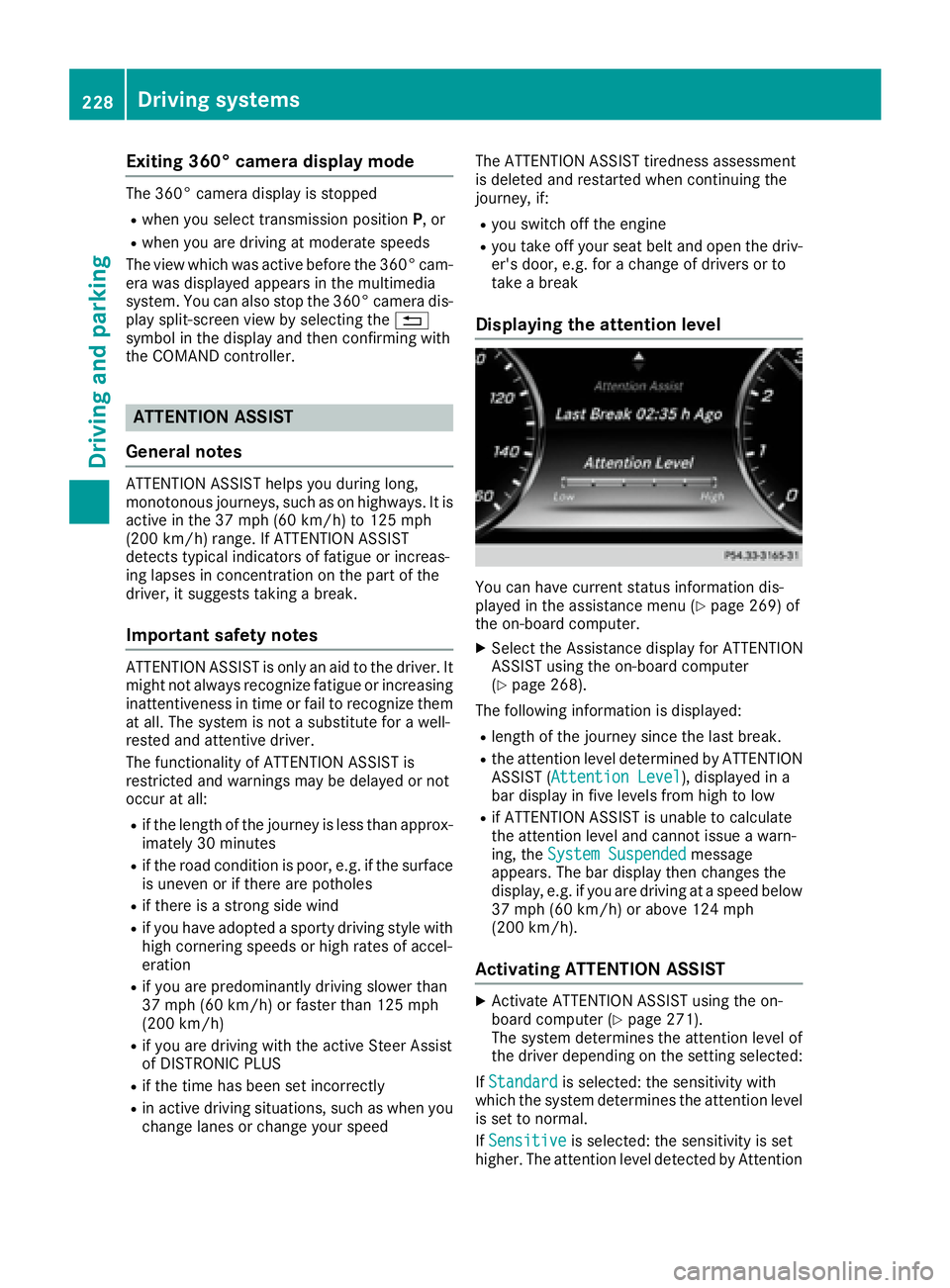
Displaying the attention level
You can have current status information dis-
played in the assistance menu ( Y
page 269) of
the on-board computer. X
Select the Assistance display for ATTENTION
ASSIST using the on-board computer
( Y
page 268).
The following information is displayed: R
length of the journey since the last break. R
the attention level determined by ATTENTION
ASSIST ( Attention Level ), displayed in a
bar display in five levels from high to low R
if ATTENTION ASSIST is unable to calculate
the attention level and cannot issue a warn-
ing, the System Suspended message
appears. The bar display then changes the
display, e.g. if you are driving at a speed below
37 mph (60 km/h) or above 124 mph
(200 km/h).
Activating ATTENTION ASSIST X
Activate ATTENTION ASSIST using the on-
board computer ( Y
page 271).
The system determines the attention level of
the driver depending on the setting selected:
If Standard is selected: the sensitivity with
which the system determines the attention level
is set to normal.
If Sensitive is selected: the sensitivity is set
higher. The attention level detected by Attention228
Driving systems
Driving and parking
Page 367 of 438
become porous. As a result, plastic parts may
come loose in the event of air bag deploy-
ment. There is a risk of injury.
Do not use any care products and cleaning
agents to clean the cockpit.
! Do not affix the following to plastic surfaces: R
stickers R
films R
scented oil bottles or similar items
You can otherwise damage the plastic.
! Do not allow cosmetics, insect repellent or
sunscreen to come into contact with the plas-
tic trim. This maintains the high-quality look of
the surfaces. X
Wipe the plastic trim with a damp, lint-free
cloth, e.g. a microfiber cloth. X
Heavy soiling: use care and cleaning prod-
ucts recommended and approved by
Mercedes-Benz.
The surface may change color temporarily.
Wait until the surface is dry again.
Cleaning the steering wheel and gear or
selector lever X
Thoroughly wipe with a damp cloth or use
leather care agents that have been recom-
mended and approved by Mercedes-Benz.
Cleaning genuine wood and trim ele-
ments
! Do not use solvent-based cleaning agents
such as tar remover, wheel cleaners, polishes
or waxes. There is otherwise a risk of damag-
ing the surface.
! Do not use chrome polish on trim pieces.
The trim pieces have a chrome look but are
mostly made of anodized aluminum and can
lose their shine if chrome polish is used. Use
a damp, lint-free cloth instead when cleaning
the trim pieces.
If the chrome-plated trim pieces are very
dirty, you can use a chrome polish. If you are
unsure as to whether the trim pieces are
chrome-plated or not, consult an authorized
Mercedes-Benz Center. X
Wipe the wooden trim and trim pieces with a
damp, lint-free cloth, e.g. a microfiber cloth. X
Heavy soiling: use care and cleaning prod-
ucts recommended and approved by
Mercedes-Benz.
Cleaning the seat covers General notes
! Do not use a microfiber cloth to clean covers
made out of real leather, artificial leather or
DINAMICA. If used often, these can damage
the cover.
Note that regular care is essential to ensure that
the appearance and comfort of the covers is
retained over time.
Genuine leather seat covers
! To retain the natural appearance of the
leather, observe the following cleaning
instructions: R
Clean genuine leather covers carefully with
a damp cloth and then wipe the covers
down with a dry cloth. R
Make sure that the leather does not
become soaked. It may otherwise become
rough and cracked. R
Only use leather care agents that have
been tested and approved by Mercedes-
Benz. You can obtain these from a qualified
specialist workshop.
Leather is a natural product.
It exhibits natural surface characteristics, for
example: R
differences in the texture R
marks caused by growth and injury R
slight nuances of color
These are characteristics of leather and not
material defects.
Seat covers of other materials
! Observe the following when cleaning: R
clean artificial leather covers with a cloth
moistened with a solution containing 1%
detergent (e.g. dish washing liquid). R
clean cloth covers with a microfiber cloth
moistened with a solution containing 1%
detergent (e.g. dish washing liquid). Rub
carefully and always wipe entire seat sec-
tions to avoid leaving visible lines. Leave Care 365
Maintenance and care Z