phone MERCEDES-BENZ S CLASS 2016 Owners Manual
[x] Cancel search | Manufacturer: MERCEDES-BENZ, Model Year: 2016, Model line: S CLASS, Model: MERCEDES-BENZ S CLASS 2016Pages: 438, PDF Size: 13.22 MB
Page 11 of 438
ECO display
Function/notes ............................ .1 93
On-board computer ....................... 262
ECO start/stop function
Automatic engine start .................. 167
Automatic engine switch-off .......... 166
Deactivating/activating ................. 167
General information ....................... 166
Important safety notes .................. 166
Introduction ................................... 166
Electronic Stability Program
see ESP ®
(Electronic Stability Program)
Emergency
Automatic measures after an acci-
dent ................................................. 61
Emergency release
Driver's door ................................... .8 7
Trunk ............................................... 94
Vehicle ............................................. 87
Emergency Tensioning Devices
Activation ......................................... 57
Emissions control
Service and warranty information ... .2 5
Engine
Check Engine warning lamp .......... .3 20
Display message ............................ 294
ECO start/stop function ................ 166
Engine number ............................... 427
Irregular running ............................ 169
Jump-starting ................................. 376
Starting (important safety notes) ... 164
Starting problems .......................... 169
Starting the engine with the
SmartKey ....................................... 164
Starting via smartphone ................ 164
Starting with the Start/Stop but-
ton ................................................. 164
Switching off .................................. 190
Switching off with the Start/Stop
button ............................................ 190
Switching off with the vehicle key .. 190
Tow-starting (vehicle) ..................... 381
Engine electronics
Problem (malfunction) ................... 169
Engine oil
Adding .......................................... .3 55
Additives ........................................ 430
Checking the oil leve l ..................... 353 C he
cking the oil level using the
dipstick .......................................... 353
Checking the oil level using the
on-board computer ........................ 355
Display message ............................ 296
Filling capacity ............................... 430
General notes ................................ 429
Notes about oil grades ................... 429
Notes on oil level/consumption .... 353
Temperature (on-board computer,
Mercedes-AMG vehicles) .............. .2 75
Viscosity ........................................ 430
ESP ®
(Electronic Stability Pro-
gram)
AMG menu (on-board computer) ... 276
Characteristics ................................. 73
Deactivating/activating ................. 269
Deactivating/activating (notes) ....... 74
Display message ............................ 278
Function/notes ................................ 73
General notes .................................. 73
Important safety information ........... 73
Trailer stabilization ........................... 74
Warning lamp ................................. 317
ETS/4ETS (Electronic Traction Sys-
tem) ...................................................... 73
Exhaust
see Exhaust pipe
Exhaust check ................................... 193
Exhaust pipe
Cleaning ......................................... 363
Exhaustive discharging (high-volt-
age battery) ....................................... 374
Exterior lighting
Cleaning ......................................... 362
see Lights
Exterior mirrors
Adjusting ....................................... 123
Dipping (automatic) ....................... 124
Folding in/out (automatically) ....... 124
Folding in/out (electrically) ........... 124
Out of position (troubleshooting) ... 124
Setting ........................................... 124
Storing settings (memory func-
tion) ............................................... 126
Storing the parking position .......... 125
Eyeglasses compartment ................. 326Index 9
Page 12 of 438
FFeatures ............................................ .3 30
Filling capacities (Technical data) ... 427
Flat tire
Changing a wheel/mounting the
spare wheel ................................... 405
MOExtended tires .......................... 368
Preparing the vehicle ..................... 367
TIREFIT kit ...................................... 369
Floormats .......................................... .3 50
Folding table ...................................... 328
Frequencies
Mobile phone ................................. 425
Two-way radio ................................ 425
Front-passenger seat
Adjusting from the driver's seat ..... 108
Adjusting from the rear compart-
ment .............................................. 108
Fuel
Additives ........................................ 429
Consumption statistics .................. 262
Displaying the current consump-
tion ................................................ 261
Displaying the range ..................... .2 61
Driving tips ................................... .1 92
Fuel gauge ....................................... 33
Grade (gasoline) ............................ 428
Important safety notes .................. 428
Problem (malfunction) ................... 180
Refueling ........................................ 177
Tank content/reserve fuel ............. 428
Fuel level
Calling up the range (on-board
computer) ...................................... 261
Fuel tank
Capacity ........................................ 428
Problem (malfunction) ................... 180
Fuses
Allocation chart ..................... 381, 383
Before changing ............................ .3 82
Dashboard fuse box ....................... 382
Fuse box in the engine compart-
ment .............................................. 383
Fuse box in the front-passenger
footwell .......................................... 382
Fuse box in the trunk ..................... 383
Important safety notes .................. 381 G Garage door opener
Clearing the memory ..................... 350
General notes ................................ 347
Important safety notes .................. 348
Opening/closing the garage door .. 350
Problems when programming ....... .3 49
Programming (button in the rear-
view mirror) ................................... 348
Synchronizing the rolling code ....... 349
Gasoline ............................................. 428
Gear indicator (on-board com-
puter, Mercedes-AMG vehicles) ....... 275
Genuine parts ...................................... 24
Glove box .......................................... .3 26
H Handbrake
see Parking brake
HANDS-FREE ACCESS .......................... 91
Hazard warning lamps ..................... .1 32
Head restraints
Adjusting ....................................... 114
Adjusting (manually) ..................... .1 15
Adjusting (rear) .............................. 116
EASY ADJUST luxury head
restraint ......................................... 115
Luxury ............................................ 115
Supplementary cushion ................. 116
Head-up display
Adjusting the brightness ................ 273
Displays and operating .................. 259
Function/notes ............................ .2 59
Important safety notes .................. 259
Selecting displays .......................... 273
Setting the position ....................... 273
Headlamps
Fogging up ..................................... 134
see Automatic headlamp mode
Heating
see Climate control
High beam flasher ............................ .1 32
High-beam headlamps
Adaptive Highbeam Assist PLUS .... 133
Display message ............................ 292
Switching on/off ........................... 13210
Index
Page 15 of 438
Seats, steering wheel, exterior
mirrors ........................................... 126
Storing settings (rear compart-
ment) ............................................. 127
Mercedes-Benz Intelligent Drive
360°camera .................................. 224
ABS (Anti-lock Brake System) .......... 68
Active Blind Spot Assist ................. 234
Active Lane Keeping Assist ............ 237
Active Parking Assist ..................... 216
ATTENTION ASSIST ........................ 228
BAS (Brake Assist) ........................... 69
BAS PLUS (Brake Assist PLUS)
with Cross-Traffic Assist .................. 69
Crosswind Assist (vehicles with
MAGIC BODY CONTROL) ............... 210
Crosswind Assist (vehicles with-
out MAGIC BODY CONTROL) ........... 75
DISTRONIC PLUS ........................... 199
DISTRONIC PLUS with Steering
Assist and Stop&Go Pilot ............... 207
ESP ®
(Electronic Stability Pro-
gram) ............................................... 73
General notes ................................ 197
MAGIC BODY CONTROL ................ 210
Night View Assist Plus ................... 230
PARKTRONIC ................................. 214
PRE-SAFE ®
(anticipatory occu-
pant protection) ............................... 59
PRE-SAFE ®
Brake ............................. 75
PRE-SAFE ®
PLUS (anticipatory
occupant protection PLUS) .............. 60
Rear view camera .......................... 220
ROAD SURFACE SCAN .................. 211
Traffic Sign Assist .......................... 229
Message memory (on-board com-
puter) .................................................. 277
Messages
see Display messages
see Warning and indicator lamps
Mirror turn signal
Cleaning ......................................... 362
Mirrors
see Exterior mirrors
see Rear-view mirror
see Vanity mirror (in the sun visor) Mobile phone
Frequencies ................................... 425
Installation ..................................... 425
Menu (on-board computer) ............ 267
Transmission output (maximum) .... 425
Modifying the programming
(SmartKey) ........................................... 81
MOExtended tires .............................. 368
Moun ting wheels
Lowe ring the vehicle ...................... 409
Mounting a new wheel ................... 409
Preparing the vehicle ..................... 406
Raising the vehicle ......................... 406
Removing a wheel .......................... 408
Securing the vehicle against roll-
ing away ........................................ 406
MP3
Operation ....................................... 266
Multicontour seat .............................. 117
Multifunction display
Function/notes ............................. 258
Multifunction steering wheel
Operating the on-board compute r. .2 57
Overview .......................................... 35
N
Navigation
Menu (on-board computer) ............ 263
Night View Assist Plus
Activating/deactivating ................. 232
Cleaning ......................................... 364
Display message ............................ 302
Function/notes ............................ .2 30
Pedestrian and animal recogni-
tion ................................................ 231
Problem (malfunction) ................... 234
Switching automatic activation
on/off ............................................ 270
Notes on breaking-in a new vehi-
cle ....................................................... 161
O
Occupant Classification System
(OCS)
Conditions ....................................... 53
Faults ............................................... 57 Index 13
Page 16 of 438
Operation ......................................... 54
System self-test .............................. .5 6
Occupant safety
Air bags .......................................... .5 0
Automatic measures after an acci-
dent ................................................. 61
Children in the vehicle ..................... 61
Important safety notes .................... 45
Introduction to the restraint sys-
tem .................................................. 44
Occupant Classification System
(OCS) ............................................... 53
PASSENGER AIR BAG indicator
lamps ............................................... 46
Pets in the vehicle ........................... 67
PRE-SAFE ®
(anticipatory occu-
pant protection) ............................... 59
PRE-SAFE ®
PLUS (anticipatory
occupant protection PLUS) .............. 60
Restraint system warning lamp ........ 45
OCS
Conditions ....................................... 53
Faults ............................................... 57
Operation ......................................... 54
System self-test ............................... 56
Odometer ........................................... 261
Oil
see Engine oil
On-board computer
AMG menu ..................................... 275
Assistance graphic menu ............... 268
Assistance menu ........................... 269
Display messages .......................... 277
Displaying a service message ........ 358
DISTRONIC PLUS ........................... 204
Factory settings ............................. 275
Head-up display ............................. 259
HYBRID menu ................................ 272
Important safety notes .................. 256
Instrument cluster menu ............... 274
Lights menu ................................... 274
Media menu ................................... 265
Menu overview .............................. 261
Message memory .......................... 277
Navigation menu ............................ 263
Operation ....................................... 257
Radio menu ................................... 265 Service menu ................................. 269
Settings menu ............................... 269
Standard display ............................ 261
Telephone menu ............................ 267
Trip menu ...................................... 261
Video DVD operation ..................... 267
Online access to the vehicle
Data protection .............................. 188
Functions ....................................... 189
General informa tion ....................... 188
Inte rne
t .......................................... 189
Opening the fuel filler flap
(PLUG-IN HYBRID vehicles) ............ 179
Operating safety
Declaration of conformity ................ 28
Important safety notes .................... 27
Operating system
see On-board computer
Operator's Manual
Overview .......................................... 25
Vehicle equipment ........................... 25
Outside temperature display ........... 257
Overhead control panel ...................... 39
Override feature
Rear side windows ........................... 67
P
Paint code number ............................ 426
Paintwork (cleaning instructions) ... 361
Panic alarm .......................................... 44
Panorama roof with power tilt/
sliding panel
Important safety notes .................... 97
Opening/closing the roller sun-
blind ............................................... 100
Operating ......................................... 98
Operating the roller sunblinds for
the sliding sunroof ........................... 99
Problem (malfunction) ................... 103
Rain closing feature ......................... 99
Resetting ....................................... 102
Reversing feature ............................. 98
Parcel net hooks ............................... 329
Parking
Important safety notes .................. 189
Parking brake ................................ 19014
Index
Page 20 of 438

Cleaning the cover ........................ .3 65
Correct driver's seat position ....... .1 04
Display message ............................ 310
EASY-ENTRY/EXIT system ............. 122
Important safety notes .................. 105
Multicontour seat .......................... 117
Seat heating .................................. 118
Seat heating problem .................... 119
Seat ventilation .............................. 119
Seat ventilation problem ................ 120
Storing settings (memory func-
tion) ............................................... 126
Switching seat heating on/off ....... 118
Switching seat ventilation on/off .. 119
Section
Wheels and tires ............................ 384
Securing a load
see Securing cargo
Securing cargo .................................. 329
Selector lever
Cleaning ......................................... 365
see Automatic transmission
Sensors (cleaning instructions) ....... 362
Service menu (on-board com-
puter) ................................................. .2 69
Service message
see ASSYST PLUS
Service products
Brake fluid ..................................... 430
Coolant (engine) ............................ 431
Engine oil ....................................... 429
Fuel ................................................ 428
Important safety notes .................. 427
Refrigerant (air-conditioning sys-
tem) ............................................... 432
Washer fluid ................................... 431
Setting the charge current (on-
board computer) ............................... 272
Setting the departure time (on-
board computer) ............................... 272
Settings
Factory (on-board computer) ......... 275
On-board computer ....................... 269
SETUP (on-board computer) ............. 276
Side impact air bag ............................ .5 2
Side marker lamp (display mes-
sage) ................................................... 292 Side windows
Cleaning ........................... .............. 362
Convenience closing feature ............ 96
Convenience opening feature ......... .9 5
Importa nt safety information ........... 94
Opening/closing .............................. 95
Problem (malfunction) .................... .9 7
Resettin g ........................................ .9 6
Reversin g feature ............................ .9 4
Sliding sunroof
see Panorama roof with power
tilt/sliding panel
SmartKey
Changing the battery ....................... 82
Changing the programming ............ .8 1
Checking the battery ...................... .8 2
Convenience closing feature ............ 96
Convenience opening feature .......... 95
Display message ............................ 312
Door central locking/unlocking ...... .7 9
Important safety notes .................... 79
KEYLESS-GO start function .............. 81
Loss ................................................ .8 4
Mechanical key ................................ 81
Overview .......................................... 79
Positions (ignition lock) ................. 162
Problem (malfunction) ..................... 84
Starting the engine ........................ 164
Smartphone
Starting the engine ........................ 164
Snow chains ...................................... 386
Sockets
Center console .............................. 336
General notes ................................ 336
Rear compartment ........................ .3 37
Trunk ............................................. 337
Special seat belt retractor .................. 62
Specialist workshop ............................ 28
Speed, controlling
see Cruise control
Speedometer
Activating/deactivating the addi-
tional speedometer ........................ 274
Digital ............................................ 263
In the Instrument cluster ................. 33
Selecting the display unit .............. .2 74
Standing lamps
Display message ............................ 29218
Index
Page 21 of 438
Switching on/off ........................... 131
Start/Stop button
General notes ................................ 162
Key positions ................................. 163
Removing ....................................... 163
Starting the engine ........................ 164
Start/stop function
see ECO start/stop function
Starting (engine) ................................ 164
STEER CONTROL .................................. 77
Steering
Display message ............................ 311
Warning lamps ............................... 324
Steering Assist
see DISTRONIC PLUS
Steering Assist and Stop&Go Pilot
(DISTRONIC PLUS)
Display message ............................ 305
Steering assistant STEER CON-
TROL
see STEER CONTROL
Steering wheel
Adjusting (electrically) ................... 120
Button overview ............................... 35
Buttons (on-board computer) ......... 257
Cleaning ......................................... 365
EASY ENTRY/EXIT feature ............. 122
Important safety notes .................. 120
Paddle shifters ............................... 174
Steering wheel heating .................. 120
Storing settings (memory func-
tion) ............................................... 126
Steering wheel heating
Problem (malfunction) ................... 122
Switching on/off ........................... 120
Steering wheel paddle shifters ........ 174
Stop&Go Pilot
see DISTRONIC PLUS
Stowage areas ................................... 325
Stowage compartments
Armrest (under) ............................. 327
Center console .............................. 326
Center console in rear compart-
ment .............................................. 327
Cup holders ................................... 330
Door ............................................... 327
Eyeglasses compartment ............... 326
Glove box ....................................... 326 Important safety information ......... 325
Rear ............................................... 327
Rear seat backrest ......................... 328
Stowage net ................................... 329
see Stowage areas
Stowage net ....................................... 329
Stowage space
Folding table .................................. 328
Parcel net retainers ....................... 329
Securing a load .............................. 329
Stowage well beneath the trunk
floor .................................................... 329
Summer tires
In w i
nter ........................................ 386
Sun visor ............................................ 333
Suspension mode
Active Body Control ABC ............... 210
Suspension setting
AIRMATIC ...................................... 212
Suspension settings
SETUP (on-board computer) .......... 276
Switching air-recirculation mode
on/off ................................................. 152
T
Tachometer ........................................ 256
Tail lamps
Display message ............................ 292
see Lights
Tank content
Fuel gauge ....................................... 33
Technical data
Capacities ...................................... 427
Information .................................... 425
Tires/wheels ................................. 410
Vehicle data ................................... 433
Telephone
Accepting a call (multifunction
steering wheel) .............................. 267
Display message ............................ 311
Introduction ................................... 267
Menu (on-board computer) ............ 267
Number from the phone book ........ 268
Redialing ........................................ 268
Rejecting/ending a call ................. 268
Temperature
Coolant .......................................... 257 Index 19
Page 80 of 438
Protection against theft
Immobilizer The immobilizer prevents your vehicle from
being started without the correct SmartKey. X
To activate with the SmartKey: remove the
SmartKey from the ignition lock. X
To activate with KEYLESS-GO: switch the
ignition off and open the driver's door. X
To deactivate: switch on the ignition.
When leaving the vehicle, always take the
SmartKey with you and lock the vehicle. Anyone
can start the engine if a valid SmartKey has been
left inside the vehicle.
i The immobilizer is always deactivated when
you start the engine.
In the event that the engine cannot be started
(yet the vehicle's battery is charged), the sys-
tem is not operational. Contact an authorized
Mercedes-Benz Center or call
1-800-FOR-MERCedes (in the USA) or
1-800-387-0100 (in Canada).
ATA (anti-theft alarm system)
X
To arm: lock the vehicle with the SmartKey or
KEYLESS-GO.
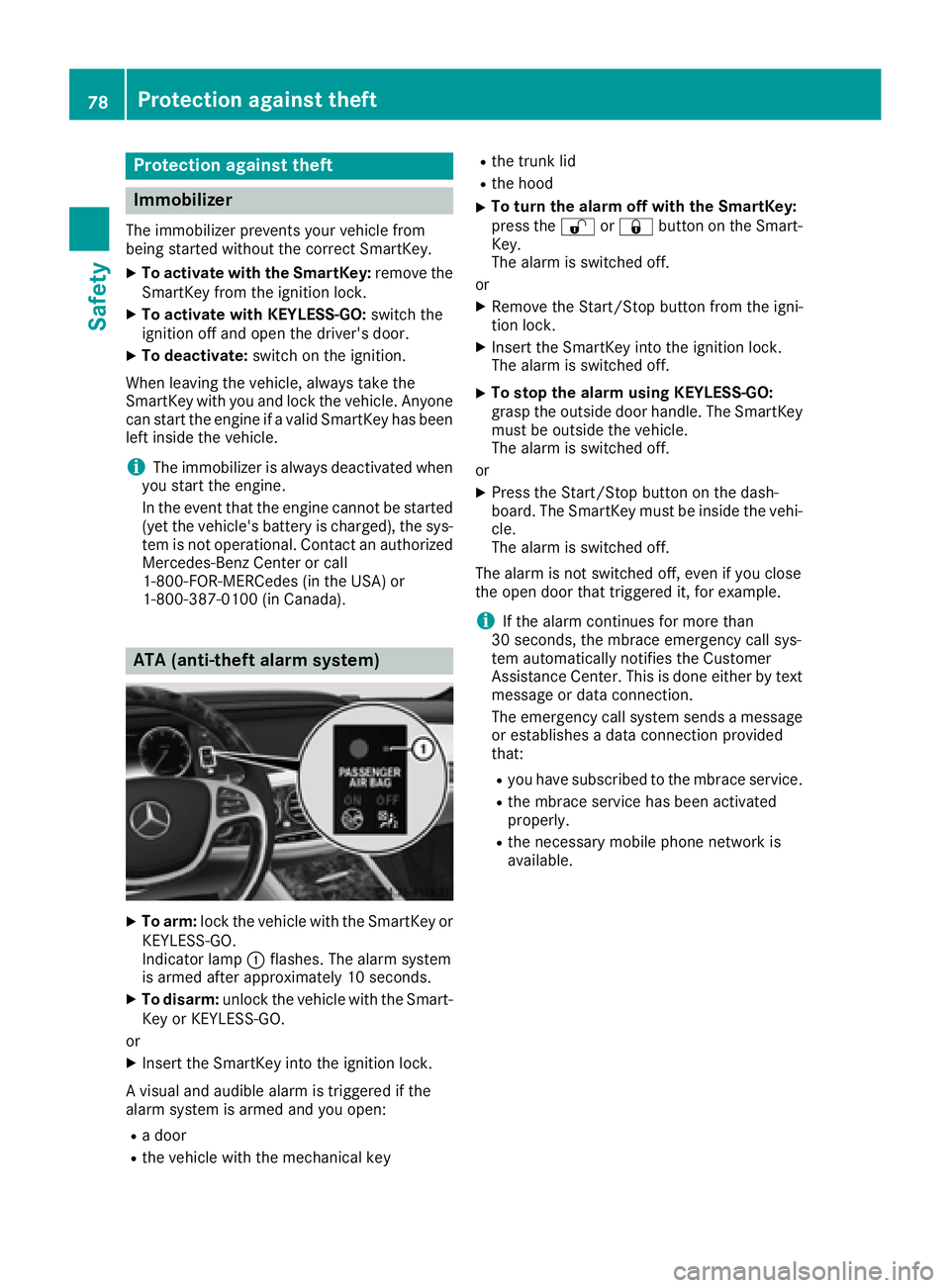
Indicator lamp C flashes. The alarm system
is armed after approximately 10 seconds. X
To disarm: unlock the vehicle with the Smart-
Key or KEYLESS-GO.
or X
Insert the SmartKey into the ignition lock.
A visual and audible alarm is triggered if the
alarm system is armed and you open: R
a door R
the vehicle with the mechanical key R
the trunk lid R
the hood X
To turn the alarm off with the SmartKey:
press the 6 or 7 button on the Smart-
Key.
The alarm is switched off.
or X
Remove the Start/Stop button from the igni-
tion lock. X
Insert the SmartKey into the ignition lock.
The alarm is switched off. X
To stop the alarm using KEYLESS-GO:
grasp the outside door handle. The SmartKey
must be outside the vehicle.
The alarm is switched off.
or X
Press the Start/Stop button on the dash-
board. The SmartKey must be inside the vehi-
cle.
The alarm is switched off.
The alarm is not switched off, even if you close
the open door that triggered it, for example.
i If the alarm continues for more than
30 seconds, the mbrace emergency call sys-
tem automatically notifies the Customer
Assistance Center. This is done either by text
message or data connection.
The emergency call system sends a message
or establishes a data connection provided
that: R
you have subscribed to the mbrace service. R
the mbrace service has been activated
properly. R
the necessary mobile phone network is
available.78
Protection against theft
Safety
Page 81 of 438
Useful information
i This Operator's Manual describes all models
and all standard and optional equipment of
your vehicle available at the time of publica-
tion of the Operator's Manual. Country-spe-
cific differences are possible. Please note
that your vehicle may not be equipped with all
features described. This also applies to
safety-related systems and functions.
i Read the information on qualified specialist
workshops ( Y
page 28).
SmartKey
Important safety notes
G WARNING
If children are left unsupervised in the vehicle,
they could: R
open the doors, thus endangering other
people or road users. R
get out and disrupt traffic. R
operate the vehicle's equipment.
Additionally, children could set the vehicle in
motion if, for example, they: R
release the parking brake. R
shifting the automatic transmission out of
park position PR
Start the engine.
There is a risk of an accident and injury.
When leaving the vehicle, always take the
SmartKey with you and lock the vehicle. Never
leave children or animals unattended in the
vehicle. Always keep the SmartKey out of
reach of children.
G WARNING
If you attach heavy or large objects to the
SmartKey, the SmartKey could be uninten-
tionally turned in the ignition lock. This could
cause the engine to be switched off. There is a
risk of an accident. Do not attach any heavy or large objects to the
SmartKey. Remove any bulky key rings before
inserting the SmartKey into the ignition lock.
! Keep the SmartKey away from strong mag-
netic fields. Otherwise, the remote control
function could be affected.
Strong magnetic fields can occur in the vicin-
ity of powerful electrical installations.
Do not keep the SmartKey: R
with electronic devices, e.g. a mobile phone
or another SmartKey. R
with metallic objects, e.g. coins or metal foil. R
inside metallic objects, e.g. a metal case.
This can affect the functionality of the Smart-
Key.
Do not keep the SmartKey in the temperature-
controlled cup holder ( Y
page 332). On vehicles
with the KEYLESS-GO start function, do not
keep it on the parcel shelf or in the trunk. Oth-
erwise, the SmartKey may not be detected, e.g.
when starting the engine using the Start/Stop
button.
A check which periodically establishes a radio
connection between the vehicle and the Smart-
Key determines whether a valid SmartKey is in
the vehicle. This occurs, for example: R
when starting the engine R
whilst driving R
when using HANDS-FREE ACCESS R
when the external door handles are touched R
during convenience closing
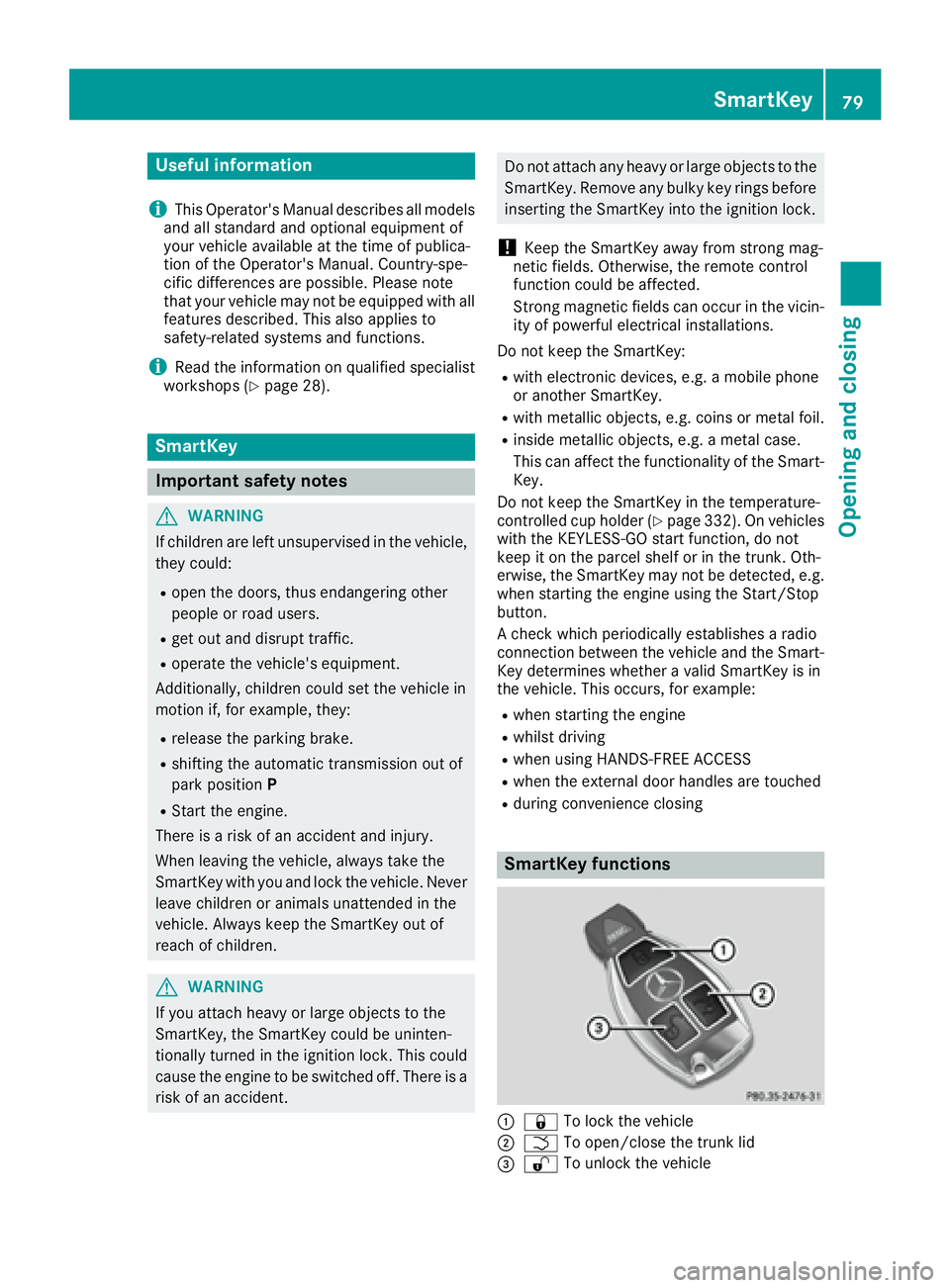
SmartKey functions
C
7 To lock the vehicle
D
T To open/close the trunk lid
Page 142 of 438
Useful information
i This Operator's Manual describes all models
and all standard and optional equipment of
your vehicle available at the time of publica-
tion of the Operator's Manual. Country-spe-
cific differences are possible. Please note
that your vehicle may not be equipped with all
features described. This also applies to
safety-related systems and functions.
i Read the information on qualified specialist
workshops ( Y
page 28).
Overview of climate control systems
General notes Observe the settings recommended on the fol-
lowing pages. The windows could otherwise fog
up.
To prevent the windows from fogging up: R
switch off climate control only briefly R
switch on air-recirculation mode only briefly R
switch on the cooling with air dehumidifica-
tion function R
switch on the defrost windshield function
briefly, if required
Climate control regulates the temperature and
air humidity in the vehicle interior. The air filter
cleans the air, thus improving the interior cli-
mate.
For vehicles with a combustion engine, the
"Cooling with air dehumidification" function is
only available when the engine is running. For
hybrid vehicles, the "Cooling with air dehumidi-
fication" function is also available via the elec-
tric refrigerant compressor when the engine is
not running. Optimum climate control is only
achieved with the side windows and roof closed.
If you start the engine using your smartphone,
the last selected climate control setting is reac-
tivated ( Y
page 164).
The residual heat function can only be activated
or deactivated with the ignition switched off
( Y
page 152).
i Ventilate the vehicle for a brief period during
warm weather, e.g. using the convenience
opening feature ( Y
page 95). This will speed
up the cooling process and the desired inte- rior temperature will be reached more
quickly.
i The integrated filter filters out most parti-
cles of dust and soot and completely filters
out pollen. It also reduces gaseous pollutants
and odors. A clogged filter reduces the
amount of air supplied to the vehicle interior.
For this reason, you should always observe
the interval for replacing the filter, which is
specified in the Maintenance Booklet. As it
depends on environmental conditions, e.g.
heavy air pollution, the interval may be
shorter than stated in the Maintenance Book-
let.
i It is possible that the blower may be activa-
t ed automatically 60 minutes after the Smart-
Key has been removed depending on various
factors, e.g. the outside temperature. The
vehicle is then ventilated for 30 minutes to dry
the climate control system.140
Overview of climate control systems
Climate control
Page 165 of 438
To start the vehicle without actively using the
Smartkey: R
the Start/Stop button must be inserted in the
ignition lock. R
the Smartkey must be in the vehicle. R
the vehicle must not be locked with the
SmartKey or KEYLESS-GO ( Y
page 80).
Do not keep the SmartKey: R
with electronic devices, e.g. a mobile phone
or another SmartKey. R
with metallic objects, e.g. coins or metal foil. R
inside metallic objects, e.g. a metal case.
This can affect the functionality of the Smart-
Key.
Do not keep the SmartKey in the temperature-
controlled cup holder ( Y
page 332). Otherwise,
the key will not be detected, e.g. when starting
the engine with the Start/Stop button.
If you lock the vehicle with the SmartKey's
remote control or with KEYLESS-GO, after a
short time: R
you will not be able to switch on the ignition
with the Start/Stop button. R
you will not be able to start the engine with the
Start/Stop button until the vehicle is
unlocked again.
If you lock the vehicle centrally using the button
on the front door ( Y
page 86), you can continue
to start the engine with the Start/Stop button.
The engine can be switched off while the vehicle
is in motion by pressing and holding the Start/
Stop button for three seconds. This function
operates independently of the ECO start/stop
automatic engine switch-off function.
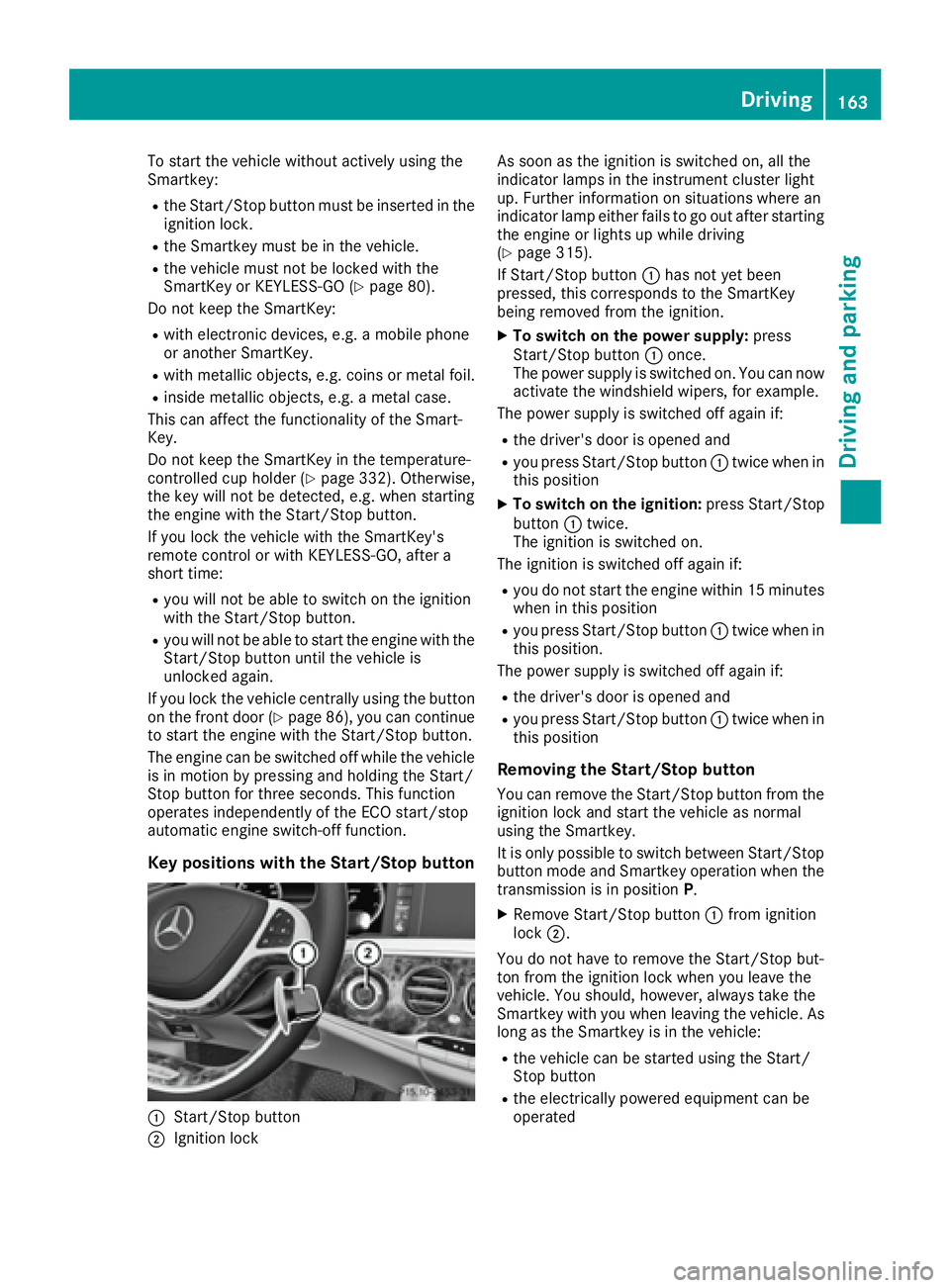
Key positions with the Start/Stop button
C
Start/Stop button
D
Ignition lock As soon as the ignition is switched on, all the
indicator lamps in the instrument cluster light
up. Further information on situations where an
indicator lamp either fails to go out after starting
the engine or lights up while driving
( Y
page 315).
If Start/Stop button C has not yet been
pressed, this corresponds to the SmartKey
being removed from the ignition. X
To switch on the power supply: press
Start/Stop button C once.
The power supply is switched on. You can now
activate the windshield wipers, for example.
The power supply is switched off again if: R
the driver's door is opened and R
you press Start/Stop button C twice when in
this position X
To switch on the ignition: press Start/Stop
button C twice.
The ignition is switched on.
The ignition is switched off again if: R
you do not start the engine within 15 minutes
when in this position R
you press Start/Stop button C twice when in
this position.
The power supply is switched off again if: R
the driver's door is opened and R
you press Start/Stop button C twice when in
this position
Removing the Start/Stop button You can remove the Start/Stop button from the
ignition lock and start the vehicle as normal
using the Smartkey.
It is only possible to switch between Start/Stop
button mode and Smartkey operation when the
transmission is in position P .X
Remove Start/Stop button C from ignition
lock D .
You do not have to remove the Start/Stop but-
ton from the ignition lock when you leave the
vehicle. You should, however, always take the
Smartkey with you when leaving the vehicle. As
long as the Smartkey is in the vehicle: R
the vehicle can be started using the Start/
Stop button R
the electrically powered equipment can be
operated Driving 163
Driving and parking Z