cruise control MERCEDES-BENZ S CLASS 2017 User Guide
[x] Cancel search | Manufacturer: MERCEDES-BENZ, Model Year: 2017, Model line: S CLASS, Model: MERCEDES-BENZ S CLASS 2017Pages: 382, PDF Size: 12.12 MB
Page 215 of 382
driver to see all of the information without hav-
ing to take their eyes off the road.
A requirement for the display of the contents is
that the following functions are available in the
vehicle and are switched on: R
Cruise control R
DISTRONIC PLUS R
Traffic Sign Assist R
Navigation
Important safety notes The Head-up Display is only an aid and is not a
substitute for attentive driving.
Speed limits and overtaking restrictions are not
always correctly displayed. Traffic signs always
have priority over the Traffic Sign Assist display.
The visibility of the Head-up Display is influ-
enced by the following conditions: R
the driver's seat position R
the positioning of the display image R
the general ambient light R
sunglasses with polarization filters R
wet roads R
blocking of sunlight by objects on the display
cover
In the event of extreme sunlight, sections of the
display may fade. This can be reversed by
switching the Head-up Display off and on again.
i Vehicles with the head-up display are equip-
ped with a special windshield. Should repairs
be necessary, have the windshield replaced at
a qualified specialist workshop.
Displays and operation
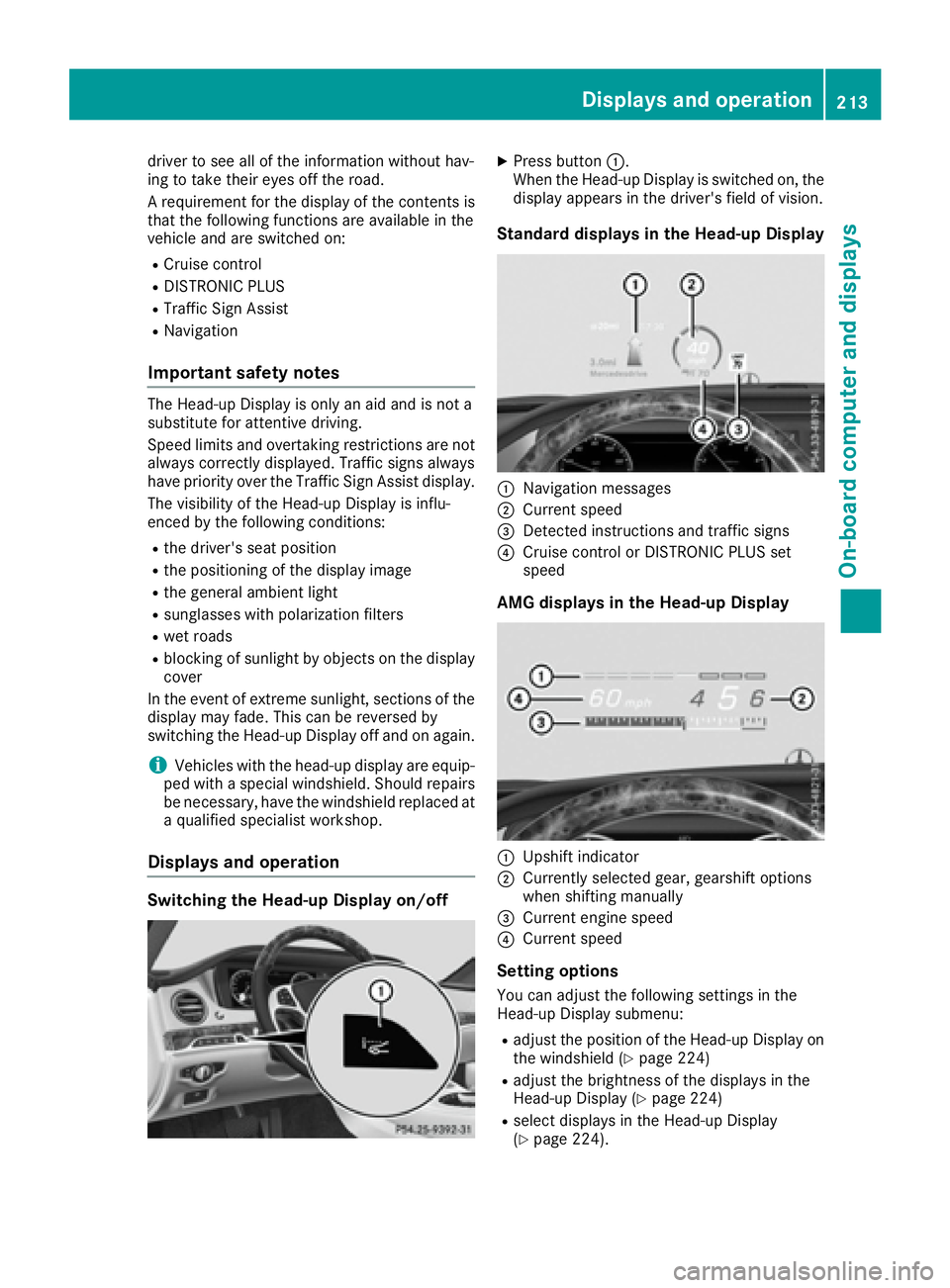
Switching the Head-up Display on/off X
Press button C .
When the Head-up Display is switched on, the
display appears in the driver's field of vision.
Standard displays in the Head-up Display
C
Navigation messages D
Current speed
Page 252 of 382
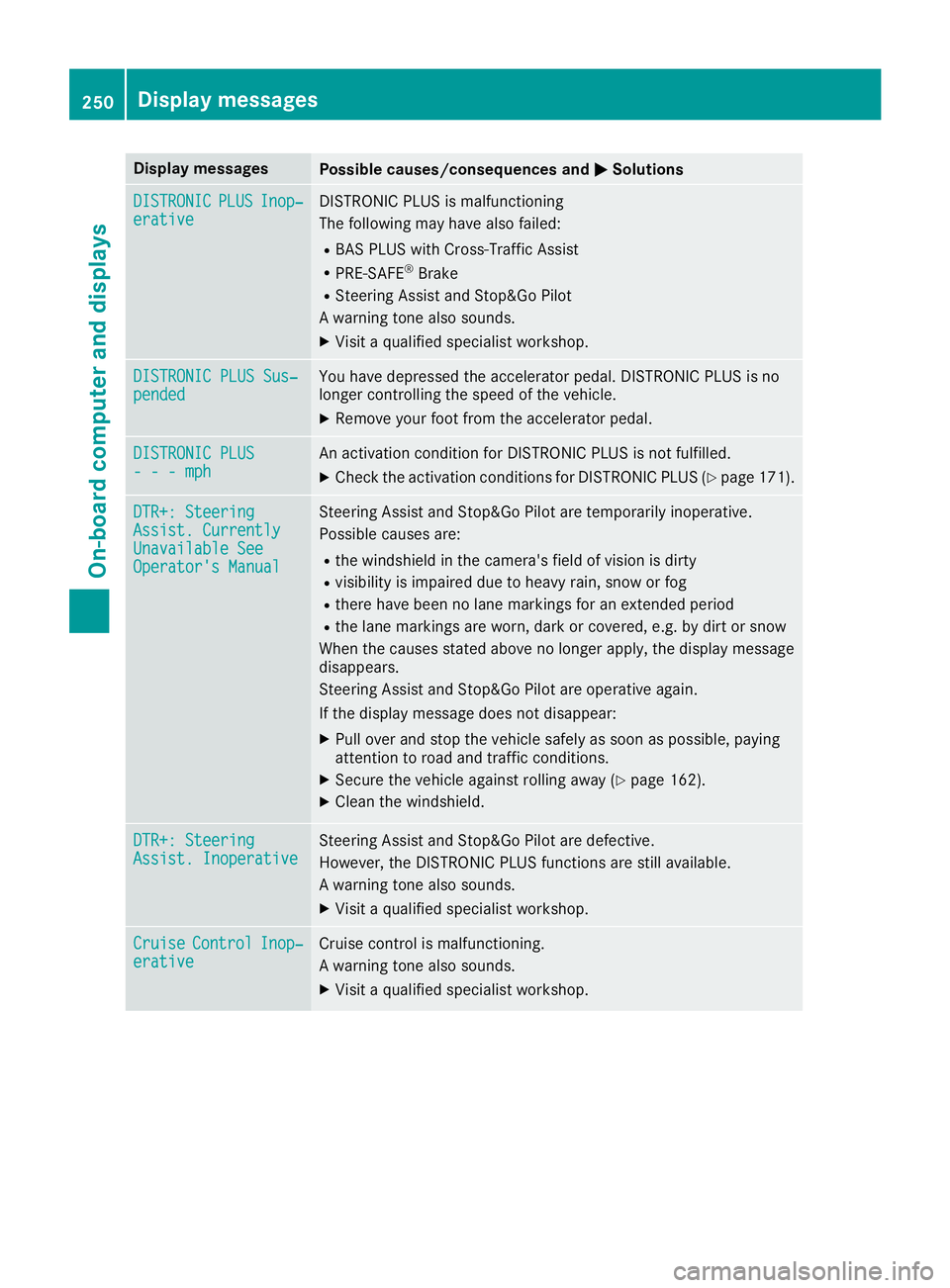
Display messages
Possible causes/consequences and P Solutions
DISTRONIC PLU S Inop‐
erativ e DISTRONI C PLU S is malfunctioning
The followin g may hav e also failed:R
BA S PLU S wit h Cross-Traffic Assis tR
PRE-SAF E ®
BrakeR
Steering Assis t and Stop&Go Pilo t
A warning tone also sounds. X
Visit a qualified specialist workshop .
DISTRONIC PLU S Sus ‐
pended You hav e depressed th e accelerato r pedal . DISTRONI C PLU S is no
longer controllin g th e speed of th e vehicle.X
Remove your foo t from th e accelerato r pedal .
DISTRONIC PLU S
- - - mph An activation condition for DISTRONI C PLU S is no t fulfilled .X
Chec k th e activation condition s for DISTRONI C PLU S ( Y
page 171).
DTR+: Steering
Assist . Currently
Unavailable See
Operator' s Manual Steering Assis t and Stop&Go Pilo t are temporarily inoperative.
Possibl e causes are: R
th e windshield in th e camera' s field of vision is dirtyR
visibilit y is impaire d due to heav y rain , snow or fogR
there hav e been no lan e marking s for an extended periodR
th e lan e marking s are worn, dark or covered, e.g. by dir t or snow
Whe n th e causes state d abov e no longer apply, th e display message
disappears.
Steering Assis t and Stop&Go Pilo t are operative again .
If th e display message does no t disappear :X
Pull ove r and stop th e vehicl e safely as soo n as possible, payin g
attention to roa d and traffic conditions.X
Secur e th e vehicl e against rollin g away ( Y
page 162).X
Clean th e windshield.
DTR+: Steering
Assist . Inoperative Steering Assis t and Stop&Go Pilo t are defective.
However, th e DISTRONI C PLU S function s are still available.
A warning tone also sounds. X
Visit a qualified specialist workshop .
Cruise Contro l Inop‐
erativ e Cruis e control is malfunctioning .
A warning tone also sounds. X
Visit a qualified specialist workshop .250
Display messages
On-board computer and displays
Page 253 of 382
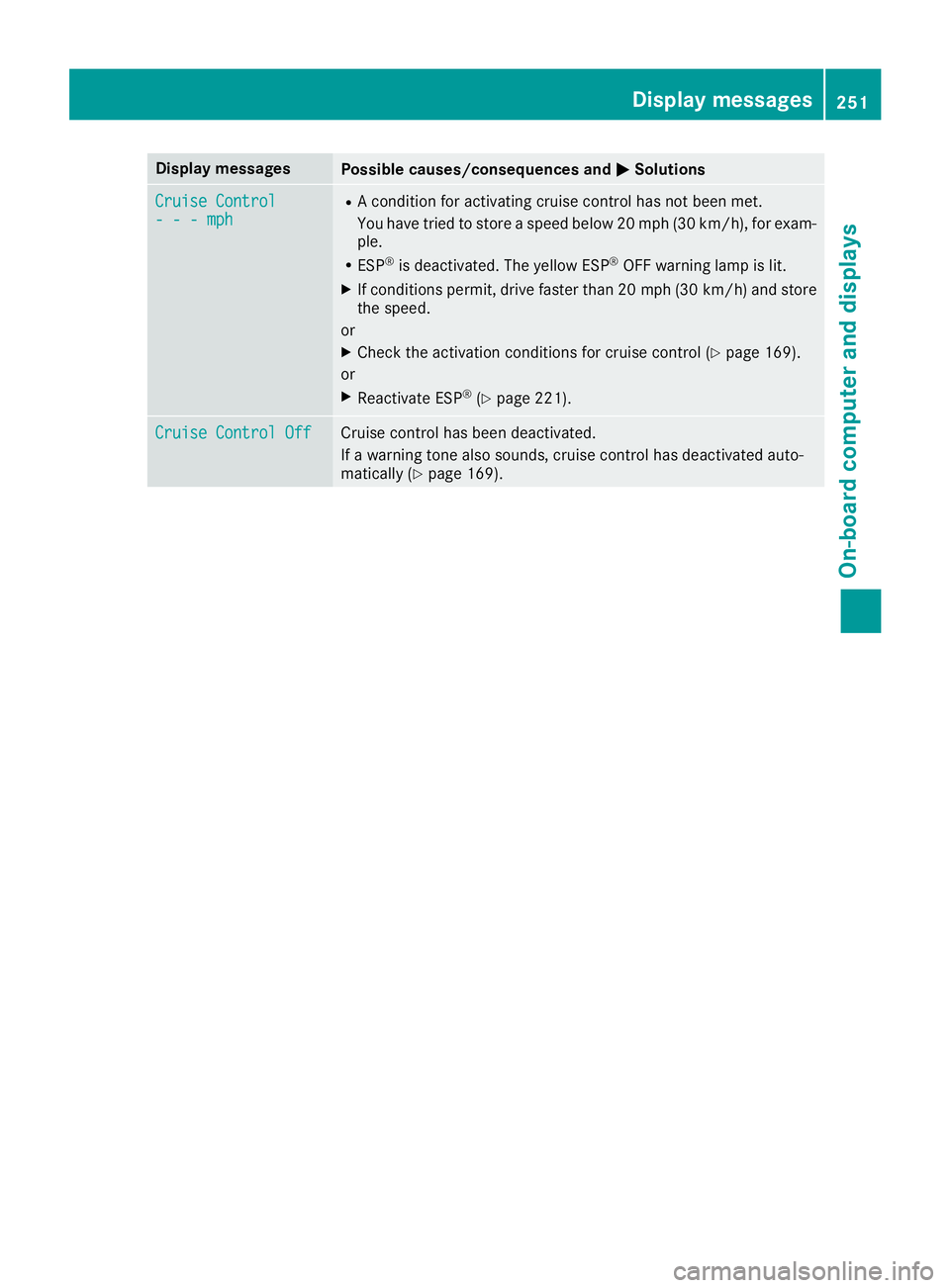
Display messages
Possible causes/consequences and P Solutions
Cruise Contro l
- - - mph R
A condition for activating cruise control has no t been met .
You hav e tried to store a speed belo w 20 mph (30 km/h), for exam-
ple. R
ES P ®
is deactivated. The yello w ES P ®
OF F warning lamp is lit .X
If condition s permit , drive faste r than 20 mph (30 km/h ) and store
th e speed.
or X
Chec k th e activation condition s for cruise control ( Y
page 169).
or X
Reactivat e ES P ®
( Y
page 221).
Cruise Contro l Off Cruis e control has been deactivated.
If a warning tone also sounds, cruise control has deactivated auto -
matically ( Y
page 169). Display messages 25 1
On-board computer and displays Z