keyless MERCEDES-BENZ S CLASS 2017 User Guide
[x] Cancel search | Manufacturer: MERCEDES-BENZ, Model Year: 2017, Model line: S CLASS, Model: MERCEDES-BENZ S CLASS 2017Pages: 382, PDF Size: 12.12 MB
Page 90 of 382
ful if you have your hands full. To do this, make
a kicking movement under the bumper with your
foot.
Observe the following points: R
Carry your KEYLESS-GO key about your per-
son. The KEYLESS-GO key must be in the rear
detection range of the vehicle. R
When making the kicking movement, make
sure that you are standing firmly on the
ground and that there is sufficient clearance
to the rear of the vehicle. You could otherwise
lose your balance, for example on ice.
R
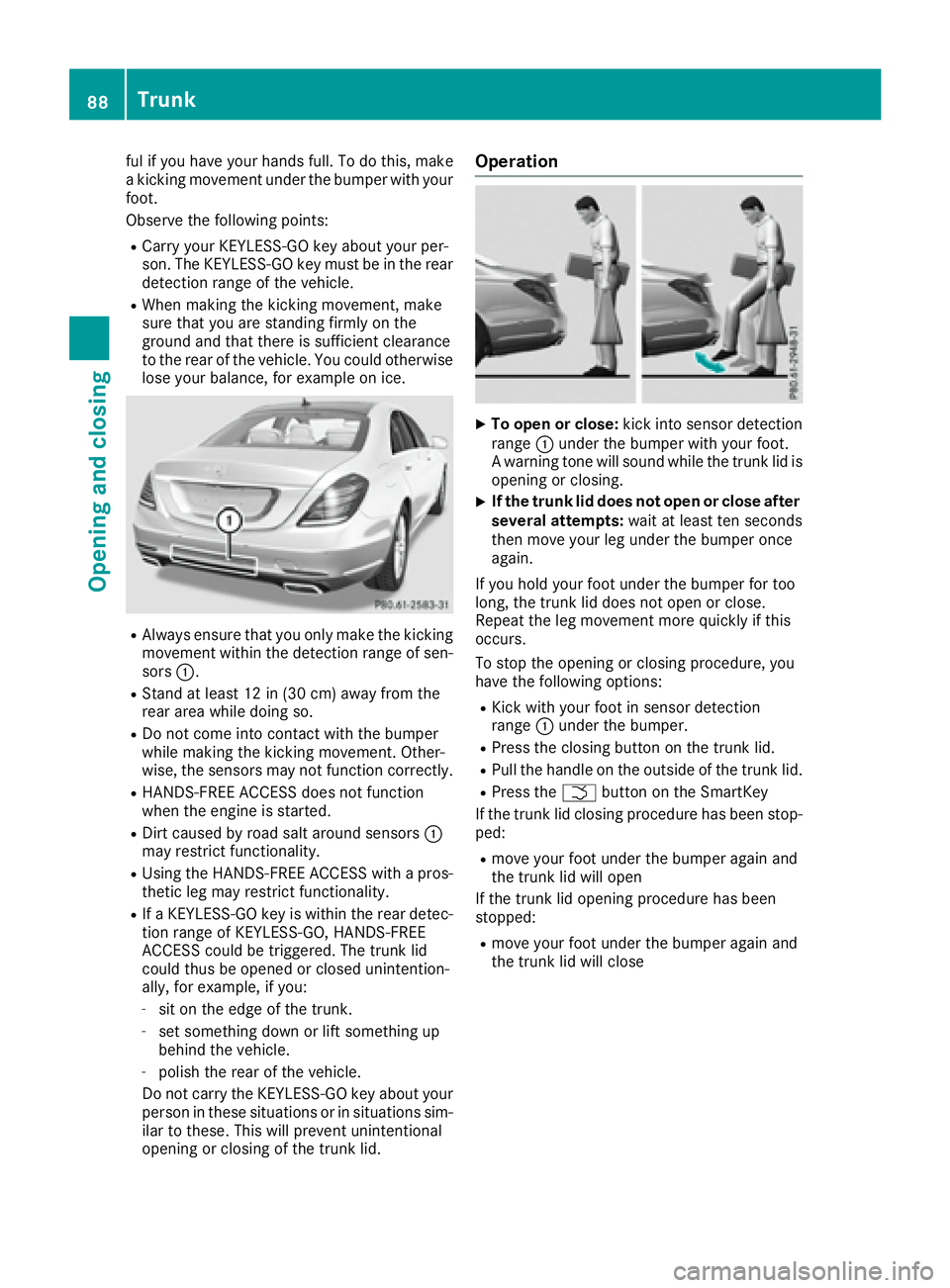
Always ensure that you only make the kicking
movement within the detection range of sen-
sors C .R
Stand at least 12 in (30 cm) away from the
rear area while doing so. R
Do not come into contact with the bumper
while making the kicking movement. Other-
wise, the sensors may not function correctly. R
HANDS-FREE ACCESS does not function
when the engine is started. R
Dirt caused by road salt around sensors C
may restrict functionality. R
Using the HANDS-FREE ACCESS with a pros-
thetic leg may restrict functionality. R
If a KEYLESS-GO key is within the rear detec-
tion range of KEYLESS-GO, HANDS-FREE
ACCESS could be triggered. The trunk lid
could thus be opened or closed unintention-
ally, for example, if you: -
sit on the edge of the trunk. -
set something down or lift something up
behind the vehicle. -
polish the rear of the vehicle.
Do not carry the KEYLESS-GO key about your
person in these situations or in situations sim-
ilar to these. This will prevent unintentional
opening or closing of the trunk lid. Operation X
To open or close: kick into sensor detection
range C under the bumper with your foot.
A warning tone will sound while the trunk lid is
opening or closing. X
If the trunk lid does not open or close after
several attempts: wait at least ten seconds
then move your leg under the bumper once
again.
If you hold your foot under the bumper for too
long, the trunk lid does not open or close.
Repeat the leg movement more quickly if this
occurs.
To stop the opening or closing procedure, you
have the following options: R
Kick with your foot in sensor detection
range C under the bumper. R
Press the closing button on the trunk lid. R
Pull the handle on the outside of the trunk lid. R
Press the T button on the SmartKey
If the trunk lid closing procedure has been stop-
ped: R
move your foot under the bumper again and
the trunk lid will open
If the trunk lid opening procedure has been
stopped: R
move your foot under the bumper again and
the trunk lid will close88
Trunk
Opening and closing
Page 94 of 382
Before opening or closing the side windows, a
check is carried out to see whether a valid
SmartKey is in the vehicle. The check is carried
out if you use the start/stop button instead of a
SmartKey in the ignition and you press or pull a
button while the engine is switched off. This is
carried out by means of a brief radio connection
between the vehicle and the SmartKey.
Information on opening and closing the roller
sunblinds on the rear side windows
( Y
page 293).
Convenience opening
General notes If the SmartKey is in close proximity to the vehi-
cle, the convenience opening function is availa-
ble.
You can ventilate the vehicle before you start
driving.
To do this, the SmartKey is used to carry out the
following functions simultaneously: R
unlock the vehicle R
open the side windows R
open the panorama roof with power tilt/slid-
ing panel and the roller sunblinds R
switch on the seat ventilation for the driver's
seat
The "convenience opening" feature is also avail-
able when the vehicle is unlocked.
Convenience opening X
Press and hold the 6 button until the side
windows and the panorama sunroof are in the
desired position.
If the roller sunblinds of the panorama roof
with power tilt/sliding panel are closed, the
roller sunblinds are opened first. X
Keep the 6 button pressed until the pan-
orama roof with power tilt/sliding panel is in
the desired position. X
To interrupt convenience opening: release
the 6 button. Convenience closing feature
Important safety notes
G WARNING
When the convenience closing feature is oper-
ating, parts of the body could become trapped
in the closing area of the side window and the
sliding sunroof. There is a risk of injury.
Observe the complete closing procedure
when the convenience closing feature is oper-
ating. Make sure that no body parts are in
close proximity during the closing procedure.
When you lock the vehicle, you can simultane-
ously: R
close the side windows R
close the panorama roof with power tilt/slid-
ing panel
On vehicles with a panorama roof with power
tilt/sliding panel, you can then close the roller
sunblinds.
i Notes on the automatic reversing feature
for: R
the side window ( Y
page 91)R
the panorama roof with power tilt/sliding
panel ( Y
page 95) R
the roller sunblinds ( Y
page 96)
Using the SmartKey X
Press and hold the 7 button until the side
windows and the panorama roof with power
tilt/sliding panel are fully closed. X
Make sure that all the side windows and the
panorama roof with power tilt/sliding panel
are closed. X
On vehicles with a panorama roof with
power tilt/sliding panel: press and hold the
7 button again until the roller sunblinds of
the panorama roof with power tilt/sliding
panel close. X
To interrupt convenience closing: release
the 7 button.
Using KEYLESS-GO
The SmartKey must be outside the vehicle. All
the doors must be closed.92
Side windows
Opening and closing
Page 134 of 382
Overview of climate control systems
General notes Observe the settings recommended on the fol-
lowing pages. The windows could otherwise fog
up.
To prevent the windows from fogging up: R
switch off climate control only briefly R
switch on air-recirculation mode only briefly R
switch on the cooling with air dehumidifica-
tion function R
switch on the defrost windshield function
briefly, if required
Climate control regulates the temperature and
air humidity in the vehicle interior. The air filter
cleans the air, thus improving the interior cli-
mate.
The "Cooling with air dehumidification" function
is available only when the engine is running.
Optimum climate control is only achieved with
the side windows and roof closed.
If you start the engine using your smartphone,
the last selected climate control setting is reac-
tivated ( Y
page 147).
The residual heat function can only be activated
or deactivated with the ignition switched off
( Y
page 140).
To enable the air conditioning, pollutant moni-
toring and air filtering systems to function cor-
rectly, an interior filter must be used at all times.
Ensure that the filter is properly installed and
that the filter housing in the engine compart-
ment is correctly and tightly sealed by the cover at all times during operation. Use filters that
have been recommended and approved by
Mercedes-Benz. Always have service work car-
ried out at a qualified specialist workshop.
The integrated filter filters out most particles of
dust and soot and completely filters out pollen.
It also reduces gaseous pollutants and odors. A
clogged filter reduces the amount of air supplied
to the vehicle interior. For this reason, you
should always observe the interval for replacing
the filter, which is specified in the Maintenance
Booklet. As it depends on environmental condi-
tions, e.g. heavy air pollution, the interval may
be shorter than stated in the Maintenance Book-
let.
i Ventilate the vehicle for a brief period during
warm weather, e.g. using the convenience
opening feature ( Y
page 92). This will speed
up the cooling process and the desired inte-
rior t emper ature will be reached more
quickly.
i It is possible that the blower may be activa-
ted automatically 60 minutes after the Smart-
Key has been removed depending on various
factors, e.g. the outside temperature. In vehi-
cles with the KEYLESS-GO or KEYLESS-GO
start function, the blower can switch on auto-
matically after the engine has been switched
off and the door opened. The vehicle is then
ventilated for 30 minutes to dry the automatic
climate control.
i Hybrid vehicles: observe the notes on cli-
mate control in the separate Operator's Man-
ual.132
Overview of climate control systems
Climate control
Page 147 of 382
There is a risk of fire and an accident. Release
the parking brake fully before driving off.
! Do not warm up the engine with the vehicle
stationary. Drive off immediately. Avoid high
engine speeds and driving at full throttle until
the engine has reached its operating temper-
ature.
Only shift the automatic transmission to the
desired drive position when the vehicle is sta-
tionary.
Where possible, avoid spinning the drive
wheels when pulling away on slippery roads.
You could otherwise damage the drive train.
! At low engine oil temperatures under 68 ‡
(+20 †), the maximum engine speed is limi-
ted in order to protect the engine. To protect
the engine and maintain smooth engine oper-
ation, avoid driving at full throttle when the
engine is cold.
Hybrid vehicles: make sure that you read the
separate operating instructions. Otherwise, you
may not recognize dangers.
SmartKey positions
SmartKey
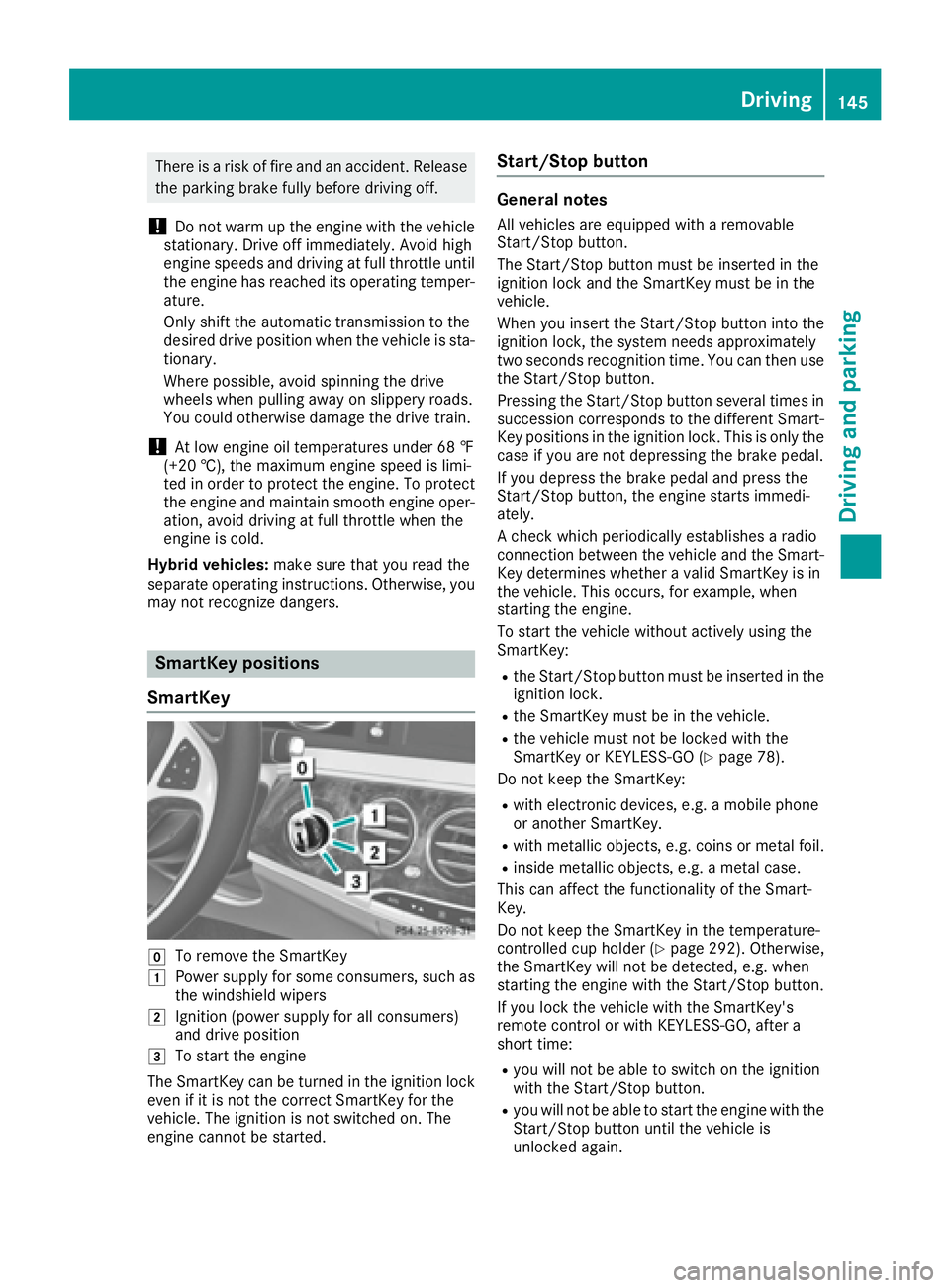
Z
To remove the SmartKey
G
Power supply for some consumers, such as
the windshield wipers
H
Ignition (power supply for all consumers)
and drive position
I
To start the engine
The SmartKey can be turned in the ignition lock
even if it is not the correct SmartKey for the
vehicle. The ignition is not switched on. The
engine cannot be started. Start/Stop button General notes All vehicles are equipped with a removable
Start/Stop button.
The Start/Stop button must be inserted in the
ignition lock and the SmartKey must be in the
vehicle.
When you insert the Start/Stop button into the
ignition lock, the system needs approximately
two seconds recognition time. You can then use
the Start/Stop button.
Pressing the Start/Stop button several times in
succession corresponds to the different Smart-
Key positions in the ignition lock. This is only the
case if you are not depressing the brake pedal.
If you depress the brake pedal and press the
Start/Stop button, the engine starts immedi-
ately.
A check which periodically establishes a radio
connection between the vehicle and the Smart-
Key determines whether a valid SmartKey is in
the vehicle. This occurs, for example, when
starting the engine.
To start the vehicle without actively using the
SmartKey: R
the Start/Stop button must be inserted in the
ignition lock. R
the SmartKey must be in the vehicle. R
the vehicle must not be locked with the
SmartKey or KEYLESS-GO ( Y
page 78).
Do not keep the SmartKey: R
with electronic devices, e.g. a mobile phone
or another SmartKey. R
with metallic objects, e.g. coins or metal foil. R
inside metallic objects, e.g. a metal case.
This can affect the functionality of the Smart-
Key.
Do not keep the SmartKey in the temperature-
controlled cup holder ( Y
page 292). Otherwise,
the SmartKey will not be detected, e.g. when
starting the engine with the Start/Stop button.
If you lock the vehicle with the SmartKey's
remote control or with KEYLESS-GO, after a
short time: R
you will not be able to switch on the ignition
with the Start/Stop button. R
you will not be able to start the engine with the
Start/Stop button until the vehicle is
unlocked again. Driving 145
Driving and parking Z
Page 317 of 382
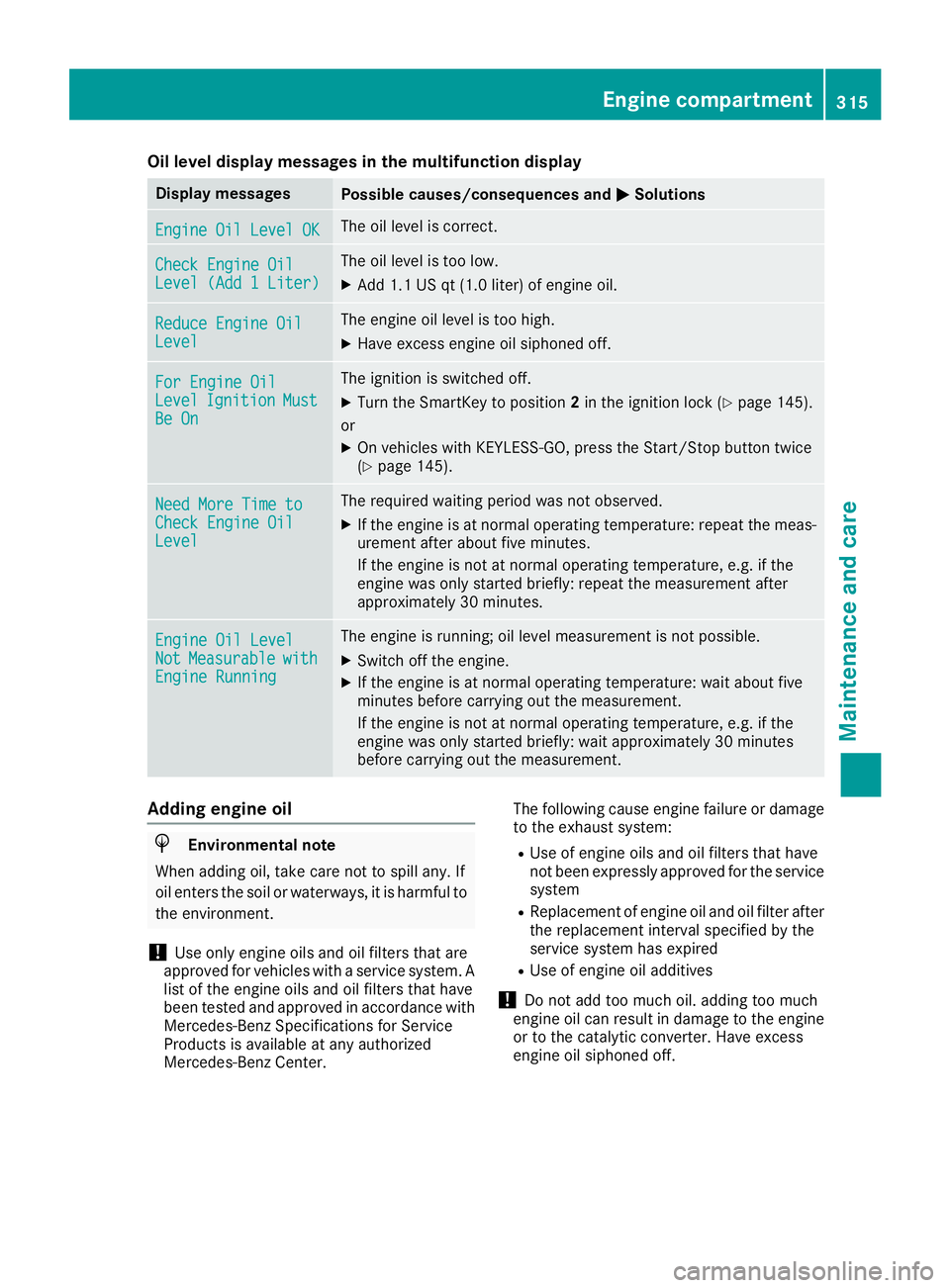
Oil level display messages in the multifunction display Display messages
Possible causes/consequences and P Solutions
Engine Oil Level OK The oil level is correct.
Check Engine Oil
Level (Add 1 Liter) The oil level is too low. X
Add 1.1 US qt (1.0 liter) of engine oil.
Reduce Engine Oil
Level The engine oil level is too high. X
Have excess engine oil siphoned off.
For Engine Oil
Level Ignition Must
Be On The ignition is switched off. X
Turn the SmartKey to position 2 in the ignition lock ( Y
page 145).
or X
On vehicles with KEYLESS-GO, press the Start/Stop button twice
( Y
page 145).
Need More Time to
Check Engine Oil
Level The required waiting period was not observed. X
If the engine is at normal operating temperature: repeat the meas-
urement after about five minutes.
If the engine is not at normal operating temperature, e.g. if the
engine was only started briefly: repeat the measurement after
approximately 30 minutes.
Engine Oil Level
Not Measurable with
Engine Running The engine is running; oil level measurement is not possible. X
Switch off the engine. X
If the engine is at normal operating temperature: wait about five
minutes before carrying out the measurement.
If the engine is not at normal operating temperature, e.g. if the
engine was only started briefly: wait approximately 30 minutes
before carrying out the measurement.
Adding engine oil
H Environmental note
When adding oil, take care not to spill any. If
oil enters the soil or waterways, it is harmful to
the environment.
! Use only engine oils and oil filters that are
approved for vehicles with a service system. A
list of the engine oils and oil filters that have
been tested and approved in accordance with
Mercedes-Benz Specifications for Service
Products is available at any authorized
Mercedes-Benz Center. The following cause engine failure or damage
to the exhaust system: R
Use of engine oils and oil filters that have
not been expressly approved for the service
system R
Replacement of engine oil and oil filter after
the replacement interval specified by the
service system has expired R
Use of engine oil additives
! Do not add too much oil. adding too much
engine oil can result in damage to the engine
or to the catalytic converter. Have excess
engine oil siphoned off.Engine compartment 315
Maintenance and care Z
Page 319 of 382
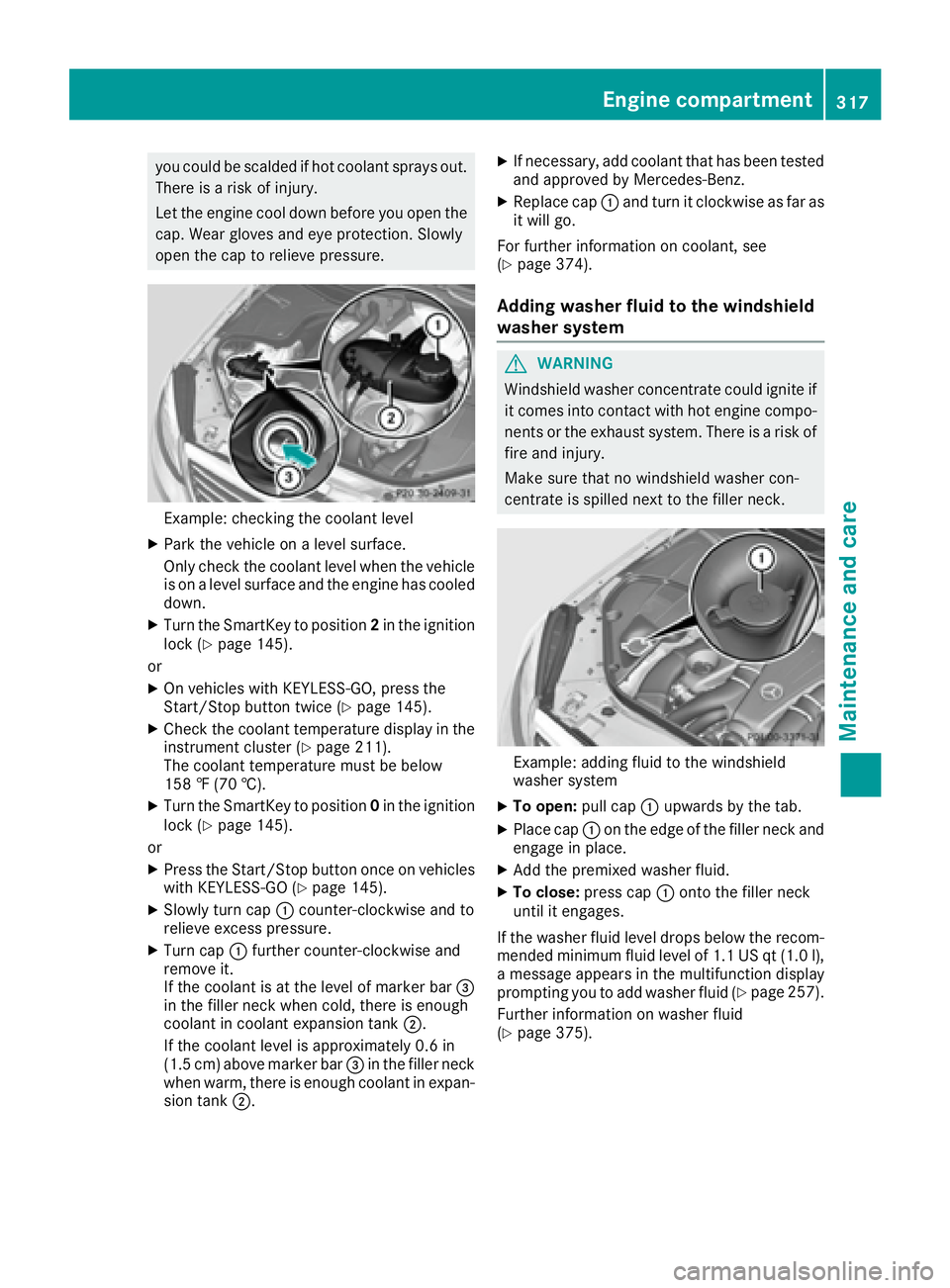
you could be scalded if hot coolan t sprays out .
There is a ris k of injury.
Let th e engin e cool down before you open th e
cap . Wear gloves and eye protection . Slowly
open th e cap to reliev e pressure.
Example: checking th e coolan t levelX
Par k th e vehicl e on a level surface.
Only chec k th e coolan t level when th e vehicl e
is on a level surfac e and th e engin e has cooled
down .X
Turn th e SmartKey to position 2 in th e ignition
loc k ( Y
page 145).
or X
On vehicles wit h KEYLESS-GO , press th e
Start/Sto p butto n twice ( Y
page 145).X
Chec k th e coolan t temperature display in th e
instrumen t cluste r ( Y
page 211).
The coolan t temperature mus t be belo w
15 8 ‡ (70 †).X
Turn th e SmartKey to position 0 in th e ignition
loc k ( Y
page 145).
or X
Press th e Start/Sto p butto n once on vehicles
wit h KEYLESS-GO ( Y
page 145).X
Slowly tur n cap C counter-clockwise and to
reliev e excess pressure.X
Turn cap C further counter-clockwise and
remove it .
If th e coolan t is at th e level of marke r bar
Page 321 of 382
replaced or changed more frequently. Under
arduous operating conditions, the tires must be
checked more often. Further information can be
obtained at a qualified specialist workshop, e.g.
an authorized Mercedes-Benz Center.
Driving abroad An extensive Mercedes-Benz Service network is
also available in other countries. You can obtain
further information from any authorized
Mercedes-Benz Center.
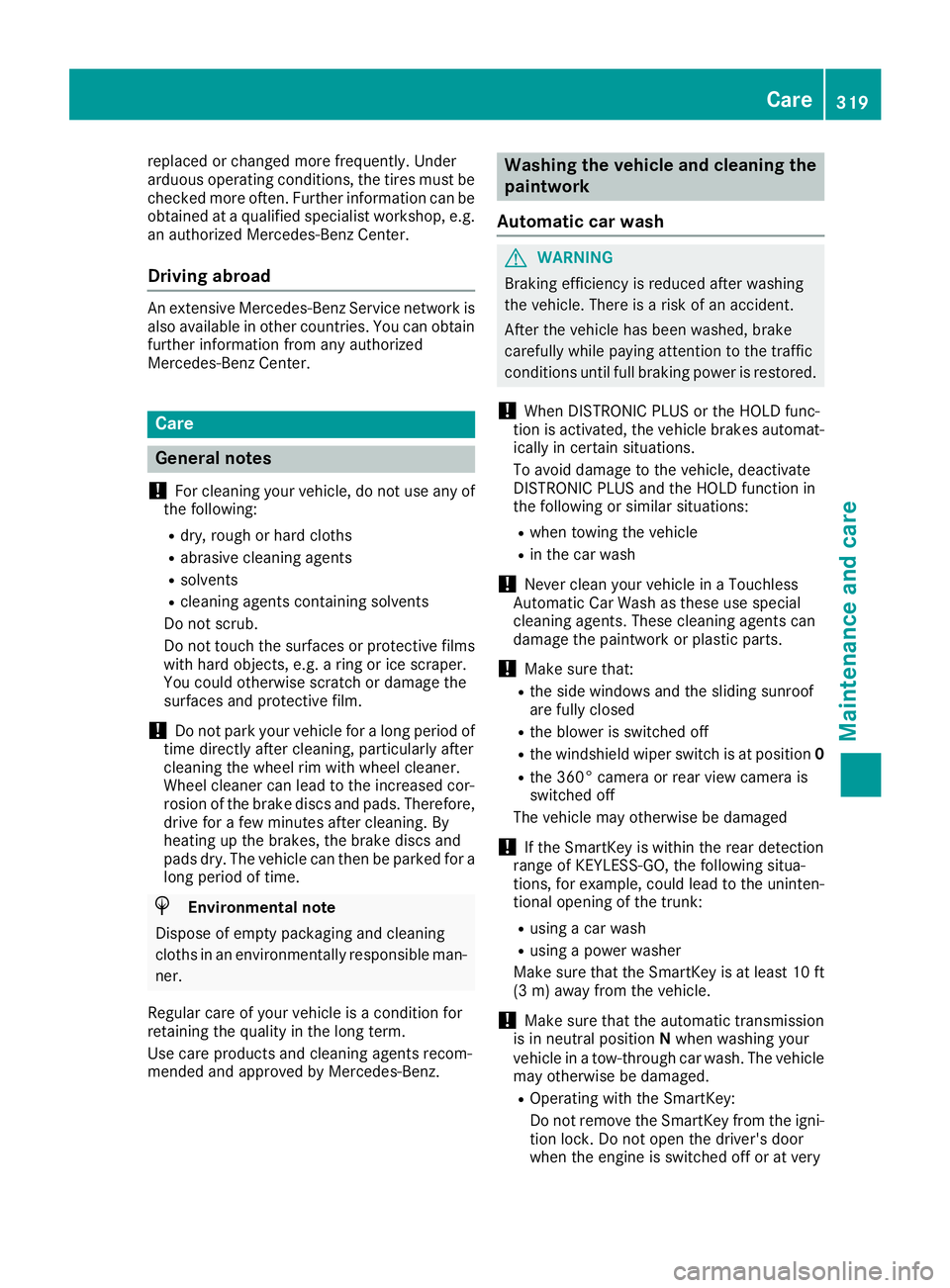
Care
General notes
! For cleaning your vehicle, do not use any of
the following: R
dry, rough or hard cloths R
abrasive cleaning agents R
solvents R
cleaning agents containing solvents
Do not scrub.
Do not touch the surfaces or protective films
with hard objects, e.g. a ring or ice scraper.
You could otherwise scratch or damage the
surfaces and protective film.
! Do not park your vehicle for a long period of
time directly after cleaning, particularly after
cleaning the wheel rim with wheel cleaner.
Wheel cleaner can lead to the increased cor-
rosion of the brake discs and pads. Therefore,
drive for a few minutes after cleaning. By
heating up the brakes, the brake discs and
pads dry. The vehicle can then be parked for a
long period of time.
H Environmental note
Dispose of empty packaging and cleaning
cloths in an environmentally responsible man-
ner.
Regular care of your vehicle is a condition for
retaining the quality in the long term.
Use care products and cleaning agents recom-
mended and approved by Mercedes-Benz. Washing the vehicle and cleaning the
paintwork
Automatic car wash
G WARNING
Braking efficiency is reduced after washing
the vehicle. There is a risk of an accident.
After the vehicle has been washed, brake
carefully while paying attention to the traffic
conditions until full braking power is restored.
! When DISTRONIC PLUS or the HOLD func-
tion is activated, the vehicle brakes automat-
ically in certain situations.
To avoid damage to the vehicle, deactivate
DISTRONIC PLUS and the HOLD function in
the following or similar situations: R
when towing the vehicle R
in the car wash
! Never clean your vehicle in a Touchless
Automatic Car Wash as these use special
cleaning agents. These cleaning agents can
damage the paintwork or plastic parts.
! Make sure that: R
the side windows and the sliding sunroof
are fully closed R
the blower is switched off R
the windshield wiper switch is at position 0R
the 360° camera or rear view camera is
switched off
The vehicle may otherwise be damaged
! If the SmartKey is within the rear detection
range of KEYLESS-GO, the following situa-
tions, for example, could lead to the uninten-
tional opening of the trunk: R
using a car wash R
using a power washer
Make sure that the SmartKey is at least 10 ft
(3 m) away from the vehicle.
! Make sure that the automatic transmission
is in neutral position N when washing your
vehicle in a tow-through car wash. The vehicle
may otherwise be damaged. R
Operating with the SmartKey:
Do not remove the SmartKey from the igni-
tion lock. Do not open the driver's door
when the engine is switched off or at very Care 319
Maintenance and care Z
Page 323 of 382
R
Battery R
Connectors R
Lamps R
Seals R
Trim R
Ventilation slots
Damaged seals or electrical components can
lead to leaks or failures.
! If the SmartKey is within the rear detection
range of KEYLESS-GO, the following situa-
tions, for example, could lead to the uninten-
tional opening of the trunk: R
using a car wash R
using a power washer
Make sure that the SmartKey is at least 10 ft
(3 m) away from the vehicle.
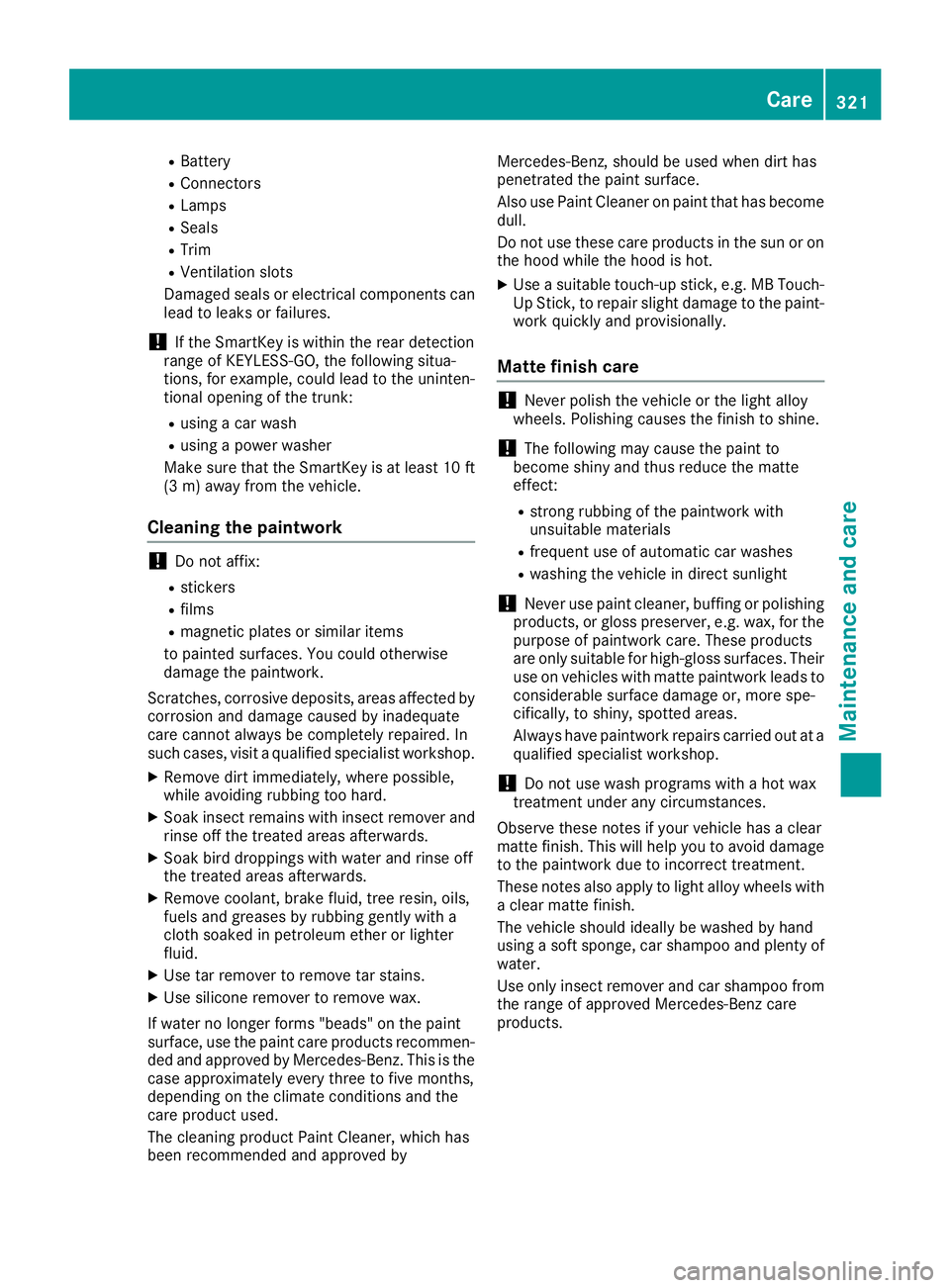
Cleaning the paintwork
! Do not affix: R
stickers R
films R
magnetic plates or similar items
to painted surfaces. You could otherwise
damage the paintwork.
Scratches, corrosive deposits, areas affected by
corrosion and damage caused by inadequate
care cannot always be completely repaired. In
such cases, visit a qualified specialist workshop. X
Remove dirt immediately, where possible,
while avoiding rubbing too hard. X
Soak insect remains with insect remover and
rinse off the treated areas afterwards. X
Soak bird droppings with water and rinse off
the treated areas afterwards. X
Remove coolant, brake fluid, tree resin, oils,
fuels and greases by rubbing gently with a
cloth soaked in petroleum ether or lighter
fluid. X
Use tar remover to remove tar stains. X
Use silicone remover to remove wax.
If water no longer forms "beads" on the paint
surface, use the paint care products recommen-
ded and approved by Mercedes-Benz. This is the
case approximately every three to five months,
depending on the climate conditions and the
care product used.
The cleaning product Paint Cleaner, which has
been recommended and approved by Mercedes-Benz, should be used when dirt has
penetrated the paint surface.
Also use Paint Cleaner on paint that has become
dull.
Do not use these care products in the sun or on
the hood while the hood is hot. X
Use a suitable touch-up stick, e.g. MB Touch-
Up Stick, to repair sl ight damage to the paint-
w ork quickly and provisionally.
Matte finish care
! Never polish the vehicle or the light alloy
wheels. Polishing causes the finish to shine.
! The following may cause the paint to
become shiny and thus reduce the matte
effect: R
strong rubbing of the paintwork with
unsuitable materials R
frequent use of automatic car washes R
washing the vehicle in direct sunlight
! Never use paint cleaner, buffing or polishing
products, or gloss preserver, e.g. wax, for the
purpose of paintwork care. These products
are only suitable for high-gloss surfaces. Their
use on vehicles with matte paintwork leads to
considerable surface damage or, more spe-
cifically, to shiny, spotted areas.
Always have paintwork repairs carried out at a
qualified specialist workshop.
! Do not use wash programs with a hot wax
treatment under any circumstances.
Observe these notes if your vehicle has a clear
matte finish. This will help you to avoid damage
to the paintwork due to incorrect treatment.
These notes also apply to light alloy wheels with
a clear matte finish.
The vehicle should ideally be washed by hand
using a soft sponge, car shampoo and plenty of
water.
Use only insect remover and car shampoo from
the range of approved Mercedes-Benz care
products. Care 321
Maintenance and care Z
Page 325 of 382
Cleaning the mirror turn signals
! Only use cleaning agents or cleaning cloths
that are suitable for plastic lenses. Unsuitable
cleaning agents or cleaning cloths could
scratch or damage the plastic lenses of the
mirror turn signals. X
Clean the plastic lenses of the mirror turn sig-
nals in the exterior mirror housing using a wet
sponge and mild cleaning agent, e.g.
Mercedes-Benz car shampoo or cleaning
cloths.
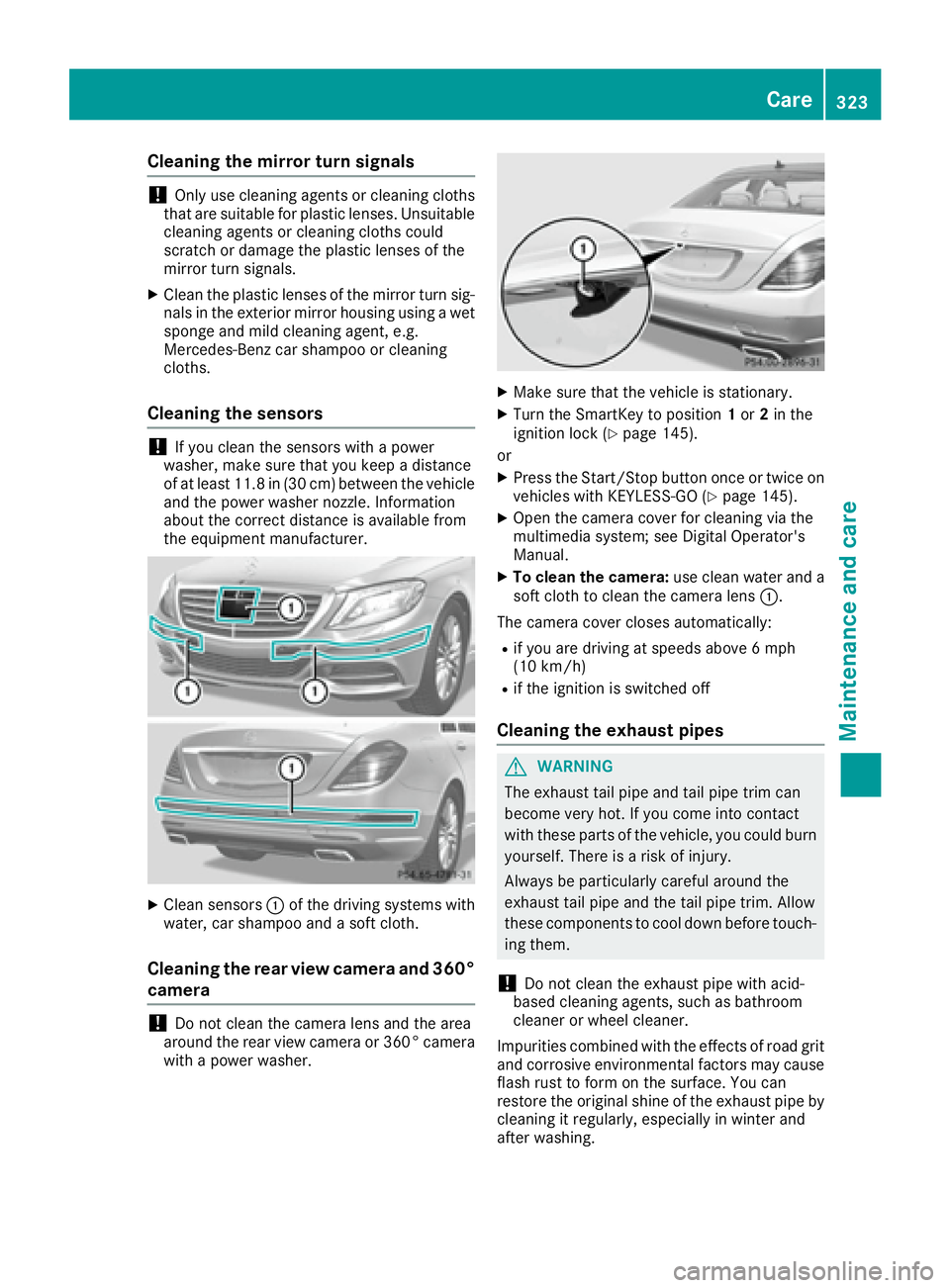
Cleaning the sensors
! If you clean the sensors with a power
washer, make sure that you keep a distance
of at least 11.8 in (30 cm ) betwee n the vehicl e
and the power washer nozzle. Information
about the correct distance is available from
the equipment manufacturer.
X
Clean sensors C of the driving systems with
water, car shampoo and a soft cloth.
Cleaning the rear view camera and 360°
camera
! Do not clean the camera lens and the area
around the rear view camera or 360° camera
with a power washer. X
Make sure that the vehicle is stationary. X
Turn the SmartKey to position 1 or 2 in the
ignition lock ( Y
page 145).
or X
Press the Start/Stop button once or twice on
vehicles with KEYLESS-GO ( Y
page 145).X
Open the camera cover for cleaning via the
multimedia system; see Digital Operator's
Manual. X
To clean the camera: use clean water and a
soft cloth to clean the camera lens C .
The camera cover closes automatically: R
if you are driving at speeds above 6 mph
(10 km/ h) R
if the ignition is switched off
Cleaning the exhaust pipes
G WARNING
The exhaust tail pipe and tail pipe trim can
become very hot. If you come into contact
with these parts of the vehicle, you could burn
yourself. There is a risk of injury.
Always be particularly careful around the
exhaust tail pipe and the tail pipe trim. Allow
these components to cool down before touch-
ing them.
! Do not clean the exhaust pipe with acid-
based cleaning agents, such as bathroom
cleaner or wheel cleaner.
Impurities combined with the effects of road grit
and corrosive environmental factors may cause
flash rust to form on the surface. You can
restore the original shine of the exhaust pipe by
cleaning it regularly, especially in winter and
after washing. Care 323
Maintenance and care Z