wheel MERCEDES-BENZ S CLASS 2017 User Guide
[x] Cancel search | Manufacturer: MERCEDES-BENZ, Model Year: 2017, Model line: S CLASS, Model: MERCEDES-BENZ S CLASS 2017Pages: 382, PDF Size: 12.12 MB
Page 24 of 382
Traction (definition) ....................... 362
Tread wear .................................... .3 56
Uniform Tire Quality Grading
Standards ...................................... 356
Uniform Tire Quality Grading
Standards (definition) .................... 360
Wear indicator (definition) ............. 362
Wheel and tire combination ........... 367
Wheel rim (definition) .................... 361
see Flat tire
Top Tether ............................................ 62
Touchpad
Changing the station/music
track .............................................. 272
Character suggestions ................... 271
Deleting characters ....................... 272
Entering a space ............................ 272
Entering characters ....................... 271
Gesture control .............................. 271
Handwriting recognition ................ 272
Operating the touchpad ................. 271
Overview ........................................ 271
Quick access for Audio .................. 272
Quick access for telephone ........... 272
Switching ....................................... 271
Switching input line ....................... 272
Tow-starting
Emergency engine starting ............ 340
Important safety notes .................. 338
Towing a trailer
ESP ®
(Electronic Stability Pro-
gram) ............................................... 72
Towing away
Important safety guidelines ........... 338
Installing the towing eye ................ 339
Notes for 4MATIC vehicles ............ 340
Removing the towing eye .............. .3 39
Transporting the vehicle ................ 340
With both axles on the ground ....... 339
Towing eye ......................................... 327
Traffic reports
see also Digital Operator's Man-
ual ................................................. .2 69
Traffic Sign Assist
Activating ....................................... 200
Display message ............................ 249
Function/notes ............................ .1 99
Important safety notes .................. 200 Instrument cluster display ............. 200
Sw i
tching on/off ........................... 222
Transfer case ..................................... 159
Transmission
see Automatic transmission
Transporting the vehicle .................. 340
Trim pieces (cleaning instruc-
tions) ................................................. .3 25
Trip computer (on-board com-
puter) ................................................. .2 15
Trip odometer
Calling up ....................................... 214
Resetting (on-board computer) ...... 215
Trunk
Emergency release .......................... 90
Emergency release button .............. .9 0
Important safety notes .................... 85
Locking separately ........................... 89
Opening/closing (automatically
from inside) ...................................... 89
Opening/closing (automatically
from outside) ................................... 86
Opening/closing (from outside,
HANDS-FREE ACCESS) .................... 87
Opening/closing (manually from
outside) ............................................ 86
Power closing .................................. 84
Trunk lid
Display message ............................ 255
Obstacle recognition ........................ 85
Opening dimensions ...................... 376
Opening/closing .............................. 85
Trunk load (maximum) ...................... 376
Turn signals
Display message ............................ 241
Switching on/off ........................... 125
Two-way radio
Frequencies ................................... 369
Installation ..................................... 369
Transmission output (maximum) .... 369
Windshield (infrared reflective) ...... 311
Type identification plate
see Vehicle identification plate
U
Unlocking
Emergency unlocking ....................... 8422
Index
Page 25 of 382
From inside the vehicle (central
unlocking button) ............................. 83
Upshift indicator (on-board com-
puter, Mercedes-AMG vehicles) ....... 226
USB devices
Connecting to the Media Inter-
face ............................................... 279
V Vanity mirror (in the sun visor) ........ 292
Vehicle
Correct use ...................................... 30
Data acquisition ............................... 31
Display message ............................ 254
Equipment ....................................... 27
Individual settings .......................... 221
Limited Warranty ............................. 31
Loading .......................................... 353
Locking (in an emergency) ............... 84
Locking (SmartKey) .......................... 77
Lowering ........................................ 367
Maintenance .................................... 28
Operating safety .............................. 29
Parking .......................................... 162
Parking for a long period ................ 164
Pulling away ................................... 148
Raising ........................................... 364
Reporting problems ......................... 30
Securing from rolling away ............ 363
Towing away .................................. 338
Transporting .................................. 340
Unlocking (in an emergency) ........... 84
Unlocking (SmartKey) ...................... 77
Vehicle data ................................... 376
Vehicle dimensions ........................... 376
Vehicle emergency locking ................ 84
Vehicle identification number
see VIN
Vehicle identification plate .............. 370
Vehicle level
Active Body Control ABC ............... 180
AIRMATIC ...................................... 182
Display message ............................ 245
Vehicle tool kit .................................. 327
Video
Operating the DVD ......................... 219 see also Digital Operator's Man-
ual .................................................. 269
Video-AUX
Connecting an external video
source ............................................ 279
VIN
Type plate ...................................... 370
W Warning and indicator lamps
ABS ................................................ 261
Brakes ........................................... 260
Check Engine ................................. 264
Coolant .......................................... 264
Distance warning ........................... 266
ESP ®
.............................................. 261
ESP ®
OFF ....................................... 263
Fuel tank ........................................ 264
General notes ................................ 258
Overview .......................................... 35
Parking brake ................................ 263
PASSENGER AIR BAG ...................... 43
Reserve fuel ................................... 264
Restraint system ............................ 263
Seat belt ........................................ 259
Steering ......................................... 268
Tire pressure monitor .................... 267
Warranty .............................................. 27
Washer fluid
Display message ............................ 257
Weather display (COMAND)
see also Digital Operator's Man-
ual .................................................. 269
Wheel and tire combinations
Tires ............................................... 367
Wheel bolt tightening torque ........... 367
Wheel chock ...................................... 363
Wheels
Changing a wheel .......................... 362
Checking ........................................ 343
Cleaning ......................................... 322
Important safety notes .................. 343
Information on driving .................... 343
Interchanging/changing ................ 362
Mounting a new wheel ................... 366
Mounting a wheel .......................... 363
Removing a wheel .......................... 366 Index 23
Page 26 of 382
Snow chains .................................. 345
Storing ........................................... 363
Tightening torque ........................... 367
Wheel size/tire size ....................... 367
Window curtain air bag
Display message ............................ 238
Operation ......................................... 50
Windows
see Side windows
Windshield
Defrosting ...................................... 139
Infrared reflective .......................... 311
Windshield washer fluid
see Windshield washer system
Windshield washer system
Adding washer fluid ....................... 317
Important safety notes .................. 375
Notes ............................................. 375
Windshield wipers
Problem (malfunction) ................... 131
Replacing the wiper blades ............ 129
Switching on/off ........................... 128
Winter driving
Important safety notes .................. 345
Slippery road surfaces ................... 168
Snow chains .................................. 345
Winter operation
Radiator cover ............................... 313
Summer tires ................................. 345
Winter tires
M+S tires ....................................... 345
Wiper blades
Cleaning ......................................... 322
Important safety notes .................. 129
Replacing ....................................... 129
Wooden trim (cleaning instruc-
tions) .................................................. 325
Workshop
see Qualified specialist workshop24
Index
Page 29 of 382
systems, e.g. the brake system. Use only genu-
ine Mercedes-Benz parts or parts of equal qual-
ity. Only use tires, wheels and accessories that
have been specifically approved for your vehi-
cle.
Genuine Mercedes-Benz parts are subject to
strict quality control. Every part has been spe-
cifically developed, manufactured or selected
for and adapted to Mercedes-Benz vehicles.
Therefore, only genuine Mercedes-Benz parts
should be used.
More than 300,000 different genuine
Mercedes-Benz parts are available for
Mercedes-Benz models.
All authorized Mercedes-Benz Centers maintain
a supply of genuine Mercedes-Benz parts for
necessary service and repair work. In addition,
strategically located parts delivery centers pro-
vide quick and reliable parts service.
Always specify the vehicle identification number
(VIN) when ordering genuine Mercedes-Benz
parts ( Y
page 370).
Operator's Manual
Vehicle equipment
i This Operator's Manual describes all models
and all standard and optional equipment of
your vehicle available at the time of publica-
tion of the Operator's Manual. Country-spe-
cific differences are possible. Bear in mind
that your vehicle may not feature all functions
described here. This also applies to safety-
relevant systems and functions. The equip-
ment in your vehicle may therefore differ from
that shown in the descriptions and illustra-
tions.
The original purchase agreement lists all sys-
tems installed in your vehicle.
Should you have any questions concerning
equipment and operation, please consult an
authorized Mercedes-Benz Center.
The Operator's Manual and Maintenance Book-
let are important documents and should be kept
in the vehicle. Service and vehicle operation
Warranty The Limited Warranty for your vehicle applies in
accordance with the warranty terms and condi-
tions in the Service and Warranty Information
booklet.
Your authorized Mercedes-Benz Center will
replace and repair all factory-installed parts in
accordance with the following warranty terms
and conditions: R
New Vehicle Limited Warranty R
Emission System Warranty R
Emission Performance Warranty R
California, Connecticut, Maine, Massachu-
setts, New York, Pennsylvania, Rhode Island
and Vermont Emission Control System War-
ranty R
State warranty enforcement laws (lemon
laws)
Replacement parts and accessories are covered
by the Mercedes-Benz Parts and Accessories
warranties. These are available at any author-
ized Mercedes-Benz Center.
i Should you lose your Service and Warranty
Information booklet, have an authorized
Mercedes-Benz Center arrange for a replace-
ment. The new Service and Warranty Infor-
mation booklet will be posted to you.
Information for customers in Califor-
nia Under California law you may be entitled to a
replacement of your vehicle or a refund of the
purchase price or lease price, if after a reason-
able number of repair attempts Mercedes-Benz
USA, LLC and/or its authorized repair or service
facilities fail to fix one or more substantial
defects or malfunctions in the vehicle that are
covered by its express warranty.
During the period of 18 months from original
delivery of the vehicle or the accumulation of
18,000 miles (approximately 29,000 km) on the
odometer of the vehicle, whichever occurs first,
a reasonable number of repair attempts is pre-
sumed for a retail buyer or lessee if one or more
of the following occurs:
(1) the same substantial defect or malfunction
results in a condition that is likely to causeService and vehicle operation 27
Introduction Z
Page 31 of 382
Operating safety
Important safety notes
G WARNING
If you do not have the prescribed service/
maintenance work or any required repairs
carried out, this can result in malfunctions or
system failures. There is a risk of an accident.
Always have the prescribed service/mainte-
nance work as well as any required repairs
carried out at a qualified specialist workshop.
G WARNING
Flammable material such as leaves, grass or
twigs may ignite if they come into contact with
hot parts of the exhaust system. There is a risk
of fire.
When driving off road or on unpaved roads,
check the vehicle's underside regularly. In
particular, remove parts of plants or other
flammable materials which have become
trapped. In the case of damage, contact a
qualified specialist workshop.
G WARNING
Modifications to electronic components, their
software as well as wiring can impair their
function and/or the function of other net-
worked components. In particular, systems
relevant to safety could also be affected. As a
result, these may no longer function as inten-
ded and/or jeopardize the operating safety of
the vehicle. There is an increased risk of an
accident and injury.
Never tamper with the wiring as well as elec-
tronic components or their software. You
should have all work to electrical and elec-
tronic equipment carried out at a qualified
specialist workshop. ! There is a risk of damage to the vehicle if: R
the vehicle becomes stuck, e.g. on a high
curb or an unpaved road R
you drive too fast over an obstacle, e.g. a
curb, speed bumps or a pothole in the road R
a heavy object strikes the underbody or
parts of the chassis
In situations like this, the body, the under-
body, chassis parts, wheels or tires could be
damaged without the damage being visible.
Components damaged in this way can unex-
pectedly fail or, in the case of an accident, no
longer withstand the strain they are designed
to.
If the underbody paneling is damaged, com-
bustible materials such as leaves, grass or
twigs can gather between the underbody and
the underbody paneling. If these materials
come in contact with hot parts of the exhaust
system, they can catch fire.
In such situations, have the vehicle checked
and repaired immediately at a qualified spe-
cialist workshop. If on continuing your jour-
ney you notice that driving safety is impaired,
pull over and stop the vehicle immediately,
paying attention to road and traffic condi-
tions. In such cases, consult a qualified spe-
cialist workshop.
Declaration of conformity for wireless
vehicle components USA: "The wireless devices of this vehicle com-
ply with Part 15 of the FCC Rules. Operation is
subject to the two following two conditions: 1)
These devices may not cause harmful interfer-
ence, and 2) These devices must accept any
interference received, including interference
that may cause undesired operation. Changes
or modifications not expressly approved by the
party responsible for compliance could void the
user’s authority to operate the equipment."
Canada: "The wireless devices of this vehicle
comply with Industry Canada license-exempt
RSS standard(s). Operation is subject to the fol-
lowing two conditions: (1) These devices may
not cause interference, and (2) These devices
must accept any interference, including inter-
ference that may cause undesired operation of
the device."Operating safety 29
Introduction Z
Page 33 of 382
The following text is reproduced as required of
all manufacturers under Title 49, Code of U.S.
Federal Regulations, Part 575 pursuant to the
National Traffic and Motor Vehicle Safety Act of
1966.
If you believe that your vehicle has a defect
which could cause a crash or could cause injury
or death, you should immediately inform the
National Highway Traffic Safety Administration
(NHTSA) in addition to notifying Mercedes-Benz
USA, LLC.
If NHTSA receives similar complaints, it may
open an investigation, and if it finds that a safety
defect exists in a group of vehicles, it may order
a recall and remedy campaign. However, NHTSA
cannot become involved in individual problems
between you, your dealer, or Mercedes-Benz
USA, LLC.
To contact NHTSA, you may call the Vehicle
Safety Hotline toll-free at 1-888-327-4236
(TTY: 1-800-424-9153 ); go to http://
www.safercar.gov ; or write to: Administrator,
NHTSA, 400 Seventh Street, SW., Washington,
DC 20590.
You can also obtain other information about
motor vehicle safety from
http://www.safercar.gov
Limited Warranty
! Follow the instructions in this manual about
the proper operation of your vehicle as well as
about possible vehicle damage. Damage to
your vehicle that arises from culpable contra-
ventions against these instructions is not cov-
ered either by the Mercedes-Benz Limited
Warranty or by the New or Used-Vehicle War-
ranty.
QR codes for the rescue card
The QR codes are secured in the fuel filler flap
and on the opposite side on the B-pillar. In the
event of an accident, rescue services can use
the QR code to quickly find the appropriate res-
cue card for your vehicle. The current rescue
card contains the most important information
about your vehicle in a compact form, e.g. the
routing of the electric cables.
You can find more information under
www.mercedes-benz.de/qr-code. Data stored in the vehicle
Data storage A wide range of electronic components in your
vehicle contain data memories.
These data memories temporarily or perma-
nently store technical information about: R
the vehicle's operating state R
incidents R
malfunctions
In general, this technical information docu-
ments the state of a component, a module, a
system or the surroundings.
These include, for example: R
operating conditions of system components,
e.g. fluid levels R
the vehicle's status messages and those of its
individual components, e.g. number of wheel
revolutions/speed, deceleration in move-
ment, lateral acceleration, accelerator pedal
position R
malfunctions and defects in important system
components, e.g. lights, brakes R
vehicle reactions and operating conditions in
special driving situations, e.g. air bag deploy-
ment, intervention of stability control sys-
tems R
ambient conditions, e.g. outside temperature
This data is of an exclusively technical nature
and can be used to: R
assist in recognizing and rectifying malfunc-
tions and defects R
analyze vehicle functions, e.g. after an acci-
dent R
optimize vehicle functions
The data cannot be used to trace the vehicle's
movements.
When your vehicle is serviced, technical infor-
mation can be read from the event data memory
and malfunction data memory.
Services include, for example: R
repair services R
service processes R
warranties R
quality assurance
The vehicle is read out by employees of the ser-
vice network (including the manufacturer) using
special diagnostic testers. More detailed infor-
mation is obtained from it, if required.Data stored in the vehicle 31
Introduction Z
Page 36 of 382
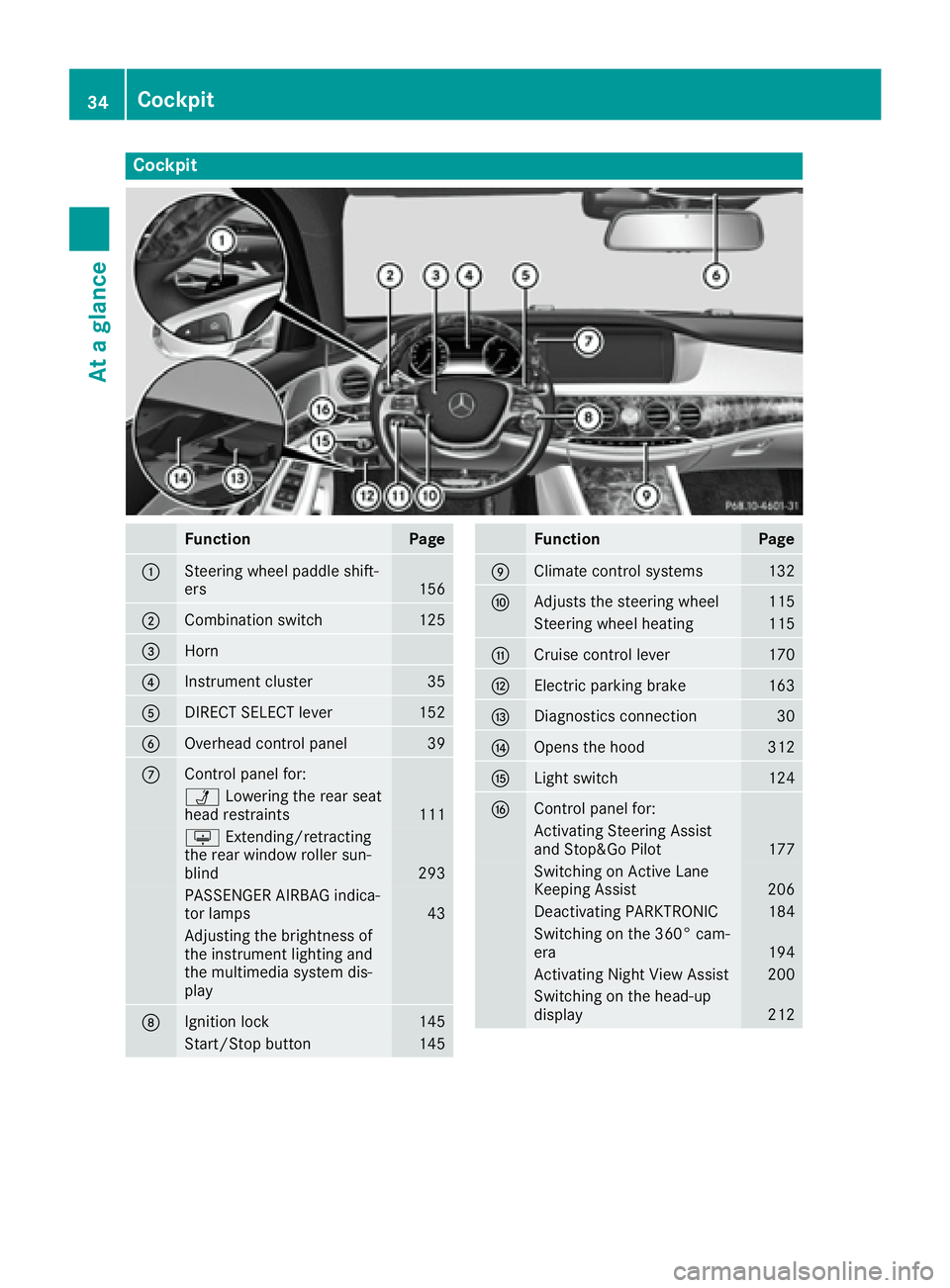
Cockpit
Function Page
C
Steering wheel paddle shift-
ers 156
D
Combination switch 125
Page 38 of 382
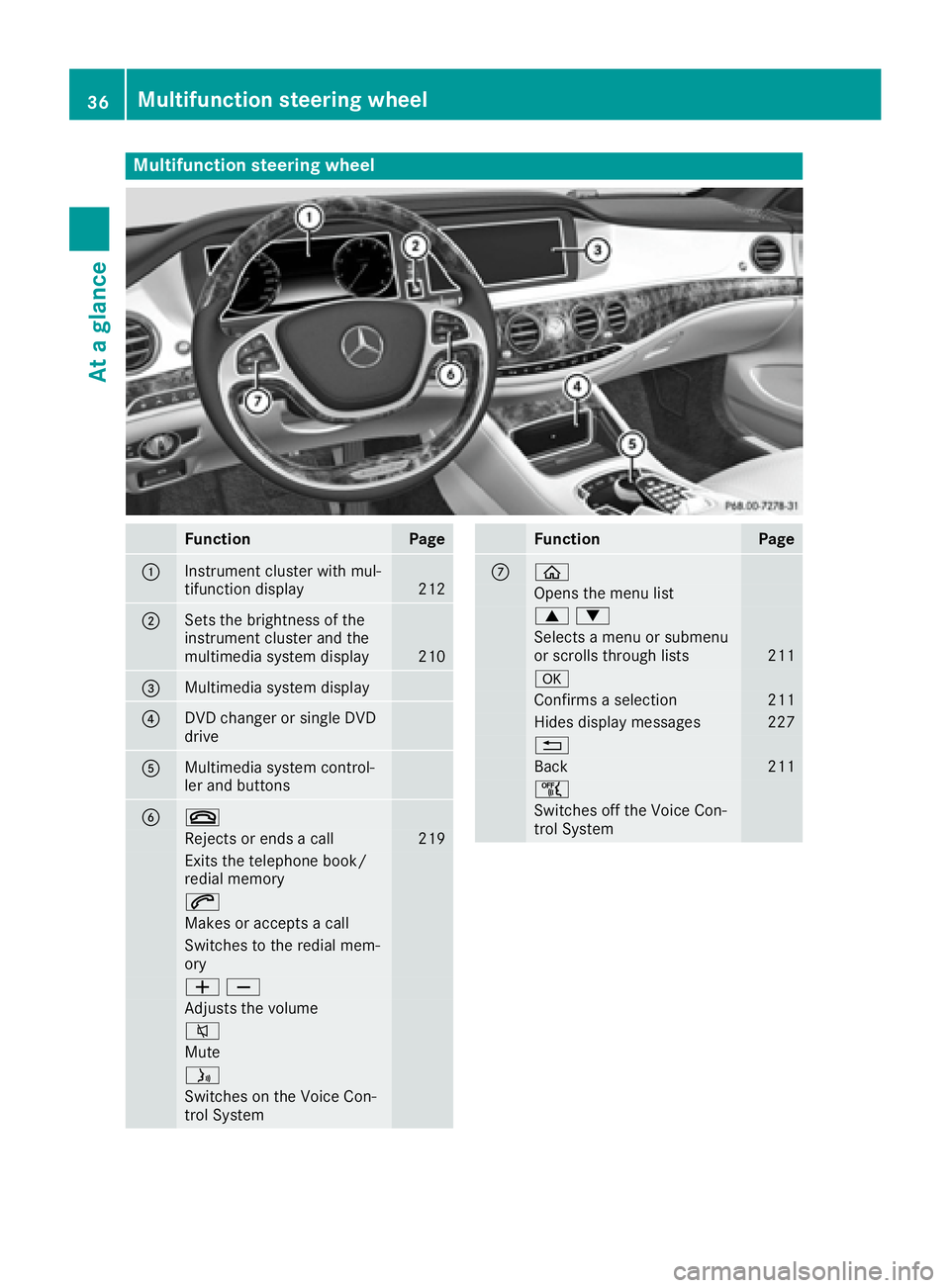
Multifunction steering wheel
Function Page
C
Instrument cluster with mul-
tifunction display 212
D
Sets the brightness of the
instrument cluster and the
multimedia system display 210
Page 39 of 382
i Additional information can be found: R
on the multimedia system in the Digital
Operator's Manual R
on the DVD changer or single DVD drive in
the Digital Operator's Manual R
on the Voice Control System in the sepa-
rate operating instructions
Multifunction steering wheel 37
At a glance
Page 44 of 382

Panic alarm X
To arm: press 3 button C for approx-
imately one second.
A visual and audible alarm is triggered if the
alarm system is armed. X
To disarm: press 3 button C again.
or X
Insert the SmartKey into the ignition lock.
or X
Press the Start/Stop button.
The SmartKey must be in the vehicle.
Occupant safety
Introduction to the restraint system The restraint system can reduce the risk of vehi-
cle occupants coming into contact with parts of
the vehicle's interior in the event of an accident.
The restraint system can also reduce the forces
to which vehicle occupants are subjected during
an accident.
The restraint system comprises: R
seat belt system R
air bags R
child restraint system R
child seat securing systems
The components of the restraint system work in
conjunction with each other. They can only
deploy their protective function if, at all times, all
vehicle occupants: R
have fastened their seat belts correctly
( Y
page 45)R
have adjusted their seat and head restraint
properly ( Y
page 100). As the driver, you also have to make sure that
the steering wheel is adjusted correctly.
Observe the information relating to the correct
driver's seat position ( Y
page 100).
You also have to make sure that an air bag can
inflate properly if deployed ( Y
page 48).
An air bag supplements a correctly worn seat
belt. As an additional safety device, the air bag
increases the level of protection for vehicle
occupants in the event of an accident. For exam-
ple, if, in the event of an accident, the protection
offered by the seat belt is sufficient, the air bags
are not deployed. When an accident occurs, only
the air bags that increase protection in that par-
ticular accident situation are deployed. How-
ever, seat belts and air bags generally do not
protect against objects penetrating the vehicle
from the outside.
Information on restraint system operation can
be found under "Triggering of the Emergency
Tensioning Devices and air bags" ( Y
page 55).
For information on children traveling with you in
the vehicle and on child restraint systems, see
"Children in the vehicle" ( Y
page 59).
Important safety notes
G WARNING
Modifications to the restraint system may
cause it to no longer work as intended. The
restraint system may then not perform its
intended protective function and may fail in an
accident or trigger unexpectedly, for example.
This poses an increased risk of injury or even
fatal injury.
Never modify parts of the restraint system.
Never tamper with the wiring, the electronic
components or their software.
If it is necessary to modify components of the
restraint system to accommodate a person
with disabilities, contact an authorized
Mercedes-Benz Center for details. USA only:
for further information contact our Customer
Assistance Center at 1-800-FOR-MERCedes
(1 ‑ 800 ‑ 367 ‑ 6372).
Mercedes-Benz recommends that you only use
driving aids which have been approved specifi-
cally for your vehicle by Mercedes-Benz.42
Occupant safety
Safety