mirror MERCEDES-BENZ S CLASS 2017 Owner's Manual
[x] Cancel search | Manufacturer: MERCEDES-BENZ, Model Year: 2017, Model line: S CLASS, Model: MERCEDES-BENZ S CLASS 2017Pages: 382, PDF Size: 12.12 MB
Page 122 of 382
Memory function
Important safety notes
G WARNING
If you use the memory function on the driver's
side while driving, you could lose control of
the vehicle as a result of the adjustments
being made. There is a risk of an accident.
Only use the memory function on the driver's
side when the vehicle is stationary.
G WARNING
When the memory function adjusts the seat or
steering wheel, you and other vehicle occu-
pants – particularly children – could become
trapped. There is a risk of injury.
While the memory function is making adjust-
ments, make sure that no one has any body
parts in the sweep of the seat or steering
wheel. If somebody becomes trapped, imme-
diately release the memory function position
button. The adjustment process is stopped.
G WARNING
Children could become trapped if they acti-
vate the memory function, particularly when
unattended. There is a risk of injury.
When leaving the vehicle, always take the
SmartKey with you and lock the vehicle. Never
leave children unsupervised in the vehicle.
The memory function can be used at any time,
even if the power supply is switched off.
Storing settings The memory function is only available in vehicles
with the memory package.
With the memory function, you can store up to
three different settings, e.g. for three different
people. The following settings are stored as a single
memory preset: R
seat, backrest, head restraint position and
contour of the backrest in the lumbar region R
active multicontour seat: side bolsters of the
backrest, shoulder of the backrest, contour of
the backrest, dynamic function level R
seat heating: distribution of the heated sec-
tions of the seat cushion and backrest R
driver's side: position of the exterior mirrors
on the driver's and front-passenger sides R
position of the head-up display
X
Adjust the seat accordingly ( Y
page 101).X
On the driver's side, adjust the steering wheel
( Y
page 115) and the exterior mirrors
( Y
page 117). X
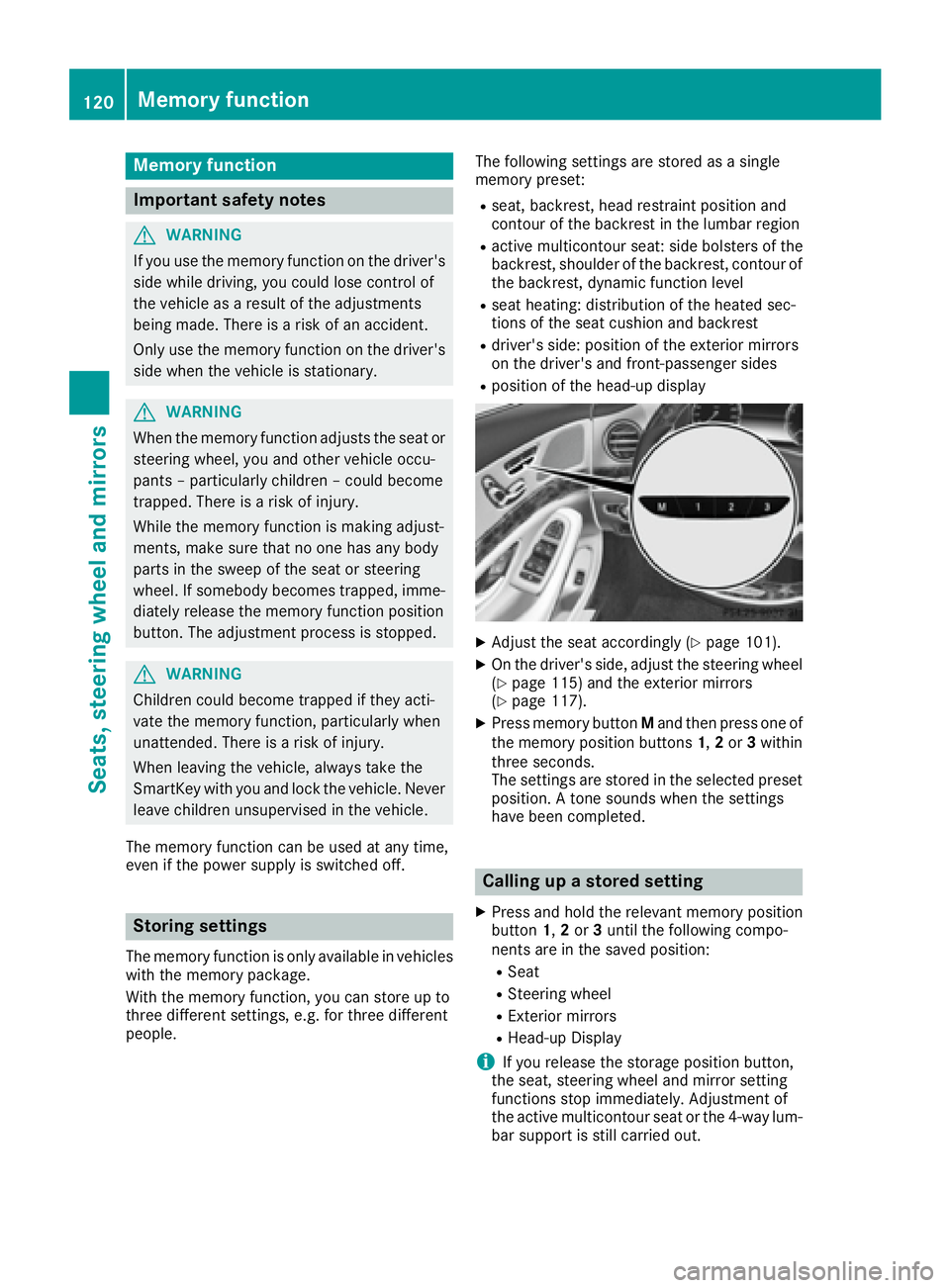
Press memory button M and then press one of
the memory position buttons 1 , 2 or 3 within
three seconds.
The settings are stored in the selected preset
position. A tone sounds when the settings
have been completed.
Calling up a stored setting X
Press and hold the relevant memory position
button 1 , 2 or 3 until the following compo-
nents are in the saved position: R
Seat R
Steering wheel R
Exterior mirrors R
Head-up Display
i If you release the storage position button,
the seat, steering wheel and mirror setting
functions stop immediately. Adjustment of
the active multicontour seat or the 4-way lum-
bar support is still carried out.120
Memory function
Seats, steering wheel and mirrors
Page 193 of 382
R
if the camera lens fogs up, e.g. when driving
into a heated garage in winter, causing a rapid
change in temperature R
if the camera lens is dirty or obstructed R
if the rear of your vehicle is damaged. In this
event, have the camera position and setting
checked at a qualified specialist workshop
The field of vision and other functions of the rear
view camera may be restricted due to additional
accessories on the rear of the vehicle (e.g.
license plate holder, bicycle rack).
The guide lines on the multimedia system show
the distances to your vehicle. The distances only
apply to road level.
The rear view camera is protected from rain-
drops and dust by means of a flap. When the rear
view camera is activated, this flap opens.
The flap closes again when: R
you have finished the maneuvering process R
you switch off the engine R
you open the trunk
Observe the notes on cleaning ( Y
page 323).
For technical reasons, the flap may remain open
briefly after the rear view camera has been
deactivated.
Activating/deactivating the rear view
camera X
To activate: make sure that the Activa‐
tion by R gear function is selected in the
multimedia system; see Digital Operator's
Manual. X
Engage reverse gear.
The rear view camera flap opens. The multi-
media system shows the area behind the vehi-
cle with guide lines.
The image from the rear view camera is avail-
able throughout the maneuvering process. X
Shift the transmission to position P .
or X
Drive forwards a short distance. Displays in the multimedia system The rear view camera may show a distorted view
of obstacles, show them incorrectly or not at all.
The rear view camera does not show objects in
the following positions: R
very close to the rear bumper R
under the rear bumper R
in the area immediately above the handle in
the trunk lid
! Objects not at ground level may appear to
be further away than they actually are, e.g.: R
the bumper of a parked vehicle R
the drawbar of a trailer R
the ball coupling of a trailer tow hitch R
the rear section of an HGV R
a slanted post
Use the guidelines only for orientation.
Approach objects no further than the bottom-
most guideline.
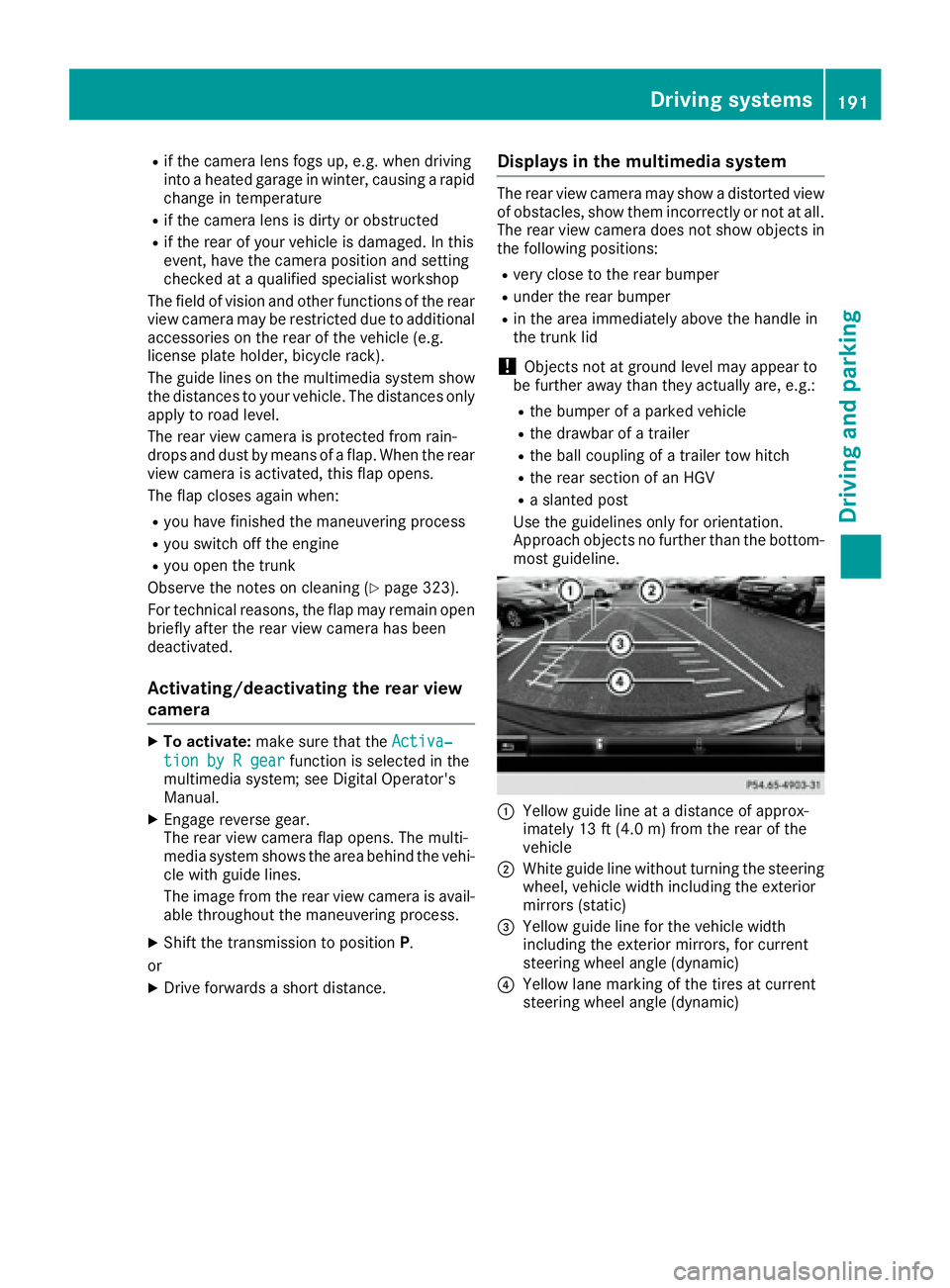
C
Yellow guide line at a distance of approx-
imately 13 ft (4.0 m) from the rear of the
vehicle D
White guide line without turning the steering
wheel, vehicle width including the exterior
mirrors (static)
Page 195 of 382
Reverse perpendicular parking with the
steering wheel at an angle
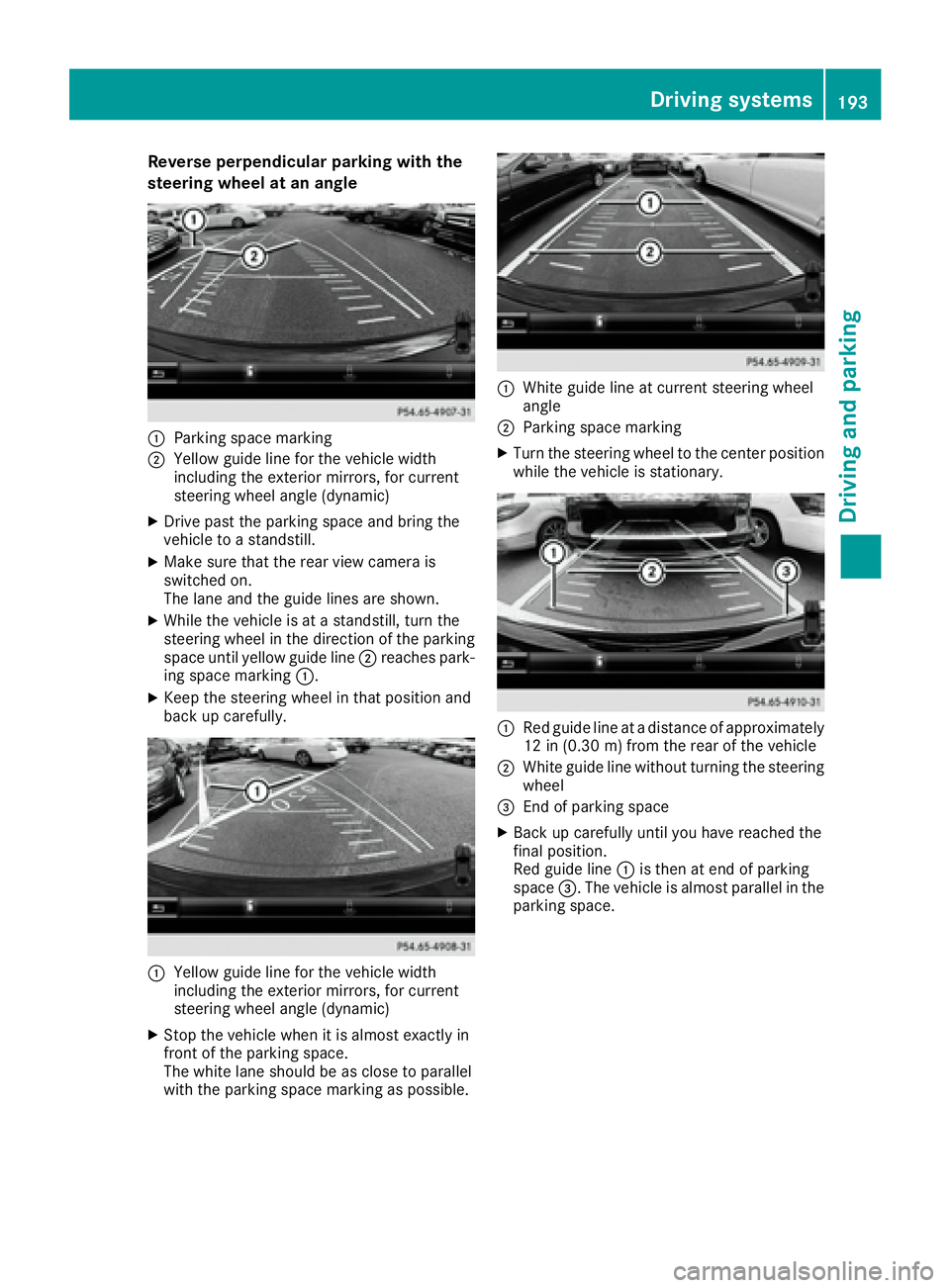
C
Parking space markingD
Yellow guide line for the vehicle width
including the exterior mirrors, for current
steering wheel angle (dynamic) X
Drive past the parking space and bring the
vehicle to a standstill. X
Make sure that the rear view camera is
switched on.
The lane and the guide lines are shown. X
While the vehicle is at a standstill, turn the
steering wheel in the direction of the parking
space until yellow guide line D reaches park-
ing space marking C .X
Keep the steering wheel in that position and
back up carefully.
C
Yellow guide line for the vehicle width
including the exterior mirrors, for current
steering wheel angle (dynamic) X
Stop the vehicle when it is almost exactly in
front of the parking space.
The white lane should be as close to parallel
with the parking space marking as possible. C
White guide line at current steering wheel
angle D
Parking space marking X
Turn the steering wheel to the center position
while the vehicle is stationary.
C
Red guide line at a distance of approximately
12 in (0.30 m) from the rear of the vehicleD
White guide line without turning the steering
wheel
Page 197 of 382
make sure that there are no persons, animals or
objects in the area in which you are maneuver-
ing.
You are always responsible for safety, and must
always pay attention to your surroundings when
parking and maneuvering. This applies to the
areas behind, in front of and beside the vehicle.
You could otherwise endanger yourself and oth-
ers.
The 360° camera will not function or will func-
tion in a limited manner: R
if the doors are open R
if the exterior mirrors are folded in R
if the trunk lid is open R
in heavy rain, snow or fog R
at night or in very dark places R
if the cameras are exposed to very bright light R
if the area is lit by fluorescent bulbs or LED
lighting (the display may flicker) R
if the camera lenses fog up, e.g. when driving
into a heated garage in winter, causing a rapid
change in temperature R
if the camera lenses are dirty or covered.
Observe the notes on cleaning
( Y
page 323) R
if the vehicle components in which the cam-
eras are installed are damaged. In this event,
have the camera position and setting checked
at a qualified specialist workshop
Do not use the 360° camera in this case. You
can otherwise injure others or cause damage to
objects or the vehicle.
The guide lines on the multimedia system show
the distances to your vehicle. The distances only
apply to road level.
The cameras in the front and in the rear area are
each protected by a flap. These flaps are opened
when the 360° camera is activated. Observe the
notes on cleaning ( Y
page 323). For technical
reasons, the flaps may remain open briefly after
the 360° camera has been deactivated.
The field of vision and other functions of the
camera system may be restricted due to addi-
tional attachments (e.g. license plate holder,
rear bicycle carrier).
On vehicl es w ith height-adjustable chassis,
dependi
ng on technical conditions, leaving the
standard height can result in: R
inaccuracies in the guide lines R
inaccuracies in the display of generated
images (top view) Activation conditions The image from the 360° camera appears if: R
the multimedia system is switched on R
the 360° Camera function is switched on
If the 360° camera is activated at speeds above
approximately 19 mph (30 km/h), a warning
message appears.
The warning message disappears if: R
the vehicle's speed falls below approximately
19 mph (30 km/h). The 360° camera is then
activated. R
the message is confirmed with the 8 but-
ton.
Switching the 360° camera on/off with
the button
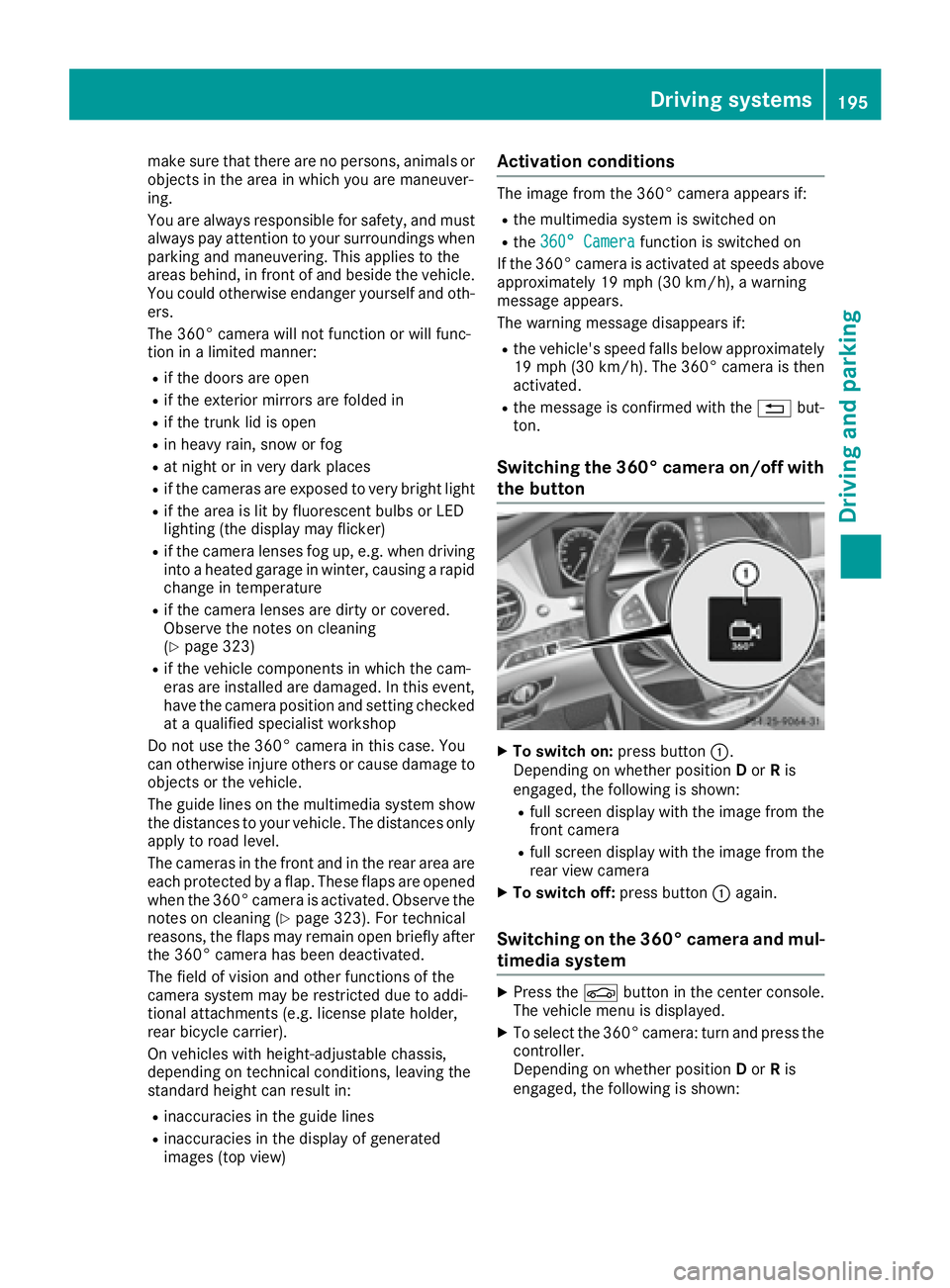
X
To switch on: press button C .
Depending on whether position D or R is
engaged, the following is shown: R
full screen display with the image from the
front camera R
full screen display with the image from the
rear view camera X
To switch off: press button C again.
Switching on the 360° camera and mul-
timedia system X
Press the
Page 198 of 382
R
a split screen with top view and the image
from the front camera or R
a split screen with top view and the image
from the rear view camera
Activating the 360° camera using
reverse gear The 360° camera images can be automatically
displayed by engaging reverse gear. X
Make sure that the Activation by R gear
function is selected in the multimedia system
(see the Digital Operator's Manual). X
To show the 360° camera image: engage
reverse gear.
The multimedia system shows the area
behind the vehicle in split-screen mode. You
see the top view of the vehicle and the image
from the rear view camera.
Selecting the split-screen view and full
screen mode Switching between split screen views: X
To switch to the line with the vehicle icons:
slide 5 the controller.X
To select a vehicle icon: turn the controller.
Switching to full screen mode: X
Turn and press 180° View with the controller.
The 180° option is only available in the following
views: R
Top view with picture from the rear view cam-
era R
Top view with picture from the front camera
Displays in the multimedia system
Important safety notes
The camera system may show a distorted view
of obstacles, show them incorrectly or not at all.
Obstacles are not shown by the system in the
following locations: R
under the front and rear bumpers R
very close to the front and rear bumpers R
in close range above the handle on the trunk
lid R
very close to the exterior mirrors R
in the transitional areas between the various
cameras in the virtual top view ! Objects not at ground level may appear to
be further away than they actually are, e.g.: R
the bumper of a parked vehicle R
the drawbar of a trailer R
the ball coupling of a trailer tow hitch R
the rear section of an HGV R
a slanted post
Use the guidelines only for orientation.
Approach objects no further than the bottom-
most guideline.
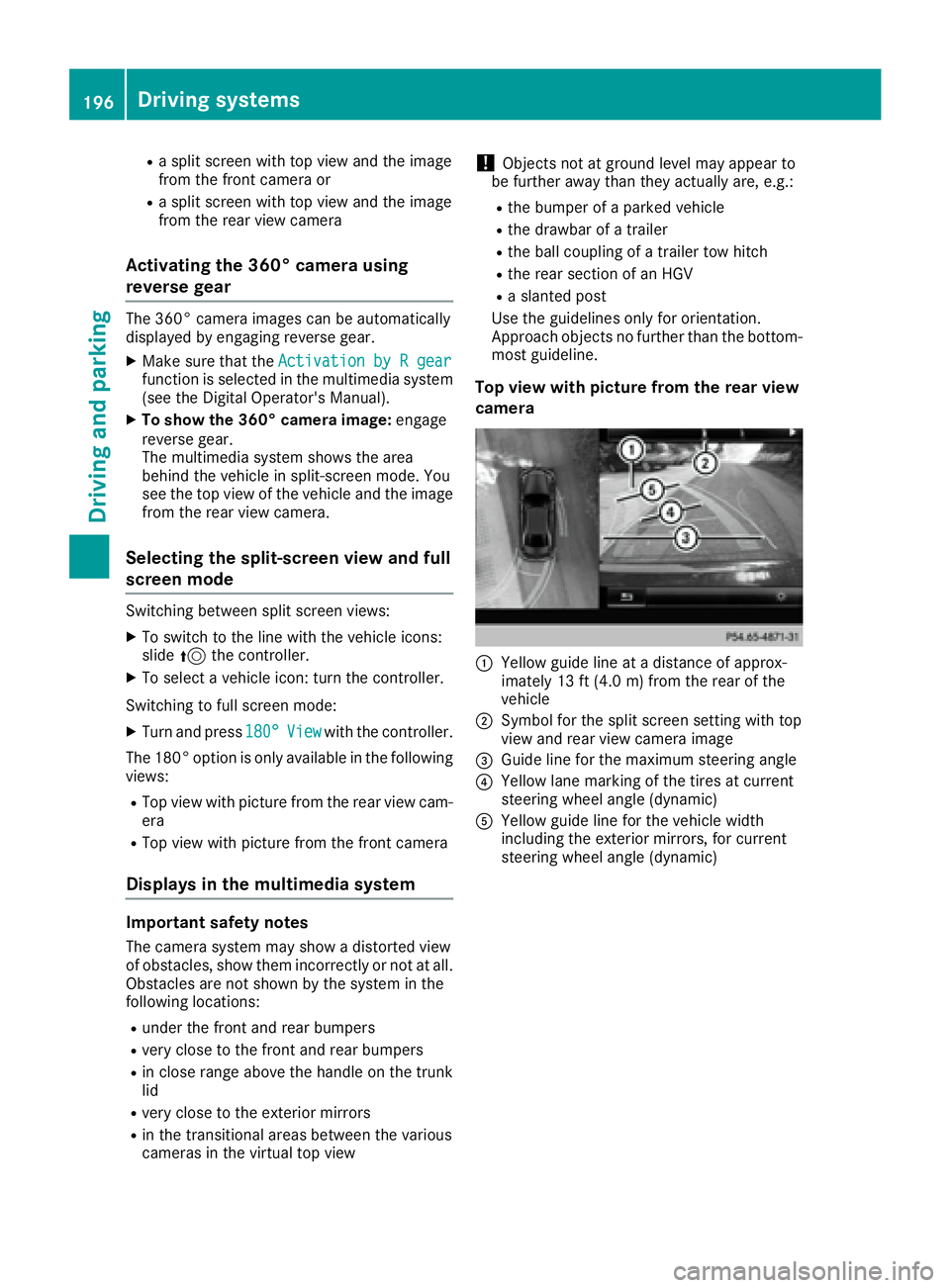
Top view with picture from the rear view
camera
C
Yellow guide line at a distance of approx-
imately 13 ft (4.0 m) from the rear of the
vehicle D
Symbol for the split screen setting with top
view and rear view camera image
Page 206 of 382
Drivin g Assistance PLUS package
General notes The Driving Assistanc e PLU S package consist s
of DISTRONIC PLU S ( Y
page 171), Active Blin d
Spot Assis t ( Y
page 204) and Active Lan e Keep-
in g Assis t ( Y
page 206).
Active Blind Spot Assist General notes Active Blin d Spot Assis t uses a radar sensor
system, pointe d toward th e rea r of th e vehicle,
to monito r th e are a to th e sides of th e vehicle
whic h th e driver is unable to see . A warnin g dis -
play in th e exterio r mirrors draws your attention
to vehicles detecte d in th e monitored area. If
you then switch on th e correspondin g turn sig -
nal to chang e lane, you will also receiv e an opti-
cal and audible warning. If a ris k of latera l colli-
sio n is detected, corrective braking may hel p
you avoid a collision . Before a course-correcting
brake application , Active Blin d Spot Assis t eval-
uates th e spac e in th e direction of trave l and at
th e sides of th e vehicle. Fo r this, Active Blin d
Spot Assis t uses th e forward-facin g radar sen -
sors.
Active Blin d Spot Assis t supports you from a
speed of approximately 20 mph (30 km/h).
Important safet y notesActive Blin d Spot Assis t is only an aid and is no t
a substitute fo r attentive driving.
G WARNING
Active Blin d Spot Assis t doe s no t react to :R
vehicles overtaken to o closely on th e side,
placin g them in th e blin d spo t are aR
vehicles whic h approac h wit h a larg e speed
differential and overtak e your vehicle
As a result , Active Blin d Spot Assis t may nei-
ther giv e warnings no r interven e in suc h sit -
uations. There is a ris k of an accident.
Always observ e th e traffic condition s care-
fully, and maintain a saf e latera l distance.
i US A only: Thi s devic e has bee n approved by
th e FCC as a "Vehicular Radar System". The
radar sensor is intended fo r use in an auto-
motive radar syste m only. Removal, tamper-
ing, or altering of th e devic e will void any war- ranties, and is no t permitte d by th e FCC. Do
no t tampe r with, alter, or use in any non-
approved way.
An y unauthorized modification to this devic e
could void th e user's authorit y to operat e th e
equipment.
i Canada only: Thi s devic e complies wit h
RSS-210 of Industry Canada. Operation is
subjec t to th e followin g tw o conditions:
1. Thi s devic e may no t cause harmful inter-
ference , and
2. Thi s devic e mus t accept any i nterferenc e
re
ceived, includin g interferenc e that may
cause undesired operation of th e device.
Removal, tampering, or altering of th e devic e
will void any warranties , and is no t permitted.
Do no t tampe r with, alter, or use in any non-
approved way.
An y unauthorized modification to this devic e
could void th e user's authorit y to operat e th e
equipment.
Rada r sensor sThe Active Blind Spot Assis t radar sensor s are
integrated into th e fron t and rea r bumper s and
behin d a cover in th e radiator trim. Mak e sur e
that th e bumper s and th e cover in th e radiator
grill are free of dirt, ic e or slush. The rea r sensor s
mus t no t be covered, fo r example by cycle racks
or overhangin g cargo. Followin g a severe impact
or in th e event of damage to th e bumpers, hav e
th e function of th e radar sensor s checke d at a
qualified specialis t workshop . Active Blin d Spot
Assis t may otherwise no longer wor k properly.
Monitoring area
G WARNING
Active Blind Spot Assis t doe s no t detec t all
traffic situation s and road users. There is a
ris k of an accident.
Always mak e sur e that there is sufficien t dis -
tanc e on th e sid e fo r other traffic or obstacles.204
Driving systems
Driving an d parking
Page 208 of 382
signal remains on, detected vehicles are indica-
ted by the flashing of red warning lamp . There
are no further warning tones.
Course-correcting brake application If Active Blind Spot Assist detects a risk of a lat-
eral collision in the monitoring range, a course-
correcting brake application is carried out. This
is meant to assist you in avoiding a collision.
G WARNING
A course-correcting brake application cannot
always prevent a collision. There is a risk of an
accident.
Always steer, brake or accelerate yourself,
especially if Active Blind Spot Assist warns
you or makes a course-correcting brake appli-
cation. Always maintain a safe distance at the
sides.
If a course-correcting brake application occurs,
the red warning lamp flashes in the exterior mir-
ror and a dual warning tone sounds. In addition,
a display underlining the danger of a side colli-
sion appears in the multifunction display.
In very rare cases, the system may make an
inappropriate brake application. A course-cor-
recting brake application may be interrupted at
any time by countersteering slightly or acceler-
ating.
The course-correcting brake application is avail-
able in the speed range between 20 mph
(30 km/h) and 120 mph (200 km/h).
Either no braking application, or a course-cor-
recting brake application adapted to the driving
situation occurs if: R
there are vehicles or obstacles, e.g. crash
barriers, located on both sides of your vehicle. R
a vehicle approaches you too closely at the
side. R
you have adopted a sporty driving style with
high cornering speeds. R
you clearly brake or accelerate. R
a driving safety system intervenes, e.g. ESP ®
or PRE-SAFE ®
Brake.R
ESP ®
is switched off.R
a loss of tire pressure or a defective tire is
detected. Switching on Active Blind Spot Assist X
Make sure that Active Blind Spot Assist is
activated in the on-board computer
( Y
page 223) X
Switch on the ignition.
Warning lamps in the exterior mirrors light up
red for approximately 1.5 seconds. Gray radar
waves propagating backwards appear next to
the vehicle in the assistance display on the
multifunction display.
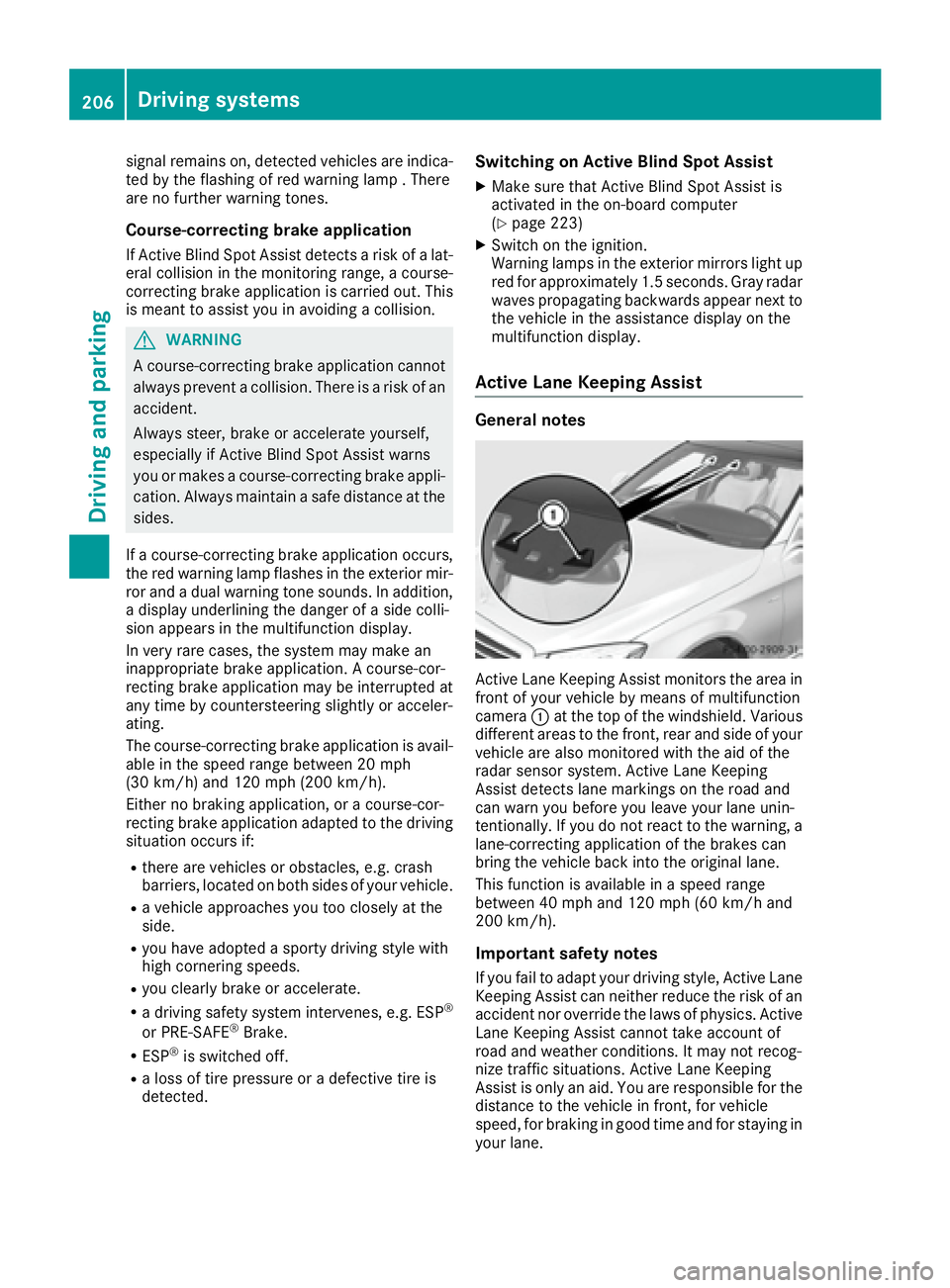
Active Lane Keeping Assist General notes
Active Lane Keeping Assist monitors the area in
front of your vehicle by means of multifunction
camera C at the top of the windshield. Various
different areas to the front, rear and side of your
vehicle are also monitored with the aid of the
radar sensor system. Active Lane Keeping
Assist detects lane markings on the road and
can warn you before you leave your lane unin-
tentionally. If you do not react to the warning, a
lane-correcting application of the brakes can
bring the vehicle back into the original lane.
This function is available in a speed range
between 40 mph and 120 mph (60 km/h and
200 km/h).
Important safety notes
If you fail to adapt your driving style, Active Lane
Keeping Assist can neither reduce the risk of an
accident nor override the laws of physics. Active
Lane Keeping Assist cannot take account of
road and weather conditions. It may not recog-
nize traffic situations. Active Lane Keeping
Assist is only an aid. You are responsible for the
distance to the vehicle in front, for vehicle
speed, for braking in good time and for staying in
your lane.206
Driving systems
Driving and parking
Page 309 of 382
Information on Roadside Assistance
( Y
page 28).
Downloading routes Downloading routes allows you to transfer and
save predefined routes in the navigation sys-
tem.
A route can be prepared and sent by either a
customer service representative or under "Own-
ers Online" at http://www.mbusa.com.
Each route can include up to four way points.
Once a route has been received by the naviga-
tion system, you will see the Do you want to
start route guidance? Destination
Received destination has been saved
in "Previous destinations". message on
the multimedia system display.
The route is saved. X
To start route guidance: select Yes .
An overview of the route is shown in the dis-
play.
If you select No , the saved route can be called
up later in the navigation menu. X
Select Start .
Route guidance starts.
Downloaded and saved routes can be called up
again.
Speed alert You can define the upper speed limit, which
must not be exceeded by the vehicle.
If this selected speed is exceeded by the vehicle,
a message will be sent to the Customer Assis-
tance Center. The Customer Assistance Center
then forwards this information to you.
You can select the way in which you receive this
information beforehand. Possible options
include text message, e-mail or an automated
call.
The data you receive contains the following
information: R
the location where the speed limit was excee-
ded R
the time at which the speed limit was excee-
ded R
the selected speed limit which was exceeded Geo fencing Geo fencing allows you to select areas which the
vehicle should not enter or leave. You will be
informed if the vehicle crosses the boundaries
of the selected areas. You can select the way in
which you receive this information beforehand.
Possible options include text message, e-mail or
an automated call.
The area can be determined as either a circle or
a polygon with a maximum of ten corners. You
can specify up to ten areas simultaneously. Dif-
ferent settings are possible for each area.
These settings can be called up under "Owners
Online" at http://www.mbusa.com.
Alternatively, you can trigger an Info call and
notify the customer service representative that
you wish to activate geo-fencing.
Currently inactive areas can be activated by text
message.
Triggering the vehicle alarm With this function, you can trigger the vehicle's
panic alarm via text message. An alarm sounds
and the exterior lighting flashes. Depending on
the setting, the panic alarm lasts five or ten sec-
onds. Afterwards, the alarm switches off.
Garage door opener
General notes The HomeLink ®
garage door opener integrated
in the rear-view mirror allows you to operate up
to three different door and gate systems.
Use the integrated garage door opener only on
garage doors that: R
have safety stop and reverse features and R
meet current U.S. federal safety standards
Once programed, the integrated garage door
opener in the rear-view mirror will assume the
function of the garage door system's remote
control. Please also read the operating instruc-
tions for the garage door system.
When programming a garage door opener, park
the vehicle outside the garage. Do not run the
engine while programming.
Certain garage door drives are incompatible
with the integrated garage door opener. If you
have difficulty programing the integrated garage Features 307
Stowage and features Z
Page 311 of 382
Several attempts might be necessary. You
should test every position for at least
25 seconds before trying another position.
Synchronizing the rolling code Pay attention to the "Important safety notes"
( Y
page 308).
If the garage door system uses a rolling code,
you will also have to synchronize the garage
door system with the integrated garage door
opener in the rear-view mirror. To do this you will
need to use the programming button on the door
drive control panel. The programming button
may be located in different places depending on
the manufacturer. It is usually located on the
door drive unit on the garage ceiling.
Familiarize yourself with the garage door drive
operating instructions, e.g. under "Program-
ming additional remote controls", before carry-
ing out the following steps.
Your vehicle must be within reach of the garage
door or gate opener drive. Make sure that nei-
ther your vehicle nor any persons/objects are
present within the sweep of the door or gate. X
Turn the SmartKey to position 2 in the ignition
lock ( Y
page 145).X
Get out of the vehicle. X
Press the programming button on the door
drive unit.
Usually, you now have 30 seconds to initiate
the next step. X
Get into the vehicle. X
Press previously programed button D ,
Page 325 of 382
Cleaning the mirror turn signals
! Only use cleaning agents or cleaning cloths
that are suitable for plastic lenses. Unsuitable
cleaning agents or cleaning cloths could
scratch or damage the plastic lenses of the
mirror turn signals. X
Clean the plastic lenses of the mirror turn sig-
nals in the exterior mirror housing using a wet
sponge and mild cleaning agent, e.g.
Mercedes-Benz car shampoo or cleaning
cloths.
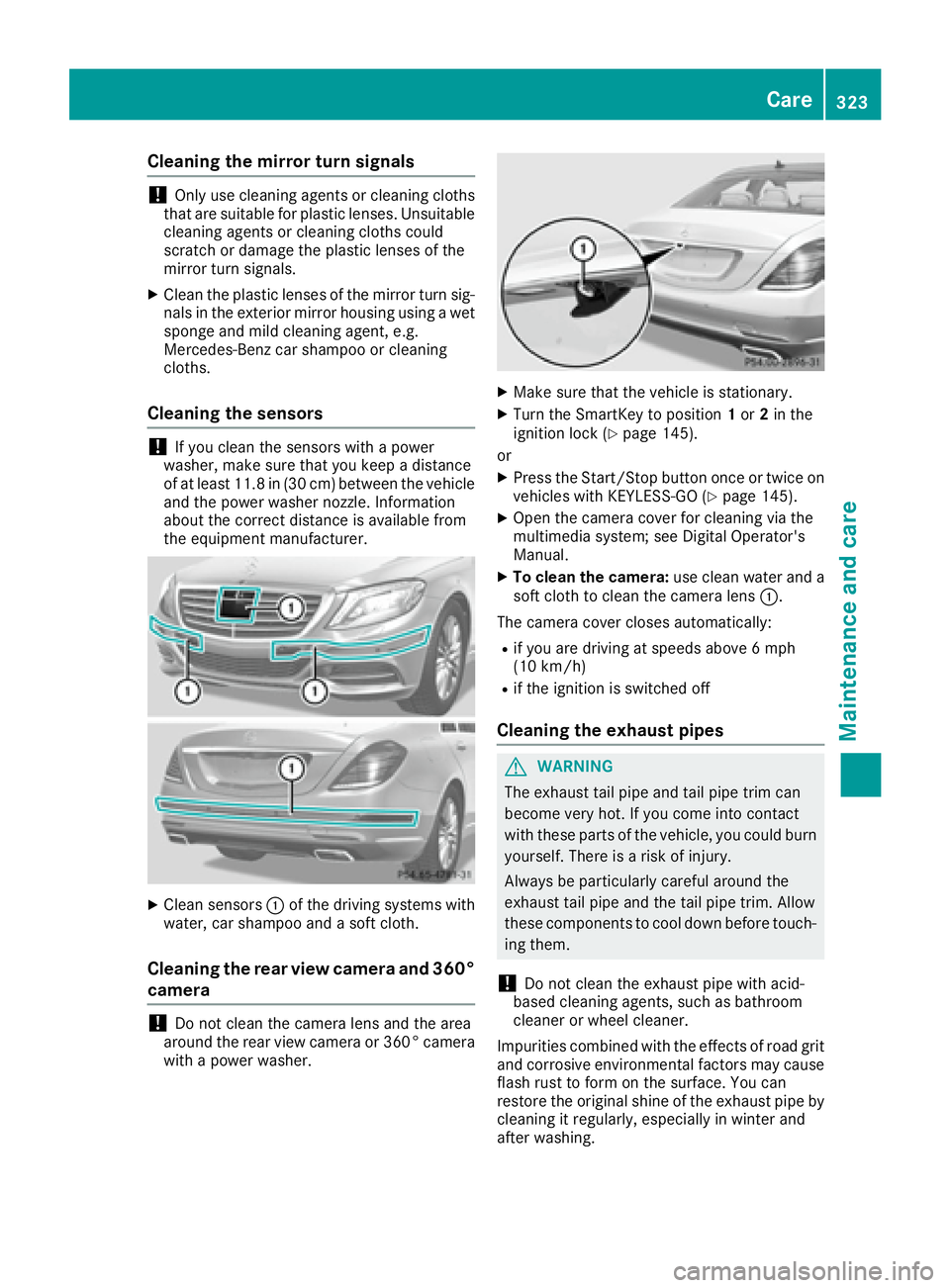
Cleaning the sensors
! If you clean the sensors with a power
washer, make sure that you keep a distance
of at least 11.8 in (30 cm ) betwee n the vehicl e
and the power washer nozzle. Information
about the correct distance is available from
the equipment manufacturer.
X
Clean sensors C of the driving systems with
water, car shampoo and a soft cloth.
Cleaning the rear view camera and 360°
camera
! Do not clean the camera lens and the area
around the rear view camera or 360° camera
with a power washer. X
Make sure that the vehicle is stationary. X
Turn the SmartKey to position 1 or 2 in the
ignition lock ( Y
page 145).
or X
Press the Start/Stop button once or twice on
vehicles with KEYLESS-GO ( Y
page 145).X
Open the camera cover for cleaning via the
multimedia system; see Digital Operator's
Manual. X
To clean the camera: use clean water and a
soft cloth to clean the camera lens C .
The camera cover closes automatically: R
if you are driving at speeds above 6 mph
(10 km/ h) R
if the ignition is switched off
Cleaning the exhaust pipes
G WARNING
The exhaust tail pipe and tail pipe trim can
become very hot. If you come into contact
with these parts of the vehicle, you could burn
yourself. There is a risk of injury.
Always be particularly careful around the
exhaust tail pipe and the tail pipe trim. Allow
these components to cool down before touch-
ing them.
! Do not clean the exhaust pipe with acid-
based cleaning agents, such as bathroom
cleaner or wheel cleaner.
Impurities combined with the effects of road grit
and corrosive environmental factors may cause
flash rust to form on the surface. You can
restore the original shine of the exhaust pipe by
cleaning it regularly, especially in winter and
after washing. Care 323
Maintenance and care Z