engine MERCEDES-BENZ S CLASS 2017 Owner's Guide
[x] Cancel search | Manufacturer: MERCEDES-BENZ, Model Year: 2017, Model line: S CLASS, Model: MERCEDES-BENZ S CLASS 2017Pages: 382, PDF Size: 12.12 MB
Page 91 of 382
Opening/closing automatically from
inside
Important safety notes
G WARNING
Parts of the body could become trapped dur-
ing automatic closing of the trunk lid. In addi-
tion, people may be standing in the closing
area or may enter the closing area, e.g. chil-
dren, during the closing procedure. There is a
risk of injury.
Make sure that nobody is in the vicinity of the
closing area during the closing process.
Release the remote operating switch imme-
diately if somebody becomes trapped. To re-
open the trunk lid, pull on the remote operat-
ing switch.
Vehicles with HANDS-FREE ACCESS:
It is also possible to stop the closing process by
performing a kicking movement under the rear
bumper.
G WARNING
Combustion engines emit poisonous exhaust
gases such as carbon monoxide. Exhaust
gases can enter the vehicle interior if the
trunk lid is open when the engine is running,
especially if the vehicle is in motion. There is a
risk of poisoning.
Always switch off the engine before opening
the trunk lid. Never drive with the trunk lid
open.
! The trunk lid swings upwards when opened.
Therefore, make sure that there is sufficient
clearance above the trunk lid.
The opening dimensions of the trunk lid can be
found in the "Vehicle data" section
( Y
page 376). Opening and closing X
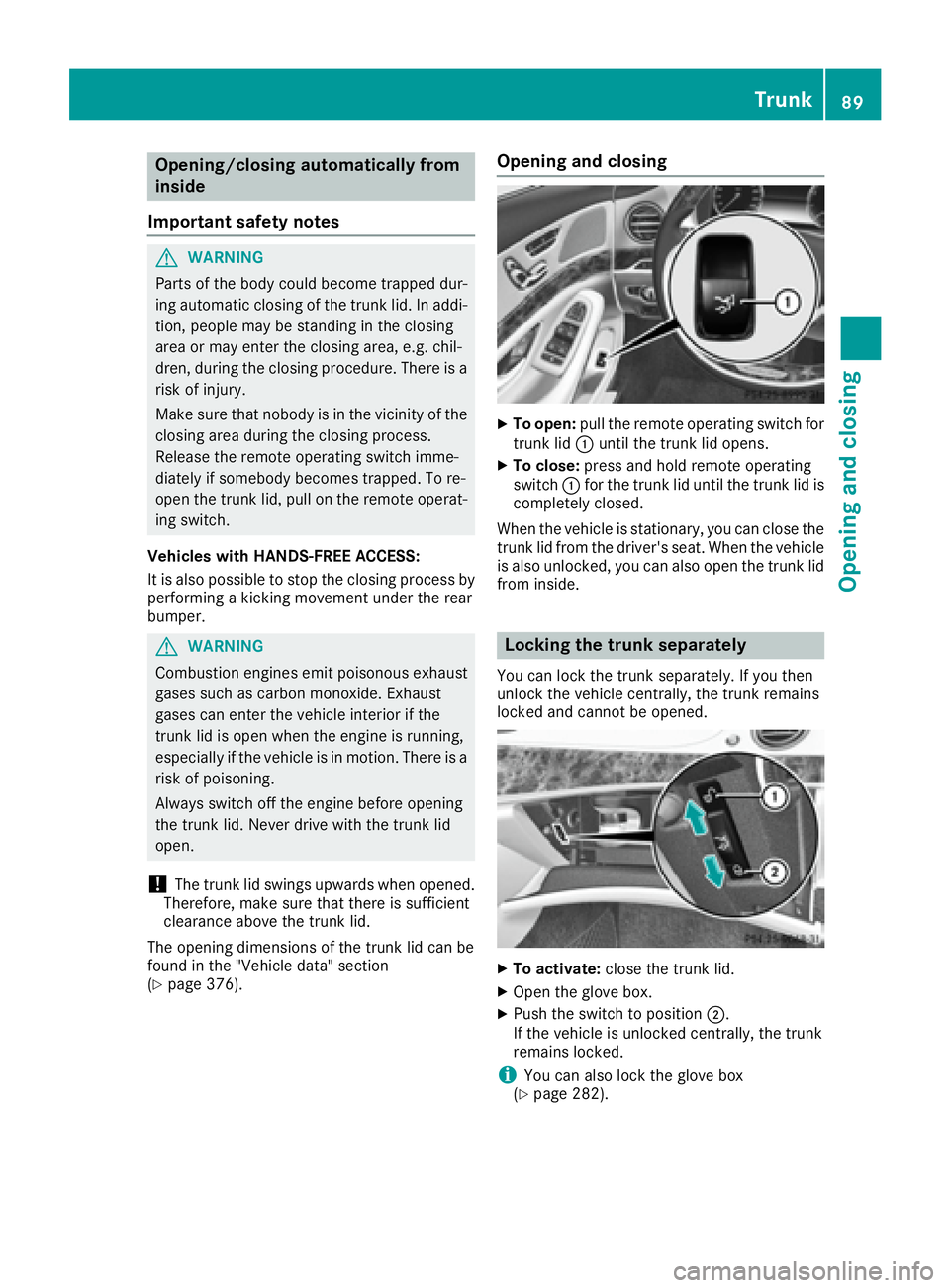
To open: pull the remote operating switch for
trunk lid C until the trunk lid opens. X
To close: press and hold remote operating
switch C for the trunk lid until the trunk lid is
completely closed.
When the vehicle is stationary, you can close the
trunk lid from the driver's seat. When the vehicle
is also unlocked, you can also open the trunk lid
from inside.
Locking the trunk separately You can lock the trunk separately. If you then
unlock the vehicle centrally, the trunk remains
locked and cannot be opened.
X
To activate: close the trunk lid. X
Open the glove box. X
Push the switch to position D .
If the vehicle is unlocked centrally, the trunk
remains locked.
i You can also lock the glove box
( Y
page 282). Trunk 89
Opening and closing Z
Page 94 of 382
Before opening or closing the side windows, a
check is carried out to see whether a valid
SmartKey is in the vehicle. The check is carried
out if you use the start/stop button instead of a
SmartKey in the ignition and you press or pull a
button while the engine is switched off. This is
carried out by means of a brief radio connection
between the vehicle and the SmartKey.
Information on opening and closing the roller
sunblinds on the rear side windows
( Y
page 293).
Convenience opening
General notes If the SmartKey is in close proximity to the vehi-
cle, the convenience opening function is availa-
ble.
You can ventilate the vehicle before you start
driving.
To do this, the SmartKey is used to carry out the
following functions simultaneously: R
unlock the vehicle R
open the side windows R
open the panorama roof with power tilt/slid-
ing panel and the roller sunblinds R
switch on the seat ventilation for the driver's
seat
The "convenience opening" feature is also avail-
able when the vehicle is unlocked.
Convenience opening X
Press and hold the 6 button until the side
windows and the panorama sunroof are in the
desired position.
If the roller sunblinds of the panorama roof
with power tilt/sliding panel are closed, the
roller sunblinds are opened first. X
Keep the 6 button pressed until the pan-
orama roof with power tilt/sliding panel is in
the desired position. X
To interrupt convenience opening: release
the 6 button. Convenience closing feature
Important safety notes
G WARNING
When the convenience closing feature is oper-
ating, parts of the body could become trapped
in the closing area of the side window and the
sliding sunroof. There is a risk of injury.
Observe the complete closing procedure
when the convenience closing feature is oper-
ating. Make sure that no body parts are in
close proximity during the closing procedure.
When you lock the vehicle, you can simultane-
ously: R
close the side windows R
close the panorama roof with power tilt/slid-
ing panel
On vehicles with a panorama roof with power
tilt/sliding panel, you can then close the roller
sunblinds.
i Notes on the automatic reversing feature
for: R
the side window ( Y
page 91)R
the panorama roof with power tilt/sliding
panel ( Y
page 95) R
the roller sunblinds ( Y
page 96)
Using the SmartKey X
Press and hold the 7 button until the side
windows and the panorama roof with power
tilt/sliding panel are fully closed. X
Make sure that all the side windows and the
panorama roof with power tilt/sliding panel
are closed. X
On vehicles with a panorama roof with
power tilt/sliding panel: press and hold the
7 button again until the roller sunblinds of
the panorama roof with power tilt/sliding
panel close. X
To interrupt convenience closing: release
the 7 button.
Using KEYLESS-GO
The SmartKey must be outside the vehicle. All
the doors must be closed.92
Side windows
Opening and closing
Page 98 of 382
and R
the Start/Stop button is used instead of the
SmartKey in the ignition lock
and R
the engine is not running
This is carried out by means of a brief radio con-
nection between the vehicle and the SmartKey.
Rain-closing feature The raised sliding sunroof automatically lowers
at the rear when driving if it starts to rain. The
sliding sunroof is lowered depending on: R
the road speed and R
the intensity of the rain
You can manually cancel the automatic closing
procedure. Press or pull the W switch in any
direction.
To raise the sliding sunroof again, press the
W switch in direction C . The rain-closing
feature remains activated.
Operating the roller sunblinds for the
sliding sunroof
Important safety notes
G WARNING
Parts of the body could become trapped
between the roller sunblind and frame or slid-
ing sunroof during automatic opening or clos-
ing. There is a risk of injury.
When opening or closing, make sure that no
body parts are in the sweep of the roller sun-
blind.
If somebody becomes trapped: R
release the switch immediately, or R
during automatic operation, push the
switch briefly in any direction
The opening or closing procedure will be stop-
ped.
The roller sunblinds shield the vehicle interior
from sunlight. The front roller sunblind can only
be opened and closed when the sliding sunroof
is closed. Roller sunblind reversing feature The roller sunblinds are equipped with an auto-
matic reversing feature. If a solid object blocks
or restricts a roller sunblind during the closing
process, the roller sunblind opens again auto-
matically. The automatic reversing feature is
only an aid and is not a substitute for your atten-
tion when closing the roller sunblinds.
G WARNING
The reversing feature does not react in par-
ticular to soft, light and thin objects, e.g. small
fingers. This means that the reversing feature
cannot prevent someone being trapped in
these situations. There is a risk of injury.
When closing the roller sunblind, make sure
that no body parts are in the sweep area.
If somebody becomes trapped: R
release the switch immediately, or R
press the switch in any direction during the
automatic closing process
The closing process is stopped.
Opening and closing the front roller sun-
blind
The front roller sunblind can only be closed
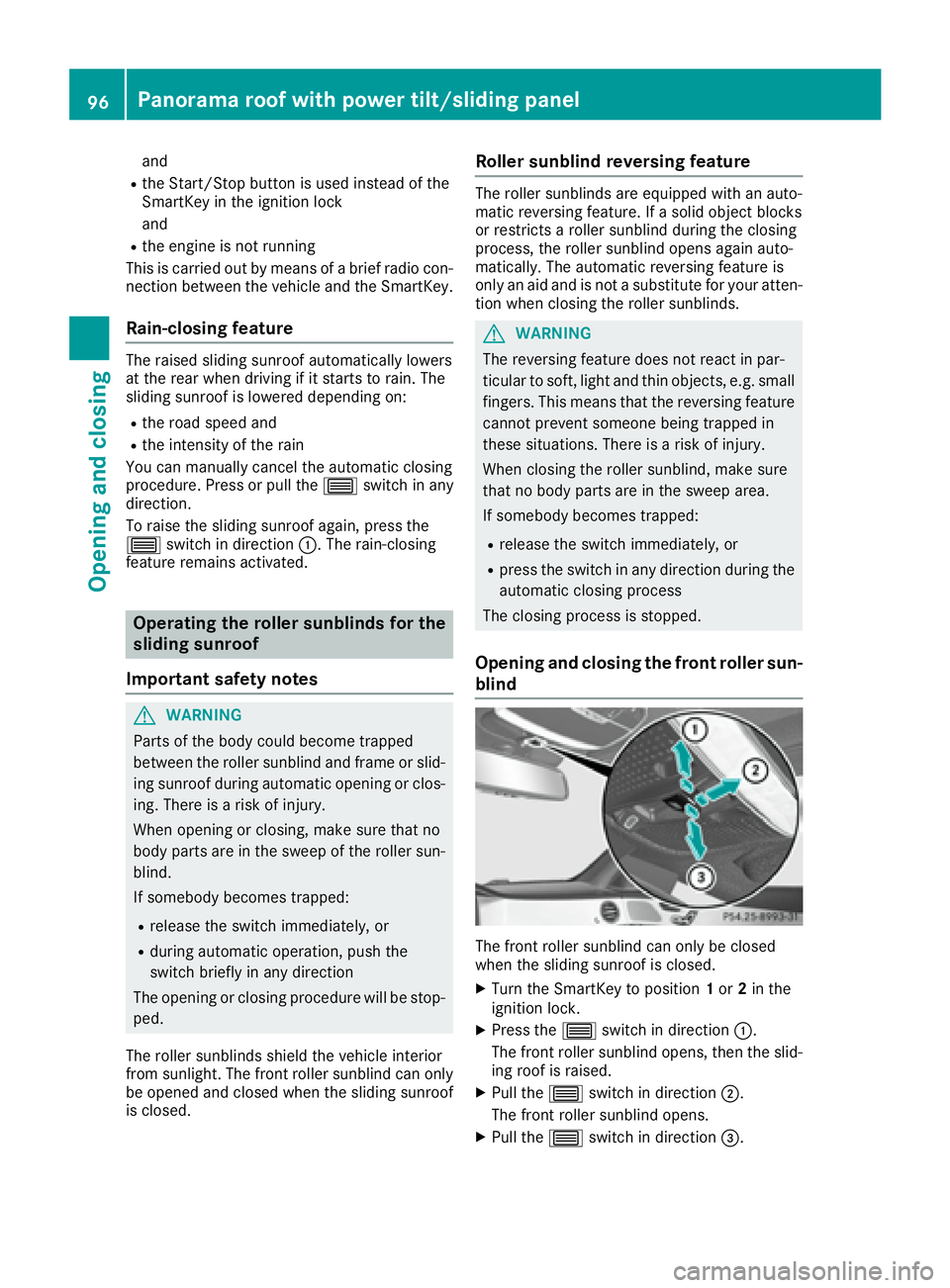
when the sliding sunroof is closed. X
Turn the SmartKey to position 1 or 2 in the
ignition lock. X
Press the W switch in direction C .
The front roller sunblind opens, then the slid-
ing roof is raised. X
Pull the W switch in direction D .
The front roller sunblind opens. X
Pull the W switch in direction
Page 100 of 382
The MAGIC SKY CONTROL voltage transformer
is stamped with a high-voltage symbol, warning
you about the high voltage. The electric cables
of the high-voltage section are color orange.
Operating MAGIC SKY CONTROL from
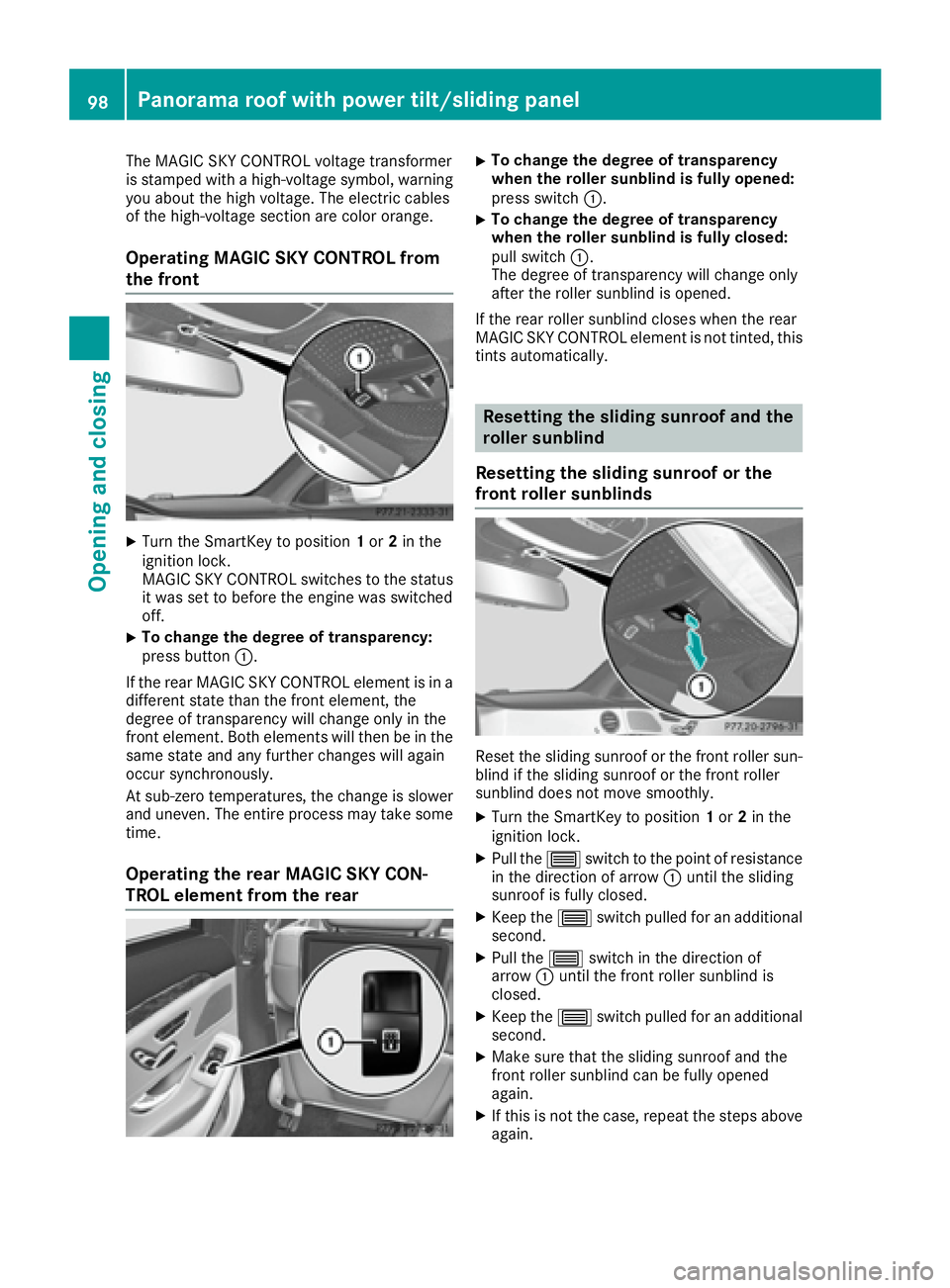
the front X
Turn the SmartKey to position 1 or 2 in the
ignition lock.
MAGIC SKY CONTROL switches to the status
it was set to before the engine was switched
off. X
To change the degree of transparency:
press button C .
If the rear MAGIC SKY CONTROL element is in a
different state than the front element, the
degree of transparency will change only in the
front element. Both elements will then be in the
same state and any further changes will again
occur synchronously.
At sub-zero temperatures, the change is slower
and uneven. The entire process may take some
time.
Operating the rear MAGIC SKY CON-
TROL element from the rear X
To change the degree of transparency
when the roller sunblind is fully opened:
press switch C . X
To change the degree of transparency
when the roller sunblind is fully closed:
pull switch C .
The degree of transparency will change only
after the roller sunblind is opened.
If the rear roller sunblind closes when the rear
MAGIC SKY CONTROL element is not tinted, this
tints automatically.
Resetting the sliding sunroof and the
roller sunblind
Resetting the sliding sunroof or the
front roller sunblinds
Reset the sliding sunroof or the front roller sun-
blind if the sliding sunroof or the front roller
sunblind does not move smoothly. X
Turn the SmartKey to position 1 or 2 in the
ignition lock. X
Pull the W switch to the point of resistance
in the direction of arrow C until the sliding
sunroof is fully closed. X
Keep the W switch pulled for an additional
second. X
Pull the W switch in the direction of
arrow C until the front roller sunblind is
closed. X
Keep the W switch pulled for an additional
second. X
Make sure that the sliding sunroof and the
front roller sunblind can be fully opened
again. X
If this is not the case, repeat the steps above
again.98
Panorama roof with power tilt/sliding panel
Opening and closing
Page 102 of 382
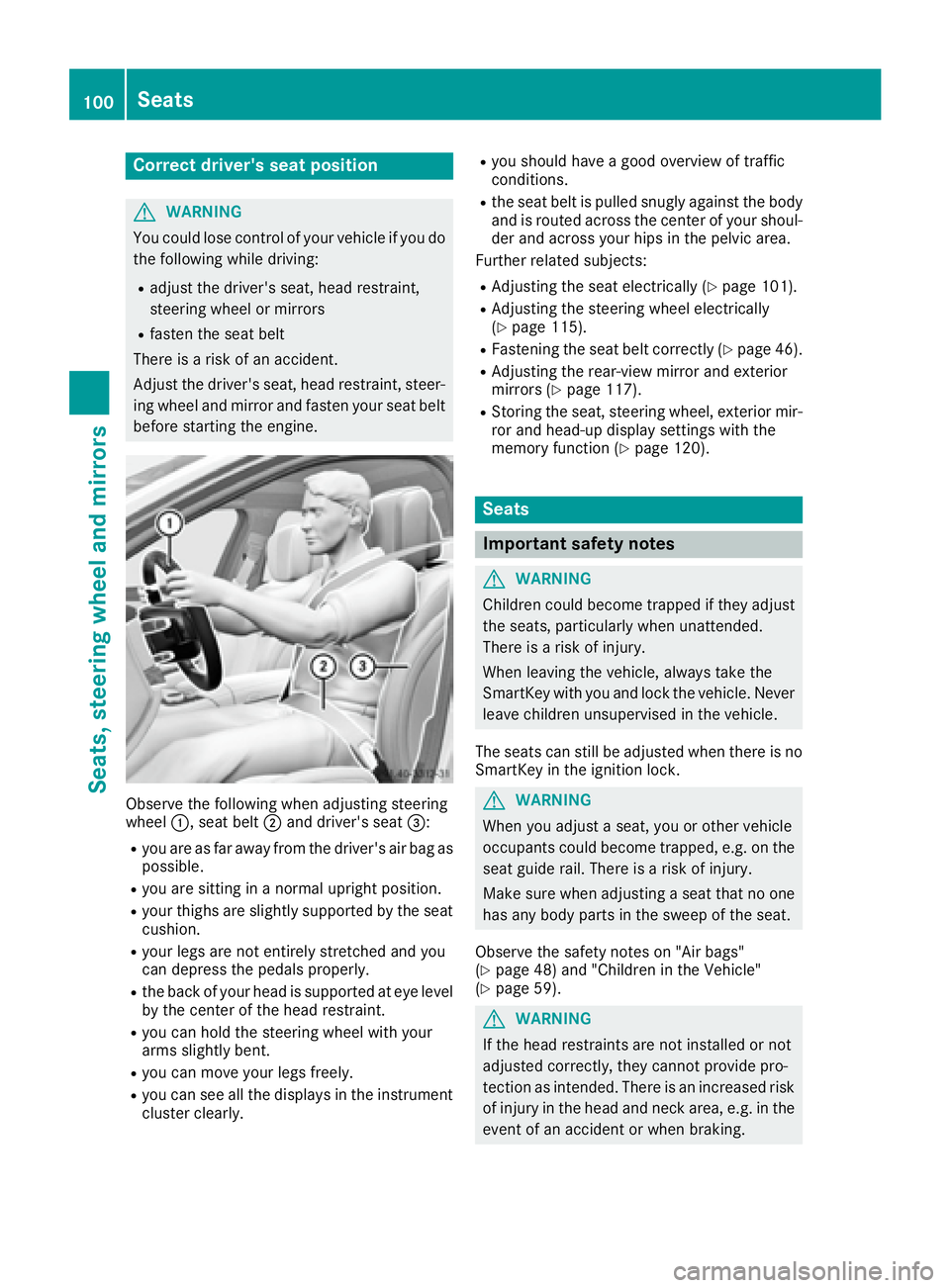
Correct driver's seat position
G WARNING
You could lose control of your vehicle if you do
the following while driving: R
adjust the driver's seat, head restraint,
steering wheel or mirrors R
fasten the seat belt
There is a risk of an accident.
Adjust the driver's seat, head restraint, steer-
ing wheel and mirror and fasten your seat belt
before starting the engine.
Observe the following when adjusting steering
wheel C , seat belt D and driver's seat
Page 103 of 382
Always drive with the head restraints instal-
led. Before driving off, make sure for every
vehicle occupant that the center of the head
restraint supports the back of the head at
about eye level.
Do not rotate the head restraints of the front and
rear seats. Otherwise, you cannot adjust the
height and angle of the head restraints to the
correct position.
Using the fore-and-aft adjustment, adjust the
head restraint so that it is as close as possible to
your head.
G WARNING
You could lose control of your vehicle if you do
the following while driving: R
adjust the driver's seat, head restraint,
steering wheel or mirrors R
fasten the seat belt
There is a risk of an accident.
Adjust the driver's seat, head restraint, steer-
ing wheel and mirror and fasten your seat belt
before starting the engine.
G WARNING
If you adjust the seat height carelessly, you or
other vehicle occupants could be trapped and
thereby injured. Children in particular could
accidentally press the electrical seat adjust-
ment buttons and become trapped. There is a
risk of injury.
While moving the seats, make sure that your
hands or other body parts do not get under the
lever assembly of the seat adjustment sys-
tem.
G WARNING
The seat belt does not offer the intended level
of protection if you have not moved the back-
rest to an almost vertical position. When brak-
ing or in the event of an accident, you could
slide underneath the seat belt and sustain
abdomen or neck injuries, for example. This
poses an increased risk of injury or even fatal
injury. Adjust the seat properly before beginning
your journey. Always ensure that the backrest
is in an almost vertical position and that the
shoulder section of your seat belt is routed
across the center of your shoulder.
! To avoid damage to the seats and the seat
heating, observe the following information: R
keep liquids from spilling on the seats. If
liquid is spilled on the seats, dry them as
soon as possible. R
if the seat covers are damp or wet, do not
switch on the seat heating. The seat heat-
ing should also not be used to dry the seats. R
clean the seat covers as recommended;
see "Interior care". R
do not transport heavy loads on the seats.
Do not place sharp objects on the seat
cushions, e.g. knives, nails or tools. The
seats should only be occupied by passen-
gers, if possible. R
when the seat heating is in operation, do
not cover the seats with insulating materi-
als, e.g. blankets, coats, bags, seat covers,
child seats or booster seats.
! Make sure that there are no objects in the
footwell under or behind the seats when mov-
ing the seats back. There is a risk that the
seats and/or the objects could be damaged.
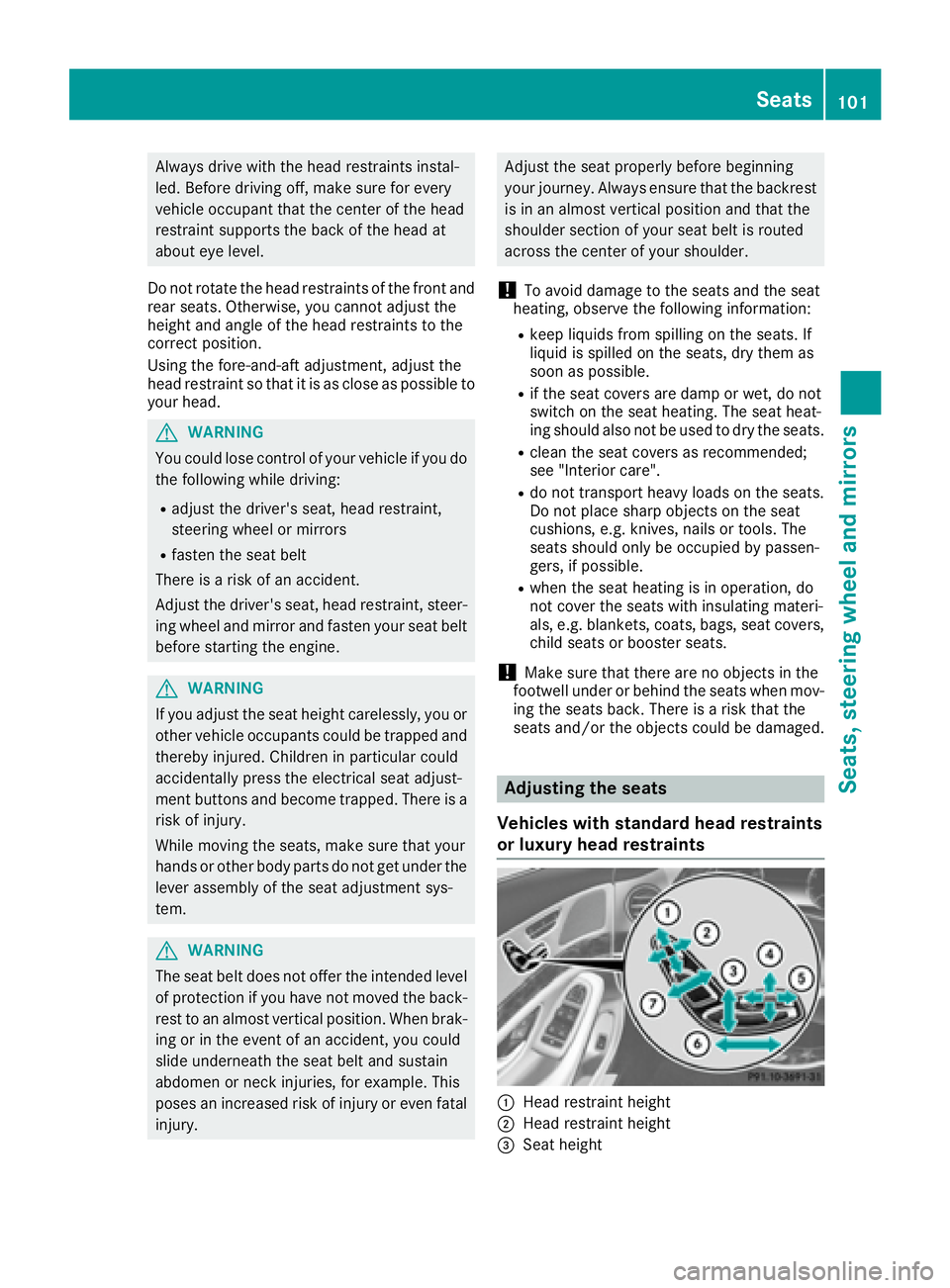
Adjusting the seats
Vehicles with standard head restraints
or luxury head restraints
C
Head restraint height
D
Head restraint height
Page 112 of 382
Adjust the driver's seat, head restraint, steer-
ing wheel and mirror and fasten your seat belt
before starting the engine.
G WARNING
If the head restraints are not installed or not
adjusted correctly, they cannot provide pro-
tection as intended. There is an increased risk
of injury in the head and neck area, e.g. in the
event of an accident or when braking.
Always drive with the head restraints instal-
led. Before driving off, make sure for every
vehicle occupant that the center of the head
restraint supports the back of the head at
about eye level.
Do not rotate the head restraints of the front and
rear seats. Otherwise, you cannot adjust the
height and angle of the head restraints to the
correct position.
Using the fore-and-aft adjustment, adjust the
head restraint so that it is as close as possible to
your head.
Pay attention to the important safety notes
( Y
page 100).
Adjusting the front head restraints
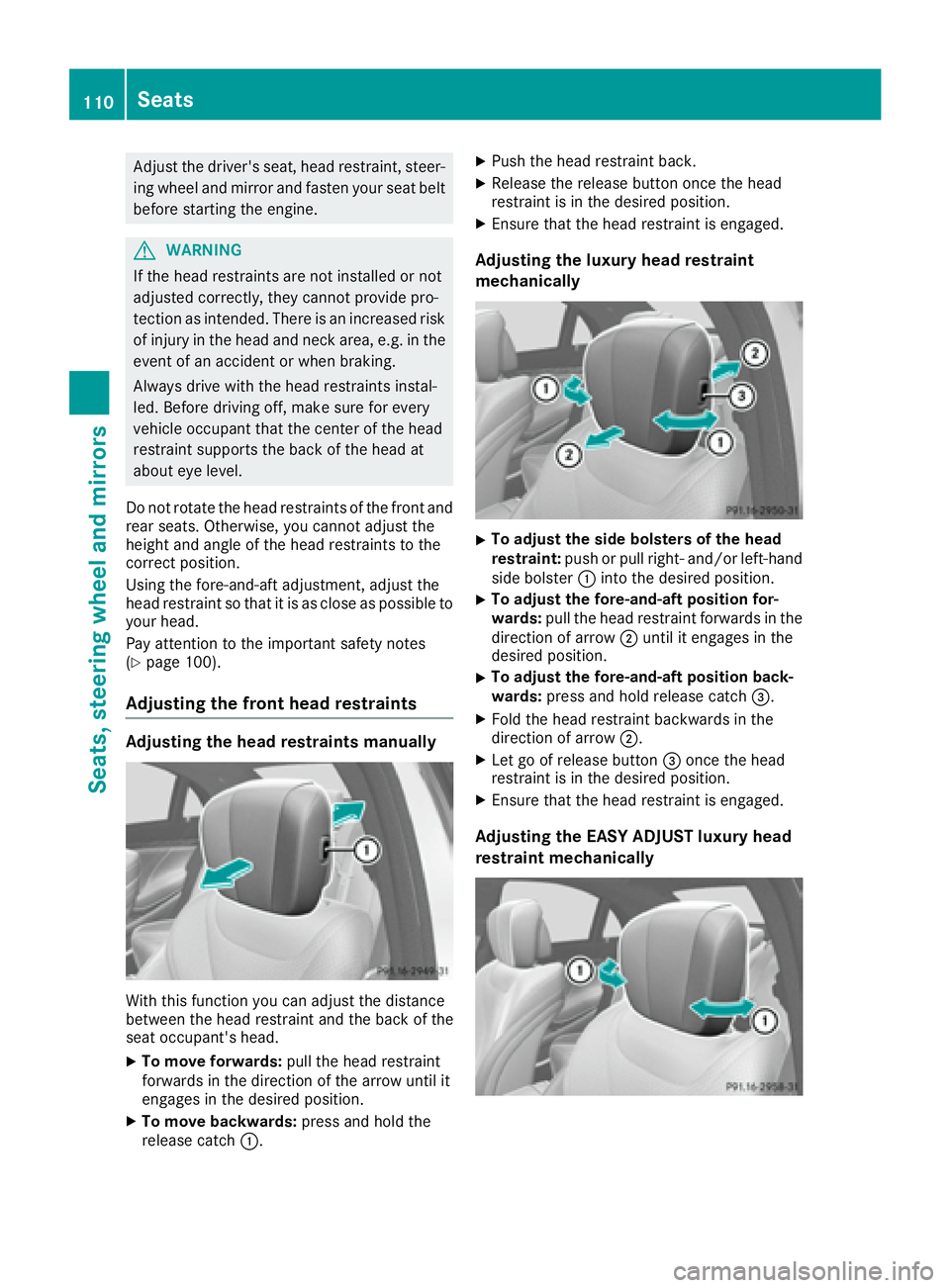
Adjusting the head restraints manually
With this function you can adjust the distance
between the head restraint and the back of the
seat occupant's head. X
To move forwards: pull the head restraint
forwards in the direction of the arrow until it
engages in the desired position. X
To move backwards: press and hold the
release catch C . X
Push the head restraint back. X
Release the release button once the head
restraint is in the desired position. X
Ensure that the head restraint is engaged.
Adjusting the luxury head restraint
mechanically X
To adjust the side bolsters of the head
restraint: push or pull right- and/or left-hand
side bolster C into the desired position. X
To adjust the fore-and-aft position for-
wards: pull the head restraint forwards in the
direction of arrow D until it engages in the
desired position. X
To adjust the fore-and-aft position back-
wards: press and hold release catch
Page 117 of 382
Steering wheel
Important safety notes
G WARNING
You could lose control of your vehicle if you do
the following while driving: R
adjust the driver's seat, head restraint,
steering wheel or mirrors R
fasten the seat belt
There is a risk of an accident.
Adjust the driver's seat, head restraint, steer-
ing wheel and mirror and fasten your seat belt
before starting the engine.
G WARNING
Children could injure themselves if they
adjust the steering wheel. There is a risk of
injury.
When leaving the vehicle, always take the
SmartKey with you and lock the vehicle. Never
leave children unsupervised in the vehicle.
The electrically adjustable steering wheel can
still be adjusted when there is no SmartKey in
the ignition lock.
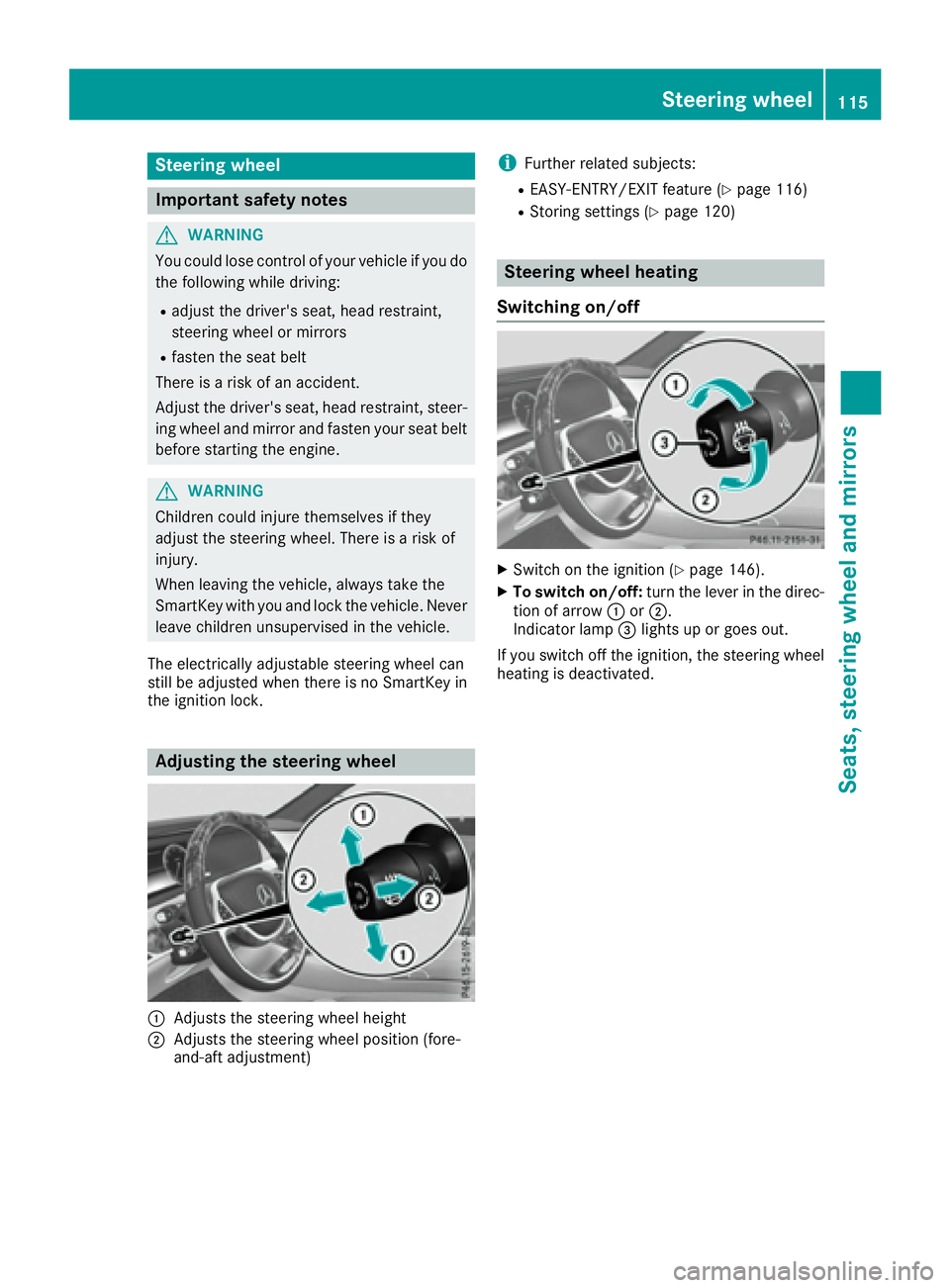
Adjusting the steering wheel
C
Adjusts the steering wheel height
D
Adjusts the steering wheel position (fore-
and-aft adjustment) i Further related subjects: R
EASY-ENTRY/EXIT feature ( Y
page 116)R
Storing settings ( Y
page 120)
Steering wheel heating
Switching on/off X
Switch on the ignition ( Y
page 146).X
To switch on/off: turn the lever in the direc-
tion of arrow C or D .
Indicator lamp
Page 119 of 382
Position of the steering wheel and the
driver's seat for driving The steering wheel and the driver's seat are
moved to the previously set position if: R
the driver's door is closed and you insert the
SmartKey into the ignition lock R
you close the driver's door when the ignition
is switched on R
you press the Start/Stop button once
i The steering wheel and the driver's seat only
return to the last set position if the driving
position is stored after the seat or steering
column has been adjusted.
The last position of the steering wheel or seat is
stored if: R
the ignition is switched off R
the setting is stored with the memory function
( Y
page 120).
Crash-responsive EASY-EXIT feature If the crash-responsive EASY-EXIT feature is trig-
gered in an accident, the steering column will
move upwards when the driver's door is opened
or the SmartKey is removed from the ignition
lock. This makes it easier to exit the vehicle and
rescue the occupants.
The crash-responsive EASY-EXIT feature is only
operational if the EASY-EXIT/ENTRY feature is
activated in the multimedia system (see the sep-
arate Operator's Manual).
Mirrors
Rear-view mirror
X
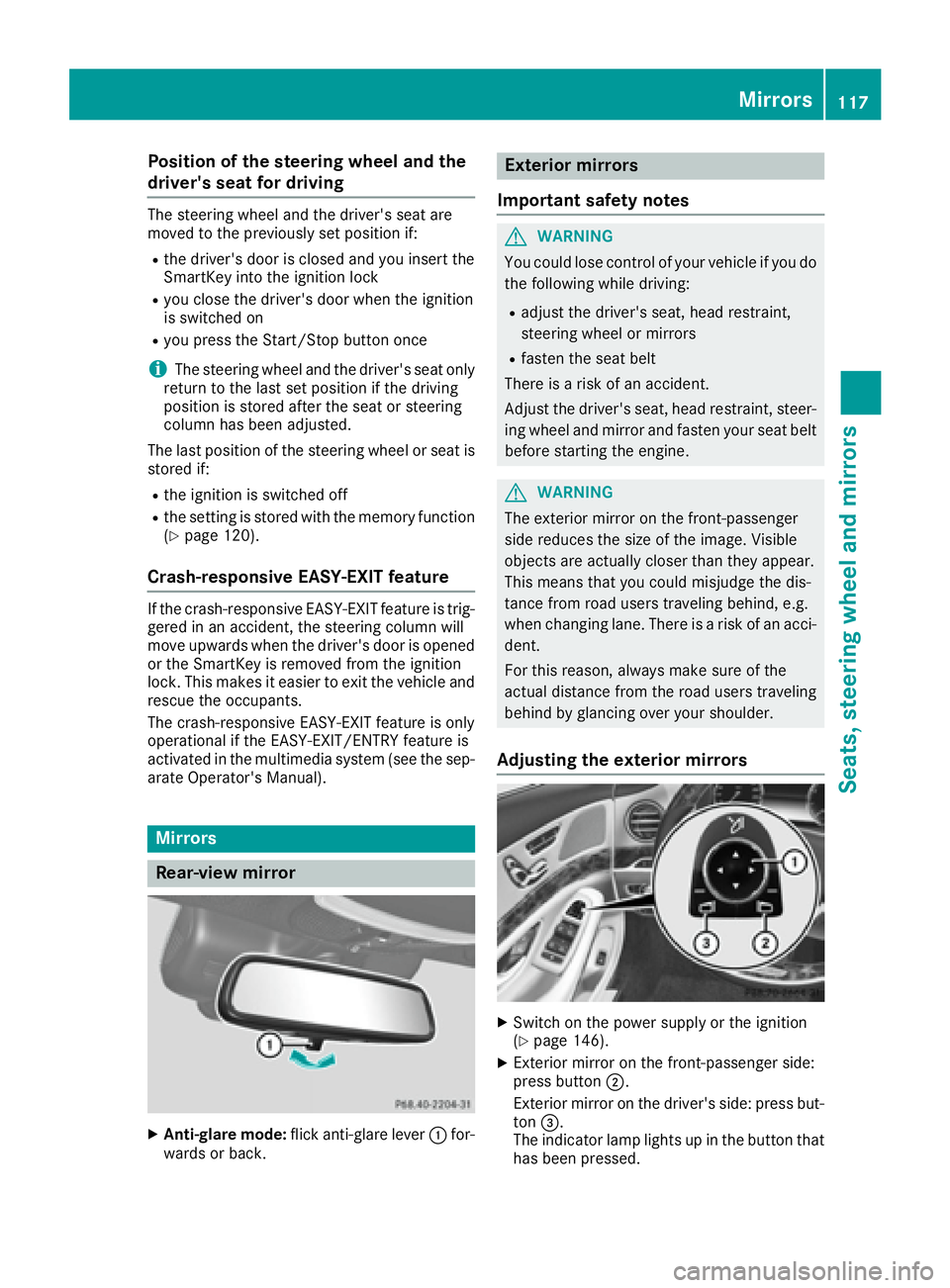
Anti-glare mode: flick anti-glare lever C for-
wards or back. Exterior mirrors
Important safety notes
G WARNING
You could lose control of your vehicle if you do
the following while driving: R
adjust the driver's seat, head restraint,
steering wheel or mirrors R
fasten the seat belt
There is a risk of an accident.
Adjust the driver's seat, head restraint, steer-
ing wheel and mirror and fasten your seat belt
before starting the engine.
G WARNING
The exterior mirror on the front-passenger
side reduces the size of the image. Visible
objects are actually closer than they appear.
This means that you could misjudge the dis-
tance from road users traveling behind, e.g.
when changing lane. There is a risk of an acci-
dent.
For this reason, always make sure of the
actual distance from the road users traveling
behind by glancing over your shoulder.
Adjusting the exterior mirrors
X
Switch on the power supply or the ignition
( Y
page 146). X
Exterior mirror on the front-passenger side:
press button D .
Exterior mirror on the driver's side: press but-
ton
Page 120 of 382
The indicator lamp goes out again after some
time. You can adjust the selected exterior
mirror using button C as long as the indicator
lamp is lit. X
Press button C up, down, or to the left or
right until you have adjusted the exterior mir-
ror to the correct position. You should have a
good overview of traffic conditions.
The convex exterior mirrors provide a larger field
of vision.
After the engine has been started, the exterior
mirrors are automatically heated if the rear win-
dow defroster is switched on and the outside
temperature is low.
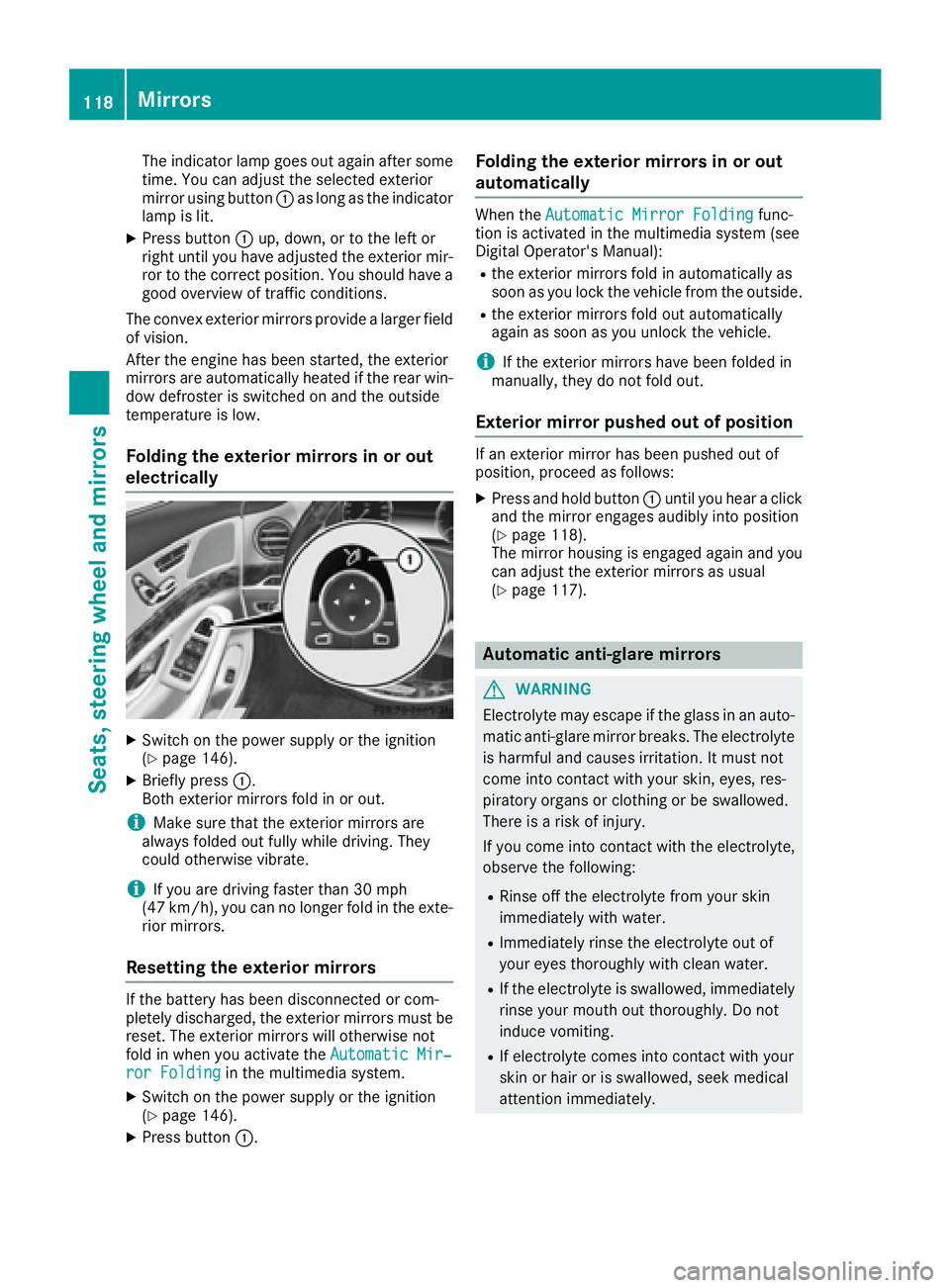
Folding the exterior mirrors in or out
electrically
X
Switch on the power supply or the ignition
( Y
page 146).X
Briefly press C .
Both exterior mirrors fold in or out.
i Make sure that the exterior mirrors are
always folded out fully while driving. They
could otherwise vibrate.
i If you are driving faster than 30 mph
(47 km/h), you can no longer fold in the exte-
rior mirrors.
Resetting the exterior mirrors If the battery has been disconnected or com-
pletely discharged, the exterior mirrors must be
reset. The exterior mirrors will otherwise not
fold in when you activate the Automatic Mir‐
ror Folding in the multimedia system.X
Switch on the power supply or the ignition
( Y
page 146).X
Press button C . Folding the exterior mirrors in or out
automatically When the Automatic Mirror Folding func-
tion is activated in the multimedia system (see
Digital Operator's Manual): R
the exterior mirrors fold in automatically as
soon as you lock the vehicle from the outside. R
the exterior mirrors fold out automatically
again as soon as you unlock the vehicle.
i If the exterior mirrors have been folded in
manually, they do not fold out.
Exterior mirror pushed out of position If an exterior mirror has been pushed out of
position, proceed as follows: X
Press and hold button C until you hear a click
and the mirror engages audibly into position
( Y
page 118).
The mirror housing is engaged again and you
can adjust the exterior mirrors as usual
( Y
page 117).
Automatic anti-glare mirrors
G WARNING
Electrolyte may escape if the glass in an auto-
matic anti-glare mirror breaks. The electrolyte
is harmful and causes irritation. It must not
come into contact with your skin, eyes, res-
piratory organs or clothing or be swallowed.
There is a risk of injury.
If you come into contact with the electrolyte,
observe the following: R
Rinse off the electrolyte from your skin
immediately with water. R
Immediately rinse the electrolyte out of
your eyes thoroughly with clean water. R
If the electrolyte is swallowed, immediately
rinse your mouth out thoroughly. Do not
induce vomiting. R
If electrolyte comes into contact with your
skin or hair or is swallowed, seek medical
attention immediately.118
Mirrors
Seats, steering wheel and mirrors