steering wheel MERCEDES-BENZ S CLASS 2017 Owner's Guide
[x] Cancel search | Manufacturer: MERCEDES-BENZ, Model Year: 2017, Model line: S CLASS, Model: MERCEDES-BENZ S CLASS 2017Pages: 382, PDF Size: 12.12 MB
Page 160 of 382
You can also deactivate manual drive program
M yourself: X
Pull on the right-hand steering wheel paddle
shifter and hold it in place ( Y
page 156).
or X
Use the DIRECT SELECT lever to switch the
transmission position.
or X
Use the program selector button to change
the drive program ( Y
page 155).
Manual drive program M is deactivated. The
automatic transmission switches to the pre-
viously activated drive program E (drive pro-
gram C on Mercedes-AMG vehicles) or S .
Manual drive program (Mercedes-
AMG vehicles)
General information In this drive program, you can permanently
change gear yourself by using the steering
wheel paddle shifters. The transmission must be
in position D .
Manual drive program M is different from drive
program S with regard to spontaneity, respon-
siveness and smoothness of gear changes.
As well as this permanent drive program M , you
can also activate temporary drive program
M ( Y
page 157).
Switching on the manual drive program In manual drive program M , you can change gear
using the steering wheel paddle shifters if the
transmission is in position D . You can see the
currently selected drive program and which gear
is engaged in the multifunction display. X
Press the program selector button
( Y
page 155) repeatedly until M appears in
the multifunction display.
Upshifting
! In manual drive program M , the automatic
transmission does not shift up automatically even when the engine limiting speed for the
current gear is reached. When the engine lim-
iting speed is reached, the fuel supply is cut to
prevent the engine from overrevving. Always
make sure that the engine speed does not
reach the red area of the tachometer. There is
otherwise a risk of engine damage.
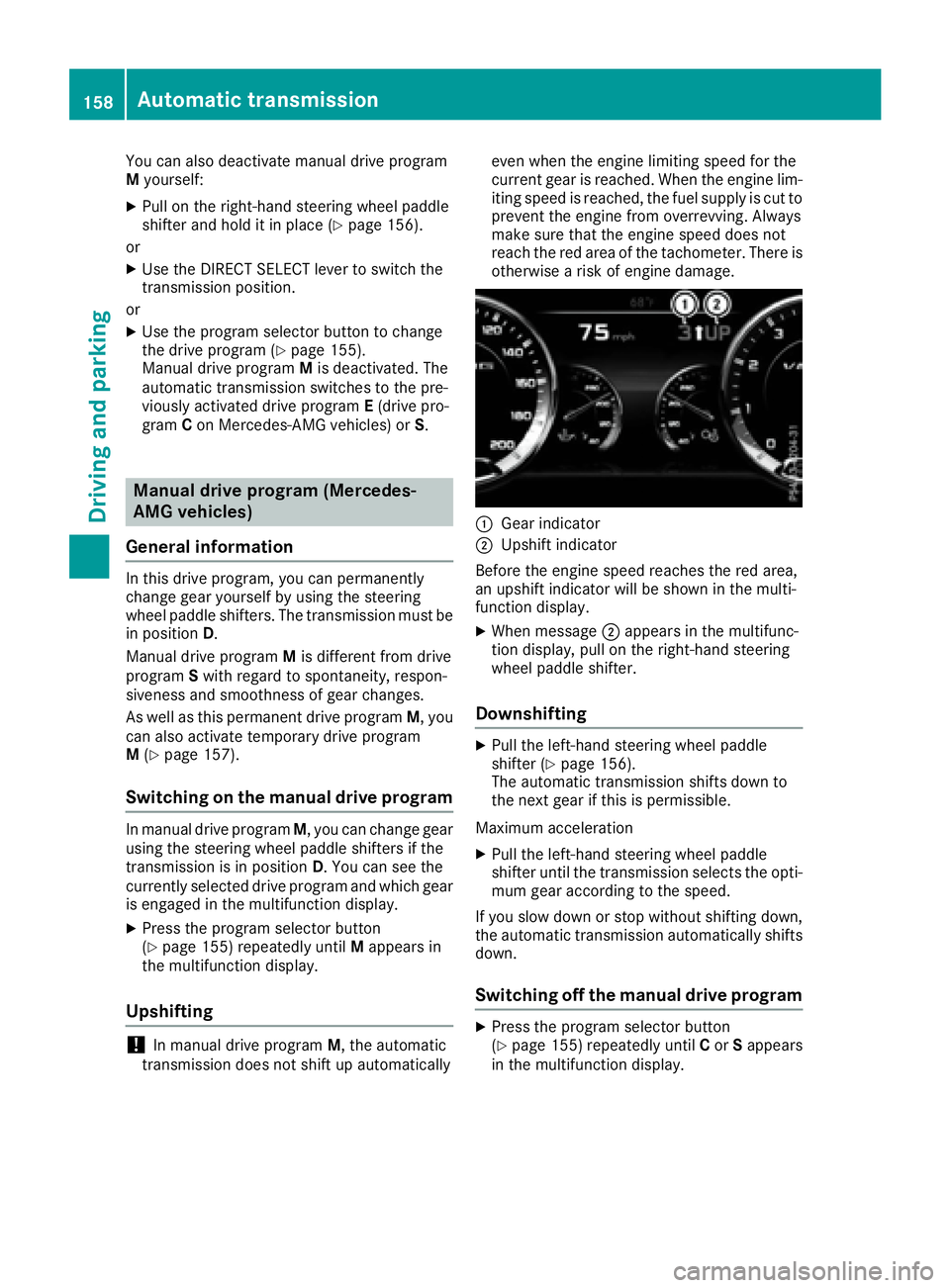
C
Gear indicator D
Upshift indicator
Before the engine speed reaches the red area,
an upshift indicator will be shown in the multi-
function display. X
When message D appears in the multifunc-
tion display, pull on the right-hand steering
wheel paddle shifter.
Downshifting X
Pull the left-hand steering wheel paddle
shifter ( Y
page 156).
The automatic transmission shifts down to
the next gear if this is permissible.
Maximum acceleration X
Pull the left-hand steering wheel paddle
shifter until the transmission selects the opti-
mum gear according to the speed.
If you slow down or stop without shifting down,
the automatic transmission automatically shifts
down.
Switching off the manual drive program X
Press the program selector button
( Y
page 155) repeatedly until C or S appears
in the multifunction display.158
Automatic transmission
Driving and parking
Page 170 of 382
Always replace all brake disks and brake pads/
linings on an axle at the same time. Always
install new brake pads/linings when replacing
brake disks.
The vehicle is equipped with lightweight brake
disks to which the wheel assembly with rim and
threaded connection is matched.
The use of brake disks other than those
approved by Mercedes-Benz can change the
track width and is subject to approval, if appli-
cable.
Shock-type loads when handling the brake
discs, such as when changing wheels, can lead
to a reduction in comfort when driving with light-
weight brake discs. Avoid shock-type loads on
the lightweight brake disks, particularly on the
brake plate.
Mercedes-Benz recommends that you only use
brake fluid that has been specially approved for
your vehicle by Mercedes-Benz, or which corre-
sponds to an equivalent quality standard. Brake
fluid which has not been approved for
Mercedes-Benz vehicles or which is not of an
equivalent quality could affect your vehicle's
operating safety.
AMG high-performance and ceramic
brakes The high-performance brake system is only
available on Mercedes-AMG vehicles.
The AMG brake systems are designed for heavy
loads. This may lead to noise when braking. This
will depend on: R
Speed R
Braking force R
Environmental conditions, such as tempera-
ture and humidity
The wear of individual components of the brake
system, such as the brake pads/linings or brake
discs, depends on the individual driving style
and operating conditions.
For this reason, it is impossible to state a mile-
age that will be valid under all circumstances. An
aggressive driving style will lead to high wear.
You can obtain more information on this from a
qualified specialist workshop.
New and replaced brake pads and discs only
reach their optimum braking effect after several
hundred kilometers of driving. Compensate for
this by applying greater force to the brake pedal.
Keep this in mind, and adapt your driving and
braking accordingly during this break-in period. Excessive heavy braking results in correspond-
ingly high brake wear. Observe the brake wear
warning lamp in the instrument cluster and note
any brake status messages in the multifunction
display. Especially for high performa nce d riving,
i
t is important to maintain and have the brake
system checked regularly.
Driving on wet roads
Hydroplaning If water has accumulated to a certain depth on
the road surface, there is a danger of hydro-
planing occurring, even if: R
you drive at low speeds R
the tires have adequate tread depth
For this reason, in the event of heavy rain or in
conditions in which hydroplaning may occur,
you must drive in the following manner: R
lower your speed R
avoid ruts R
avoid sudden steering movements R
brake carefully
Driving on flooded roads
! Do not drive through flooded areas. Check
the depth of any water before driving through
it. Drive slowly through standing water. Oth-
erwise, water may enter the vehicle interior or
the engine compartment. This can damage
the electronic components in the engine or
the automatic transmission. Water can also
be drawn in by the engine's air suction nozzles
and this can cause engine damage.
Winter driving
G WARNING
If you shift down on a slippery road surface in
an attempt to increase the engine's braking
effect, the drive wheels could lose their grip.
There is an increased danger of skidding and
accidents.
Do not shift down for additional engine brak-
ing on a slippery road surface.168
Driving tips
Driving an d parking
Page 171 of 382
G DANGER
If th e exhaust pipe is blocke d or adequate
ventilation is no t possible, poisonous gase s
suc h as carbon monoxide (CO) may ente r th e
vehicle. This is th e case, e.g. if th e vehicl e
become s trapped in snow. There is a ris k of
fatal injury.
If you leav e th e engin e or th e auxiliary heating
running, mak e sur e th e exhaust pipe and area
around th e vehicl e are clear of snow. To
ensur e an adequate supply of fresh air, open a
window on th e side of th e vehicl e that is no t
facing int o th e wind.
Hav e your vehicl e winter-proofe d at a qualified
specialist workshop at th e onset of winter.
Drive particularly carefully on slipper y roa d sur -
faces. Avoid sudden acceleration , steering and
braking maneuvers . Do no t use th e cruise con-
trol or DISTRONI C PLUS.
If th e vehicl e threaten s to skid or canno t be
stoppe d when moving at low speed:X
Shift th e transmission to position N .
The outside temperature indicator is no t
designed to serve as an ice-warning device and
is therefor e unsuitable for that purpose .
Changes in th e outside temperature are dis-
played after a short delay.
Indicate d temperatures jus t abov e th e freezing
poin t do no t guarantee that th e roa d surfac e is
free of ice . The roa d may s till be icy, especially in
w ooded area s or on bridges .
You should pay special attention to roa d condi-
tion s when temperatures are around freezing
point.
Fo r mor e information on drivin g wit h snow
chains, see ( Y
page 345).
Fo r mor e information on drivin g wit h summer
tires , see ( Y
page 345).
Observ e th e note s in th e "Winte r operation " sec -
tion ( Y
page 345).
Driving systems
Mercedes-Benz Intelligent Drive
Mercedes-Ben z Intelligent Drive stand s for inno-
vative driver assistanc e and safet y systems
whic h enhance comfort and support th e driver in critical situations. Wit h these intelligen t co-ordi -
nated systems Mercedes-Ben z has set a mile -
ston e on th e pat h toward s autonomous driving.
Mercedes-Ben z Intelligent Drive embraces all
elements of active and passive safet y in on e well
though t out system – for th e safet y of th e vehi-
cle occupant s and that of other roa d users.
Further information on drivin g safet y systems
( Y
page 65).
Cruise cont rol
Gene ra l notesCruis e control maintains a constan t roa d speed
for you. It brakes automatically in order to avoid
exceedin g th e set speed. Change int o a lower
gear in goo d time on lon g and steep downhill
gradients . This is especially important if th e
vehicl e is laden . By doin g so, you will mak e use
of th e braking effec t of th e engine. This relieves
th e load on th e brak e system and prevents th e
brakes from overheating and wearing to o
quickly.
You can use cruise control if you wan t to drive at
a steady speed for a prolonged period of time.
You can store any roa d speed abov e 20 mph
(30 km/h).
Import ant safety notesIf you fail to adapt your drivin g style, cruise con-
trol can neither reduce th e ris k of an acciden t
no r override th e laws of physics . Cruis e control
canno t tak e int o accoun t th e road, traffic and
weather conditions. Cruis e control is only an
aid. You are responsibl e for maintainin g a saf e
distanc e to th e vehicl e in front, for vehicl e
speed, for braking in goo d time and for stayin g in
lane.
Do no t use cruise control :R
in roa d and traffic condition s whic h do no t
allow you to maintai n a constan t speed, e.g. in
heav y traffic or on windin g roadsR
on slipper y roa d surfaces. Braking or accel-
erating could caus e th e drive wheels to lose
traction and th e vehicl e could then skidR
when there is poor visibility, e.g. due to fog ,
heav y rain or snow
If there is a chang e of drivers, advise th e ne w
driver of th e speed stored.Driving systems 169
Driving and parking Z
Page 180 of 382
The system is switched to passive and no longer
assists you by performing steering interventions
if: R
you actively change lane R
you switch on the turn signal R
take your hands off the steering wheel or do
not steer for a prolonged period of time
Steering Assist and Stop&Go Pilot are activated
again automatically after a lane change is com-
pleted.
Steering Assist and Stop&Go Pilot do not pro-
vide any support: R
on very sharp corners R
when a loss of tire pressure or a defective tire
has been detected and displayed
Pay attention also to the important safety notes
for DISTRONIC PLUS ( Y
page 171).
The steering interventions are carried out with a
limited steering moment. The system requires
the driver to keep his hands on the steering
wheel and to steer himself.
If you do not steer yourself or if you take your
hands off the steering wheel for a prolonged
period of time, the system will first alert you with
a visual warning. A steering wheel symbol
appears in the multifunction display. If you have
still not started to steer and have not taken hold
of the steering wheel after five seconds at the
latest, a warning tone also sounds to remind you
to take control of the vehicle. Steering Assist
and Stop&Go Pilot are switched to passive.
DISTRONIC PLUS remains active.
Activating Steering Assist and Stop&Go
Pilot
X
Press button D .
Indicator lamp C lights up. The DTR+:
Steering Assist. On message appears in the multifunction display. Steering Assist and
Stop&Go Pilot are activated.
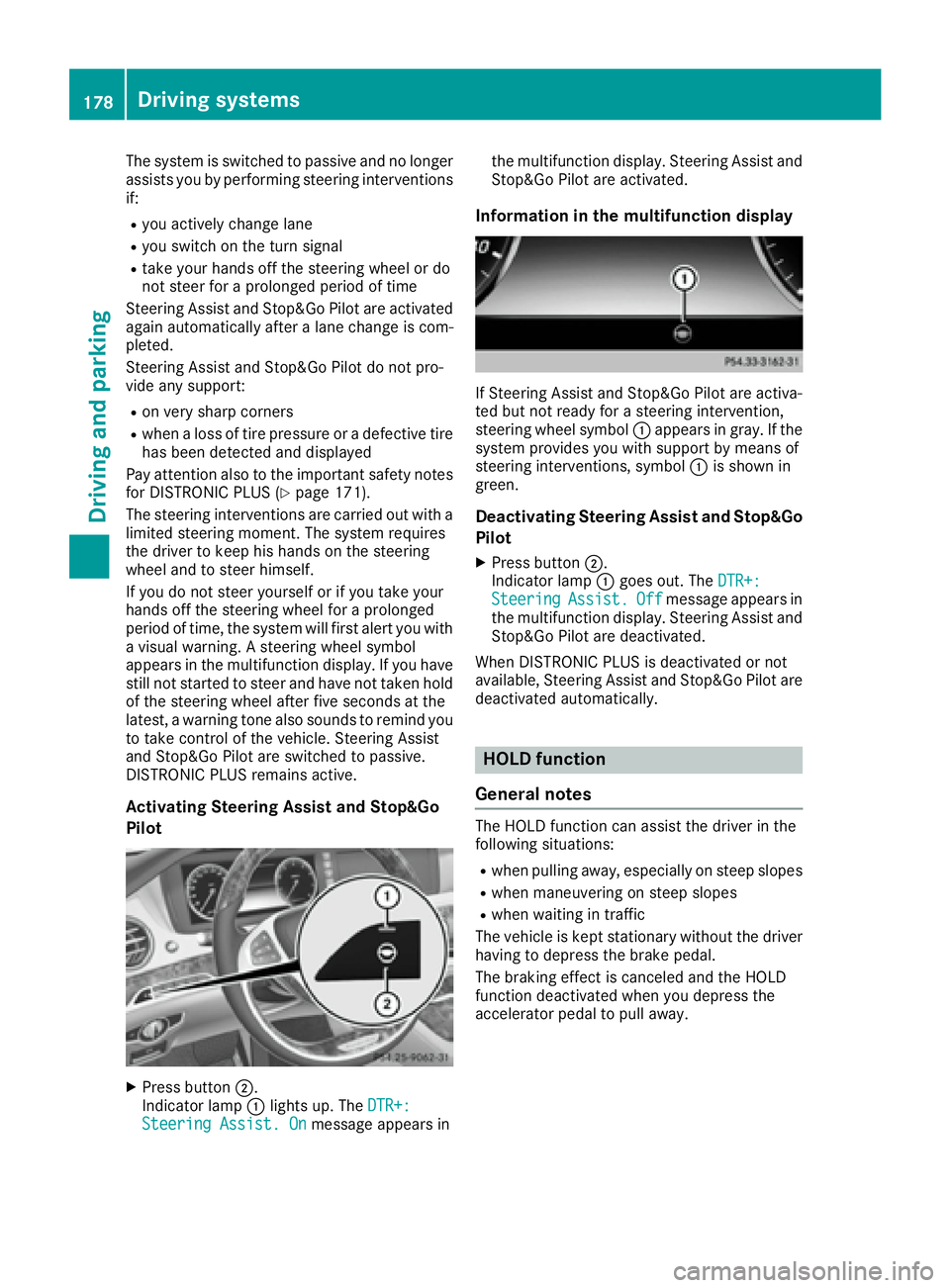
Information in the multifunction display
If Steering Assist and Stop&Go Pilot are activa-
ted but not ready for a steering intervention,
steering wheel symbol C appears in gray. If the
system provides you with support by means of
steering interventions, symbol C is shown in
green.
Deactivating Steering Assist and Stop&Go
Pilot X
Press button D .
Indicator lamp C goes out. The DTR+:
Steering Assist. Off message appears in
the multifunction display. Steering Assist and
Stop&Go Pilot are deactivated.
When DISTRONIC PLUS is deactivated or not
available, Steering Assist and Stop&Go Pilot are
deactivated automatically.
HOLD function
General notes The HOLD function can assist the driver in the
following situations: R
when pulling away, especially on steep slopes R
when maneuvering on steep slopes R
when waiting in traffic
The vehicle is kept stationary without the driver
having to depress the brake pedal.
The braking effect is canceled and the HOLD
function deactivated when you depress the
accelerator pedal to pull away.178
Driving systems
Driving and parking
Page 182 of 382
The electric parking brake secures the vehicle
automatically if the HOLD function is activated
when the vehicle is stationary and: R
a system malfunction occurs. R
the power supply is not sufficient.
If a malfunction in the electric parking brake
occurs, then the transmission may also be shif-
ted into position P automatically.
MAGIC BODY CONTROL
General notes MAGIC BODY CONTROL consists of Active Body
Control (ABC), ROAD SURFACE SCAN as well as
automatic vehicle stabilization in the event of a
crosswind.
Your vehicle automatically adjusts its ride height
to improve driving safety and reduce fuel con-
sumption. The suspension mode is adjusted
according to your selection (sports or comfort),
the road surface conditions and the vehicle load.
A multifunction camera detects bumps in the
road surface before the vehicle drives over
them. This reduces chassis movements.
Important safety notes
G WARNING
When the vehicle is being lowered, people
could become trapped if their limbs are
between the vehicle body and the wheels or
underneath the vehicle. There is a risk of
injury.
Make sure no one is underneath the vehicle or
in the immediate vicinity of the wheel arches
when the vehicle is being lowered.
! The vehicle is lowered when the engine is
switched off. When parking, position your
vehicle so that it does not make contact with
the curb as the vehicle is lowered. Your vehi-
cle could otherwise be damaged.
Crosswind Assist
The crosswind stabilization operates by chang-
ing wheel loads through adjusting the ABC
spring struts. It reduces impairments in handling
when driving in a straight line and assists during
countersteering. Crosswind Assist is active in the speed range
between 50 mph (80 km/ h) and
130 mph (210 km/h) when driving straight
ahead or cornering gently.
Active Body Control ABC Vehicle level Mercedes-AMG vehicles: depending on the
vehicle level that has been selected, the vehicle
automatically adjusts its height dependent on
the current speed. The vehicle is lowered by up
to 0.4 in (10 mm) below the normal level as the
speed increases. As the speed is reduced, the
vehicle is raised up to the set vehicle height.
All other models: depending on the vehicle
level that has been set, the vehicle automatically
adjusts its height dependent on the current
speed. The vehicle is lowered by up to 0.6 in
(15 mm) as the speed increases. As the speed is
reduced, the vehicle is raised up to the set vehi-
cle height.
Select the "Normal" setting for normal road con-
ditions and "Raised" for driving with snow chains
or in particularly poor road conditions.
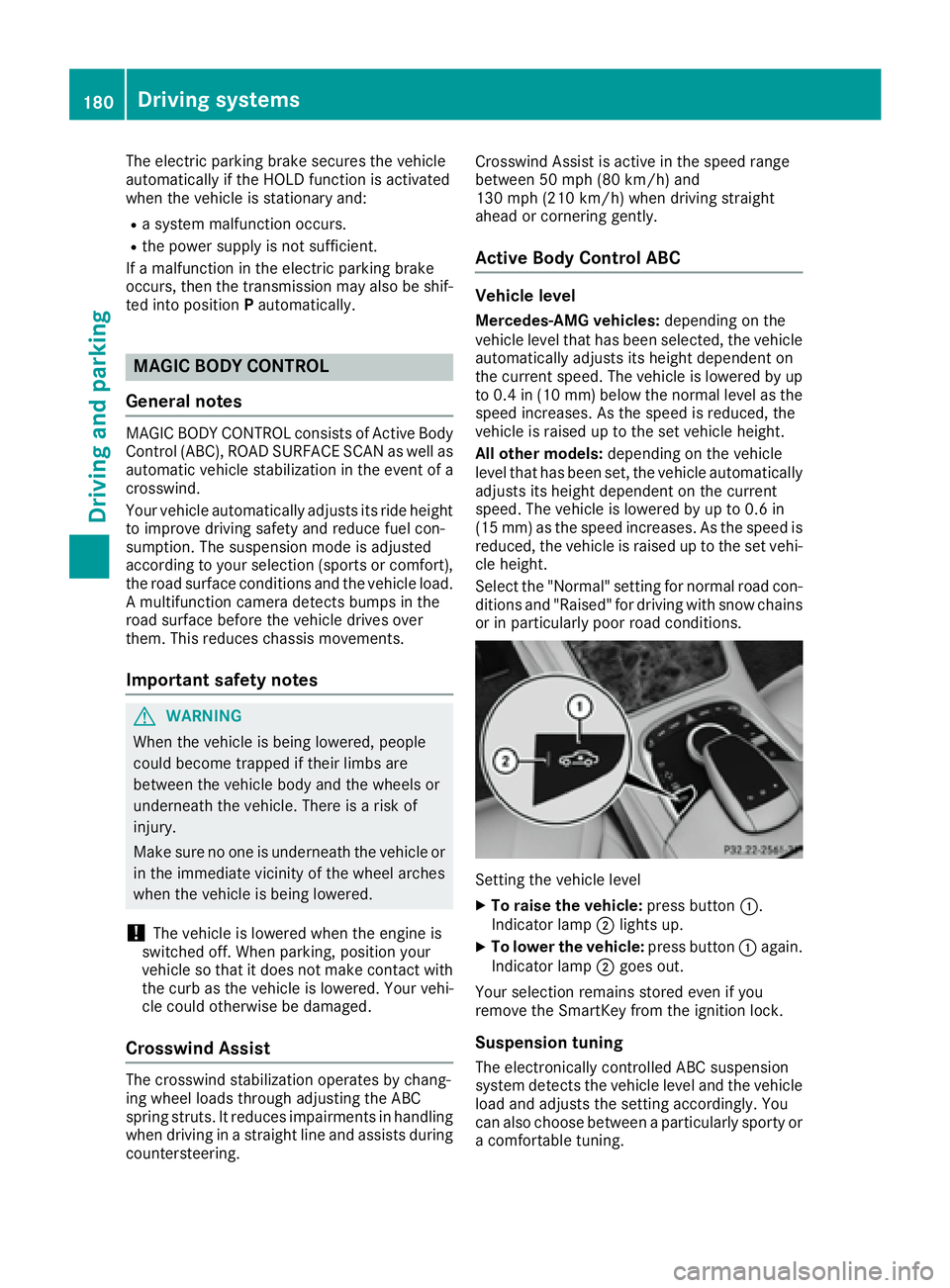
Setting the vehicle level X
To raise the vehicle: press button C .
Indicator lamp D lights up.X
To lower the vehicle: press button C again.
Indicator lamp D goes out.
Your selection remains stored even if you
remove the SmartKey from the ignition lock.
Suspension tuning
The electronically controlled ABC suspension
system detects the vehicle level and the vehicle
load and adjusts the setting accordingly. You
can also choose between a particularly sporty or
a comfortable tuning.180
Driving systems
Driving and parking
Page 183 of 382
The ABC suspension system is tuned individu-
ally to each wheel and depends on: R
your driving style, e.g. sporty R
the road surface condition, e.g. bumps R
your individual selection, i.e. sports or com-
fort R
the vehicle load R
the force of the side wind
Your selection remains stored even if you
remove the SmartKey from the ignition lock.
The firmer setting of the suspension tuning in
SPORT mode ensures even better contact with
the road. The steering response behavior is
sporty. Select this mode when employing a
sporty driving style on flat roads, e.g. on high-
ways.
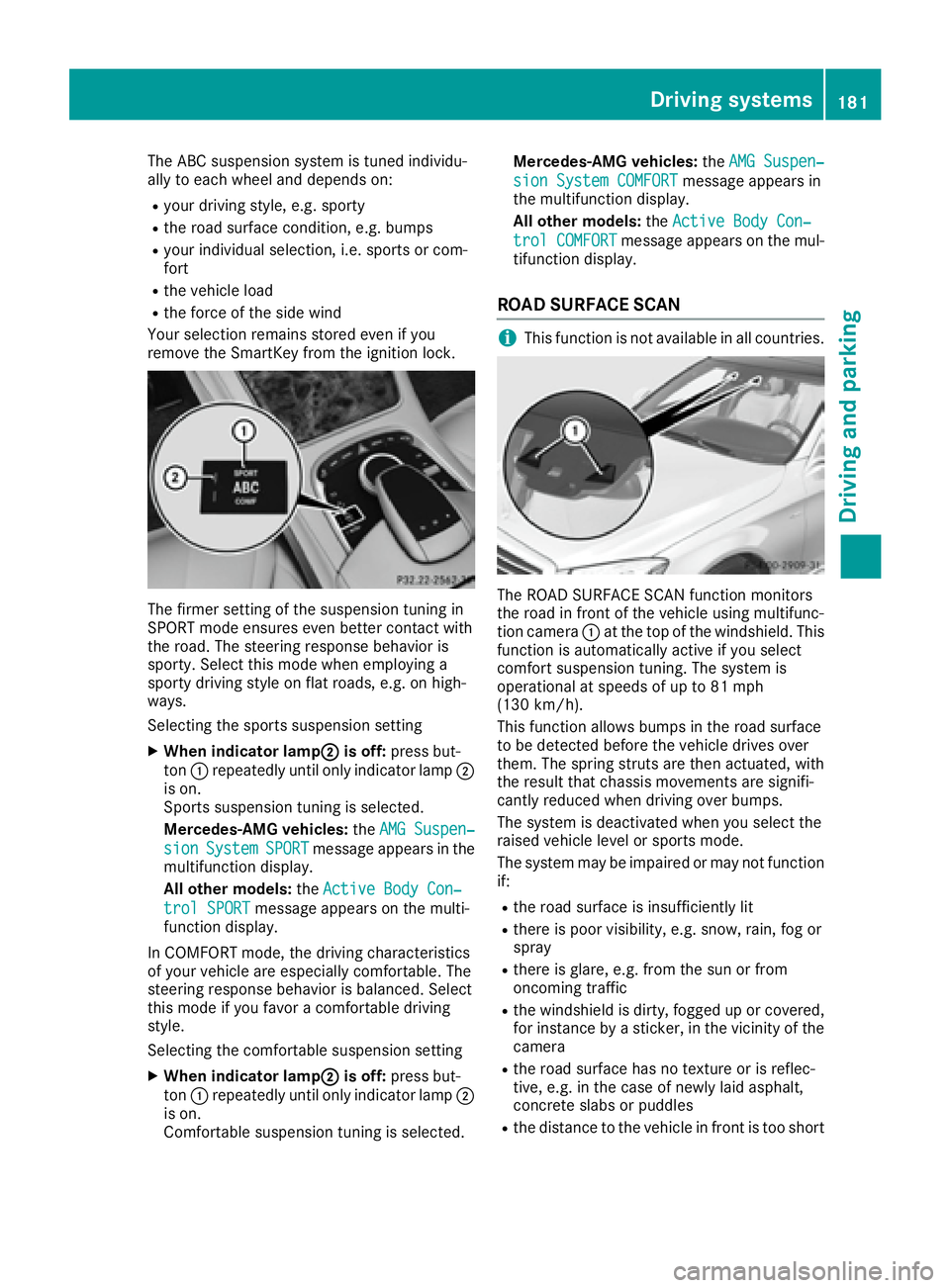
Selecting the sports suspension setting X
When indicator lamp D is off: press but-
ton C repeatedly until only indicator lamp D
is on.
Sports suspension tuning is selected.
Mercedes-AMG vehicles: the AMG Suspen‐
sion System SPORT message appears in the
multifunction display.
All other models: the Active Body Con‐
trol SPORT message appears on the multi-
function display.
In COMFORT mode, the driving characteristics
of your vehicle are especially comfortable. The
steering response behavior is balanced. Select
this mode if you favor a comfortable driving
style.
Selecting the comfortable suspension setting X
When indicator lamp D is off: press but-
ton C repeatedly until only indicator lamp D
is on.
Comfortable suspension tuning is selected. Mercedes-AMG vehicles: the AMG Suspen‐
sion System COMFORT message appears in
the multifunction display.
All other models: the Active Body Con‐
trol COMFORT message appears on the mul-
tifunction display.
ROAD SURFACE SCAN
i This function is not available in all countries.
The ROAD SURFACE SCAN function monitors
the road in front of the vehicle using multifunc-
tion camera C at the top of the windshield. This
function is automatically active if you select
comfort suspension tuning. The system is
operational at speeds of up to 81 mph
(130 km/h).
This function allows bumps in the road surface
to be detected before the vehicle drives over
them. The spring struts are then actuated, with
the result that chassis movements are signifi-
cantly reduced when driving over bumps.
The system is deactivated when you select the
raised vehicle level or sports mode.
The system may be impaired or may not function
if: R
the road surface is insufficiently lit R
there is poor visibility, e.g. snow, rain, fog or
spray R
there is glare, e.g. from the sun or from
oncoming traffic R
the windshield is dirty, fogged up or covered,
for instance by a sticker, in the vicinity of the
camera R
the road surface has no texture or is reflec-
tive, e.g. in the case of newly laid asphalt,
concrete slabs or puddles R
the distance to the vehicle in front is too shortDriving systems 181
Driving and parking Z
Page 188 of 382
Problems with PARKTRONIC Problem
Possible causes/consequences and P Solutions
Only the red segments in
the PARKTRONIC warn-
ing displays are lit. You
also hear a warning tone
for approximately two
seconds.
PARKTRONIC is then
deactivated and the indi-
cator lamp on the
PARKTRONIC button
lights up. PARKTRONIC has malfunctioned and has switched off. X
If problems persist, have PARKTRONIC checked at a qualified spe-
cialist workshop.
Only the red segments in
the PARKTRONIC warn-
ing displays are lit.
PARKTRONIC is then
deactivated. The PARKTRONIC sensors are dirty or there is interference. X
Clean the PARKTRONIC sensors ( Y
page 323).X
Switch the ignition back on.
The problem may be caused by an external source of radio or ultra-
sound waves. X
See if PARKTRONIC functions in a different location.
Active Parking Assist
General notes Active Parking Assist is an electronic parking aid
with ultrasound. It measures the road on both
sides of the vehicle. A parking symbol indicates
a suitable parking space. Active steering inter-
vention and brake application can assist you
during parking and when exiting a parking
space. You may also use PARKTRONIC
( Y
page 184).
Important safety notes Active Parking Assist is merely an aid. It is not a
replacement for your attention to your immedi-
ate surroundings. You are always responsible
for safe maneuvering, parking and exiting a
parking space. Make sure that no persons, ani-
mals or objects are in the maneuvering range.
When PARKTRONIC is switched off, Active Park-
ing Assist is also unavailable.
For vehicles with the trailer tow hitch folded out,
the minimum length for parking spaces is
slightly longer.
If you have attached a trailer to your vehicle, you
should not use Active Parking Assist. Once the
electrical connection is established between your vehicle and the trailer, Active Parking
Assist is no longer available. PARKTRONIC is
deactivated for the rear area.
G WARNING
While parking or pulling out of a parking
space, the vehicle swings out and can drive
onto areas of the oncoming lane. This could
result in a collision with another road user.
There is a risk of an accident.
Pay attention to other road users. Stop the
vehicle if necessary or cancel the Active Park-
ing Assist parking procedure.
! If unavoidable, you should drive over obsta-
cles such as curbs slowly and not at a sharp
angle. Otherwise, you may damage the
wheels or tires.
Active Parking Assist may possibly indicate
parking spaces which are not suitable for park-
ing, for example: R
where parking or stopping is prohibited R
in front of driveways or entrances and exits R
on unsuitable surfaces186
Driving systems
Driving and parking
Page 190 of 382
Active Parking Assist will only detect parking
spaces: R
parallel or at right angles to the direction of
travel R
that are parallel to the direction of travel and
at least 59 in (1.5 m) wid eR
that are parallel to the direction of travel and
at least 39.5 in (1.0 m) longer than your vehi-
cle R
that are at right angles to the direction of
travel and at least 39.5 in (1.0 m) wider than
your vehicle
i Note that Active Parking Assist cannot
measure the size of a parking space if it is at
right angles to the direction of travel. You will
need to judge whether your vehicle will fit into
the parking space.
When driving at speeds below 19 mph
(30 km/h), you will see the parking symbol as a
status indicator in the instrument cluster. When
a parking space has been detected, an arrow
towards the right or the left also appears. By
default, Active Parking Assist only displays park-
ing spaces on the front-passenger side. Parking
spaces on the driver's side are displayed as
soon as the turn signal on the driver's side is
activated. When parking on the driver's side,
this must remain switched on until you acknowl-
edge the use of Active Parking Assist by press-
ing the v button on the multifunction steer-
ing wheel. The system automatically determines
whether the parking space is parallel or at right
angles to the direction of travel.
A parking space is displayed while you are driv-
ing past it, and until you are approximately 50 ft
(15 m) away from it.
Parking
G WARNING
If you leave the vehicle when it is only being
braked by Active Parking Assist it could roll
away if: R
there is a malfunction in the system or in
the voltage supply. R
the electrical system in the engine com-
partment, the battery or the fuses have
been tampered with. R
the battery is disconnected. R
the accelerator pedal has been depressed,
e.g. by a vehicle occupant.
There is a risk of an accident.
Before leaving the vehicle, always secure it
against rolling away.
i When PARKTRONIC detects obstacles,
Active Parking Assist brakes automatically
during the parking process. You are respon-
sible for braking in good time. X
Stop the vehicle when the parking space sym-
bol shows the desired parking space in the
instrument cluster. X
Shift the transmission to position R .
The Start Park Assist? Yes: OK No: 8
message appears in the multifunction display. X
To cancel the procedure: press the 8
button on the multifunction steering wheel or
pull away.
or X
To park using Active Parking Assist: press
the v button on the multifunction steering
wheel.
The Park Assist Active Accelerate
and Brake Observe Surroundings mes-
sage appears in the multifunction display. X
Let go of the multifunction steering wheel. X
Back up the vehicle, being ready to brake at all
times. When backing up, drive at a speed
below approximately 6 mph (10 km/h). Oth-
erwise Active Parking Assist will be canceled.
Active Parking Assist brakes the vehicle to a
standstill when the vehicle approaches the
rear border of the parking space.
Maneuvering may be required in tight parking
spaces.
The Park Assist Active Select D Observe
Surroundings message appears in the multi-
function display. X
Shift the transmission to position D while the
vehicle is stationary.
Active Parking Assist immediately steers in
the other direction.188
Driving systems
Driving and parking
Page 191 of 382
The Park Assist Active Accelerate
and Brake Observe Surroundings mes-
sage appears in the multifunction display.
i You will achieve the best results by waiting
for the steering procedure to complete before
pulling away. X
Drive forwards and be ready to brake at all
times.
Active Parking Assist brakes the vehicle to a
standstill when the vehicle approaches the
rear border of the parking space.
The Park Assist Active Select R Observe
Surroundings message appears in the multi-
function display.
As soon as the parking procedure is complete,
the Park Assist Switched Off message
appears and a warning tone sounds. The vehicle
is now parked. The vehicle is kept stationary
without the driver having to depress the brake
pedal. The braking effect is canceled when you
depress the accelerator pedal.
Active Parking Assist no longer supports you
with steering interventions and brake applica-
tions. When Active Parking Assist is finished,
you must steer and brake again yourself.
PARKTRONIC is still available.
Parking tips: R
The way your vehicle is positioned in the park-
ing space after parking is dependent on vari-
ous factors. These include the position and
shape of the vehicles parked in front and
behind it and the conditions of the location. It
may be the case that Active Parking Assist
guides you too far into a parking space, or not
far enough into it. In some cases, it may also
lead you across or onto the curb. If necessary,
you should cancel the parking procedure with
Active Parking Assist. R
You can also select preselect transmission
position D . The vehicle redirects and does not
drive as far into the parking space. Should the
transmission change take place too early, the
parking procedure will be canceled. A sensi-
ble parking position can no longer be ach-
ieved from this position. Exiting a parking space In order that Active Parking Assist can support
you when exiting the parking space: R
the border of the parking space must be high
enough at the front and the rear. A curb is too
small, for example. R
the border of the parking space must not be
too wide. Your vehicle can be maneuvered
into a position at a maximum of 45° to the
starting position in the parking space. R
a maneuvering distance of at least 3.3 ft
(1.0 m) must be available.
Active Parking Assist can only assist you with
exiting a parking space if you have parked the
vehicle parallel to the direction of travel using
Active Parking Assist.
i If PARKTRONIC detects obstacles, Active
Parking Assist brakes automatically whilst the
vehicle exits the parking space. You are
responsible for braking in good time. X
Start the engine. X
Release the electric parking brake. X
Switch on the turn signal in the direction you
are pulling away. X
Shift the transmission to position D or R .
The Start Park Assist? Yes: OK No: 8
message appears in the multifunction display. X
To cancel the procedure: press the 8
button on the multifunction steering wheel or
pull away.
or X
To exit a parking space using Active Park-
ing Assist: press the v button on the mul-
tifunction steering wheel.
The Park Assist Active Accelerate
and Brake Observe Surroundings mes-
sage appears in the multifunction display. X
Let go of the multifunction steering wheel. X
Pull away, being ready to brake at all times. Do
not exceed a maximum speed of approx-
imately 6 mph (10 km/h) when exiting a park-
ing space. Otherwise Active Parking Assist
will be canceled. X
Shift the transmission to position D or R as
required or according to the message while
the vehicle is stationary.
Active Parking Assist immediately steers in
the other direction. The Park Assist
Active Accelerate and Brake ObserveDriving systems 189
Driving and parking Z
Page 192 of 382
Surroundings message appears in the mul-
tifunction display.
i You will achieve the best results by waiting
for the steering procedure to complete before
pulling away.
If you back up after activation, the steering
wheel is moved to the straight-ahead posi-
tion. X
Drive forwards and back up as prompted by
the PARKTRONIC warning displays, several
times if necessary.
Once you have exited the parking space com-
pletely, the steering wheel is moved to the
straight-ahead position. You hear a tone and the
Park Assist Switched Off message appears
in the multifunction display. You will then have
to steer and merge into traffic on your own.
PARKTRONIC is still available. You can take over
the steering before the vehicle has exited the
parking space completely. This is useful if you
recognize that it is already possible to pull out of
the parking space.
Canceling Active Parking Assist X
Stop the movement of the multifunction
steering wheel or steer yourself.
Active Parking Assist will be canceled at once.
The Park Assist Canceled message
appears in the multifunction display.
or X
Press the PARKTRONIC button ( Y
page 185).
PARKTRONIC is switched off and Active Park-
ing Assist is immediately canceled. The Park
Assist Canceled message appears in the
multifunction display.
Active Parking Assist is canceled automatically
if: R
the electric parking brake is engaged R
transmission position P is selectedR
parking using Active Parking Assist is no lon-
ger possible R
you are driving faster than 6 mph (10 km/h) R
a wheel spins, ESP ®
intervenes or fails. The